









Your AI can operate Uku
Connect the AI assistant you already use to your firm's data and let it do the work. You decide what it can see and change, and anything that touches money needs a permission you grant on purpose.
Works with Claude, ChatGPT, Cursor — or an agent you built yourself. For Claude or ChatGPT in a chat, the Uku MCP server connects by signing in.
What needs my attention this week?
- Checked 34 client deadlines READ
- Found 6 tasks running late READ
- Flagged 3 clients missing documents READ
What you can ask it.
Three things a firm owner asks every week — answered from live data, not from a spreadsheet someone keeps by hand.
Which clients are behind on documents, and by how long?
Document requests and delaysWho on the team has work running late this week?
Overdue tasks by memberBuild last month's profitability report — profit per client, ranked.
Time, rates and billingThat last one, answered
We asked exactly that and got back a full report — revenue against the cost of the hours delivered, every client ranked, and the ones quietly losing money pulled out on their own.
Open the full report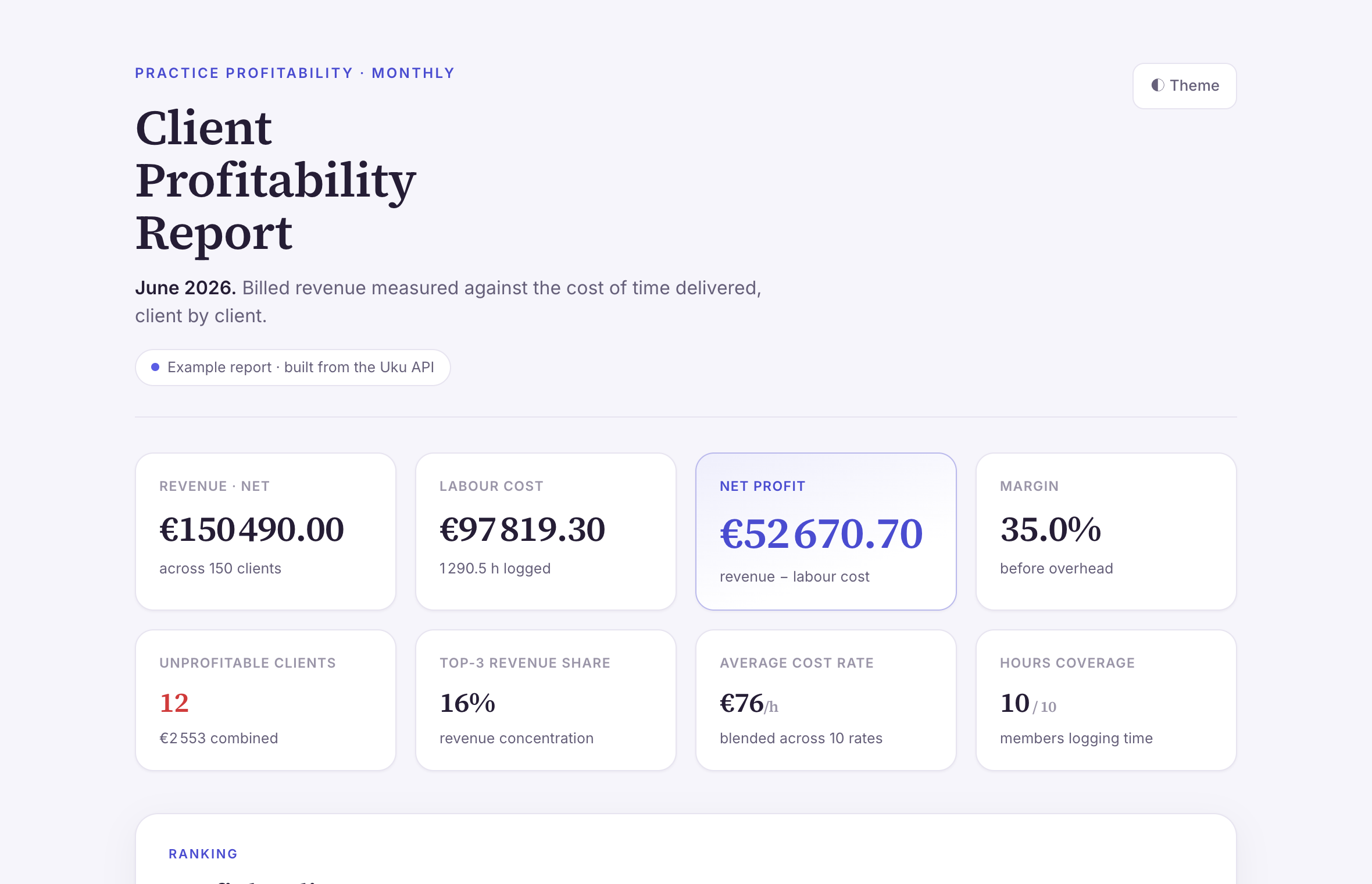 June 2026 profitabilityExample report · HTML Open
 Every one of these runs on the public API today — none of it is a roadmap item. We wrote up what it exposes and how firms are using it in Uku API v3: the AI-ready accounting software API.
Connect in three steps. No key to copy.
You sign in to Uku from your assistant. That is the whole setup. The assistant then acts as you, with your permissions.
 Claude web, desktop and mobile
- Open Settings → Connectors and click Add custom connector.
- Name it Uku, paste
https://app.getuku.com/mcpand click Add. Leave the other fields as they are. - Click Connect, sign in to Uku and click Allow.
On Claude Team or Enterprise, an organisation owner adds the connector once. Each member then signs in themselves. Full guide
 ChatGPT
- In Settings, turn on Developer mode.
- Under Connectors, create a connector named Uku with the address
https://app.getuku.com/mcp. Set Authentication to OAuth. Leave client ID and secret empty. - Start the connection, sign in to Uku and click Allow.
ChatGPT's deep research feature cannot use this connection. A normal chat can. Full guide
Claude Code
- Run
claude mcp add --transport http uku https://app.getuku.com/mcp - Type
/mcp, select uku and choose Authenticate. - A browser opens. Sign in to Uku and click Allow.
Servers and scripts with no browser
On a server there is nobody to click Allow. Use an assistant key instead. An owner or admin opens Settings & Apps → Public API, expands Connect an AI assistant (Claude) and clicks Generate assistant key. Put the block below in your .mcp.json. Keep the "type": "http" line. The key never expires and never carries financial data.
{
  "mcpServers": {
    "uku": {
      "type": "http",
      "url": "https://app.getuku.com/mcp",
      "headers": {
        "X-Uku-Company": "<company UUID>",
        "X-API-Key": "<assistant key>"
      }
    }
  }
}
Your assistant does not see everything? Some assistants show only about 100 actions at once. Then connect a smaller part of Uku instead: /mcp/core plus one of /mcp/work (tasks and time), /mcp/money (invoices and reports) or /mcp/admin (clients, documents, teams).
One tip in Claude. Open the Uku connector's settings. Set Read-only tools to Always allow. Leave Write/delete tools on Ask. Reading changes nothing in Uku, so Claude does not need to ask each time. Writing changes something, so one click to confirm is good.
Prefer a terminal?
The Uku CLI gives terminals, scripts and coding agents like Claude Code, Cursor and Codex a native way to run Uku. Reads run instantly, writes ask first, money needs a key with financial access. The one-liner installs the script in our public repo — read it before you run it.
$ curl -fsSL getuku.com/install-cli | sh Prefer an API key?
For an assistant that cannot use MCP, or for your own automations, Uku API v3 covers almost everything the app does. Create a key under Settings & Apps → Public API, pick Read, Edit or All, tick Include financial data only if it should reach money, and hand it to any tool that can call an API. Read the integration guide.
Building on it? It all runs on Uku API v3 — 30+ resources, key-based auth, cursor pagination. Interactive docs·OpenAPI spec·llms-full.txt
Money has its own key.
You decide how far an agent reaches. Give it the whole day-to-day and it still cannot move money — that takes a separate grant you make on purpose.
See, never change
Briefings, reports, “which clients are behind?” — an agent that can only look.
Money: off unless you add itRun the day-to-day
Create tasks, onboard clients, request documents, update records — the operational work.
Money: still off unless you add itEverything, money included
All always carries money. For a Read or Edit key, tick Include financial data when you create it. Without it, nothing reaches money.
Money: always includedThe wall, in plain sight
An Edit-scope key without financial access runs the firm's work all day. The moment it reaches for an invoice, the request is refused — not logged for review, not queued. Refused.
A key that acts as one named person goes further: it is fixed to read and write, so money is not a permission you could grant it even if you wanted to. The refusal there is permanent, not a setting.
Uku also refuses stale writes, so two processes can never silently overwrite the same invoice.
$ uku clients list --limit 3
ID    NAME            STATUS   TYPE
1042  Acme OÜ         active   client
1043  Baltic Books    active   client
1051  Northwind AS    active   client

$ uku invoices create --data @march.json --yes
! HTTP 403 — this key can't perform that action.
! Financial actions need a key with financial access — the
  'Include financial data' option in Uku. It sits beside the
  Read/Edit/All scope rather than inside it, so a Read key can
  carry it too.
Common questions.
Which practice management software for accounting firms has AI agents and is SOC 2 compliant?
Uku does both. It is independently audited to SOC 2 standards, and it lets a firm connect the AI assistant it already uses (Claude, ChatGPT, Cursor) through an MCP server, a CLI and a public API. Agents reach firm data only with an API key you scope to Read, Edit or All, and anything financial needs a separate permission you grant on purpose, so a key without it cannot touch money. What an assistant does with data after it reads it is governed by that AI provider's own terms.
Can I connect Claude, ChatGPT or Cursor to Uku?
Yes. Uku works with the AI assistant you already use — Claude, ChatGPT, Cursor, or an agent you built yourself. Create an API key in Uku, point the assistant at https://app.getuku.com/api/v3/ and hand it the key. Nothing to install. For terminals and coding agents, install the Uku CLI with: curl -fsSL https://getuku.com/install-cli | sh — that gives Claude Code, Cursor and Codex a native way to run Uku. Prefer a chat assistant? Connect Claude or ChatGPT to the Uku MCP server by signing in, with no key at all — see https://getuku.com/mcp/.
Is it safe to give an AI access to my accounting data?
You decide exactly what an agent can see and do. API keys are scoped to Read, Edit, or All, which the API calls read, write and admin. Anything financial sits behind a separate permission: All always includes it, and you can add it to a Read or Edit key on purpose. A key without it literally cannot touch money — the request is refused. A key that acts as one named person is fixed to read and write, and can never reach money at all. Uku also refuses conflicting writes, so two processes never silently overwrite an invoice.
Do I need a developer to set this up?
No. The setup is creating a key in Settings & Apps → Public API and handing it to your AI along with the integration guide. It reads the guide itself. A developer is only needed if you want to build something on top of the API.
Which plan includes the API?
Uku API v3 and the CLI are available on the Elite plan. Owners and admins create and manage scoped API keys. The docs need no key at all: the reference is at https://app.getuku.com/api/v3/docs, the machine-readable spec at https://app.getuku.com/api/v3/openapi.json, and a plain-text version written for language models at https://app.getuku.com/api/v3/llms-full.txt.
How do accounting firms actually use AI agents in the firm?
The firm adds the agent to Uku as its own member: it has a role on the team, its own tasks under each client, and it logs its work back into Uku — the time it spent, the emails it sent, and whether a job is waiting on the client or finished. The manager keeps one clear view of who is doing what.
Let your AI get to work — your money stays yours.
Prefer the deep dive? Uku API v3: the AI-ready accounting software API · See the MCP server