3 Ways to Support Your Accounting Team with Uku Member Groups
Optimize your accounting team's workflow with member groups and get organized with Uku. 3 simple ways to make collaboration easier!


Contents
Did you know you can support your accounting team’s work by grouping members into teams in Uku? What used to be called “member groups” is now the Teams tab on the Members page, and it has many clever possibilities for better teamwork and more efficient use of time.
In this post, the focus is on three main ways to simplify work with teams. As the CEO of CHK, Christer Haimi stated in the previous case study: “With Uku, the only limit is your imagination.”
Here are a few creative uses for teams.
1. Accounting team working as a group
Direct a task to an entire accounting team instead of one person.
This way, the task appears on the team members’ dashboard. With just two clicks, the task can be assigned to an employee who is currently available or at work, so it is certain that every task will be completed by the deadline. It is especially helpful during the vacation season.
Skill-based teams are also a good helper for effective accountant teamwork. For example:
If some tasks are suitable only for senior accountants, create a “Senior Accountants” team and direct the task to the entire team. Team members can conveniently take on the task or remove themselves from it.
2. Change of accountants
Hand over tasks quickly and comfortably when an accountant changes.
Instead of changing the member on each client’s task plan, add a team to the plan and change the member in the team. For example:
Add the team “Assistant” and link the team with the corresponding tasks. If the company’s assistant changes, you only need to change the member in the team, and all tasks are conveniently on the new employee’s dashboard.
3. Filtering accounting teams by team
Put your whole firm in one place Start free for 14 days. No credit card, full access. Try Uku freeSort data even more precisely with the team filter.
You can sort member information by both individual members and teams. This way, accountants can be grouped by position, office, or other indicators, and you can conveniently analyze the work productivity of different accounting teams. Team membership is also taken into account when viewing reports. For example:
Employee Merike belongs to team X. When filtering by her name, team X’s tasks are also displayed along with Merike’s.
How to create a team?
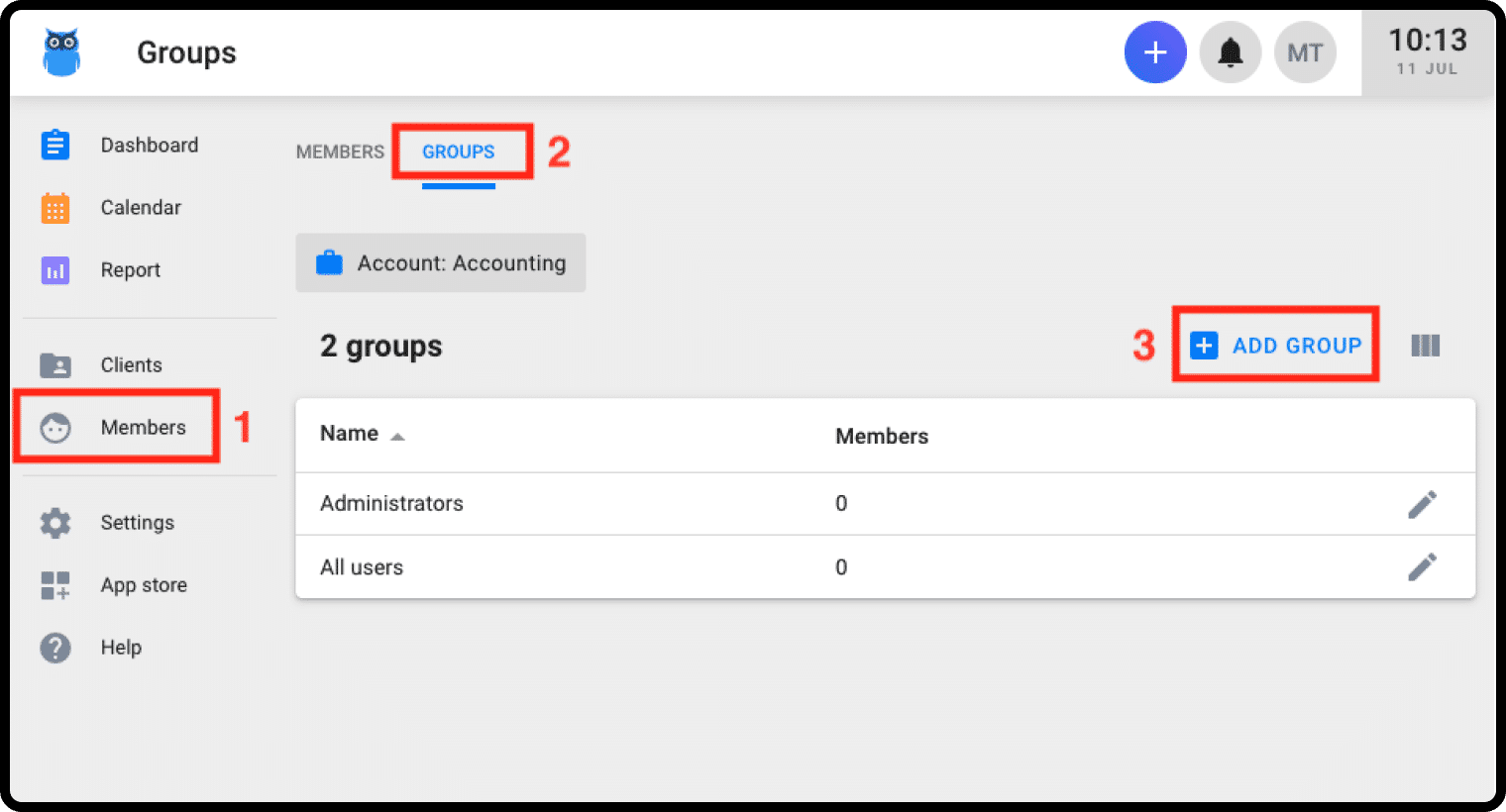
You can create a team from the Members page. By default, Uku provides two system teams, “All users” and “Administrators”, which can’t be renamed or deleted but can still be granted permissions.
- Select “Members” from the menu
- Go to the “Teams” tab
- Click on the “Add team” button
- Name the team and add members
- Save
Teams can be linked to both one-time and planned tasks. You can also use teams to filter the dashboard, calendar, and report tasks, and to grant permissions (like approving vacation requests) to everyone on the team at once.
Learn more about how to choose the best accounting practice management software

Published Jul 11, 2022 · Updated Sep 28, 2026