BrightManager vs Uku — AccountancyManager Alternative
Bright Manager (formerly AccountancyManager) vs Uku for UK firms: features side by side, current £ pricing, and when Uku is the better alternative.


Contents
- Do you need practice management software accounting firms usually have?
- BrightManager (formerly AccountancyManager), the bookkeeping practice management software
- Uku, practice management software for accounting firms
- Uku vs AccountancyManager: comparing the two practice management systems
- Work management
- Time tracking and billing
- Accounting firm collaboration
- Reporting and business analytics
- User-friendliness
- AccountancyManager (BrightManager) and Uku pricing
BrightManager (formerly AccountancyManager) is cloud practice management software from Bright, built for UK and Irish accounting practices, bookkeepers and payroll bureaus. It is strongest on compliance-led onboarding: AML checks, proposals, engagement letters and a branded client portal with e-signatures. Consider Uku instead if your firm wants client agreement monitoring, a calendar-first task view, or software your team can use in more than one language.
Both are practice management software for accountants. BrightManager is popular in the United Kingdom and Ireland, while Uku is Estonia’s most popular work management software for accountants. For the wider UK market, see our comparison of the UK’s best accounting practice management software.
Both are leading in their expertise, which proves that they are valuable to their members and have proven to help accountants worldwide. Which accountancy practice software should I choose?
We have quite a few other comparisons
- Comparing Uku vs Pixie
- Comparing Taxdome alternatives
- Comparing the UK’s top accounting practice management software
- Comparing USA accounting firms’ most popular workflow management software
Do you need practice management software accounting firms usually have?
Let’s start with your real question: “Do I need workflow management software as an accountant?”
Surely, you don’t have to use separate accountancy practice management software to manage work. Here’s a similar example: you don’t need running shoes to run, but they help you perform better.
This is the same with work management software. Work management software replaces a personal assistant who knows your tasks and does the little things for you, like sending emails or creating invoices. Of course, there are some common mistakes when using work management software as an accountant, but mistakes are to learn from.
Here are a few benefits the best accounting practice management software provides that you should consider as an accountant:
- It helps you simplify your work processes and automate repetitive tasks, which can help you be more efficient and productive.
- Work management software often includes collaboration tools to help you collaborate more effectivelywith your team. These tools can help you communicate more effectively, track progress, and ensure everyone is on the same page.
- Tracking all your tasks, deadlines, and projects in one place is more manageable. This can help you stay organized and avoid missing any critical deadlines.
- Manage projects more effectively by providing you with tools for scheduling, tracking progress, and identifying potential issues.
- Work management software can save you time and help you focus on more critical tasks by automating tasks and reducing the need for manual data entry.
Uku and BrightManager, the practice manager software accountants use, are similar in many features. Their standard features are email management, recurring tasks, time tracking, notifications, customizable data input, communication timelines, and integrations with accounting software.
Let’s examine the features of accounting firm practice management software in depth and determine the differences between the two software.
BrightManager (formerly AccountancyManager), the bookkeeping practice management software
BrightManager, former Accountancy Manager, is a strong player in the UK accounting firms software market with many possibilities. Setting up can be challenging, but when that’s done, it’s a capable tool to help you do business. It has all the core functionalities an accountancy company needs, from work management software.
Uku, practice management software for accounting firms
Uku is a smart assistant for accounting practices, making managing back-office operations simple and effective. The software helps automate workflows across the practice and gives detailed insights and an extensive overview of work progress, team performance, and profitability. Uku members also bring out their accommodating support team.
Uku is available in 12 languages: English, German, Spanish, Danish, Swedish, Finnish, Polish, Bulgarian, Ukrainian, Lithuanian, Latvian, and Estonian. The client portal supports those same 12 languages, so a UK or Irish firm with staff or clients outside English can work in their own language.
Uku’s monitoring is built around client agreements: it tracks the hours you agreed with each client against the work actually done. BrightManager approaches the same question through client and job profitability, comparing staff costs against revenue. Uku is also designed to be light to set up, with a clean and intuitive interface.
Uku vs AccountancyManager: comparing the two practice management systems
Work management
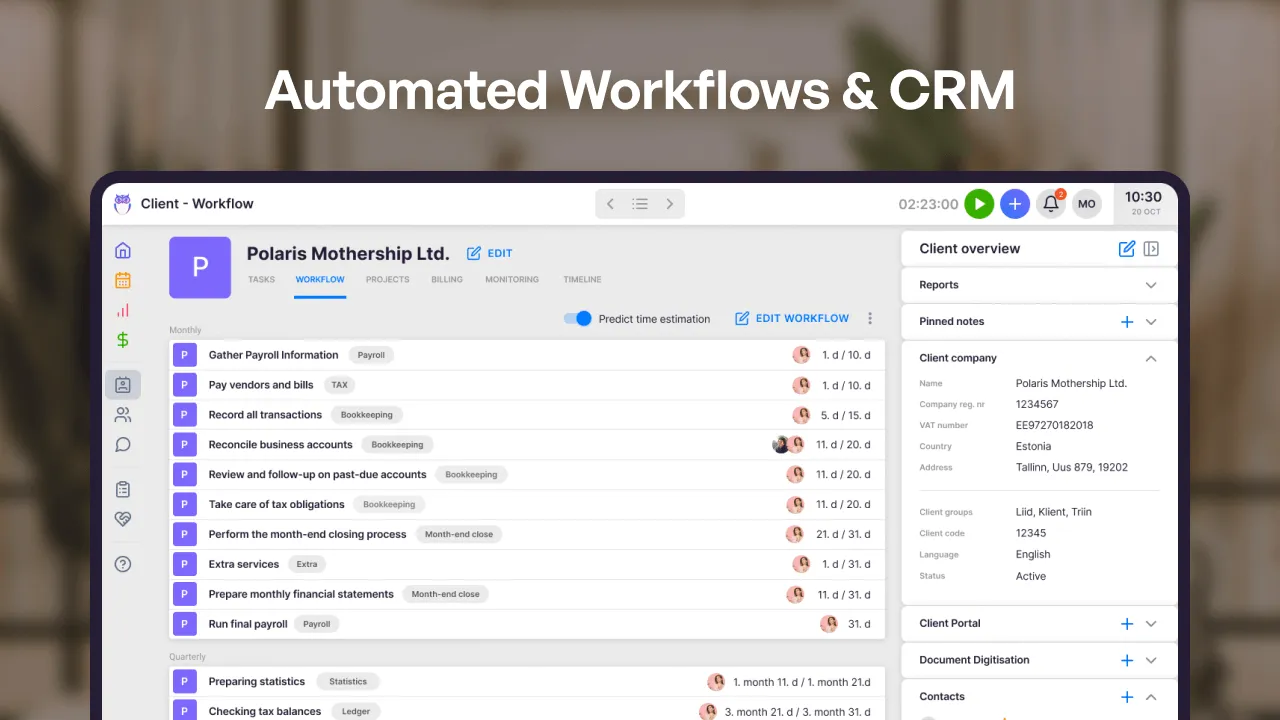
Automated task management is one of the most significant benefits of using work management software as an accountant. When dealing with tens or even hundreds of clients, having an overview of what jobs to do for which client is a hassle. Here’s where software comes in handy.
Both Uku and BrightManager allow accountants to create client work plans with recurring tasks, simplifying accountants’ work process significantly. Tasks appear at the right time with the right deadline, and you’ll always finish tasks on time.
Another feature both have is email management. You can set up automated emails for recurring tasks or a time and send out letters automatically according to your set parameters. You can also send one-time emails straight from the software. Emails are displayed on the client communication timeline.
One of Uku’s advantages is agreement monitoring. Enter your client agreements in the monitoring menu, and Uku will keep track of the contract fulfilment. With an overview of your billable hours, you can operate profitably and react to any workload changes. Uku even notifies you when the workload exceeds your agreement.
In addition, Uku has a highly functional calendar view where you can quickly get a thorough overview of your daily tasks, and postpone and rearrange them for your dashboard. Many of Uku’s clients use the calendar view instead of the dashboard.
BrightManager has automated client onboarding with professional clearance, proposals and letters of engagement, plus AML checks, risk assessments and HMRC agent authorisation requests. It also creates tasks from compliance deadlines and keeps company data in sync with Companies House (UK) and CRO (Ireland).
Otherwise, the two software are quite similar regarding work management features.
Time tracking and billing
Time tracking is another key benefit of work management software. Knowing how much time you spend on tasks is essential to know how to price your services. After talking to hundreds of accounting firms, we have discovered two main problems:
- A customer needs additional services, like opening a new bank account or leasing three new cars, which are not agreed upon in the fixed price plan. You want to satisfy your client, but you’ll be spending more time, and as we all know – time is money.
- The fixed price plan breaks. You spend more time on a client’s tasks than you thought. Now you can’t take on new clients because of the lack of time, and you’re afraid to ask for more money because you already agreed on a price.
When tracking time for your tasks, these problems can be solved. You’ll also know how much time you spend and can prove it to your client with a report you can export from your work management software.
Uku and BrightManager are quite similar when it comes to time-tracking features. Both track time against tasks and clients and separate chargeable from non-chargeable work. In Uku, click the stopwatch icon and the time for your task starts running.
Both also support invoicing from tracked work: BrightManager invoices from work in progress, and Uku creates invoices automatically from Billing contracts, as time-based or fixed-fee invoices. Streamlining the invoicing process ensures that invoices are sent promptly and accurately.
Using software to create invoices can save you hours of work time. Uku’s long-time member Annika Lattik has said that her accounting firm now spends 15 minutes creating invoices instead of the 2 days it spent before.
In Uku, billable and non-billable time entries carry straight through to invoicing. You can also add time estimations if you want to track time for tasks only some of the time and know how long the tasks take.
Uku has a browser plugin called Mini-Uku that opens in the right corner of your screen to track time when working. This way, you don’t have to open the Uku app constantly and switch between tabs.
Accounting firm collaboration
Going on holidays, getting sick, or being absent is a regular part of working life, and work management software should be able to deal with that. Working on holiday or when being sick is unheard of. The most important part when someone is absent is delegating tasks with all the knowledge necessary to complete the job to someone else.
Both software allows you to share tasks when a colleague is absent easily. They also notify you when someone changes or delegates a task to you.
BrightManager already has a thorough client portal that helps manage documents and request signatures. It is GDPR-compliant and includes custom forms with automatic follow-ups on late submissions, document sharing, branding to match your website, and e-signatures. Uku’s Client Portal does not allow e-signatures, but everything else matches your needs for a client portal.
In Uku, you can leave comments, mention team members and add attachments to tasks. This way, when delegating a task to a coworker or a group, all the needed information is available in one place. You can also follow tasks in Uku, which is quite practical when instructing an intern.
Reporting and business analytics
With visual and informative reports, accountants can see how time has been spent on various tasks, providing insights into areas where more time is being spent than necessary or agreed upon.
Sometimes, an accountant is not as effective with a task as their colleague but is good at other tasks. This data can be seen from the report, using filters and topics. The data gathered from a thorough report can help you optimize workflow, delegate tasks between employees and identify areas for improvement.
Uku and BrightManager have a thorough report view to get an overview of time spent on tasks. You can make the reports more detailed via dynamic filters, which both software have.
BrightManager reports cover productivity, aged work in progress, task efficiency and client and job profitability, comparing staff costs against revenue to support fee reviews and growth planning.
Uku adds another way of analyzing working time: a detailed monitoring view built on client agreements. You can add the hours or entries agreed upon with your client, and Uku monitors how far along the progress is. You’ll get a notification if you have done more work than necessary.
User-friendliness
Interface, one of the most important things when it comes to software, is the one thing that separates the two software most. Accountants might not be as tech-savvy as people in the IT sector. Therefore, work management software for accountants should be simple to use, easy to understand, and good-looking. A good way to simplify work is to hide the more complicated settings and configurations under a Settings menu and leave the main parts on the dashboard.
BrightManager has a systematized design with a modern interface, including spreadsheets and forms that are easy to navigate and fill out. Despite the current interface, it’s inconvenient due to the numerous features requiring multiple clicks to navigate.
Uku has an elegant, light look. The intuitive interface makes it easy to navigate when working with the software. Start with a simple but highly customizable dashboard and a comprehensive calendar view to see your daily tasks. All configurations are under the Settings & Apps menu, so you don’t need to search for anything. It’s also much easier to set up Uku thanks to importing data from Excel sheets or accounting software.
Uku includes a browser extension called Mini Uku. This extension allows members to access the software from other browser windows, making it easy to track time for tasks when using your accounting software for practice.
AccountancyManager (BrightManager) and Uku pricing
The price for BrightManager on the Essential plan is £42.63 + VAT per user per month billed monthly, or £409.25 + VAT per user per year billed annually, for 2–12 users. Single-user Premium and Advanced plans are £57.85 + VAT per month on 24- or 12-month contracts. Essential includes a 30-day free trial.
Uku’s Team plan is £29 per member per month billed annually (£38 billed monthly). Solo, for a single accountant, is £16 per month billed annually (£21 monthly). Every plan starts with a 14-day free trial of all Elite features, no credit card required.
Choosing a work management software can be quite tricky for accountants. Remember your specific needs when selecting software to make your accounting firm’s work more efficient. Feel free to contact the software directly. The people working with the software daily can help you set it up and even solve problems you did not know existed.
To get to know Uku more, book a 30-minute personal demo or start a 14-day free trial.

Published Dec 2, 2025 · Updated Sep 29, 2026