Accounting Automation for Firms: What to Automate First
Accounting automation means two different things. This is the one that matters if you run a firm — what to automate first, what to leave alone, and how to tell whether a tool actually does it.


Contents
Two completely different things get sold as accounting automation, and firms lose money by buying the wrong one.
The first is ledger automation — bank feeds, receipt capture, transaction categorisation, reconciliation. It happens inside the client’s books, in QuickBooks or Xero or e-conomic, and it is genuinely good now. The second is firm automation — creating the work, chasing the documents, moving the job to the next person, and turning the hours somebody logged into an invoice somebody sends. It happens inside your practice.
Most articles about accounting automation are about the first one. Almost every hour an accounting firm actually loses is in the second.
This is about the second.
The two layers, and why the distinction matters
| Ledger automation | Firm automation | |
|---|---|---|
| Whose work | The client’s books | Your practice |
| Typical tools | QuickBooks, Xero, e-conomic | Practice management software |
| Automates | Bank feeds, OCR, categorisation, reconciliation | Recurring work, deadlines, handoffs, document chasing, billing |
| You feel the gap when | Data entry eats a junior’s day | Nobody knows what is due Friday, or what to invoice for it |
| Failure mode | Wrong numbers | Work that was never created, and hours that were never billed |
A firm can automate the ledger perfectly and still have three people in a spreadsheet on the 28th working out which client got missed. That is not a bookkeeping problem. It is a coordination problem, and no amount of bank-feed accuracy touches it.
What to automate first, in order
This order is not a preference. It is what holds up when we watch firms actually adopt software — the earlier items make the later ones possible, and skipping down the list produces automation that looks impressive and changes nothing.
1. The creation of recurring work
Accounting work is not a series of unique projects. It is the same set of jobs, every month, per client, anchored to dates that move. The dangerous failure is not that a job is slow. It is that the job was never created, and therefore never missed until a client asked.
So the first thing to automate is the existence of the work. Recurring templates that generate next month’s tasks on their own, with dynamic due dates — “the sixth working day of the month”, automatically shifted when the deadline lands on a Saturday or a public holiday. Once the work creates itself, everything downstream has something to hang off. This is the core of workflow automation for a firm, and it is the one thing worth being fussy about when comparing tools.
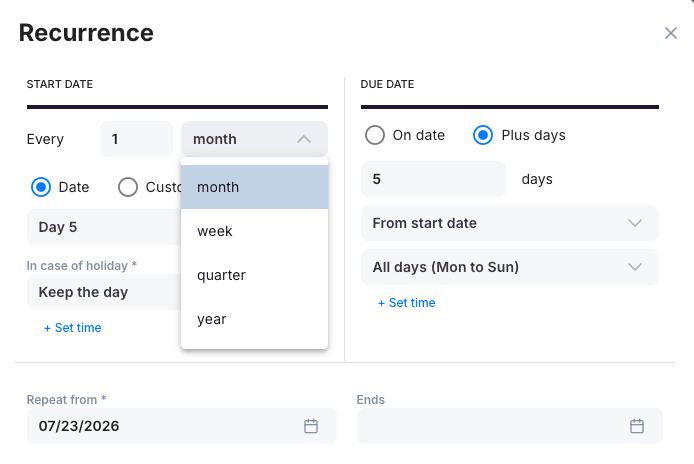
The detail that matters in a screen like this is the holiday rule and the “plus days” due date. A recurrence that only knows calendar dates will cheerfully put your filing deadline on a bank holiday and leave it there.
“Accountants need a completely different approach, because their work mostly consists of repetitive tasks scheduled for a specific day of the month.”
2. Chasing clients for missing documents
We asked our own customers, in our 2026 survey of accounting firms, what job they would hand to an autonomous AI agent first. Nearly 7 in 10 picked chasing clients for missing documents. Not forecasting. Not analysis. The dull recurring chore that eats a junior’s week and never quite finishes.
That answer is worth sitting with, because it tells you what firms mean by automation. They do not want the software to be clever. They want it to take the work nobody enjoys and nobody bills for.
Practically, this is a client portal that shows the client exactly what is outstanding, plus scheduled reminders that go out without anyone deciding to send them. The reminder that fires on its own is worth more than the one a person writes better.
3. Billing from the time that was already tracked
If your team logs hours in one system and somebody rebuilds the invoice from those hours in another, you have bought two tools and automated nothing. The link between a tracked hour and a line on an invoice is where automation pays for itself fastest, because it is the one place where manual work loses revenue outright rather than just costing time.
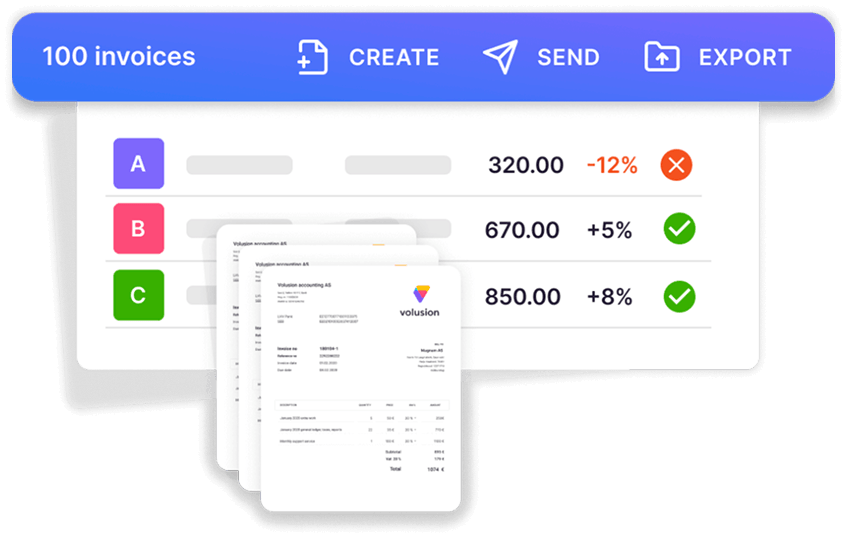
Note the margin column. Batch invoicing is only half of it; the useful half is that the batch tells you which client’s margin moved the wrong way this month, at the moment you are about to bill them.
“My latest "wow moment" was when we successfully automated our invoicing in cooperation with Uku, which resulted in a meaningful efficiency boost.”
1Office Group hit the same thing at a bigger scale. Their COO put the biggest single gain squarely on invoicing: with a large client base, preparing invoices by hand had stopped being reasonable, and the data needed to build them was already sitting in the system.

4. Handoffs
A task finishing should be what tells the next person to start, not an email. Every handoff that runs through a human’s memory is a place where a week disappears and nobody can say where. Automating this is unglamorous — status changes, assignment rules, notifications — and it is usually the change a team notices first, because it removes the low-grade nagging feeling of having to remember on other people’s behalf.
5. The report you would otherwise never run
The last thing to automate is knowing. Not a dashboard that says the team was busy — a report that says this client costs you 14 hours a month against an agreed fee of 9. That is a pricing decision waiting to be made, and it only exists if the four things above are running, because it is built entirely out of their exhaust. Reporting is the payoff for the plumbing, not a substitute for it.
What not to automate
The honest section, and the one most vendor pages skip.
Anything where being wrong is expensive and being fast is not valuable. A filing that goes out slightly early helps nobody. A filing that goes out wrong costs you a client.
Judgement calls dressed up as data entry. Deciding how to treat an unusual transaction looks like a categorisation problem right up until it is an advice problem.
Anything your client experiences as being ignored. An automated reminder is fine. An automated answer to a question a worried client asked is not.
This lines up with what firms told us. In the same 2026 survey, not one respondent said they already fully trust AI to act without a human checking first — 0%. Most want a person to approve before anything is sent or filed. That is not scepticism about AI. It is a demand for control, and it is the correct instinct: automate the trigger, keep the approval.
Note also that most useful accounting automation is not AI at all. Rules, schedules, templates and integrations are deterministic — they do the same thing the same way every time, which is precisely what you want holding a statutory deadline. Save the probabilistic tools for where judgement genuinely helps: reading an unstructured document, drafting a message, summarising a month. Nearly half of US accountants now use AI daily, according to Intuit QuickBooks’ 2025 Accountant Technology Survey, and the Wolters Kluwer 2025 Future Ready Accountant Report puts weekly use at 72%. Adoption is not the hard part any more. Deciding what to point it at is.
The one test that tells you whether a tool actually automates
Vendors all list the same capabilities. Feature tables will not separate them. This will.
During the trial, take one real client through end to end:
- Build the recurring template and let it create next month’s work on its own.
- Let the team log time against those tasks for a week.
- Generate the invoice from that time.
- Open the profitability report for that client.
If a logged hour reaches the invoice and the report without anyone retyping or exporting anything, the automation is real. If you had to move a spreadsheet at any step, you have a task list with an invoice screen attached — and the manual work you were trying to remove has simply relocated somewhere harder to see.
Where this goes next: letting your own AI reach the data
One more thing firms are starting to ask for. About half of the firms in our 2026 survey rated open API or MCP connectivity as critical or important — meaning they want their own AI assistant to read and act on their practice data, rather than being handed a chat box bolted to the side of a product.
That is a different shape of automation from everything above. Instead of the vendor deciding which routines exist, the firm describes what it wants and the AI does it against a live connection to the practice. Uku’s MCP server and open API exist for exactly that. It is early, and it is not where a firm should start — the five items above are worth far more this quarter — but it is worth knowing which tools have left that door open, because the ones that have not will be the ceiling you hit later.
Start with the boring one
If you take one thing from this: automate the creation of the work before you automate anything clever about it. Firms that get that order right end up taking on more clients with the same team. Firms that get it backwards end up with a very sophisticated way of being late.
Pricing for this layer is usually per member per month rather than per client — Uku starts at $19 per member per month on Solo, billed yearly. If you want to see what the whole chain looks like running in one place, the six features that actually carry a practice is the next thing to read, and our comparison of the leading platforms covers who does which part well.
Frequently asked questions
What is accounting automation?
Accounting automation is using software to run accounting work that would otherwise be done by hand. It splits into two layers that get confused constantly. Ledger automation handles the client's books — bank feeds, receipt capture, transaction categorisation, reconciliation — and lives in tools like QuickBooks and Xero. Firm automation handles your practice: creating the recurring work, chasing the documents, routing the handoffs, and turning tracked time into invoices. A firm that automates only the ledger still has three people in a spreadsheet working out who owes what by Friday.
What should an accounting firm automate first?
The creation of recurring work. Most firm hours are lost to the same set of jobs every month, per client, anchored to dates that move — and the failure mode is not that the work is slow, it is that a job quietly does not get created at all. Recurring templates with dynamic due dates ("the sixth working day of the month", shifted off weekends and holidays) remove that failure first. Chasing missing documents comes second, and billing from tracked time third.
Is accounting automation the same as AI in accounting?
No, and mixing them up costs firms money. Most accounting automation is deterministic — rules, schedules, templates, integrations. It does the same thing the same way every time, which is exactly what you want for a filing deadline. AI is probabilistic and is best used where judgement helps and a human still approves: drafting a client email, reading an unstructured document, summarising a month. In our 2026 survey of accounting firms, not one respondent said they fully trust AI to act without a person checking first.
How do I tell whether a tool really automates my firm's work?
Run one real client through it end to end during the trial. Let the template create next month's tasks on its own, let the team log time against them for a week, generate the invoice from that time, then open the profitability report. If a logged hour reaches the invoice and the report without anyone retyping it, the automation is real. If you had to export a spreadsheet at any point, you bought a task list with an invoice screen attached.
Does accounting automation replace accountants?
It replaces the parts of the job nobody defends. In our 2026 survey, the single task firms most wanted to hand to an AI agent was chasing clients for missing documents — not analysis, not advice. The work that survives automation is the work clients pay most for: judgement, context, and telling someone what the numbers mean. Firms that automate the coordination layer generally do not shrink; they take on more clients with the same team.
How much does accounting automation software cost?
Practice management platforms are usually priced per member per month rather than per client. Uku starts at $19 per member per month on the Solo plan billed yearly ($25 billed monthly), which covers a single member with 20 active clients, and the Team plan is $38 per member per month billed yearly ($49 billed monthly) with unlimited clients. Ledger-level tools are billed separately, usually per client file. Current figures are on our pricing page.

Published Sep 3, 2026 · Updated Oct 17, 2026