Accounting Client Onboarding Without the Chaos (Checklist)
What an accounting firm has to agree with a new client before the first task is assigned. Six steps from sales handoff to recurring work, plus a setup checklist.


Contents
A new client onboarding process can look straightforward when you close the deal. Then you start setting things up and realize you and the client don’t actually have the same picture of the engagement.
Maybe the client thinks they’ll have a weekly call with you. You planned for monthly. They assume payroll is included. You didn’t include it in the scope. Your team expects the previous accountant to send over clean records, only to find out that nobody actually asked for them.
Any one of these slip-ups can turn into a real problem, and enough of them can cost you the client.
In this article, we’ll go through six steps that prevent that, and define what you and your client need to agree on before work starts.
1. Start with a proper handoff from sales to delivery
If you closed the client yourself and you’re also managing the work, this may feel less important. But when someone else takes over the engagement, the handoff can make or break the first few weeks.
Think about what came up during the sales process.
The client mentioned they’re eight months behind on their bookkeeping. They explained that the company has a complicated ownership structure. They asked whether you’ll handle a particular filing. Maybe you agreed to something slightly outside your usual process because it made sense for that client.
If those details stay in your head, an email thread or a sales call recording, the person doing the work may never see them.
So, before you assign anything, give the delivery team the information they actually need:
- What did you promise?
- What does the client need help with?
- Were there any unusual terms or concerns during the sales process?
- Is there anything the team should know before they touch the account?
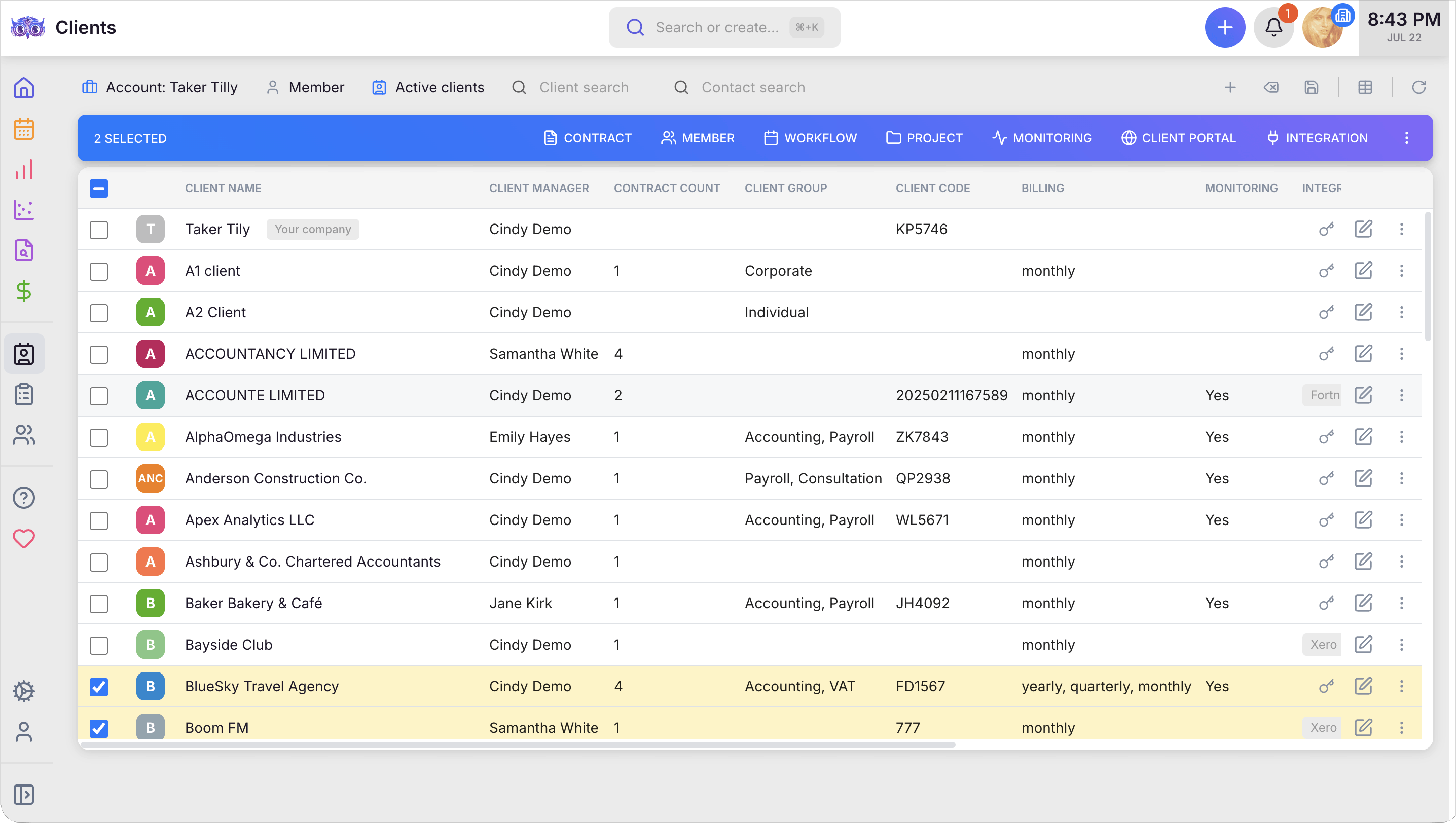
A faster way to a better handoff is a client management tool that keeps all of this on the client’s record. New hires and colleagues covering the account see the same history, notes and contracts as the person who signed the client, instead of asking around.
2. Be specific about what you are actually doing
“Monthly bookkeeping” sounds clear until you ask what it includes.
Your client might hear that and expect reconciliations, transaction categorization and a monthly call to go through the numbers. You might mean processing the transactions they send you and flagging anything that looks unusual.
That’s where problems start.
Before the first task goes live, write down exactly what you’re doing. List the services, the deliverables, what the client needs to provide, when they need to provide it, and anything that isn’t included.
You don’t need a twenty-page document for this. You just need enough detail that you and the client would be looking at the same thing if you disagreed six months from now. If you’re drafting one from scratch, our guide to the bookkeeping engagement letter covers what belongs in it.
This matters even more with recurring services. If a client comes back later and says, “I thought quarterly sales tax filings were included,” you want the engagement letter to answer that question for you. Work that quietly grows past what was agreed is one of the most common revenue leaks at accounting firms.
3. Give recurring work a clear start point
Setting a task to repeat every month doesn’t tell your team when the work should actually begin.
Say you do monthly bookkeeping. Does the work start:
- on the first of every month?
- when the client sends the previous month’s bank statements?
- after another member of your team completes a review?
You need to decide that before the engagement starts.
Uku’s project management lets you build this in with dependencies, so the next task doesn’t go live until the step before it is completed. The same works for onboarding itself: run it from a template, and each setup step waits for the one it depends on.
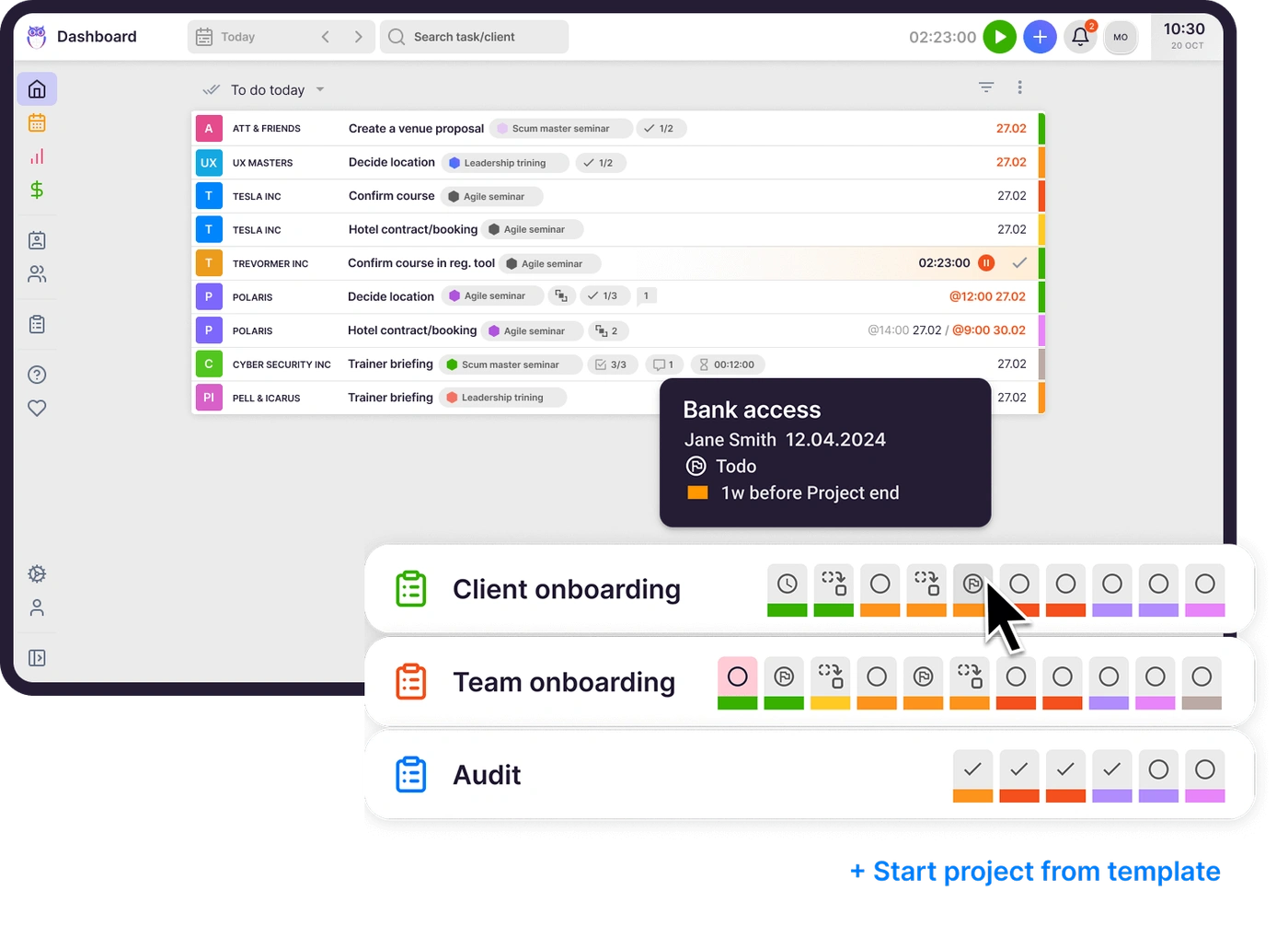
Of course, that only works if you’ve decided what the trigger should be in the first place. So take a few minutes during setup to work that out, rather than fixing the workflow after the first cycle goes wrong. If your clients each run on their own deadlines, see how to handle recurring tasks with client-specific deadlines.
4. Make it clear who owns each part of the work
Put your whole firm in one place Start free for 14 days. No credit card, full access. Try Uku freeYou don’t want a client asking, “Who should I send this to?” three weeks into the engagement.
Give them a clear point of contact from the start. That might not be the partner who closed the deal. It should be the person who is actually going to handle their questions and help them when something comes up.
Then look at the services you’ve sold.
If you’re handling bookkeeping, tax preparation and payroll, who owns each one? Don’t leave that at “the team.” Put a name against each service so there’s no question about who picks it up.
The same goes for the client.
If you need bank statements by the fifth of every month, tell them. If they need to provide records in a particular format, tell them that too. Don’t assume they’ll know what you need just because it’s obvious to your team.
Once everyone knows what they’re responsible for, far fewer tasks sit untouched because everyone thought someone else was handling them.
5. Make sure the engagement letter matches the work
Here’s an easy one to overlook.
Your engagement letter says you’ll prepare year-end financial statements and the owner’s personal tax return. Then you look at the task list and find twelve tasks that aren’t mentioned anywhere in the letter. At the same time, something you promised in the letter never made it into the workflow.
Now you’ve got a problem in both directions.
You could end up doing work the client isn’t paying for. Or you could miss something the client believes they’ve already paid for.
Before you start the work, go through the engagement letter and the task setup together. Every service you’ve agreed to should show up in the workflow. And if you’ve added a task that isn’t covered by the engagement, stop and check why.
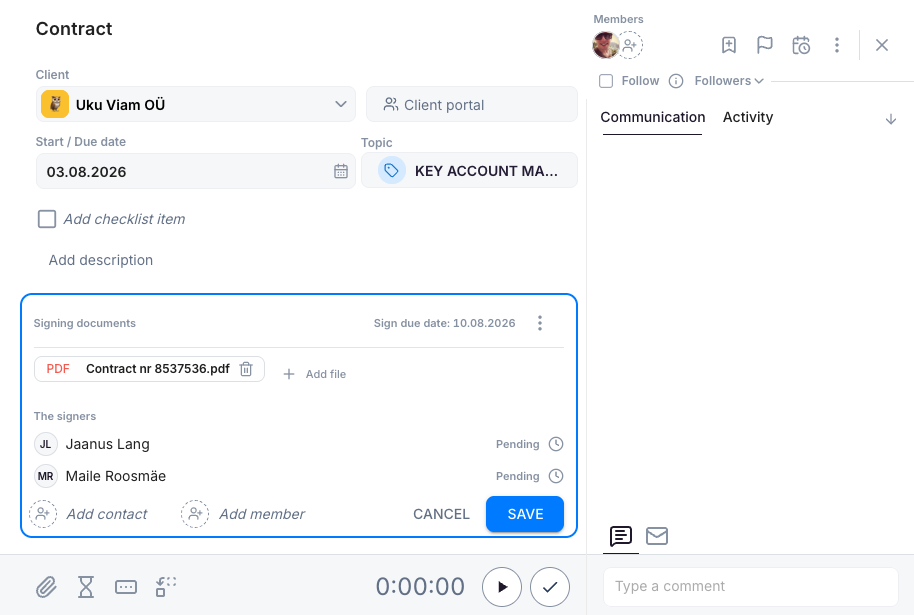
You can also make signing the engagement letter part of the setup itself. In Uku, e-signatures run inside a task: the letter goes out from the client’s task, each signer’s status is visible, and the signed PDF is saved back on that task. Put the setup steps after it as dependent tasks, and they wait until the letter is done, instead of relying on someone to remember.
6. Use the same setup checklist every time
You don’t need to treat every new client exactly the same. But the basic setup should be consistent and kept up to date.
Otherwise, onboarding quality depends on who happens to be setting up the account that day.
A simple checklist catches the things that are easy to miss:
- Engagement letter signed and filed
- Scope checked against the task list
- Recurring work set up with a frequency, trigger and owner
- Primary contact confirmed and communicated to the client
- Each service assigned to the right person
- Client responsibilities documented and communicated
- Previous records or data transferred and available to the team
- Billing checked against the engagement letter
You can also add a small welcome step if that fits your firm. It could be a short onboarding email, a printed guide, a folder with the signed agreement, or a welcome gift, from branded wear printed on blank apparel to a digital perk.
The point is to make sure the same important things happen every time, regardless of who’s setting up the client.
Wrapping up
Good client onboarding is about answering the questions that usually cause problems later. What exactly are you doing for the client? When does the work start? Who owns each part? What does the client need to send you? Does the task list actually match what you agreed to?
Sort those out before the first task goes live, and your team gets a much clearer starting point.
If you’re using Uku, you can build those decisions into the client setup itself: set the scope, agree on a trigger and define ownership. If you’re still choosing a system, start with our comparison of the best accounting practice management software.
Frequently asked questions
What should an accounting firm agree with a new client before work starts?
Five things. The exact scope of services and what is not included, when each piece of recurring work starts, who at the firm owns each service, what the client has to send and by when, and whether the engagement letter matches the tasks the team has actually set up.
What goes on an accounting client onboarding checklist?
A signed engagement letter, scope checked against the task list, recurring work set up with a frequency, a trigger and an owner, a confirmed primary contact, each service assigned to a named person, client responsibilities documented, records from the previous accountant received, and billing checked against the engagement letter.
Why does client onboarding go wrong at accounting firms?
Usually at a handoff. What was promised in the sales conversation never reaches the person doing the work, the engagement letter and the task list drift apart, or recurring work is set to repeat without anyone deciding what should trigger it.
How does practice management software help with client onboarding?
It keeps the client's history, contracts and tasks in one record, so the team works from the same picture. In Uku, onboarding can run from a project template with dependent tasks, so a step only starts once the one before it is done, and engagement letters can be signed inside the task they belong to.