Accounting Practice Data Audit: 6 Checks
Six questions your reports can't answer — unbilled work, invoices that bill zero, revenue concentration, who owns the work, messy data. Copy the prompt, paste it into your AI, get the answer.


Contents
- First, connect your AI to Uku
- 1. Which clients are we working for free?
- 2. Will next month’s invoice run bill anything?
- 3. Where does the money actually come from?
- 4. Do the people who own the work actually do it?
- 5. What small things are quietly costing us?
- 6. Bulk work that survives being interrupted
- Trying this yourself
Your reports answer the questions someone built a screen for. The questions that keep a firm owner up at night are different — which clients are we losing money on? and will next month’s invoice run actually produce anything? — and each one needs two things that live on separate screens.
That used to mean two CSV exports and an afternoon in a spreadsheet. Now it means pasting a prompt.
Below are six of them. Copy, paste, read the answer. We ran all six against a real account — 65 clients, 15,000 records — and the numbers under each one are what came back.
First, connect your AI to Uku
One-time setup. Create an API key in Uku under Settings & Apps → Public API, then paste this into Claude, ChatGPT, or whichever assistant you use. A Read key is enough for everything in this article.
 Claude Cowork Uku integration setup
Connect to my Uku account through the Uku API and set it up so I can reuse it.
Reference: https://help.getuku.com/en/integrations/public-api-v3/
Company UUID: [your company UUID]
API key: [your uku_live_ key]
Test the connection, then save it as a named connection I can use in future chats.
Reference: https://help.getuku.com/en/integrations/public-api-v3/
Company UUID: [your company UUID]
API key: [your uku_live_ key]
Test the connection, then save it as a named connection I can use in future chats.
Live in a terminal instead? Install the Uku CLI with curl -fsSL https://getuku.com/install-cli | sh and sign it in once. After that Claude Code can answer the same questions by running it for you.
Terminal uku — one-time setup
# one-time: sign the CLI into your Uku account
$ uku auth login
# check it worked
$ uku auth status
$ uku clients list --limit 5
$ uku auth login
# check it worked
$ uku auth status
$ uku clients list --limit 5
That is the whole setup. Everything below is a question you ask afterwards — in whichever of the two you prefer.
1. Which clients are we working for free?
Hours logged against money invoiced, per client, worst first.
Claude Cowork Unbilled workIn my Uku account, find every client where the billable hours we logged are worth more than what we actually invoiced them.
For each client show: client name, billable hours, currency, total invoiced, and the effective hourly rate (invoiced ÷ billable hours).
Two rules: only count invoices that have an invoice number and are not annulled, and never add up different currencies — group by currency instead.
Sort worst first and tell me the five I should look at on Monday.
For each client show: client name, billable hours, currency, total invoiced, and the effective hourly rate (invoiced ÷ billable hours).
Two rules: only count invoices that have an invoice number and are not annulled, and never add up different currencies — group by currency instead.
Sort worst first and tell me the five I should look at on Monday.
What it found: 19 clients under water. The worst was 668 billable hours invoiced as 2,265 — an effective rate of 3.40 an hour.
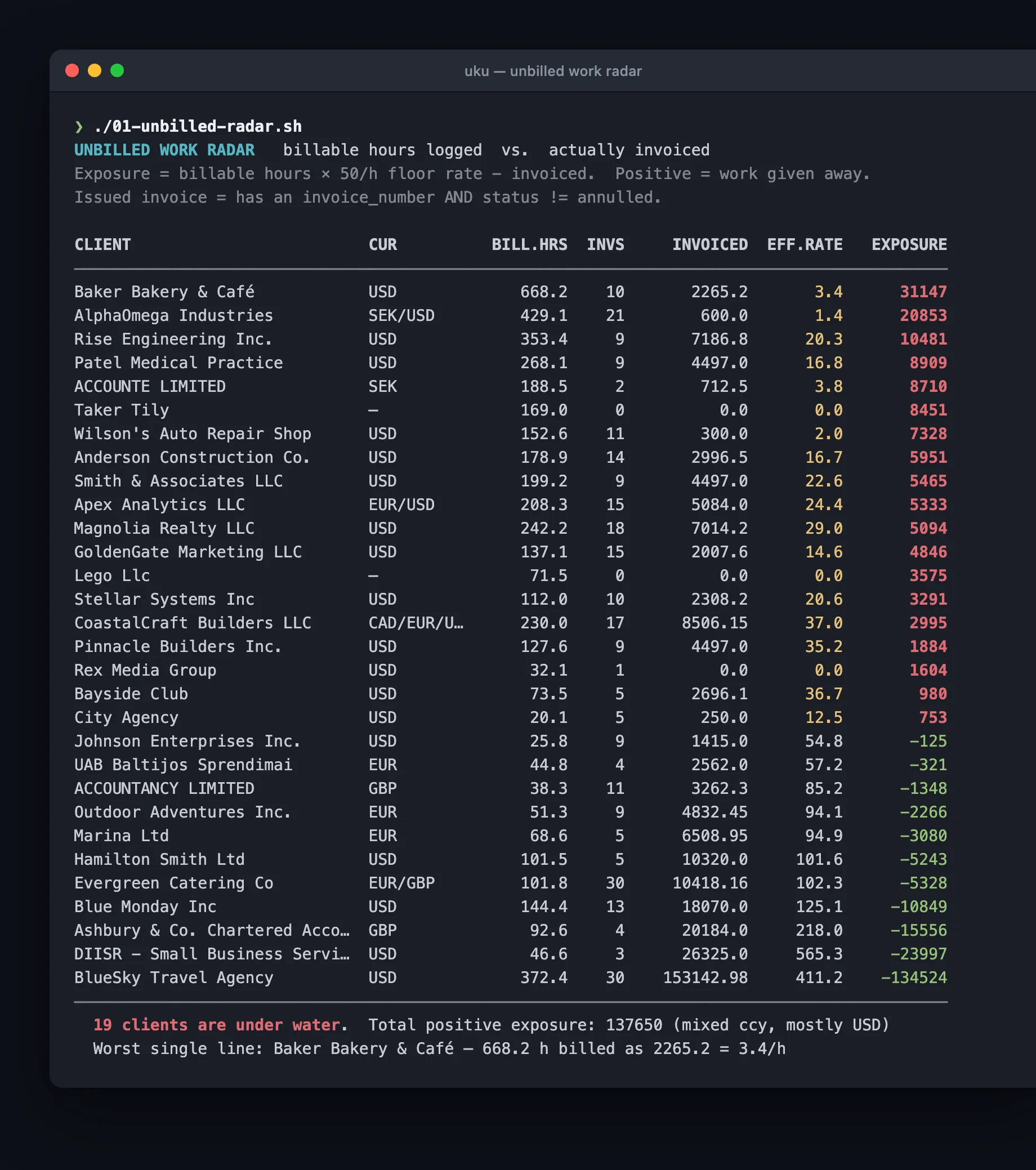
The same question in a terminal — Claude Code reads your account through the Uku CLI and answers:
Terminal claude code — unbilled work
$ claude -p "Use the uku CLI to find every client where the billable
hours we logged are worth more than what we invoiced. Count only
invoices that have an invoice number and are not annulled. Never add
up different currencies. Show client, hours, currency, invoiced and
the effective hourly rate, worst first, top 5 only." \
--allowedTools "Bash(uku:*)"
hours we logged are worth more than what we invoiced. Count only
invoices that have an invoice number and are not annulled. Never add
up different currencies. Show client, hours, currency, invoiced and
the effective hourly rate, worst first, top 5 only." \
--allowedTools "Bash(uku:*)"
Read it before you act on it. A fixed-fee client whose hours ran long is a different conversation from one nobody billed. And one row here was not a client at all — it was the firm itself, booked as a client record.
2. Will next month’s invoice run bill anything?
A contract row can bill 0.00 for five reasons, and not one of them is an error. The product is inactive. There is no product on the row. The row’s own price is zero. An hours-based product has no time logged. A custom field the price depends on is empty.
Every one is a valid setup that quietly produces nothing — which is why nobody catches it.
Claude Cowork Invoice preflightBefore my next invoice run in Uku, check every row on every active billing contract and tell me which ones will bill 0.00 — and why.
Check each row for these five causes: the product is inactive, there is no product on the row, the row's own price is set to 0.00, the product bills by hours but no billable time was logged this period, or a custom field the price depends on is empty.
Show me client, contract and the reason in plain English. Then tell me how many of my active contracts are affected.
Also list invoices that were calculated but never issued, grouped by currency, oldest first.
Check each row for these five causes: the product is inactive, there is no product on the row, the row's own price is set to 0.00, the product bills by hours but no billable time was logged this period, or a custom field the price depends on is empty.
Show me client, contract and the reason in plain English. Then tell me how many of my active contracts are affected.
Also list invoices that were calculated but never issued, grouped by currency, oldest first.
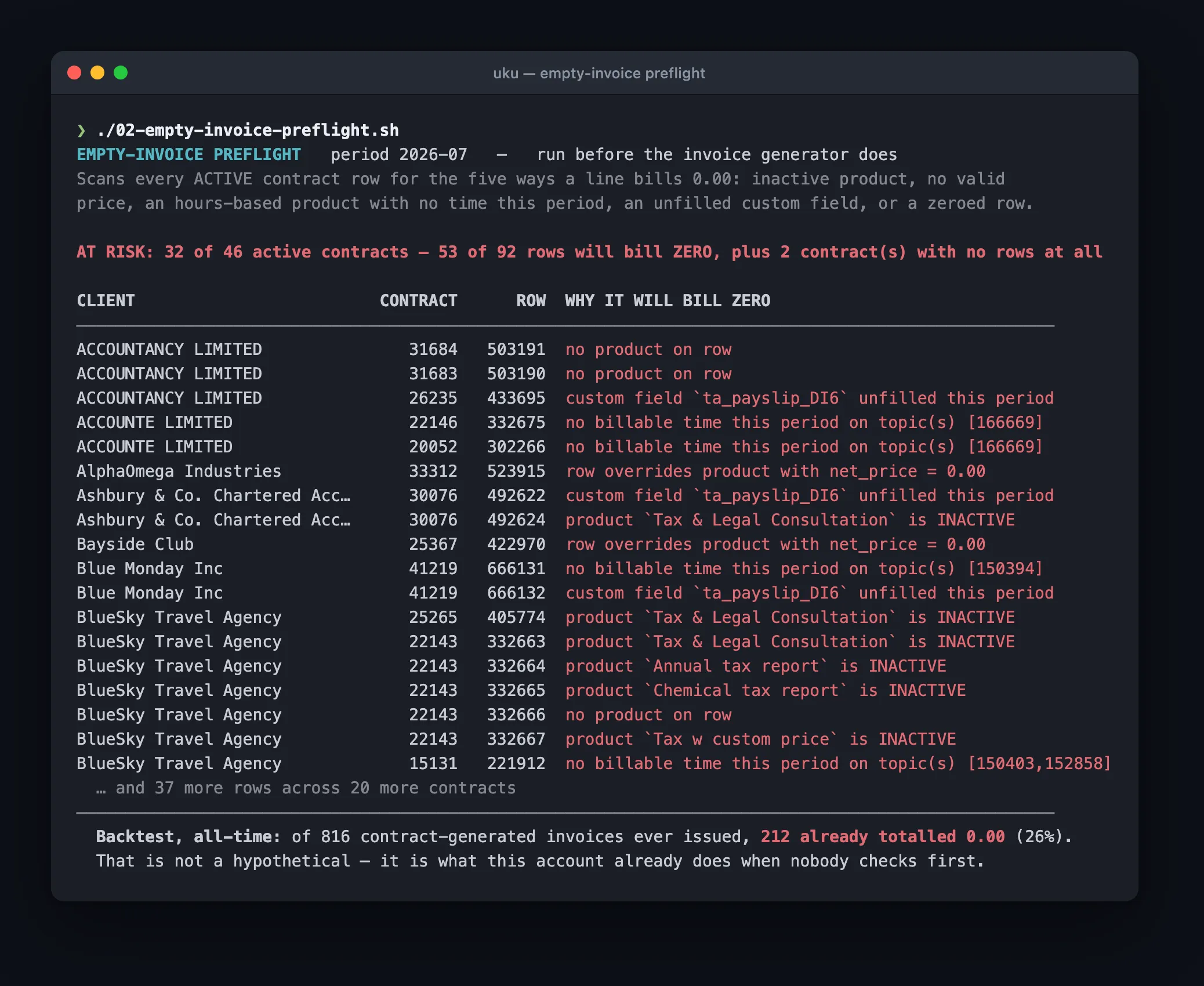
What it found: 32 of 46 active contracts at risk — 53 rows would have billed zero.
Or from a terminal:
Terminal claude code — invoice preflight
$ claude -p "Use the uku CLI. Before my next invoice run, check every
row on every active billing contract and tell me which ones will bill
0.00 and why. Look for: no product on the row, the row price set to
0.00, and an inactive product. Give me the count and the first 5 rows
with client and reason." \
--allowedTools "Bash(uku:*)"
row on every active billing contract and tell me which ones will bill
0.00 and why. Look for: no product on the row, the row price set to
0.00, and an inactive product. Give me the count and the first 5 rows
with client and reason." \
--allowedTools "Bash(uku:*)"
Then the part that stops being a neat trick. Checked against every invoice the account had ever produced, going back two years: 212 invoices had already gone out at 0.00. Fifty-five of them carried a real invoice number. Twelve were marked paid.
And separately: 496 invoices calculated and never sent at all — the oldest 909 days old. Together that is 266,745 USD, 47,996 GBP and 42,154 EUR of finished work that never left the building.
Before: you find out when a client asks about a blank invoice. After: you find out on the 31st, with the reason attached.
3. Where does the money actually come from?
Claude Cowork Revenue mixShow me where my revenue actually comes from in Uku. Use only issued, non-annulled invoices, and report everything per currency — never add currencies together.
For each currency: total invoiced, the biggest client's share, and the top three clients' share.
Then for my biggest currency, break revenue down by service, and tell me which services earn money with no tracked hours behind them.
Finally find price drift: the same product billed at very different prices to different clients. Show the lowest, the highest and the spread.
For each currency: total invoiced, the biggest client's share, and the top three clients' share.
Then for my biggest currency, break revenue down by service, and tell me which services earn money with no tracked hours behind them.
Finally find price drift: the same product billed at very different prices to different clients. Show the lowest, the highest and the spread.
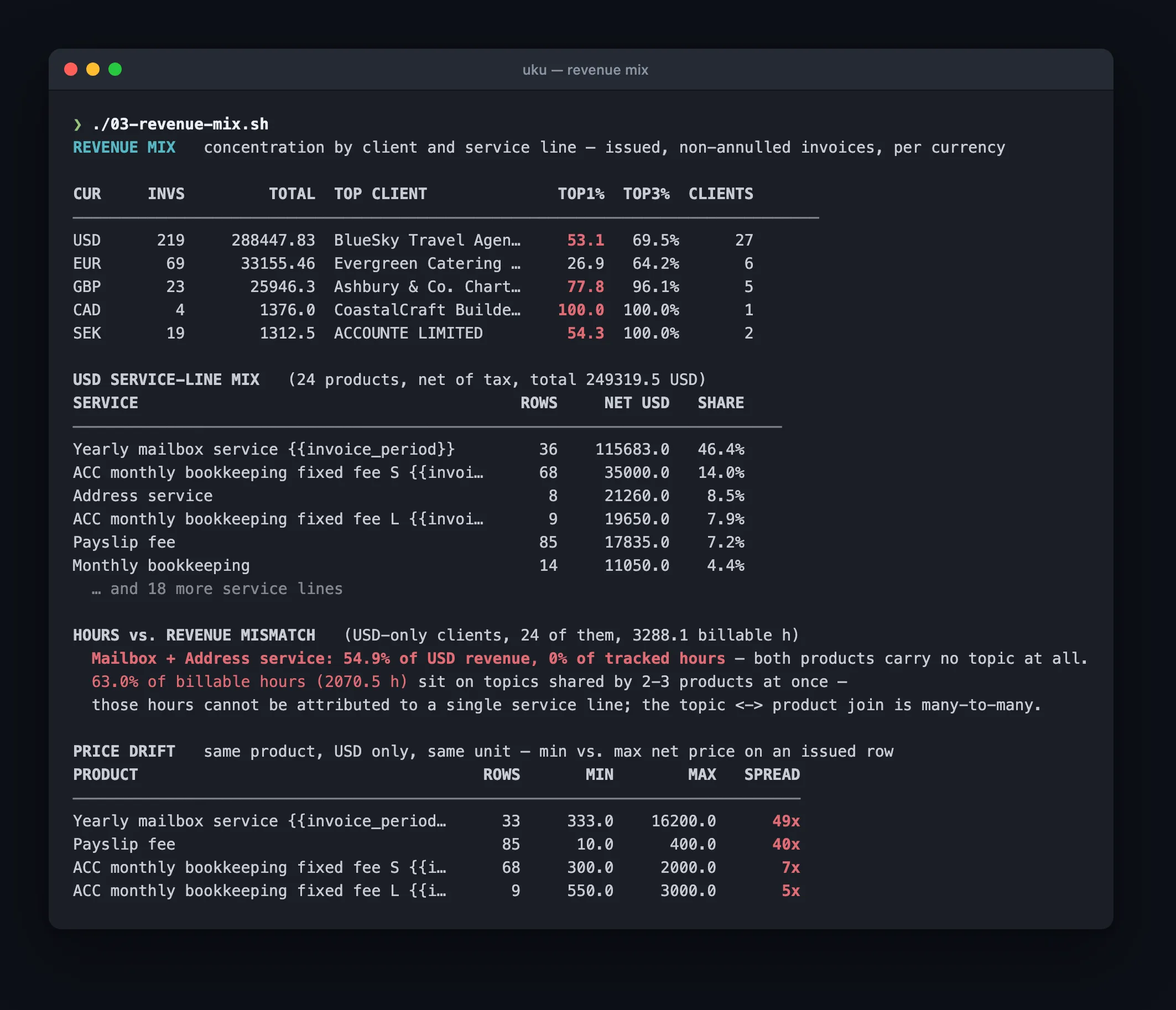
What it found: the work you spend time on and the work that pays are not the same work. Mailbox and address services were 55% of revenue with zero tracked hours behind them.
Or from a terminal:
Terminal claude code — revenue mix
$ claude -p "Use the uku CLI. Show me where revenue comes from, per
currency, never adding currencies together. Use only invoices that
have an invoice number and are not annulled. For each currency: total,
invoice count, and the biggest client's share." \
--allowedTools "Bash(uku:*)"
currency, never adding currencies together. Use only invoices that
have an invoice number and are not annulled. For each currency: total,
invoice count, and the biggest client's share." \
--allowedTools "Bash(uku:*)"
The same run caught price drift — one service billed anywhere from 10.00 to 400.00 depending on the client. Nobody decided that. It accumulated, one exception at a time.
4. Do the people who own the work actually do it?
Hours per person is a report. Open tasks per person is a view. What matters is the two of them in the same row.
Claude Cowork Capacity vs ownershipIn my Uku account, put open task ownership next to hours actually logged, per team member.
For each member show: number of open tasks (status new or in progress), their share of all open tasks, and hours logged in the last 30, 90 and 365 days.
Flag anyone who owns open work but has logged nothing in the last 90 days.
Don't try to calculate utilisation — there is no capacity field on the member record, so say what you can and stop there.
For each member show: number of open tasks (status new or in progress), their share of all open tasks, and hours logged in the last 30, 90 and 365 days.
Flag anyone who owns open work but has logged nothing in the last 90 days.
Don't try to calculate utilisation — there is no capacity field on the member record, so say what you can and stop there.
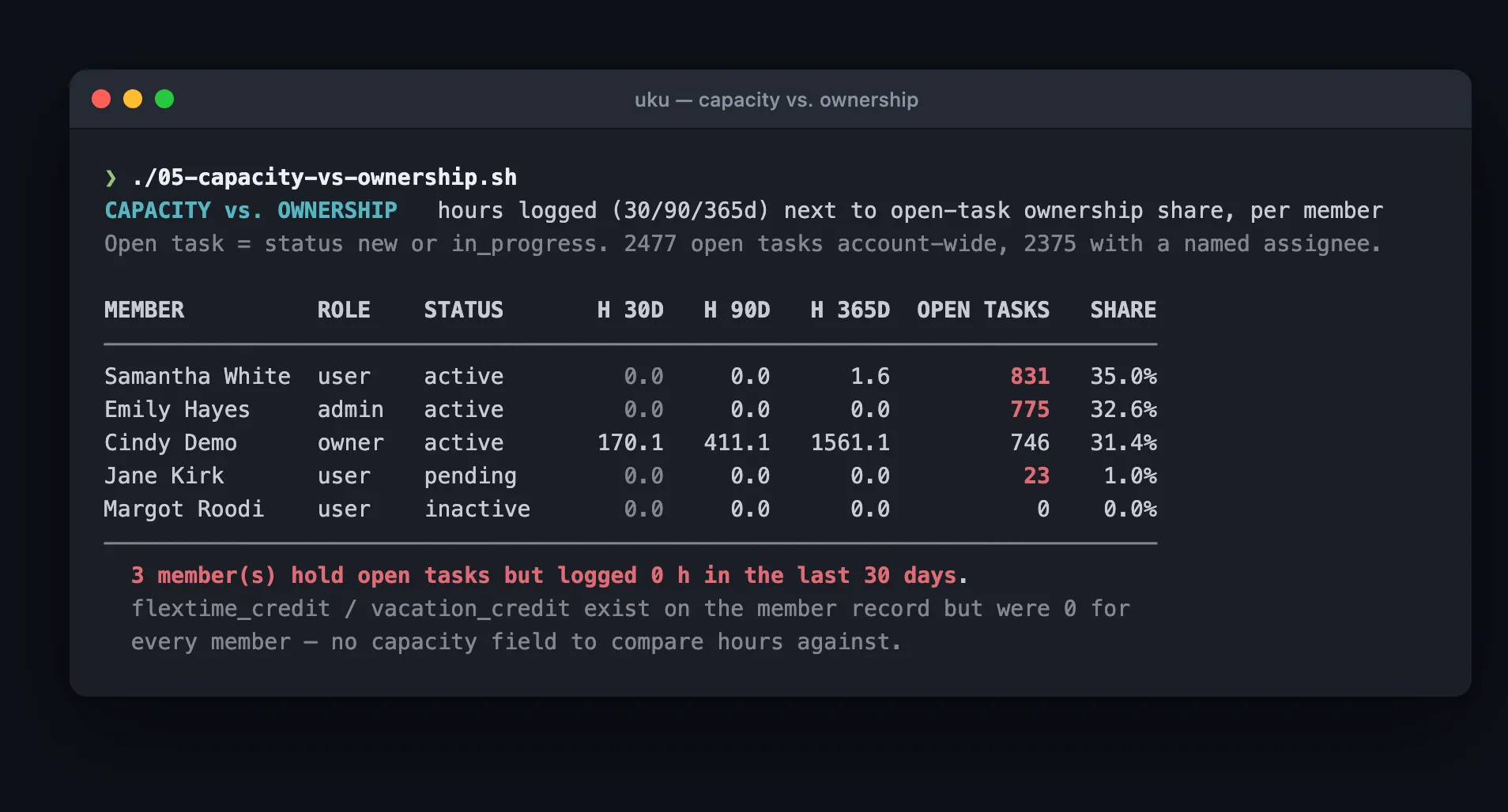
What it found: two people owned 68% of all open work and had logged nothing in three months.
Or from a terminal:
Terminal claude code — capacity vs ownership
$ claude -p "Use the uku CLI. Put open task ownership next to hours
actually logged, per team member. Open means status new or
in_progress. Show each member's open task count, their share of all
open tasks, and hours logged in the last 90 days. Flag anyone owning
open work with zero hours." \
--allowedTools "Bash(uku:*)"
actually logged, per team member. Open means status new or
in_progress. Show each member's open task count, their share of all
open tasks, and hours logged in the last 90 days. Flag anyone owning
open work with zero hours." \
--allowedTools "Bash(uku:*)"
| Member | Open tasks | Share | Hours, last 90d |
|---|---|---|---|
| Samantha White | 831 | 35.0% | 0.0 |
| Emily Hayes | 775 | 32.6% | 0.0 |
| Cindy Demo | 746 | 31.4% | 411.1 |
A leaver whose queue was never handed over, a role that stopped tracking time, or a real bottleneck — whichever it is, every task in those two queues has a due date nobody is working towards.
5. What small things are quietly costing us?
Claude Cowork Data hygieneRun a data-quality pass on my Uku account and report five things. Keep it to short lists, no commentary.
1. Clients whose names are near-duplicates of each other
2. Every different seller name that appears on our issued invoices
3. Time entries longer than 12 hours, and whether each is marked billable
4. Clients with work logged in the last 90 days but no active contract
5. Clients with no activity for over 90 days that are still on an active contract
1. Clients whose names are near-duplicates of each other
2. Every different seller name that appears on our issued invoices
3. Time entries longer than 12 hours, and whether each is marked billable
4. Clients with work logged in the last 90 days but no active contract
5. Clients with no activity for over 90 days that are still on an active contract
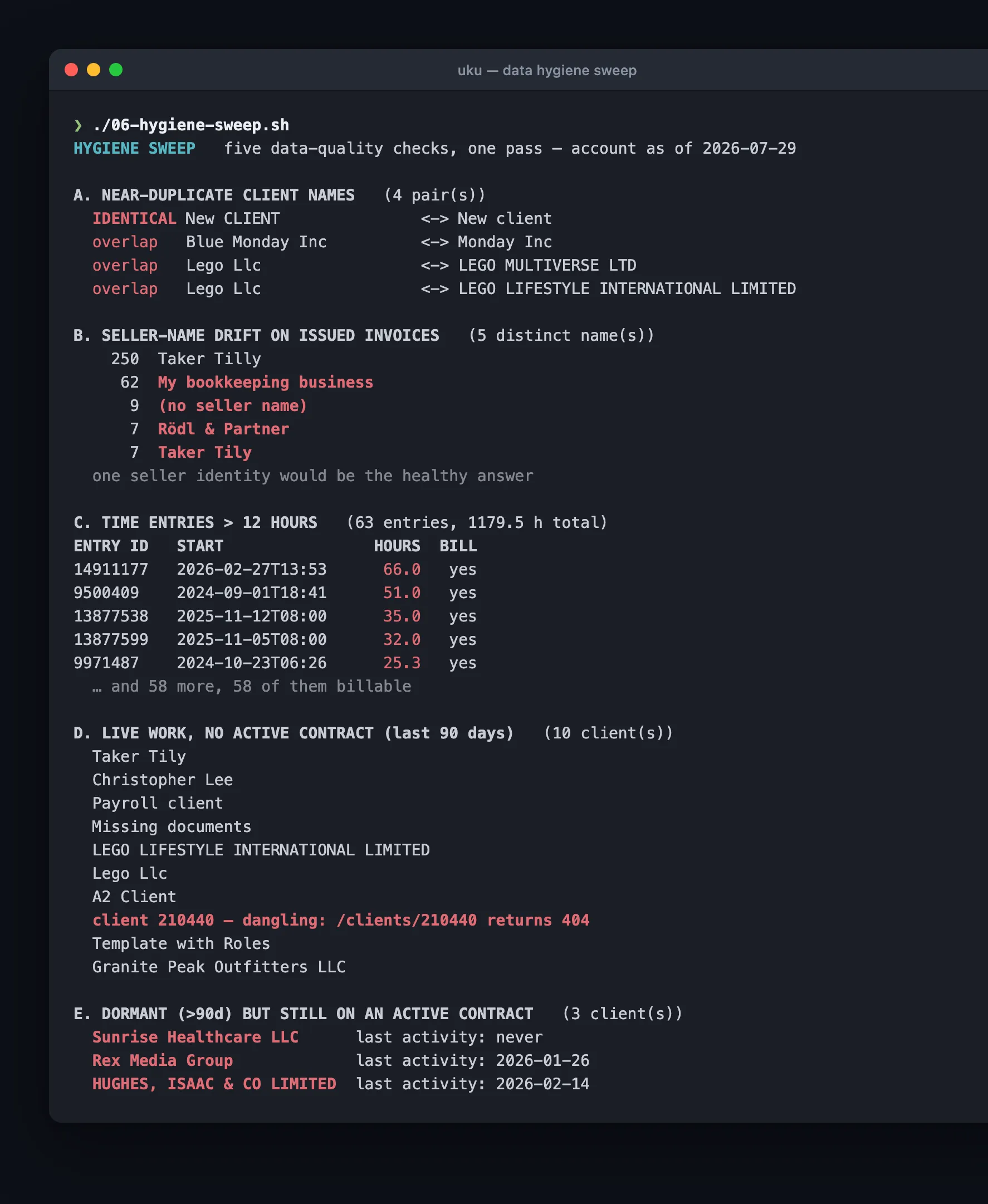
What it found, in one pass:
Or from a terminal:
Terminal claude code — hygiene sweep
$ claude -p "Use the uku CLI. Run a data-quality pass: client names that
are near-duplicates of each other, every distinct seller name on
issued invoices with counts, and time entries longer than 12 hours
with how many are billable. Short lists only." \
--allowedTools "Bash(uku:*)"
are near-duplicates of each other, every distinct seller name on
issued invoices with counts, and time entries longer than 12 hours
with how many are billable. Short lists only." \
--allowedTools "Bash(uku:*)"
- Five different seller names on issued invoices. Most were correct. Seven carried a one-letter typo of the firm’s own name — seven clients got an invoice from a company that does not exist.
- 63 time entries longer than 12 hours, 1,179 hours in total, every one marked billable. The largest was a single 66-hour entry. Each is a forgotten timer or a typo, and all of them sit in the billing base.
- Duplicate clients, and 10 clients with live work but no active contract — including one record that is not a client at all, just a broken reference nothing in the interface can show you.
- 3 clients dormant for 90+ days but still on an active contract. Still billed, no longer served.
Before: you find each of these by accident, usually because a client points it out. After: one question, once a month, before month-end close.
6. Bulk work that survives being interrupted
The five above only read. This one writes, and it is the one place where a terminal beats a chat window.
Terminal uku — batch create
# check the file first — this writes nothing
$ uku tasks create --batch @tasks.jsonl --dry-run
# create them
$ uku tasks create --batch @tasks.jsonl --yes
# interrupted? run the exact same line again
$ uku tasks create --batch @tasks.jsonl --resume --yes
$ uku tasks create --batch @tasks.jsonl --dry-run
# create them
$ uku tasks create --batch @tasks.jsonl --yes
# interrupted? run the exact same line again
$ uku tasks create --batch @tasks.jsonl --resume --yes
We killed a run mid-flight to see what would happen, then re-ran the same file. Nine lines were skipped as already done, ten were created, and one was refused — the process had died between sending it and hearing back, so the tool did not know whether it had landed. Zero duplicates.
That refusal is the point. The honest answer to “did this write go through?” is sometimes “I don’t know”, and a tool that guesses will either double-bill a client or skip them.
Trying this yourself
Everything above runs on Uku API v3, available on the Elite plan. Two ways in:
- Your AI assistant — the connect prompt at the top, then any of the six. This is the path for most people; there is nothing to install. More on connecting your AI to Uku.
- The Uku CLI — for terminals, scripts and coding agents. One line to install:
curl -fsSL https://getuku.com/install-cli | sh
Read-only questions need a Read-scoped key and nothing more. Anything that touches money needs an All-scoped key you grant on purpose.
Frequently asked questions
What is a practice data audit?
A pass over your own practice data looking for money and work that quietly went missing: hours you never invoiced, invoices about to bill 0.00, work calculated but never sent, tasks owned by people who are not working, and duplicate or broken records. Each question joins two things that live on different screens, which is why no standard report answers them.
Do I need a developer to run these?
No. Every check in this article is a prompt you copy and paste into Claude, ChatGPT or another assistant that can call an API. You connect it to Uku once with your company UUID and an API key, then ask in plain English. A developer is only needed if you want to build something on top of it.
Why would an invoice bill 0.00?
Five reasons, all invisible until the invoice exists: the product on the row is inactive, the row has no product, the row's own price is set to 0.00, an hours-based product has no time logged this period, or a custom field the price depends on is empty. None of them is an error, which is exactly why nobody catches them.
Which Uku plan do I need?
The Public API v3 is available on the Elite plan, and only Company Owners and Admins can create API keys. Reading your own data needs a Read-scoped key and nothing more. Anything that touches money requires an All-scoped key you grant on purpose.
Is it safe to let an AI touch my accounting data?
Every check in this article is read-only — the prompts ask questions, they do not change anything. API keys are scoped to Read, Edit or All, so a Read key literally cannot write. If you later automate writes, the Uku CLI asks before each batch, and an interrupted run resumes without creating duplicates.

Published Jul 29, 2026 · Updated Oct 17, 2026