




Aero Workflow Review 2026: Features, Pricing & The Uku Alternative
Aero Workflow costs $108–$365/month flat for checklists, recurring tasks and time tracking. Our review of its features, limits and where Uku fits.


Contents
Aero Workflow is a checklist-first workflow app for bookkeeping and client accounting services (CAS) firms, most of them running on QuickBooks Online. It turns a library of step-by-step procedures into recurring client tasks, tracks time on every task, and charges one flat monthly price per firm: $108 to $365 a month for up to 50 users, with no per-user fees. It does that job well. What it does not do is face the client or send the invoice: Aero’s own help centre says it “doesn’t have any document storage”, we found no client portal on its site, and invoices are made in QuickBooks.
To write this Aero Workflow review, we went through its feature pages, pricing, FAQ and public help centre. We believe it’s a good choice if:
- Your firm does recurring bookkeeping or CAS work and wants every task to follow a written checklist
- You want a ready-made library of accounting procedures instead of writing your own from scratch
- You have three or more people and want one flat price instead of paying per user
- You invoice in QuickBooks Online and only need Aero to send it the time
- You value free onboarding and one-on-one support as part of the subscription
However, Aero Workflow might not be enough if:
- You want clients to upload documents, answer questions and sign in one secure place
- You want invoices drafted from tracked time and contracts, not assembled by hand in QuickBooks
- Your ledger is Xero, or you want e-signatures and document storage in the same system
- You need to see which clients use more hours than their fixed fee covers, without a QuickBooks report
- You are a one-person practice, where a flat $108 a month is a lot for a task list
In that case, consider Uku: practice management for accounting firms that runs the same recurring workflows and time tracking, then carries them through to the client portal and the invoice. Aero keeps the team on its checklists; Uku also keeps the client in the loop and makes sure the work gets billed.
Want to see the difference for yourself? Try Uku free for 14 days, no credit card required.
Prices and features below were checked on 5 November 2026 against Aero Workflow’s own website, FAQ and public help centre.
What is Aero Workflow?
Aero Workflow is a cloud workflow app built by accountants for accountants. Its own story starts in 2008 with Laura Redmond of Redmond Accounting, who could not find a cloud tool that let her distributed team run recurring services for many clients with a checklist behind every task. She built her own on Method:CRM, then joined fellow QuickBooks ProAdvisors Victoria Cameron and Mark Crews, who had been solving the same problem. Aero first shipped as a Method add-on and was later rebuilt on its own platform and published on Intuit’s app store.
That origin still shapes the product. Its core, in Aero’s words, is “step-by-step checklists for each task, task templates, recurring tasks, and built-in time tracking”. The homepage calls it “All-in-One Workflow Automation for Accounting Firms”, and its pricing FAQ notes that “the vast majority of our users are ProAdvisors”. The buyer it has in mind is a bookkeeping or CAS firm owner who wants the team to deliver the same service the same way every month, without the owner checking each step.
Aero Workflow Pros & Cons
| Pros | Cons |
|---|---|
| ✅ One flat price per firm: up to five users for $108/month on annual billing | ❌ No client portal and no document storage |
| ✅ Over 150 pre-built checklist templates, including app-specific procedures | ❌ Invoices are made in QuickBooks, not in Aero |
| ✅ Time tracking built into every task | ❌ No direct Xero or QuickBooks Desktop sync |
| ✅ Two-way client sync with QuickBooks Online | ❌ Inbox sync is Office 365 only; the Google Workspace integration was retired |
| ✅ Client Vault with encrypted fields for logins, tax IDs and bank details | ❌ Task dependencies need workarounds (steps or linked templates) |
| ✅ Free onboarding, one-on-one support and training on every plan | ❌ No native mobile app |
| ✅ Open API at no extra charge | ❌ Annual plans are not refunded if you cancel early |
Aero Workflow Review: How it Works & Key Features
Checklist templates and the Aero Library: procedures you don’t have to write
Everything in Aero starts from a checklist. Each task (Aero calls them “Aeros”) carries its steps, and each step can link to a procedure guide, so a new team member can do a bank reconciliation the firm’s way on day one. You can write your own templates, or start from the Aero Library, which every plan lists as “Over 150 pre-built checklist templates”.
The library covers bookkeeping client onboarding and offboarding, recurring weekly, monthly and quarterly work, month-end and year-end close, sales tax returns and 1099 prep, tax return collaboration, and app-specific procedures for QuickBooks Online, BILL, Gusto and others. Templates can carry default time budgets, priorities, due dates and fixed-fee or hourly billing. It is the most useful thing Aero has for a firm that has never written its procedures down.
One catch for trial users: the library is locked until you add a credit card. Aero’s help centre says the card is not charged until the trial ends.
Recurring work and scheduling: set it once
Aero’s scheduling page describes the promise plainly: “Schedule recurring client work once—and let Aero handle the rest. No more rolling over tasks or copying last year’s checklist.” A template applied to a client becomes a Recurring Aero that creates each occurrence on schedule, whether weekly, semi-monthly, quarterly or annual. Tasks can be assigned to individuals, roles or teams.
Each team member gets a personal dashboard of what is due and what is high priority, plus a calendar view of their own tasks. Managers get a firm-wide view sorted by priority or status. For tax season, Aero’s help centre suggests checklists that several people work on in turn, each saving and deferring the task to the next.
That is also where Aero shows its age. Work that passes from one person to another is handled either by putting the whole process in one task’s steps, or by pasting a link to a second template into a step so it creates the next task. Aero’s own article on dependent tasks describes both as the way to do it.
Time tracking: built into the task
Aero’s homepage says “Time tracking is built into every accounting task—automated and seamless”. In practice, a time entry is logged when a user saves and completes a task or saves and defers it, with a timer you can also run by hand. Each entry can be marked billable, fixed fee or neither.
Time can then go to QuickBooks Online or QuickBooks Time automatically. According to Aero’s sync article, each entry carries the hours, notes, team member, service item, customer, class and billable flag. Edits made later in QuickBooks do not flow back to Aero.
Billing: rates in Aero, invoices in QuickBooks
Aero lets you set an hourly rate by QuickBooks service item, customer, team member or company. But Aero does not issue the invoice. Billable time entries synced to QuickBooks Online “will be available to be added to customer invoices” there, and you can round them or change the rate as you add them. Fixed-fee and non-billable entries are not available for invoicing.
That split is fine if your billing person already lives in QuickBooks. It does mean every invoice involves two systems, and the person building it in QuickBooks has to pull the time in by hand.
Reports: productivity and profitability
Aero lists “20+ reports” on every plan. The productivity set covers actual versus estimated time, average time for recurring tasks, days to completion and a daily activity log per team member. The profitability set is more interesting:
- Fixed Fee Job Costing compares the cost of time logged on fixed-fee clients with the monthly fee in the client record
- Time Cost vs Amount Billed compares each client’s time cost with what was invoiced in QuickBooks Online, and only works for accounts connected to QuickBooks Online
- Billable vs Fixed Fee vs Not-Billable splits the firm’s time into the three buckets
These are honest, useful reports for a firm that wants to know whether its fixed fees hold up. Aero’s overview of them is worth reading before a trial.
Client Vault: logins and tax IDs in one place
The Vault stores the usernames, passwords, tax IDs and bank details a firm uses on a client’s behalf, along with links to client resources such as a folder in your document management system. Anything in the “Secured Value” field is encrypted, and Aero’s security page says certain Vault fields use 256-bit encryption. Each entry has a security level, so a junior bookkeeper does not see what a partner sees.
Email: Office 365, or forward it in
Aero’s Office 365 integration filters client emails into Aero, where you can read and reply, log the time spent and create tasks from them. Without Office 365, every user has a unique address to forward emails to, and the email appears on their dashboard ready to be filed under a client with the timer running.
Gmail firms should know that Aero’s help centre says the Google Workspace integration “will no longer be supported as of June 30, 2023” and “is not available to new users”. For them, forwarding is the route.
Aero Advisor: checklists as a client service
Aero Advisor lets a firm open managed Aero accounts for its clients, white-labelled with the firm’s logo, and share checklist templates and procedure guides into them from one central library. Aero pitches it to firms with DIY clients, niche-focused firms and multi-office firms, and as a way to sell process advice on a subscription. Managed accounts are charged to the firm’s card each month, per Aero’s help centre.
It is an original idea. It is not a client portal, though: Aero describes it as a way to share checklists and procedures with clients, not as a place where clients send documents, answer requests or message the firm about its own tasks.
Integrations, API and security
Aero’s integrations page lists QuickBooks Online (two-way client sync and time), QuickBooks Time, Office 365, Zapier, Zoho Flow, Integrately and Connect My SaaS. The open API is free to use on every plan. Its FAQ is just as clear about the gaps: no sync with QuickBooks Desktop, none with the QuickBooks Online Accountant practice management tools, and, per its help centre, no direct Xero integration. The FAQ also says about 40% of Aero users don’t use the QuickBooks integration at all.
On security, Aero is hosted on Microsoft Azure with servers in Virginia and other US East Coast locations, offers two-factor authentication, separates tenant databases and keeps a rolling seven days of backups.
Onboarding and support
Support is where Aero is most generous: “Free onboarding. Free one-on-one support. Free, on-demand training and certification. For every user, on every plan.” Its white-glove onboarding includes a setup call, help designing workflows and team training, and Aero imports customers, tasks and Vault data for you at no charge. Aero’s FAQ is candid that a full rollout usually takes four to eight weeks.
Aero Workflow Pricing (2026)
Aero charges one flat monthly rate per firm, banded by the number of users. Every plan includes the same features: unlimited customers, tasks, templates and contacts, the checklist library, 20+ reports, forward-to-inbox tasks, all integrations, the API, onboarding, support and training.
| Plan | Per month | Users |
|---|---|---|
| Startup | $108 paid yearly, $135 monthly | 1–5 |
| Growth | $200 paid yearly, $250 monthly | 6–25 |
| Scaling | $295 paid yearly, $365 monthly | 26–50 |
| Enterprise | Set fee per extra group of 10 users | 51+ |
Two terms to note from Aero’s pricing FAQ: yearly billing saves 20%, and “If you choose the annual subscription and cancel your subscription before your 12-month period is over, no refund is available.” The 14-day trial needs no card. For what each band costs per head and how it compares at different team sizes, see our full Aero Workflow pricing breakdown.
Where Aero Workflow Falls Short
Aero is good at what it was built for: making a team follow the same checklist every month. Its limits come from where that design stops.
No client portal or document storage: Aero’s feature pages and help centre describe no client portal, and its help centre says plainly that Aero “doesn’t have any document storage”. Even images in a procedure have to be linked from somewhere else. Collecting bank statements and receipts, chasing missing documents and getting engagement letters signed all happen in other tools, which means more logins for your clients and more places to check for your team.
Invoices live in QuickBooks: Aero applies billing rates and pushes billable time, but the invoice is assembled in QuickBooks Online. Hourly and out-of-scope work only reaches the client if someone adds it there.
QuickBooks Online or nothing: there is no direct Xero or QuickBooks Desktop sync, and the Google Workspace email integration is closed to new users. A Xero firm can still use Aero, but its client list and time need workarounds.
Dated in places: dependent work is handled with steps or links between templates, and there is no native mobile app. The newest release notes in Aero’s public help centre are dated November 2023, though its help articles have been updated since.
Flat pricing cuts both ways: for a team of ten, $200 a month is very good value. For a solo bookkeeper, $108 a month for a task list is steep, and annual plans can’t be refunded if the fit turns out wrong.
None of this is a flaw in what Aero sets out to do. It leaves a question for every growing firm on it: where do the client, the documents and the invoice live?
Top Aero Workflow Alternative: Uku
Uku is practice management built for accounting, bookkeeping and audit firms. It runs the same recurring workflows and time tracking Aero does, and carries the work on to the two places Aero hands off: the client and the invoice. Uku is rated 4.8★ across 300+ reviews.
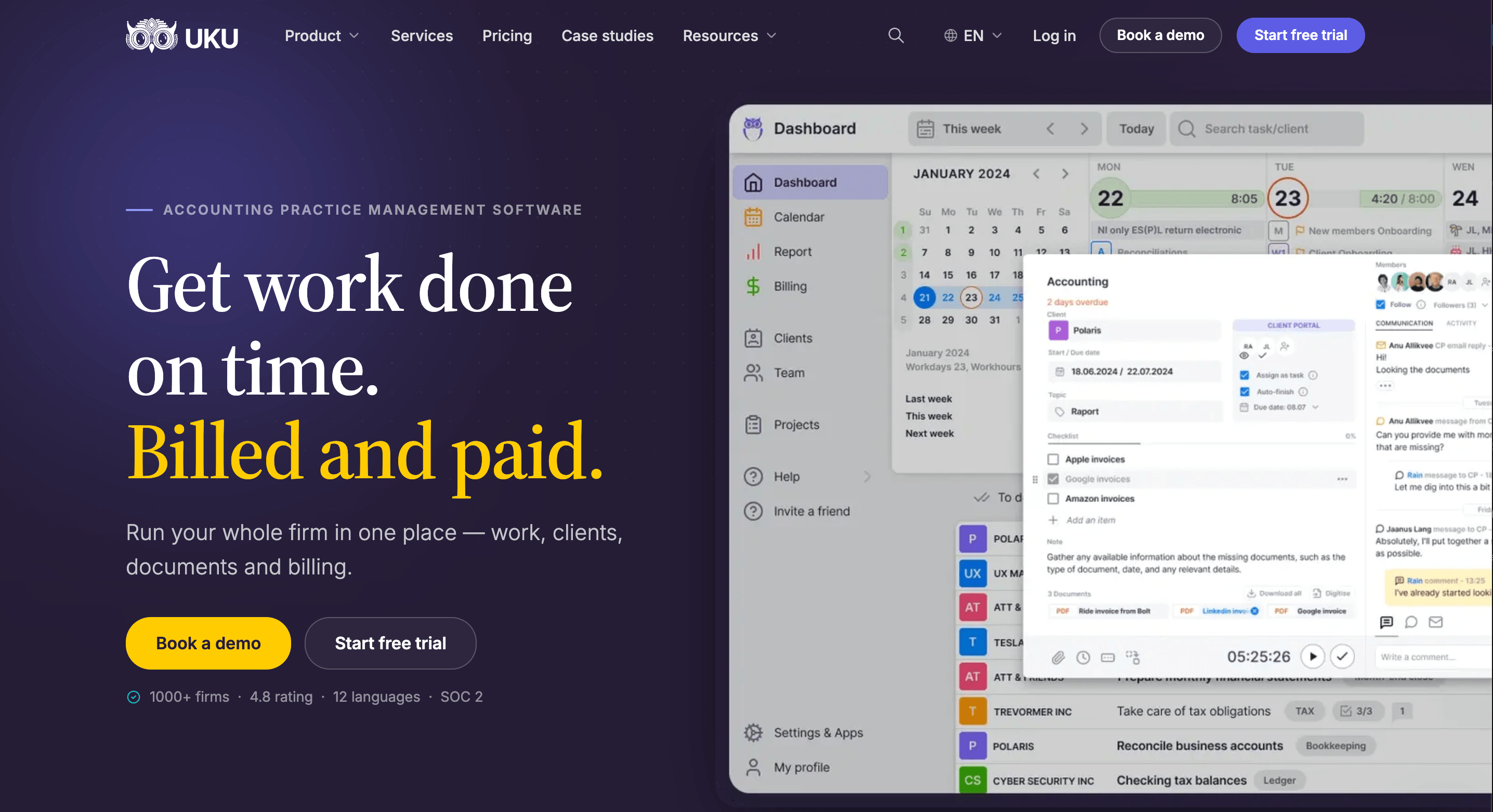
Uku is modular: you can start with just clients and tasks on day one, and add billing, workflows and analytics as you grow. Here is what changes against Aero, section by section.
Workflow automation: every deadline, every client, one screen
Tasks come from workflow templates that follow the rhythm of accounting work: monthly bookkeeping, quarterly sales tax, year-end. Assign a template to a client once and Uku creates every future task on the right date, with its checklist and instructions attached. Recurrence rules cover daily, weekly, monthly, quarterly, yearly and custom schedules, and dependencies between tasks are part of the template rather than a link pasted into a step.
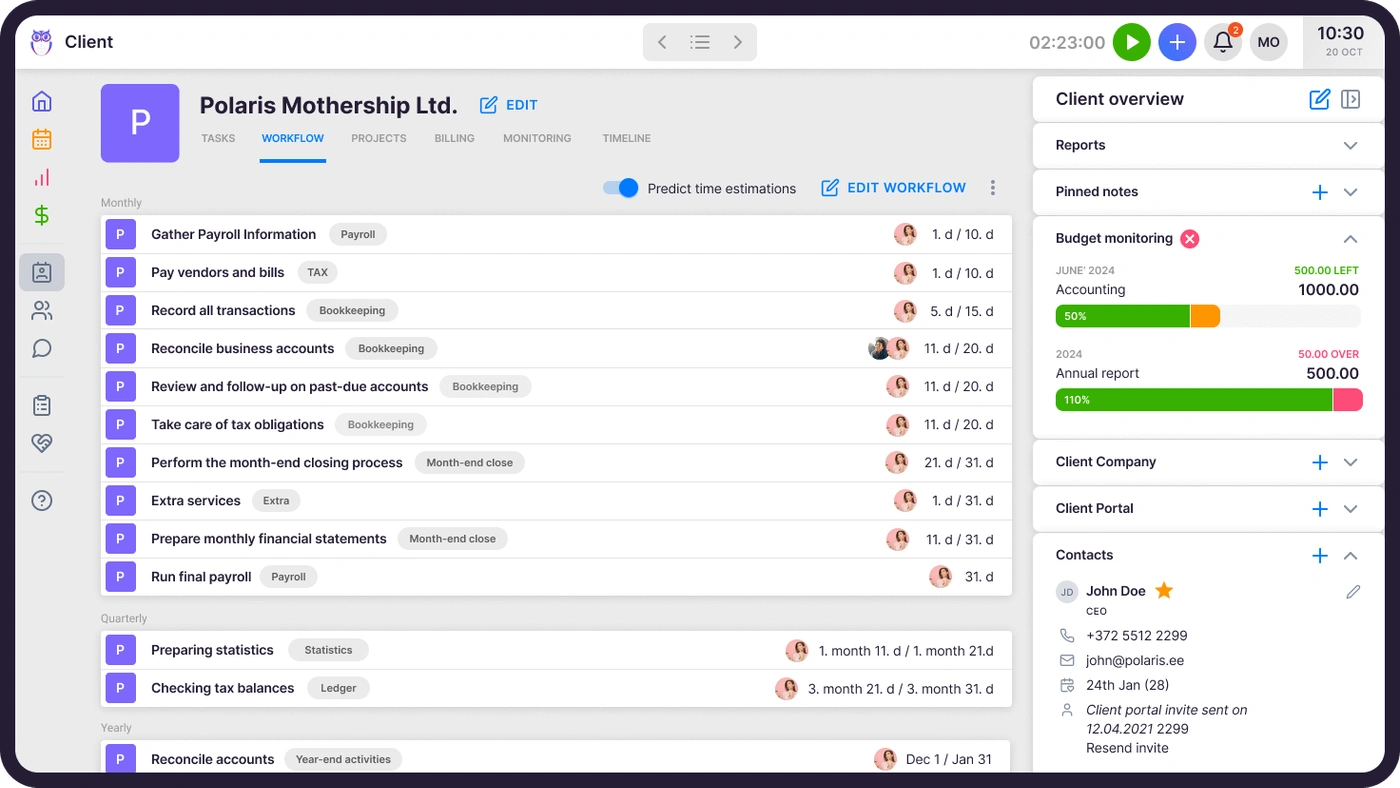
The dashboard is a single source of truth for who’s doing what across the team, and when someone is away, their tasks move to a substitute in one action.

Client portal: the one Aero doesn’t have
This is the biggest difference. Uku’s client portal mirrors the exact same task on both sides: the client and the accountant work on one item, with its messages, documents and checklist in one place. Clients sign in with a magic link, no password, and upload files, answer questions and sign agreements with e-signatures. Automatic reminders go out before deadlines, so the team stops chasing. Portal access is free for clients on every plan.
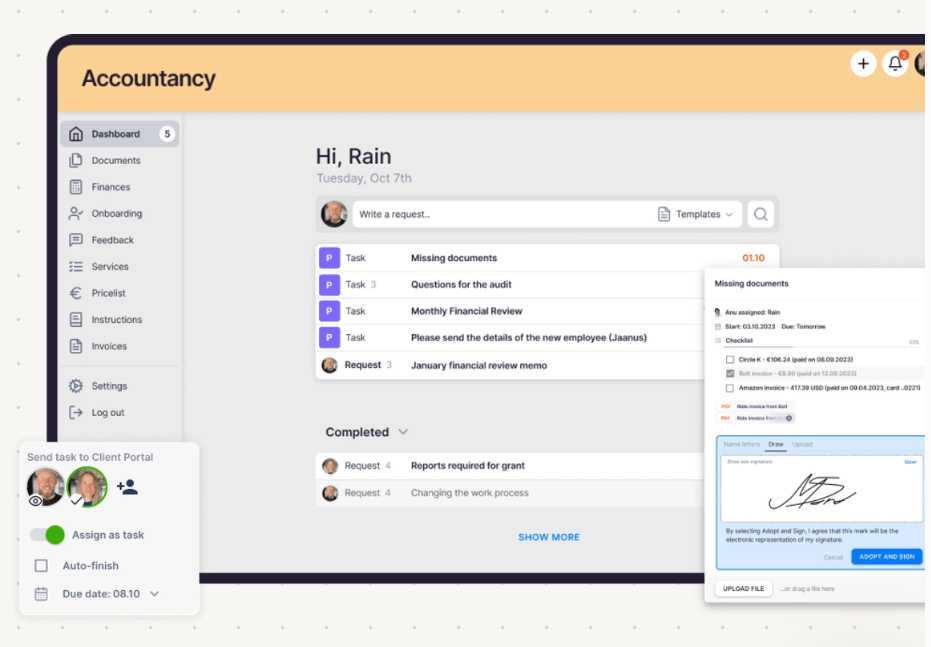
Uku also has its own document management, with files organised by client, year and month, so documents don’t have to live in a separate system linked from a Vault entry.
“Uku client portal has enhanced our operations, improved client satisfaction, and streamlined our processes.”

Time tracking that feeds billing
Time tracking sits on the task, as it does in Aero: a one-click timer, a timer that stays visible in the header on every page, and manual entries. The difference is where the time goes next. In Uku it flows straight into the client’s invoice, with nothing to sync and re-assemble in another system.
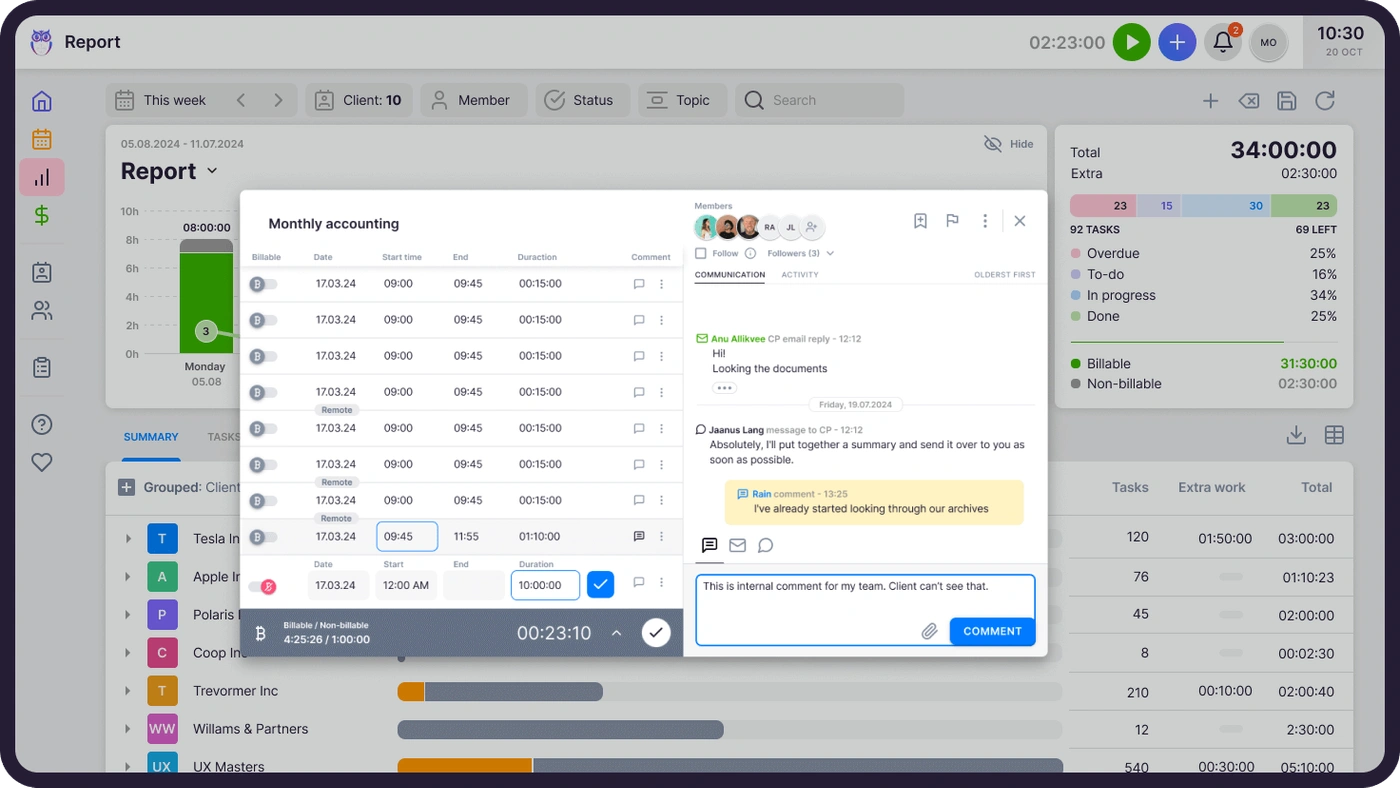
Automated billing: invoices built in Uku, landed in QuickBooks
Uku’s automated billing reads the month’s time entries, applies each client’s billing contract, and drafts the invoices when the period closes: fixed price, hourly, member rate, per-piece and task-triggered fees, or several of them combined on one invoice. You review and approve them, and they land in QuickBooks Online with line items, tax and due date; when QuickBooks marks an invoice paid, Uku closes it on the client. Xero and other ledgers are supported too. It reduces invoice preparation from days to about 30 minutes.
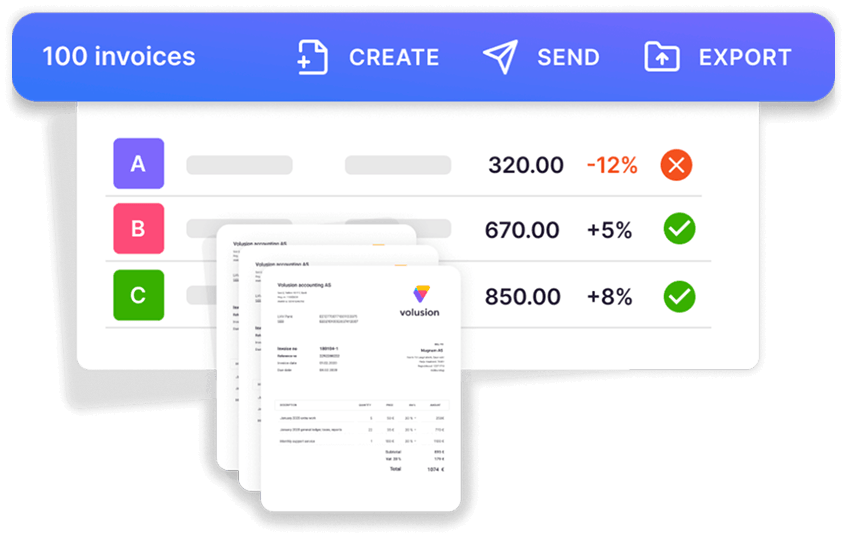
Where Aero’s profitability report compares time with what someone billed in QuickBooks, Uku’s agreement monitoring sets each client’s agreed volume of work against what was actually done this period and flags the clients who have outgrown their fee, before the invoice goes out.

Email, integrations and AI
Uku’s email management connects Gmail and Outlook, links client emails to tasks and clients, and sends automated emails triggered by task events. Uku integrates with QuickBooks Online, Xero and other ledgers on every plan; Zapier, the open API and the Uku MCP server, which lets an AI assistant work with your tasks, time and clients, come with Elite.
Like Aero, Uku runs in the browser and has no native mobile app.
“The best thing about Uku is that it’s made specifically for the accountants - it brings tasks, clients, planning and billing all in one place.”
Uku pricing
Uku charges per member per month; clients and their portal access cost nothing. Annual billing saves about 23%, and every account starts with a 14-day trial of the full Elite plan, no card required, plus 90 minutes of free onboarding.
| Plan | Annual | Monthly | Best for |
|---|---|---|---|
| Solo | $19 | $25 | One accountant, up to 20 active clients |
| Team | $38 | $49 | Unlimited members and clients, access control |
| Elite | $48 | $62 | BI Analytics, workforce management, API, Zapier, MCP |
| Enterprise | $88 | $99 | Custom integrations, account manager, assisted import |
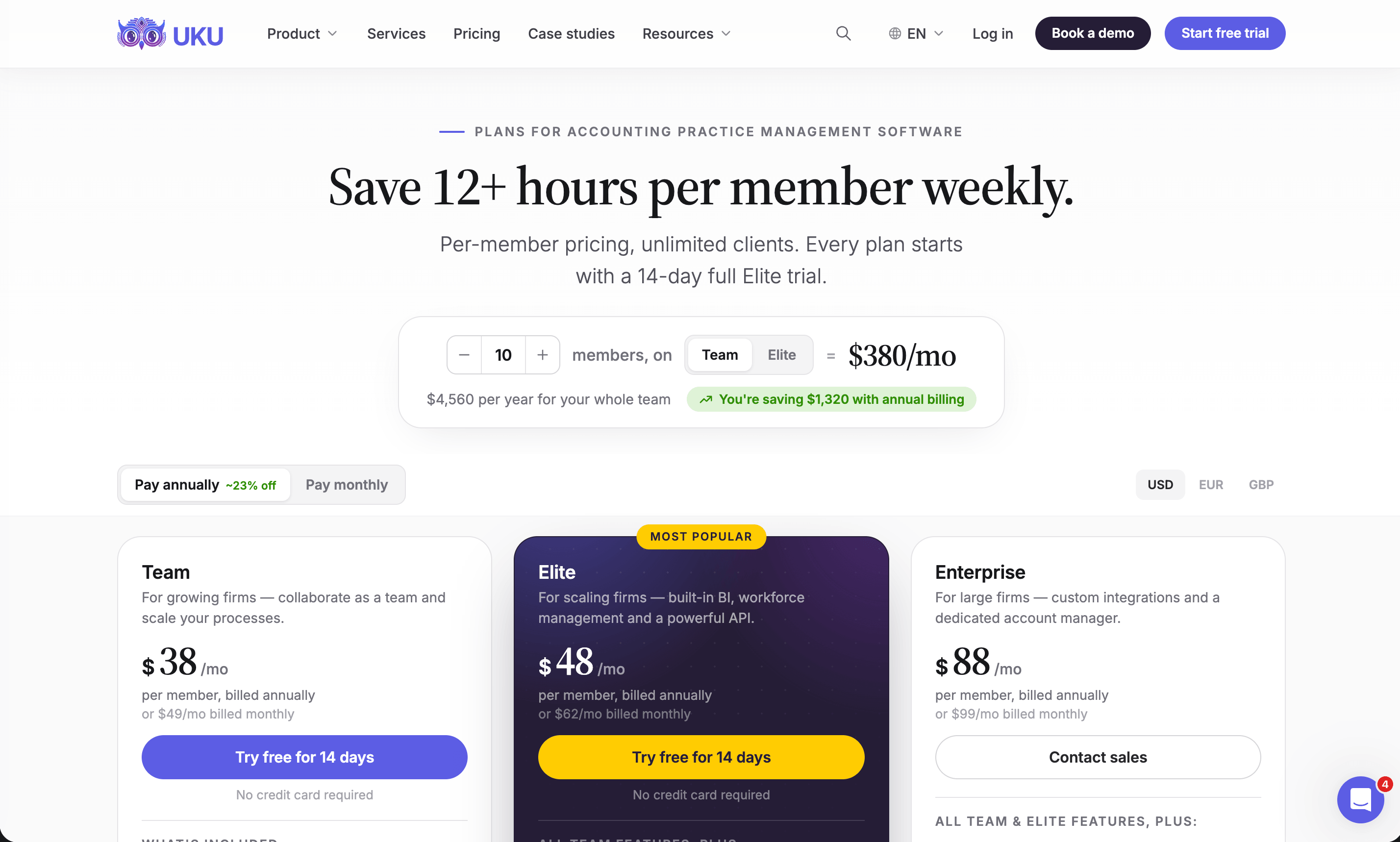
The honest maths. On subscription alone, Aero’s flat rate wins for most teams. A three-person firm pays $108 a month for Aero Startup and $114 for Uku Team, both on annual billing; at ten people it is $200 against $380. Uku is cheaper only for one or two people: $19 for Solo, or $76 for two members on Team, against $108. What the per-member price buys is everything Aero sends elsewhere: the client portal, document storage, e-signatures and invoices built in the same system as the work. If your firm pays for those separately today, add them to Aero’s side before you compare. See every Uku plan on the pricing page, or book a demo and we will price your firm’s actual setup with you.
Aero Workflow or Uku: Comparison Summary
| Aspect | Aero Workflow | Uku |
|---|---|---|
| Main job | Recurring checklists, tasks and time | Workflow, time, billing and client portal |
| Pricing model | Flat firm rate by user band | Per member, clients free |
| Entry price (annual) | $108/month for 1–5 users | $19/month Solo; Team $38 per member |
| Recurring work | Recurring Aeros from checklist templates | Workflow templates with recurrence rules |
| Ready-made procedures | 150+ library checklists | Workflow templates |
| Task dependencies | Steps in one task, or linked templates | Part of the workflow template |
| Time tracking | Built into tasks | Timer on tasks and in the header |
| Invoicing | Time sent to QuickBooks; invoice made there | Invoices drafted in Uku, exported to the ledger |
| Client portal | Not described on its site or help centre | On every plan, free for clients |
| Documents and e-signatures | No document storage | Document management and e-signatures |
| Office 365 sync or forwarding | Gmail and Outlook | |
| Ledgers | QuickBooks Online, QuickBooks Time | QuickBooks Online, Xero and more |
| Mobile | Responsive web, no native app | Browser, no native app |
| Free trial | 14 days, no card | 14 days of Elite, no card |
| Best for | QuickBooks firms that want checklists and a flat price | Firms that want the client and the invoice in the same system |
How to Switch from Aero Workflow to Uku
Most firms are live in two to six weeks, at their own pace, and keep serving clients throughout.
- Export and import your clients. Sync them straight from QuickBooks Online or Xero, or import them from Excel through Uku’s import flow.
- Rebuild your checklists as workflow templates. Each recurring Aero becomes a Uku workflow template: monthly bookkeeping, payroll, sales tax, year-end. Your procedure guides go into the task instructions.
- Set up billing contracts and invite clients to the portal. Hourly, fixed and combined fees go on each client’s contract, and clients get a magic link to the portal.
- Train the team and go live. Use the 90 minutes of onboarding that comes with every plan, then run your first month-end in Uku.
If your firm uses an AI assistant, the Uku MCP server connects in a day. For a guided move, see how firms migrate to Uku.
Final Verdict
Aero Workflow and Uku agree on the core: accounting work is recurring, and it should run from checklists with the time tracked on the task. They disagree on where the system should stop.
👉 Choose Aero Workflow if:
- You want a deep library of ready-made bookkeeping and CAS procedures
- Your team is three or more people and a flat monthly price matters most
- You invoice in QuickBooks Online and are happy to keep it that way
- You want a credential Vault and generous free onboarding and support
- You want to sell checklists to DIY clients through Aero Advisor
👉 Choose Uku if:
- Your clients send documents by email and your team chases them by hand
- You want invoices drafted from tracked time and contracts, not assembled in QuickBooks
- You work in Xero, or want Gmail connected
- You want e-signatures and document storage in the same place as the work
- You are a one- or two-person practice and $108 a month is more than you want to pay
Try Uku free for 14 days or book a demo and we will map your Aero checklists to Uku workflows with you.
Aero asks how to make the team follow the same steps every month. Uku asks that too, then how to get the client’s documents in and the invoice out without leaving the system. If your firm has outgrown a checklist app, get started with Uku, or read how other firms made the move in our case studies.
Read more
- Aero Workflow pricing — every plan, what it costs per head, and the terms behind the flat rate
- Aero Workflow vs Karbon vs Uku — the checklist app against the email-first platform
- Aero Workflow vs Jetpack Workflow vs Uku — two workflow-first tools side by side
- Jetpack Workflow review and Financial Cents review — the closest tools to Aero in the market
- Best client portal software for accountants — what Aero leaves to another tool
- Best accounting practice management software
- Uku case studies
Frequently asked questions
What is Aero Workflow?
Aero Workflow is a cloud workflow and practice management app for bookkeeping, accounting and client accounting services (CAS) firms. It is built around checklist templates and recurring tasks, with time tracking on every task, a client Vault for logins and tax IDs, 20+ reports and a two-way client sync with QuickBooks Online. It was started by accountants and QuickBooks ProAdvisors Laura Redmond, Victoria Cameron and Mark Crews.
How much does Aero Workflow cost?
Aero Workflow charges a flat monthly rate per firm, not per user. In the US, Startup (1–5 users) is $108 a month paid yearly or $135 monthly, Growth (6–25 users) is $200 or $250, and Scaling (26–50 users) is $295 or $365. Above 50 users, Aero moves the firm to an Enterprise plan with a set fee for each additional group of 10 users. Yearly billing saves 20%, but an annual plan cancelled before the 12 months are up is not refunded.
Does Aero Workflow have a free trial?
Yes. Aero Workflow offers a 14-day free trial with no credit card required and as many users as you like. To open the pre-built checklist library during the trial, you have to add a credit card, which is not charged until the trial ends.
Does Aero Workflow have a client portal?
Aero's feature pages and help centre do not describe a client portal, and its help centre says Aero "doesn't have any document storage". Files are linked from elsewhere, such as a document management system. Its Aero Advisor feature gives clients their own managed Aero accounts for shared checklists and procedures, which is a different thing from a portal for documents and requests.
Does Aero Workflow do invoicing?
Aero tracks billable, fixed-fee and non-billable time and applies billing rates, but the invoice itself is made in QuickBooks Online. Billable time entries synced from Aero become available to add to customer invoices in QuickBooks. Aero's profitability reports then compare time cost with the amount billed in QuickBooks Online.
Does Aero Workflow integrate with Xero or QuickBooks Desktop?
Not directly. Aero syncs clients both ways with QuickBooks Online and pushes time to QuickBooks Online or QuickBooks Time. Its help centre says it does not integrate directly with Xero, and its FAQ says it does not sync with QuickBooks Desktop; in both cases time can reach the ledger through QuickBooks Time.
Does Aero Workflow have a mobile app?
No. Aero's FAQ says it does not have a native smartphone app, but its responsive design lets you log in and use it on a phone or tablet browser.
What is a good alternative to Aero Workflow?
If you want recurring checklists and time tracking only, and invoice in QuickBooks, Aero does that job well. If you also want a client portal, document collection, e-signatures and invoices built from tracked time and contracts in the same system, Uku covers those on every plan, from $19 a month for one accountant (Solo, billed annually) or $38 per member a month for teams.