Uku API v3: the AI-ready accounting software API
Uku Public API v3 is live on the Elite plan: 30+ resources, key-based auth, cursor pagination, and an LLM-ready spec so AI agents can automate your firm.


Contents
The Uku accounting API — Public API v3 — is live. It gives your firm programmatic access to over 30 resources across Uku’s practice-management surface: clients, contacts, tasks, projects, time entries, invoices, contracts, products and more. You authenticate with a single API key and read and write records over plain REST. Webhooks for real-time events are coming, but are not live yet. It’s available on the Elite plan, and any Company Owner or Admin can generate a key.
Most accounting software APIs were designed in 2015 for humans writing Zapier recipes. Uku API v3 is designed for AI agents writing to your ledger at 3 a.m.
That is not a marketing line. It is a design constraint that shaped every endpoint, every scope, and every error code in the spec. This post is the engineering-grade tour — what it does, why we built it the way we did, and what your CTO can build on it today.
Uku API v3 vs. the legacy v1.0
| Aspect | v3 (current) | v1.0 (legacy) |
|---|---|---|
| Base URL | https://app.getuku.com/api/v3/ | https://app.getuku.com/api/v1.0/ |
| Signing in | Two headers, no expiring token | Key + secret → JWT (10-min expiry) |
| Coverage | Over 30 resources | 16 resources |
| Writing | Create, update, delete across most | Mostly read-only |
| Documentation | Interactive Swagger + OpenAPI | Sandbox docs |
If you built against v1.0, your old keys return 401 on v3 — the two versions run side by side, and v3 is where all new work should go.
What v3 covers
Uku Public API v3 spans the full practice-management surface — over 30 resources, including:
- Clients & contacts — clients, contacts, client groups, notes, client members
- Work — tasks, projects, topics, delegations, task automations, workflow roles
- Time — time entries, calendar (working hours and holidays), flextime
- Billing — invoices and rows, contracts, products and prices, taxes, budgets, monitors, reclaims, invoice sellers
- People & setup — members and agreements, custom fields, suppliers, content templates
- Files — attachments on tasks and notes, up to 150 MB each
Every endpoint is documented in surfaces built for different readers — and, deliberately, for machines:
| Surface | URL | Best for |
|---|---|---|
| Interactive Swagger | app.getuku.com/api/v3/docs | Trying calls in your browser |
| ReDoc reference | app.getuku.com/api/v3/redoc | Reading the full reference |
| OpenAPI spec | app.getuku.com/api/v3/openapi.json | Code generators, linters, LLMs doing schema-precise work |
| LLM bundle | app.getuku.com/api/v3/llms-full.txt | Pasting into an AI tool as plain-language context |
Paste openapi.json and llms-full.txt into Claude or ChatGPT and the model can answer “does endpoint X accept field Y” — and write the call — without you reading the docs line by line. The docs are public, so you don’t even need a key to explore them.
Why we call it AI-ready
Lots of vendors have an API. Few have an API that a language model can drive without a human babysitter. Five concrete design choices make the difference.
1. Scopes belong to the key — and money has its own scope
v3 uses three scopes, attached to the key rather than the user: Read, Edit, and All.
- Read is read-only.
- Edit adds create, update and delete on everyday records — clients, tasks, contacts.
- All is required for anything that moves money — invoices, contracts, taxes, budgets, reclaims — both to read it and to write it.
The key detail: a key with Edit but not All can create a draft invoice and edit its metadata, but it cannot touch net_price, tax, iban or any other money field. It gets 403 FINANCIAL_SCOPE_REQUIRED instead. That is the difference between “my AI agent can triage invoices” and “my AI agent can silently add a zero to one.” You hand the agent a narrow key — optionally locked to an IP allowlist and an expiry date, and rotatable via the API with a 24-hour grace window — and sleep well.
2. Optimistic locking on anything that holds money
Financial resources return a weak ETag on GET. Mutations must echo it back in If-Match:
GET /api/v3/invoices/123
→ 200 OK
  ETag: W/"2026-07-23T10:15:33.421+00:00"

PATCH /api/v3/invoices/123
  If-Match: W/"2026-07-23T10:15:33.421+00:00"
  { "comments": "paid via wire" }
→ 200 OK   (or 412 if someone else changed it first)
Two agents racing on the same invoice? One wins; the other gets 412 and re-reads before retrying (forget the If-Match header entirely and you get 428). No torn writes, no mysterious corruption.
3. HMAC-signed webhooks — coming soon
Webhooks are not part of this release: /api/v3/webhooks currently returns 503 WEBHOOKS_COMING_SOON and no events are delivered. Poll for now. This is how they will work when they ship — every delivery will carry a signature and metadata headers:
X-Uku-Timestamp: 1753257600
X-Uku-Signature: sha256=<hex HMAC-SHA256 of "{timestamp}." + raw body>
X-Uku-Delivery-Id: <uuid>
X-Uku-Event: invoice.updated
You will verify with your shared secret, dedupe on the delivery ID, and have an event-driven pipeline. Deliveries will retry after 1, 5 and 30 minutes, then stop; a subscription that fails 10 times in a row will be auto-disabled (re-enabled with PATCH /webhooks/{id}). Events will cover create/update/delete across clients, contacts, tasks, projects, invoices and time entries. Creating subscriptions will need a key with the All scope.
4. Cursor pagination for real-world data sizes
Offset works up to 10,000 rows. Past that, switch to opaque cursors:
GET /api/v3/time-entries?limit=200&cursor=<opaque>
→ { "data": [...], "meta": { "next_cursor": "...", "has_more": true } }
No COUNT(*) on the database, no degradation on large tenants, no surprises when a firm with 50,000 time entries runs its nightly sync.
5. Rate-limit headers on every response
X-RateLimit-Limit: 120
X-RateLimit-Remaining: 117
X-RateLimit-Reset: 1753257660
120 reads and 30 writes per minute per key. Over the limit returns 429 with a Retry-After. Your agent can back off without guessing.
What your firm can build
Six concrete automations that take a single engineer under a week each. All assume you have Claude, GPT, or your preferred model plugged into your internal tooling — the repetitive work firms used to keep in-house or hand to data entry outsourcing, an agent now handles in the loop.
Invoice draft assistant
Cron the time entries, group by contract, post rows.
# Pseudocode — base URL https://app.getuku.com/api/v3/
entries = uku.get("/time-entries", start_from=last_sunday, billable=True)
for client_id, client_entries in group_by_client(entries):
    draft = uku.post("/invoices", {
        "client_id": client_id,
        "invoice_date": today,
        "due_date": today + timedelta(days=14),
        "currency": "EUR",
    })
    for entry in client_entries:
        uku.post(f"/invoices/{draft.id}/rows", {
            "description": entry.description,
            "quantity": entry.duration / 3600,
            "unit": "h",
            "net_price": hourly_rate(entry.person_id),
            "tax_rate": 22,
        })
An accountant reviews drafts instead of assembling them. Four hours of monthly busywork collapses to twenty minutes.
Client onboarder
Subscribe to client.created. The agent queries the public business register, fills in reg_code / vat_code / address, creates the primary contact, tags the client into the right group, and spawns onboarding tasks from a template. Patch back via PATCH /api/v3/clients/{id}.
Email → task triage
An inbox connector feeds every email to an LLM that extracts the action, picks the right client and assignee, and posts the task:
POST /api/v3/tasks
{
  "title": "Send Q1 VAT report to Acme",
  "client_id": 1234,
  "assignee_ids": [5678],
  "due_date": "2026-08-10T17:00:00Z",
  "topic_id": 12
}
Contract renewal watcher
A daily job reads contracts expiring in the next 30 days. The agent drafts a renewal, emails the client for approval, and creates the new contract on receipt — old contract to finished, new one to active, billing engine takes over.
Client health monitor
Score every client on invoice age, task load and communication recency. Once webhooks ship, subscribers to invoice.updated and task.updated feed a rolling model. When a score crosses your alert threshold, POST /tasks to the account lead.
Morning briefing agent
A scheduled agent reads tasks due today, overdue invoices, team flextime balances and yesterday’s new clients, then writes a Slack DM to the managing partner at 08:00. Ten minutes of context, zero clicks.
The Uku MCP server
The API is the foundation. The layer on top of it is the official Uku MCP server — a Model Context Protocol connector that lets Claude, ChatGPT and other AI assistants talk to Uku natively, with no integration code to write at all. If today you automate Uku through Zapier or Make, MCP is the step beyond: your assistant reads and writes Uku directly, inside the same conversation. You sign in from the assistant, so there is no key to paste, and financial data is a separate checkbox on the sign-in screen that only an account administrator sees. See the full tool list and how it connects.
Getting your API key
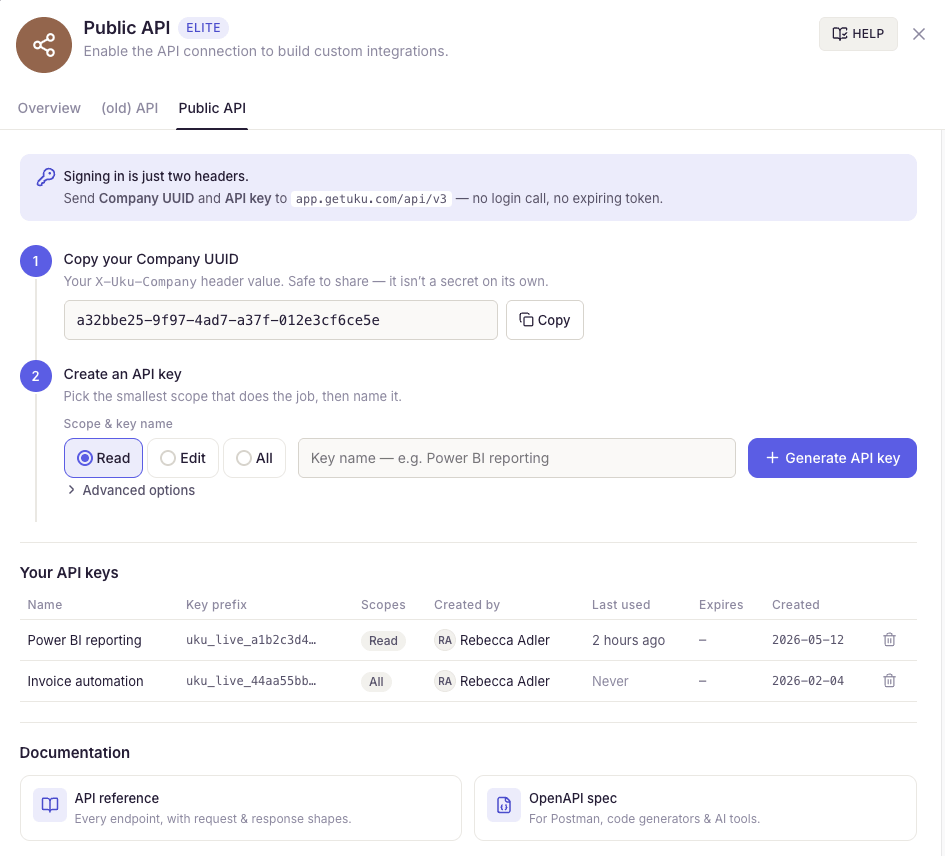
The Public API lives in Uku’s settings on the Elite plan, and only a Company Owner or Company Admin can enable it and create keys — regular Members can’t see them. Setup takes about a minute.
1. Copy your Company UUID. It’s the X-Uku-Company value every request sends. It isn’t a secret on its own, so it’s safe to hand to whoever builds the integration.
2. Create a scoped key. Pick the smallest scope that does the job — Read, Edit, or All — name it something you’ll recognize later (say, Power BI reporting), then hit Generate API key. Advanced options let you lock the key to an IP allowlist or an expiry date.
3. Copy the key once. The full key — it starts with uku_live_ — appears a single time, so store it in your secrets manager right away. If it ever leaks, revoke and rotate it in one click.
Every key is listed under Your API keys with its scope, who created it, and when it was last used — so access stays auditable and you can revoke any key instantly.
Getting started today
With a key in hand, you’re three steps from a live integration.
1. Make your first request.
curl https://app.getuku.com/api/v3/clients \
  -H "X-Uku-Company: your-company-uuid" \
  -H "X-API-Key: uku_live_..."
2. Grab the spec for your AI tooling. The docs are public — no key required:
curl https://app.getuku.com/api/v3/openapi.json > uku-openapi.json
curl https://app.getuku.com/api/v3/llms-full.txt > uku-llms.txt
Paste both into Claude Code, Cursor, Copilot or ChatGPT and it can author integrations that compile on the first try.
3. Subscribe to the events you care about — once webhooks ship. Today this endpoint returns 503 WEBHOOKS_COMING_SOON.
POST /api/v3/webhooks
{
  "url": "https://your-app.example.com/uku",
  "events": ["client.created", "task.updated", "invoice.updated"]
}
Once webhooks ship you will verify signatures and dedupe on X-Uku-Delivery-Id. Until then, poll.
Prefer productized connectors? Uku already integrates with Xero, e-conomic, QuickBooks and more — see the full integrations catalogue. The API is for the gaps: your own tools, your own agents, the workflows nobody else builds for your market.
A note on the bigger picture
Uku was founded nine years ago on a simple claim — that an accounting practice-management tool should act like a smart assistant, not a spreadsheet with buttons. The AI models needed to deliver on that claim finally exist. This API is how we let every accounting firm build its own version of that assistant, shaped to how their practice works, without writing a single line of Uku’s source code.
Shopify gave every merchant a customizable storefront without forcing them to hire an engineering team. Uku API v3 is the same move for accounting firms. Your tools, your agents, your client experience — running on our engine.
Want help scoping an integration? Book a call and we’ll walk through your use case. Curious about the rest of the platform first? See how Uku works or compare plans. Wondering what AI agents can do with this API? See what your AI can do with Uku →
Frequently asked questions
Does Uku have an API?
Yes. Uku Public API v3 is live on the Elite plan. It's a REST API at https://app.getuku.com/api/v3/ covering over 30 resources — clients, tasks, time entries, invoices, contracts and more — with read and write access, cursor pagination, and a machine-readable OpenAPI spec. Webhooks are coming but are not live yet.
Which Uku plan do I need to use the API?
The Public API v3 is available on the Elite plan. Only Company Owners and Company Admins can create and see API keys, once the Public API app is activated — regular Company Members cannot. Each key carries its own scopes, so you can hand an integration a narrowly permissioned key.
What can you build with the Uku accounting API?
Automated invoice drafting from time entries, client onboarding from a public business register, email-to-task triage, contract-renewal watchers, client-health scoring, and morning-briefing agents. With over 30 resources exposed over plain REST, most single-firm automations take one engineer under a week.
Is the Uku API built for AI agents?
Yes. v3 ships a machine-readable OpenAPI spec and an LLM-friendly llms-full.txt, so you can paste the docs into Claude or ChatGPT and have it author working calls. Scoped keys, optimistic locking on money records, and clear error codes make it safe for autonomous agents, not just humans.
Does the Uku API support webhooks?
Not yet. Webhooks are coming: /api/v3/webhooks currently returns 503 WEBHOOKS_COMING_SOON and no events are delivered. When they ship they will be HMAC-SHA256-signed (X-Uku-Signature: sha256=…) for events across clients, contacts, tasks, projects, invoices and time entries. Deliveries will retry after 1, 5 and 30 minutes and auto-disable after 10 consecutive failures, and creating a subscription will require a key with the All scope.
How is Uku API v3 different from v1.0?
v3 covers over 30 resources with full create, update and delete, uses simple two-header key auth with no expiring token, and ships interactive Swagger docs. The legacy v1.0 covered 16 resources, was mostly read-only, and used a key-plus-secret JWT that expired every 10 minutes.

Published Jul 23, 2026 · Updated Sep 10, 2026