




7 Best Aiwyn Alternatives for Accounting Firms (2026)
Compare 7 Aiwyn alternatives for accounting firms, from billing automation to free solo tools. Find the right fit by size, market, and budget.


Contents
- The Best Aiwyn Alternatives
- What is Aiwyn?
- How We Curated Our List of Aiwyn Alternatives
- 1. Uku: Best Aiwyn Alternative for Small and Mid-Sized Firms That Want Billing Automated From Tracked Time
- 2. Karbon: Best Aiwyn Alternative for Email-Driven Collaboration in Large Multi-Partner Firms
- 3. Financial Cents: Best Aiwyn Alternative for QuickBooks Online Firms That Want Ready-Made Workflow Templates
- 4. TaxDome: Best Aiwyn Alternative for US Tax Firms That Need a Native Tax Workflow Today
- 5. Ignition: Best Aiwyn Alternative for Proposal-to-Payment Automation Without Replacing Your Practice Stack
- 6. Pixie: Best Aiwyn Alternative for Growing Teams That Want Flat, Client-Count Pricing
- 7. Pascal Workflow: Best Free Aiwyn Alternative for Solo Practitioners and Micro Tax Firms
- The Final Verdict
Aiwyn is one of the fastest-growing companies in accounting firm technology. Founded in 2020 as a payments and collections tool, it has since expanded into what it calls “the first complete platform for modern accounting firms”, covering payments, practice management, client experience, and tax.
A $113M round led by KKR and Bessemer Venture Partners backs it, and it now serves 800+ firms, most of them mid-to-large US CPA practices.
But Aiwyn is built for IPA Top 500 firms. Its pricing is quote-only, it has no free trial or self-serve entry point, it focuses on the US market, and the core engine of its flagship tax product is still rolling out through a waitlist. Buying an enterprise platform for a smaller or international practice can feel like leasing a full office floor when you only need a few desks: everything works, but you pay for space and process you never use.
This guide looks at Aiwyn alternatives for accounting firms that want to:
Automate billing from tracked time, with transparent pricing and multi-language support
Run practice operations from a shared, email-centric workflow across a large team
Get started quickly with ready-made workflow templates and QuickBooks Online sync
Prepare, review, and e-file US tax returns inside their practice platform today
Automate the proposal-to-payment cycle without replacing their existing practice stack
Keep software costs flat while their team grows
Organize a solo or micro tax practice without paying anything
The goal isn’t to find a “better” platform than Aiwyn, but the right fit for your firm’s size, market, and priorities. Some firms will use these tools alongside parts of their existing stack; others will replace it entirely. Let’s start.
The Best Aiwyn Alternatives
| The Best Aiwyn Alternatives | |
|---|---|
 | Best Aiwyn Alternative for Small and Mid-Sized Firms That Want Billing Automated From Tracked Time We chose Uku because it ties time tracking, client contracts, and invoicing into one loop, so every billable minute lands on an invoice. Published per-member pricing, 12 languages, and a 14-day free trial make it available to firms that Aiwyn’s enterprise model doesn’t serve. |
 | Best Aiwyn Alternative for Email-Driven Collaboration in Large Multi-Partner Firms We chose Karbon because it brings Gmail and Outlook into its workflows, turning every client email into an assignable work item backed by conditional workflow automation. |
 | Best Aiwyn Alternative for QuickBooks Online Firms That Want Ready-Made Workflow Templates We chose Financial Cents for its 400+ pre-built workflow templates and two-way QuickBooks Online sync, which let small North American firms structure recurring work within hours. |
 | Best Aiwyn Alternative for US Tax Firms That Need a Native Tax Workflow Today We chose TaxDome because its tax production workflow (organizers, review, e-file, and delivery) has been live since 2017, alongside unlimited document storage and an all-in-one client portal. |
 | Best Aiwyn Alternative for Proposal-to-Payment Automation Without Replacing Your Practice Stack We chose Ignition because it turns signing the engagement letter and authorizing payment into a single client action, then collects every recurring invoice automatically. |
 | Best Aiwyn Alternative for Growing Teams That Want Flat, Client-Count Pricing We chose Pixie because it charges by the number of clients, not team members, so hiring doesn’t raise your software bill. |
 | Best Free Aiwyn Alternative for Solo Practitioners and Micro Tax Firms We chose Pascal Workflow because its free-forever plan includes a CRM, client portal, and patented Payment Lock document delivery designed for small tax practices. |
What is Aiwyn?
Aiwyn is an accounting firm management platform for mid-to-large CPA firms, typically those ranked within the IPA Top 500 in the US. It started in 2020 as a payments and collections tool. Through its December 2024 funding round and the acquisitions of Taxa and Digilence and QuickFee’s US payments business, it has grown into a four-pillar platform. Its key features include:
Aiwyn Payments: aging-based collections sequences, a one-click client payment portal for ACH and cards, engagement-letter-triggered autopay, compliant surcharges, and automatic payment-to-invoice reconciliation
Aiwyn Practice: time and expense, billing and AR, project management, client and contact management, and reporting on a single data model
Aiwyn Experience: a single client portal, request lists, and engagement letters that firms can batch-create up to 5,000 at a time
Aiwyn Tax: document requests, digital organizers, and return delivery with e-signature available today, plus a core engine for AI-enabled preparation, review, multi-user collaboration, and e-file, currently rolling out through a waitlist
“Pay Later” financing: access to QuickFee’s offering, where clients pay over 3-12 months while the firm is paid upfront
Integrations: connections to Sage Intacct, TR PracticeCS, CCH Axcess Workflow, Deltek, QuickBooks, HubSpot, Box, and others
SOC 2 Type 2 infrastructure across Engagements, with tokenized payment data
The core idea is consolidation. Because engagement letters, client portal activity, billing, and payments live on one platform, a client can sign an engagement letter, save a payment method in the same flow, and have future invoices collected automatically. Aiwyn supports this with a hands-on, CPA-led implementation (on-site “Moonlanders” plus a remote “Mission Control” crew), and it reports a Net Promoter Score of 77.
That said, Aiwyn is designed for large US firms with complex billing and the resources for a structured, sales-led rollout. Its practice management modules are newer than its payments product, its core tax engine isn’t broadly available yet, and it has no published pricing, free trial, or self-serve tier.
If your firm is smaller, operates outside the US, or wants to evaluate software on its own terms, you’ll likely find a better fit among the alternatives below. For the full picture, see our Aiwyn review, what we found out about Aiwyn pricing, and the head-to-head Aiwyn vs Uku.
Looking for practice management that turns tracked time into invoices automatically? Uku gives accounting firms task automation, time tracking, and billing in one calm, modular platform. Try free for 14 days, no credit card required.
How We Curated Our List of Aiwyn Alternatives
After researching Aiwyn and the accounting practice management market, we found that firms searching for alternatives usually fall into a few groups: they’re too small for an enterprise sales process, they operate outside the US, they need a proven tax workflow now, or they only need to fix one part of their operations. Aiwyn covers a lot of ground for large firms, but firms often need a better fit for:
Automating billing from tracked time and seeing client profitability in real time
Managing high volumes of client email inside a shared team workflow
Getting structured, recurring work running quickly with ready-made templates
Running the full US tax production cycle inside their practice platform
Automating proposals, engagement letters, and recurring payments without replacing other tools
Keeping software costs predictable as headcount grows
Organizing a solo practice with no software budget
Each tool on this list leads in one of these areas. You might use one to replace your current setup entirely or to fill a specific gap, depending on where your firm is today.
1. Uku: Best Aiwyn Alternative for Small and Mid-Sized Firms That Want Billing Automated From Tracked Time
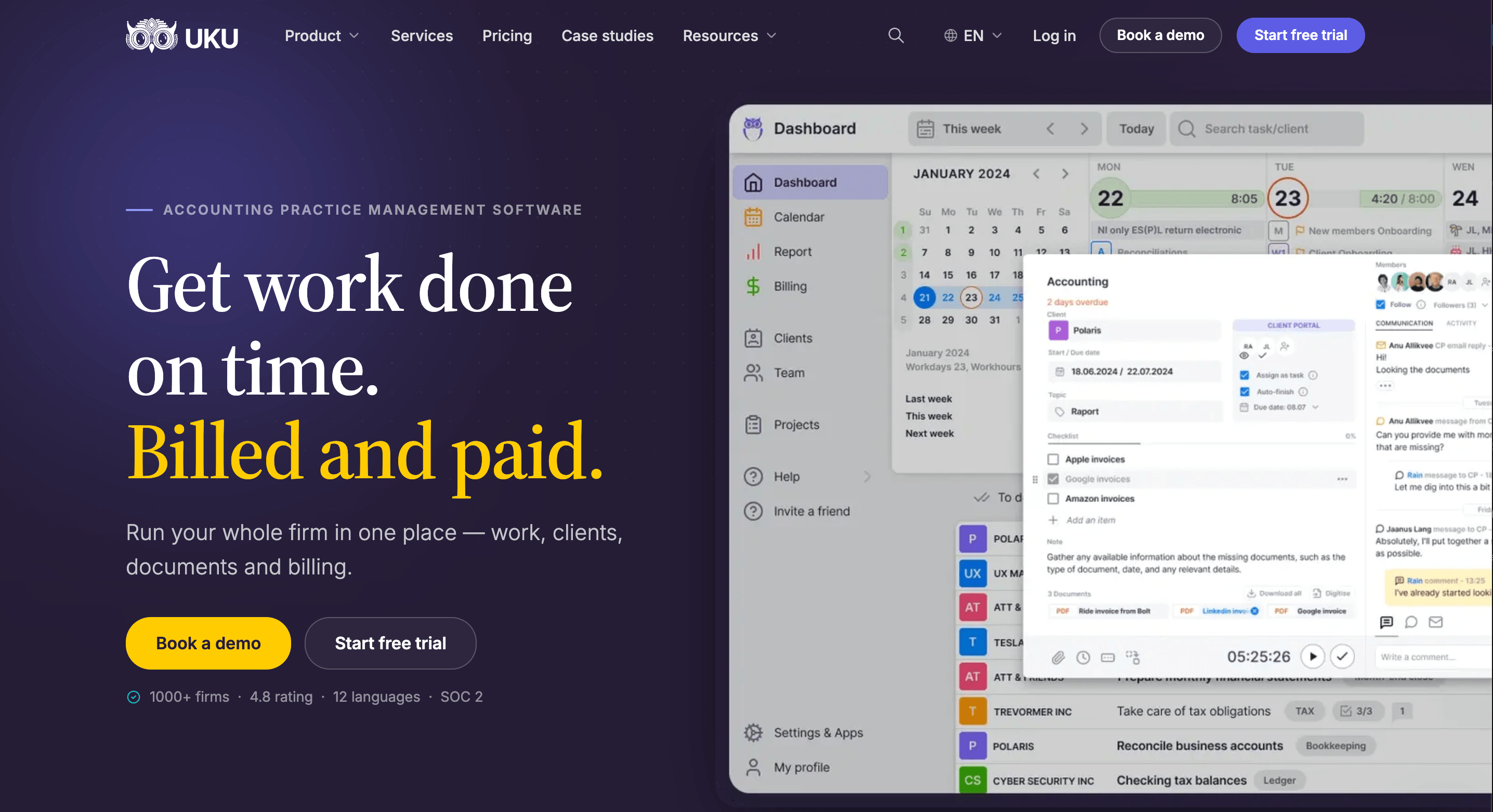
Uku is accounting practice management software built only for accounting, bookkeeping, and audit firms. It describes itself as “the single source of truth for accounting firms: full visibility over your team, clients, work, projects, and billing, so deadlines are met and nothing slips.”
Uku was built for international use from the start. It is bootstrapped, and 1,000+ accounting firms across 25+ countries use it. Its key features include:
Task management and workflow automation: recurring workflow templates place every client task on the right accountant’s dashboard on the right date
Time tracking: a one-click stopwatch, manual and bulk entry, and billable/non-billable defaults at the company and topic level
Automated billing: invoices generated from tracked time and client contracts, sent to QuickBooks, Xero, e-conomic, Merit Aktiva, and more, with paid status synced back
BI Reporting and agreements monitoring: BI Reporting with real-time profitability and budget insights, business analytics reports, and a real-time comparison of agreed vs. actual work for every client
Client management and portal: an accounting CRM with built-in AML compliance tracking and a client portal with company branding where client seats are free
Email, document, and workforce management: shared client email timelines, auto-organized cloud storage folders, and flextime, vacation, and attendance tracking
Aiwyn began as a payments and collections tool for IPA Top 500 firms and later added practice management. Uku was designed from day one around the daily rhythm of firms with roughly 5-50 people (plus sole practitioners on its Solo plan): recurring monthly, quarterly, and annual client work.
Its billing-first design ties time tracking directly to invoice generation. Its “calm by design” philosophy (90% of actions take one click) earned it a G2 Ease of Use score of 9.5 vs. a category average of 8.6.
Uku is also modular: firms start with just CRM and tasks, then add modules as they grow, instead of committing to a full platform rollout upfront. That means a firm can start working on day one. Firms moving off spreadsheets can work with their Excel file for an hour, import it into Uku, and have automated work plans ready to go, an approach Uku calls “from Excel to greatness.”
| Uku | Aiwyn | |
|---|---|---|
| Core focus | Practice management for accounting, bookkeeping, and audit firms, built around time-to-invoice billing | Payments, practice management, client experience, and tax for mid-to-large CPA firms |
| Billing approach | Invoices generated automatically from tracked time and client contracts | Payments-first: automated invoice delivery, aging-based reminders, and reconciliation |
| Reporting and profitability | BI Reporting with real-time profitability and budget status, business analytics reports, and agreements monitoring | Real-time analysis of project, client, and employee performance |
| Client portal | Included on all plans; client contacts don’t count as paid seats | Single client portal within Aiwyn Experience |
| Tax preparation | No built-in tax engine; supports tax-season workflows and billing | Aiwyn Tax: gather, sign, and deliver live; core tax engine rolling out through a waitlist |
| Languages and regions | 12 interface languages and multi-currency; used in 25+ countries; EU data hosting in Frankfurt | US-focused |
| Security | SOC 2 Type I; TLS 1.3 and AES-256 encryption; GDPR compliant | SOC 2 Type 2 (Engagements); tokenized payment data |
| Pricing model | Published, per member per month; monthly or annual billing | Quote-based |
| Starting price | From $19/mo (Solo, billed annually) | Not published |
| Free trial | 14-day free trial of the full Elite plan, no credit card | Not offered; demo only |
| Best for | Firms of 5-50 people that want billing, workflow, and profitability insights in one modular platform that’s quick to deploy | IPA Top 500 US firms prioritizing payments, collections, and consolidating tools under one enterprise contract |
Why Choose Uku Over Aiwyn for Billing Automation and Practice Management
Aiwyn excels at what happens after an invoice exists: delivering it, chasing it, and reconciling the payment. Uku focuses on everything upstream, making sure the work is scheduled, done, tracked, and billed in full. As Uku puts it: “The bottleneck was never the invoice, it was everything upstream.” The sections below show where Uku does more.
Time Tracking: Capture Every Billable Minute Before It Disappears
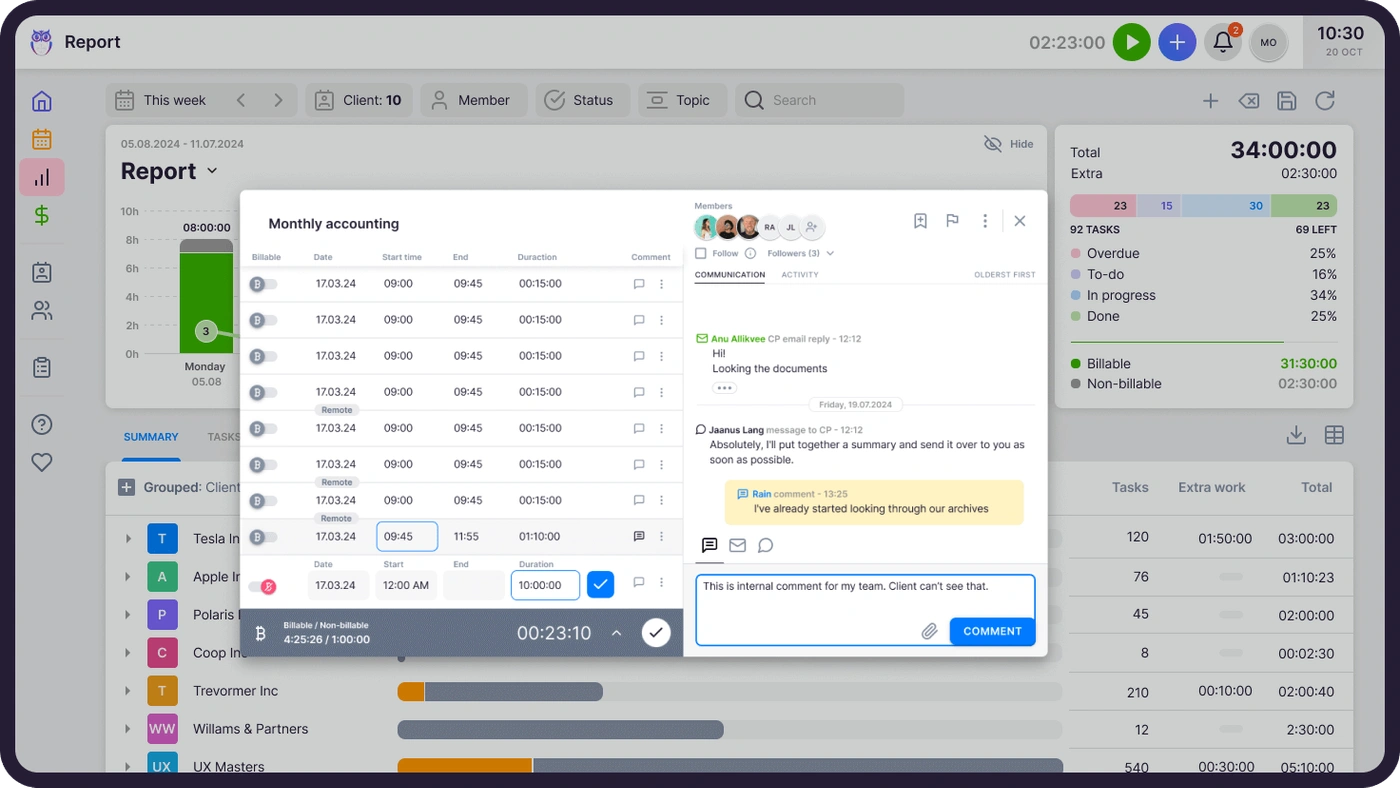
Accounting firms rarely lose revenue because people avoid work; they lose it because quick calls, five-minute emails, and small advisory moments never get recorded. Uku’s Time Tracking removes that friction.
Source: Uku
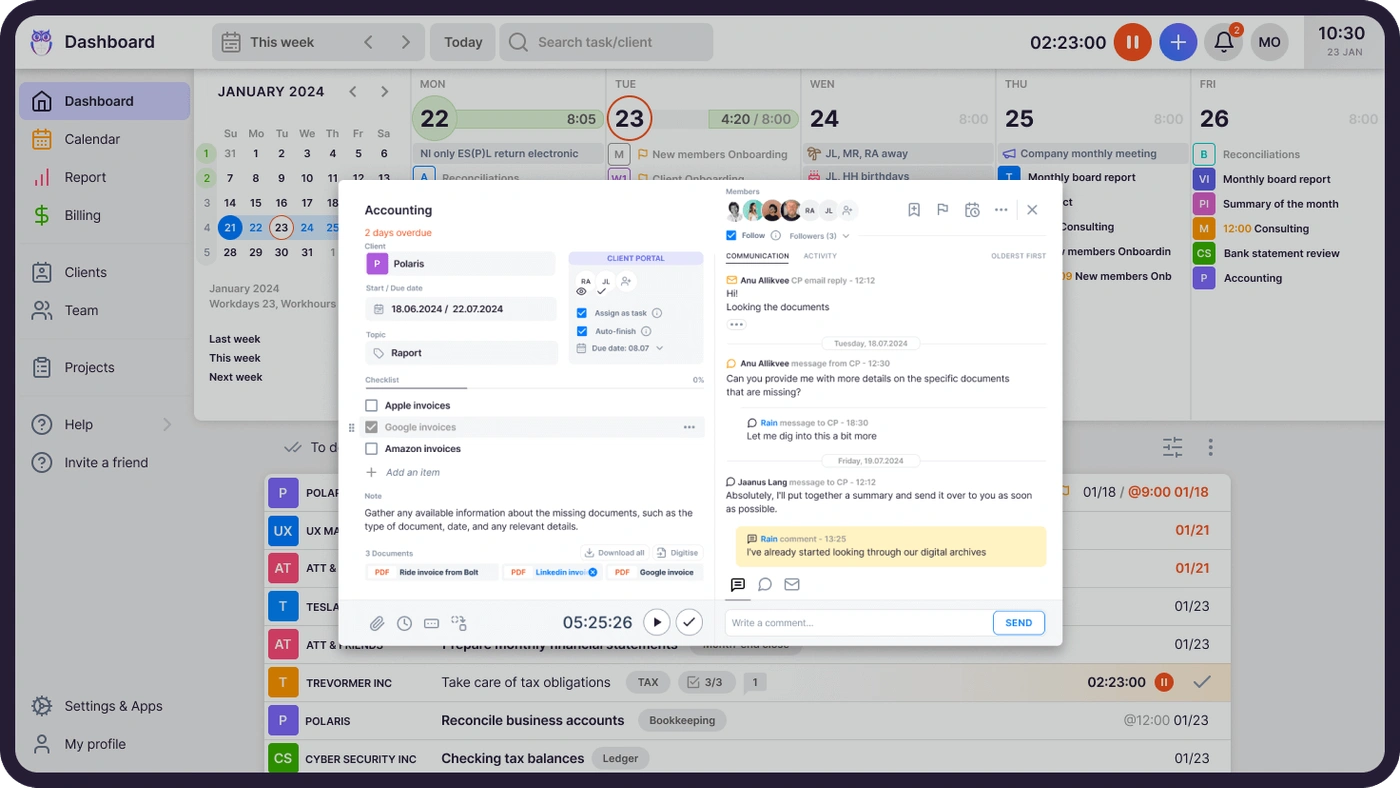
Uku captures time at the task level, so it ties every entry to a client and a piece of work automatically. Users can start a stopwatch from any task (a header widget follows them across every screen), enter time manually, or use bulk time entry to log time across several tasks at once. A smart time entry feature suggests each new entry’s start time based on when the last one ended. Uku also offers:
Magic Buttons: up to 8 one-click shortcuts that create a task and start its timer at the same time, useful for an unexpected client call
The Mini Uku browser plugin, which lets you add tasks and track time from any website
Offline mode, which keeps tracking without connectivity and syncs on reconnect
Mandatory time entries (Elite+), which block a task from being completed until someone logs time
Time entry locking, which closes weekly or monthly periods, mirroring accounting period-close discipline
Aiwyn Practice also handles time and expense well: you can drag and drop time to a calendar or log multiple entries from a list view, tie time to projects and tasks, and use admin controls for period close.
The difference is that Uku makes capture easier and enforceable for everyday accounting work, and sends that time straight to the invoice. As Uku states: “Other tools track time. Period. Uku tracks time AND generates the invoice.”
JA&CH Konsultacijos raised its billable hours by up to 20% simply by tracking all of its tasks in Uku. (JA&CH Konsultacijos case study)

Automated Billing: Turn Tracked Time Into Invoices in Minutes
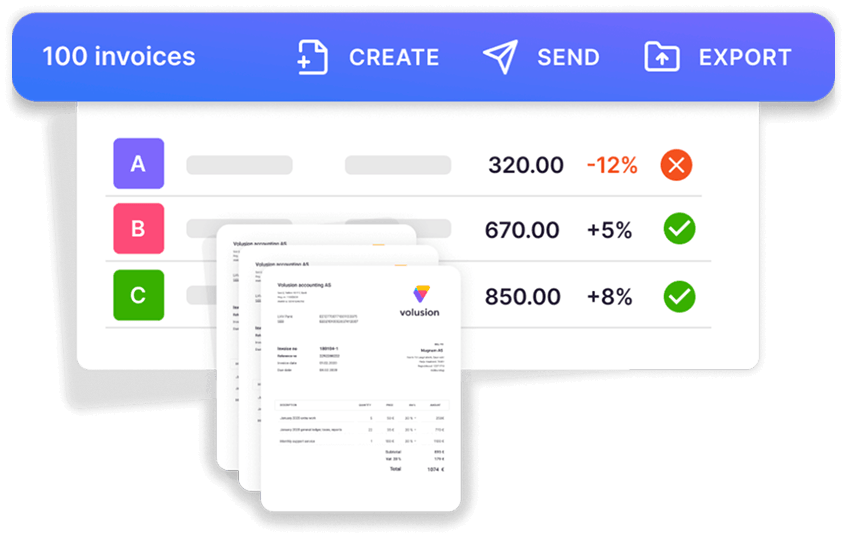
Many firms dread end-of-month billing more than any other task. Uku’s Billing module automates the chain from tracked time to sent invoice, so “nothing slips through unbilled; every billable minute is captured automatically.” Uku cuts monthly invoice preparation for 100+ clients from two to three days to about 30 minutes.
Source: Uku
Here’s how it works. You create products (invoice line items) using six product types: hourly, fixed price, per-piece, member billable rate, combined, and task-triggered. You then connect products to clients through contract templates that you build once and customize per client, using time, fixed, volume (with price-range levels), or mixed pricing in a single contract.
When the billing period closes, Uku reads each contract, pulls the tracked time and custom values, applies your rounding and minimum time rules, and generates draft invoices. You can set rounding rules by entry, team, client, or month, so Uku can bill a one-minute unplanned call as 15 minutes automatically.
From there, invoices move through a Draft, Approval, Created, Sent, and Paid lifecycle with bulk actions. You can:
Send invoices from your own company email domain and in each client’s preferred language
Export them to QuickBooks, Xero, e-conomic, or Merit Aktiva, with paid status synced back
Send up to 3 rounds of automatic debt reminders
Bill a parent company for work across subsidiaries, split revenue across team members, and issue prepayment invoices
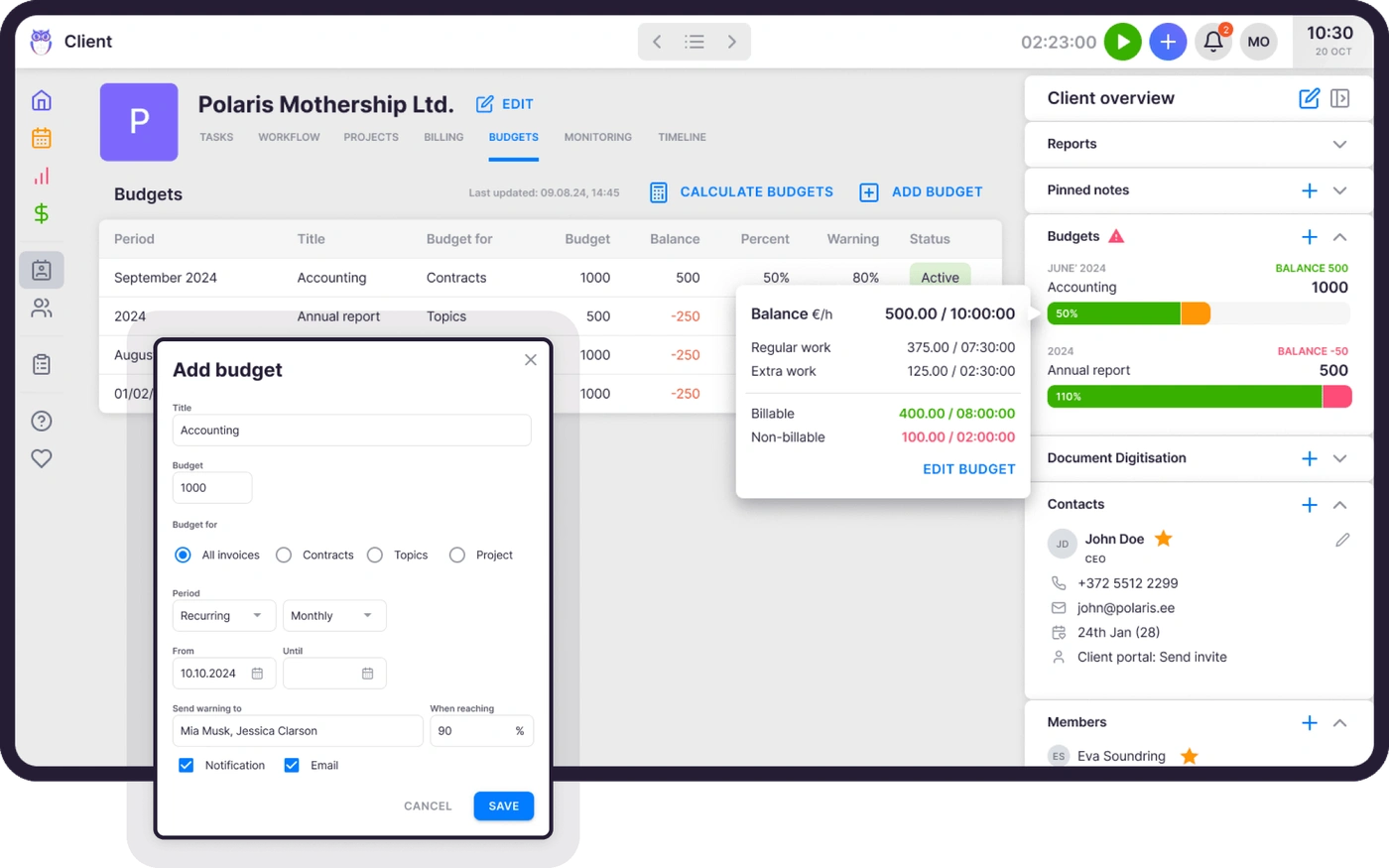
Use Client Budgeting to track progress against an agreed monthly budget with real-time alerts
Source: Uku
The task-triggered product type is useful: a fee fires automatically when a task reaches a defined status, so flat-fee services and completion charges get billed without anyone remembering to add them.
Aiwyn approaches billing from the other end. Aiwyn Payments automatically delivers invoices, runs aging-based reminders, offers a client payment portal for ACH and cards, and matches payments to invoices, and Aiwyn Practice offers automated invoicing based on fixed schedules or work milestones.
If your biggest pain is collecting on invoices you’ve already sent, Aiwyn’s payments depth (including surcharging and access to Pay Later financing) is a strength. But if your bottleneck is preparing accurate invoices from the work your team did, Uku closes that loop without exports, imports, or reconciliation spreadsheets.
Aaroni Accounting Services cut invoice preparation from 1-2 days to 15 minutes and served 38% more clients after one year with Uku. (Aaroni Accounting Services case study)

BI Reporting and Agreements Monitoring: Know Which Clients Are Profitable Before Month-End
Most accounting firms price on fixed monthly agreements, and the common failure is quiet scope creep: a client starts consuming more work than their fee covers, and nobody notices until the month is over. As Uku asks: “Do you know how profitable your clients are?”
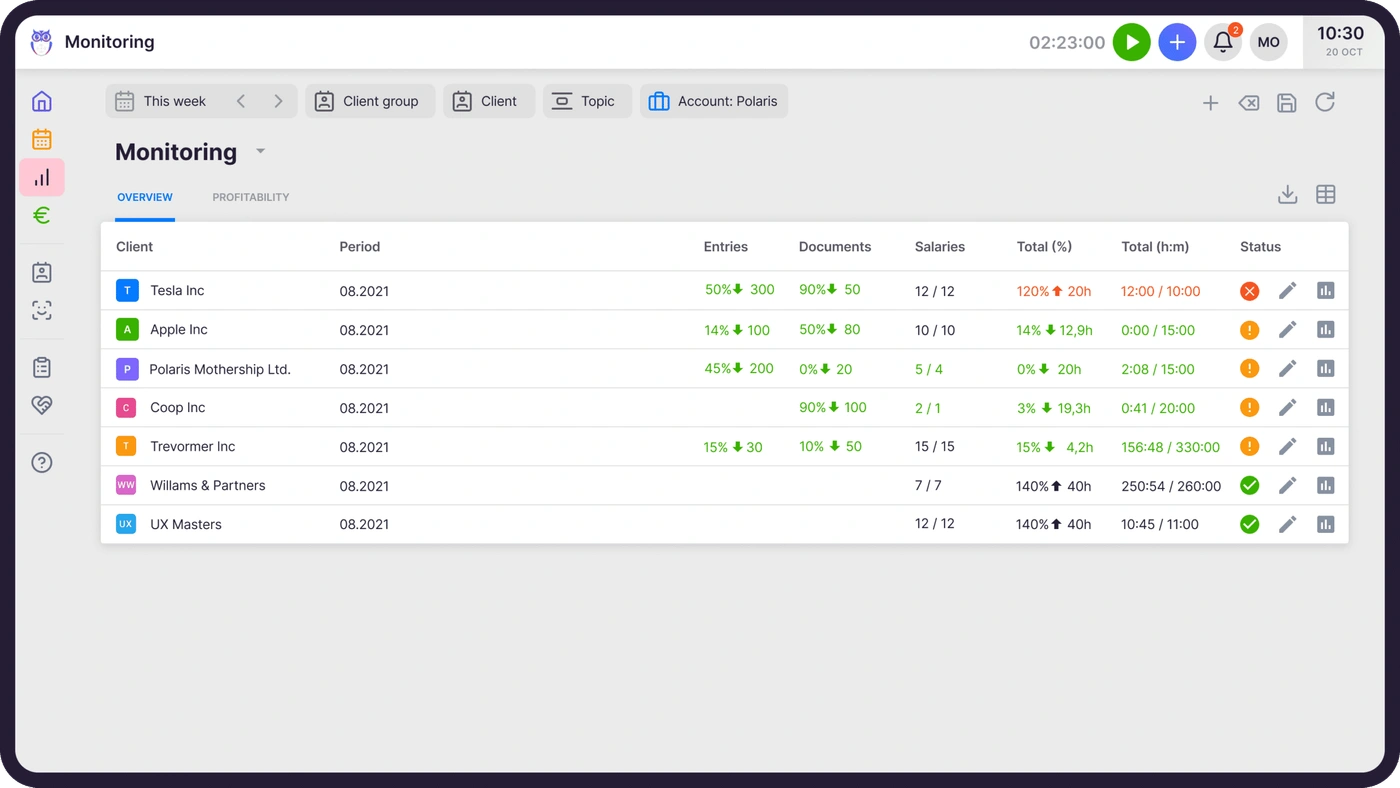
Uku’s Agreements Monitoring compares the work agreed with the work done, in real time, for every client at once. You enter each agreement with the metric to monitor (hours, or volume such as documents processed, payroll runs, or VAT filings) and an allowed fluctuation percentage.
Source: Uku
Uku then reads time entries and the document log continuously and shows every client with a traffic-light signal: green for on track, orange for approaching the limit, and red for over-fulfillment. You can set up all clients at once, which Uku describes as “easier than filling an Excel sheet.”
For deeper analysis, Uku’s business analytics reports break down time by client, employee, task, and topic, compare time used against fees charged, and flag gaps and overlaps in individual timesheets. Because Uku tracks both sales prices and cost prices, you can see whether an employee who costs €30/hour and bills at €45/hour is profitable on each client.
On the Elite plan, BI Reporting adds real-time visual reports with detailed filters, saved report templates, and three levels of depth (summary, tasks, and time) across Production, Revenue and Profitability, Utilization and Capacity, Billing and Payments, Budgets, and Monitoring.
Its health signals alert you to problems and, on click, filter the table to affected rows. Uku reports that firms discover ~20% more billable revenue by spotting underpriced agreements in this data.
Aiwyn Practice offers real-time analysis of project, client, and employee performance and integrates with third-party analytics tools. Uku builds BI Reporting into the platform, so you don’t need a separate BI license. Its business analytics reports measure profitability against each client’s actual agreement, so you spot losses in real time instead of 30 days too late.
“Uku has given our company data which we use monthly to make our pricing decisions,” says Jaanus K. of CHK. (Uku Business Analytics)

Workflow Automation: Never Miss a Recurring Client Deadline
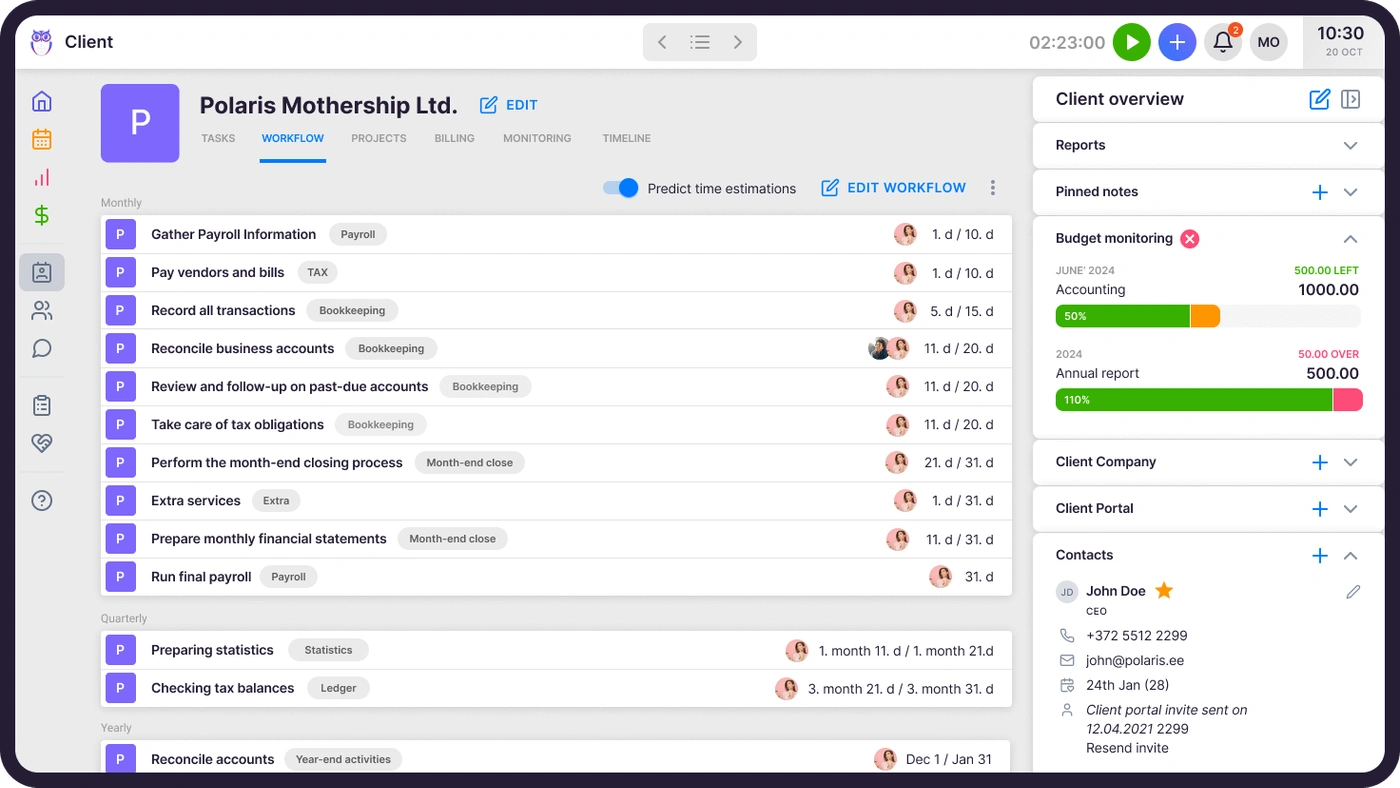
Someone has to organize recurring client work (monthly bookkeeping, quarterly VAT, annual year-end) every cycle. With Uku’s template-driven automation, you define each service once and assign it to a client, and Uku creates, assigns, and schedules all future tasks. Uku reports that firms save ~30% of their time through recurring tasks, automated email reminders, and reusable templates.
Source: Uku
Each client gets a permanent work plan built from your templates. Recurrence options cover weekly, monthly (fixed date or working-day logic), quarterly, yearly, and custom schedules, and Uku moves tasks that fall on weekends or holidays to before or after the day off.
You can also anchor recurring tasks to client date fields like fiscal year-end or payroll date, so automation follows each client’s own calendar. Other automation includes:
Task dependencies that keep a task hidden until its prerequisite is done
Template update propagation that pushes changes to every client task derived from a template
Task email automation that carries forward to every future recurring occurrence without reconfiguration
Bulk reassignment that moves a colleague’s tasks to a substitute during an absence and back when they return
A ready-made template library for monthly bookkeeping, bi-weekly payroll, year-end review, and more
Aiwyn Practice offers reusable project templates with auto-populated roles, tasks, and scheduling rules for recurring engagements. Uku’s depth lies in recurrence logic designed for accounting calendars, and in showing tasks on the dashboard only when it’s time to work on them.
Sandgrav Solutions saved 20% of its time on task management and had its full 16-person team using Uku within one week. (Sandgrav Solutions case study)

Client Portal: A Branded Workspace Your Clients Can Open in One Click
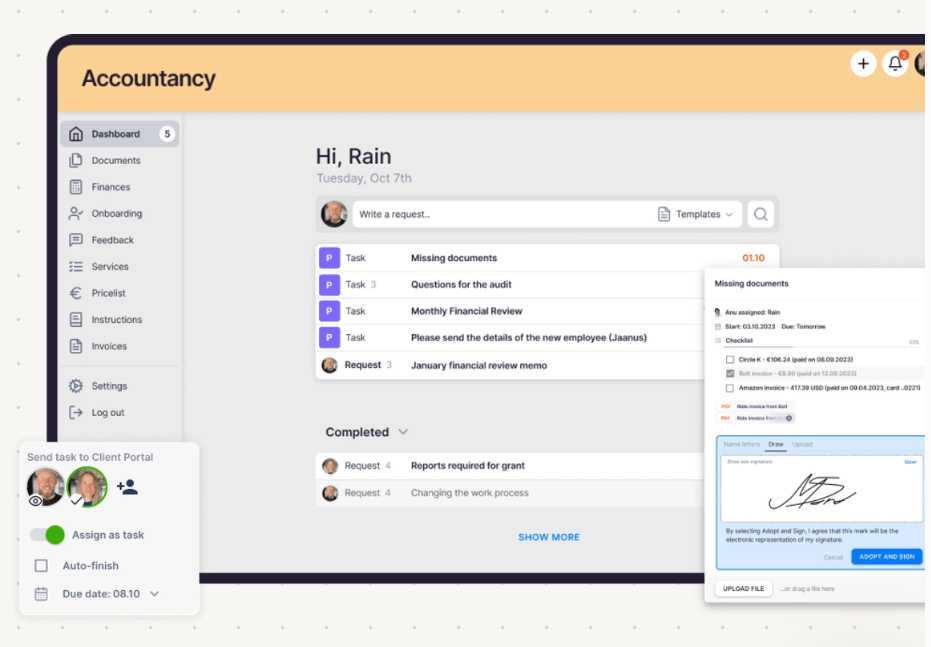
According to Uku, accounting firms spend up to 30% of their working day chasing documents and managing scattered client threads. Uku’s Client Portal gives each client one branded place to see their tasks, upload requested documents, message the firm, and sign agreements electronically.
Source: Uku
Clients log in through a magic link with no username or password. The link is valid for seven days, and you can resend it anytime. You can add your logo, colors, and welcome video, and create a unique menu for each client. In traditional portals, you have to connect tickets to work items; Uku’s portal shows the same task on both sides.
Clients and accountants work on one item, with all communication, documents, logs, and time tracking in one place. Automated reminders chase outstanding items, and you can digitize uploaded files in one click and push them into QuickBooks or Xero. Most important for small firms, every plan includes the portal, and client contacts never count as paid seats.
Aiwyn Experience also offers a single client portal with magic-link access, engagement letters, request lists, invoices, and payments under one login, which suits large firms consolidating many service-line tools. Uku’s portal ties directly to the task workflow your team already uses, and every plan includes it, starting with Solo ($19/month with annual billing).
Multi-Country Practices: Work in 12 Languages With EU Data Residency
Aiwyn focuses on US accounting firms; even its QuickFee acquisition covered only the US payments business. Uku was built for international use from the start, and 1,000+ firms in 25+ countries use it. If your firm serves clients across several countries or currencies, Uku was built for that.
The platform is available in 12 languages: English, German, Spanish, Danish, Swedish, Finnish, Polish, Bulgarian, Ukrainian, Lithuanian, Latvian, and Estonian. Invoices go out in each client’s preferred language, and email template translations send the same template in whichever language the client’s profile specifies. Multi-currency support lets you bill each client in their own currency.
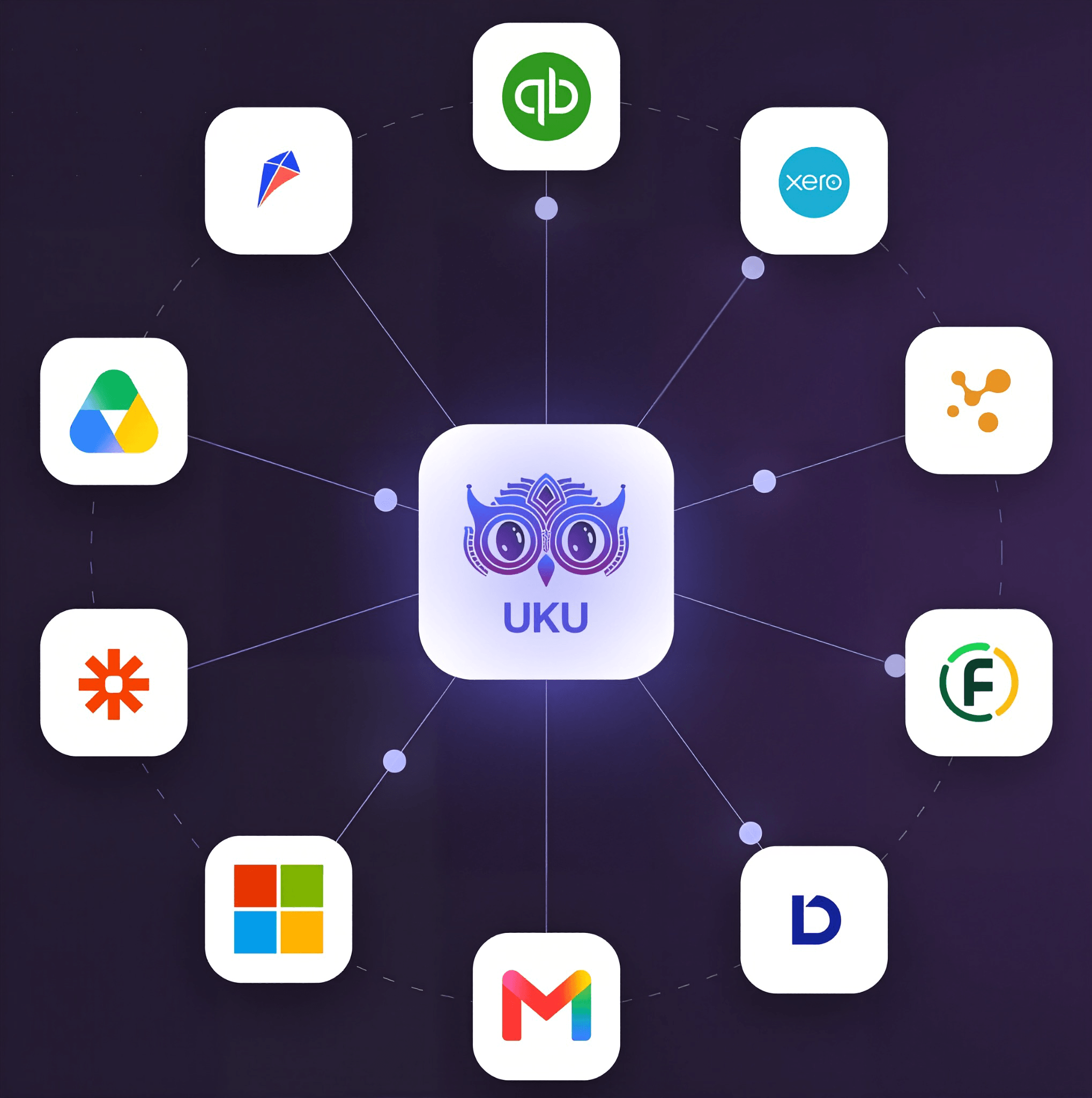
Native integrations cover European accounting software like e-conomic, Merit Aktiva, Fortnox, Tripletex, FreeAgent, and 360 Księgowość, plus business registry lookups like Companies House in the UK.
Source: Uku
On security, Uku is SOC 2 Type I audited, with production servers hosted in Frankfurt, Germany, TLS 1.3 encryption in transit, AES-256 encryption at rest, MFA, and GDPR compliance. Its hosting provider holds SOC 2 Type II and ISO/IEC 27001. Firms whose procurement requires vendor-level SOC 2 Type II should note that Aiwyn describes its Engagements module as running on SOC 2 Type 2 compliant infrastructure.
Uku Pricing
Uku publishes per-member pricing with both monthly and annual billing. Only firm staff count as seats; clients who use the portal are free. Annual billing saves ~23%. Prices are available in €, $, and £, with VAT added on top.
Solo: A full one-person tool, not a stripped-down preview. Solo includes integrated billing, a shared Client Portal, AML tools, e-signatures inside tasks, and all accounting integrations, plus CRM, time tracking, workflow automation, Magic Buttons, agreements monitoring, email management, document management, and client budgeting. It costs $19/month with annual billing or $25/month with monthly billing (16€ or 21€), for 1 user (no team members) and up to 20 active clients.
Team: $38/member/month (annual) or $49 (monthly). Adds unlimited members and clients, shared clients and tasks, user roles and access management, and one-on-one training.
Elite (Most Popular): $48/member/month (annual) or $62 (monthly). Key capabilities include Client Budgeting and Document Management. Elite also adds BI Reporting, Workforce Management, Public API, Zapier (5,000+ apps), Google Drive/Dropbox/SharePoint integration, mandatory time entries, flextime reporting, and a full audit log with deleted task restore.
Enterprise: $88/member/month (annual) or $99 (monthly). Adds custom integrations built by Uku, a dedicated account manager, a tailor-made team workshop, and pay-by-invoice.
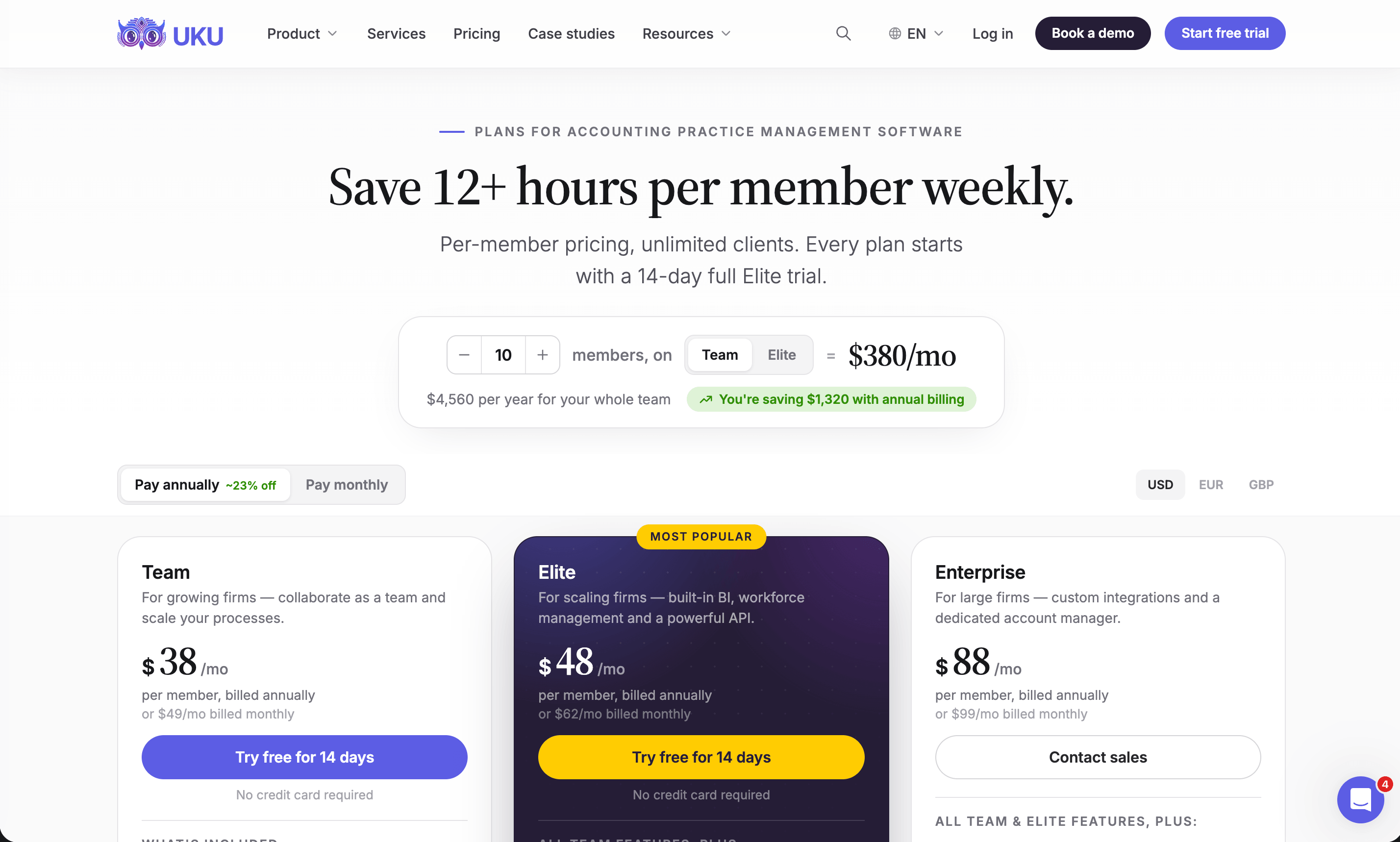
Every new account starts with a 14-day free trial of the full Elite plan, no credit card required, so you can evaluate the complete feature set with real client data before picking a tier. Monthly billing lets firms test Uku without a large upfront annual commitment, and you can cancel anytime. Every plan includes client import from Excel or your accounting software; assisted import comes with Enterprise.
The first 90 minutes of onboarding help are free; optional onboarding packages start at $700 for small teams (up to 4 members) and $2,000 for medium teams (up to 15 members). A few details worth knowing: Team doesn’t include Client Budgeting (Solo and Elite do), Team keeps audit logs for 1 day, and Uku doesn’t support downgrading from Team or Elite to Solo.
Who Should Use Uku?
Choose Uku if:
You run an accounting or bookkeeping firm of roughly 5-50 people, you manage recurring client work in Excel and Outlook, and you want deadlines, time tracking, and billing in a system your team will enjoy using.
Month-end billing eats days of your team’s time, and you want Uku to generate invoices from tracked time and client contracts in about 30 minutes, with real-time signals showing which clients consume more work than their fee covers.
You want to adopt software step by step, starting with only the modules you need on day one rather than a full platform rollout.
Your firm serves clients in multiple countries, languages, or currencies, and you need localized invoices and emails, integrations with international accounting software, and flexible monthly pricing rather than an annual commitment.
Ready to stop losing billable time and spending days on invoicing? Try free for 14 days and see how quickly your firm can go from tracked time to sent invoices, or book a demo.
2. Karbon: Best Aiwyn Alternative for Email-Driven Collaboration in Large Multi-Partner Firms
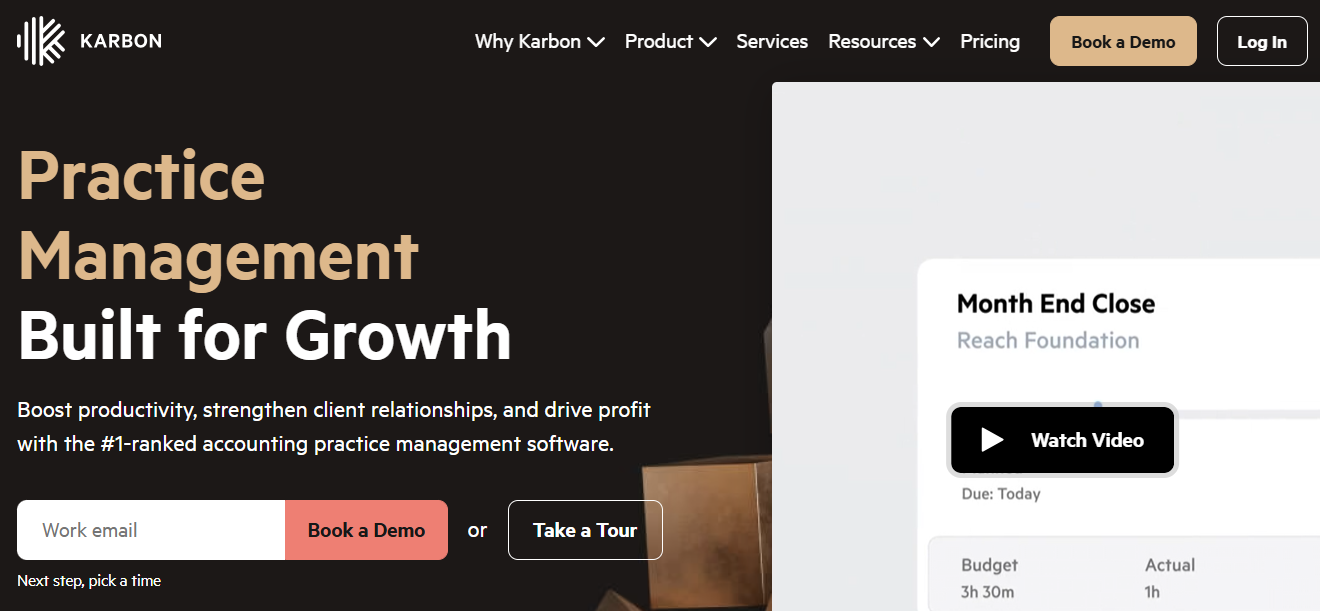
Karbon is an accounting practice management platform that puts email at the center of firm operations, turning every client message into a trackable, assignable work item. Its key features include:
Email triage that connects Gmail and Outlook directly to jobs and team members
AI email summaries and draft generation
Multi-step workflow automation with conditional triggers and role-based routing
Karbon Analytics dashboards for productivity, time vs. budget, and client revenue
Integrations with Microsoft 365, Microsoft Teams, Google Workspace, Xero, and QuickBooks
A client portal, billing and payments, time and budgets, eSignatures, and document management
Karbon suits firms with 20 or more staff where Gmail or Outlook is the main channel between staff and clients.
Why Choose Karbon Over Aiwyn for Email-Native Practice Management?
Karbon stands out in the following areas:
- Email Built Into the Workflow
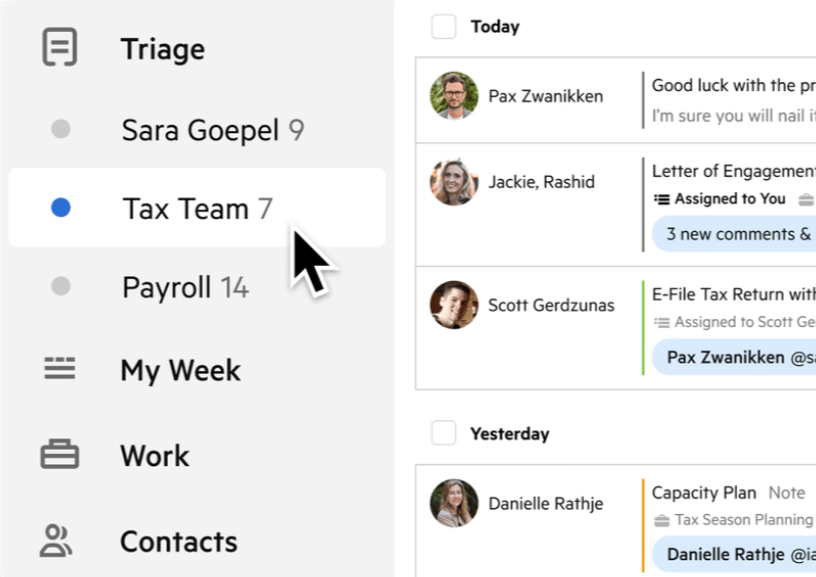
Aiwyn’s platform centers on billing, collections, engagements, and practice records, and it handles client communication through its portal rather than your team’s inboxes. Karbon connects Gmail and Outlook directly to its workflows: it threads every client email into a shared audit trail, links it to the relevant client and job, and makes it available for assignment or internal comments.
Shared Triage lets colleagues work shared addresses like info@ side by side, starting at $10/month per shared inbox. Karbon reports that email management alone saves 3 hours per employee per week.
Source: Karbon
- A Deep, Independent Review Record
Aiwyn has little independent review coverage on G2 and Capterra so far. Karbon holds a 4.8/5 on G2 across 788+ reviews and a 4.7 on Capterra, and G2 has named it a Leader in Accounting Practice Management for 20 consecutive quarters.
40,000 accounting professionals across 34 countries use it, and they completed 5.5 million jobs in 2024, which gives evaluation teams plenty of third-party feedback to review.
- Mature, Conditional Workflow Automation
Aiwyn Practice runs on a single data model with project templates, but its practice management layer is relatively new. Karbon’s two-tier Automators (practice-wide Global Automators plus “if this, then that” Tasklist Automators) and conditional workflow support let a tax job follow a different path than a bookkeeping job automatically.
Its free template library covers multiple regions and accounting software ecosystems, from Tax Compliance to Client Accounting Services.
Karbon Pricing
Karbon uses per-user pricing with annual and monthly billing:
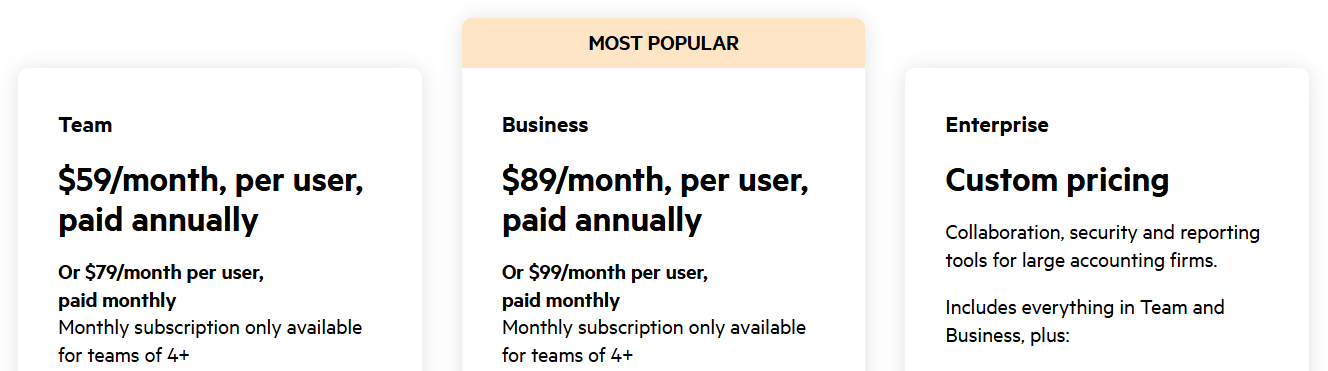
Team: $59/user/month (annual) or $79 (monthly). Includes email Triage, collaboration, workflow, time tracking, billing and payments, and a basic client portal, with 40 work templates. Automatic client reminders, Tasklist Automators, and ecosystem integrations require Business.
Business: $89/user/month (annual) or $99 (monthly). Adds automatic client reminders, conditional task automation, all ecosystem integrations, 75 templates, advanced Work Insights, and API access.
Enterprise: Custom pricing with unlimited templates and teams, Email Insights and team training included, a dedicated Customer Success Manager, guided migration, and 24/7 priority support.
Add-ons include Email Insights ($10/user/month on Team and Business) and Custom Reporting (from $6,000 one-time); Power BI reporting needs a separate Power BI license from $14/user/month. Payment processing costs 2.6% + $0.30 for cards and 1% + $0.30 (max $5) for ACH. Karbon doesn’t refund annual plans cancelled early.
Who Should Use Karbon?
Choose Karbon if:
Your firm has 20+ staff and email is the main channel for client and team communication, so you want inbox management and workflow management to be the same thing.
You run multi-partner, multi-service-line operations and need real-time visibility into every job, client, and team member.
You work inside the Microsoft or Google ecosystem, or you’re standardizing workflows across acquired firms through Karbon’s Private Equity and M&A program.
See also our Karbon review, Karbon pricing and Karbon vs Uku.
3. Financial Cents: Best Aiwyn Alternative for QuickBooks Online Firms That Want Ready-Made Workflow Templates
Financial Cents is a cloud-based practice management platform for small to mid-sized accounting, bookkeeping, and CPA firms, and it calls itself the “#1 Accounting Practice Management Software.” Its key features include:
400+ pre-built workflow templates for accounting, bookkeeping, tax, and payroll
A passwordless, magic-link client portal
One-click time tracking with per-client billable rates that convert into invoices
Two-way QuickBooks Online sync for clients, invoices, and payments
Zapier integration (Scale plan) with 5,000+ apps
SOC 2 Type II certified infrastructure
Financial Cents suits US and Canadian firms with 1-30 staff that run on QuickBooks Online and want structured workflows running quickly, without a vendor-led implementation.
Why Choose Financial Cents Over Aiwyn for Template-Driven Small-Firm Workflows?
Financial Cents excels in the following areas:
- 400+ Ready-to-Use Workflow Templates
Aiwyn’s standard rollout is a structured, multi-week implementation led by its on-site and remote teams, which suits large firms but not a five-person bookkeeping practice.
Financial Cents was founded in 2020 for firms that found existing tools “clunky, outdated, and overly complex.” Its templates cover monthly bookkeeping, 1040s, 1099s, payroll, and onboarding, so firms can import a client list and schedule recurring work within hours.
- Two-Way QuickBooks Online Sync With Built-In Billing
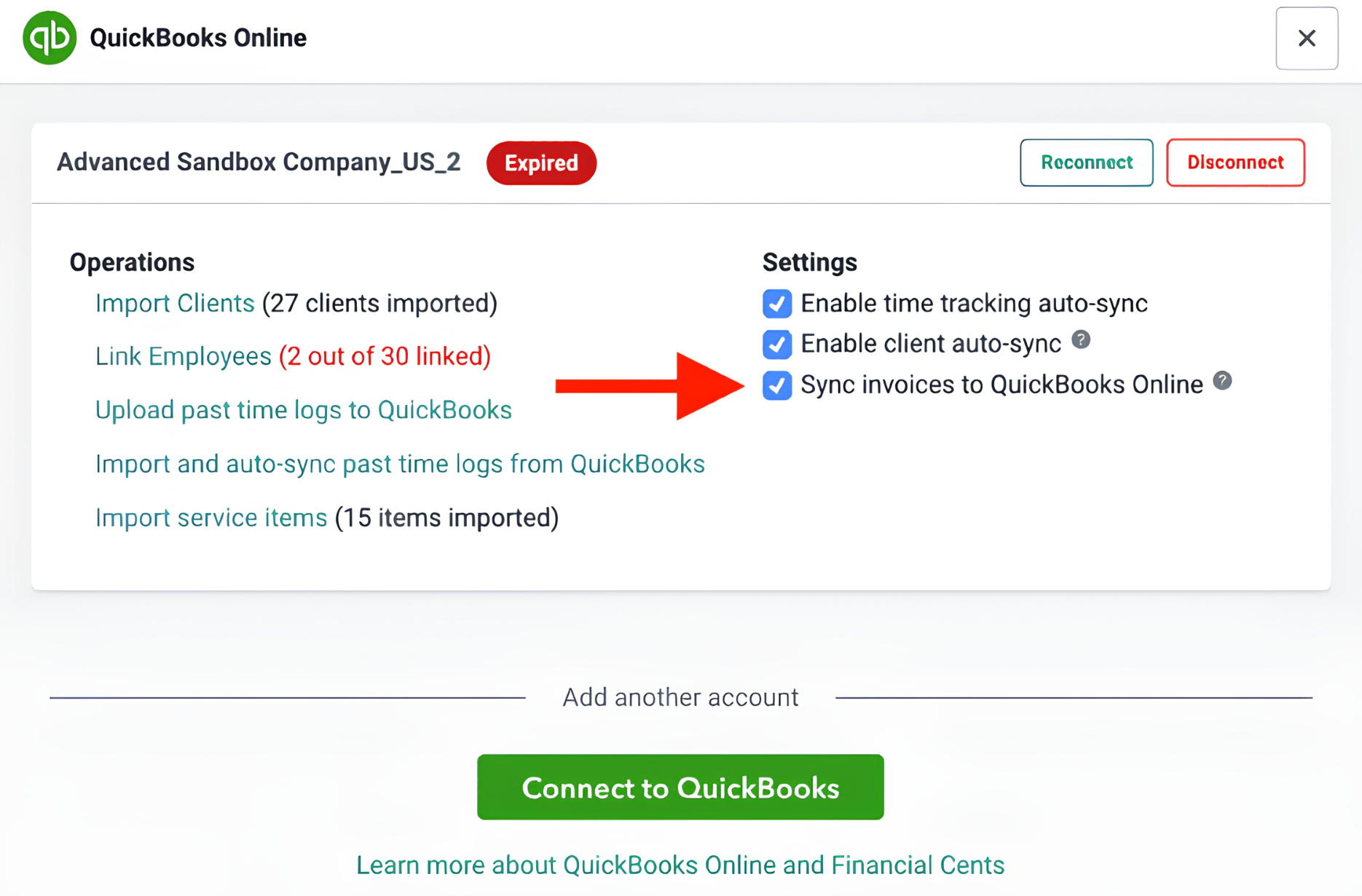
Aiwyn connects to QuickBooks mainly to turn QBO invoices into a guided payment experience. Financial Cents builds time tracking tied to invoicing and billing and payments with two-way QuickBooks Online sync into the workflow tool, so client records and invoice statuses stay aligned without a separate invoicing platform.
Source: Financial Cents
- All-in-One Consolidation for the Small-Firm Stack
One subscription covers workflow, a passwordless client portal, e-signatures, proposals and engagement letters, a CRM with an encrypted password vault, and document management. Financial Cents claims this saves firms $19,000 per team member per year in tool costs and credits its portal with 6x faster client responses.
- Published Pricing and a Full-Featured Trial
Unlike Aiwyn’s demo-only model, Financial Cents lists every plan on its pricing page and offers a 14-day free trial with no credit card required. The platform holds 4.8 stars on Capterra and G2, earned Capterra’s Best Ease of Use badge for 2025, and made the Inc. 5000 list in 2025.
Financial Cents Pricing
Financial Cents uses per-seat pricing, and annual billing saves up to 30%:
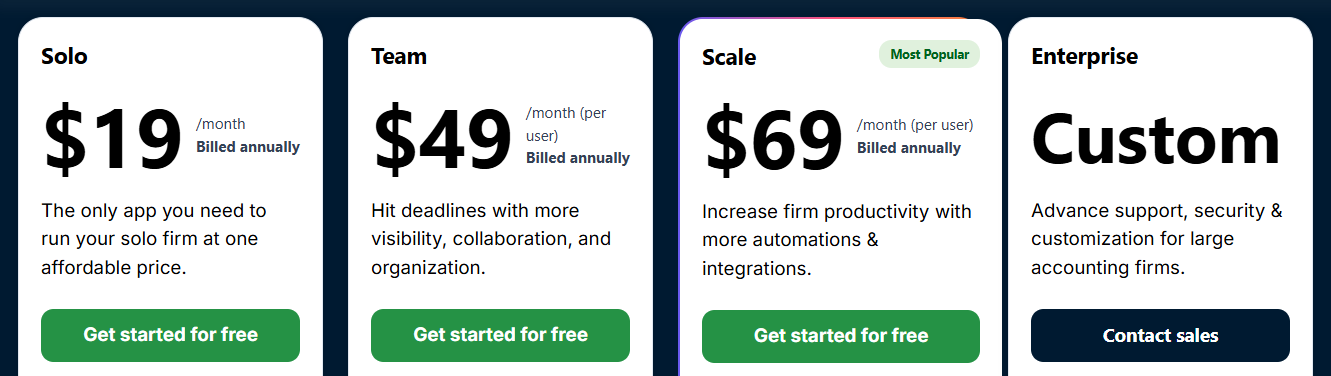
Solo: $19/month (1 user, annual). Includes workflow, client portal, time tracking, billing, QBO integration, proposals, and e-signatures.
Team: $49/user/month (annual) or $69 (monthly, 5-user minimum). Adds Gmail/Outlook integration, unlimited custom fields, client groups, and tags.
Scale (Most Popular): $69/user/month (annual). Adds task dependencies, automations, Zapier, shared inbox, Google Drive and OneDrive integration, branded portal, profitability reports, and open API.
Enterprise: Custom pricing with IP whitelisting, enforced 2FA, custom permissions, webhooks, and a dedicated customer success manager.
Financial Cents doesn’t refund annual subscriptions pro-rata on cancellation.
Who Should Use Financial Cents?
Choose Financial Cents if:
You run a 1-30 person US or Canadian firm and want pre-built templates for bookkeeping, tax, and payroll so recurring work is structured from day one.
QuickBooks Online is the backbone of your client work and you want two-way billing and client sync inside your workflow tool.
You’re replacing spreadsheets, email threads, and standalone e-sign and invoicing tools, and want to test everything on real client work before buying.
See also our Financial Cents review, Financial Cents pricing and Financial Cents alternatives.
4. TaxDome: Best Aiwyn Alternative for US Tax Firms That Need a Native Tax Workflow Today
TaxDome is a practice management platform for accounting, tax, and bookkeeping firms that calls itself “the operating system for your practice.” Its key features include:
A native tax workflow covering organizers, preparation, reviewer sign-off, IRS e-file, and status tracking
Unlimited document storage with automated client folders
A white-labeled client portal with KBA-authenticated e-signatures, payments, and secure messaging
Drag-and-drop pipeline automation with stage-triggered tasks and client emails
Invoicing, payments, and document paywalls that release returns once clients pay their invoices
A white-labeled client mobile app for firms with 25+ Business seats
TaxDome suits US tax and accounting firms, from solo practitioners to multi-office practices, that want tax production in the same system as workflow, billing, and the client portal.
Why Choose TaxDome Over Aiwyn for a Production-Ready Tax Workflow?
TaxDome excels in the following areas:
- A Native Tax Workflow That’s Live Today
TaxDome’s tax workflow has been in production since 2017, and firms completed 2.6M+jobs on it in 2025. It works with major US tax programs including Drake, Lacerte, CCH Axcess, ProSeries, ProConnect, and UltraTax CS, using a virtual printer to send returns straight into client folders.
Aiwyn Tax’s core engine, by contrast, is still rolling out through a waitlist starting with a 1040 pilot, so firms adopting it may need to keep their existing tax software in parallel for now.
- Unlimited Document Storage and a Built-In PDF Editor
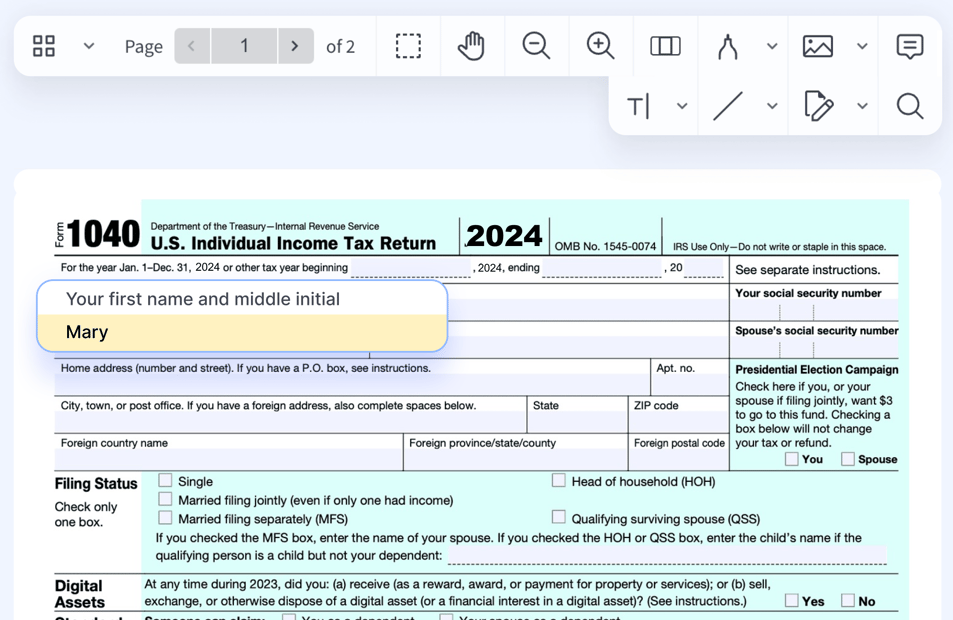
TaxDome includes unlimited storage with no per-client fees on every plan and files portal uploads by year and type automatically. A built-in PDF editor handles annotation, merging, and fillable forms. Aiwyn relies on integrations like Box, SharePoint, and SafeSend Returns for document storage and return delivery rather than native storage.
Source: TaxDome
- Practitioner-Voted Recognition and Deep Review Coverage
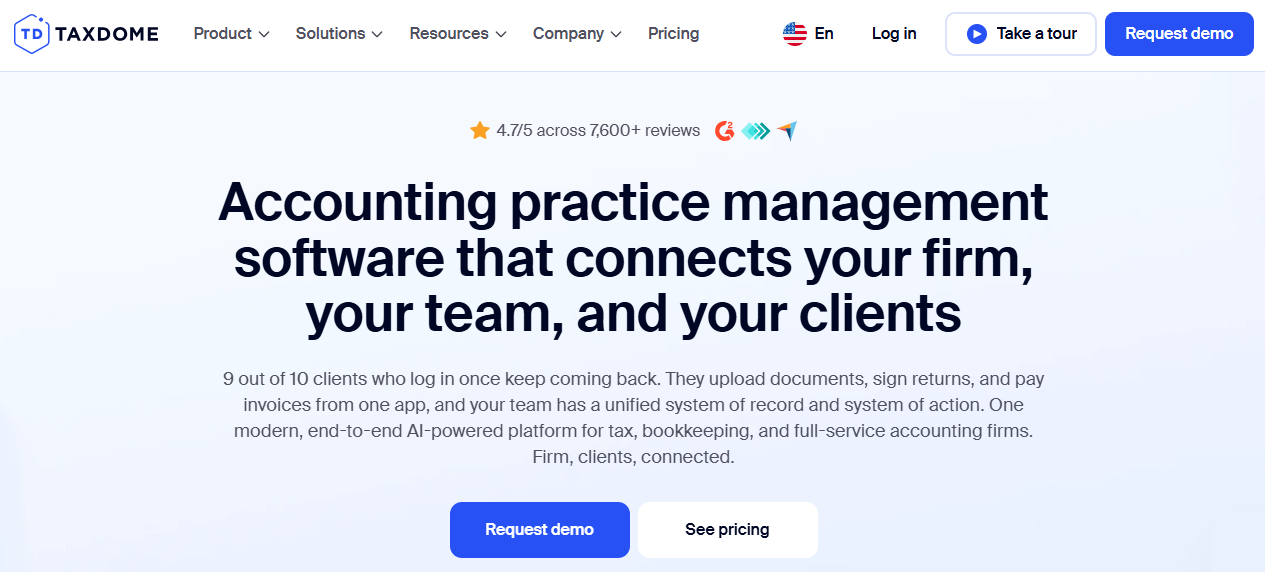
TaxDome holds a 4.7/5 rating across 7,600+ reviews on G2, Capterra, and GetApp, ranked #1 on Capterra’s 2025 Shortlist for Accounting Practice Management, and won seven categories in CPA Practice Advisor’s 2025 Readers’ Choice Awards. That gives buyers far more independent material to evaluate than Aiwyn currently offers.
TaxDome Pricing
TaxDome uses per-seat annual pricing with unlimited clients, storage, and e-signatures on every plan:
Essentials: $800/seat/year (solo practitioners, 1 seat). Includes CRM, client portal and app, workflow automation, email/SMS/chat, proposals, and payments.
Pro: $1,000/seat/year (unlimited seats). Adds QBO bookkeeping integrations, IRS transcript downloads, AI reporting, team chat, roles and permissions, and branded emails.
Business: $1,200/seat/year. Adds Client Care, unlimited bookkeeping connections, a 365-day activity feed, import assistance, and a free branded mobile app for 25+ seats.
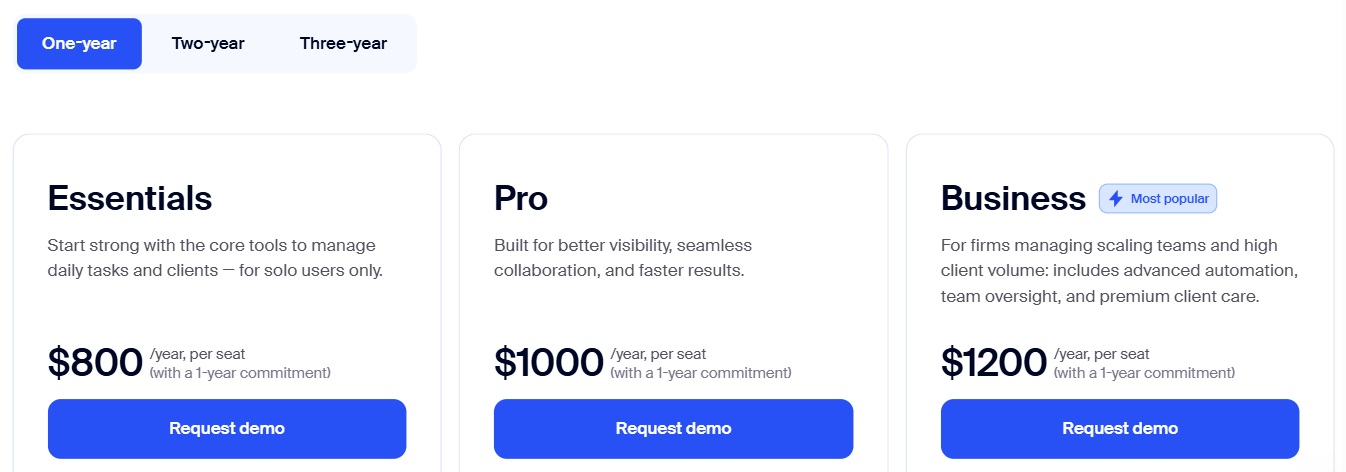
Multi-year terms lower the per-seat price. KBA for Form 8879 costs $1 per use, SMS carries usage fees, and paid onboarding starts at $999. Subscriptions auto-renew and are non-refundable; a switch-and-save program offers up to 6 months free for firms leaving a competitor contract.
Who Should Use TaxDome?
Choose TaxDome if:
Your firm prepares US tax returns and wants organizers, prep, review, e-file, and delivery in the same system as workflow and billing, without waiting for a pilot program.
You manage high document volumes and want unlimited storage, automated folders, and a PDF editor without a separate DMS subscription.
You serve clients across tax, bookkeeping, and advisory and want one branded portal covering all of them.
See also our TaxDome review, TaxDome pricing and TaxDome alternatives.
5. Ignition: Best Aiwyn Alternative for Proposal-to-Payment Automation Without Replacing Your Practice Stack
Ignition is an AI revenue and billing automation platform for accounting, bookkeeping, tax, and advisory firms. Its core idea is that signing the engagement letter and authorizing payment should be one client action. Ignition reports that it collects 91% of payments on the platform automatically. Its key features include:
Branded proposals and engagement letters with accounting-specific terms and native e-signatures
Payment method capture at proposal acceptance
Automated recurring billing based on the signed terms
Bulk annual renewals with automatic percentage-based price increases
Two-way Xero and QuickBooks sync that marks invoices paid automatically
AI Price Insights inside the proposal editor
Ignition is a specialist for firms that want to fix the proposal, engagement letter, and recurring billing loop without replacing their practice management tool.
Why Choose Ignition Over Aiwyn for Proposal-to-Payment Automation?
Ignition stands out in the following areas:
- Signature and Payment as a Single Client Action
Aiwyn’s Engagements module works at scale, with batches of up to 5,000 letters and payment capture at signing, but it’s one module inside a broader enterprise platform.
Ignition built its entire product around that moment. With the Require Payments toggle, clients can’t accept a proposal without adding a payment method, which Ignition then charges on every invoice the terms generate.
Because Ignition pays out invoice totals gross and collects fees separately, deposits match invoices in Xero or QuickBooks exactly. The platform has processed more than $15.5 billion in revenue since 2013.
- AI Price Insights Built on Real Accepted Proposals
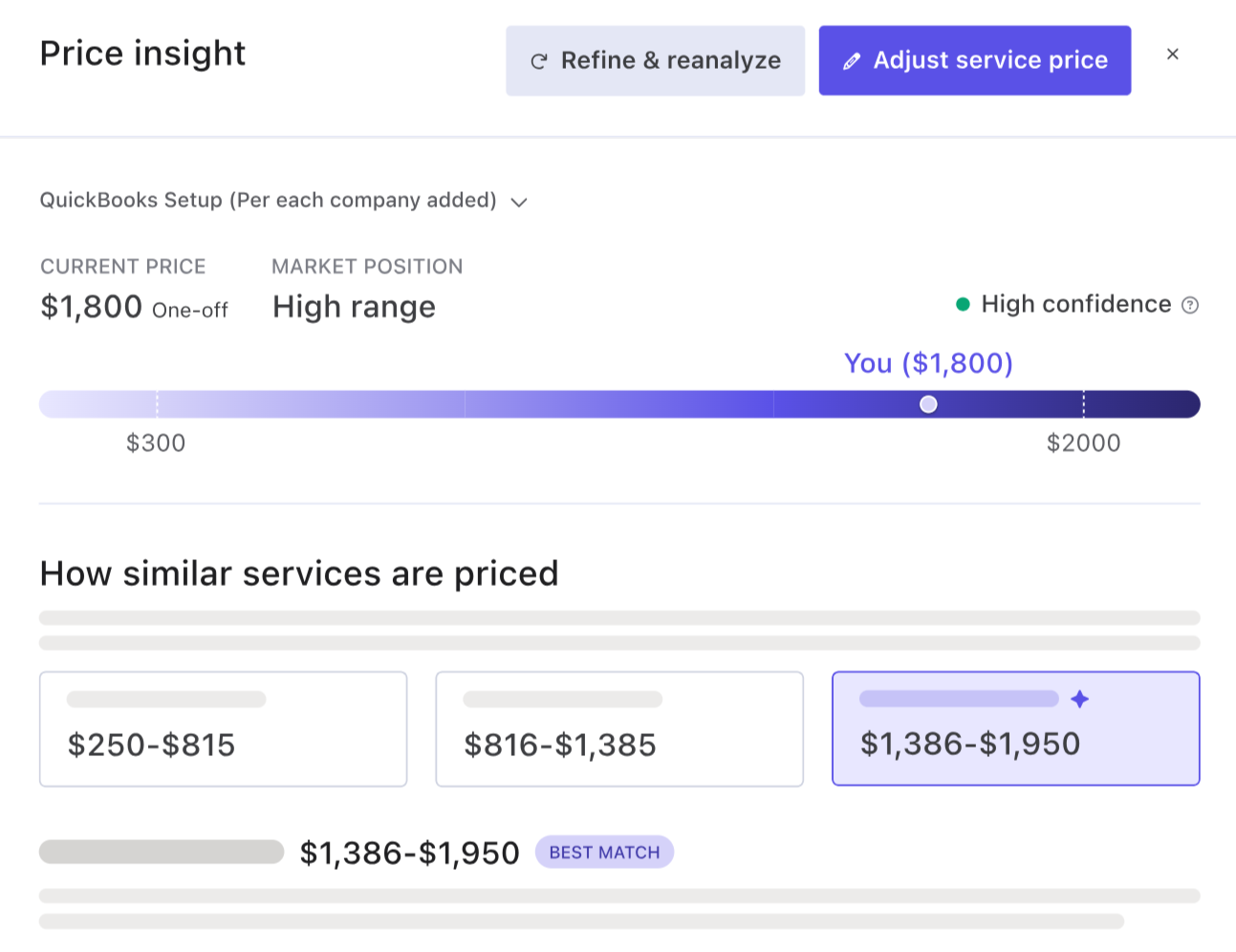
Aiwyn doesn’t offer a pricing benchmark tool. Ignition’s AI Price Insights, named an Accounting Today Top New Product for 2026, compares your service prices against anonymized accepted-proposal data from Ignition’s users and suggests three scope-based tiers rated Below, Mid, or Above range.
Ignition reports that firms using it earn 40% more revenue, and AutoPricing applies a price change to every client billed for that service at once.
Source: Ignition
- Published Pricing and Self-Serve Setup
Where Aiwyn requires a demo and a negotiated contract, Ignition publishes its plans at ignitionapp.com/pricing and offers a 14-day free trial with no credit card. A solo bookkeeper can send a first proposal and have automated billing running in the same session.
Ignition Pricing
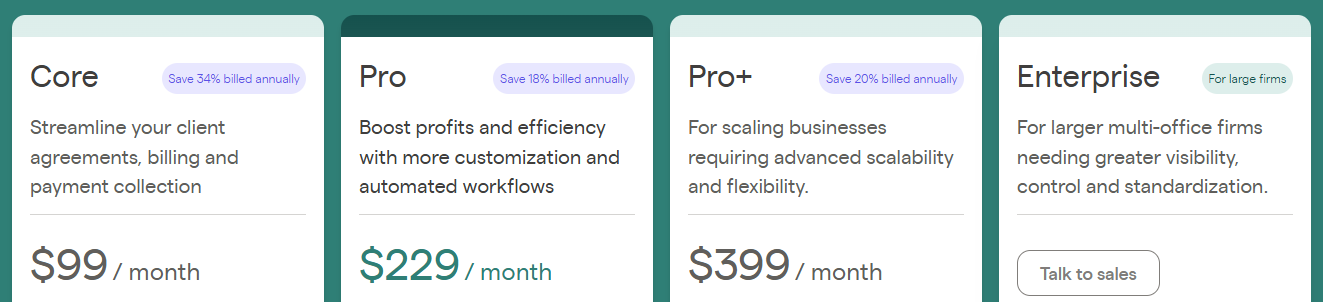
Ignition combines a subscription with an active-client cap per plan; annual billing saves 18-34% depending on the plan, and Ignition localizes pricing by country on its pricing page. All plans include built-in payment processing.
Solo: Core proposal, contract, billing, and payment automation for solo practitioners.
Core: Adds AML/KYC checks, bulk proposal sending, single-proposal renewal, and setup assistance.
Pro: Adds multiple e-signatures, bulk renewals, custom domains and email branding, intake forms, Zapier, and XPM, Karbon, and FYI integrations.
Pro+: Adds 10 e-signatures per proposal, proposal approvals, Deals pipeline, Advanced Reports, Reporting API, 1-hour priority support, and 600 active clients with 20 users.
Enterprise: Custom pricing for larger multi-office firms.
Extra costs include payment processing fees per collected invoice (for example, 3.6% + $0.30 for premium US cards), AI Price Insights credits after the first 3 ($349/year for 200 in the US), per-check AML fees, and a $49/month Deals and Forms add-on on Solo through Pro.
Who Should Use Ignition?
Choose Ignition if:
Your most pressing problem is the proposal, engagement letter, and recurring billing loop, and you want to fix it while keeping your current practice management tool.
You want data to back your pricing and an easy way to roll out annual price increases across your client base.
You’re a Xero-focused firm (Ignition won Xero Global Practice App of the Year 2026) that wants invoices reconciled automatically.
See also our Ignition review, Ignition pricing and Ignition vs Uku.
6. Pixie: Best Aiwyn Alternative for Growing Teams That Want Flat, Client-Count Pricing
Pixie is a cloud-based practice management platform for small and medium-sized accounting and bookkeeping firms, combining client records, recurring workflow automation, email integration, and document management. What sets it apart is pricing: Pixie charges a flat monthly fee based on the number of clients you manage, not the number of team members. Its key features include:
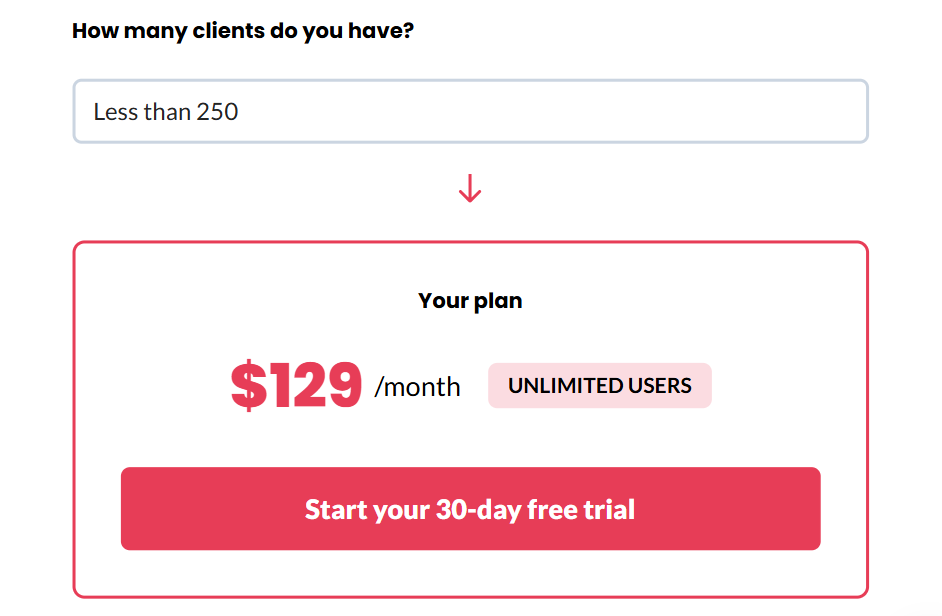
Per-client pricing with unlimited team members, from $129/month for up to 250 clients
Automated recurring tasks for monthly bookkeeping, quarterly VAT, and annual accounts
CRM, workflow, Gmail and Office 365 integration, and document management in one interface
A GDPR-compliant client portal with e-signatures and document requests
A 30-day free trial with a dedicated account manager
Companies House integration for UK statutory deadlines
Why Choose Pixie Over Aiwyn for Predictable, Headcount-Independent Pricing?
Pixie excels in the following areas:
- Flat Per-Client Pricing With Unlimited Users
Aiwyn’s pricing is quote-only and aimed at large firms. Pixie publishes its pricing and builds it around client count: a three-person firm and a 20-person firm managing 250 clients pay the same $129/month.
Pixie has no per-seat charges, so hiring bookkeepers or junior accountants doesn’t raise your software bill. For firms where headcount grows faster than the client base, that sets Pixie apart from the per-seat models common across the category.
- A Longer Trial With Hands-On Onboarding
Aiwyn has no trial and relies on a structured enterprise implementation. Pixie’s 30-day free trial comes with a named account manager who helps migrate client records, configure recurring templates, and set up automation before the trial ends.
G2 users rate Pixie’s ease of setup at 10.0. Pixie was founded in 2019 to serve small firms that complex, expensive practice software left behind.
- Recurring Compliance Automation With Embedded SOPs
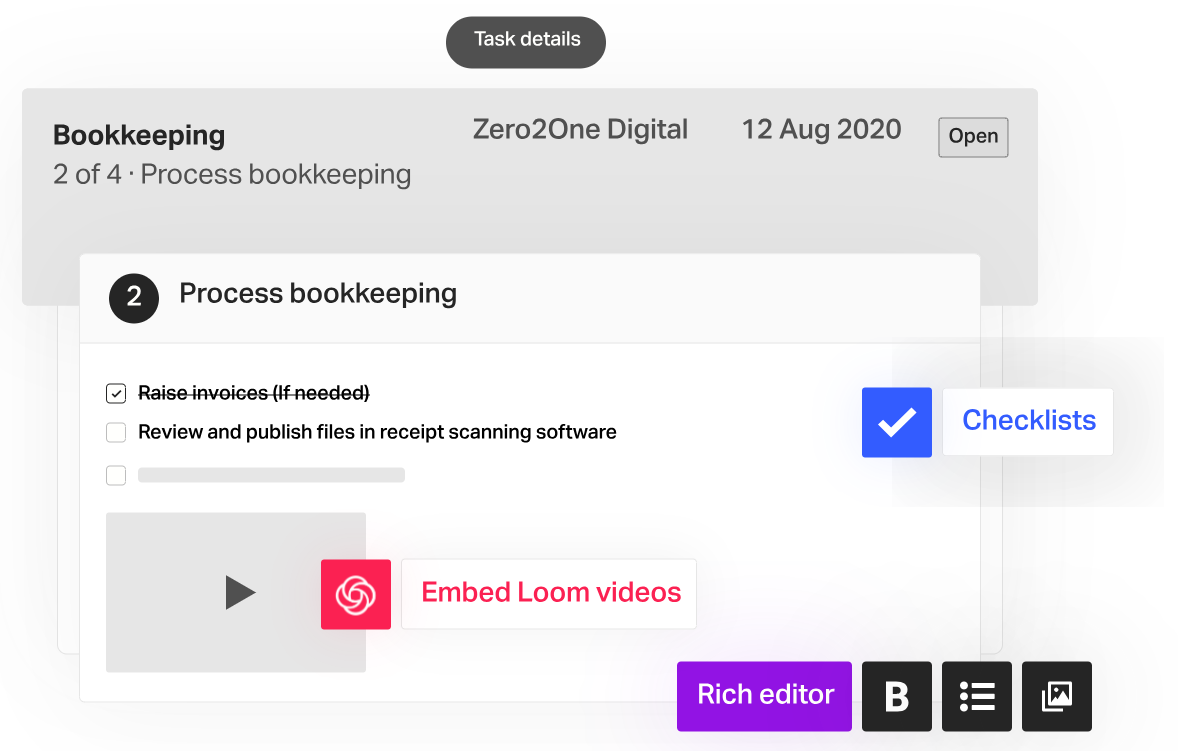
Aiwyn focuses on shortening collection times and batching engagements at enterprise scale; Pixie focuses on getting recurring compliance work done on time for every client. It generates tasks on each client’s schedule, and work templates can embed SOPs, checklists, and training videos directly into task steps.
Client-facing steps like document requests and e-signatures sit in the same workflow, and UK firms can sync incorporation dates and accounts due dates from Companies House to trigger work automatically.
Source: Pixie
Pixie Pricing
Pixie bases pricing on client count, with unlimited team members and every feature included on all tiers:
Up to 250 clients: $129/month
251-500 clients: $199/month
501-1,000 clients: $329/month
1,000+ clients: Price on application
All tiers include workflow automation, recurring jobs, auto-assignment, client reminders, email integration, the client portal, e-signing, template marketplace access, migration assistance, live chat, and integrations via Zapier plus Companies House, Xama AML, and Clockify. The 30-day free trial requires no credit card.
Who Should Use Pixie?
Choose Pixie if:
Your team is growing faster than your client base, and per-seat pricing would raise your costs with every hire.
You manage fewer than 250 clients on spreadsheets and shared inboxes and want a dedicated account manager to guide your transition.
You’re a UK practice that wants Companies House deadlines feeding directly into client records and workflows.
See also our Pixie review, Pixie pricing and Pixie vs Uku.
7. Pascal Workflow: Best Free Aiwyn Alternative for Solo Practitioners and Micro Tax Firms
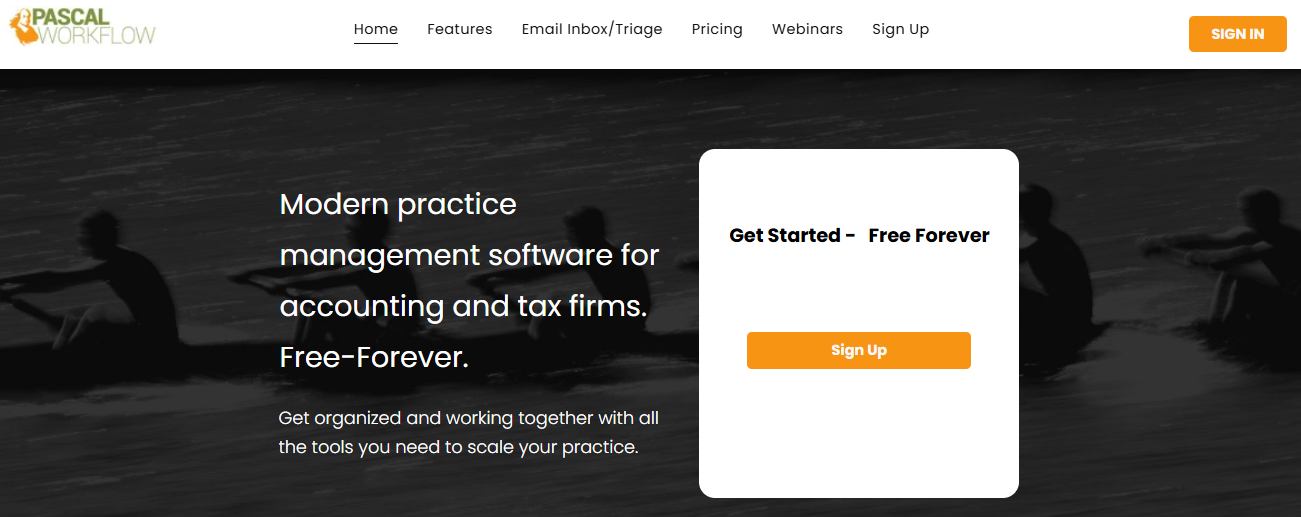
Pascal Workflow is an accounting and tax practice management platform with a free-forever plan for solo practitioners and micro-firms. Its key features include:
A free plan for up to 5 team members with unlimited projects, CRM, and client portal
Patented Payment Lock delivery that keeps returns locked until payment is confirmed
IRS-compliant e-signatures and Form 8879 delivery, with optional KBA from $1 per signer
A central email inbox with triage, 365-day attachment backfill, and a Daily Agenda Dashboard
Automated client follow-ups tied to the portal’s task list
A month-to-month Unlimited plan at $45 per team member
Why Choose Pascal Workflow Over Aiwyn for Solo and Micro Tax Practices?
Pascal Workflow stands out in the following areas:
- A Permanent Free Tier
Aiwyn’s quote-based model targets firms where AR improvements translate into six-figure savings, which puts it out of reach for a one- or two-person office. Pascal’s free-forever plan covers up to 5 team members and 250 contacts with no time limit or credit card, including the CRM, client portal, Payment Lock, email triage, and document filing automation.
- Tax Delivery Built by a Working Practitioner
Eric Meury, who grew up in his family’s tax practice, built Pascal. Its e-signature flow walks clients through the return step by step, pointing out payment vouchers rather than just presenting a signature box. The Payment Lock stops clients from viewing or downloading a completed return until they pay the invoice, which ends post-delivery fee chasing.
- No Implementation Project
Aiwyn’s structured go-live process fits firms replacing a legacy system, not a solo preparer getting organized before tax season. Pascal’s 365-day email lookback pulls past client attachments in automatically at setup, and all plans include free training through weekly live webinars.
Pascal Workflow Pricing
Free Forever: $0/month for up to 5 team members and 250 contacts, with unlimited projects and storage, CRM, client portals, email integration, Payment Lock, automated follow-up, and document filing. Users can unlock e-signatures, the marketing platform, and unlimited proposals for 3 months through referrals.
Unlimited: $45 per team member per month, billed monthly with no annual contract. Adds unlimited users and contacts, IRS-compliant e-signatures and 8879 delivery, the Pascal Marketing Platform, and unlimited requests and proposals. Optional KBA costs from $1 per signer.

Pascal offers no annual discount, and recurring billing currently runs through Stripe or Authorize.net by card, with ACH listed as coming soon.
Who Should Use Pascal Workflow?
Choose Pascal Workflow if:
You’re a solo CPA, Enrolled Agent, or tax preparer running a 1-5 person US practice and want professional practice management at no cost.
Your biggest headache is getting paid after delivering returns, and you want clients to pay before they can access them.
You have no IT support or onboarding budget and need something you can set up yourself in an afternoon. (Firms that need QuickBooks Online or Xero integrations, time tracking, or reporting will likely outgrow it.)
The Final Verdict
Aiwyn is a well-funded platform for large US CPA firms that want payments, collections, engagements, and practice management under one enterprise contract. But firms of other sizes, in other markets, or with narrower needs often find a better fit elsewhere. Based on our research, here are the best Aiwyn alternatives:
Uku for small and mid-sized firms that want billing automated from tracked time, real-time client profitability, and a modular, multi-language platform with published monthly or annual pricing
Karbon for large multi-partner firms that run on email and need conditional workflow automation
Financial Cents for QuickBooks Online firms in North America that want ready-made workflow templates
TaxDome for US tax firms that need a native tax workflow, proven in production, today
Ignition for automating proposals, engagement letters, and recurring payments alongside your existing stack
Pixie for growing teams that want flat, client-count pricing with unlimited users
Pascal Workflow for solo practitioners and micro tax firms that need a free starting point
You don’t have to replace everything at once. Some firms pair a practice management platform with a specialist like Ignition, while others consolidate onto a single system. Consider your firm’s size, market, and biggest bottleneck before deciding.
Tired of spending days on invoicing and still wondering which clients are profitable? With Uku, your team’s tracked time turns into accurate invoices automatically, and Uku monitors every client agreement in real time. Try free for 14 days, no credit card required, and see how calm practice management can be. Or book a demo and browse our case studies.
Frequently asked questions
Why do accounting firms look for Aiwyn alternatives?
Aiwyn is designed for mid-to-large US CPA firms, so smaller firms often find its quote-only pricing, lack of a free trial, and structured enterprise implementation a poor fit. Firms outside the US, firms that need a fully available tax product today, and firms that only want to fix one part of their operations (like proposals or workflow) also tend to look elsewhere.
Does Aiwyn publish its pricing or offer a free trial?
No. Aiwyn doesn't publish pricing and offers no free trial or self-serve signup; prospective customers start by scheduling a demo. Its website terms mention recurring charges and possible early cancellation fees, but that clause covers purchases made through its site, so contract terms aren't published.
What is the best Aiwyn alternative for small and mid-sized accounting firms?
Uku is the best option for firms of roughly 5-50 people that want task automation, time tracking, and billing in one platform. It generates invoices automatically from tracked time and client contracts and monitors every client agreement in real time. Pricing starts at $19 per month with annual billing, and every account begins with a 14-day free trial of the full Elite plan.
Which Aiwyn alternative is best for tax preparation?
TaxDome is the best choice for US firms that need a native tax workflow today, covering organizers, preparation, review, e-file, and delivery, and it works with major tax programs like Drake, Lacerte, and UltraTax CS. Aiwyn Tax's core engine is still rolling out through a waitlist. For solo tax preparers on a budget, Pascal Workflow's free plan includes Payment Lock return delivery.
Is there a free alternative to Aiwyn?
Pascal Workflow offers a free-forever plan for up to 5 team members and 250 contacts, including a CRM, client portal, and Payment Lock. Uku, Financial Cents, and Ignition offer 14-day free trials, and Pixie offers a 30-day free trial with a dedicated account manager.
Which Aiwyn alternatives work for firms outside the US?
Uku was built for international use from the start, with 12 interface languages, multi-currency support, invoices and email templates sent in each client's language, EU data hosting in Frankfurt, and integrations with European accounting software like e-conomic, Fortnox, and Merit Aktiva. Pixie suits UK firms through its Companies House integration, and Ignition offers localized pricing across several English-speaking markets.
Can I use these tools alongside Aiwyn or my current practice management software?
Yes, some of them are designed for that. Ignition focuses on proposals and recurring billing and integrates with practice management tools rather than replacing them. Other options on this list, like Uku, Karbon, and TaxDome, are full practice management platforms that firms typically adopt as their primary system.