




Aiwyn Pricing: Worth It or Consider Uku? November 2026
Aiwyn doesn't publish pricing. See what its website terms say, the hidden costs to ask about, and why Uku starts at $19/mo with a 14-day free trial.


Contents
If you’ve looked for Aiwyn’s pricing, you’ve probably noticed there isn’t any. The /pricing/ URL redirects to the homepage, no plan names appear anywhere on the site, and every product page ends with the same button: Schedule a demo. For a firm trying to build next year’s software budget before talking to sales, that leaves a lot of blanks.
Aiwyn sells accounting firms one platform for getting paid, running the practice, serving clients, and preparing tax returns. Firms can let clients pay invoices online, chase late payers automatically, send thousands of engagement letters in one batch, and move time, billing, and client records onto a single database.
The company has grown quickly, reaching more than 800 accounting firm customers by the end of 2025 with backing from KKR and Bessemer Venture Partners. Its commercial model, however, is built for large US firms: quote-based contracts, a sales-led buying process, and website terms that mention early cancellation fees.
We’ve reviewed everything Aiwyn discloses about its products, contract terms, and costs. We believe it’s the right choice if:
- You run a US firm in or near the IPA Top 500 with a heavy accounts receivable burden
- You want clients to pay by ACH or card, with autopay set up the moment they sign an engagement letter
- You plan to replace a legacy practice management system, client portal, and engagement letter tool with one vendor
- You want a CPA-led team to run implementation and change management for you
- You’re comfortable negotiating a custom contract
However, Aiwyn’s pricing might not be a good choice if:
- You want to see prices before booking a call
- You run a small or mid-size firm well below the Top 500
- Your firm operates outside the US
- You want to test the software yourself before committing
- You prefer terms you can cancel at the end of any billing period
In that case, consider Uku: practice management software for accounting, bookkeeping, and audit firms that ties client deadlines, time tracking, and billing together, so tracked hours turn into invoices without a spreadsheet in between. Its per-member prices are published and start at $19/month with annual billing ($25 on monthly billing). Every new account begins with a 14-day free trial of the full Elite plan.
For that reason, this review includes a detailed pricing comparison with Uku, our pick for small and mid-size firms that want transparent, flexible pricing. If you want to go straight to the Uku pricing breakdown, use this link.
Aiwyn Pricing Summary
| Aiwyn | Uku | |
|---|---|---|
| Core focus | • Payments and collections • Practice management • Client portal and engagement letters • Tax (gather, sign, and deliver live; core engine on a waitlist) | • Task and workflow automation • Time tracking and billing • Client portal • BI Analytics and business analytics reports |
| Target firms | • US accounting firms, mainly the IPA Top 500 • PE-backed accounting roll-ups | • Accounting, bookkeeping, and audit firms • Solo practices to 300-person groups • 12 interface languages |
| Client payments | • ACH and card payment portal • Autopay captured at engagement signing • Pay Later financing over 3 to 12 months (via QuickFee) | • Automatic invoice generation and sending • Up to 3 rounds of overdue reminders • Invoice sync to QuickBooks, Xero, and others • Payment links via Stripe or Montonio (Elite and Enterprise) |
| Implementation | • CPA-led implementation team • On-site and remote go-live crews • Cost not published | • Modular, start working on day one • First 90 minutes of onboarding free • Paid packages from $700 |
| Contract terms | • Website terms: recurring charges until cancelled • Same terms reference early cancellation fees | • No long-term contract • Cancel anytime, active to period end |
| Pricing model | • Quote-based • No public tiers or module prices | • Per member, per month (annual or monthly billing) • Client portal users free • Priced in €, $, and £, VAT added on top |
| Starting price | • Not published • Demo required | • Solo: from $19/mo (annual) or $25/mo (monthly) • Team: from $38/member/mo (annual) |
| Free trial | • None advertised • Demo only | • 14-day free trial of the full Elite plan • No credit card required |
| Best for | Mid-to-large US firms consolidating payments, practice management, client experience, and eventually tax with one vendor | Small and mid-size firms that want published prices, flexible terms, and billing built on tracked time |
Aiwyn Pricing: In-Depth Overview
Aiwyn sells four product lines: Aiwyn Payments, Aiwyn Practice, Aiwyn Experience, and Aiwyn Tax. None has a published price, tier, or feature matrix. Aiwyn describes a “land soft, expand hard” adoption pattern: firms often start with billing, AR, or engagement letters and add modules later.
That suggests modules can be bought separately, but Aiwyn explains packaging only in a sales conversation. Each contract appears to be negotiated per firm. Here’s what each module includes and what we know about its cost.
Aiwyn Payments: Quote-Based Pricing
| Feature | Details |
|---|---|
| Price | Not published; quote via demo |
| Payment methods | ACH, Visa, Mastercard, Discover |
| Collections | Aging-based invoice reminder sequences |
| Autopay | Captured at engagement letter signature |
| Card fees | Compliant surcharges and late fees configurable |
| Reconciliation | Automatic payment-to-invoice matching |
| Financing | Pay Later via QuickFee, clients pay over 3 to 12 months |
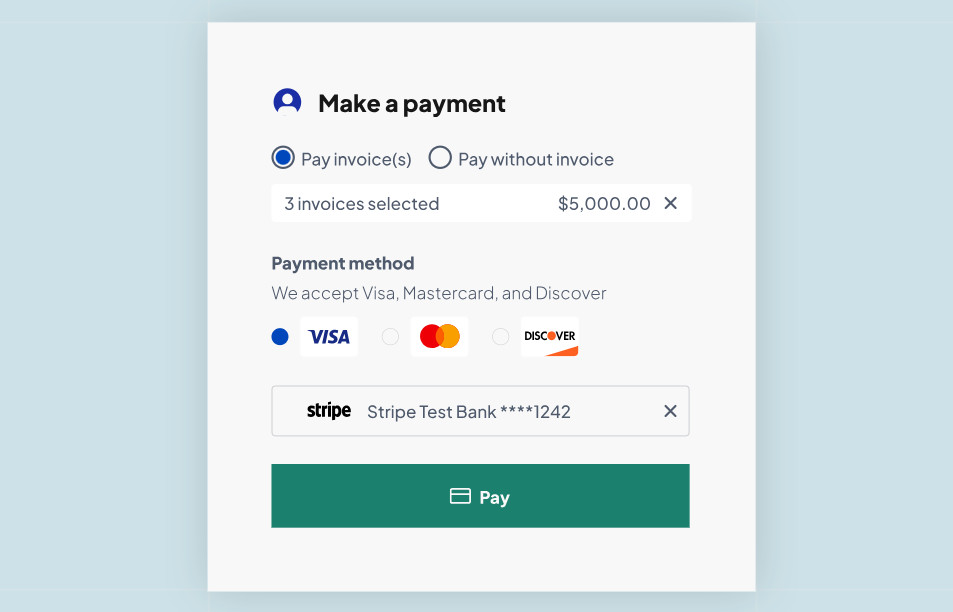
Aiwyn Payments was the company’s original product and remains its most developed. It covers the whole path from invoice to cash: aging-based reminder sequences with different messages at 15 and 60 days past due, a client portal where clients pay several invoices in one transaction, and automatic matching of payments to invoices, so nobody re-keys deposits at month-end.
Firms can require autopay when a client signs the engagement letter, and Quick Payment Links collect retainers before an invoice exists.
Two cost points matter here. First, client payments run through Stripe, and Aiwyn doesn’t publish the processing rates. Second, Aiwyn supports compliant credit card surcharges, so firms can pass card fees to clients instead of absorbing them.
The September 2025 QuickFee acquisition gave Aiwyn customers access to QuickFee’s Pay Later financing, which QuickFee still runs: clients spread payments over 3 to 12 months while the firm gets paid in full upfront.
| Pros | Cons |
|---|---|
| ✅ Covers invoicing, collections, and reconciliation | ❌ Subscription price not published |
| ✅ Surcharging can offset card processing costs | ❌ Processing rates not published |
| ✅ Autopay starts at engagement signing | ❌ Requires a sales process to evaluate |
| ✅ Tokenized card data reduces the firm’s PCI scope | ❌ Customer references are US firms |
👉 The Bottom Line: Aiwyn Payments offers the clearest return for firms with slow collections, but you won’t know its cost, or the processing rates attached to it, until you’re deep in a sales cycle.
Aiwyn Practice: Quote-Based Pricing
| Feature | Details |
|---|---|
| Price | Not published; quote via demo |
| Time & expense | Calendar drag-and-drop and list entry |
| Billing & AR | Invoicing on fixed schedules or milestones |
| Projects | Reusable templates with roles and tasks |
| Client records | Many-to-many contact relationships |
| Reporting | Real-time analysis plus third-party BI tools |
| GL integration | Sage Intacct General Ledger |
Aiwyn Practice is a cloud practice management system built on a single data model, where time entries, projects, invoices, and client records share one source of truth. Firms can keep their existing general ledger through the Sage Intacct integration and pull CRM data from HubSpot while they migrate.
This module is newer than Payments. Aiwyn began building full practice management after its $113M funding round in December 2024, and only a small cohort of firms was live on it as of early 2026. Firms comparing it with long-established practice management systems should ask detailed questions about reporting depth and profit allocation during the demo.
| Pros | Cons |
|---|---|
| ✅ One database for time, billing, and clients | ❌ Price not published |
| ✅ Can run alongside a legacy PM system during migration | ❌ Newer module with a small live user base |
| ✅ Native connection to Payments and Experience | ❌ Implementation cost not published |
| ✅ CPA-led implementation team | ❌ No Zapier, Make, or Workato connector listed |
👉 The Bottom Line: Practice suits firms already planning to consolidate around Aiwyn, but buyers should treat it as a young module and price it as part of a broader platform deal.
Aiwyn Experience: Quote-Based Pricing
| Feature | Details |
|---|---|
| Price | Not published; quote via demo |
| Engagement letters | Batch creation of up to 5,000 at once |
| Client access | Magic link, no login or account needed |
| Reminders | Every 3 days until signed |
| Payment at signing | Optional payment method or prepayment |
| Compliance | 7216 consent tracking, locked legal sections |
| Security | SOC 2 Type 2 (Engagements) |
Aiwyn Experience bundles engagement letters, a client portal, and request lists. Its main draw for large firms is scale: Aiwyn can batch-create up to 5,000 engagement letters from templates that pull client, project, and fee data from the firm’s practice management system.
Once clients sign, the letters upload to the firm’s document management system, and Aiwyn schedules next year’s renewal automatically. The portal gives clients one login for signing letters, sharing documents, messaging, viewing invoices, and paying.
| Pros | Cons |
|---|---|
| ✅ Handles thousands of annual renewals in one run | ❌ Price not published |
| ✅ Clients sign without creating an account | ❌ Value peaks at large client volumes |
| ✅ Ties signature to payment setup | ❌ Signed letters are filed in an external DMS such as SharePoint |
| ✅ SOC 2 Type 2 for the Engagements module | ❌ Sold through sales only |
👉 The Bottom Line: Experience pays off for firms sending hundreds or thousands of engagement letters each year, which again points to the larger end of the market.
Aiwyn Tax: Waitlist Rollout, Pricing Not Published
| Feature | Details |
|---|---|
| Price | Not published |
| Availability | Gather, sign, and deliver live; core engine on a waitlist, 1040 pilot targeting 100 firms |
| Calculation engine | Via Column Tax, 1M+ 1040 returns processed |
| Collaboration | Multiple users in one return at once (coming soon) |
| E-file | Built in, with real-time IRS connectivity (coming soon) |
| AI access | Claude Connector for 1040 calculations |
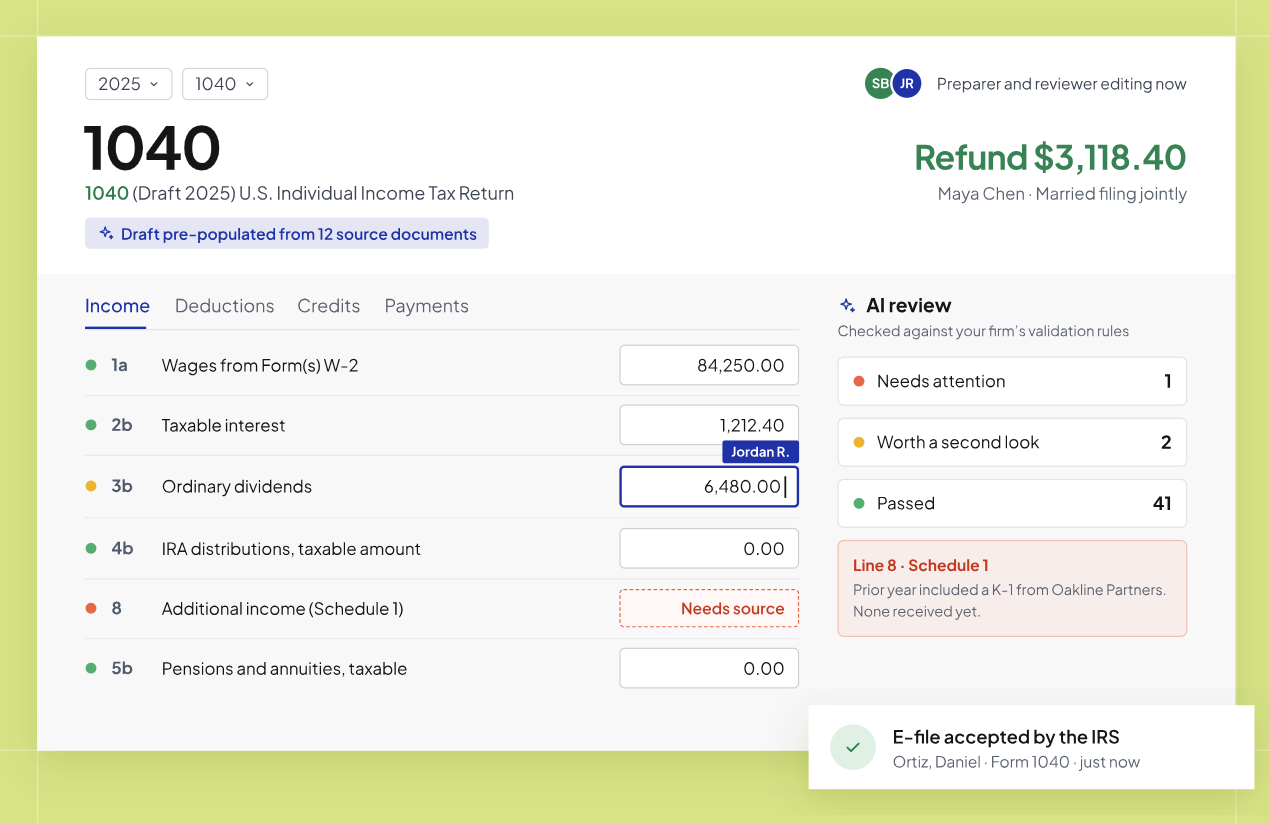
Aiwyn Tax’s live part gathers documents, collects signatures, and delivers returns alongside the firm’s existing tax software. Its core engine, marked coming soon, combines preparation, AI-assisted review, multi-user collaboration, and e-file in one system. Aiwyn says over 1 million 1040 returns have been processed via Column Tax.
According to Aiwyn’s waitlist page, the core engine has been rolling out to a pilot of 100 firms for 1040 returns. Aiwyn hasn’t published pricing or a general availability date for the engine.
| Pros | Cons |
|---|---|
| ✅ Engine with a large production track record | ❌ Core engine not generally available |
| ✅ Real-time collaboration inside a return | ❌ 1040 only in the pilot |
| ✅ Connected to billing and payments after filing | ❌ No published pricing model |
| ✅ Available as a Claude Connector | ❌ Firms likely keep a legacy tax tool for now |
👉 The Bottom Line: Aiwyn Tax is promising, but firms shouldn’t budget around it yet; most will run it alongside their current tax software for at least another season.
Aiwyn Contract Terms and Additional Costs
Aiwyn’s public Terms and Conditions (last updated May 17, 2024) are the website’s terms of use, not a firm software contract, and contain the only published commercial details:
Contract Structure:
- Recurring plans carry “an initial charge and recurring charges prior to cancellation”
- A signed Customer Agreement governs firms that have one, so terms are negotiated per firm
- The terms point to support for “early cancellation fees and options” without saying what they are
- Liability is capped at fees paid in the previous 12 months
 Source: Aiwyn
Additional Costs:
- Payment processing fees on client card and ACH payments, at rates Aiwyn doesn’t publish
- Taxes, since posted prices exclude them
- Implementation and onboarding, which Aiwyn doesn’t price publicly
One Cost Offset:
- Through its Microsoft partnership, firms can apply committed Azure spend toward Aiwyn licenses
Where Aiwyn Falls Short
Aiwyn’s commercial model fits the large US firms it was designed for. For smaller practices and firms outside the US, the same design choices create obstacles:
No Published Pricing or Self-Serve Entry
- There is no pricing page, no plan list, and no per-module price
- No free trial or free plan is advertised, so evaluation starts with a sales demo
- Firms can’t compare total cost against alternatives without entering a sales cycle
Built for the Top 500, Not Smaller Practices
- Aiwyn’s buyers are managing partners, CIOs, and controllers at mid-to-large firms
- Features like 5,000-letter batches and PE roll-up support matter most at that scale
- Solo, boutique, and regional firms fall outside its target market
Commitments That Limit Flexibility
- The terms mention early cancellation fees, so leaving mid-contract may cost extra
- Contract length isn’t published; it’s set in each firm’s Customer Agreement
- Firms that want to cancel at the end of any month have no published option
US-Focused Coverage
- Aiwyn acquired only QuickFee’s US payments business
- Its customer references are US CPA firms
- Firms in Europe or elsewhere have no clear path to adoption
Newer Modules Still Maturing
- Aiwyn Tax’s core engine remains a waitlist pilot for 1040 returns
- Practice management was live at a small group of firms as of early 2026
- Implementation costs and support terms aren’t published
These limitations lead many smaller and international firms to look for practice management software with clear prices and lighter commitments…
Best Aiwyn Alternative for Smaller Firms: Uku
Uku is practice management software for accounting, bookkeeping, and audit firms that want deadlines met, time tracked, and work billed in one place.
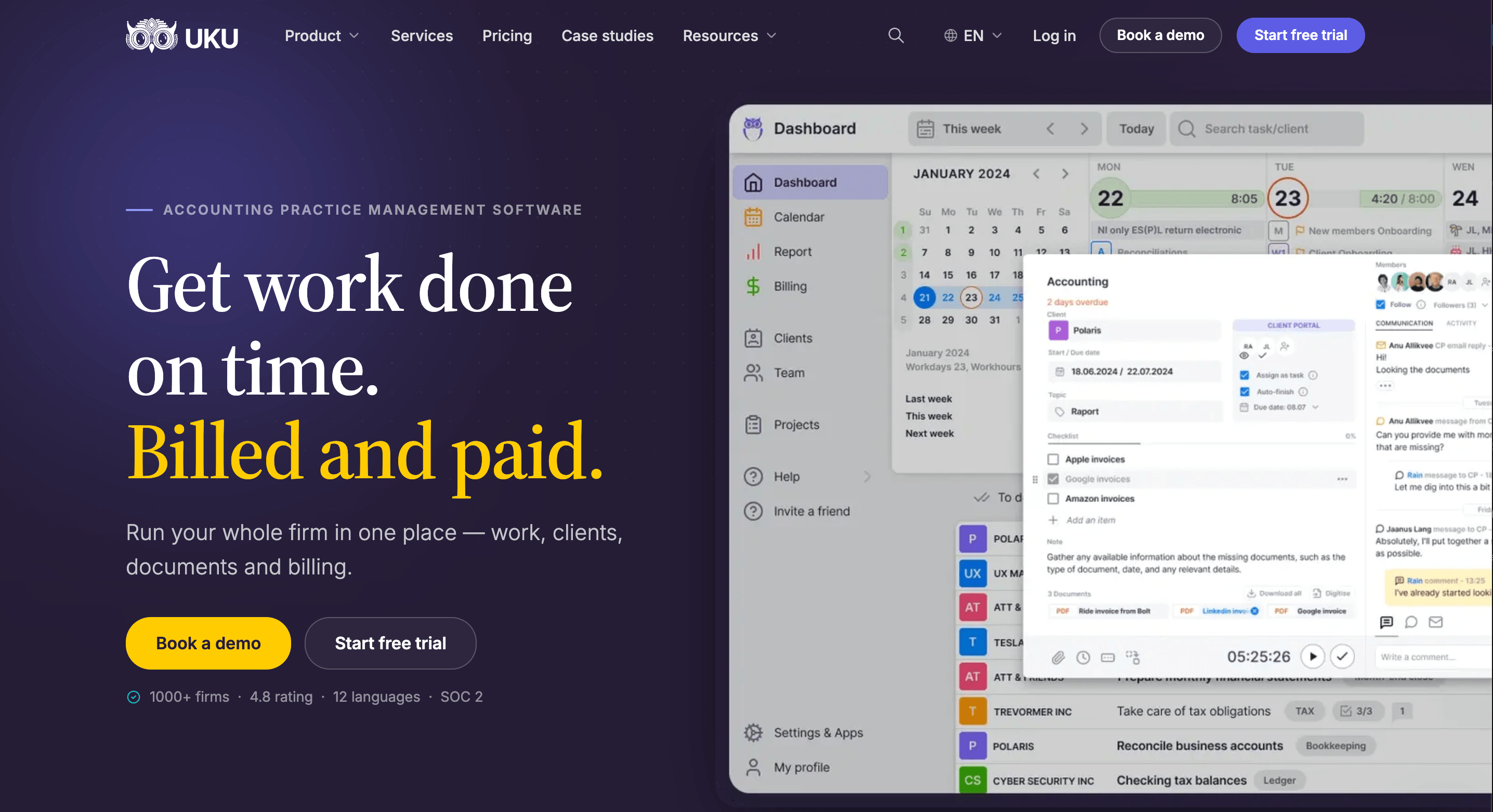
For firms put off by Aiwyn’s hidden pricing, contract commitments, and Top 500 focus, Uku offers a narrower tool with a clearer deal: four published plans priced per team member, a 14-day free trial of the full Elite plan with no credit card, and no long-term contract.
Uku was built from the start to work internationally, and it has stayed bootstrapped. It now serves 1,000+ accounting firms in 25+ countries, in 12 interface languages, with named clients including Leinonen, Baker Tilly, and Rödl & Partner. Reviewers rate it 4.7/5 on G2, with an Ease of Use score of 9.5 and a Quality of Support score of 9.7.
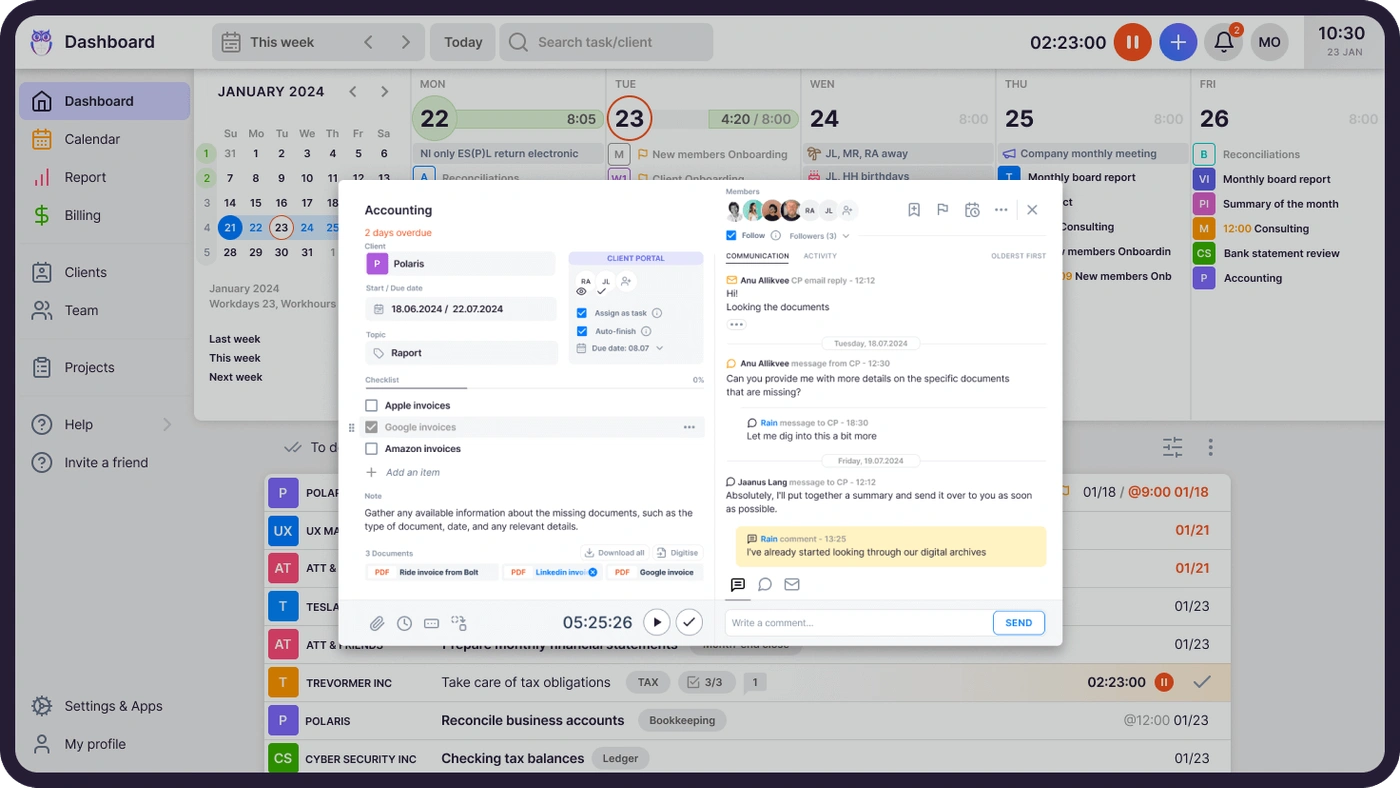
Uku doesn’t try to cover everything Aiwyn does. It has no tax preparation engine and doesn’t run a client payment portal with surcharging or financing. What it does is connect the daily work of an accounting firm: recurring tasks appear on each accountant’s dashboard on schedule, accountants log time against those tasks, and contracts turn that time into invoices automatically.
Two features set it apart: automated billing, which cuts invoice preparation from two to three days to about 30 minutes, and a client portal where clients and accountants work on the same task. Uku is also modular.
Firms can start with CRM and tasks on day one and add billing, the portal, and reporting one step at a time. Teams moving off spreadsheets can import the sheets they already keep and have automated plans ready to go. The result is a system teams find easy to use. Uku fits firms with 2 to 100 staff and recurring monthly and quarterly work best.
Uku Solo Plan: $19/month annually or $25/month monthly
| Feature | Details |
|---|---|
| Price | $19/mo (annual) or $25/mo (monthly); 16€ or 21€ in EUR |
| Members | 1 user (no team members) |
| Active clients | Up to 20 (inactive clients don’t count) |
| Billing | Automated invoicing included |
| Client Portal | Included |
| Support | Live chat |
Solo is a complete one-person tool, not a stripped-down preview. It gives a one-person practice the full core feature set: client records, calendar, time tracking, automated billing, workflow automation, all accounting software integrations, the Client Portal, Document Management, e-signatures inside tasks, agreements monitoring, email management, AML tools, and Client Budgeting.
Solo costs $19/month with annual billing or $25/month with monthly billing (16€ or 21€ in EUR), so annual billing saves about 23%. The limits are simple: 1 user and up to 20 active clients. Every new account starts with a 14-day free trial of the full Elite plan, so practitioners can test the complete platform before picking Solo.
One catch: Uku doesn’t allow downgrading from Team or Elite back to Solo, so solo practitioners should start here rather than upgrade and plan to return.
| Pros | Cons |
|---|---|
| ✅ Full core features for $19/mo | ❌ 20 active client limit |
| ✅ Billing and Client Portal included | ❌ 1 user, no team members |
| ✅ All accounting integrations | ❌ No API or Zapier access |
| ✅ Save ~23% with annual billing | ❌ Can’t downgrade back from higher plans |
👉 The Bottom Line: Solo replaces spreadsheets with real workflow, billing, and a shared client portal for a sole practitioner, as long as the client list stays within 20 active accounts.
Uku Team Plan: $38/member/month annually or $49 monthly
| Feature | Monthly | Annual | Details |
|---|---|---|---|
| Price per member | $49 | $38 | About 22% savings |
| Members | Unlimited | Unlimited | Only staff count as seats |
| Clients | Unlimited | Unlimited | Portal clients are free |
| Projects | Included | Included | Multi-step engagements |
| Training | One-on-one | One-on-one | Included |
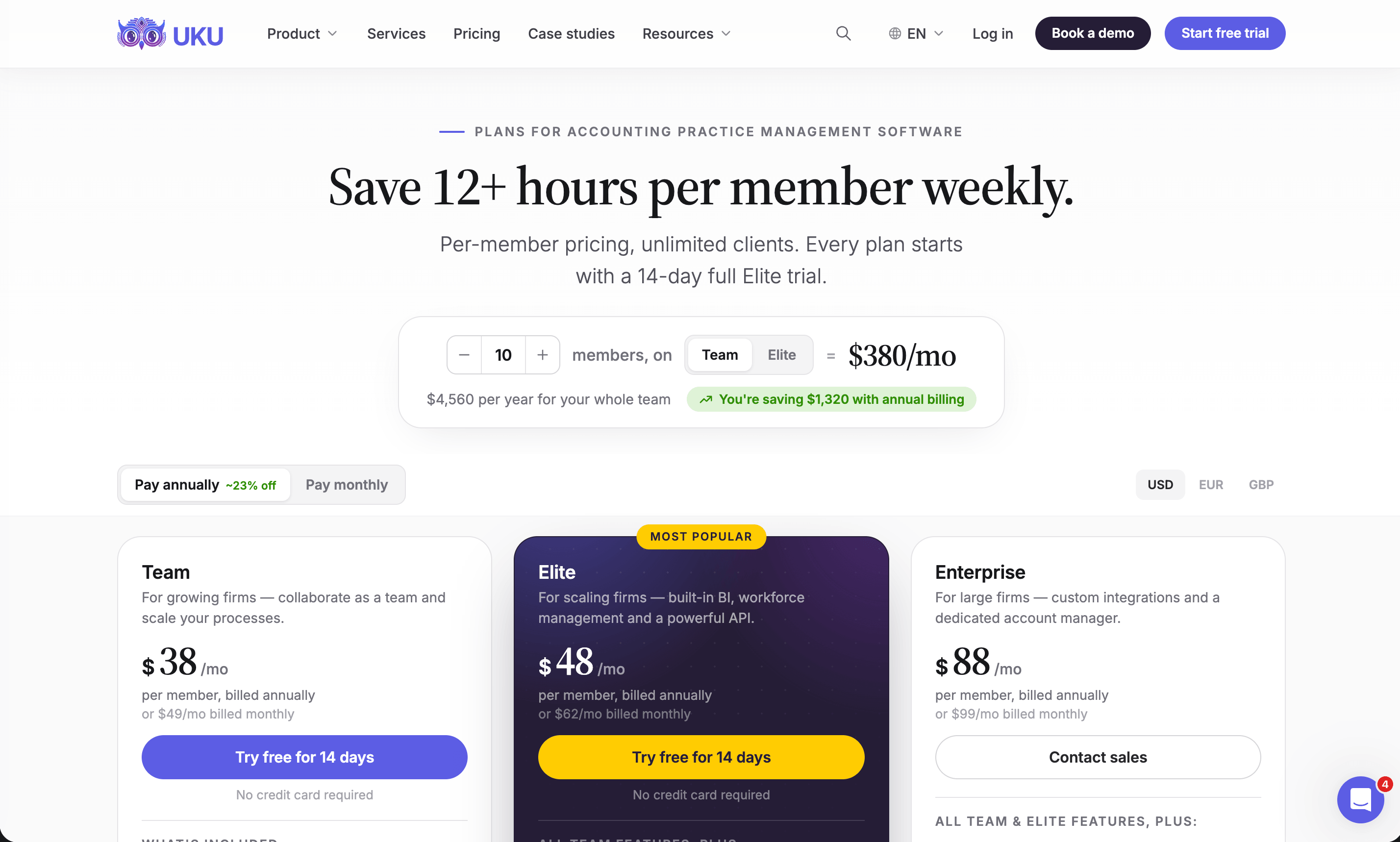
Team removes the member and client caps and adds shared clients and tasks, projects, user roles, and access management. Team leads see the whole firm’s workload, Uku highlights overdue tasks automatically, and managers can reassign all of an absent colleague’s tasks in one action. A 10-person firm pays $380/month on annual billing ($4,560/year).
Two gaps are worth knowing: Team lacks Client Budgeting (which Solo includes), and audit log retention drops to 1 day.
| Pros | Cons |
|---|---|
| ✅ Unlimited members and clients | ❌ No Client Budgeting |
| ✅ Projects and user roles included | ❌ 1-day audit log retention |
| ✅ Clients use the portal at no cost | ❌ No API or Zapier access |
| ✅ One-on-one training included | ❌ No BI Analytics or Workforce Management |
👉 The Bottom Line: Team covers what most small firms need to run recurring client work and billing, at a price a 10-person practice can plan for down to the dollar.
Uku Elite Plan: $48/member/month annually or $62 monthly
| Feature | Monthly | Annual | Key Additions |
|---|---|---|---|
| Price per member | $62 | $48 | About 23% savings |
| BI Analytics | Included | Included | Currently in beta |
| Workforce Management | Included | Included | Flextime, vacations, attendance |
| Public API and Zapier | Included | Included | 5,000+ app connections |
| Client Budgeting | Included | Included | Real-time budget alerts |
Elite is Uku’s most popular plan and the one included in the 14-day free trial. Its key capabilities are Client Budgeting and Document Management, and it includes e-signatures.
It also adds BI Analytics (in beta, with access granted on request) for revenue, utilization, and AR aging reports; Workforce Management for flextime, vacations, and attendance; the Public API and Zapier; Google Drive, Dropbox, and SharePoint connections; payment links through the firm’s own Stripe or Montonio account; a full audit log with deleted task restore; and mandatory time entries, which block anyone from completing a task until they log time against it.
Uku’s MCP integration for AI agents is live on Elite; Email Triage, Capacity Planning, and Proposals are listed as in development for Elite.
| Pros | Cons |
|---|---|
| ✅ API, Zapier, and cloud storage integrations | ❌ $10/member/mo more than Team on annual billing |
| ✅ Mandatory time entries protect billable hours | ❌ BI Analytics still in beta |
| ✅ Client Budgeting with real-time alerts | ❌ Roadmap items not yet shipped |
| ✅ Full audit log and task restore | ❌ Payment processing runs through your own Stripe or Montonio account |
👉 The Bottom Line: Elite suits growing firms that want profitability data and integrations; at $48/member, a 25-person firm pays $1,200/month on annual billing.
Uku Enterprise Plan: $88/member/month annually or $99 monthly
| Feature | Details |
|---|---|
| Price | $88/member/mo (annual) or $99 (monthly) |
| Integrations | Custom integrations built by Uku |
| Account management | Dedicated account manager |
| Onboarding | Assisted client import, tailored team workshop |
| Billing | Pay by invoice; volume pricing via sales |
| Product access | Early feature access |
Enterprise includes everything in Elite plus services for larger firms: custom integrations, a dedicated account manager, assisted client import, a team workshop, and the option to pay by invoice. Volume pricing is negotiable. Even here, Uku publishes the base price, so large firms have a starting number before any negotiation.
| Pros | Cons |
|---|---|
| ✅ Custom integrations included | ❌ Nearly double the Elite price |
| ✅ Dedicated account manager | ❌ Smaller annual discount (about 11%) |
| ✅ Published base price | ❌ Custom integration scope set by sales |
| ✅ Pay by invoice | ❌ Uku is SOC 2 Type I audited, not Type II |
👉 The Bottom Line: Enterprise gives larger firms hands-on service similar to Aiwyn’s while keeping a published per-member price.

Uku Onboarding Packages and Other Costs
Every account gets its first 90 minutes of onboarding assistance free. Firms that want more help can buy a one-time package:
| Package | Team Size | Price | Includes |
|---|---|---|---|
| Small team | Up to 4 members | $700 | Kick-off, client import, settings, task templates, 1 training session, 2 Connect Meetings/year |
| Medium team | Up to 15 members | $2,000 | 3 kick-offs, full template setup, 2 training sessions, 4 Connect Meetings/year, VIP support |
| Big team | Custom | Custom | 3+ training sessions, VIP Connect Meetings, VIP support |
Other cost notes: file storage is capped at 16 GB per organization, and prepayments are non-refundable. Prices come in €, $, and £, with VAT added on top. Every plan offers annual and monthly billing. Uku has no long-term contract; a cancelled account stays active until the end of the paid period, and upgrades are prorated. If you want to see how your current setup would map to Uku first, book a demo.
Aiwyn Feature Value Breakdown (vs Uku)
Pricing Transparency and Commitment
Aiwyn’s Approach: Aiwyn prices each firm individually through a sales process. It has no public tiers, module prices, or trial, and its website terms reference early cancellation fees and recurring charges until cancellation.
This is common in enterprise software and gives large firms room to negotiate a package that replaces several legacy systems at once. It also means a firm can’t estimate its cost, or compare it with alternatives, until it’s well into a sales cycle.
Uku’s Approach: Uku publishes four plans in USD, EUR, and GBP (VAT added on top), charges only for staff seats, and lets firms cancel at the end of any billing period.
With monthly billing, a firm can test the system for around $49 a month per member instead of making a large upfront annual commitment. The 14-day free trial of the full Elite plan needs no credit card. A firm can calculate its annual cost on the pricing page before talking to anyone.
🪙 Value Verdict: Uku is better for firms that want to budget before buying and avoid multi-period lock-in, while Aiwyn suits large firms prepared to negotiate a bundled platform deal.
Billing and Payment Collection
Aiwyn’s Approach: Aiwyn Payments handles the full bill-to-cash cycle: a client payment portal for ACH and card, surcharges to offset card fees, autopay captured at engagement signing, automatic reconciliation, and Pay Later financing. For firms whose main problem is slow collection on large invoices, this is the core of Aiwyn’s value.
 Source: Aiwyn
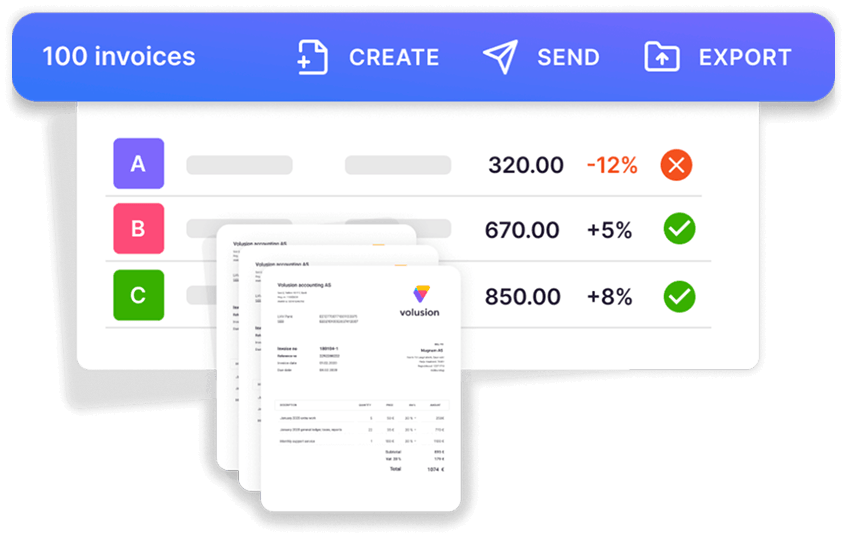
Uku’s Approach: Uku focuses on the step before collection: making sure every billable minute reaches an invoice. Contracts combine hourly, fixed, volume, and per-piece pricing, and six product types include task-triggered fees that bill automatically when someone completes a task. Firms set rules once, and Uku prices tracked time in real time, which cuts invoice preparation from two to three days to about 30 minutes.
 Source: Uku
Invoices go out from the firm’s own email domain in the client’s language, overdue reminders fire automatically, and invoices sync to QuickBooks, Xero, e-conomic, and other accounting software. Uku does not process card or ACH payments with surcharging or financing; on Elite and Enterprise, payment links let clients pay through the firm’s own Stripe or Montonio account.
🪙 Value Verdict: Aiwyn is better for firms that need to collect faster and want a payment portal with autopay, while Uku is better for firms losing revenue to unbilled time and manual invoice preparation.

Practice Management and Workflow
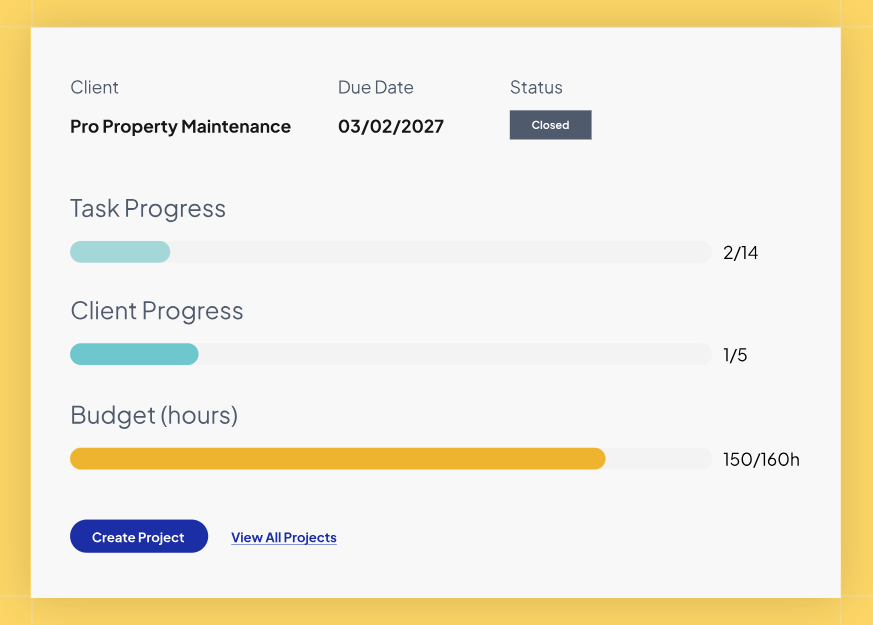
Aiwyn’s Approach: Aiwyn Practice puts time, billing, projects, client records, and reporting on one database, with reusable project templates and a Sage Intacct GL integration. Aiwyn designed it to replace legacy practice management systems at larger firms, though it is newer than Aiwyn’s payments products and was live at a small number of firms as of early 2026.
 Source: Aiwyn
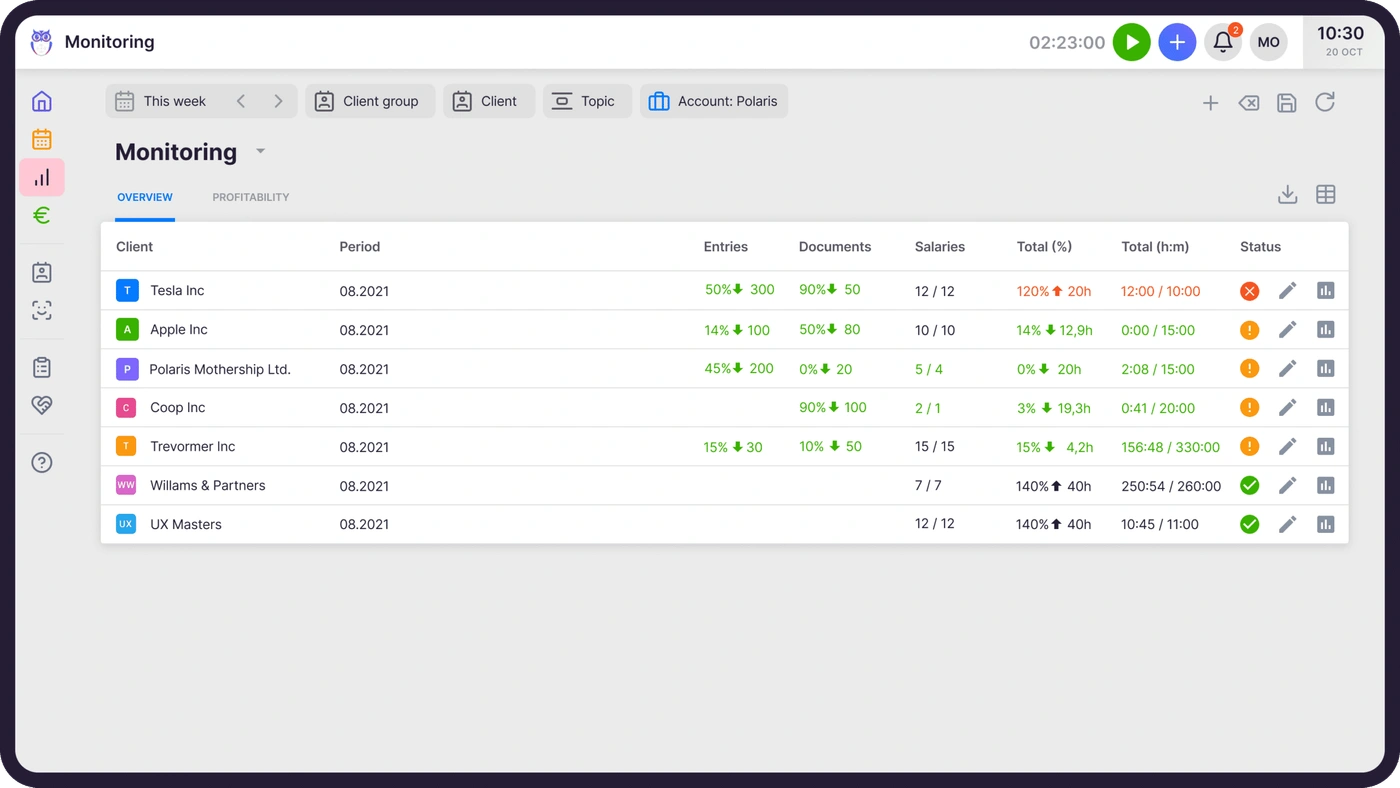
Uku’s Approach: Uku has offered practice management since 2017, and its workflow layer is built around recurring accounting work. Firms define a service once as a workflow template and assign it to a client; tasks then appear on the right accountant’s dashboard on schedule, with weekend and holiday handling.
Agreements Monitoring compares agreed work with actual time and volume for every client in real time, using green, orange, and red signals. Because Uku is modular, firms can start with tasks and workflows on day one and add billing, the portal, and BI Analytics one step at a time.
 Source: Uku
🪙 Value Verdict: Uku is better for small and mid-size firms running recurring monthly and quarterly work today, while Aiwyn suits large firms that want practice management as one part of a wider platform.

Client Portal and Engagement Letters
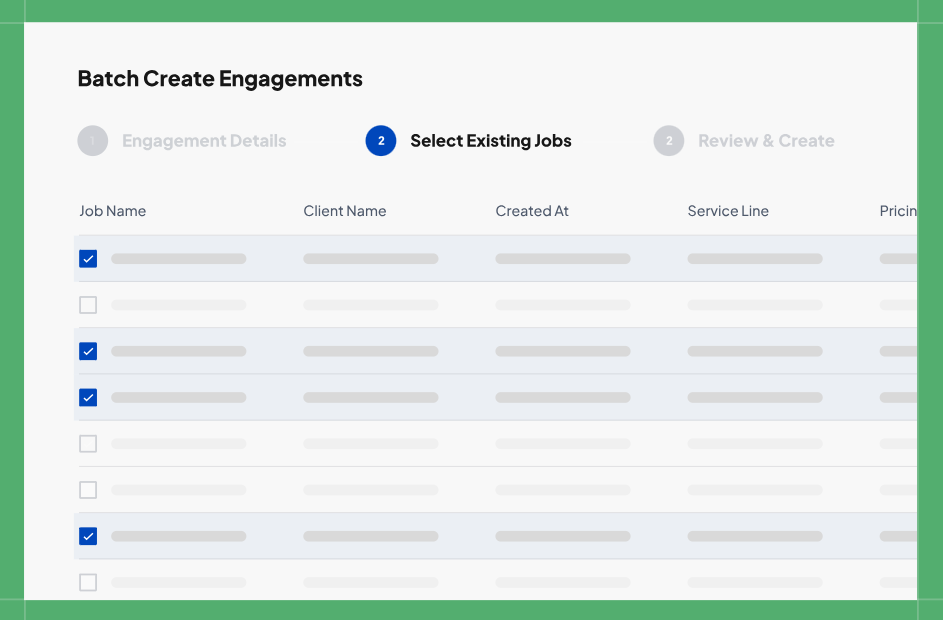
Aiwyn’s Approach: Aiwyn Experience combines engagement letters, a client portal, and request lists. Its batch engagement letters (up to 5,000 per run), payment capture at signing, 7216 consent tracking, and locked legal sections serve firms that renew large client bases every year.
 Source: Aiwyn
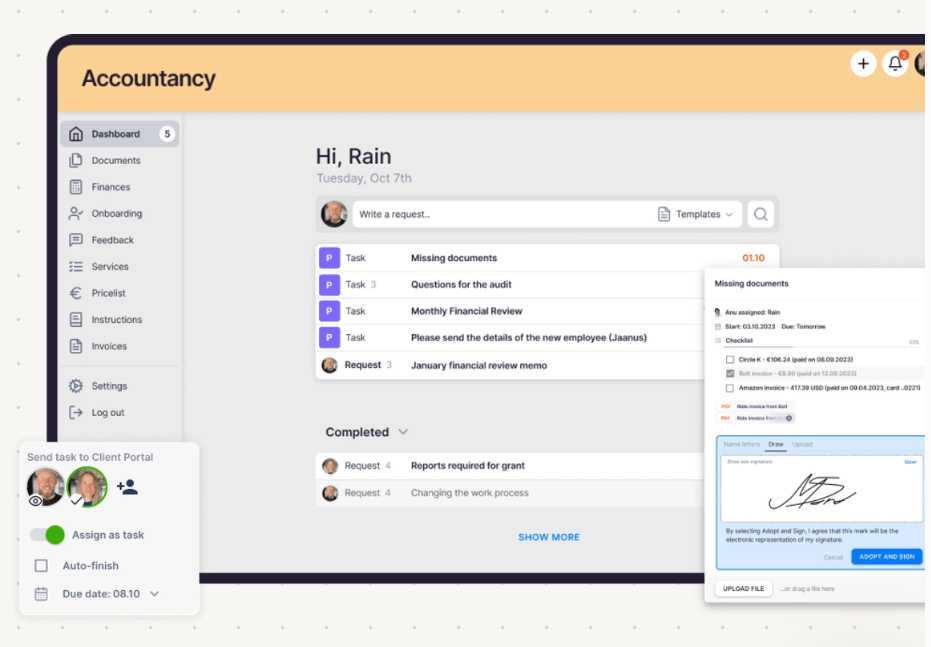
Uku’s Approach: Uku’s Client Portal is included on every plan, and client users don’t count as paid seats. In some portals, staff must link tickets to work items; Uku’s portal shows the same task on both sides, so clients and accountants share communication, documents, and time tracking in one place.
 Source: Uku
Clients log in through a magic link, upload documents to their tasks, message the firm, and sign documents electronically (e-signatures are on Solo, Elite and Enterprise). Uploads land in the firm’s workflow immediately, and staff can send files to QuickBooks or Xero for digitization in one click. Firms can brand the portal with their logo and colors.
🪙 Value Verdict: Aiwyn is better for high-volume engagement letter cycles tied to payment setup, while Uku is better for firms that want a branded portal for document collection at no extra per-client cost.
Tax Preparation
Aiwyn’s Approach: Aiwyn Tax aims to replace legacy tax software with AI-assisted review, real-time collaboration inside a return, and built-in e-file. Its gather, sign, and deliver tools are live, while the core engine remains in a waitlist pilot for 1040 returns, with pricing unpublished.
 Source: Aiwyn
Uku’s Approach: Uku does not prepare or file tax returns, and it lacks US-specific compliance features such as IRS e-file. It manages the work around tax season (deadlines, document requests, time, and billing) alongside whatever tax software the firm already uses.
🪙 Value Verdict: Aiwyn is the only one of the two building a tax engine, but since it isn’t generally available, most firms using either platform will keep their current tax software for now.
Implementation and Support
Aiwyn’s Approach: Aiwyn assigns a CPA-led implementation team: an on-site crew works alongside staff during launch week while a remote team of engineers and support leads monitors in the background. Aiwyn doesn’t publish implementation costs.
Uku’s Approach: Uku is modular, so firms can start working on day one and activate only the modules they need. Firms coming from spreadsheets can import their Excel file and get automated plans ready to go.
The first 90 minutes of onboarding are free, paid packages cost $700 or $2,000 depending on team size, and every plan includes live chat support. Uku’s G2 Quality of Support score of 9.7 is its highest rating.
🪙 Value Verdict: Aiwyn is better for large firms that want a vendor to manage a firm-wide transition, while Uku is better for firms that want a fast, low-cost setup with a known price.

Final Verdict: Aiwyn vs Uku
The choice between Aiwyn and Uku depends on your firm’s size, location, and which problem costs you most:
Aiwyn is an accounting firm platform designed for mid-to-large US firms that want to consolidate payments, practice management, client experience, and eventually tax with one vendor.
With quote-based pricing negotiated firm by firm, it lets managing partners and finance leaders replace several legacy systems, collect client payments faster through autopay and surcharging, and hand implementation to a CPA-led team.
This model works best for IPA Top 500 firms with heavy AR, PE-backed roll-ups standardizing technology across acquired firms, and buyers comfortable negotiating custom contracts.
Uku is a practice management platform for accounting, bookkeeping, and audit firms that want every deadline met and every billable hour invoiced. With published per-member prices from $19/month, a 14-day free trial of the full Elite plan, and no long-term contract, it lets firms know their cost before they commit and leave if it doesn’t work.
That makes it a strong fit for firms of 2 to 100 people running recurring client work, firms in Europe and other markets outside Aiwyn’s US focus, and any practice that wants to replace spreadsheets without entering a sales cycle.
Try Uku free for 14 days here or book a demo.
The difference comes down to approach. Aiwyn asks, “How can one vendor run every part of a large firm?” Uku asks, “How can a growing firm see all its work and bill for every hour of it?” Get started with Uku.
Read more
- Aiwyn review — what each Aiwyn product does day to day
- Aiwyn alternatives — practice management and payments tools to compare with Aiwyn
- Aiwyn vs Uku — the two compared feature by feature
- Uku automated billing and the Uku client portal
- Uku case studies
Frequently asked questions
How much does Aiwyn cost?
Aiwyn doesn't publish its prices. It has no pricing page, and it prices its four products (Payments, Practice, Experience, and Tax) through a sales demo. Its website terms don't describe firm contracts; a signed Customer Agreement does, so expect a negotiated contract rather than a published subscription.
Does Aiwyn offer a free trial?
Aiwyn's website mentions no free trial or free plan. The only way to evaluate it is to schedule a demo with the sales team. Uku, by comparison, offers a 14-day free trial of the full Elite plan with no credit card required.
Can I cancel an Aiwyn contract early?
Aiwyn's Terms and Conditions direct questions about early cancellation fees and options to its support team without listing amounts. A signed Customer Agreement governs firms that have one, so cancellation terms depend on what each firm negotiated.
Are there extra costs beyond the Aiwyn subscription?
Likely, yes. Card and ACH processing fees apply to client payments at rates Aiwyn doesn't publish, taxes are charged separately, and Aiwyn doesn't publish implementation costs. Firms with committed Microsoft Azure spend can apply it toward Aiwyn.
Is Aiwyn Tax available yet?
Partly. Gathering documents, e-signing, and delivering returns are available today and work alongside existing tax software. The core tax engine has been rolling out through a waitlist, with a 1040 pilot aimed at 100 firms. Aiwyn hasn't published general availability or pricing for the engine, so most firms will keep their existing tax software for now.
Does Aiwyn work for small firms or firms outside the US?
Aiwyn targets mid-to-large US firms, mostly within the IPA Top 500. It has no published self-serve or small-firm tier, and it acquired only QuickFee's US payments business. Small firms and firms outside the US will generally find better-fitting options elsewhere.
How much does Uku cost compared to Aiwyn?
Uku publishes its prices: $19/month for Solo, $38 per member for Team, $48 per member for Elite, and $88 per member for Enterprise on annual billing. Every plan also offers monthly billing (for example, $25/month for Solo). Prices come in €, $, and £, with VAT added on top. A 10-person firm on Team pays $4,560 a year. Aiwyn's costs can't be compared directly because they're available only by quote.
Can Uku replace everything Aiwyn does?
No. Uku covers practice management, workflow, time tracking, billing, and a client portal, but it doesn't process client card or ACH payments itself (Elite and Enterprise add payment links through the firm's own Stripe or Montonio account), offer client financing, or prepare tax returns. Firms that need those features from one vendor should look at Aiwyn; firms that mainly need to organize work and bill accurately will find that Uku covers it at a lower, known cost.