




Aiwyn Review 2026: Features, Pricing & Best Alternative
Aiwyn offers payments, practice management & tax for large US CPA firms, but no public pricing or trial. See the top alternative for smaller firms.


Contents
Aiwyn started in 2020 with one job: help accounting firms get paid faster. Six years and several acquisitions later, it sells one platform covering payments, practice management, client experience, and tax to some of the largest CPA firms in the United States.
For a firm that bills thousands of clients and chases invoices across half a dozen disconnected systems, the pitch is simple: one vendor, one client login, and cash that arrives weeks sooner.
But a platform shaped around large US firms makes choices that don’t fit every practice. We analyzed Aiwyn in detail for this review. We believe it’s the right choice if:
- You run a mid-to-large US CPA firm, most likely in the IPA Top 500
- Slow collections and high days sales outstanding are your most expensive problem
- You want billing, collections, engagement letters, and the client portal under one vendor
- You’re comfortable with a sales-led purchase, a custom quote, and a structured implementation
- You want early access to a modern tax system as it moves out of pilot
However, Aiwyn might not be the best choice if:
- Your firm has 2 to 100 people and no appetite for an enterprise contract
- You operate outside the United States
- You want to see prices and try the software before speaking to sales
- Your daily friction is recurring deadlines and task coordination, not collections
- You want to know, client by client, whether the work you do fits the fee you charge
In that case, consider Uku: practice management software for accounting and bookkeeping firms that schedules recurring client work automatically, turns tracked time into invoices, and shows which clients are drifting beyond their agreed scope. More than 1,000 firms in 25+ countries use it, it runs in 12 languages, and it publishes its prices, starting at $19/month with annual billing ($25 with monthly billing).
That’s why we’ve included a closer look at Uku later in this Aiwyn review, as the best alternative for small and mid-sized firms that want workflow, time, and billing in one place without an enterprise sales cycle. If you’d rather see it now, you can try Uku free for 14 days with the full Elite plan.
Features and prices below were last checked in November 2026.
What is Aiwyn?
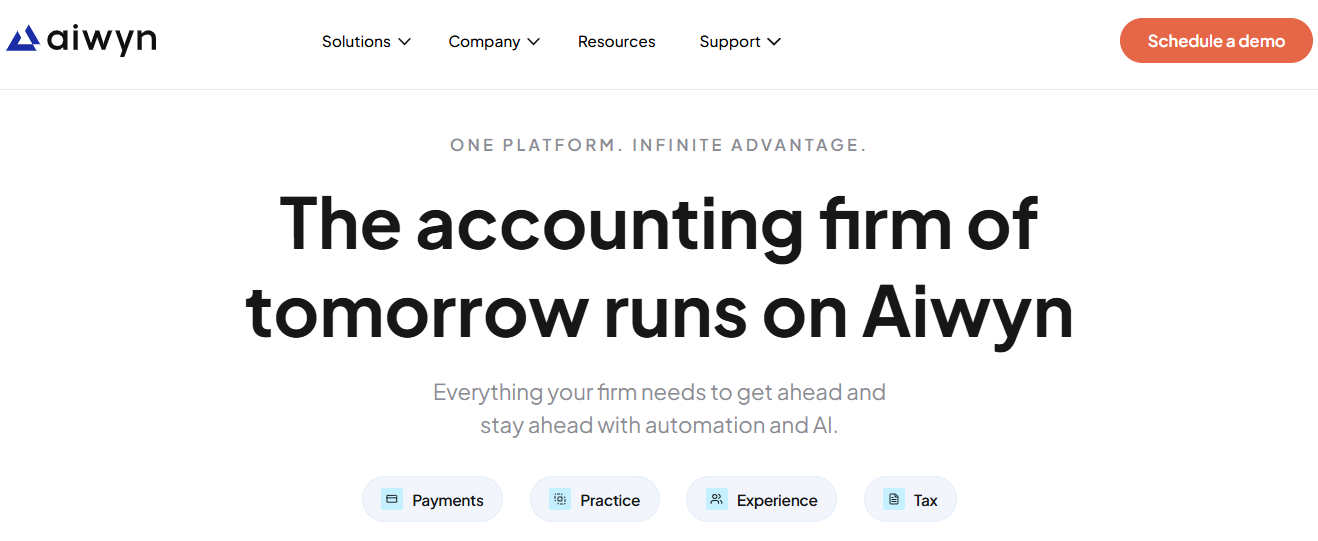
Justin Adams, Tanner Fritz, and Pat Morrell founded Aiwyn in 2020 in Charlotte, North Carolina. The name means “wise friend,” and the company’s marketing leans on that idea of trust.
 Source: Aiwyn
The first product automated billing and collections for accounting firms, aiming to shorten the gap between finishing client work and collecting the fee. In December 2024, Aiwyn closed a $113M round led by KKR and Bessemer Venture Partners to expand into full practice management and tax. Acquisitions followed quickly.
In May 2025 it bought Taxa (now Aiwyn Tax) and Digilence, a workflow integration company. In September 2025 it acquired QuickFee’s US payments business, which gives Aiwyn customers access to QuickFee’s “Pay Later” financing option. It later acquired Column Tax for its tax calculation engine.
Today Aiwyn calls itself the first complete platform for modern accounting firms, organized into four products: Aiwyn Payments, Aiwyn Practice, Aiwyn Experience, and Aiwyn Tax. In 2025 the company grew from roughly 200 to more than 800 firm customers, processed over $5B in payment volume, and reported a Net Promoter Score of 77.
Aiwyn sells to managing partners, controllers, COOs, and IT directors at US firms ranked in the IPA Top 500, and to private-equity-backed firms standardizing technology across the practices they acquire.
Aiwyn Pros & Cons
| Pros | Cons |
|---|---|
| ✅ Billing and collections logic designed around accounting firms | ❌ No public pricing, free trial, or self-serve signup |
| ✅ Autopay captured when clients sign the engagement letter | ❌ Built for mid-to-large US firms only |
| ✅ Batch creation of up to 5,000 engagement letters | ❌ Aiwyn Tax’s core engine is still in a waitlist pilot |
| ✅ One client portal with no-login magic links | ❌ Practice management modules are much newer than payments |
| ✅ Integrates with Sage Intacct, PracticeCS, CCH Axcess Workflow, and Deltek | ❌ Few independent reviews on G2 or Capterra |
| ✅ SOC 2 for Payments, SOC 2 Type 2 for Engagements | ❌ No Zapier, Make, or Workato connectors listed |
| ✅ Hands-on implementation led by CPAs | ❌ Terms reference early cancellation fees |
Aiwyn Review: How it Works & Key Features
Aiwyn Payments: Billing, collections, and reconciliation designed around how CPA firms get paid
Aiwyn began with Payments, and it remains the most developed part of the platform. It covers three stages of the bill-to-cash cycle.
Collections handles outbound AR. Once an invoice exists in the firm’s practice management system, Aiwyn delivers it and triggers aging-based reminder sequences. A 15-day reminder reads differently from a 60-day notice, and firms set the cadence, tone, and escalation. The follow-up runs the same way whether the firm sends 50 invoices or 5,000, which takes the chasing off partners and billing staff.
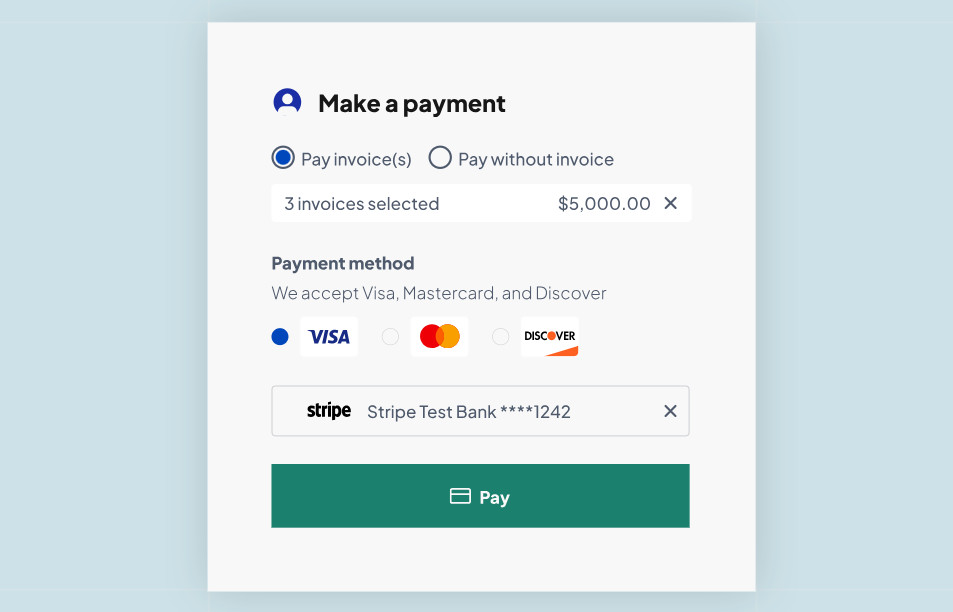
Payments gives clients a secure portal where they can view and pay their whole balance by ACH or credit card, covering several invoices in one transaction. Saved payment methods make repeat payments one click. The most distinctive feature is autopay tied to engagement letters: the client chooses autopay while signing, so the payment method is on file before work begins.
 Source: Aiwyn
For retainers and deposits that come before any invoice, Quick Payment Links create a shareable payment URL. Firms can also apply standardized late fees and compliant credit card surcharges instead of absorbing processing costs.
Reconciliation closes the loop. Aiwyn matches payments to invoices automatically, including multi-invoice and multi-currency payments, and sends the data back to the firm’s practice management or general ledger system. Aiwyn tokenizes card and bank details and never stores them on firm systems, which reduces the firm’s PCI scope.
Because Payments connects to TR PracticeCS, Sage Intacct, QuickBooks Online, Certinia, Deltek, and Iris, many firms run it as an AR layer on top of the system they already use. Through the QuickFee acquisition, Aiwyn customers also get access to QuickFee’s “Pay Later” option, which lets clients spread an invoice over 3 to 12 months while the firm gets paid in full upfront.
Aiwyn Practice: A newer practice management layer on a single data model
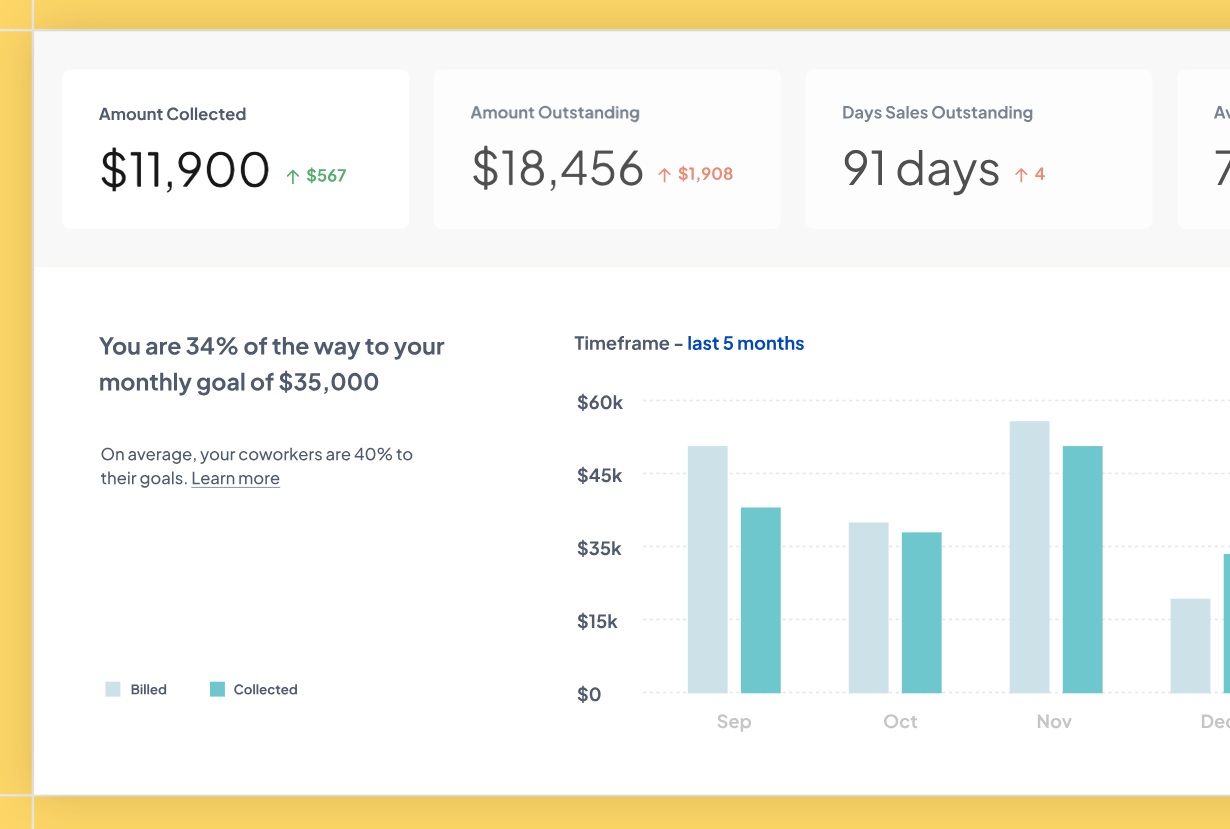
Aiwyn Practice brings time and expense, billing and AR, projects, client records, and reporting into one cloud system. Its main argument is architectural: time entries, projects, invoices, and client records share one source of truth, so billing sees a time entry immediately, with no export or sync.
The modules cover the expected ground:
- Time & Expense: drag time onto a calendar or log entries from a list, tied to projects and tasks, with billable tagging and period-close controls
- Billing & AR: automated invoicing on fixed schedules or work milestones, plus reminders, reconciliation, and smart statements
- Project Management: reusable project templates with roles, tasks, and scheduling rules for recurring engagements
- Client & Contact Management: single client records with many-to-many contact relationships to avoid duplicates
- Reporting & Analytics: real-time views of project, client, and employee performance, with connections to outside BI tools
 Source: Aiwyn
Aiwyn expects most firms to adopt Practice gradually, often starting with billing or engagement letters and expanding from there. The Sage Intacct integration pushes clients, projects, invoices, and AR back to Intacct so a firm can keep its general ledger, and the HubSpot integration pulls CRM data into engagement letters on a read-only basis. A team of CPAs runs the implementation and data migration.
Outside of tax, Practice is the youngest part of the platform. As of early 2026, only a small group of firms was live on the new practice management modules.
Aiwyn Experience: Engagement letters, a client portal, and request lists under one login
Aiwyn Experience is the client-facing suite. Aiwyn’s own research says the average firm runs 13 separate client-facing tools, and Experience aims to replace them.
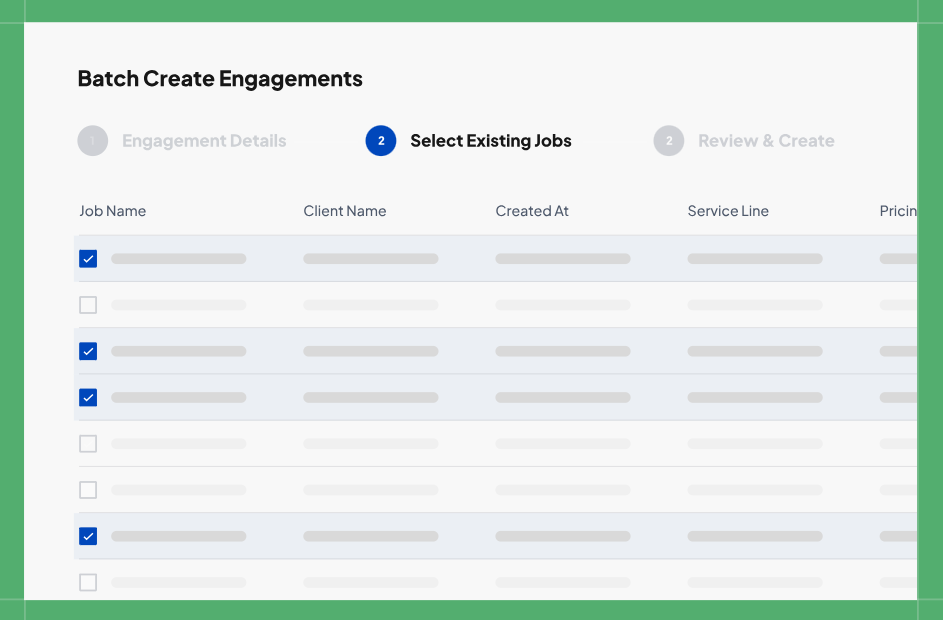
The Engagement Letters module (also sold as Aiwyn Engagements) handles everything around the signature. Templates pull client, project, and fee data from the practice management system, firms can lock legal sections, and they can create up to 5,000 letters in one batch for annual renewals.
 Source: Aiwyn
Clients open letters through a magic link without creating an account, and reminders go out every 3 days until the client signs. After signing, the document uploads to the firm’s document management system, a webhook updates downstream workflows, and Aiwyn schedules next year’s renewal. If scope changes, an “Under Revision” status pulls the letter back. The module also tracks IRS Form 7216 consent documents.
The Client Portal gives clients one login to sign letters, exchange documents, answer request lists, message the firm, and pay invoices, across tax, audit, advisory, and client accounting services. Request Lists sit inside project templates, with automated reminders and document-level status for both sides.
Aiwyn Tax: An AI-native tax system whose core engine is still in pilot
Aiwyn built Aiwyn Tax in two parts. Gathering client documents, signing, and delivering returns are available today and work alongside a firm’s existing tax software. The core engine, marked “coming soon,” combines preparation, review, filing, and collaboration in one place:
- Preparation: Aiwyn ingests client documents uploaded through the portal and uses them to pre-fill draft returns
- Review: firm-specific validation rules flag issues with red, yellow, and green indicators, so reviewers work through exceptions instead of every line
- Collaboration: several preparers and reviewers can work in the same return at once, with in-line comments
- E-file: a built-in e-file module with real-time IRS connectivity, status alerts, and pre-submission checks
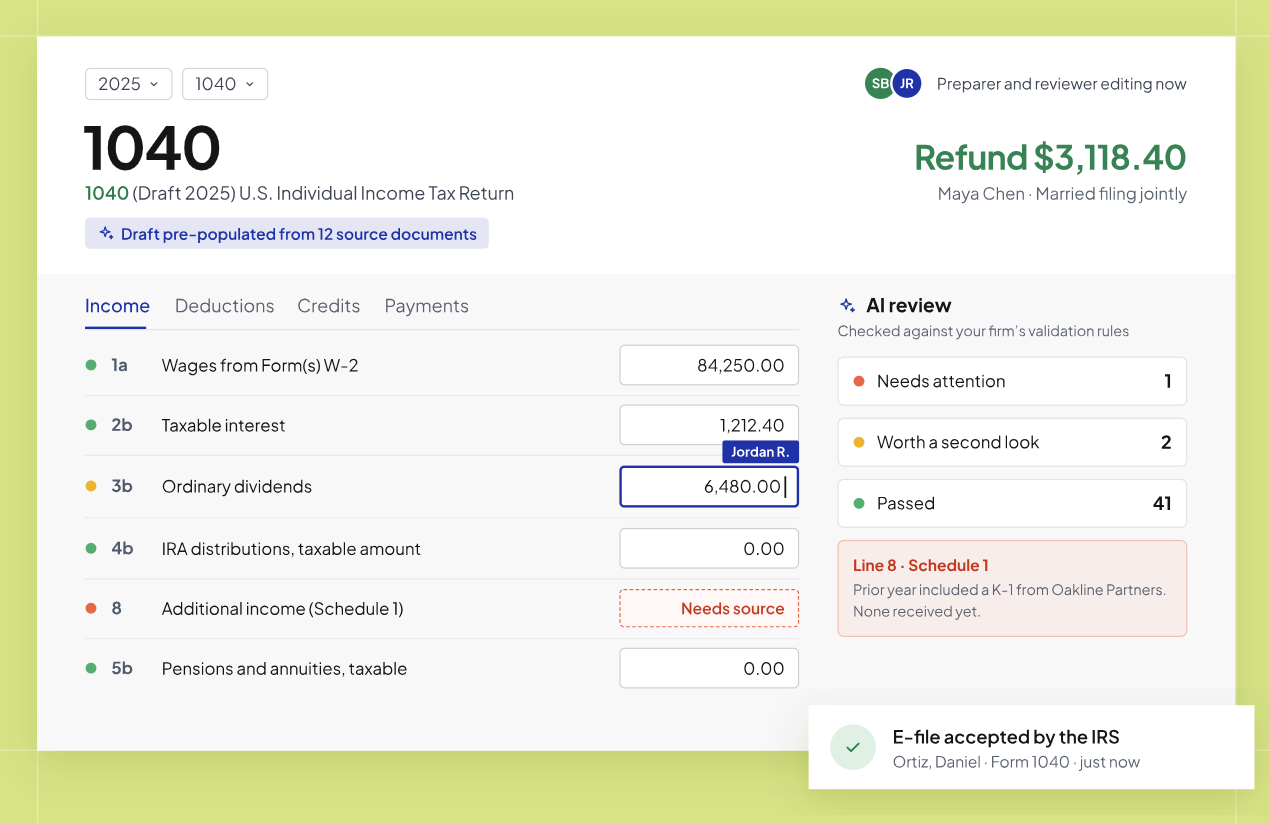 Source: Aiwyn
The calculation engine comes from Column Tax and has processed over 1 million 1040 returns in production. Aiwyn Tax is also available as a Claude Connector, where firms can run 1040 calculations and test scenarios inside a chat interface.
The caveat matters. According to Aiwyn’s latest public information, the core engine is rolling out through a waitlist, with a 1040 pilot for 100 firms. Aiwyn has not published pricing or a general availability date for it. Most firms evaluating Aiwyn today would keep their current tax software running alongside it.
Pricing: Aiwyn sells through demos and custom quotes
Aiwyn publishes no prices. Its /pricing/ URL redirects to the homepage, and every page ends with “Schedule a demo”. There are no public tiers, no free trial, and no self-serve signup.
The Terms and Conditions offer a few clues about the commercial model. They describe recurring charges until cancellation, mention possible early cancellation fees, and cap Aiwyn’s liability at the fees paid in the previous 12 months. They are the website’s terms of use, though, and say a signed Customer Agreement takes precedence, so they say little about a firm’s software contract.
 Source: Aiwyn
Client card and ACH payments run through Stripe, with processing fees that Aiwyn does not publish. Aiwyn does not disclose implementation costs. For everything we could and could not find, see our Aiwyn pricing breakdown.
Where Aiwyn Falls Short
Aiwyn targets a specific buyer, and most of its limitations follow from that focus.
Built for the Top 500: Aiwyn designed its pricing, sales process, and implementation model for large firms with multiple partners and big AR balances. With no self-serve tier or published entry price, a 10-person bookkeeping practice has no clear way in, and a custom enterprise contract rarely makes financial sense at that size.
US Only: The QuickFee deal covered only the US payments business, and Aiwyn’s customer references are US CPA firms. Firms in Europe or elsewhere, or firms that need an interface in a language other than English, fall outside its market.
Breadth Is Newer Than Depth: Aiwyn was a payments company until late 2024. Practice management and tax arrived through acquisitions and fast development in 2025. Firms comparing Aiwyn Practice with mature practice management tools may find some modules still filling out, and Aiwyn Tax’s core engine is not yet generally available.
Money First, Workflow Second: Aiwyn’s most detailed automation covers invoices, collections, and engagement letters. Its public material says much less about how the system schedules recurring monthly bookkeeping, payroll, and VAT deadlines, assigns them, and shows them to each accountant every day. Firms whose biggest problem is missed deadlines rather than late payments should test that area closely.
Little Independent Feedback: Aiwyn has 24 reviews on G2 and no listing we could find on Capterra or TrustRadius. Most available evidence comes from Aiwyn’s own materials, so buyers will struggle to find unfiltered opinions before they commit.
Opaque Cost and Commitment: Aiwyn negotiates prices and does not publish its contract terms, so contract length and early exit fees are questions for the demo. Aiwyn also lists no Zapier or Make connectors, so connecting tools outside its partner list means using the API.
These limitations aren’t failures. They follow from building one platform for large US firms with complex billing. But they leave room for an option made for small and mid-sized firms, in any country, whose main need is getting recurring client work done, billed, and paid on time.
Top Aiwyn Alternative for Small and Mid-Sized Firms: Uku
Lifelong friends Rain Allikvee and Jaanus Lang founded Uku; both of their mothers worked as accountants. The first customer was Rain’s mother’s own firm. The company is self-funded and describes itself as “proudly bootstrapped”.
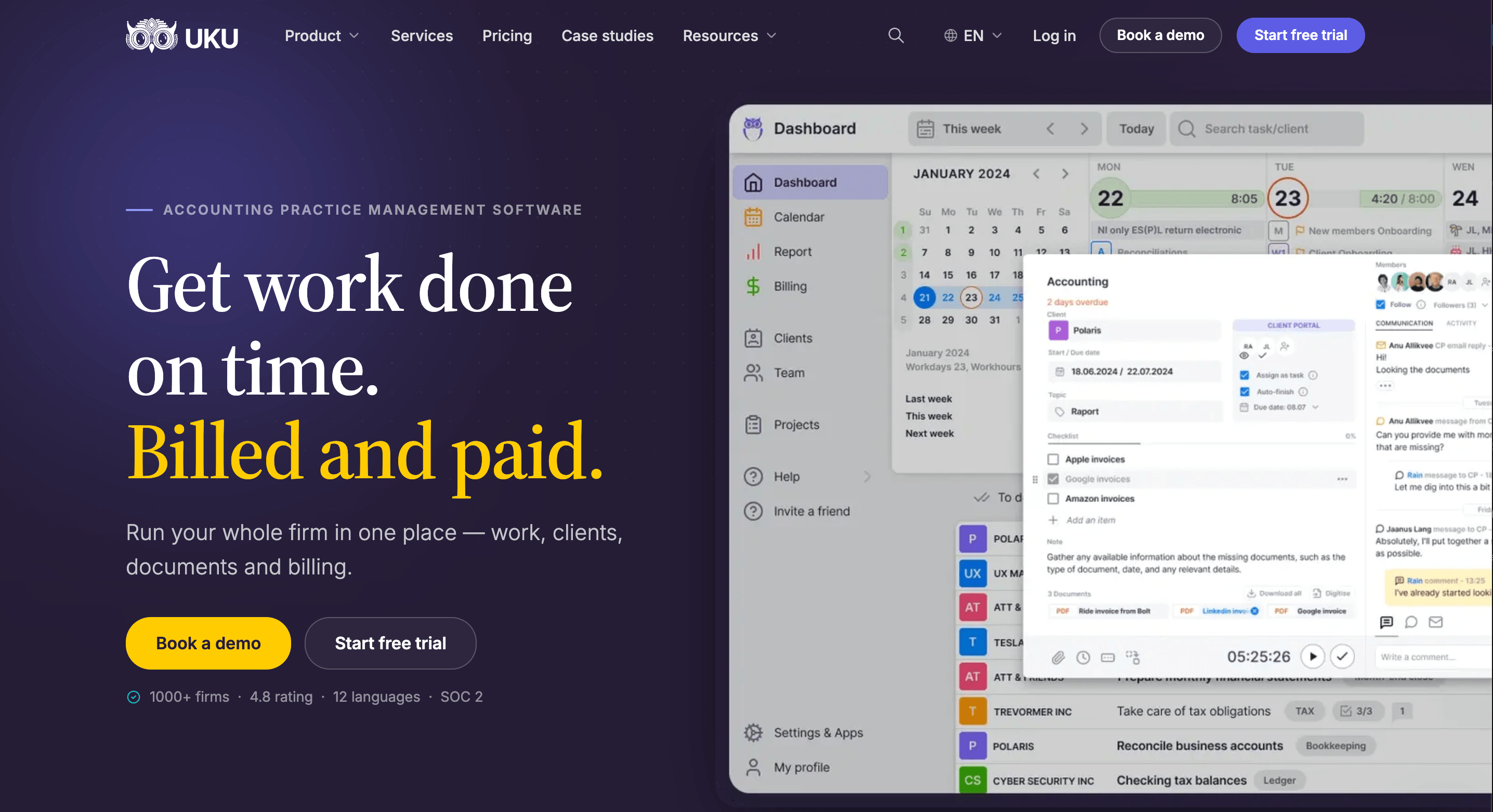
The founders built it to be international from the start, and it now serves 1,000+ accounting firms across 25+ countries in 12 languages and multiple currencies.
Where Aiwyn started with collections, Uku started with the daily work itself: which tasks are due, who is doing them, how long they took, and what to bill. Its design principle is “calm by design,” with 90% of actions taking one click, and the goal is a system your team will enjoy using.
Reviewers agree: Uku holds a 4.7/5 rating on G2 and 4.8/5 on Capterra, with G2 scores of 9.5 for Ease of Use and 9.7 for Quality of Support against a category average of 8.6.
Uku is also modular. A firm can start with just CRM and tasks on day one, then add billing, the client portal, and reporting as it grows. Many firms arrive from spreadsheets: they spend an hour tidying their Excel file, import it, and have automated work plans ready.
Workflow Automation & Task Management: Uku schedules recurring client work so nobody has to
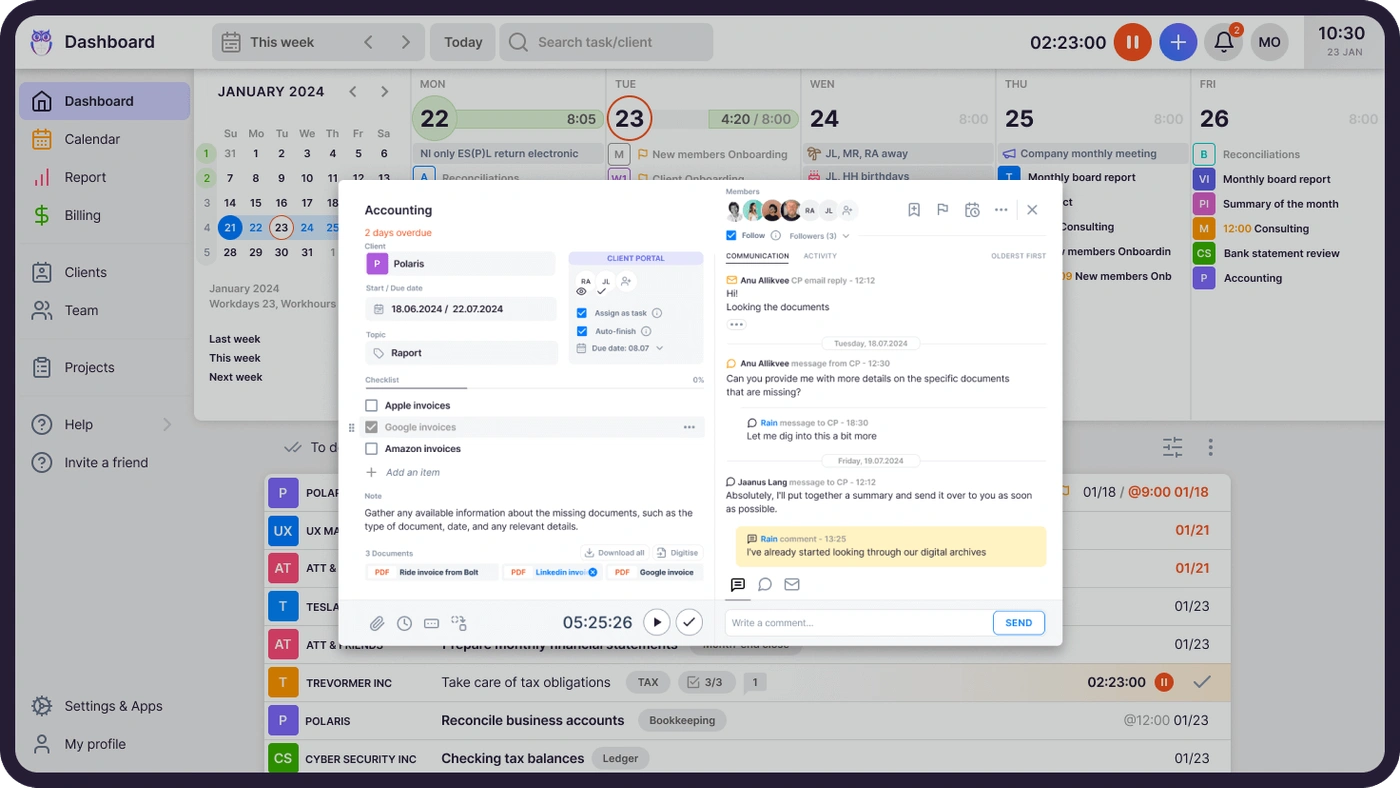
In Uku, you define each recurring service (monthly bookkeeping, payroll, quarterly VAT, year-end) once as a workflow template. Apply it to a client, and Uku creates every future task on the right date, assigns it to the right accountant, and places it on their dashboard and calendar. There is no “create this month’s tasks” step.
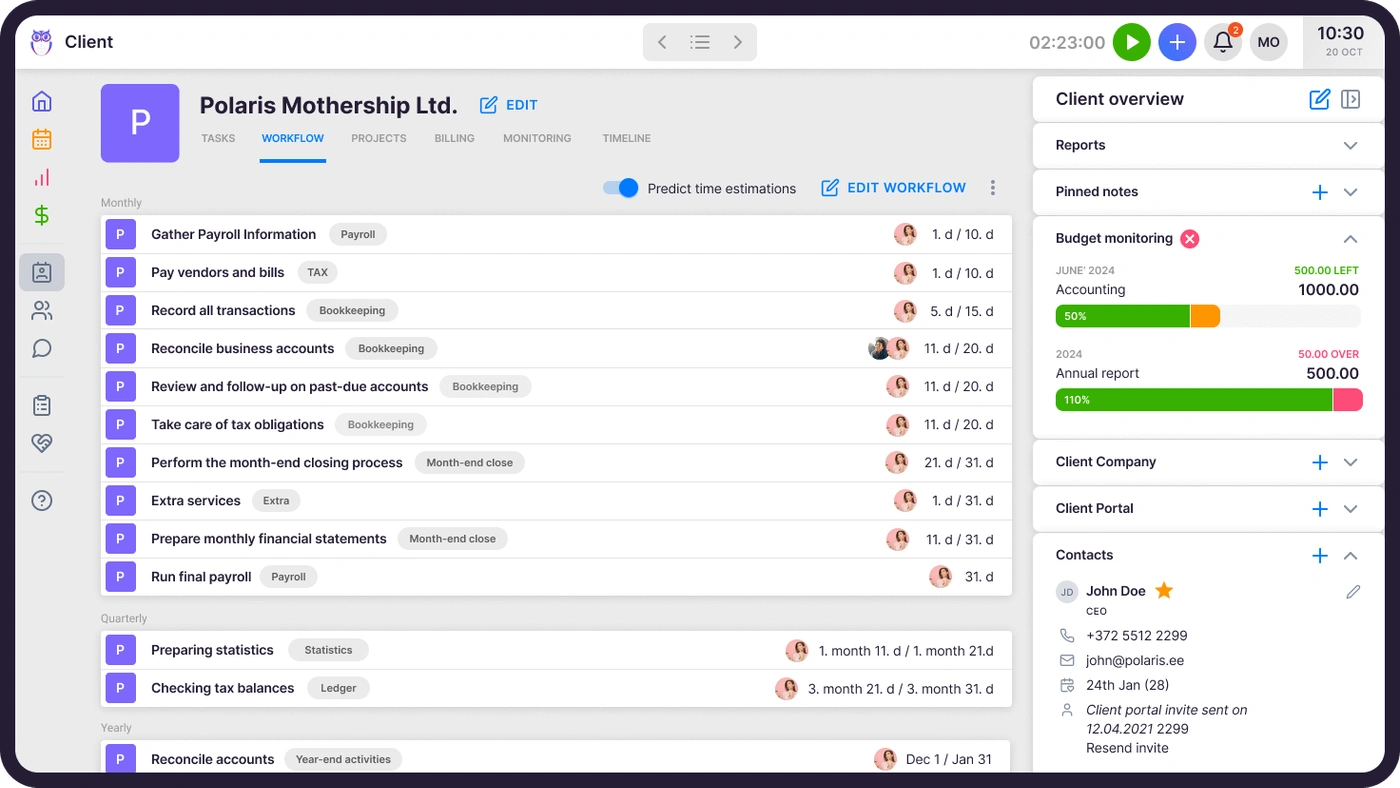
Recurrence rules cover weekly, monthly, quarterly, yearly, and custom patterns, and they shift tasks that fall on weekends or holidays. You can also anchor tasks to each client’s own dates, such as fiscal year-end or payroll date, so automation follows the client’s calendar rather than a fixed one. When you change a template, you can push the update to every client using it.
The dashboard shows each person what to work on today, with filters by client, team member, status, and deadline. Team leads see every task across the firm, with overdue work highlighted. Task dependencies hide a step until the one before it is done.
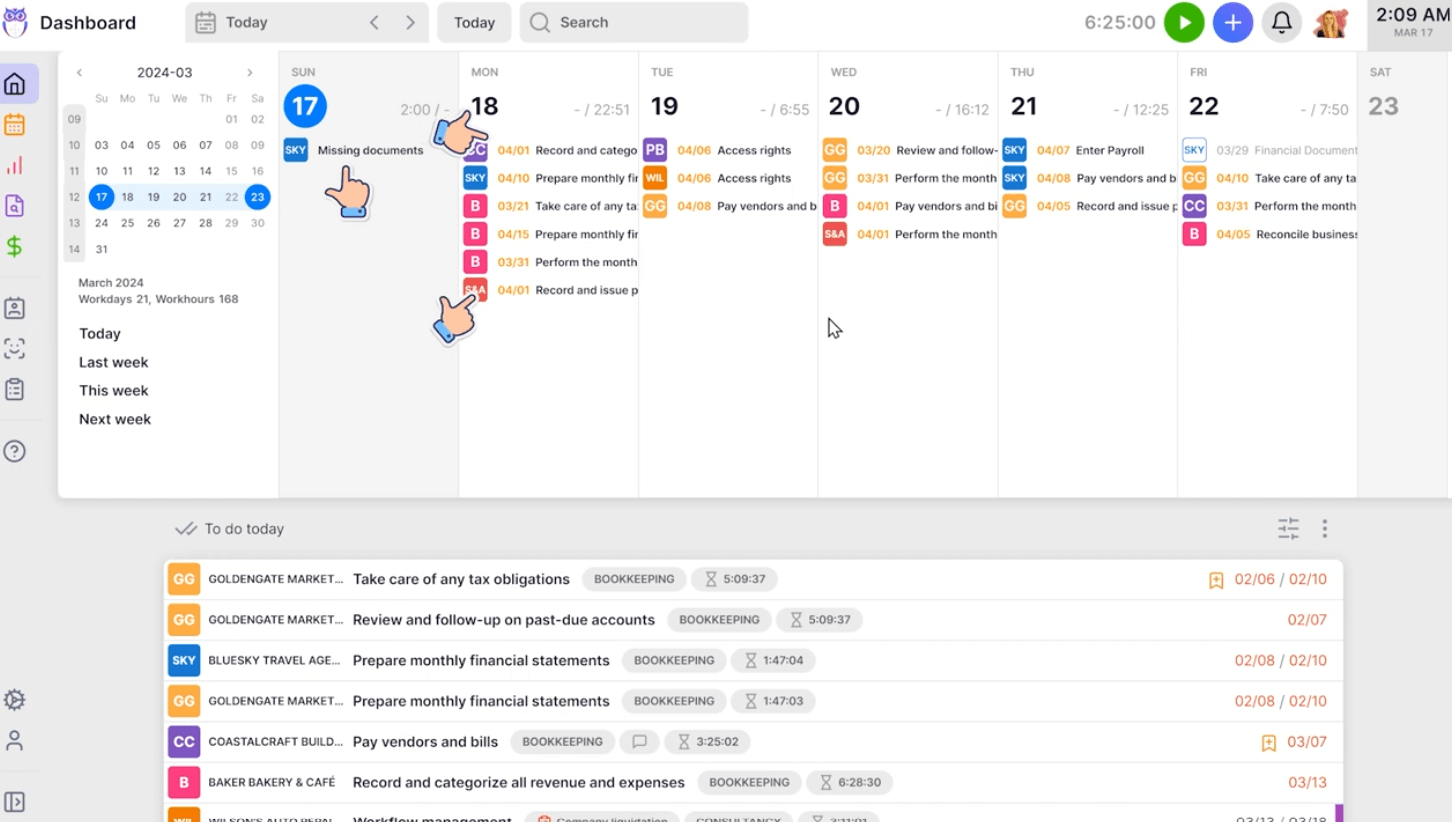
When someone is away, a manager can reassign all their tasks in one action, and because checklists, instructions, files, and credentials live on the task, the substitute has what they need. Task email automation sends emails when a task starts, changes, or nears its deadline, and the rule carries forward to every future occurrence.

Time Tracking & Billing: Every tracked minute flows onto an invoice
Uku treats time tracking as the input to billing. Accountants start a stopwatch from any task, log time manually, or enter time across several tasks at once. Each entry is billable or non-billable, users can tag out-of-scope work as extra, and admins can lock entries weekly or monthly to match period-close discipline. On Elite, firms can block a task from being completed until someone logs time against it.
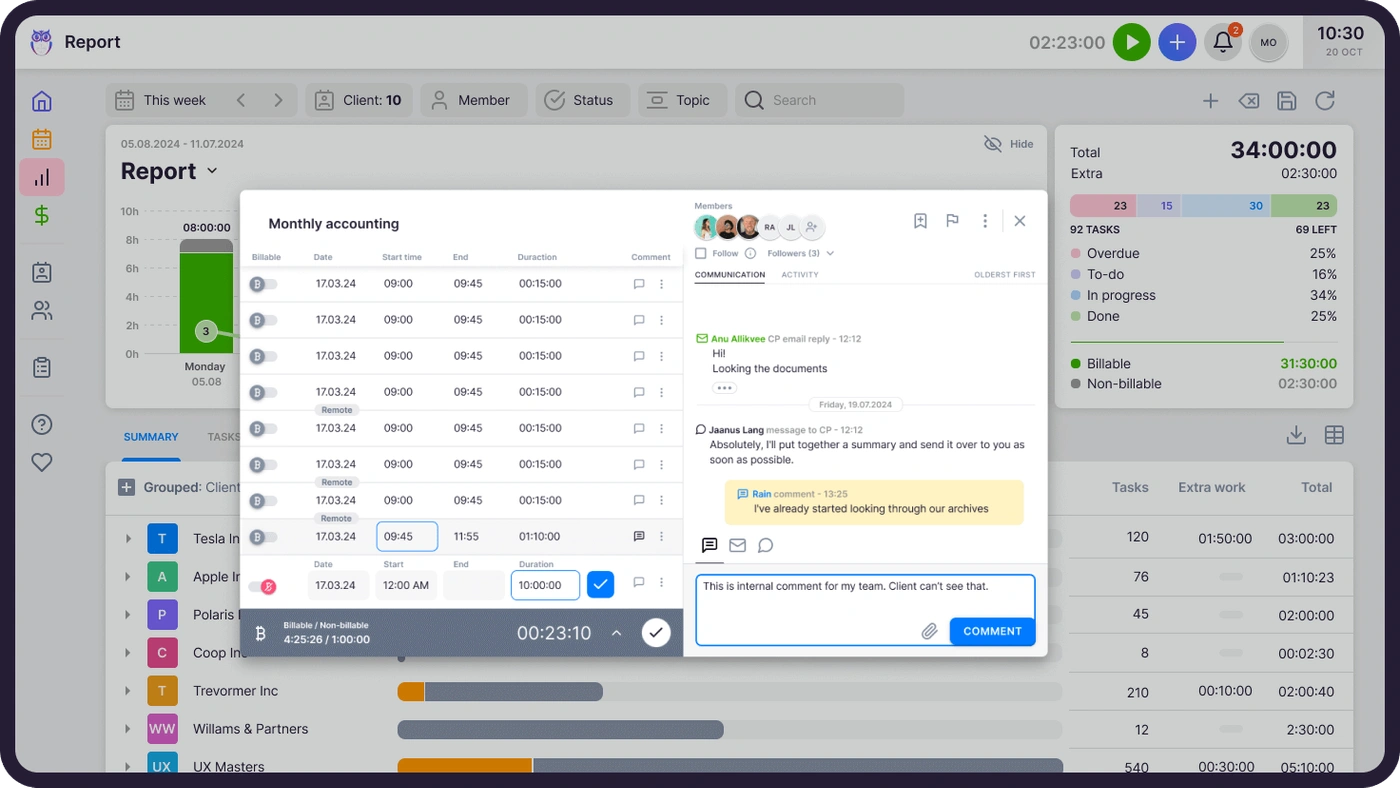
Billing then reads that data. Firms build client contracts from products of six types, including hourly, fixed, per-piece, and task-triggered fees that bill automatically when a task reaches a set status. A single contract can mix time, fixed, and volume pricing. Firms can set rounding rules per invoice line or per task, so Uku can automatically bill a one-minute unplanned call as 15 minutes.
At period end, Uku generates draft invoices for every client, which move through approval to sending. Invoices go out from the firm’s own email domain and in each client’s language, automatic debt reminders follow up on overdue invoices, and data syncs both ways with QuickBooks, Xero, e-conomic, Fortnox, and several other accounting platforms.
Uku’s own description sums it up: “Other tools track time. Period. Uku tracks time AND generates the invoice.” Automated billing is Uku’s main differentiator, cutting monthly invoice preparation from two or three days to about 30 minutes.
Uku doesn’t run a payment-processing and financing layer like Aiwyn Payments. Its strength lies upstream: making sure the firm records and invoices billable work in the first place.

Profitability & BI Reporting: See which clients cost more than they pay
Most accounting firms bill fixed monthly fees for an agreed amount of work. The problem is drift: a client’s workload creeps up, and nobody notices until the month is over.
Uku’s Agreements Monitoring compares agreed work with actual work in real time, by hours or by volume (documents processed, payroll runs, VAT filings). Every client appears on one screen in green, orange, or red, and you can set it up for all clients at once.
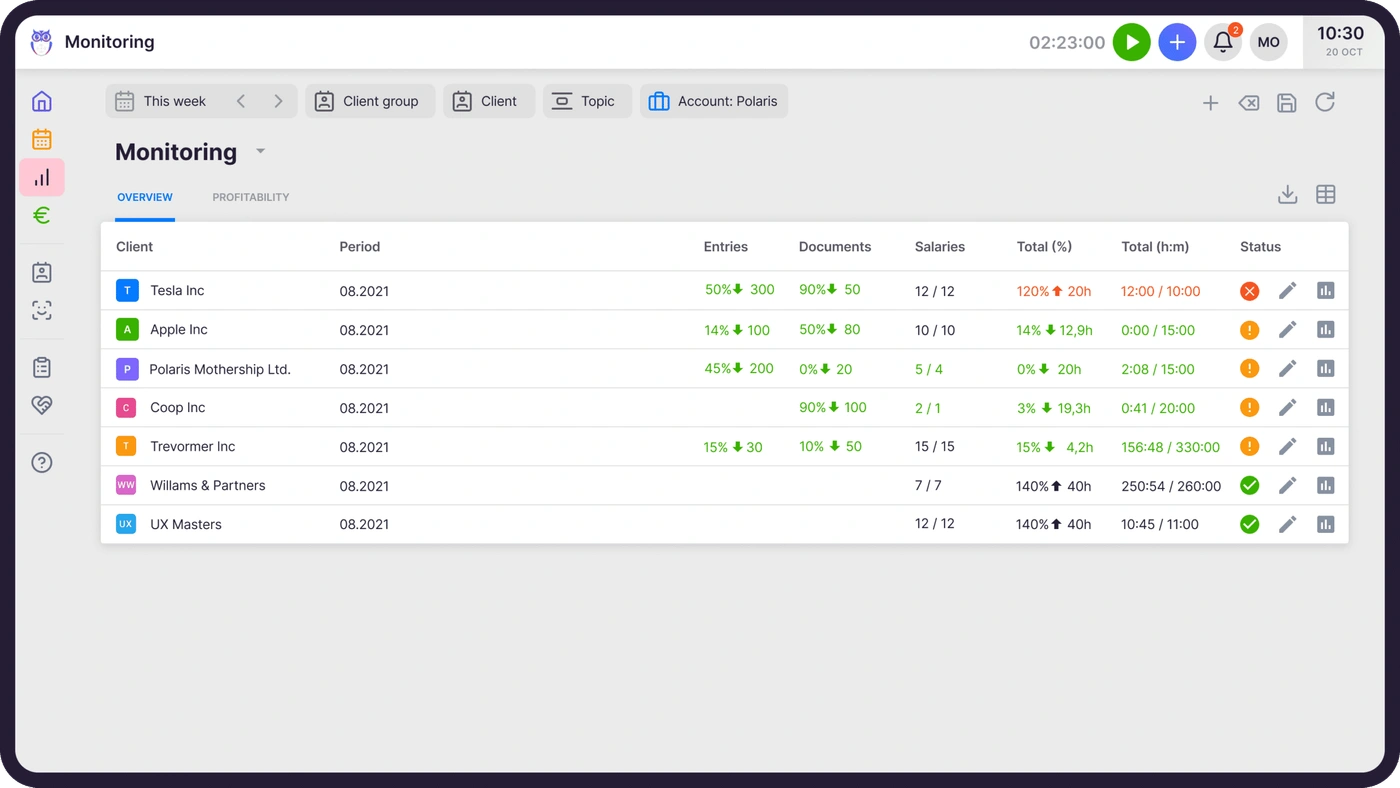
Billing tracks cost prices alongside sales prices. If an employee costs €30/hour and bills at €45/hour, managers see the margin. If someone worked eight hours but only six were billable, managers can tell whether the cause is efficiency, a difficult client, or pricing.
The Reports module breaks time down by client, team member, topic, or project and flags gaps or overlaps in a person’s timesheet.
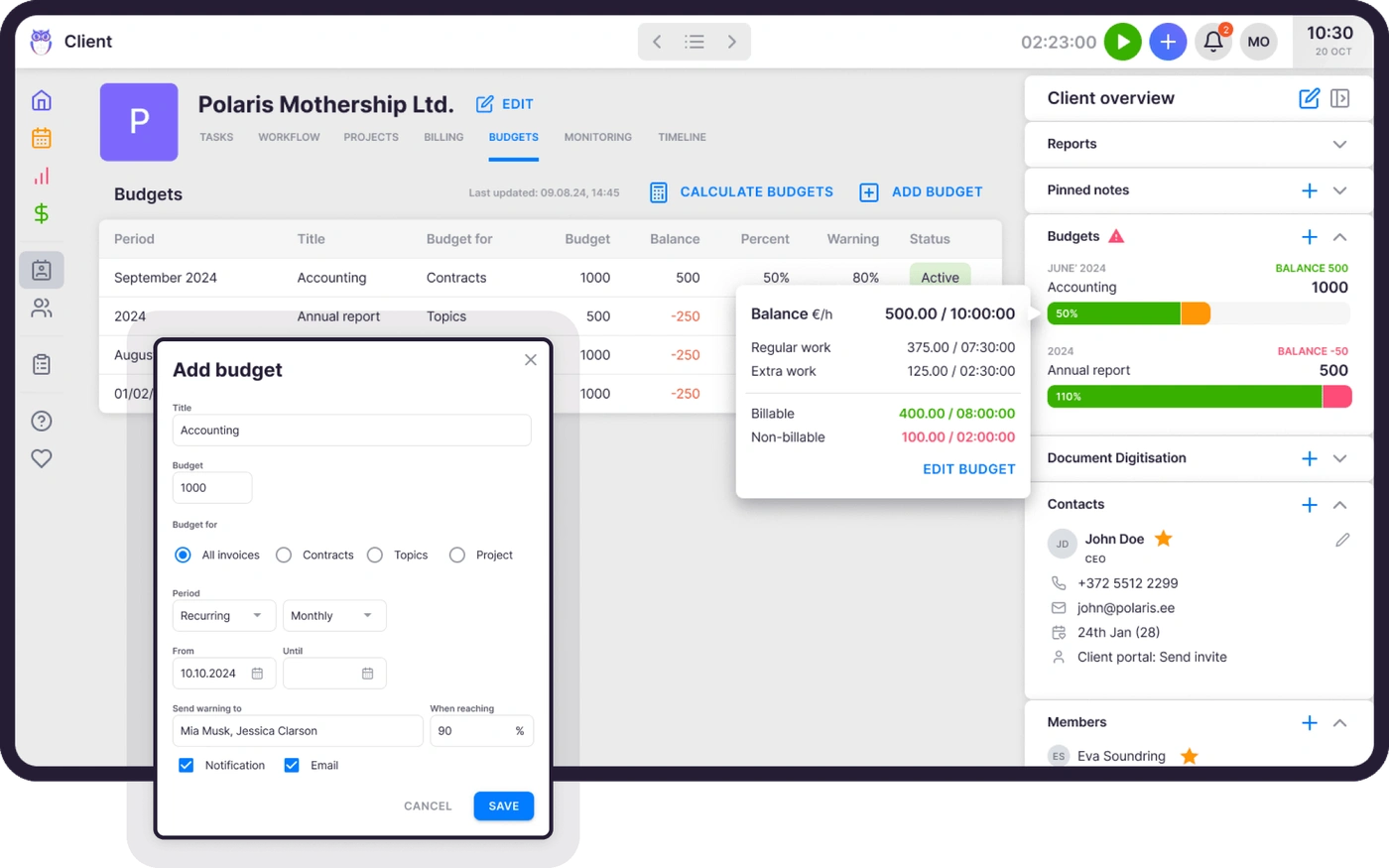
On Elite, Client Budgeting tracks monthly budgets and alerts you before a client reaches the limit, and BI Reporting adds real-time visual reports on production, revenue, utilization, billing health, and AR aging, with detailed filters and saved templates. Using Uku’s business analytics report, firms find ~20% more billable revenue once they can see which agreements are underpriced.

Client Portal & Client Management: One place for every client, with no charge for client seats
Uku’s Client Portal lives in the same system as tasks and billing. Clients and accountants work on the same task, with messages, documents, actions, and tracked time in one place. Clients log in through a magic link with no password, see the tasks assigned to them, upload documents, message the firm, and sign agreements electronically.
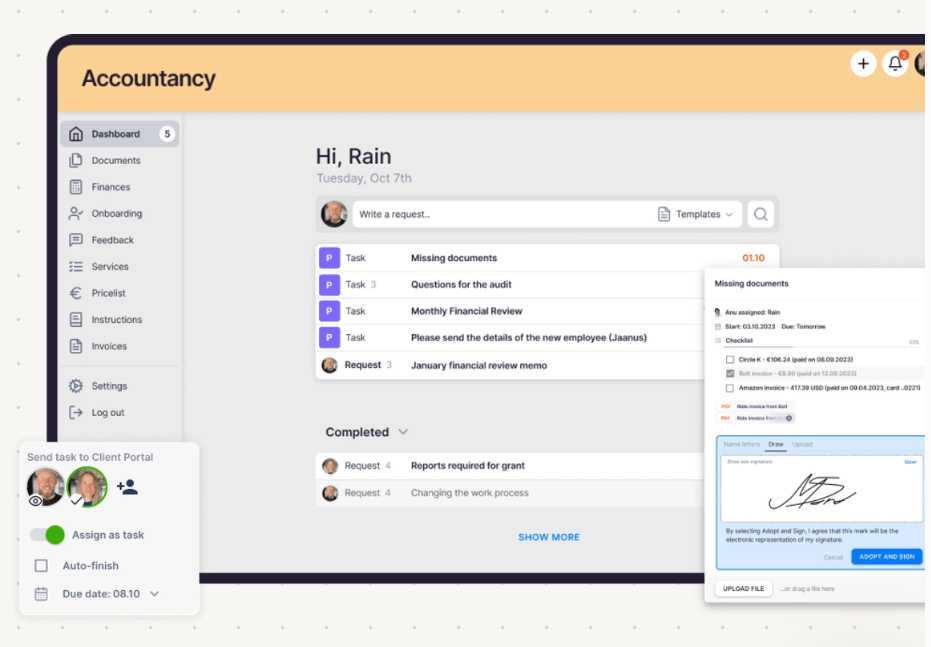
Uploads land on the right task immediately, reminders go out before deadlines, and the firm can send documents to QuickBooks or Xero for digitization in one click. The portal supports company branding, and client contacts don’t count as paid seats.
Behind the portal, each client profile holds contacts, notes, documents, passwords, custom fields, access rights, and the client’s work plan. Uku also runs a daily AML check on every active client and creates a task when an identity document or risk review is due.
The newer Document Management module connects to Google Drive, OneDrive, SharePoint, or Dropbox and creates folders by client, year, and month automatically. Email Management keeps every client email on a shared timeline and sends template emails in each client’s language.
Pricing: Uku publishes per-seat prices and offers a free trial
Uku charges per firm member, per month, with both monthly and annual billing. Clients using the portal are free.
- Solo: a full tool for one person, not a stripped-down preview. Solo includes billing, the client portal, AML, e-signatures, and all integrations for 1 user and up to 20 active clients, at $19/month billed annually ($25 monthly). Annual billing saves ~23%.
- Team: $38/member/month billed annually ($49 monthly), with unlimited members and clients, shared tasks, projects, and user roles
- Elite: $48/member/month billed annually ($62 monthly), adding Client Budgeting, Document Management, BI Reporting, Workforce Management, the Public API, and Zapier
- Enterprise: $88/member/month billed annually ($99 monthly), adding custom integrations and a dedicated account manager
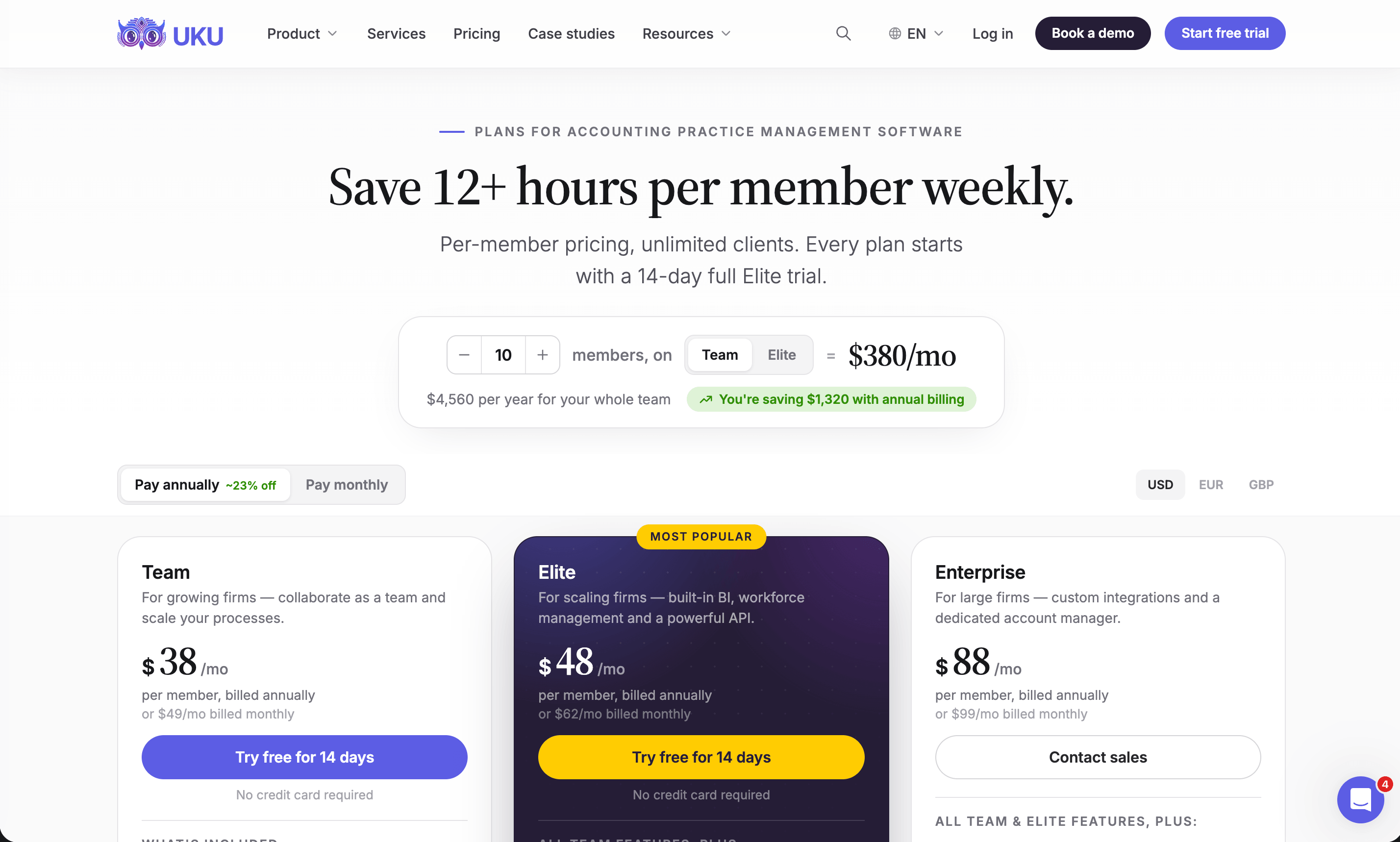
Prices are available in €, $, and £, with VAT added on top, and Enterprise includes assisted client import. Every new account starts with a 14-day free trial of the full Elite plan, with no credit card required. Unlike Aiwyn’s custom contracts, Uku offers monthly billing with no long-term commitment, and you can cancel at any time.
The first 90 minutes of onboarding are free, and optional onboarding packages cost $700 for teams of up to 4 and $2,000 for teams of up to 15. Uku hosts data in Frankfurt, Germany, and is SOC 2 Type I audited. If you would rather talk it through first, book a demo.
Aiwyn or Uku: Comparison Summary
| Feature | Aiwyn | Uku |
|---|---|---|
| Core focus | Payments, practice management, client experience, and tax for CPA firms | Workflow, time tracking, billing, and client management for accounting firms |
| Target firm size | Mid-to-large US firms (IPA Top 500) | Solo practices to mid-sized firms |
| Geography and languages | US-focused, English | 25+ countries, 12 languages, multi-currency |
| Payment processing and collections | Full portal, autopay, surcharges, reconciliation, access to QuickFee Pay Later | Invoices, debt reminders, and sync with accounting software |
| Tax preparation | Gather, sign, and deliver live; tax engine in waitlist pilot (1040) | Not included |
| Recurring workflow automation | Project templates with task routing | Recurring templates, client-date triggers, dependencies, bulk reassignment |
| Engagement letters | Batch creation of up to 5,000, autopay at signing | E-signatures and agreements through the portal |
| Client portal | One login for letters, documents, requests, and payments | Magic-link portal with free client seats |
| Client profitability tracking | Reporting on projects, clients, and employees | BI Reporting with business analytics reports, Client Budgeting, real-time agreement tracking |
| Key integrations | Sage Intacct, PracticeCS, CCH Axcess Workflow, Deltek, QuickBooks, HubSpot | QuickBooks, Xero, e-conomic, Fortnox, FreeAgent, Merit Aktiva, Zapier |
| Security | SOC 2 (Payments), SOC 2 Type 2 (Engagements) | SOC 2 Type I audited, EU hosting in Frankfurt |
| Pricing model | Custom quote; contract terms not published | Per member, monthly or annual billing, no long-term contract |
| Starting price | Not published | From $19/month (Solo, annual billing) or $25 monthly |
| Free trial | None | 14 days of the full Elite plan, no credit card |
| Best for | Large US CPA firms focused on faster collections | Small and mid-sized firms that need recurring work done, billed, and tracked |
How to Switch from Aiwyn to Uku
Most firms are live in two to six weeks, at their own pace, and keep serving clients throughout.
- Export and import your clients. Sync them from QuickBooks Online or Xero, or import them from Excel through Uku’s import flow.
- Rebuild your recurring work as workflow templates. Monthly bookkeeping, payroll, quarterly filings and year-end become templates that create every future task.
- Set up billing contracts and invite clients to the portal. Hourly, fixed and combined fees go on each client’s contract; on Elite, connect Stripe or Montonio for payment links.
- Train the team and go live. Use the 90 minutes of onboarding that comes with every plan, then run your first month-end in Uku.
If your firm uses an AI assistant, the Uku MCP server connects in a day. For a guided move, see how firms migrate to Uku.
Final Verdict
The choice between Aiwyn and Uku depends mostly on your firm’s size, location, and where it loses money.
Choose Aiwyn if you lead a mid-to-large US CPA firm where unpaid invoices and slow collections cost the most. Its payments product handles accounting-specific billing well, from aging-based reminders to autopay captured at engagement letter signing, and its client portal and engagement letter tools can replace several separate products.
If you want one vendor for payments, client experience, practice management, and eventually tax, and you have the budget and patience for a structured enterprise rollout, Aiwyn is built for you.
Choose Uku if you run a small or mid-sized accounting or bookkeeping firm, in the US or anywhere else, and your daily challenge is keeping recurring client work on schedule and billing all of it.
Uku schedules tasks automatically, turns tracked time into invoices in about 30 minutes, and shows which clients are exceeding their agreed scope. You can start with only the modules you need and add more over time, at a published price with monthly billing.
Try Uku free for 14 days. Or book a demo and we will set up your recurring work with you.
Aiwyn asks how a large firm can collect its money faster. Uku asks how a growing firm can get its work done on time and bill for all of it. Pick the tool that answers your firm’s question. If it is the second one, get started with Uku, or read how other firms made the move in our case studies.
Read more
- Aiwyn pricing — what we could and could not find about what Aiwyn costs
- Aiwyn alternatives — the practice management tools firms compare it with
- Aiwyn vs Uku — the head-to-head, area by area
- Best client portal software for accountants
- Best accounting practice management software
- Uku case studies
Frequently asked questions
How much does Aiwyn cost?
Aiwyn does not publish pricing. It sells every product through a demo and a custom quote. Its website terms mention recurring charges and possible early cancellation fees, but they say a signed Customer Agreement takes precedence, and that agreement is not published. Uku publishes its prices, from $19/month for Solo and $38/member/month for Team with annual billing, and also offers monthly billing.
Does Aiwyn offer a free trial?
No. Aiwyn has no free trial, free plan, or self-serve signup; the only entry point is scheduling a demo. Uku offers a 14-day free trial of the full Elite plan with no credit card required, so firms can test workflows, time tracking, and billing with their own data before buying.
Is Aiwyn Tax available now?
Partly. According to Aiwyn's latest public information, gathering client documents, signing, and delivering returns are available today and work alongside a firm's existing tax software. The core tax engine is rolling out through a waitlist with a 1040 pilot for 100 firms. Firms considering Aiwyn should plan to keep their current tax software in the meantime. Uku does not offer tax preparation software; it manages the deadlines, tasks, and billing around tax work.
Is Aiwyn a good fit for small accounting firms?
Aiwyn designs for mid-to-large US firms, mostly in the IPA Top 500, and has no small-firm tier or published entry price. Tools with per-seat pricing and quick setup usually serve small and mid-sized firms better. Uku is strongest for small and mid-sized firms, and its Team plan supports unlimited members and clients. The Solo plan serves sole practitioners with up to 20 active clients.
Does Aiwyn work for firms outside the United States?
Aiwyn focuses on US CPA firms. Its QuickFee acquisition covered only the US payments business. Firms in more than 25 countries use Uku; it runs in 12 languages, stores data in Frankfurt, Germany, and integrates with accounting systems common in Europe as well as QuickBooks and Xero.
What does Aiwyn integrate with?
Aiwyn connects with Sage Intacct, TR PracticeCS, CCH Axcess Workflow, Iris, Deltek, Certinia, QuickBooks, Caseware, HubSpot, Box, and SafeSend Returns, and offers a public API with webhooks. Zapier, Make, and Workato connectors are not listed. Uku integrates with QuickBooks, Xero, e-conomic, Fortnox, FreeAgent, and other accounting platforms, plus Google Drive, OneDrive, SharePoint, and Dropbox, and offers Zapier and a public API on its Elite plan.
How secure is Aiwyn?
Aiwyn describes Aiwyn Payments as SOC 2 compliant and Aiwyn Engagements as running on SOC 2 Type 2 compliant infrastructure, and Aiwyn tokenizes client payment data and never stores it on firm systems. Uku is SOC 2 Type I audited, hosts data in Frankfurt within the EU, encrypts data with AES-256, and supports multi-factor authentication.