




Aiwyn vs Uku: Which Accounting Firm Platform Fits Your Practice in 2026?
Aiwyn vs Uku: a payments-first platform for large US firms against workflow-first practice management with automated billing. Features, pricing and fit.


Contents
- Aiwyn vs Uku at a glance
- The core difference: getting paid vs getting the work done
- Aiwyn is built to shorten the time to cash
- Uku is built to keep every deadline on schedule
- Billing and invoicing: collection depth vs billing logic
- Time tracking and practice management
- Client portal and engagement letters
- Tax: Aiwyn is building a tax engine, Uku manages tax work
- Reporting and analytics
- Integrations and API
- Security and compliance
- Pricing and implementation
- Aiwyn vs Uku: Which should you choose?
- How to switch from Aiwyn to Uku
Choosing between Aiwyn and Uku usually comes down to five questions:
- Is your firm’s biggest problem getting paid, or getting the work done on time?
- Are you a large US firm in the IPA Top 500, or a small to mid-sized firm, possibly outside the US?
- Do you want one vendor for payments, practice management, client experience, and eventually tax prep?
- Would you rather see the price and start a trial today, or go through a sales-led evaluation?
- Does your team need software it can adopt in two to six weeks, or a vendor-managed rollout across a large firm?
Here’s what we recommend:
Aiwyn is a platform for mid-to-large US accounting firms that starts with the money. Its payments product sends invoices, chases late payers, lets clients pay online, and reconciles payments automatically, so firms collect faster and stop spending staff hours on checks and spreadsheets.
Around that core, Aiwyn has added practice management, a single client portal that handles engagement letters in bulk, and an AI-assisted tax product whose core engine is still in a waitlist pilot. Backed by a $113M round led by KKR and Bessemer, it serves 800+ firms, roughly half of the IPA Top 500. Pricing is quote-only, and there is no free trial.
Uku is practice management software for accounting, bookkeeping, and audit firms, built around the work itself. You set up each recurring service once, and Uku puts every client deadline on the right accountant’s dashboard on the right day.
Its billing automation turns time logged on those tasks into invoices, cutting invoice preparation from days to about 30 minutes. Its client portal lets clients and accountants work on the same task. More than 1,000 firms in 25+ countries use Uku, it runs in 12 languages, and it publishes its pricing from $19/month, with a 14-day free trial of the full Elite plan.
Both platforms help accounting firms run their operations, but they start from opposite ends of the work-to-cash cycle and fit different firms. If you’re a growing firm that wants deadlines, time, and billing in one system, try free for 14 days and see it with your own clients, or book a demo.
Aiwyn vs Uku at a glance
| Feature | Aiwyn | Uku |
|---|---|---|
| Core focus | Payments-led platform for accounting firms | Workflow-led practice management with automated billing |
| Typical firm | Larger US firms (roughly half the IPA Top 500), PE-backed roll-ups | Teams of 5–50 people, plus solo practitioners |
| Geography | US-focused | 25+ countries, 12 languages |
| Recurring workflow automation | Project templates in Aiwyn Practice | Core strength, with client-level work plans |
| Time tracking | Included in Aiwyn Practice | Included on all plans, feeds invoices directly |
| Online payment collection | ACH, card, autopay, surcharges, Pay Later | Invoices, status tracking, debt reminders, payment links via Stripe or Montonio (Elite and up) |
| Engagement letters | Batch of up to 5,000, payment captured at signing | E-signatures in the client portal |
| Tax preparation | Aiwyn Tax: gather, sign and deliver live; core engine in a 1040 pilot via waitlist | Not offered (manages tax workflows) |
| Client portal | One login for letters, documents, invoices, payments | Clients and accountants share the same task, free for clients |
| Public API | REST and GraphQL, webhooks | REST API v3 and signed webhooks (Elite and up) |
| Security | SOC 2 Type 2 (Engagements) | SOC 2 Type I audited, EU hosting |
| Implementation | Vendor-led, CPA-staffed rollout | Modular, start on day one with only the modules you need |
| Pricing model | Custom quote | Per member, monthly or annual billing |
| Starting price | Not published | From $19/month (Solo, annual billing) |
| Free trial | None | 14-day free trial of the full Elite plan, no credit card |
| Best for | Large US firms focused on collections | Growing firms focused on work and billing |
The core difference: getting paid vs getting the work done
Aiwyn was founded in 2020 in Charlotte, NC, as a payments and collections tool for accounting firms. Its first job was narrow: shrink the gap between finishing client work and having the cash in the bank. After its December 2024 funding round, Aiwyn set out to become a full platform.
In May 2025 it acquired Taxa and Digilence and began calling itself “the first complete platform for modern accounting firms.” In September 2025 it bought QuickFee’s US payments business, which brought more customers and a client financing option.
Aiwyn’s argument is consolidation. It says the average firm runs 5–7 disconnected systems to run operations, and it wants to replace them with four connected products: Payments, Practice, Experience, and Tax. It frames the buyer’s usual choice as “a legacy vendor or modern point solutions”, and offers itself as the third option.
Uku was built by co-founders Rain Allikvee and Jaanus Lang, who ran a design and software studio. Both of their mothers were accountants. They watched accounting firms manage client deadlines in Excel and Outlook, and built Uku to replace that. They designed it from the start to work internationally, and it now serves firms in 25+ countries.
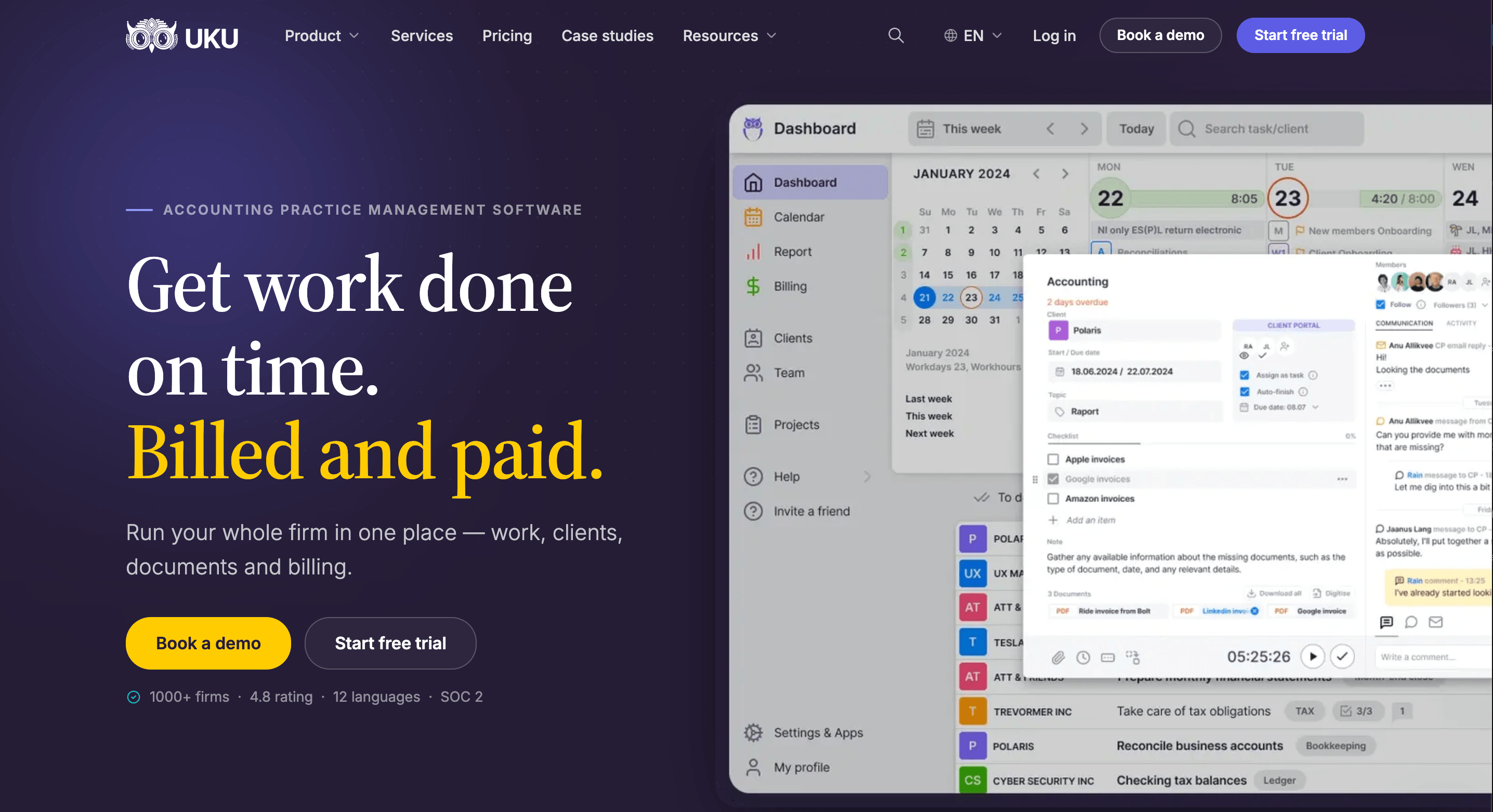
Rain’s design rule is that an action should take a few movements at most, which became Uku’s “calm by design” promise: 90% of actions take one click. The company is bootstrapped, with no venture capital.
Uku’s tagline, “Get work done on time, billed & paid”, lists its priorities in order. The task comes first. Time is logged on the task. The invoice is built from the time.
The practical difference is where each product begins. Aiwyn’s core product picks up once an invoice exists and works to turn it into cash. Uku’s core product starts before any work is done, with a recurring task on an accountant’s dashboard, and carries it through to the invoice.
Aiwyn is built to shorten the time to cash
Aiwyn Payments covers three steps: collections, payments, and reconciliation.
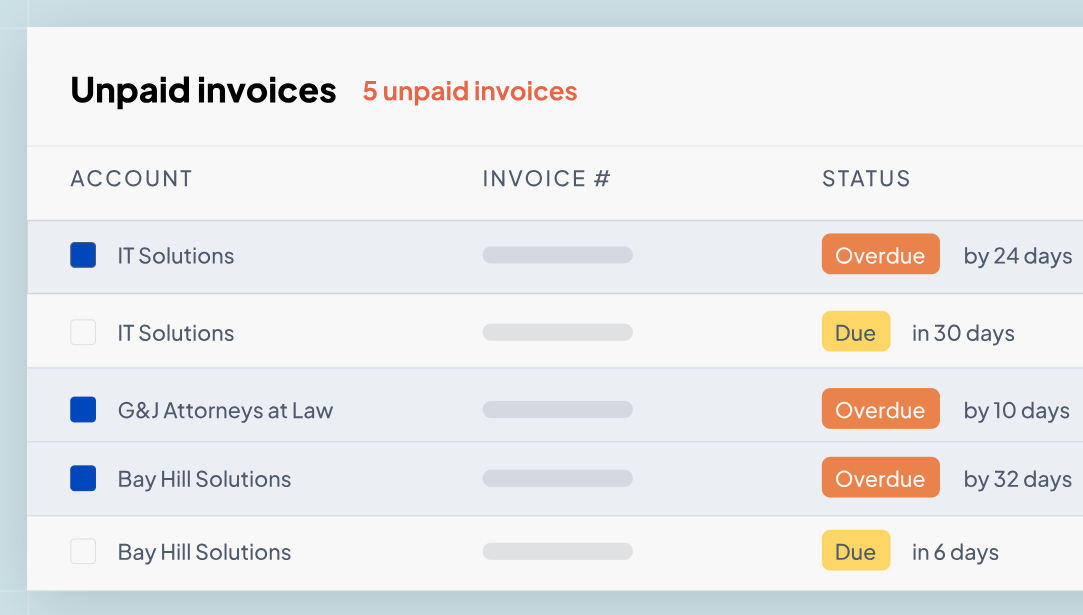
For collections, Aiwyn delivers invoices and sends aging-based reminders, with different messages for a 15-day reminder and a 60-day notice. Firms set the cadence and tone, and the sequences run at any billing volume, so partners and billing admins stop chasing payments by hand.
Source: Aiwyn
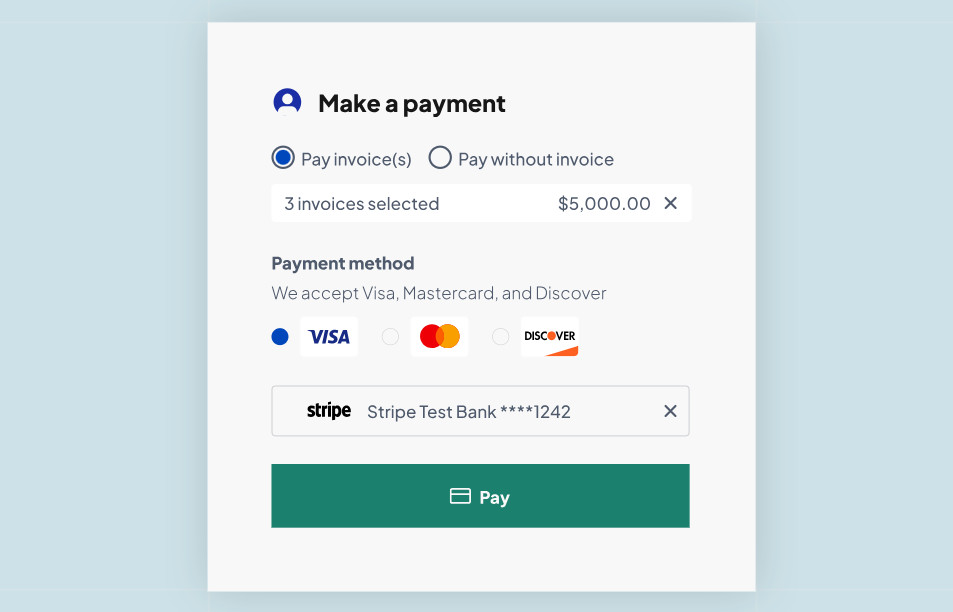
Clients pay through a secure portal by ACH or credit card, for one invoice or many at once, and returning clients can pay in one click with a saved method. The most useful automation sits upstream: clients can choose autopay when they sign the engagement letter, so the firm has a payment method on file before work begins.
Source: Aiwyn
For retainers or deposits that come before any invoice, Quick Payment Links create a payment URL the firm can email. Firms can also apply standard late fees and compliant credit card surcharges, passing processing costs to clients instead of absorbing them.
Reconciliation closes the loop. Aiwyn matches payments to invoices automatically, including multi-invoice and multi-currency payments, and sends the matched data back to the firm’s practice management or general ledger system. Aiwyn quotes one firm’s CEO saying billing used to take a full week and can now close out in two days.
Two features go beyond what most practice management tools attempt. The QuickFee acquisition gave customers access to QuickFee’s “Pay Later” option, which lets clients spread payments over 3–12 months while the firm gets paid in full upfront.
And because Aiwyn Payments connects to TR PracticeCS, Sage Intacct, QuickBooks Online, Deltek, Iris, and others, a firm can run it as an accounts receivable layer on top of its existing system without replacing anything.
The scale is real. Aiwyn processed $5B+ in payment volume in 2025, and it cites 40% faster time to cash after an invoice. For a large firm with 60 or 90 days of receivables outstanding, this is the part of Aiwyn that pays for the rest.
Uku is built to keep every deadline on schedule
Uku puts its depth into the work that happens before an invoice exists: recurring client services, deadlines, and who owns them.
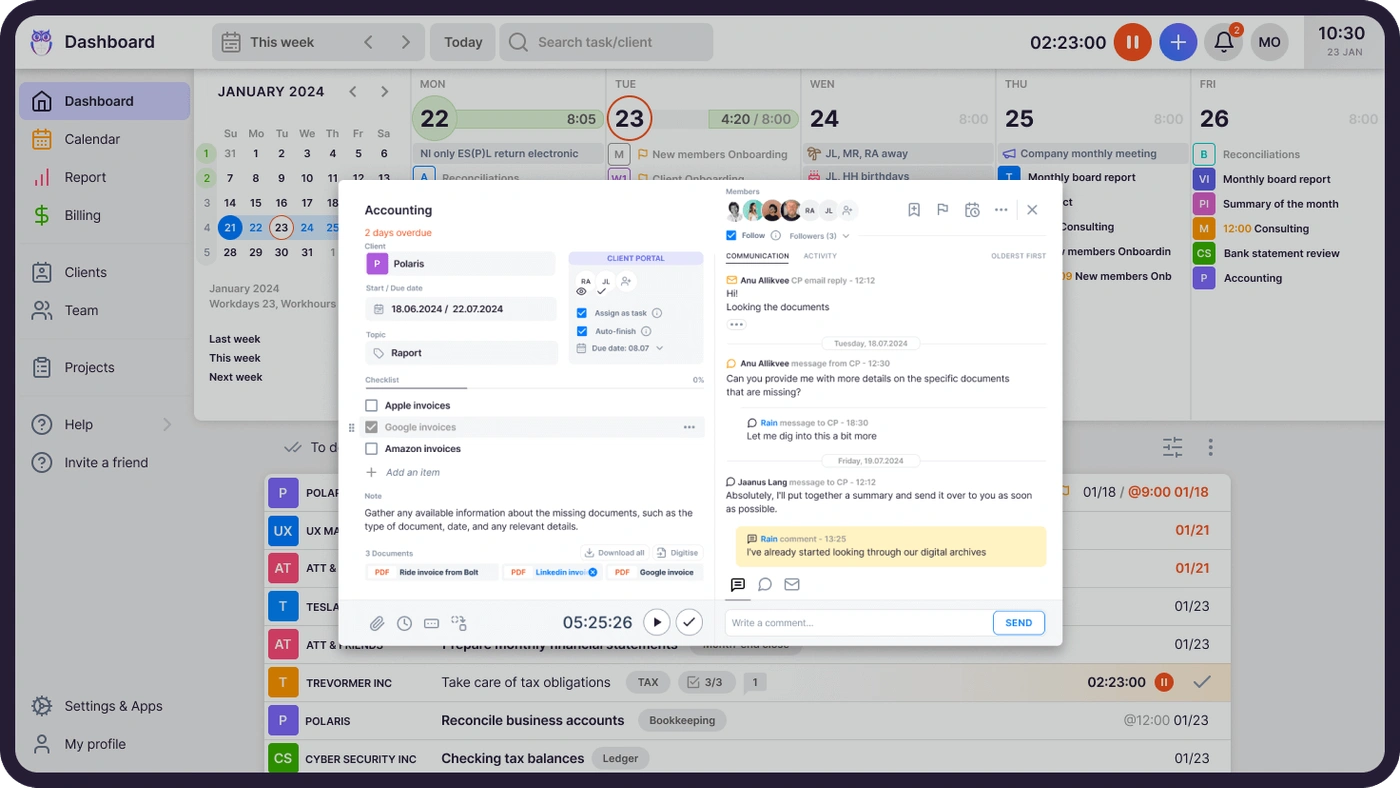
The engine is the workflow template. A firm defines a service once (monthly bookkeeping, bi-weekly payroll, quarterly VAT, year-end), with its tasks, order, owner, checklists, time estimates, and recurrence.
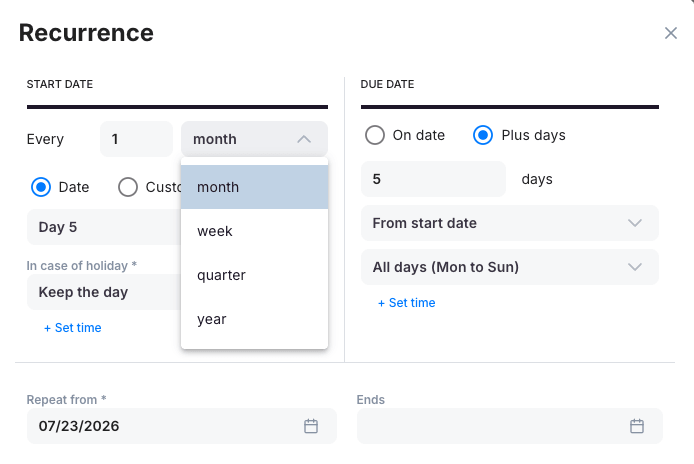
Applied to a client, the template becomes that client’s permanent work plan: Uku creates each task on the right date and places it on the assigned accountant’s dashboard. Nobody has to build this month’s task list.
The recurrence rules match how accounting deadlines work. Tasks can repeat weekly, monthly, quarterly, or yearly, and move before or after weekends and holidays based on a per-rule setting.
Firms can also anchor them to client date fields such as fiscal year-end or payroll date, so each client runs on its own calendar. Task dependencies hide a step until the one before it is done, and firms can push template updates to every client using that template at once.
Around that core:
- Email automation fires on task creation, update, or an approaching due date, and carries forward to every future occurrence of a recurring task without new setup.
- Absence cover takes one action: bulk reassignment moves all of a colleague’s tasks to a substitute and back when they return. Checklists, instructions, and stored credentials live on the task, so the substitute has the context.
- Magic Buttons give each user up to 8 shortcuts that create a task and start its timer in one click, which captures unplanned work like a client phone call.
- A template library offers ready-made accounting workflows that firms can import without signing up.
Team leads see every task and deadline across the firm in real time, with overdue work highlighted, while regular members see only their own tasks. The interface stays quiet: tasks appear when it’s time to work on them, not weeks ahead. Uku’s G2 Ease of Use score of 9.5, against a category average of 8.6, shows that teams find Uku easy to use.
The workflow engine has limits. Some Capterra reviewers want finer recurrence control, such as every-15-days intervals and exception dates, and larger firms have asked for a way to lock task names to a predefined list.
Sandgrav Solutions saved 20% of its time on task management and had its full team working in Uku within one week.

Billing and invoicing: collection depth vs billing logic
Both platforms automate billing, but they put the automation in different places.
Aiwyn handles invoice creation in Aiwyn Practice, with automated invoicing on fixed schedules or work milestones, smart statements, and custom messaging. Its strength is everything after the invoice: the reminders, payment options, surcharges, autopay, and reconciliation covered above. Firms that keep their existing practice management system can still use Aiwyn only for collections.
Uku puts its depth into how an invoice gets built. Firms assemble pricing from six product types: hourly, fixed price, per piece, member billable rate, combined, and task-triggered. The last one is unusual: Uku bills a fee automatically when a task reaches a set status, so a flat fee for a completed annual report needs no human step.
Contract templates connect products to clients on a schedule, and one contract can mix time, fixed, and volume pricing, including lower rates after a set number of hours.
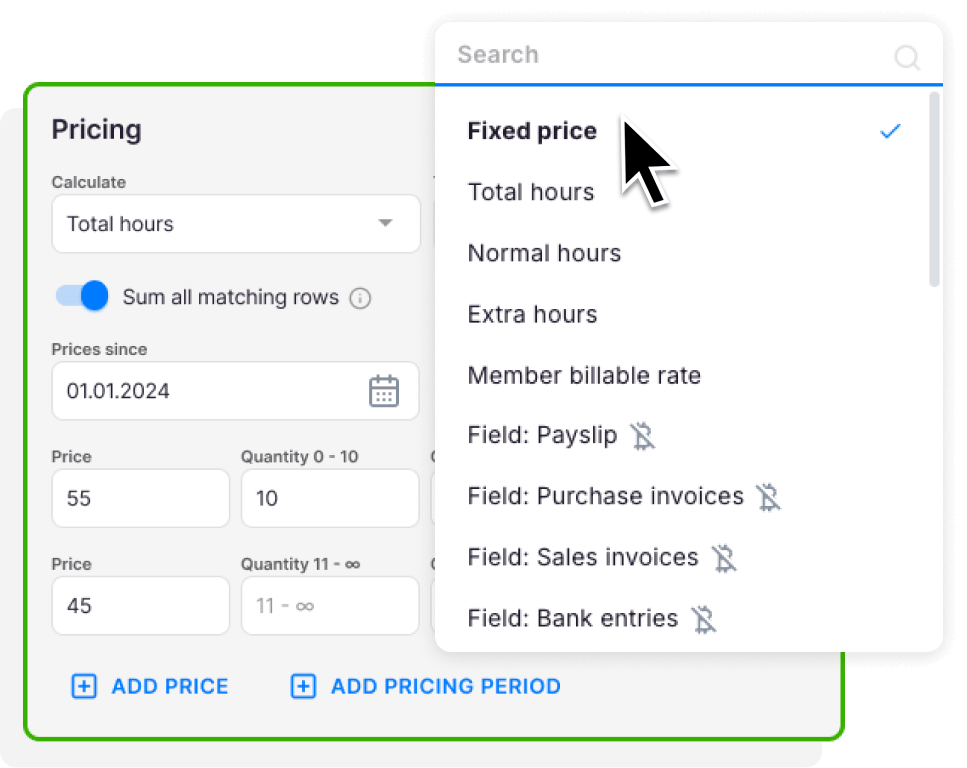
At the end of the period, Uku reads each contract, pulls the tracked time, and drafts the invoice. Rounding rules make sure interruptions get billed, so a one-minute unplanned call can become 15 billable minutes. Invoice preparation takes about 30 minutes instead of two to three days.
From there, invoices move through Draft, Approval, Created, Sent, and Paid. Firms can send them from their own email domain and in each client’s preferred language, or export them to QuickBooks, Xero, e-conomic, Merit Aktiva, and other accounting systems. Debt reminders chase overdue invoices for up to three rounds.
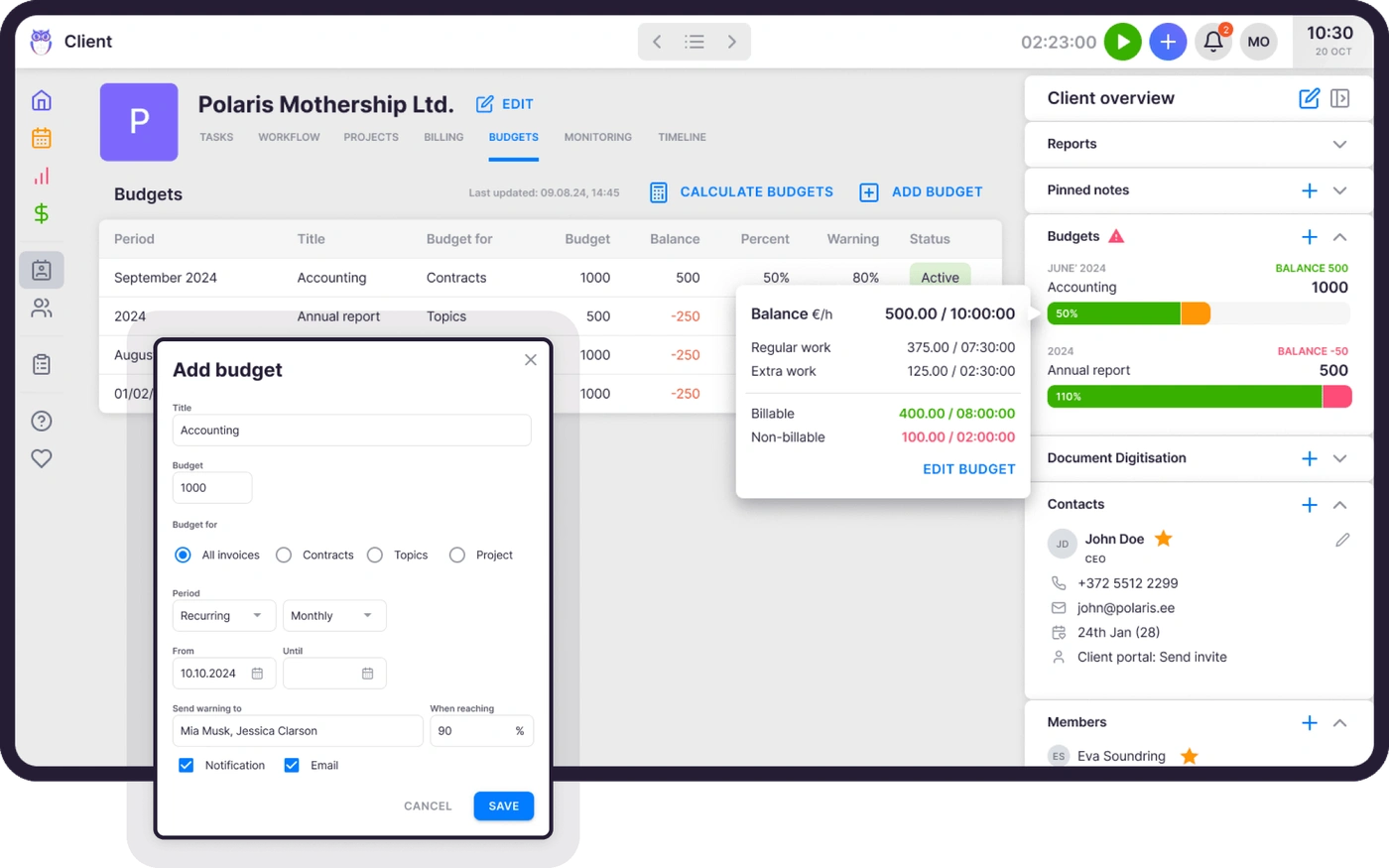
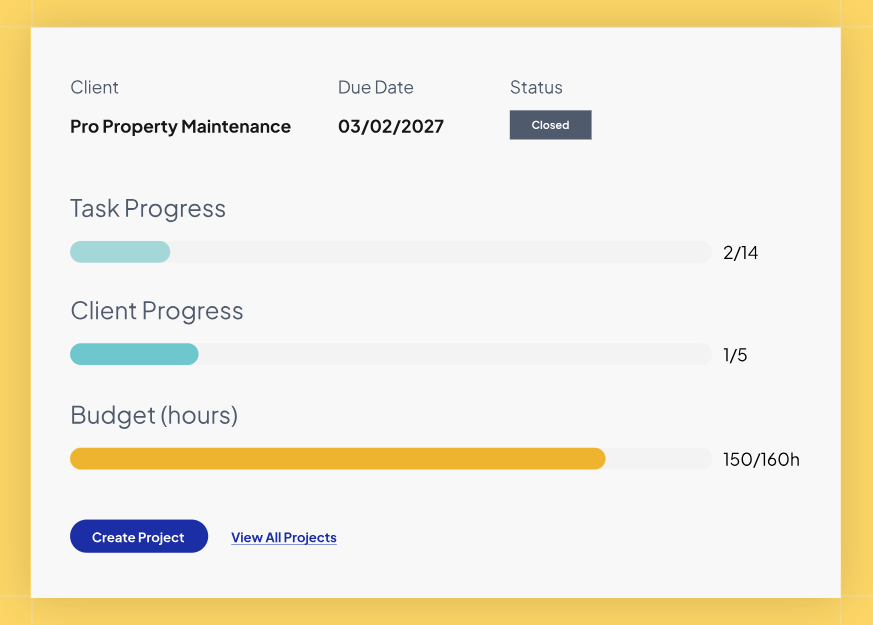
On Elite and above, Client Budgeting shows a live progress bar against each client’s agreed monthly budget and warns the team before the work goes over, which turns an awkward invoice adjustment into an early conversation.
Uku doesn’t position itself as a payment processor. Beyond payment links on Elite and above, which put a pay button on every invoice through the firm’s own Stripe or Montonio account, it doesn’t offer Aiwyn’s ACH collection, surcharging, autopay at signing, or client financing. Firms that collect through their accounting software or bank won’t miss these. Firms whose main problem is slow-paying clients will.
Leinonen Estonia, part of a 300-person group operating in 11 countries, cut invoice preparation from 6 hours to 2 with Uku.

Time tracking and practice management
Aiwyn Practice is the newest of Aiwyn’s major products. It runs on a single data model, so time entries, projects, invoices, and client records share one source of truth. Users can drag time onto a calendar or log several entries from a list, tag work as billable or non-billable, and close periods with admin controls.
Source: Aiwyn
Reusable project templates come with roles, tasks, and scheduling rules, and client records support many-to-many contact relationships, so one contact can belong to several clients without duplicates.
Aiwyn describes its adoption path as “land soft, expand hard”: firms often start with billing or engagement letters, keep their legacy system running, and move more work into Aiwyn over time. That suits large firms that can’t switch everything at once.
It also means the practice management modules have less production history than Aiwyn’s payments product. Aiwyn built them during 2024 and 2025, and buyers comparing them against long-standing practice management systems should check their depth closely.
Uku treats time tracking as the input to billing, not a separate report. Users log time on tasks, so every entry already belongs to a client and a piece of work.
They can run a one-click stopwatch that follows them across the app, enter time manually, or use bulk time entry across several tasks at once. The Mini Uku browser plugin lets them log time from any website, and offline mode syncs when the connection returns.
Uku also builds in the discipline accounting firms expect from their own work. Admins can lock time entries weekly or monthly, like a period close. On Elite, a firm-wide setting blocks task completion until someone logs time, which closes the most common source of unbilled work.
Agreements Monitoring ties this together. A firm enters each client’s agreement, measured in hours or in volume (documents, payroll runs, VAT filings), and an allowed variance. Uku compares agreed work against actual work in real time and shows every client on one screen as green, orange, or red.
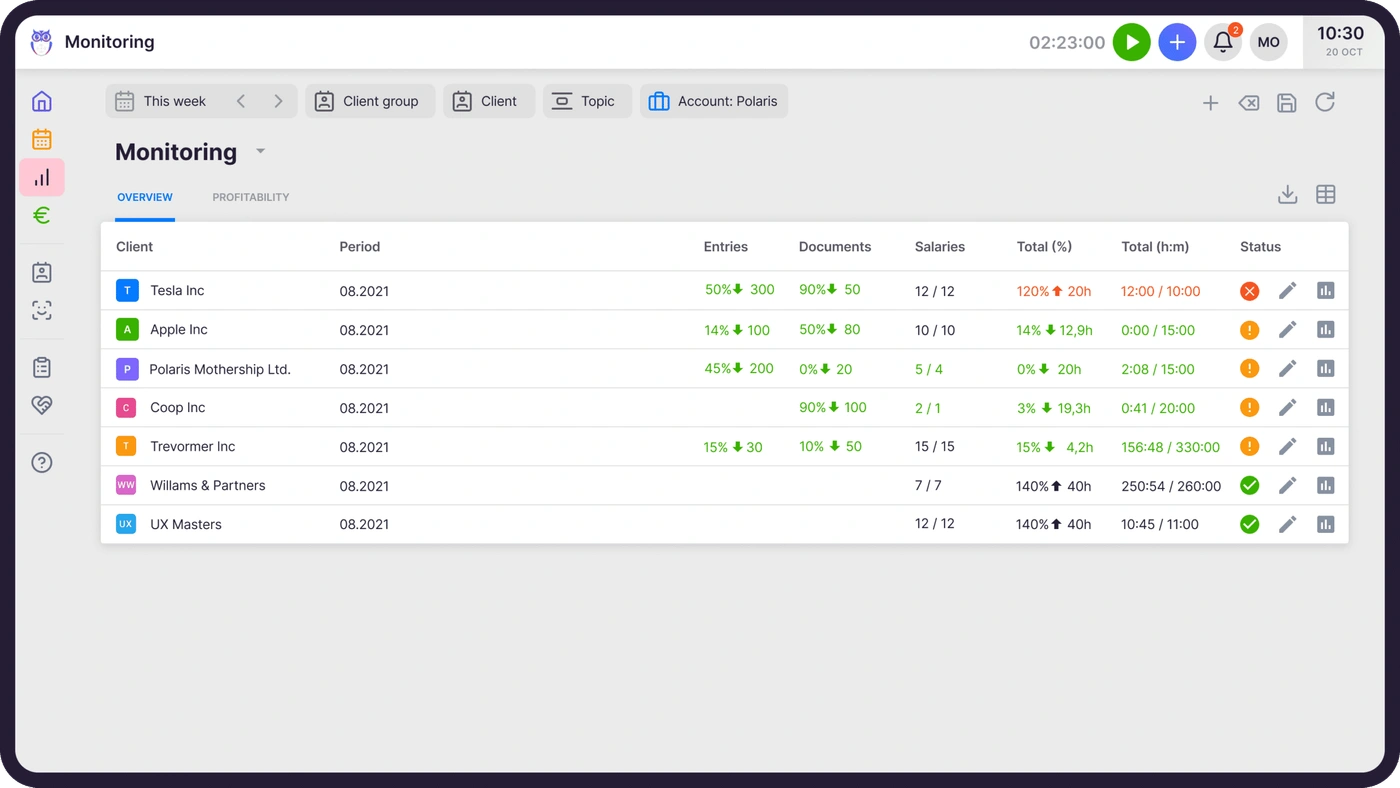
A partner can see in the middle of the month which fixed-fee clients are eating unpaid time, and raise the price before the next renewal instead of after the year is over. Customers report up to ~20% more profit after finding outdated agreements, such as billing for eight hours while the team spent 20.
JA&CH Konsultacijos raised its billable hours by ~20% simply by tracking every task in Uku.

Client portal and engagement letters
Aiwyn Experience aims to replace the average of 13 client-facing tools a firm runs with one portal. Clients get one login to sign engagement letters, exchange documents, answer request lists, message the firm, and pay invoices, across tax, audit, advisory, and client accounting services.
Engagement letters are where Aiwyn goes furthest. Firms can create up to 5,000 letters in one batch from templates that pull client, contact, project, and fee data from the practice management system, with legal sections locked so staff can’t edit them. Clients open letters through a magic link with no account needed, and Aiwyn sends reminders every three days until they sign.
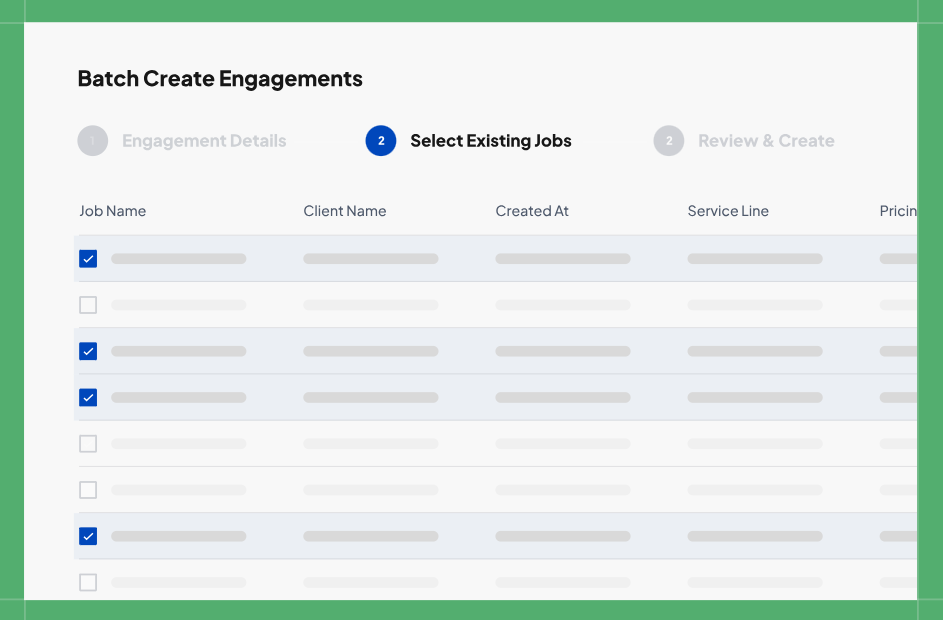
Source: Aiwyn
Once a client signs, Aiwyn files the letter to the firm’s document system, triggers downstream workflows, and schedules next year’s renewal. If scope changes, an “Under Revision” status pulls the letter back. Aiwyn also tracks IRS Form 7216 consent documents alongside each letter, a real concern for US tax practices.
Uku’s Client Portal is part of the task workflow. The client and the accountant work on the same task, with communication, documents, logs, and time tracking in one place. Setup takes a few minutes: the firm adds its branding and a welcome video, then turns on the portal per client. Firms can give each client its own menu, run onboarding with forms, share business insight reports, and display price lists.
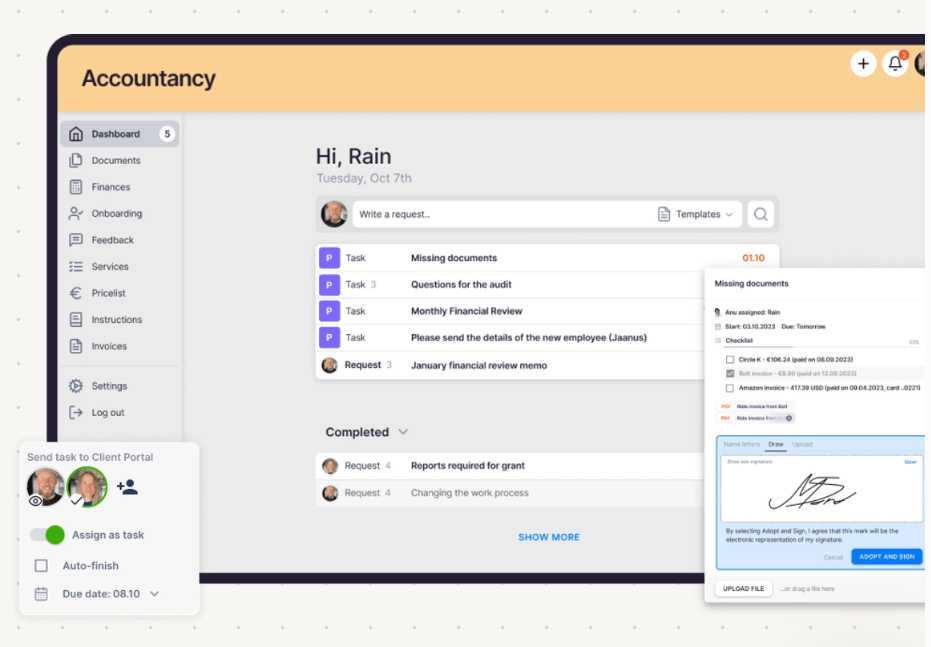
Clients log in through a magic link, see the tasks assigned to them (document requests, checklists, forms, and e-signatures), upload files, and message the firm. Every upload and message lands in the firm’s Uku workflow immediately, and automated reminders chase anything outstanding.
For QuickBooks and Xero users, a digitization partner can digitize uploaded documents and send them to the accounting software in one click.
Two points matter on cost and scope. Client portal users don’t count as paid seats in Uku, on any plan. And Uku doesn’t offer a bulk engagement letter engine like Aiwyn’s. A firm that sends thousands of engagement letters every renewal season will find Aiwyn better suited to that job.
Tax: Aiwyn is building a tax engine, Uku manages tax work
Aiwyn Tax aims to replace legacy tax software with a system that combines preparation, review, filing, workflow, and client collaboration. Its gather, sign, and deliver tools (document request lists, organizers, and return delivery with e-signature) are available today and work alongside a firm’s existing tax software. Its core engine, marked coming soon, reads client source documents to pre-fill draft returns, flags review issues with red, yellow, and green indicators, lets several preparers and reviewers work in the same return at once, and e-files with real-time IRS status alerts.
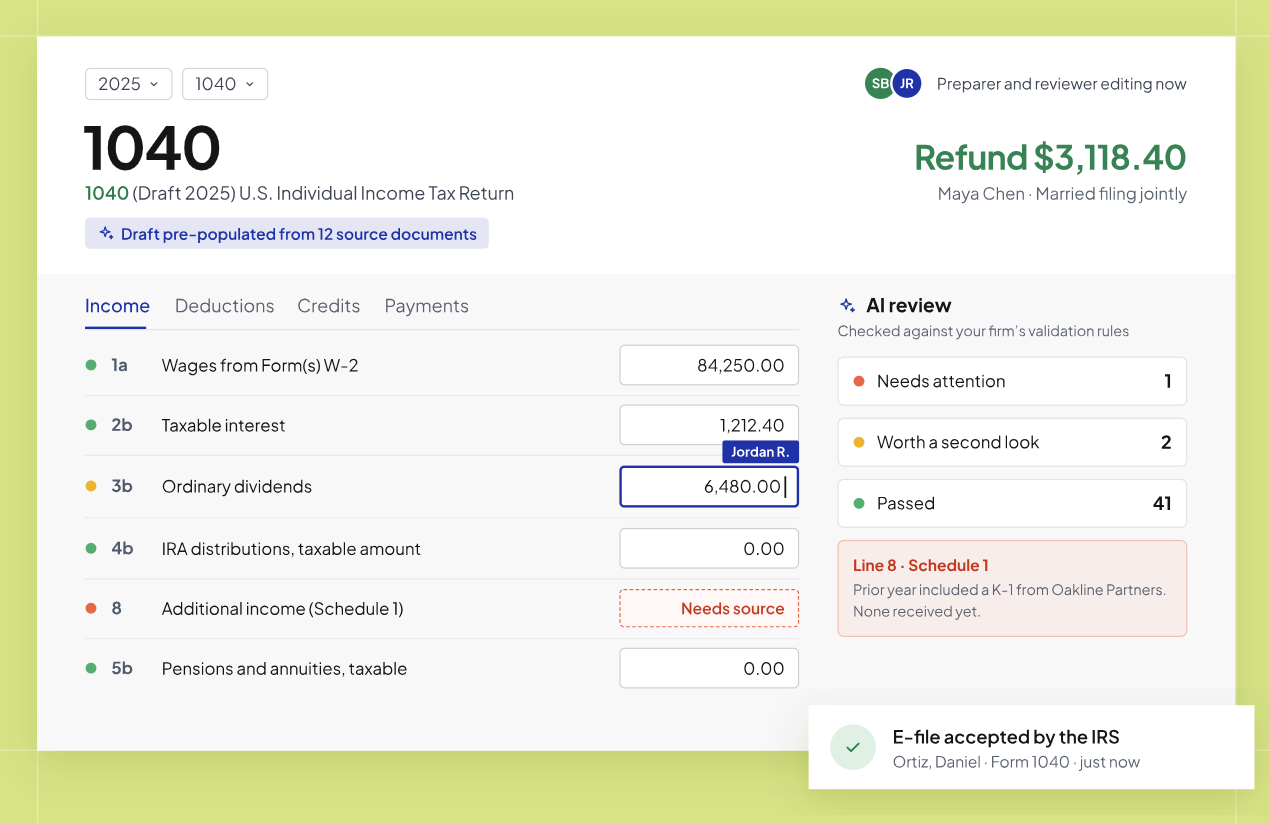
Source: Aiwyn
Its calculation engine comes from Column Tax and has processed over 1 million 1040 returns in production. Aiwyn Tax is also available as a Claude connector, so users can run 1040 calculations and test scenarios inside Claude.
The catch is availability. When we did our research, Aiwyn was still rolling out the Aiwyn Tax engine through a waitlist, starting with a 1040 pilot for 100 firms. It hasn’t published coverage for other return types, pricing, or a general release date. Most firms evaluating Aiwyn today will keep their current tax software alongside it, which is why Aiwyn connects to CCH Axcess Workflow and SafeSend Returns.
Uku doesn’t prepare tax returns. It manages the work around them: recurring tax deadlines, client document requests, review steps with dependencies, and billing for the season. Its help center includes a guide to tax season workflows and billing. Firms keep their tax preparation software and use Uku to make sure someone owns, tracks, and bills every return.
Reporting and analytics
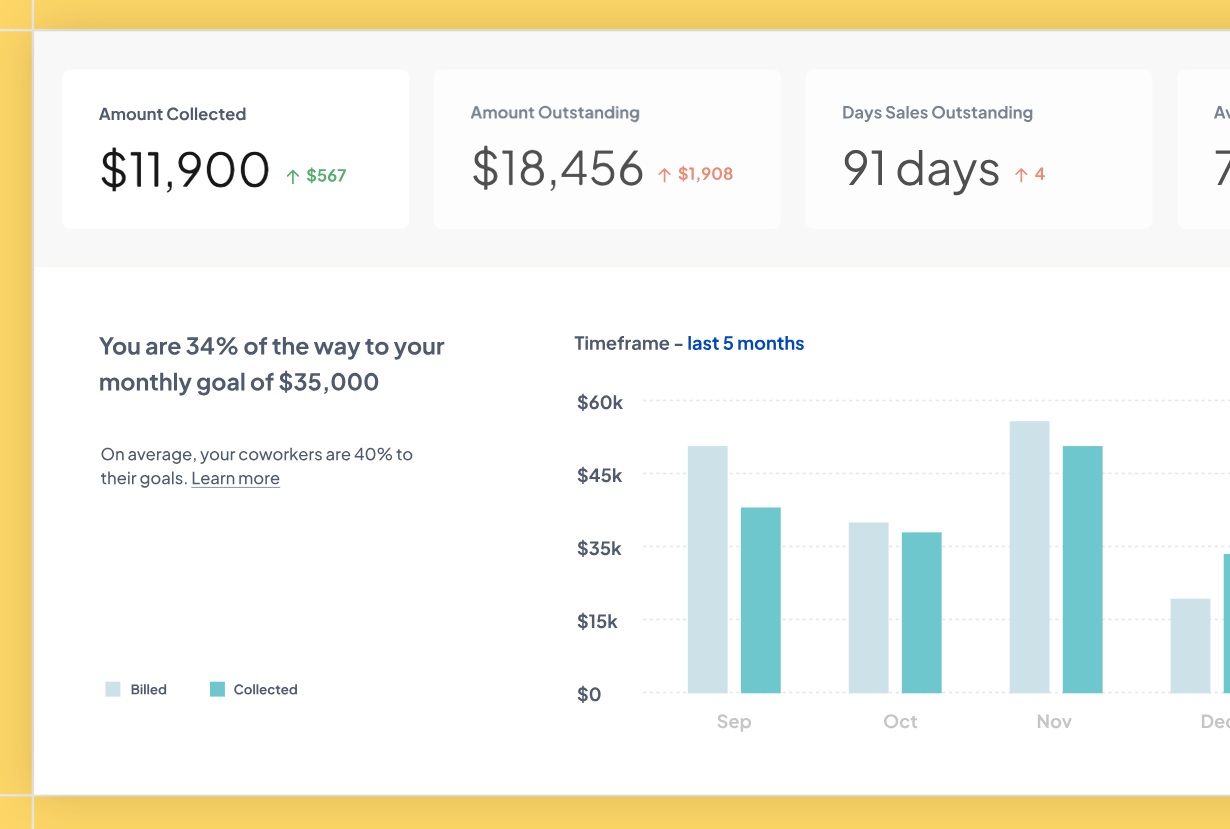
Aiwyn Practice offers real-time analysis of project, client, and employee performance and connects to third-party BI tools. Firms with complex multi-partner profit allocation may still rely on those external tools for deeper analysis.
Source: Aiwyn
Uku’s reports come straight from the time and task data already in the system. The Report module groups time by client, member, topic, or project, drills down to individual tasks, and flags gaps and overlaps when you view one person’s time. A flextime tab compares agreed and actual working hours. Users can save any filter combination as a shared report, at three levels of detail: summary, tasks, and time.
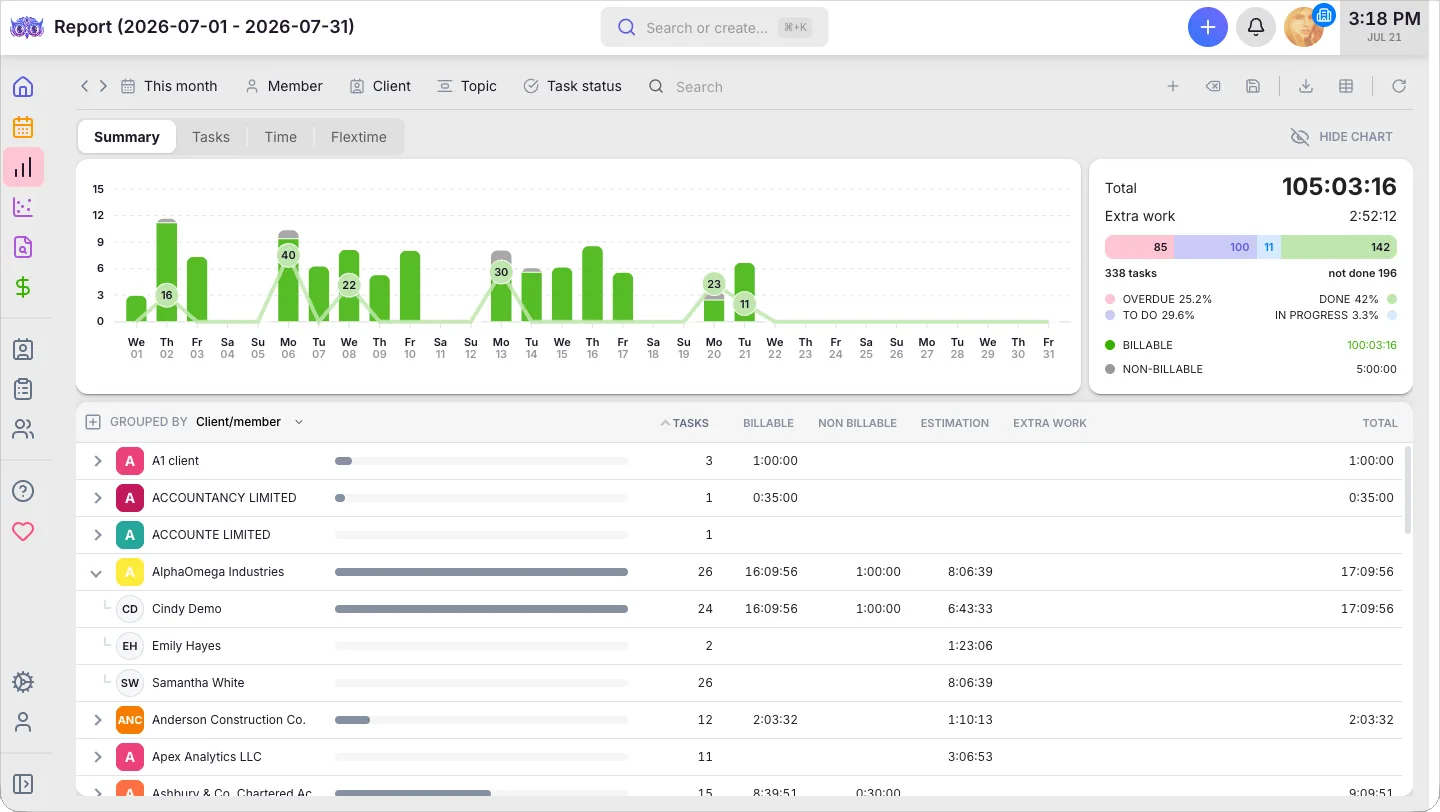
On Elite, BI Analytics adds six ready-made categories: Production, Revenue & Profitability, Utilization & Capacity, Billing & Payments, Budgets, and Monitoring. Each opens with the relevant KPIs, charts, and red, orange, or green health signals already in place, and clicking a signal filters the table to the clients or people who need attention.
Uku tracks both sales prices and cost prices, so its business analytics report shows in real time whether each client and employee is profitable. For further analysis, firms can pull Uku data into Power BI through the public API.

Integrations and API
The integration lists show who each platform serves.
Aiwyn connects to the systems large US firms already run: Sage Intacct, TR PracticeCS, Iris, Deltek Maconomy, Vision, and Vantagepoint, CCH Axcess Workflow, SafeSend Returns, Caseware, QuickBooks, Certinia, Box, and HubSpot, with HubSpot as read-only. Through a Microsoft partnership, firms can apply committed Azure spend toward Aiwyn licenses. Aiwyn doesn’t publish Zapier, Make, or Workato connectors.
Its public API mixes REST and GraphQL, covers clients, invoices, payments, projects, engagements, and staff, and supports webhooks with delivery history and signature validation. A sandbox environment is available.
Uku connects to accounting software used across Europe and English-speaking markets: QuickBooks, Xero, e-conomic, Merit Aktiva, FreeAgent, Fortnox, Tripletex, Directo, SmartAccounts, and Scoro, with two-way sync of clients, products, and invoices. Every plan, Solo included, comes with all of these integrations.
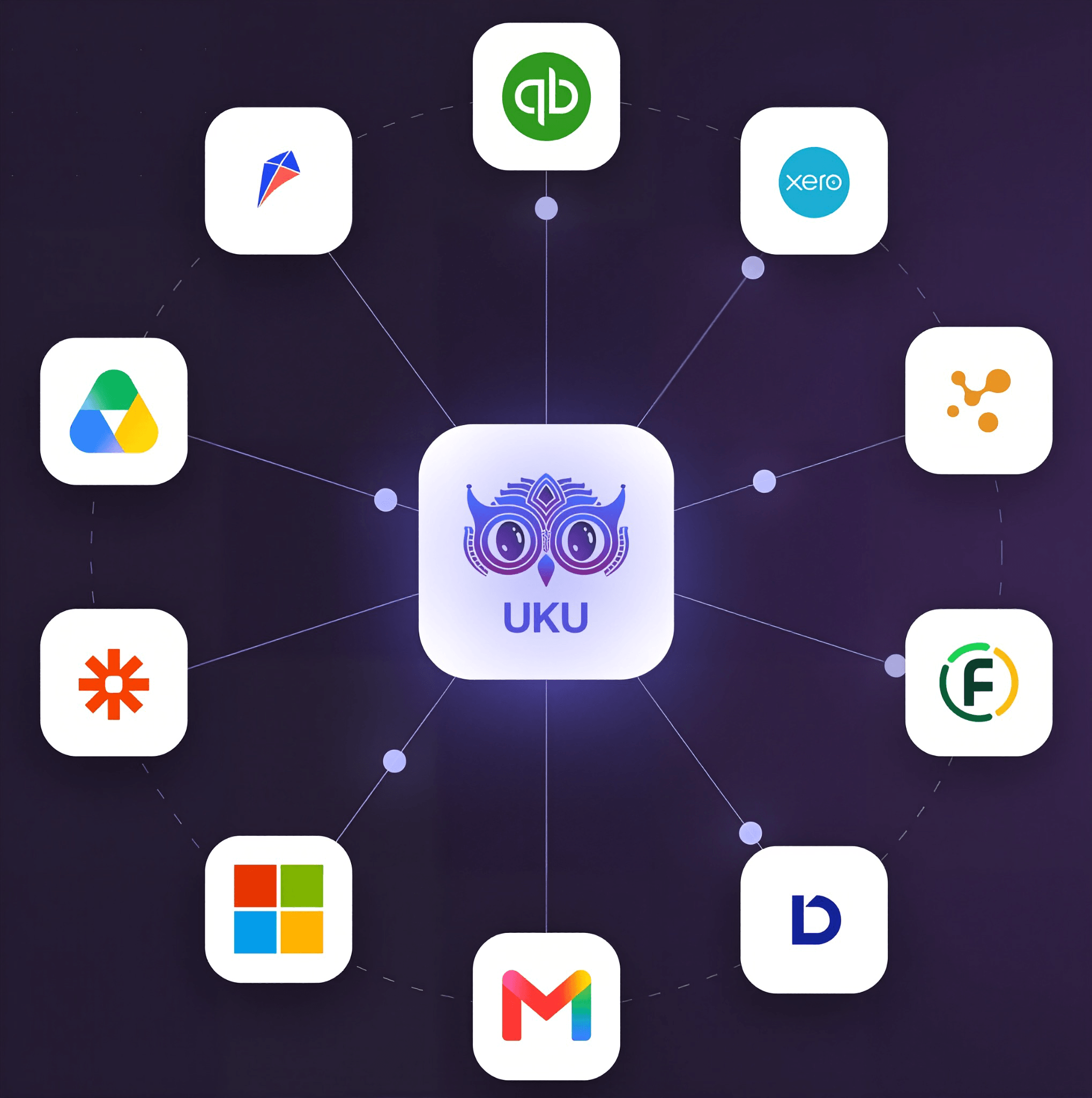
Uku can look up company details from Companies House in the UK and the Estonian and Danish business registers. On Elite and above, it adds Google Drive, SharePoint, and Dropbox, plus Zapier for 5,000+ other apps.
Uku’s API v3 is well documented for a company its size: an interactive sandbox, a downloadable OpenAPI spec, idempotency keys, and published rate limits. Signed webhooks are live on the same plan, with retries and replay.
API access requires the Elite plan. Uku has no direct link to US systems like Practice CS, its CCH Axcess Tax integration is available for selected firms, and one reviewer noted that syncing a new client from a local ERP still needs a manual trigger.
Security and compliance
Aiwyn reports SOC 2 Type 2 compliant infrastructure for its Engagements module and SOC 2 compliance for Payments. Aiwyn tokenizes client payment data and never stores it on firm systems, which reduces the firm’s PCI exposure.
Its Form 7216 consent tracking and locked legal language add tax-specific controls.
Uku is SOC 2 Type I audited itself, and its servers run in Frankfurt, Germany with a hosting provider that holds SOC 2 Type II and ISO 27001. Uku encrypts data with TLS 1.3 in transit and AES-256 at rest, and firms can require multi-factor authentication through Google Authenticator, Microsoft Authenticator, or Azure Active Directory.
EU data residency and GDPR compliance matter to European firms, and Uku’s anti-money laundering tracking scans client records daily and creates tasks before identity documents or risk reviews expire. Firms whose procurement rules require a vendor-level SOC 2 Type II report should confirm Uku’s current audit status directly.
Pricing and implementation
Aiwyn doesn’t publish pricing. There’s no pricing page, no free trial, and no self-serve signup; every path leads to a demo. Its site terms mention possible early cancellation fees and cap liability at the fees paid in the previous 12 months, but a signed customer agreement overrides them, so contract length comes with the quote. Stripe processes client payments; card and ACH fees are not published.
In return, firms get a managed rollout. A CPA-led implementation team works with firm leadership on change management and data migration. At go-live, an on-site team Aiwyn calls “Moonlanders” works next to firm staff while a remote “Mission Control” crew of engineers and support leads monitors integrations.
For a large firm switching a core financial process, that level of hands-on help is worth having.
Uku publishes its prices and charges per firm member. Clients using the portal are free. Firms can choose annual or monthly billing. Prices are available in €, $, and £, with VAT added on top.
| Plan | Annual billing | Monthly billing | Key additions |
|---|---|---|---|
| Solo | $19/month | $25/month | Integrated billing, Client Portal, AML, e-signatures, and all integrations for 1 user and up to 20 active clients |
| Team | $38/member/month | $49/member/month | Unlimited members and clients, projects, user roles, one-on-one training |
| Elite | $48/member/month | $62/member/month | Client Budgeting, Document Management, BI Analytics, Workforce Management, API, Zapier, cloud storage |
| Enterprise | $88/member/month | $99/member/month | Custom integrations, dedicated account manager, pay by invoice |
A 10-person firm on Elite pays $480/month on annual billing. Solo practitioners save ~23% with annual billing. Every new account starts with a 14-day free trial of the full Elite plan, with no credit card required. Uku has no long-term contracts: firms can cancel any time and keep access through the end of the paid period. Check a few details before you choose a plan.
Client Budgeting is on Solo and Elite but not on Team. The Team plan keeps only one day of audit log history. A firm can’t move from Team or Elite back down to Solo. Each organization also has a 16 GB file storage cap.
Uku takes a modular approach to deployment. Firms can start on day one with just CRM and tasks, then add billing, the client portal, and reporting step by step. Firms moving from spreadsheets can import their Excel file and have automated work plans ready. Assisted client import is included on the Enterprise plan.
Most firms are live in two to six weeks, at their own pace. The first 90 minutes of onboarding help are free, and optional packages cost $700 for teams of up to 4 and $2,000 for teams of up to 15, with custom packages for larger firms. Reviewers rate support highest of all: Uku scores 9.7 for Quality of Support on G2 and won Software Advice’s Best Customer Support award in 2025.
Aiwyn vs Uku: Which should you choose?
The decision depends on your firm’s size, where it operates, and which problem costs you the most.
Choose Aiwyn if:
- You’re a mid-to-large US firm, especially in the IPA Top 500
- Slow collections and high receivables are your biggest financial problem
- You want online payments, autopay, surcharging, and client financing in one product
- You send thousands of engagement letters each renewal season
- You want one vendor that may eventually cover tax preparation as well
- You run PracticeCS, Sage Intacct, Deltek, or CCH Axcess and want to add capabilities without replacing them
- You’re a PE-backed firm standardizing technology across acquired practices
- You prefer a vendor-led rollout and have budget for an enterprise contract
Choose Uku if:
- You’re a team of 5 to 50 people, or a sole practitioner, running recurring monthly, quarterly, and annual client work
- You want to minimize your team’s admin time
- You’re moving off Excel and want the easiest implementation
- You want every hour tracked on a task to flow into an invoice automatically
- You want clients and accountants working on the same task in one shared portal
- You need to see which fixed-fee clients cost more than they pay
- Your team works in a language other than English, or your clients are spread across countries
- You use QuickBooks, Xero, e-conomic, Fortnox, or another accounting system Uku syncs with
- You need flexible monthly pricing rather than annual commitments
- You want to implement software step by step rather than all at once
If that second list sounds like your firm, try Uku free for 14 days with your own clients and workflows.
How to switch from Aiwyn to Uku
This section is for firms running Aiwyn Practice. If you only use Aiwyn Payments on top of another system, Uku would replace that other system, and neither Aiwyn nor Uku lists the other as an integration, so plan collections separately. Aiwyn’s clients, contacts and projects all have a counterpart in Uku: clients and contacts stay clients and contacts, and recurring projects become client task plans built from templates. Most firms are live in two to six weeks, at their own pace, and keep billing clients throughout.
- Bring the client list across first. Export clients and contacts to a spreadsheet and import it, or sync them straight from QuickBooks Online or Xero. On Enterprise, Uku’s team does the client import for you.
- Rebuild recurring projects as task templates. Uku’s accounting templates cover monthly bookkeeping, payroll and year-end, so most firms adapt a template rather than start from an empty screen.
- Set up billing contracts. Define each client’s pricing once, then let the month’s invoices draft themselves from tracked time. If you collect online, connect your Stripe or Montonio account for payment links on Elite.
- Run one cycle in parallel, then close Aiwyn. Keep Aiwyn read-only for a month, move clients to the portal (magic links mean no client creates an account), and use the 90 minutes of onboarding that come with every plan.
If your firm runs an AI assistant, the Uku MCP server connects in a day and can check the migration for you: which clients arrived without a task plan, and whether the first Uku invoice run matches the last month you billed in Aiwyn.
Aiwyn and Uku overlap in the middle (both track time, build invoices, run a client portal, and promise one system instead of many), but they approach the job from opposite sides.
Aiwyn is a growing, well-funded platform for large US firms that need to collect cash faster, with practice management and tax expanding around its payments core. Uku is a focused, independent product for growing firms that need their work organized, every deadline met, and every billable hour on an invoice.
Large US firms whose main problem is receivables will likely get more value from Aiwyn. Small and mid-sized firms, especially those outside the US, will find Uku easier to start with, easier to afford, and closer to how their teams spend the day.
Still shortlisting? Our Aiwyn review goes deeper on all four products, the Aiwyn pricing guide covers what a quote involves, and the Aiwyn alternatives roundup compares the other practice management tools firms consider. You can read what firms found after moving to Uku in our case studies.
Ready to see whether Uku fits your firm? Start a 14-day free trial of the full Elite plan, no credit card required, or book a demo and we will map your services, contracts and workflows with you.
Frequently asked questions
What is the main difference between Aiwyn and Uku?
Aiwyn is a payments-led platform for mid-to-large US accounting firms, with practice management, a client portal, and a tax product whose core engine is in pilot, built around its collections core. Uku is workflow-led practice management for accounting, bookkeeping, and audit firms, focused on recurring tasks, deadlines, time tracking, and turning tracked time into invoices.
How much do Aiwyn and Uku cost?
Aiwyn doesn't publish pricing. Firms get a custom quote after a demo, and the contract terms come with that quote. Uku publishes per-member pricing from $19/month: Solo at $19/month, Team at $38, Elite at $48, and Enterprise at $88 per member per month on annual billing. Monthly billing is also available, with no long-term contract. Prices are offered in €, $, and £, with VAT added on top.
Do Aiwyn or Uku offer a free trial?
Uku offers a 14-day free trial of the full Elite plan with no credit card required. Aiwyn doesn't offer a free trial or free plan; prospective customers start by scheduling a demo.
Can Uku collect client payments like Aiwyn?
Uku generates and sends invoices, tracks them through to paid, syncs with accounting software, and sends up to three rounds of overdue reminders. On Elite and above, payment links put a pay button on every invoice through the firm's own Stripe or Montonio account. It doesn't position itself as a payment processor, so it lacks Aiwyn's aging-based collection sequences, autopay at engagement signing, surcharging, and Pay Later financing.
Does Aiwyn or Uku handle tax preparation?
Aiwyn is building a tax preparation product, Aiwyn Tax, with AI-assisted review, multi-user collaboration, and e-filing. Its gather, sign, and deliver tools are available today alongside a firm's existing tax software; when we did our research, the core tax engine was available only through a waitlist, starting with a 1040 pilot. Uku doesn't prepare returns; it manages tax workflows, deadlines, document collection, and billing alongside the firm's existing tax software.
Which platform is better for firms outside the US?
Uku is the better fit. Its founders designed it from the start to work internationally. Firms in 25+ countries use it, it runs in 12 languages, sends invoices in each client's preferred language, hosts data in the EU, and integrates with European accounting systems such as e-conomic, Fortnox, and Tripletex. Aiwyn focuses on the US market.
Which platform is easier to implement?
Uku's modular approach lets firms start on day one with only the modules they need and add more as they grow. Most firms are live in two to six weeks, at their own pace, with 90 minutes of free onboarding help and optional paid packages for larger teams. Aiwyn uses a vendor-led rollout with a CPA-staffed implementation team and on-site support at go-live, which suits large firms making bigger changes but takes more time and coordination.
Is Uku suitable for larger firms?
Yes. Uku fits teams of 5 to 50 people best, but it also serves larger groups, including a 300-person firm operating in 11 countries, and international networks such as Baker Tilly and Rödl & Partner. Its Enterprise plan adds custom integrations and a dedicated account manager.