What Is Canopy Software? 2026 Review, Features & Pricing
Canopy is cloud-based practice management software for US tax and accounting firms: CRM, documents, client portal, workflow, billing and IRS tax resolution.


Contents
Canopy is a cloud-based (SaaS) practice management platform for US accounting, CPA, tax and bookkeeping firms. It puts client management (CRM), document management with eSignatures, a branded client portal and mobile app, workflow automation, time and billing, and payments behind one login. IRS transcript retrieval, notice workflows and tax resolution are sold as a separate add-on. Plans start at $74 per user per month, billed annually (see our full Canopy pricing breakdown).
Canopy has become a well-known name in accounting practice management, particularly among US-based firms that handle tax resolution work. The platform promises to bring together client management, document storage, workflow automation, and billing into a single system. With backing from significant venture capital funding and a growing focus on AI-powered features, Canopy has positioned itself as a comprehensive solution for accounting professionals.
To create this Canopy review, I’ve analyzed the platform extensively. I believe it’s the ideal choice if:
- You need specialized tax resolution tools with IRS transcript integration
- You want the full platform included from the entry tier and can budget for metered tax add-ons on top
- Your firm handles complex document management requirements
- You prefer a platform backed by significant funding and development resources
- You’re a US-based firm working heavily with IRS-related matters
However, Canopy might not be the best choice if:
- You want to start working on day one without extensive configuration
- You want a lower per-seat price: Canopy Standard is $74/user/month billed annually, $93 billed monthly
- You’re a freelancer or small firm looking for a free starting point
- Your firm operates internationally or outside the US tax system
- You want to implement software step by step rather than all at once
In this case, you should consider Uku: a practice management platform built around a modular approach to features that lets firms activate only what they need and scale up as they grow. With its automated billing system that reduces invoice preparation from days to approximately 30 minutes, integrated client portal, and fast & flexible deployment, Uku offers a streamlined alternative for firms that want to start being productive immediately.
If you want to weigh more than one option, our list of Canopy alternatives compares seven practice management tools side by side.
I’ve included a detailed look at Uku later in this Canopy review, as the alternative for firms seeking a modular, step-by-step approach to practice management. If you’re ready to explore a more flexible solution, you can start with Uku’s Solo plan here.
Table of contents:
- What is Canopy?
- Canopy Pros & Cons
- Canopy Review: How it Works & Key Features
- Where Canopy Falls Short
- Top Canopy Alternative: Uku
- Canopy or Uku: Comparison Summary
- Final Verdict
What is Canopy?
Canopy is a cloud-based practice management software designed specifically for accounting and tax firms. Founded in 2014 by Kurt Avarell, a Wall Street tax attorney, the platform emerged from frustration with the inefficiencies of tax resolution work. Avarell found himself dealing with repetitive data entry, multiple disconnected software programs, and processes that strained client relationships during already stressful IRS situations.

The company started with a narrow focus on tax resolution, aiming to make that complex process more manageable. Over time, Canopy evolved into a broader practice management platform, adding modules for client management, document storage, workflow automation, and billing. Today, Canopy serves as what the company describes as a “firm-wide operating system” for accounting practices.
Canopy has raised $236.5 million in total funding through multiple rounds, including a $70 million Series C in April 2025. This funding has enabled significant investment in AI-powered features, which the company positions as central to its future development. The platform is now trusted by over 4,000 accounting firms.
The ideal Canopy customer is a small to mid-sized US-based accounting or tax firm that handles tax resolution work and wants a comprehensive system to manage their entire practice. It particularly appeals to firms that value having specialized IRS integration and are willing to invest time in learning a full-featured platform.

Canopy Pros & Cons
| Pros | Cons |
|---|---|
| ✅ Comprehensive all-in-one practice management platform | ❌ Some users report a learning curve for new users |
| ✅ Specialized tax resolution tools with IRS transcript pulling | ❌ Free tier has limited functionality; full features require paid modules |
| ✅ Direct IRS integration for up to 20 years of transcripts | ❌ Modular pricing can become complex and expensive |
| ✅ Robust document management with desktop sync | ❌ Can feel overwhelming for simpler practice needs |
| ✅ SOC 2 Type II certified security | ❌ US-focused with limited international features |
| ✅ AI-powered features in active development, including a “Canopy Coworker” AI assistant now in beta on the pricing page | ❌ Some users report occasional bugs and glitches |
| ✅ Unlimited eSignatures with Document Management | ❌ Requires multiple modules for full functionality |
Canopy Review: How it Works & Key Features
Client Management: A centralized hub for client relationships and communication.
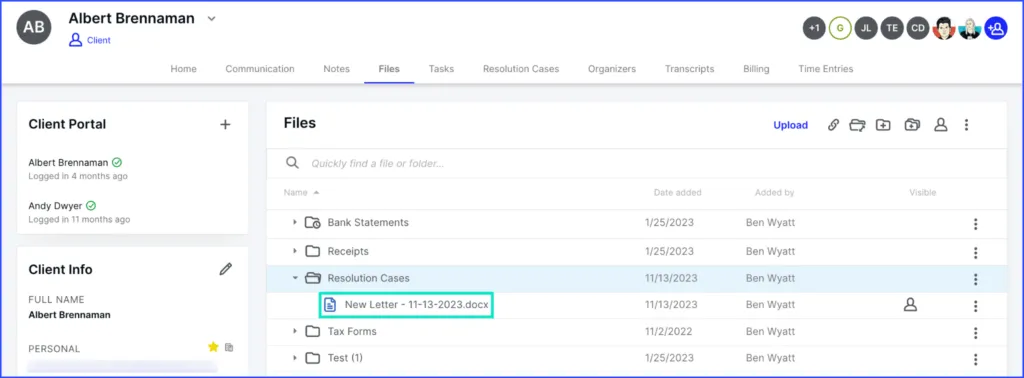
Canopy’s Client Management module serves as the foundation of the platform. It combines CRM functionality, a client portal, and communication tools, with document management available through an integrated module. The client directory stores all client information, including contact details, communication history, notes, and files.
The engagement letters and proposals feature allows firms to create, send, and track professional documents directly within the platform. Clients can review terms, electronically sign, and provide payment information through a secure link. A notable automation: once a proposal is accepted, the system can automatically create associated projects and tasks in the workflow module.
Source: Canopy
The client portal provides a branded online space where clients can view their to-do items, share documents securely, sign documents electronically, and access their billing history. Canopy offers multi-factor authentication for portal access. The portal is free for clients; they simply need an invitation from the firm to create an account.
Document Management: Centralized storage with desktop integration.
Canopy’s Document Management provides unlimited cloud storage for both client-facing and internal firm documents. The system organizes files through a centralized client file system, and firms can create custom folder structures or apply standardized folder templates to ensure consistency.
Two desktop tools bridge the gap between cloud storage and local work. The Desktop Assistant enables file editing, where users can open cloud files in local desktop software and have changes sync back automatically. It also allows users to “print” documents directly to client folders and scan physical documents into the system. The Virtual Drive (Windows only) creates a local drive that mirrors the Canopy file structure, similar to Dropbox or Google Drive.
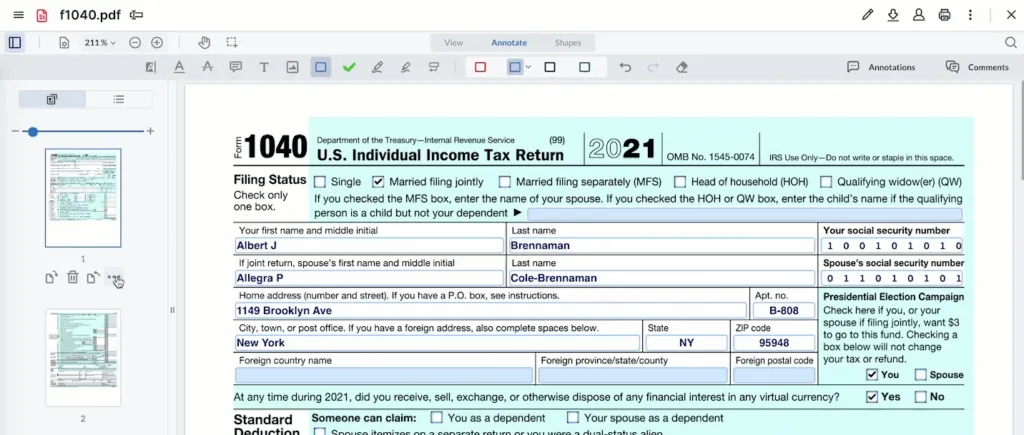
The platform includes file annotation capabilities for internal collaboration, including highlighting, text boxes, and commenting with @mentions. Annotations remain separate from the client-facing document, allowing firms to share clean versions while maintaining internal notes.
Source: Canopy
Workflow: Task management with automation capabilities.
The Workflow module handles project and task management. Users can create tasks and break them down into subtasks, set due dates, assign team members, and track progress through a centralized dashboard.
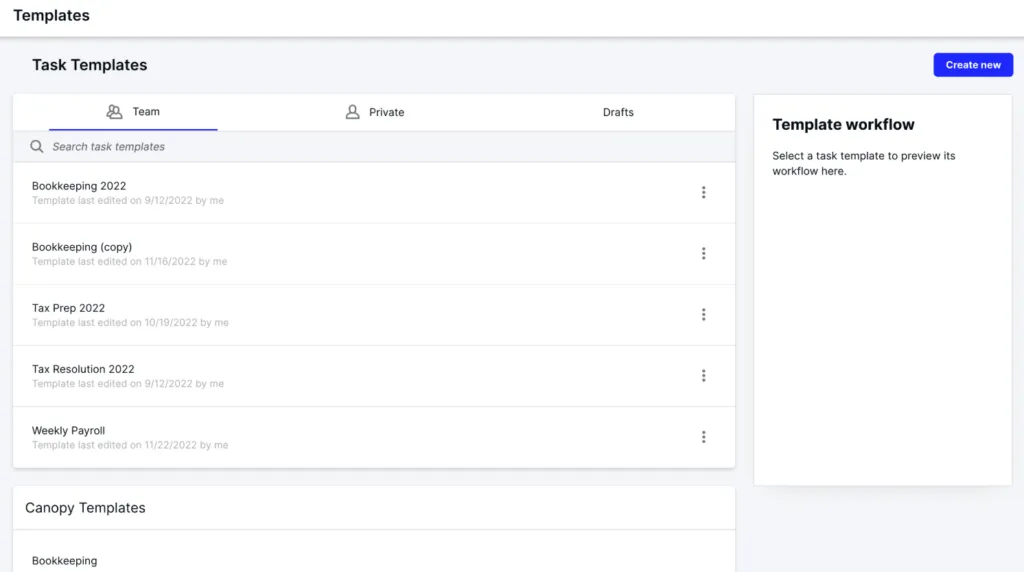
Task templates allow firms to create standardized workflows for recurring services. These templates can include predefined subtasks, assigned roles, relative due dates, and automation rules. Canopy offers pre-built templates and the ability to create custom ones.
Source: Canopy
Workflow automation uses triggers and actions to reduce manual work. For example, when a subtask status changes to “complete,” an automation can notify the next team member, create a new task, or send an email to the client. The platform supports recurring tasks that automatically generate based on schedules.
Time & Billing: Tracking work and generating invoices.
The Time & Billing module connects time tracking directly to invoicing. Users can track time through built-in timers that can be started from anywhere in the platform, including directly from tasks. Manual time entry is also available for times when the timer wasn’t used.
Work-in-Progress (WIP) reports show all unbilled time and expenses, helping firms identify what needs to be invoiced. Users can select time entries directly from the WIP report and add them to invoices.
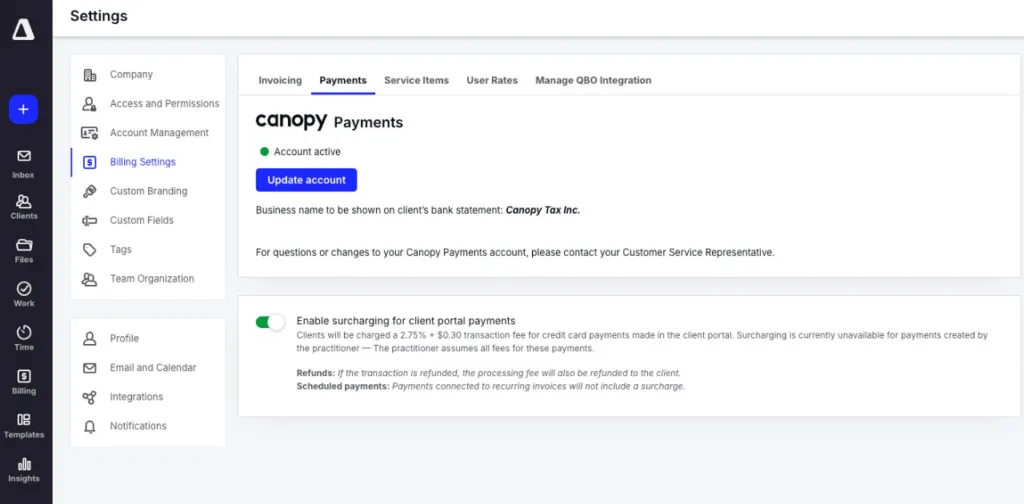
Canopy Payments integrates payment processing, allowing firms to accept credit cards and ACH transfers. Clients can pay through the portal or via a “Quick Pay” link in invoice emails. The platform supports recurring invoices and automated payment reminders.
Source: Canopy
Tax Resolution: Specialized tools for IRS work.
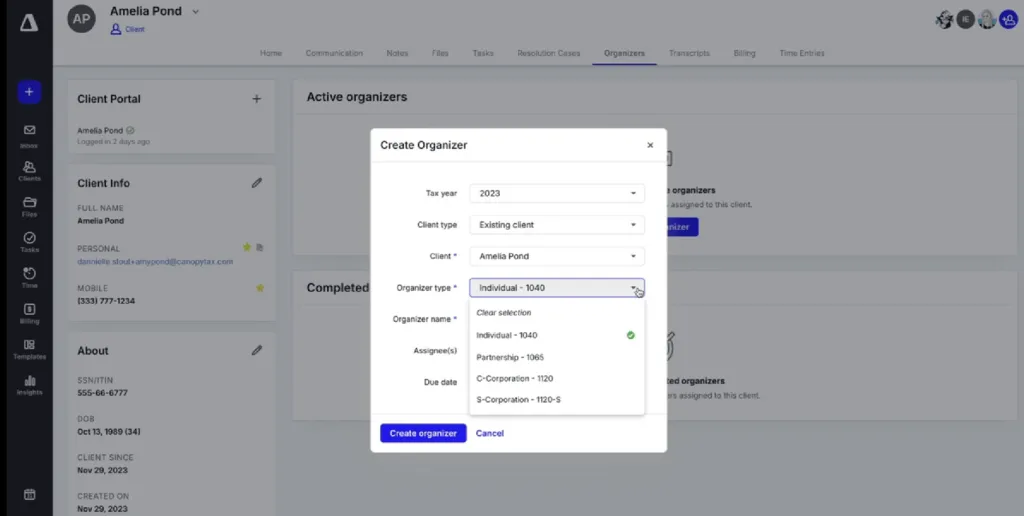
Tax Resolution remains one of Canopy’s distinctive features, reflecting its origins. The platform provides direct integration with the IRS for pulling client transcripts. With a Power of Attorney on file, practitioners can pull up to 20 years of transcripts with a single click. The system can also schedule automated transcript pulls at regular intervals.
Source: Canopy
The notices feature includes a database of IRS notices with step-by-step resolution instructions. Pre-built workflow templates guide users through the resolution process for each notice type. Client surveys help gather the specific financial information needed for resolution cases, and the data auto-populates into relevant IRS forms.
Where Canopy Falls Short
Compare Uku against your current tool — live Book a 30-minute demo built around your firm's setup. No slides. Book a demoWhile Canopy offers comprehensive functionality, several characteristics reveal a platform optimized for feature depth over flexibility. These aren’t failures but rather the natural consequences of building a full-featured system.
Complexity and Learning Curve: The platform’s extensive functionality can be overwhelming for new users. What should be simple tasks sometimes involve navigating through multiple menus and configuration options. Users frequently report needing significant training and resources to leverage the platform effectively. Even with the full feature set bundled into every tier, understanding which automation depth belongs to Standard, Plus, or Premium — and which specialist work is metered separately — takes time.
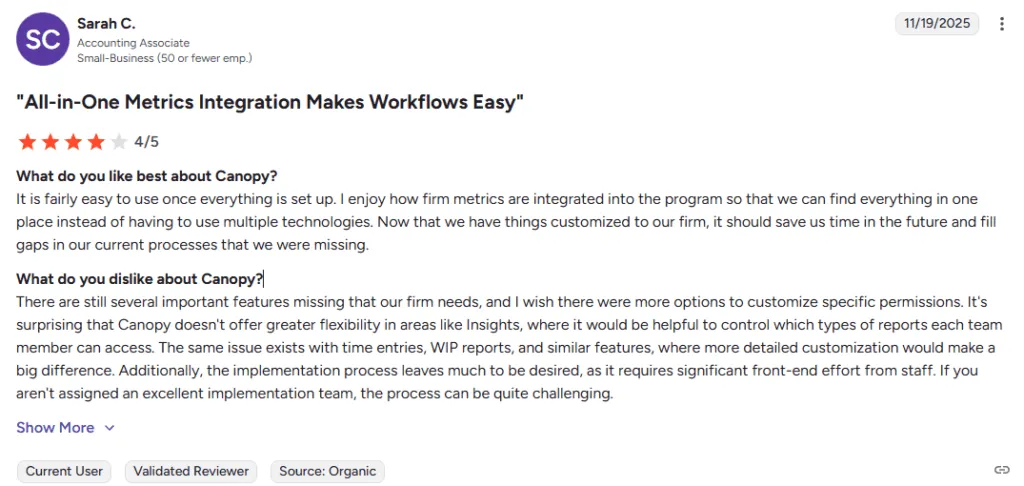
Source: g2
Pricing Structure: Canopy’s tiers are flat and seat-based now — Standard $74, Plus $109, Premium $149 per user per month on annual billing (monthly billing is also offered; annual saves 20%, and Standard is $93 billed monthly). Premium is marked “coming soon” on Canopy’s pricing page. But specialist tax and payment work is billed separately by usage: Tax Workflow Automation from $34/client credit, Close Automation at $10/connected client/month, Tax Resolution at $50/user/month, and card/ACH payment processing fees on top. A firm’s actual monthly cost still depends on how much of that consumption-based work it runs, even though the base seat price is now predictable. (Canopy pricing re-verified 5 October 2026, unchanged since 25 September.)
No Self-Serve Free Tier: Canopy retired its freemium tier along with the old modular pricing. Evaluating the platform now requires booking a sales demo rather than starting a free account. Firms wanting to test the full experience on their own schedule have no self-serve entry point.
US and IRS Focus: Canopy’s strongest differentiators, particularly the IRS transcript integration and tax resolution tools, primarily benefit US-based firms. International firms or those not heavily involved in tax resolution may find less value in these specialized features while still navigating the platform’s overall complexity.
Reliability Concerns: Some users have reported experiencing bugs, glitches, and occasional platform reliability issues. While the company appears to address these concerns, they’ve contributed to mixed perceptions among some users.
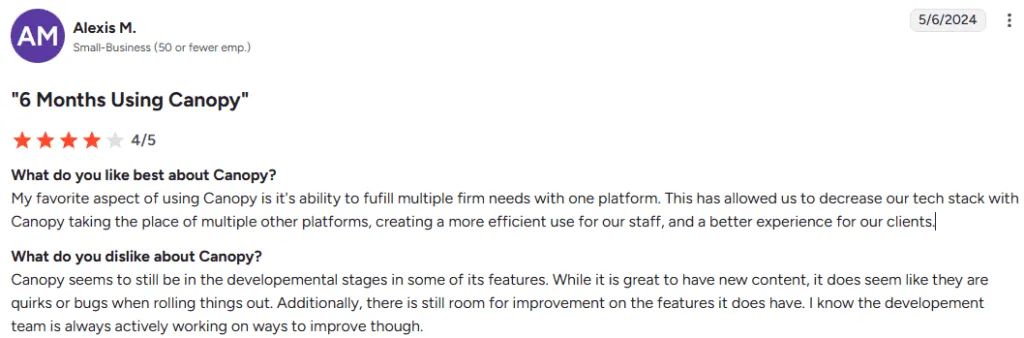
Source: g2
These limitations create clear opportunities for firms that prioritize fast & flexible deployment, transparent pricing, and the ability to implement software step by step rather than configuring everything upfront.
Top Canopy Alternative: Uku
Uku approaches practice management with a different philosophy: that accounting software should be a system your team will actually enjoy using. Created from the ground up to be international, especially for UK and US markets, the platform was built by Rain Allikvee and Jaanus Lang, who observed that existing practice management tools were “unhandy, impractical and unsightly.”
Rather than requiring extensive upfront configuration, Uku takes a modular approach where firms can start working on day one, activating only the features they need and scaling up as they grow. This makes Uku particularly appealing for firms transitioning from Excel, offering a path from spreadsheets to professional practice management without lengthy implementation periods.

Uku now serves 1,000+ clients globally with support for 12 languages and multi-currency capabilities across UK, USA, Scandinavia, and beyond.
Two primary differentiators set Uku apart:
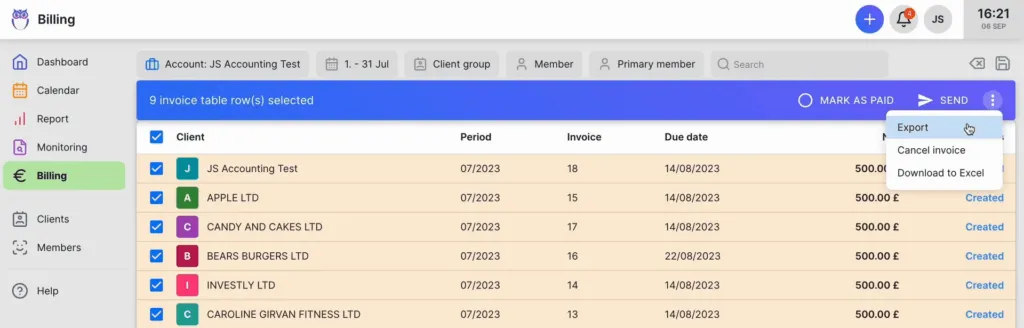
First, Uku’s automated billing system reduces invoice preparation time from two to three days to approximately 30 minutes. The system supports complex price lists, sophisticated rounding rules, and automated calculations through “contracts” where billing rules are set up once and time tracking automatically calculates billable amounts in real-time. Customers report seeing ~20% more profit by discovering outdated agreements where they were billing for eight hours but employees were actually doing 20 hours of work.
Second, Uku’s integrated client portal provides a unified workspace where clients and accountants work on the same task which are not separate tickets that must be connected. All communication, actions, documents, logs, and time tracking happen in one place. When clients make requests through the portal, notifications appear on the accountant’s dashboard, and they can immediately start tracking time within that same task.
Task Management: Workflow automation through templates.
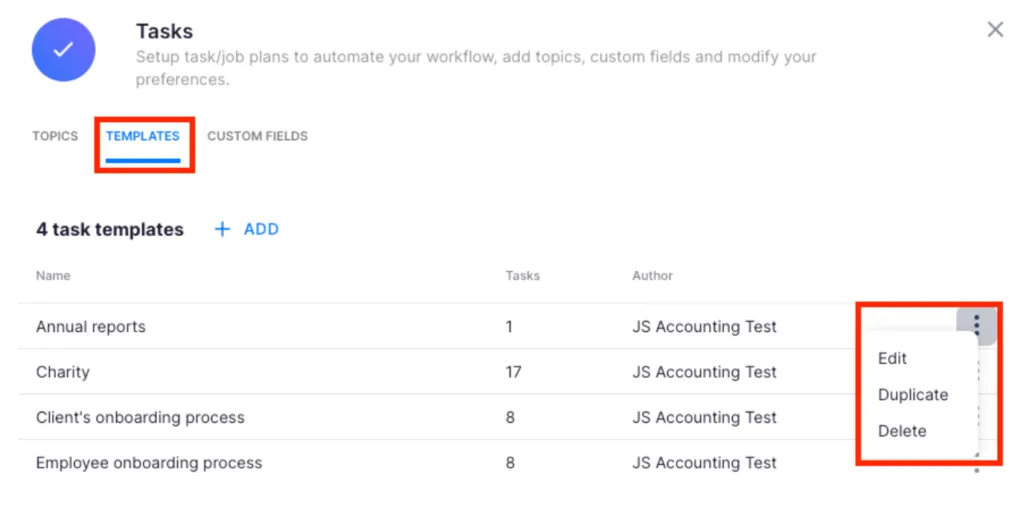
Uku’s task management is built around a three-level structure: task templates, client task plans, and individual tasks. This hierarchy allows firms to standardize their processes while maintaining flexibility for individual client needs.
Task templates represent the firm’s standard services. These can be created from scratch or modified from Uku’s pre-built options. When applied to a client, they become a “client task plan” that generates tasks automatically based on recurrence settings. The system significantly automates a firm’s workflow through this template-based approach.
The dashboard provides a to-do list view, prioritizing tasks for the current day by default. Users can filter by client, status, or custom topics. A calendar view shows a weekly schedule where tasks can be dragged and dropped to reschedule. Subtask checklists allow breaking complex tasks into smaller steps, and tasks can be assigned to multiple team members.
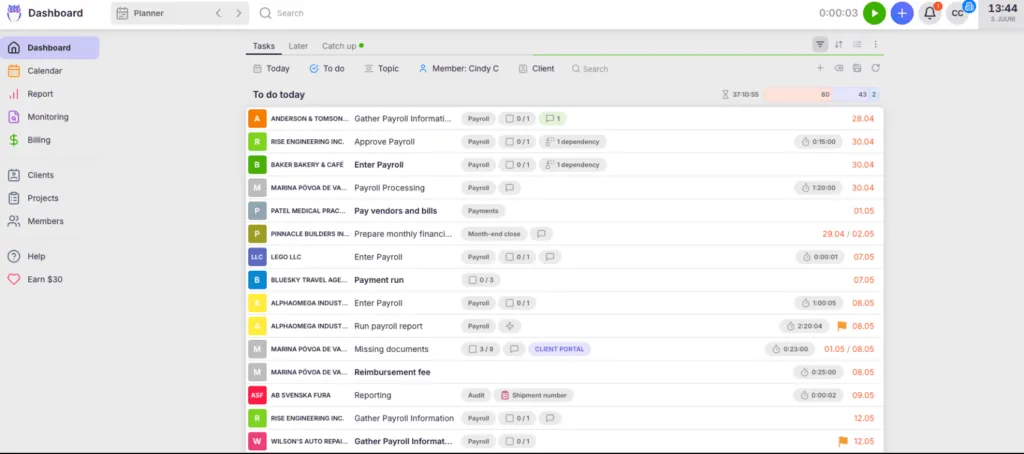
Time Tracking: Multiple methods for capturing billable hours.
Uku offers several approaches to time tracking, with 90% of actions being one-click. The stopwatch can be started and stopped with a single click. When starting a timer on a new task, the previous timer stops automatically, preventing overlapping entries. The running timer remains visible in the application header.
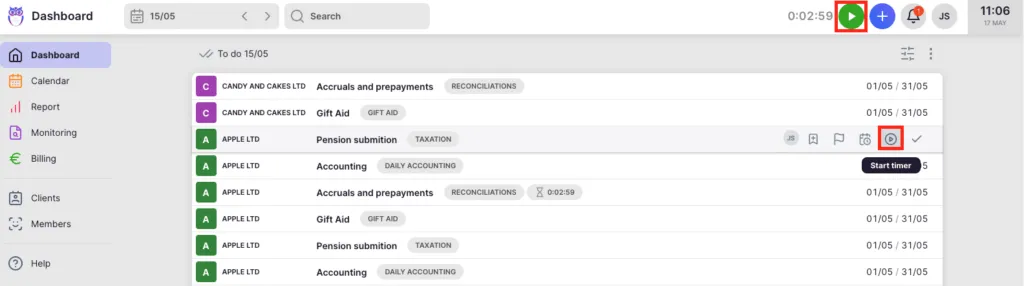
Manual time entry allows users to input duration directly or specify start and end times. The system suggests start times based on when previous work ended. Bulk time entry enables adding time to multiple tasks simultaneously, useful for situations like client meetings that touched on several projects.
A browser extension called “Mini Uku” brings time tracking to any webpage, allowing users to track time without switching to the main application. Time entries can be marked as billable or non-billable, with the distinction flowing directly into reporting and automated billing.
Billing & Invoicing: Automation from time tracking to payment.
Uku’s billing connects directly to time tracking and task completion. The system collects billable data automatically and uses pre-defined client contracts to generate invoices without manual intervention, reducing what takes many firms two to three days down to approximately 30 minutes.
Pricing flexibility includes time-based, fixed-fee, item-based, and mixed models. Client contracts define the billing relationship, including services, prices, and recurrence. The platform supports monthly, quarterly, or yearly billing schedules. The system tracks both sales prices and actual cost prices, providing managers with real-time profitability insights through Reporting, helping identify whether issues stem from employee efficiency, client difficulty, or pricing structure.
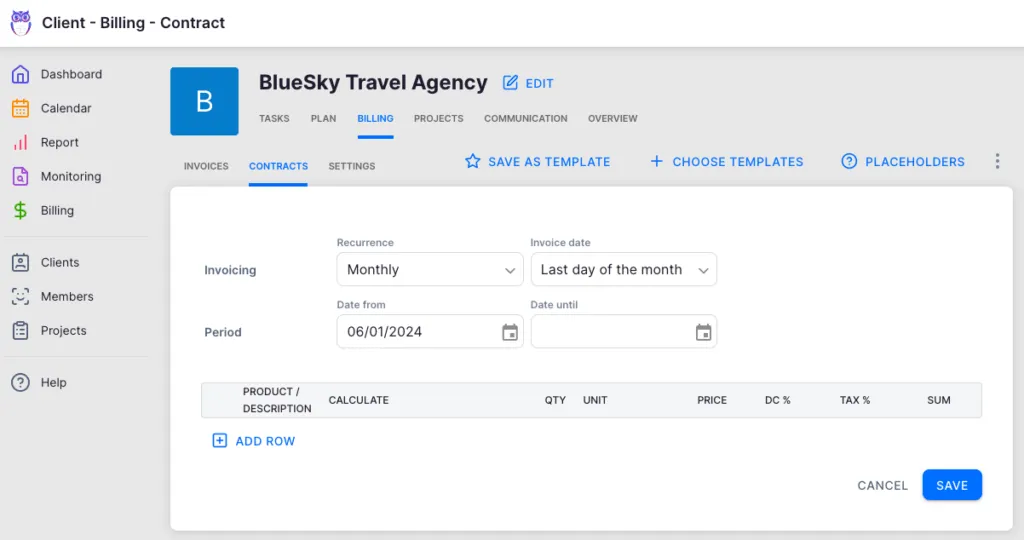
Once generated, invoices can be reviewed and sent in bulk directly from the platform. Integration with accounting software (Xero, QuickBooks, e-conomic, and others) allows easy export of finalized invoices. The business analytics report automatically compares agreed-upon work with actual time spent, highlighting profitability at the client level.
Client Portal: Streamlined communication and document collection.
The client portal provides a branded environment for client interaction. Firms can customize the portal with their logo, colors, company branding, and description. The portal menu can be configured to show only relevant features and information in which firms can even create unique menus for each client.
Clients access the portal through a secure link sent via email. Within the portal, clients see their assigned tasks, can upload requested documents via drag-and-drop, and communicate directly with the firm. Unlike traditional portals where separate tickets must be connected to work items, Uku mirrors the exact same task on both sides, keeping everything unified.
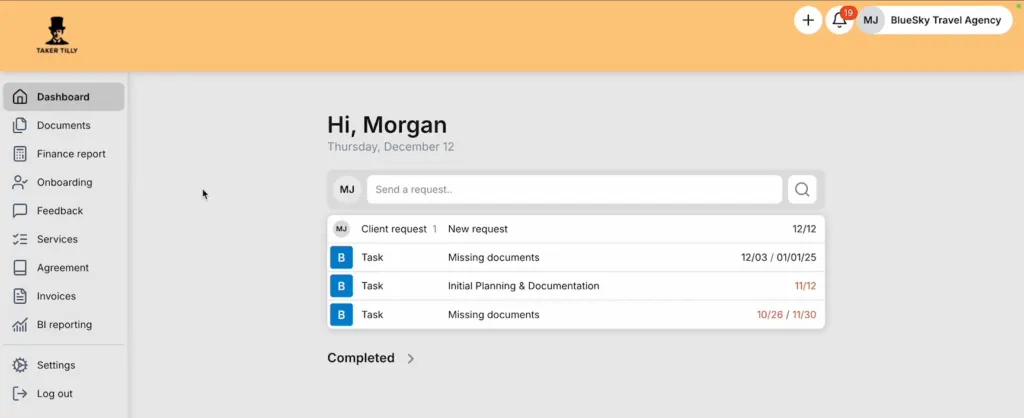
Automated reminders notify clients about upcoming deadlines and overdue items. The portal also displays current service agreements, creating opportunities for client engagement around additional services.
Document Management: One-click digitalization.
Uku integrates with Google Drive, Dropbox, and SharePoint for document storage and management. A distinctive capability: documents can be submitted for digitalization with a single click, sending them directly into accounting software. This level of automation for document handling streamlines what is typically a manual process.
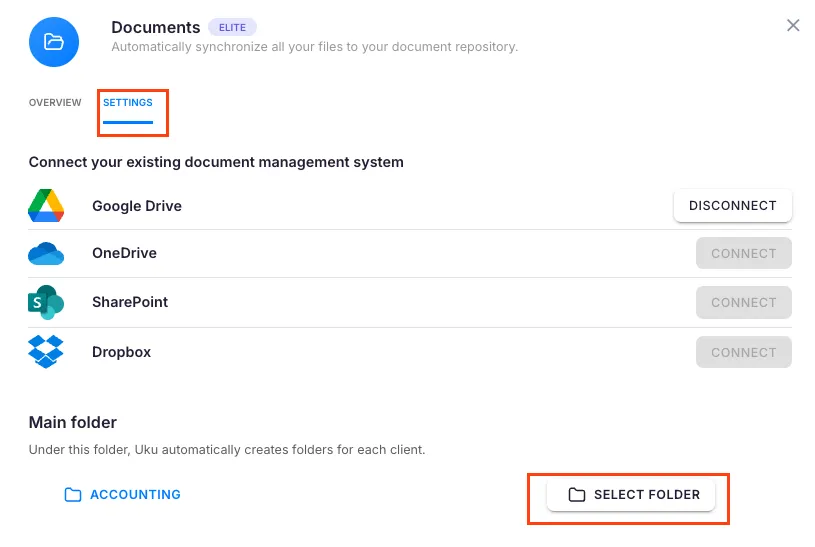
Flextime Management: A distinctive approach to work-life balance.
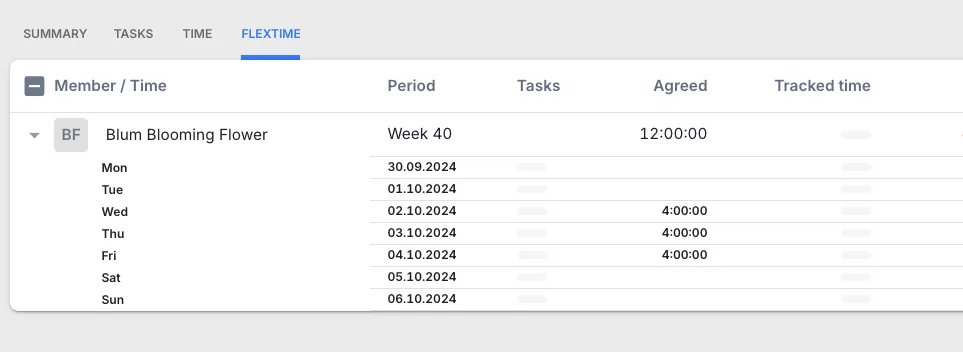
As a distinctive feature, Uku includes flextime management as a built-in capability. This allows firms to manage flexible work arrangements, overtime, and vacations directly within the same system used for client work.
The feature provides an overview of time spent by employees, with customizable working hour settings on a per-employee basis. Time entries can be approved on weekly or monthly cycles. This recognition that accounting firm management extends beyond client work to team management differentiates Uku from competitors focused solely on client-facing functionality.
Pricing: Transparent tiers with an affordable starting point.
Uku’s pricing structure offers four tiers with clear feature sets, available in €, $, and £ with both monthly and annual billing options (annual billing provides a 23% discount):

Solo (from $19/user/month): 1 member, 20 active clients, unlimited tasks, templates, time tracking, reporting, CRM, and calendar.
Team (from $38/user/month): All Solo features plus teamwork, email integration, client portal, unlimited clients, access management, custom fields, and integrations.
Elite ($48/user/month): Team features plus Google Drive, Dropbox, and SharePoint integration, customizable portal menu, workforce management, actionable audit log, client budgeting, and e-signatures.
Enterprise ($88/user/month): Elite features plus custom integrations, assisted import, team workshop, early feature access, and dedicated account manager.
Monthly billing lets firms test and adopt Uku without a long-term commitment.
Canopy or Uku: Comparison Summary
| Aspect | Canopy | Uku |
|---|---|---|
| Primary Focus | Comprehensive practice management with tax resolution | Modular practice management with automated billing |
| Founded | 2014 | 2017 |
| Funding Model | Venture-backed ($236.5M raised) | Limited external funding |
| Free Plan | ❌ No self-serve free tier (sales-assisted demo/trial) | ❌ Solo plan (1 user, 20 active clients) from $19/user/month |
| Pricing Structure | Seat tiers (Standard/Plus/Premium) plus metered add-ons; annual or monthly | Tiered (all features per tier, monthly or annual) |
| Starting Price (paid) | $74/user/month (Standard, annual) | From $38/user/month |
| Tax Resolution Tools | ⭐⭐⭐⭐⭐ IRS integration, transcript pulling, notices database | ❌ Not included |
| Document Management | ⭐⭐⭐⭐⭐ Desktop Assistant, Virtual Drive | ⭐⭐⭐⭐ Integration with cloud storage, one-click digitalization |
| Automated Billing | ⭐⭐⭐ Standard invoicing from time entries | ⭐⭐⭐⭐⭐ 2-3 days → 30 minutes, profitability tracking |
| Ease of Use | ⭐⭐⭐ Comprehensive but steep learning curve | ⭐⭐⭐⭐⭐ Fast deployment, modular activation |
| Workflow Automation | ⭐⭐⭐⭐ Templates, triggers, actions | ⭐⭐⭐⭐⭐ Template-based automation |
| Client Portal | ✅ Included with branding | ✅ Unified workspace, customizable menus |
| Flextime Management | ❌ Not included | ✅ Built-in feature |
| Reporting | ⭐⭐⭐⭐ WIP reports, standard analytics | ⭐⭐⭐⭐⭐ Reporting with profitability insights |
| Geographic Focus | US-centric (IRS integration) | International (12 languages, multi-currency) |
| Best For | US tax firms needing comprehensive features | Firms wanting fast deployment and modular scaling |
Final Verdict
The choice between Canopy and Uku comes down to what your firm values most in practice management software.
👉 Choose Canopy if:
- Your firm operates in the US tax resolution space and needs specialized IRS integration.
- You want a comprehensive system covering many aspects of firm operations and are willing to invest time in learning a full-featured platform.
- You’re comfortable with flat per-seat tiers plus metered tax add-ons that scale with your caseload.
- Your firm is interested in AI-powered features and emerging automation capabilities.
👉 Choose Uku if:
- You want to minimize your team’s admin time and value ultra-fast onboarding with modular scaling.
- Your firm prefers to implement software step by step rather than configuring everything upfront.
- You want automated billing that reduces invoice preparation from days to approximately 30 minutes, delivering immediate ROI.
- You need an integrated client portal that creates a unified workspace for client collaboration.
- You are a freelancer or small practice looking for an affordable starting plan.
- Your firm is international and needs multilingual or multi-currency support, or you are transitioning from Excel and want the easiest implementation path.
- You want a lower per-seat price than Canopy’s $74 Standard tier.
Sign up for Uku and boost your productivity.
Both platforms serve accounting firms effectively, but they reflect different philosophies about what practice management should be. Canopy builds depth through features and modules for US tax practices; Uku builds efficiency through a modular approach that lets you start working on day one. Your choice depends on whether your firm needs comprehensive US-focused functionality or values fast deployment with the flexibility to scale.
Frequently asked questions
What is Canopy software?
Canopy is a cloud-based (SaaS) practice management platform for US accounting, CPA, tax and bookkeeping firms. It combines CRM, document management with eSignatures, a client portal, workflow, time and billing, and payments behind one login, with IRS transcripts and tax resolution available as a paid add-on.
Can tax resolution professionals use Canopy to manage IRS notices, transcripts and resolution cases in one platform?
Yes. Canopy's Tax Resolution add-on ($50 per user per month, billed annually) covers IRS transcript pulls, pre-built workflows for IRS notices, and case templates for collections, penalties and spousal relief. Once a POA is on file with the IRS you can pull up to 20 years of transcripts and schedule automated pulls, but every user who requests transcripts needs their own Transcripts license and ID.me account.
Does Canopy include a secure client portal, document management and e-signatures?
Yes. Canopy's Standard plan includes document management with eSign and a client portal with secure messaging. Clients can sign, upload files, pay invoices and fill in questionnaires in the portal or mobile app, or through secure links without logging in, and every Document Management license includes unlimited eSignatures.

Published Dec 27, 2025 · Updated Oct 5, 2026