6 Best CCH Axcess Alternatives for Practice Management in 2026
The 6 best CCH Axcess Practice and Workstream alternatives in 2026: Uku, TaxDome, Financial Cents, Firm360, Canopy and Karbon, and what each does with Axcess Tax.


Contents
- CCH Axcess Alternatives at a Glance
- What is CCH Axcess?
- How We Curated Our List of CCH Axcess Alternatives
- 1. Uku: Best Alternative for Billing From Tracked Time and Agreements
- 2. TaxDome: Best Alternative for Tax Firms That Sign a Lot of Documents
- 3. Financial Cents: Best Alternative for Small Firms That Want to Try First
- 4. Firm360: Best Alternative for CPA Firms That Want Tax Documents Synced
- 5. Canopy: Best Alternative for Tax Resolution Work
- 6. Karbon: Best Alternative for Email-First Teams That Need Capacity Planning
- How to Switch from CCH Axcess to Uku
- The Final Verdict
- Read more
The six best CCH Axcess alternatives for practice management in 2026 are Uku, TaxDome, Financial Cents, Firm360, Canopy and Karbon. They replace the practice-management layer of CCH Axcess (Axcess Practice for time and billing, Axcess Workstream for projects and due dates) and let you keep Axcess Tax for returns. Uku drafts invoices from tracked time and each client’s agreement; TaxDome, Financial Cents, Firm360 and Canopy also sync documents from Axcess Tax.
CCH Axcess is Wolters Kluwer’s modular cloud suite for tax, audit and firm management, which Wolters Kluwer says is “trusted by 94 of Accounting Today’s Top 100 Firms”. It is sold module by module. Small-firm tax packages start at $2,814 and Client Collaboration at $3,092 on Wolters Kluwer’s eStore; the practice-management modules are priced by quote.
Firms look for alternatives to the practice-management modules for three reasons: time, billing and workflow have no price on the page, the client portal and document management are separate modules with their own dependencies, and reviewers describe support and implementation as hard going for small and mid-sized firms. Tax preparation is usually not the problem, which is why most firms keep it.
CCH Axcess Alternatives at a Glance
| The Best CCH Axcess Alternatives | ||
|---|---|---|
 | Best Alternative for Billing From Tracked Time and Agreements Starts at: $19/member/mo · Axcess Tax: no integration Workflows, a timer on every task, a client portal and invoices drafted from each client’s contract, priced on the page. | |
 | Best Alternative for Tax Firms That Sign a Lot of Documents Starts at: $800/seat/yr · Axcess Tax: sync + print Print Axcess returns straight into TaxDome, with unlimited e-signatures and a client mobile app. | |
 | Best Alternative for Small Firms That Want to Try First Starts at: $19/mo (solo) · Axcess Tax: Drive sync Workflow, capacity, time and invoicing on every plan, with Axcess files synced through Google Drive. | |
 | Best Alternative for CPA Firms That Want Tax Documents Synced Starts at: $49/user/mo · Axcess Tax: FileSync Built by a US CPA, with documents synced from Axcess, UltraTax, Lacerte and Drake. | |
 | Best Alternative for Tax Resolution Work Starts at: $74/user/mo · Axcess Tax: saves files IRS transcripts and notices beside documents, portal, workflow and billing in one system. | |
 | Best Alternative for Email-First Teams That Need Capacity Planning Starts at: $59/user/mo · Axcess Tax: coming soon A shared inbox that turns client email into assigned work, plus budgeted hours against capacity. | |
Entry prices per month on annual billing, except TaxDome (per seat per year). The Axcess Tax line says what each product does with CCH Axcess Tax today; none of them shares a client database with it the way the Axcess suite does internally.
What is CCH Axcess?
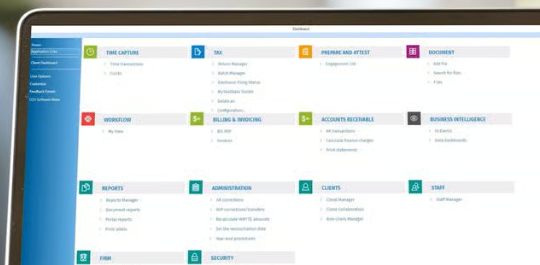
CCH Axcess is Wolters Kluwer’s cloud platform for US accounting firms: “a seamless platform for tax, audit and firm management”. Many firms come to it from Wolters Kluwer’s desktop CCH ProSystem fx, and Wolters Kluwer says 94 of Accounting Today’s Top 100 firms use it. It is not one application but a family of modules, each licensed separately: Tax, Document, Portal, Practice, Workstream, Engagement, Intelligence and more.
 Source: Wolters Kluwer
The practice-management layer is two modules:
- CCH Axcess Practice: “a practice management solution that simplifies time and billing, enhances client service, and enables you to analyze and improve profitability”. One-screen time entry, clocks from the route sheet and tax return, hourly, fixed and progress billing, e-payments through partners, and KPI reports including WIP and receivables.
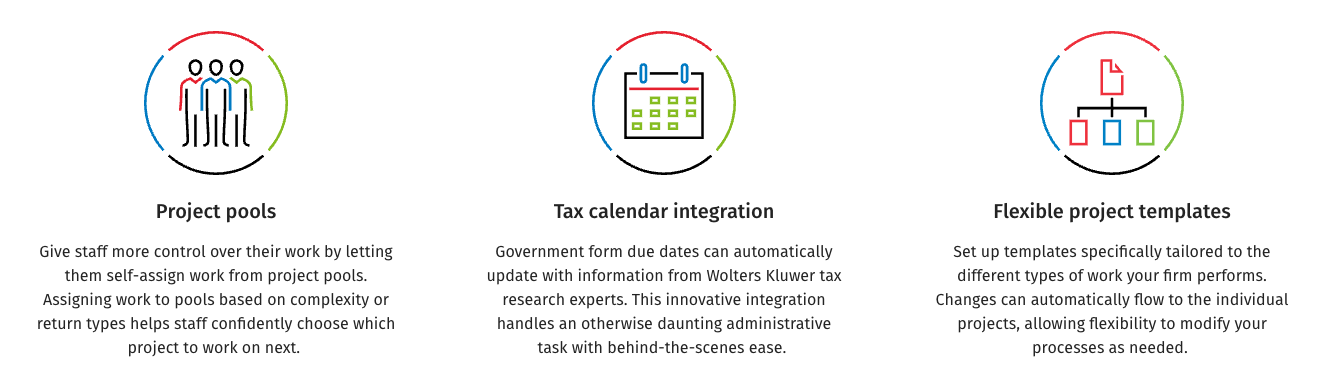
- CCH Axcess Workstream: project tracking with due dates, project pools that staff self-assign from, tax calendar integration that updates government due dates, and templates whose changes flow to existing projects.
 Source: Wolters Kluwer
Around them sit Axcess Document for document management and Axcess Portal for clients. They are separate modules, and Wolters Kluwer is explicit about the dependency: “CCH Axcess Document is a prerequisite for CCH Axcess Portal users.”
 Source: Wolters Kluwer
None of these module pages shows a price, only “Request a Quote”. The prices Wolters Kluwer does publish are for packages in its eStore: Tax Essentials at $2,814, $4,039 and $5,264 for 100, 200 and 400 returns, and Client Collaboration (engagement letters, organizers, e-signatures) at $3,092 for 75 licences. TrustRadius, where CCH Axcess scores 7.3 out of 10, notes that no free trial is available. Its reviewers praise the depth and criticise support:
“Customer support does not know their own product! … Hidden add-ons that they deceive prospect into believe is a part of the system.”
For more detail on each module and what reviewers say, see our CCH Axcess review; for the cost structure, CCH Axcess pricing.
Want practice management with the price on the page and the portal included? Uku is built for exactly that. Try it free for 14 days, no credit card required.
How We Curated Our List of CCH Axcess Alternatives
We compared on 2 October 2026. Prices are what each vendor shows a US firm on its own pricing page. Feature and integration claims come from each product’s own pages and help centre; if something isn’t mentioned there, we say “not mentioned”, not “doesn’t exist”.
We looked for practice-management tools that answer the reasons firms give for moving off Axcess Practice and Workstream:
- A published price for practice management, without a quote for each module
- A client portal and document management included, not separate modules with dependencies
- Workflow, time and billing in one system
- A clear answer for CCH Axcess Tax, which most firms keep
- A documented way to bring clients across from Axcess
- Support and setup a small or mid-sized firm can manage
1. Uku: Best Alternative for Billing From Tracked Time and Agreements
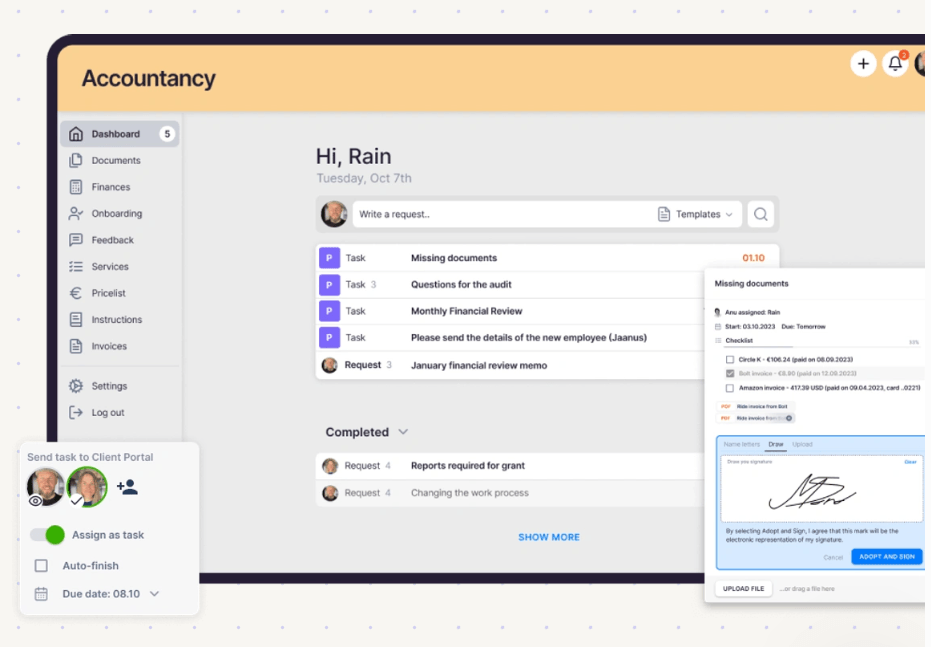
Uku is practice management built for accounting, bookkeeping and audit firms: clients, recurring workflows, time tracking, automated billing, a client portal and analytics in one system. It serves 1,000+ firms in 25+ countries, in 12 languages, and it is modular, so you can start with clients and tasks on day one and add billing, workflows and analytics as you grow.
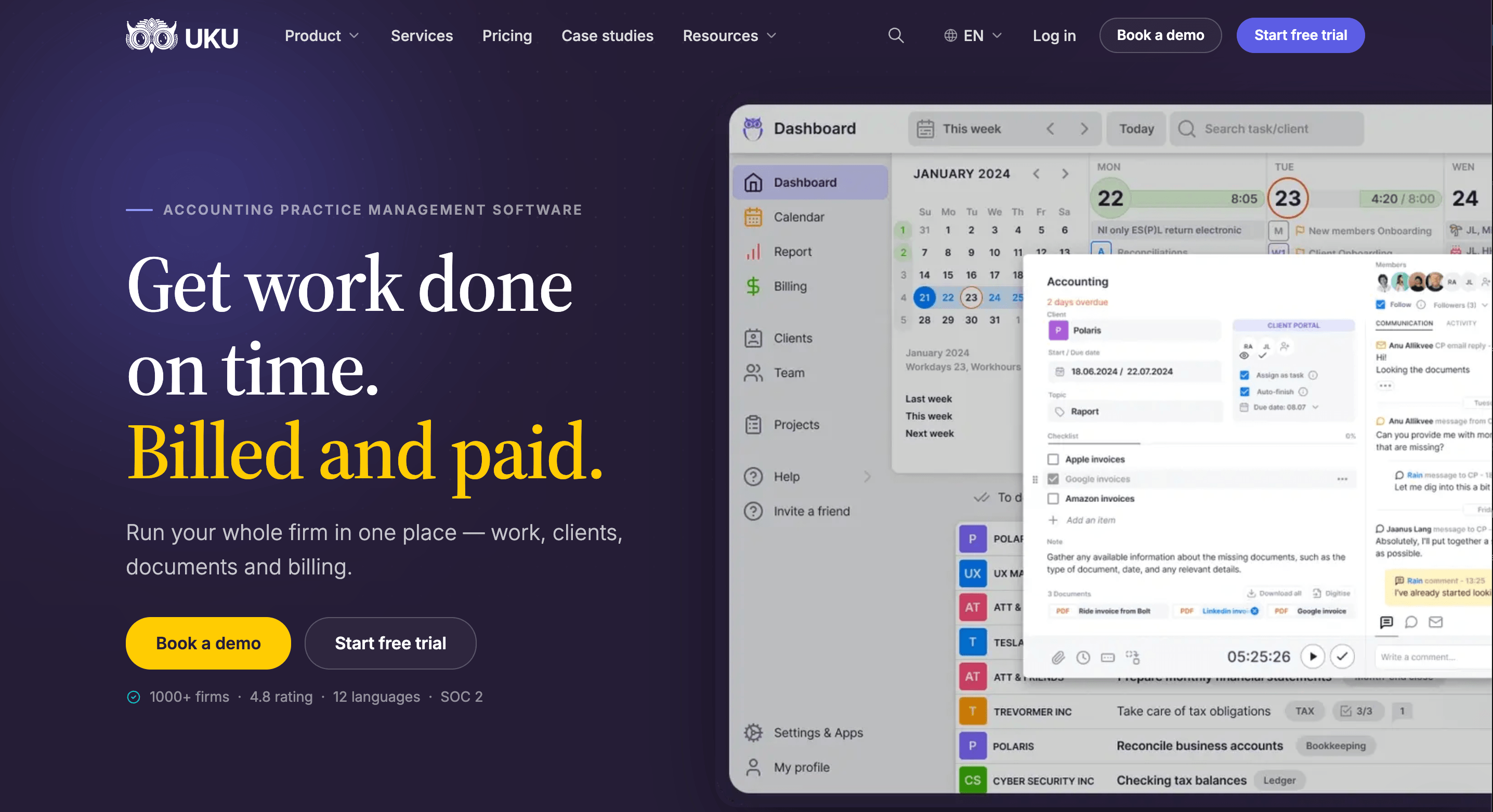
Its key capabilities include:
- Automated billing. Billing contracts (hourly, fixed, per piece, volume tiers, or a mix) draft each period’s invoices from tracked work and sync them to QuickBooks Online, Xero and other ledgers.
- Time tracking on the task. A one-click timer, manual and bulk entry, billable or not. On Elite and Enterprise, a firm can require a time entry before a task is closed.
- Agreements monitoring. Agreed work against delivered work for every client, flagged green, amber or red before the month closes.
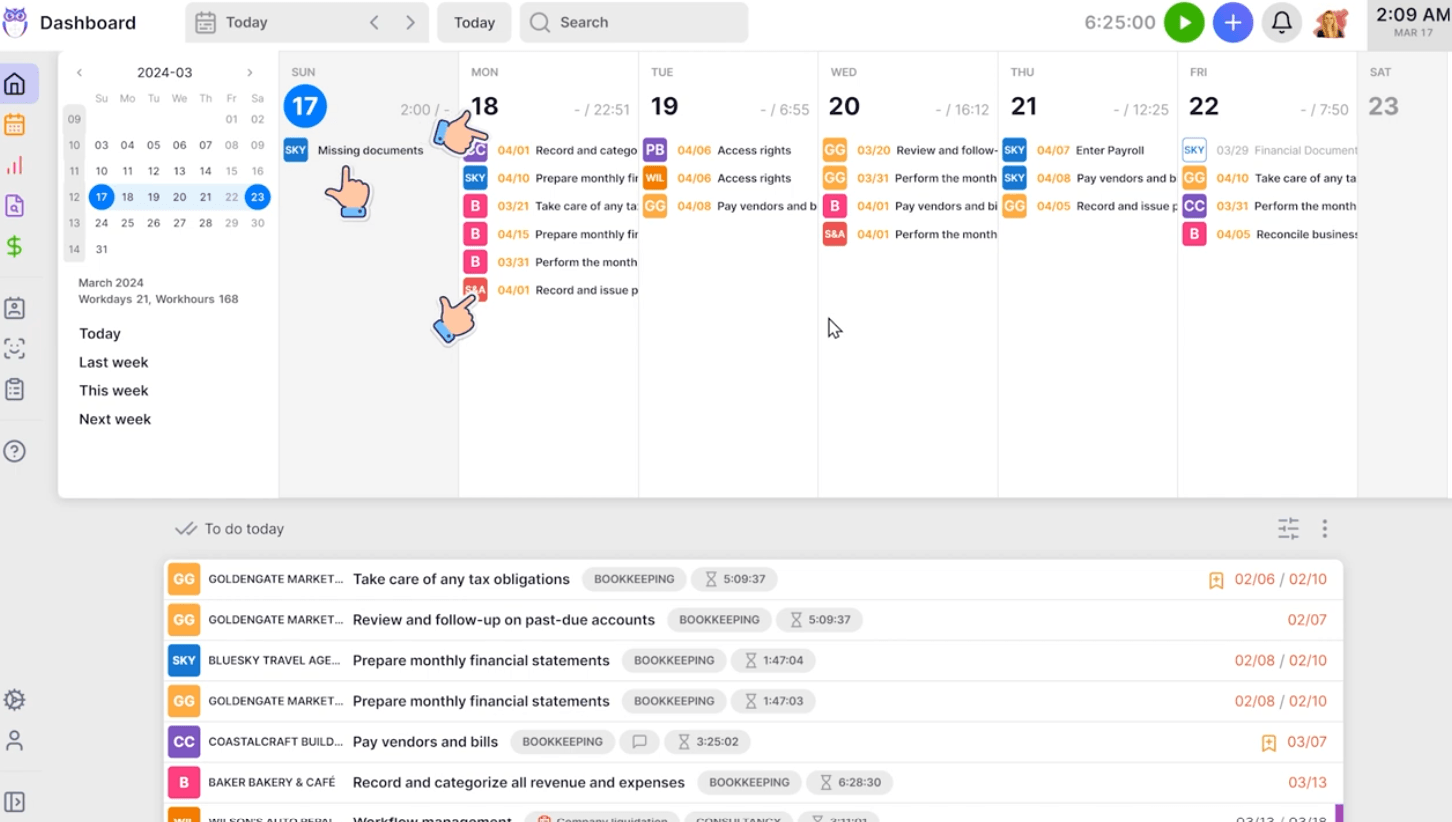
- Workflow automation. Workflow templates create every recurring task with its checklist, responsible person and due date, on every plan.
- Client portal and documents. A passwordless portal, free for clients, with document requests, reminders and e-signatures on every plan, and document management included.
- What Uku does not have: an integration with CCH Axcess Tax or other US tax software. Clients come across from an Axcess export.
Why choose Uku over CCH Axcess
The first difference is what’s in the box. On Axcess, time and billing is Practice, projects are Workstream, documents are Document and the portal is Portal, each a module, and Portal requires Document. In Uku, workflow templates, time tracking, billing, document management, the client portal and e-signatures are on every plan, and clients use the portal free.
The second is where billing starts. Axcess Practice bills from time and WIP with progress, fixed and batch billing. Uku starts from each client’s agreement: a billing contract says what the fee covers, tracked time and extra work land against it, and at period end the invoices draft themselves, which reduces invoice preparation from days to about 30 minutes.
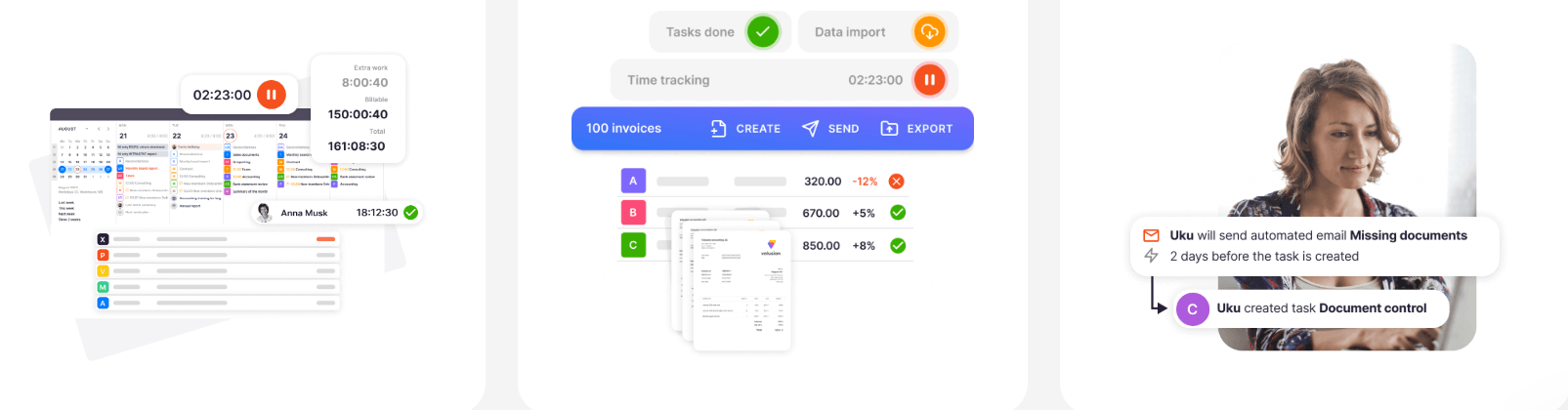

The third is how you buy it. Axcess Practice and Workstream are quoted module by module, and Client Collaboration alone starts at $3,092 for 75 licences. Uku publishes per-member prices, has a 14-day trial without a card, and can be billed monthly. It also runs a US tax season: Gordon J. Maier & Company, a 43-person Wisconsin CPA firm, went live on Uku weeks before tax season and ran the whole season through it.

The trade-off is Axcess Tax. Inside the suite, Tax, Practice and Workstream share one client database; Uku has no Axcess integration, so client details live in both systems and returns stay in Axcess Tax. If your firm depends on that shared database, weigh it before anything else here. Uku connects to QuickBooks Online and Xero, Gmail and Outlook, and on Elite a public API, Zapier and the Uku MCP server for Claude and ChatGPT.
Uku pricing
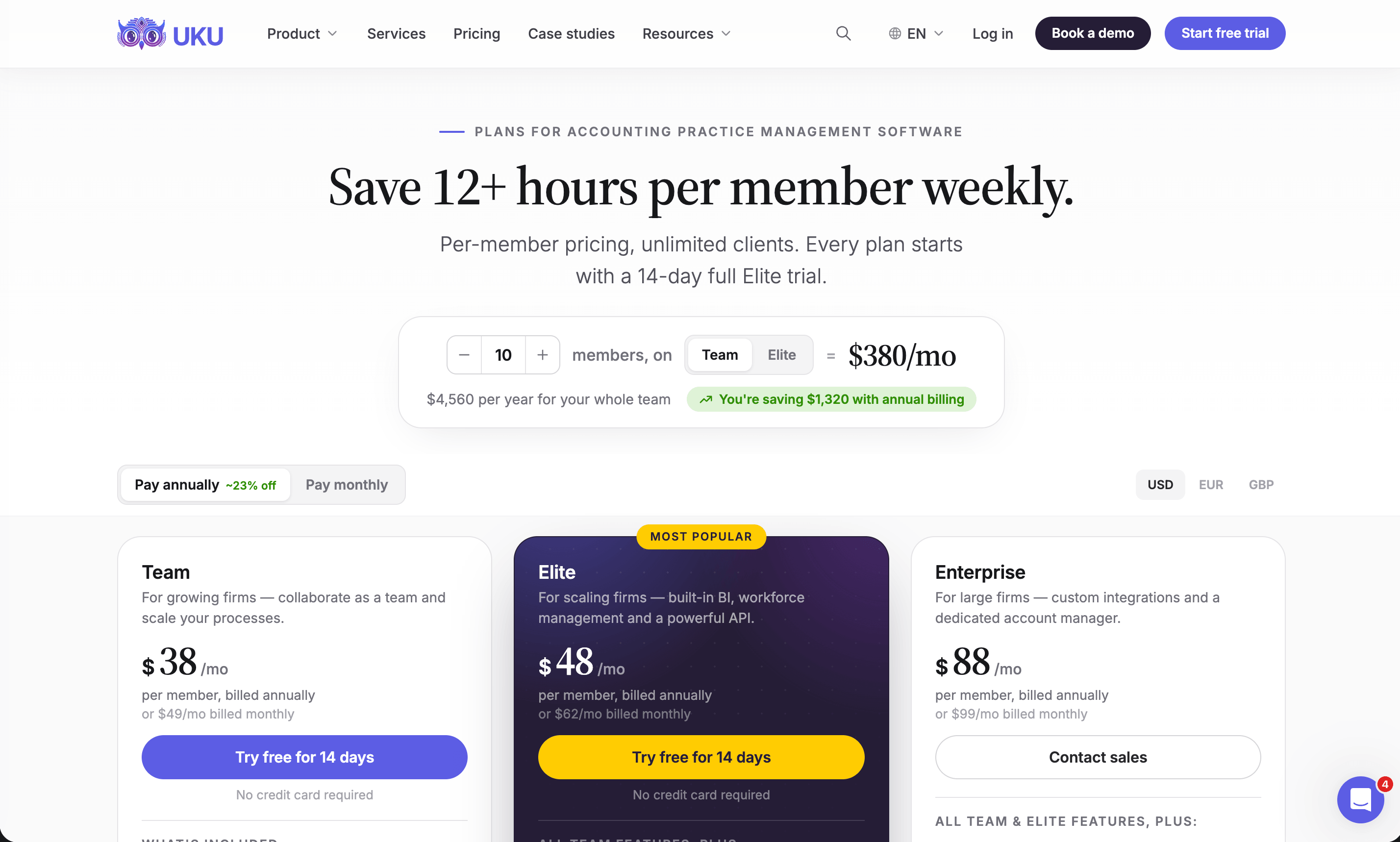
Per member per month, from Uku’s US pricing page: Solo $19 annual, $25 monthly (1 member, 20 active clients, e-signatures and document management included); Team $38, $49 monthly (unlimited members and clients, projects, access management); Elite $48, $62 monthly (BI Analytics, mandatory time entries, workforce management, public API, Zapier, Uku MCP); Enterprise $88, $99 monthly (custom integrations, dedicated account manager, assisted client import). Clients and the portal are free. Every account starts with a 14-day Elite trial, no card, plus 90 minutes of onboarding.
Who should use Uku?
Choose Uku if: you run a tax, accounting or bookkeeping firm of 2 to 100 people; you bill some or all of your work by the hour or against a scope; you want workflow, billing and the client portal in one system with the price on the page. Not the first choice if you are a Top 100 firm that depends on Axcess’s shared client database, or you need the practice system wired into Axcess Tax. Reviews: G2 and Capterra. For the head-to-head, see CCH Axcess vs Uku.
2. TaxDome: Best Alternative for Tax Firms That Sign a Lot of Documents
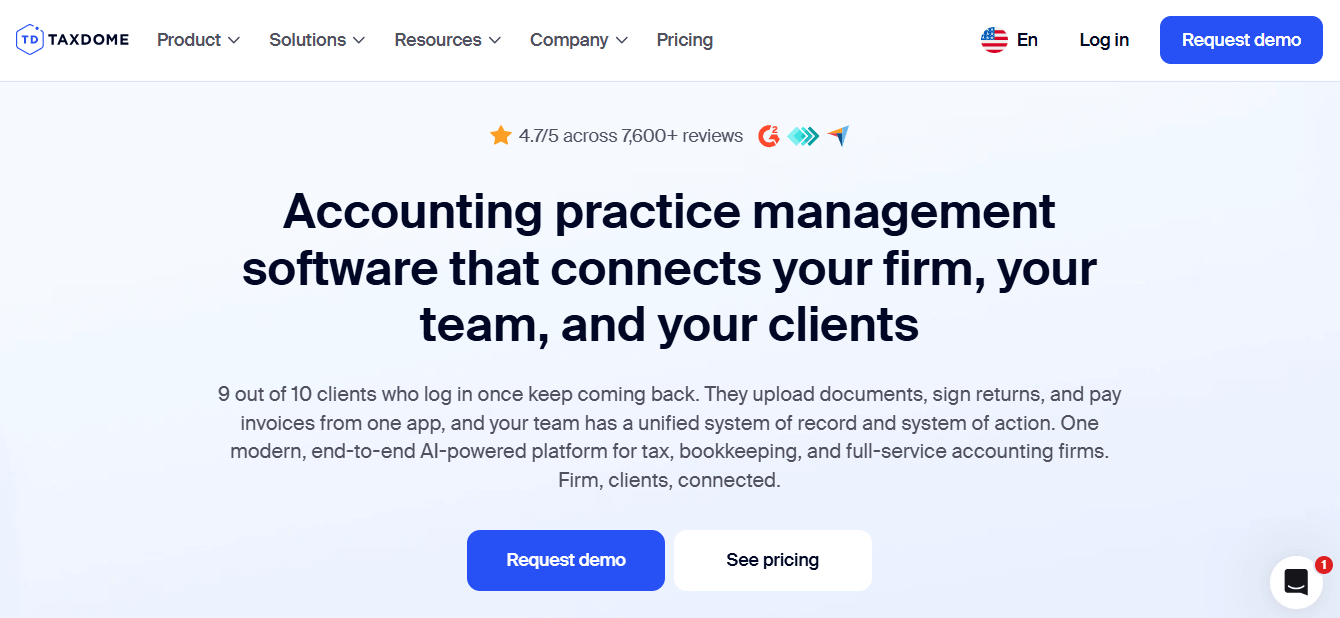
TaxDome is an all-in-one platform for tax, bookkeeping and accounting firms: CRM, client portal and mobile app, unlimited document storage and e-signatures, workflow automation, email and chat, proposals, invoicing and payments.
 Source: TaxDome
Its key capabilities include:
- A CCH Axcess integration: “Sync documents from CCH Axcess to TaxDome” and “Print CCH Axcess tax returns directly to your TaxDome practice management system”
- Unlimited document storage and e-signatures on every plan, and KBA e-signatures for Form 8879 at $1 per use
- Tax organizers and intake forms that feed the workflow
- Client mobile app on iOS and Android
- Invoicing, time tracking and payments
Why choose TaxDome over CCH Axcess
The first reason is that it keeps Axcess Tax close. TaxDome’s CCH Axcess integration lets you print returns from Axcess straight into the client’s TaxDome folder, and its help centre has step-by-step instructions for exporting your client list from CCH Axcess to CSV.
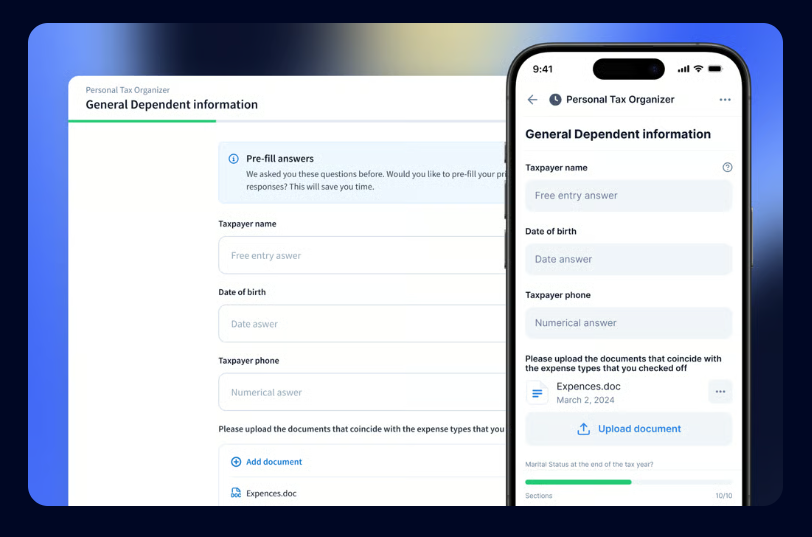 Source: TaxDome
The second is that portal, documents and e-signature are one product. On Axcess, the portal needs the Document module; in TaxDome, unlimited storage and e-signatures are on every plan, and clients get a mobile app.
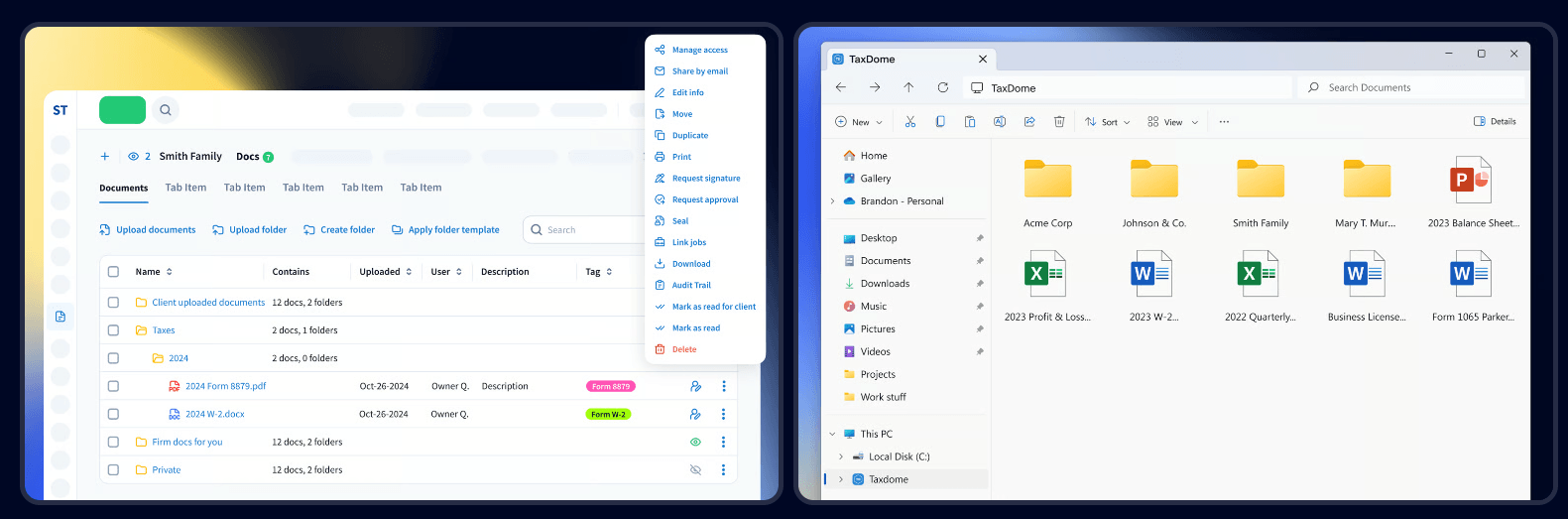 Source: TaxDome
The third is the price, which is on the page. The trade-offs: TaxDome bills yearly and upfront, and it takes real configuration to deploy.
TaxDome pricing
From the TaxDome pricing page, per seat per year on a one-year term: Essentials $800 (solo users only), Pro $1,000 (IRS transcripts, AI reporting), Business $1,200 (Client Care, client import assistance). Two- and three-year terms lower the price; the page opens on the three-year prices. KBA signatures are $1 each.
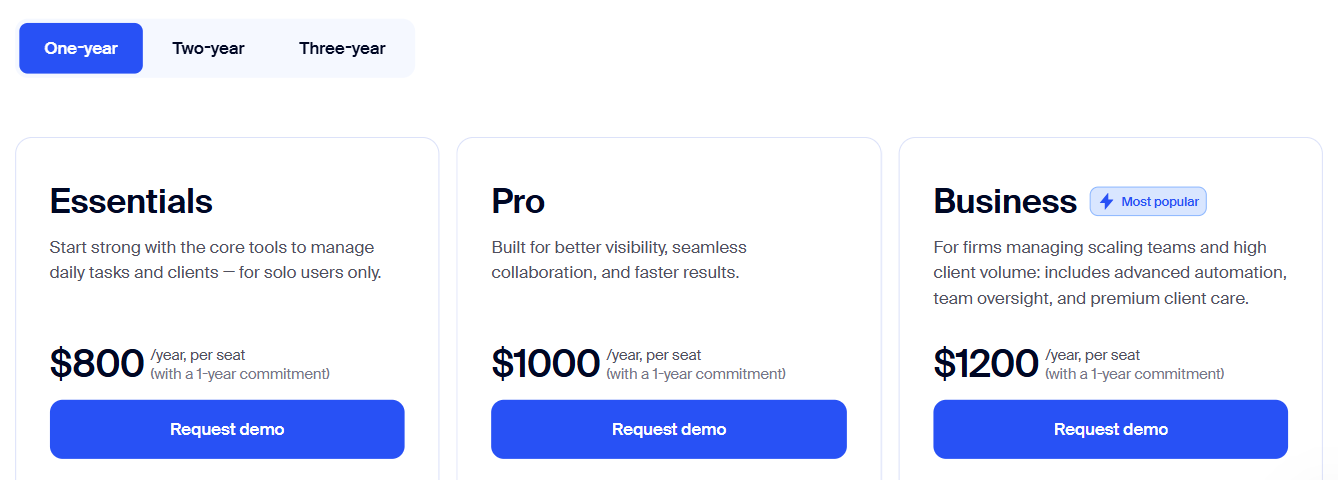 Source: TaxDome
Who should use TaxDome?
Choose TaxDome if: you are a US tax firm that keeps Axcess Tax, signs hundreds of engagement letters and 8879s a season, and wants clients on a mobile app. See also our TaxDome review and TaxDome alternatives.
3. Financial Cents: Best Alternative for Small Firms That Want to Try First
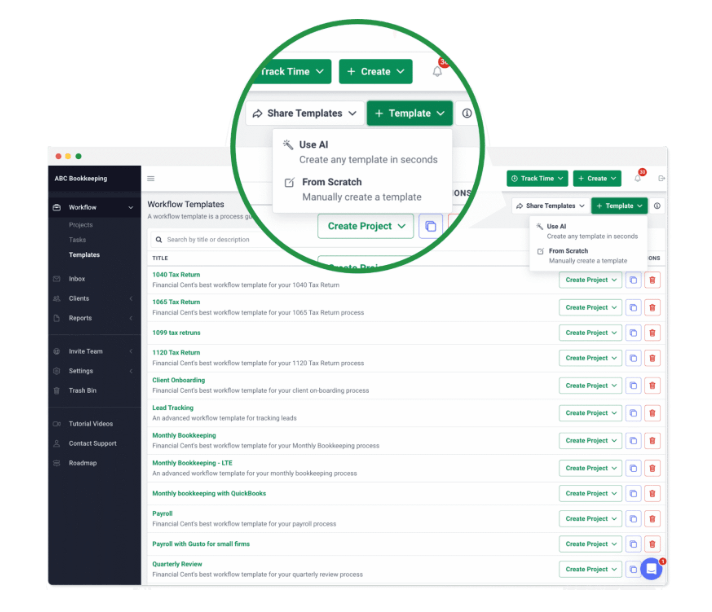
Financial Cents is practice management for small US accounting and bookkeeping firms: workflow, client tasks and portal, capacity planning, time tracking and invoicing, with a native QuickBooks Online integration and a library of 400+ workflow templates.
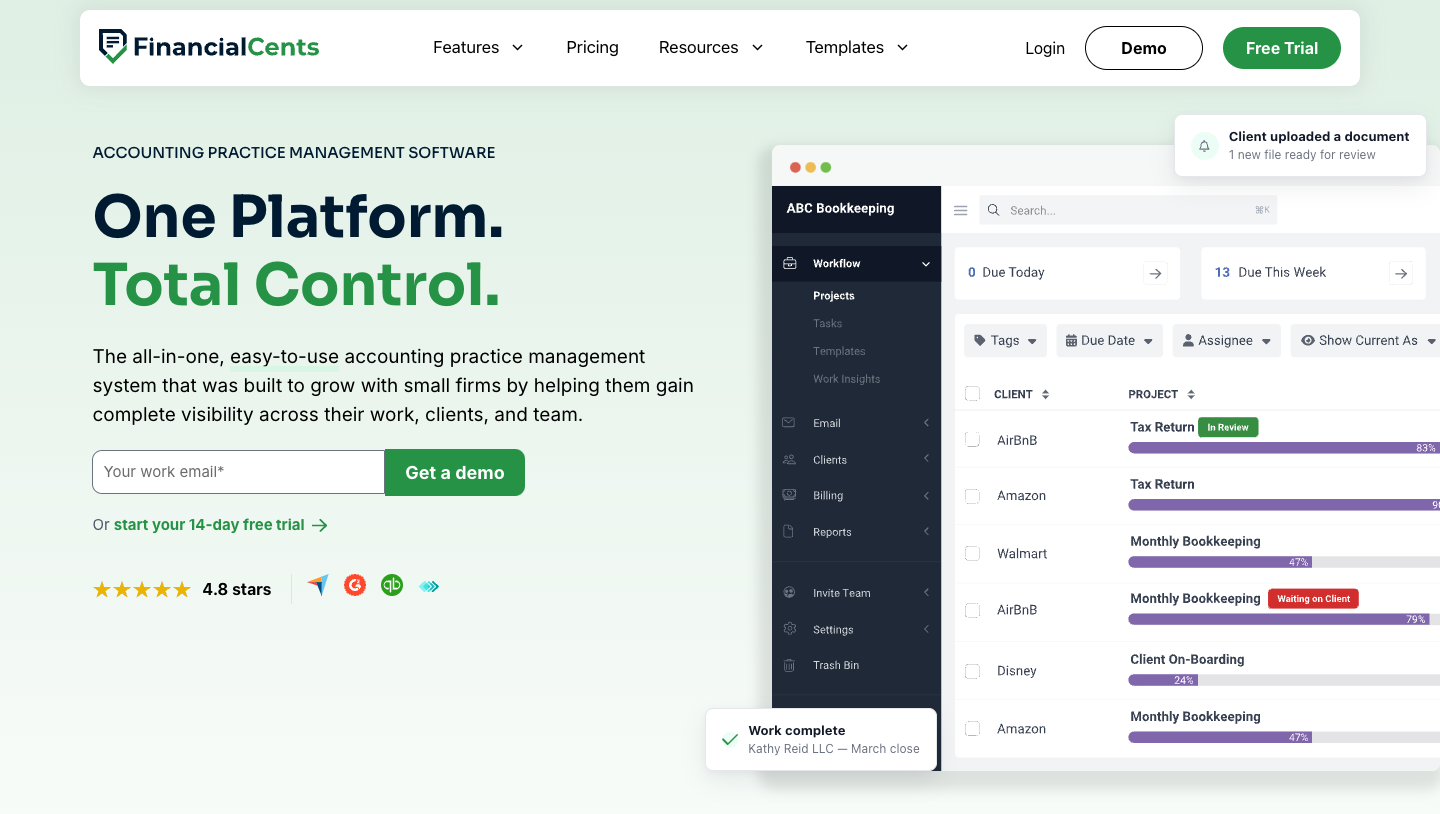 Source: Financial Cents
Its key capabilities include:
- A CCH Axcess connection: “Financial Cents connects to CCH Access through our Google Drive two-way sync” (their spelling), with a guide to import your clients from Axcess by CSV
- Workflow templates from a library of 400+, with client tasks and document requests
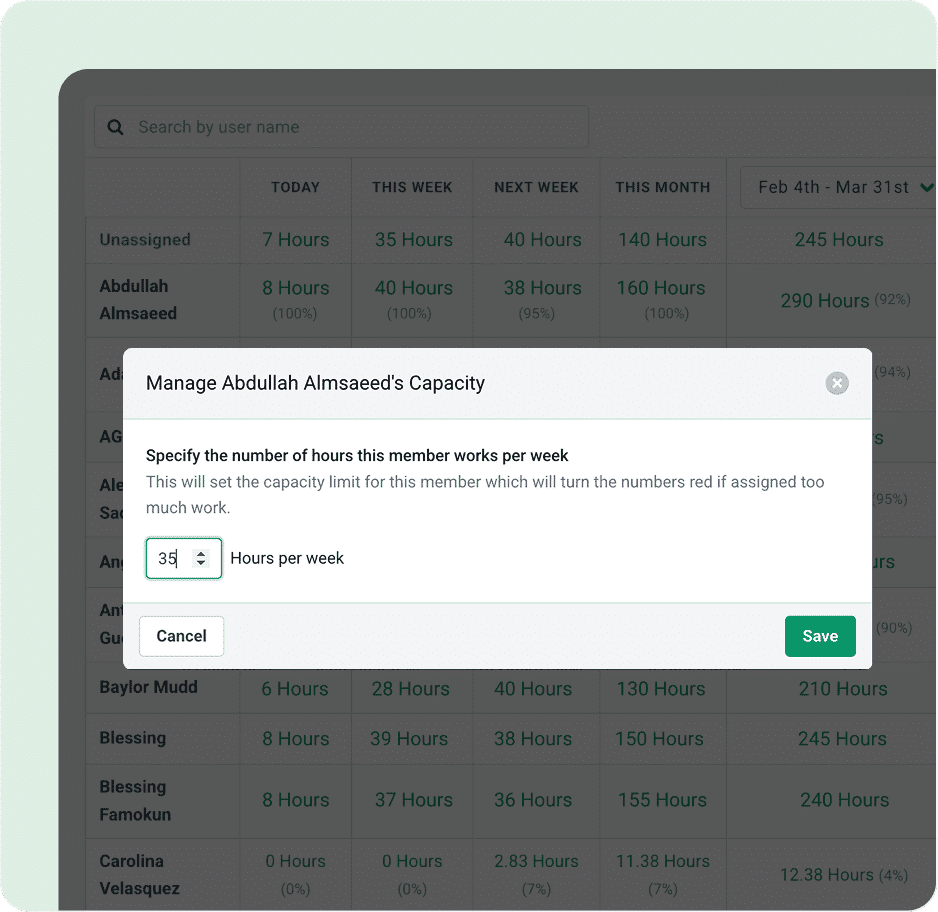
- Capacity management showing each person’s hours against their weekly capacity
- Time tracking and invoicing on every plan
Why choose Financial Cents over CCH Axcess
The first reason is the way in. Axcess starts with a quote. Financial Cents starts with a 14-day trial, no card, and a price list that begins at $19 a month for a one-person firm.
 Source: Financial Cents
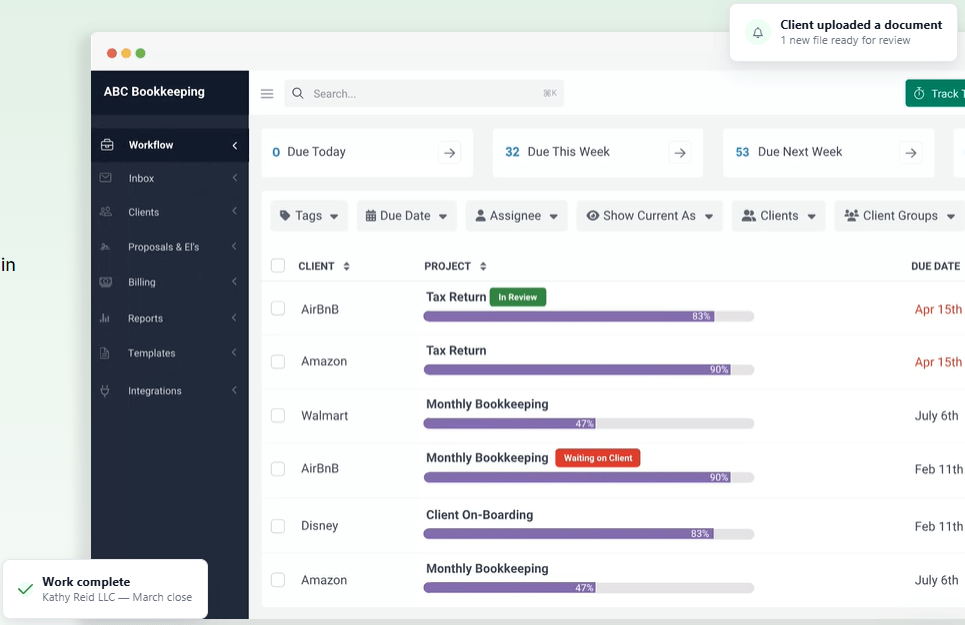
The second is Axcess Tax. Financial Cents’ CCH Axcess page explains the set-up: export your client list from Axcess, import it by CSV, connect Google Drive, and anything you save or print from Axcess into a client’s Drive folder appears in Financial Cents within minutes.
 Source: Financial Cents
The third is capacity. Axcess Workstream’s pages don’t mention staff capacity planning; Financial Cents shows hours today, this week, next week and this month against each person’s capacity.
 Source: Financial Cents
The trade-offs: every plan is a 12-month agreement, monthly billing needs five users, the tax integrations sit on Scale at $69 per user, and e-signature runs through Adobe Sign.
Financial Cents pricing
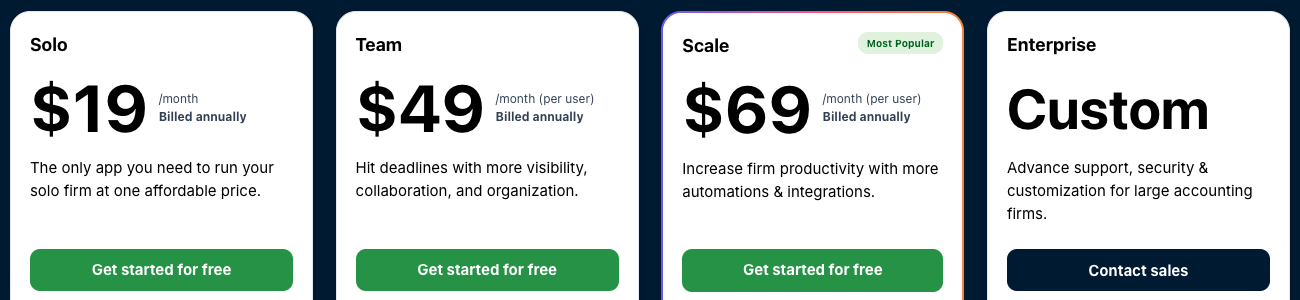
From the Financial Cents pricing page: Solo $19 per month (single-user firms only), Team $49 per user per month ($69 monthly), Scale $69 ($89 monthly; task dependencies, Zapier, shared inbox, branded portal, profitability reports, tax software integrations), Enterprise custom. Every plan is a 12-month agreement. 14-day free trial, no card.
 Source: Financial Cents
Who should use Financial Cents?
Choose Financial Cents if: you are a US firm of one to about 30 people, QuickBooks Online is at the centre of your client work, and you want Axcess returns to land in the practice system without uploads. See also our Financial Cents review.
4. Firm360: Best Alternative for CPA Firms That Want Tax Documents Synced
Firm360 is an all-in-one practice management platform for US accounting and CPA firms, founded by a practising CPA: projects, documents, a client portal, e-signature, time and billing, and reporting in one system, with US-based support.
 Source: Firm360
Its key capabilities include:
- FileSync for CCH Axcess, UltraTax, Lacerte, Drake and ProConnect documents
- Project management with templates and a visual workflow builder (Standard and up)
- Document management with revision history, PDF merge and split
- Client portal with branded login, no-login upload links, e-signature and invoice payment
- Time tracking and billing with card and ACH payments and automated A/R collections (Standard and up)
Why choose Firm360 over CCH Axcess
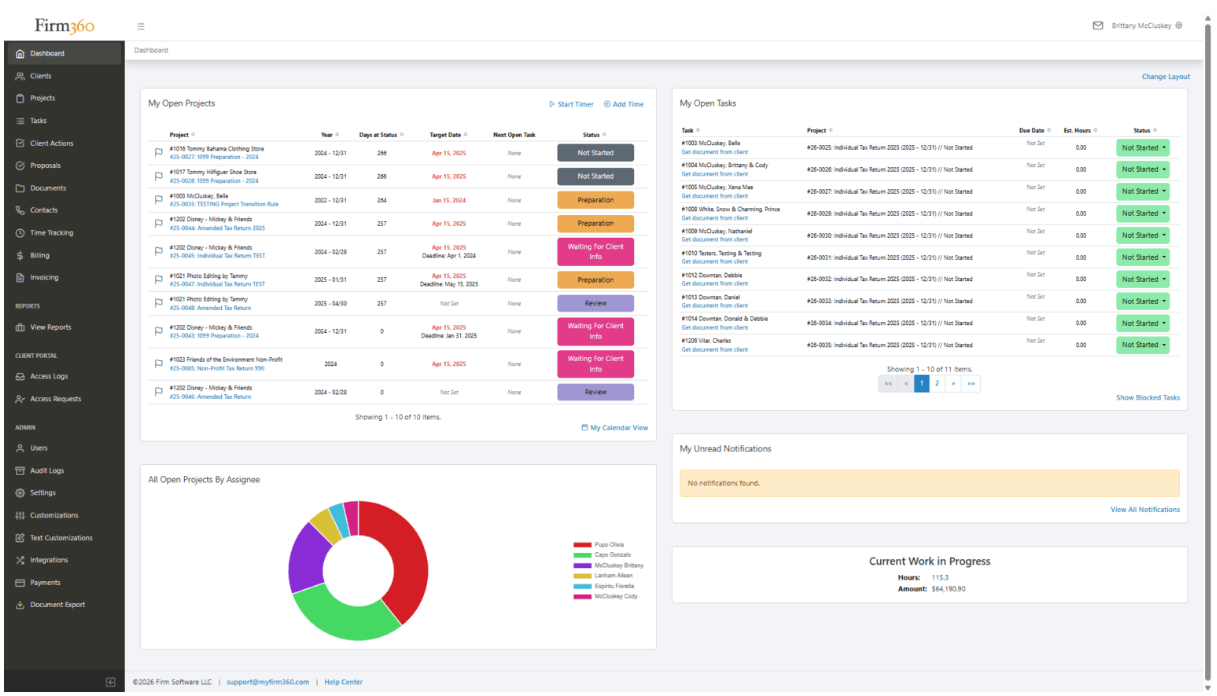
The first reason is document sync. Firm360’s integrations page says it will “automatically sync documents with CCH Access using our FileSync tool — no manual uploads needed” (their spelling), so returns prepared in Axcess Tax land in the client’s Firm360 record.
 Source: Firm360
The second is that it keeps a CPA partner’s habits. Firm360’s dashboard shows work in progress in hours and dollars, like Axcess Practice’s WIP reports, while projects, documents and the portal live in the same system.
The third is the price: published per user, with the portal included. The trade-offs: no free trial, project management starts on Standard with a three-user minimum, annual billing only, and Firm360 says most firms go live in six to eight weeks.
Firm360 pricing
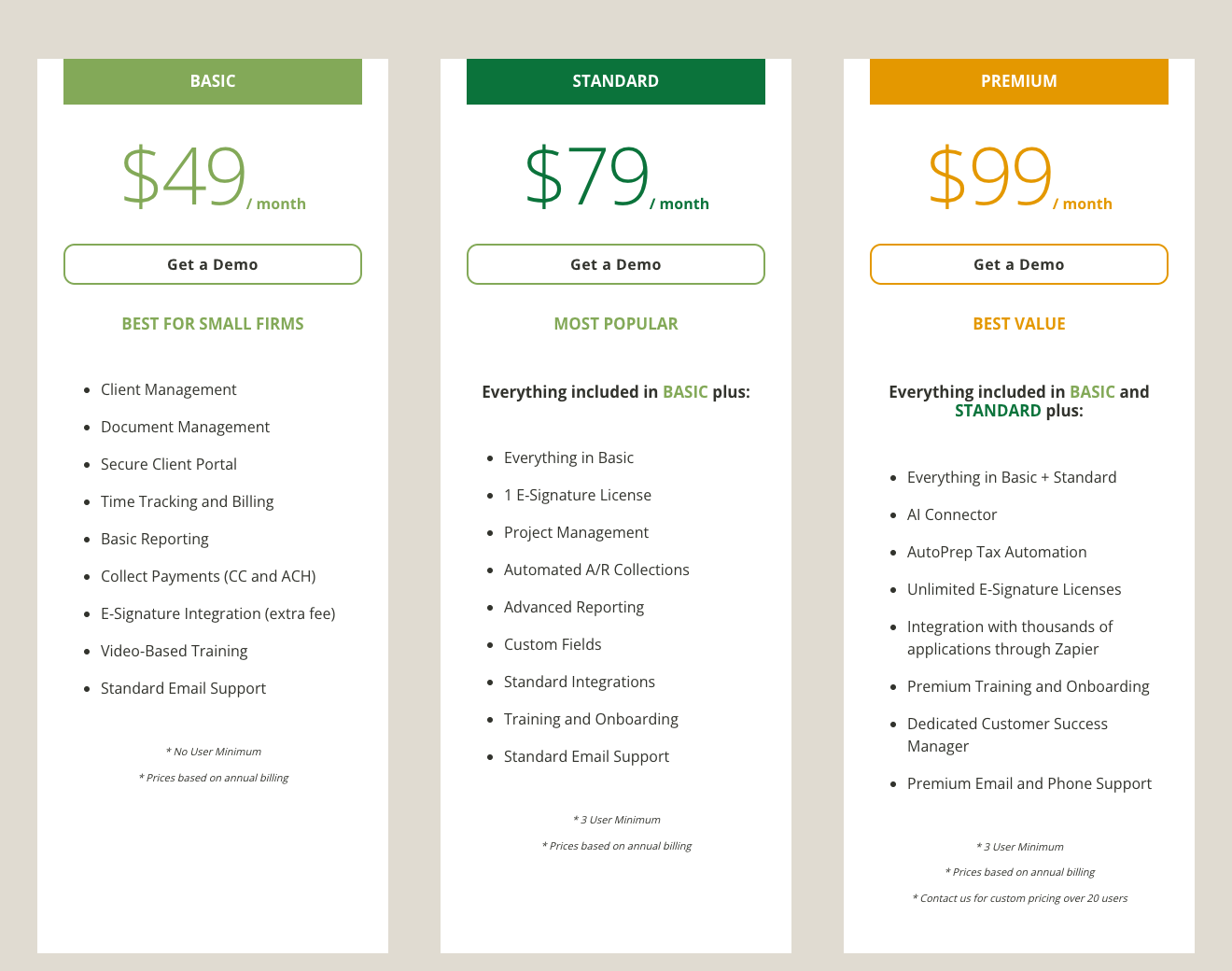
From the Firm360 pricing page, per user per month on annual billing: Basic $49 (no user minimum, e-signature integration at an extra fee, no project management), Standard $79 (three-user minimum; project management, automated A/R collections, advanced reporting), Premium $99 (three-user minimum; AI Connector, unlimited e-signatures, Zapier). Firms above 20 users get a custom quote.
 Source: Firm360
Who should use Firm360?
Choose Firm360 if: you are a US CPA firm of 5 to 100 people that keeps Axcess Tax, wants returns synced into the practice system, and is comfortable with an annual contract and a guided rollout. See also our Firm360 review and Firm360 vs Uku.
5. Canopy: Best Alternative for Tax Resolution Work
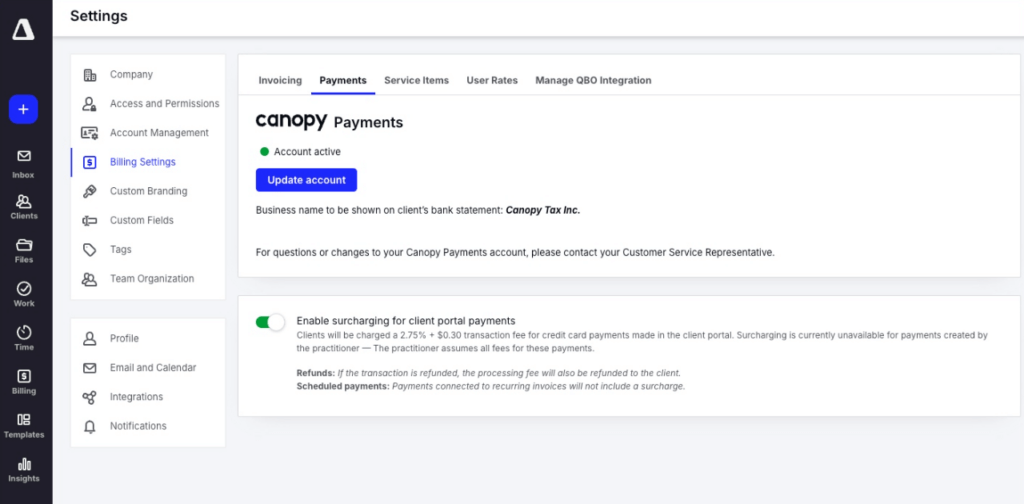
Canopy is cloud practice management for US tax and accounting firms: CRM, documents and e-signature, a client portal, workflow, time and billing, payments, and tools for IRS transcripts and tax resolution.
 Source: Canopy
Its key capabilities include:
- Tax software file saving: “Save files from Wolters Kluwer to Canopy”, plus UltraTax, Lacerte and Drake
- IRS transcripts and tax resolution tools for notice and representation work
- Client portal and secure messaging, with document management and e-signature on every plan
- Automated and recurring task workflows from team and Canopy templates
- Time, billing and Canopy Payments, with a QuickBooks Online integration
Why choose Canopy over CCH Axcess
The first reason is that documents, portal and e-signature are one product. On Axcess, Portal needs the Document module; Canopy has both on its Standard plan and saves files from Wolters Kluwer into the client’s folder.
 Source: Canopy
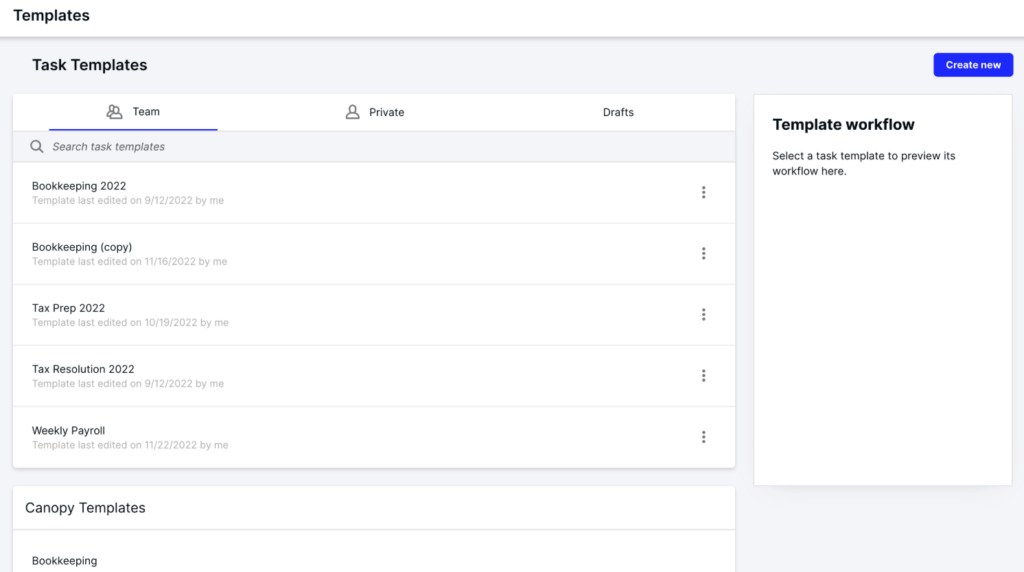
The second is tax resolution. Canopy pulls IRS transcripts and organises notice and representation work, which Axcess Practice and Workstream don’t cover. And because Canopy ships its own template library next to your team’s templates, a firm leaving Workstream can start from a ready tax-prep or bookkeeping workflow and adjust it, rather than rebuilding every project type from a blank page.
 Source: Canopy
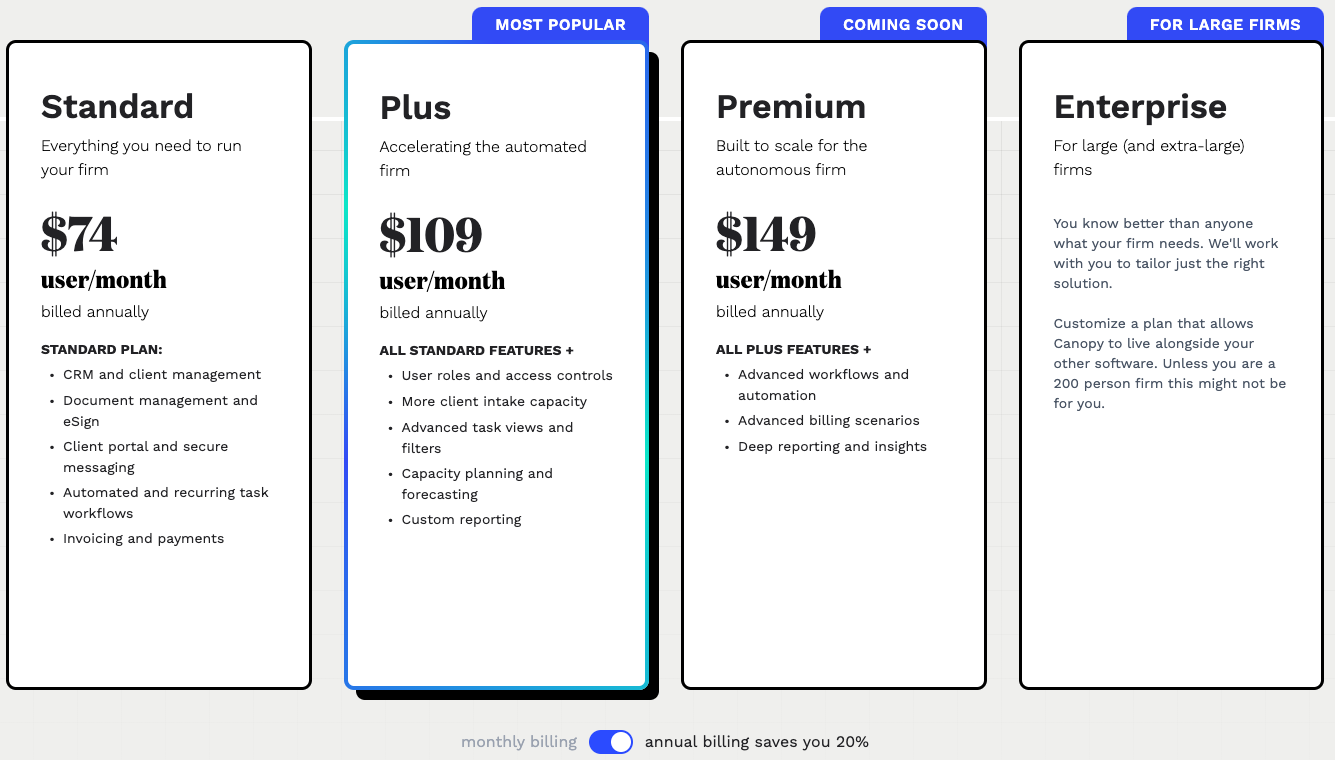
The third is a published price. The trade-offs: Canopy is the most expensive per user here, capacity planning starts on Plus at $109, and its Axcess integration saves files rather than syncing client data.
Canopy pricing
From the Canopy pricing page, per user per month billed annually: Standard $74 (CRM, documents and e-signature, client portal, workflows, invoicing and payments), Plus $109 (most popular; roles and access controls, capacity planning, custom reporting), Premium $149 (marked coming soon), and Enterprise custom. Annual billing saves 20% against monthly.
 Source: Canopy
Who should use Canopy?
Choose Canopy if: you are a US tax firm that does IRS notice or resolution work and is happy to pay more per seat for documents, portal, workflow and billing in one system. See also our Canopy alternatives and Canopy vs Uku.
6. Karbon: Best Alternative for Email-First Teams That Need Capacity Planning
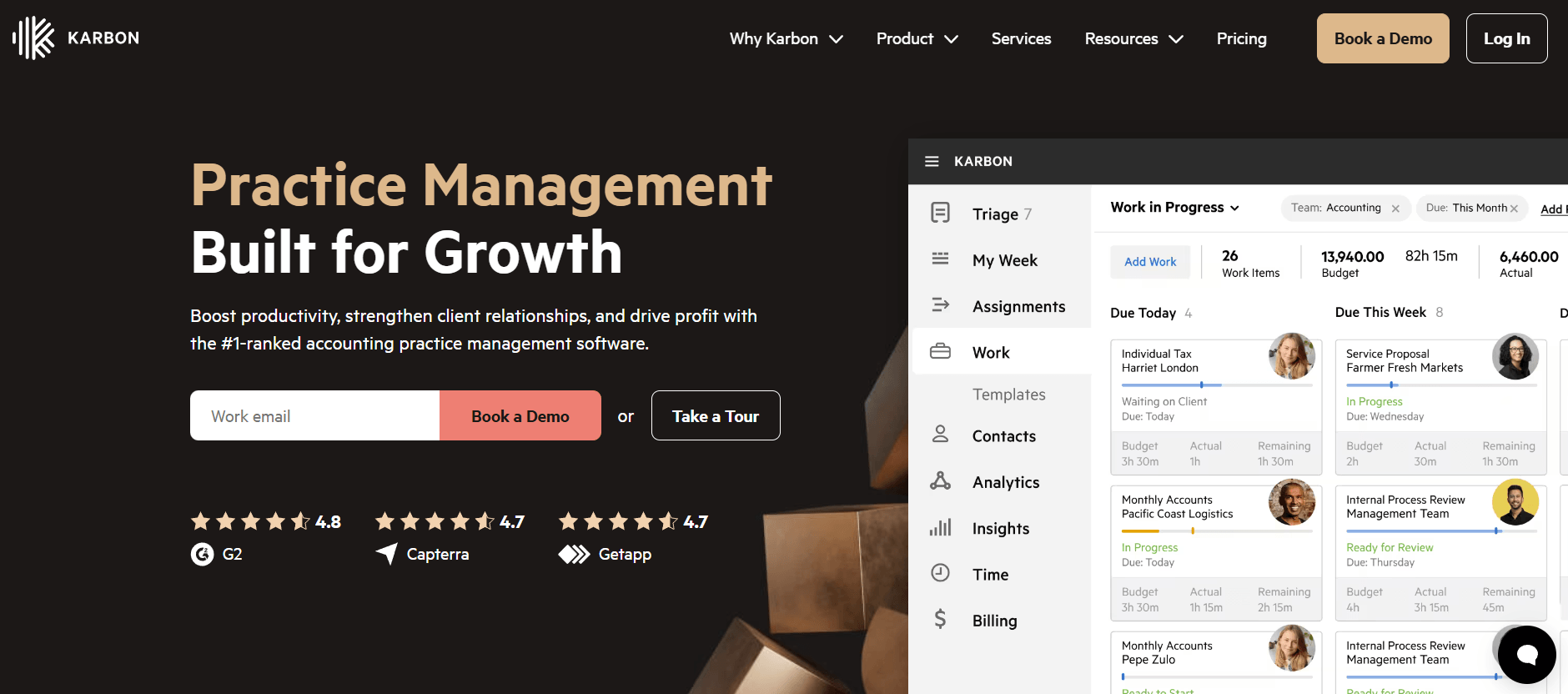
Karbon is practice management for larger, often distributed accounting teams. It says 33,000 accounting professionals in 34 countries use it. Its centre is email: every client conversation becomes shared, assignable work.
 Source: Karbon
Its key capabilities include:
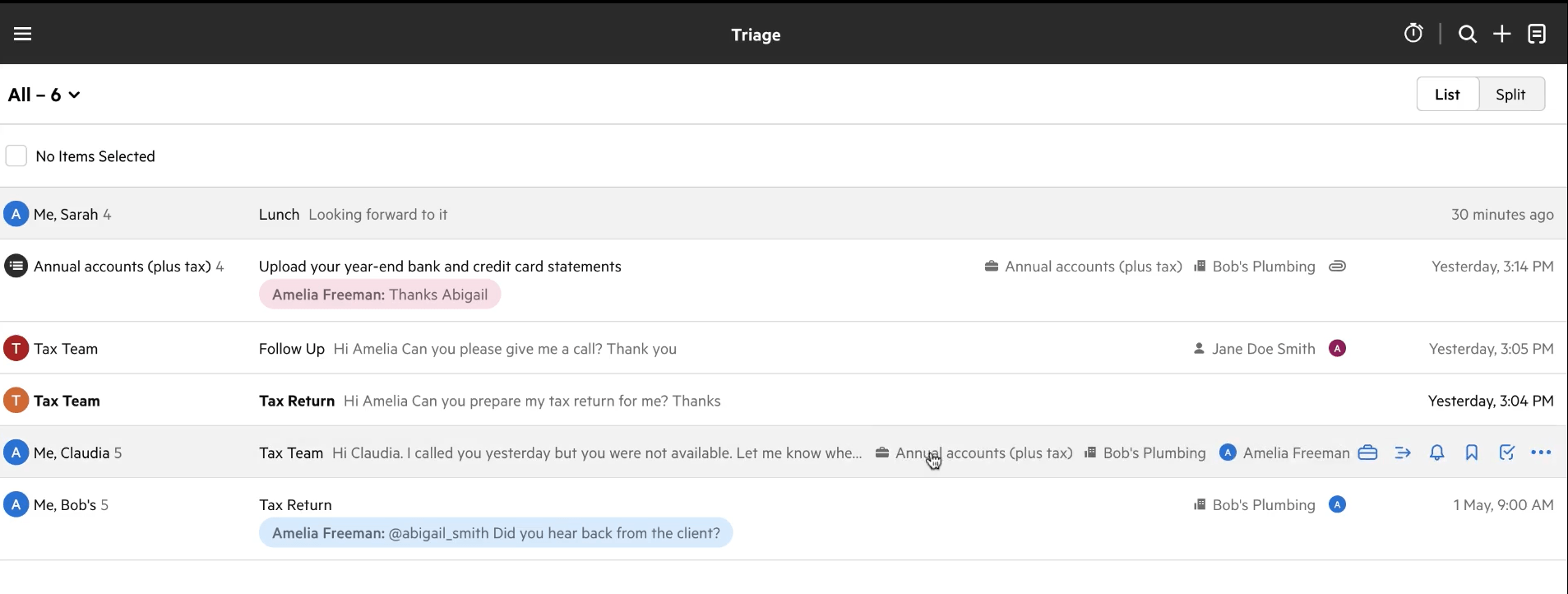
- Triage and Shared Triage: a shared inbox where any email becomes a work item attached to a client and a job
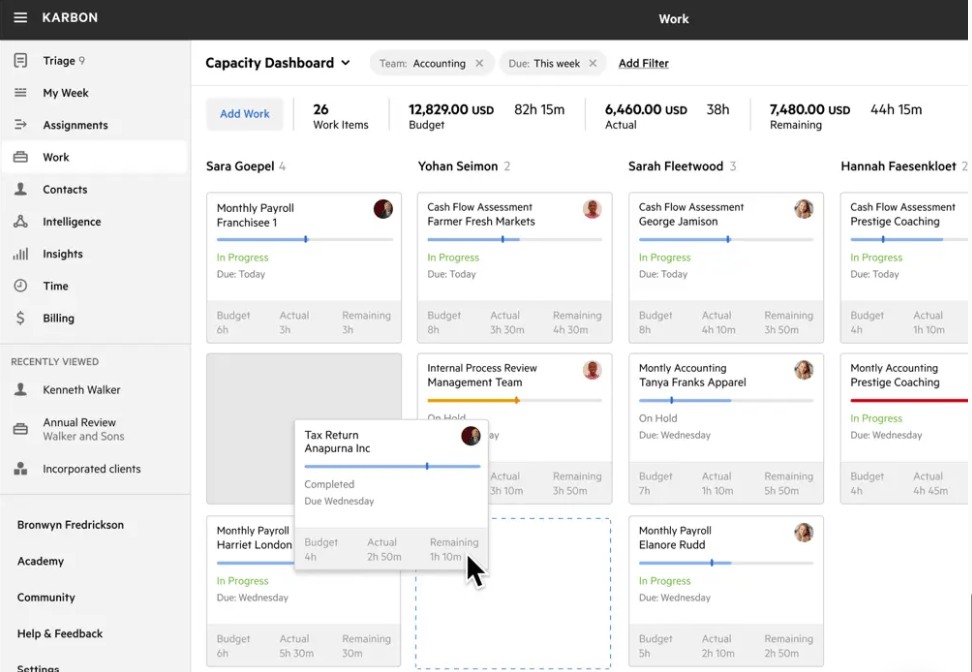
- Capacity planning with each team member’s budgeted hours against their capacity
- Automators and automatic client reminders on Business
- Time tracking and billing for hourly, fixed and recurring fees, with payments
- A documented Axcess export: its help centre explains exporting contacts from CCH Axcess’s Return Manager
Why choose Karbon over CCH Axcess
The first reason is how work arrives. In an Axcess firm, client email lives in Outlook and the work in Workstream. Karbon turns email into work: a shared inbox, internal comments on a thread, and one click from a message to an assigned task with a due date.
 Source: Karbon
The second is capacity. Axcess Workstream’s pages describe project pools for self-assignment but don’t mention capacity planning; Karbon measures budgeted hours against capacity per person per week.
 Source: Karbon
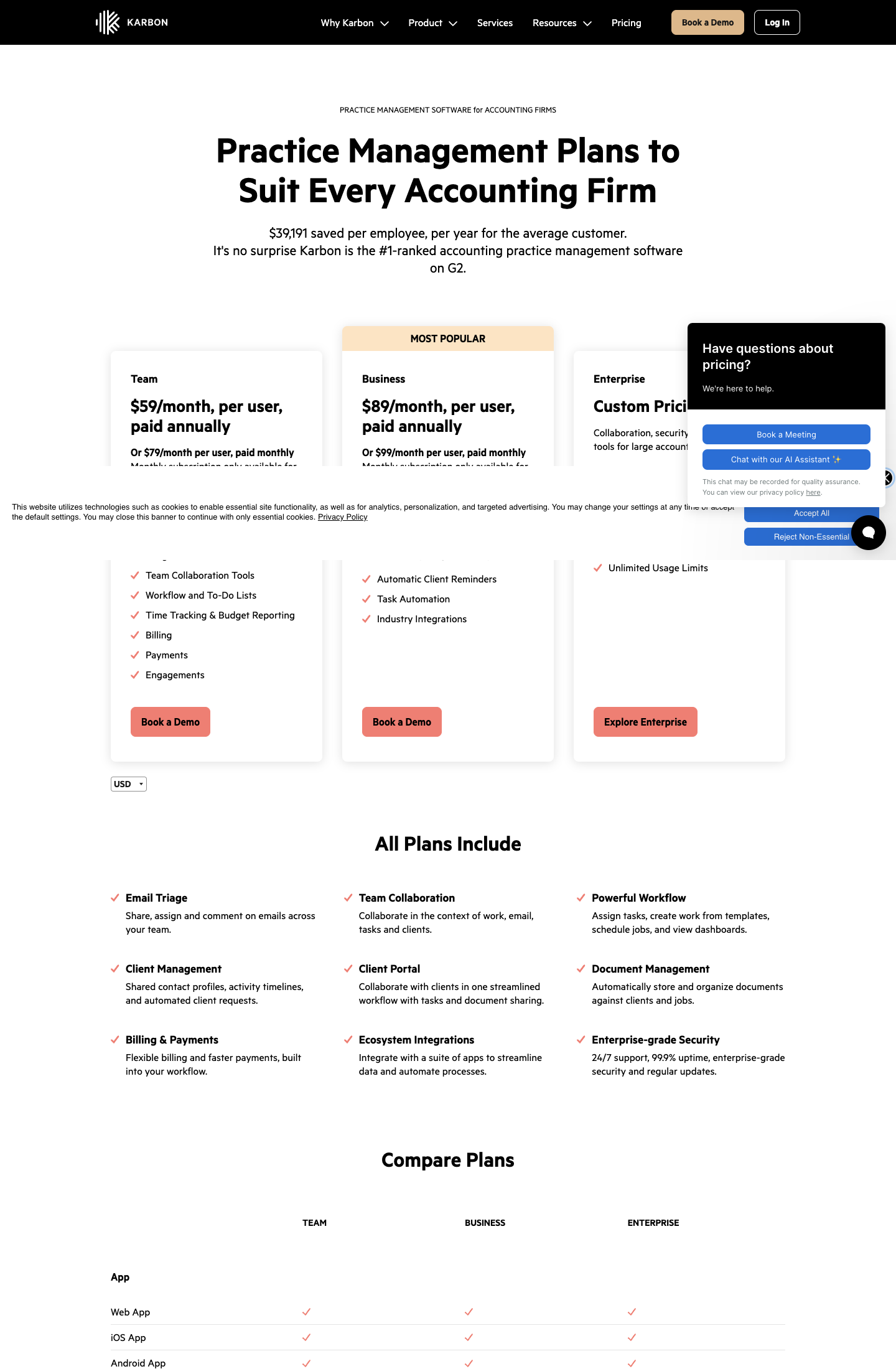
The trade-offs: Karbon’s integrations page lists “CCH Axcess via Karbon” as coming soon, so for now there is no live sync. The automators that make Karbon worth switching to sit on Business at $89 per user, and monthly billing is only for teams of four or more.
Karbon pricing
From the Karbon pricing page: Team $59 per user per month annual ($79 monthly), Business $89 annual ($99 monthly; automatic client reminders, task automators, API), Enterprise custom. Monthly billing is only for teams of four or more.
 Source: Karbon
Who should use Karbon?
Choose Karbon if: you are 20 to 200 people, email-first and often distributed, and you want capacity measured in hours across the whole team. See also our Karbon review and Karbon vs Uku.
How to Switch from CCH Axcess to Uku
If Uku is your answer, most firms are live in two to six weeks, at their own pace, and keep serving clients throughout. Axcess Tax stays where it is; you are moving the practice-management layer.
- Export and import your clients. Export the client list from Axcess (Karbon’s help centre describes it: in Return Manager, set Quick Search to All, select all client IDs and choose Export Grid). Import the sheet into Uku through the import flow, or sync clients from QuickBooks Online.
- Rebuild your Workstream templates as Uku workflow templates. One per service, with the same steps, owners and due-date rules, applied to every client who buys it.
- Set up billing contracts. Recreate each client’s billing arrangement from Axcess Practice (hourly, fixed or progress) as a billing contract. Bill out open WIP in Axcess first, so nothing is billed twice.
- Go live. Run one billing cycle in parallel, compare it with Axcess Practice, then switch off Practice and Workstream. Use the 90 minutes of onboarding that comes with every plan.
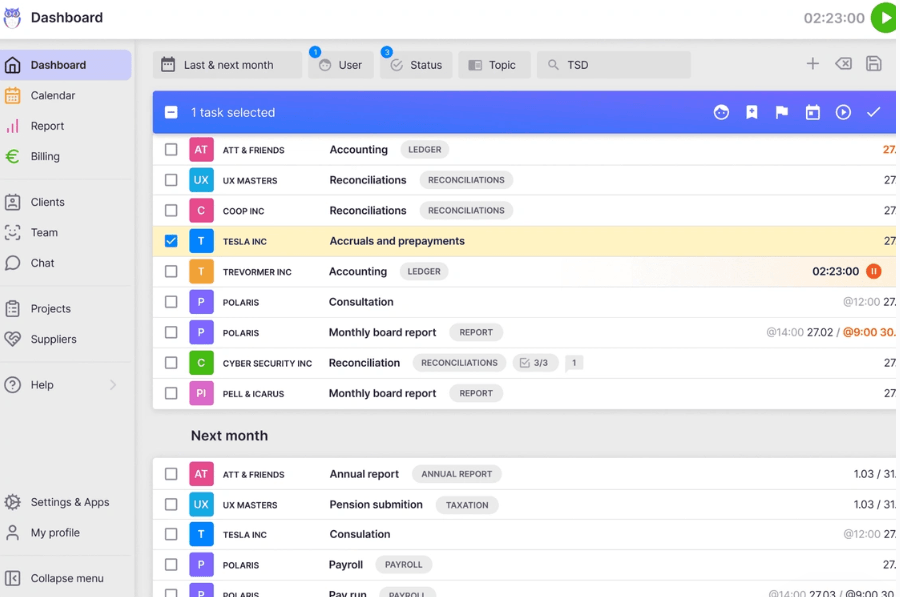
Once the templates are applied, every client’s recurring work appears in the task list on its own, grouped by this month and next.
If your firm uses an AI assistant, the Uku MCP server connects in a day and can check the move for you: which clients came across, which have no workflow yet, and how the first Uku invoice run compares with the last one from Axcess Practice.
The Final Verdict
CCH Axcess is built for scale, and for a Top 100 firm running Tax, Practice, Workstream, Document and Portal on one client database, staying is a reasonable choice. The alternatives answer the reasons smaller and mid-sized firms move the practice-management layer:
- Uku for invoices drafted from tracked time and each client’s agreement, the portal included, and a price on the page
- TaxDome for tax firms that want Axcess returns printed straight into the portal and unlimited e-signatures
- Financial Cents for small firms that want a self-serve trial and Axcess files synced through Google Drive
- Firm360 for US CPA firms that want Axcess documents synced with FileSync
- Canopy for IRS transcripts and tax resolution beside documents and billing
- Karbon for email-first teams of 20+ that need a shared inbox and capacity in hours
If your firm wants workflow, billing and the client portal in one system and to see it working before a sales call, try Uku free for 14 days or book a demo.
Read more
- CCH Axcess review — the modules and what reviewers say
- CCH Axcess pricing — every published price and what is quoted
- CCH Axcess vs Uku — the head-to-head
- Practice CS alternatives — the same question for Thomson Reuters firms
- The best accounting practice management software
Frequently asked questions
What is the best alternative to CCH Axcess?
It depends on which part of CCH Axcess you want to replace. For the practice-management layer (Axcess Practice and Workstream) the main options are Uku for billing drafted from each client's agreement, TaxDome for tax firms that sign heavily and want returns printed straight into the portal, Financial Cents for small firms, Firm360 for US CPA firms that want tax documents synced automatically, Canopy for tax resolution work, and Karbon for email-first teams. Most firms keep CCH Axcess Tax for returns.
Can I keep CCH Axcess Tax and replace Axcess Practice?
Yes. CCH Axcess is sold module by module, so a firm can keep Axcess Tax and move time, billing, workflow and the client portal to another system. You lose the common client database inside the suite, so client details are kept in two places and returns stay in Axcess Tax.
Which practice management tools integrate with CCH Axcess?
As of October 2026: TaxDome syncs documents and lets you print Axcess returns into TaxDome; Financial Cents syncs files through Google Drive; Firm360 syncs documents with its FileSync tool; Canopy saves files from Wolters Kluwer into Canopy; Karbon lists a CCH Axcess client sync as coming soon. Uku has no CCH Axcess integration.
How much does CCH Axcess cost?
Wolters Kluwer's eStore lists CCH Axcess Tax Essentials at $2,814 for 100 returns, $4,039 for 200 and $5,264 for 400 (firms with four or fewer full-time tax professionals, new customers only), and CCH Axcess Client Collaboration from $3,092 for 75 licences. The practice-management modules, Axcess Practice and Workstream, plus Document and Portal, are priced by quote, and there is no free trial.
Is CCH Axcess good for small firms?
Wolters Kluwer sells Tax Essentials packages for firms with four or fewer full-time tax professionals, from $2,814 for 100 returns, and special packages for up to 15 user licences, but the product is built for scale: it says 94 of Accounting Today's Top 100 firms use it. One reviewer on TrustRadius described it as 'scalable to the nth degree', and others say support and implementation are hard for small teams.
How do I export clients from CCH Axcess?
Several vendors document it. Karbon's help centre says: open Return Manager, set the Quick Search criteria to All, select all client IDs and choose Export Grid. TaxDome's guide describes exporting a client list to CSV from the Dashboard's Application Links. The exported file can be imported into most practice-management systems, including Uku.
How long does it take to switch from CCH Axcess Practice to Uku?
Most firms are live on Uku in two to six weeks, at their own pace, while still serving clients. You export the client list, import it into Uku, rebuild recurring work as workflow templates, set up billing contracts and run one billing cycle in parallel before switching off.

Published Oct 1, 2026 · Updated Oct 2, 2026