7 Best Client Hub Alternatives for Accounting Firms (2026)
Compare 7 Client Hub alternatives for accounting firms — from Uku's automated billing to Karbon's email workflows and Canopy's free CRM tier.


Contents
- Client Hub Alternatives at a Glance
- What Is Client Hub?
- How We Curated Our List of Client Hub Alternatives
- 1. Uku: Best Alternative for Automated Billing and International Practice Management
- 2. Karbon: Best Alternative for Large Firms That Need Email-Native Workflow Management
- 3. TaxDome: Best Alternative for Native Billing, E-Signatures, and Payment Collection
- 4. Financial Cents: Best Alternative for Small US Bookkeeping Firms on a Budget
- 5. Liscio: Best Alternative for Tax Firms That Need Document Intelligence
- 6. Canopy: Best Alternative for Full-Service Accounting and Tax Firms
- 7. Double: Best Alternative for AI-Powered Month-End Close at Per-Client Pricing
- The Final Verdict
- How to Switch from Client Hub to Uku
- Client Hub Alternatives FAQ
Client Hub has earned its reputation as a practice management and client portal platform for accounting and bookkeeping firms. It combines client communication, workflow tracking, and QuickBooks Online integration into a single workspace, making it a popular choice for firms that want to replace scattered email threads with a structured, client-facing hub.
But as your practice grows, you may find that Client Hub’s strengths in client communication and bookkeeping workflows don’t cover every operational need. It has no native billing or invoicing, so you still need a separate tool to get paid. Its US-centric design offers no multilingual support for international firms. And its workflow layer, while clean and intuitive, may lack the depth that complex, multi-service engagements require.
That’s where this guide comes in. We’ll explore Client Hub alternatives that fill these gaps, whether you’re looking to:
- Automate billing directly from tracked time, with modular deployment that lets you start on day one
- Manage complex, multi-service workflows with email-native team collaboration
- Consolidate billing, e-signatures, and payment collection in a single subscription
- Run a lean bookkeeping practice at the lowest possible monthly cost
- Automate document classification and tax-season client communication
- Start with a free client management tier and scale into full practice management
- Accelerate month-end close with AI-powered bookkeeping automation
This isn’t about finding a “better” platform. It’s about finding the right fit for your needs. Some firms might use these tools alongside Client Hub for added capability in a particular area, while others might replace it entirely. Let’s look at the alternatives and see which ones align with your practice goals.
Client Hub Alternatives at a Glance
| The Best Client Hub Alternatives | ||
|---|---|---|
 | Starts at: $19/mo (Solo) G2 Score: 4.7 Capterra Score: 4.8 | Best Alternative for Automated Billing and International Practice Management We chose Uku because it fills Client Hub’s biggest gap: native billing and invoicing that converts tracked time directly into client-ready invoices. With support for 12 languages and European accounting integrations, it’s the strongest option for international accounting firms. |
 | Starts at: $59/user/mo G2 Score: 4.8 Capterra Score: 4.7 | Best Alternative for Large Firms That Need Email-Native Workflow Management We chose Karbon because its Triage inbox turns every team email into an assignable work item, giving multi-service firms shared visibility across client communication that Client Hub’s email sync cannot match. |
 | Starts at: $800/seat/year G2 Score: 4.7 Capterra Score: 4.7 | Best Alternative for Native Billing, E-Signatures, and Payment Collection We chose TaxDome because it consolidates invoicing, payment processing, e-signatures, and pipeline-based workflow automation into a single annual subscription with no per-client fees. |
 | Starts at: $19/mo (Solo) G2 Score: 4.7 Capterra Score: 4.8 | Best Alternative for Small US Bookkeeping Firms on a Budget We chose Financial Cents because its Solo plan at $19/month is less than half the cost of Client Hub’s entry tier, while still including workflow management, a client portal, billing, and QuickBooks Online integration. |
 | Starts at: $19/user/mo G2 Score: 4.6 Capterra Score: 4.7 | Best Alternative for Tax Firms That Need Document Intelligence We chose Liscio because its AI-powered File Intelligence reads, classifies, and renames incoming documents automatically, covering a client communication layer that Client Hub’s file manager does not. |
 | Starts at: Free CRM · $74/user/mo G2 Score: 4.6 Capterra Score: 4.5 | Best Alternative for Full-Service Accounting and Tax Firms We chose Canopy because it offers a permanently free CRM module for up to 500 contacts, a dedicated Tax Resolution module, and AI tools that span the full practice lifecycle. |
 | Starts at: $10/client/mo G2 Score: 4.9 Capterra Score: 4.8 | Best Alternative for AI-Powered Month-End Close at Per-Client Pricing We chose Double because its per-client pricing keeps costs predictable as teams grow, while its AI Bank Feeds and AI Journal Entries automate the month-end close at a depth Client Hub’s Magic Suite does not reach. |
What Is Client Hub?
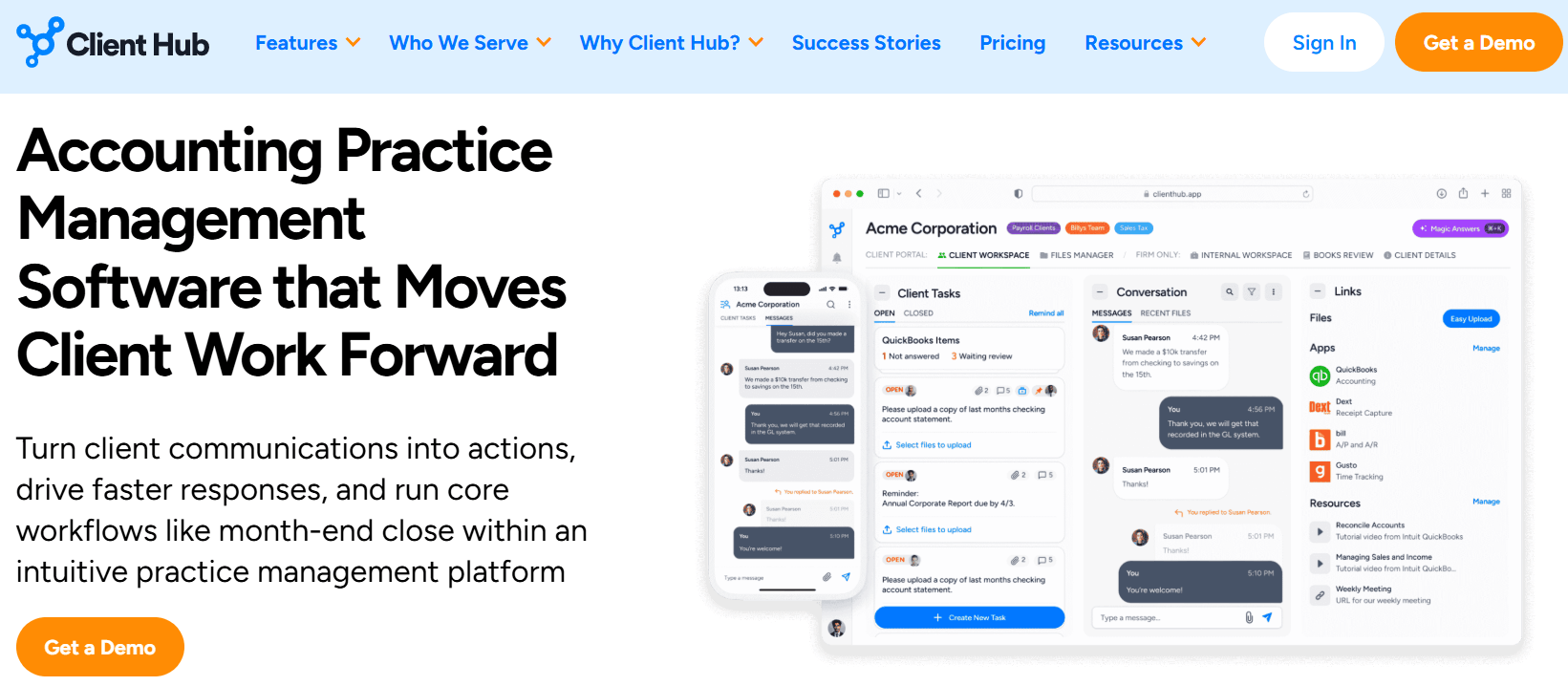
Client Hub is an accounting practice management and client portal platform built for firms that offer small business bookkeeping, CAS, and outsourced controller services. It combines client communication, workflow tracking, document management, time tracking, and AI-assisted bookkeeping workflows into a single system, with QuickBooks Online and Xero integration at its core.
Its key features include:
- A branded client portal with secure messaging, mobile app, and five structured client task types
- Workflow management with job templates, recurring jobs, and a Kanban dashboard
- An AI “Magic Suite” covering email drafting, workflow generation, month-end close diagnostics, and financial report summaries
- Two-way QuickBooks Online sync for resolving uncategorized transactions, with Books Review AI analysis
- Gmail and Microsoft 365 email sync with automatic workspace linking
- Time tracking tied to jobs with per-staff budget hours
- eSignature via native SignWell integration
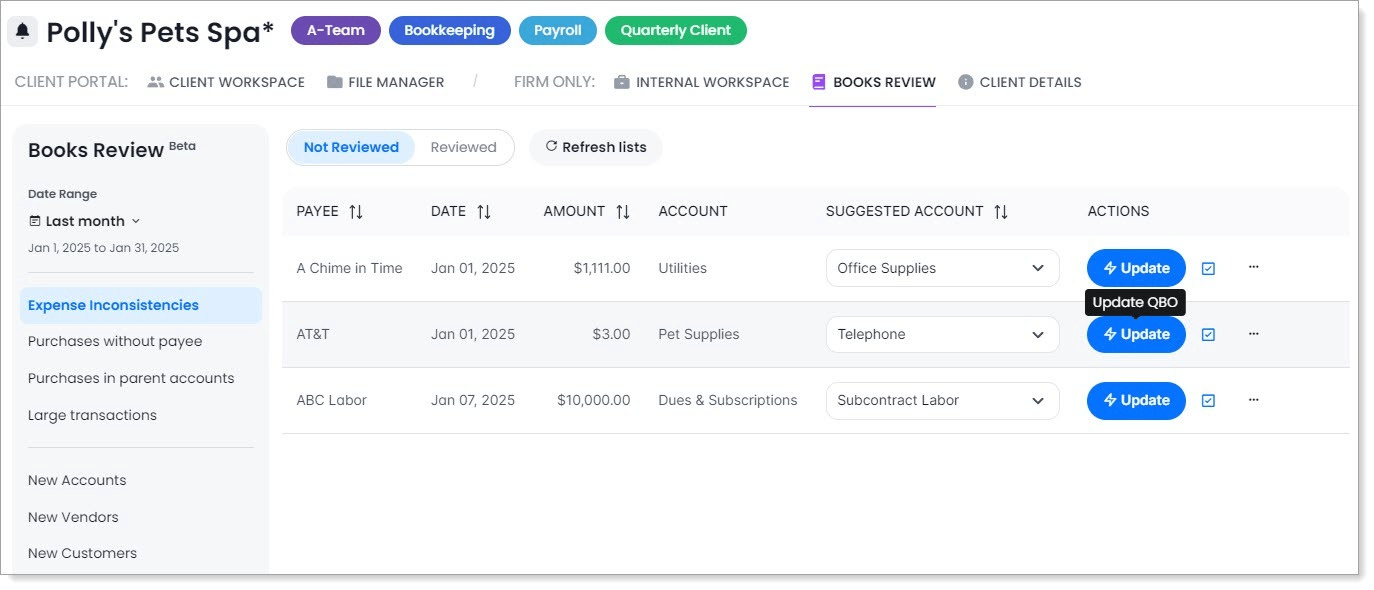
Client Hub’s strength is its client-facing experience: the portal is the core of the product, not an afterthought, and the QBO integration turns uncategorized transaction resolution into a structured, trackable workflow. For bookkeeping-led firms that need to replace email as their primary client communication channel, it delivers real value.
However, Client Hub does not include native invoicing or billing, so firms must use a separate tool like Anchor to close the billing loop. Its Xero integration is narrower than its QuickBooks coverage. And its US-centric design offers no multilingual support for international practices. These are the gaps the alternatives on this list fill.
Looking for practice management with built-in billing that converts tracked time directly into invoices? Uku handles everything from task management to automated invoicing in 12 languages. Try free for 14 days and see the difference.
How We Curated Our List of Client Hub Alternatives
After testing Client Hub and researching the accounting practice management market, we focused on tools that address specific operational gaps. Client Hub centralizes client communication and streamlines bookkeeping workflows well, but some practices need more capability for:
- Converting tracked time and work volume into invoices automatically, without a separate billing tool
- Running complex, multi-service engagements with conditional workflow logic and team-wide email visibility
- Handling the full billing-to-payment cycle (invoicing, e-signatures, payment collection) in one subscription
- Getting started with practice management at the lowest possible monthly cost
- Automating document classification and tax-season client communication
- Accessing a free, permanent entry point for client management before committing to a paid plan
- Accelerating month-end close with AI that operates directly inside the accounting ledger
Each tool on this list leads in one of these areas. You might use them alongside Client Hub or switch entirely; it depends on where your practice needs the most depth.
1. Uku: Best Alternative for Automated Billing and International Practice Management
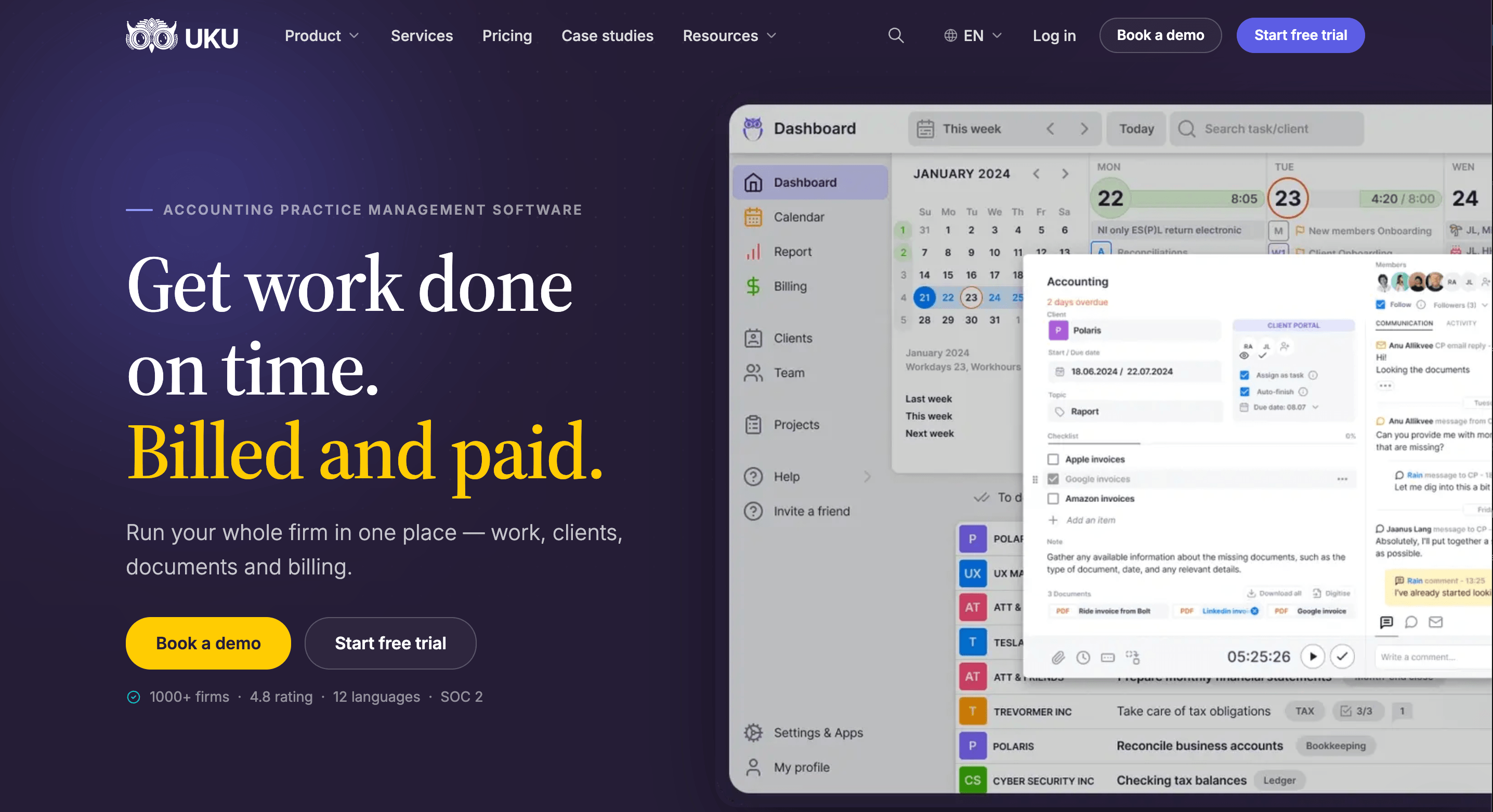
Uku is accounting practice management software built for accounting firms, CPAs, and bookkeepers. Designed for international, multi-language markets, it covers the full practice lifecycle — from client management and task management through time tracking, workflow automation, and automated billing — in a single platform available in 12 languages.
Serving 1,000+ firms across 25+ countries, Uku is modular: firms start with just CRM and tasks, then activate billing, portal, workflows, and reporting as they grow. Key features include:
- Automated billing and invoicing: Six product types (hourly, fixed, per-piece, member billable rate, combined, task-triggered) and four pricing models per contract (time, fixed, volume, mixed), with auto-generated invoice drafts from tracked time and configurable rounding rules
- Time tracking: Stopwatch, manual entry, and bulk allocation, with 90% of actions requiring one click; Elite adds mandatory time logging before task completion
- Workflow automation: Accounting-specific templates with propagation to existing client plans, plus email automations embedded in task stages
- Integrated client portal: Clients and accountants work on the same task, with communication, documents, and time tracking in one place. Passwordless magic-link access with company branding and automated reminders
- Reporting and analytics: Real-time filterable reports with saved views; Elite adds a role-based BI Analytics layer for profitability, utilization, and budgets
- Multilingual support: Full UI in 12 languages with integrations for European accounting software (E-conomic, Tripletex, Fortnox) and business registries (Companies House, Danish Business Authority)
Uku reduces invoice preparation from days to roughly 30 minutes, and customers report discovering approximately 20% more billable revenue by surfacing work that previously went unbilled.
“Creating invoices now takes 15 minutes instead of 1-2 days.”
Why Choose Uku Over Client Hub for Billing Automation and International Practice Management
Client Hub does client communication and QBO-linked bookkeeping workflows well. Uku adds a complete operational backbone where every tracked hour flows directly into an invoice, and its modular design lets firms implement step by step rather than all at once. Here’s where Uku steps up.
Automated Billing and Invoicing: From Tracked Time to Paid Invoice
Client Hub’s biggest gap is that it has no native invoicing or billing, so firms must bolt on a separate tool (Anchor, QuickBooks invoicing, or another service) to get paid. Uku eliminates that dependency.
Uku’s billing module auto-generates invoice drafts from the time and task data already in the platform. Each client gets one or more contracts built from Uku’s six product types, with a choice of four pricing models (time, fixed, volume with price-range tiers, or mixed), a billing frequency, and rules such as minimum-time and rounding (configurable in 5-, 15-, 30-, or 60-minute increments).
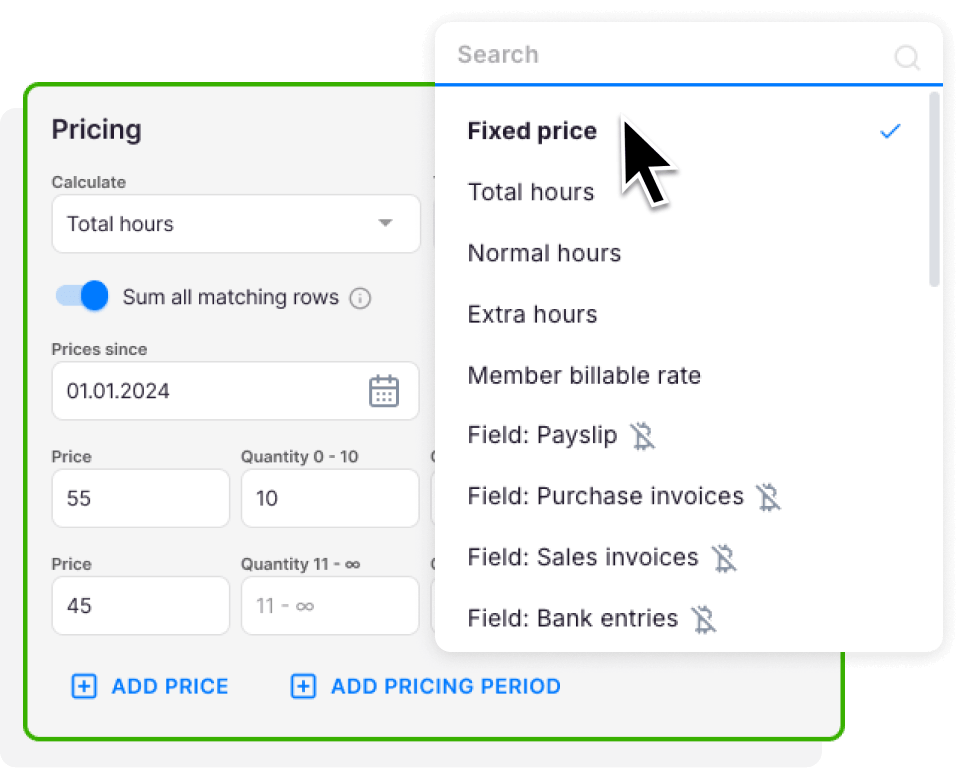
A one-minute unplanned client call can bill automatically as 15 minutes. At billing time, the account owner reviews and approves the draft, then sends or exports to QuickBooks, Xero, E-conomic, or other connected software.
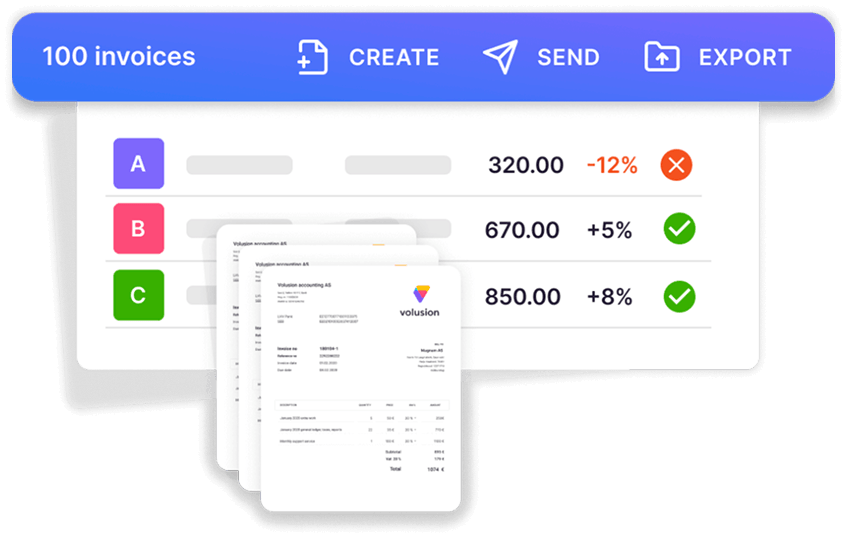
Because billing tracks both sales and cost prices, managers can see whether an employee billing at €45/hour but costing €30/hour is profitable, and real-time alerts surface losses before month-end rather than 30 days too late.
Client Agreement Monitoring compares agreed volumes against actual work with color-coded status across all clients, and on Solo and Elite, Client Budgeting sets ceilings by contract, project, or topic with alerts before the budget runs out.
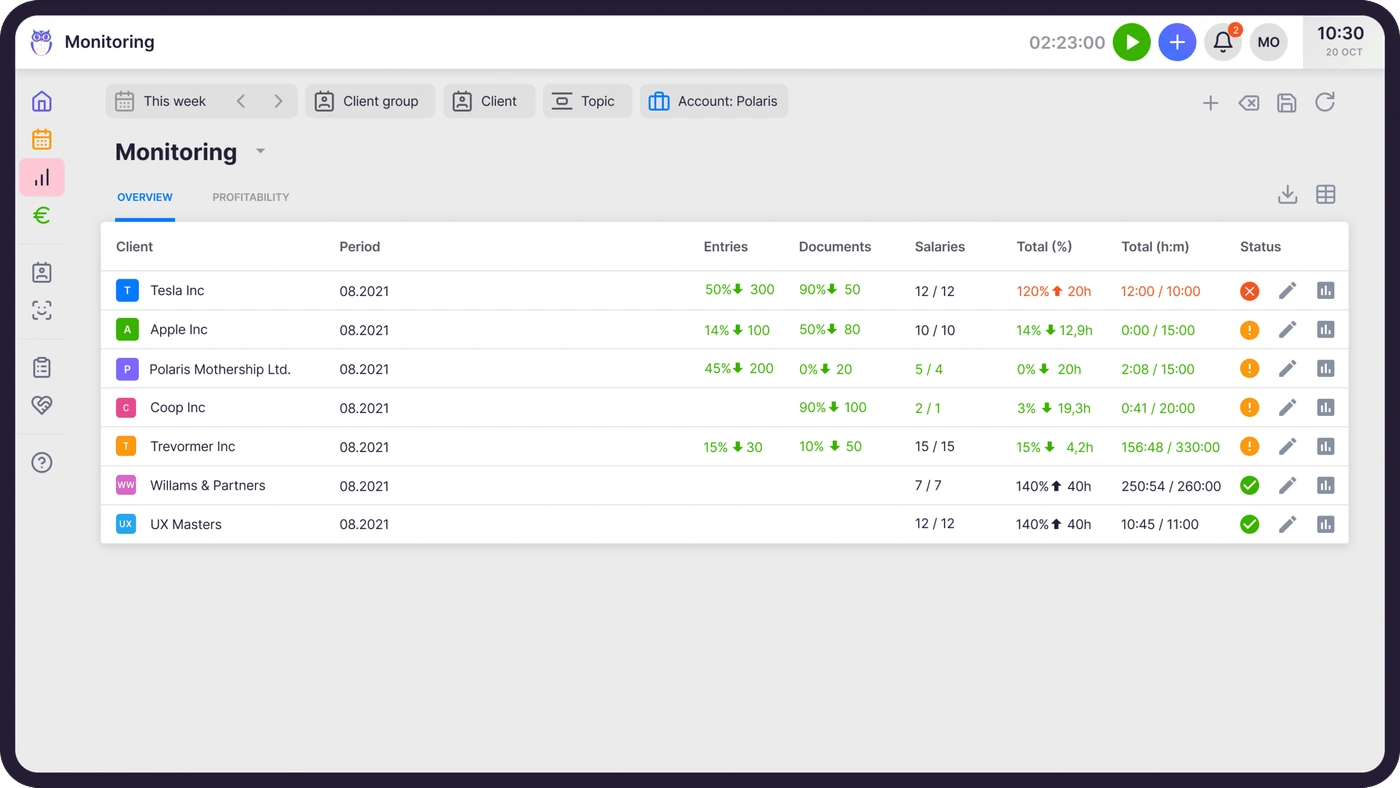
The Extra Work tag flags out-of-scope hours so they surface for additional invoicing instead of being absorbed into a fixed fee.

Time Tracking That Captures Every Billable Minute
Uku’s time tracking feeds directly into invoicing with no export or re-entry. Three input methods cover different work styles: a stopwatch that pauses when you switch tasks, manual entry with Smart time entry that pre-fills the start time from your last session, and bulk allocation across multiple tasks.
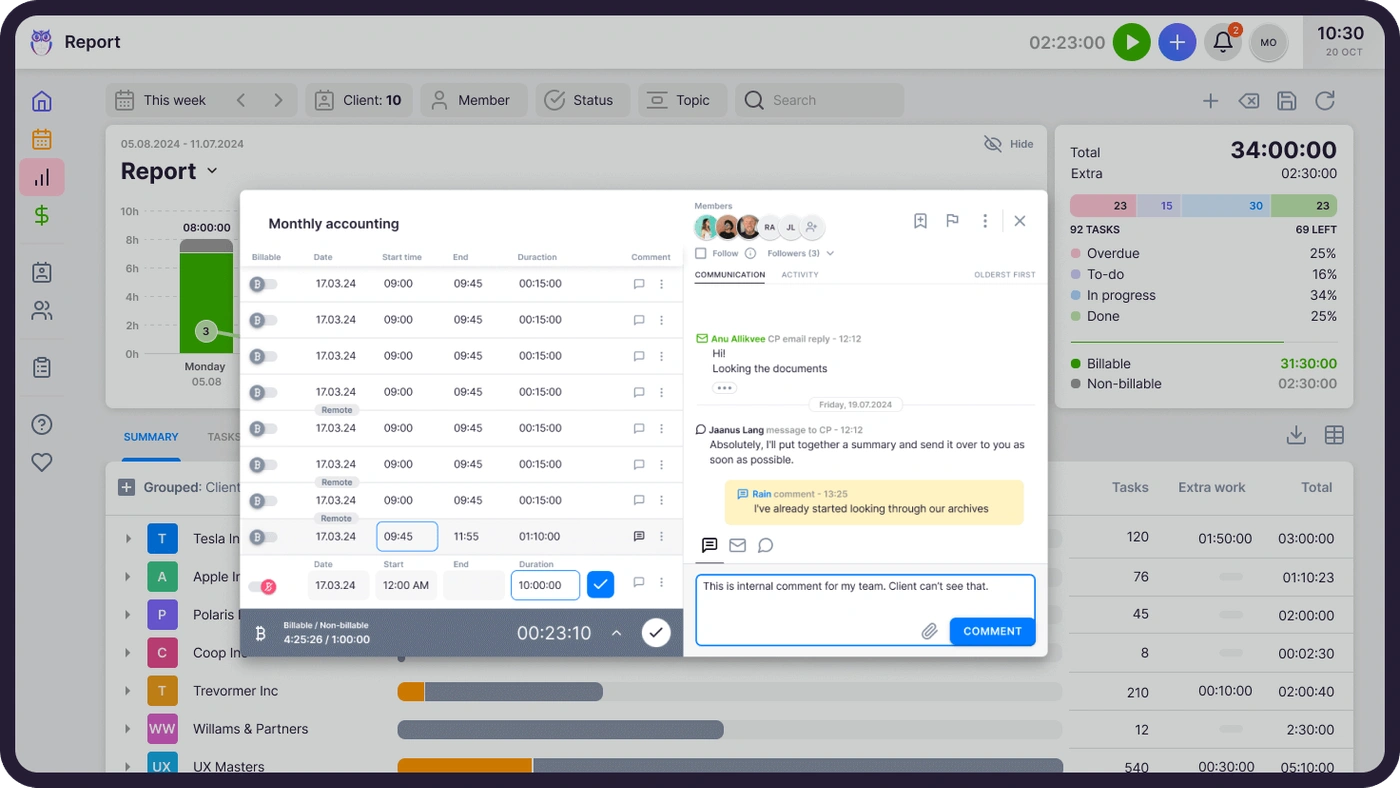
On Elite, mandatory time entries prevent staff from closing a task without logging time, closing the most common source of missing billable hours. Template time estimates also convert to logged time automatically when a task is marked done, as a fallback for forgotten timers.
Workflow Automation: Accounting Templates That Scale With Your Practice
Uku ships with pre-built accounting templates across seven categories (Accounting, Administration, Bookkeeping, Client Management, Operations, Payroll, Tax), built by accountants for real accounting cycles.
Its standout is template propagation: improve a template once and push the change to existing client plans, controlling which clients, which fields, and which effective date. Email automations are embedded in the templates too, firing a client email when a task hits a given stage, with color-coded indicators showing success (green), failure (red), or not-yet-triggered (grey).
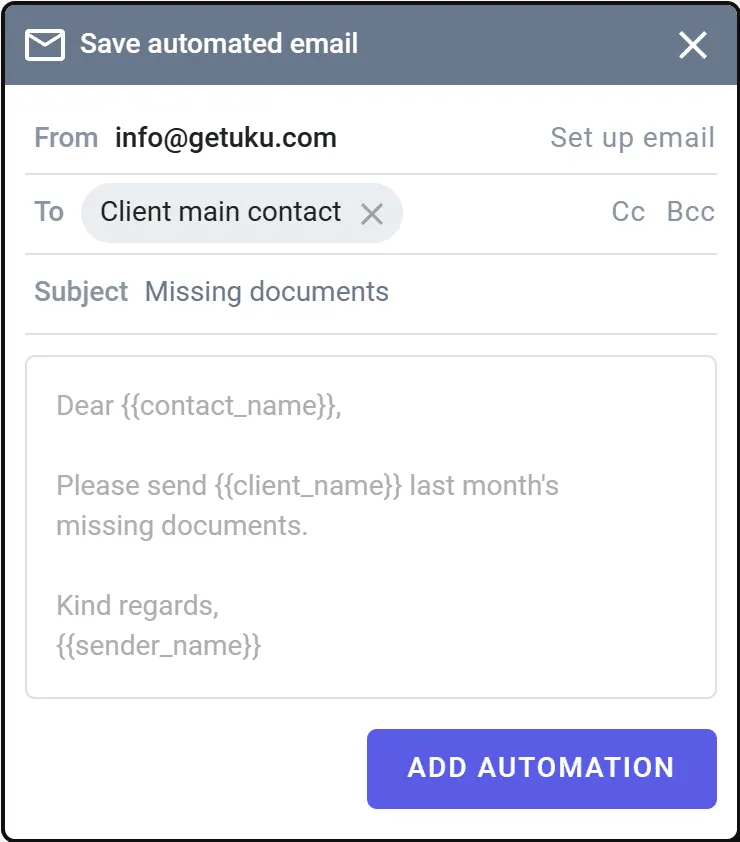
For firms leaving spreadsheets behind, Uku imports an existing Excel file into ready-to-run automated plans without heavy upfront configuration.

Multilingual Client Portal for International Practices
Uku’s client portal uses magic-link access (valid seven days, re-sendable), so clients never create an account or password. A link takes them straight to their outstanding tasks, secured by TLS 1.3 and SOC 2 Type I.
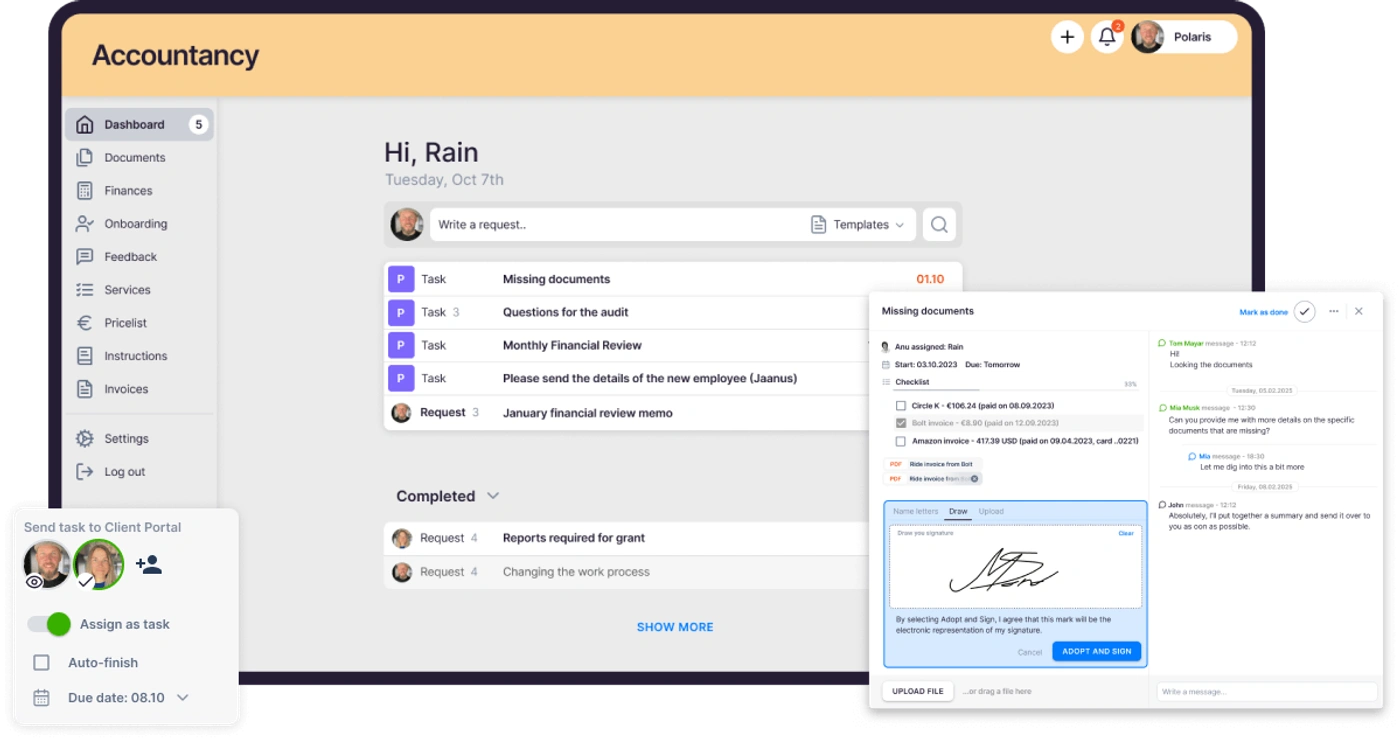
Firms can brand the portal and build per-client menus, onboarding forms, and shared reports, and every client action lands directly on the accountant’s dashboard.
The localization runs deep: the UI is available in 12 languages, and email templates auto-select each client’s language, so a Danish office works in Danish and a German team in German without manual switching.
Uku also integrates with European tools other platforms here don’t support, including E-conomic, Tripletex, Fortnox, Companies House (UK), and the Danish Business Authority, alongside FreeAgent, Merit Aktiva, SmartAccounts, Scoro, and Directo. All accounting integrations are included on every plan; cloud storage sync (Google Drive, OneDrive, SharePoint, Dropbox) is Elite and above.

Uku Pricing
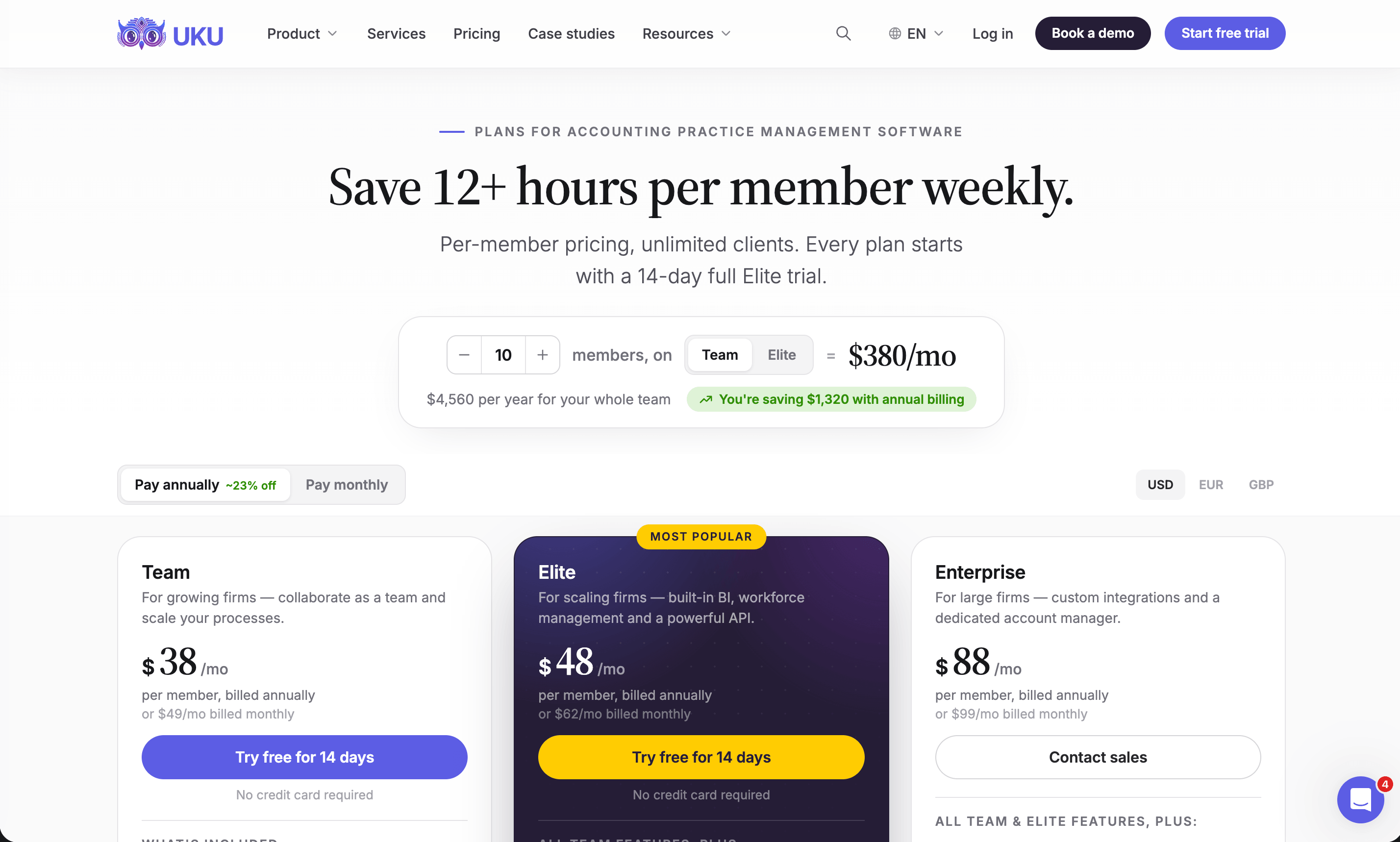
Uku uses a per-seat model with annual or monthly billing, priced in €, $, and £ (VAT added). Every account starts with a 14-day free trial of the full Elite plan (no credit card, first 90 minutes of onboarding free); there is no permanently free tier.
- Solo ($19/member/mo annual, $25/mo monthly): Full-featured single-user plan (1 user, up to 20 active clients). Includes CRM, time tracking, billing, workflow automations, all accounting integrations, client portal, agreements monitoring, email management, AML tools, document management, Client Budgeting, e-signatures, and full audit log. Note: downgrading from Team or Elite back to Solo isn’t supported.
- Team (from $38/member/mo annual, $49/mo monthly): Everything in Solo, plus unlimited members and clients, shared clients and tasks, projects, access management, and user roles. Two caveats: Client Budgeting isn’t included on Team, and audit log retention drops to 1 day.
- Elite ($48/member/mo annual, $62/mo monthly, “Most Popular”): Everything in Team, plus BI Analytics, Workforce Management, Client Budgeting, full audit log with deleted-task restore, Public API, Zapier, cloud storage integrations, portal custom menu, mandatory time entries, and Flextime reporting. Uku MCP for Claude and ChatGPT. Roadmap: Email Triage, Capacity Planning, Proposals.
- Enterprise ($88/member/mo annual, $99/mo monthly): Everything in Elite, plus custom integrations, a dedicated account manager, assisted client import, a team workshop, pay-by-invoice, and early feature access.
See full plan details on the Uku pricing page.
Who Should Use Uku?
Choose Uku if:
- You need native billing that converts tracked time directly into invoices, cutting invoice prep from days to ~30 minutes.
- You run an international or European practice and need 12-language support plus regional accounting and registry integrations.
- You want to minimize admin time with one-click actions and a fast time-tracking UX.
- You value modular, low-risk adoption, starting with the modules you need and scaling up.
- You’re leaving Excel behind and want the easiest migration path.
- You prefer monthly pricing over annual lock-in.
Uku is backed by SOC 2 Type I compliance and strong support (G2 Quality of Support 9.7 vs. 8.6 category average). Want to see it against your own workflows? Book a demo and we’ll walk through your billing setup live.
Ready to turn tracked time into paid invoices without juggling a separate billing tool? Try Uku free for 14 days.
2. Karbon: Best Alternative for Large Firms That Need Email-Native Workflow Management
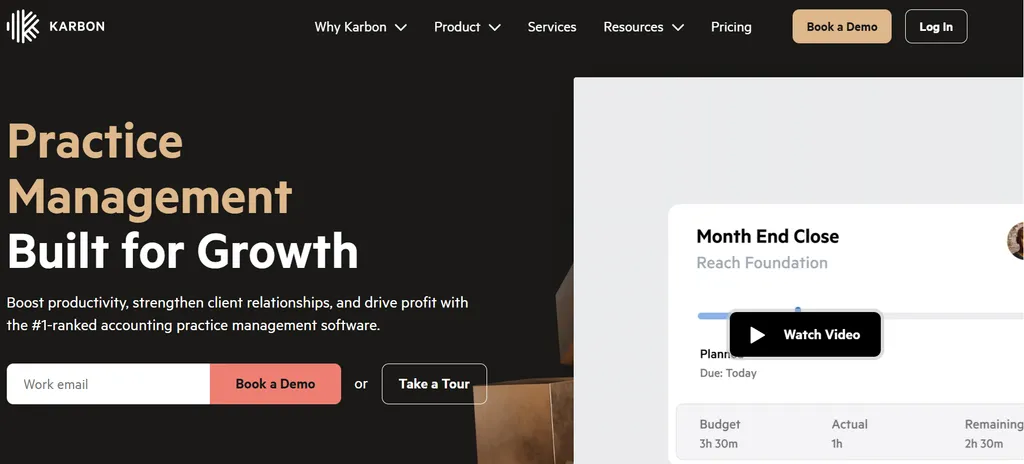
Karbon is an accounting practice management platform that centralizes team email, client workflow, and AI-assisted collaboration in a single system. With a 4.8/5 rating on G2 across 788+ reviews and the G2 Leader position in Accounting Practice Management for 17 consecutive quarters, Karbon is built for mid-size to enterprise accounting firms running diverse service lines simultaneously. Its key capabilities include:
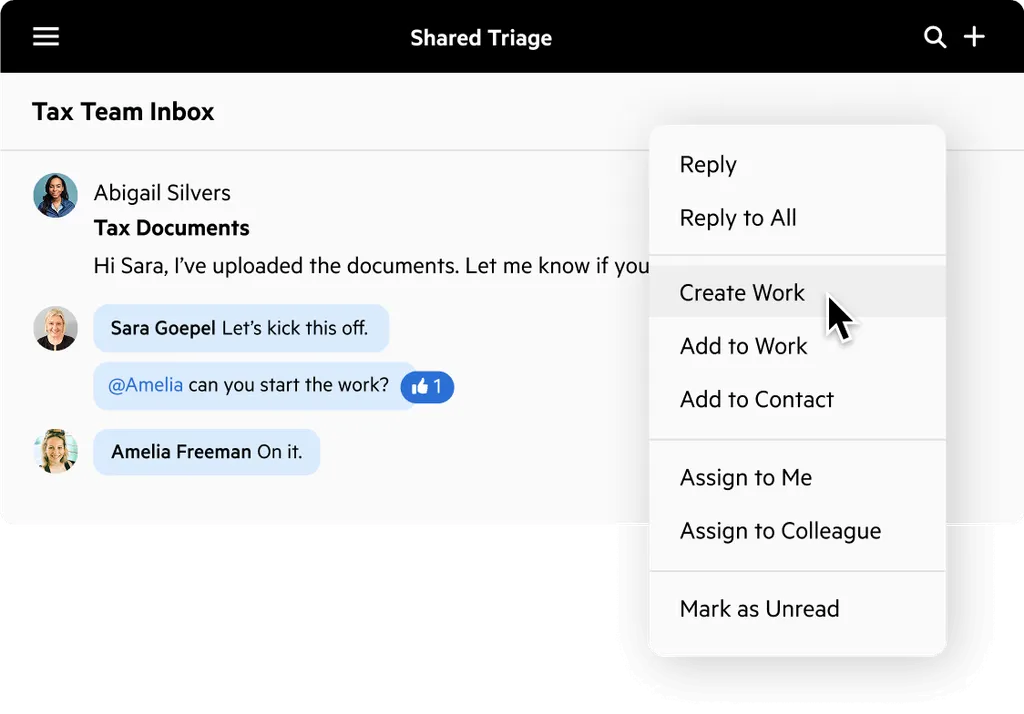
- A unified Triage inbox that converts all incoming team emails into assignable work items
- Multi-level work items with nested tasks, conditional automations, and branching workflow logic
- Karbon AI for email summarization, response drafting, and smart work assignment
- Activity timelines maintaining a shared audit trail of every email, internal note, and task per client
Why Choose Karbon Over Client Hub for Enterprise Workflow Management
Karbon stands out in the following areas:
- Email Integration Built Into the Workflow Layer. Client Hub syncs Gmail and Microsoft 365 inboxes and lets accountants convert emails into trackable tasks. In Karbon, email doesn’t just link to workflow; it is the workflow. Every connected inbox feeds into Karbon’s Triage inbox, where every incoming email is immediately actionable: assign it to a team member, convert it into a work item, or attach it to an existing client record. Every email any team member sends or receives becomes part of that client’s shared audit trail. Karbon also offers Shared Triage for dedicated shared inboxes with unlimited collaborators and @mention functionality.
- Multi-Level Work Items with Conditional Logic. Client Hub’s job structure supports task checklists with recurring schedules. Karbon’s work items go further with nested tasks and sub-tasks, multiple assignees, and Automators that introduce conditional branching: a tax engagement can branch into a standard path or an amended return path based on a single status change, without manual intervention.
- AI Across the Firm. Karbon AI provides one-click email thread summarization, AI-drafted client responses, Smart Assignments based on prior engagement history, and AI Client Summaries that pull together notes, work items, emails, and billing data. Coming in 2026, AI Agents will operate as role-based autonomous workers that monitor workflows, send reminders, and handle data entry.
One thing none of the tools in this comparison do is let a firm ship agents under its own name. That is an adjacent category rather than a Client Hub replacement: a White label AI agent platform gives you branded, task-specific agents to put in front of clients. Worth knowing about if your firm sells advisory work and wants the automation to carry your logo instead of a vendor’s, but it is a build project, with the maintenance that implies.
Karbon Pricing
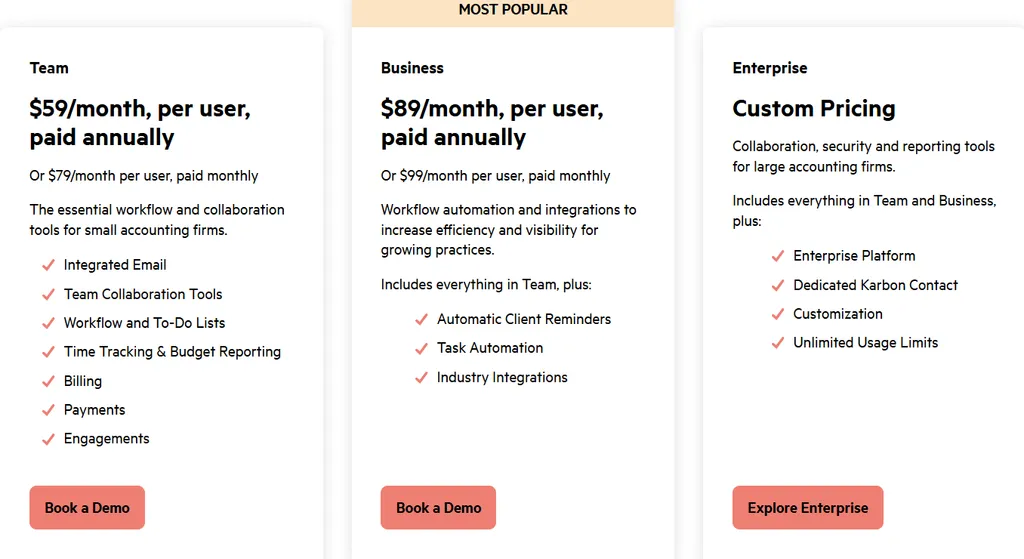
Karbon uses a per-seat subscription model with both monthly and annual billing options:
- Team: $59/user/month (annual) or $79/user/month (monthly). Includes Triage inbox, workflow management, client management, client portal, document management, time tracking, and billing.
- Business: $89/user/month (annual) or $99/user/month (monthly). Adds automatic client reminders, task automation, industry integrations, and Karbon API access.
- Enterprise: Custom pricing. Adds unlimited workflow statuses and templates, dedicated cloud hosting, SAML SSO, and managed data migration.
Note that Karbon’s Power BI integration requires separate Power BI licenses starting from $14/user/month in addition to the base Karbon subscription.
Who Should Use Karbon?
Choose Karbon if:
- Your firm has 10 or more staff and partner-level client email needs to be visible and actionable across the whole team, not siloed in personal inboxes.
- You run multiple service lines per client concurrently (bookkeeping, tax, audit, advisory) and need each engagement track to operate with its own workflow logic and assignees within a single client record.
- You want AI embedded in the workflow layer for email summarization, work assignment, and client summaries, rather than switching to a separate AI tool for each task.
3. TaxDome: Best Alternative for Native Billing, E-Signatures, and Payment Collection
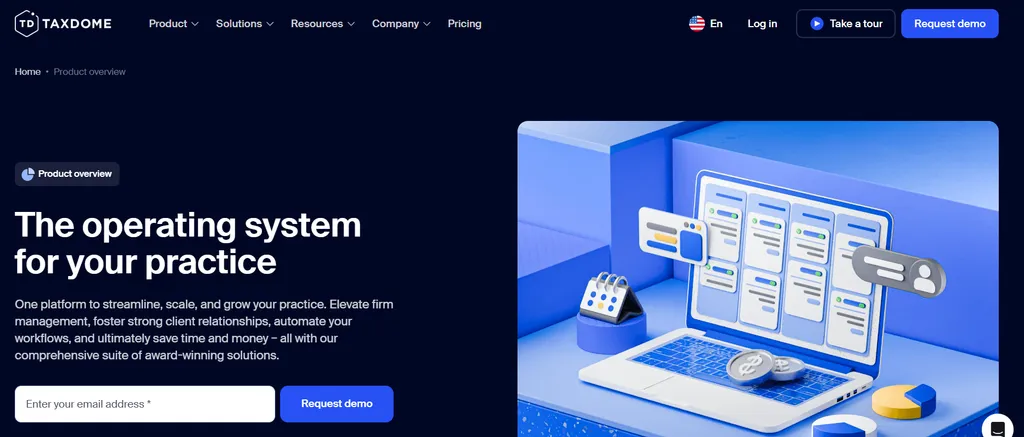
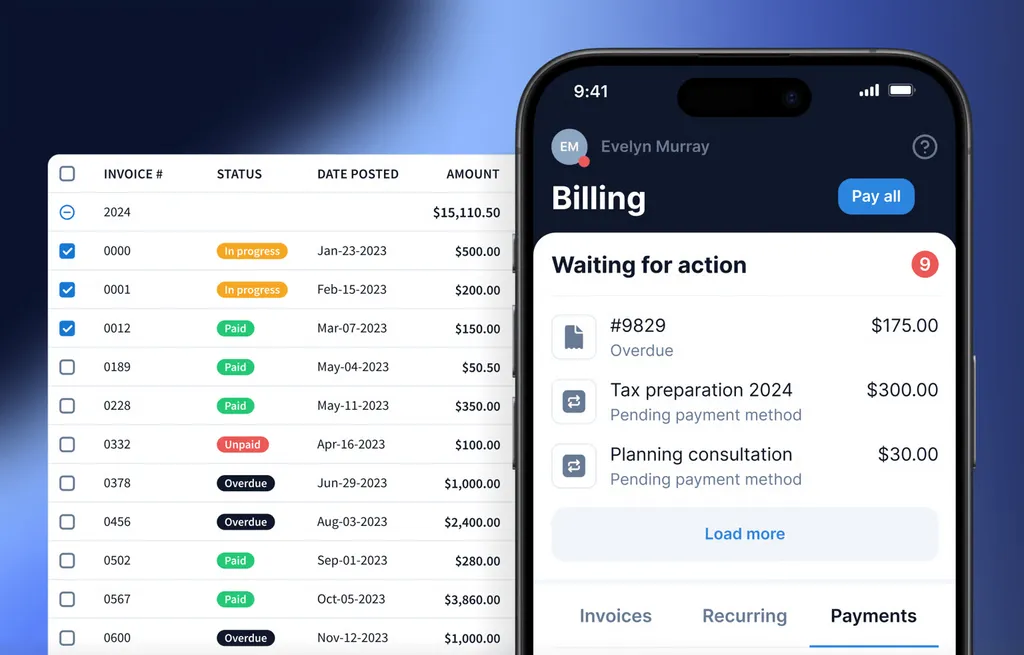
TaxDome is a practice management platform that consolidates CRM, document management, workflow automation, e-signatures, client portal, and native billing and payment processing into a single system. Its case as a Client Hub alternative rests on the structural gap it fills: Client Hub has no native invoicing or payment collection. TaxDome eliminates that dependency. Key capabilities include:
- Native invoicing and payment collection with credit card and ACH processing via Stripe or TaxDome Payments
- Visual pipeline-based workflow automation with stage-triggered task creation and automated client communications
- Integrated e-signatures compliant with the E-Sign Act, UETA, and IRS Form 8879 requirements
- Client portal with iOS and Android apps and an optional white-labeled branded mobile app
Why Choose TaxDome Over Client Hub for End-to-End Practice Management
TaxDome stands out in the following areas:
- Native Billing, Invoicing, and Payment Collection. TaxDome’s Revenue Operations module handles the entire invoice-to-cash cycle: firms create invoices, send them via the portal, accept credit card and ACH payments, and track receivables in one view. A pipeline stage can trigger automatic invoice creation, and a document paywall releases completed documents only after payment clears.
- Pipeline-Based Workflow Automation. TaxDome’s workflow engine uses visual pipeline stages where automations fire as a job advances: task assignments, client notifications, document requests, and deadline triggers. Pre-built pipeline templates are available from the TaxDome Marketplace.
- Built-In E-Signatures Without Third-Party Dependency. TaxDome’s e-signature is fully native. Signed documents archive automatically to the client record. KBA (knowledge-based authentication) for IRS Form 8879 compliance is supported. Client Hub includes e-signatures via SignWell, but the integration routes through a separate service.
TaxDome Pricing
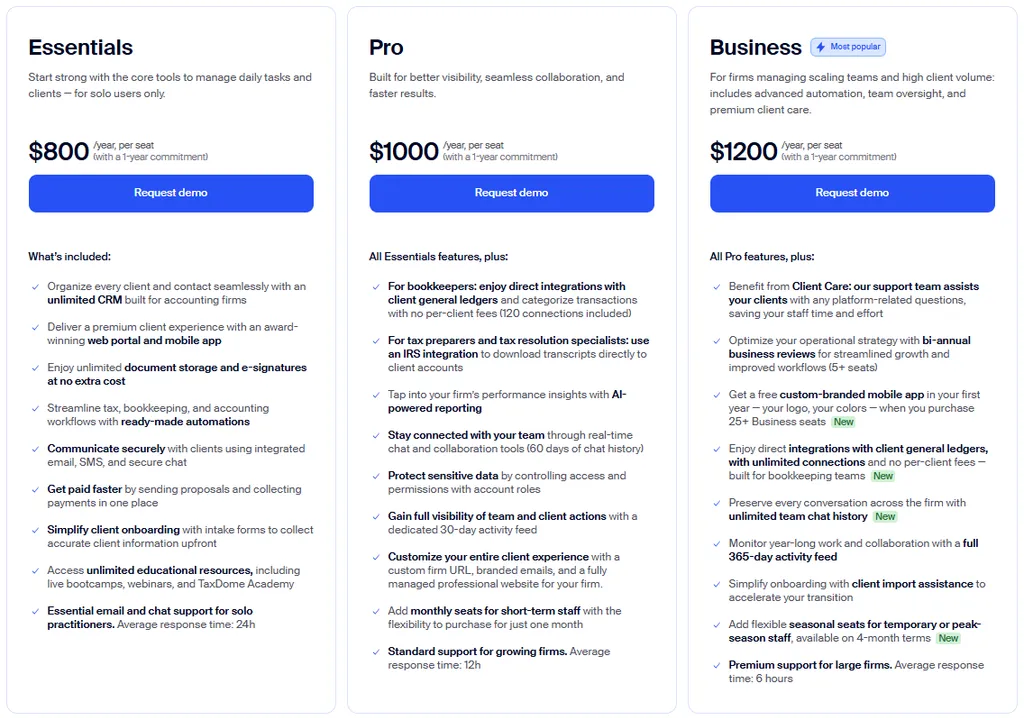
TaxDome uses a per-seat, annual subscription model. All plans include unlimited clients, document storage, and e-signatures. Annual billing is required across all tiers.
- Essentials (Solo): $800/seat/year (1-year). Includes CRM, client portal, workflow automations, e-signatures, secure messaging, proposals and payments, and email/SMS integration.
- Pro: $1,000/seat/year (1-year). Adds bookkeeping hub with QBO integrations, IRS transcript downloads, AI-powered reporting, and role-based permissions.
- Business: $1,200/seat/year (1-year). Adds Client Care (TaxDome fields client questions), unlimited bookkeeping connections, and seasonal seats.
TaxDome offers a switch-and-save program with up to 6 months free for firms locked into a competing contract.
Who Should Use TaxDome?
Choose TaxDome if:
- Your firm juggles separate tools for invoicing, payment collection, e-signatures, and document management, and you want to consolidate them into a single annual subscription.
- You handle recurring tax, bookkeeping, or accounting engagements where visual pipeline automation would reduce manual follow-up.
- You need legally compliant, IRS-ready e-signatures (including KBA for Form 8879) built natively into your client workflow rather than routed through a third-party integration.
4. Financial Cents: Best Alternative for Small US Bookkeeping Firms on a Budget
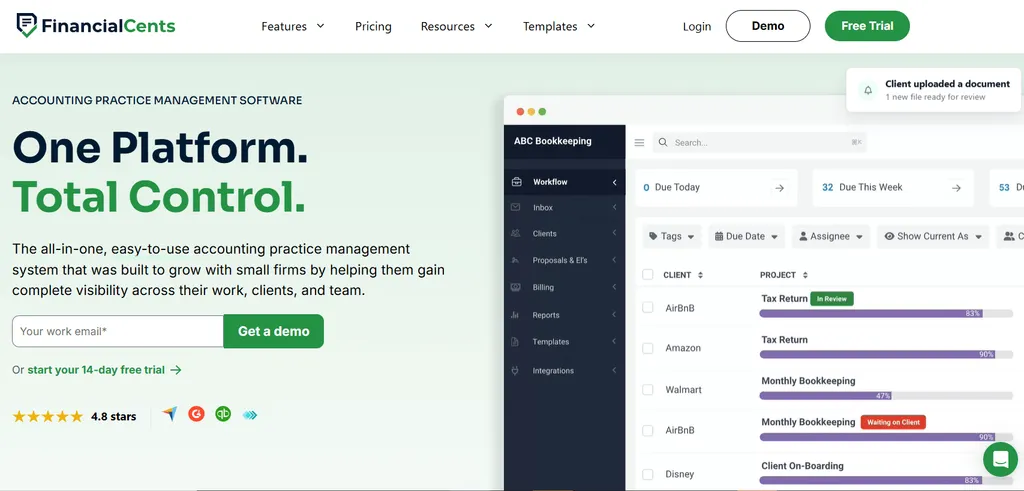
Financial Cents is a cloud-based accounting practice management platform built for bookkeeping and CPA firms in the United States and Canada. It bundles workflow management, a passwordless client portal, time tracking, billing, and QuickBooks Online integration at the lowest published entry price in this comparison. Its key capabilities include:
- 300+ pre-built accounting-specific workflow templates covering monthly bookkeeping, 1040 returns, payroll, and more
- Passwordless client portal using magic-link access with automated SMS and email reminders
- QuickBooks Online integration that pulls uncategorized transactions into client tasks
- Capacity management dashboard with workload forecasting
Financial Cents is US/Canada-only with no multilingual support and billing only in USD. It does not offer native Xero integration.
Why Choose Financial Cents Over Client Hub for Small US Bookkeeping Practices
Financial Cents stands out in the following areas:
- Solo Plan at $19/Month. Financial Cents’ Solo plan starts at $19/month on annual billing, compared to Client Hub’s Solopreneur at $49/month. That $30/month gap adds up to $360 per year. Both include unlimited clients and storage, so the price difference isn’t explained by a capacity ceiling. The Solo plan includes workflow management, a client portal, time tracking, billing, QuickBooks Online integration, and e-signatures.
- Passwordless Magic-Link Client Portal with SMS Reminders. Financial Cents eliminates account creation through magic-link technology: clients receive a link that opens their outstanding tasks immediately, with no username or password. Automated SMS and email reminders continue until the client responds.
- 300+ Pre-Built Accounting Workflow Templates. Financial Cents ships with over 300 ready-to-use templates covering monthly bookkeeping, 1040 preparation, 1099 workflows, payroll, and client onboarding. A community-driven template library features practitioner-contributed templates. The Accounting Workflow Academy provides free certification courses used by over 6,000 accountants.

Financial Cents Pricing
Financial Cents requires a minimum 1-year purchase commitment on every plan. Team and Scale can be paid monthly within that agreement, but only with 5 or more users.
- Solo: $19/month (annual billing, single user only). Includes workflow management, client portal, time tracking, billing, QBO integration, and e-signatures.
- Team: $49/user/month (annual, no user minimum; $69 monthly with 5+ users). Adds email integration, unlimited tags, client groups, and custom fields.
- Scale: $69/user/month (annual). Adds task dependencies, Zapier, open API, Google Drive/OneDrive integration, branded portal, and profitability reports.
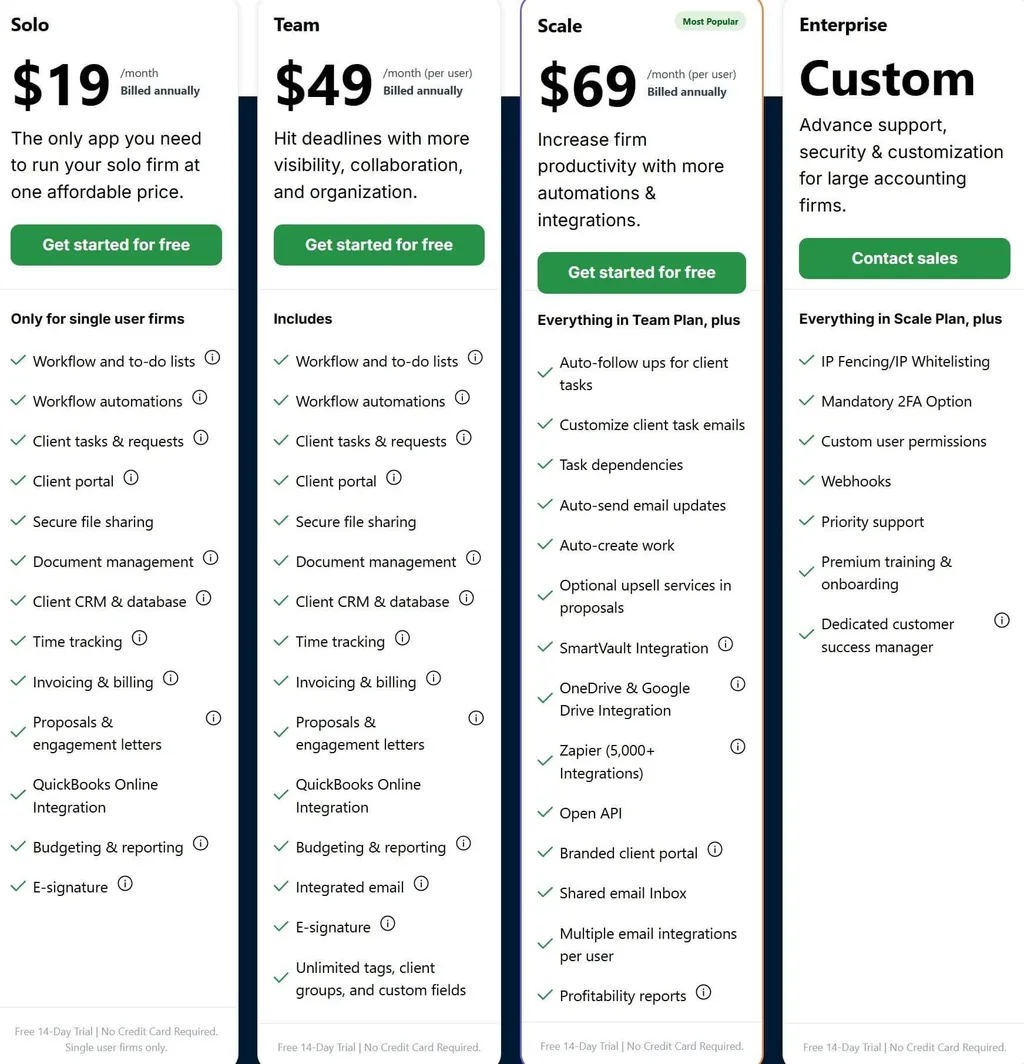
All plans include a 14-day free trial with no credit card required. For a closer look at how it stacks up against Client Hub specifically, see our Client Hub vs Financial Cents comparison.
Who Should Use Financial Cents?
Choose Financial Cents if:
- You are a solo practitioner or small firm (1-10 staff) in the US or Canada with a tight budget who needs a full practice management stack for under $20/month per user.
- Your clients resist creating portal accounts or checking email; Financial Cents’ magic-link portal and SMS reminders reduce the response friction.
- You want to deploy standardized workflows from day one using pre-built templates for monthly bookkeeping, payroll, and tax engagements.
5. Liscio: Best Alternative for Tax Firms That Need Document Intelligence
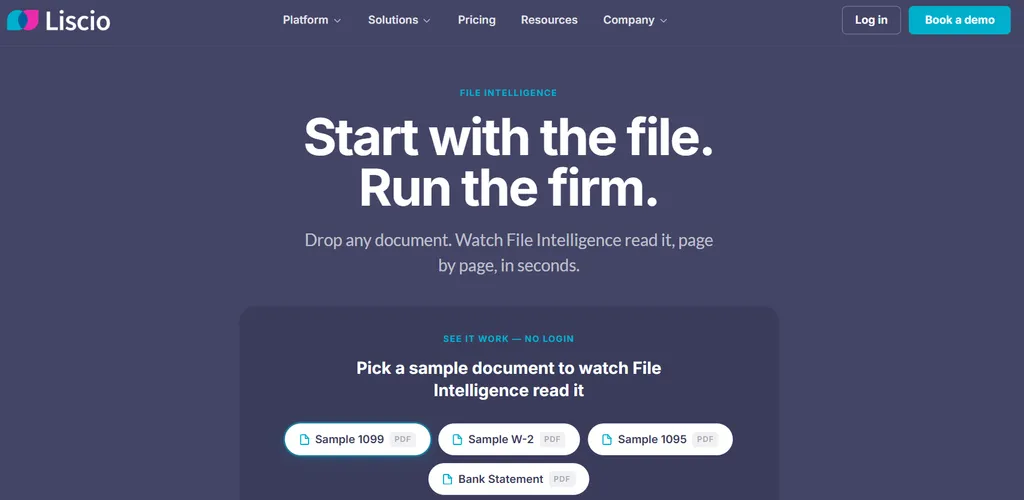
Liscio is a File Intelligence and client communication platform built for tax and bookkeeping firms. It covers a client communication layer that Client Hub’s file manager does not: AI-powered document classification that reads, classifies, and renames incoming files before any staff member touches them. Its key capabilities include:
- AI-powered File Intelligence that recognizes 277 document types at 95% classification accuracy
- Smart Tax Organizers with prior-year prefill, driving a 72% organizer return rate
- Smart Tax Delivery with guided return walkthroughs and automatic Form 8879 signature placement
- Two-way SMS business texting achieving 8x faster client response rates than email
Why Choose Liscio Over Client Hub for Document Intelligence and Tax-Season Communication
Liscio stands out in the following areas:
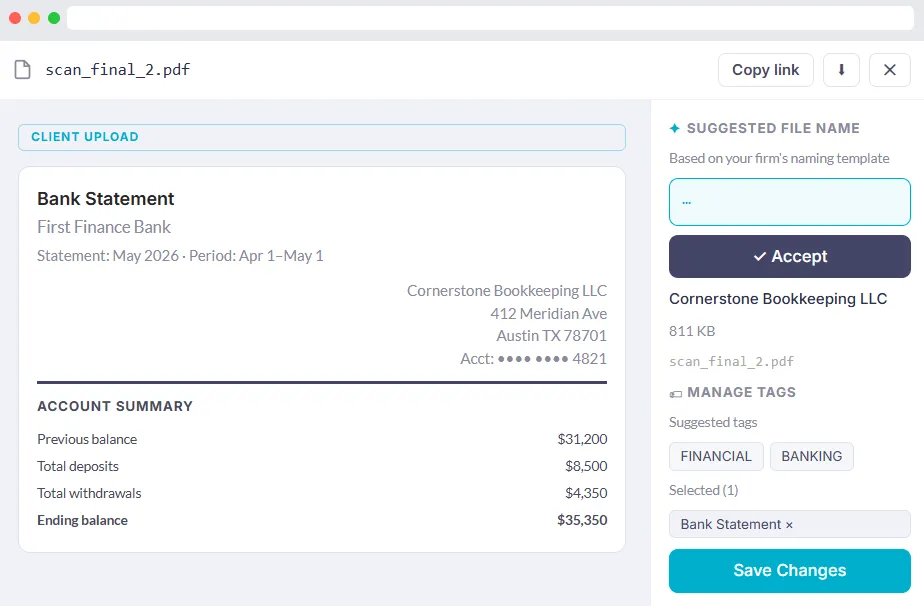
- Document Intelligence That Reads Files on Arrival. When a client uploads a PDF named
scan_final_2.pdf, someone on the firm side still needs to identify and rename it. At scale during tax season, this triage eats hours of staff time. Liscio’s File Intelligence reads incoming files the moment they arrive and applies the firm’s naming convention automatically. It recognizes all 16 1099 subtypes, five 1098 subtypes, and 30+ CP and LTR IRS notice types. Federal and state return coverage extends to 41 states plus DC. Client Hub has no equivalent document-reading capability. - Tax-Season Automation for Organizers and Delivery. Liscio’s organizer workflow pulls from firms’ existing tax software (UltraTax CS, Lacerte, Drake, ProSeries, and CCH Axcess) and converts printed PDF organizers into personalized digital questionnaires prefilled with prior-year data. On the delivery side, Smart Tax Delivery wraps the completed return in a section-by-section guided walkthrough with automatic Form 8879 signature placement, saving 15+ minutes per delivery.
- SMS-Based Outreach for Unresponsive Clients. Liscio provides two-way SMS business texting with provisioned business numbers. The full conversation thread appears on the client Timeline alongside all other interaction history. For clients who miss portal notifications and email, text messaging provides a real completion lift.
Liscio Pricing
Liscio uses a per-seat, annually-billed model:
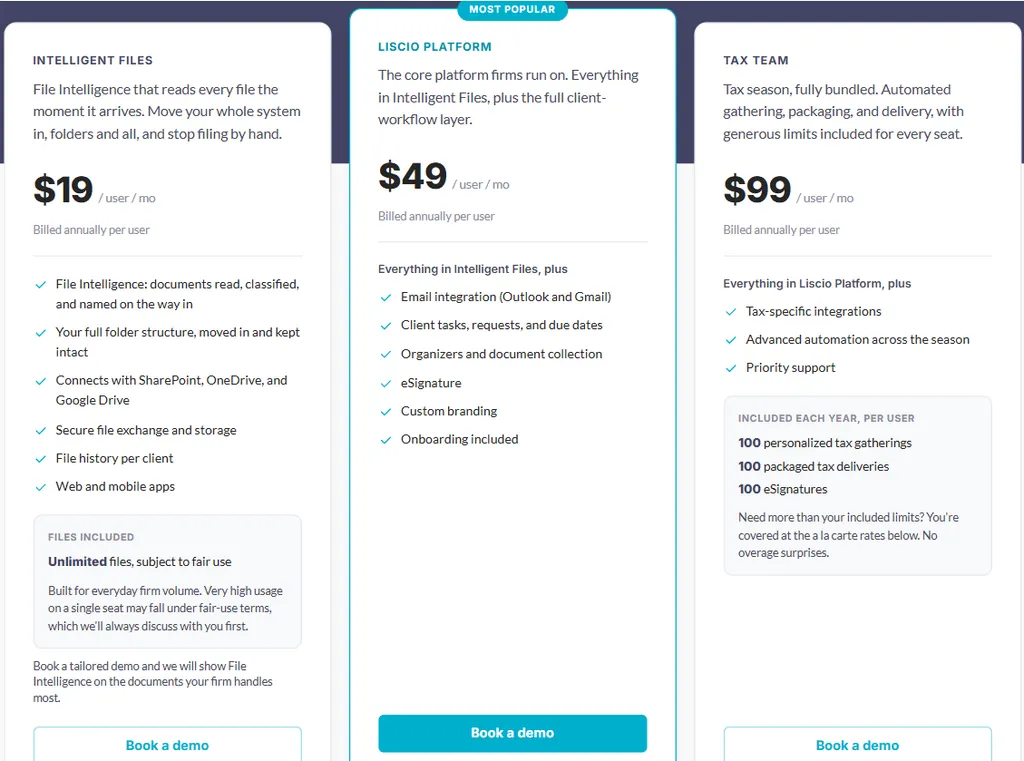
- Intelligent Files: $19/user/month. AI-powered File Intelligence with document classification and automatic renaming. Unlimited files.
- Liscio Platform: $49/user/month. Adds Outlook and Gmail integration, client tasks, eSignature, custom branding, and onboarding.
- Tax Team: $99/user/month. Adds tax-software integrations, 100 Smart Tax Organizers, 100 Smart Tax Deliveries, and 100 eSignatures per user per year. Overages at $5/organizer and $5-7/delivery.
Who Should Use Liscio?
Choose Liscio if:
- Your practice is primarily tax-focused, and the seasonal crunch of document collection and return delivery consumes non-billable staff time.
- Client document collection is your primary bottleneck (specifically, clients submitting files with unrecognizable names that staff must manually sort).
- You already use a practice management tool and want to upgrade the client-facing communication and document collection layer without migrating your internal workflow infrastructure.
6. Canopy: Best Alternative for Full-Service Accounting and Tax Firms

Canopy is a practice management platform built for accounting and tax firms. It distinguishes itself with an indefinitely free Client Management module, a dedicated Tax Resolution module, and AI tools that span the full practice lifecycle. Its key capabilities include:
- Free, permanent CRM module covering contact management and client portal access for up to 500 contacts
- Tax Resolution module with IRS transcript pulls, notice workflows, and a 230-form library
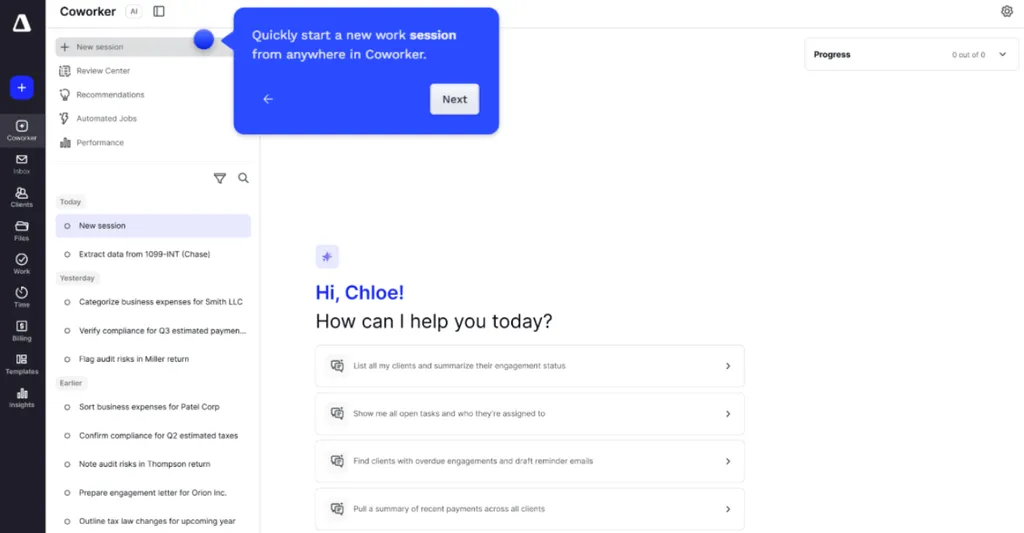
- Canopy Coworker AI that accepts plain-language instructions, builds a step-by-step plan, and executes approved steps
- AI Notetaker that joins client calls and produces accounting-aware transcripts filed directly into the client record
Why Choose Canopy Over Client Hub for Full-Service Accounting and Tax Firms
Canopy stands out in the following areas:
- A Permanent Free Tier for Client Management. Canopy is the only platform in this comparison that offers a genuinely ongoing free entry point. The Client Management module carries no expiry date and requires no payment details. Client Hub’s free option is a 14-day trial that converts automatically. For firms that want extended evaluation time with real client data, Canopy removes the forced commitment point.
- Tax Resolution and IRS Transcript Capabilities. Canopy’s Tax Resolution module covers IRS compliance cases including installment agreements, offers-in-compromise, penalty abatements, and more. Bundled Transcripts & Notices pulls IRS transcripts for multiple clients simultaneously with scheduled automated refreshes and change detection. Client Hub has no equivalent for this category of work.
- AI Execution Across the Full Practice Lifecycle. Canopy Coworker places e-signature fields, updates task statuses, sends client follow-ups, and flags bookkeeping anomalies with automatic task creation. The AI Notetaker joins every scheduled meeting automatically and surfaces accounting-aware summaries organized by engagement and tax year.
Canopy Pricing
Canopy combines a permanently free CRM with per-seat subscription tiers:
- Free Plan: Client Management module, free indefinitely. CRM and client portal for up to 500 contacts.
- Standard: $74/user/month (annual). Full CRM, document management, e-signatures, client portal, workflow tracking, invoicing, and payments. AI Notetaker: 8 hrs/user/month.
- Plus: $109/user/month (annual). Adds automated and recurring workflows, advanced task views, custom reporting, and 12 hrs/user/month AI Notetaker.
- Premium: $149/user/month (annual). All Plus features and advanced workflows, billing scenarios, and deep reporting.
- Tax Resolution add-on: $50/user/month (annual contract required).
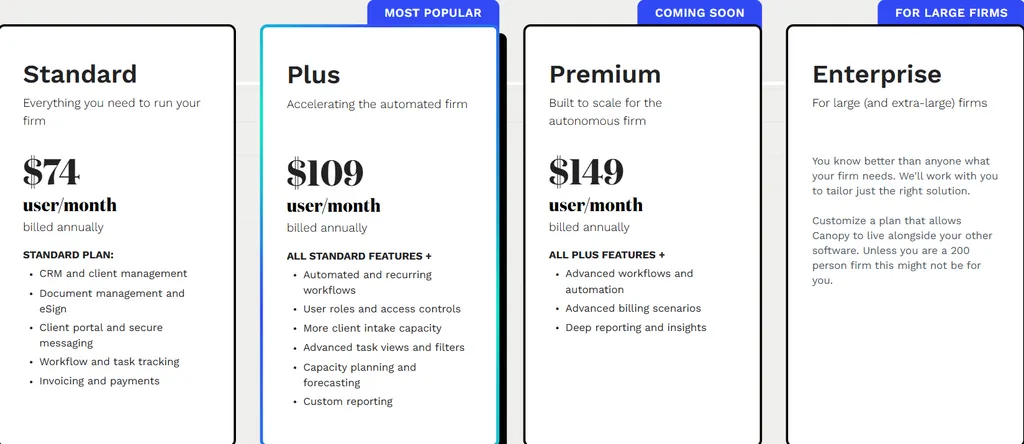
For a deeper look at how the tiers stack up, see our Canopy pricing breakdown.
Who Should Use Canopy?
Choose Canopy if:
- Your firm handles a mix of tax preparation, bookkeeping, and advisory services and needs a single system covering the full practice lifecycle.
- You do any volume of IRS tax resolution work, installment agreements, or notice management.
- You want an extended free evaluation period before any purchase decision, with no time limit on the CRM module.
7. Double: Best Alternative for AI-Powered Month-End Close at Per-Client Pricing
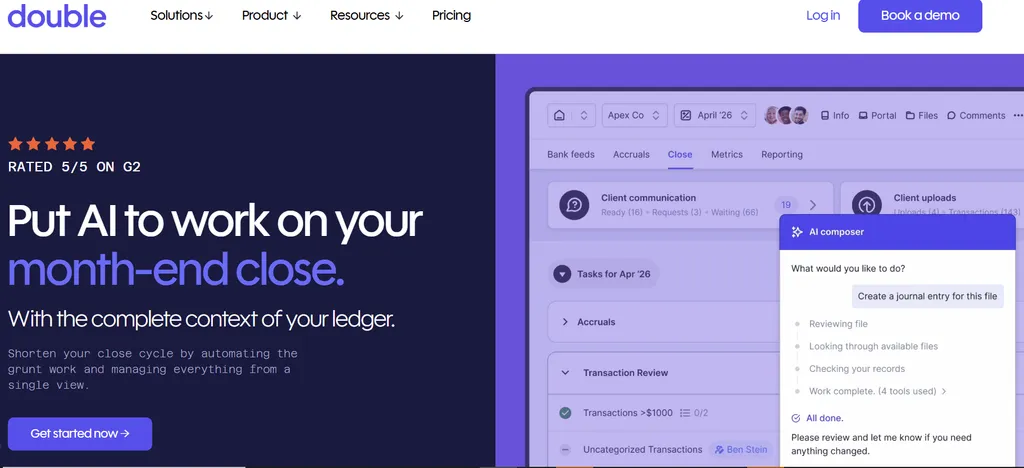
Double (formerly Keeper, rebranded October 2025) is a month-end close and practice management platform built for bookkeeping and accounting firms that manage recurring client closes in QuickBooks Online or Xero. Where Client Hub serves as a broad practice hub, Double is built around the monthly close workflow with AI automation layered into each stage. Its key capabilities include:
- Per-firm pricing based on connected client count ($10-$50/client/month), with unlimited team members at every tier
- AI Bank Feeds that pre-sort incoming transactions into four tiers by how much judgment each requires
- AI Journal Entries that convert complex source documents into balanced, ready-to-post journal entries
- A dedicated Accruals module replacing spreadsheet-based prepaid, fixed asset, and deferred revenue tracking
Why Choose Double Over Client Hub for AI-Powered Month-End Close
Double stands out in the following areas:
- Per-Client Pricing That Stays Predictable as the Team Grows. Client Hub prices per firm user. Double inverts that: the pricing model charges per connected client with unlimited firm users included. A practice adding a third or fourth bookkeeper pays nothing extra on the Double side. Monthly SaaS cost rises in proportion to billable revenue rather than headcount.
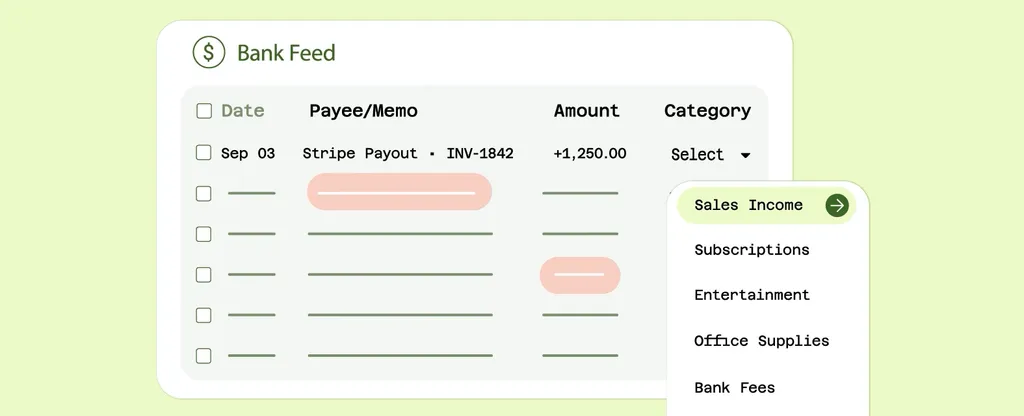
- Close-Specialized AI That Goes Deeper Than General Practice Management. AI Bank Feeds doesn’t just flag uncategorized items; it pre-sorts all incoming transactions into four tiers (Potential Matches, Rules, Auto Classifications, and Needs Review), sequencing work by how much judgment each item requires. For unknown vendors, the AI searches the internet to suggest a categorization. AI Journal Entries generates fully balanced, multi-line journal entries from uploaded source documents using reusable saved prompts.
- Accruals and Complex Close Coverage. Client Hub does not include accrual accounting management. Double’s Accruals module (Scale tier) replaces spreadsheet-based tracking with rule-driven automated schedules for prepaid expenses, fixed assets, deferred revenue, and accrued expenses, with one-click posting from the close page and full audit documentation.
Double Pricing
Double uses a per-connected-client pricing model with unlimited firm users at every tier. Plans are mix-and-match.
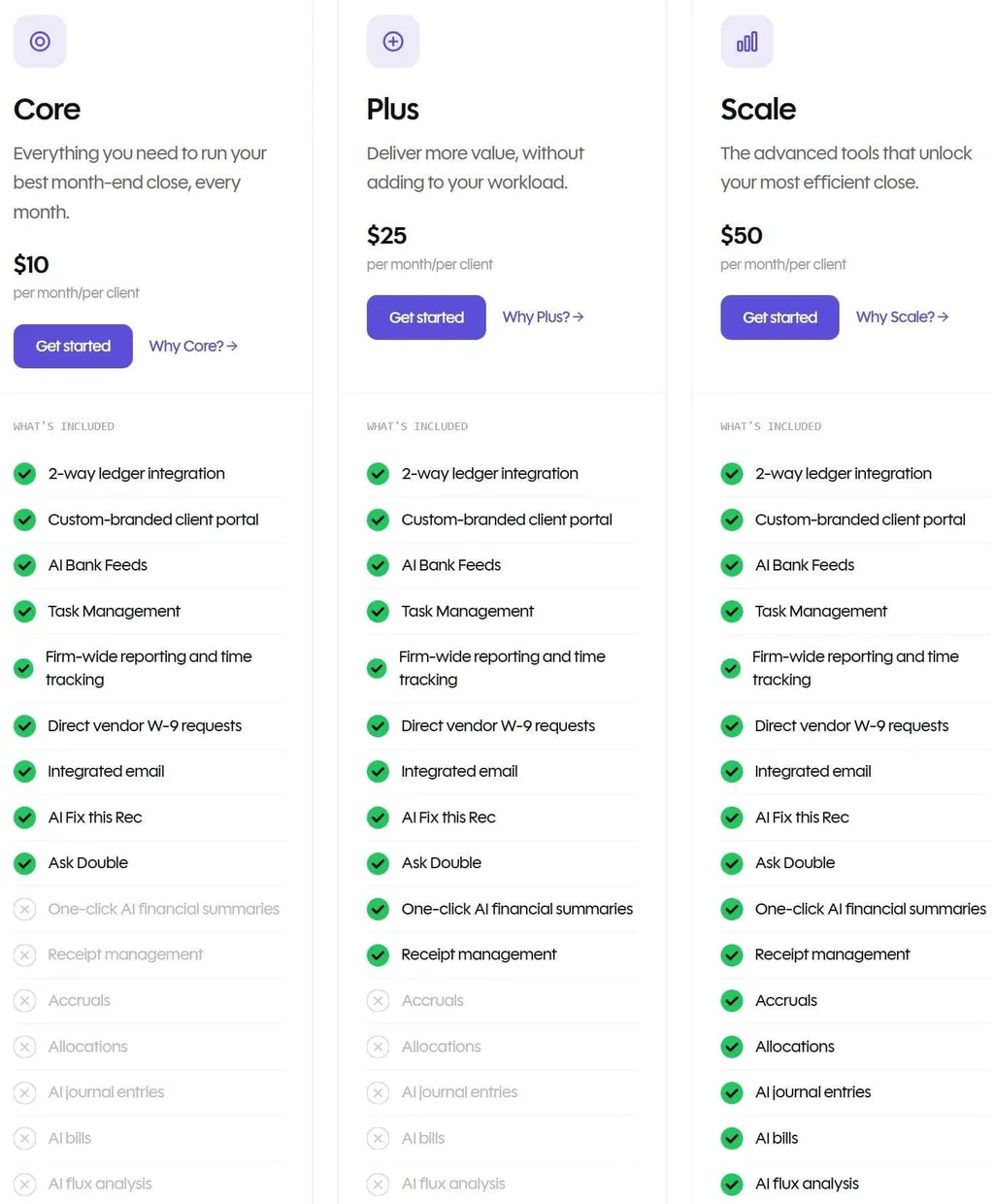
- Core: $10/client/month. Unlimited firm users, 2-way ledger integration (QBO and Xero), custom-branded client portal, AI Bank Feeds, task management, firm-wide close dashboard, and time tracking.
- Plus: $25/client/month. Adds AI Financial Summaries and receipt management with OCR extraction.
- Scale: $50/client/month. Adds Accruals, AI Journal Entries, and AI Bills.
- Tax Suite add-on: Included at no extra charge with a $200/month annual commitment. Covers tax organizers, KBA e-signatures, and a live client tax tracker.
Double offers both month-to-month and annual terms. It is a SOC 2 Type II certified platform with a documented Trust Center. If you’re weighing these two head-to-head, our Client Hub vs Double comparison goes deeper on where each one wins.
Who Should Use Double?
Choose Double if:
- Your firm manages 10 or more recurring monthly closes in QuickBooks Online or Xero and the month-end close cycle is the workflow you most need to accelerate.
- You are actively growing your bookkeeping team and need a pricing model where adding users does not increase your SaaS spend.
- You offer controller-level or CAS services where accrual schedules are deliverables, and you currently manage those schedules in spreadsheets.
The Final Verdict
Client Hub works well as a client communication and bookkeeping workflow platform. Growing accounting practices often need more depth in specific areas. Here are the best alternatives:
- Uku for automated billing that reduces invoice preparation from days to roughly 30 minutes, with modular deployment, multilingual support in 12 languages, and monthly pricing for international practices
- Karbon for large firms that need email-native workflow management with shared visibility across complex, multi-service engagements
- TaxDome for firms that want billing, e-signatures, and payment collection consolidated into a single annual platform
- Financial Cents for small US bookkeeping firms that need a full practice management stack at the lowest monthly cost
- Liscio for tax-heavy practices that need AI-powered document classification and tax-season automation
- Canopy for full-service accounting and tax firms that want a free CRM entry point, tax resolution capabilities, and AI-driven practice management
- Double for bookkeeping firms focused on accelerating month-end close with AI-powered automation and per-client pricing
You don’t have to choose between Client Hub and these alternatives. Many firms use Client Hub alongside other tools to build their ideal practice management stack. Consider your needs and growth plans when deciding which solution works best for your firm.
If it is the price that sent you looking, our Client Hub pricing analysis breaks down what each tier really costs. If Uku is the alternative you are weighing most seriously, Client Hub vs Uku is the full head-to-head: QuickBooks depth against billing automation, both pricing tables side by side, and the cases where Client Hub is the better answer. If you are still deciding whether to leave at all, our Client Hub review covers the platform on its own terms — what it does well, and where firms outgrow it.
How to Switch from Client Hub to Uku
Replacing a client-facing platform sounds heavier than it is, because the pieces move in a sensible order:
- Export your client list. A CSV or Excel file of clients, contacts, and the services each one buys is enough to start — Uku builds automated client plans from that file directly, so you don’t need Client Hub’s data model to come across intact.
- Rebuild recurring work from templates, not by hand. Uku’s accounting templates cover monthly bookkeeping, payroll, and year-end cycles. Pick the closest one per service, adjust it once, and apply it to every client on that service.
- Turn on billing when the time data exists. Set up contracts (product type, pricing model, frequency, rounding) after a few weeks of tracked time, so the first invoice run has real data behind it.
- Move clients to the portal last. Magic-link access means no client creates an account, so the switchover is a single email rather than an onboarding project.
- Keep Client Hub running in parallel for one cycle. Most firms overlap one month, then close the old subscription once the first Uku invoice run lands cleanly.
Assisted client import is included on all plans, and the first 90 minutes of onboarding are free.
Ready to turn tracked time into paid invoices without the billing tool juggle? With Uku, you get automated billing, multilingual support, and accounting-specific workflows in one platform. Try free for 14 days and see how much time your firm can save — or book a demo and we’ll map your current setup live.
Client Hub Alternatives FAQ
Why do accounting firms look for Client Hub alternatives?
Client Hub works well for client communication and bookkeeping workflows, but firms look for alternatives because it lacks native billing and invoicing, has limited workflow depth for complex multi-service engagements, offers no multilingual support for international practices, and has narrower Xero integration compared to QuickBooks. Firms needing any of these capabilities typically evaluate specialized tools.
What is the best overall Client Hub alternative?
There is no single best alternative because Client Hub covers multiple functions. Uku is the top choice for firms needing native billing automation and international practice management, with modular deployment that lets firms start on day one. Karbon leads for large, multi-service firms needing email-native workflow management. Financial Cents is the strongest option for small US bookkeeping practices on a tight budget.
Is there a free alternative to Client Hub?
Canopy offers a permanent free Client Management module for up to 500 contacts, covering CRM and basic client portal access. This is the only genuinely free, non-expiring option in this comparison. Financial Cents, Karbon, and Double offer free trials ranging from 14 days to demo-based evaluation periods.
Uku provides a 14-day free trial of the full Elite plan (no credit card required), with its paid Solo tier starting from $19/month for sole practitioners managing up to 20 active clients.
Which Client Hub alternative is best for international accounting firms?
Uku was built from the ground up for international markets, especially the UK and US. It offers its full platform UI in 12 languages with integrations for European accounting software (E-conomic, Tripletex, Fortnox) and business registries (Companies House, Danish Business Authority).
No other platform in this comparison matches that depth of European market support, and Uku’s in-house development team can build country-specific features that larger competitors skip for smaller markets.
How does Uku compare to Client Hub for billing?
Client Hub has no native billing or invoicing; firms must use a separate tool like Anchor. Uku provides a complete billing engine with six product types (hourly, fixed, per-piece, member billable rate, combined, and task-triggered) and four pricing models per contract (time, fixed, volume, and mixed). It offers auto-generated invoice drafts from tracked time, contract templates, rounding rules, cumulative tier pricing, and direct export to QuickBooks, Xero, and other accounting software.
Uku reduces invoice preparation from days to roughly 30 minutes. It tracks both sales prices and cost prices in real time, so firms can identify profitability issues before they compound.
Which alternative is best for tax-focused practices?
For tax-heavy practices, Liscio offers AI-powered document classification (277 document types), Smart Tax Organizers with prior-year prefill, and Smart Tax Delivery with automatic Form 8879 placement. Canopy provides a dedicated Tax Resolution module with IRS transcript pulls and a 230-form library. TaxDome includes native e-signatures compliant with IRS Form 8879 requirements.
Is it difficult to migrate from Client Hub to one of these alternatives?
Migration complexity depends on your usage. Uku is designed for fast deployment: you can work with your existing Excel file, import it into Uku, and have automated plans ready to go. Its modular approach means you can activate only the features you need on day one without a full-platform rollout, unlike platforms that require upfront configuration.
Uku’s onboarding packages and client import from Excel or connected accounting software simplify the transition. Replacing multiple functions at once (workflow, portal, billing, QBO integration) requires more planning. Many firms keep Client Hub for client communication while adding a specialized tool for billing or workflow.
Which alternative offers the best value for solo practitioners?
Financial Cents at $19/month (annual) is the lowest-cost option for a solo US or Canadian practitioner, including workflow, portal, billing, and QBO integration.
Uku’s Solo plan ($19/month annual, or $25/month with monthly billing) serves sole-practitioner bookkeepers and accountants managing up to 20 active clients. Solo is a full-featured tool, not a stripped-down preview: it includes billing, client portal, document management, all accounting integrations, e-signatures, and AML compliance.
Every new Uku account starts with a 14-day free trial of the full Elite plan, so practitioners experience the complete platform before picking a tier. For firms outside the US or Canada, Uku’s 12-language support and monthly billing option make it the stronger choice. Client Hub’s Solopreneur plan starts at $49/month (annual only).
Frequently asked questions
Why do accounting firms look for Client Hub alternatives?
Client Hub works well for client communication and bookkeeping workflows, but firms look for alternatives because it lacks native billing and invoicing, has limited workflow depth for complex multi-service engagements, offers no multilingual support for international practices, and has narrower Xero integration compared to QuickBooks. Firms needing any of these capabilities typically evaluate specialized tools.
What is the best overall Client Hub alternative?
There is no single best alternative, because Client Hub covers multiple functions. Uku is the top choice for firms needing native billing automation and international practice management, with modular deployment that lets firms start on day one. Karbon leads for large, multi-service firms needing email-native workflow management. Financial Cents is the strongest option for small US bookkeeping practices on a tight budget.
Is there a free alternative to Client Hub?
Canopy offers a permanent free Client Management module for up to 500 contacts, covering CRM and basic client portal access. This is the only genuinely free, non-expiring option in this comparison. Financial Cents, Karbon, and Double offer free trials ranging from 14 days to demo-based evaluation periods. Uku provides a 14-day free trial of the full Elite plan (no credit card required), with its paid Solo plan starting from $19/month for sole practitioners managing up to 20 active clients.
Which Client Hub alternative is best for international accounting firms?
Uku was built from the ground up for international markets. It offers its full platform UI in 12 languages with integrations for European accounting software (E-conomic, Tripletex, Fortnox) and business registries (Companies House, Danish Business Authority). No other platform in this comparison matches that depth of European market support, and Uku's in-house development team can build country-specific features that larger competitors skip for smaller markets.
How does Uku compare to Client Hub for billing?
Client Hub has no native billing or invoicing; firms must use a separate tool like Anchor. Uku provides a complete billing engine with six product types (hourly, fixed, per-piece, member billable rate, combined, and task-triggered) and four pricing models per contract (time, fixed, volume, and mixed). It offers auto-generated invoice drafts from tracked time, contract templates, rounding rules, cumulative tier pricing, and direct export to QuickBooks, Xero, and other accounting software. Uku reduces invoice preparation from days to roughly 30 minutes, and it tracks both sales prices and cost prices in real time, so firms can identify profitability issues before they compound.
Which alternative is best for tax-focused practices?
For tax-heavy practices, Liscio offers AI-powered document classification (277 document types), Smart Tax Organizers with prior-year prefill, and Smart Tax Delivery with automatic Form 8879 placement. Canopy provides a dedicated Tax Resolution module with IRS transcript pulls and a 230-form library. TaxDome includes native e-signatures compliant with IRS Form 8879 requirements.
Is it difficult to migrate from Client Hub to one of these alternatives?
Migration complexity depends on your usage. Uku is designed for fast deployment: you can work with your existing Excel file, import it into Uku, and have automated plans ready to go. Its modular approach means you can activate only the features you need on day one without a full-platform rollout. Replacing multiple functions at once (workflow, portal, billing, QBO integration) requires more planning. Many firms keep Client Hub for client communication while adding a specialized tool for billing or workflow.
Which alternative offers the best value for solo practitioners?
Financial Cents at $19/month (annual) is the lowest-cost option for a solo US or Canadian practitioner, including workflow, portal, billing, and QBO integration. Uku's Solo plan ($19/month annual, or $25/month with monthly billing) serves sole-practitioner bookkeepers and accountants managing up to 20 active clients — a full-featured tool, not a stripped-down preview, including billing, client portal, document management, all accounting integrations, e-signatures, and AML compliance. For firms outside the US or Canada, Uku's 12-language support and monthly billing option make it the stronger choice. Client Hub's Solopreneur plan starts at $49/month (annual only).

Published Aug 9, 2026 · Updated Sep 25, 2026