Client Hub Pricing 2026: Plans, Costs, and What You Actually Pay
Client Hub costs $49–$99/user with QuickBooks integration stripped from the mid-tier. See the real cost per plan and how Uku compares from $19/month.


Contents
- Client Hub pricing at a glance
- Client Hub’s pricing model
- Client Hub Solopreneur: $49/month, annual billing only
- Client Hub Practice Manager: $59/month annual, $79/month monthly
- Client Hub Practice Manager Plus: $79/month annual, $99/month monthly
- What else Client Hub costs
- Where Client Hub’s pricing falls short
- How Uku’s pricing compares
- The five-person firm test
- Where each platform’s money goes
- Verdict: is Client Hub worth it?
- Client Hub pricing FAQ
If you have looked at Client Hub’s three-tier pricing and tried to work out whether Practice Manager at $59/month per user covers your QuickBooks needs, or whether you need Practice Manager Plus at $79/month — while discovering that the Solopreneur plan locks you into annual billing with no room to add a second person — you know the feeling: choose simplicity or capability, with no middle ground.
This article breaks down what each Client Hub tier actually includes, where the costs sit that the pricing page does not show, and how the numbers compare against Uku, which starts at $19/month and does not strip features between tiers.
All Client Hub prices below were checked against Client Hub’s own pricing page on 11 August 2026. A competitor’s price is a perishable fact, so treat any figure older than that with suspicion — including ours.
Client Hub pricing at a glance
| Client Hub | Uku | |
|---|---|---|
| Free trial | 14 days, full access, no credit card | 14 days, full Elite access, no credit card |
| Entry plan | Solopreneur: $49/mo (annual only), 1 user, QuickBooks + Xero | Solo: $19/mo annual, $25/mo monthly, 1 user, 20 active clients, billing included |
| Mid-tier | Practice Manager: $59/mo annual, $79/mo monthly, unlimited clients, no QuickBooks/Xero deep integration | Team: $38/mo annual, $49/mo monthly, unlimited members and clients, projects |
| Upper tier | Practice Manager Plus: $79/mo annual, $99/mo monthly, full QuickBooks + Xero, Books Review, 1099 Manager | Elite: $48/mo annual, $62/mo monthly, BI Analytics, workforce management, public API |
| Enterprise | No enterprise tier | Enterprise: $88/mo annual, $99/mo monthly, custom integrations, dedicated account manager |
| Free plan | No | No |
| Best for | Solo bookkeepers and small firms needing a client portal with QuickBooks Online | Growing firms wanting full practice management with automated billing, analytics, and team tools |
Client Hub wins one row of that table outright, and it is not a small one: on the Solopreneur plan, a single bookkeeper gets transaction-level QuickBooks integration — uncategorized transaction resolution, AI Books Review, the 1099 Manager — that Uku does not offer at any price.
Client Hub’s pricing model
Client Hub uses a per-seat subscription model with three tiers. All plans include unlimited clients and unlimited storage, so the per-user fee is the only scaling variable.
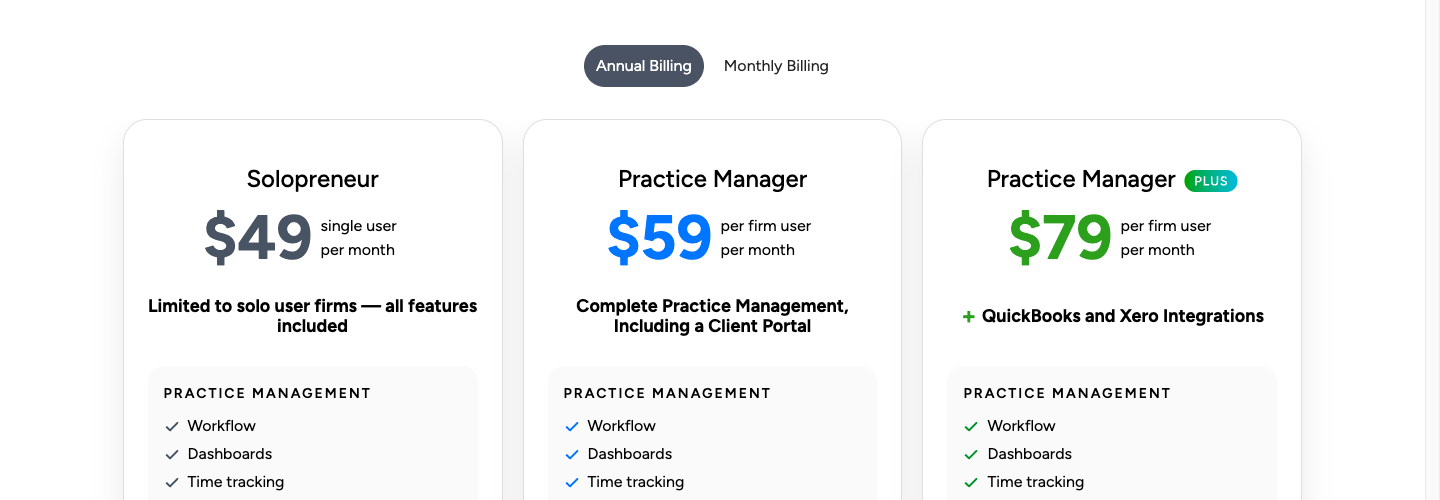
The critical decision is whether you need QuickBooks Online and Xero integration, because that feature set is excluded from the middle tier entirely. That single exclusion is what makes Client Hub’s pricing harder to reason about than the three-card layout suggests.
The free trial: 14 days, full access
| Feature | Details |
|---|---|
| Duration | 14 days |
| Features | Full functionality, no restrictions |
| Credit card | Not required upfront |
| Real clients | Can be onboarded during the trial |
| Conversion | Auto-converts to a paid plan at trial end |
The 14-day trial gives unrestricted access to the whole platform, including the QuickBooks and Xero integration, AI features, and the client portal. You can bring real clients in, which makes it a genuine evaluation rather than a sandbox exercise.
Per the Terms of Service, the subscription converts to a paid plan automatically when the trial expires unless you cancel first. Two weeks is enough to test the QuickBooks workflow with one client; it is tight for judging whether the platform holds your whole client base.
Client Hub Solopreneur: $49/month, annual billing only
| Feature | Details |
|---|---|
| Price | $49/month, billed annually |
| Monthly option | Not available |
| Users | 1 (single user only) |
| Clients | Unlimited |
| Storage | Unlimited |
| QuickBooks / Xero | Full integration included |
The Solopreneur plan is the surprising one: it carries the complete feature set. Client portal, workflow management, time tracking, email sync, all the AI Magic features, and the full QuickBooks and Xero integration with Books Review, Financial Reports, and the 1099 Manager.
The catch is structural, not a feature gap. It is annual billing only, with no monthly option, and you cannot add a team member at all. The day your practice needs a second person, you are not upgrading a plan — you are repricing everything, and if you want to keep the QuickBooks workflow, you are moving to $79/user/month.
| Pros | Cons |
|---|---|
| Full QuickBooks and Xero integration | Annual billing only, no monthly option |
| All AI features included | Strictly limited to 1 user |
| Unlimited clients and storage | Cannot add team members at all |
| Books Review and 1099 Manager | Growing means repricing from scratch |
Bottom line: Solopreneur fits a solo bookkeeper whose workflow runs through QuickBooks Online. The single-user cap means any growth triggers an upgrade.
Client Hub Practice Manager: $59/month annual, $79/month monthly
| Feature | Annual | Monthly | Difference from Solopreneur |
|---|---|---|---|
| Price per user | $59 | $79 | Team access unlocked |
| Users | Multiple | Multiple | + team collaboration |
| QuickBooks/Xero deep integration | Not included | Not included | Removed |
| Books Review (AI) | Not included | Not included | Removed |
| 1099 Manager | Not included | Not included | Removed |
Practice Manager unlocks multi-user access and removes the QuickBooks and Xero integration that defines the Solopreneur plan. No uncategorized transaction resolution, no Books Review with AI analysis, no Financial Reports publishing, no 1099 Manager.
You keep the client portal, workflow management, time tracking, email sync, and the AI features for messaging and workflows. But for a bookkeeping firm, losing the QuickBooks integration is a steep price to pay for adding a second person.
Bottom line: this tier creates an awkward gap. A firm that needs both team collaboration and QuickBooks integration cannot buy it here — it has to go to Practice Manager Plus. Practice Manager works only for firms that do not rely on QuickBooks workflows at all.
Client Hub Practice Manager Plus: $79/month annual, $99/month monthly
| Feature | Annual | Monthly | Key addition |
|---|---|---|---|
| Price per user | $79 | $99 | Full feature set |
| QuickBooks / Xero | Full integration | Full integration | Restored |
| Books Review (AI) | Included | Included | AI-driven month-end close |
| 1099 Manager | Included | Included | W-9 and 1099 workflows |
Practice Manager Plus is the only multi-user plan that includes everything. Team collaboration plus the full QuickBooks and Xero suite, AI-powered Books Review, Financial Reports, and the 1099 Manager.
For most multi-person bookkeeping firms, $79/user/month on annual billing is Client Hub’s real price — not the $59 on the middle card, and not the $49 headline. It is worth doing that arithmetic before comparing Client Hub against anything else.
| Pros | Cons |
|---|---|
| Complete feature set | $79/user/month is significant |
| Full QuickBooks and Xero integration restored | $99/user/month without an annual commitment |
| AI-powered month-end close | No native invoicing or billing |
| Team collaboration plus bookkeeping | No BI dashboards or workforce tools |
What else Client Hub costs
Included at no extra charge: unlimited clients and file storage on all plans, training and Client Hub Academy sessions, phone, email and live chat support, SignWell eSignature (no separate subscription), and the Anchor integration for proposals.
Optional paid: concierge onboarding for larger organizations, priced on request rather than published.
Not covered, and easy to forget when budgeting: QuickBooks Online, Xero, Anchor and Zapier subscriptions are all separate, and because there is no native invoicing, a billing tool is a required additional line item rather than an optional one.
Contract terms: subscription fees are non-refundable except where law requires otherwise; if a team member leaves, unused seat time on annual plans is prorated with no penalty; subscriptions auto-renew unless canceled in account settings.
Where Client Hub’s pricing falls short
No native billing at any price. Client Hub does not include invoicing, billing, or payment processing on any plan. Time tracking records hours against jobs but does not flow into invoice generation. Tracked hours require manual export and re-entry into a separate billing system, which means the most revenue-critical process in the firm lives outside the platform you are paying for.
The middle tier strips the core feature. Practice Manager removes exactly the integration most bookkeeping firms buy Client Hub for. There is no affordable option for a two-person bookkeeping firm that needs QuickBooks workflows — the jump is straight to $79/user/month.
No profitability analytics. No client profitability analysis, agreement monitoring, or BI dashboards. A firm cannot answer “which clients are unprofitable?” from inside the platform, and there is no real-time comparison of agreed work against work actually delivered. Growing firms end up back in spreadsheets for the analysis they need to price correctly.
Limited integration ecosystem. No public API, no webhooks, no developer documentation. Integrations are limited to QuickBooks, Xero, Anchor, SignWell, Gmail, Outlook and Zapier. Firms on any other accounting software have no native path.
No workforce or project management. No vacation tracking, flextime, or attendance. No task dependencies for multi-step engagements. A firm running audits, year-end closes, and team schedules needs separate tools for each.
How Uku’s pricing compares
Uku covers what Client Hub does and adds the billing, analytics and team tools that Client Hub leaves to other software — at a lower per-user price at every tier.
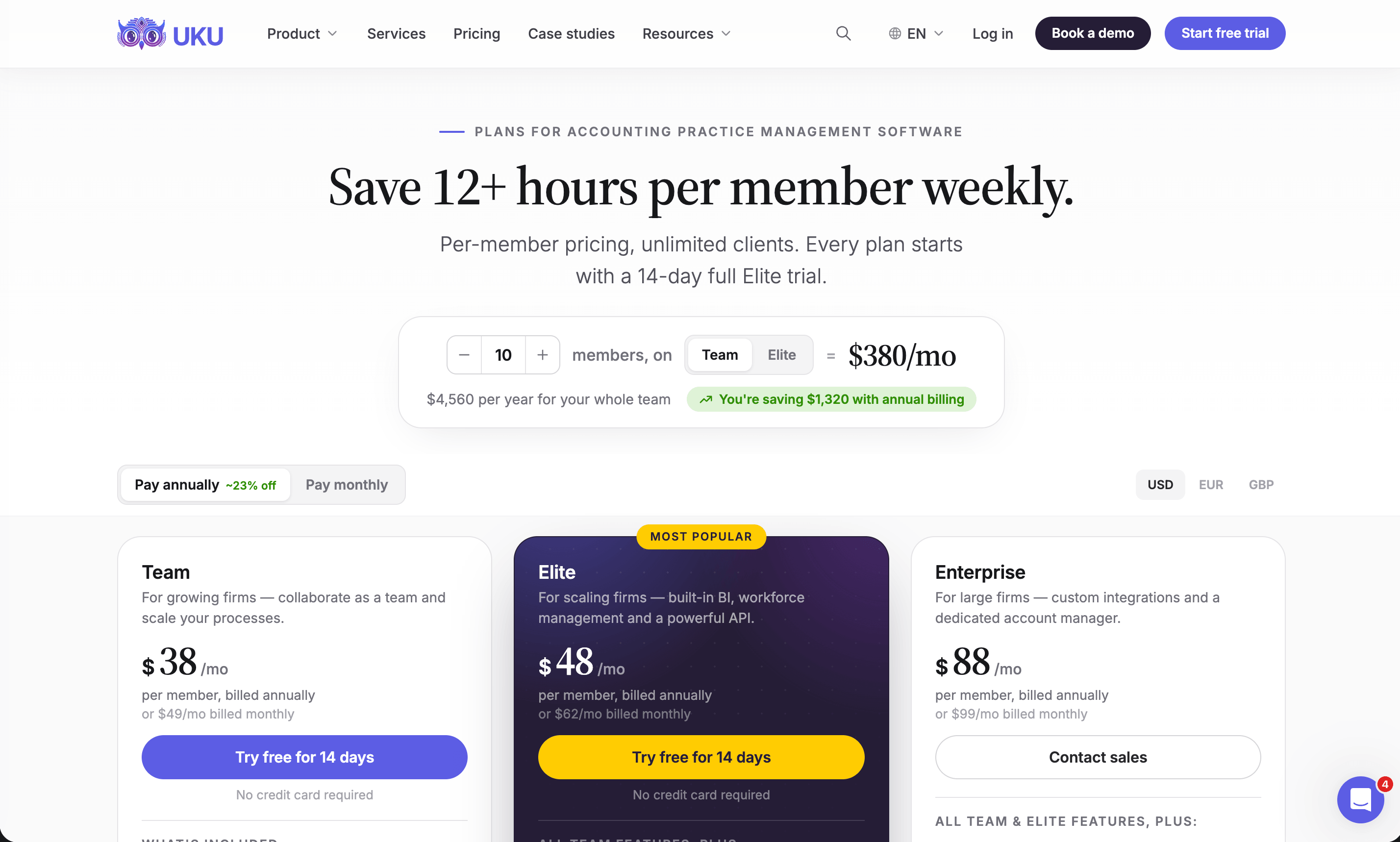
Uku Solo: $19/month annual, $25/month monthly
One user, 20 active clients, and the full core toolkit — CRM, calendar, time tracking, automated billing, workflow automation, every accounting integration, client portal, agreements monitoring, email management, AML tools, document management, and e-signatures. Inactive clients do not count toward the 20.
Against Client Hub’s $49/month Solopreneur, Solo is less than half the price and includes the automated billing Client Hub does not offer at any tier. What it does not include is Client Hub’s transaction-level QuickBooks work, which for a QuickBooks-centred bookkeeper may be the whole job.
Uku Team: $38/month annual, $49/month monthly per user
Unlimited members and clients, projects with task dependencies, access management and user roles, plus one-on-one training. At $38/user annually it is $21 below Client Hub’s Practice Manager and $41 below Practice Manager Plus — while including the billing automation neither of them has.

Uku Elite: $48/month annual, $62/month monthly per user
Elite adds the strategic layer: BI Analytics with production, revenue, utilization, billing, budget and monitoring dashboards; client budgeting; document management with Google Drive, OneDrive, SharePoint and Dropbox; workforce management for flextime, vacations and attendance; and the open API covering almost everything you can do in the app.
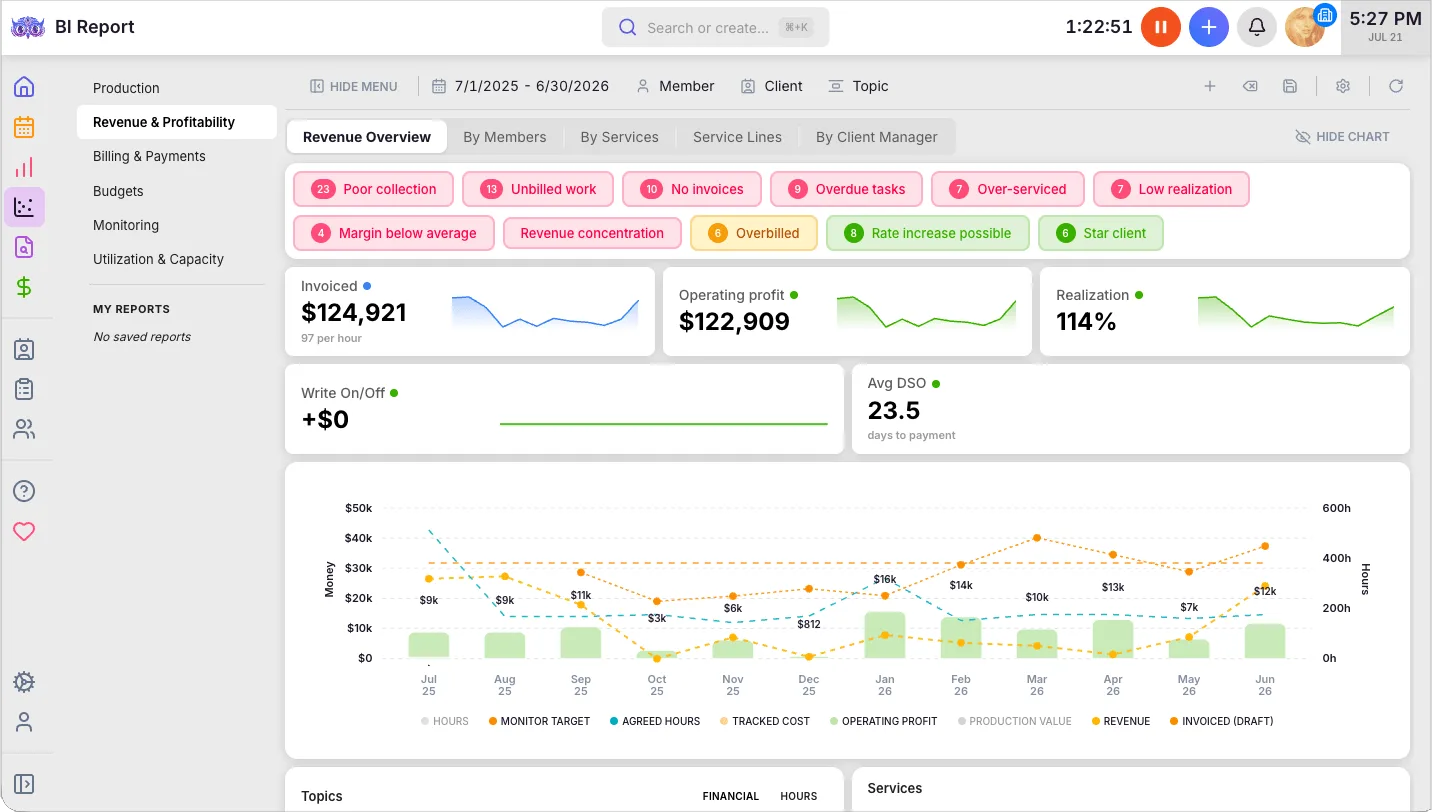
At $48/user/month it is $31 below Client Hub’s Practice Manager Plus, while including an entire category of features Client Hub does not offer.

Uku Enterprise: $88/month annual, $99/month monthly per user
Custom integration development, a dedicated account manager, assisted client import, custom training workshops, and pay-by-invoice for procurement. Volume pricing is negotiated. Client Hub has no equivalent tier at all.
Onboarding, published rather than quoted
Unlike Client Hub’s unpriced concierge onboarding, Uku publishes what onboarding costs:
| Package | Team size | Price | Includes |
|---|---|---|---|
| Free | Any | $0 | First 90 minutes of onboarding |
| Small | Up to 4 members | $700 | Kick-off, import, setup, 1 training session, 2 connect meetings/year |
| Medium | Up to 15 members | $2,000 | 3 kick-offs, full template setup, 2 training sessions, 4 connect meetings/year, VIP support |
| Large | 15+ | Custom | 3+ training sessions, VIP connect meetings, VIP support |
The five-person firm test
Pricing pages are easiest to compare on a real team. Five people, both platforms on the tier that actually does the job:
| Annual | Monthly | |
|---|---|---|
| Client Hub Practice Manager Plus | $395/month | $495/month |
| Uku Elite | $240/month | $310/month |
| Difference | $155/month ($1,860/year) | $185/month |
Client Hub’s figure buys transaction-level QuickBooks integration and a shipped AI suite. Uku’s buys automated billing, BI Analytics, workforce management and an open API. Neither number is “better” on its own — the question is which set of capabilities your firm actually uses, and the honest answer for a QuickBooks-only bookkeeping shop may well be Client Hub’s.
Where each platform’s money goes
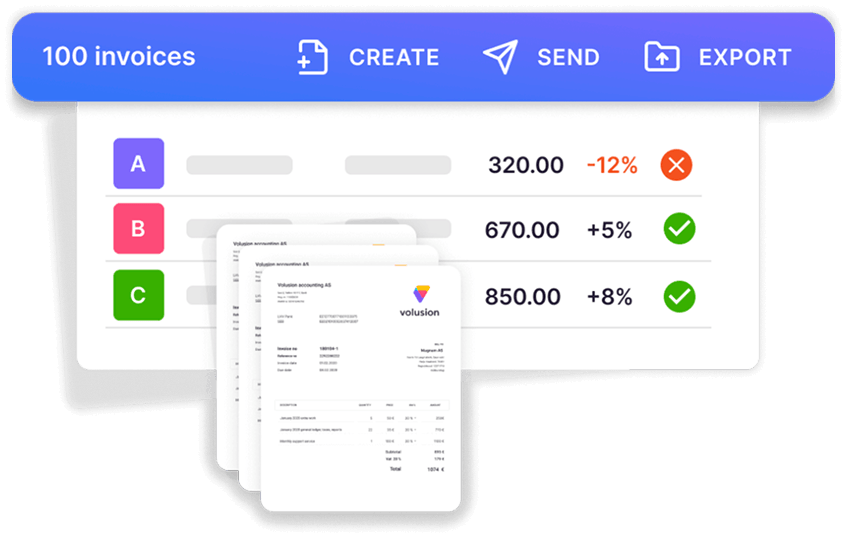
Billing. Client Hub records hours against jobs; producing an invoice means exporting to another tool. Uku’s billing module generates invoices from tracked time and client contracts, with six product types and contract templates that define recurring billing rules per client. Firms report billing 100+ clients in about 30 minutes rather than days.
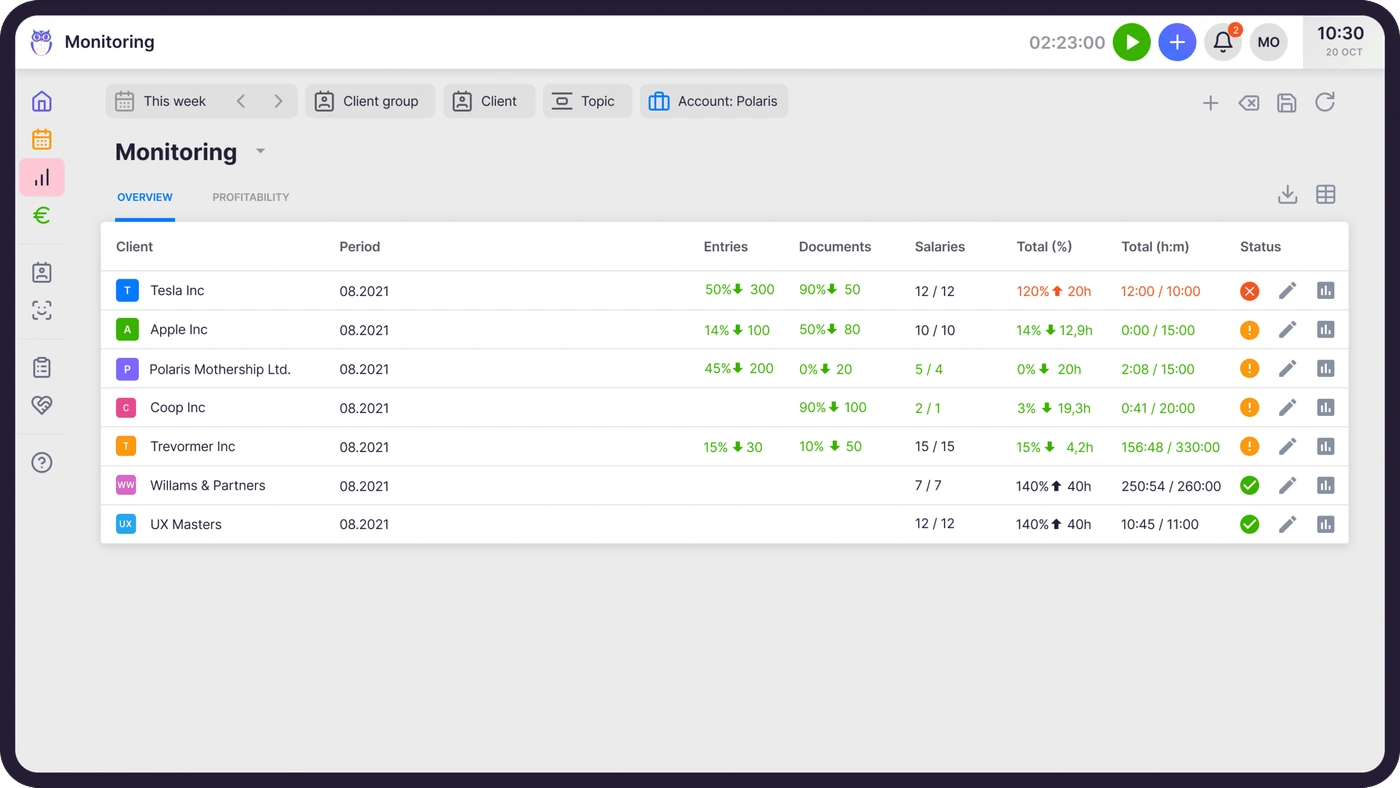
Profitability. Client Hub offers job dashboards and time reports but no profitability analysis or agreement monitoring. Uku’s agreements monitoring compares agreed work against actual delivery continuously, flagging every client green, amber or red on one screen.
Scaling. Client Hub’s three tiers create a cliff at the middle. Uku’s four tiers scale from $19/month with every core accounting integration on every plan, monthly billing available throughout, and pricing shown in €, $ and £.
Integrations. Client Hub connects natively to QuickBooks, Xero, Gmail, Microsoft 365, Anchor and SignWell, with Zapier for the rest. Uku connects to eleven accounting platforms and publishes a REST API with 33 resource groups and full CRUD.
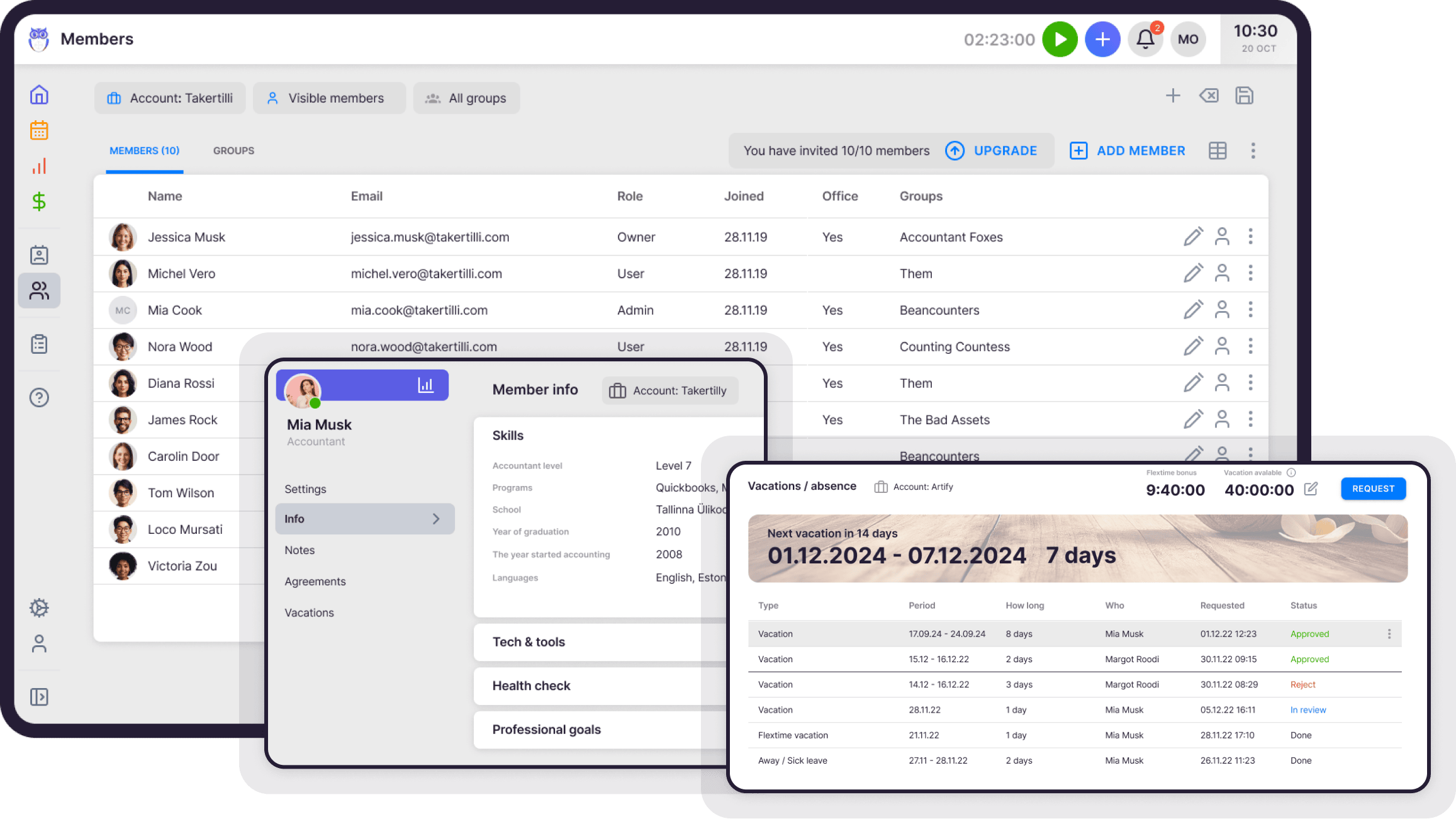
Team management. Client Hub supports multiple members with job assignment and a shared inbox, but no workforce management. Uku’s workforce management covers employee profiles, flextime, vacation approval, and attendance.
Verdict: is Client Hub worth it?
Client Hub is worth its price if your work centres on QuickBooks Online month-end close, client communication is your real bottleneck, and you are a solo practitioner or a small firm that values a narrow, polished tool over a full suite. On the Solopreneur plan in particular, $49/month buys a complete bookkeeping-workflow product.
Client Hub’s pricing works against you if you need billing inside the same system, you are a two-person firm that needs QuickBooks workflows (the middle tier will not serve you), you want profitability data, or you expect to grow into workforce and project management.
Uku costs less per seat at every tier and includes billing automation on all of them, but it does not reach into the ledger the way Client Hub does. If uncategorized transaction resolution is the daily job, that gap matters more than the price difference.
For the full feature-by-feature comparison, see Client Hub vs Uku. For the platform reviewed on its own terms, see our Client Hub review. Weighing the wider field? Our roundup of Client Hub alternatives compares seven tools, and we also line Client Hub up against Financial Cents and Double.
Want to see the numbers against your own team size? Uku’s pricing page has a calculator, or book a demo and we will map your services and contracts with you. Every account starts with a 14-day free trial of the full Elite plan, no credit card required.
Client Hub pricing FAQ
Is Client Hub free to use?
Client Hub offers a 14-day free trial with full feature access and no credit card required. There is no permanently free plan. After the trial the subscription converts to a paid plan automatically unless canceled. The lowest-priced option is Solopreneur at $49/month on annual billing.
What’s the difference between Practice Manager and Practice Manager Plus?
Practice Manager ($59/month per user, annual) includes the client portal, workflow management, time tracking, email sync and AI features, but excludes QuickBooks and Xero integration. Practice Manager Plus ($79/month per user, annual) adds the full integration suite: uncategorized transaction resolution, Books Review with AI analysis, Financial Reports publishing and the 1099 Manager. For bookkeeping firms this distinction is critical, because the QuickBooks workflow is usually the primary use case.
Does Client Hub include invoicing or billing?
No. Client Hub does not include native invoicing, billing or payment processing on any plan. Time tracking records hours against jobs, but generating and sending invoices requires a separate tool. Uku includes automated billing on all plans, generating invoices directly from tracked time.
How much does Client Hub cost for a 5-person team?
A 5-person team on Practice Manager Plus — the only multi-user plan with full QuickBooks integration — costs $395/month annually or $495/month monthly. The same team on Uku Elite costs $240/month annually or $310/month monthly, with BI Analytics, workforce management and a public API included.
Can I use Client Hub with Xero?
Yes, with limitations. The Xero integration, available on Solopreneur and Practice Manager Plus, covers uncategorized transaction resolution only. Books Review, Financial Reports and the 1099 Manager are QuickBooks-only. Uku’s Xero integration covers bidirectional sync for clients, products and invoices.
Does Client Hub have a public API?
No. Client Hub does not publish a public API, offer webhook support, or provide developer documentation, so Zapier is the integration route the company actually supports and documents. Uku offers an open API on the Elite plan ($48/month per user, annual) covering almost everything you can do in the app, and the Uku MCP server for connecting Claude or ChatGPT — with every one of its tools listed on the page, so you can read what an assistant would be able to do before you connect it.
Which platform is better for a growing firm?
For firms planning to add team members, automate billing and monitor client profitability, Uku provides a more complete platform at a lower per-user cost. Client Hub suits firms whose needs centre on client communication and QuickBooks transaction resolution. The key question is whether your primary challenge is managing clients or managing your practice — Client Hub addresses the first, Uku addresses both.
Does Client Hub charge per client?
No. Every Client Hub plan includes unlimited clients and unlimited file storage, so the per-seat fee is the only variable that scales. Uku also charges per member rather than per client, with unlimited clients on Team and above; Solo is capped at 20 active clients, and inactive clients do not count toward that cap.
Frequently asked questions
Is Client Hub free to use?
Client Hub offers a 14-day free trial with full feature access and no credit card required. There is no permanently free plan. After the trial, the subscription automatically converts to a paid plan unless canceled. The lowest-priced option is the Solopreneur plan at $49/month on annual billing.
What's the difference between Practice Manager and Practice Manager Plus?
Practice Manager ($59/month per user, annual) includes the client portal, workflow management, time tracking, email sync, and AI features, but excludes QuickBooks and Xero integration. Practice Manager Plus ($79/month per user, annual) adds the full QuickBooks and Xero integration suite: uncategorized transaction resolution, Books Review with AI analysis, Financial Reports publishing, and the 1099 Manager. For bookkeeping firms this distinction is critical, because the QuickBooks workflow is usually the primary use case.
Does Client Hub include invoicing or billing?
No. Client Hub does not include native invoicing, billing, or payment processing on any plan. Time tracking records hours against jobs, but generating and sending invoices requires a separate tool. The Anchor integration handles proposals and contracts, but not invoice creation. Uku includes automated billing on all plans, generating invoices directly from tracked time.
How much does Client Hub cost for a 5-person team?
A 5-person team on Practice Manager Plus, the only multi-user plan with full QuickBooks integration, costs $395/month on annual billing or $495/month on monthly billing. The same team on Uku Elite costs $240/month annually or $310/month monthly, with BI Analytics, workforce management, and a public API included.
Can I use Client Hub with Xero?
Yes, but with limitations. The Xero integration, available on the Solopreneur and Practice Manager Plus plans, covers uncategorized transaction resolution only. Books Review with AI analysis, Financial Reports publishing, and the 1099 Manager are QuickBooks-only. Uku's Xero integration covers bidirectional sync for clients, products, and invoices.
Does Client Hub have a public API?
No. Client Hub does not publish a public API, offer webhook support, or provide developer documentation, so Zapier is the programmatic route the company actually supports and documents. Uku offers an open API on the Elite plan ($48/month per user, annual) that covers almost everything you can do in the app, plus the Uku MCP server for connecting Claude or ChatGPT — with every one of its tools listed on the page, so you can read what an assistant would be able to do before you connect it.
Which platform is better for a growing firm?
For firms planning to add team members, automate billing, and monitor client profitability, Uku provides a more complete platform at a lower per-user cost. Client Hub suits firms whose needs center on client communication and QuickBooks transaction resolution. The key question is whether your primary challenge is managing clients or managing your practice, because Client Hub addresses the first while Uku addresses both.
Does Client Hub charge per client?
No. All Client Hub plans include unlimited clients and unlimited file storage, so the per-seat fee is the only variable that scales. Uku also charges per member rather than per client, with unlimited clients on the Team plan and above; the Solo plan is capped at 20 active clients, and inactive clients do not count toward that cap.

Published Aug 10, 2026 · Updated Sep 10, 2026