Client Hub vs Uku: Which Practice Management Platform Fits Your Firm in 2026?
Client Hub excels at QuickBooks bookkeeping workflows; Uku automates billing and tracks profitability. See which fits your accounting firm.


Contents
- Client Hub vs Uku at a glance
- The core difference: bookkeeping depth vs operational breadth
- Client Hub excels at QuickBooks bookkeeping workflows
- Uku turns tracked time into revenue automatically
- Client portal approaches: portal-first vs workflow-first
- Workflow automation: templates vs recurring engines
- Pricing comparison
- Reporting and analytics
- Integration ecosystems
- Security and compliance
- Client Hub vs Uku: which should you choose?
- How to switch from Client Hub to Uku
- Client Hub vs Uku FAQ
Choosing between Client Hub and Uku for your accounting practice management comes down to five questions:
- Is your firm’s core service recurring bookkeeping and month-end close work, or do you run a mix of accounting, tax, payroll, and advisory services?
- Do you need QuickBooks transaction-level workflows, or billing automation that turns tracked time into invoices?
- Is your firm based in the US or Canada, or do you serve clients across multiple countries and languages?
- Do you want a platform built around the client portal, or one built around team productivity and profitability tracking?
- Are you looking for a tool that handles bookkeeping tasks like uncategorized transactions, or one that monitors whether your service agreements are profitable?
In short, here’s what we recommend:
Client Hub is the bookkeeping-first practice management platform co-founded by a Top 100 QuickBooks ProAdvisor who spent two decades in accounting practice. Its strength is a two-way QuickBooks Online integration that pulls uncategorized transactions into a client-facing portal, lets clients categorize expenses and attach receipts, and syncs everything back to the ledger. The AI-powered Books Review flags month-end anomalies automatically, and the client portal feels like texting so clients actually respond. Starting at $49/month for solo practitioners with unlimited clients and storage on all plans, it serves US and Canada-based bookkeeping and CAS firms that live inside QuickBooks or Xero.
Uku is the accounting practice management platform that gives firms visibility over team workload, client profitability, and billing in one system. Workflow automation generates recurring tasks on autopilot, time tracking feeds into automated invoice generation, and agreements monitoring flags unprofitable clients in real time. Available in 12 languages across 25+ countries, with pricing starting at $19/month for solo practices, it serves accounting firms worldwide that need to know where their time goes and whether they are billing enough for it.
Both platforms manage accounting workflows and client communication, but they approach practice management from opposite directions. Client Hub starts with the client interaction and works inward; Uku starts with the firm’s operations and works outward.
Client Hub vs Uku at a glance
| Feature | Client Hub | Uku |
|---|---|---|
| Core philosophy | Bookkeeping workflow + client portal | Team productivity + billing automation |
| Starting price | $49/month (Solopreneur, annual) | $19/month (Solo, annual) |
| Per-user price | $59–$79/user/month (annual) | $38–$88/user/month (annual) |
| Client limits | Unlimited on all plans | Unlimited (20 active on Solo) |
| Geographic focus | US and Canada | Global (25+ countries, 12 languages) |
| QuickBooks integration | Two-way transaction sync | Bidirectional client/invoice sync |
| Xero integration | Uncategorized transactions only | Bidirectional client/invoice sync |
| Native invoicing | Not included | Full automated billing |
| Client portal | Core feature with mobile app | Built-in with magic link access |
| AI features | Magic Suite (emails, close review, workflows) | Open API and Uku MCP today; email triage on the roadmap |
| Agreements monitoring | Not included | Real-time profitability tracking |
| BI Analytics | Not included | Six-category reporting (Elite) |
| Public API | Not available | REST API, 33 resource groups, full CRUD (Elite) |
| Best for | US/Canada bookkeeping and CAS firms | Accounting firms worldwide needing billing and profitability visibility |
Two rows in that table are worth pausing on, because they are the ones where Client Hub is genuinely ahead: transaction-level QuickBooks integration, and a shipped AI layer. Neither is something Uku matches today.
The core difference: bookkeeping depth vs operational breadth
The difference between these platforms comes down to where each invests its design effort.
Client Hub was started in 2017, co-founded by Judie McCarthy, a Top 100 QuickBooks ProAdvisor who spent two decades in accounting practice. That background produced a platform built around one pain point: by the company’s own account, McCarthy calculated in 2017 that her accounting and bookkeeping team was spending 30% of its time chasing clients for information instead of doing accounting work.
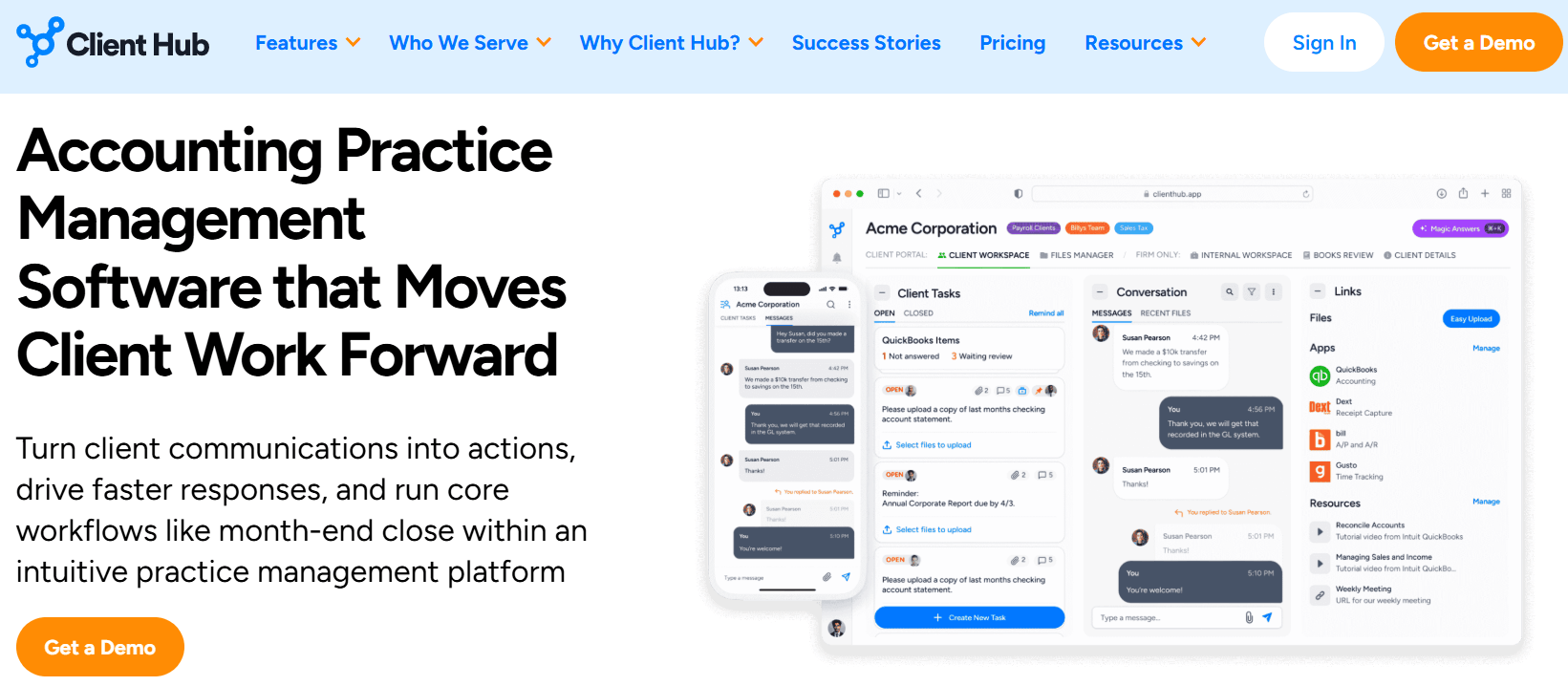
The solution was a client portal at the center of the product, with QuickBooks transaction workflows layered on top. When a client has uncategorized expenses in QuickBooks, Client Hub pulls those transactions into the portal, the client categorizes them and attaches receipts, and everything syncs back to the ledger. The month-end close becomes a structured process instead of an email thread.
This focus means Client Hub does bookkeeping work that no other practice management tool replicates natively. But it also means the platform does not include invoicing, profitability analytics, or workforce management. Firms handle billing through separate tools.
Uku was founded in Estonia by Rain Allikvee and Jaanus Lang, childhood friends whose mothers were accountants. They watched firms manage client work in spreadsheets and email, losing billable hours because no one tracked them and losing money because no one measured whether service agreements were profitable.
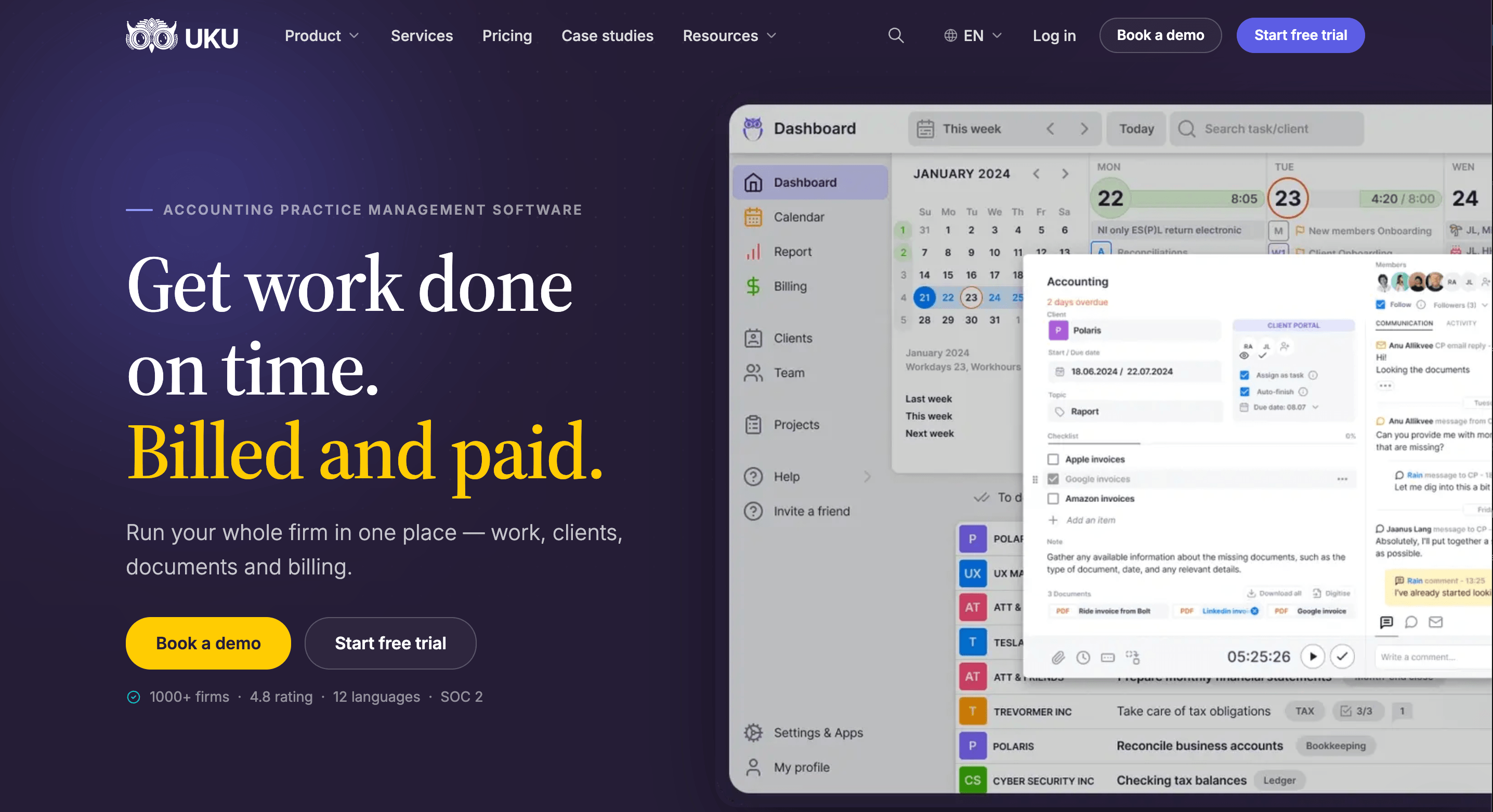
Their answer was a platform where every tracked minute flows into an invoice automatically, and every client agreement is measured against actual work in real time.
Uku’s modular approach covers more operational ground: task management, workflow automation, time tracking, billing, agreements monitoring, BI Analytics, workforce management, and a client portal. Firms can start with CRM and tasks, then activate billing, reporting, and other modules as needed rather than implementing everything at once.
The trade-off is that Uku does not reach into the accounting ledger. It does not pull uncategorized transactions from QuickBooks or run AI diagnostics on a balance sheet. It manages the firm’s operations around the accounting work, not the accounting data itself.
Client Hub excels at QuickBooks bookkeeping workflows
Client Hub’s strongest advantage is its two-way QuickBooks Online integration, which goes well beyond what other practice management platforms offer.
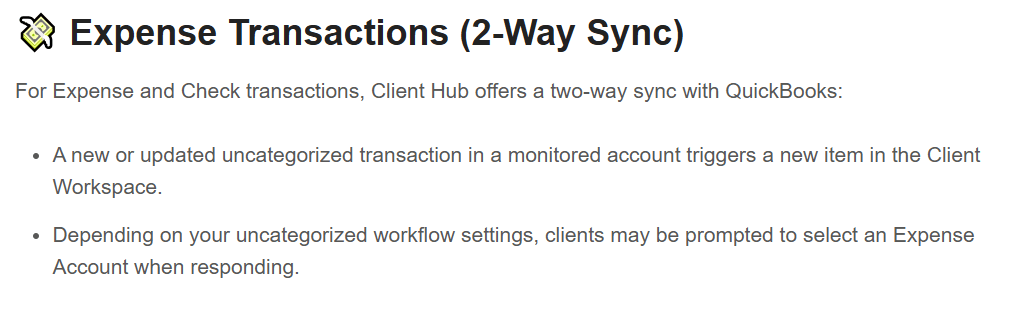
When a transaction posts to a monitored account in QuickBooks, it appears in the client’s portal as an actionable item. For expense and check transactions, the client sees the transaction details, provides a description or selects an expense account, and optionally attaches a receipt.
When the accountant reviews and closes the item, all updates and attachments sync back to QuickBooks instantly. For deposits, a one-way sync triggers a client task requiring a description, with a direct link back to the QuickBooks transaction.
The Books Review feature adds a month-end quality control layer. It runs two categories of checks: rule-based data hygiene (expenses without payees, purchases in parent accounts, large transactions above a configurable threshold, transactions without attachments) and AI-driven variance analysis that compares the Balance Sheet and P&L to the prior period.
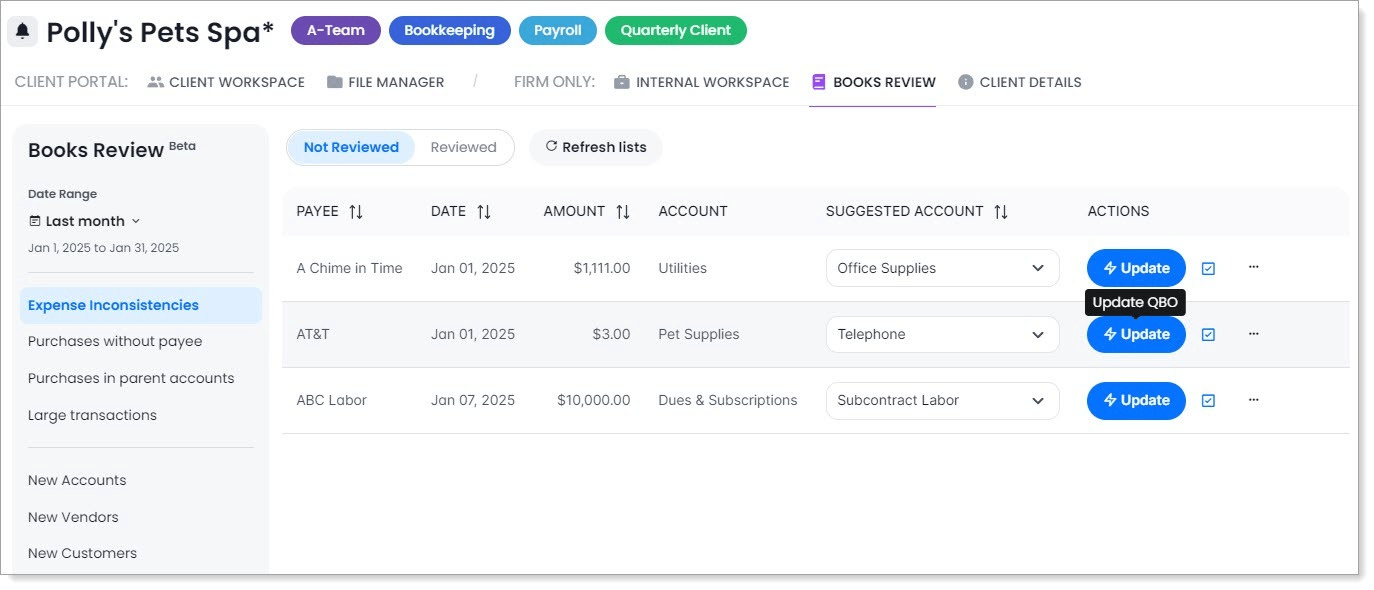
Orange-shaded rows flag unexpected or significant balance changes; green rows flag accounts with current-period activity but no prior-period balance. Accountants drill down to individual transactions and click through to QuickBooks directly.
The 1099 Manager, located within Books Review, pulls vendor payment and Tax ID data from QuickBooks, tracks W-9 request and receipt dates, pushes updates back to QuickBooks, and exports completed data to CSV for filing. It turns the annual 1099 collection process into a tracked workflow rather than a spreadsheet exercise.
Client Hub also publishes financial reports to clients with AI-generated plain-language summaries through Magic Financial Reports, translating complex statements into language clients can understand.
These capabilities are available on the Solopreneur ($49/month) and Practice Manager Plus ($79/user/month) plans. The base Practice Manager plan ($59/user/month) does not include the QuickBooks or Xero integrations, which means the platform’s most distinctive features require specific tier selection.
Uku connects to QuickBooks and Xero for bidirectional sync of clients, products, and invoices, but does not reach into the transaction level. It does not pull uncategorized expenses, run ledger diagnostics, or manage W-9 collection.
For firms whose primary bottleneck is getting clients to categorize transactions and attach receipts, Client Hub’s integration depth has no equivalent. If that is your firm, the rest of this comparison matters less than this section does.
Uku turns tracked time into revenue automatically
Where Client Hub focuses on the accounting data, Uku focuses on the business of running the firm, and billing is the centerpiece. Users track time through a stopwatch, manual entry, or bulk allocation across multiple tasks, with 90% of actions requiring one click.
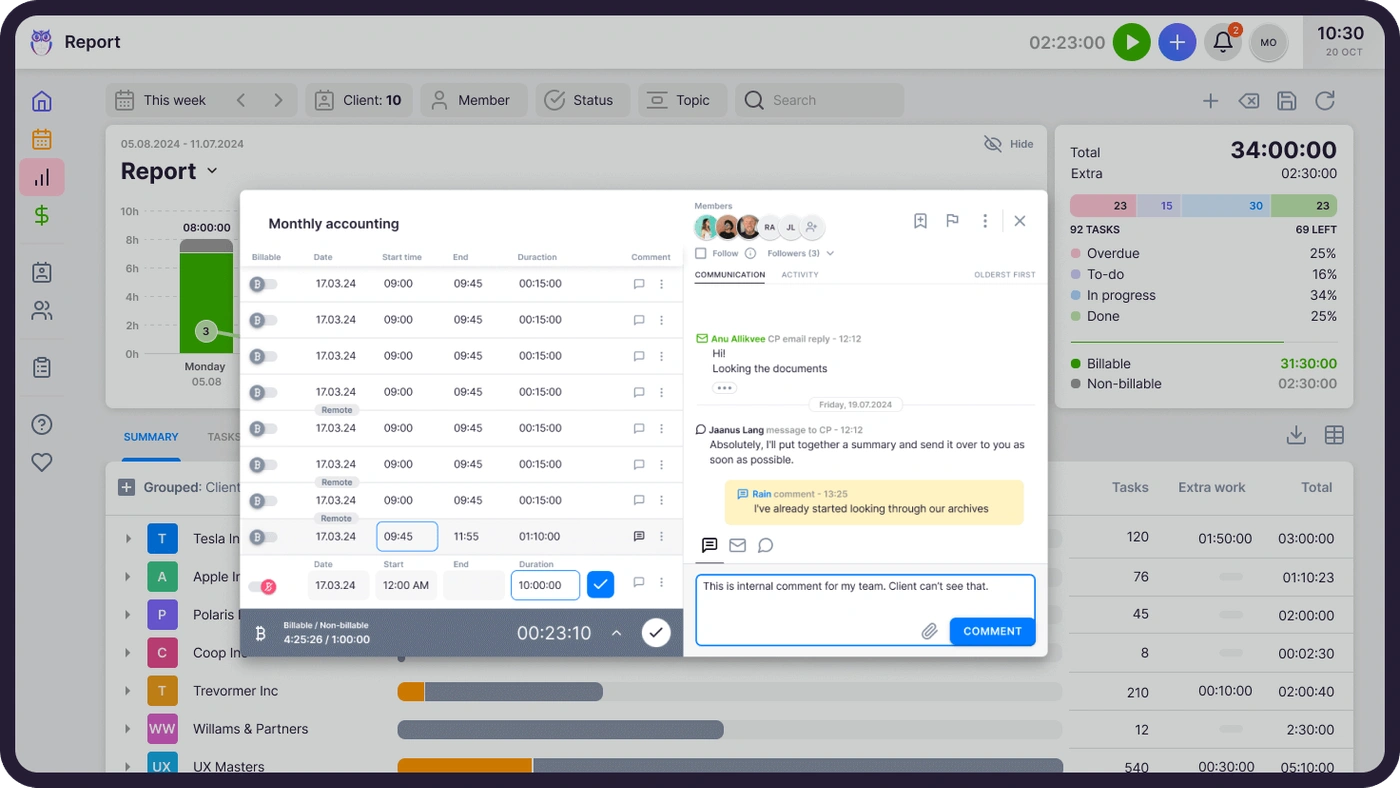
Uku’s billing module automates the chain from tracked time to paid invoice. Every time entry logged against a client task maps to a billing contract. When the billing period closes, Uku reads the contract, pulls the relevant time entries and custom values, applies pricing rules, and generates a draft invoice. The firm reviews, approves, and sends.
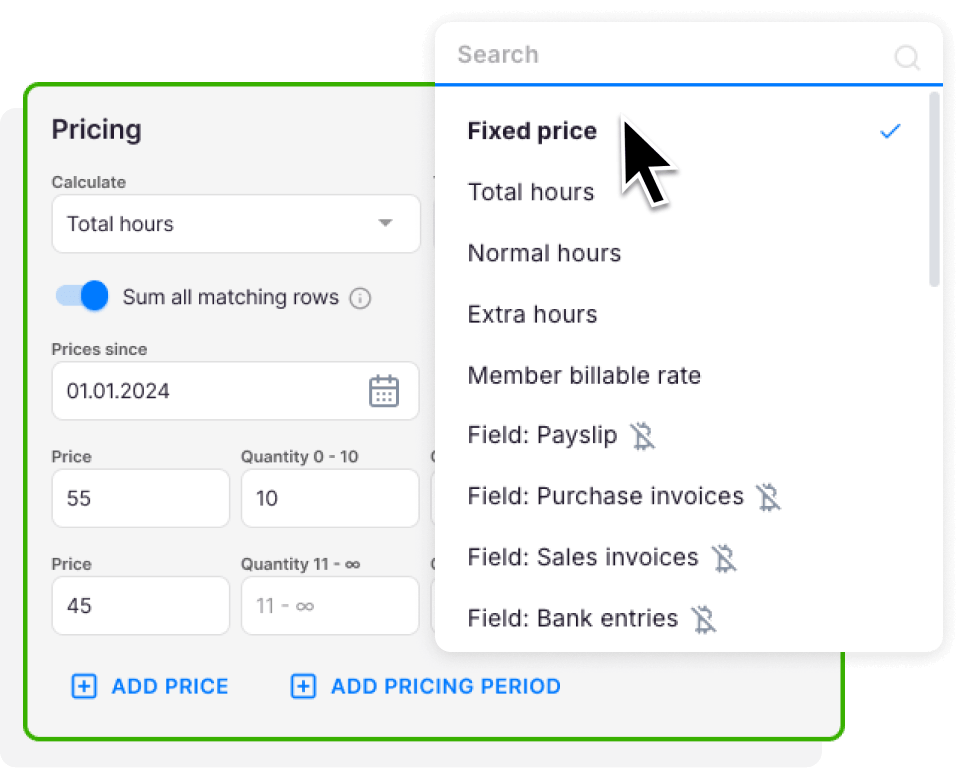
The billing system supports six product types: hourly, fixed price, per-piece, member billable rate, combined, and task-triggered (a fee fires automatically when a task reaches a specific status). Contracts can mix pricing models (time, fixed, volume with tiered pricing ranges, or a combination) within a single agreement.
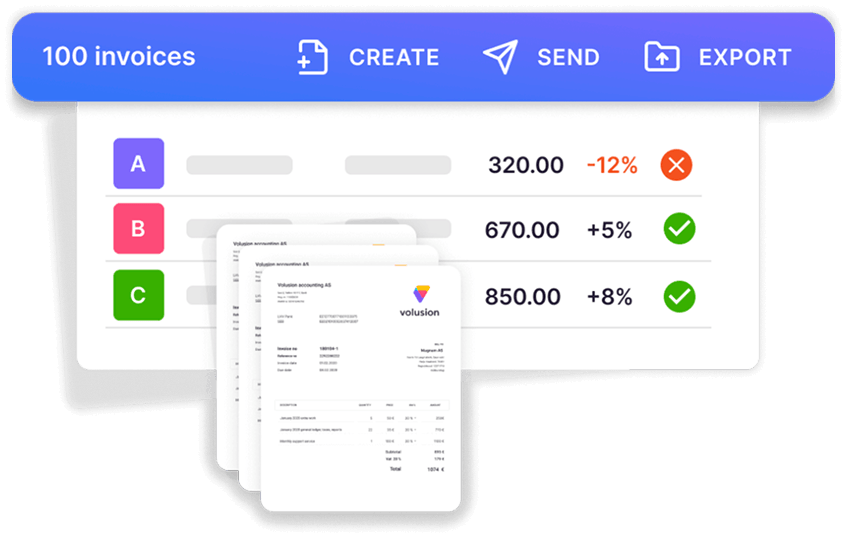
Invoices export to connected accounting software or send directly from the firm’s own email domain in the client’s preferred language.
The agreements monitoring feature sits alongside billing and solves a problem most practice management tools ignore. It compares agreed work volume (hours, documents processed, payroll runs, VAT filings) against actual work in real time. Each client gets a traffic-light status: green (on track), orange (approaching the limit), red (consuming more than the pricing accounts for).
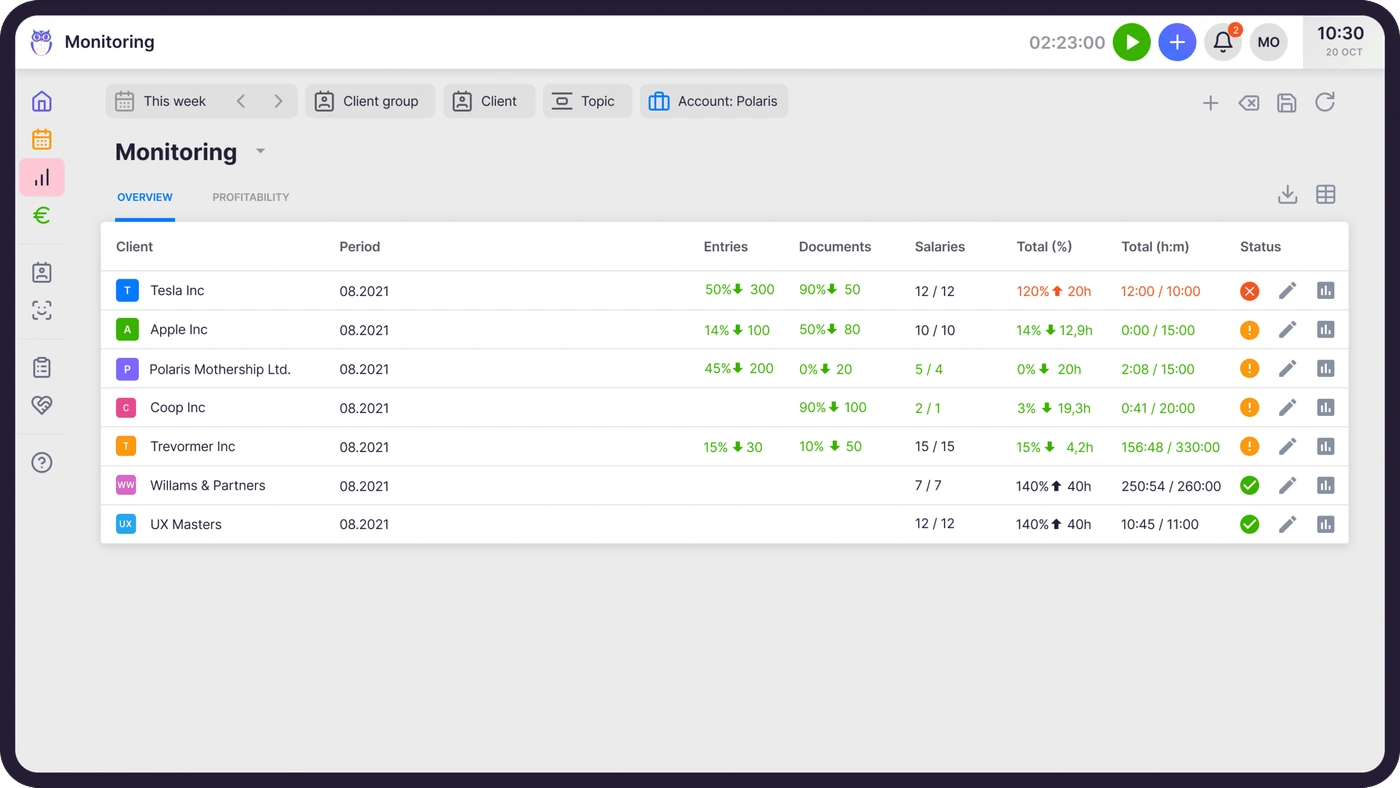
The entire client portfolio appears on one screen, so a firm owner can see which clients are profitable and which are not without waiting for month-end.

Client Hub does not include native invoicing or billing. Firms using Client Hub handle billing through the Anchor integration (for proposals and contracts) or separate billing software. Time tracking exists in Client Hub with per-staff budget hours per job, but tracked time does not flow into invoice generation within the platform.
Client portal approaches: portal-first vs workflow-first
Both platforms include client portals, but they serve different roles within each product.
Client Hub treats the portal as the product’s foundation, not a feature added alongside other tools. Clients access the portal through email notifications with links that take them directly to the relevant task or conversation without requiring a fresh login. The experience feels like messaging, with reviewers comparing it to texting.
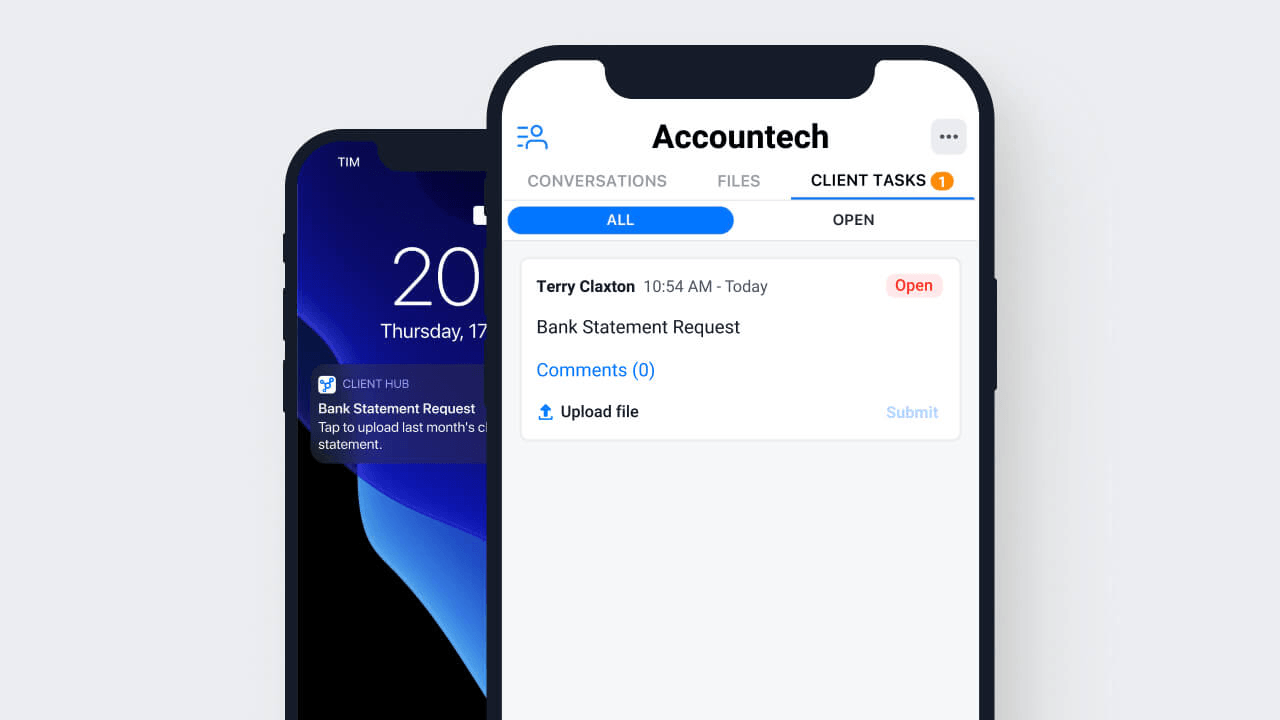
The portal supports five client task types: To Do, Yes/No, File Request, Accept/Decline, and Open Text.
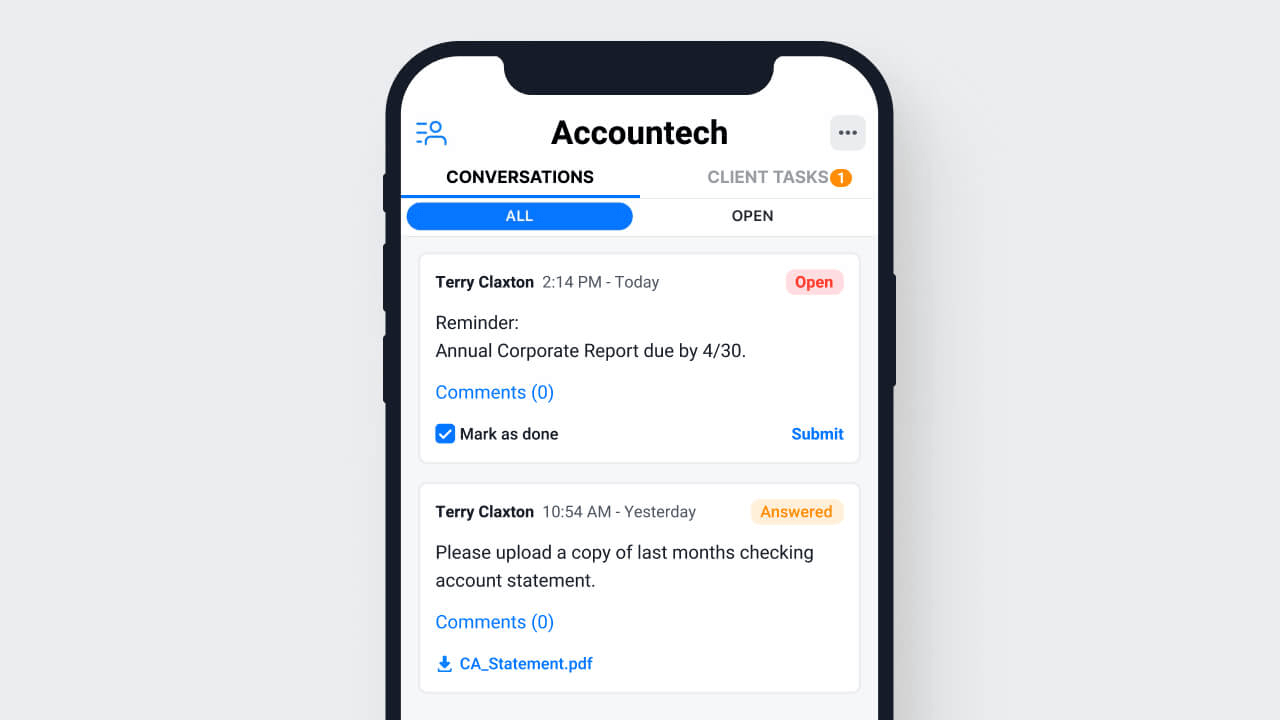
The Autopilot feature publishes client tasks on a scheduled day before work begins, and Auto-Remind sends daily reminders after the due date until the client responds.
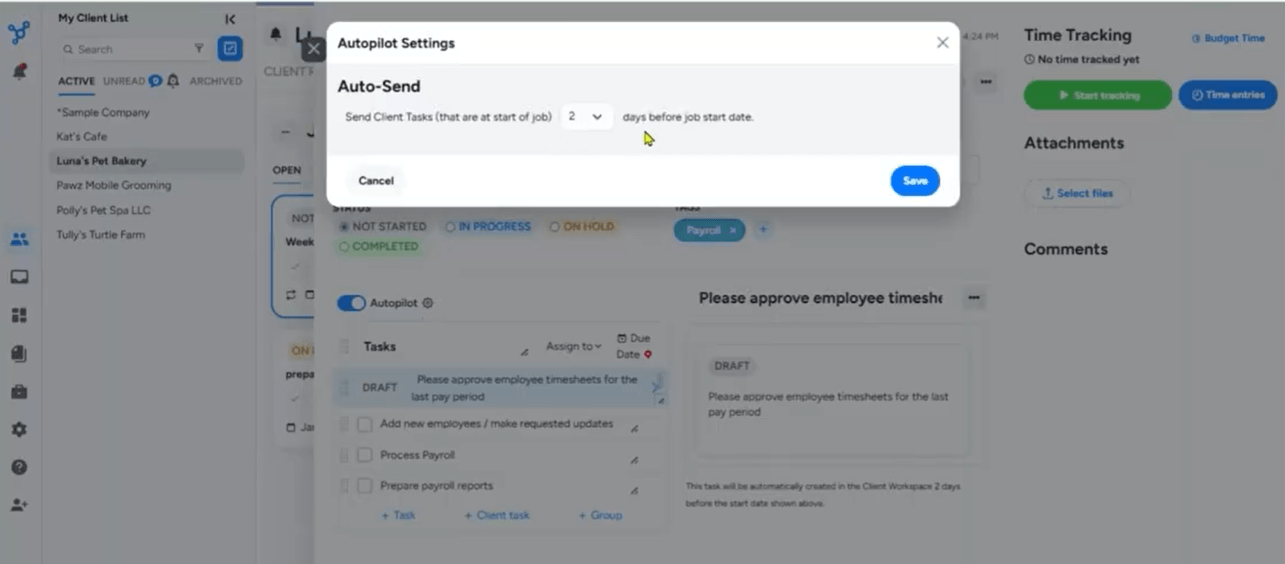
A dedicated iOS and Android mobile app lets clients respond on the go. eSignature is embedded in the File Manager through SignWell at no extra cost.
For bookkeeping clients, uncategorized QuickBooks transactions surface directly inside the portal. Clients resolve expenses within the same interface they use for messages and file uploads, keeping the entire interaction in one place.
Uku’s client portal mirrors the same task on both sides: clients and accountants work on the same item with all communication, documents, and time tracking in one place. Clients access the portal through a magic link (one-click authenticated URL, no username or password, valid seven days) to view assigned tasks, upload documents, message the firm, and sign documents with e-signatures.
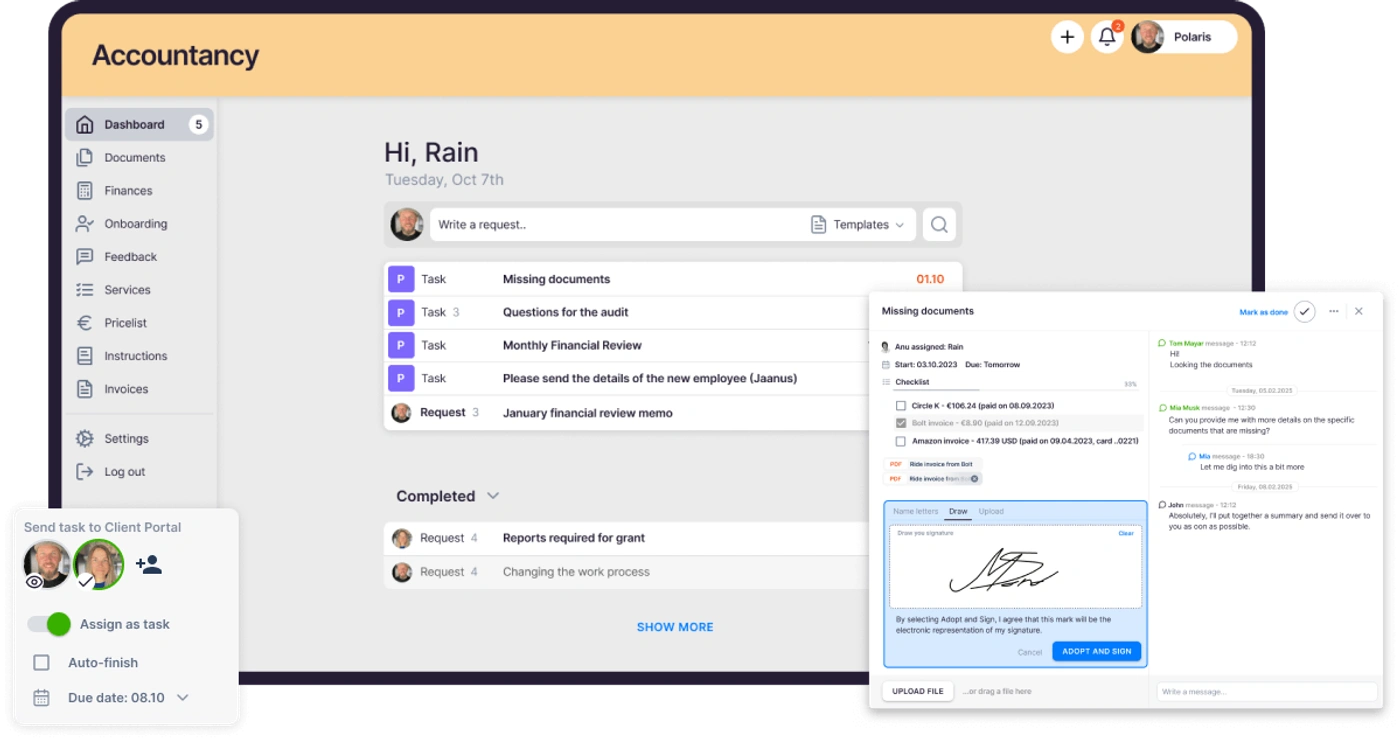
Automated reminders fire before deadlines and for overdue tasks. Documents uploaded through the portal can be digitized in one click and pushed to QuickBooks or Xero through a digitization partner.
The portal supports company branding with custom subdomain, logo, colors, and welcome video, and firms can create unique menus for each client. Client contacts are free and do not count toward the subscription.
The difference is one of emphasis. Client Hub’s portal is the primary interface between firm and client, built to handle the back-and-forth of bookkeeping data collection. Uku’s portal serves the firm’s broader workflow, collecting documents and tracking tasks across all service types without the ledger-specific features.
One practical gap worth naming: Client Hub ships a dedicated client mobile app, and Uku does not.
Workflow automation: templates vs recurring engines
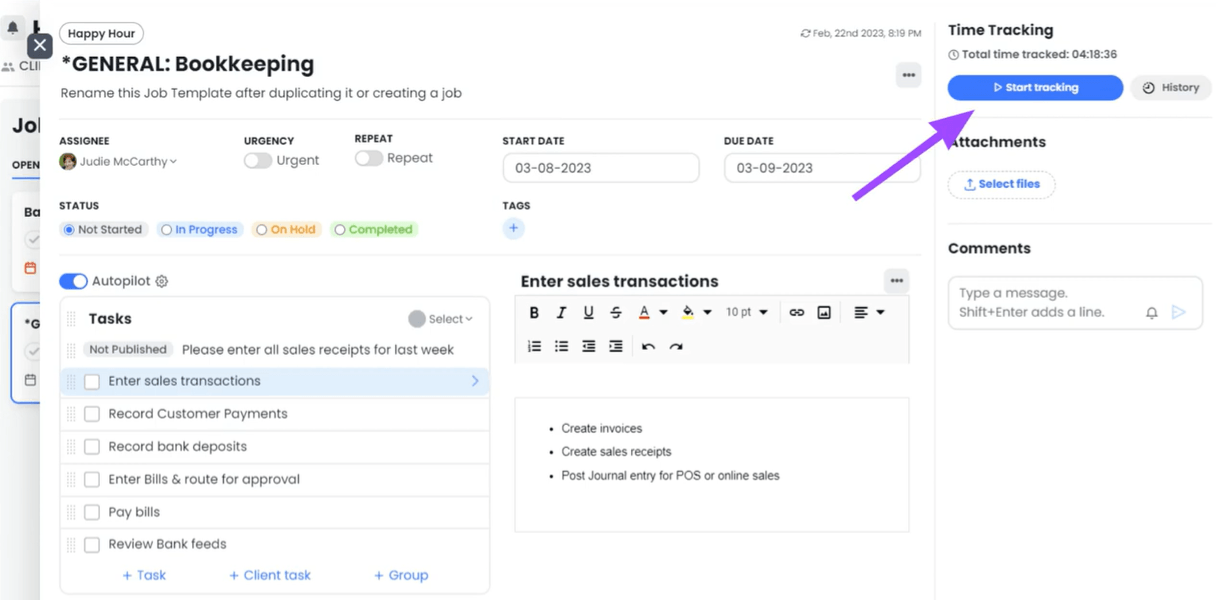
Client Hub organizes work around Jobs, each containing a structured task checklist. Jobs can be created manually, from saved templates, or via Magic Workflow (AI-generated from a plain-language description). Recurring jobs regenerate automatically when marked complete, and the Batch Create feature deploys a template to multiple clients at once.
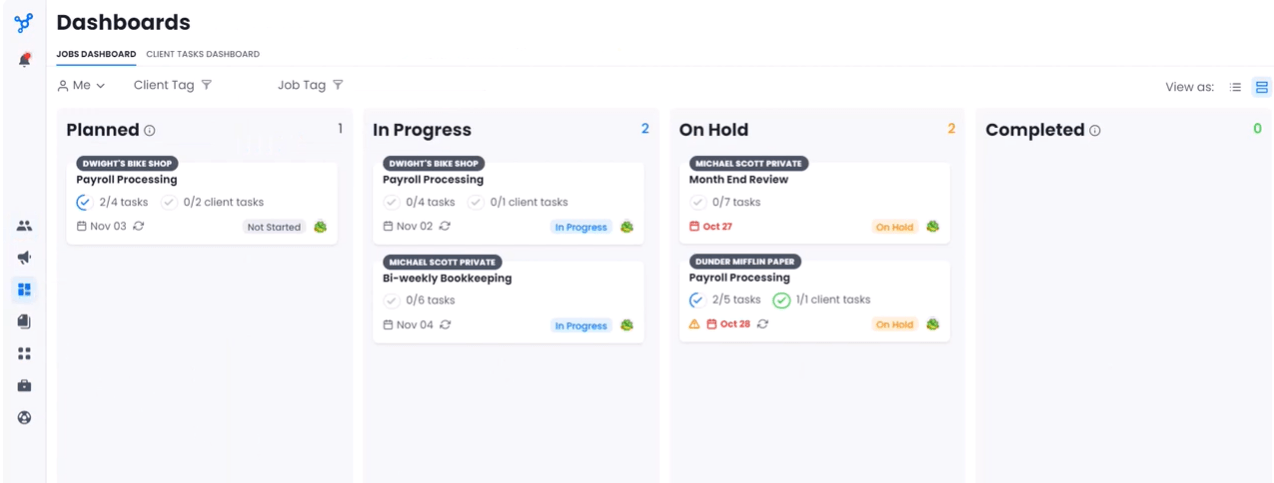
The Jobs Dashboard provides Kanban and list views with four status columns: Planned, In Progress, On Hold, and Completed. Email sync links client emails directly to workspaces, and firms can create a job from any email with the original thread attached as context.
A prebuilt Templates Library offers accounting-specific workflows to reduce setup time.
The AI layer (branded “Magic Suite”) adds capabilities across workflows: Magic Workflow generates job structures from natural language, Magic Emails summarize threads and draft replies, and Magic Client Tasks generate client-facing instructions from plain-language prompts.
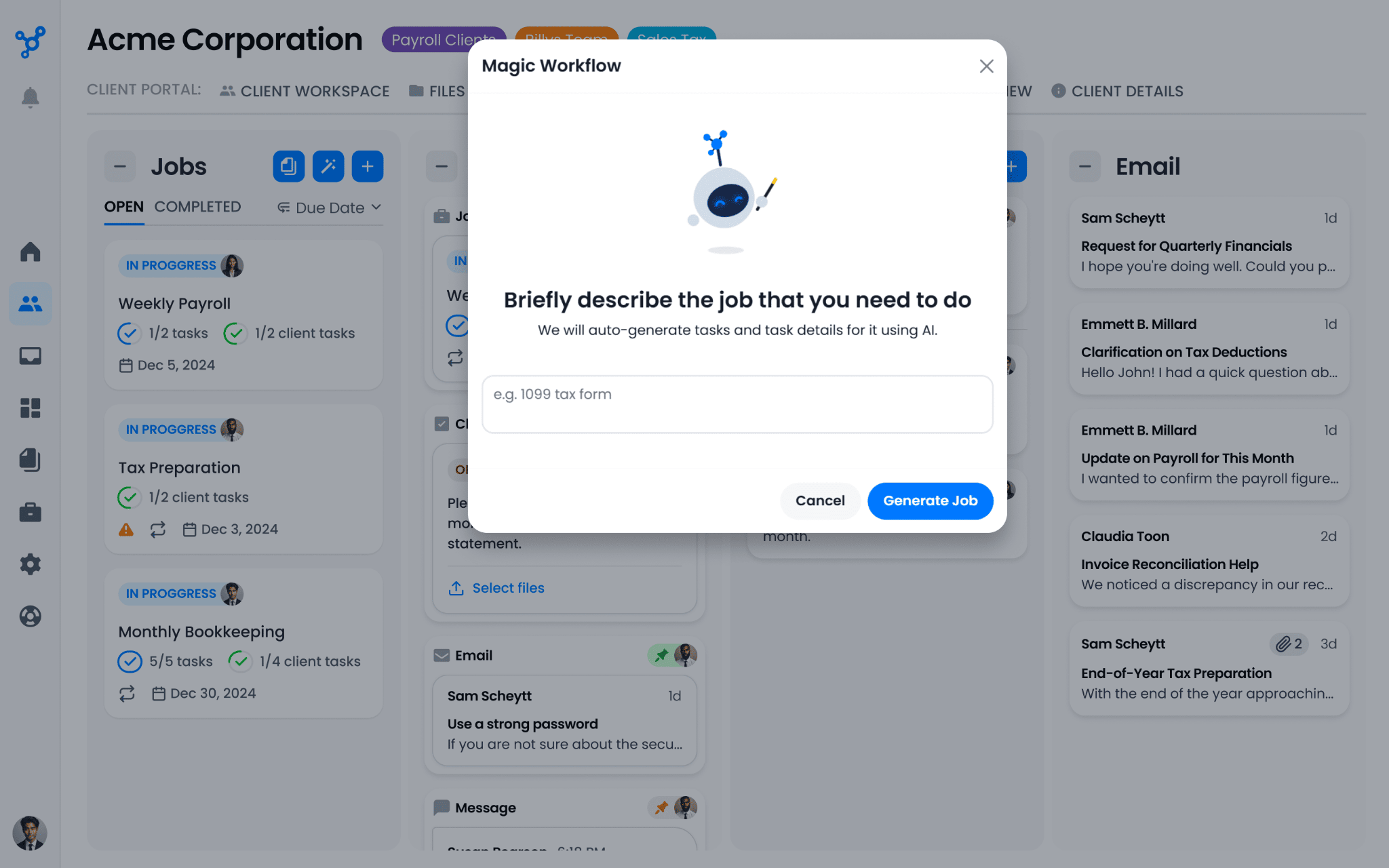
These features are included on all plans.
Uku uses a template-driven automation layer where each service is defined as a recurring workflow template once, assigned to a client, and tasks generate on autopilot from that point forward. Recurrence patterns cover weekly, monthly, quarterly, yearly, and custom intervals.
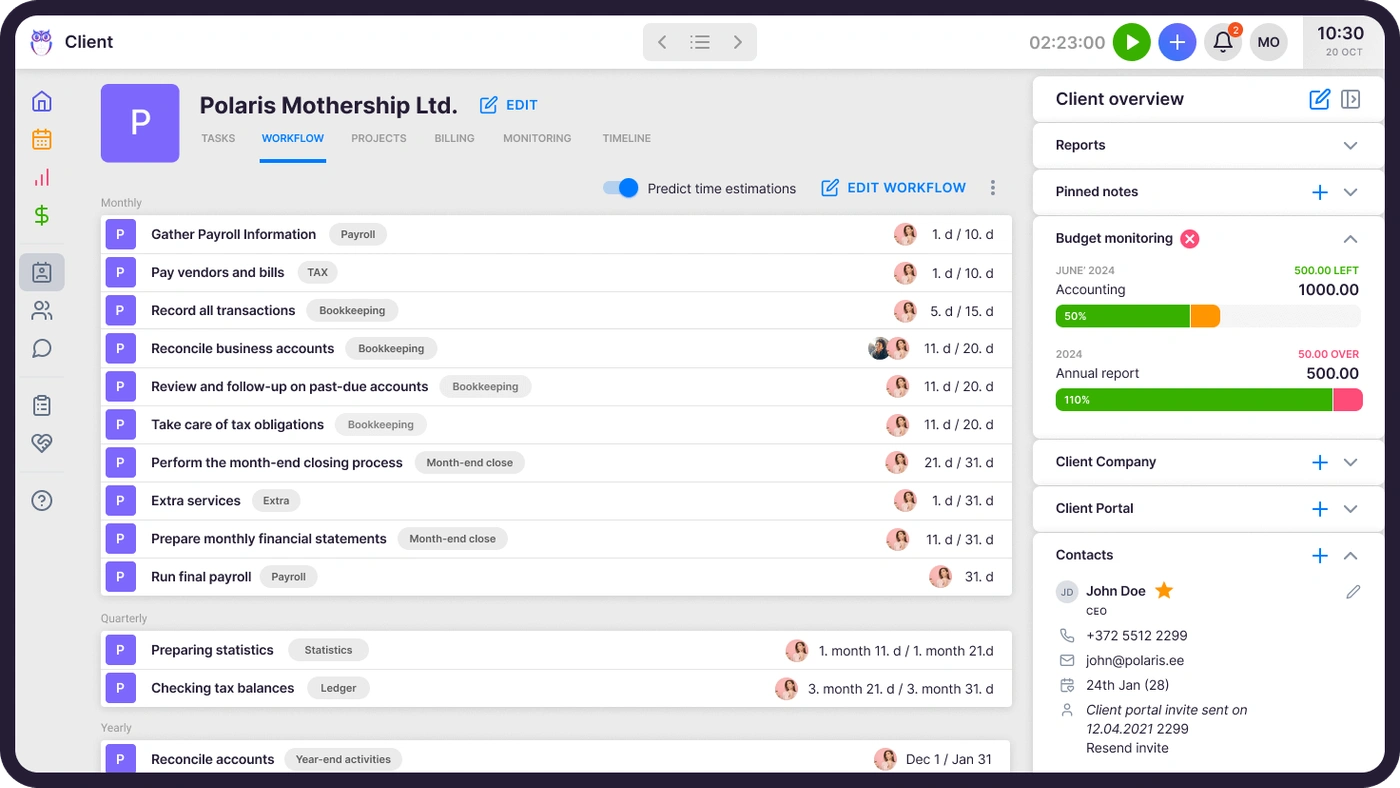
Tasks falling on weekends or holidays shift to the nearest working day automatically. Recurring tasks can be anchored to client-specific date fields (fiscal year-end, payroll date), so automation adapts to each client’s calendar rather than forcing a universal schedule. Task dependencies keep downstream tasks hidden until predecessors are complete.
Template update propagation pushes changes to all existing client tasks derived from a template, eliminating per-client manual updates.
Client Hub’s strength here is AI-assisted job creation and the direct email-to-job bridge. Uku’s strength is the depth of its recurring automation engine, where a firm sets up a client’s work plan once and never touches it again unless the engagement changes.

Pricing comparison
Client Hub uses a per-seat model with three tiers, all including unlimited clients and unlimited storage:
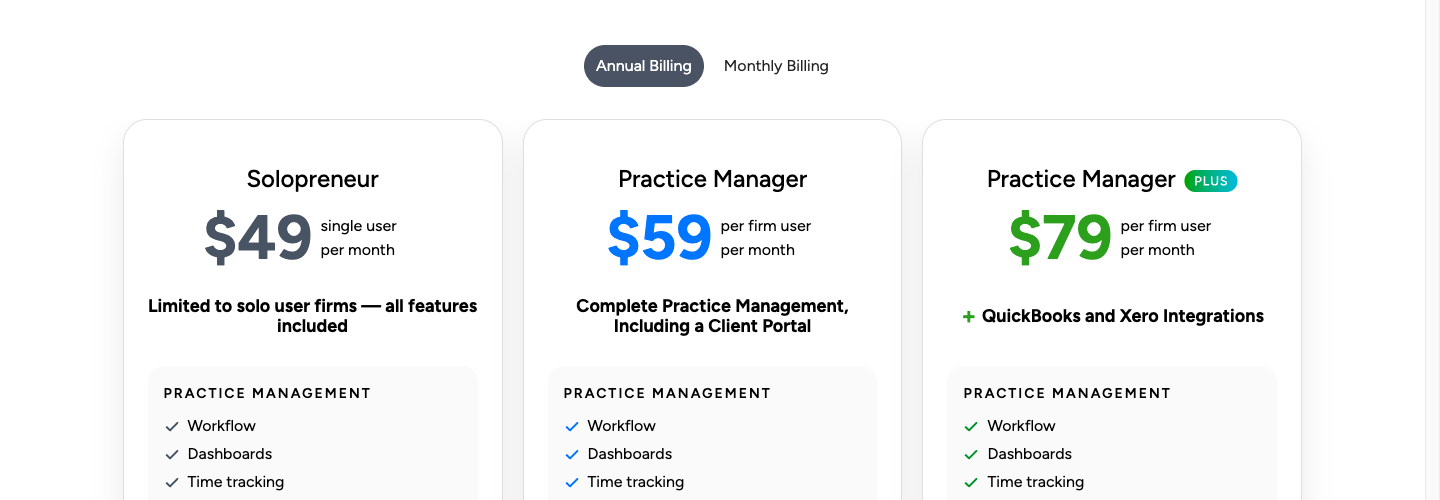
| Plan | Annual price | Monthly price | Notes |
|---|---|---|---|
| Solopreneur | $49/month | Annual only | Single user; includes QBO/Xero integration |
| Practice Manager | $59/user/month | $79/user/month | Multiple seats; no QBO/Xero integration |
| Practice Manager Plus | $79/user/month | $99/user/month | Multiple seats; full QBO + Xero integration |
A 14-day free trial with full functionality is available, no credit card required. There are no per-client fees, setup fees, or feature paywalls within a tier. Optional concierge onboarding is available at additional cost for larger firms.
An important pricing note: the Practice Manager plan ($59/user/month) excludes the QuickBooks and Xero integrations that are Client Hub’s primary differentiator. Firms wanting the uncategorized transaction workflows, Books Review, and 1099 Manager need the Practice Manager Plus plan at $79/user/month.
Uku uses a per-member model across four tiers. Client portal access is free on all plans:
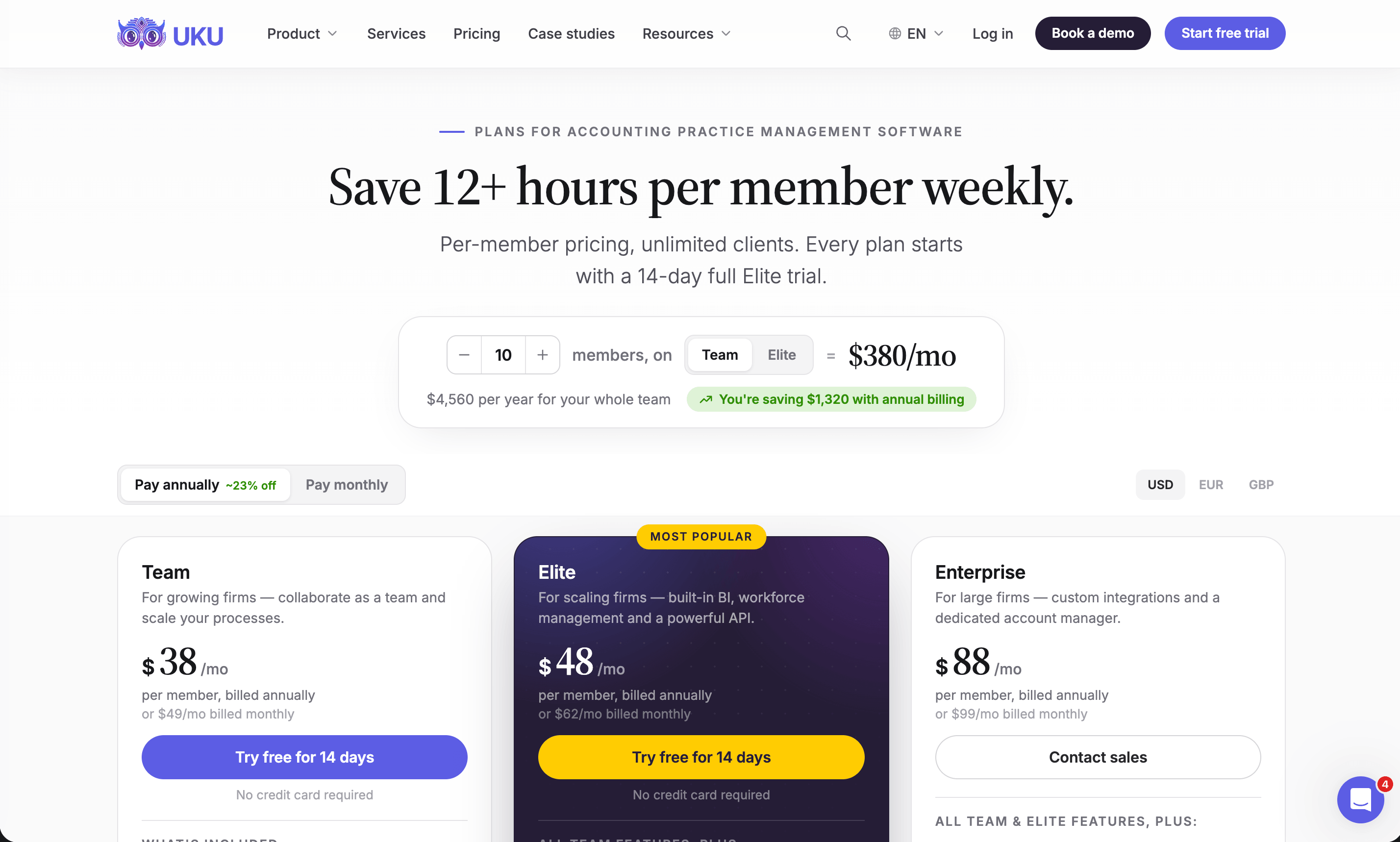
| Plan | Annual price | Monthly price | Notes |
|---|---|---|---|
| Solo | $19/month | $25/month | 1 member, 20 active clients |
| Team | $38/user/month | $49/user/month | Unlimited members and clients |
| Elite | $48/user/month | $62/user/month | Adds BI Analytics, API, Workforce Management |
| Enterprise | $88/user/month | $99/user/month | Custom integrations, dedicated account manager |
A 14-day free trial of the full Elite plan is available, no credit card required. The first 90 minutes of onboarding is free. Pricing is available in €, $, and £, with VAT added on top. Both annual and monthly billing options are available across all plans. Paid onboarding packages range from $700 for small teams to $2,000 for medium teams, with custom pricing for larger firms. File storage is capped at 16 GB total.
For a 10-person firm comparing apples to apples, the annual cost breaks down as:
- Client Hub Practice Manager Plus: $79 × 10 = $790/month ($9,480/year)
- Uku Elite: $48 × 10 = $480/month ($5,760/year)
Uku’s Elite plan includes billing automation, BI Analytics, workforce management, and API access at a lower per-user cost than Client Hub’s top tier. Client Hub’s price includes the QuickBooks integration and AI features that Uku does not offer. The value comparison depends on which capabilities matter more to the firm.
Note that the comparison above puts Client Hub’s Practice Manager Plus against Uku’s Elite plan, because those are the tiers where each platform’s distinguishing features actually live. A firm that needs neither the QuickBooks bookkeeping integration nor BI Analytics can compare Practice Manager ($59) against Uku Team ($38) instead.
For a full tier-by-tier breakdown — including the hidden costs and what the middle tier quietly removes — see our Client Hub pricing analysis.
Reporting and analytics
Client Hub provides time tracking with per-staff budget hours per job, tracked versus budgeted comparisons on the dashboard, and exportable time reports in Excel, PDF, or CSV. The Jobs Dashboard offers Kanban and list views with filtering and bulk actions. Client Hub does not include profitability analytics, BI dashboards, or agreement monitoring tools.
Uku separates reporting into two layers. The Report module provides operational views: time usage by client, employee, and task; gap and overlap detection in time entries; flextime tracking; and saved report configurations.
The BI Analytics module (Elite plan) adds firm-level intelligence organized into six categories: Production, Revenue & Profitability, Utilization & Capacity, Billing & Payments, Budgets, and Monitoring. Each report includes KPI cards with prior-period comparisons, health indicators (red/orange/green) that filter the table to affected rows on click, and perspective switching across nine dimension combinations.
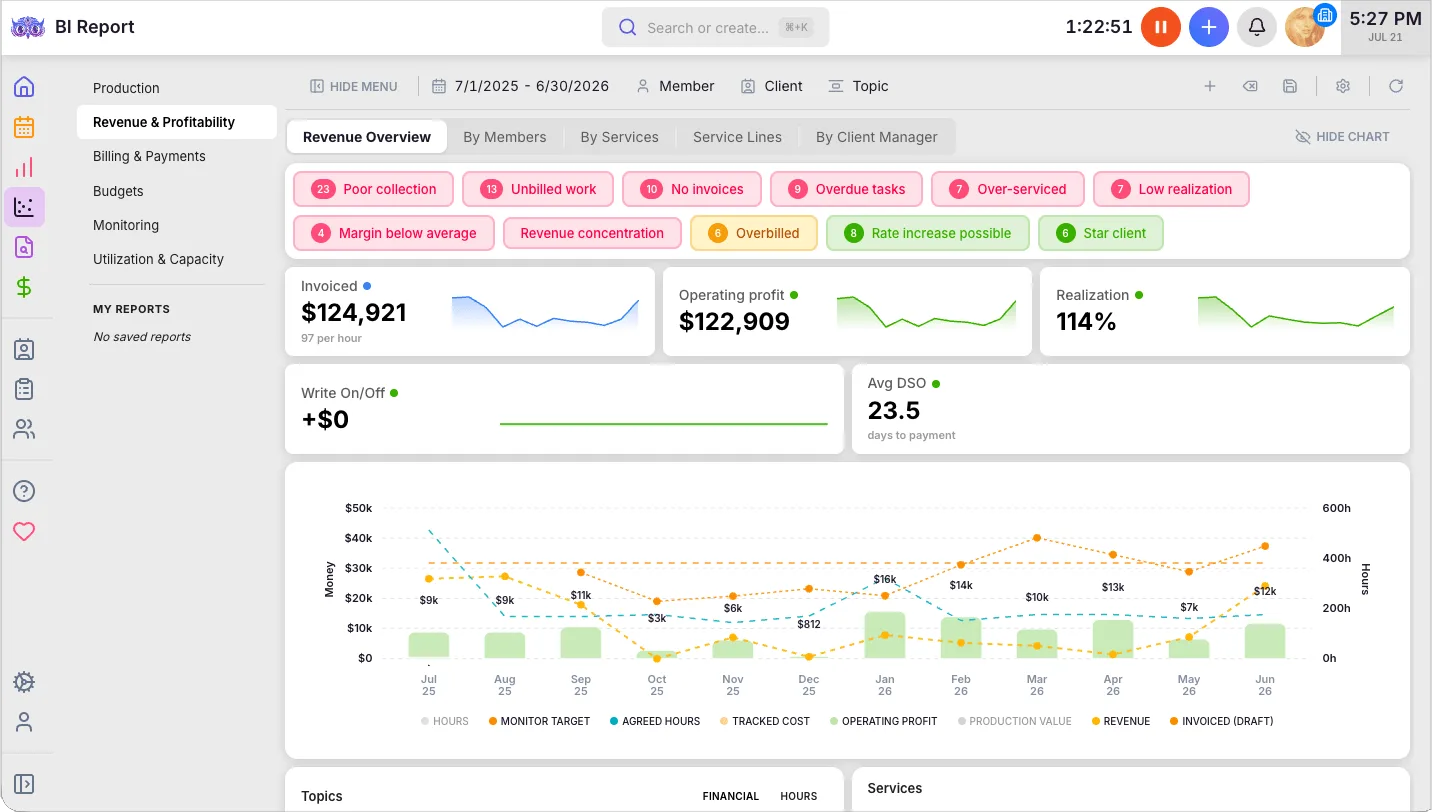
BI Analytics views are embedded inside client profiles and member pages, so a firm owner reviewing a client’s record sees that client’s profitability, billing health, and utilization data in context without navigating to a separate module.
For firms that make pricing decisions based on data (whether a client is profitable, whether an accountant is over-allocated, whether service agreements are being fulfilled) Uku’s BI Analytics is a significant advantage. Client Hub provides the time data but leaves the analysis to the firm.

Integration ecosystems
Client Hub maintains a focused set of native integrations: QuickBooks Online (two-way transaction sync), Xero (uncategorized transactions), Gmail and Microsoft 365 (email sync), SignWell (eSignatures), and Anchor (proposal-to-project automation). The Zapier integration connects to over 8,000 apps for broader automation. Client Hub does not publish a public API.
Uku connects to a wider range of accounting platforms: QuickBooks, Xero, e-conomic, Merit Aktiva, FreeAgent, Fortnox, Directo, Tripletex, Scoro, SmartAccounts, and 360 Ksiegowosc. Document storage integrations cover Google Drive, OneDrive, SharePoint, and Dropbox (Elite plan). Business registry lookups (Companies House for the UK, Estonian and Danish registries) auto-fill client records. Zapier is available on Elite and above.
Uku’s open API covers almost everything you can do in the app: clients and contacts, tasks, time, invoices, and the data behind your reports. You create the key yourself in Uku’s settings and choose how much it is allowed to touch, so a key handed to an assistant for reporting cannot go near the money. Uku MCP connects all of it to the Claude or ChatGPT you already use.
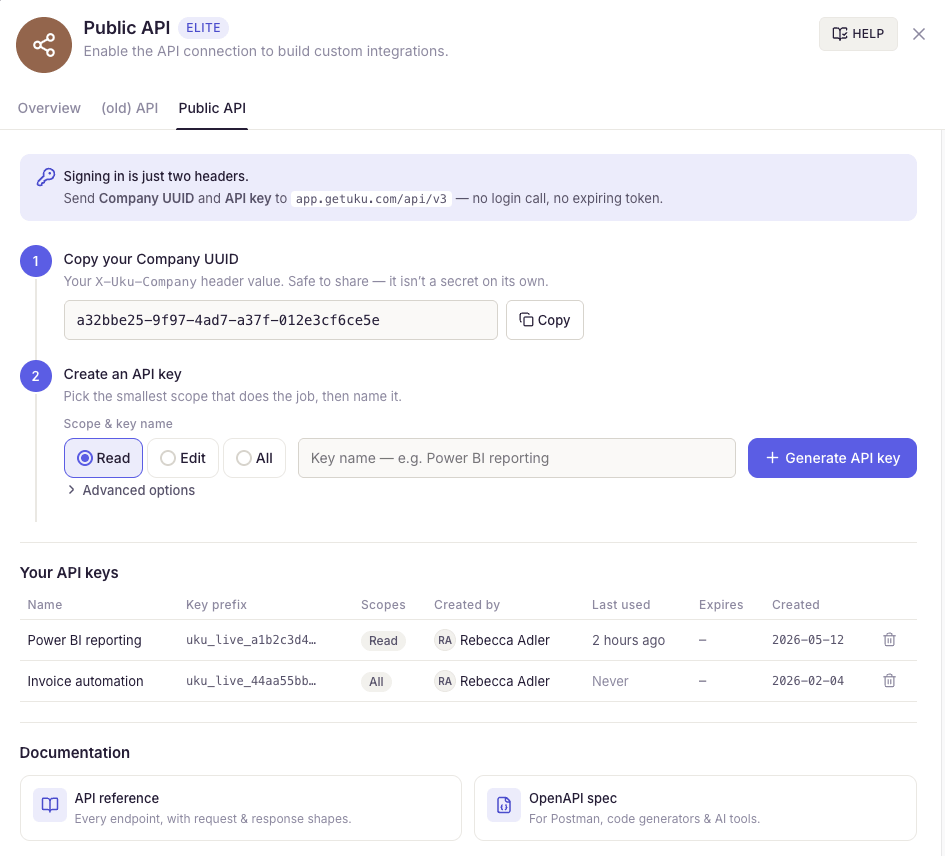
For firms that need to connect practice management to other business systems (Power BI, CRMs, proposal tools, or custom internal systems), Uku’s API is a capability Client Hub does not offer.
Security and compliance
Both platforms take security seriously, though their certifications and infrastructure differ.
Client Hub runs on a dual-cloud architecture (Google Cloud Platform for application logic, AWS for file storage), with all data hosted in US and Canada-based data centers. Encryption covers 256-bit at rest and TLS 1.2+ in transit. The platform is regularly vetted by an Intuit-selected security partner as a condition of listing on the Intuit App Store.
Security features include SMS-based two-factor authentication, real-time session monitoring with remote revocation, and role-based access controls. Client Hub references its cloud providers’ ISO and SOC certifications but does not hold independent ISO or SOC certification as an entity.
Uku holds SOC 2 Type I certification directly (independently audited). Infrastructure is hosted in Frankfurt, Germany on Akamai/Linode, which holds SOC 2 Type II, ISO 27001, and PCI DSS certifications. Encryption uses TLS 1.3 in transit and AES-256 at rest. The platform undergoes OWASP ASVS 2.0 independent audits and regular third-party penetration testing. Full details are in our security policy.
MFA is supported through Google Authenticator, Microsoft Authenticator, and Azure Active Directory. Built-in AML compliance tracking runs daily automated scans across all clients and generates reminder tasks when identity documents approach expiry.
For European firms, Uku’s EU data residency and GDPR compliance are structural advantages. For US firms embedded in the QuickBooks ecosystem, Client Hub’s Intuit-vetted security posture carries weight.
Client Hub vs Uku: which should you choose?
The choice depends on what your firm needs most: bookkeeping workflow integration or operational management with billing automation.
Choose Client Hub if:
- Your firm’s core service is recurring bookkeeping or Client Accounting Services for small businesses
- You rely on QuickBooks Online and need transaction-level integration (uncategorized expense resolution, month-end close diagnostics, 1099 management)
- Client communication is your primary bottleneck and you want a portal that replaces email
- You are based in the US or Canada
- You handle billing through separate software and do not need native invoicing
- AI-assisted email drafting, workflow generation, and financial summaries would save your team time today
- You want fast setup with minimal configuration (users report being operational in under 10 minutes)
Choose Uku if:
- Your firm needs billing automation that turns tracked time into invoices without manual reconciliation
- You want real-time visibility into which clients are profitable and which consume more work than their agreements cover
- You serve clients across multiple countries or languages (Uku supports 12 languages and operates in 25+ countries)
- You need BI Analytics, workforce management, and capacity planning alongside practice management
- You want an open API to connect your practice management system to other business tools
- Your accounting software is something other than QuickBooks or Xero (Uku connects to 11 accounting platforms)
- You need AML compliance tracking built into client records
- You are transitioning from Excel and want the easiest path into practice management
- You are growing and want a modular platform that scales from a solo practice to a 300-person firm

The two platforms reflect different philosophies about what accounting practice management should prioritize.
Client Hub starts from the belief that the client interaction is the bottleneck: fix how firms communicate with clients and how bookkeeping data flows between the ledger and the firm, and everything else follows.
Uku starts from the belief that the firm’s own operations are the bottleneck: track every minute, bill for every hour, and monitor every agreement, and the firm runs profitably with nothing falling through the cracks.
For US-based bookkeeping firms whose daily work revolves around QuickBooks and client data collection, Client Hub provides workflow depth that Uku does not attempt. For firms worldwide that need a single system covering task management, billing, profitability analytics, and workforce planning, Uku covers ground that Client Hub leaves to other tools.
The right choice aligns with your firm’s primary pain point. If your team spends its days chasing clients for transaction details and receipts, Client Hub removes that friction at the source. If your team loses revenue to untracked time, underpriced agreements, and manual invoice preparation, Uku closes those gaps.
Still weighing your options? Our Client Hub review goes deeper on the platform itself, and our roundup of Client Hub alternatives covers seven tools worth comparing. If you want to see how Client Hub stacks up against other bookkeeping-first platforms, we also compare Client Hub vs Financial Cents and Client Hub vs Double. You can read what firms say about the switch in our case studies.
Ready to see whether Uku fits your firm? Start a 14-day free trial of the full Elite plan, no credit card required, or book a demo and we will map your services, contracts, and workflows with you.
How to switch from Client Hub to Uku
Client Hub’s workflows, jobs and client requests all have a counterpart in Uku, and the piece that needs the most care is the one your clients can see. Most firms are live in two to six weeks, at their own pace, and keep billing clients throughout.
- Bring the client list across first. Export clients, contacts and the services each one buys; assisted import is on every plan, and QuickBooks Online or Xero can populate the same list directly.
- Rebuild recurring jobs as task templates. Uku’s accounting templates cover monthly bookkeeping, payroll and year-end, so most firms adapt a template rather than build from an empty screen.
- Switch billing on once there is time data. Set up contracts after a few weeks of tracked time, so the first invoice run prices real work instead of estimates. This is the step Client Hub leaves to a separate tool.
- Move clients to the portal last, then close Client Hub. Magic-link access means no client creates an account, so the changeover is one email rather than an onboarding project. Keep Client Hub for one overlapping cycle.
If your firm runs an AI assistant, the Uku MCP server connects in a day and can check the migration for you: which clients arrived without a task plan, and whether the first Uku invoice run matches the last Client Hub month.
Client Hub vs Uku FAQ
What is the main difference between Client Hub and Uku?
Client Hub is a bookkeeping-focused practice management platform with QuickBooks Online integration for transaction-level workflows, AI-powered month-end close review, and a client portal designed to replace email.
Uku is a broader accounting practice management platform with automated billing, real-time profitability monitoring, BI Analytics, and support for 12 languages across 25+ countries. Client Hub specializes in the data flow between firm and client; Uku specializes in the operational and financial management of the firm itself.
How do Client Hub and Uku compare on pricing?
Client Hub starts at $49/month for solo practitioners (annual billing) and ranges to $79/user/month for the Practice Manager Plus plan with full QuickBooks integration. Uku starts at $19/month for solo practitioners and ranges to $48/user/month for the Elite plan with BI Analytics, API access, and workforce management. Both include unlimited clients on multi-user plans, and neither charges per-client fees. Uku costs less per seat at every tier. See current Uku pricing for the full breakdown.
Does Client Hub include invoicing?
No. Client Hub does not include native invoicing or billing. Firms handle billing through the Anchor integration for proposals and contracts, or through separate billing software. Uku includes automated billing on all plans, generating invoices from tracked time and client contracts without manual reconciliation.
Which platform has better QuickBooks integration?
Client Hub has significantly deeper QuickBooks integration. It pulls uncategorized transactions into the client portal for resolution, syncs descriptions, expense accounts, and receipts back to QBO, runs AI-powered month-end diagnostics on the Balance Sheet and P&L, and manages W-9 and 1099 workflows.
Uku’s QuickBooks integration covers bidirectional sync of clients, products, and invoices but does not reach into the transaction level.
Can Uku be used by firms outside the US?
Yes. Uku operates in 25+ countries with an interface available in 12 languages, including English, German, Spanish, Danish, Swedish, Finnish, Polish, and several Baltic and Eastern European languages. Data is hosted in Frankfurt, Germany for EU compliance. Client Hub is available only in the US and Canada markets with an English-only interface.
Which platform is easier to set up?
Both are designed for fast onboarding. Client Hub users report setup in under 10 minutes with a Capterra customer service score of 4.9/5.0. Uku targets full team adoption in one week, with G2 Ease of Setup at 8.9/10 and Ease of Use at 9.5/10. Both offer 14-day free trials with no credit card required.
Client Hub includes a prebuilt template library for common accounting workflows; Uku provides a free 90-minute onboarding session and an importable workflow template library.
Does either platform offer a public API?
Uku offers a REST API (v3) on its Elite plan and above, with 33 resource groups, full CRUD, interactive documentation, and a public OpenAPI spec. Webhooks are not live yet — you poll. Client Hub does not publish a public API, so Zapier is the programmatic route the company actually supports and documents.
Which platform is better for firms that offer more than bookkeeping?
Uku is the stronger choice for firms running a mix of services (tax, payroll, advisory, audit) because its workflow automation, billing, and profitability monitoring apply to any recurring service type. Client Hub’s strongest features are specific to bookkeeping and month-end close workflows, and its lack of native invoicing makes it less self-contained for firms that need billing within the same platform.
If you are ready to compare Uku against your current setup, see the plans or book a demo with our team.
Frequently asked questions
What is the main difference between Client Hub and Uku?
Client Hub is a bookkeeping-focused practice management platform with QuickBooks Online integration for transaction-level workflows, AI-powered month-end close review, and a client portal designed to replace email. Uku is a broader accounting practice management platform with automated billing, real-time profitability monitoring, BI Analytics, and support for 12 languages across 25+ countries. Client Hub specializes in the data flow between firm and client; Uku specializes in the operational and financial management of the firm itself.
How do Client Hub and Uku compare on pricing?
Client Hub starts at $49/month for solo practitioners (annual billing) and ranges to $79/user/month for the Practice Manager Plus plan with full QuickBooks integration. Uku starts at $19/month for solo practitioners and ranges to $48/user/month for the Elite plan with BI Analytics, API access, and workforce management. Both include unlimited clients on multi-user plans, and neither charges per-client fees. Uku costs less per seat at every tier.
Does Client Hub include invoicing?
No. Client Hub does not include native invoicing or billing. Firms handle billing through the Anchor integration for proposals and contracts, or through separate billing software. Uku includes automated billing on all plans, generating invoices from tracked time and client contracts without manual reconciliation.
Which platform has better QuickBooks integration?
Client Hub has significantly deeper QuickBooks integration. It pulls uncategorized transactions into the client portal for resolution, syncs descriptions, expense accounts, and receipts back to QBO, runs AI-powered month-end diagnostics on the Balance Sheet and P&L, and manages W-9 and 1099 workflows. Uku's QuickBooks integration covers bidirectional sync of clients, products, and invoices but does not reach into the transaction level.
Can Uku be used by firms outside the US?
Yes. Uku operates in 25+ countries with an interface available in 12 languages, including English, German, Spanish, Danish, Swedish, Finnish, Polish, and several Baltic and Eastern European languages. Data is hosted in Frankfurt, Germany for EU compliance. Client Hub is available only in the US and Canada markets with an English-only interface.
Which platform is easier to set up?
Both are designed for fast onboarding. Client Hub users report setup in under 10 minutes and include a prebuilt template library for common accounting workflows. Uku targets full team adoption in one week and provides a free 90-minute onboarding session along with an importable workflow template library. Both offer 14-day free trials with no credit card required.
Does either platform offer a public API?
Uku offers an open API on its Elite plan and above. It covers almost everything you can do in the app — clients, contacts, tasks, time, invoices and reporting data — and Uku MCP connects that to Claude or ChatGPT by signing in. Client Hub does not publish a public API, so Zapier is the programmatic route the company actually supports and documents.
Which platform is better for firms that offer more than bookkeeping?
Uku is the stronger choice for firms running a mix of services such as tax, payroll, advisory, or audit, because its workflow automation, billing, and profitability monitoring apply to any recurring service type. Client Hub's strongest features are specific to bookkeeping and month-end close workflows, and its lack of native invoicing makes it less self-contained for firms that need billing within the same platform.

Published Aug 10, 2026 · Updated Sep 24, 2026