Double Pricing: Worth It or Consider Uku? April 2026
Double charges $10–$50/client/month with no invoicing tool. See why per-seat pricing and automated billing make Uku the better fit.


Contents
If you’ve ever tried to calculate what Double will cost your accounting firm (multiplying $10, $25, or $50 per client across your entire book of business, while figuring out which AI features you need and whether the Tax Suite’s $200/month add-on makes sense) you know that per-client pricing can feel like running a spreadsheet on your spreadsheet replacement.
Double is a month-end close and practice management platform for bookkeeping and accounting firms, used by more than 4,000 firms managing books for hundreds of thousands of businesses. The platform connects to QuickBooks Online and Xero with a two-way sync, letting bookkeepers catch errors, reclassify transactions, and deliver financial reports without leaving one application. But as Double has expanded from a close-acceleration tool into a broader platform with AI Bank Feeds, AI Journal Entries, accruals management, and a Tax Suite, its per-client pricing creates real cost variability depending on which tier each client needs.
We’ve analyzed Double’s pricing tiers, add-on costs, and feature restrictions. It’s the right choice if:
- You manage month-end close for multiple QuickBooks Online or Xero clients and want to cut review time
- Your firm needs two-way ledger integration where corrections sync back instantly
- You want AI-assisted bank feed categorization and journal entry generation
- Your clients respond well to a passwordless portal with Magic Link access
- You’re a US-based firm primarily using QuickBooks Online
Double’s pricing might not be a good choice if:
- You want per-seat pricing that stays predictable as your client roster grows
- Your firm needs integrated billing that converts tracked time into invoices
- You want to minimize admin time with one-click actions and automated processes
- You’re transitioning from Excel and want the fastest implementation possible
- You need multilingual or multi-currency support for international operations
- You prefer to implement software module by module rather than committing to a single workflow upfront
In that case, you should consider Uku: an accounting practice management platform built to be international, serving 1,000+ firms globally with support for 12 languages and multi-currency capabilities (€, $, £). Uku charges per team member rather than per client, includes automated billing that reduces invoicing from days to about 30 minutes, and takes a modular approach to features. Firms can start with just CRM and tasks on day one and add modules as they grow, rather than requiring substantial upfront configuration. It is a system your team will enjoy using, with a G2 rating of 4.7 and a 9.5 Ease of Use score (versus the 8.6 category average).
That’s why we’ve included a detailed pricing comparison with Uku in this review, as the best choice for firms seeking predictable per-seat pricing with integrated billing.
Double Pricing Summary
| Double | Uku | |
|---|---|---|
| Free Trial | No public free trial; demo booking required; trial terms not publicly specified | 14-day free trial of full Elite plan, no credit card required (auto-starts on every new signup) |
| Entry Level | Core: $10/client/month, unlimited users, AI Bank Feeds, client portal, task management | Team: $38/member/month (annual) or $49/member/month (monthly), unlimited clients, automated billing, workflow automations |
| Mid-Tier | Plus: $25/client/month, receipt management, AI financial summaries | Elite: $48/member/month (annual), cloud storage integrations, client budgeting, BI Analytics, API access |
| High-Tier | Scale: $50/client/month, accruals, AI journal entries, AI bills | Enterprise: $88/member/month (annual), dedicated account manager, custom integrations |
| Pricing Currency | USD only | Available in €, $, and £ |
| Best For | Firms focused on month-end close for QBO/Xero clients who want AI file review and ledger-integrated workflows | Firms wanting predictable per-seat costs with automated billing, modular deployment, and multilingual support across international markets |
Double Pricing: In-Depth Overview
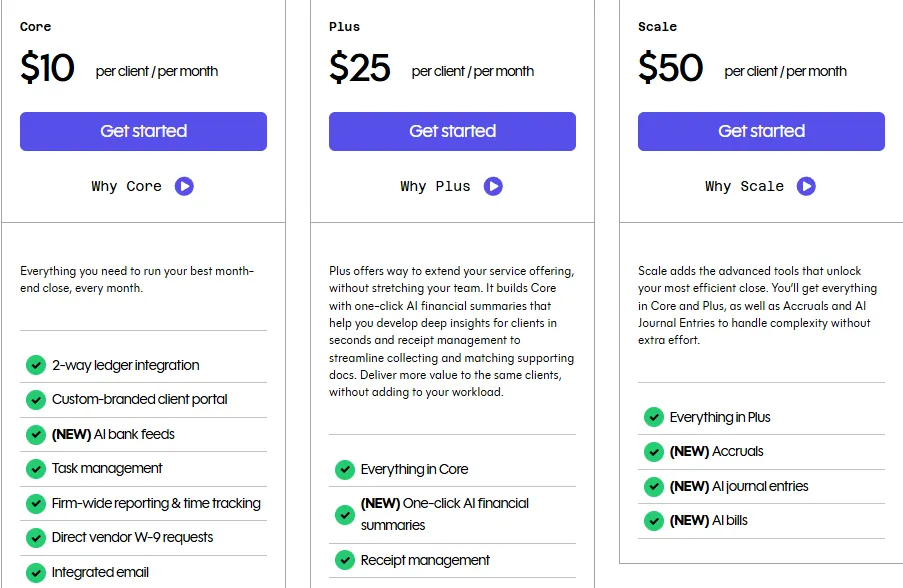
Double uses a per-connected-client pricing model with three tiers: Core, Plus, and Scale. Unlimited firm users can access the platform at no extra cost.
The only variable is how many clients are connected and which tier each sits on. Plans are mix-and-match, so different clients within the same account can sit on different tiers based on what services they need. Billing is available monthly, with an annual commitment option that unlocks the Tax Suite add-on.
Double Core Plan: $10/client/month
| Feature | Details |
|---|---|
| Price | $10/client/month |
| Users | Unlimited |
| Ledger Integration | 2-way sync with QBO, Xero, Sage |
| AI Bank Feeds | Included |
| Client Portal | Custom-branded, Magic Link access |
| Task Management | Templates, checklists, sign-offs |
| 1 practice email included |
Core is Double’s entry point and includes the features most bookkeeping firms need for the monthly close.
The two-way sync with QuickBooks Online and Xero means corrections made in Double write back to the ledger immediately. AI Bank Feeds sort transactions into four tiers by complexity, so bookkeepers handle the easiest items first and spend more time on the uncertain ones.
The client portal uses Magic Links instead of passwords. Task management includes workflow templates, multi-user sign-off, and daily digest emails.
| Core Plan Pros | Core Plan Cons |
|---|---|
| ✅ Unlimited firm users at no extra cost | ❌ No receipt management |
| ✅ AI Bank Feeds included at entry tier | ❌ No AI financial summaries |
| ✅ 2-way QBO/Xero sync | ❌ No accruals or AI journal entries |
| ✅ Client portal with Magic Link access | ❌ Cost scales linearly with client count |
The Bottom Line 👉 Core works well for firms focused on close management and client communication, but practices needing receipt handling or advanced accounting features must upgrade individual clients to higher tiers.
Double Plus Plan: $25/client/month
| Feature | Details |
|---|---|
| Price | $25/client/month |
| Increase from Core | +150% |
| Receipt Management | OCR extraction, rules-based coding, direct QBO posting |
| AI Financial Summaries | Auto-generated client-ready commentary |
| All Core Features | Included |
Plus adds receipt management and AI-generated financial summaries to everything in Core.
Receipt Management accepts uploads from the client portal, SMS, or forwarding email, then uses OCR and AI to suggest coding based on historical transactions. AI Financial Summaries write client-ready narrative for management reports, highlighting key trends and variances.
| Plus Plan Pros | Plus Plan Cons |
|---|---|
| ✅ Receipt management replaces standalone tools | ❌ $25/client adds up with large client books |
| ✅ AI financial summaries save reporting time | ❌ No accruals management |
| ✅ All Core features included | ❌ No AI journal entries |
| ✅ Multiple receipt submission channels | ❌ 2.5× the Core price for 2 additional features |
The Bottom Line 👉 Plus makes sense for clients who regularly submit receipts and need polished financial reporting, but the price jump is steep for firms that only need one of the two added features.
Double Scale Plan: $50/client/month
| Feature | Details |
|---|---|
| Price | $50/client/month (or contact sales for enterprise) |
| Increase from Plus | +100% |
| Accruals | Prepaid expenses, fixed assets, deferred revenue |
| AI Journal Entries | Document-to-entry pipeline for complex sources |
| AI Bills | Included |
| All Plus Features | Included |
Scale is Double’s most complete tier, adding the Accruals module for managing prepaid expenses, fixed asset depreciation, and deferred revenue with one-click posting from the close page.
AI Journal Entries converts complex source documents (payroll reports, HUD statements, loan documents) into balanced, ready-to-post journal entries using saved prompts.
Currently, accruals and AI Bank Feeds are available only for US-based QuickBooks Online customers.
| Scale Plan Pros | Scale Plan Cons |
|---|---|
| ✅ Accruals eliminate spreadsheet-based scheduling | ❌ $50/client is a significant cost |
| ✅ AI Journal Entries automate complex entries | ❌ Currently US QBO only for some features |
| ✅ Reusable prompts compound efficiency over time | ❌ Overkill for clients with simple books |
| ✅ All Plus and Core features included | ❌ Payroll and loan amortizations still coming soon |
The Bottom Line 👉 Scale delivers the most value for complex engagements involving accruals, depreciation schedules, and multi-line journal entries, but at $50/client, firms should be selective about which clients justify this tier.
Double Tax Suite: $200/month (annual commitment required)
| Feature | Details |
|---|---|
| Price | $200/month with annual commitment |
| Tax Organizers | Default 1040 plus custom organizers |
| E-Signatures | KBA-authenticated for Form 8879 |
| Tax Tracker | Real-time client-facing progress view |
| Document Storage | Auto-sorted by year |
The Tax Suite is an add-on for firms handling both bookkeeping and tax preparation.
It adds tax organizers, IRS-compliant KBA e-signatures, and a live tax return progress tracker visible in the client portal. The Tax Suite does not include tax preparation or filing. It is a practice management layer that sits alongside dedicated tax software.
The $200/month price covers the entire firm regardless of client count, which favors firms with larger tax rosters.
| Tax Suite Pros | Tax Suite Cons |
|---|---|
| ✅ Unified portal for bookkeeping and tax clients | ❌ Requires annual commitment |
| ✅ KBA e-signatures without third-party tools | ❌ No tax prep or filing capabilities |
| ✅ Flat fee regardless of client count | ❌ $2,400/year adds to total cost |
| ✅ Live tax tracker reduces client inquiries | ❌ No integrations with specific tax software documented |
The Bottom Line 👉 The Tax Suite makes economic sense for firms with a large tax roster looking to consolidate bookkeeping and tax workflows under one portal, but firms with only a handful of tax clients may not justify the annual commitment.
Double Additional Costs
Beyond base subscriptions, Double’s total cost depends on a few add-ons:
Published add-ons:
- Additional connected team emails: $10/connected team email/month (one practice email is included with Core)
- Tax Suite: $200/month with annual commitment
Cost variability:
- Per-client pricing means total cost scales with your client book
- Mix-and-match tiers mean you must decide which tier each client needs
- No implementation or onboarding fees are listed publicly
- No overage charges (the model is flat per-client, not usage-based)
Where Double Falls Short
Double accelerates the month-end close through ledger integration and AI features, but its pricing model and feature scope create challenges for certain firms:
Per-Client Pricing Creates Budget Unpredictability
- A 50-client firm on Core pays $500/month; moving 20 of those clients to Plus for receipt management jumps the bill to $800/month
- Adding or losing clients directly affects monthly costs, making budgeting harder for growing firms
- The mix-and-match model requires ongoing decisions about which tier each client justifies
No Integrated Billing or Invoicing
- Double manages the close workflow but does not convert tracked time into invoices
- Firms still need separate billing software or manual processes to invoice clients
- Time tracking exists but lacks a path to invoice generation
Limited Geographic and Accounting Software Support
- AI Bank Feeds currently support only US QuickBooks Online files; Xero and non-US support is on the roadmap
- Accruals are available only for US-based QBO customers
- The integrations page lists QBO, Xero, Sage, Zapier, Ping, and Abacor, a narrow ecosystem compared to broader practice management platforms
No Free Plan or Self-Serve Trial
- No self-serve free trial is visible on the pricing page; the primary CTA routes to a demo booking
- No free tier for solo practitioners to test the platform
- Competitors offer no-credit-card trials and monthly billing options that lower adoption friction
These limitations have led many accounting firms to explore alternatives that offer per-seat pricing, integrated billing, and broader market support. For a deeper feature-by-feature look, see our Double review and Double vs Uku head-to-head.
Best Double Alternative: Uku
Uku simplifies accounting practice management with predictable per-seat pricing and automated billing that converts tracked time into invoices in about 30 minutes instead of days.
For firms that find Double’s per-client pricing unpredictable, its lack of integrated billing frustrating, and its US-centric feature limitations constraining, Uku offers a direct solution.
Per-member pricing keeps costs stable as your client list grows. Automated billing with complex price lists, rounding rules, and reusable contracts eliminates the manual bridge between time tracking and invoicing. And 12-language support with multi-currency capabilities (€, $, £) serves firms operating across international markets.
Uku was built to be international, with a strong presence across UK, US, and Scandinavian markets. The platform earned the Capterra Best Value award for 2025 and serves 1,000+ firms globally. Named clients include Leinonen Group (300 employees across 11 countries), Baker Tilly, and Rödl & Partner.

The platform is modular: firms begin with just CRM and tasks, then activate workflows, billing, and reporting modules as they grow. This means firms start working on day one rather than spending weeks on upfront configuration.
Uku 14-Day Free Elite Trial — Auto-Starts on Every Signup
Unlike Double’s demo-gated onboarding, every new Uku account automatically starts a 14-day free trial of the full Elite plan, not a stripped-down preview. No credit card required, and the first 90 minutes of onboarding come free. Teams evaluate the complete feature set with their real client data before they pick a tier.
For firms transitioning from Excel, Uku also makes it easy to import existing spreadsheets and have automated plans ready to go, eliminating the fear of lengthy software implementations.
Uku Solo Plan: $19/member/month (annual) or $25/member/month (monthly)
| Feature | Details |
|---|---|
| Price | $19/member/month (annual, $228/year) or $25/member/month (monthly), save ~23% with annual billing |
| Members | 1 |
| Includes | Tasks, Clients, Billing, Emails, Client Portal, Document Management, all integrations, Magic Buttons, Monitoring, AML, Budgets, Custom Fields, E-signatures |
Solo is Uku’s single-practitioner tier. At $19/member/month (annual) or $25/member/month (monthly), it gives sole-practitioner bookkeepers integrated billing, a shared client portal, AML compliance, and e-signatures inside tasks. The monthly option matters for price-sensitive sole practitioners: Financial Cents Solo, by comparison, requires annual upfront commitment.
| Solo Plan Pros | Solo Plan Cons |
|---|---|
| ✅ Includes integrated billing, all integrations, AML, and e-signatures | ❌ Limited to 1 user (no team members) |
| ✅ Monthly billing available (FC Solo is annual-only) | ❌ No BI Analytics (Elite-only) |
| ✅ 14-day full Elite trial precedes the Solo subscription | ❌ No Public API or workforce management |
The Bottom Line 👉 Solo works for individual bookkeepers who want integrated billing and a client portal without committing to a year upfront. Most growing firms will outgrow Solo and start on Team, where unlimited clients, members, and the full automation stack open up.
Uku Team Plan: $38/member/month (annual) or $49/member/month (monthly)
| Feature | Details |
|---|---|
| Price | From $38/member/month (annual) or $49/member/month (monthly) |
| Clients | Unlimited |
| Automated Billing | Complex price lists, 4 billing types, rounding rules, reusable contracts |
| Workflow Automations | Recurring tasks, email automations, templates |
| Client Portal | Unified workspace where clients and accountants work on the same task |
| Time Tracking | Stopwatch, manual entry, bulk allocation (90% of actions are one-click) |
| Integrations | QuickBooks, Xero, E-conomic, and more |
Team is Uku’s entry point for multi-person firms.
At from $38/member/month (annual), a 5-person firm pays $190/month for unlimited clients. On Double, the same firm managing 50 clients on Core would pay $500/month. Both annual and monthly billing options are available; firms can pay $49/member/month to test the system without a long-term commitment.
Team includes automated billing that goes well beyond basic invoicing: complex price lists support billing by quantity, time, material, and ranges with different rates for different periods.
Rounding rules can automatically bill a one-minute unplanned call as 15 minutes, ensuring firms capture revenue from interruptions. Rules are configured once through reusable contracts, and time tracking calculates billable amounts in real-time.
The billing system also tracks both sales prices and cost prices. If an employee costs $30/hour but bills at $45/hour, managers can immediately see whether the engagement is profitable. When employees work eight hours but only six are billable, the system surfaces whether the issue is employee efficiency, client difficulty, or pricing structure.

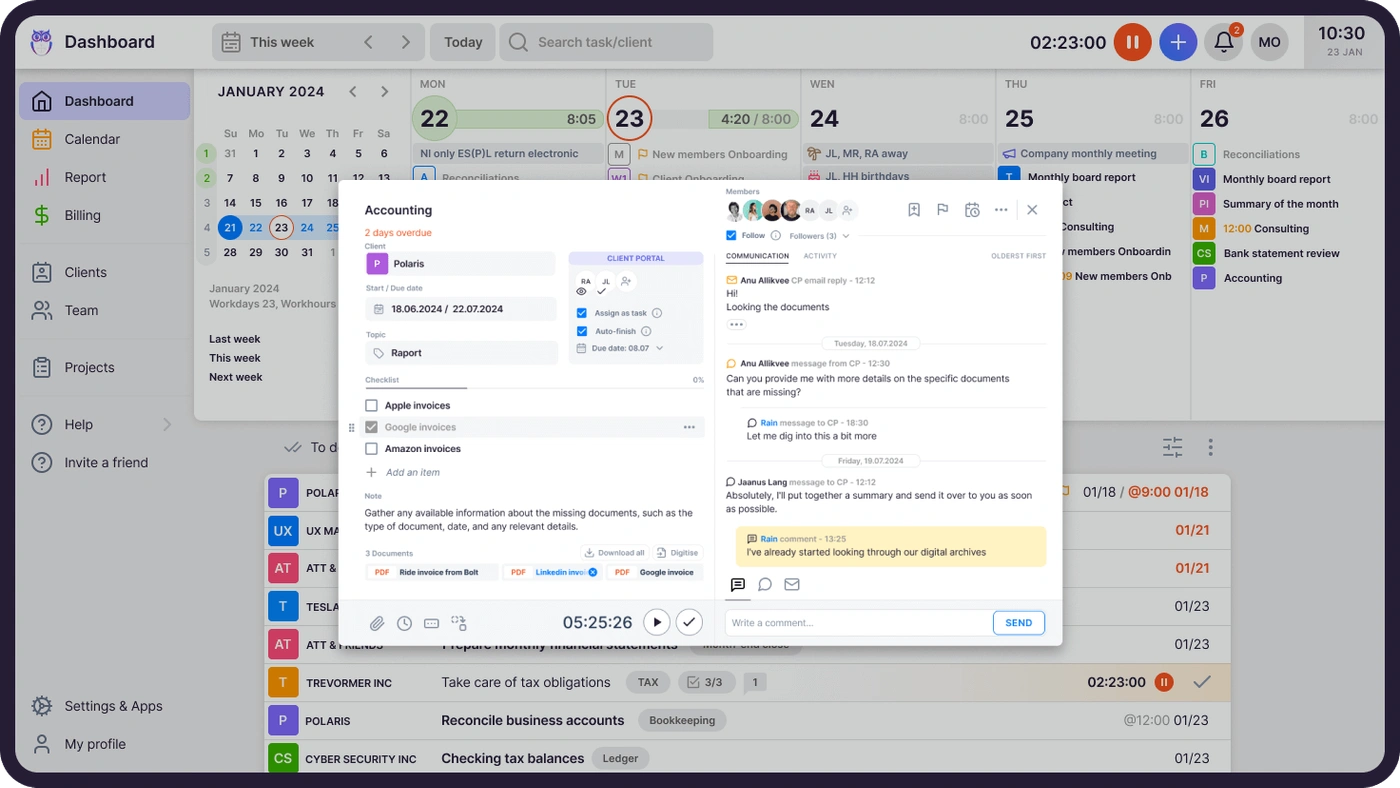
The client portal is not a separate ticketing system. It mirrors the same task on both sides. Clients and accountants work on the same item with all communication, documents, time tracking, and actions in one place. When clients make requests through the portal, notifications appear on the accountant’s dashboard, and they can immediately start tracking time within that task.
The portal is customizable: firms can create unique menus for each client, run onboarding with forms, share business insight reports, and display price lists. Workflow automation with pre-built accounting templates and automated email reminders round out the plan.

| Team Plan Pros | Team Plan Cons |
|---|---|
| ✅ Unlimited clients at a fixed per-seat cost | ❌ No cloud storage integrations |
| ✅ Automated billing with profitability tracking | ❌ No client budgeting |
| ✅ Unified client portal (same task on both sides) | ❌ No API access |
| ✅ Flexible monthly or annual billing | ❌ No document management module |
The Bottom Line 👉 Team provides more complete practice management at a lower total cost than Double for firms with many clients, especially those needing automated billing that reduces invoicing from days to about 30 minutes.
Uku Elite Plan: $48/member/month (annual) or $62/member/month (monthly)
| Feature | Details |
|---|---|
| Price | $48/member/month (annual) or $62/member/month (monthly) |
| Cloud Storage | Google Drive, Dropbox, SharePoint |
| Client Budgeting | Budget ceilings by contract, project, or topic with real-time alerts |
| Document Management | One-click document submission for digitalization into accounting software |
| BI Analytics | Real-time visual reports with filters, saved templates, and three levels of depth |
| API Access | Public REST API |
| Zapier | 5,000+ integrations |
| E-Signatures | Included |
| All Team Features | Included |
Elite adds cloud storage integrations, client budgeting with real-time progress bars and alerts before budgets run out, and document management with one-click digitalization into accounting software.
BI Analytics offers views with filters, saved report templates, and three levels of depth (summary, tasks, and time), including business analytics reports with detailed performance metrics. The platform also includes a public API, Zapier connectivity to 5,000+ apps, and e-signatures.
The Workforce Management module handles flextime tracking with manager approval flows. At $48/member/month (annual), a 5-person firm pays $240/month for every feature Uku offers, including unlimited clients.
| Elite Plan Pros | Elite Plan Cons |
|---|---|
| ✅ BI Analytics with real-time profitability insights | ❌ Higher per-seat cost |
| ✅ Client budgeting prevents scope creep | ❌ No native ledger-level transaction review |
| ✅ One-click document digitalization | ❌ Annual billing required for best rates |
| ✅ Public API for custom integrations | ❌ No AI-assisted bank feed categorization |
The Bottom Line 👉 Elite suits growing firms needing BI Analytics, budget tracking, document management, and workforce management at a predictable monthly cost.
Uku Enterprise Plan: $88/member/month (annual) or $99/member/month (monthly)
| Feature | Details |
|---|---|
| Price | $88/member/month (annual) or $99/member/month (monthly) |
| Everything in Elite | Included |
| Custom Integrations | Available (in-house dev team for 50+ user firms) |
| Assisted Client Import | Included (available across all plans) |
| Dedicated Account Manager | Included |
| Early Access | New features |
| Security | SOC 2 Type I compliant, TLS 1.3 encryption, EU-hosted (Germany) |
Enterprise adds custom integrations built by Uku’s in-house development team (including country-specific features like local e-invoice formats), assisted onboarding, a dedicated account manager, and early access to new features.
The pay-by-invoice option simplifies procurement for larger organizations. The platform is SOC 2 Type I compliant with TLS 1.3 encryption and data hosted in Germany. Leinonen Group (300 employees across 11 countries) uses Uku at this scale, demonstrating the platform’s ability to standardize processes across international offices. Assisted import is available across all plans, making migration straightforward regardless of tier.
| Enterprise Plan Pros | Enterprise Plan Cons |
|---|---|
| ✅ Dedicated account manager | ❌ Annual contracts typical |
| ✅ Custom integrations for complex stacks | ❌ Implementation timeline needed |
| ✅ SOC 2 Type I compliant with EU data hosting | |
| ✅ Early access to roadmap features |
The Bottom Line 👉 Enterprise provides the support, security certifications, and customization larger firms need for multi-office deployments, with Uku’s per-seat model keeping costs proportional to team size rather than client count.
Uku Additional Costs
Onboarding packages (optional):
| Package | Price | Team Size |
|---|---|---|
| Small | $700 flat fee | Up to 4 members |
| Medium | $2,000 flat fee | Up to 15 members |
| Big | Custom quote | Larger teams |
Professional services:
- Process consulting: $85/hour
- Team training (2 hours): $400
- Dedicated account manager: $5,000/year
- First 90 minutes of onboarding: free for all new accounts
Uku’s modular approach means onboarding costs stay low. Firms can start with the modules they need and expand over time, rather than paying for setup of features they won’t use yet. For firms transitioning from spreadsheets, Uku lets teams import existing files and have automated plans ready on day one.
Double Feature Value Breakdown (vs Uku)
Pricing Model Philosophy
Double’s Approach: Double charges per connected client at $10, $25, or $50 depending on the tier.
Costs scale with your client book, not your team size. A solo bookkeeper managing 100 clients on Core pays $1,000/month. Adding team members costs nothing, but adding clients or upgrading tiers increases the bill. The mix-and-match flexibility is useful but creates ongoing tier-assignment decisions.
Uku’s Approach: Uku charges per team member from $38/month (annual) with unlimited clients at every paid tier.
Pricing is available in €, $, and £ with both annual and monthly billing options. A 5-person firm pays the same whether managing 30 or 300 clients. This model rewards firms that grow their client roster without proportionally growing their team, which is the efficiency gain practice management software should enable.
Firms can also pay $49/member/month on a monthly basis to test the system before committing annually.
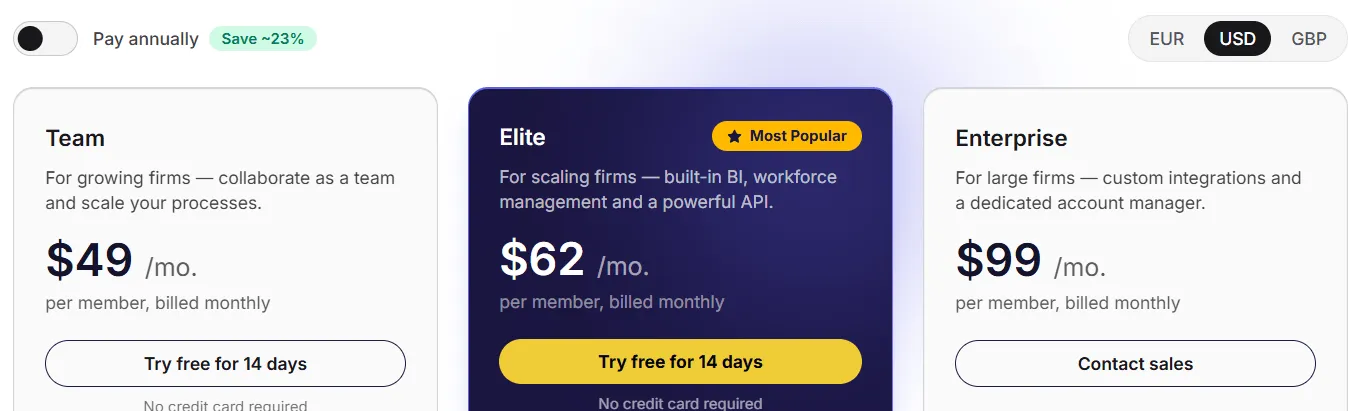
🟡 Value Verdict: Uku is better for firms with large or growing client books, where per-client pricing makes costs unpredictable. Double is better for small firms with few clients but many team members, where per-client pricing keeps the bill low.
Month-End Close vs Full Practice Management
Double’s Approach: Double is built around the month-end close as the organizing workflow.
File Reviews, AI Bank Feeds, AI Journal Entries, and Accruals all feed into the close process. The two-way ledger sync means bookkeepers catch and fix errors without opening QuickBooks. This close-centric design is Double’s strongest differentiator.
Uku’s Approach: Uku covers the full practice lifecycle: task management, workflow automation, time tracking, automated billing, client portal, BI Analytics, and document management.
It does not offer ledger-level transaction review or AI-assisted bank feed categorization. Instead, it focuses on the operational infrastructure around client work, from task assignment through invoice delivery. The modular approach means firms activate only the modules they need on day one and scale up as they grow (no requirement to configure the entire platform before getting value from it). One firm, Aaroni, reported serving 38% more clients after a year on Uku.
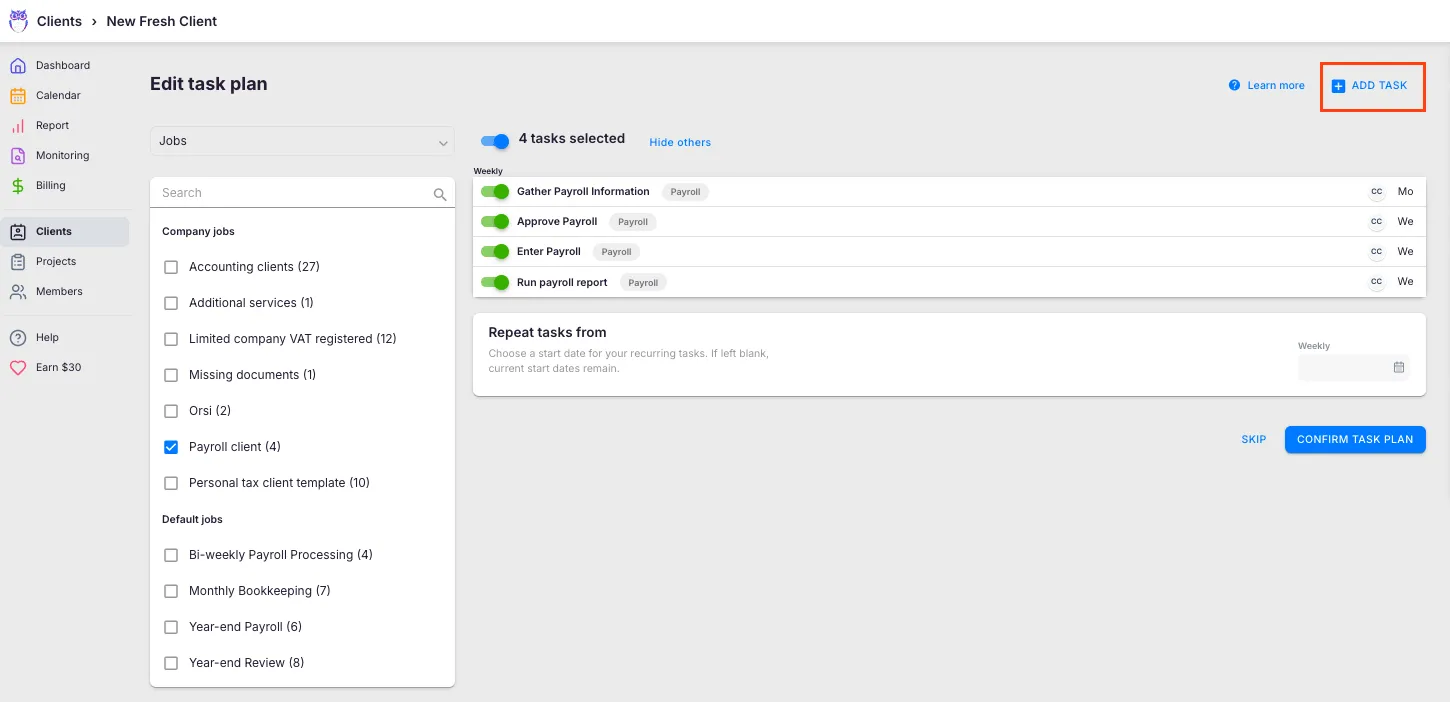
🟡 Value Verdict: Double is better for firms whose primary pain point is the close process itself. Uku is better for firms that need practice operations including billing, time tracking, and workforce management alongside task coordination, with the flexibility to adopt features incrementally.
Billing and Revenue Capture
Double’s Approach: Double includes firm-wide reporting and time tracking but does not generate invoices. Tracked time does not flow into an invoicing pipeline. Firms using Double still need separate billing software (e.g., QuickBooks invoicing, FreshBooks) to bill clients for bookkeeping services.
Uku’s Approach: Uku’s automated billing converts tracked time into invoice drafts, reducing invoice preparation from days to about 30 minutes.
The system supports complex price lists based on quantity, time, material, and ranges with different rates for different periods. Rounding rules (configurable by entry, team, client, or month) ensure firms capture revenue properly. A one-minute unplanned call can be automatically billed as 15 minutes.
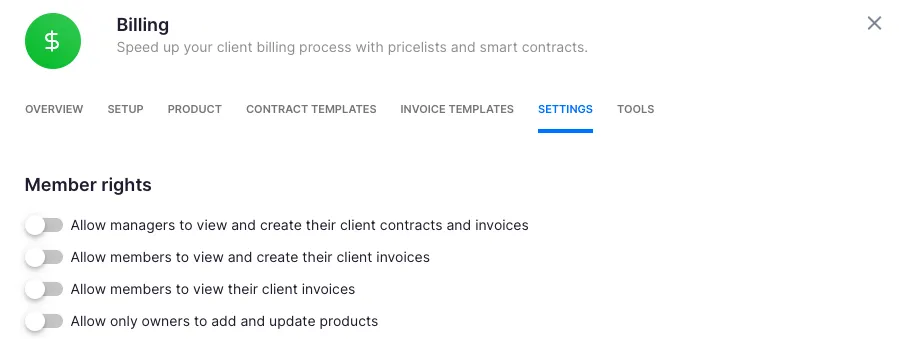
Everything runs through reusable contracts where billing rules are configured once, then time tracking calculates billable amounts in real-time.
Beyond invoicing, the billing system provides profitability analysis by tracking both sales prices and cost prices.
If an employee costs $30/hour but bills at $45/hour, managers can see whether the engagement is profitable. When employees work eight hours but only six are billable, the system surfaces whether the issue is employee efficiency, client difficulty, or pricing structure.
BI Analytics delivers real-time visual alerts, preventing firms from discovering losses 30 days too late. Customers report seeing up to ~20% more profit by discovering outdated agreements where they billed for eight hours but employees worked 20. Invoices export to QuickBooks, Xero, E-conomic, and 8+ accounting platforms.
🟡 Value Verdict: Uku is better for firms that want a single platform handling both work management and invoicing, with built-in profitability insights. Double requires a separate billing tool, adding cost and manual steps to the revenue cycle.
AI and Automation Capabilities
Double’s Approach: Double has invested in AI: AI Bank Feeds sort transactions by complexity, AI Journal Entries convert complex documents into balanced entries, AI Financial Summaries generate client-ready commentary, and AI-assisted reconciliations pinpoint discrepancies. The company philosophy positions AI as an amplifier of human expertise, with every AI output reviewed before posting.
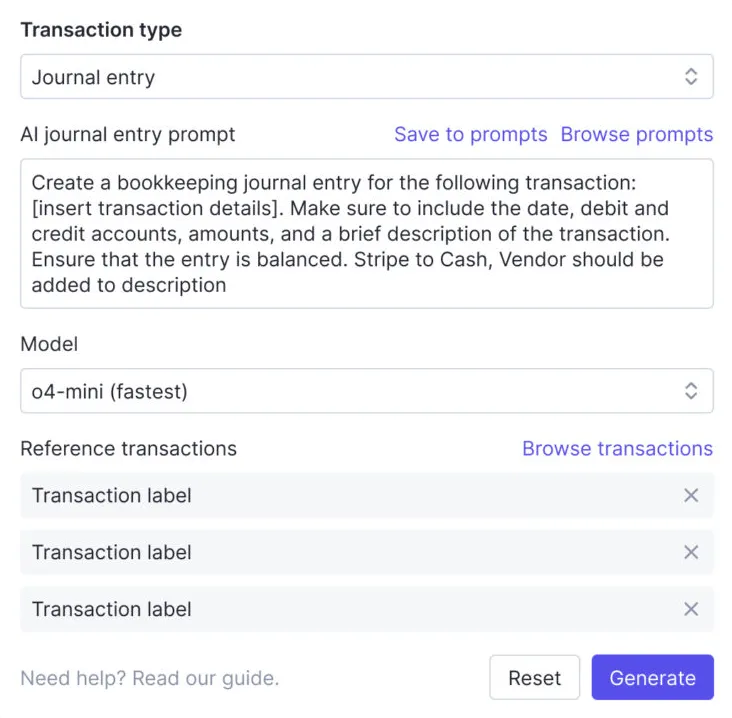
Uku’s Approach: Uku’s automation focuses on workflow efficiency and minimizing admin time rather than AI-assisted accounting.
Recurring tasks generate automatically from templates (weekly, monthly, quarterly, and yearly intervals), automated emails fire at defined workflow stages, and template improvements propagate to existing client plans. Time tracking is designed for speed, with 90% of actions being one-click.
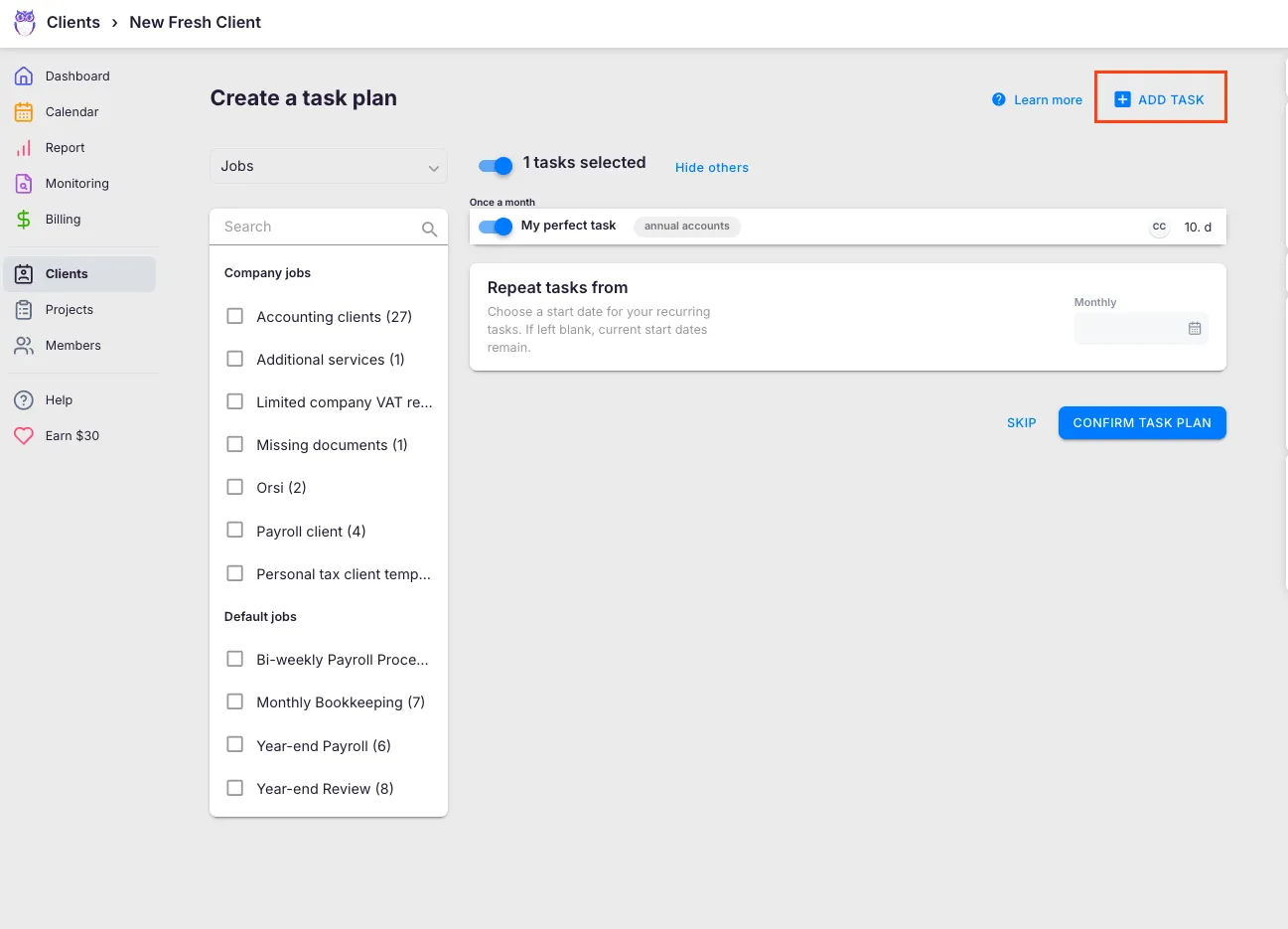
All communication stays within tasks, solving the problem of information trapped in individual email accounts. One-click document submission sends files into accounting software for digitalization.
🟡 Value Verdict: Double is better for firms wanting AI to accelerate accounting-specific tasks like transaction coding and journal entry creation. Uku is better for firms focused on operational efficiency (minimizing admin time through one-click actions, automated billing, and streamlined communication).
Final Verdict: Double vs Uku
The choice between Double and Uku depends on where your firm’s biggest pain points sit and how your costs should scale:
👍 Double is a close-management platform for bookkeeping firms whose primary challenge is the month-end close.
With per-client pricing from $10 to $50/month, it lets firms review QuickBooks and Xero files without leaving one application, catch coding errors through integrated file reviews, and use AI to categorize bank feeds, generate journal entries, and write financial summaries.
This per-client pricing model works best for firms with smaller client books, teams that rely on QuickBooks Online, and practices that want AI-powered close acceleration as their primary efficiency gain.
👉 Uku is a full practice management platform built on per-seat pricing that keeps costs predictable regardless of client count.
With automated billing that reduces invoicing from days to about 30 minutes, a unified client portal where clients and accountants work on the same task, and a modular approach that lets firms start on day one and add features as they grow, Uku covers the entire practice lifecycle from task assignment through invoice delivery.
Pricing starts from $38/member/month (annual) in €, $, or £ with monthly options available. This makes Uku the right fit for firms with large or growing client rosters, practices operating across international markets needing 12-language support, teams transitioning from Excel who want the fastest implementation possible, and any accounting firm that wants automated billing with profitability insights built into their workflow.
Get started with Uku here. Or book a demo to see automated billing and the unified client portal in action — most firms switch within 30 minutes of the call.
The fundamental difference isn’t just features but pricing philosophy. Double asks “What level of service does each client need?” Uku asks “How many people are on your team?” The answer that matters more to your firm determines the better fit.
Related: for the full feature breakdown see our Double review, or jump to the head-to-head Double vs Uku comparison. For specialized alternatives organized by priority — billing, enterprise reporting, tax, error detection, budget, workflow — see 7 Double Alternatives. You can also browse our case studies to see how firms run their practices on Uku.
Frequently asked questions
Does Double offer a free plan or free trial?
Double does not offer a publicly listed free plan. The Terms and Conditions reference a possible trial period, but no specific duration or self-serve signup is visible on the pricing page. The primary onboarding path is through a demo booking. Uku, by contrast, automatically starts a 14-day free trial of the full Elite plan on every new signup, with no credit card required and 90 minutes of onboarding included. After the trial, firms choose Team ($38/member/month annual or $49/member/month monthly), Elite, or Enterprise, or stay on the Solo tier from $19/member/month.
How much does Double cost for a 50-client firm?
On Core ($10/client/month), a 50-client firm pays $500/month. If 20 of those clients need receipt management (Plus at $25/client), the total rises to $800/month. Moving some clients to Scale ($50/client) for accruals and AI journal entries increases costs further. The Tax Suite adds another $200/month with an annual commitment. A comparable 5-person firm on Uku's Team plan would pay $190/month (annual) for unlimited clients, with monthly billing also available at $49/member/month.
Does Double include billing or invoicing?
No. Double tracks time and manages the close workflow but does not generate invoices. Firms need separate software for client billing. Uku includes automated billing in its Team plan and above, with complex price lists, rounding rules, and reusable contracts that reduce invoice preparation from days to about 30 minutes. Invoices export to QuickBooks, Xero, E-conomic, and other accounting platforms.
Is Double available outside the US?
Double supports QuickBooks Online, Xero, and Sage for ledger integration, making it usable internationally. However, AI Bank Feeds currently support only US QuickBooks Online files, and the Accruals module is available only for US-based QBO customers. Xero and non-US support for these features is on the roadmap. Uku supports 12 languages and multi-currency billing in €, $, and £, with integrations to European accounting platforms like E-conomic, Tripletex, and Fortnox.
How does Double's per-client pricing compare to Uku's per-seat pricing?
Double charges $10–$50 per client per month with unlimited users. Uku charges from $38 per member per month (annual) with unlimited clients, and also offers monthly billing at $49/member/month. Pricing is available in €, $, and £. For firms with many clients relative to team members, Uku is typically cheaper. For small firms with few clients, Double's per-client model may cost less. A 3-person firm with 100 clients pays $1,000/month on Double Core versus $114/month on Uku Team (annual).
What accounting software does Double integrate with?
Double integrates with QuickBooks Online, Xero, and Sage through two-way sync. Additional integrations include Zapier, Ping (AI meeting transcription), Abacor, and Anchor (billing). Uku integrates with QuickBooks, Xero, E-conomic, Tripletex, Fortnox, FreeAgent, Merit Aktiva, SmartAccounts, Scoro, and Directo, plus business registries in the UK, Estonia, and Denmark.
Can I mix tiers for different clients on Double?
Yes. Double's pricing model is mix-and-match, so different clients within the same firm account can be placed on Core ($10), Plus ($25), or Scale ($50) based on their needs. This gives firms flexibility but also requires ongoing decisions about which tier each client justifies.
Does Double charge implementation or onboarding fees?
Double does not list implementation or onboarding fees publicly, and there are no overage charges (the model is flat per-client, not usage-based). Uku offers tiered onboarding packages — $700 flat fee for up to 4 members, $2,000 for up to 15, custom for larger teams — plus the first 90 minutes of onboarding free for all new accounts. Process consulting is $85/hour and team training (2 hours) is $400.

Published Apr 29, 2026 · Updated Aug 28, 2026