
Double Review 2026: Is This Month-End Close Platform Right for Your Firm?

Double occupies a specific niche in accounting software: a month-end close platform for bookkeeping firms that use QuickBooks Online and Xero. It offers two-way ledger sync, AI bank feed classification, and a client portal that reportedly reaches 95% adoption rates. Double promises to cut your close time in half. But does that promise hold up?
To write this Double review, we analyzed the platform in detail. We believe it’s the right choice if:
- You run a bookkeeping firm on QuickBooks Online or Xero
- Your biggest bottleneck is the monthly close process
- You want to review and correct transactions without switching to QuickBooks
- You need AI-assisted bank feed coding and journal entry generation
- Client communication around specific transactions creates constant friction
However, Double might not be the best choice if:
- You need time tracking that feeds into automated invoicing
- Billing accuracy and revenue capture matter as much as close speed
- You serve international clients and need multilingual, multi-currency support
- You want flexible billing models (hourly, fixed, per-piece, volume-based) in one platform
- Your firm’s growth depends on visibility across time, workload, and profitability
- You prefer implementing software step by step rather than committing to a single workflow
In this case, you should consider Uku: an accounting practice management platform that covers a firm’s full operational lifecycle, from task scheduling and time tracking through automated billing and business analytics, all designed for accounting practices. Uku takes a modular approach where firms start with the features they need and add more as they grow, enabling fast deployment rather than a lengthy all-at-once implementation. Where Double focuses on accelerating the close, Uku focuses on making the entire firm run better, with documented outcomes like 12+ hours saved per team member weekly and automated billing that reduces invoice preparation from days to roughly 30 minutes.
We’ve included a detailed look at Uku at the end of this Double review as the best alternative for firms that need more than close acceleration. If you’re ready to explore a full practice management approach, you can start with Uku’s free plan here.
Table of contents:
- What is Double?
- Double Pros & Cons
- Double Review: How It Works & Key Features
- Where Double Falls Short
- Top Double Alternative: Uku
- Double or Uku: Comparison Summary
- Final Verdict
What is Double?
Double is a month-end close and practice management platform for bookkeeping and accounting firms that use QuickBooks Online or Xero.
Founded in 2020 by Ben Stein and Kenny Song, the product grew from Stein’s experience as CFO of a tech startup, where he found the close process buried under back-and-forth emails, clunky spreadsheets, and approximately 79 open browser tabs.
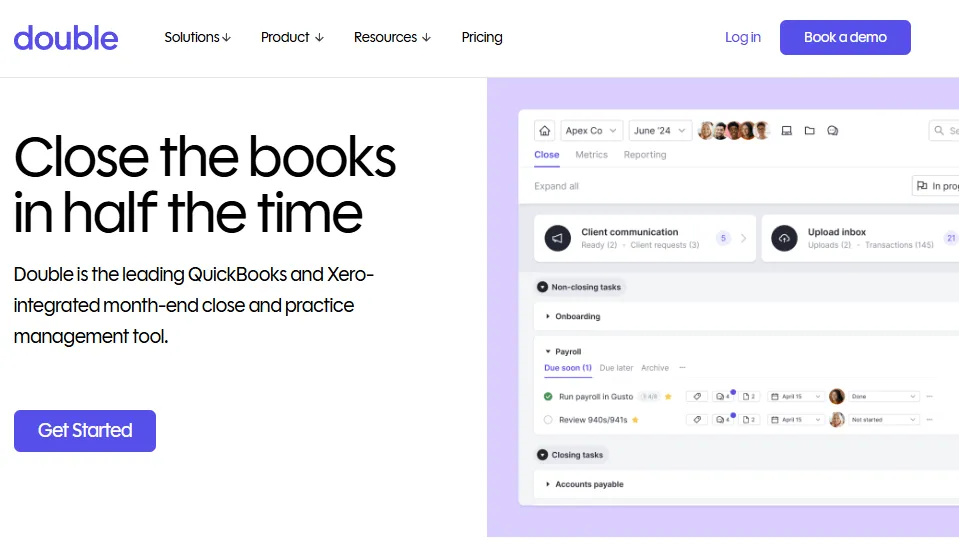
The company originally operated as Keeper until October 2025, when a trademark lawsuit prompted a rebrand to Double, a name referencing double-entry accounting. The team and product stayed the same. Double went through Y Combinator’s Summer 2021 cohort and has raised more than $12.5 million, including a $6.5 million Series A led by Album Ventures in December 2025.
Today, more than 4,000 accounting and bookkeeping firms use Double to manage their monthly close. The platform holds a 5.0 rating on G2, and its stated mission is “to write software that helps accountants produce better quality work product, more quickly, and with fewer errors.”
Double Pros & Cons
| Pros | Cons |
|---|---|
| ✅ True two-way sync with QuickBooks Online and Xero | ❌ Limited integrations beyond QBO, Xero, and Sage |
| ✅ AI Bank Feeds organize transactions by cognitive load | ❌ No built-in time tracking or automated invoicing |
| ✅ Client portal with Magic Link access (no passwords) | ❌ AI Bank Feeds currently US-only for QBO |
| ✅ File review tools that catch coding errors without leaving the platform | ❌ No email open/read tracking in the portal |
| ✅ Per-client pricing with unlimited users | ❌ No public API (Zapier and limited native integrations only) |
| ✅ Weekly product release cadence | ❌ No free plan; demo booking required to start |
| ✅ AI Journal Entries for complex source documents | ❌ Accruals and AI Journal Entries limited to the $50/client Scale tier |
Double Review: How It Works & Key Features
File Reviews: Double’s core feature catches transaction errors without opening QuickBooks.
File Reviews is the foundation of Double’s close workflow.
The platform connects to a client’s QuickBooks Online or Xero file via a two-way integration and surfaces structured review reports, each organized as a list of issues to address. Every flagged transaction can be handled in one of three ways: fix it, approve it, or exclude it from future reviews.
The key advantage: corrections made inside Double (recording transactions, assigning payees, updating vendors) sync immediately back to QuickBooks or Xero. Bookkeepers never need to open the accounting software to apply changes.
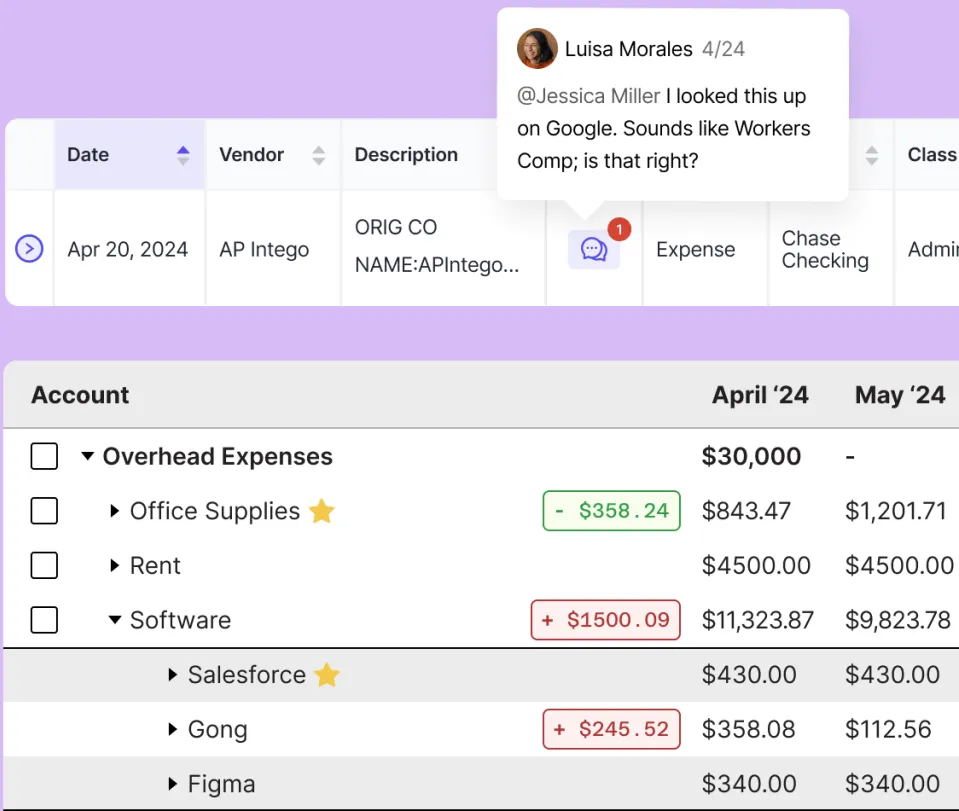
Double includes over a dozen review report types: Expense Inconsistency (which flags potential miscodes against historical data), Transactions without Payees, Uncategorized Transactions, P&L Drill-Down at Vendor Level, Transactions Coded to Parent Accounts, Transactions Over a set dollar amount, and Account Reconciliations, among others.
Each report supports date range filtering and persistent exclusion lists so recurring false positives don’t reappear.
AI Bank Feeds: Transactions are pre-sorted by difficulty so bookkeepers start with the easiest items first.
AI Bank Feeds brings bank feed coding into Double and uses AI to sort incoming transactions into four tiers before a bookkeeper touches them.
Instead of a flat list, the system sequences work by cognitive load: Potential Matches first (transactions matching existing ledger items), then Rules-based classifications, then Auto Classifications based on historical coding patterns, and finally a Needs Review bucket for uncertain or new transactions.
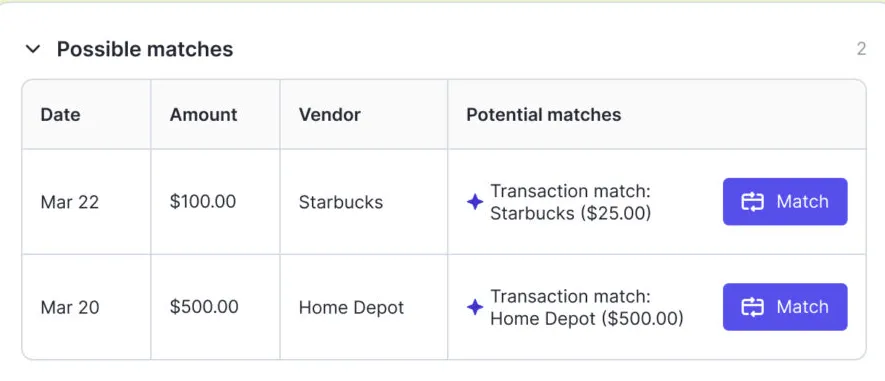
The rules engine is more capable than QuickBooks’s native rules. It supports multiple rules on the same transaction, conditional if-then-else logic, and absolute-value-of-amount matching that covers both debits and credits. For new vendors, Double’s AI searches the internet to suggest a categorization, removing a common manual interruption.
One limitation: AI Bank Feeds currently supports only US QuickBooks Online files. Xero and non-US support is on the roadmap but not yet available.
Client Portal: A branded space where clients answer questions and submit documents without creating an account.
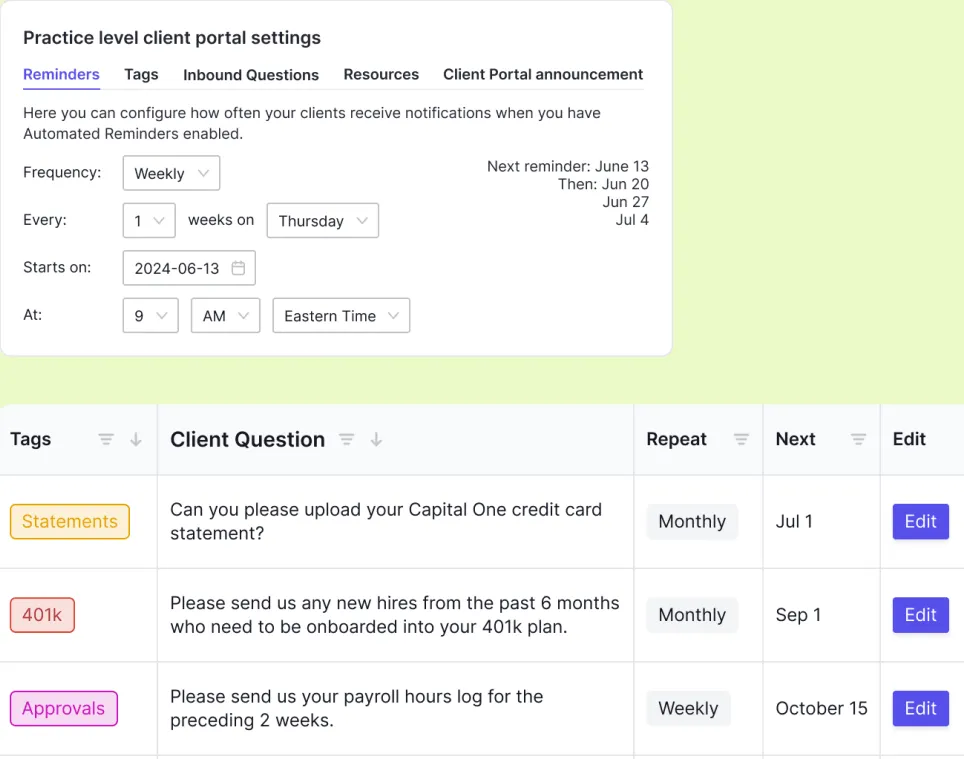
Double’s Client Portal lets bookkeepers ask transaction-specific questions that surface in the client’s portal.
Clients access it through Magic Links sent by email or text, with no password required. When a client responds, the bookkeeper can reclassify the transaction inside Double, and changes sync back to QuickBooks or Xero.
The portal supports automated email and text reminders (configurable frequency and timing), unlimited file storage, and full whitelabeling via CNAME so it lives at the firm’s own domain. A companion mobile app lets clients respond and upload receipts from their phones.
AI Journal Entries and Accruals: Scale-tier features for complex accounting workflows.
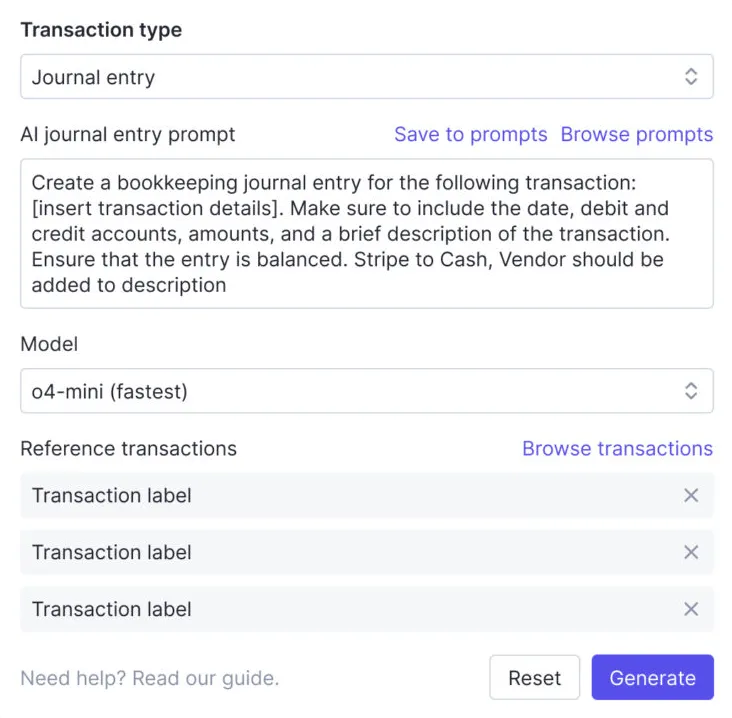
AI Journal Entries convert complex source documents (payroll reports, HUD settlement statements, loan documents) into balanced, ready-to-post journal entries.
Bookkeepers upload the source file, apply or create an AI prompt describing how amounts map to accounts, and generate the entry. The prompt can be saved and reused each month, turning a labor-intensive task into a near-automated recurring workflow.
The Accruals module replaces spreadsheet-based accrual management with structured schedules for prepaid expenses, fixed asset depreciation, accrued expenses, and deferred revenue. Entries are reviewed and posted from the same Close page bookkeepers already use for everything else.
Both features are limited to the Scale plan at $50 per client per month and are currently available only for US-based QuickBooks Online customers.
Pricing: Per-client pricing with three tiers and no seat limits.
Double charges per connected client, not per user. Any number of firm members can access the platform at no extra cost.
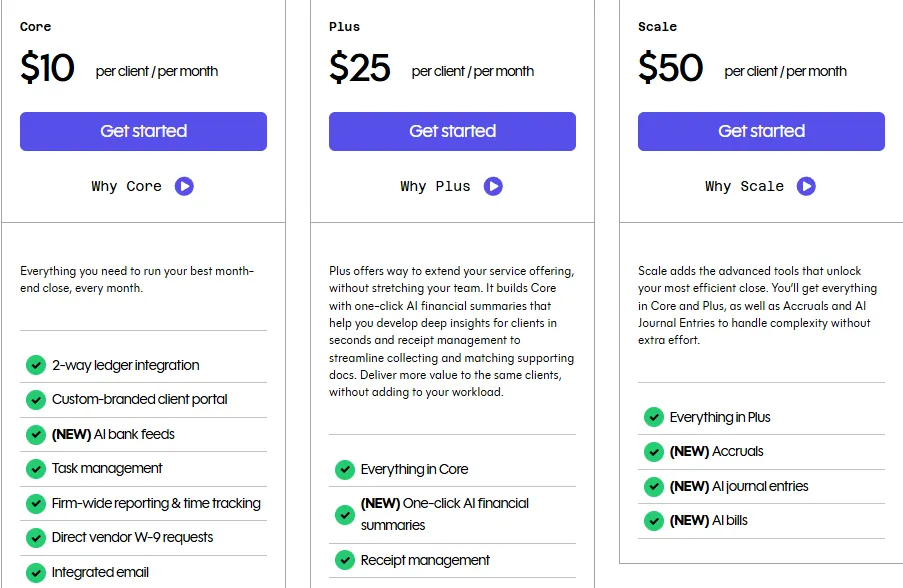
Core ($10/client/month): Two-way QBO/Xero integration, client portal, AI Bank Feeds, task management, firm-wide reporting, time tracking, 1099 tracking, and one practice email inbox.
Plus ($25/client/month): Everything in Core, plus AI Financial Summaries and receipt management.
Scale ($50/client/month): Everything in Plus, plus accruals, AI Journal Entries, and AI Bills. Enterprise arrangements are available by contacting sales.
Add-ons: Additional connected team emails cost $10 per email per month. The Tax Suite is included with a $200/month annual commitment.
Double does not offer a permanent free plan. The Terms and Conditions acknowledge that a trial period may exist, but no duration is published on the pricing page, and the primary calls to action route to a demo booking flow.
Where Double Falls Short
Double accelerates the month-end close well. But several limitations appear when you consider the full picture of running a bookkeeping practice.
No Built-in Time Tracking or Automated Billing
Double includes basic time tracking on the Core plan, but it lacks the connection between time capture and invoice generation that drives profitability in accounting firms.
There is no automated invoicing, no billing contract system, and no way to track whether you’re over-serving or under-billing clients. For firms where revenue leakage from unbilled hours is a real concern, this gap matters.
Narrow Integration Ecosystem
The integrations page lists QuickBooks Online, Xero, Sage (recently added), Zapier, Ping, and Abacor. That is a thin ecosystem compared to practice management platforms with native connections to multiple accounting systems, cloud storage providers, and automation tools. A public REST API exists but is in early stages, and no webhooks documentation is publicly available.
US-Centric Limitations
AI Bank Feeds works only with US QuickBooks Online files. The Accruals module is similarly limited to US-based QBO customers. For firms with international clients or those using Xero as their primary ledger, key AI features are not yet available.
No Email Open Tracking
Users have requested the ability to see whether clients opened emails sent through the portal, a feature that remains absent. Some firms report sending emails outside of Double because of this gap.
Per-Client Costs Scale Quickly
While per-client pricing aligns costs with revenue, a firm managing 100 clients on the Scale plan faces $5,000 per month before add-ons. For smaller firms or those with many low-fee clients, the economics get difficult at higher tiers.
No Free Plan for Evaluation
Unlike competitors that offer permanent free tiers for solo practitioners, Double requires booking a demo to get started. This creates a barrier for firms that prefer to explore software on their own before committing.
These limitations reflect Double’s deliberate focus on the month-end close. But for firms that need the full picture (time tracking, billing, profitability analytics, and operational visibility), the gaps create a need for additional tools or a more comprehensive platform.
Top Double Alternative: Uku
Uku addresses Double’s operational gaps by covering the complete practice management lifecycle in one platform.
Built from the ground up to be international, Uku now serves 1,000+ firms globally across markets including the UK, USA, and Scandinavia, with support for 12 languages and multi-currency capabilities. The platform was built by Rain Allikvee and Jaanus Lang, who identified the gap in accounting-specific practice management software from their experience running a professional services business.
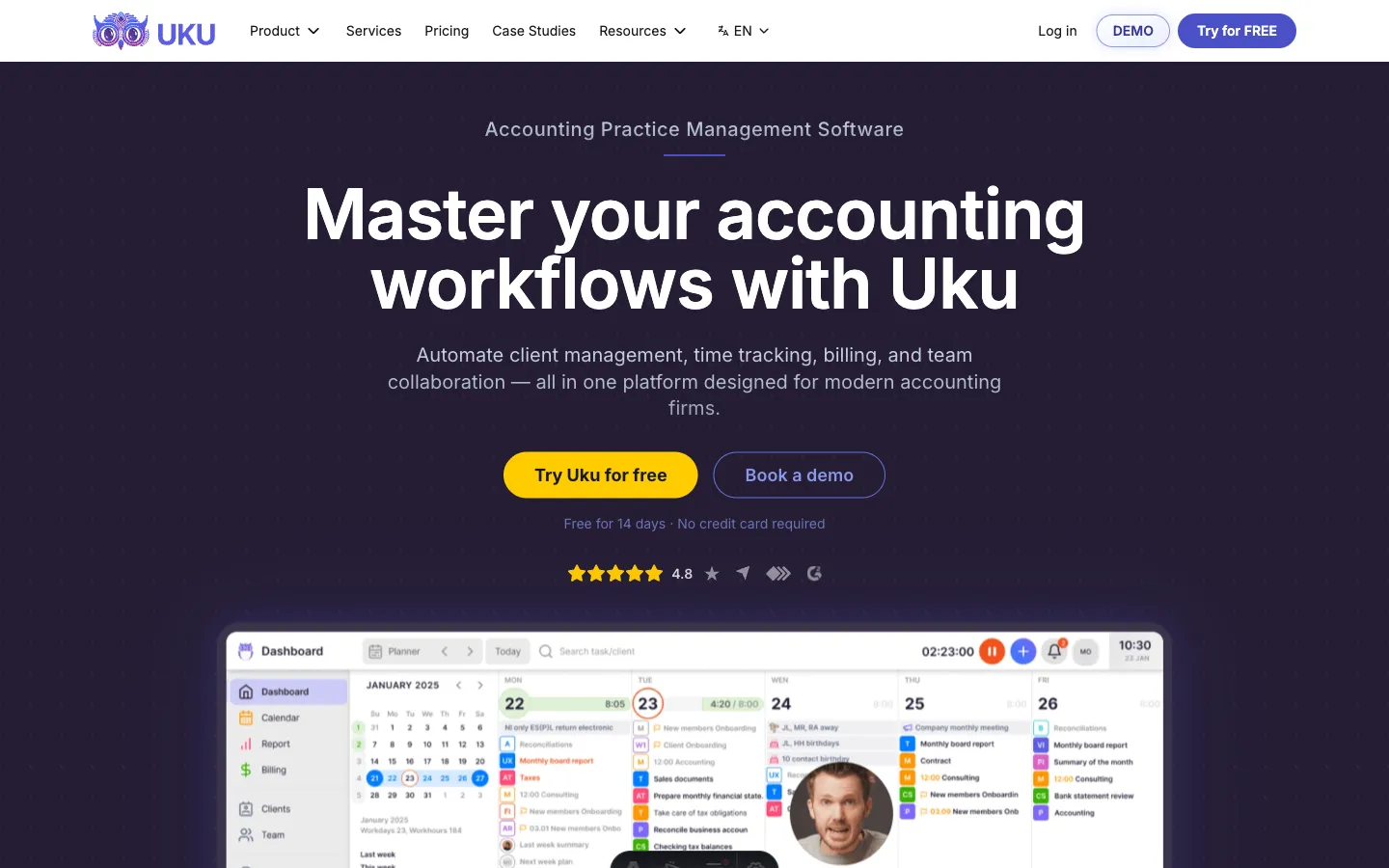
Named clients include Leinonen Group, Baker Tilly, and Rödl & Partner, and Uku has earned G2 Best Usability, Capterra Best Value, and Software Advice Best Customer Support awards for 2025.
A defining characteristic of Uku is its modular approach: firms can begin with just CRM and tasks, then gradually activate billing, portal, reporting, and other modules as they grow. This means firms can start working on day one rather than spending weeks on upfront configuration.
Task Management and Workflow Automation: Uku automates the recurring rhythm of accounting work so nothing falls through the cracks.
Uku’s task management is built around per-client work plans: recurring task schedules that generate automatically on each team member’s dashboard when it’s time to work on them.
Firms define task templates specifying recurrence patterns (daily, weekly, monthly, quarterly, yearly), assignees, checklists, due dates, and estimated time. Once applied to a client plan, tasks appear on the right person’s dashboard at the right time without manual setup each period. Tasks can also be generated from client custom fields, adding flexibility beyond standard recurrence.
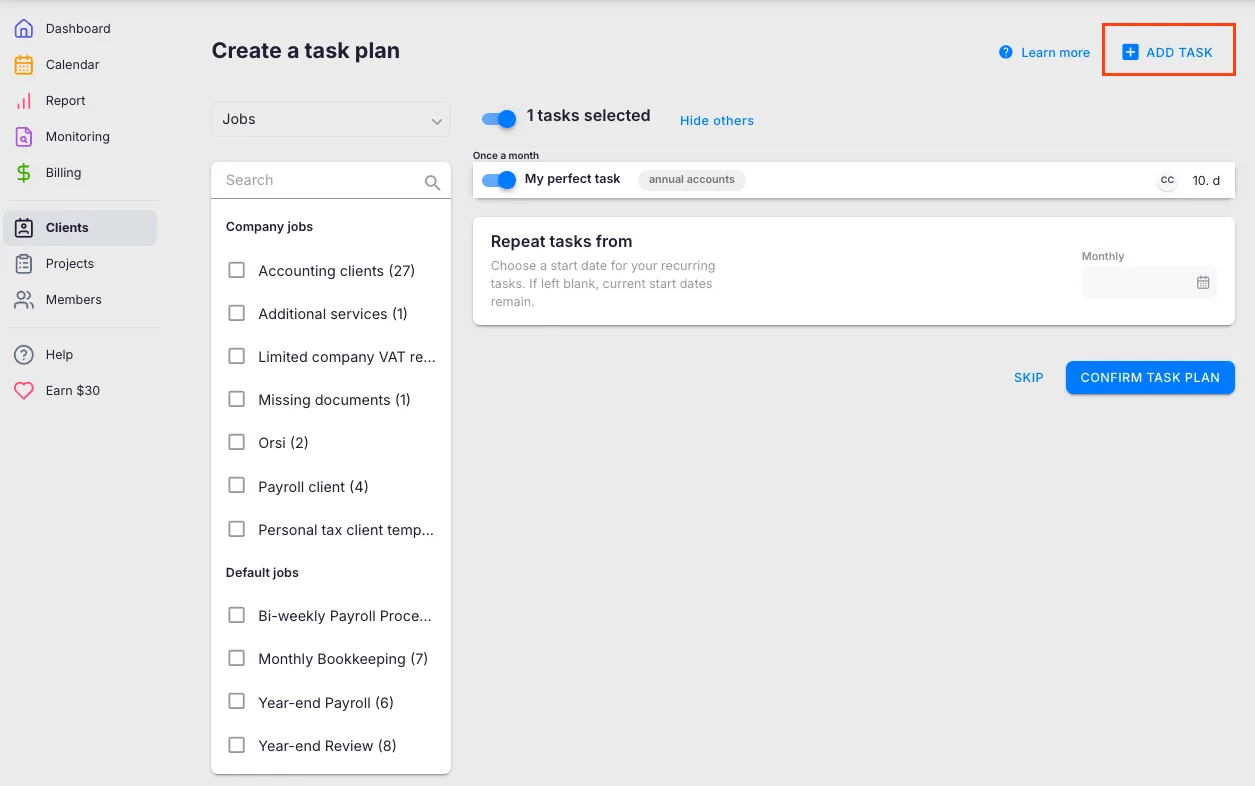
The system includes task dependencies (so downstream tasks surface only after prerequisites are complete), subtask checklists with mandatory-ticking options, and a firm-wide Task List that aggregates work across all clients by due date. When a firm improves a workflow template, those changes can be pushed to existing client plans at controlled rollout, selecting which clients, fields, and timing to update.
Email automations attach directly to recurring tasks, so client reminders fire when a task opens or a deadline approaches, with color-coded indicators showing whether each automated email was sent successfully.
Uku provides pre-built accounting templates across seven categories: Accounting, Administration, Bookkeeping, Client Management, Operations, Payroll, and Tax. All communication stays within tasks, solving the common problem of critical information trapped in individual email accounts.

Time Tracking and Automated Billing: Uku captures every billable minute and converts it into invoices.
Uku’s time tracking records work at the task level through three methods: a stopwatch for real-time capture, manual entry with smart start-time suggestions, and bulk time allocation across multiple tasks. The time tracking interface keeps 90% of actions to one click, reducing daily admin overhead. Time tracked on subtasks rolls up to the parent task for clean reporting.
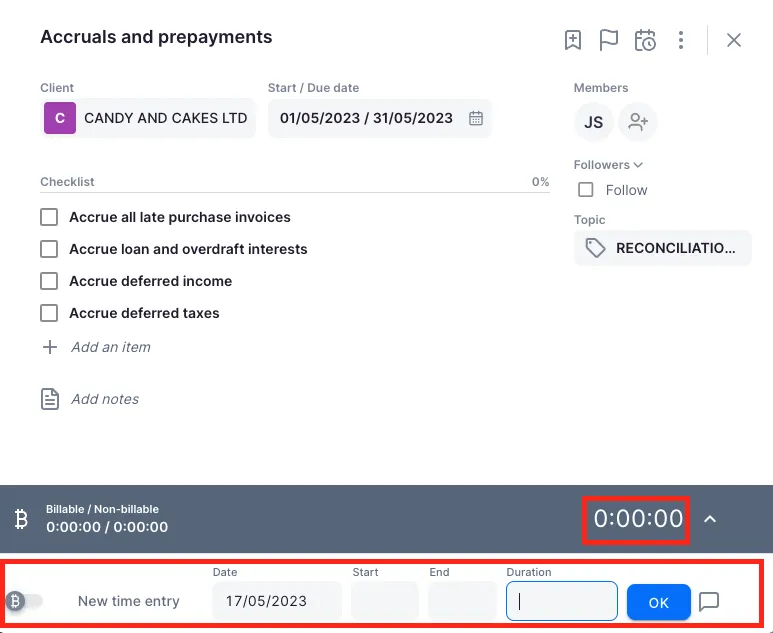
What sets this apart is the direct connection to billing.
Tracked hours flow into Uku’s invoicing engine without any export or re-entry step. The automated billing module supports price lists based on quantity, time, material, and ranges, with different rates for different periods. Rounding rules can be configured at the entry, team, client, or month level, so unplanned work is properly captured: for instance, a one-minute unplanned call can be billed as 15 minutes.
Each client can have multiple active contracts for different services, such as monthly bookkeeping at a fixed fee and advisory work at an hourly rate under the same client.
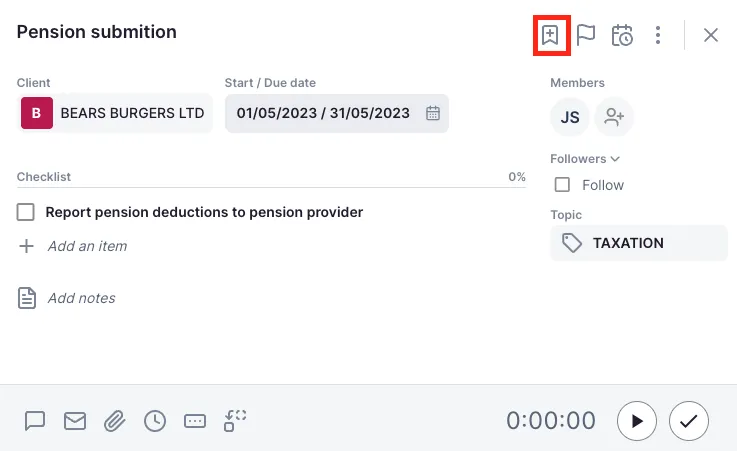
Everything runs through contracts: rules are set up once, then time tracking calculates billable amounts in real time. At billing time, Uku generates draft invoices pulling all tracked time and task data for the period. An “Extra work” tag distinguishes standard contracted work from out-of-scope hours, making it clear when clients consume more time than their agreement covers.
The results are concrete: firms report reducing invoice preparation from two to three days to roughly 30 minutes, and customers see ~20% more profit by discovering outdated agreements where they billed for a fraction of actual hours worked.


Reporting and Client Profitability: Uku turns operational data into decisions about pricing, capacity, and growth.
Uku’s BI Reporting pulls from the time and task data already flowing through the platform, providing real-time visibility without a separate BI tool. Reports come in three levels of depth: Summary (grouped by client, member, or date), Tasks (individual task detail), and Time (per-session duration logs). The system supports filters and saved report templates for recurring analysis.
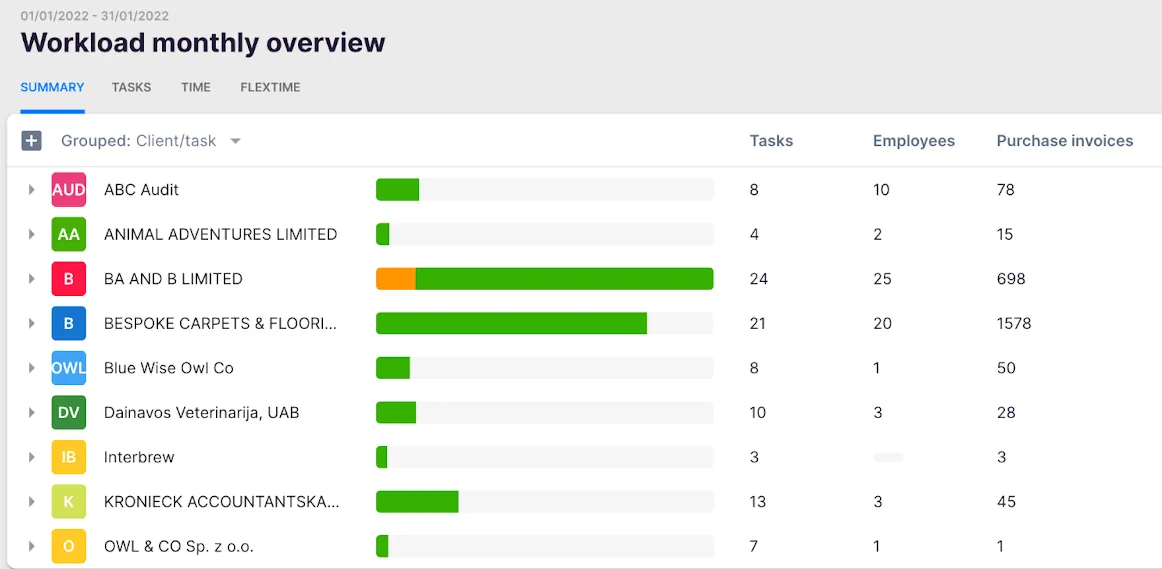
The billing system tracks both sales prices and actual cost prices. If an employee costs $30/hour but bills at $45/hour, managers can see whether they’re profitable. When employees work eight hours but only six are billable, BI Reporting shows whether the issue is employee efficiency, client difficulty, or pricing structure.
A business analytics report compares agreed service volumes against actual work performed, with color-coded status indicators visible across all clients at once. Firms can see which clients generate scope creep and which have unused capacity.
For firms on the Elite plan, Client Budgeting lets you set time or cost ceilings by contract, project, or topic, with automatic alerts before budgets run out. This prevents the problem where a client’s budget was exceeded weeks ago and nobody noticed until billing time.
“As a manager, I see how much the accountants work, if there are any bottlenecks, how much time we spend on a client.”
Client Portal and Team Collaboration: Uku reduces email overhead and keeps the whole team aligned.
Unlike traditional portals where tickets must be connected to work items separately, Uku’s Client Portal mirrors the same task on both the client and accountant side.
Clients and accountants work on the same item with all communication, actions, documents, logs, and time tracking in one place. When clients make requests through the portal, notifications appear on the accountant’s dashboard, and they can start tracking time or communicating within that same task.
The portal uses magic links (no passwords, no account creation) and supports company branding including logo, colors, custom URL, and welcome video.
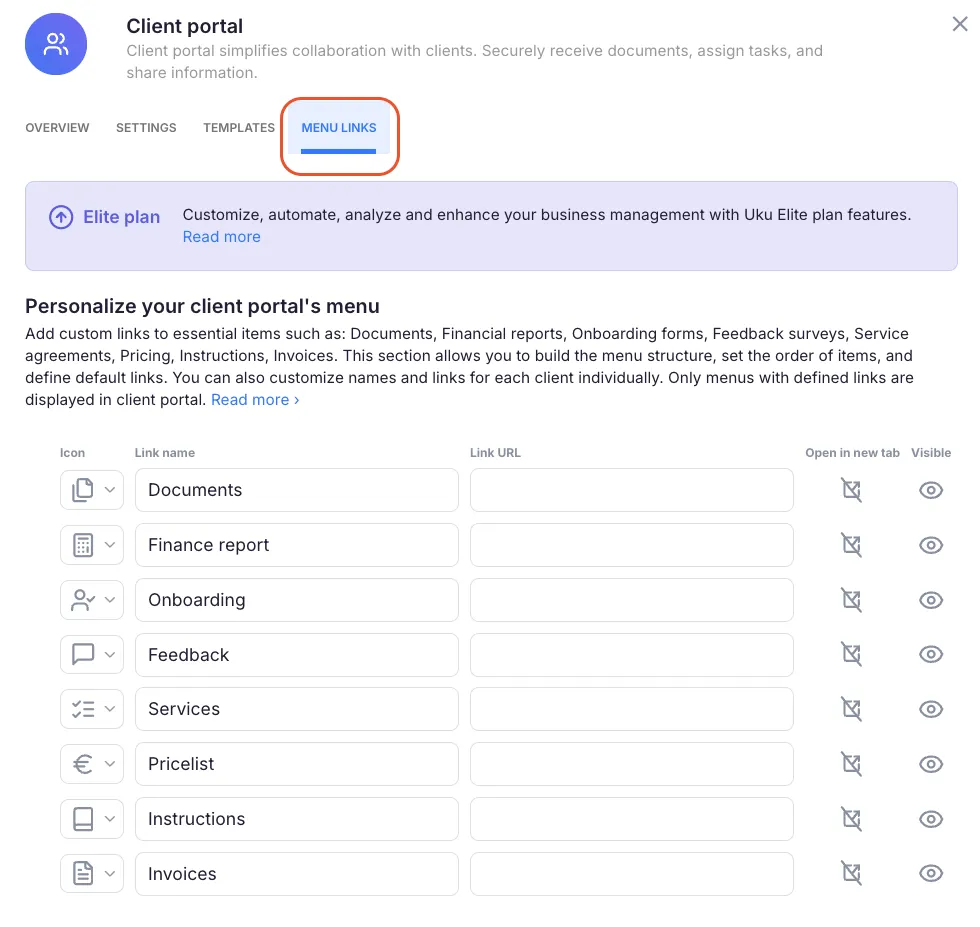
Firms can create unique menus for each client, run onboarding with forms, share business insight reports, display price lists, and embed custom content. Automatic deadline reminders fire without manual accountant intervention, and document uploads sync to connected cloud storage (Google Drive, OneDrive, SharePoint, or Dropbox).
Uku also supports one-click document digitalization, sending submitted documents directly into accounting software.
On the team side, Uku treats employee absence coverage as a core use case. Managers can forward an entire employee’s workload to a colleague in a single action during vacations or sick leave. A per-client communication timeline gathers all emails sent by every team member in chronological order, so any colleague covering an account has full context immediately.
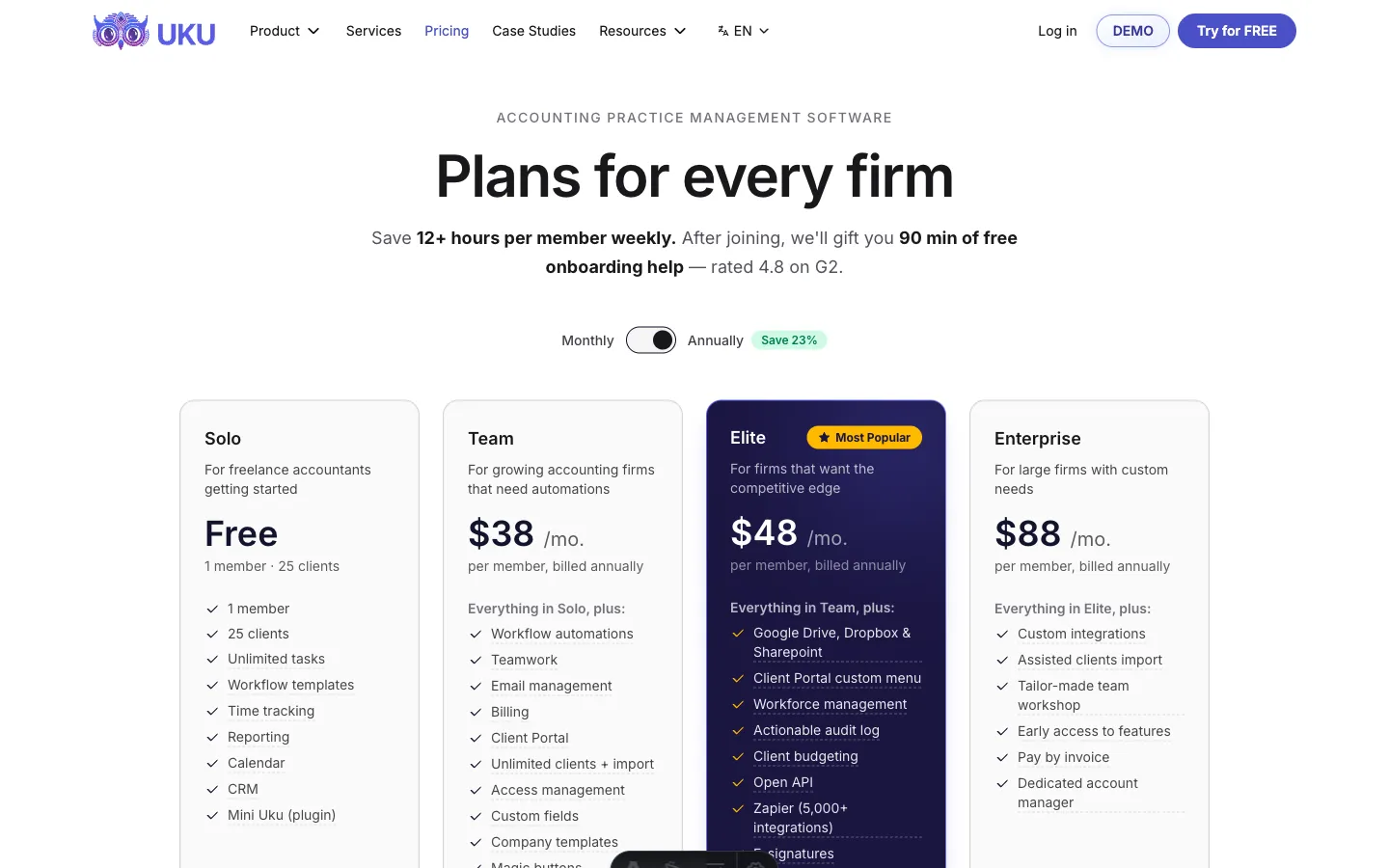
Pricing: Per-seat pricing with a permanent free plan and 14-day full trial.
Uku charges per team member rather than per client, with pricing in multiple currencies (€, $, £) and both annual and monthly billing options.
Solo (Free forever): 1 member, up to 25 clients. Includes unlimited tasks, time tracking, reporting, calendar, and CRM.
Team (from $38/member/month billed annually): Unlimited clients and contacts. Everything in Solo, plus workflow automations, billing, client portal, email management, integrations, and projects.
Elite ($48/member/month billed annually): Everything in Team, plus cloud storage integrations, custom client portal menus, Client Budgeting, Document Management, e-signatures, workforce management, audit log, public API, and Zapier integration.
Enterprise ($88/member/month billed annually): Everything in Elite, plus custom integrations, dedicated account manager, and early feature access.
Monthly billing is available for firms that prefer flexibility over annual commitments. New accounts receive a 14-day free trial with full Elite plan access and no credit card required. The first 90 minutes of onboarding assistance are free with all new accounts, and assisted import is available across all plans, making the transition from spreadsheets straightforward.
Double or Uku: Comparison Summary
| Double | Uku | |
|---|---|---|
| Primary focus | Month-end close acceleration | Full practice management |
| Target user | Bookkeeping firms on QBO/Xero | Accounting and bookkeeping firms globally |
| Pricing model | Per client ($10–$50/client/month) | Per member (from $38/member/month, billed annually) |
| Free plan | ❌ No free plan; demo required | ✅ Free Solo plan (1 member, 25 clients) |
| Free trial | Not clearly published | ✅ 14 days, full Elite access, no credit card |
| Two-way ledger sync | ✅ QBO, Xero, Sage | Billing integration with QBO, Xero, and 8+ others |
| File review tools | ✅ 14+ review report types with in-app corrections | Not a core feature |
| AI Bank Feeds | ✅ Four-tier classification (US QBO only) | Not available |
| AI Journal Entries | ✅ Scale plan ($50/client) | Not available |
| Time tracking | Basic (included in Core) | ✅ Stopwatch, manual, bulk entry; 90% one-click actions |
| Automated billing | ❌ Not available | ✅ Four billing types with contracts and rounding rules |
| Client portal | ✅ Magic Link, whitelabeled | ✅ Magic Link, company branding, custom menus per client |
| Document management | Not available | ✅ One-click digitalization to accounting software |
| Task management | ✅ Close-focused workflows | ✅ Recurring plans with dependencies and templates |
| Reporting & analytics | Basic firm-wide reporting | ✅ BI Reporting with profitability and business analytics |
| Deployment approach | Full platform adoption | ✅ Modular: start with what you need, add as you grow |
| Languages | English | 12 languages |
| Integrations | QBO, Xero, Sage, Zapier, 2 native | QBO, Xero, 10+ accounting systems, Zapier, Make |
| Security | SOC 2 Type II, AES-256, 2FA | SOC 2 Type I, TLS 1.3, AES-256, EU-hosted |
| Customer support awards | G2 5.0 rating | G2 Best Usability, Capterra Best Value, SA Best Support |
Final Verdict
The choice between Double and Uku depends on what your firm needs most: close speed or operational control.
Choose Double if your primary pain point is the month-end close.
If your bookkeepers spend too much time hunting for miscoded transactions across browser tabs, chasing clients for transaction explanations, and manually coding bank feeds, Double addresses those problems directly. Its two-way QuickBooks and Xero sync, AI bank feed classification, and transaction-linked client portal compress close timelines.
For US-based firms running QuickBooks Online with a heavy close workload, Double is a focused, effective tool.
Choose Uku if you need more than close acceleration.
If your firm loses revenue to unbilled hours, spends too long assembling invoices, lacks visibility into client profitability, or struggles with workload distribution across a growing team, Uku addresses the full operational picture. Its automated billing reduces invoice preparation from days to roughly 30 minutes, its BI Reporting surfaces which clients are profitable and which drain capacity, and its workflow automation ensures recurring work happens on schedule without manual setup.
Uku’s modular approach means you start with the features you need and scale up over time, and firms transitioning from spreadsheets find it the fastest path to a fully managed practice. For firms that want one platform covering tasks, time, billing, reporting, and client communication with multilingual and multi-currency support, Uku is the more complete solution.
Double makes the close faster. Uku makes the firm run better. Your choice depends on which problem costs you more.
Related: for a feature-by-feature head-to-head, see Double vs Uku: which accounting practice management tool fits your firm in 2026. For a full pricing breakdown across all four Double tiers and the Tax Suite add-on, see Double Pricing: Worth It or Consider Uku?. For specialized alternatives organized by firm priority (billing, enterprise reporting, tax, error detection, budget, workflow), see 7 Double Alternatives.

Intelligent practice management assistant for accounting firms. Helping 1000+ firms save time, standardise processes, and grow.

Ready to upgrade your practice management?
Join 1,000+ accounting firms already using Uku to save time and grow their business.