
Double vs Uku: Best Accounting Practice Tool in 2026

Choosing between Double and Uku for accounting practice management comes down to five questions:
- Is your firm’s core problem the month-end close, or do you need a broader platform covering billing, workforce, and client management?
- Do you primarily use QuickBooks Online, or do you work across European accounting systems like E-conomic, Tripletex, or Fortnox?
- Are AI features like automated transaction classification and journal entry generation important to your workflow?
- Do you need multilingual support for a team or client base spanning multiple countries?
- Does your pricing preference lean toward per-client billing or per-seat billing?
In short, here’s what we recommend:
👉 Double is the month-end close specialist for bookkeeping firms that run on QuickBooks Online or Xero. Its two-way ledger sync lets bookkeepers review and correct transactions without opening the accounting software, and AI features like AI Bank Feeds and AI Journal Entries cut manual data entry. Per-client pricing starts at $10/client/month with unlimited team members included. Double works well for firms where closing the books faster is the primary goal. However, its integration ecosystem is narrow and its AI Bank Feeds feature currently supports only US-based QuickBooks Online files. We covered the platform in depth in our Double review.
👉 Uku is the practice management platform built for accounting firms that need to manage the full lifecycle of client work, from task scheduling and time tracking through automated billing and team coordination. Serving 1,000+ clients globally across 12 languages with native integrations to European accounting systems, Uku was designed from the ground up for international firms. Its automated billing engine converts tracked time directly into invoices, reducing invoice preparation from days to roughly 30 minutes, and firms report raising billable hours by ~20% by capturing work that previously went unbilled. A modular approach lets firms start with just CRM and tasks on day one, then activate features as they grow.
Both platforms are built for accounting firms, but they organize work around different problems. Double treats the month-end close as the defining workflow. Uku treats the entire practice operation as the system to manage.
Get started with Uku for free.
Double vs Uku at a glance
| Double | Uku | |
|---|---|---|
| Core focus | Month-end close acceleration | Full practice management |
| Starting price | $10/client/month | From $19/member/month (Solo, annual); $38 (Team, annual) |
| Pricing model | Per client, unlimited users | Per seat, unlimited clients (paid plans) |
| Accounting integrations | QuickBooks Online, Xero, Sage | QuickBooks, Xero, E-conomic, Tripletex, Fortnox, and 6 more |
| AI features | AI Bank Feeds, AI Journal Entries, AI Reconciliations, AI Financial Summaries | Automation rules; Uku MCP on the roadmap |
| Client portal | Magic link, company branding, mobile app | Magic link, company branding, multilingual |
| Languages | English only | 12 languages |
| Time tracking | Built-in | Built-in with stopwatch, mandatory logging option |
| Billing/invoicing | Not included (integrates with QBO) | Full automated invoicing engine |
| Geographic strength | US and Canada | International (UK, USA, Scandinavia, Baltics, DACH) |
| G2 rating | 5.0 | 4.7 |
| Best for | Firms focused on closing books faster | Firms managing the full practice lifecycle |
The core difference: close-first vs operations-first
Double was built around a single frustration.
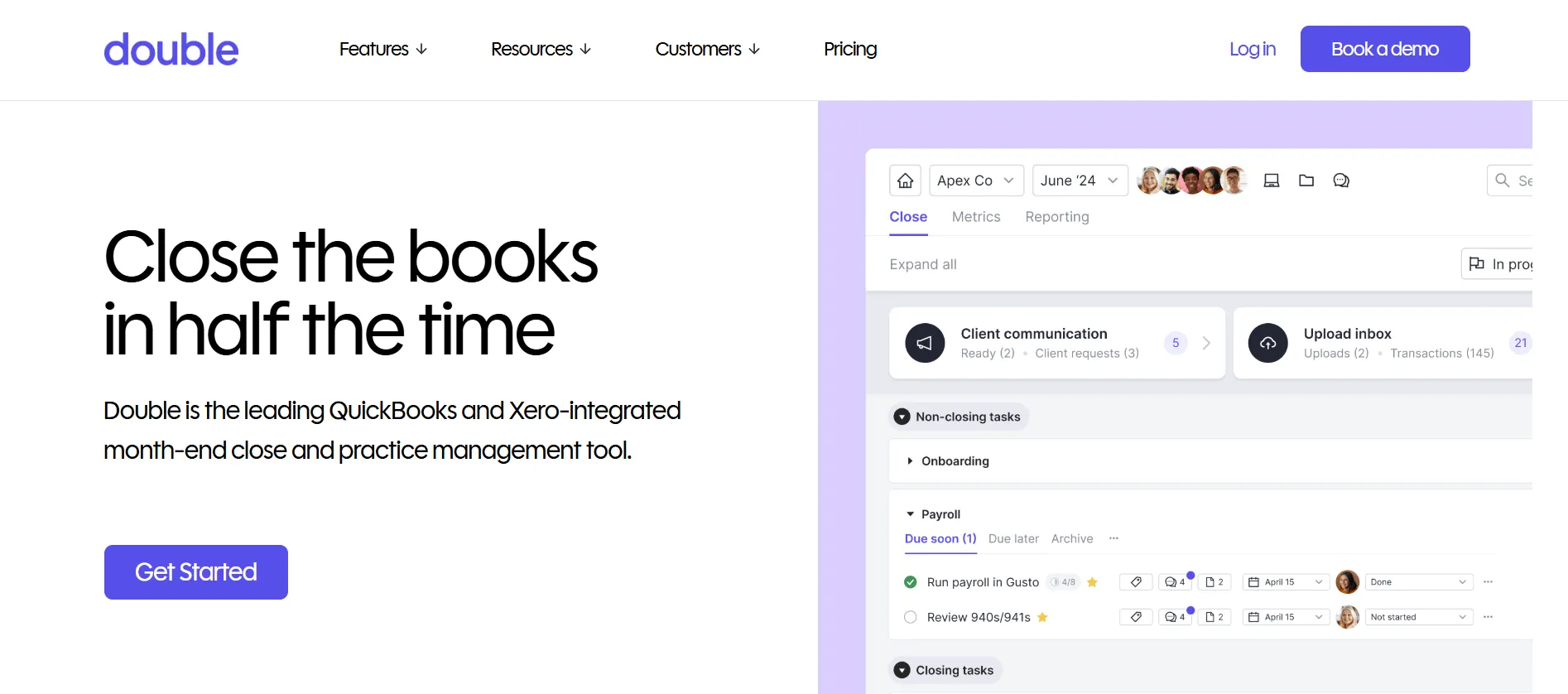
Co-founder Ben Stein, working as CFO of a tech startup, found the month-end close process buried in back-and-forth emails, spreadsheets, and roughly 79 open browser tabs. That experience shaped every design decision. Double treats the month-end close as the central event of a bookkeeping practice, and every feature feeds into making it faster and more accurate.
The product connects directly to the client’s QuickBooks Online or Xero file and pulls transaction data into a structured review environment. Bookkeepers catch errors, reclassify transactions, and post corrections from Double’s interface, with changes syncing back to the ledger immediately.
This two-way sync is the foundation: AI bank feed classification, client questions linked to specific transactions, automated reconciliation diagnostics, and management reports all run on live ledger data.
Uku started from a different observation.
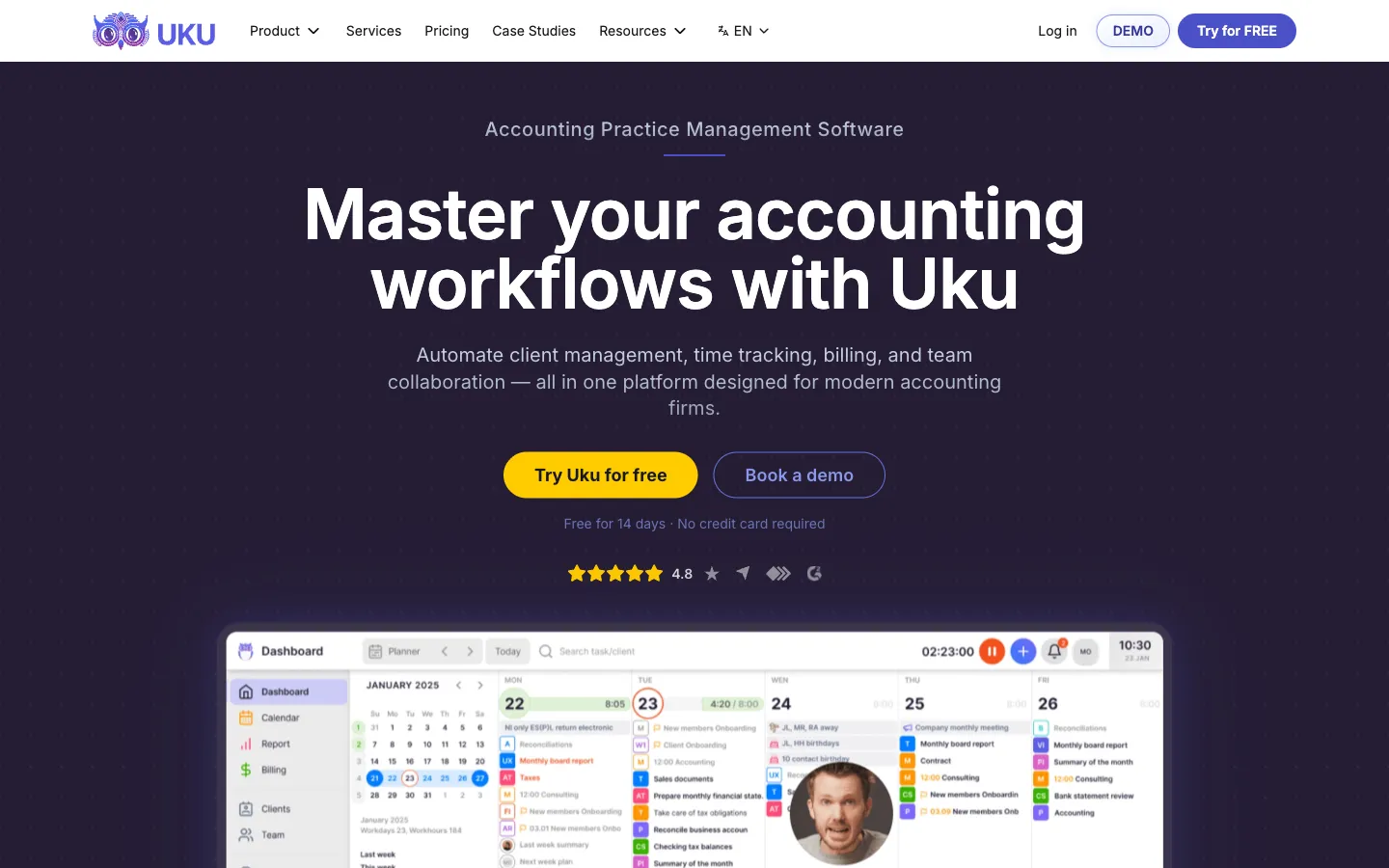
Its founders saw that accounting firms managed their operations across disconnected spreadsheets, email inboxes, and generic project tools that didn’t understand accounting work.
Rather than optimizing one step, they built a platform covering the full practice: recurring task scheduling, time tracking, automated billing, client communication, team coordination, document management, and workforce planning. The platform was built from the ground up for international use.
Uku organizes everything around the client relationship. Each client gets a dedicated card containing their work plan, billing contracts, communication history, documents, and budget status. Tasks appear on individual accountants’ dashboards only when scheduled, with automated reminders handling client follow-ups. Time tracked on tasks flows directly into invoice drafts without re-entry.
The system understands accounting cadences natively (monthly, quarterly, yearly recurrence with weekend fallback rules) rather than requiring accountants to configure generic project management patterns.
What distinguishes Uku’s approach is its modularity: firms can begin with just CRM and tasks, then gradually activate features like automated billing, client portal, or workforce management. This eliminates large upfront configuration and training, so firms start working productively on day one rather than spending weeks in setup. For firms transitioning from Excel, this path is particularly valuable, as Uku is designed to be the fastest practice management tool to onboard from spreadsheets.
Double leads in month-end close and file review
Double’s File Reviews feature is the product’s defining capability.
It surfaces a structured set of reports (expense inconsistencies, uncategorized transactions, missing payees, reconciliation discrepancies, transactions coded to parent accounts, and more) that bookkeepers work through systematically. Each item can be fixed, approved, or excluded with a single action, and corrections sync back to QuickBooks or Xero instantly.
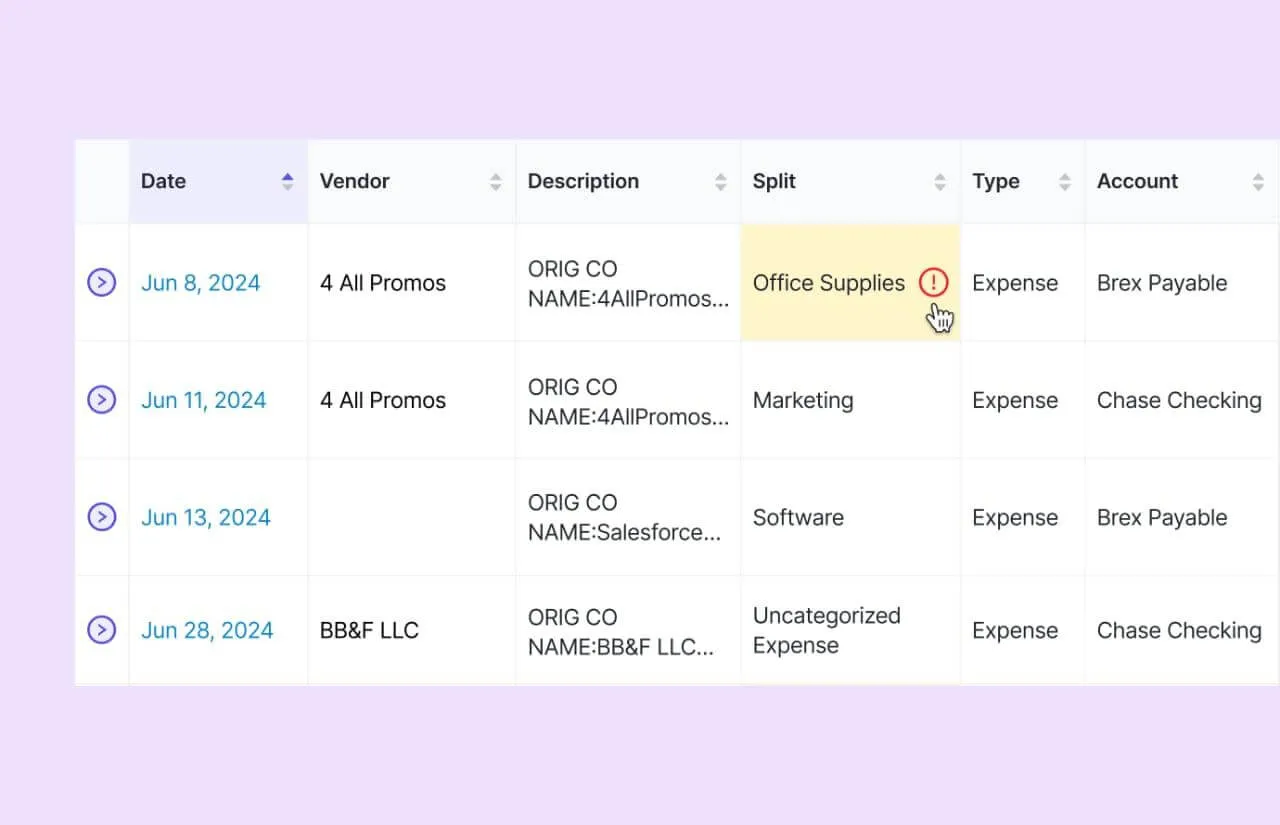 Source: Double
The exclusion list is also worth noting: when a bookkeeper marks a recurring item as irrelevant, it never surfaces again. Over time, this reduces review noise, making each month’s close faster than the last.
Uku does not have an equivalent file review module.
Its close-related capabilities come through task management: firms create recurring close checklists with subtasks, assign preparers and reviewers, and track completion across all clients from a centralized dashboard.
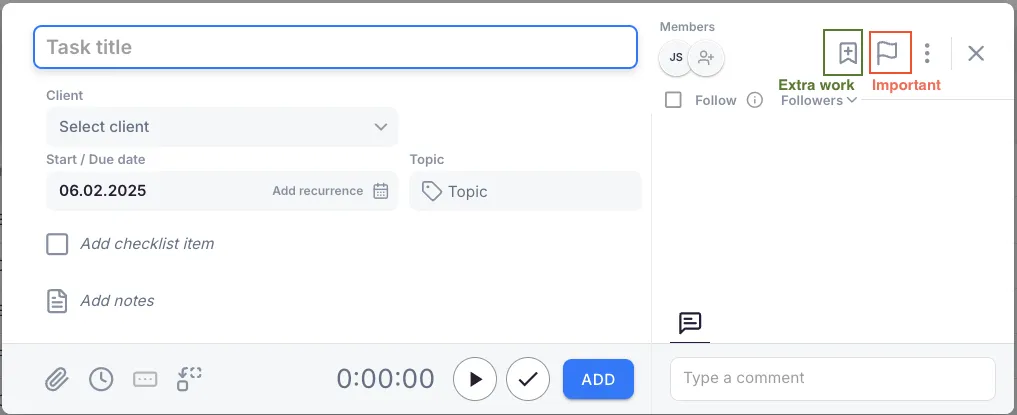 Source: Uku
This works well for managing the workflow around the close, but the actual transaction-level review and correction happens inside the accounting software. Firms that need to catch and fix coding errors at scale will find Double’s integrated review environment more direct.
Double’s AI features create a meaningful gap
Double has shipped four AI capabilities, all embedded within the close workflow rather than bolted on as separate tools.
AI Bank Feeds replaces the flat transaction list in QuickBooks or Xero with a four-tier system that sorts transactions by cognitive load. Potential matches and rule-based classifications are handled first (often in bulk), auto-classifications with high and medium confidence come next, and only uncertain items require manual review.
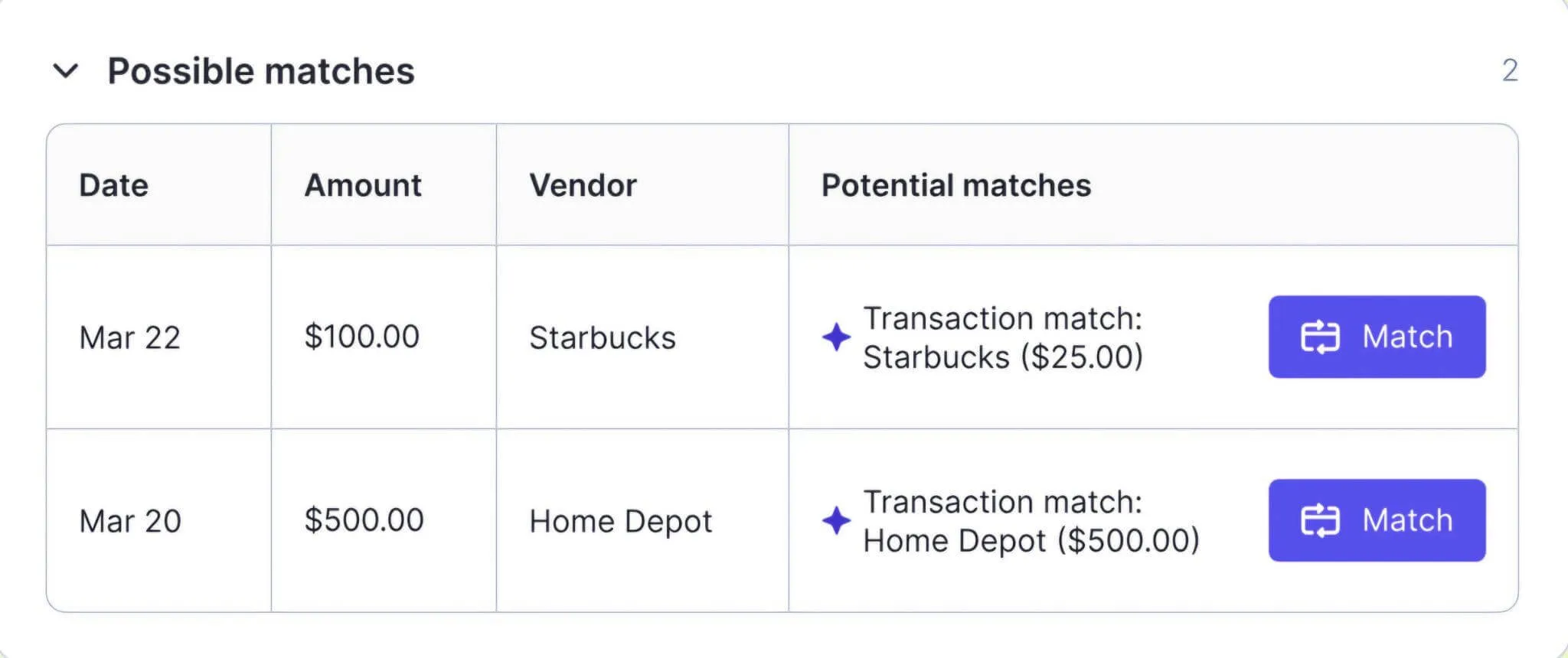 Source: Double
The rules engine supports conditional if-then-else logic and absolute-value matching, which is more capable than QuickBooks’ native rules. For unknown vendors, the AI searches the internet to suggest a categorization.
AI Journal Entries converts complex source documents (payroll reports, HUD settlement statements, loan documents) into balanced, ready-to-post journal entries.
The first time requires crafting a prompt describing how the document maps to accounts. Every subsequent month, the saved prompt runs against the latest version of the same document, turning a labor-intensive task into a near-automated one.
AI Financial Summaries auto-generate client-ready commentary on management reports, and AI-assisted Reconciliations diagnose tie-out failures by comparing statements against the ledger and recommending specific fixes.
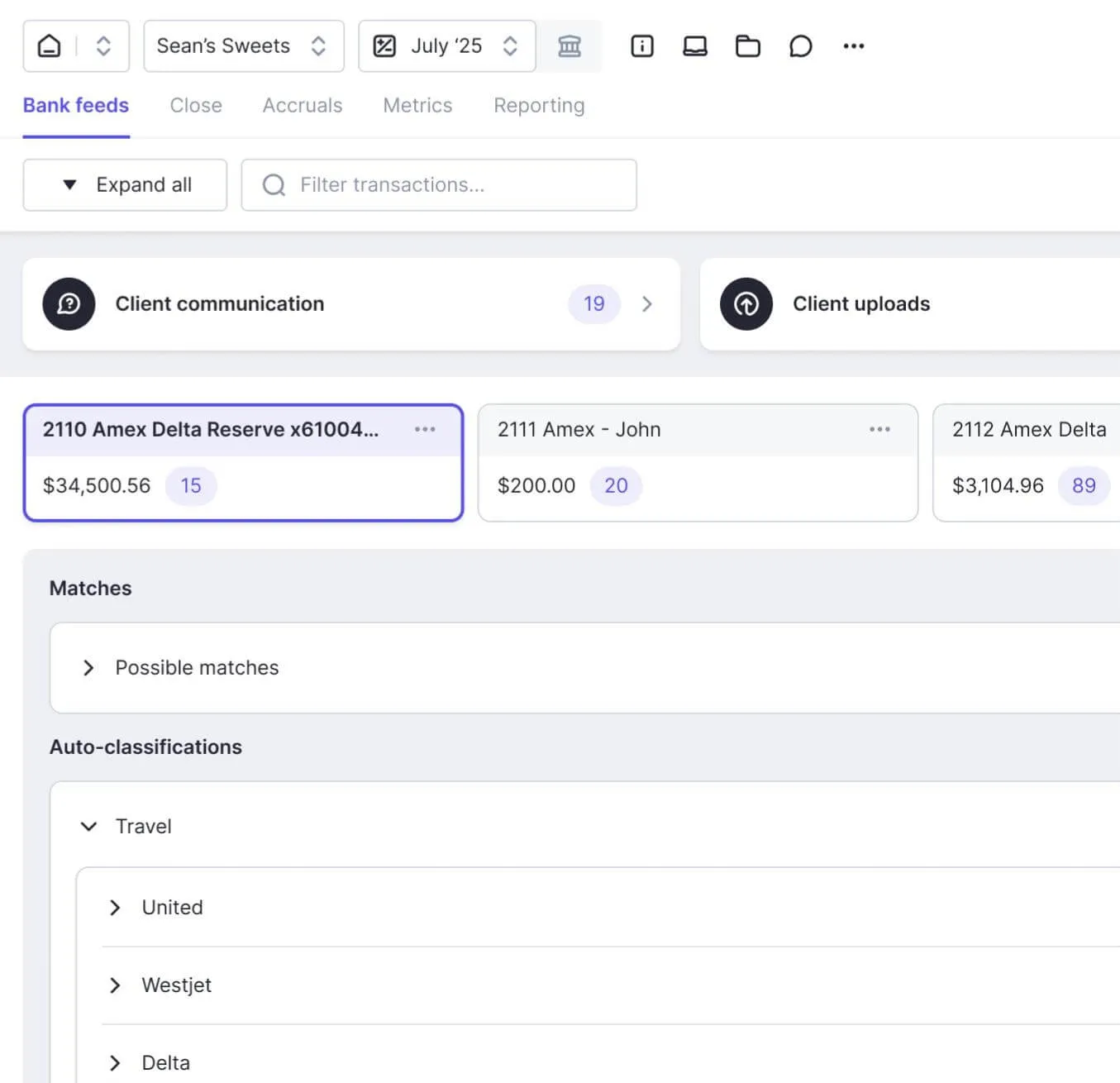 Source: Double
Double’s stated AI philosophy is conservative: every AI output is reviewed by a human before posting. The goal is to bring the accountant to the finish line, not to cross it without them.
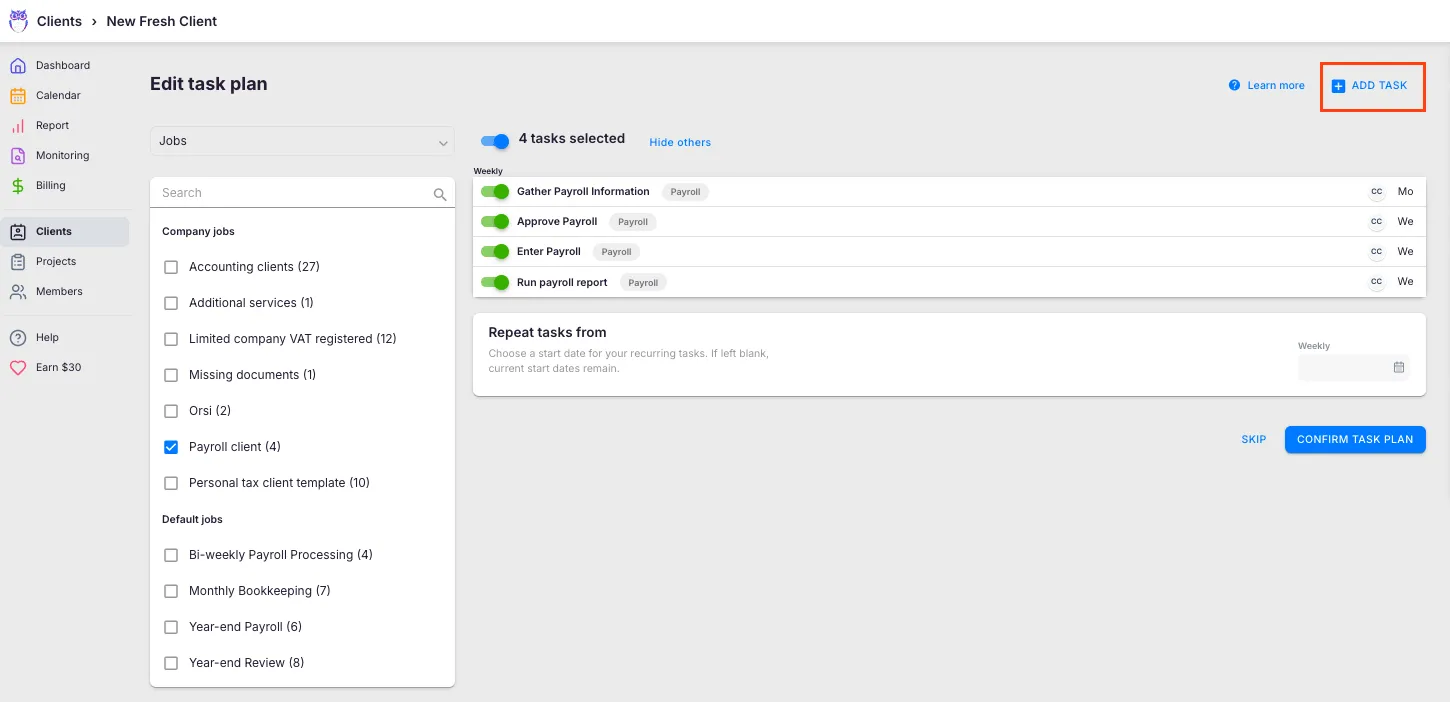
Uku does not currently have live AI features.
The platform relies on rule-based automation (recurring task generation, email triggers, template propagation) rather than machine learning. The Uku MCP, currently on the roadmap, describes Model Context Protocol integration combining business intelligence querying with bulk operations.
 Source: Uku
Until that ships, firms that want AI-assisted transaction classification or document processing will need to handle those tasks inside their accounting software or with third-party tools.
Uku has the stronger billing and invoicing engine
Uku’s billing module is where the operations-first approach pays off, and it’s Uku’s primary competitive advantage.
The system converts tracked time and task data directly into client-ready invoices through an automated pipeline: draft generation, review, approval, and export to connected accounting software. Where invoice preparation can take days with other practice management tools, Uku reduces it to roughly 30 minutes.
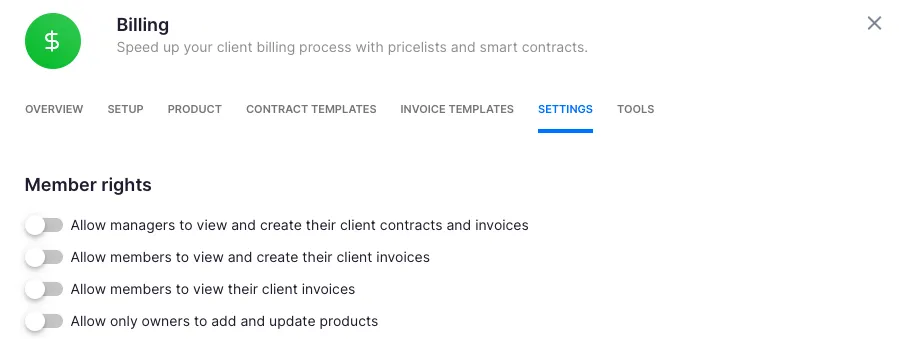
What makes it flexible is the contract template system. Each client can have multiple active contracts for different services, billed under different models simultaneously.
A firm might bill monthly bookkeeping at a fixed fee, advisory work at an hourly rate, and payroll processing per-piece, all under the same client. Pricing rules include cumulative tier pricing, minimum time requirements, configurable rounding rules (by entry, team, client, or month), and client-specific discounts.
 Source: Uku
The rounding capability is useful for unplanned work: a one-minute interruption call can be automatically billed as 15 minutes, ensuring firms capture revenue from every interaction.
The billing system tracks both sales prices and cost prices in real time. If an employee costs $30/hour but bills at $45/hour, managers see immediately whether they’re profitable. When employees work eight hours but only six are billable, the system shows whether the issue is employee efficiency, client difficulty, or pricing structure.
Uku’s BI Reporting provides visual reports and alerts on profitability, preventing firms from discovering losses 30 days too late.
The revenue impact is concrete:

The Extra Work tag distinguishes out-of-scope hours from contracted work, making it easy to identify and bill for scope creep. The business analytics report compares agreed service volumes against actual work performed, giving firms visibility across all clients. Customers report seeing up to ~20% more profit by discovering outdated agreements where they billed for eight hours but employees performed 20.
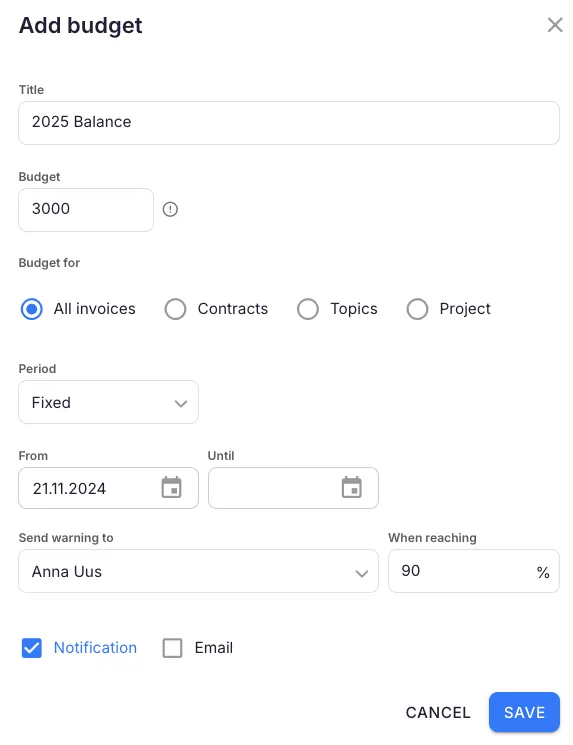
The Client Budgeting feature takes this further: firms set budget ceilings by contract, project, or topic, and receive automatic alerts before the budget runs out, rather than discovering overruns at invoice time.
 Source: Uku
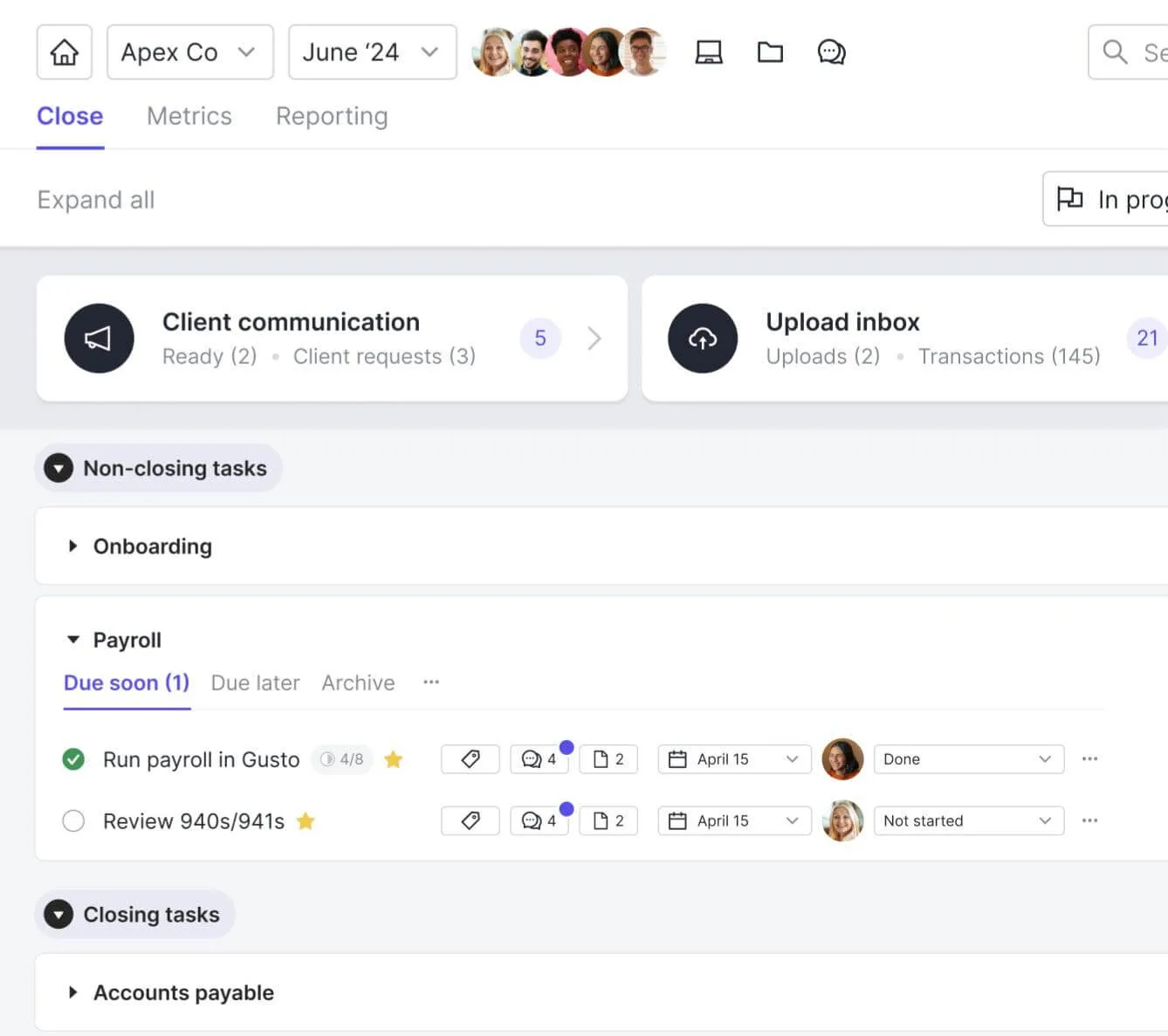
Double does not include a native billing or invoicing module.
The platform integrates with QuickBooks Online for invoicing, and its Effective Hourly Rate report helps firms understand profitability on fixed-fee engagements. But invoice creation, pricing logic, and payment collection happen outside Double. Firms that want their practice management tool to handle billing end-to-end will find Uku’s approach more complete.
 Source: Double
Client portal comparison: similar approach, different strengths
Both platforms use magic links for passwordless client access, company branding, and automated reminders. The philosophies are similar, but the implementations serve different use cases.
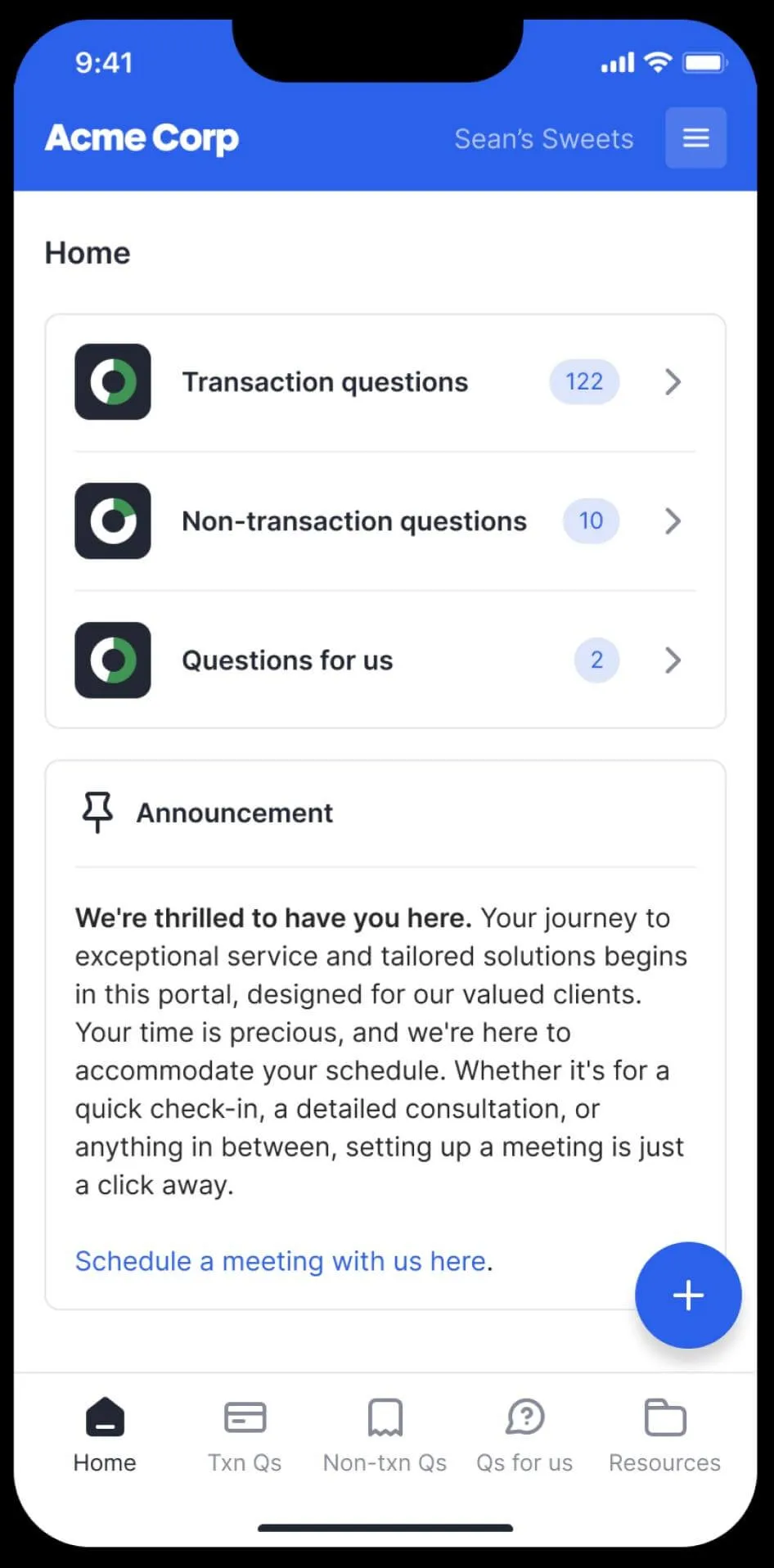
Double’s portal is tightly coupled to the ledger.
Bookkeepers ask questions tied to specific transactions, and when clients respond, the bookkeeper can reclassify the transaction directly in Double without switching tools.
Double also includes a dedicated mobile app for clients and supports receipt collection via portal, text message, or email forwarding. The portal is included in the Core plan at $10/client/month.
 Source: Double
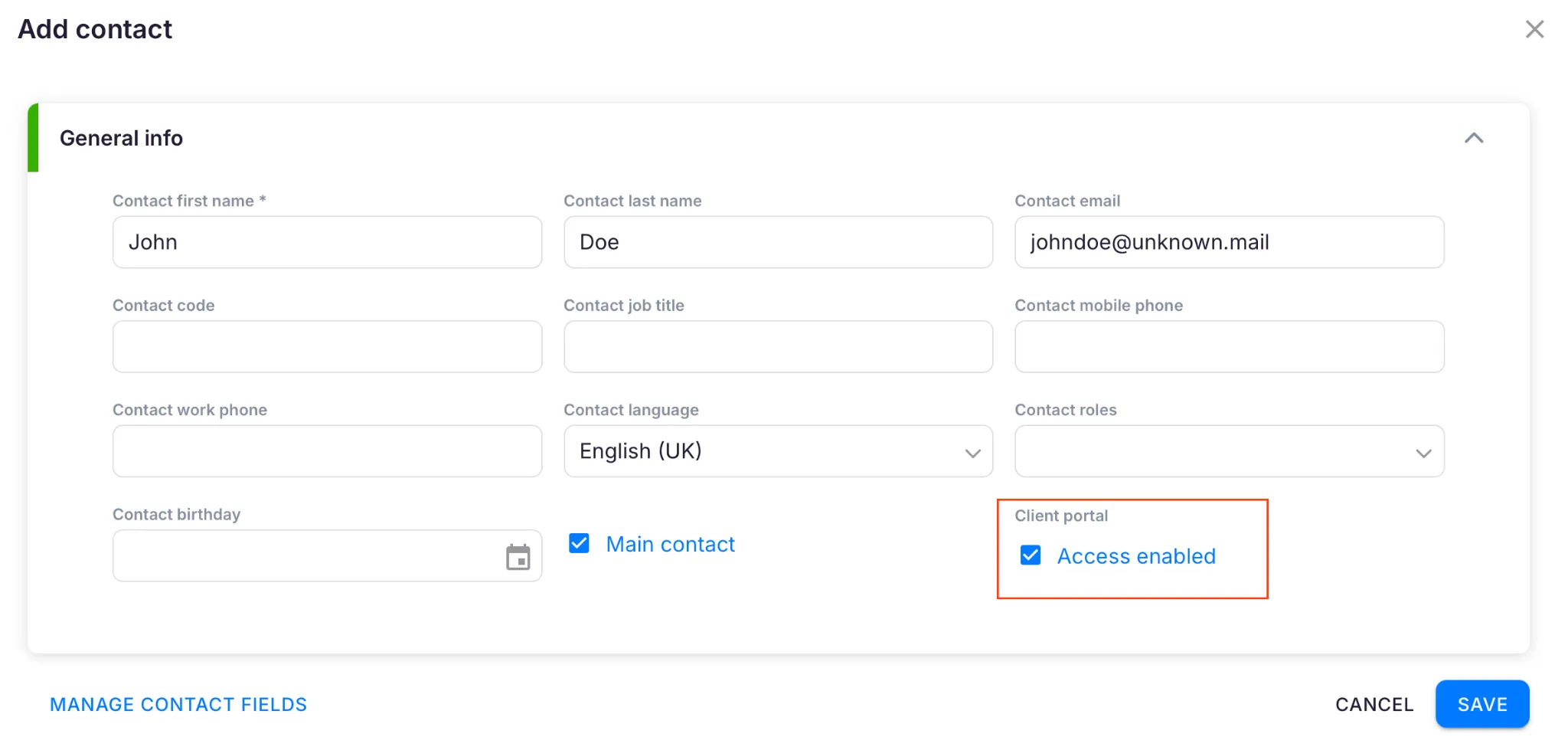
Uku’s portal is its second major differentiator, and it works differently from traditional portals.
Rather than requiring tickets to be connected to work items, Uku’s portal mirrors the same task on both sides. Clients and accountants work on the same item with all communication, actions, documents, logs, and time tracking in one place.
When clients make requests through the portal, notifications appear on the accountant’s dashboard, and they can immediately start tracking time or communicating within that task.
The portal supports multiple languages based on each client’s settings, and clients working with multiple companies can switch between them in a single session. Documents uploaded through the portal automatically sync to the firm’s connected cloud storage (Google Drive, OneDrive, SharePoint, or Dropbox).
 Source: Uku
Beyond task coordination, the portal is customizable.
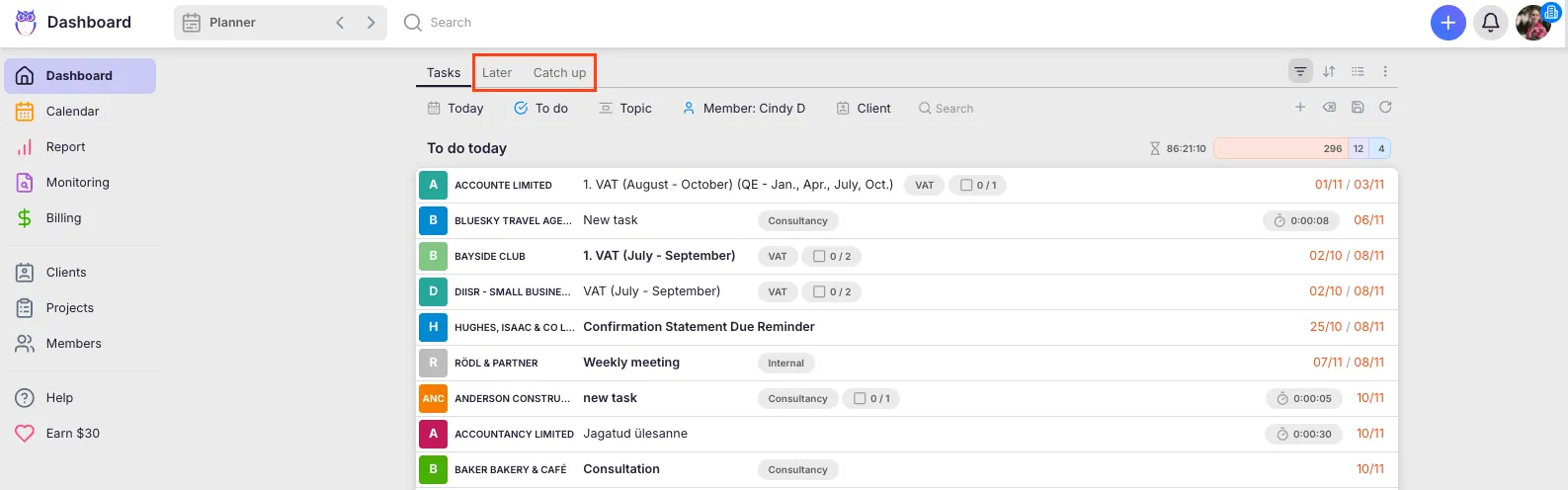
The Custom Menu Links feature lets firms create unique menus for each client, linking to financial reports, invoice folders, service agreements, onboarding questionnaires, business insight reports, or price lists. Firms can run onboarding with forms, collect client feedback, and embed custom content with simple copy-paste functionality.
The Catch Up dashboard aggregates all inbound client activity (portal responses, emails, team comments) in one view.
 Source: Uku
The distinction: Double’s portal is built for transaction-level Q&A during the close. Uku’s portal is built for ongoing client coordination across all service types, functioning as a shared workspace rather than a one-way communication channel.
Task management and workflow automation
Double’s task management is organized around the close page.
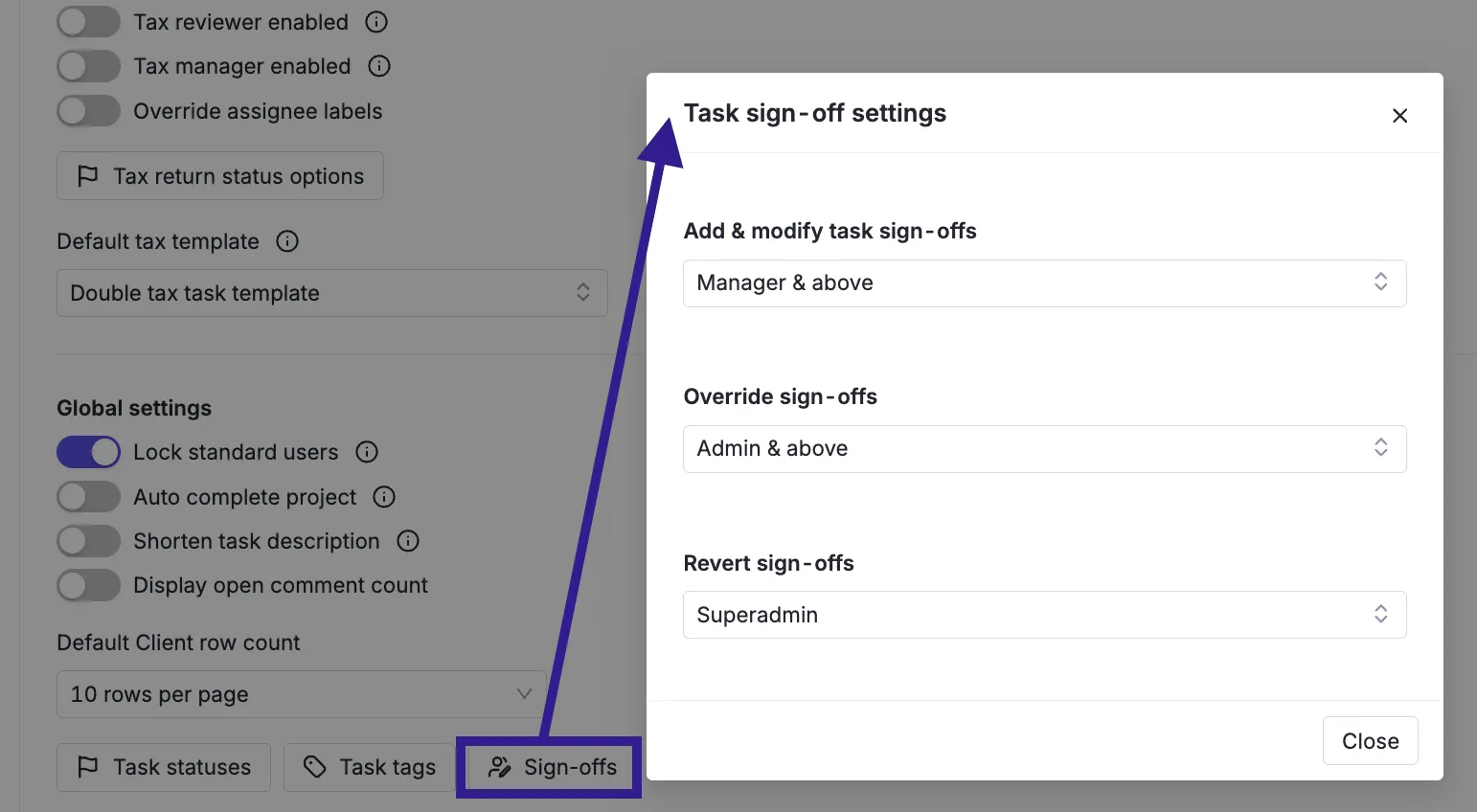
Each client has a sequential checklist of tasks worked top-to-bottom, with workflow templates that auto-apply each period. The system supports sub-tasks, multi-user sign-off (preparer, reviewer, manager), task locking, and activity logs. A community template library provides pre-built workflows that firms can download and customize.
 Source: Double
The Task List view aggregates all tasks across all clients by due date, and daily digest emails highlight what’s due or overdue. The close page also connects to file reviews, client communication, and financial reports, creating a single workspace per client per period.
Uku’s task management is broader in scope.
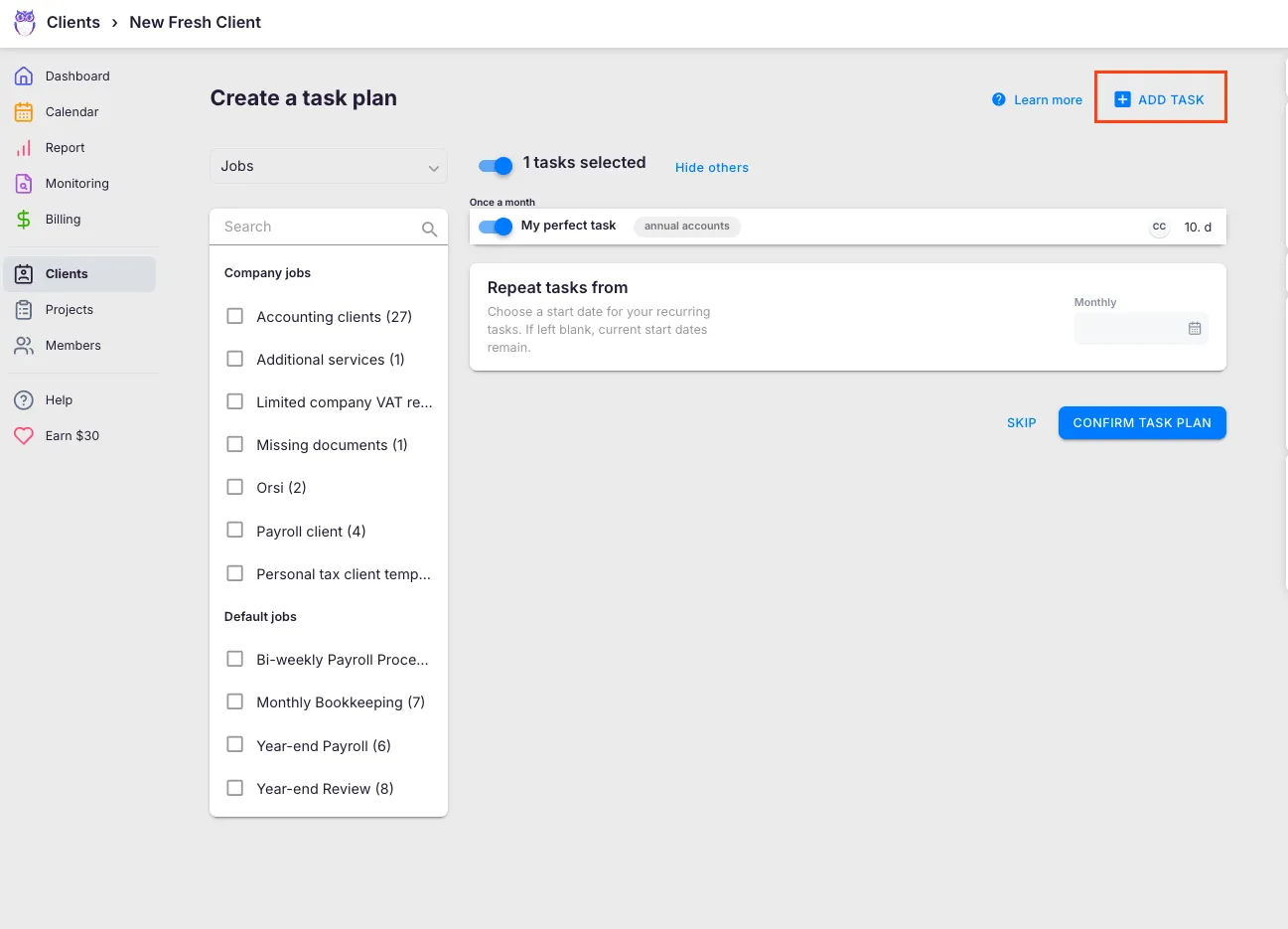
Tasks are organized into per-client work plans with six recurrence frequencies (daily, weekly, monthly, quarterly, yearly, and working-days-based), configurable weekend fallback rules, and task dependencies that ensure correct execution order.
Tasks can also be automatically generated from client custom fields. Tasks appear on individual dashboards only when their scheduled start date arrives, keeping each team member focused on what’s due now.
A key differentiator is template propagation: when a firm improves a workflow template, it can push those changes to existing client plans in a controlled rollout, choosing which clients, which fields, and which effective dates. This matters for firms that continuously refine their processes across a large client base.
 Source: Uku
Uku also provides pre-built accounting templates organized into seven categories (Accounting, Administration, Bookkeeping, Client Management, Operations, Payroll, Tax), developed by experienced accountants rather than adapted from generic project management patterns.
All communication stays within tasks, solving the problem of information trapped in individual email accounts. When a colleague is absent, the replacement accountant has full context without needing access to anyone’s inbox.
Both platforms handle recurring task automation well. Double integrates more tightly with the close-specific workflow. Uku covers a wider range of recurring accounting obligations beyond the monthly close.
Time tracking and profitability insights
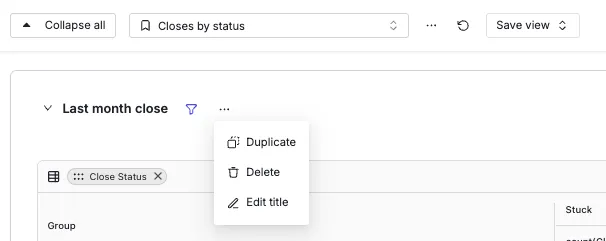
Double includes time tracking with a timer accessible from anywhere in the app.
Time entries link to specific clients and projects, and the platform offers profitability analysis through Realization & Profitability reports that calculate labor costs, gross profit, and margins. Firm analytics provide visibility into task completion performance across the practice.
 Source: Double
Uku builds time tracking more directly into the operational workflow, with a focus on speed: 90% of time tracking actions are one-click.
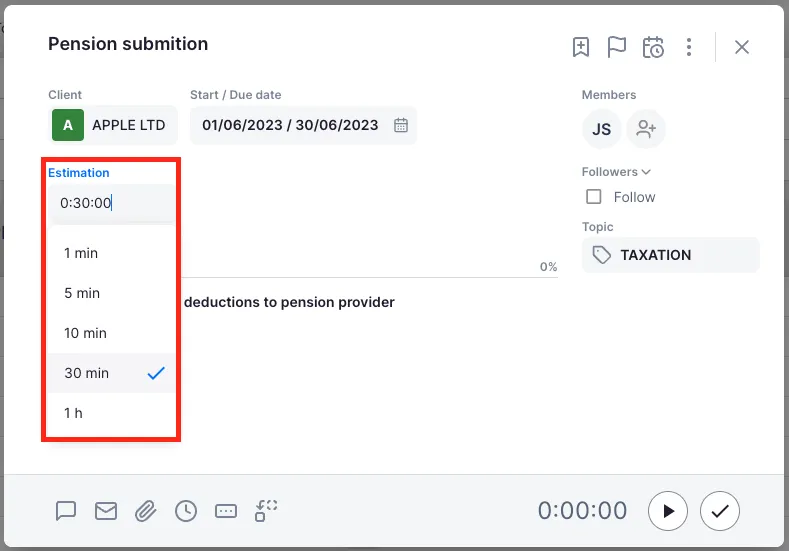
Three input methods are available: a stopwatch for real-time tracking, manual entry with smart time suggestions, and bulk time allocation across multiple tasks. The Mandatory time entries feature prevents staff from marking tasks complete without logging time, closing the most common source of missing billable hours.
Time estimation is another useful capability: firms set expected durations on templates, and Uku can automatically convert those estimates to logged time when tasks are marked complete, providing a fallback when accountants forget to run the stopwatch.
 Source: Uku
Uku’s BI Reporting generates analytics on time utilization, client profitability, and agreement compliance, with filters, saved report templates, and three levels of depth: summary, tasks, and time.
The business analytics report provides performance metrics across the practice. The overlap and missing time record detection feature uses color-coded indicators to locate data quality issues in time logs. Because time data feeds directly into Uku’s billing engine, there’s no handoff or export step between tracking hours and generating invoices.
Integration ecosystems reflect market focus
Double’s integration list is focused but deep.
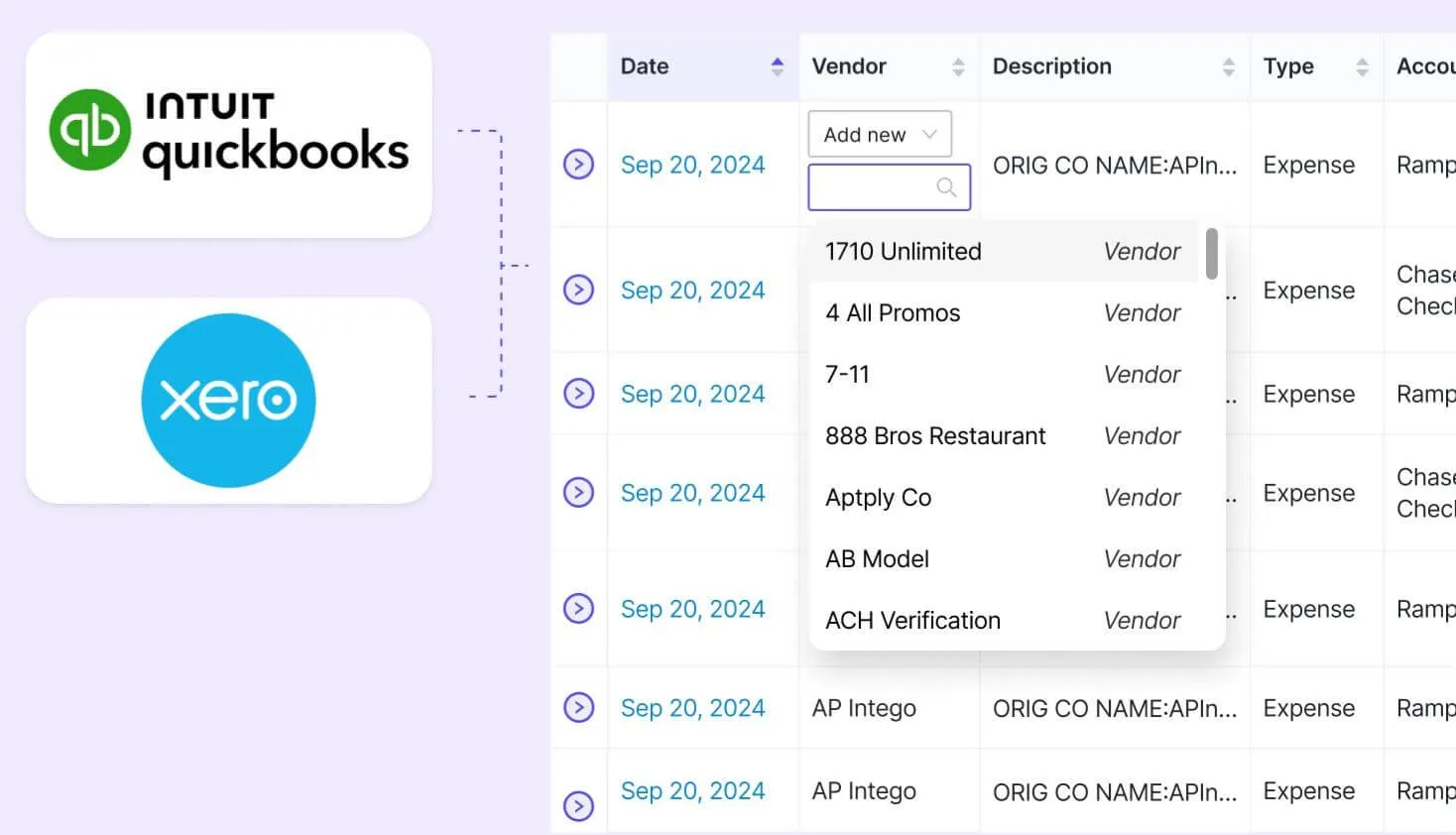
The platform’s two-way sync with QuickBooks Online and Xero is its technical foundation, with Sage recently added. Beyond accounting software, the ecosystem includes Zapier, Ping (AI meeting transcription), Abacor (AI meeting notes), and Anchor (billing/invoicing). A REST API exists but is in early stages. Double is also listed in the QuickBooks Online App Store.
 Source: Double
The narrow integration set is a deliberate trade-off: Double’s value depends on deep ledger connectivity rather than broad ecosystem reach. But firms that need to connect with tools beyond QBO, Xero, and Sage have limited native options.
Uku integrates with a wider range of accounting platforms: QuickBooks, Xero, E-conomic, Tripletex, Fortnox, FreeAgent, 360 Ksiegowosc, SmartAccounts, Merit Aktiva, Directo, and Scoro.
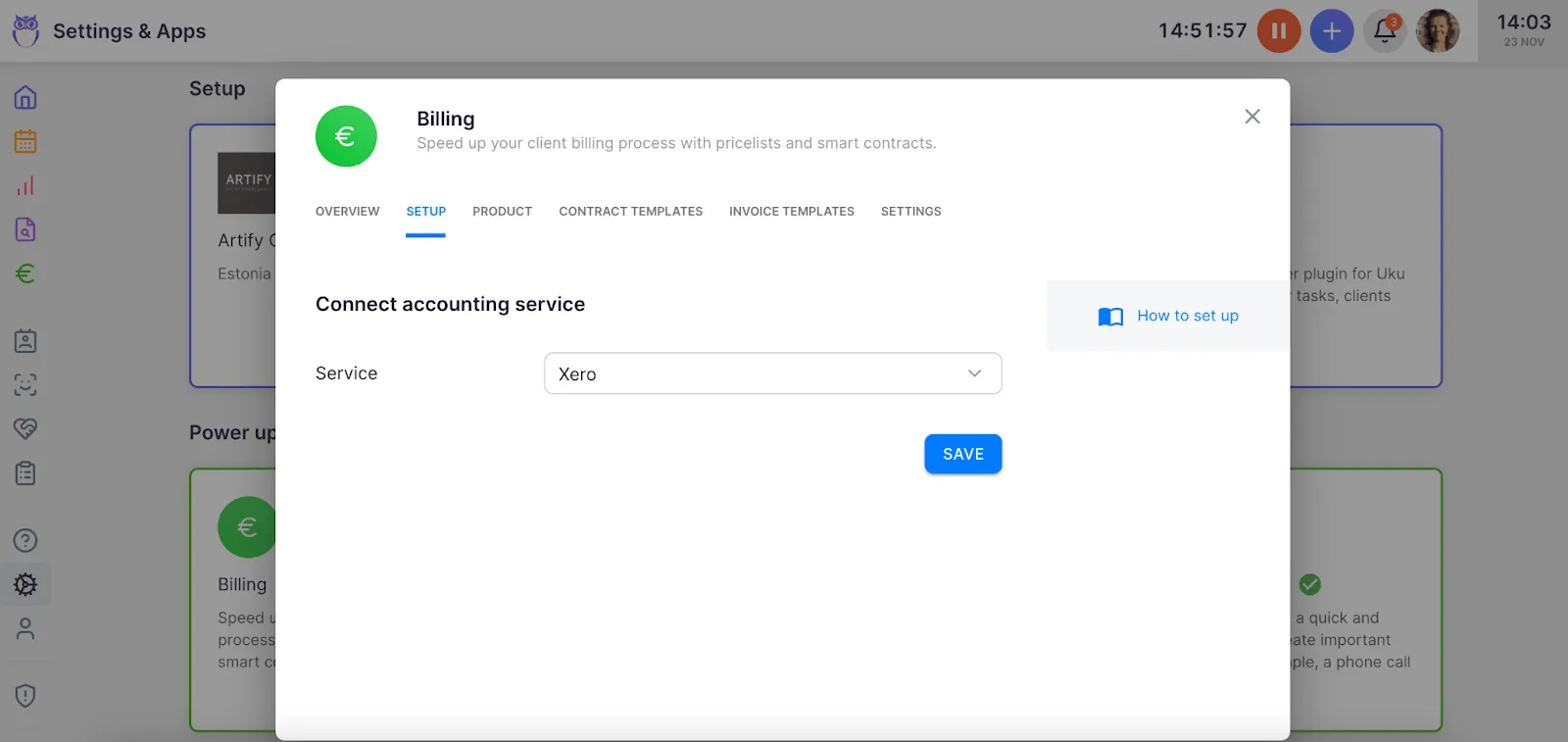 Source: Uku
Business registry integrations (Companies House, Estonian e-Business Register, Danish Business Authority) automate client data import. Cloud storage connections cover Google Drive, Dropbox, SharePoint, and OneDrive.
Uku also allows documents to be submitted for digitalization with a single click, sending them directly into accounting software, a level of document automation uncommon in the practice management space.
Uku supports Zapier and Make.com for custom automation, Gmail and Microsoft 365 for email, and a public REST API covering clients, contracts, invoices, tasks, and time entries. For firms with 50+ users, Uku’s in-house development team can create custom integrations, including country-specific features like local e-invoice formats that larger competitors often decline to build for smaller markets.
Pricing models serve different firm structures
Double charges per connected client with unlimited team members included.
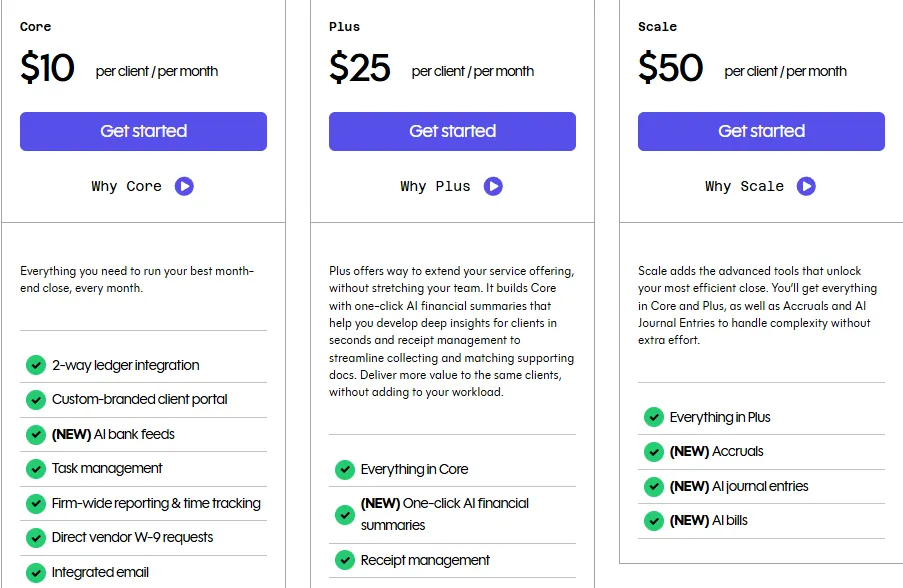
Three tiers are available:
- Core — $10/client/month: two-way ledger sync, AI Bank Feeds, client portal, task management, 1099 tracking, one practice email
- Plus — $25/client/month: adds AI Financial Summaries and receipt management
- Scale — $50/client/month: adds Accruals, AI Journal Entries, and AI Bills
The Tax Suite is available as an add-on with a $200/month annual commitment. Additional team email connections cost $10/month each. Plans are mix-and-match, so different clients can sit on different tiers. There is no published free plan, and demo booking is the primary entry point.
Uku charges per seat with unlimited clients on paid plans.
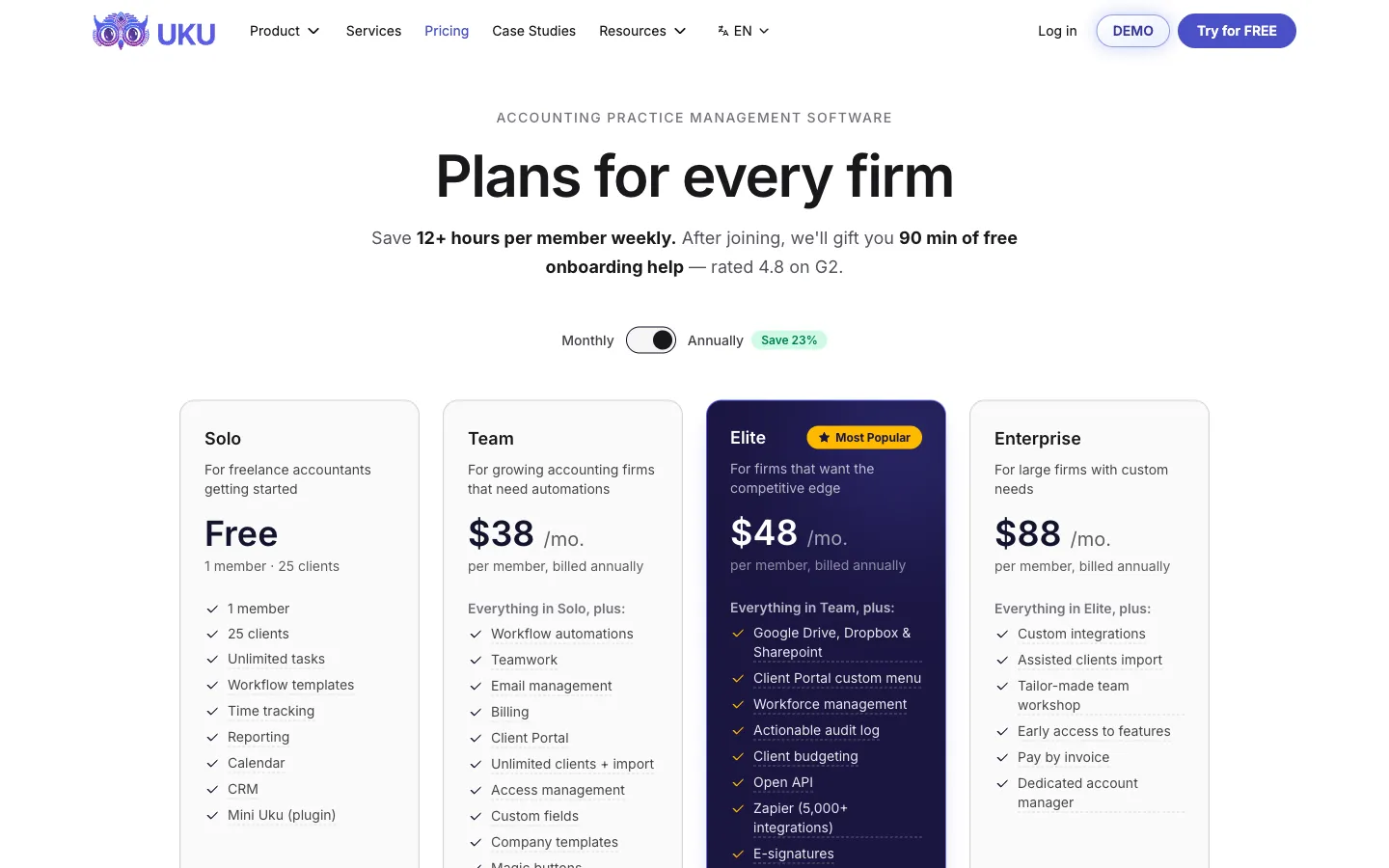
Both annual and monthly billing options are available on every paid tier, with pricing in €, $, and £:
- Solo — $19/member/month (annual) or $25/member/month (monthly): single-user tier with Tasks, Billing, Client Portal, all integrations, AML, and E-signatures
- Team — $38/member/month (annual) or $49/member/month (monthly): adds members, workflow automations, teamwork collaboration, email management, projects, inbox, unlimited clients
- Elite — $48/member/month (annual) or $62/member/month (monthly): adds cloud storage integrations, Client Budgeting, Document Management, BI Reporting, workforce management, API access, Zapier (5,000+ apps)
- Enterprise — $88/member/month (annual) or $99/member/month (monthly): adds custom integrations, dedicated account manager, early feature access
Every new signup auto-starts a 14-day free trial of the full Elite plan with no credit card required, and 90 minutes of free onboarding come included. Assisted import is available across all plans. Optional onboarding packages range from $700 (teams up to 4) to $2,000 (teams up to 15). Monthly billing is available on every paid tier, including Solo at $25/month and Team at $49/member/month, so price-sensitive practitioners can test for one month rather than committing to a year upfront.
The pricing models create different cost curves.
Double’s per-client model costs less when a small team manages many clients on the Core tier, but scales linearly with client count.
A 3-person firm with 50 clients on the Core plan pays $500/month for Double versus from $114/month for Uku Team (annual). A 15-person firm with 200 clients pays $2,000/month for Double Core versus from $570/month for Uku Team (annual). Double’s higher tiers ($25–$50/client) widen that gap significantly.
Uku’s per-seat model costs less as client counts grow, since adding clients doesn’t increase the bill. Firms that prefer testing a platform month-to-month rather than committing to annual payments benefit from Uku’s monthly billing option.
Team management and collaboration
Double provides team oversight through the CRM dashboard and task management system.
The Close Assignees structure assigns Preparer, Reviewer, and Manager roles per client. The email module supports shared inboxes with inline commenting and one-click task creation from emails. Internal chat keeps team conversations connected to specific clients.
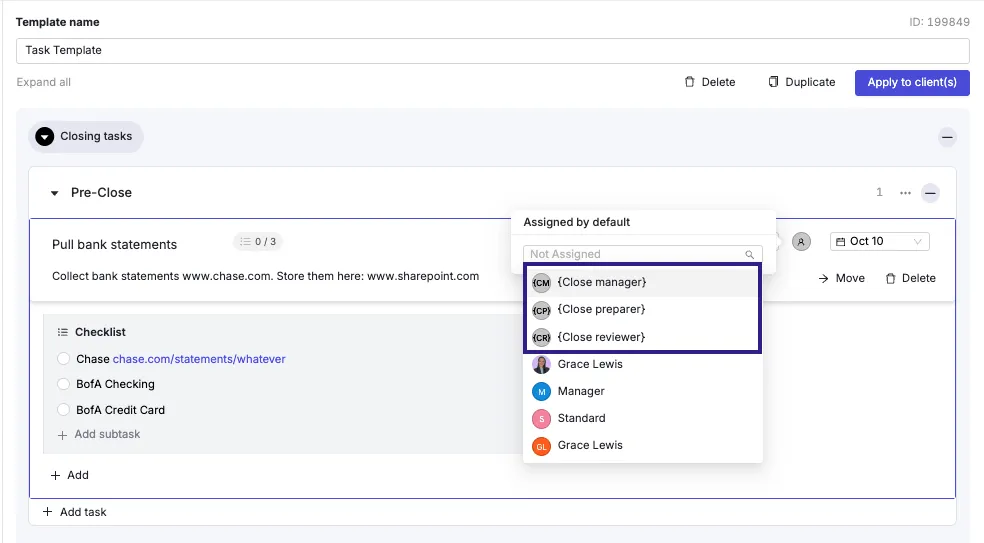 Source: Double
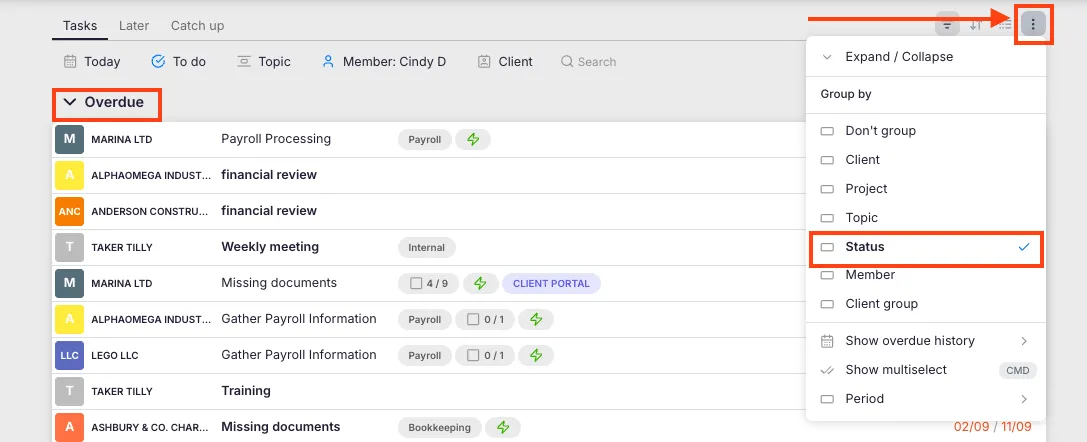
Uku treats team coordination as a core capability.
The vacation/absence coverage system lets managers forward an employee’s entire workload to a colleague in a single action. The communication timeline aggregates all emails sent by any team member to a client in one chronological view, so replacement accountants have full context without accessing a colleague’s inbox.
 Source: Uku
Role-based access is granular: regular staff see only their own tasks, team leads see their team’s tasks, and owners have full visibility. Access can be configured per-client rather than only firm-wide, which matters for practices where junior staff should access only specific accounts.
Uku’s Workforce Management module adds internal HR capabilities: flextime tracking, overtime monitoring, vacation and sick leave management with manager approval workflows. These features reduce the need for a separate HR system.
Geographic, language, and security considerations
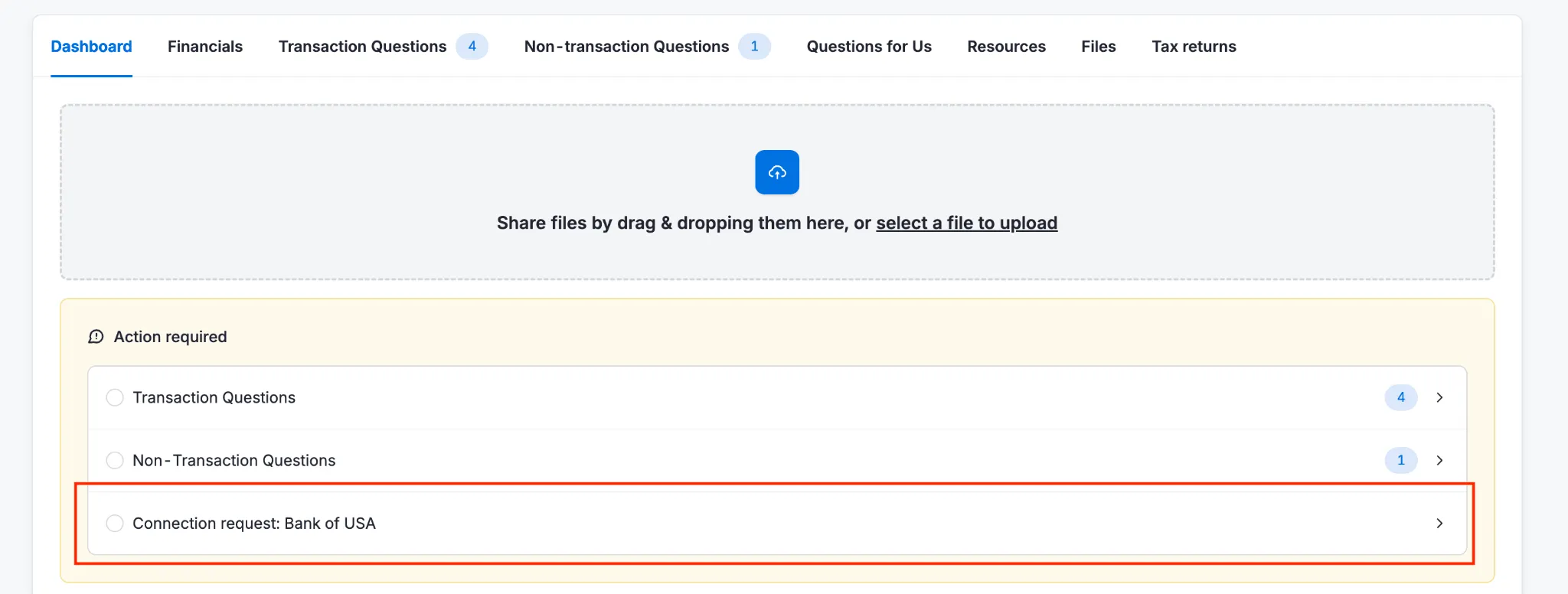
Double is built for the US and Canadian market.
The client portal supports English only. AI Bank Feeds currently work only with US-based QuickBooks Online files. The platform’s customer stories are predominantly US-based (27 out of 51), with some Canadian representation. Sage integration provides some UK reach, but the product’s core value is in the QBO ecosystem.
 Source: Double
Uku was built from the ground up for international use, with particular strength in the UK and US markets.
The platform operates in 12 languages (English, German, Spanish, Danish, Swedish, Finnish, Polish, Bulgarian, Ukrainian, Lithuanian, Latvian, and Estonian), with email templates that automatically select the correct language based on client settings.
Native integrations with E-conomic (Denmark/Scandinavia), Tripletex (Norway), Fortnox (Sweden), and business registries in the UK, Estonia, and Denmark reflect multi-market investment. Pricing in €, $, and £ with multi-currency capabilities supports firms operating across borders.
Named clients include Leinonen Group (operating across 11 countries), Baker Tilly, and Rödl & Partner, demonstrating credibility with international accounting networks.

Sandgrav Solutions chose Uku partly because it was one of the few tools available in Danish. The platform currently serves 1,000+ clients globally.

 Source: Uku
On security, Uku is SOC 2 Type I compliant and uses TLS 1.3 encryption, with data hosted on cloud servers in Germany (EU).
For US-focused firms, Double’s QBO integration and AI features are more relevant. For firms operating across multiple markets or serving multilingual clients, Uku’s language, integration, and compliance coverage is hard to match.
Double vs Uku: which should you choose?
Choose Double if:
- Your firm’s primary bottleneck is the month-end close process
- You run your practice on QuickBooks Online or Xero and want two-way ledger integration
- AI-assisted transaction classification and journal entry generation would save your team significant time
- You’re based in the US or Canada and serve English-speaking clients
- You want per-client pricing that includes unlimited team members
- Transaction-level client Q&A through the portal is important to your workflow
- You need receipt management, 1099 tracking, and accruals built into the close workflow
Choose Uku if:
- You want to reduce your team’s admin time with one-click actions and automated processes
- You need a complete practice management platform covering tasks, time tracking, billing, and team coordination
- Automated invoicing that cuts invoice preparation from days to 30 minutes is a priority
- You value fast onboarding and modular scaling (start with just the modules you need and add more over time)
- You’re transitioning from Excel and want the simplest implementation path
- Your firm operates across multiple markets or needs multilingual and multi-currency support
- You use accounting software beyond QuickBooks and Xero, such as E-conomic, Tripletex, or Fortnox
- You need flexible monthly pricing rather than annual commitments
Try free for 14 days with full Elite access, no credit card required.
The choice between Double and Uku reflects a basic question about what problem your firm most needs to solve.
Double excels at making the month-end close faster and more accurate through ledger integration and AI-powered review tools. Its focus is narrow by design, and within that focus, the results are strong. For a deeper look at the product itself, see our Double review.
Uku takes a wider view, treating the entire practice as the system to manage. From task scheduling through automated billing and team management, it provides a single platform that replaces the combination of spreadsheets, project tools, and invoicing software many firms cobble together.
Its modular approach means firms can start working on day one and add features as needs evolve, with quick deployment that eliminates the upfront configuration burden common with all-in-one platforms. Built from the ground up for international use, Uku provides language, integration, and multi-currency coverage that single-market tools lack.
Neither platform tries to do everything the other does, and that’s what makes the choice clear. If your firm’s biggest constraint is the close itself, Double addresses it directly. If your firm needs operational infrastructure covering client management, billing, and team coordination alongside close management, Uku provides that broader foundation.
Ready to test it for yourself? Try free for 14 days or book a 30-minute demo to see whether Uku fits your firm.
Related: for a deeper look at Double’s per-client pricing math (Core $10, Plus $25, Scale $50, plus the $200/month Tax Suite) and how it compares to Uku’s per-seat tiers across firm sizes, see Double Pricing: Worth It or Consider Uku?. For the complete platform overview, read our Double review. For specialized alternatives by firm priority (billing, enterprise, tax, error detection, budget, workflow), see 7 Double Alternatives.

Intelligent practice management assistant for accounting firms. Helping 1000+ firms save time, standardise processes, and grow.

Ready to upgrade your practice management?
Join 1,000+ accounting firms already using Uku to save time and grow their business.