Financial Cents Review 2026: Pricing, Pros, Cons & The Uku Alternative
Financial Cents is practice management software for small US and Canada accounting firms — workflows, client tasks, time and a portal, from $19/user/month on an annual plan. What it does well, where it stops, and how Uku compares.


Contents
- What is Financial Cents?
- Financial Cents Pros & Cons
- Financial Cents Review: How it Works & Key Features
- Where Financial Cents Falls Short
- Financial Cents Pricing (2026)
- How Financial Cents Compares to the Alternatives
- Top Financial Cents Alternative: Uku
- Financial Cents or Uku: Comparison Summary
- How to Switch from Financial Cents to Uku
- Final Verdict
- Frequently Asked Questions
- Related Reading
Financial Cents is practice management software for small accounting and bookkeeping firms in the US and Canada. It handles the work around the books — recurring workflows, client tasks and deadlines, time tracking, invoicing, and a passwordless client portal — while your ledger stays in QuickBooks Online. It is not a bookkeeping tool and does not replace one. Launched in 2020, it reports over 10,000 accountants on the platform and holds 4.8 out of 5 on Capterra across 266 reviews (July 2026).
Who it suits: a firm of one to roughly fifteen people that has outgrown spreadsheets and wants to be running inside a week rather than a quarter. Its defining trade-off is simplicity in exchange for reach: US and Canada only, USD only, no Xero integration, and an annual commitment on every plan.
What it costs: Solo $19/user/month, Team $49, Scale $69, Enterprise custom — all billed annually, with a 14-day trial and no free plan. Monthly billing exists only from five users up, at $69 (Team) and $89 (Scale). Full breakdown in our Financial Cents pricing guide.
If the annual commitment is the sticking point, Uku is the direct alternative at the same entry price: Solo $19/month (up to 20 active clients, combining Team and Elite features), Team $38, Elite $48 (with BI Analytics), Enterprise $88 — all with true monthly billing, or ~23% off billed annually. Uku also gives firms a single source of truth for who’s doing what across the team, which is the most-cited reason customers say they switched.
To create this Financial Cents review, I’ve analyzed the platform extensively. I believe it’s the ideal choice if:
- You value a large community of users sharing workflow templates and best practices
- You need deep email integration to manage client communications
- You want visual capacity management to prevent team overload
- You appreciate built-in proposals and engagement letters
- You prefer extensive onboarding support and resources
However, Financial Cents might not be the best choice if:
- You want a permanently free option beyond a 14-day trial
- You need automated billing that reduces invoice preparation from days to 30 minutes
- You require native Xero integration for seamless accounting workflows
- You need global capabilities with multi-currency and multilingual support
- You want flexible monthly pricing instead of a minimum 1-year commitment
In this case, you should consider Uku: a practice management platform that takes a modular approach, allowing firms to start working on day one with just the features they need. With its automated billing system that reduces invoicing from 2-3 days to just 30 minutes and an integrated client portal that mirrors tasks on both sides, Uku helps firms discover outdated agreements and increase turnover by over 10%.
Because of that, I’ve included a detailed look at Uku later in this Financial Cents review, as the best alternative for firms prioritizing automated billing efficiency and flexible implementation.
If you’re ready to explore this approach, you can start with Uku’s Solo plan from $19/month.
Table of contents:
- What is Financial Cents?
- Financial Cents Pros & Cons
- Financial Cents Review: How it Works & Key Features
- Where Financial Cents Falls Short
- Top Financial Cents Alternative: Uku
- Financial Cents or Uku: Comparison Summary
- Final Verdict
What is Financial Cents?
Financial Cents was launched in 2020 by Shahram Zarshenas and Abdullah Almsaeed, who identified a gap in the market for practice management software that was both powerful and accessible.
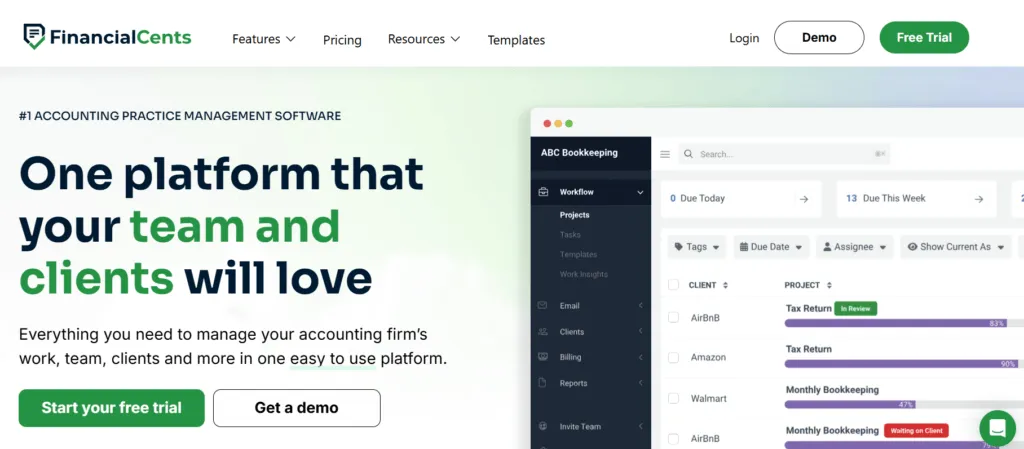
The founders aimed to create an intuitive platform for the “everyday firm” that simplifies how work gets done, observing that many existing solutions were either too complex or too expensive for solo practitioners and small firms.
Today, Financial Cents serves as an all-in-one accounting practice management platform that brings teams, clients, and data into a single place. The software reports serving over 10,000 accountants globally and has grown steadily since its launch.
The platform encompasses workflow management, client relationship management, time tracking, automated billing, document management, and client collaboration through a secure portal. Its core value proposition centers on simplicity and efficiency, helping firms track client work, meet deadlines, and organize operations without the steep learning curve of enterprise solutions.
Financial Cents primarily targets small to mid-sized accounting and bookkeeping firms, including solo practitioners, who are looking to move beyond spreadsheets and manual processes. The ideal user values ease of use, quick implementation, and having a single source of truth for all client and project information.
Financial Cents Pros & Cons
| Pros | Cons |
|---|---|
| ✅ Intuitive interface accessible to non-technical users | ❌ No permanent free plan (14-day trial only) |
| ✅ Community-driven template library with 100+ workflows | ❌ Requires minimum 1-year purchase commitment |
| ✅ Comprehensive email integration with focused client inbox | ❌ Limited to US/Canada markets (no multilingual support) |
| ✅ Visual capacity management and workload tracking | ❌ No native Xero integration |
| ✅ Built-in proposals and engagement letters | ❌ Lacks one-click document digitalization to accounting software |
| ✅ Strong QuickBooks Online integration | ❌ Limited bulk operations for file management |
Financial Cents Review: How it Works & Key Features
Workflow Management with Community Templates
Financial Cents structures workflow management through a three-level hierarchy: templates, projects (client-specific work plans), and individual tasks.
The platform provides access to over 100 pre-built workflow templates created and shared by other accounting professionals in the community. These templates cover common services like monthly bookkeeping, payroll processing, and tax preparation.
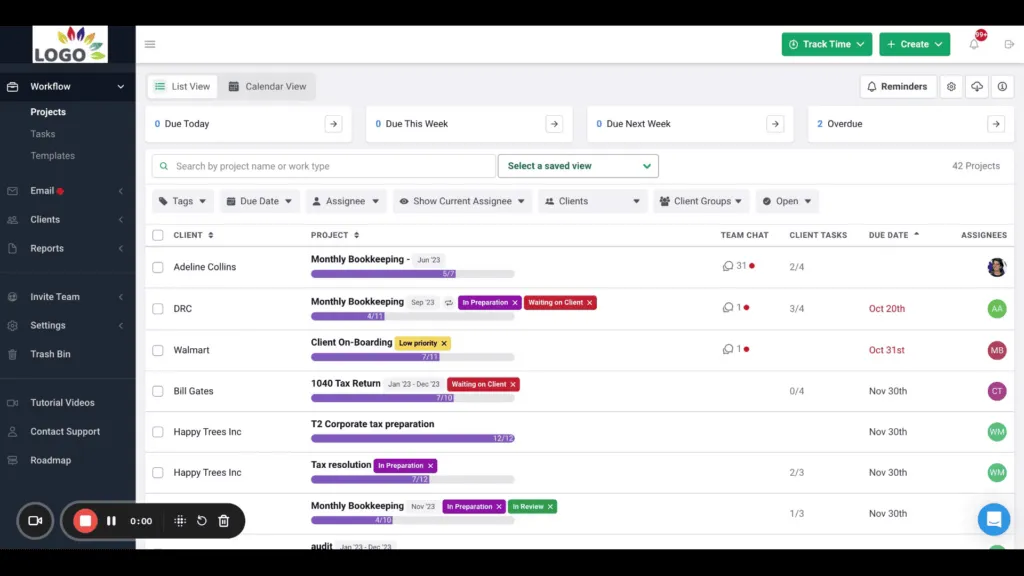
Users can browse the template library and download relevant workflows, then customize them to match their firm’s specific processes. Once templates are set up, they’re applied to individual clients to create customized work plans. The system then automatically generates tasks based on recurrence settings, streamlining recurring work.
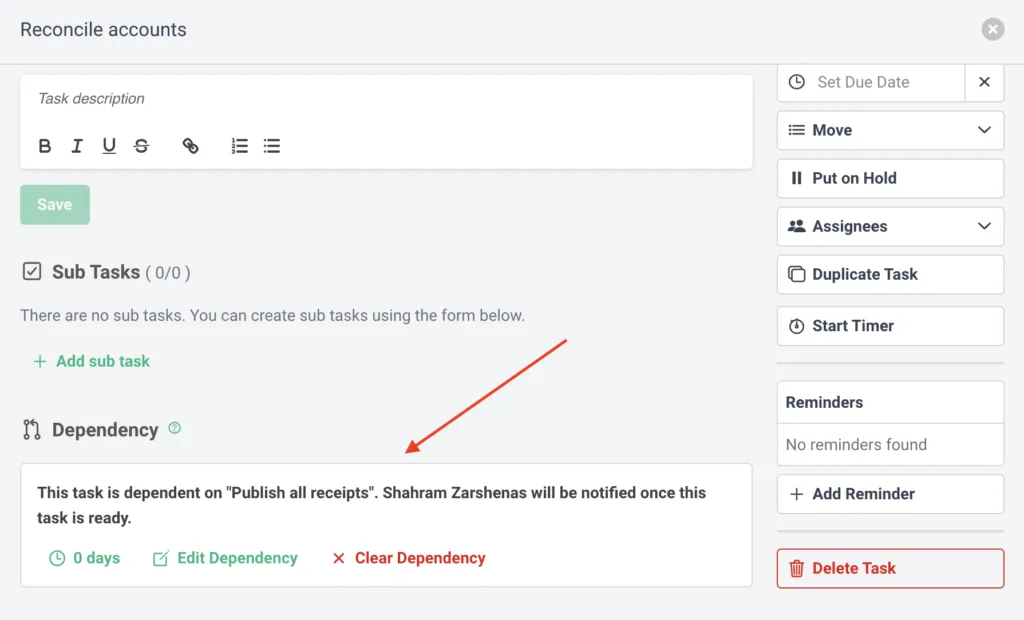
The workflow dashboard provides a real-time overview showing task statuses, assignments, and deadlines. Tasks can include subtask checklists, attachments, and notes. The platform also supports custom fields at the client level for tracking specific information like invoice counts or employee numbers. Task dependencies ensure certain tasks cannot start until prerequisites are completed.
Source: Financial Cents
Client Portal and Communication Hub
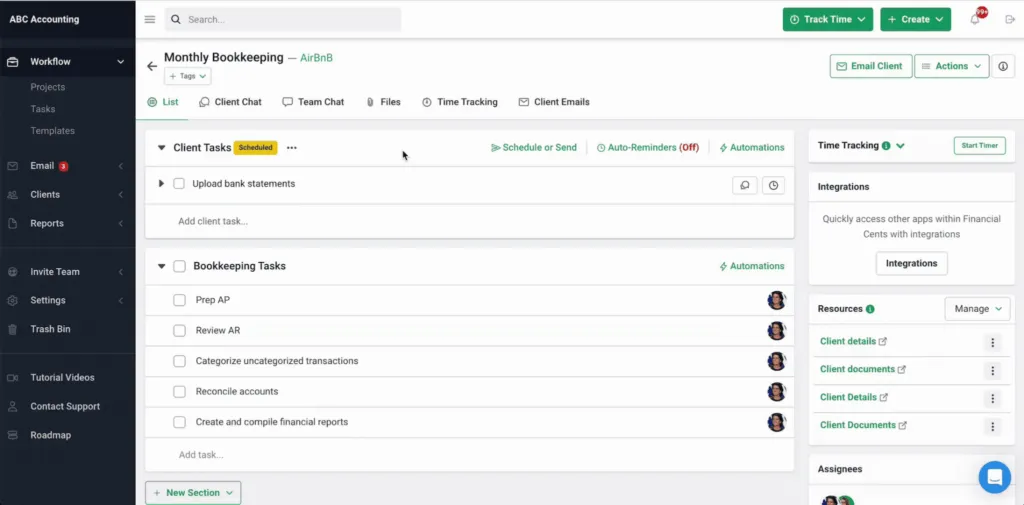
The client portal serves as a centralized platform for client interaction and document exchange.
Source: Financial Cents
Clients access the portal through secure email links and can view their assigned tasks, upload requested documents, and communicate with their accounting team. The portal can be customized with the firm’s branding, including logo, colors, and domain name.
Document requests are automated through the portal, with the system sending reminders to clients about outstanding items until they’re completed. This automation addresses the common problem of accountants spending hours chasing clients for information. All documents uploaded through the portal are automatically organized within the relevant project.
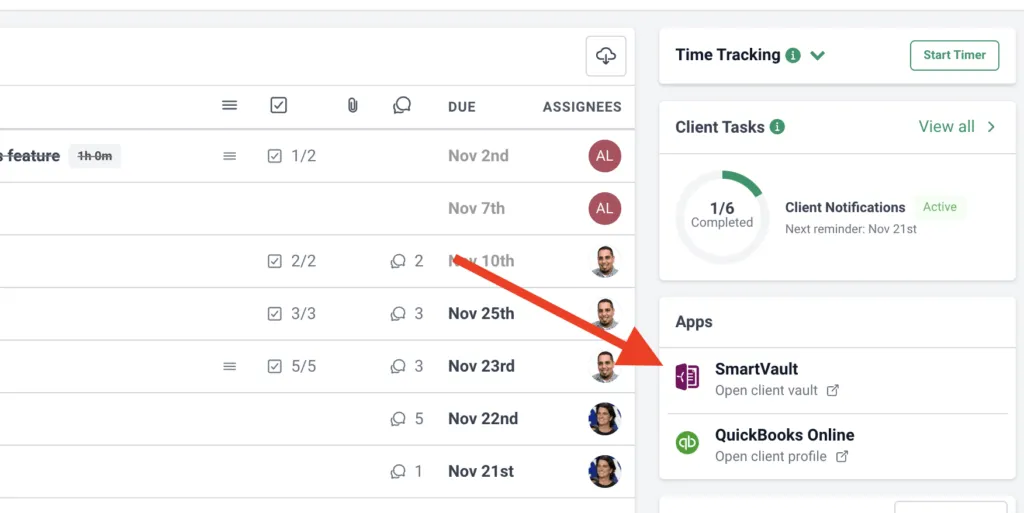
The portal integrates with document management systems including SmartVault (in beta), Google Drive, and OneDrive. Clients can also sign engagement letters and proposals electronically through Adobe eSignature integration, streamlining the onboarding process.
Source: Financial Cents
Time Tracking and Billing
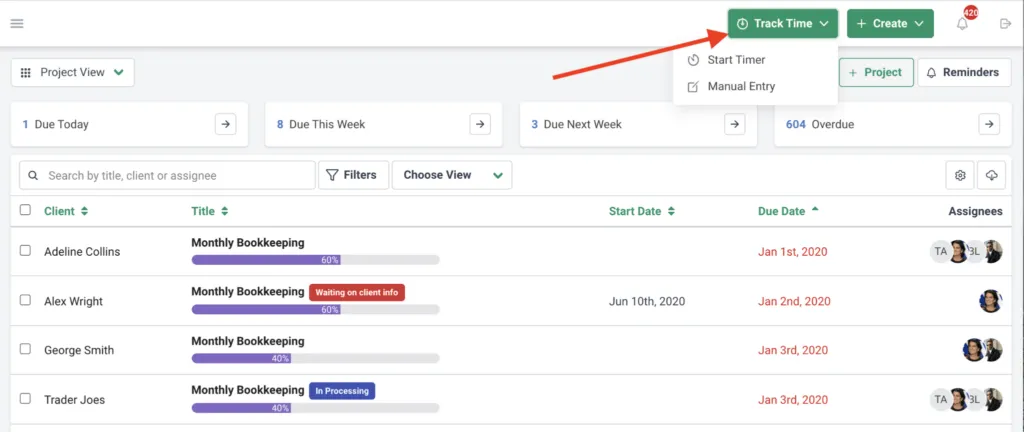
Financial Cents offers multiple time tracking methods to accommodate different working styles.
Users can track time using a running timer or enter time manually. The platform distinguishes between billable and non-billable hours, with all time entries flowing directly into reporting and billing modules.
Source: Financial Cents
The billing system generates invoices based on tracked time. It supports various pricing models including hourly rates and fixed fees. The platform integrates with QuickBooks Online for two-way time sync and one-way invoice sync, ensuring financial records stay updated.
An Effective Hourly Rate Report helps firms analyze profitability by comparing billed amounts against time spent, particularly valuable for fixed-fee engagements. This report identifies which clients may be consuming more resources than their fees justify, enabling data-driven pricing decisions.
Email Integration and Focused Inbox
Financial Cents integrates directly with Gmail and Outlook to create a unified communication system.
Once connected, emails sync bidirectionally, meaning actions taken in Financial Cents reflect in the native email client and vice versa. The platform automatically creates a “Focused Client Inbox” that filters to show only emails from clients in the firm’s database, reducing inbox clutter.
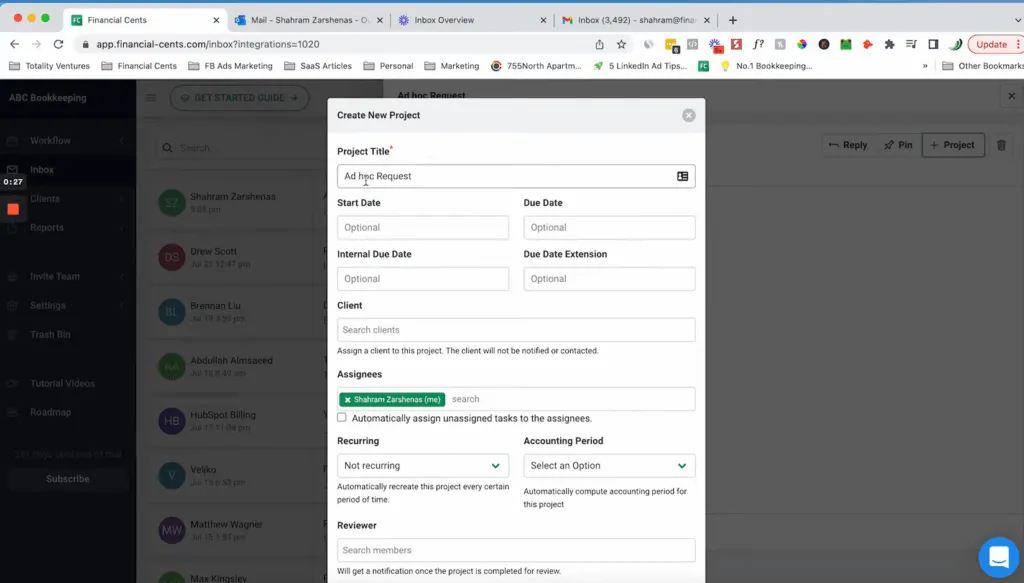
Users can convert emails directly into projects or tasks, ensuring ad-hoc client requests don’t get lost in email threads. Emails can also be “pinned” to existing projects, making them accessible to all team members working on that client. An email audit trail tracks all communication between the firm and each client, providing transparency into who communicated what and when.
Source: Financial Cents
The platform allows integration of multiple email addresses, consolidating client communications from various accounts into a single view. This centralization helps prevent important messages from being overlooked when team members use different email addresses for client communication.
Where Financial Cents Falls Short
While Financial Cents is great at workflow automation and team collaboration, several limitations become apparent for firms with specific needs. These constraints reveal a platform optimized for US/Canada markets rather than global practice management.
Minimum 1-Year Commitment Required: Unlike competitors offering flexible monthly billing, Financial Cents requires a minimum 1-year purchase commitment. This upfront commitment can deter firms wanting to test the platform thoroughly before making a long-term financial decision. For firms transitioning from Excel or other systems, this represents a significant risk without the option for month-to-month flexibility.
Limited to US/Canada Markets: Financial Cents is exclusively US/Canada-centric with no multilingual support and billing only in USD. This geographic limitation excludes international firms or those with clients across multiple countries. The lack of multi-currency capabilities and language options makes it unsuitable for firms operating in global markets.
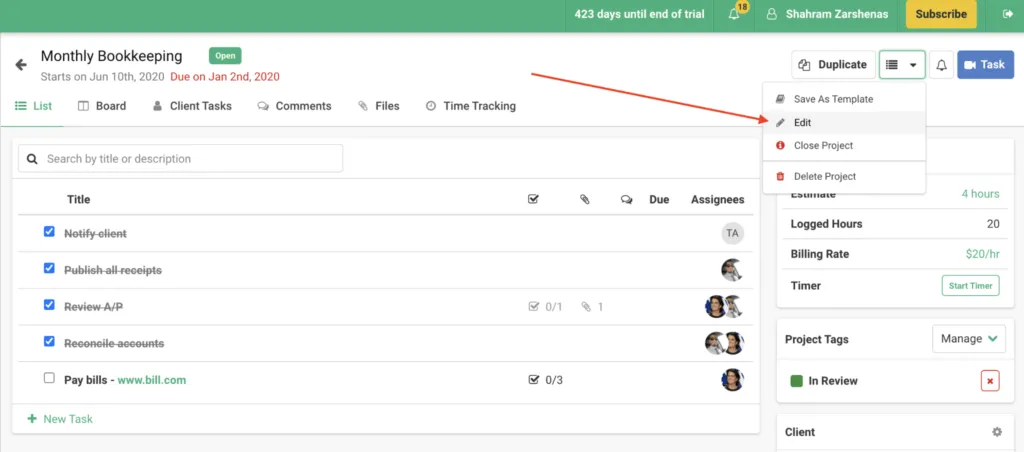
No Native Xero Integration: While Financial Cents offers strong QuickBooks Online integration, it lacks native Xero integration. For firms using Xero as their primary accounting software, this creates workflow inefficiencies and requires manual data transfer or third-party workarounds.
Source: Financial Cents
Manual Document Processing: Financial Cents lacks one-click document digitalization to accounting software. Unlike platforms that allow instant submission of documents for digitalization with a single click, Financial Cents requires more manual document handling processes. This limitation impacts efficiency, particularly for firms processing high volumes of client documents.
Substantial Upfront Configuration: While the platform offers extensive templates and features, implementing Financial Cents requires substantial upfront configuration and training. Firms cannot start working immediately with just the modules they need, instead requiring comprehensive setup before becoming productive. This approach conflicts with the needs of smaller firms wanting to implement software step by step.
These limitations aren’t failures but rather reflect Financial Cents’ focus on the North American market with comprehensive but rigid implementation requirements. However, they create opportunities for alternatives that prioritize global capabilities, flexible deployment, and automated efficiency.
Financial Cents Pricing (2026)
| Plan | Annual (per user/mo) | Monthly (per user/mo) | Best for |
|---|---|---|---|
| Solo | $19 | annual only | Single practitioners |
| Team | $49 | $69 | Small teams (minimum 5 users) |
| Scale | $69 | $89 | Growing firms (“Most Popular”) |
| Enterprise | Custom | Custom | Larger practices |
Every paid plan requires an annual commitment after the 14-day free trial. Financial Cents has no permanently free version.
How Financial Cents Compares to the Alternatives
If you are weighing Financial Cents against other practice management platforms, here is the short version:
| Tool | Starting price (/user/mo) | Best for | Billing |
|---|---|---|---|
| Financial Cents | $19 (annual only) | US/Canada firms on QuickBooks Online | Annual commitment |
| Uku | $19 Solo / $38 Team | Firms wanting monthly billing, multi-currency, and native Xero | Monthly or annual |
| Karbon | $59 | Larger firms with dedicated ops staff | Monthly |
| TaxDome | ~$67 (annual only) | Document-heavy tax-prep workflows | Annual |
| Canopy | $74/user/mo (Standard, annual) | Tax resolution specialists | Monthly or annual |
For the full head-to-head, see our Financial Cents alternatives comparison.
Top Financial Cents Alternative: Uku
Uku addresses Financial Cents’ gaps by providing a practice management platform created from the ground up to be international — strong across US and Northern European markets.

With its modular approach and automated billing system, Uku enables the “from Excel to greatness” transformation that accounting firms seek.
The signal we hear most from customers who switched: Uku gives them a single source of truth for who’s doing what across the team. Every task, deadline, billable hour, and client conversation lives in one shared view — so partners stop chasing status updates and staff stop falling through the cracks. This operational accountability, more than any individual feature, is what keeps firms on Uku long-term.
Uku offers four plans — Solo, Team, Elite, and Enterprise — covering everything from solo practitioners up through multi-partner firms. Here is the full breakdown of each Uku plan in 2026:

Uku Solo Plan: $19/month — Same Price as Financial Cents Solo, No Annual Contract
| Billing Option | Price | Annual Equivalent |
|---|---|---|
| Monthly | $25/month | $300/year |
| Annual (~23% off) | $19/month | $228/year |
Uku Solo lands at the exact same $19/month price as Financial Cents Solo — but with two critical differences: no annual commitment (monthly billing available at $25/month, switch off anytime) and a deliberately richer feature set. Uku Solo is built for individual accountants and bookkeepers running their own book of business, supporting up to 20 active clients.
Unlike a stripped-down “lite” tier, Uku Solo is a deliberate combination of features pulled from both the Team and Elite plans: you get client budgeting and e-signatures (normally Elite-only) right out of the gate, alongside the core time tracking, automated billing, client portal, and task management.
For accountants comparing the two Solo options side-by-side: same $19/month, but Uku adds monthly billing flexibility, the SSOT operational view across team and clients, and works across 12 languages with multi-currency (€/$/£).
Uku Team Plan: $38/month — Less Than Half of Financial Cents Team
| Billing Option | Price | Annual Equivalent |
|---|---|---|
| Monthly | $49/month | $588/year |
| Annual (~23% off) | $38/month | $456/year |
The Team plan is the multi-user baseline — at $38/month annual ($456/year), it costs roughly the same as a single user-month of Financial Cents Team ($49 annual or $69 monthly), but scales unlimited users. The Team plan is NOT “Solo plus a few extras”; it adds a distinct set of features that solo practitioners don’t need: Reporting, Teamwork Tools, Projects, Access management, Company templates, and the Mini Uku assistant.
For a 5-person firm, Uku Team costs $2,280/year ($38 × 12 × 5) vs Financial Cents Team at $2,940/year ($49 × 12 × 5) — a $660/year saving with no minimum-user requirement and true monthly billing flexibility.
Uku Elite Plan: $48/month — With BI Analytics
| Billing Option | Price | Annual Equivalent |
|---|---|---|
| Monthly | $62/month | $744/year |
| Annual (~23% off) | $48/month | $576/year |
Elite is for ambitious teams that need deeper insight and the full document/automation stack. The headline feature is BI Analytics — real-time visual reports, alerts, and drill-down dashboards that go beyond the standard Reporting available from the Team plan. This is Uku’s answer to Financial Cents Scale’s profitability reports — but with deeper analytics and at a lower price ($48/month vs Financial Cents Scale $69/month annual).
Beyond Team plan features, Elite adds Google Drive and OneDrive integrations, customizable client portal menu, workforce management tools, actionable audit log, client budgeting, document management with one-click digitalization into accounting software (which Financial Cents lacks entirely), e-signatures, and BI Analytics.
Uku Enterprise Plan: $88/month — With Custom Integrations & Dedicated Manager
| Billing Option | Price | Annual Equivalent |
|---|---|---|
| Monthly | $99/month | $1,188/year |
| Annual (~23% off) | $88/month | $1,056/year |
Enterprise provides white-glove service for larger practices: all Elite plan features plus custom integrations, assisted client import from Excel or other systems, tailor-made team workshops, early access to new features, invoice payment options, and a dedicated account manager.
Unlike Financial Cents Enterprise (custom pricing only — no transparency), Uku Enterprise has publicly listed pricing at $88/month yearly billed and maintains true monthly billing flexibility throughout.
Automated Billing: From 2-3 Days to 30 Minutes
Uku’s automated billing system is the platform’s primary competitive advantage.
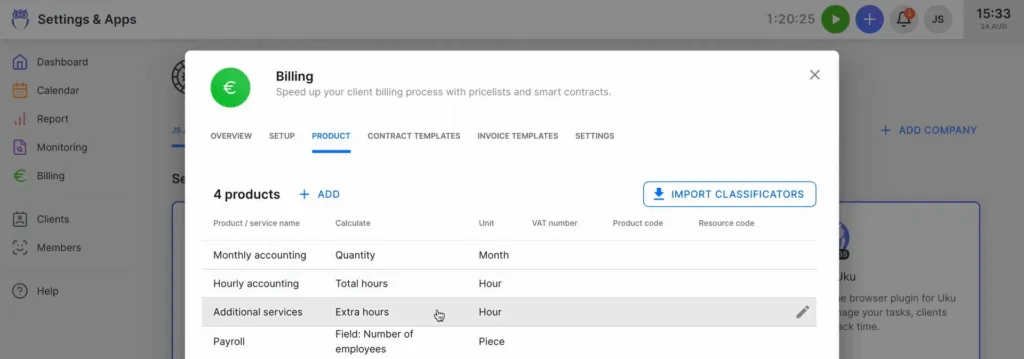
The system supports complex price lists based on quantity, time, material, and ranges with different rates for different periods. Advanced rounding rules based on entry, team, client, or month allow firms to properly bill for interruptions. For instance, a one-minute unplanned call can be automatically billed as 15 minutes.
Source: Uku
Everything is automated through ‘contracts’ where rules are set up once, then time tracking automatically calculates billable amounts in real-time. What normally takes 2-3 days of invoice preparation is reduced to approximately 30 minutes. The system tracks both sales prices and actual cost prices, so if an employee costs €30/hour but bills at €45/hour, managers can see profitability instantly.
Many customers report seeing up to ~20% more profit by discovering outdated agreements where they were billing for eight hours but employees were doing 20 hours of work. BI Analytics in the Elite plan provides real-time visual reports and alerts on top of the standard Reporting available from the Team plan — preventing firms from discovering losses 30 days too late.
Integrated Client Portal That Mirrors Tasks
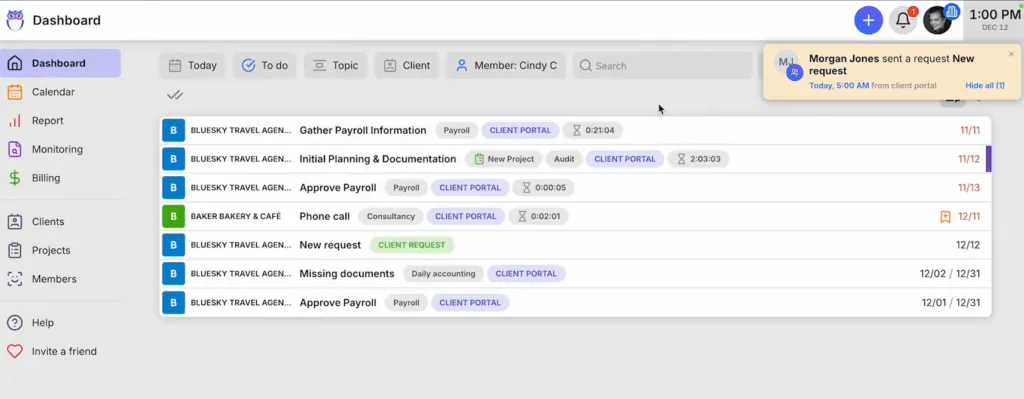
Unlike traditional portals where tickets must be connected to work items, Uku’s portal mirrors the exact same task on both sides.
Source: Uku
Clients and accountants work on the same item with all communication, actions, documents, logs, and time tracking in one place. When clients make requests through the portal, notifications appear on the accountant’s dashboard, and they can immediately start tracking time within that same task.
The portal uses a “magic link” system that eliminates passwords entirely. Clients receive an email with a secure link providing instant access. The portal is highly customizable. Firms can create unique menus for each client, run onboarding with forms, share business insight reports, display price lists, and embed custom content with simple copy-paste functionality.
Global Capabilities and Native Integrations
Supporting 12 languages and multi-currency capabilities, Uku serves 1,000+ accountants globally across the US, UK, and Scandinavia.
The platform offers native Xero integration alongside other accounting software connections, addressing a critical gap in Financial Cents’ offerings.
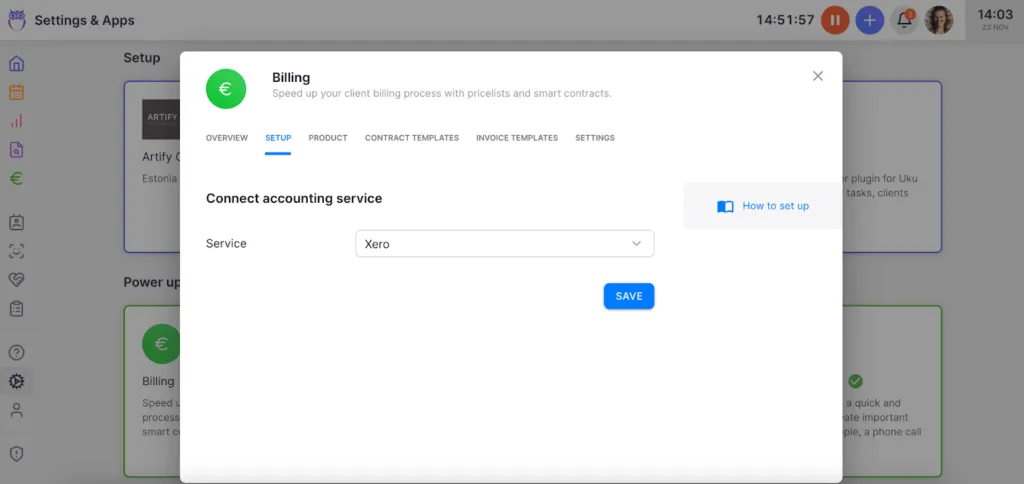
Documents can be submitted for digitalization with a single click, sending them directly into accounting software. This level of automation for document handling is unique in the practice management space and significantly reduces manual data entry.
Modular Approach: Start Working Day One
Like an iPhone where you start with basic functionality and add apps as needed, users can begin with just CRM and tasks, then gradually add features. This flexibility is designed for small and medium-sized companies that need agility. Firms can start working on day one, activating only the modules needed and scaling up as they grow.
This modular deployment represents one of the biggest reasons why clients switch from competitors to Uku, as it eliminates the need for substantial upfront configuration and training. Users can work with their Excel file for an hour, import it into Uku, and have automated plans ready to go, thereby achieving the “from Excel to greatness” transformation.
“Working with Uku has been the most enjoyable moment in my Accounting career.”
Financial Cents or Uku: Comparison Summary
| Feature | Financial Cents | Uku |
|---|---|---|
| Starting Price (Solo) | $19/month (1-year minimum, single user) | $19/month annual / $25/month flexible (up to 20 active clients, no contract) |
| Team Pricing | $49/month annual ($69 monthly), min 5 users | $38/month annual ($49 monthly), no user minimum |
| Advanced Tier | $69/month Scale ($89 monthly) | $48/month Elite ($62 monthly) — incl. BI Analytics |
| Enterprise | Custom pricing only | Public $88/month annual ($99 monthly) |
| Billing Flexibility | Minimum 1-year commitment required | Monthly or annual options on every plan |
| Single Source of Truth | Per-platform views | One shared view of who’s doing what across the team |
| Invoice Preparation Time | Standard manual process | ~30 minutes (from 2-3 days) |
| Global Capabilities | US/Canada only, USD billing | 12 languages, multi-currency (€, $, £) |
| Xero Integration | Not available | Native integration |
| Document Processing | Manual handling | One-click digitalization to accounting software |
| Implementation Speed | Substantial upfront configuration | Start working day one with modular approach |
| Client Portal | Password-protected access | Passwordless magic link with task mirroring |
How to Switch from Financial Cents to Uku
Switching platforms is simpler than most firms expect — especially from Financial Cents, since Uku natively imports the kind of workflow + client structures Financial Cents firms typically already maintain. Here’s a typical Uku migration timeline:
- Discovery Call (30 minutes) — Review your current Financial Cents setup, identify priorities (workflow templates, billing rules, client portal needs), and plan the modular rollout
- Data Migration (1-3 days) — Import client lists, workflow templates, and historical task data from Financial Cents (or directly from Excel if you maintained any side spreadsheets)
- Workflow Setup (1-2 days) — Recreate recurring workflows and automation rules in Uku’s automated billing and client portal modules — including the multi-currency and multilingual setup that Financial Cents doesn’t support
- Team Training & Go-Live (1 day) — Walkthrough for your team and deployment, with 90 minutes of free onboarding help
Most firms complete the full Uku migration within 5-7 business days — and because Uku bills monthly with no contract, you can cancel during your Financial Cents 1-year commitment if it overlaps, with no penalty on the Uku side. For a side-by-side feature breakdown before committing, see Top Financial Cents alternatives.
Final Verdict
The choice between Financial Cents and Uku ultimately depends on your firm’s geographic scope, implementation preferences, and billing efficiency needs.
Choose Financial Cents if your firm operates exclusively in the US or Canada and values community resources through shared templates.
It’s ideal for practices that heavily rely on QuickBooks Online integration and need advanced mail inbox management. The platform suits teams willing to commit to a full year upfront and invest time in comprehensive initial configuration for long-term benefits.
Get started with Financial Cents here.
Choose Uku if you want to minimize your team’s admin time with automated billing that reduces invoice preparation from days to 30 minutes, and you value a single source of truth for who’s doing what across the team.
It’s perfect if you value ultra-fast onboarding and modular scaling, allowing you to start with just the features you need. The platform excels for firms needing multilingual or multi-currency support, those transitioning from Excel wanting the easiest implementation, and teams preferring flexible monthly pricing (from $19/month Solo, $38/month Team) rather than annual commitments. With native Xero integration, one-click document digitalization, and BI Analytics in the Elite plan, Uku provides “a system your team will actually enjoy using.”
Both platforms deliver on the promise of streamlining accounting practice management. Financial Cents excels at community-driven efficiency within North American markets, while Uku stands out for its automated billing efficiency, global capabilities, single source of truth operational view, and modular approach that lets firms implement software step by step. Your choice depends on whether you prioritize community resources with annual commitment or automated efficiency with flexible, immediate implementation.
Frequently Asked Questions
How much does Financial Cents cost in 2026?
Financial Cents has four plans: Solo at $19/month (annual billing, single user), Team at $49/month annual ($69/month with monthly billing, minimum 5 users), Scale at $69/month annual ($89/month monthly billing) — their “Most Popular” tier — and Enterprise at custom pricing. All paid plans require an annual commitment after the 14-day free trial.
What is Financial Cents’ rating on review sites?
Financial Cents holds a 4.8 out of 5 rating on Capterra across 266 reviews (July 2026). Reviewers most often praise its ease of use, automated client-data collection, and community workflow templates.
Does Financial Cents have a free plan?
No. Financial Cents only offers a 14-day free trial. After that, all plans require an annual commitment starting from $19/month (Solo).
How does Financial Cents Solo compare to Uku Solo?
Both plans cost $19/month when billed annually. Financial Cents Solo requires a 1-year contract. Uku Solo costs the same ($19/month yearly, $25/month monthly), supports up to 20 active clients, combines Team and Elite features (including client budgeting and e-signatures), and offers true monthly billing with no contract.
What does Financial Cents integrate with?
Financial Cents has native QuickBooks Online integration, Gmail and Outlook email, SmartVault, Google Drive, and OneDrive for documents, and Adobe eSignature. It does not integrate natively with Xero — Uku does.
Is Financial Cents good for solo accountants?
Yes. Financial Cents Solo at $19/month (annual billing) is a single-user plan with all core features. Uku Solo matches that $19/month price, adds true monthly billing with no contract, and supports up to 20 active clients.
How does Financial Cents compare to Karbon?
Financial Cents is cheaper and simpler, starting at $19/month versus Karbon’s $59/user. Karbon offers deeper workflow and email management for larger firms, while Financial Cents is limited to US and Canada with QuickBooks Online and lacks native Xero and multi-currency support.
Is Financial Cents worth the 1-year commitment?
Financial Cents is worth the annual commitment if you operate exclusively in the US or Canada, rely heavily on QuickBooks Online, and value the 100+ community workflow templates. It is not a good fit if you need monthly billing flexibility, multi-currency or multilingual support, native Xero integration, or one-click document digitalization.
Can I cancel Financial Cents monthly?
No. Financial Cents requires an annual commitment on all paid plans after the 14-day trial. If you need month-to-month flexibility, Uku offers true monthly billing (Solo $25/month, Team $49/month) with no contract.
What is the best Financial Cents alternative?
Uku is the closest direct alternative — same $19/month Solo starting price but with monthly billing (no annual commitment), 12-language support, multi-currency (€/$/£), native Xero integration, and automated billing that reduces invoice preparation from 2-3 days to ~30 minutes.
Related Reading
If you’re researching practice management options beyond Financial Cents, our broader cluster covers the full landscape:
- Top Financial Cents alternatives for accounting firms — head-to-head with 8 alternatives
- Financial Cents pricing breakdown — detailed pricing analysis
- TaxDome alternatives — for firms comparing TaxDome to Uku
- Karbon pricing & alternatives — enterprise-grade comparison
- Canopy pricing — tax-resolution-focused alternative
- Jetpack Workflow alternatives — workflow-first comparison
- Xero Practice Manager review — for Xero-native firms
Frequently asked questions
How much does Financial Cents cost in 2026?
Financial Cents has four plans: Solo at $19/month (annual billing, single user), Team at $49/month annual ($69/month with monthly billing, minimum 5 users), Scale at $69/month annual ($89/month monthly billing) — their 'Most Popular' tier — and Enterprise at custom pricing. All paid plans require an annual commitment after the 14-day free trial.
Is Financial Cents worth the 1-year commitment?
Financial Cents is worth the annual commitment if you operate exclusively in the US or Canada, rely heavily on QuickBooks Online, and value the 100+ community workflow templates. It is NOT a good fit if you need monthly billing flexibility, multi-currency or multilingual support, native Xero integration, or one-click document digitalization.
What is the best Financial Cents alternative?
Uku is the closest direct alternative — same $19/month Solo starting price but with monthly billing (no annual commitment), 12-language support, multi-currency (€/$/£), native Xero integration, and automated billing that reduces invoice preparation from 2-3 days to ~30 minutes. Uku also gives firms a single source of truth for who's doing what across the team — the most-cited reason customers say they switched.
Does Financial Cents have a free plan?
No. Financial Cents only offers a 14-day free trial. After that, all plans require an annual commitment starting from $19/month (Solo).
How does Financial Cents Solo compare to Uku Solo?
Both plans cost $19/month when billed annually. Financial Cents Solo includes workflow management, client portal, QuickBooks Online integration, time tracking, invoicing, proposals, and e-signatures — but requires a 1-year contract. Uku Solo costs the same ($19/month yearly, $25/month monthly billing), supports up to 20 active clients, combines features from Uku's Team and Elite plans (including client budgeting and e-signatures), and offers true monthly billing with no contract.
Can Financial Cents integrate with Xero?
No. Financial Cents only has native QuickBooks Online integration. Firms using Xero must work around this with manual data transfer or third-party tools. Uku has native Xero integration alongside other accounting software connections.
What is Financial Cents' rating on review sites?
Financial Cents holds a 4.8 out of 5 rating on Capterra across 266 reviews (July 2026). Reviewers most often praise its ease of use, automated client-data collection, and community workflow templates.
What does Financial Cents integrate with?
Financial Cents has native QuickBooks Online integration (two-way time sync, one-way invoice sync), Gmail and Outlook email, SmartVault, Google Drive, and OneDrive for documents, and Adobe eSignature. It does not integrate natively with Xero — Uku does.
Is Financial Cents good for solo accountants?
Yes. Financial Cents Solo at $19/month (annual billing) is a single-user plan with all core features. Uku Solo matches that $19/month price, adds true monthly billing with no contract, and supports up to 20 active clients.
How does Financial Cents compare to Karbon?
Financial Cents is cheaper and simpler, starting at $19/month versus Karbon's $59/user. Karbon offers deeper workflow and email management for larger firms, while Financial Cents is limited to US and Canada with QuickBooks Online and lacks native Xero and multi-currency support.
Can I cancel Financial Cents monthly?
No. Financial Cents requires an annual commitment on all paid plans after the 14-day trial. If you need month-to-month flexibility, Uku offers true monthly billing (Solo $25/month, Team $49/month) with no contract.

Published Dec 22, 2025 · Updated Aug 28, 2026