7 Best Firm360 Alternatives for Accounting Firms in 2026
The 7 best Firm360 alternatives in 2026: Uku, Karbon, Financial Cents, TaxDome, Jetpack Workflow, Cone and Double, with verified prices and who each fits.


Contents
- Firm360 Alternatives at a Glance
- What is Firm360?
- How We Curated Our List of Firm360 Alternatives
- 1. Uku: Best Alternative for Billing From Tracked Time, Paid Monthly
- 2. Karbon: Best Alternative for Email-First Teams That Need Capacity Planning
- 3. Financial Cents: Best Alternative for Small US Firms That Want to Try First
- 4. TaxDome: Best Alternative for Tax Firms That Sign a Lot of Documents
- 5. Jetpack Workflow: Best Alternative for Workflow Only
- 6. Cone: Best Alternative for Proposals and Billing on a Small Budget
- 7. Double: Best Alternative for Bookkeeping Firms Closing Books on QuickBooks or Xero
- How to Switch from Firm360 to Uku
- The Final Verdict
- Read more
The seven best Firm360 alternatives in 2026 are Uku, Karbon, Financial Cents, TaxDome, Jetpack Workflow, Cone and Double. Each one answers a different reason for leaving. Uku drafts invoices from tracked time and can be paid monthly. Karbon and TaxDome are for larger or tax-heavy US firms, Financial Cents and Cone for small ones, Jetpack Workflow for workflow alone, and Double for bookkeeping firms whose real bottleneck is month-end close.
Firm360 is practice management software built for US CPA firms: projects, documents, a client portal, e-signature, time and billing, and reporting in one system. It is priced per user on annual billing, $49 a month on Basic, $79 on Standard and $99 on Premium, with a three-user minimum on the two higher plans.
Firms look elsewhere for four reasons. Project management, advanced reporting and automated collections start on Standard, so a small firm pays at least $237 a month to get them. There is no trial, only a demo, and the vendor says most firms go live in six to eight weeks. And Firm360’s pages do not mention a shared team inbox, capacity planning or any market outside the US.
Firm360 Alternatives at a Glance
| The Best Firm360 Alternatives | ||
|---|---|---|
 | Best Alternative for Billing From Tracked Time, Paid Monthly Starts at: $19/member/mo · Per member Workflows, a timer on every task and invoices drafted from each client’s contract, with a 14-day trial and no seat minimum. | |
 | Best Alternative for Email-First Teams That Need Capacity Planning Starts at: $59/user/mo · Per user A shared inbox that turns client email into assigned work, plus budgeted hours against each person’s capacity. | |
 | Best Alternative for Small US Firms That Want to Try First Starts at: $19/mo (solo) · Per user Workflow, capacity, time tracking and invoicing on every plan, with a self-serve trial and a solo tier. | |
 | Best Alternative for Tax Firms That Sign a Lot of Documents Starts at: $800/seat/yr · Per seat, yearly Unlimited e-signatures and document storage on every plan, KBA signing and a client mobile app. | |
 | Best Alternative for Workflow Only Starts at: $40/user/mo · Per user Recurring deadlines and templates with unlimited clients and no seat minimum, and deliberately no billing. | |
 | Best Alternative for Proposals and Billing on a Small Budget Starts at: $5/user/mo · Per user Proposals that become projects, workflow and billing with QuickBooks, Xero and Zoho Books sync. | |
 | Best Alternative for Bookkeeping Firms Closing Books on QuickBooks or Xero Starts at: $10/client/mo · Per client File reviews that catch coding errors in the client’s ledger, and a portal where client answers sync back to it. | |
Entry prices per month on annual billing, except TaxDome (per seat per year) and Double (per connected client, any number of users). Firm360 itself starts at $49 per user a month on Basic and $79 on Standard, with a three-user minimum on Standard and Premium.
What is Firm360?
Firm360 is an all-in-one practice management platform for US accounting and CPA firms. It was founded by Brandon Gray, a practising CPA, and it shows: projects carry federal and state due dates and extension dates, and the product is built around how a US tax and accounting practice runs its year. Its promise is visibility: “You Can’t Scale What You Can’t See.”
 Source: Firm360
Its key features include:
- Project management with templates, rule-based status transitions and a visual workflow builder (Standard and up)
- Document management with revision history, PDF merge and split, and image-to-PDF conversion
- Client portal with branded login, document upload links that need no login, e-signature and invoice payment
- Time tracking and billing with card and ACH payments and automated A/R collections (Standard and up)
- Reporting on realization, utilization, workload and receivables (advanced reports on Standard and up)
- Integrations with QuickBooks Online, UltraTax, Lacerte, CCH Axcess, ProConnect, Drake, Stripe, Gmail and Office 365, plus Zapier on Premium
- An AI Connector (Premium, limited beta) that lets partners ask Claude read-only questions about WIP, receivables and client profitability
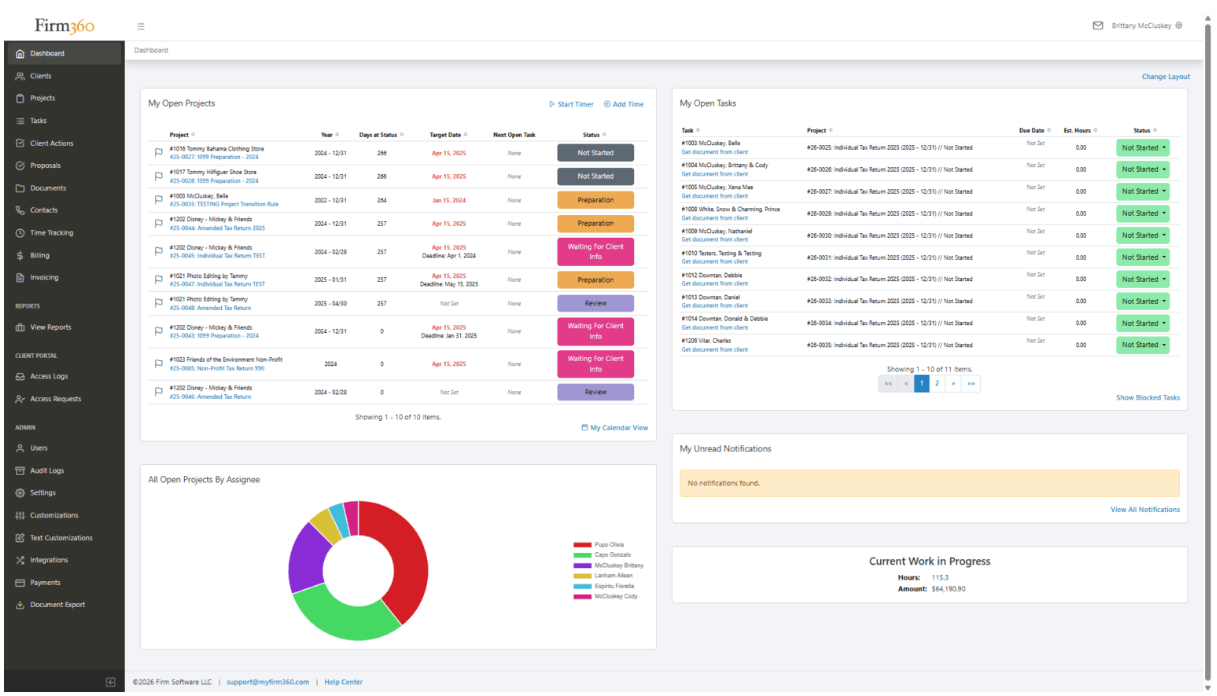 Source: Firm360
Its best-known result is CRS CPAs, a 50-person West Tennessee firm that replaced Practice CS, GoFileRoom, ShareFile, FirmFlow and spreadsheets with Firm360 and reports saving about 200 hours a week. Support is 100% US-based.
What makes firms look elsewhere is mostly the shape of the deal, not the product. Every plan is priced on annual billing, the plans that include project management need three users, you cannot try it without a demo, and implementation runs six to eight weeks with four training sessions.
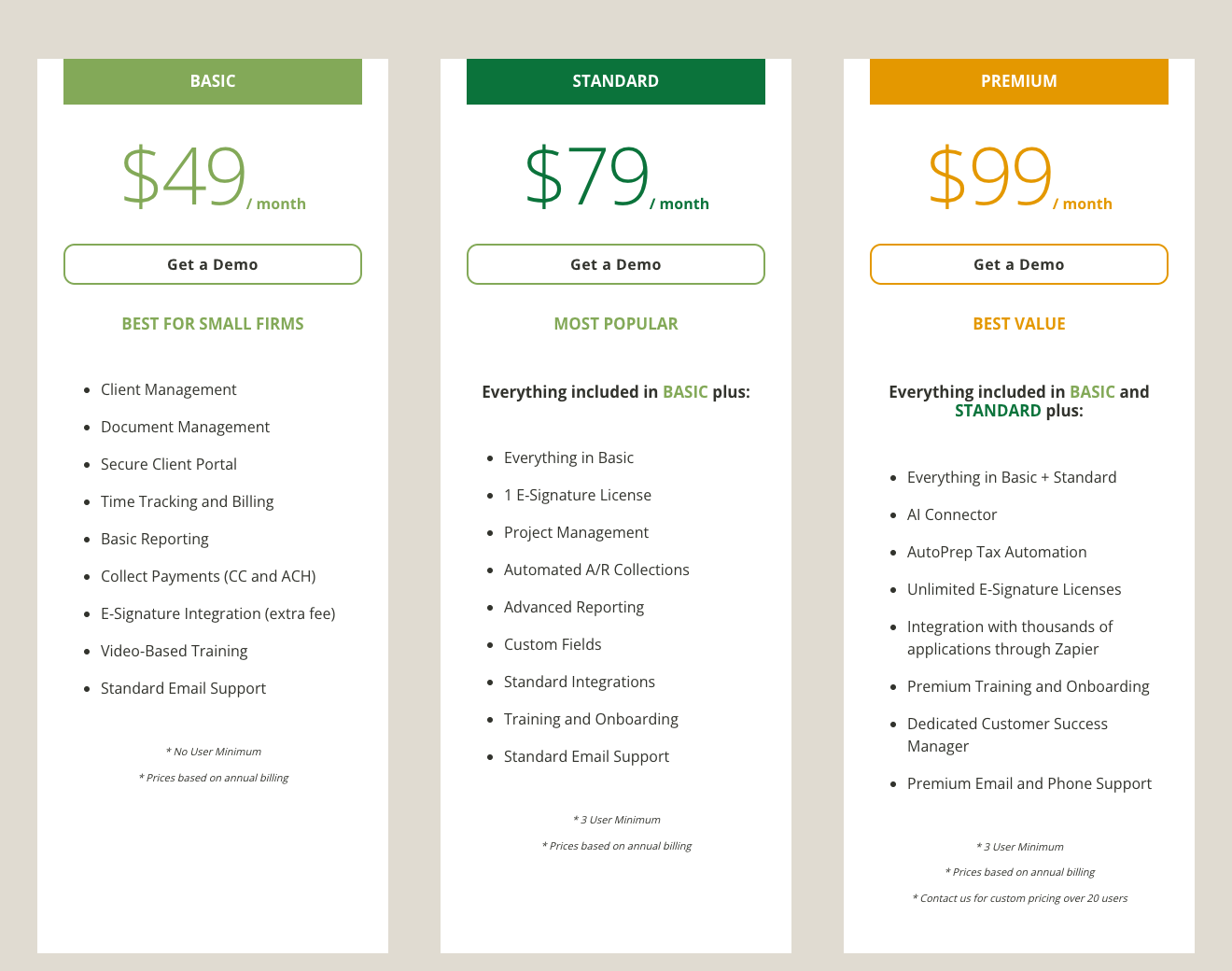 Source: Firm360
For how each feature works and what users say, see our Firm360 review; for every plan and add-on, Firm360 pricing; for the head-to-head, Firm360 vs Uku.
Want billing drafted from tracked time, on a plan you can pay monthly? Uku is built for exactly that. Try it free for 14 days, no credit card required.
How We Curated Our List of Firm360 Alternatives
We compared on 30 September 2026. Prices are what each vendor shows a US firm on its own pricing page. Feature claims come from each product’s own pages and help centre; if something isn’t mentioned there, we say “not mentioned”, not “doesn’t exist”.
We looked for tools that answer the reasons firms give for leaving or never choosing Firm360:
- Invoices drafted from tracked time and each client’s agreement, not assembled at month-end
- A plan a small firm can buy without a three-user minimum or an annual contract
- A trial you can start on your own, before any sales call
- A shared inbox and capacity planning for a larger, email-heavy team
- Unlimited e-signatures for tax season, without buying licences per plan
- Proposals that turn into projects and billing
- Error checks inside the client’s ledger for bookkeeping firms
1. Uku: Best Alternative for Billing From Tracked Time, Paid Monthly
Uku is practice management built for accounting, bookkeeping and audit firms: clients, recurring workflows, time tracking, automated billing, a client portal and analytics in one system. It serves 1,000+ firms in 25+ countries, in 12 languages, with USD, EUR and GBP billing. It is modular, so you can start with clients and tasks on day one and add billing, workflows and analytics as you grow.
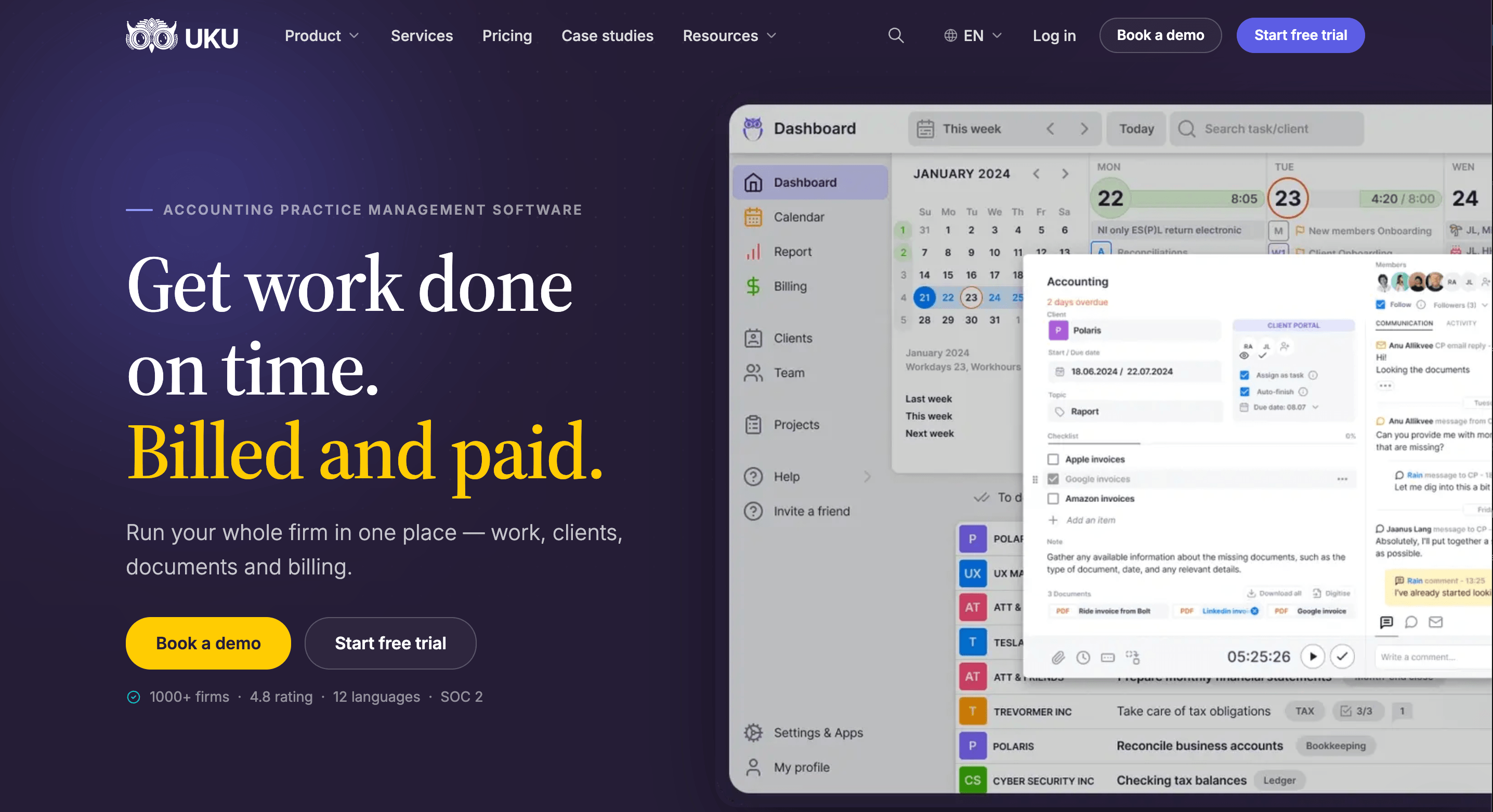
Its key capabilities include:
- Automated billing. Billing contracts (hourly, fixed, per piece, volume tiers, or a mix) draft each period’s invoices from tracked work and sync them to QuickBooks Online, Xero and other ledgers.
- Time tracking on the task. A one-click timer, manual and bulk entry, billable or not. On Elite and Enterprise, a firm can require a time entry before a task is closed.
- Agreements monitoring. Agreed work against delivered work for every client, flagged green, amber or red before the month closes.
- Workflow automation. Workflow templates create every recurring task with its checklist, responsible person and due date, and changes to a template can be pushed to the clients already using it.
- Client portal. Passwordless, free for clients on every plan, with document requests, reminders and comments on the task itself.
- What Uku does not have: native integrations with US tax software such as UltraTax or Lacerte, and proposals (on the roadmap).
Why choose Uku over Firm360
The first difference is billing. Firm360 tracks time and bills it, and its advanced reports tell you afterwards which clients were realized below standard. Uku starts from the other end. Each client has a billing contract that says what the fee covers, tracked time and out-of-scope work land against it, and at period end the invoices draft themselves. You review and send them in one batch.
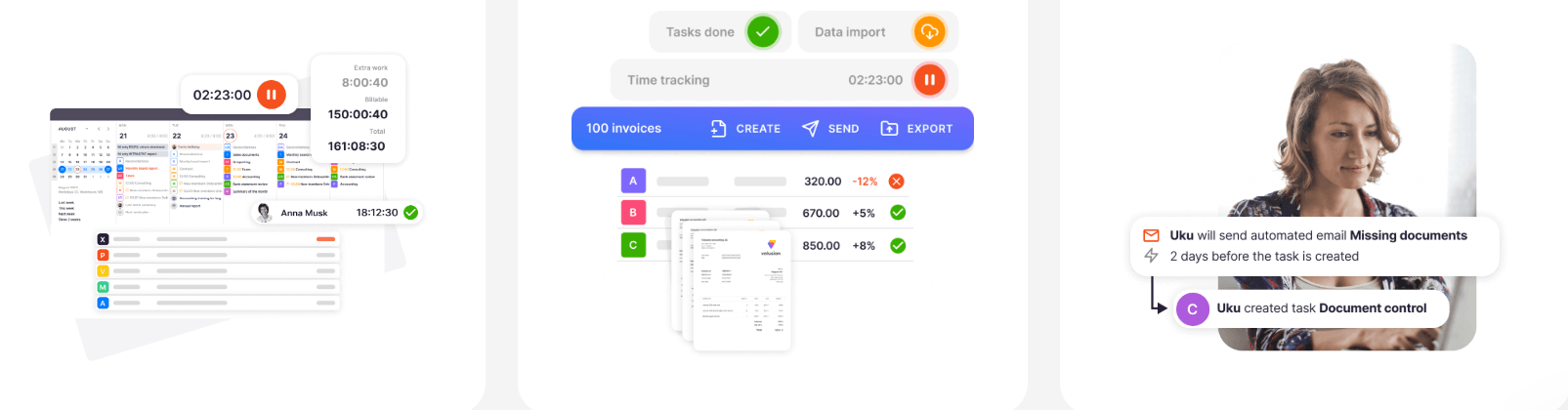

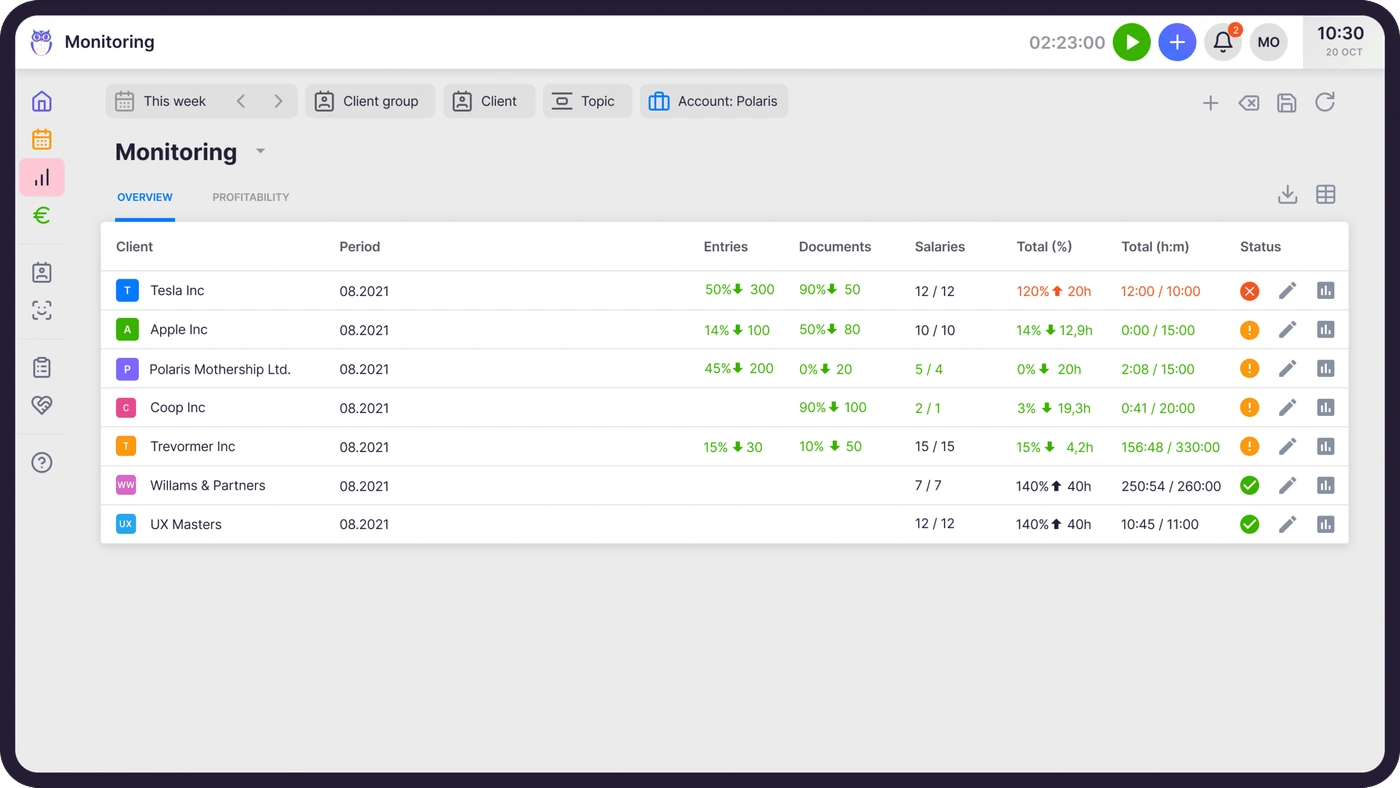
The second is catching the problem while there is still time to act. Firm360’s realization report is a look back. Uku’s agreements monitoring compares agreed work with delivered work for every client in the middle of the month, so a client who is sending twice the documents they pay for becomes a pricing conversation, not a write-off.
The third is how you buy it. Firm360 has no trial, starts project management at $79 per user with a three-user minimum, prices on annual billing and quotes six to eight weeks to go live. Uku has a 14-day trial of its Elite plan without a card, no seat minimum, monthly billing on every plan, and most firms are live in two to six weeks. A three-person firm pays $237 a month for Firm360 Standard and $114 for Uku Team on annual billing.
It also works for the firm Firm360 is built for. Gordon J. Maier & Company, a 43-person Wisconsin CPA firm founded in 1935, went live on Uku weeks before the US tax season and ran the whole season through it.

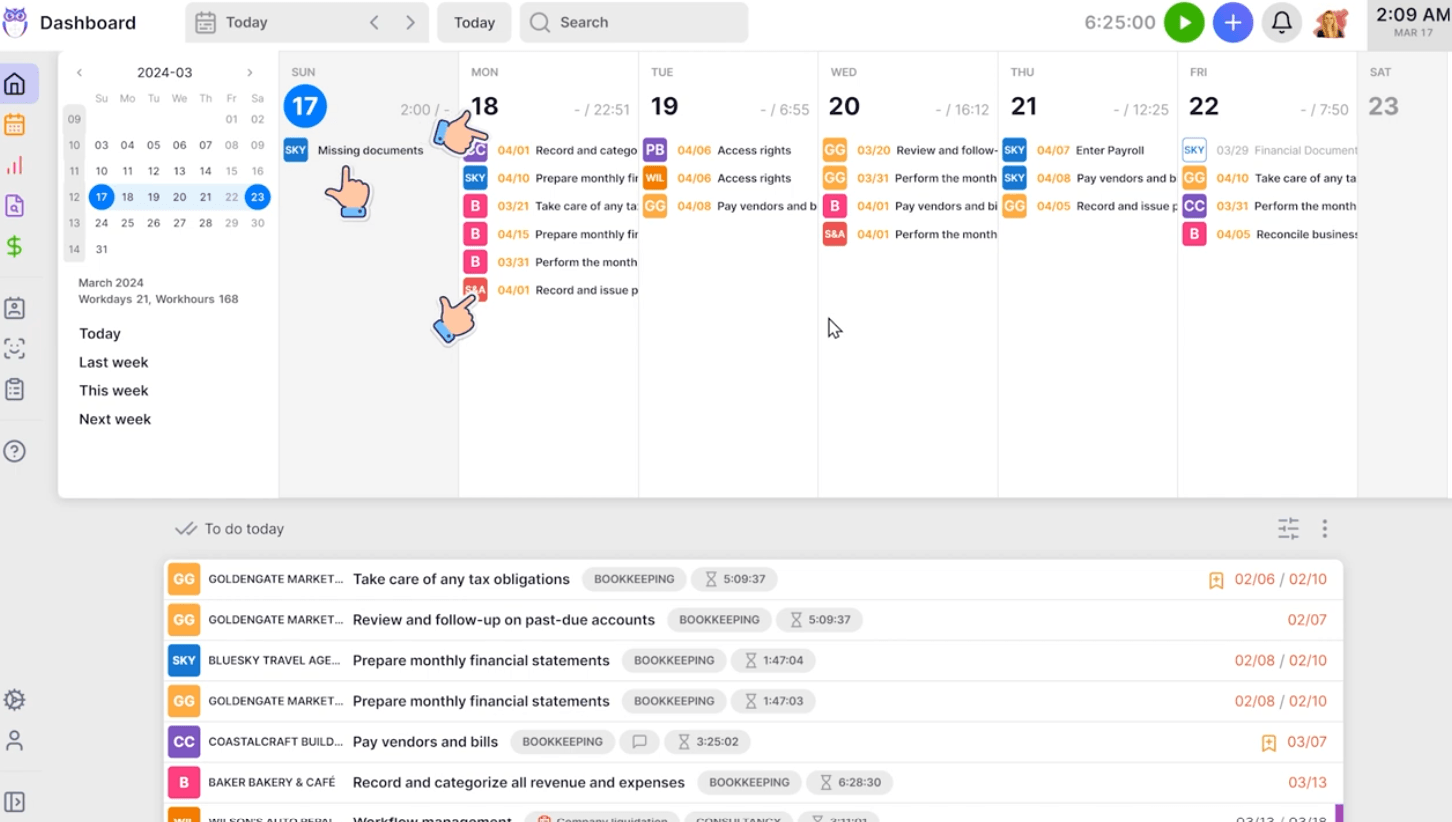
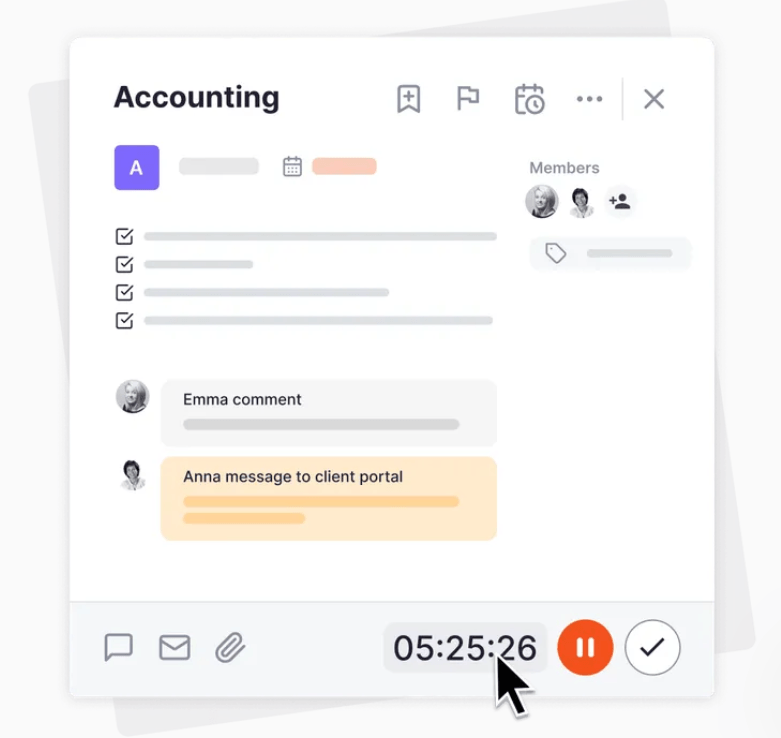
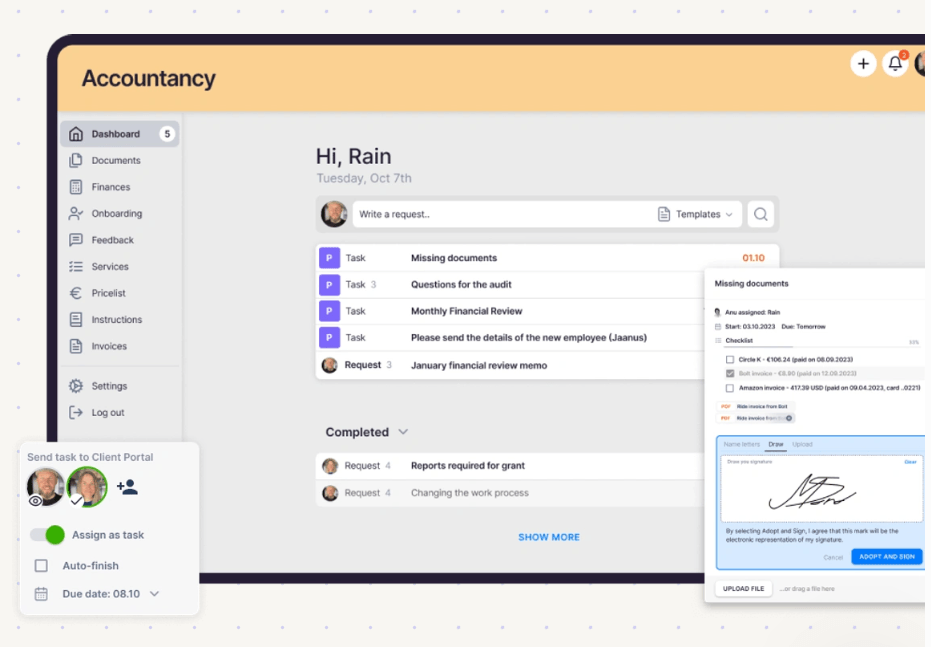
Day to day, the work and the client conversation sit on the same task. A timer runs on the task card, the checklist is beside it, and a message to the client goes to the portal from the same place. Clients open the portal without a password, see what is asked of them, upload the file and sign where needed.
The trade-off is US tax software. Firm360 connects to UltraTax, Lacerte, CCH Axcess, ProConnect and Drake; Uku does not. If your returns flow depends on those integrations, weigh that before anything else on this page. Uku connects to QuickBooks Online and Xero, European ledgers such as e-conomic, Fortnox and FreeAgent, Gmail and Outlook, and on Elite a public API, Zapier and the Uku MCP server for Claude and ChatGPT.
Uku pricing
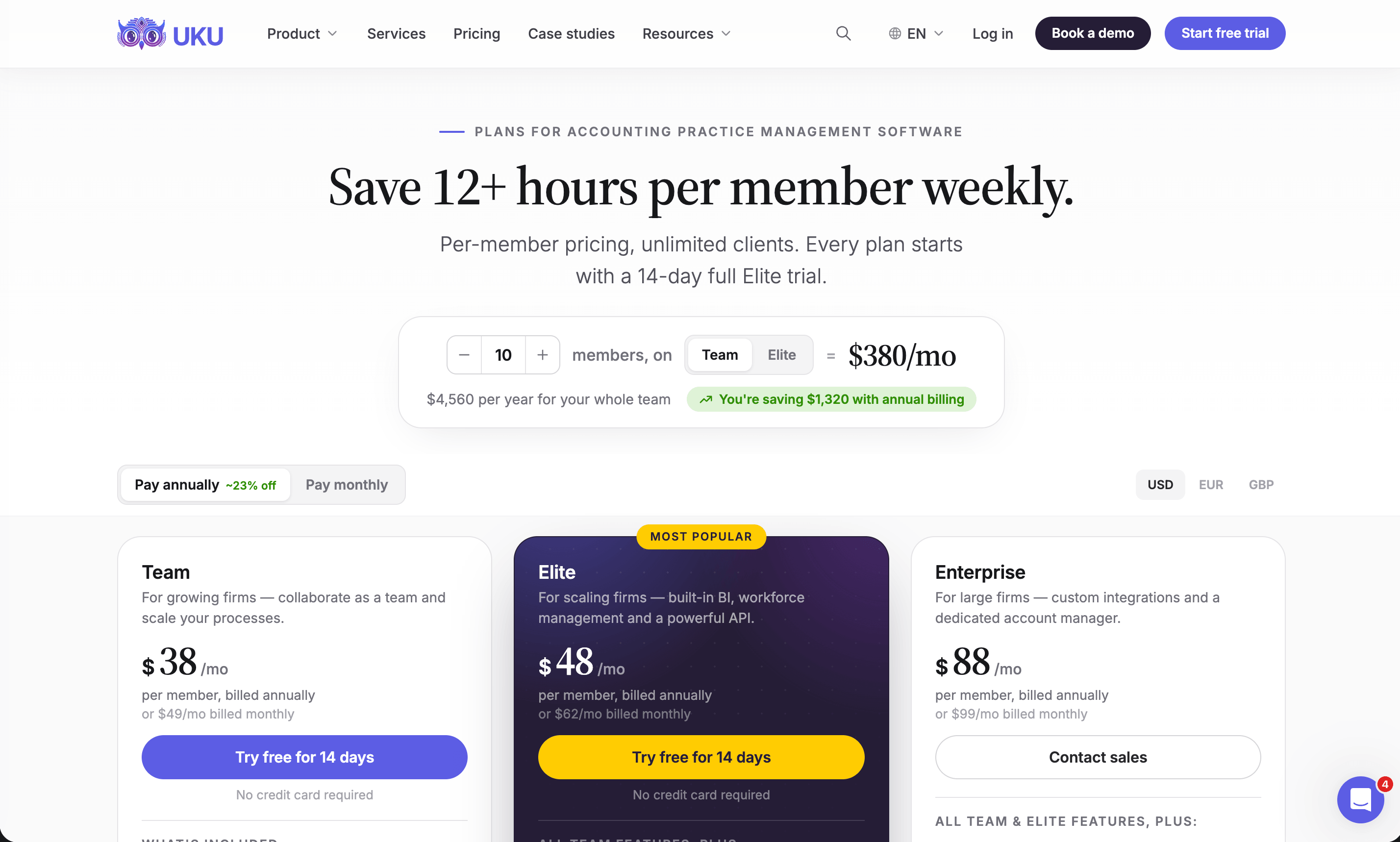
Per member per month, from Uku’s US pricing page: Solo $19 annual, $25 monthly (1 member, 20 active clients, e-signatures and document management included); Team $38, $49 monthly (unlimited members and clients, projects, access management); Elite $48, $62 monthly (BI Analytics, mandatory time entries, workforce management, public API, Zapier, Uku MCP); Enterprise $88, $99 monthly (custom integrations, dedicated account manager, assisted client import). Clients and the portal are free. Every account starts with a 14-day trial of Elite, no card, plus 90 minutes of onboarding.
Who should use Uku?
Choose Uku if: you run an accounting or bookkeeping firm of 2 to 100 people with recurring monthly work; you bill some or all of it by the hour or against a scope; you want invoices drafted from tracked time and each client’s agreement checked before month-end; or you want to try the product yourself and pay monthly. Not the first choice if your tax returns run through UltraTax, Lacerte or CCH Axcess and you want the practice system wired into them, which Firm360 does. Reviews: G2 and Capterra. Book a demo to see it with your own services.
2. Karbon: Best Alternative for Email-First Teams That Need Capacity Planning
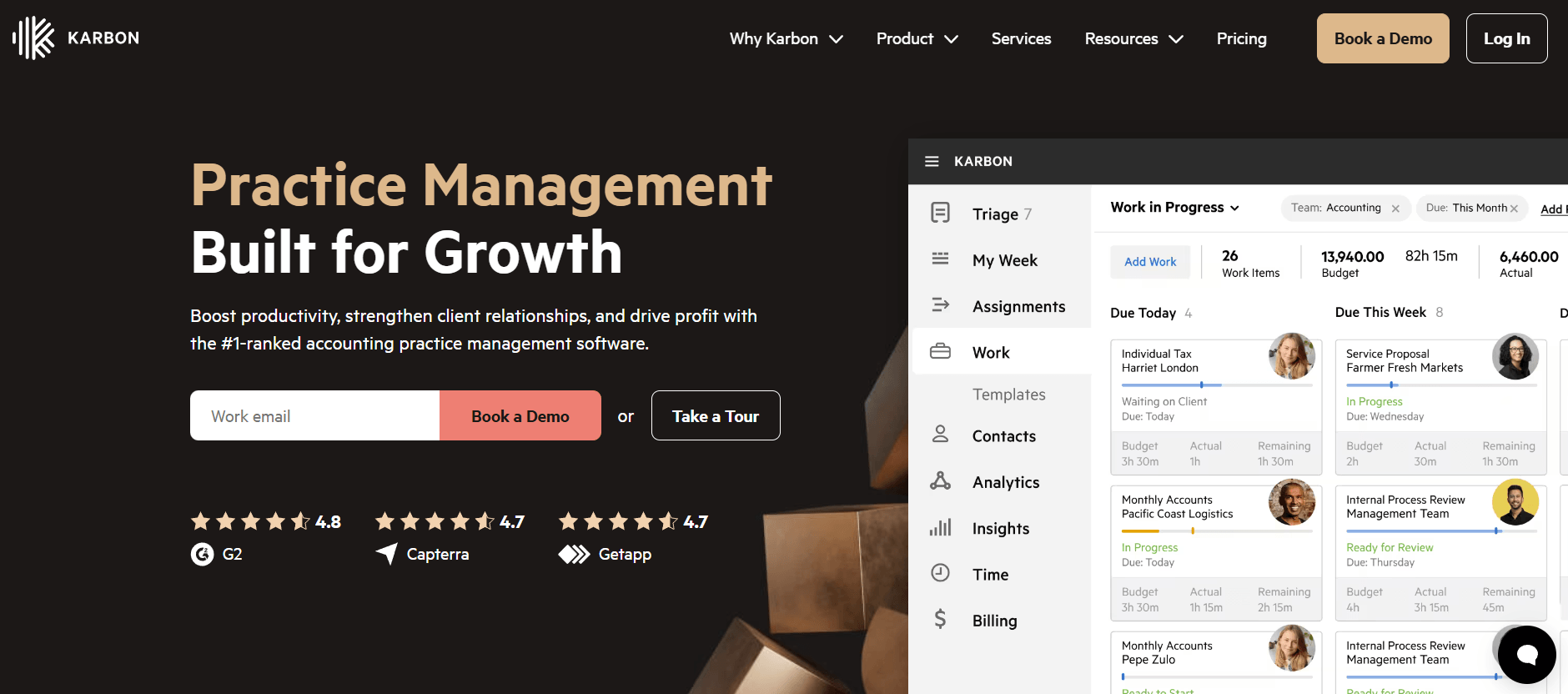
Karbon is practice management for larger, often distributed accounting teams. It says 33,000 accounting professionals in 34 countries use it. Its centre is email: every client conversation becomes shared, assignable work.
 Source: Karbon
Its key capabilities include:
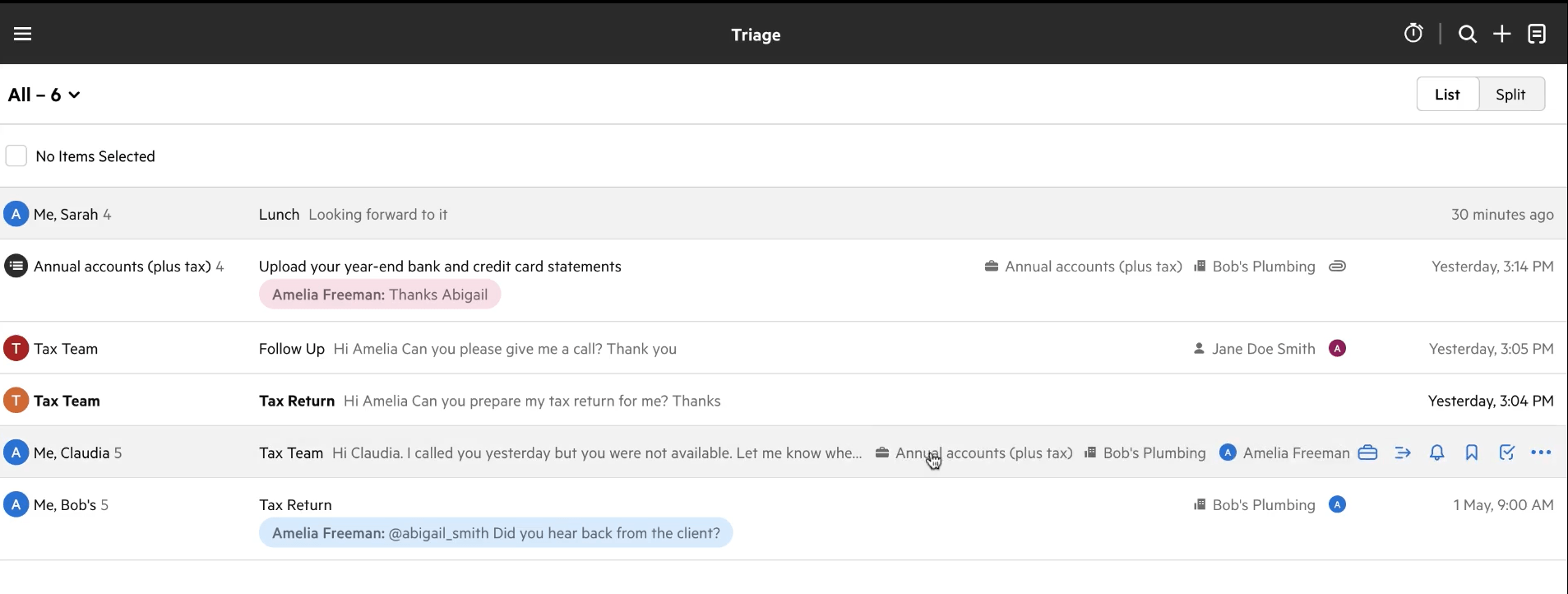
- Triage and Shared Triage: a shared inbox where any email becomes a work item attached to a client and a job
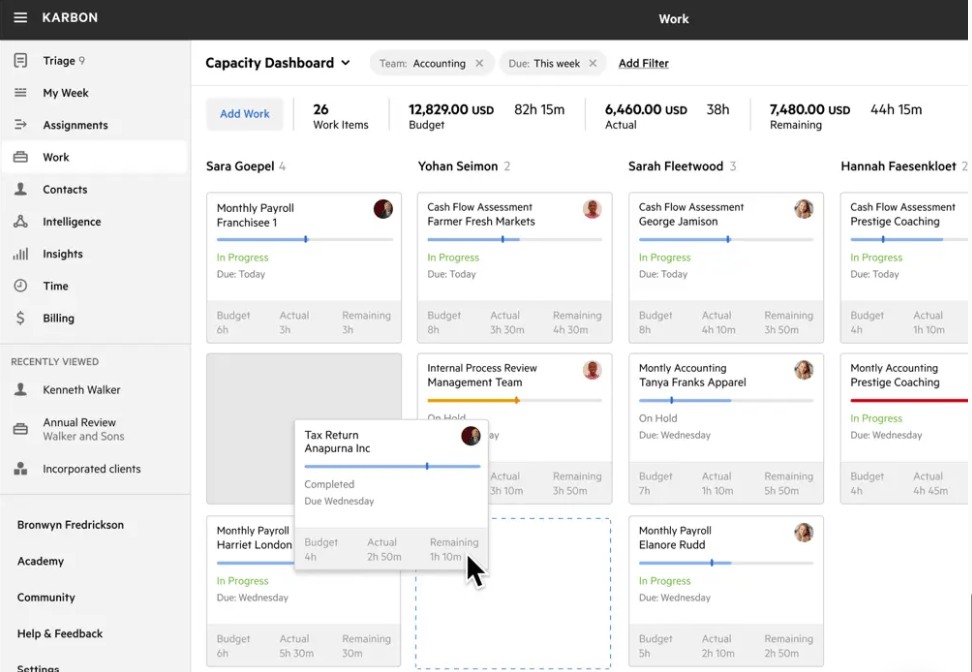
- Capacity planning with each team member’s budgeted hours against their capacity
- Automators that apply practice-wide rules, and automatic client reminders on Business
- Time tracking and billing for hourly, fixed and recurring fees, with payments
- Analytics workbooks on work status, team performance and revenue
Why choose Karbon over Firm360
Both sync Gmail and Office 365, but they do different things with it. Firm360 brings a client’s emails into the client record. Karbon turns email into work: a shared inbox for the team, internal comments on a thread, and one click from a message to an assigned task with a due date. For a firm where most work starts in someone’s inbox, that is the difference.
 Source: Karbon
The second is capacity. Firm360 shows workload at a glance, who has how much open work; its pages do not mention capacity planning. Karbon measures hours: budgeted against capacity per person per week, completion times, and how long work sits in each status.
 Source: Karbon
Karbon is also working on AI in the same direction as Firm360’s Claude connector: an assistant called Kai is in limited early access, and it has announced AI agents for roles such as bookkeeper, practice manager and tax preparer. Neither is generally available yet.
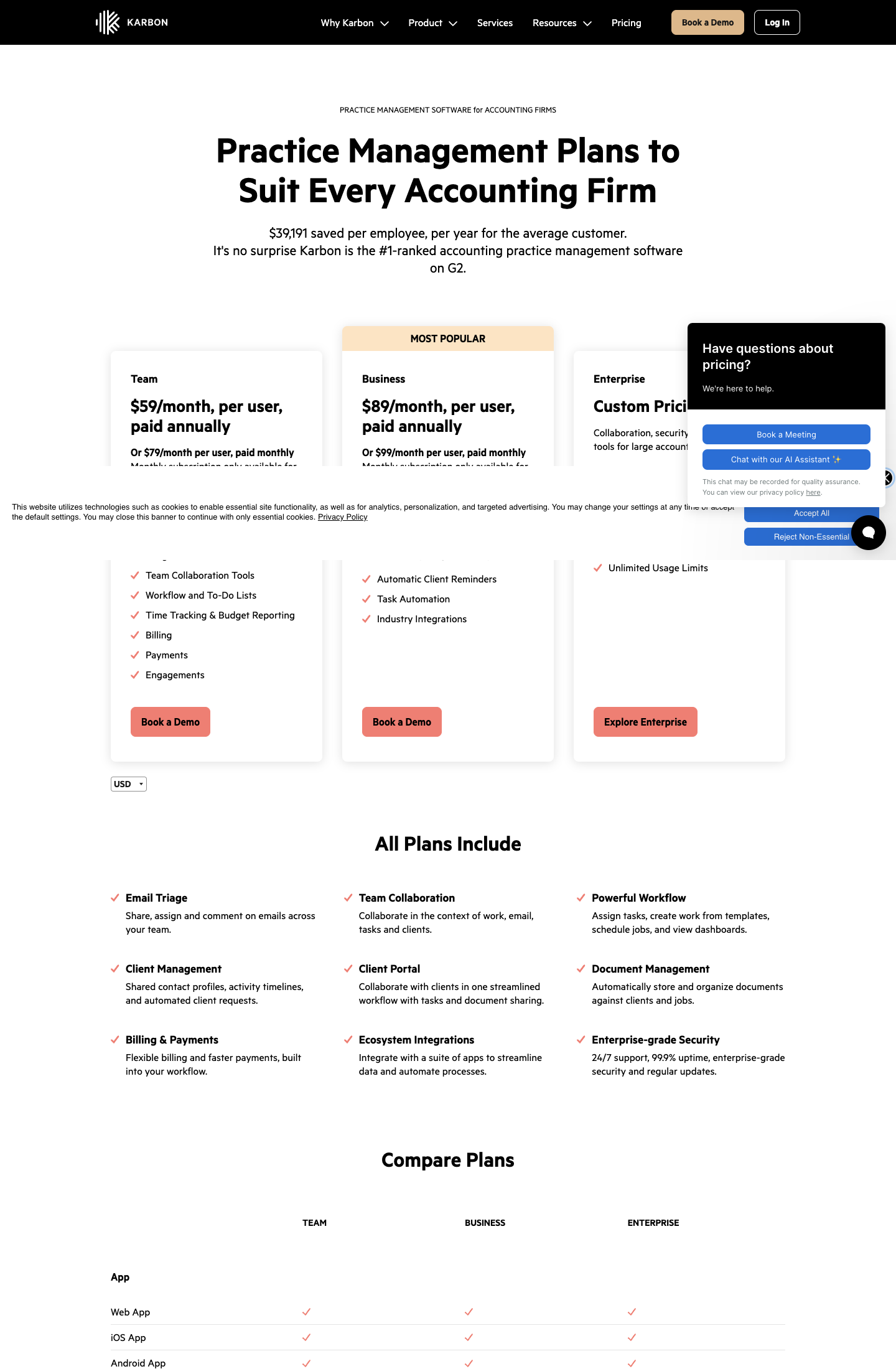
The trade-off is cost and setup. Karbon Team at $59 per user is cheaper than Firm360 Standard at $79, but the automators and automatic client reminders that make Karbon worth switching to sit on Business at $89, close to Firm360 Premium’s $99. Monthly billing is only for teams of four or more, and our Karbon review covers the implementation effort.
Karbon pricing
From the Karbon pricing page: Team $59 per user per month annual ($79 monthly), Business $89 annual ($99 monthly; automatic client reminders, task automators, API), Enterprise custom. Monthly billing is only for teams of four or more.
 Source: Karbon
Who should use Karbon?
Choose Karbon if: you are 20 to 200 people, email-first and often distributed, and you want capacity and performance measured in hours across the whole team. Reviews: Capterra. See also our Karbon review, Karbon pricing and Karbon vs Uku.
3. Financial Cents: Best Alternative for Small US Firms That Want to Try First
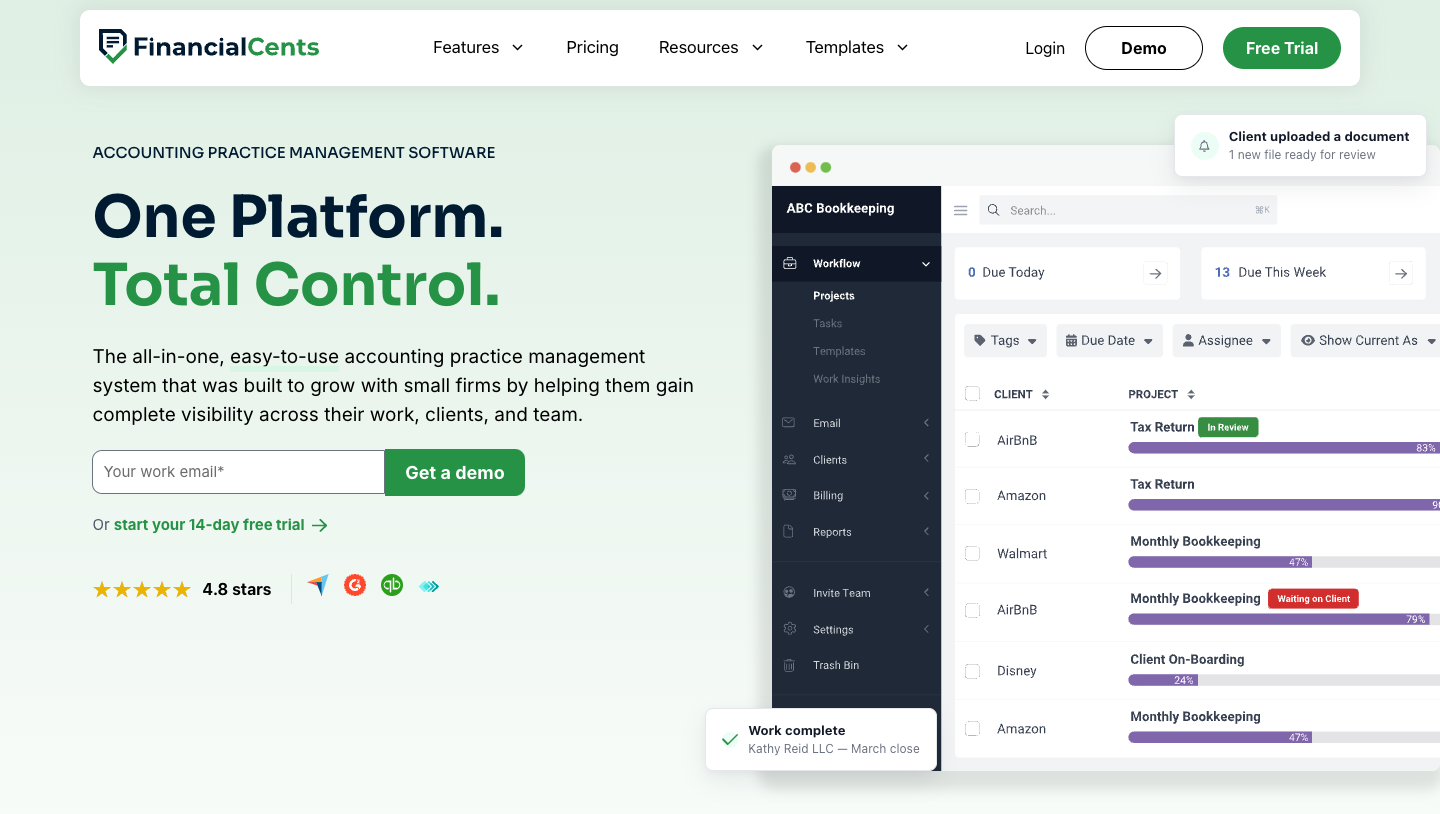
Financial Cents is practice management for small US accounting and bookkeeping firms: workflow, client tasks and portal, capacity planning, time tracking and invoicing, with a native QuickBooks Online integration and a library of 400+ workflow templates.
 Source: Financial Cents
Its key capabilities include:
- Workflow templates from a library of 400+, with client tasks, a client portal and document requests
- Capacity management showing each person’s assigned hours against their weekly capacity
- Time tracking and invoicing, including project-based billing and retainers, on every plan
- QuickBooks Online integration on every plan
Why choose Financial Cents over Firm360
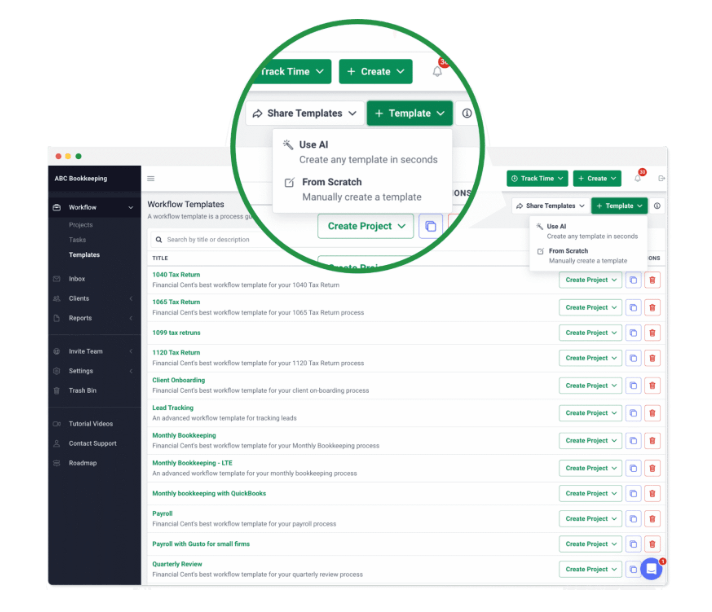
The first reason is the way in. Firm360 starts with a demo. Financial Cents starts with a 14-day trial, no card, and a price list that begins at $19 a month for a one-person firm. A solo bookkeeper can have clients and workflows in it the same afternoon, starting from a template or one generated with AI.
 Source: Financial Cents
The second is what the entry plan includes. Firm360 Basic has time tracking and billing but no project management; that starts on Standard, at $79 per user with a three-user minimum. Financial Cents puts workflow, time tracking, invoicing and QuickBooks Online on every plan, including Solo, and Team at $49 per user has no user minimum on annual billing.
 Source: Financial Cents
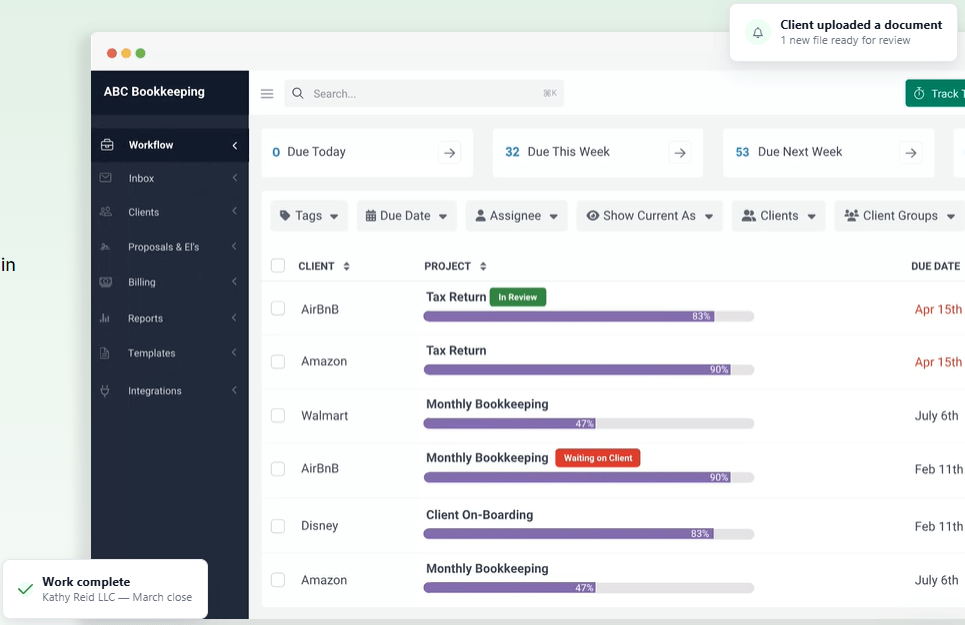
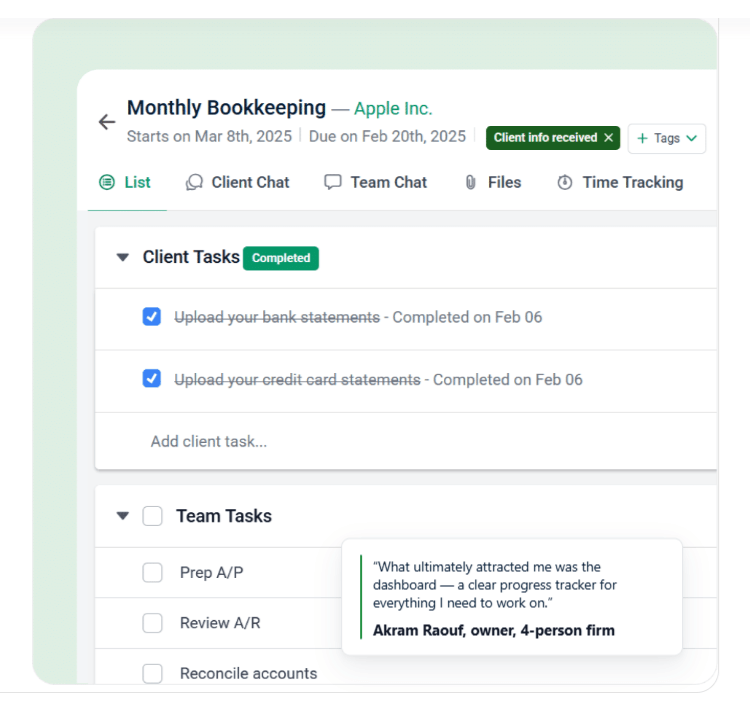
Client tasks live inside the project: the client ticks off “Upload your bank statements” in the portal, the project shows it, and the team’s own checklist continues underneath.
 Source: Financial Cents
 Source: Financial Cents
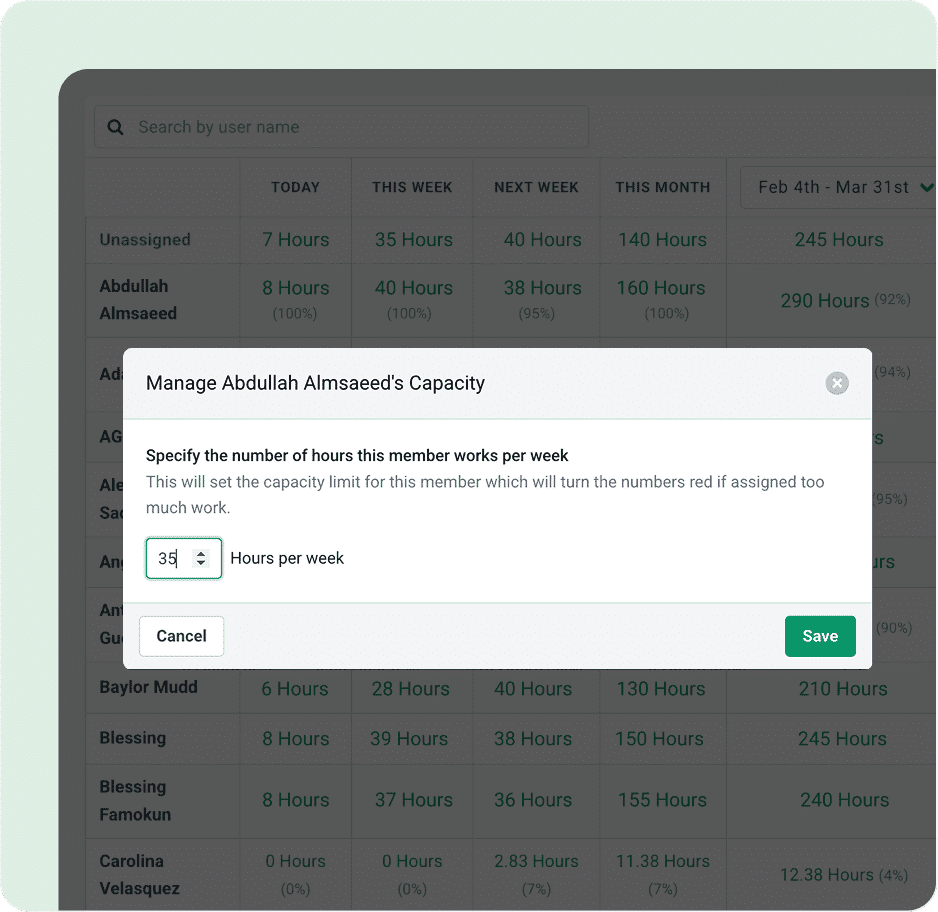
The third is capacity. Financial Cents shows hours today, this week, next week and this month against each person’s capacity, and turns the number red when someone is overloaded.
It also covers the two things Firm360’s plans do not list: proposals and engagement letters, on every plan. And on Scale it connects to the same kind of US tax software Firm360 does: Drake, UltraTax, ProConnect, ProSeries and CCH Axcess.
The trade-offs: every Financial Cents plan is a 12-month agreement, even when billed monthly, and monthly billing needs five users. The tax integrations, Zapier, a shared inbox and profitability reports all sit on Scale at $69 per user, close to Firm360 Standard.
Financial Cents pricing
From the Financial Cents pricing page: Solo $19 per month (single-user firms only), Team $49 per user per month ($69 monthly), Scale $69 ($89 monthly; task dependencies, Zapier, shared inbox, branded portal, profitability reports, tax software integrations), Enterprise custom. Every plan is a 12-month agreement. 14-day free trial, no card.
 Source: Financial Cents
Who should use Financial Cents?
Choose Financial Cents if: you are a US firm of one to about 30 people, QuickBooks Online is at the centre of your client work, and you want to try practice management yourself before talking to anyone. See also our Financial Cents review and Financial Cents alternatives.
4. TaxDome: Best Alternative for Tax Firms That Sign a Lot of Documents
TaxDome is an all-in-one platform for tax, bookkeeping and accounting firms: CRM, client portal and mobile app, unlimited document storage and e-signatures, workflow automation, email and chat, proposals, invoicing and payments.
 Source: TaxDome
Its key capabilities include:
- Unlimited document storage and e-signatures on every plan
- KBA e-signatures for IRS Form 8879 at $1 per use
- Tax organizers and intake forms that feed the workflow
- Client mobile app on iOS and Android
- Invoicing, time tracking and payments, with the option to lock documents until an invoice is paid
 Source: TaxDome
Why choose TaxDome over Firm360
Signatures are the clearest difference. Firm360 charges extra for e-signature on Basic, includes one licence on Standard and unlimited licences only on Premium. TaxDome includes unlimited e-signatures on every plan and adds knowledge-based authentication for Form 8879 at $1 a signature. In a busy season that is a cost you can predict.
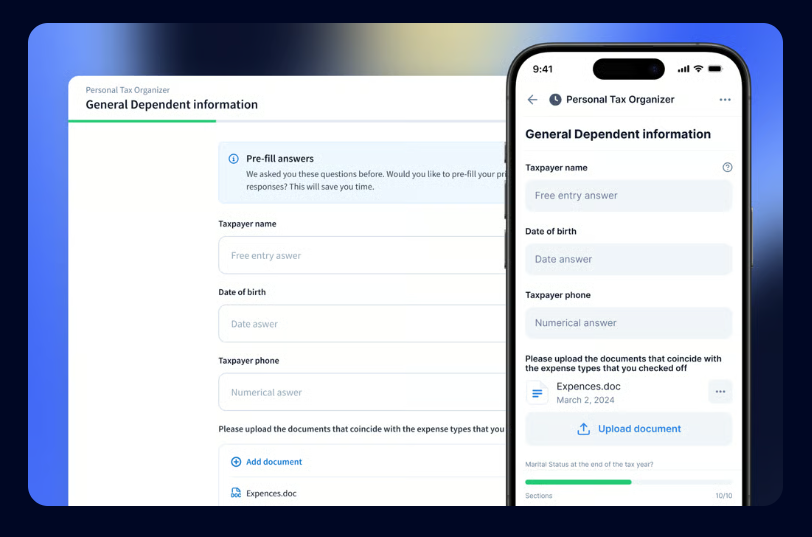
The second is the client side. Firm360’s portal works in a browser, and one reviewer on its Software Advice listing found “the end user experience trying to access and upload to the portal on a mobile device is poor”. TaxDome gives clients a mobile app, and for firms with 25+ Business seats a branded one. Tax organizers work the same on the web and on the phone, and can pre-fill last year’s answers.
 Source: TaxDome
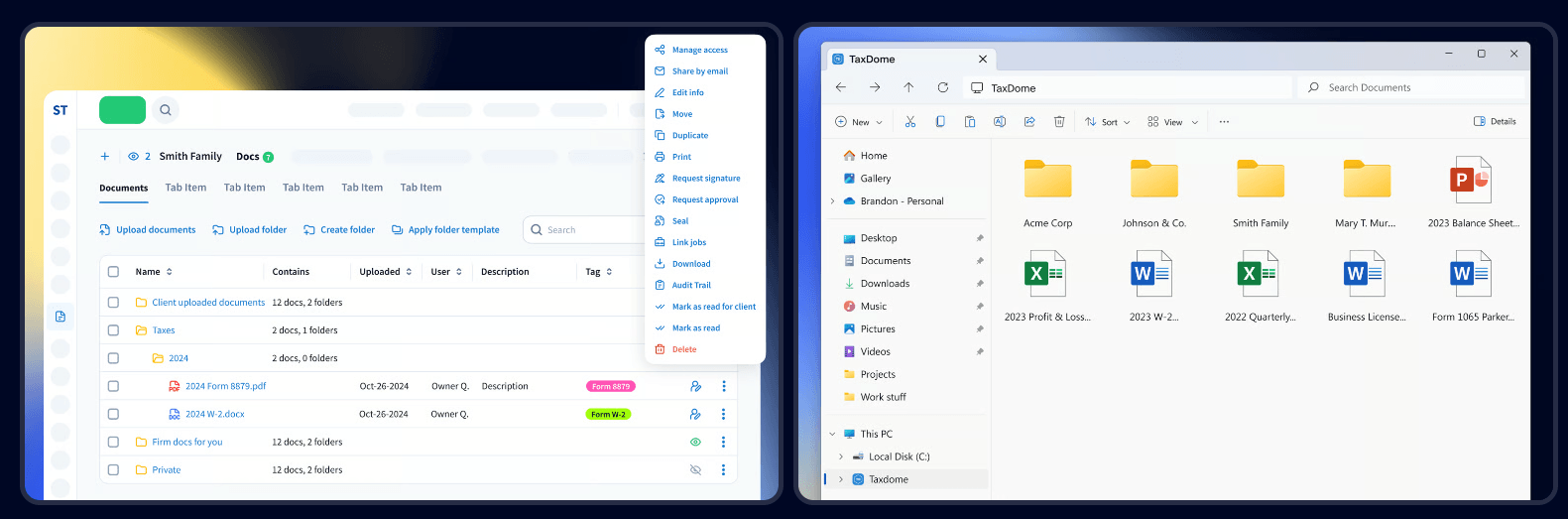
And TaxDome treats documents as the centre of the practice: folder templates per client, signature and approval requests from the document itself, and TaxDome Drive, which mounts the whole store as a drive in Windows File Explorer.
 Source: TaxDome
The trade-offs: TaxDome bills yearly and upfront, it takes real configuration to deploy, and Firm360’s list of tax software integrations (UltraTax, Lacerte, CCH Axcess, ProConnect, Drake) is at least as long as TaxDome’s.
TaxDome pricing
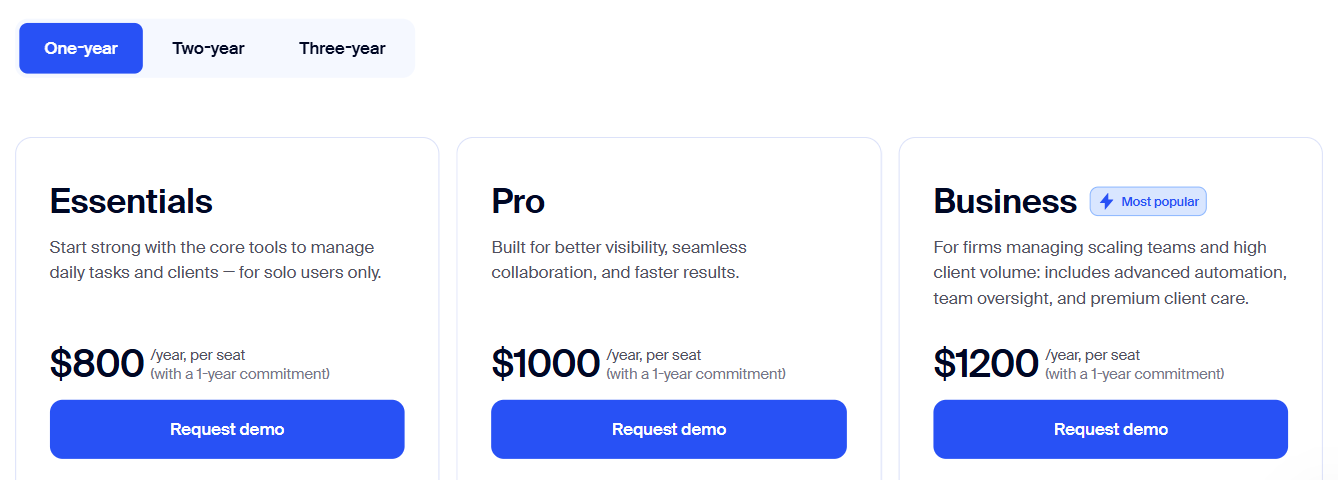
From the TaxDome pricing page, per seat per year on a one-year term: Essentials $800 (solo users only), Pro $1,000 (IRS transcripts, AI reporting), Business $1,200 (Client Care, client import assistance). Two- and three-year terms lower the price to as little as $700, $900 and $1,100; the page opens on the three-year prices. KBA signatures are $1 each.
 Source: TaxDome
Who should use TaxDome?
Choose TaxDome if: you are a US tax firm with heavy document traffic every season, you sign hundreds of engagement letters and 8879s, and your clients expect a mobile app. See also our TaxDome pricing and TaxDome alternatives.
5. Jetpack Workflow: Best Alternative for Workflow Only
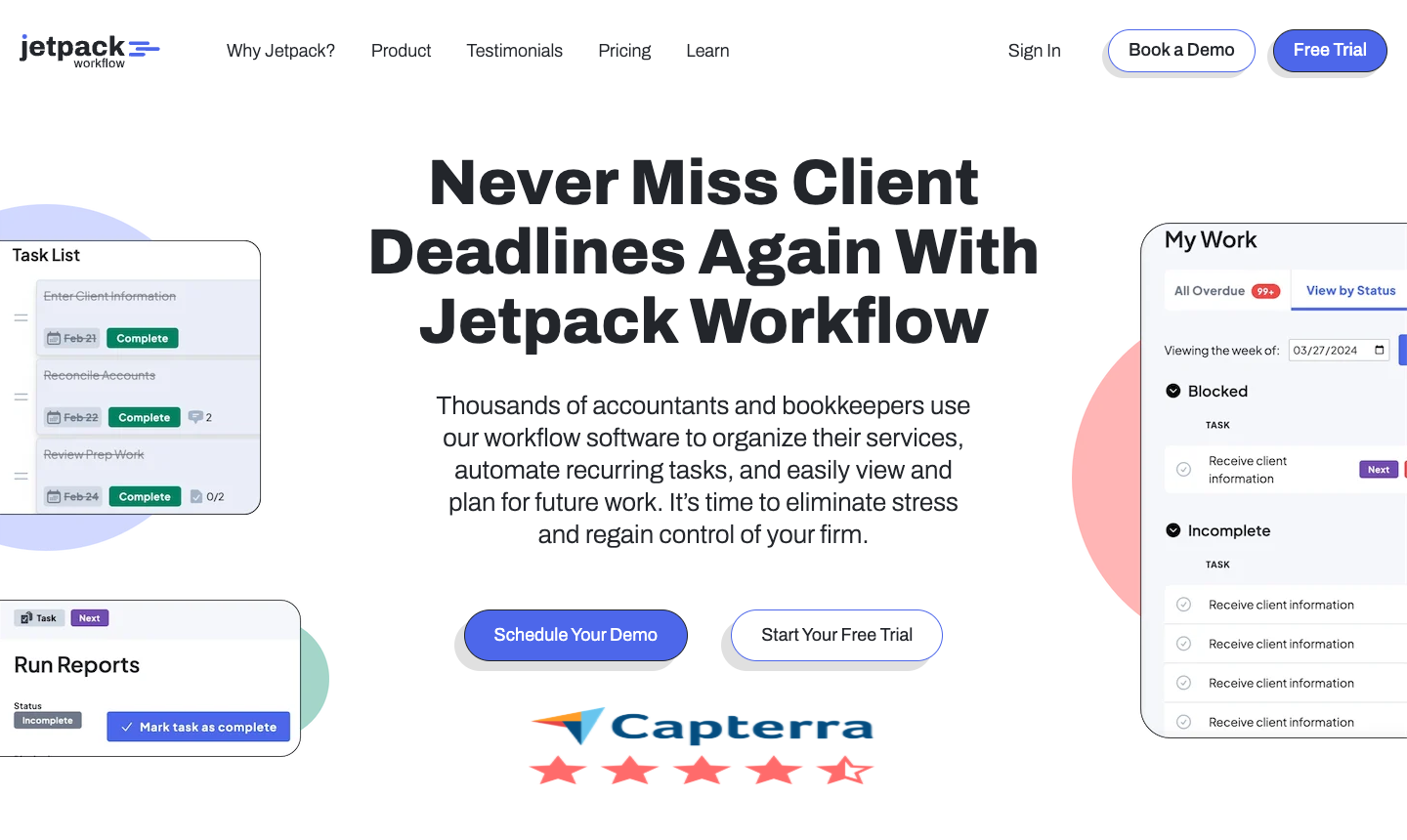
Jetpack Workflow is workflow software for accounting and bookkeeping firms. It does one job: recurring client work on schedule, with templates, deadlines and a view of who is overloaded. It does not try to be practice management, and says so.
 Source: Jetpack Workflow
Its key capabilities include:
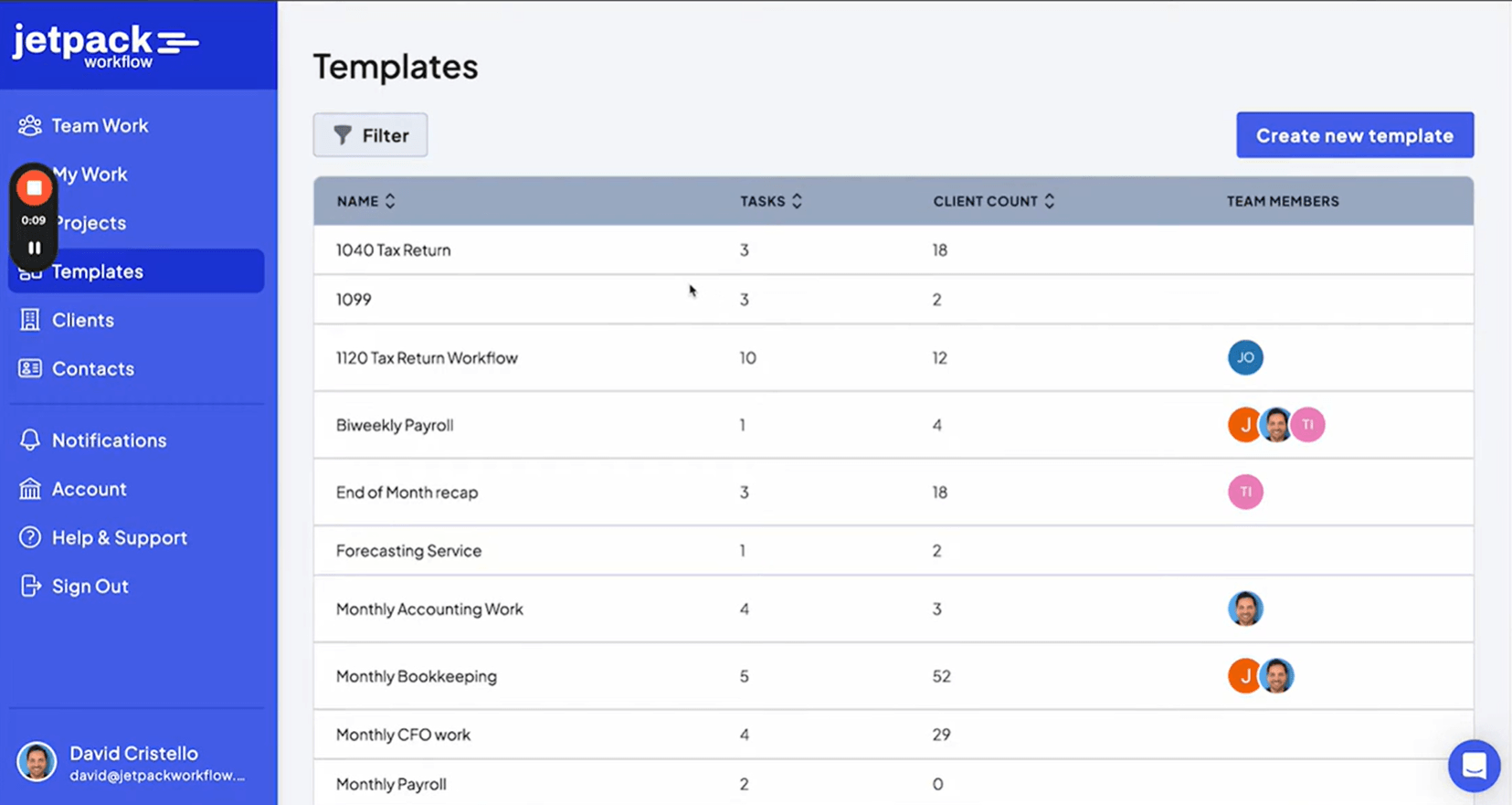
- Workflow templates for recurring services such as monthly bookkeeping, payroll and 1040s
- Recurring jobs created daily, weekly, monthly, quarterly or yearly
- Task dependencies, so the next step opens only when the previous one is done
- Time tracking, budget vs actual and capacity reports on Premium
Why choose Jetpack Workflow over Firm360
Jetpack Workflow is for the firm that only needs the part of Firm360 it has to buy Standard for. On Firm360, project management starts at $79 per user with a three-user minimum. On Jetpack Workflow, recurring workflow starts at $40 per user with no minimum, and a three-person firm pays $120 a month instead of $237.
 Source: Jetpack Workflow
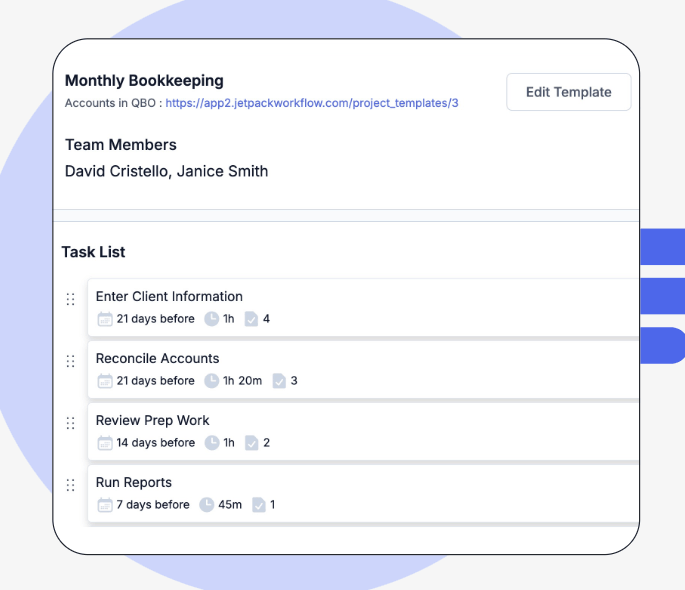
It is also fast to start: a 14-day trial without a card, and templates for the common services, so a firm can have its recurring work scheduled in days rather than the six to eight weeks Firm360 quotes for its own rollout. Each template sets its tasks relative to the due date, with a time estimate and a checklist per step.
 Source: Jetpack Workflow
The trade-off is everything else. Jetpack says plainly that it “doesn’t handle billing and invoicing”, its pages do not mention a client portal or document management, and time tracking needs Premium. Firms that leave Firm360 for Jetpack keep billing, documents and client communication in other tools.
Jetpack Workflow pricing
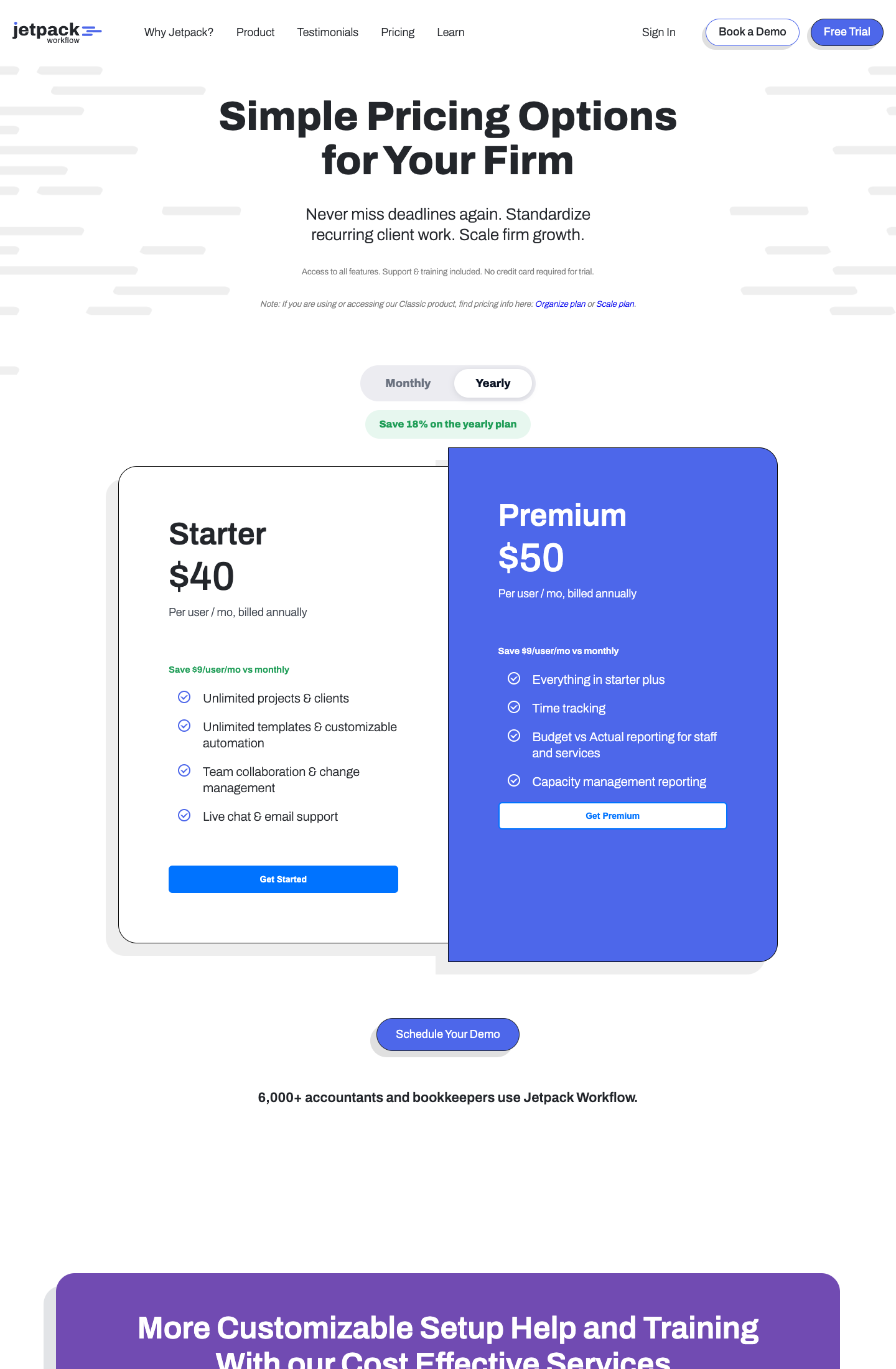
From the Jetpack Workflow pricing page: Starter $40 per user per month annual ($49 monthly; unlimited projects, clients and templates), Premium $50 annual ($59 monthly; time tracking, budget vs actual and capacity reporting), Enterprise custom. An onboarding and training package is a flat $1,500 add-on. 14-day free trial, no card.
 Source: Jetpack Workflow
Who should use Jetpack Workflow?
Choose Jetpack Workflow if: your main problem is recurring deadlines slipping, you already bill through QuickBooks or Xero and keep documents elsewhere, and you want workflow running this week at half Firm360 Standard’s price. See also our Jetpack Workflow review and Jetpack Workflow vs Uku.
6. Cone: Best Alternative for Proposals and Billing on a Small Budget
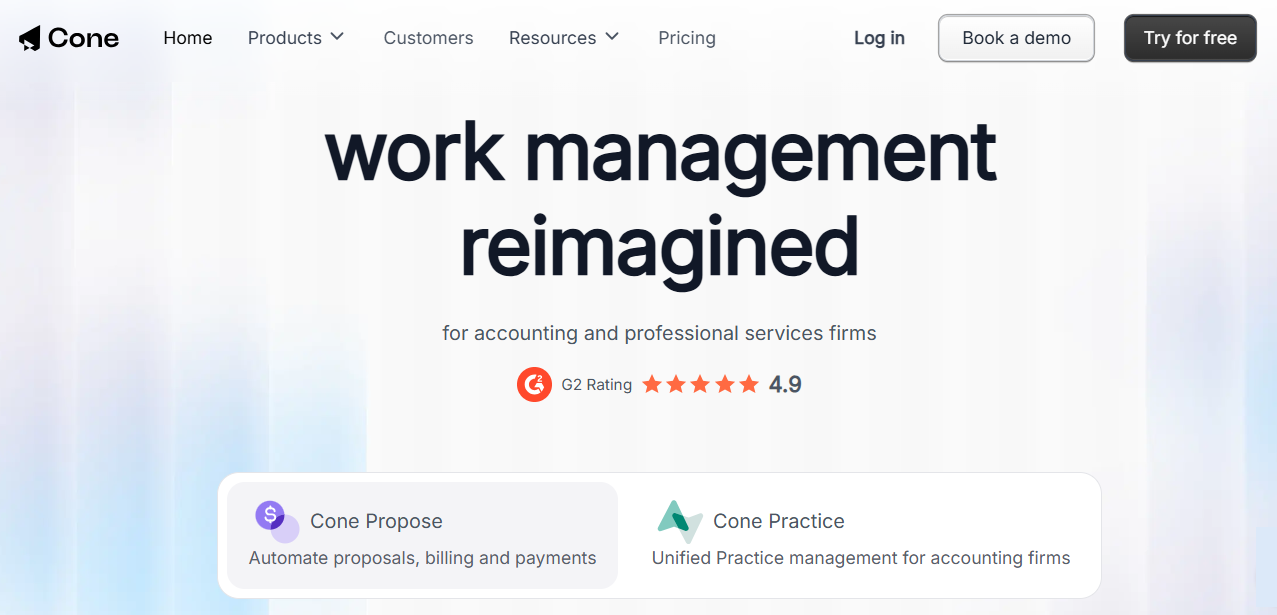
Cone is a Y Combinator-backed platform for accounting and professional services firms, sold as Cone Propose (proposals, billing and payments) and Cone Practice, which adds workflows, a client portal and email. It covers the client lifecycle from proposal to paid invoice at a per-user price.
 Source: Cone
Its key capabilities include:
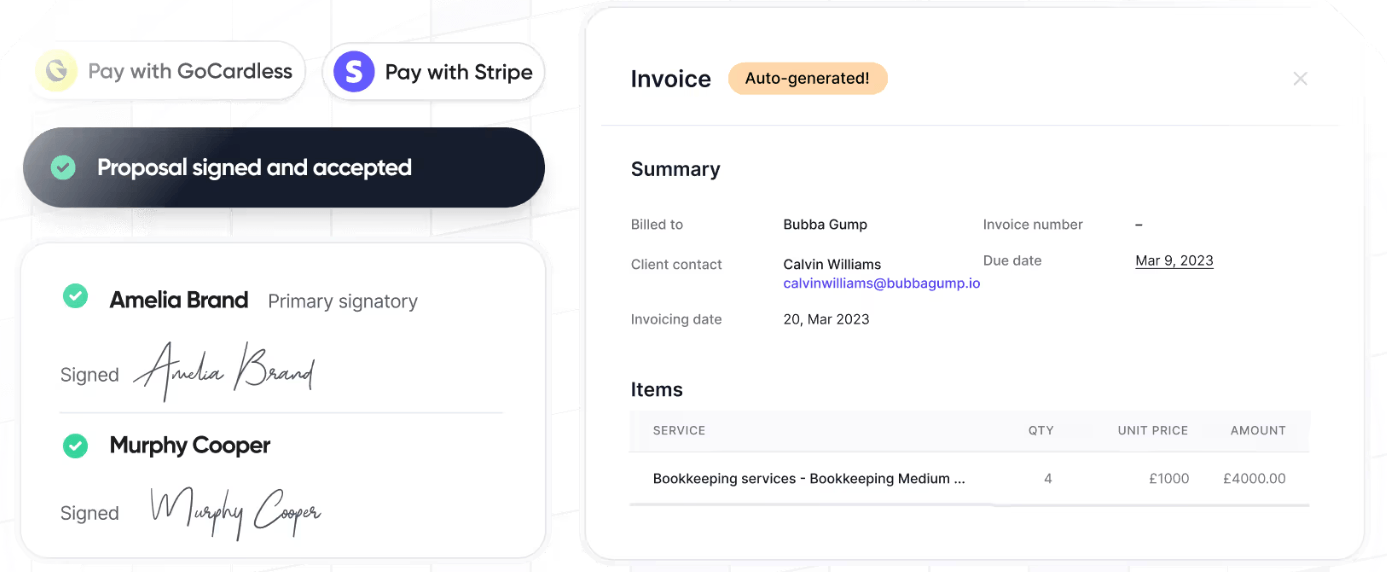
- Proposals and engagement letters with pricing tables and e-signatures, which create the project when a client accepts
- Billing and payments, with automated invoicing and payment collection on Growth
- Client portal and client requests for documents and information
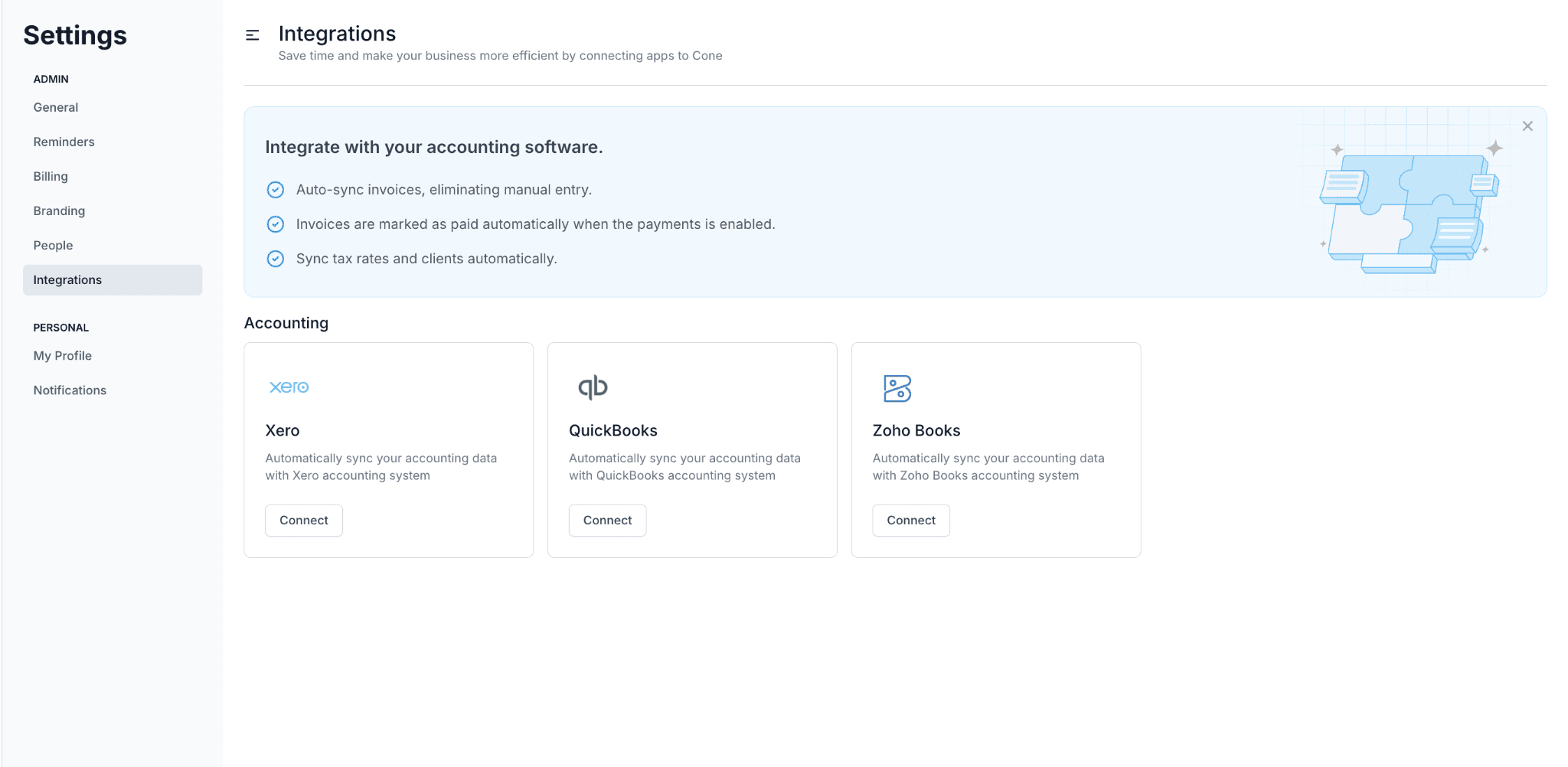
- Accounting integrations with QuickBooks Online, Xero and Zoho Books
Why choose Cone over Firm360
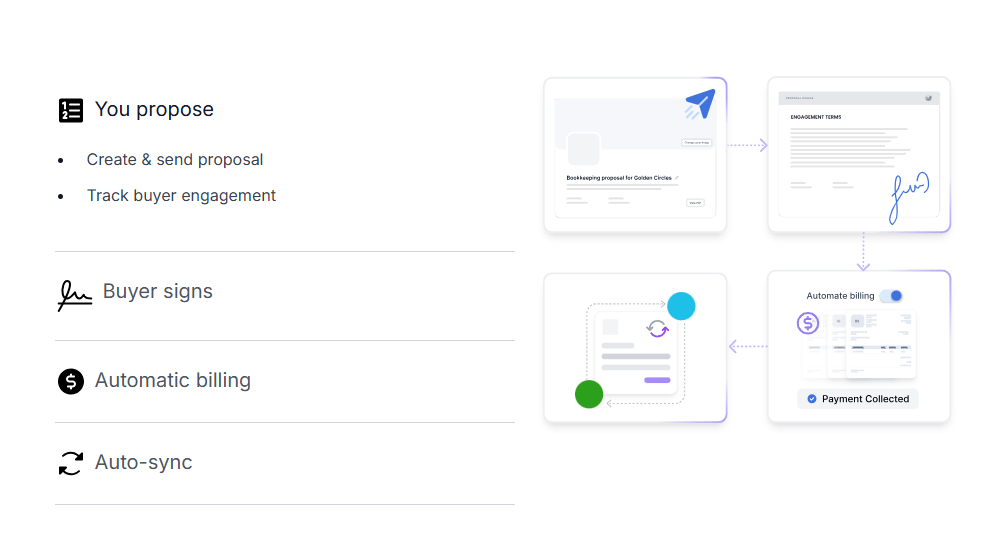
Firm360’s plans do not list proposals or engagement letters; its work begins once a client is signed. Cone starts earlier. A client accepts a proposal, and the project, the billing terms and the payment details are in place the same moment.
 Source: Cone
 Source: Cone
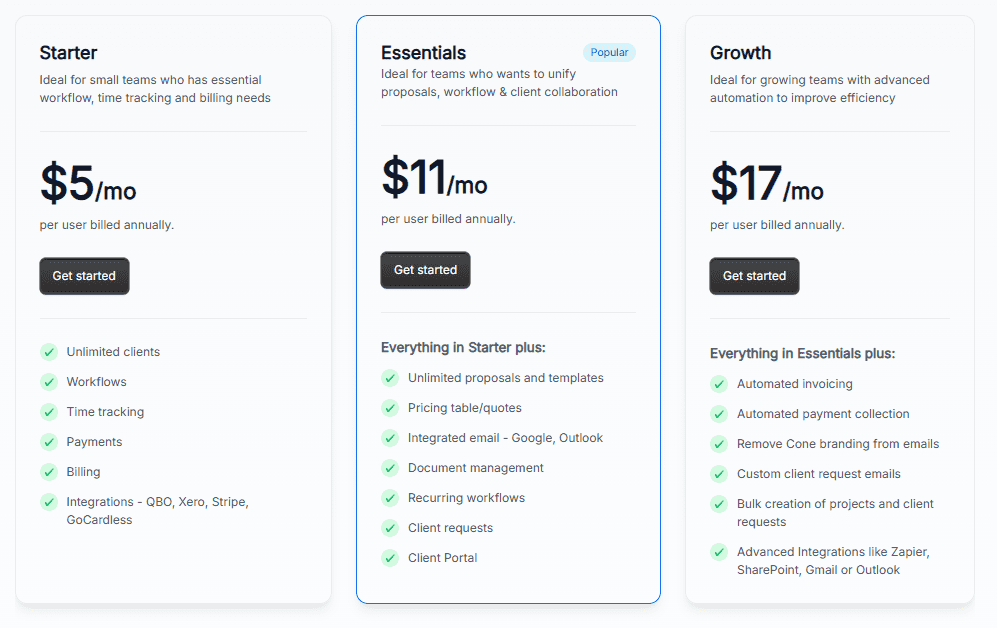
The second reason is price. Cone Practice Essentials, with proposals, client portal, email and document management, is $11 per user per month on annual billing: $33 a month for three people, against $237 for Firm360 Standard at its three-user minimum. Even Starter at $5 includes workflows, time tracking and billing.
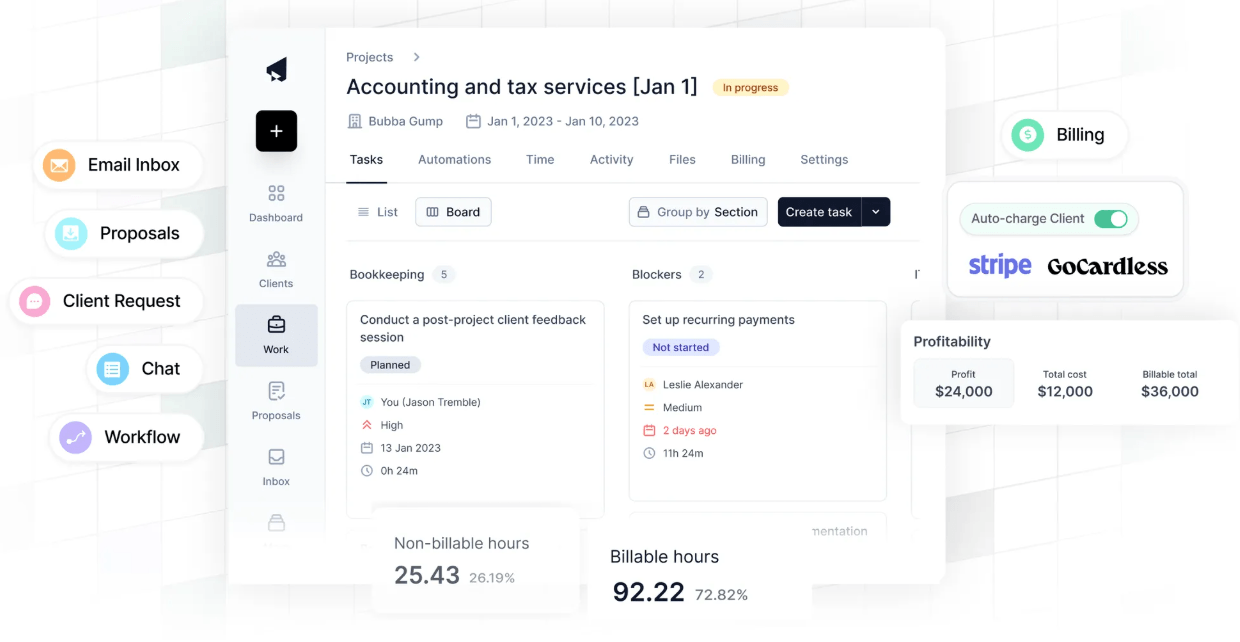
Invoices sync with QuickBooks Online, Xero or Zoho Books and are marked paid automatically when the payment comes in. The project itself carries its tasks, time, billing and profitability.
 Source: Cone
 Source: Cone
The trade-off is depth. Cone is a younger product with lighter reporting, no advanced realization or utilization reports of the kind Firm360 has on Standard, and none of its US tax software integrations.
Cone pricing
From the Cone pricing page, US view, per user per month on annual billing: Cone Practice Starter $5 ($8 monthly; workflows, time tracking, billing, QBO and Xero), Essentials $11 ($16; proposals, integrated email, document management, client portal), Growth $17 ($24; automated invoicing and payment collection, Zapier, SharePoint). 30-day free trial on Practice and 14 days on Propose, no card.
 Source: Cone
Who should use Cone?
Choose Cone if: you are a small firm that sells engagements through proposals, runs a proposal tool and an invoicing tool side by side today, and wants one product for both at a fraction of Firm360’s price.
7. Double: Best Alternative for Bookkeeping Firms Closing Books on QuickBooks or Xero
Double, called Keeper until October 2025, is a month-end close and practice management platform for bookkeeping and accounting firms. It sits on the client’s ledger through a two-way sync with QuickBooks Online and Xero, finds what is wrong in the books before close, and handles the client questions in the same place. It says more than 4,000 firms run their close on it.
 Source: Double
Its key capabilities include:
- File Reviews that flag uncategorized transactions, missing payees, expense inconsistencies and reconciliation gaps, with fixes that sync back to the ledger
- AI bank feeds that pre-sort transactions by how much judgment they need
- A client portal with passwordless access, where transaction questions and answers sync straight back to the books
- Task management with close templates and a firm-wide view of every client
- 1099 tracking and W-9 requests sent directly to vendors
Why choose Double over Firm360
Firm360 manages the work around the books: projects, documents, time and invoices. It does not read the client’s general ledger. Double does. It compares each month’s expenses with history, flags what looks miscoded, and a correction made in Double lands in QuickBooks or Xero immediately. MCO Bookkeeping cut its final review of a client’s books from an hour and a half to as little as 12 minutes.
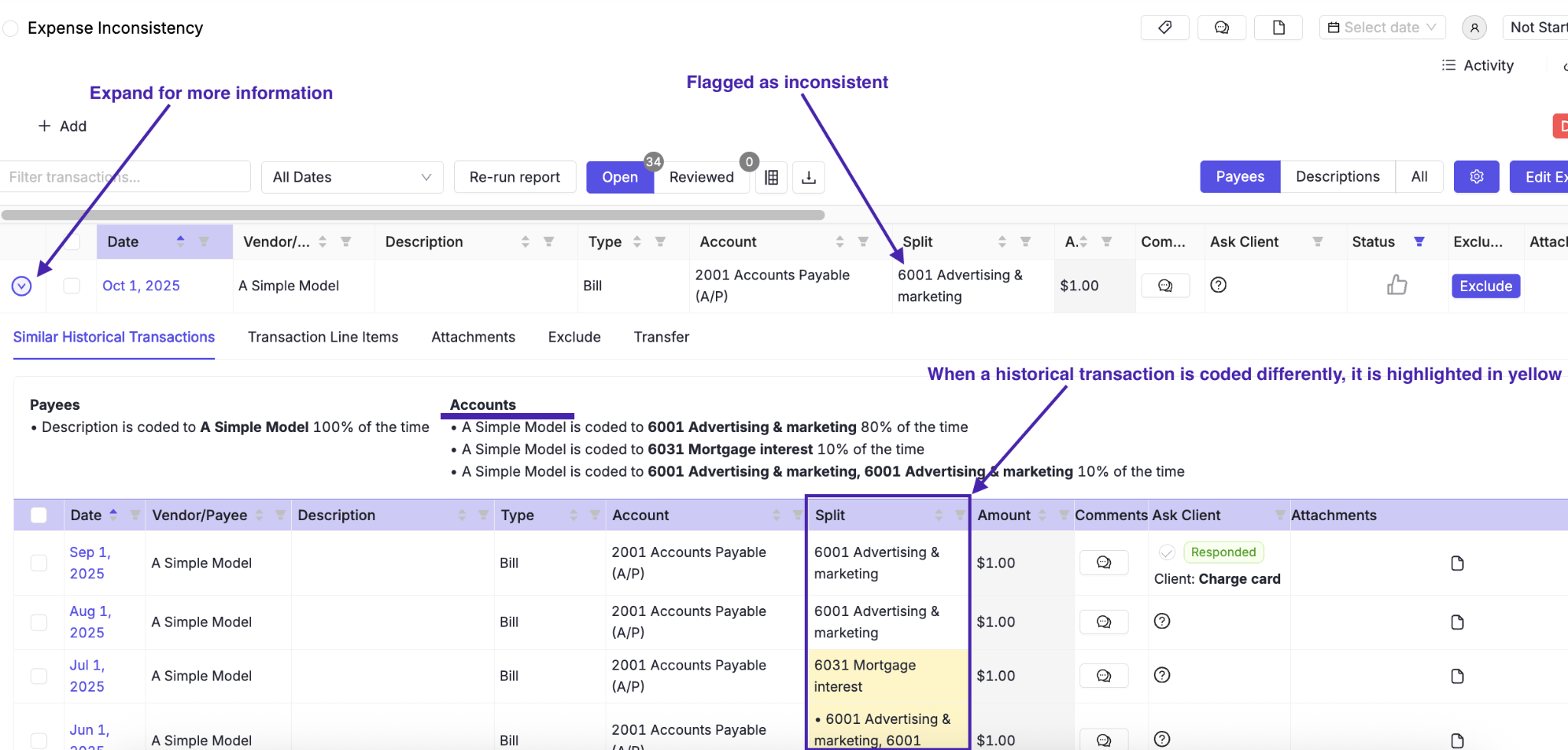 Source: Double
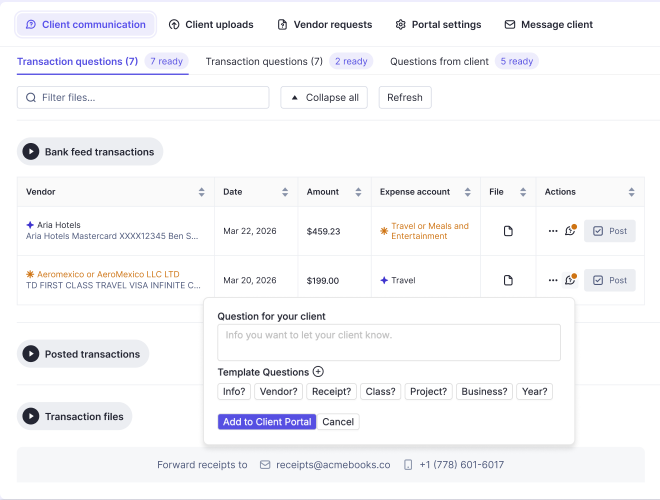 Source: Double
The second difference is the portal. Firm360’s portal collects documents and signatures. Double’s is built around the transaction: a bookkeeper asks about a line in the bank feed, the client answers in the portal, and the reclassification goes back to the ledger. MCO reports 95% of its clients using it.
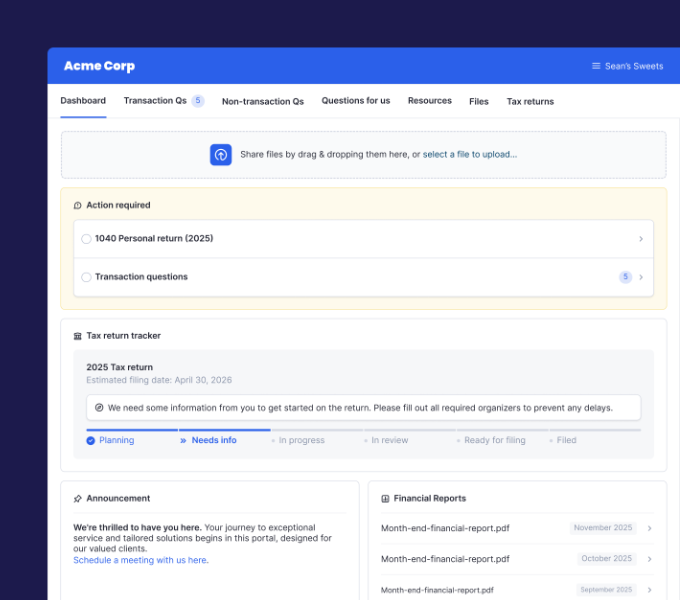 Source: Double
The third is the price model. Firm360 charges per user; Double charges per connected client with unlimited users, so adding reviewers and junior staff costs nothing.
The trade-offs: Double is built for firms doing recurring bookkeeping on QuickBooks Online or Xero, not for tax or advisory work; there is no self-serve trial (you book a demo, as with Firm360); and per-client pricing gets expensive for a firm with many small clients and few people.
Double pricing
From the Double pricing page, per connected client per month, unlimited users: Core $10 (two-way ledger sync, branded client portal, AI bank feeds, task management, reporting and time tracking), Plus $25 (AI financial summaries, receipt management), Scale $50 (accruals, allocations, AI journal entries, AI bills, flux analysis), Enterprise custom. The Tax Suite add-on is included with a $200-a-month annual commitment; extra connected team email is $10 a month.
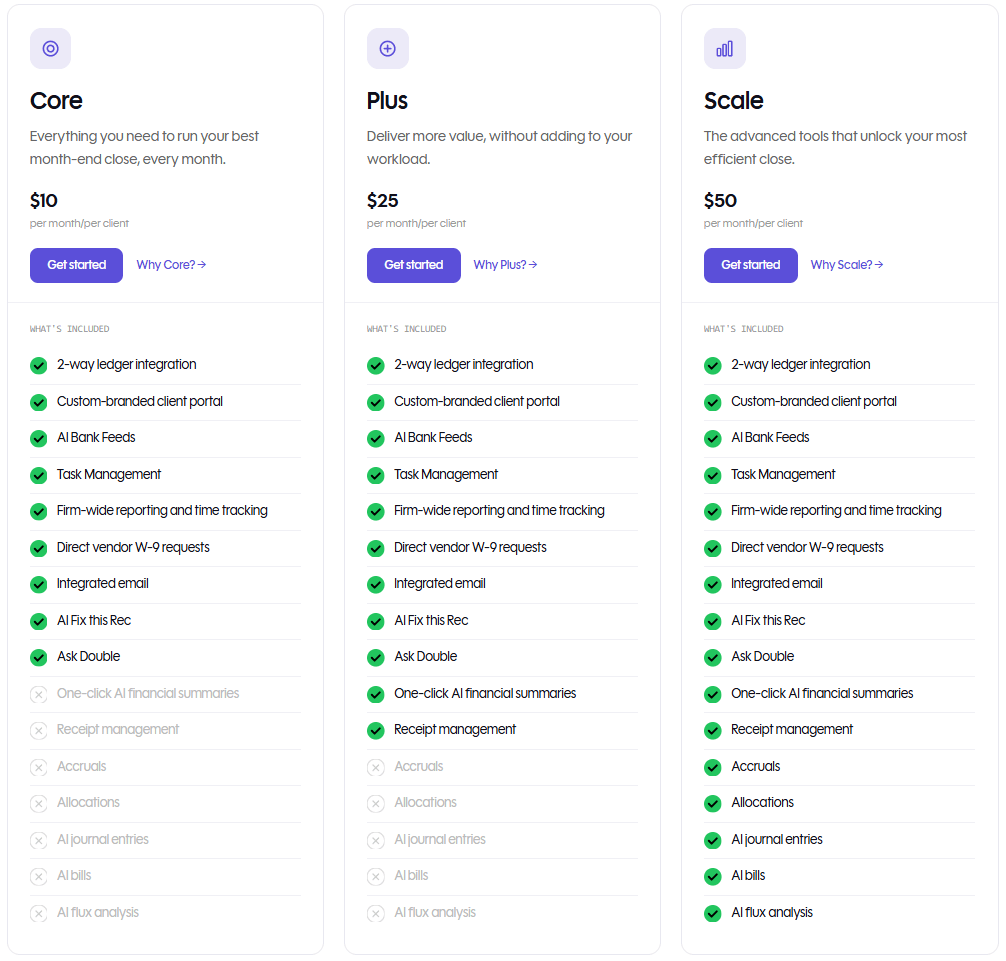 Source: Double
Who should use Double?
Choose Double if: you are a bookkeeping or CAS firm with many clients on QuickBooks Online or Xero, month-end cleanup is your bottleneck rather than task tracking, and you want pricing that grows with clients, not headcount. See also our Double review, Double pricing and Double vs Uku.
How to Switch from Firm360 to Uku
If Uku is your answer, most firms are live in two to six weeks, at their own pace, and keep serving clients throughout. That is shorter than the six to eight weeks Firm360 quotes for its own rollout, because you can start with clients and tasks and add billing once the work is running.
- Import your clients. From an Excel export of Firm360, or synced straight from QuickBooks Online through Uku’s import flow.
- Rebuild your Firm360 project templates as Uku workflow templates. One per service, with the same steps, owners and due-date rules, applied to every client who buys it.
- Set up billing contracts. Hourly, fixed or per-piece, per client, so the first period’s invoices draft themselves from tracked time.
- Go live. Run one billing cycle in parallel, compare it with Firm360’s, then switch off. Use the 90 minutes of onboarding that comes with every plan.
Once the templates are applied, every client’s recurring work appears in the task list on its own, grouped by this month and next, with filters by user, status and topic and bulk actions for reassigning or rescheduling.
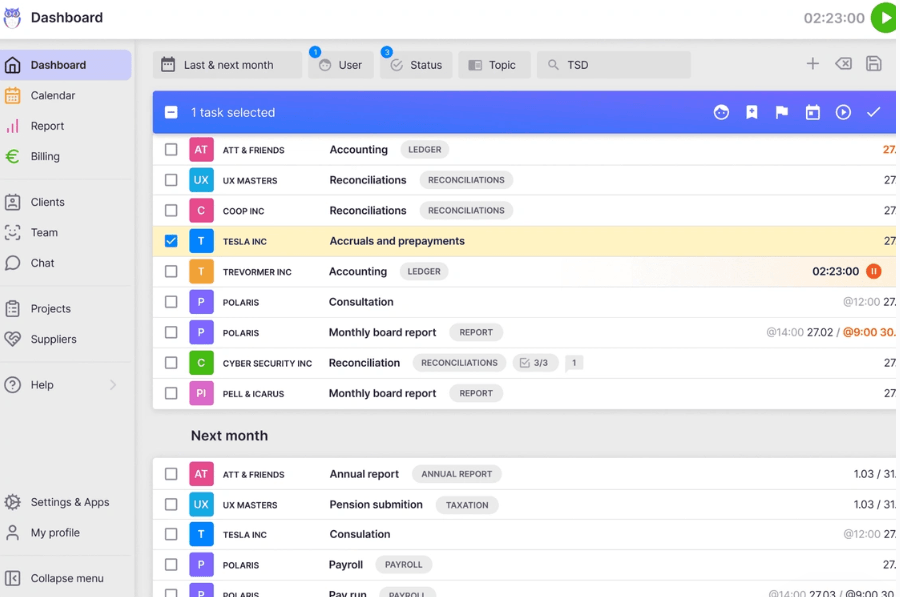
If your firm uses an AI assistant, the Uku MCP server connects in a day and can check the move for you: which clients came across, which have no workflow yet, and how the first Uku invoice run compares with the last one.
The Final Verdict
Firm360 is a capable all-in-one system for US CPA firms, especially ones whose returns run through UltraTax, Lacerte or CCH Axcess. The alternatives answer the reasons firms do not buy it or leave it:
- Uku for invoices drafted from tracked time, agreements checked before month-end, and plans you can try and pay monthly
- Karbon for email-first teams of 20+ that need a shared inbox and capacity in hours
- Financial Cents for small US firms that want a self-serve trial and a $19 solo plan
- TaxDome for tax firms that sign heavily every season and want a client mobile app
- Jetpack Workflow for recurring workflow only, at about half Firm360 Standard’s price
- Cone for proposals, workflow and billing on a small team’s budget
- Double for bookkeeping firms closing books on QuickBooks Online or Xero, priced per client
If your firm bills by the hour or against a scope and wants to see it working before a sales call, try Uku free for 14 days or book a demo.
Read more
- Firm360 review — how its features work and what users say
- Firm360 pricing — every plan, the minimums and the add-ons
- Firm360 vs Uku — the head-to-head
- Karbon alternatives, TaxDome alternatives and Financial Cents alternatives
- Practice CS alternatives — for firms leaving Thomson Reuters Practice CS, as CRS CPAs did
- Uku case studies
Frequently asked questions
Why do accounting firms look for Firm360 alternatives?
Mostly for price structure and access. Firm360 is sold per user on annual billing, project management starts on the $79 Standard plan with a three-user minimum, there is no free trial (every route in is a demo), and most firms go live in six to eight weeks. Firms also look elsewhere for a shared team inbox and capacity planning, which Firm360's pages do not mention, for per-client pricing, or for a product that works outside the US.
How much does Firm360 cost?
Firm360 lists three plans on annual billing: Basic at $49, Standard at $79 and Premium at $99 a month per user. Basic has no user minimum; Standard and Premium require at least three users, so the smallest Standard account is $237 a month. Firms buying for more than 20 users get a custom quote. Firm360 does not publish a monthly-billing price.
What is the best Firm360 alternative?
It depends on why you are leaving. For billing drafted from tracked time and monthly plans, Uku. For an email-first team that needs capacity planning, Karbon. For a small US firm that wants a self-serve trial and a $19 solo plan, Financial Cents. For a tax firm that signs a lot of documents, TaxDome. For workflow only, Jetpack Workflow. For proposals and billing on a small budget, Cone. For a bookkeeping firm closing books on QuickBooks Online or Xero, Double.
Is there a free alternative to Firm360?
None of the seven is free forever, but most can be tried without a sales call: Uku for 14 days on its Elite plan, Financial Cents and Jetpack Workflow for 14 days, Cone Practice for 30 days, all without a card. Firm360 itself has no free plan or public trial; you book a demo.
Is Firm360 priced per user?
Yes. The pricing page prints "$49 / month" without a unit, but the same page sets a three-user minimum on Standard and Premium and asks firms buying for more than 20 users to call for a quote, and Firm360's Capterra listing gives Basic as $49 per user per month.
Which Firm360 alternative is best for a small firm?
For a solo practitioner, Financial Cents Solo ($19 a month) or Uku Solo ($19 a month on annual billing, $25 monthly) both include time tracking and invoicing. For a team of two to five, Uku Team at $38 per member costs less than half of Firm360 Standard's $79, and Cone Practice starts at $5 per user if proposals matter more than depth.
Can I move from Firm360 to Uku without stopping work?
Yes. Most firms are live on Uku in two to six weeks, at their own pace, and keep serving clients throughout. You import clients from Excel or sync them from QuickBooks Online, rebuild each Firm360 project template as an Uku workflow template, set up billing contracts, and run one billing cycle in parallel before switching off.

Published Sep 29, 2026 · Updated Oct 1, 2026