Firm360 Pricing: Worth It or Consider Uku? (June 2026)
Firm360 costs $49–$99/user/month with project management gated at $79 and annual billing only. See why Uku offers more from the first paid tier with a free trial.


Contents
If you’ve tried to navigate Firm360’s three-tier pricing, you know the problem. Basic at $49/user/month leaves out project management. Standard at $79 unlocks it but requires three users. E-signatures cost extra on the entry plan. Accounting practice management pricing forces you to choose between paying for the features you need today and the ones you’ll need next quarter.
Firm360 has earned a solid reputation as an all-in-one platform designed by a practicing CPA who got tired of juggling five disconnected systems. It consolidates projects, billing, documents, and client communication into one place, backed by 100% US-based support and recognition from all three Gartner Digital Markets brands in 2024. But as firms weigh whether Firm360’s per-user pricing delivers the right value for their size and workflow, the tier restrictions, feature gates, and annual billing commitment deserve a close look.
We’ve analyzed Firm360’s pricing tiers, feature gates, and hidden costs. It’s the right choice if:
- You’re a US-based CPA firm that needs integrations with UltraTax, Lacerte, and QuickBooks Online
- You want a platform built by a practicing accountant who understood the pain firsthand
- Your firm runs multiple service lines (tax, audit, advisory) that need configurable workflows
- You value US-based phone support and a dedicated Customer Success Manager
- You’re comfortable committing to annual billing for an all-in-one system
Firm360’s pricing is not a good fit if:
- You want a free trial to test the platform before committing
- Your firm operates across multiple countries and needs multilingual support
- You prefer monthly billing without being locked into an annual contract
- You need built-in workforce management, client budgeting, or capacity planning tools
- You want all core features available from the entry-level plan
In that case, consider Uku: an accounting practice management platform with a 14-day free trial of the full Elite plan (no credit card required), a Solo plan from $19/member/month for sole practitioners, monthly or annual billing, and support for 12 languages. It fits firms that want to try before they buy and scale without hitting feature gates at every tier. If you’d rather jump straight to the numbers, here’s the full Uku pricing breakdown.
Firm360 Pricing Summary
| Tier | Firm360 | Uku |
|---|---|---|
| Entry for solo practitioners | No free plan or free trial; demo request only | Solo: $19/member/mo ($25 monthly); 1 user, up to 20 clients; 14-day free trial of full Elite |
| Entry level | Basic: $49/user/mo (annual); no user minimum; client management, time tracking, billing, basic reporting | Team: $38/member/mo annual ($49 monthly); unlimited clients; workflow automations, billing, client portal |
| Mid-tier | Standard: $79/user/mo (annual); 3-user minimum; adds project management, advanced reporting, integrations, 1 e-signature license | Elite: $48/member/mo annual ($62 monthly); adds cloud storage, workforce management, client budgeting, document management, API, Zapier |
| Top tier | Premium: $99/user/mo (annual); 3-user minimum; unlimited e-signatures, Zapier, dedicated CSM, phone support | Enterprise: $88/member/mo annual ($99 monthly); custom integrations, dedicated account manager, early feature access |
| Best for | US-based CPA firms (team size 5–50) needing UltraTax/Lacerte integrations and US-based support | Accounting firms wanting flexible billing, multilingual support, and core features included from the first paid tier |
Uku bills monthly or annually, with annual saving roughly 23%. Firm360 publishes annual pricing only.
Firm360 Pricing: In-Depth Overview
Firm360 uses a per-seat, subscription-based pricing model billed annually, with three published tiers for teams up to 19 users and custom pricing for larger firms. The company calls this “Transparent, All-In Pricing,” though project management, advanced reporting, and integrations are gated behind the Standard tier. Here’s what you actually get at each price point.

Firm360 Basic Plan: $49/user/month (billed annually)
| Feature | Details |
|---|---|
| Price | $49/user/month (billed annually) |
| User minimum | None |
| Client management | Included |
| Time tracking & billing | Included |
| Reporting | Basic only |
| E-signature | Extra fee |
| Support | Standard email |
The Basic plan is the only tier with no user minimum, making it accessible to solo practitioners. It includes client management, document management, a secure client portal, time tracking, billing, payment collection (credit card and ACH), and basic reporting. Video-based training is included for onboarding.
The exclusions define this tier: no project management, no advanced reporting, no automated A/R collections, no custom fields, and no integrations with QuickBooks Online, UltraTax, or Lacerte. E-signature carries an extra fee beyond the subscription cost.
| Basic Plan — Pros | Basic Plan — Cons |
|---|---|
| No user minimum for solo practitioners | No project management included |
| Client portal included at entry level | No integrations with tax software |
| Time tracking and billing from day one | Basic reporting only |
| Document management with revision history | E-signature costs extra |
👉 The bottom line: Basic works for small firms that need document storage, time tracking, and client billing. But without project management and integrations, it’s a limited starting point for any firm managing multiple engagements.
Firm360 Standard Plan: $79/user/month (billed annually)
| Feature | Details |
|---|---|
| Price | $79/user/month (billed annually) |
| User minimum | 3 users |
| Project management | Included |
| Advanced reporting | Included |
| E-signature | 1 license bundled |
| Integrations | QuickBooks Online, UltraTax, Lacerte |
| Support | Standard email; training and onboarding included |
The Standard plan is marked “Most Popular” and is the first tier where Firm360 functions as a real practice management platform. Project management with workflow templates, automated status transitions, and recurring projects opens the operational core of the product. Advanced reporting adds realization tracking, staff utilization, workload distribution, and A/R aging views. Automated A/R collections handle overdue invoice follow-up without staff intervention.

The 3-user minimum means a firm pays at least $237/month ($2,844/year) to reach this tier. One e-signature license is bundled, which may not be enough for firms where multiple team members send documents for client signatures.
| Standard Plan — Pros | Standard Plan — Cons |
|---|---|
| Project management with workflow automation | 3-user minimum ($237/month floor) |
| Advanced reporting for firm-health visibility | Only 1 e-signature license included |
| QuickBooks, UltraTax, Lacerte integrations | No Zapier for custom automations |
| Automated A/R collections | No phone support |
👉 The bottom line: Standard is where Firm360 delivers on its promise as an all-in-one platform. For firms with 3 or more team members managing multiple client engagements, this is the realistic starting point — though the jump from Basic is steep at $30 more per user per month.
Firm360 Premium Plan: $99/user/month (billed annually)
| Feature | Details |
|---|---|
| Price | $99/user/month (billed annually) |
| User minimum | 3 users |
| E-signature | Unlimited licenses |
| Integrations | Zapier (connecting thousands of apps) |
| Support | Premium email and phone; dedicated CSM |
| Training | Premium training and onboarding |
The Premium plan adds three upgrades worth noting: unlimited e-signature licenses (removing the one-license cap of Standard), Zapier integration for connecting Firm360 to thousands of third-party applications, and premium support with phone access and a dedicated Customer Success Manager.
At $99/user/month with a 3-user minimum, the floor cost is $297/month ($3,564/year). For a 10-person firm, the annual commitment reaches $11,880. Premium is the only way to get phone support or a dedicated CSM.
👉 The bottom line: Premium makes sense for firms that rely on e-signatures across multiple staff and need Zapier for custom workflow automation. The dedicated CSM and phone support add value for firms that want hands-on guidance.
Firm360 Custom Pricing: 20+ Users
For firms with 20 or more users, Firm360 offers custom pricing on request. The featured case study, CRS CPAs, is a 50-person Tennessee firm with five offices that reports saving roughly 200 hours per week after consolidating from Practice CS, GoFileRoom, ShareFile, FirmFlow, and spreadsheets. This shows Firm360 can serve firms well beyond its published tier structure, though pricing and terms require direct negotiation.
Firm360 Additional Costs and Considerations
Beyond base subscriptions, several costs deserve attention:
- E-signature fees: Basic plan charges an extra fee (specific cost not published); Standard bundles 1 license; Premium includes unlimited. Knowledge-Based Authentication (KBA) is free on all plans that include e-signature.
- Payment processing: Processed through Stripe at 2.9% + $0.30 per card transaction and 0.8% capped at $5 per ACH transaction. No additional transaction fees from Firm360 beyond Stripe’s standard rates.
- Billing terms: All published prices are annual billing only; no monthly option is listed. Sales tax may be added. Cancellation takes effect at the end of the current paid term; no mid-cycle refund is implied.
- Onboarding: Standard and Premium include training and onboarding. Most firms go live after four focused training sessions, and implementation typically takes 6–8 weeks.
Where Firm360 Falls Short
Firm360 delivers a cohesive platform for US-based CPA firms, but its pricing structure and feature gates create problems for firms that want flexibility and immediate access to core tools:
- Core features locked behind Standard. Project management — the backbone of practice operations — is excluded from the $49/user Basic plan. Advanced reporting, automated A/R collections, custom fields, and integrations all require Standard ($79/user). The Basic plan functions more as a billing and document tool than a practice management platform.
- No free trial or free plan. The entry point is a demo request, requiring a sales conversation before evaluation. Firms must commit to annual billing without first testing the platform with their own data and workflows.
- Annual billing with no published monthly option. All three tiers are priced on annual billing only. This requires an upfront commitment of $588 to $1,188 per user per year before experiencing the product in production.
- Limited international and multilingual support. All documented case studies are US-based, integrations target US tax software (UltraTax, Lacerte), and there is no multilingual interface for firms operating across countries or serving non-English-speaking clients.
These limitations have led many accounting firms to explore alternatives that offer lower entry barriers and broader feature access from the first paid tier.
Best Firm360 Alternative: Uku
Uku takes a different approach to practice management pricing: include core features from the first paid tier, offer an affordable Solo plan for sole practitioners, and let firms try the full platform before committing.

For firms that find Firm360’s feature gates, annual-only billing, and lack of a free trial limiting, Uku offers a Solo plan from $19/member/month for sole practitioners, a 14-day free trial of the full Elite plan (no credit card required), monthly or annual billing flexibility, and workflow automations, billing, and a client portal included from the first paid plan.
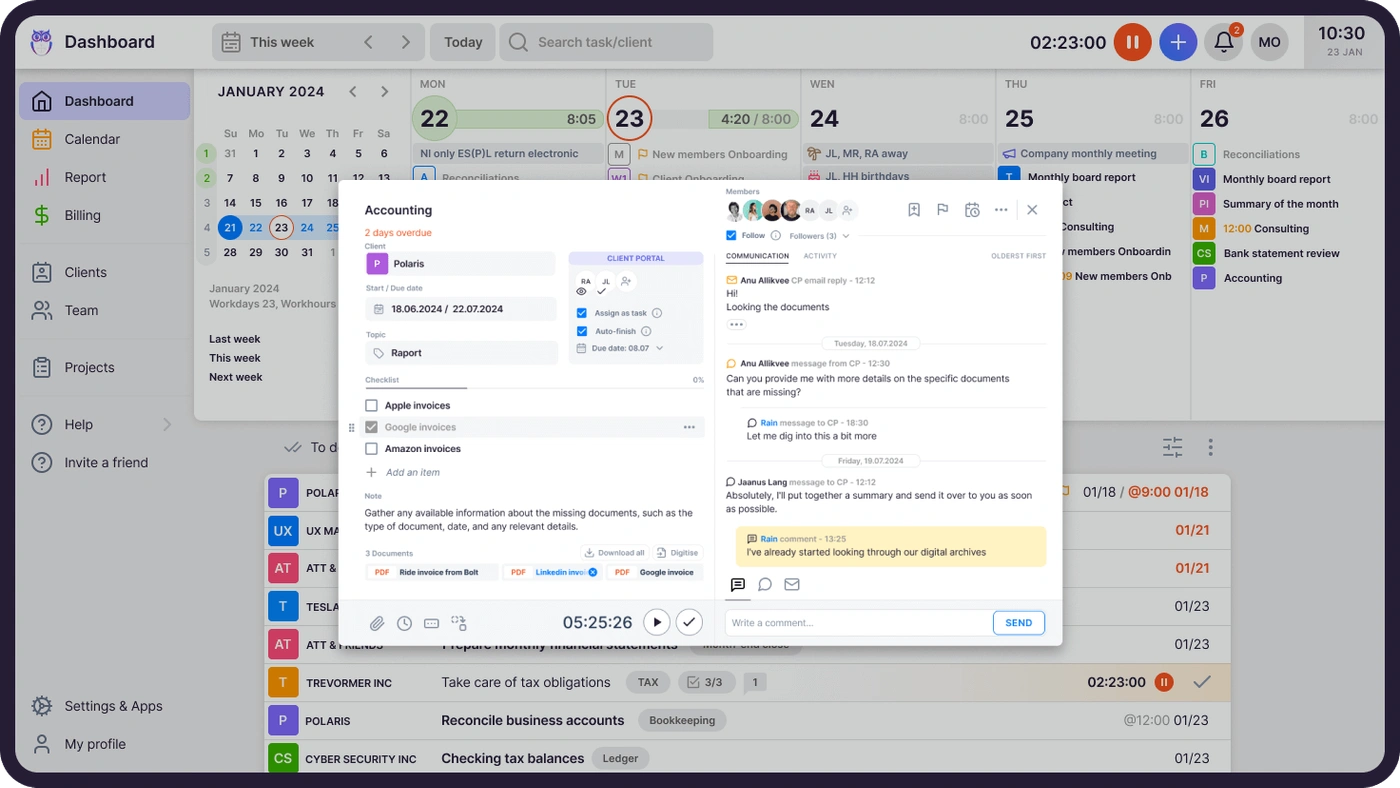
Founded in Estonia by two lifelong friends, Rain Allikvee and Jaanus Lang — Uku’s Co-founders — the platform was built as an alternative to the clunky, impractical tools available to accounting firms. It now serves firms across Europe and beyond, with clients including Leinonen Group, Baker Tilly, and Rödl & Partner, and holds G2 Best Usability and Capterra Best Value awards for 2025. Uku is the single source of truth for who’s doing what across your team — so deadlines are met and nothing slips.
Uku fits firms that want to test before buying, practices operating in multiple languages or countries, and any accounting team that believes project management and workflow automation should not be a premium upgrade.
Uku Solo Plan: $19/member/month (annual) or $25/member/month (monthly)
| Feature | Details |
|---|---|
| Annual price | $19/member/month ($228/year) |
| Monthly price | $25/member/month |
| Members | 1 (no team members) |
| Clients | Up to 20 active clients |
| Features | Tasks, billing, client portal, document management, all integrations, e-signatures, AML, budgets, custom fields |
| Support | Self-service knowledge base, email |
Uku’s Solo plan is built for sole-practitioner bookkeepers and accountants managing up to 20 active clients. At $19/member/month on annual billing (save ~23%) or $25/member/month monthly, Solo is a complete one-person tool, not a stripped-down preview. It includes billing, a shared client portal, document management, all accounting integrations, e-signatures, AML compliance, budgets, and custom fields. Pricing is also available in EUR and GBP, with VAT added on top. Every new account starts with a 14-day free trial of the full Elite plan.
| Solo Plan — Pros | Solo Plan — Cons |
|---|---|
| Integrated billing and client portal included | Limited to 1 user with no team members |
| All accounting integrations from day one | Maximum 20 active clients |
| Monthly billing option for flexible commitment | No workflow automations |
| 14-day free trial of full Elite plan to start | No cloud storage integrations |
👉 The bottom line: Solo gives sole practitioners a complete practice management tool at the lowest per-member price in Uku’s lineup, with monthly billing flexibility that Firm360 does not offer at any tier.
Uku Team Plan: $38/member/month (annual) or $49/member/month (monthly)
| Feature | Details |
|---|---|
| Annual price | $38/member/month (saves ~23%) |
| Monthly price | $49/member/month |
| Clients | Unlimited |
| Key features | Workflow automations, billing, client portal, email management, projects, AML, custom fields |
| Support | Email, live chat |
The Team plan matches Firm360’s Basic at $49/member/month on monthly billing but includes far more: workflow automations, automated billing, a client portal with magic-link access, email management, projects, AML compliance tools, custom fields, and integrations. On annual billing the price drops to $38/member/month, undercutting Firm360’s Basic by $11/user while including features that Firm360 reserves for Standard ($79/user).
| Team Plan — Pros | Team Plan — Cons |
|---|---|
| Workflow automations included at entry level | No cloud storage integrations |
| Client portal with magic-link access | No client budgeting (Elite feature) |
| Automated billing from tracked time | No API access |
| Monthly billing option available | No Zapier integration |
👉 The bottom line: Team delivers the core practice management features that Firm360 gates behind its $79/user Standard tier, at a lower price with monthly billing flexibility.

Uku Elite Plan: $48/member/month (annual) or $62/member/month (monthly)
| Feature | Details |
|---|---|
| Annual price | $48/member/month (saves ~23%) |
| Monthly price | $62/member/month |
| Key additions | Google Drive, Dropbox, SharePoint integrations; workforce management; client budgeting; document management; API access; Zapier |
| Support | Email, live chat |
The Elite plan is marked “Most Popular” and adds the features power users need: cloud storage integrations (Google Drive, Dropbox, SharePoint), workforce management, client budgeting with real-time budget alerts, document management, an open API, and Zapier for connecting 5,000+ apps. E-signatures are also included. At $48/member/month on annual billing, it costs less than Firm360’s Standard ($79/user) while including features Firm360 reserves for Premium ($99/user), such as Zapier.
| Elite Plan — Pros | Elite Plan — Cons |
|---|---|
| Zapier and API at $48/user (annual) | No dedicated account manager (Enterprise only) |
| Client budgeting with real-time alerts | Less US-tax-software integration depth |
| Workforce management included | Smaller North American case-study base |
👉 The bottom line: Elite covers the feature breadth of Firm360’s Premium tier at roughly half the annual cost, making it a strong value for firms that want full-featured practice management without $99/user pricing.

Uku Enterprise Plan: $88/member/month (annual) or $99/member/month (monthly)
| Feature | Details |
|---|---|
| Annual price | $88/member/month (saves ~23%) |
| Monthly price | $99/member/month |
| Key additions | Custom integrations, tailor-made team workshop, early access to features, pay-by-invoice |
| Support | Dedicated account manager included |
The Enterprise plan adds custom integrations, a tailored team workshop, early access to new features, and a dedicated account manager. Assisted client import is available across all plans, and the pay-by-invoice option addresses procurement requirements at larger organizations. Leinonen Group, a firm with roughly 300 employees across 11 countries, shows that Uku can handle enterprise-scale deployments.

Uku Onboarding Packages
Uku offers optional paid onboarding for firms that want structured setup assistance:
| Package | Price | Team size | Includes |
|---|---|---|---|
| Small | $700 (flat fee) | Up to 4 members | Client import, settings setup, 2 annual connect meetings |
| Medium | $2,000 (flat fee) | Up to 15 members | Template setup, 2 training sessions, 4 annual connect meetings |
| Big | Custom quote | Larger teams | Custom scope |
All new accounts receive 90 minutes of free onboarding. Additional professional services include process consulting at $85/hour and team training sessions at $400 per session.
Firm360 Feature Value Breakdown (vs Uku)
Feature accessibility and pricing philosophy
Firm360 splits its product into three tiers where the entry plan ($49/user) excludes project management, advanced reporting, integrations, and automated A/R collections. To access what most firms consider core practice management functionality, you need Standard at $79/user/month.
Uku’s Team tier ($49/user monthly, $38 annual) includes workflow automations, billing, a client portal, email management, projects, AML compliance, and custom fields. The feature gap between Uku’s entry tier and Firm360’s mid-tier Standard is small, while Uku’s price is lower.
🟡 Value verdict: Uku is better for firms that want core features from day one without paying $79/user. Firm360’s tiered approach may suit firms that only need billing and document storage at the entry level.
Trial and evaluation experience
Firm360 does not publish a free trial or free plan; the entry point is a demo request, so prospective customers must schedule a sales conversation. All plans require annual billing, making the minimum commitment $588/year for a single Basic user or $2,844/year for a three-person Standard team.
Every new Uku account starts with a 14-day free trial of the full Elite plan with no credit card required. After the trial, sole practitioners can continue on the Solo plan from $19/member/month, while teams start from $38/member/month annually. Monthly billing is available on all paid plans, so a three-person team can start at $147/month with no annual lock-in.
🟡 Value verdict: Uku is better for firms that want to evaluate before committing. A no-credit-card trial, affordable entry pricing, and monthly billing flexibility remove the financial risk that Firm360’s demo-and-annual-commit model creates.
Billing and invoicing capabilities
Firm360 includes time tracking and billing on all plans, with multi-location timers for accountants working across multiple screens. The billing module supports hourly, flat-fee, value-based, project-based, and hybrid models. Automated A/R collections require Standard ($79/user). Invoice customization, bulk processing, and online payment collection via Stripe are available across tiers.

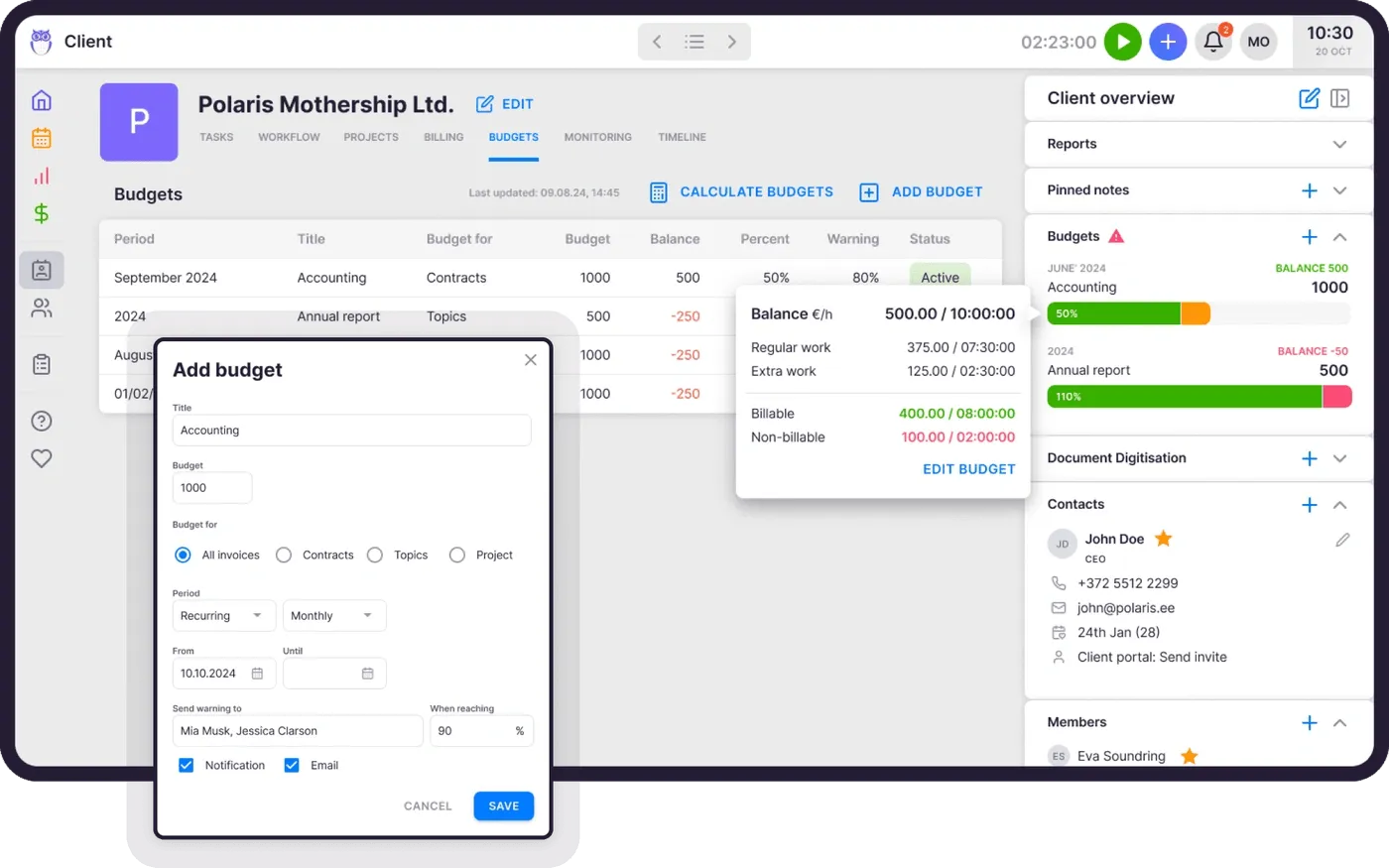
Uku’s billing engine auto-generates invoice drafts from tracked time with no manual reconstruction. Each client can have multiple active contracts with different billing types (hourly, fixed, per-piece, or combined). Pricing rules include cumulative tier pricing, minimum time requirements, and rounding rules. Automated debt reminders handle overdue follow-up, and Client Budgeting (Elite tier) sets budget ceilings by contract, project, or topic with real-time alerts before the budget runs out.
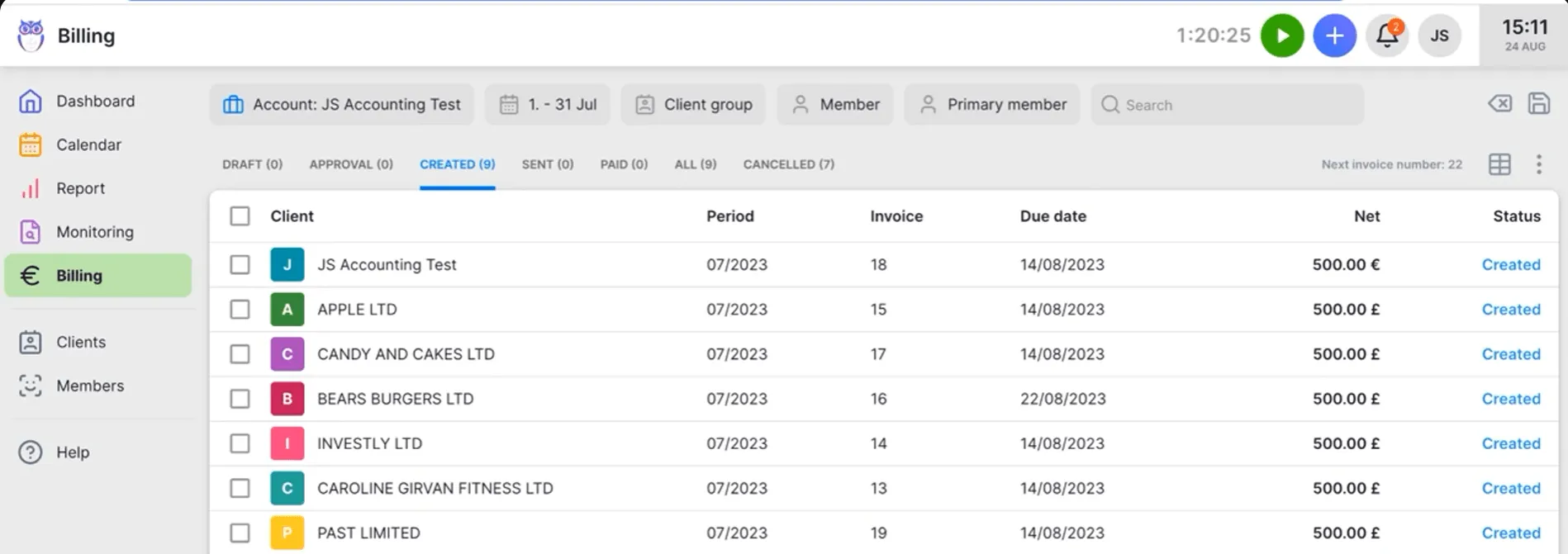
🟡 Value verdict: Both platforms handle the time-to-invoice pipeline well. Firm360 edges ahead on deferred billing and WIP management. Uku edges ahead on contract flexibility (multiple billing types per client) and proactive budget alerts. The choice depends on whether your firm’s pain is holdback management (Firm360) or scope-creep detection (Uku).
Client portal and client experience
Firm360’s client portal is included on all plans. Clients upload documents, sign electronically, message staff, and pay invoices from one branded interface. A no-login document upload link reduces friction for less tech-savvy clients, and document checklists map to project workflows so client submissions automatically advance internal stages.
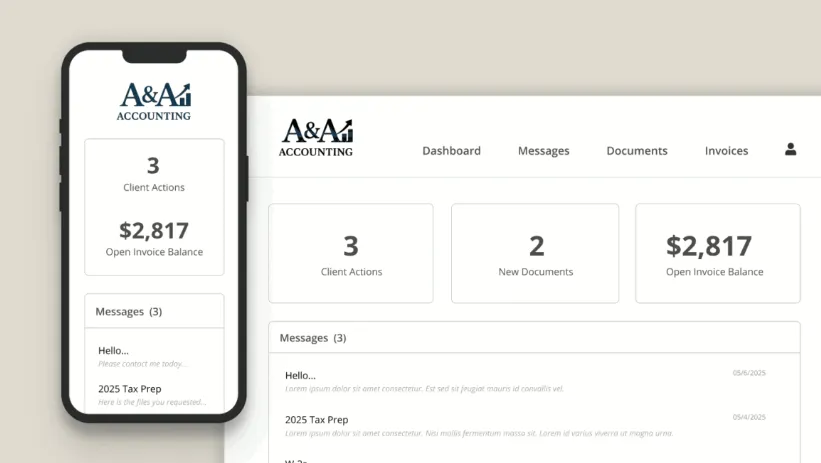
Uku’s client portal uses a magic-link model where clients access the portal through a time-limited email link with no password required. The portal can be branded with a custom logo, colors, URL, and welcome video. Files uploaded through the portal sync to connected cloud storage (Google Drive, OneDrive, SharePoint, or Dropbox). The Elite plan adds custom menu links for service agreements, financial reports, or onboarding questionnaires.
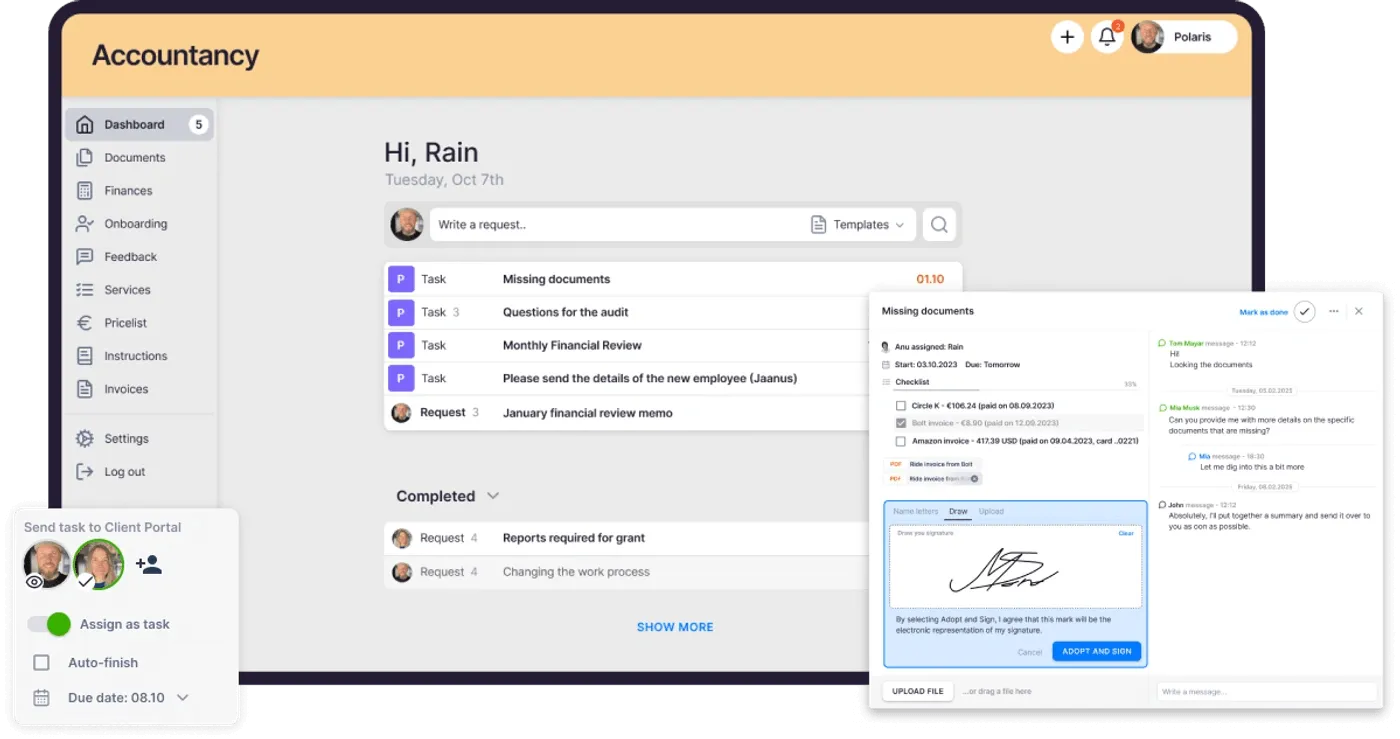
🟡 Value verdict: Both portals solve the same problem — reducing email-based document chasing, and both include e-signing. Firm360 has it from the entry tier; Uku includes e-signatures on Solo, Elite and Enterprise, sent from the task and signed in the portal the client already uses. Firm360 also collects payments in the portal, which Uku does not. Uku’s magic-link approach and cloud storage sync offer a lower-friction client experience. The right choice depends on whether in-portal payment collection (Firm360) or passwordless access with cloud storage sync (Uku) matters more to your client base.
Reporting and firm visibility
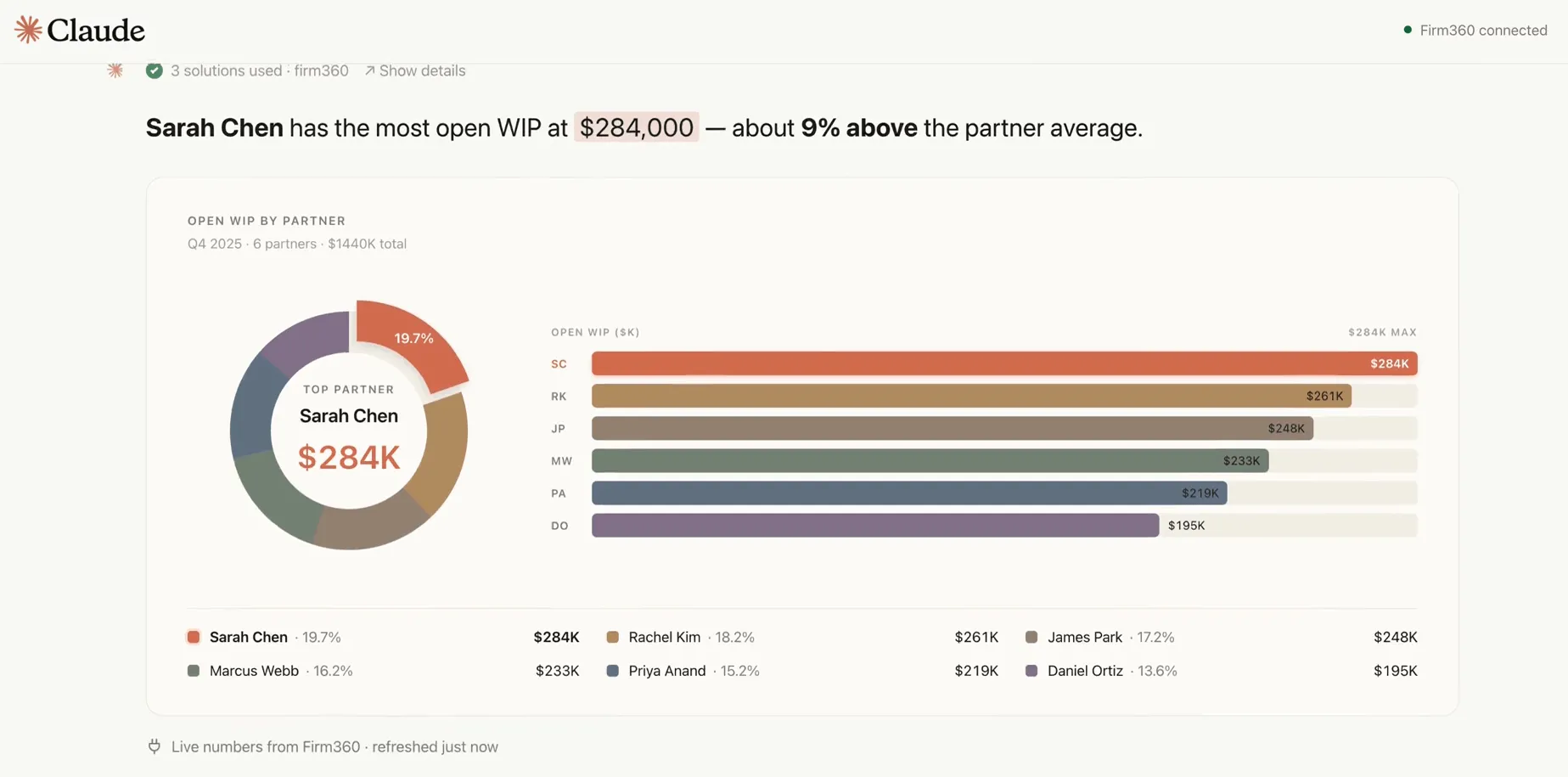
Firm360’s advanced reporting is available on Standard and Premium plans only. It covers client realization, staff utilization, workload distribution, A/R aging, and timesheet approval with payroll locking. A Firm360 + Claude connector, currently in limited beta, adds a natural-language AI query layer powered by Claude for firm-health metrics.

Uku’s BI Reporting is included on all plans (including Solo), with three levels of depth: Summary, Tasks, and Time. Filters by period, member, client, topic, and task status are available alongside saved report templates, plus business analytics reports with detailed performance metrics. The Elite plan adds Client Budgeting dashboards with real-time budget alerts and workforce management with flextime tracking.
🟡 Value verdict: Firm360 delivers deeper native firm-health analytics (realization rates, WIP, utilization) on Standard and above, plus a novel AI query layer in beta. Uku provides broader reporting access from the first tier, with BI Reporting on all plans plus budget alerts and business analytics for monitoring firm performance.
How to Switch from Firm360 to Uku
Moving from Firm360 to Uku is straightforward, and most firms are running in production within a couple of weeks:
- Start a free trial (day 1). Create a 14-day free trial of the full Elite plan — no credit card, no sales call required — and explore the platform with your real workflows.
- Import your clients (days 1–3). Use assisted client import (available on all plans) to bring over your client list, contacts, and details. Uku’s team helps with the setup.
- Set up workflows and billing (week 1). Recreate your recurring work as task templates, configure billing contracts, and connect integrations and cloud storage.
- Add your team and go live (week 2). Invite members, assign work, and switch your day-to-day operations over — with monthly billing, there’s no annual lock-in if you’re still evaluating.
Final Verdict: Firm360 vs Uku
The choice between Firm360 and Uku depends on where your firm operates, how you prefer to evaluate software, and which features you need from day one.
Firm360 is a US-built accounting practice management platform designed by a practicing CPA for CPA firms that want integrations with UltraTax, Lacerte, and QuickBooks Online, backed by 100% US-based support. With per-user pricing from $49 to $99/month on annual billing, firms can consolidate projects, documents, billing, and client communication into one system with strong security credentials (SOC 2 Type II certified) and configurable workflows across multiple service lines. This pricing model works best for US-based CPA firms with a team size of 5–50 running tax, audit, and advisory, firms comfortable with annual billing, and practices that need UltraTax and Lacerte document sync.
Uku is a practice management platform built from the ground up to be international (especially for UK and US markets) on the principle that core features should be accessible from the first paid tier, not gated behind premium pricing. With a 14-day free trial of the full Elite plan, no credit card required, monthly billing flexibility, and 12-language support, it removes the barriers that make evaluating practice management software feel risky. With per-member pricing from $19/month for sole practitioners (or from $38 annual for teams), it delivers workflow automations, billing, a client portal, and integrations at prices that undercut comparable Firm360 tiers by 30–50%. Pricing is available in EUR, USD, and GBP, with VAT added on top.
The fundamental difference is accessibility. Firm360 asks, “How can we build the best US-focused practice management platform for established firms?” Uku asks, “How can we make full-featured practice management available to accounting firms of every size, everywhere?”
Get started with Uku — try the full platform free for 14 days, then choose the plan that fits your firm.
Related: for a full feature walkthrough, pros and cons, and how Firm360’s modules compare to Uku’s, see our Firm360 review. For a head-to-head comparison, see Firm360 vs Uku.
Frequently asked questions
Does Firm360 offer a free trial?
Firm360 does not publish a free trial or free plan on its pricing page. The entry point is a demo request, which requires contacting the sales team. Uku, by contrast, offers a 14-day free trial of the full Elite plan with no credit card required, letting practitioners evaluate the complete feature set with their real client data before choosing a tier.
What is the minimum cost to use Firm360?
The Basic plan costs $49/user/month billed annually ($588/year for one user). However, Standard ($79/user/month) requires a 3-user minimum ($2,844/year), which is the realistic entry point for firms that need project management and integrations. Uku's Solo plan starts at $19/member/month on annual billing for sole practitioners, while Team starts at $38/member/month on annual billing with no minimum user requirement.
Does Firm360 offer monthly billing?
Firm360's pricing page lists annual billing only. No monthly alternative is published. Firms interested in monthly billing would need to contact Firm360 directly. Uku offers both monthly and annual billing on all paid plans, with annual billing saving roughly 23%.
What features are excluded from Firm360's Basic plan?
The Basic plan at $49/user/month excludes project management, advanced reporting, automated A/R collections, custom fields, and all integrations (QuickBooks Online, UltraTax, Lacerte, Zapier). E-signature is available at an extra fee. These features require Standard ($79/user) or Premium ($99/user).
How does Firm360 handle payment processing fees?
Firm360 processes payments through Stripe with no additional platform fees beyond Stripe's standard rates: 2.9% plus $0.30 per card transaction and 0.8% capped at $5 per ACH transaction. Clients pay through the secure client portal, where they can also save payment methods for future invoices.
Is Firm360 or Uku better for a 10-person accounting firm?
For a 10-person US firm needing UltraTax and Lacerte integrations, Firm360 Standard at $79/user/month ($9,480/year) provides a US-focused solution with strong tax software connectivity. For a firm that values lower cost, multilingual support, or monthly billing flexibility, Uku Elite at $48/member/month annual ($5,760/year) delivers comparable features at roughly 40% less, though with less depth in US-specific integrations.
Does Firm360 integrate with Zapier?
Zapier is available only on Firm360's Premium plan at $99/user/month. Standard includes native integrations with QuickBooks Online, UltraTax, and Lacerte, but no automation-platform connectivity. Uku includes Zapier on its Elite plan at $48/member/month (annual), connecting to 5,000+ applications at a lower price point.
How does Firm360's support compare to Uku's?
Firm360 offers standard email support on Basic and Standard plans, with phone support and a dedicated Customer Success Manager only on Premium ($99/user). All support staff are 100% US-based. Uku provides email support on all plans, live chat from the Team tier onward, and a dedicated account manager on Enterprise. Uku holds a 9.7 quality-of-support score on G2 (versus an 8.6 category average) and won the 2025 Software Advice Best Customer Support award.