Ignition Pricing 2026: Plans, Fees & What It Doesn't Cover
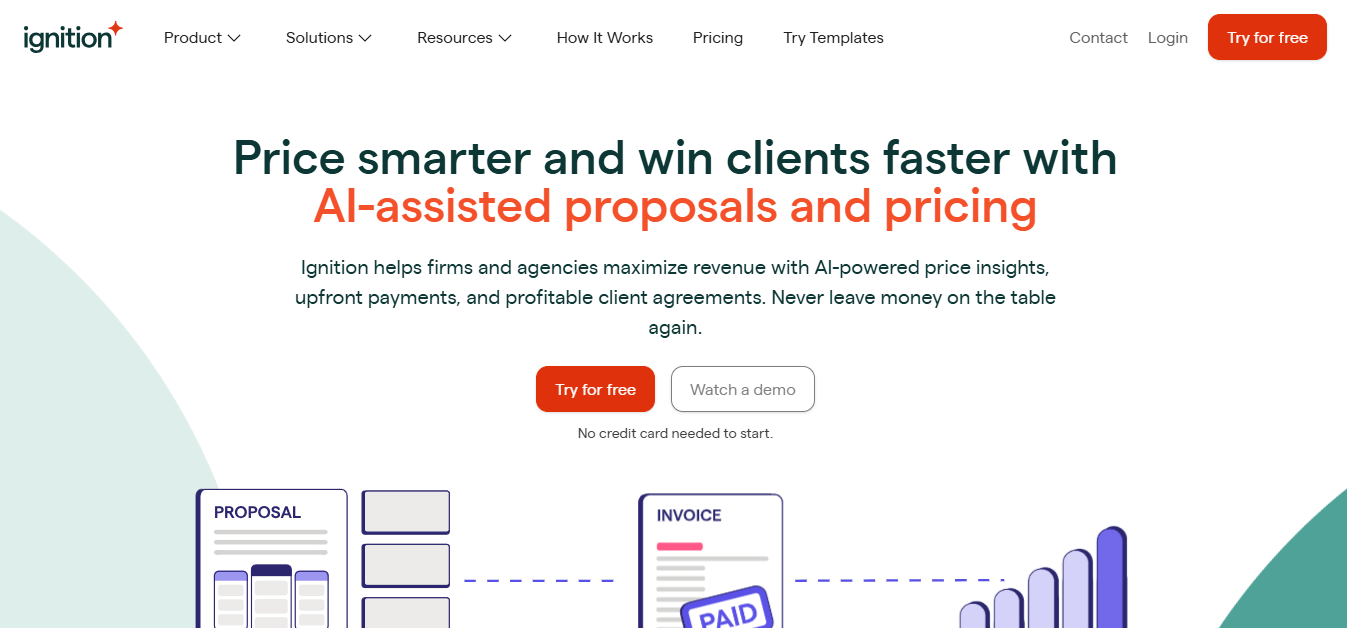
Ignition (formerly Practice Ignition) costs $99–$399/month plus 2.5–3.6% card fees. See every plan, the client and user caps, and where Uku fits beside it.


Contents
If you have tried to work out what Ignition (formerly Practice Ignition) will really cost your firm, you have probably found that the plan price is only one of three numbers. The second is the per-client overage once you pass your plan’s active-client allowance. The third is the processing fee on every payment Ignition collects for you — and on a firm billing $30,000 a month through cards, that fee can be larger than the subscription.
Ignition is a proposals, engagement letter and payment collection platform for accounting firms and agencies. It says it serves 8,500+ businesses, whose clients have paid them more than $15.5 billion through the platform. In the US it costs $99, $229 or $399 per month on annual billing (Core, Pro, Pro+), with a $39 Solo plan for firms under $150,000 in revenue.
Ignition’s pricing is a good fit if:
- You want proposals, engagement letters and payment authorisation in one client-facing flow
- You bill fixed fees or subscriptions and want payment collected automatically on schedule
- Your clients are happy to pay by ACH, which keeps the processing fee capped at $5 a payment
- You already run practice management elsewhere and need Ignition to feed it
Ignition’s pricing is not a good fit if:
- You need task management, deadlines and recurring workflows for the work itself
- You want tracked time to become invoices, or to see which clients cost more than they pay
- Most of your clients pay by business or rewards card (Ignition’s premium rate is 3.6% + $0.30)
- You are a solo practitioner in the US and want the Solo plan, which is no longer shown on Ignition’s US plan grid
We compared on 25 September 2026. Ignition’s prices, limits and fees come from its own US pricing page and help centre; Uku’s from getuku.com/pricing. The Updated date above moves when a number changes.
Ignition pricing summary
| Ignition | Uku | |
|---|---|---|
| Free trial | 14 days, no card, up to $10,000 in fee-free payments | 14 days of the full Elite plan, no card |
| Entry plan | Solo: $39/mo annual, $49 monthly, 1 user, 20 active clients, under $150K revenue only | Solo: $19/mo annual, $25 monthly, 1 member, 20 active clients |
| Mid tier | Core: $99/mo annual, $149 monthly, 3 users, 50 active clients | Team: $38/member/mo annual, $49 monthly, unlimited clients |
| Upper tier | Pro: $229/mo annual, $279 monthly, 15 users, 350 active clients, Zapier | Elite: $48/member/mo annual, $62 monthly, BI Analytics, API, Zapier |
| Top tier | Pro+: $399/mo annual, $499 monthly, 20 users, 600 active clients · Enterprise: on request | Enterprise: $88/member/mo annual, $99 monthly |
| Pricing model | Per plan, capped by active clients and users, plus payment fees | Per member; clients free and unlimited from Team up |
| Best for | Winning the engagement and getting paid for it upfront | Delivering the work, tracking its cost and billing for it |
The two products answer different questions, which is why the table does not produce a winner. Ignition gets a client to sign and pay. Uku runs the work that signature commits you to. Plenty of firms pay for both; the rest of this article shows what each line costs and where they overlap.
Ignition pricing: in-depth overview
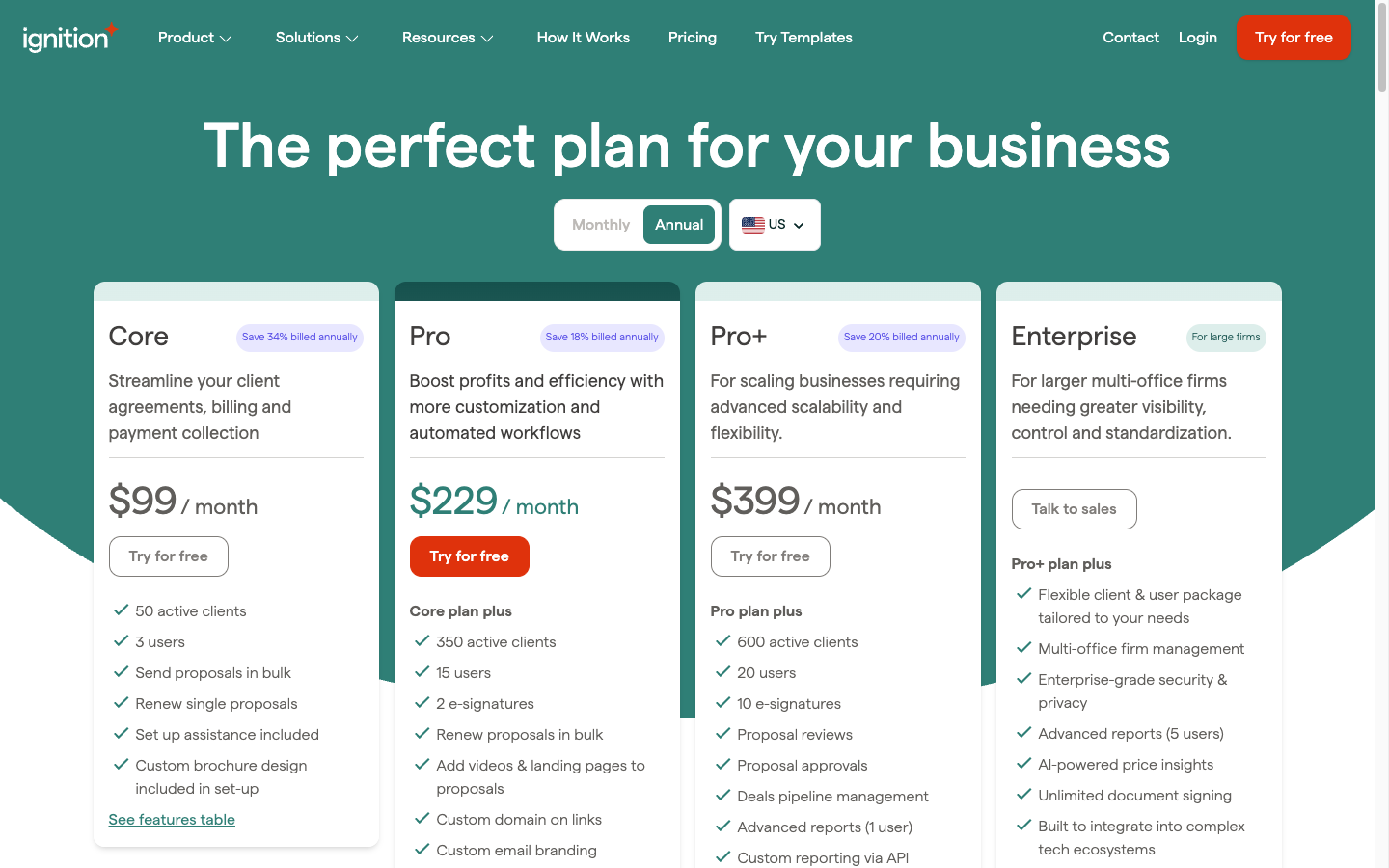
Ignition prices each plan as a bundle of active clients and user accounts. An active client, in Ignition’s words, is someone who “has accepted a proposal with Ignition for any given month and still has an active service within its contracted period”. A client with several proposals counts once.
 Source: Ignition
Go over your client allowance and you pay per extra active client, per month. The overage is counted on the highest number of active clients reached during the billing period, so a busy renewal month sets the bill even if a few clients drop off before month-end.
Two other things vary by plan and are easy to miss on the cards: the number of user accounts (only people who send proposals need one) and the number of e-signatures per proposal, which matters when an engagement letter needs two directors or partners to sign.
| Plan | Per month | Includes |
|---|---|---|
| Solo | $39 annual, $49 monthly | 20 clients (+$7 each), 1 user |
| Core | $99 annual, $149 monthly | 50 clients (+$5 each), 3 users |
| Pro | $229 annual, $279 monthly | 350 clients (+$3 each), 15 users |
| Pro+ | $399 annual, $499 monthly | 600 clients (+$2 each), 20 users |
| Enterprise | On request | Custom |
The annual discount is not a flat percentage: 20% on Solo, 34% on Core, 18% on Pro and 20% on Pro+.
 Source: Ignition
Ignition free trial: 14 days, no credit card
| Feature | Details |
|---|---|
| Duration | 14 days |
| Credit card | Not required |
| Fee-free payments | Up to $10,000 (US) |
| After the trial | Account goes on hold, no data deleted |
The trial is a real test: you can send live proposals and collect real money. Once a US firm has processed $10,000, payment processing pauses until it picks a plan. Clients can still accept proposals sent during the trial after it ends, but those proposals will not create invoices until the account is paid.
| Trial pros | Trial cons |
|---|---|
| ✅ No card to start | ❌ 14 days is short for a full renewal cycle |
| ✅ Real proposals and real payments | ❌ Payments pause at $10,000 |
| ✅ Nothing is deleted when it ends | ❌ No permanently free plan |
The Bottom Line 👉 The trial lets you run your own proposal-to-payment flow for two weeks, with the processing fees waived — the fairest way to measure what the fee line will cost you later.
Ignition Solo: $39/month annual, $49/month monthly
| Price | Limits |
|---|---|
| $39/month annual, $49/month monthly | 1 user, 20 active clients, 1 e-signature per proposal |
Solo carries the core flow: branded proposals, engagement letters, automated payment collection and invoice creation through Xero or QuickBooks Online. It comes with conditions. Ignition’s pricing FAQ says a firm must earn less than $150,000 a year, connect Xero or QuickBooks Online at sign-up, and enable payments.
One more thing a US reader should know: Ignition’s US pricing page no longer shows Solo in its plan grid. The plan still appears in Ignition’s pricing FAQ and pricing data at $39/$49, so ask sales whether it is open to new US sign-ups before you plan around it.
| Solo pros | Solo cons |
|---|---|
| ✅ The full proposal-to-payment flow | ❌ Revenue must stay under $150,000 |
| ✅ Xero and QuickBooks Online included | ❌ Payments must be switched on |
| ✅ 3 free AI price insights | ❌ No Zapier, Karbon or XPM integration |
| ✅ Online payment links and surcharging | ❌ Not shown on the US plan grid |
The Bottom Line 👉 Solo is priced for a practitioner starting out, and the eligibility rules make it a plan you grow out of rather than into.
Ignition Core: $99/month annual, $149/month monthly
| Price | Limits |
|---|---|
| $99/month annual, $149/month monthly | 3 users, 50 active clients, 1 e-signature per proposal |
Core removes the revenue cap and adds the tools a small team uses at renewal time: bulk proposal creation, single-proposal renewals, and set-up help with a custom brochure design. It also unlocks Ignition’s AML and KYC compliance dashboard, with identity checks charged per check ($6 standard, $10 enhanced).
Core’s 34% annual discount is the steepest of any plan, which is why $99 is the number on the card. Month to month, it is $149.
| Core pros | Core cons |
|---|---|
| ✅ No revenue cap | ❌ Only 3 user accounts |
| ✅ Bulk proposals for onboarding | ❌ Still 1 e-signature per proposal |
| ✅ AML/KYC dashboard | ❌ Identity checks cost extra per check |
| ✅ Set-up assistance included | ❌ No Zapier, Karbon or XPM integration |
The Bottom Line 👉 Core suits a small firm that sells on its own and keeps the rest of its stack separate, because it does not connect to practice management.
Ignition Pro: $229/month annual, $279/month monthly
| Price | Limits |
|---|---|
| $229/month annual, $279/month monthly | 15 users, 350 active clients, up to 2 e-signatures per proposal |
Pro is the plan that joins Ignition to the rest of a firm’s software. Zapier, Karbon, Xero Practice Manager, FYI, Financial Cents, Gusto, ProConnect, Practice CS and Onvio all switch on here. Pro also adds bulk renewals, bulk price changes, proposal expiry dates, video and landing-page proposals, a custom domain and custom email branding, invoice tracking categories, and faster ACH payouts (three business days instead of five to seven). Online forms, a $49 monthly add-on below Pro, are included.
Support improves with the plan, to a 4-hour average response.
| Pro pros | Pro cons |
|---|---|
| ✅ Practice management integrations | ❌ Deals pipeline is still a $49/month add-on |
| ✅ Bulk renewals and bulk price changes | ❌ No proposal review or approval step |
| ✅ Branded proposals, domain and email | ❌ No advanced reporting |
| ✅ 350 active clients, faster ACH payouts | ❌ Up to 2 signatures per proposal |
The Bottom Line 👉 If Ignition has to talk to anything beyond your ledger, Pro is where your price starts, whatever your client count.
Ignition Pro+: $399/month annual, $499/month monthly
| Price | Limits |
|---|---|
| $399/month annual, $499/month monthly | 20 users, 600 active clients, up to 10 e-signatures per proposal |
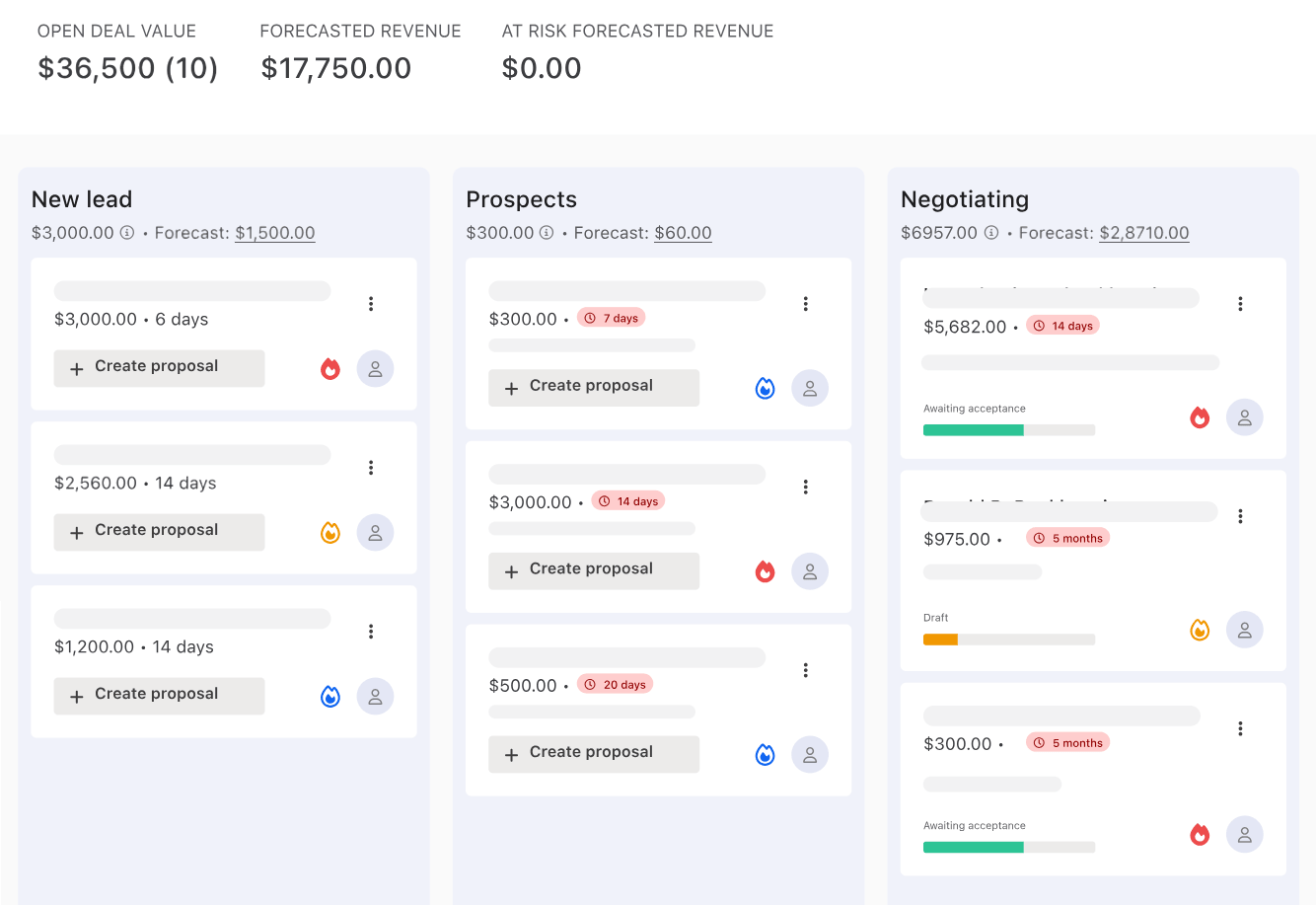
Pro+ is for multi-partner firms that sell as a team. It includes the Deals pipeline, adds a proposal review and approval step before anything reaches a client, advanced reports, custom reporting through Ignition’s API, unlimited document signing, the CCH Axcess integration, and a 1-hour average support response.
 Source: Ignition
| Pro+ pros | Pro+ cons |
|---|---|
| ✅ Deals pipeline included | ❌ $399/month before any payment fees |
| ✅ Proposal review and approvals | ❌ A large step up from Pro |
| ✅ Reporting API and advanced reports | ❌ Still no view of the work itself |
| ✅ Up to 10 signatures per proposal | ❌ More than most firms under 20 people need |
The Bottom Line 👉 Pro+ earns its price when partners review each other’s proposals and track a sales pipeline; for a firm that does neither, it is Pro with features nobody opens.
Ignition Enterprise
Enterprise is priced on request. Ignition pitches it at larger multi-office firms, with flexible client and user packages, multi-office management and enterprise-grade security.
Ignition payment fees and add-ons
The subscription is the predictable part of Ignition’s cost. Payment processing is the variable part, and it is charged on every payment Ignition collects for you.
| Payment method (US) | Fee | Notes |
|---|---|---|
| Standard cards | 2.5% + $0.30 | Most standard Visa and Mastercard credit and debit cards |
| Premium cards | 3.6% + $0.30 | Amex, corporate and rewards cards |
| ACH bank payments | 1% + $0.30, max $5 | Plus 0.3% on the part of any payment above $3,000 |
The line that matters is the premium rate. Ignition’s own help centre estimates that about 75% of US cards fall into the premium group, because most business, corporate and rewards cards do. Here is what it costs to collect a $500 monthly fee, once and for 60 clients:
| Paid by | Per payment | 60 clients |
|---|---|---|
| ACH | $5.00 | $300 |
| Standard card | $12.80 | $768 |
| Premium card | $18.30 | $1,098 |
Ignition does two things well here. It charges nothing on failed payments, and it pays out the full invoice amount and bills fees separately, which keeps reconciliation in Xero or QuickBooks clean. US firms can also turn on surcharging to pass card fees to clients. The cheapest move of all is steering clients to ACH, where the $5 cap does most of the work.
Add-ons, priced on Ignition’s US pricing page:
| Add-on | Price | Included in |
|---|---|---|
| Deals pipeline | $49/month | Pro+ |
| Online forms | $49/month | Pro and Pro+ |
| AI price insights | 3 free, then $349/year for 200 insights | Add-on on every plan (US and Australia) |
| Identity checks (AML/KYC) | $6 standard, $10 enhanced, per check | Core and above; not available on Solo |
| 1:1 account management | Add-on | Core and above |
Ignition’s MCP server, which lets an AI assistant work with your Ignition data, is included on every plan at no extra cost.
Where Ignition stops
Ignition is a revenue platform, and it is honest about it: its integration list includes Karbon, Xero Practice Manager, FYI and Financial Cents because it does not do their job. What that leaves outside Ignition:
The work itself. Ignition knows a client signed and paid. It does not know whether this month’s bookkeeping has started, who is doing it, or whether the quarterly return is on track. Recurring tasks, deadlines and checklists live somewhere else.
Time. Ignition bills the agreed scope. It has no time tracking, so it cannot tell you how many hours a $500-a-month client actually takes, and the quick calls and extra questions that fall outside the proposal go unrecorded.
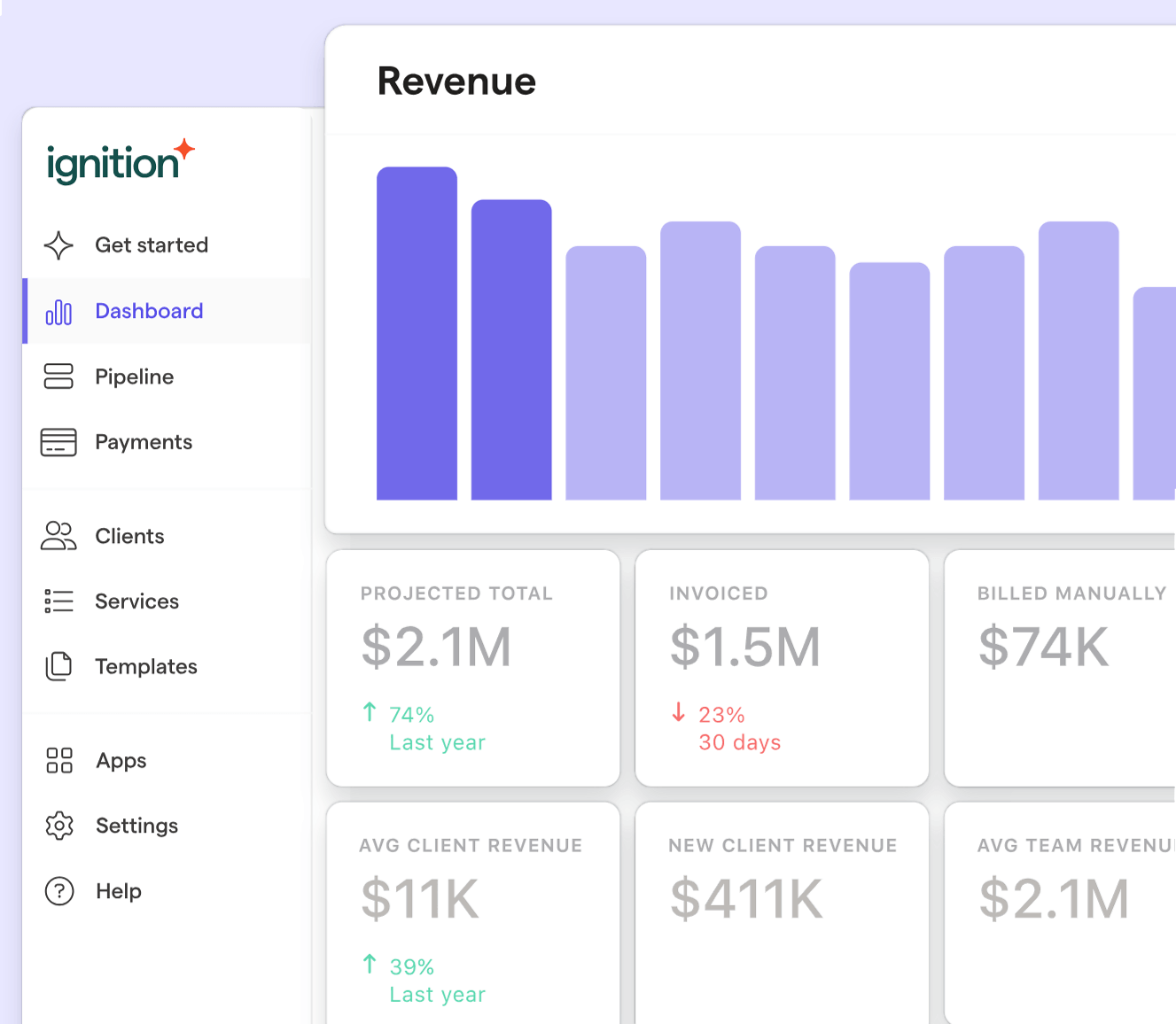
Profitability. Ignition’s Business Insights dashboard shows projected, invoiced and collected revenue. It cannot show cost, because it never sees the hours, so “which clients lose us money?” has no answer inside Ignition.
 Source: Ignition
The team. There is no workload view, no absence cover and no capacity planning. When someone is on holiday, reassigning their clients’ work is a job for another system, or for memory.
Where Uku fits next to Ignition
Uku is practice management for accounting firms: the work, the time, the billing and the team, in one place. It does not replace Ignition’s proposals — Uku’s own proposals feature is on the roadmap, not in the product — so for a firm that already sells through Ignition, the question is what runs the work once the proposal is signed.
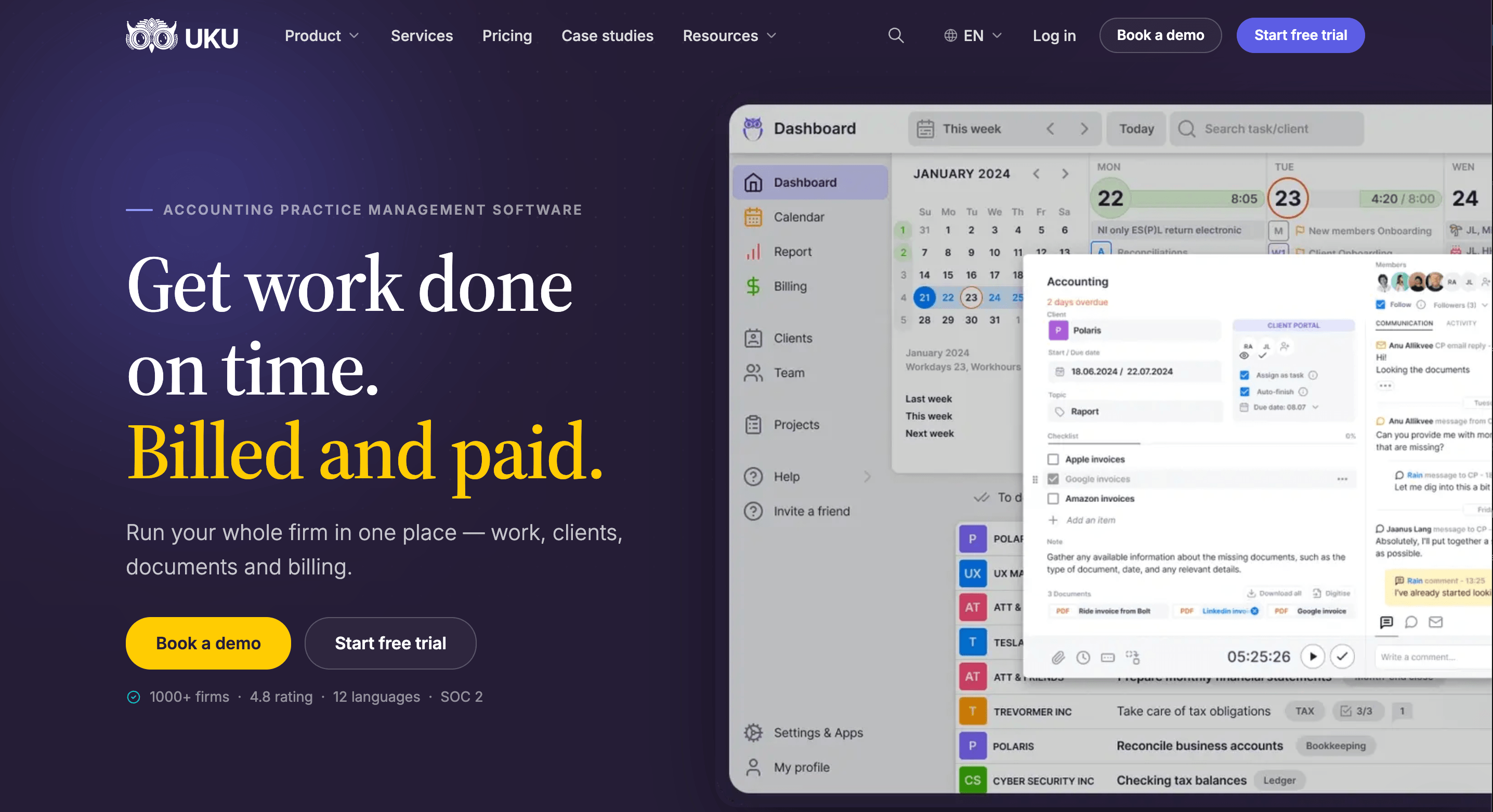
In Uku, each client gets a workflow of recurring tasks that creates itself month after month, time lands on the task it belongs to, and invoices build themselves from each client’s contract and the hours tracked. Uku serves 1,000+ accounting firms in 25+ countries, in 12 languages, and charges per member: clients, and the client portal they use, cost nothing.
How the two connect. Through Zapier, Ignition’s Proposal Accepted trigger can run Uku’s Create Client action, so a newly signed client appears in Uku without retyping. From there, your team applies the right workflow template to the client and the recurring work schedules itself. Uku’s Zapier app creates and updates clients and contacts; it does not create tasks, so the workflow step is yours. Zapier needs Ignition Pro or Pro+ and Uku Elite or Enterprise.
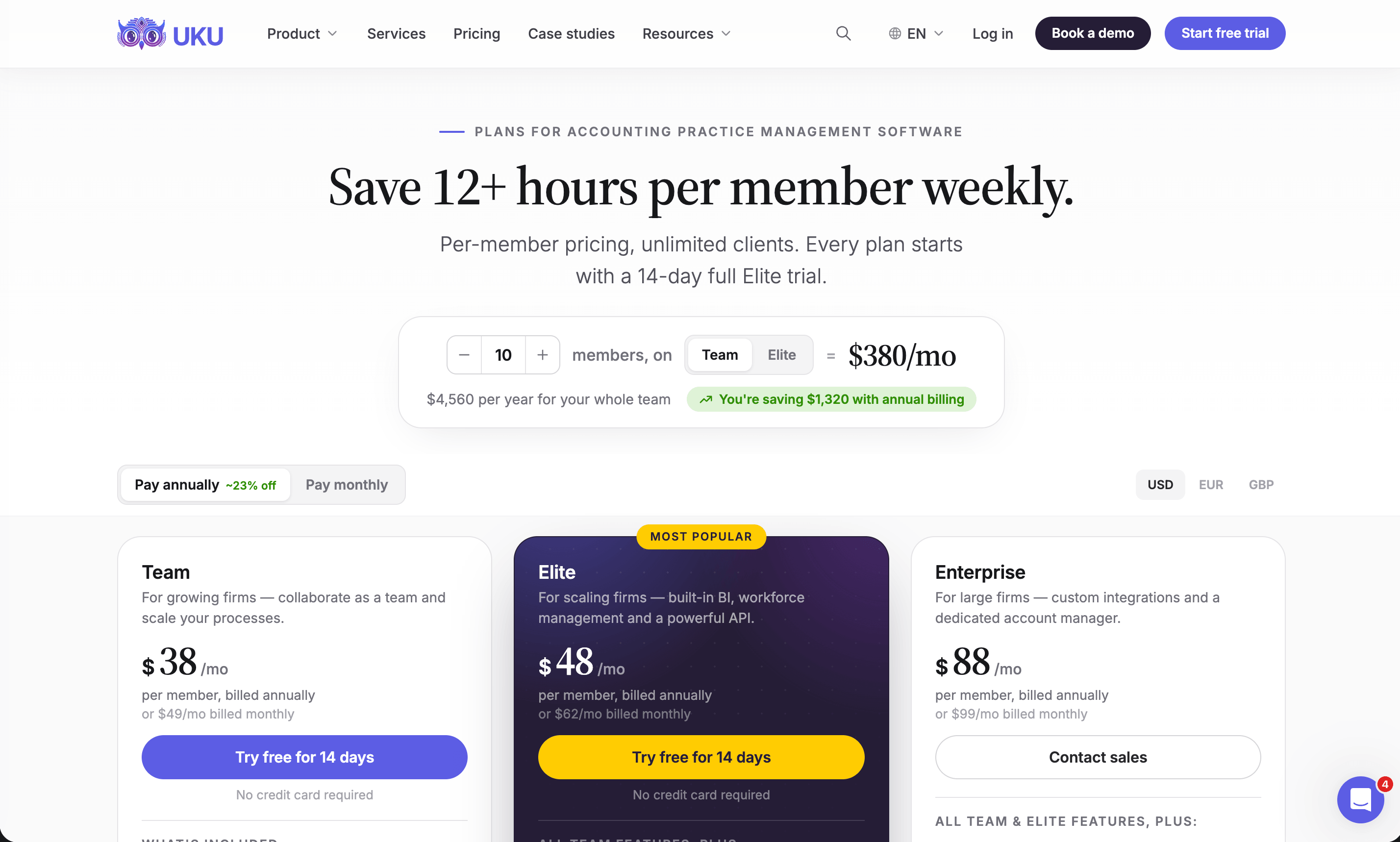
Uku Solo: $19/month annual, $25/month monthly
| Price | Limits |
|---|---|
| $19/month annual, $25/month monthly | 1 member, 20 active clients |
The whole core toolkit for one person: CRM, calendar, time tracking, billing, workflow automation, the client portal, agreements monitoring, client budgeting, email management, AML tools, document management, e-signatures, and every accounting integration. Inactive clients do not count toward the 20.
| Solo pros | Solo cons |
|---|---|
| ✅ The full core feature set | ❌ One member, 20 active clients |
| ✅ Client portal and e-signatures included | ❌ No projects or access management |
| ✅ Every accounting integration | ❌ No Zapier, so no automatic link to Ignition |
The Bottom Line 👉 Next to Ignition Solo, Uku Solo adds the delivery side for $19 a month, with new clients entered in both tools by hand.
Uku Team: $38/month annual, $49/month monthly per member
| Price | Limits |
|---|---|
| $38/member/month annual, $49/member/month monthly | Unlimited members and clients |
Team removes the limits and adds what a group needs to work together: projects, shared tasks, user roles and access management, company templates and one-on-one training. Client portal users never count as seats.
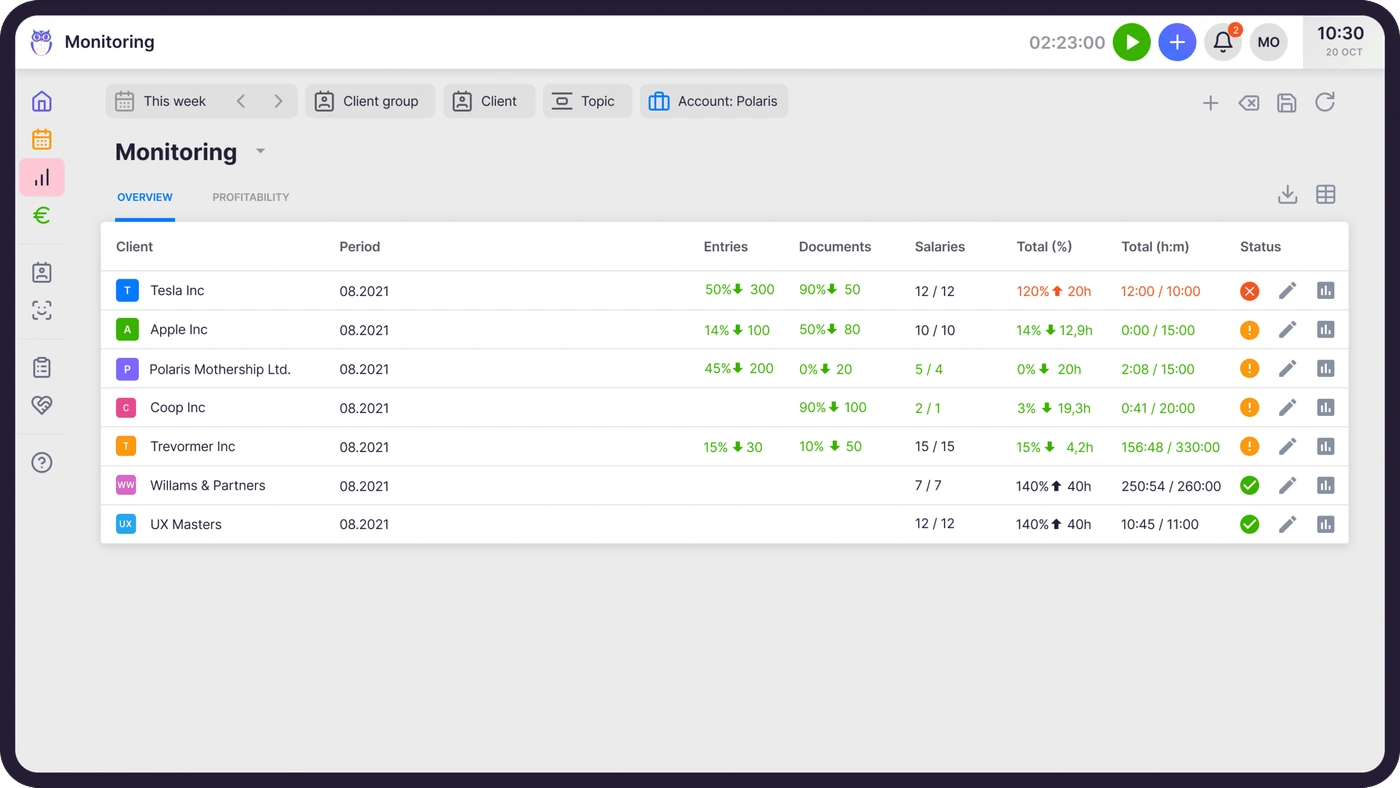
That screen is the answer to the question Ignition leaves open: it sets each client’s agreed volume of work against what was actually delivered this period, and flags the clients who are using more than their fee covers — before the month closes, not at year-end.
| Team pros | Team cons |
|---|---|
| ✅ Unlimited members and clients | ❌ No BI Analytics or public API |
| ✅ Projects, roles and access management | ❌ No Zapier connection to Ignition |
| ✅ Agreements monitoring on every client | ❌ No payment links or e-signatures |
The Bottom Line 👉 Team is the lowest-cost way to run a firm’s delivery beside Ignition, as long as you are happy adding each newly signed client by hand.

Uku Elite: $48/month annual, $62/month monthly per member
| Price | Limits |
|---|---|
| $48/member/month annual, $62/member/month monthly | Unlimited members and clients |
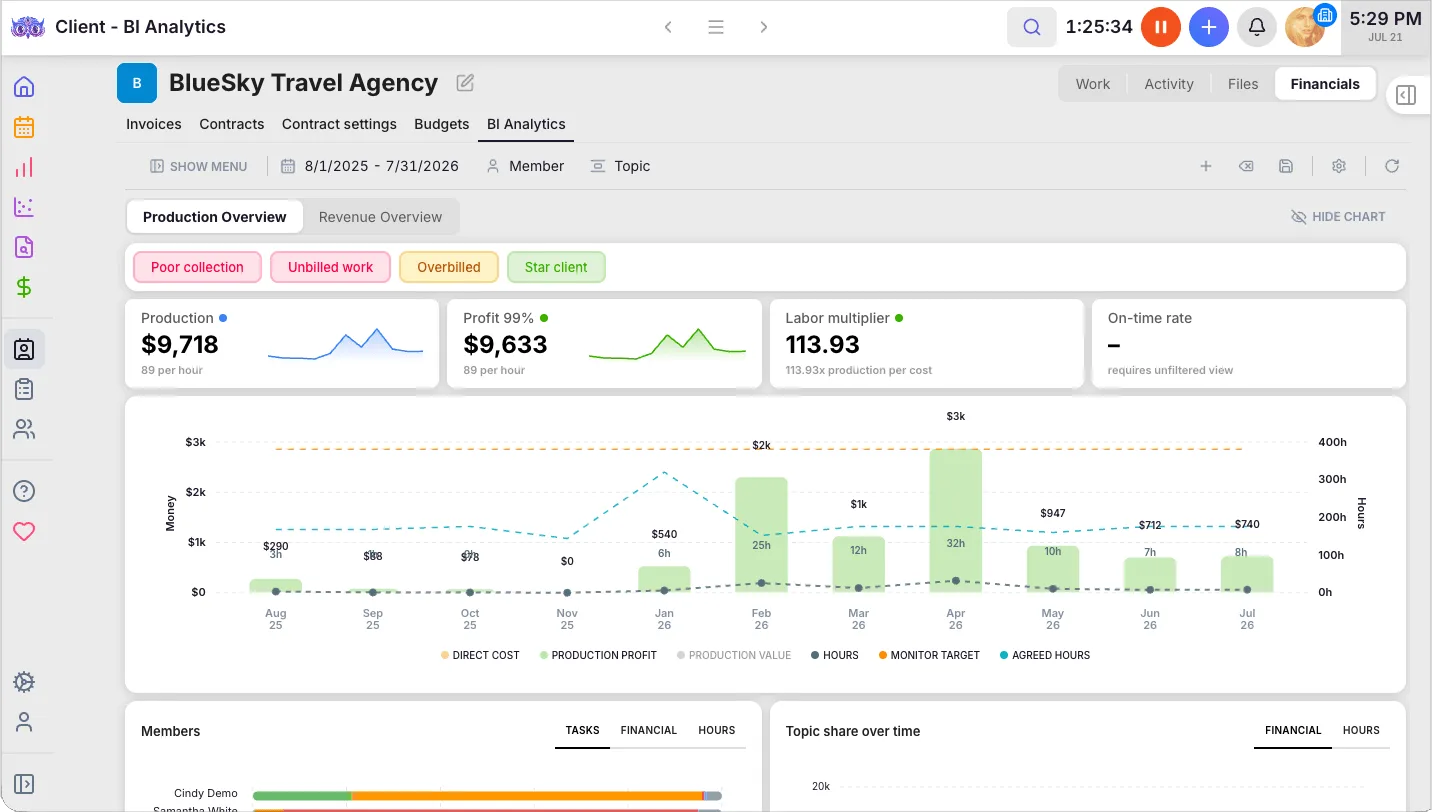
Elite is the plan that connects to Ignition, through Zapier, and the one that answers the profitability question in full. BI Analytics shows production, profit and labour multiplier per client and flags poor collection, unbilled work, overbilled clients and star clients. Client budgeting tracks each client against an agreed budget and warns the team before it runs out. Elite also adds workforce management, e-signatures, document management with Google Drive, Dropbox and SharePoint, the public API, and the Uku MCP server.
Elite also includes payment links: a pay button on every invoice, reminder and PDF. Connect your own Stripe or Montonio account and Uku marks the invoice paid when the money lands. That is not Ignition’s card-on-file collection at signing, but for a firm that only wanted a way for clients to pay invoices online, it can be enough — at your payment provider’s own rates.
| Elite pros | Elite cons |
|---|---|
| ✅ Zapier link to Ignition | ❌ $10/member more than Team |
| ✅ BI Analytics and client budgeting | ❌ No proposals (on the roadmap) |
| ✅ Payment links through your own Stripe | ❌ No card-on-file collection at signing |
| ✅ Public API and Uku MCP | ❌ Best rate needs annual billing |
The Bottom Line 👉 Elite is the match for Ignition Pro: both are the plans where the integration switches on, and together they cover a client from proposal to profitable delivery.

Uku Enterprise: $88/month annual, $99/month monthly per member
Everything in Elite, plus custom integrations built by Uku, a dedicated account manager, assisted client import, a tailor-made team workshop, early access to new features and pay-by-invoice. It is built for multi-office firms and accounting networks.
Uku onboarding, published rather than quoted
| Package | Team size | Price | Includes |
|---|---|---|---|
| Free | Any | $0 | First 90 minutes of onboarding |
| Small | Up to 4 members | $700 | Kick-off, import, setup, 1 training session, 2 connect meetings a year |
| Medium | Up to 15 members | $2,000 | 3 kick-offs, full template setup, 2 training sessions, 4 connect meetings a year, VIP support |
| Large | 15+ | Custom | 3+ training sessions, VIP connect meetings, VIP support |
Ignition vs Uku: where each one’s money goes
Proposals and engagement letters
Ignition’s approach: this is the product. Branded online proposals with up to three options, add-ons, engagement terms, e-signatures, renewals in bulk from Pro, and payment authorised at the moment the client signs.
Uku’s approach: e-signatures for engagement letters and other documents (Solo, Elite and Enterprise), with proposals on the roadmap.
Value verdict: Ignition, outright. If winning and renewing engagements is where your firm loses time, Ignition does it and Uku does not yet.
Billing
Ignition’s approach: billing fires from the agreed scope — a monthly retainer, a milestone, a date — and creates the invoice in Xero or QuickBooks. It is the “what did we agree to charge” side.
Uku’s approach: billing starts from what was delivered. Contracts define each client’s pricing (fixed, hourly, per piece, volume tiers), time is tracked on tasks, and the month’s invoices draft themselves from both. Firms report billing 100+ clients in about 30 minutes instead of days.
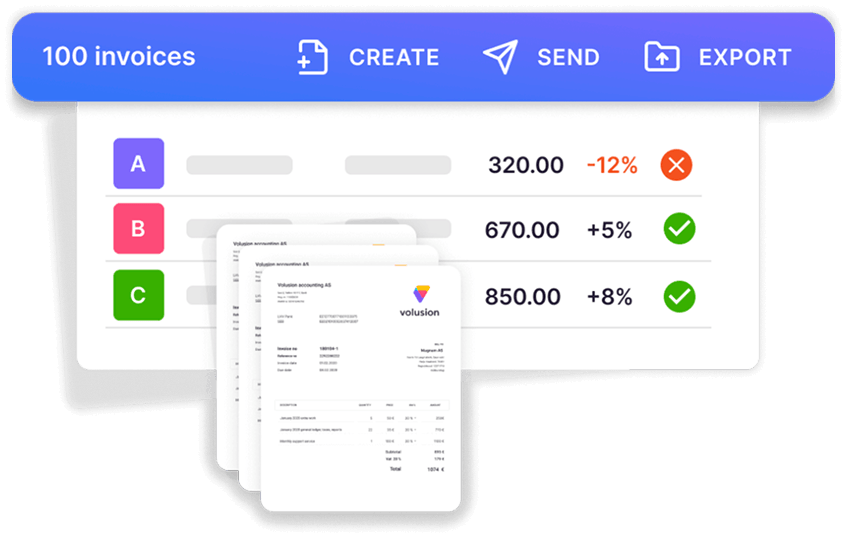
Value verdict: a fixed-fee firm can live on Ignition’s billing alone. A firm with any hourly or out-of-scope work, or one that wants to know its margin per client, needs Uku’s.
Payments
Ignition’s approach: payment details are captured at signing and collected automatically on schedule, at 1–3.6% plus $0.30 a payment.
Uku’s approach: payment links on Elite and Enterprise, through the firm’s own Stripe or Montonio account, with the invoice marked paid automatically.
Value verdict: Ignition, for firms that want payment on autopilot. Uku’s route is lighter and cheaper to run, but it is a pay button, not card-on-file collection.
Profitability and reporting
Ignition’s approach: projected, invoiced and collected revenue, win rates and service-level revenue. Advanced reports and a reporting API on Pro+.
Uku’s approach: time and cost per client, agreements monitoring, client budgets, and BI Analytics on Elite with production, profit and utilisation per client and team member.
Value verdict: Uku. Ignition sees the revenue; only a system that sees the hours can show the margin.
Team and workload
Ignition’s approach: user accounts for the people who sell. No task, calendar or capacity view.
Uku’s approach: every member’s work on one calendar, absences and substitutions, and workforce management on Elite for vacations, flextime and attendance.
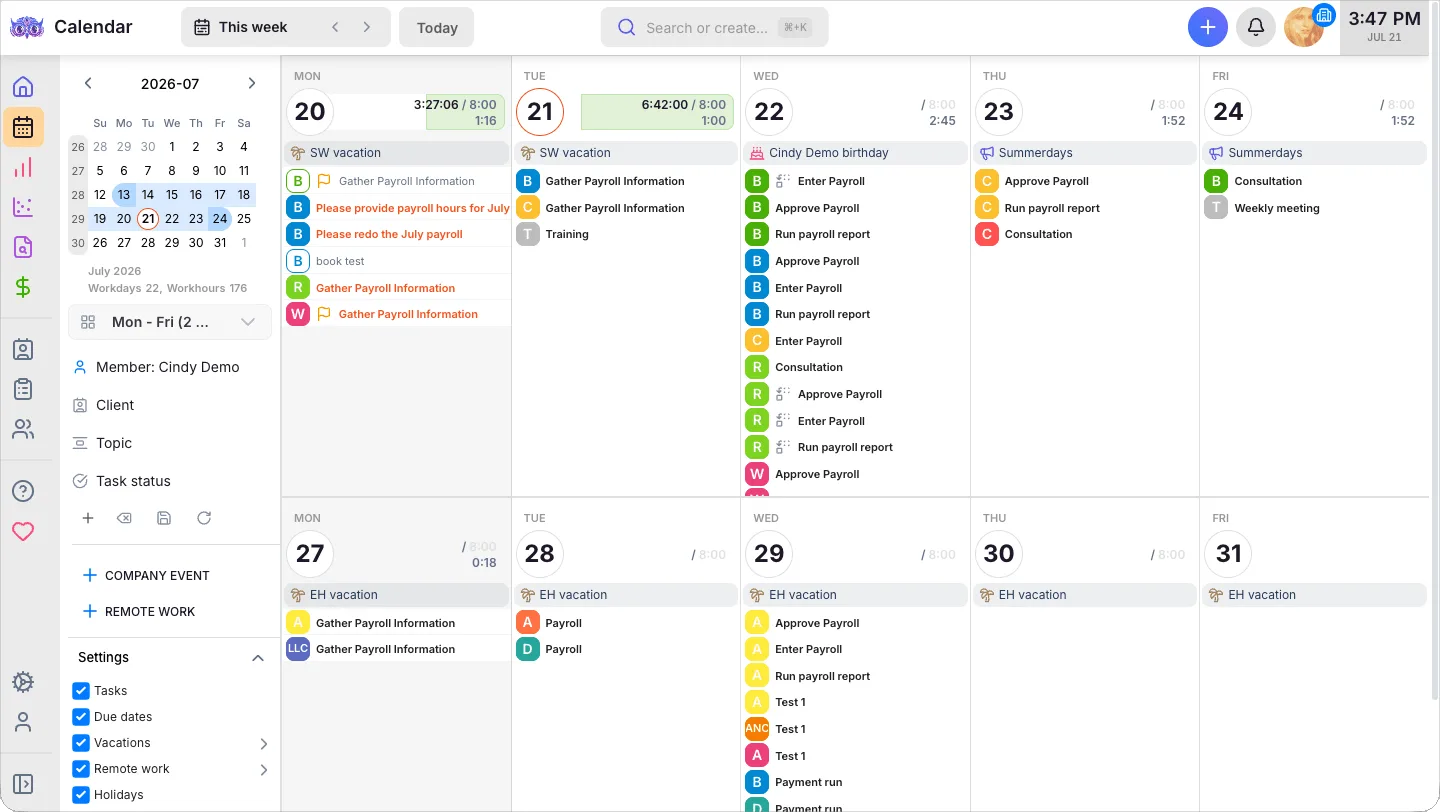
Value verdict: Uku. Ignition does not try to do this.
The five-person firm test
Five people, 60 active clients on a $500 monthly fee each, annual billing. Only two of the five send proposals, so two Ignition users is enough. Everyone works in Uku.
| Stack | Subscriptions per month |
|---|---|
| Connected: Ignition Pro ($229) + Uku Elite (5 × $48) | $469 |
| By hand: Ignition Core ($99 + 10 extra clients × $5) + Uku Team (5 × $38) | $339 |
| Uku only: Elite with payment links (5 × $48) | $240 |
Then add payment processing. With Ignition collecting all 60 fees by ACH, that is $300 a month; by premium card, $1,098 — unless you surcharge clients. With Uku’s payment links, the fees are whatever your own Stripe or Montonio account charges.
The connected stack costs $130 a month more than the by-hand one, and buys a signed Ignition client appearing in Uku automatically, plus Uku’s BI Analytics, client budgeting and payment links. The Uku-only line is cheapest, but it gives up Ignition’s proposals and automatic collection, which for a firm that sells on fixed fees may be the whole reason it bought Ignition.
How to set up Uku next to Ignition
Adding Uku beside Ignition is a smaller move than replacing a practice management system, because Ignition keeps doing what it does. Most firms are live in two to six weeks, at their own pace, and keep billing clients throughout.
- Import your clients into Uku. Export them from Ignition or your ledger to Excel, or sync them straight from Xero or QuickBooks through Uku’s import flow.
- Turn your services into workflow templates. One template per service you sell in Ignition — monthly bookkeeping, payroll, the annual return — then apply it to each client.
- Set up billing contracts for the work Ignition does not bill. Hourly, out-of-scope and per-piece work goes on Uku contracts; fixed fees can stay in Ignition.
- Connect the two and go live. On Ignition Pro and Uku Elite, a Zapier zap from Proposal Accepted to Create Client keeps new clients flowing in. Use the 90 minutes of onboarding that comes with every plan.
If your firm runs an AI assistant, the Uku MCP server connects in a day, and Ignition has an MCP server of its own on every plan. With both connected, one assistant can check that every client signed in Ignition has a workflow in Uku.
Final verdict: Ignition vs Uku
👍 Ignition is worth its price if your firm’s problem is selling: proposals that take too long, engagement letters nobody renews, clients who pay late. From $99 a month on Core, and realistically $229 on Pro once it has to talk to other software, it turns a signed proposal into collected money. Budget for the payment fees, push clients towards ACH, and check the active-client allowance against your busiest month. See Ignition’s pricing.
👉 Uku is worth adding if your firm’s problem is delivering: recurring work tracked in spreadsheets, time that never reaches an invoice, no idea which clients lose money, and a team whose workload nobody can see. From $19 a month for one person and $38 per member for a team, with clients free, it runs the work Ignition’s proposals promise. Every account starts with a 14-day trial of the full Elite plan, no card required. See Uku’s pricing or book a demo and we will map your Ignition services to Uku workflows with you.
Ignition asks: how do we win the client and get paid upfront? Uku asks: how do we deliver the work, and make money doing it? Most growing firms need an answer to both.
Read more
- Ignition vs Uku — the head-to-head: proposals and payments against the work, time and billing
- Ignition alternatives — seven tools that run the work beside Ignition or replace its proposals and payments
- Ignition review — how the proposals, payments, price insights and AML features work, and what users say
- How to price accounting firm services — the packaging and value-pricing groundwork Ignition’s proposals are built on
- Best apps for accountants — Ignition alongside the rest of a modern firm’s stack
- Xero Practice Manager pricing — one of the practice management tools Ignition Pro connects to
- Karbon pricing — another Ignition Pro integration, priced per user
- Uku automated billing and the Uku client portal
- Uku case studies
Frequently asked questions
How much does Ignition cost per month?
Ignition's US plans cost $99 (Core), $229 (Pro) and $399 (Pro+) per month on annual billing, or $149, $279 and $499 on monthly billing. Solo, for firms under $150,000 in annual revenue, is $39 per month on annual billing or $49 monthly. Enterprise is priced on request. On top of the subscription, Ignition charges payment processing fees on every payment it collects: 2.5% + $0.30 for standard cards, 3.6% + $0.30 for premium cards, and 1% + $0.30 for ACH, capped at $5.
Is Practice Ignition the same as Ignition?
Yes. Practice Ignition renamed itself Ignition and now sells to accounting firms and agencies alike. Pricing, plans and the ignitionapp.com domain are the same product.
Does Ignition charge per user or per client?
Both. Each plan includes a number of active clients (20 on Solo, 50 on Core, 350 on Pro, 600 on Pro+) and a number of user accounts (1, 3, 15 and 20). Above the client allowance you pay per extra active client each month: $7 on Solo, $5 on Core, $3 on Pro and $2 on Pro+. Overages are counted on the highest number of active clients you reach in the billing period, not the number at the end of it.
Does Ignition have a free plan?
No. Ignition has a 14-day free trial with no credit card required, during which a US firm can collect up to $10,000 in payments with no processing fees. After the trial the account goes on hold until you choose a paid plan; no data is deleted.
What are Ignition's payment processing fees?
In the US: 2.5% + $0.30 for standard Visa and Mastercard cards, 3.6% + $0.30 for premium cards (Amex, corporate and rewards cards), and 1% + $0.30 for ACH bank payments, capped at $5, with an extra 0.3% on the part of any payment above $3,000. Ignition's own help centre estimates that around 75% of US cards are premium. Firms in the US can pass card fees on to clients with surcharging.
Does Ignition include practice management?
No. Ignition covers proposals, engagement letters, payments and billing. It has no task management, time tracking, workflow automation or team workload view. Its Pro plan connects to practice management tools such as Karbon, Xero Practice Manager and Financial Cents instead, which is where a tool like Uku fits.
Can Ignition and Uku work together?
Yes, through Zapier. Ignition's Proposal Accepted trigger can create the client in Uku with Uku's Create Client action, and your team applies the client's workflow template from there. Zapier needs Ignition Pro or Pro+ and Uku Elite or Enterprise. Uku's Zapier app creates and updates clients and contacts; it does not create tasks.
What does Ignition plus Uku cost for a small firm?
For a five-person firm with 60 active clients on annual billing: Ignition Pro ($229) plus Uku Elite ($240) is $469 a month and connects the two through Zapier. Ignition Core with 10 overage clients ($149) plus Uku Team ($190) is $339 a month, with clients added to Uku by hand. Payment processing fees come on top of either figure.

Published Sep 24, 2026 · Updated Sep 28, 2026