Karbon vs Uku: Which Practice Management Software Fits Your Accounting Firm in 2026?
Karbon vs Uku, feature by feature: email Triage and AI against task templates and automated billing, with a 10- and 25-seat total-cost table and who each fits.


Contents
- Karbon vs Uku at a glance
- Karbon vs Uku: email-centric vs task-focused design
- What Karbon does better: email Triage, AI and integrations
- What Uku does better: modular setup, automated billing, client portal
- Karbon vs Uku workflow automation
- Karbon vs Uku client portal and CRM
- Karbon vs Uku billing and invoicing
- Karbon vs Uku time tracking
- Karbon vs Uku reporting and analytics
- Karbon vs Uku pricing
- Is Uku better than Karbon? Where firms replace it, and where they should not
- Karbon vs Uku: which should you choose?
Choosing between Karbon and Uku for your accounting practice management comes down to five questions:
- Do you want email at the centre of your workflow, or tasks and templates at the centre with email attached to them?
- Is your firm looking for a comprehensive all-at-once platform, or a modular system you can implement step by step?
- Do you need a 70-plus native integration ecosystem, or direct connections to your accounting software plus an open API?
- Would you rather pay premium annual pricing, or transparent per-user pricing with monthly options at any team size?
- Do you want AI that reads your inbox today, or built-in BI Reporting and an MCP server that lets your own AI assistant operate the system?
In short, here’s what we recommend:
Karbon is the enterprise-focused practice management platform built around email as the central hub of communication. Its Triage feature turns the inbox into actionable work items, Karbon AI summarises threads and drafts replies, and an ecosystem of over 70 native integrations plus Zapier connects it to the rest of the firm. Backed by $101.5M in total funding, Karbon offers deep features, but at $59–$89 per user per month on annual billing (with custom Enterprise pricing), a demo-gated trial, and a multi-week billing implementation, it is best suited to larger firms with dedicated resources.
Uku is the modular, task-focused practice management platform built by accountants’ sons who prioritised fast deployment without giving up power. Its three-level workflow structure (task templates to client task plans to tasks), automated billing that turns days of invoicing into a 30-minute job, and a fully integrated client portal at no extra cost cover what a growing firm needs to scale. With pricing from $19 per month for a solo practice and $38 per user per month for teams, monthly billing at any team size, and a 14-day trial with no card, it suits firms that want to start working on day one and add modules as they grow.
Both platforms are strong contenders in accounting practice management, but they serve fundamentally different philosophies. Your choice depends on whether you value email-centric enterprise power or a modular, task-focused approach with fast deployment and accessible pricing.
How we compared them: we compared the two on 22 September 2026, reading both vendors’ help centres and US pricing pages, taking Karbon’s screenshots from its own documentation and Uku’s from a live account, and citing G2 and Capterra reviews rather than our own opinion wherever a reviewer had already said it. The Updated date above moves when a number changes.
Karbon vs Uku at a glance
| Feature | Karbon | Uku |
|---|---|---|
| Core philosophy | Email-centric collaboration | Modular, task-focused efficiency |
| Starting price | $59/user/month (Team, annual) | $19/month (Solo, annual); $38/user/month (Team, annual) |
| Monthly billing | Teams of 4+ only | Any team size |
| Free trial | No (demo required) | 14 days, full Elite plan, no card |
| Learning curve | Moderate to steep | Minimal |
| Email integration | Central to the workflow (Triage) | Standard integration with automated emails |
| Workflow automation | Sophisticated, AI-assisted | Template-based, highly automated |
| Client portal | Functional, magic-link access | Fully integrated, mirrored tasks, branding included |
| Billing automation | Integrated with Stripe, multi-week setup | Contract-based, operational on day one |
| AI capabilities | Karbon AI (summaries, drafts, prioritisation) | Open API and Uku MCP today; email triage on the roadmap |
| Reporting | Practice Intelligence dashboards | BI Reporting with business analytics |
| Languages supported | English | 12 languages |
| Geographic focus | Global (34 countries) | Global (1,000+ firms, 25+ countries, multi-currency) |
| Best for (team size) | 20+ | 1–300 |
| Best for | Larger firms with email-heavy workflows | Growing firms wanting modular, fast deployment |
Two rows in that table are where Karbon is genuinely ahead: a shipped AI layer that reads your email, and the sheer breadth of its integration ecosystem. Neither is something Uku matches today, and the sections below say so where it matters.
Karbon vs Uku total cost for a 10-person and a 25-person firm
Per-user prices hide the add-ons, so here is what each platform costs a firm per month on annual billing, shown as entry plan / growth plan: Karbon Team / Business, Uku Team / Elite.
| Per month | Karbon | Uku |
|---|---|---|
| 10 users | $590 / $890 | $380 / $480 |
| 25 users | $1,475 / $2,225 | $950 / $1,200 |
| Power BI reporting | +$14 per user licence | Included (BI Reporting on Elite, public API) |
| E-signatures | $1 per signature, $100 bundles | Included on Elite |
| Card payments | 2.6% + $0.30 per transaction (Karbon Payments) | Payment links on Elite through your own Stripe or Montonio account, at that provider’s rate |
| Billing implementation | 3–4 week service | Day one |
| Monthly billing | Teams of 4+ only: $79 / $99 per user | Any team size: $49 / $62 per user |
For 10 people on the plans most firms compare, that is $890 a month on Karbon against $480 on Uku before a single add-on, and $1,030 against $480 once the firm wants its own Power BI reports. Over a year, the gap on the 25-seat firm is $12,300 in subscription alone.
Karbon against the rest of the field
Most firms shortlisting Karbon are also looking at Canopy or TaxDome, and the Karbon-versus-X question has its own answers on this site: Karbon vs TaxDome, Canopy vs Karbon, Jetpack Workflow vs Karbon, Financial Cents vs Karbon, Pixie vs Karbon and the three-way Aero Workflow vs Karbon vs Uku. If the question is broader than one rival, our Karbon alternatives roundup ranks the five platforms firms move to most. This page stays on the one pair: Karbon and Uku.
Karbon vs Uku: email-centric vs task-focused design
The philosophical differences between Karbon and Uku aren’t just about features. They represent fundamentally different approaches to how accounting firms should manage their work.
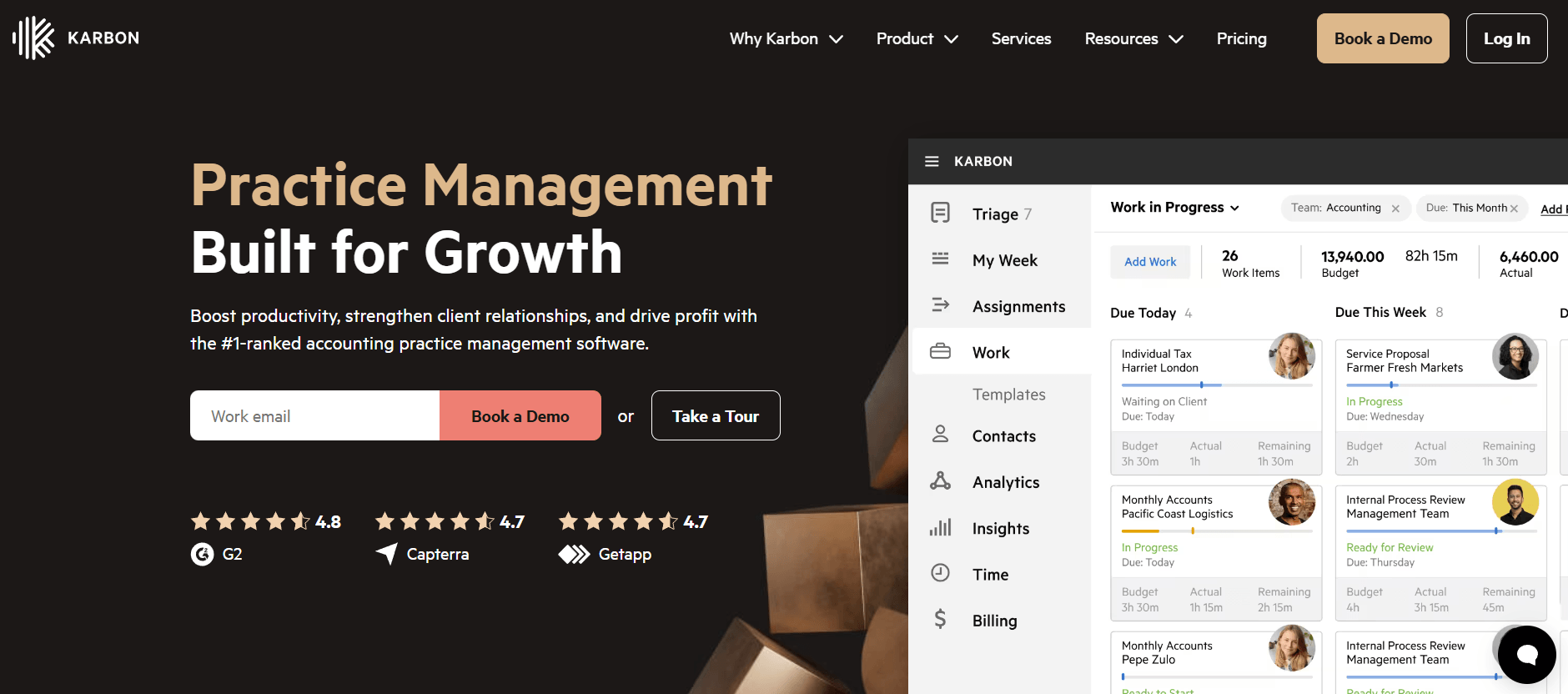
Karbon was built around a core belief: email is the heartbeat of accounting firm communication, and practice management software should embrace rather than fight this reality. Founded in 2014 by Stuart McLeod, John Freeman and Ian Vacin, all with deep roots in the accounting software industry from their time at Xero, Karbon emerged from frustration with tools that treated email as separate from workflow.
Source: Karbon
Their solution was Triage, a feature that transforms the email inbox into an actionable command centre where every message can be assigned, commented on, or converted into tasks within the context of client work.
This email-centric philosophy extends throughout the platform. Every client interaction, whether an email, a note, or a completed task, appears on unified activity timelines. Team members can comment internally on emails without forwarding, keeping discussions contextual and reducing inbox clutter. The Karbon AI layer adds sophistication by summarising long email threads, drafting responses, and prioritising messages based on urgency and sentiment.
Uku took a different path. Founded in Estonia by Rain Allikvee and Jaanus Lang, childhood friends whose mothers were accountants, and built from the ground up to be international, Uku emerged from watching firms run client work in spreadsheets and email and lose billable hours because nobody tracked them. Rather than building around email, the founders built around tasks and a modular approach. The three-level structure (task templates to client task plans to individual tasks) makes workflow automation the foundation, not an afterthought.
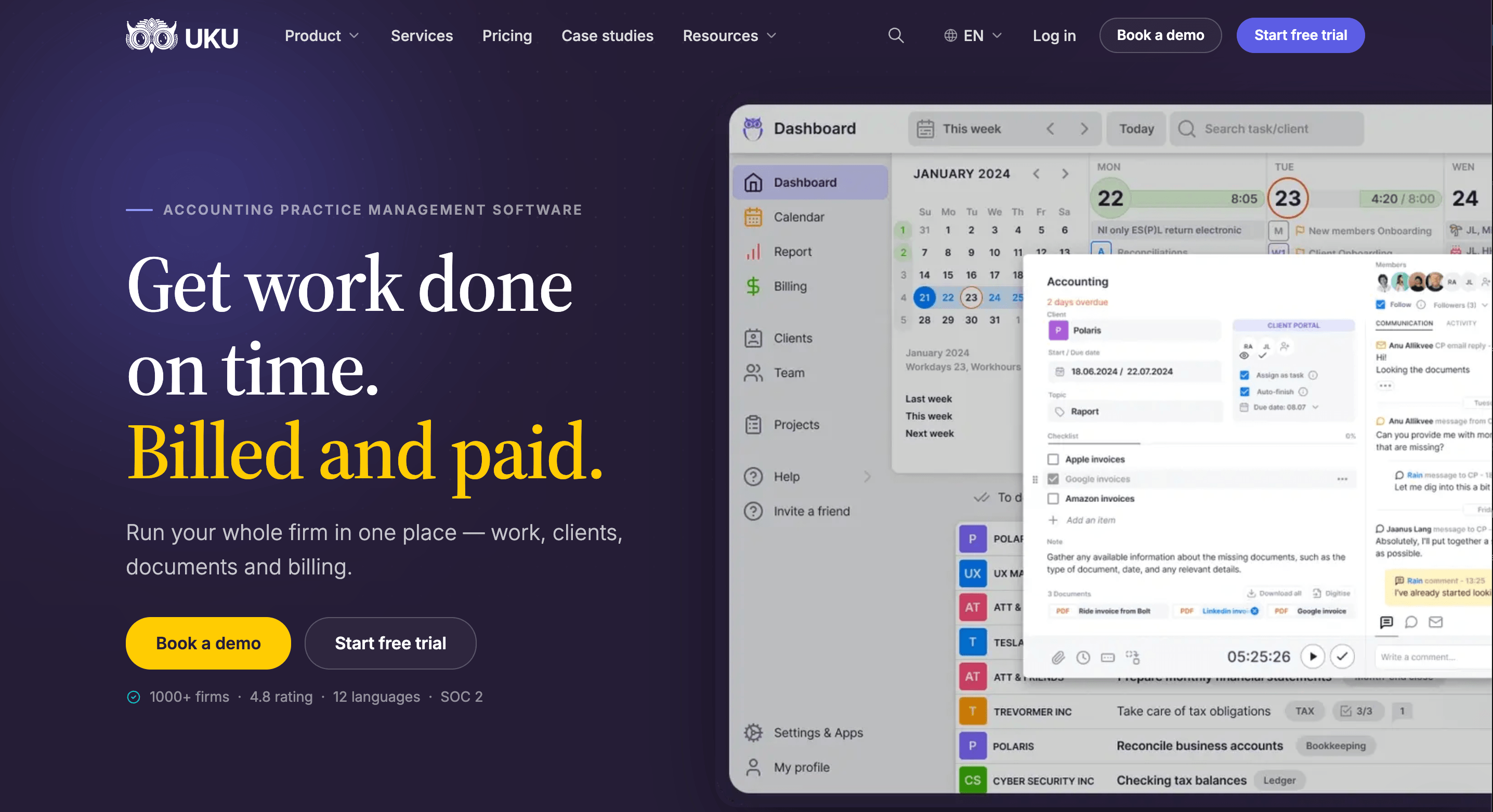
Uku’s philosophy centres on making mundane work disappear through automation, while giving firms the flexibility to implement the software step by step. Like a phone where you start with the basics and add apps as needed, a firm can begin with just CRM and tasks, then activate automated billing, the client portal, or document management as it grows. This modular deployment is one of the most common reasons firms switch to Uku from heavier platforms: it removes the need for substantial upfront configuration and training.
For firms transitioning from spreadsheets, Uku offers a direct path: import the Excel file, and the automated plans are ready to go. That route resonates with firms hesitant to try new software after a bad implementation elsewhere.
What Karbon does better: email Triage, AI and integrations
Karbon has positioned itself as the market leader in accounting practice management, ranking #1 on G2 in its category and serving customers in 34 countries. Backed by $101.5M in total funding, that reputation stems from a comprehensive approach to connecting teams, clients and workflows.
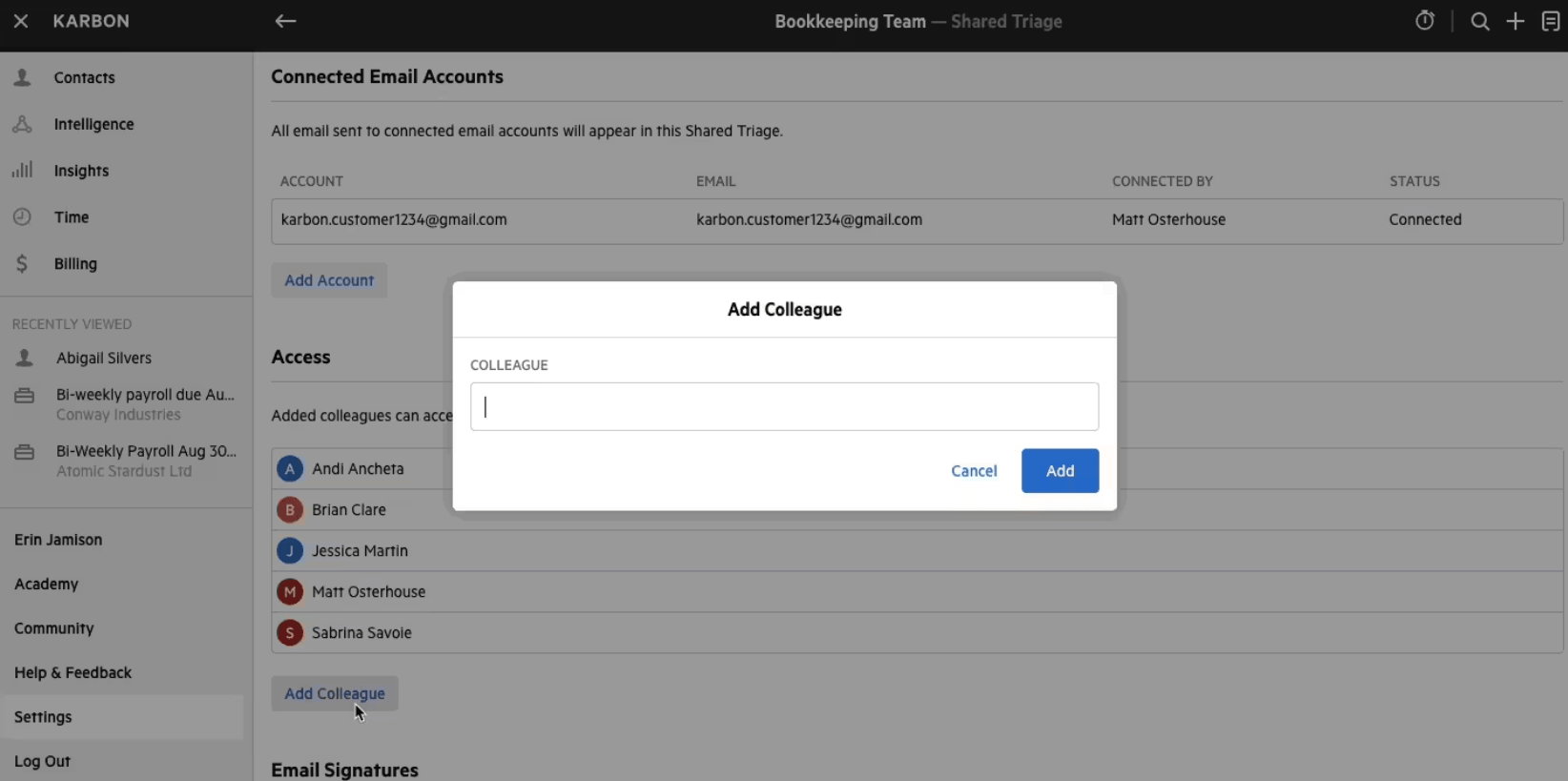
The Triage feature is Karbon’s most distinctive capability. Unlike a traditional email client, Shared Triage creates a shared view where team members can see all firm communication, assign emails to colleagues, and turn messages into actionable work items. This solves a real problem in accounting firms: the knowledge trapped in individual inboxes. When someone is out sick or leaves the firm, emails added to public timelines and auto-shared emails stay accessible to the team.
Source: Karbon
Karbon’s AI capabilities (branded as Karbon AI and evolving toward “Practice Intelligence”) provide real productivity gains:
- Email summarisation distils long threads into bullet-pointed summaries
- Email draft generation creates contextual replies based on conversation history and user prompts
- Inbox prioritisation highlights urgent messages based on sentiment and tone
- AI workflow agents (on the roadmap) will automate actions, fetch data and communicate with clients
The Practice Intelligence dashboards offer 12 pre-built reports covering billing, budgets, realisation, work-in-progress and team capacity. For firms needing custom analysis, Karbon provides direct access to a Snowflake data warehouse, allowing integration with tools like Power BI, though custom reporting requires separate Power BI licences starting from $14 per user per month.
Karbon’s integration ecosystem includes over 70 native connections with major platforms including Gmail, Outlook, Xero, QuickBooks, Google Drive, OneDrive and SharePoint, plus extensive connectivity through Zapier. The platform also connects with proposal tools like Ignition to automatically create work items when clients accept engagements.
However, Karbon’s power comes with complexity. The platform requires a demo before starting, has no self-serve free trial, and offers paid onboarding packages for certain plans. Reviewers on G2 report needing dedicated time to learn the system, particularly to leverage advanced features like workflow automators and Practice Intelligence dashboards. The billing implementation alone spans 3–4 weeks of collaborative setup with expert-led configuration, data imports and training sessions.
“Karbon makes it easy to keep my team organized and on the same page. The ease of use is impressive once you get familiar with the system. The initial implementation does take some time, and there's definitely a learning curve when first setting up workflows. While the platform is powerful, it can feel overwhelming at first with so many features.”
For a deeper look at the platform on its own terms, read our Karbon review, and for the full tier-by-tier breakdown, our Karbon pricing guide.
What Uku does better: modular setup, automated billing, client portal
Uku has built its reputation on being a system your team will actually enjoy using. The platform serves 1,000+ accounting firms across 25+ countries with support for 12 languages and multi-currency billing in EUR, USD and GBP, and it is bootstrapped rather than venture-funded.
The standout feature is Uku’s approach to workflow automation through its three-level structure:
- Task templates define standardised processes for firm services
- Client task plans apply these templates to individual clients with customisations
- Tasks are generated automatically from recurrence settings (weekly, monthly, quarterly, yearly) or even from client custom fields
This hierarchy lets firms standardise their processes while keeping flexibility for individual client needs. Pre-built templates for common accounting workflows get firms started quickly, and the results show up in the reviews.
“Now that reminders appear automatically on our dashboards, we save around 20% of time spent on task management.”
“1 year with Uku and we can serve 38% more clients. Couldn't imagine life without Uku.”
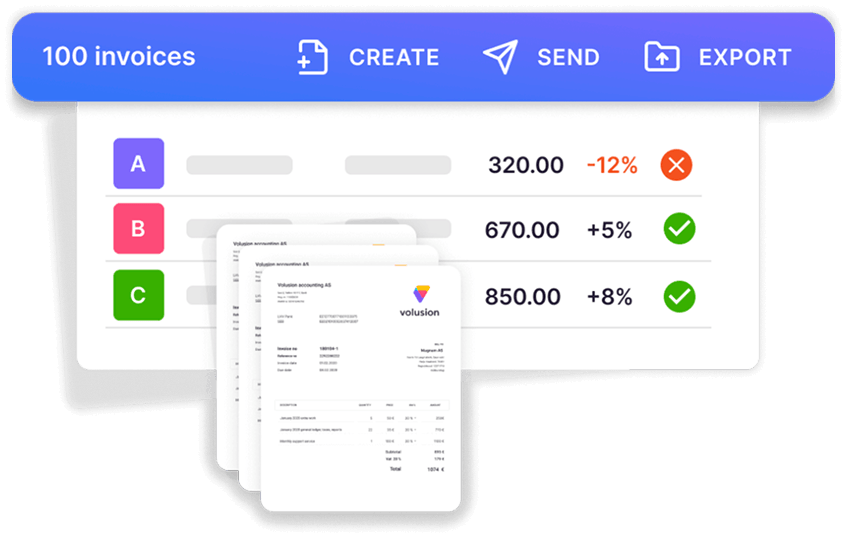
Automated billing is where Uku particularly excels, and it is the platform’s primary competitive advantage. The system supports sophisticated pricing configurations including complex price lists based on quantity, time, material and ranges, with different rates for different periods. Rounding rules can be set by entry, team, client or month, so a one-minute unplanned call can be billed automatically as 15 minutes. Everything runs through “contracts”: rules are set up once, then time tracking calculates billable amounts in real time. The result is that what takes days of invoicing becomes a 30-minute process:
- Automated data collection from time tracking and custom fields
- Invoice generation from predefined contracts with flexible pricing models (time-based, fixed-fee, item-based or mixed)
- Bulk sending of invoices to clients
- Direct export to integrated accounting software including Xero, QuickBooks, e-conomic and others
The client portal is Uku’s second major differentiator. Unlike traditional portals where tickets must be connected to work items, Uku’s portal mirrors the exact same task on both sides. Clients and accountants work on the same item with all communication, actions, documents, logs and time tracking in one place.
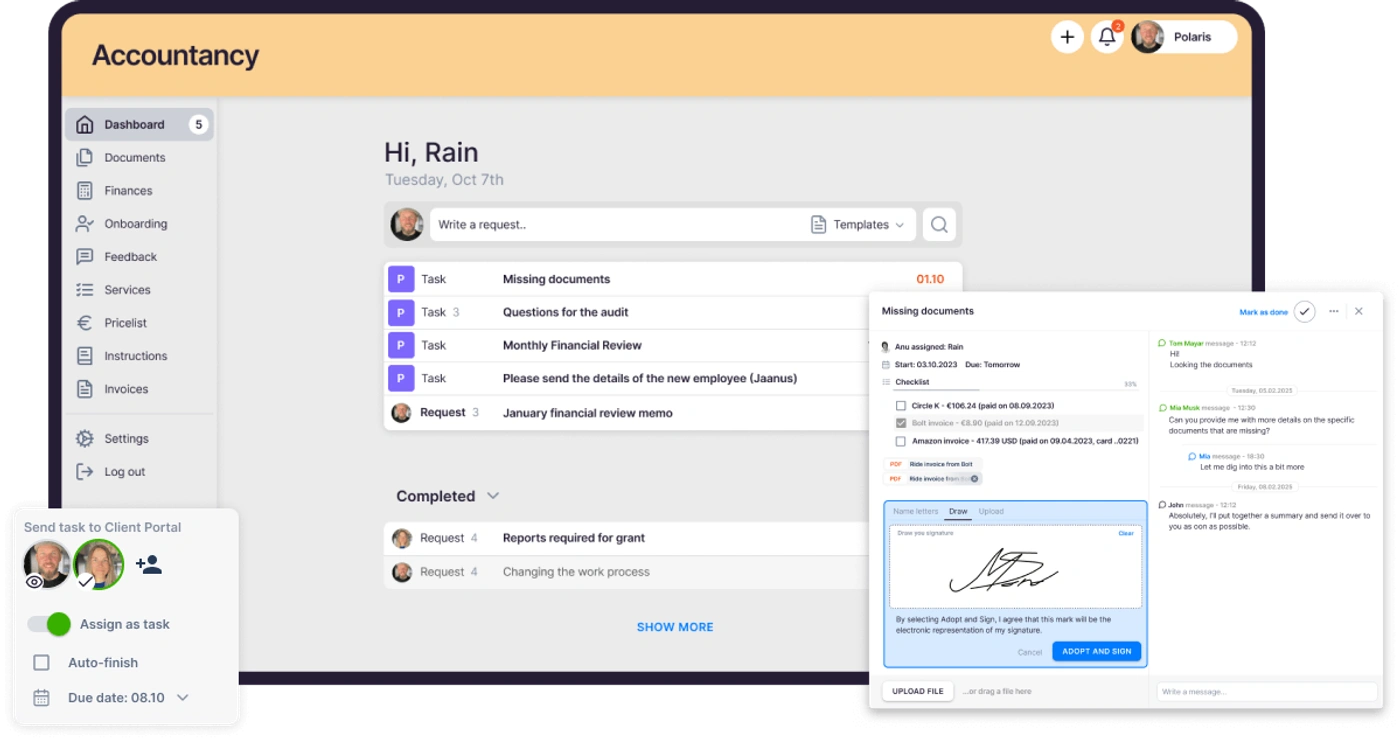
When clients make requests through the portal, notifications appear on the accountant’s dashboard, and they can immediately start tracking time or communicating within that same task. The portal includes company branding on Team plans and above at no additional cost: logo, colours, custom domain, and personalised menu links for each client.
Beyond task management, the portal provides document management, financial reports, onboarding with forms, and client feedback collection. The mobile-responsive web app lets clients respond to requests from anywhere.
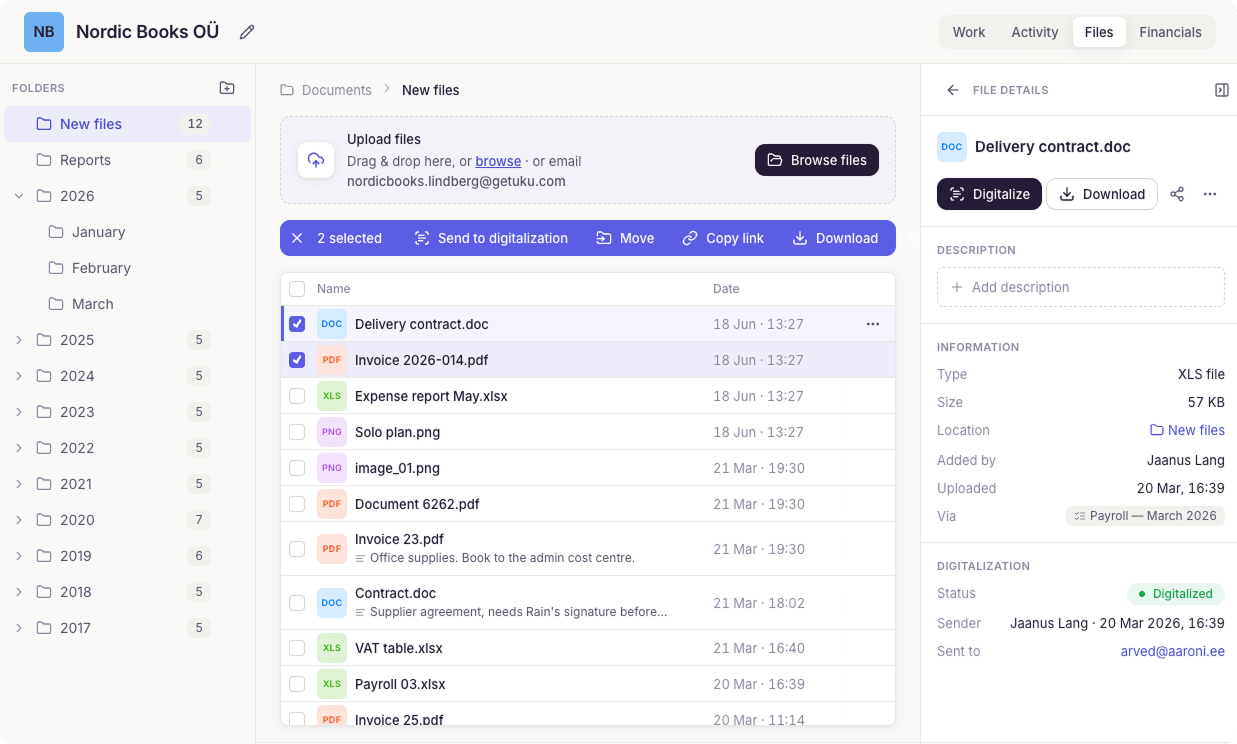
Uku’s onboarding reflects its modular philosophy. Firms can start working on day one, activating only the modules they need and scaling up as they grow. New users receive 90 minutes of complimentary onboarding assistance, and the 14-day free trial provides full Elite access without a credit card. The Solo plan ($19 per month, one accountant, 20 active clients) gives a freelancer the same toolkit at a price that matches the workload, and assisted import is available across all plans, making the transition from Excel or another system straightforward.
Where Uku shows limitations is in inbox AI. While the platform offers effective automation through rules and templates, and its MCP server lets an AI assistant operate the system, it lacks the AI-powered email summarisation, draft generation and intelligent prioritisation that Karbon provides. Email triage is on Uku’s roadmap, not shipped. For firms drowning in email, this gap matters today.
Karbon vs Uku workflow automation
How each platform handles workflow automation illustrates their fundamental design differences.
Karbon’s workflow system centres on work items (jobs) that contain everything related to a piece of client work: emails, notes, tasks and documents. The Kanban board visualises all firm work, with cards that can be moved between status columns. Work templates standardise processes, and the Work Scheduler automates creation of recurring work items.
The differentiation comes in how Karbon handles the connection between email and workflow:
- Emails can be assigned, added to work items, or turned into actionable tasks
- Automated client reminders send follow-ups for outstanding requests
- Task automators trigger actions when conditions are met (like updating work status when all tasks complete)
- The “My Week” dashboard shows each user’s personalised view with items organised by priority
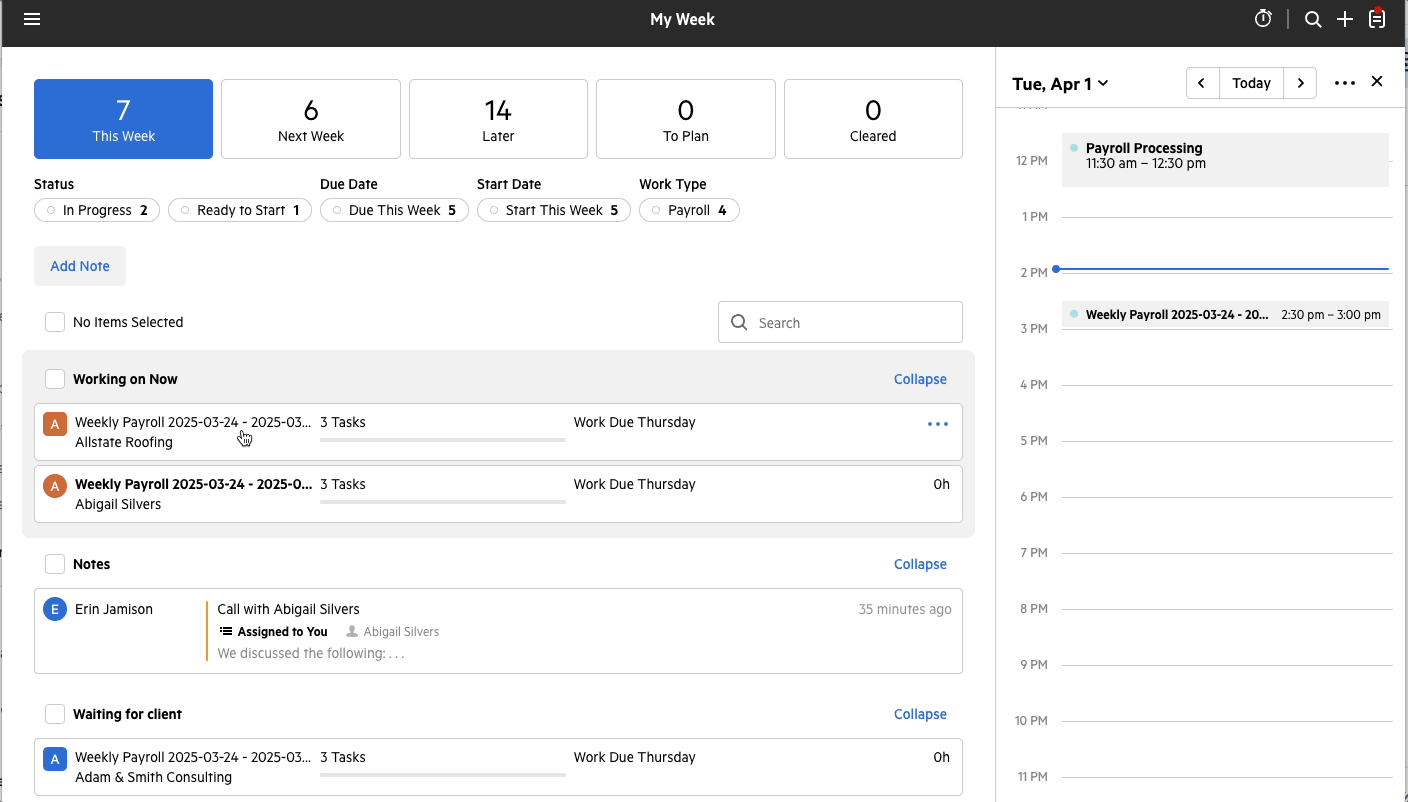
Source: Karbon
Karbon’s Client Groups feature lets a firm manage related entities (like family businesses with multiple companies) under a unified view, seeing all work across the group in one place. Note that automatic client reminders and task automators are Business-plan features; the Team plan excludes them.
Uku’s workflow system operates through the task template hierarchy and a modular approach that lets firms choose what to implement and when. A master template contains all recurring tasks for a service type. When applied to a client, it creates a client task plan that can be customised with specific due dates, assignees and variations. The system then generates tasks automatically from recurrence settings. Firms can start with just CRM and task management, then gradually add automated billing, the client portal, document management and other modules, without reconfiguring the system.
Uku’s approach includes:
- Dynamic due dates calculated from rules (like “6th working day of the month”)
- Task dependencies preventing work from starting until prerequisites complete
- Subtask checklists breaking complex tasks into verifiable steps
- Custom fields tracking client-specific data that flows into reports and billing
- Flextime management handling overtime, vacations and work-life balance
All communication stays within tasks, solving the problem of information being trapped in individual email accounts. The dashboard offers both list and calendar views, with filters that can be saved for quick access. Bulk operations allow adding time to multiple tasks simultaneously or marking many tasks complete at once.
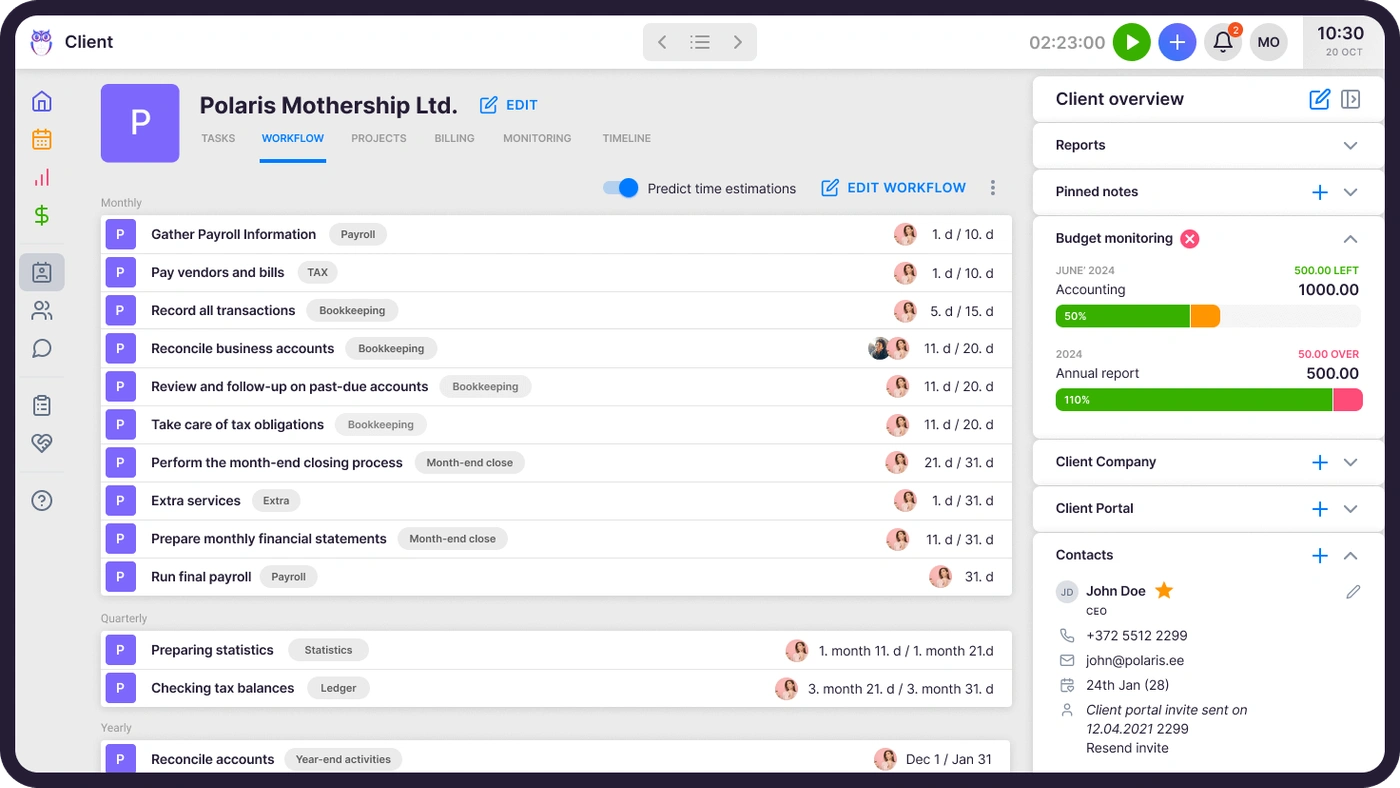
Both platforms enable significant automation, but the emphasis differs: Karbon optimises how email becomes workflow, while Uku optimises how templates become tasks, with the added flexibility of modular deployment.

Karbon vs Uku client portal and CRM
Client relationship management is a critical function for both platforms, though each approaches it differently.
Karbon’s client management emphasises the activity timeline as the source of truth. Every email, note, task and completed item appears chronologically, creating a complete history accessible to anyone on the team. Custom fields and contact segments allow tracking firm-specific data and enable targeted communication to groups of clients.
The Karbon client portal (called “Karbon for Clients”) provides:
- Password-less access via magic links
- Secure document sharing with enterprise-grade encryption (AES-256)
- Client task assignment with automated reminders
- eSignature capabilities with credits at $1 each
- Mobile apps for iOS and Android
Branding options include logo and colour customisation, though branded client portals are a Business-plan feature. Some users have noted the client portal could be more feature-rich compared to the internal team functionality.
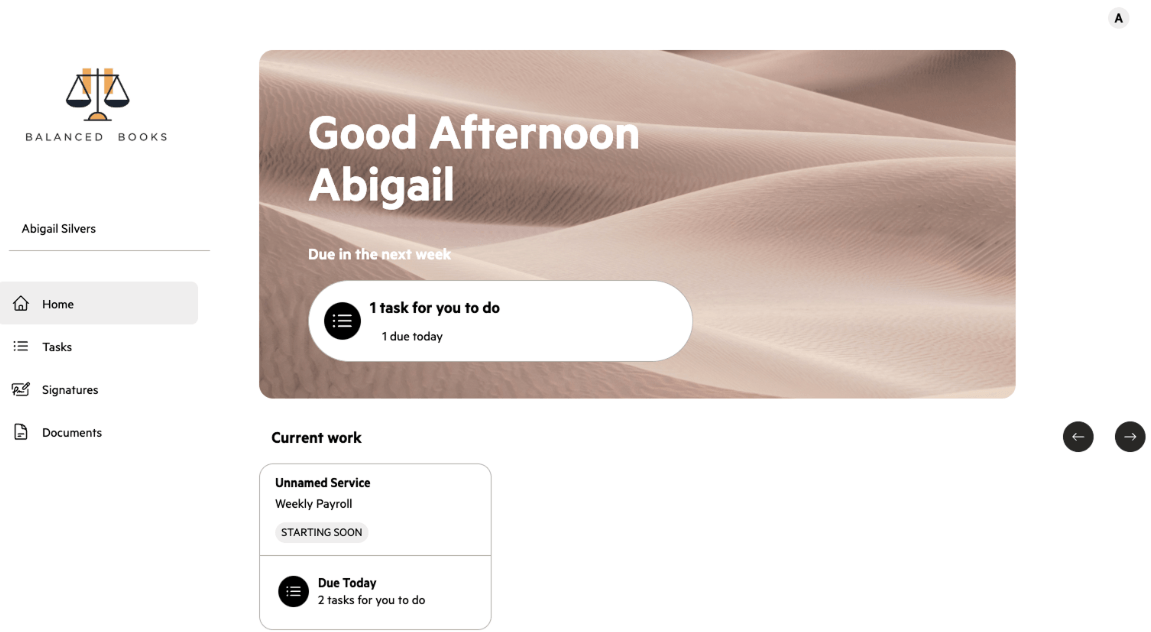
Source: Karbon
Uku’s client management builds on a flexible CRM foundation with highly customisable client profiles. The Companies House integration (for UK firms) auto-fills client details from statutory records, and the accounting integrations sync clients with Xero, QuickBooks, e-conomic, Fortnox, Tripletex, FreeAgent, Merit Aktiva, SmartAccounts and 360 Księgowość.
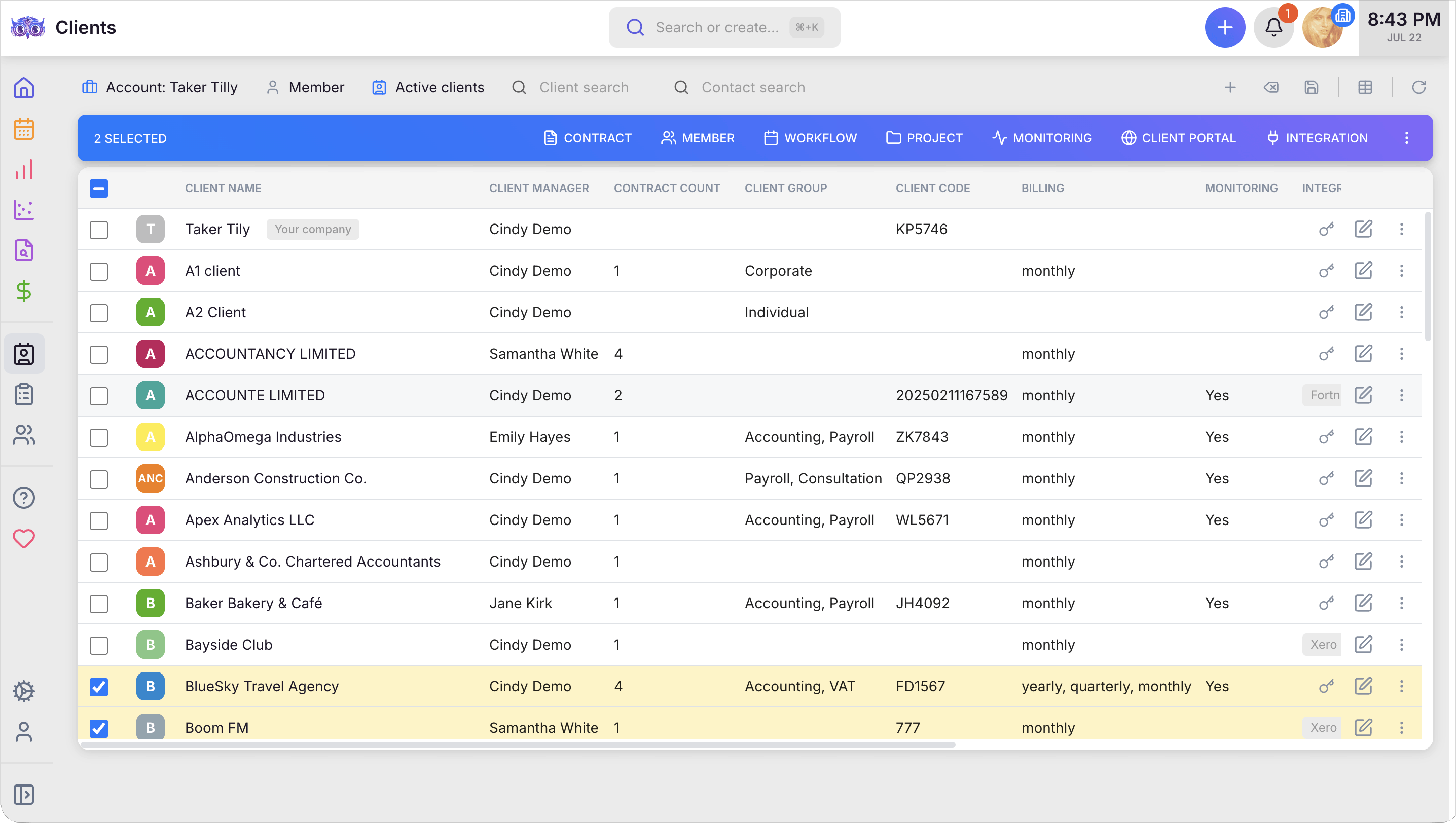
The Uku client portal differentiates through its architecture and breadth of capabilities:
- Mirrored task system where clients and accountants work on the exact same item, with all communication, actions, documents, logs and time tracking in one place
- Company branding included in Team plans and above (logo, colours, custom domain)
- Personalised menu links unique to each client (Elite)
- No additional charge for unlimited clients
- Document management and document requests with easy upload
- Financial reports shared directly through the portal
- Onboarding with forms for new clients
- Client feedback collection
- E-signatures included in the Elite plan
- Task assignment with automated reminders
- Mobile-responsive web app for on-the-go access
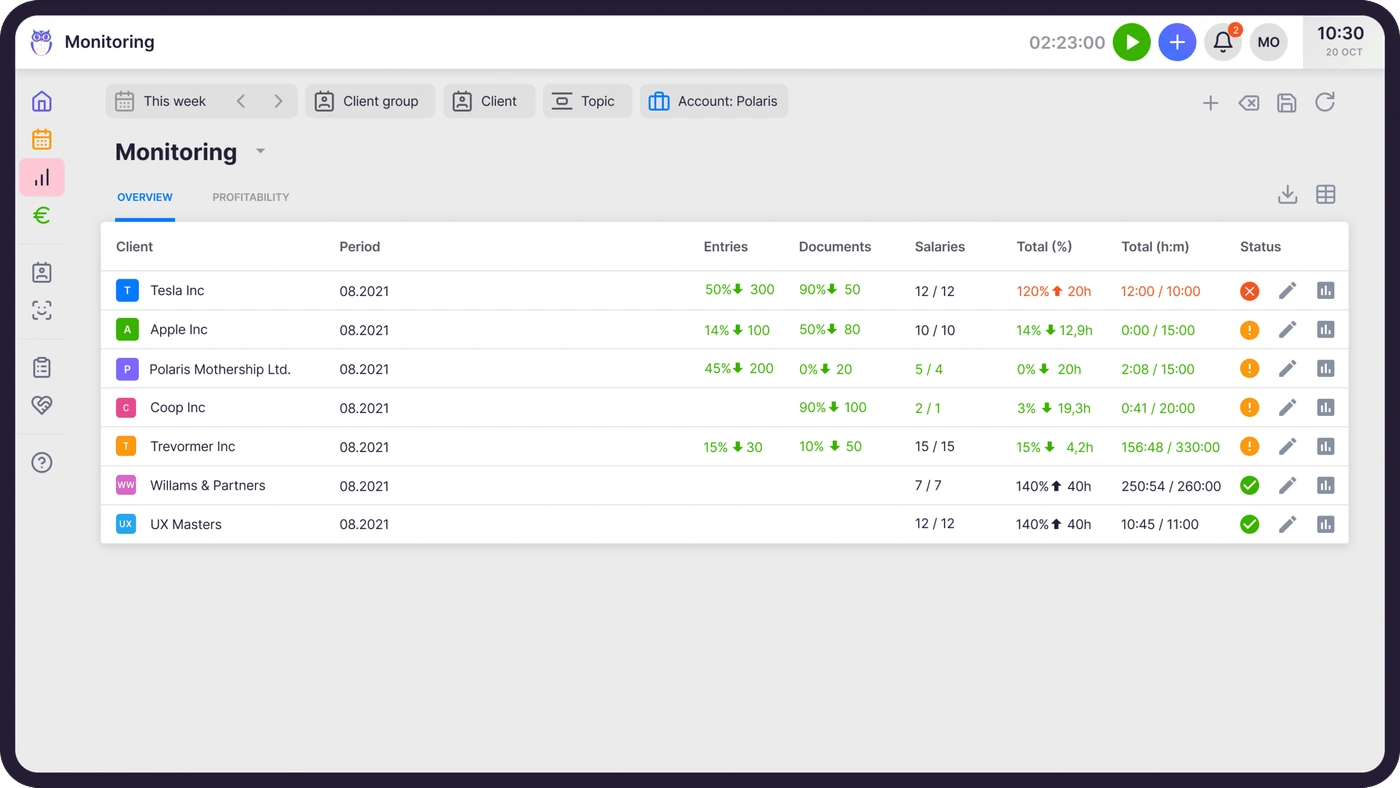
Uku’s agreement monitoring automatically compares agreed work volume against actual time spent, showing which client relationships are profitable and which need renegotiation. This is how firms uncover outdated agreements: the cases where they were billing for eight hours while employees were doing twenty.
Karbon vs Uku billing and invoicing
Both platforms recognise that billing efficiency directly affects firm profitability, though their implementations differ significantly in setup time and sophistication.
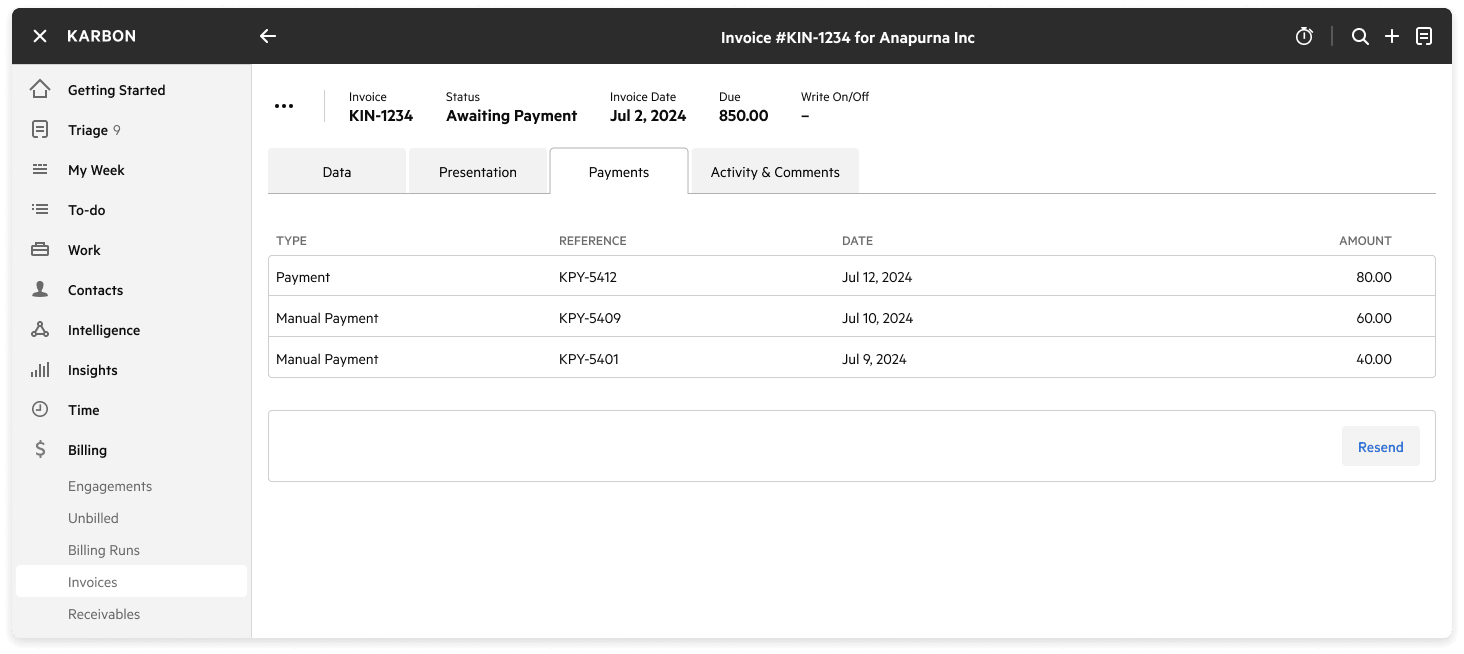
Karbon’s billing and payments feature (launched in early 2024) integrates with Stripe for payment collection. The system supports time-and-materials, fixed-fee and recurring billing models. Key capabilities include:
- Time and budget tracking against projects
- Customisable invoice templates with firm branding
- Auto-pay options where clients save payment details
- Surcharge options to pass card processing fees to clients
- WIP, realisation and aged receivables dashboards
Source: Karbon
Payment processing fees run 2.6% + $0.30 for US Visa and Mastercard transactions, and 1% + $0.30 (capped at $5) for ACH. eSignature credits cost $1 each when purchased in bundles. Notably, Karbon’s billing implementation spans 3–4 weeks of collaborative setup including kick-off meetings, configuration deep dives, data imports and training sessions.
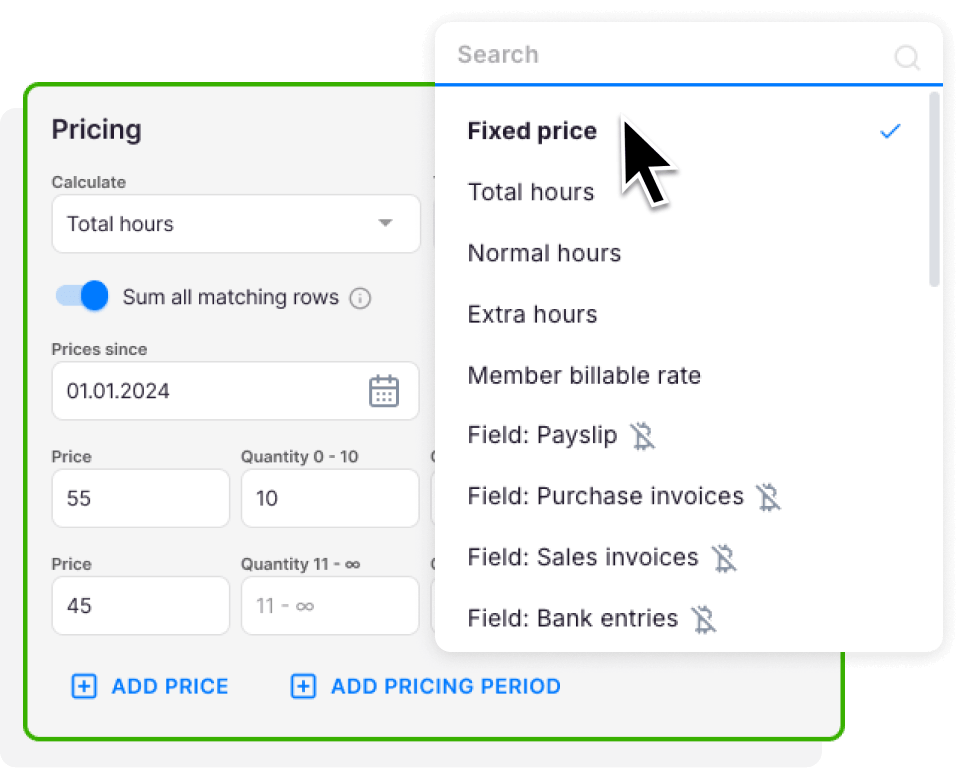
Uku’s billing automation is the platform’s primary competitive advantage, reducing invoice preparation from days to approximately 30 minutes. The system goes beyond basic billing with contract-based automation: rules are set up once per client, then time tracking calculates billable amounts in real time. Pricing models include:
- Time-based billing with hourly rates
- Fixed-fee billing for predetermined prices
- Item-based billing for individual services
- Mixed models combining multiple approaches
- Complex price lists based on quantity, time, material and ranges, with different rates for different periods
- Advanced rounding rules configurable by entry, team, client or month (for example, a one-minute unplanned call automatically billed as 15 minutes)
Integration with Xero, QuickBooks, e-conomic and other accounting platforms allows direct export of approved invoices. The billing system also tracks both sales prices and actual cost prices: if an employee costs €30 an hour but bills at €45, managers see real-time profitability. When employees work eight hours but only six are billable, the system shows whether the issue is employee efficiency, client difficulty or pricing structure.
The contrast in billing setup is stark: Karbon requires weeks of implementation support, while Uku’s contract-based system can be configured and operational on day one.

Karbon vs Uku time tracking
Accurate time capture underpins profitability analysis and billing accuracy for both platforms.
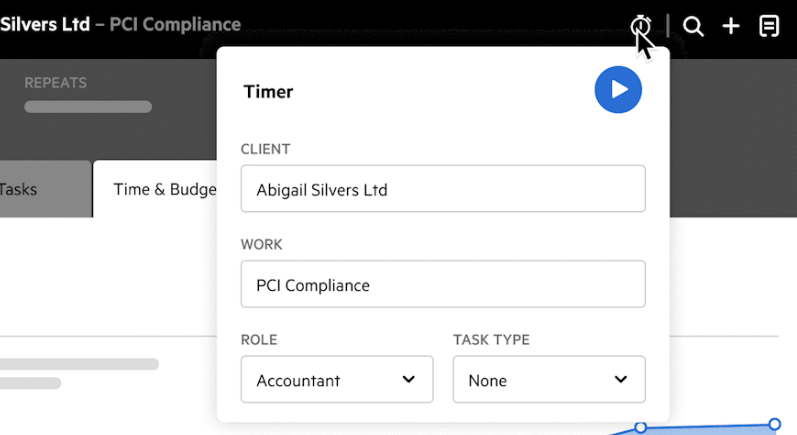
Karbon’s time tracking integrates into daily workflows with a timer accessible from anywhere in the app. The platform links time entries to specific clients and projects, with reporting through Practice Intelligence. The Budget Dashboard helps understand employee efficiency and client profitability, while the Realization Dashboard identifies which clients generate healthy margins.
Key features include:
- Timer and manual entry options
- Budget estimates with variance tracking
- Configurable billing rates
- Realisation reports showing effective rates for fixed-fee work
Source: Karbon
Uku’s time tracking is designed for speed, with most actions taking one click. Multiple capture methods include:
- Stopwatch for real-time tracking
- Manual entry with suggested start times based on previous tasks
- Bulk time allocation distributing time across multiple tasks
- Time estimations with automatic logging if no actual time is entered
- Mini Uku browser plugin for tracking without leaving other websites
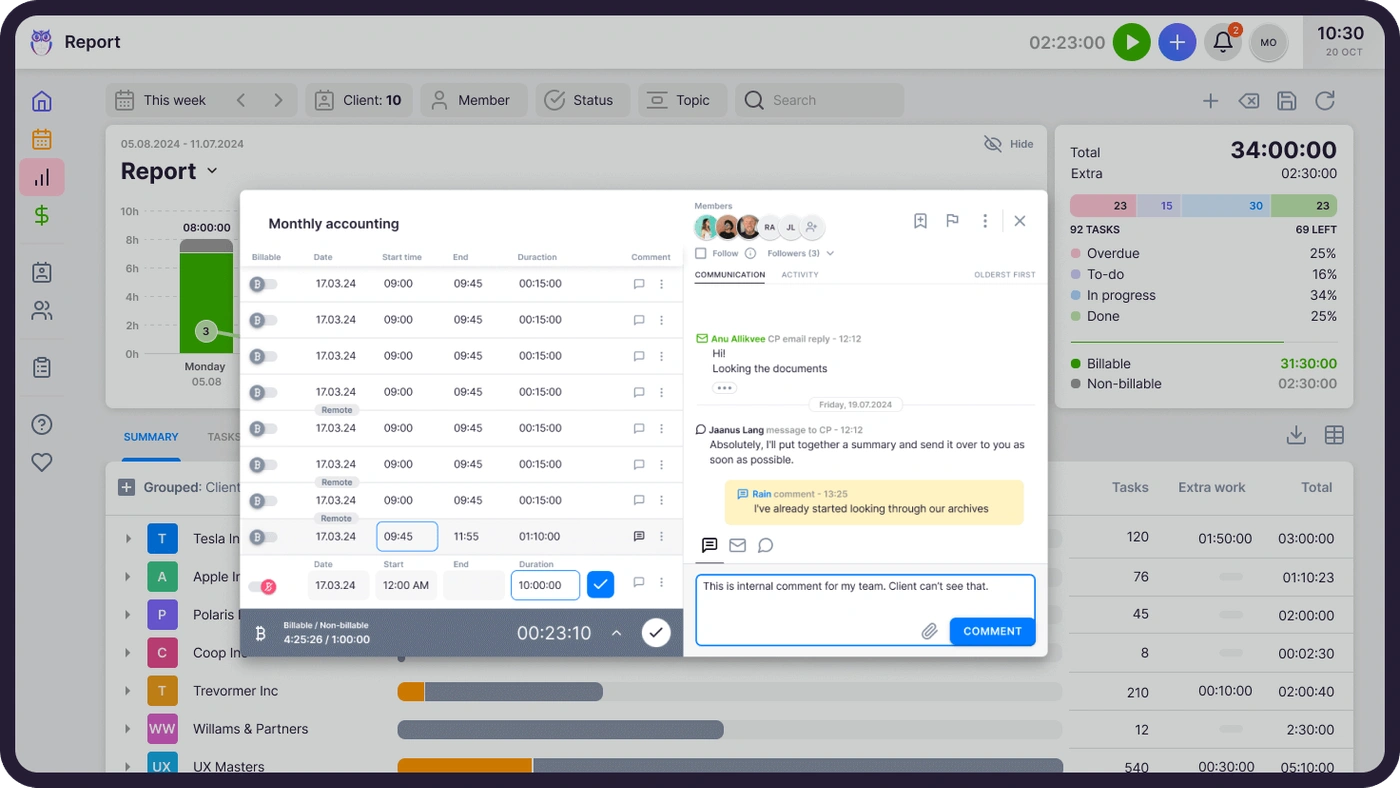
Uku’s BI Reporting provides real-time visual reports on profitability, automatically comparing tracked time against contracted hours and alerting managers before losses compound, so firms stop discovering problems 30 days too late. The flextime management feature addresses work-life balance by tracking overtime and helping prevent burnout.
Both platforms provide billable versus non-billable tracking and flow time data into invoicing. The notable differences are Uku’s browser plugin for tracking across any website, its one-click design, and its flextime capabilities.
Karbon vs Uku reporting and analytics
Data-driven insights separate good practice management from great practice management.
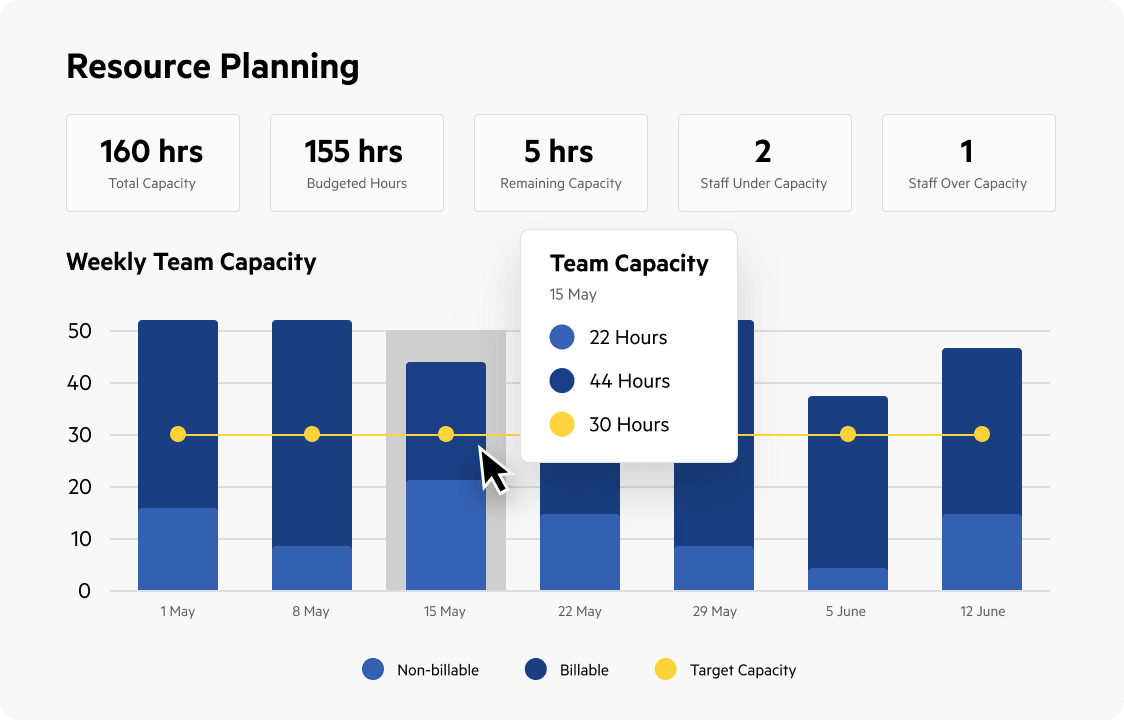
Karbon’s Practice Intelligence provides 12 pre-built dashboards covering:
- Billing lifecycle (WIP to cash collection)
- Budget efficiency and client profitability
- Client communication patterns
- Email volume and response times
- Realisation rates
- Resource planning and capacity
- Revenue tracking
- Time distribution
- Work status and bottlenecks
Source: Karbon
Data refreshes daily at 8 AM local time. For custom needs, Karbon offers direct Snowflake connector access, allowing firms to build reports in Power BI or other business intelligence tools. However, custom reporting requires separate Power BI licences starting from $14 per user per month, an additional cost on top of the Karbon subscription. This flexibility enables sophisticated analysis beyond the pre-built dashboards, but it adds to the total cost of ownership.
Uku’s BI Reporting offers comprehensive views with deep filters, saved report templates, and three levels of depth: summary, tasks and time. Reporting capabilities include:
- Team performance and workload distribution
- Client profitability analysis with real-time insight into cost versus billing rates
- Business analytics reports with detailed performance metrics
- Task status overviews (done, ongoing, overdue)
- Time usage by client, task and employee
- Custom field data integration into reports
- Budget tracking with Client Budgeting (Elite plan)
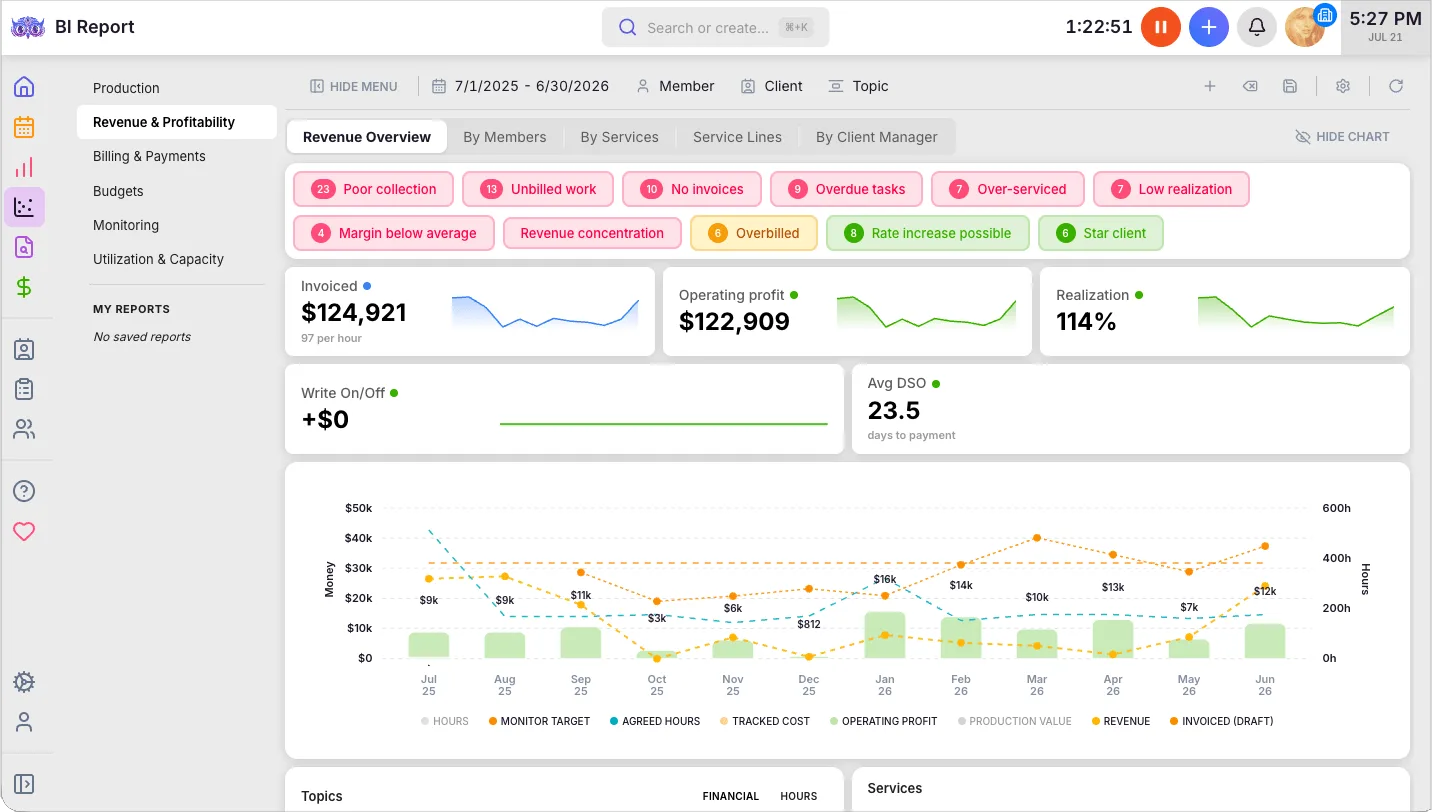
The actionable audit log tracks all system changes with the ability to restore deleted tasks. A public API enables data extraction for external analysis in tools like Power BI, without additional per-user licences from Uku’s side.
Karbon offers more pre-built dashboards and data warehouse access for custom reporting, though at additional cost. Uku provides real-time BI Reporting with built-in business analytics and profitability insights included in the subscription.
“Uku gives you data you didn't know you needed”
Karbon vs Uku pricing
The pricing structures reveal each platform’s intended audience and approach to accessibility. Prices below come from Karbon’s pricing page and Uku’s pricing page.
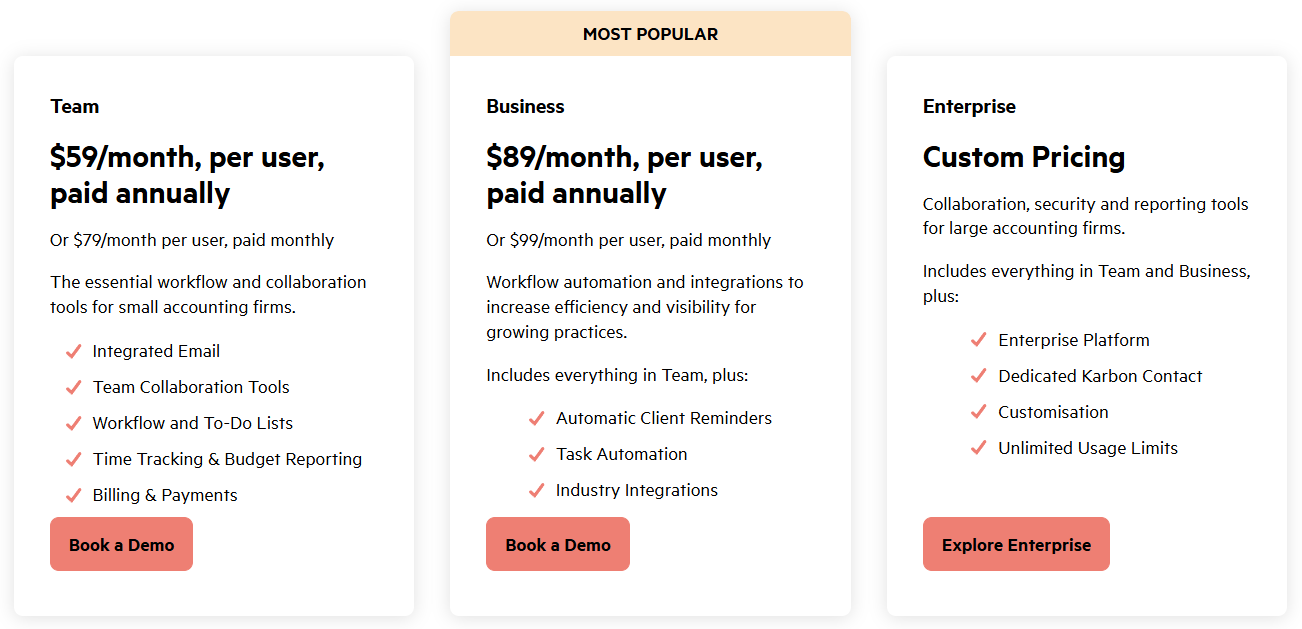
Karbon offers three tiers:
- Team: $59/user/month (annual) or $79/user/month (monthly)
- Business: $89/user/month (annual) or $99/user/month (monthly)
- Enterprise: custom pricing
Monthly billing is only available to teams of four or more, so a smaller firm commits to an annual contract. The Team plan limits work templates (40), contact profiles (1,000) and teams (3), and it excludes automatic client reminders, task automation, branded client portals and industry integrations. The Business plan raises the limits and adds automation and advanced reporting. Enterprise adds dedicated support, custom integrations and managed data import.
Additional costs include payment processing fees (2.6% + $0.30 for cards, 1% + $0.30 for ACH), eSignature credits ($1 each in $100 bundles), and optional Power BI licences ($14/user/month) for custom reporting. A trial requires booking a demo first, and onboarding fees may apply to higher tiers.
Source: Karbon
Uku offers four plans with pricing in EUR, USD and GBP:
- Solo: $19/month (annual) or $25/month (monthly), one accountant, 20 active clients
- Team: $38/user/month (annual) or $49/user/month (monthly)
- Elite: $48/user/month (annual) or $62/user/month (monthly)
- Enterprise: $88/user/month (annual)
Solo includes the same toolkit as Team, capped to one member and 20 active clients: CRM, time tracking, billing, workflow automations, all accounting integrations, the client portal, document management, client budgeting and e-signatures. Team adds unlimited members and clients, teamwork tools, projects, access management and company templates. Elite adds BI Analytics, workforce management, the actionable audit log, the public API, Uku MCP, Zapier, Google Drive/OneDrive/Dropbox document sync, e-signatures and a custom client portal menu. Enterprise adds custom integrations, a dedicated account manager, assisted client import and pay-by-invoice. Assisted import is available on every plan.
A 14-day free trial with full Elite access requires no credit card. Both annual and monthly billing are available at any team size, with a 23% annual discount across all paid plans, so a firm can test the system without a large upfront commitment.
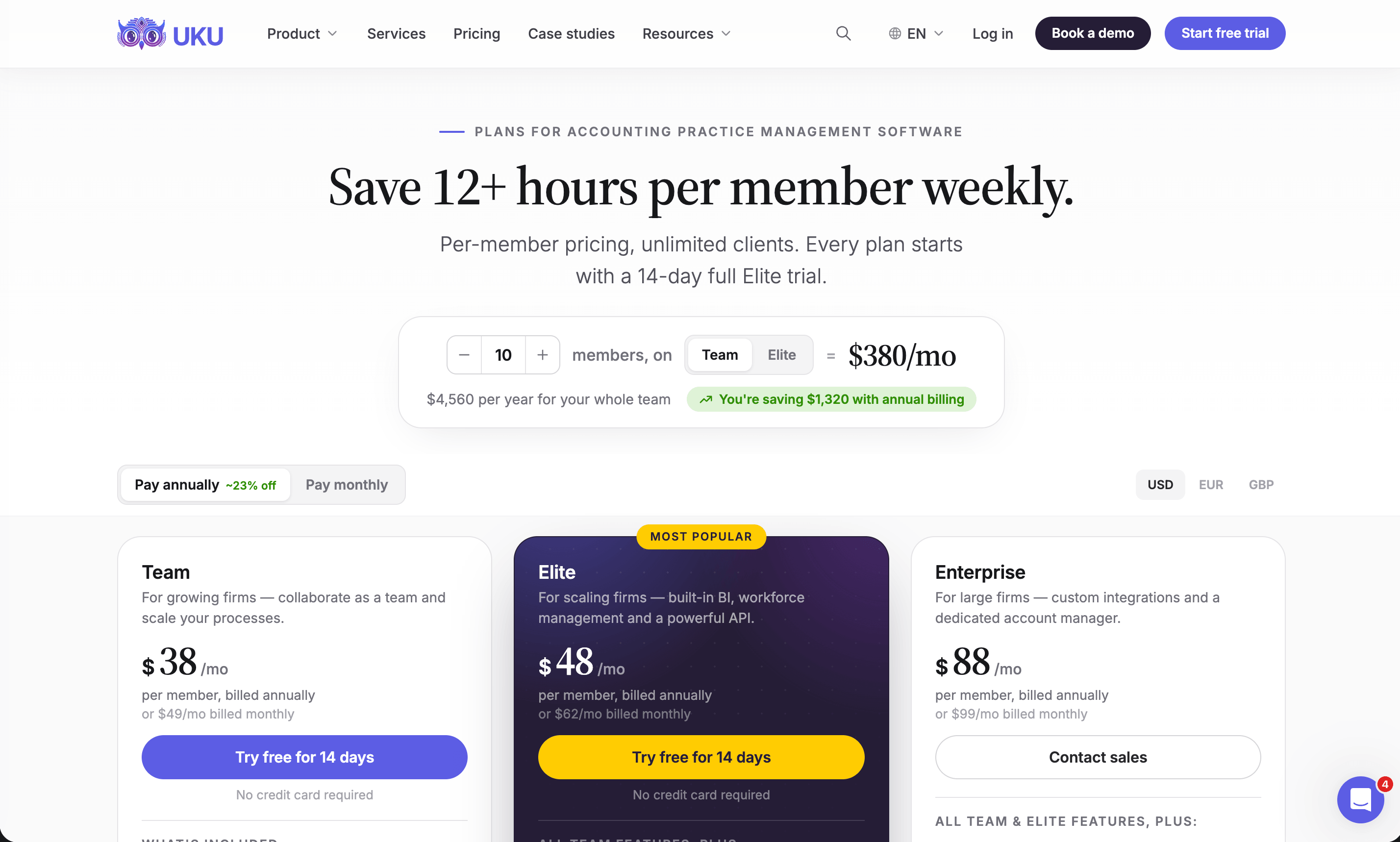
The pricing comparison is notable: a 10-person firm pays approximately $590–$890 per month with Karbon versus $380–$480 per month with Uku on the two plans most firms choose. When factoring in Karbon’s potential onboarding fees, Power BI licence costs and eSignature add-ons versus Uku’s included features (the integrated client portal, BI Reporting and unlimited clients), the total cost of ownership difference widens further.
Is Uku better than Karbon? Where firms replace it, and where they should not
“Better than Karbon” is the question firms actually type, so here is the honest split rather than a verdict.
Uku is better than Karbon at:
- Billing. Contract-based pricing set once per client, tracked time priced in real time, a month’s invoices generated, sent and exported in one batch, and cost-versus-billing-rate profitability on every client. Karbon’s billing module is a 2024 addition with a 3–4 week implementation service and Stripe fees on every card payment.
- Time to value. A firm is working in Uku on day one with 90 minutes of included onboarding; Karbon’s own G2 reviewers describe an implementation period and a learning curve before the platform pays off. For a firm that needs to onboard new accounting staff quickly, a task list generated from a template is faster to learn than a shared inbox with automators.
- Price, and pricing flexibility. $48 against $89 per user on the plans most firms compare, monthly billing at any team size instead of teams of four or more, and BI Reporting, e-signatures and unlimited clients included instead of metered.
- The client portal. The same task on both sides, firm branding on Team plans and above, and no per-client charge.
- International firms. 12 languages, invoicing in EUR, USD and GBP, and nine accounting integrations from QuickBooks and Xero to e-conomic, Fortnox and Tripletex.
Karbon is better than Uku at:
- Email. Triage, shared inboxes, internal comments on emails and Karbon AI summaries and drafts. Uku has email management and automated client emails, but not an AI that reads your inbox; email triage is on Uku’s roadmap, not shipped.
- Integration breadth. 70-plus native integrations plus Zapier on Business, against Uku’s accounting-software integrations, Google Drive/OneDrive/Dropbox, Zapier on Elite and an open API.
- Pre-built analytics for large firms. Twelve Practice Intelligence dashboards and a Snowflake data warehouse, if the firm will pay for Power BI on top.
So a firm replaces Karbon with Uku when the pain is billing, price, onboarding time or a portal clients actually use. A firm stays on Karbon when its bottleneck is email volume across a large team and it has the budget and the implementation capacity to absorb the platform. Both of those firms are making the right call.
Karbon vs Uku: which should you choose?
The choice between Karbon and Uku depends on your firm’s priorities, resources and working style.
Choose Karbon if:
- Email management is a significant pain point and you want it integrated into workflow
- You need enterprise-grade features with AI-powered summaries and drafting today
- Your firm has complex operations requiring sophisticated Practice Intelligence dashboards
- You can invest time in a comprehensive implementation process
- You value having 70+ native integrations plus Zapier connectivity
- Your budget accommodates $59–$89+ per user monthly plus potential add-on costs, and your team is large enough to absorb it
- You want optional dedicated implementation support
- Your team collaborates heavily through internal email discussions
Explore Karbon’s enterprise practice management platform.
Choose Uku if:
- You want to minimise your team’s admin time with one-click actions and automated processes
- You value fast onboarding and modular scaling: start with what you need, add modules as you grow
- You need automated billing that reduces invoicing from days to 30 minutes
- You want a fully integrated client portal where clients and accountants work on the same tasks
- You need multilingual or multi-currency support for international operations
- You’re transitioning from Excel and want the easiest implementation path
- You need flexible monthly pricing at any team size rather than an annual commitment
- You want your own AI assistant to operate the system through an open API and MCP server
- Transparent, accessible pricing matters: from $19 per month solo and $38 per user per month for teams with annual billing
Start your Uku journey with the 14-day free trial.

The accounting practice management landscape in 2026 offers genuine choices. Karbon has earned its market leadership through comprehensive features, email-centric design and AI-powered insights that serve larger, more complex firms willing to invest in a thorough implementation. Uku has carved out a compelling position through modular deployment, automated billing efficiency and accessible pricing that helps firms start working on day one and scale without overwhelming complexity.
Your decision ultimately comes down to this: do you need email to be the centre of your workflow, or do you want tasks and automation to take the lead? Do you have the budget and resources for a comprehensive enterprise platform, or do you want maximum value with the flexibility to grow at your own pace?
Both paths lead to better-organised, more efficient practices. The right choice is the one that aligns with how your team actually works and what your firm needs to grow.
Still weighing your options? Our Karbon review goes deeper on the platform itself, our Karbon pricing guide breaks down every tier and add-on, and our roundup of Karbon alternatives covers the other tools worth a look. To see Karbon against its closest rivals, read Karbon vs TaxDome, Canopy vs Karbon, Financial Cents vs Karbon, Jetpack Workflow vs Karbon, Pixie vs Karbon and Aero Workflow vs Karbon vs Uku. Already decided? The switching from Karbon guide maps work items to task plans, and our case studies show what firms found on the other side.
Ready to see whether Uku fits your firm? Start a 14-day free trial of the full Elite plan, no credit card required, or book a demo and we will map your services, contracts and workflows with you. Uku is accounting practice management software built to be running on day one.
Frequently asked questions
What is the main difference between Karbon and Uku?
Karbon is built around email: its Triage inbox turns messages into work items, Karbon AI summarises and drafts replies, and Practice Intelligence dashboards report on the result. Uku is built around tasks: templates generate client task plans, tracked time flows into automated invoices, and agreement monitoring flags unprofitable clients. Karbon suits larger firms with heavy internal email traffic; Uku suits growing firms that want to start on day one and add modules as they go.
How much do Karbon and Uku cost?
Karbon's Team plan is $59 per user per month on annual billing ($79 monthly) and Business is $89 ($99 monthly); monthly billing is only offered to teams of four or more, and Enterprise is custom. Uku's Solo plan is $19 per month for one accountant with 20 active clients, Team is $38 per user per month on annual billing ($49 monthly), Elite is $48 ($62 monthly) and Enterprise is $88. The Updated date above moves when a number changes.
Does Karbon have a free trial?
No. Karbon requires a booked demo before a trial, and its billing and payments module is set up over a three-to-four-week implementation. Uku gives every new signup a 14-day trial of the full Elite plan with no credit card, plus 90 minutes of complimentary onboarding on every plan.
Which platform has better AI features?
Karbon, today. Karbon AI summarises email threads, drafts replies and prioritises the inbox, and AI workflow agents are on its roadmap. Uku's AI layer is different in shape: a public API and the Uku MCP server let Claude, ChatGPT or any MCP-capable assistant operate Uku directly, while email triage is on Uku's roadmap rather than shipped.
Which platform has better billing?
Uku. Billing is built into every Uku plan: contracts define time-based, fixed-fee, item-based or mixed pricing once, tracked time is priced in real time, and a month's invoices are generated, sent and exported to Xero, QuickBooks or e-conomic in one batch. Karbon's billing and payments module, launched in early 2024, invoices from Stripe with time-and-materials, fixed-fee and recurring models, but its implementation service runs three to four weeks and card payments cost 2.6% plus $0.30 per transaction.
Is Karbon or Uku better for a small firm?
For a firm under ten people, Uku is usually the better fit: monthly billing is available at any team size, the Solo plan starts at $19, and the modular setup means a firm can run on CRM and tasks first. Karbon only offers monthly billing to teams of four or more, so a two-person firm commits to a year of $59 per user up front, and the Team plan excludes automatic client reminders and task automation.
Can I switch from Karbon to Uku?
Yes. Uku imports clients and tasks from Excel or your accounting software on every plan, Enterprise adds assisted import, and the 14-day trial lets you rebuild your recurring work as task templates before you move the team. Our Karbon switch guide walks through the mapping from Karbon work items to Uku task plans.
How much is Karbon per month?
Karbon costs $59 per user per month on the Team plan and $89 on the Business plan when paid annually, or $79 and $99 when paid monthly, and monthly billing is only offered to teams of four or more. Enterprise is custom. Add-ons are separate: Power BI licences from $14 per user per month for custom reporting, e-signature credits at $1 each, and card processing at 2.6% plus $0.30 per payment. A 10-person firm on Business pays $890 a month before add-ons; the same firm on Uku Elite pays $480.
Is Karbon good for accounting firms?
Yes, for a particular kind of firm. Karbon is the top-ranked practice management platform on G2 and is built for larger teams whose work runs through email: Triage, shared inboxes, Karbon AI and Practice Intelligence dashboards are its strengths. It is a weaker fit for a small or growing firm that needs billing on day one, monthly pricing at any team size, or a client portal without a Business-plan upgrade, which is where Uku is usually the better choice.
Is Karbon a CRM system?
Karbon includes a CRM (contacts, client groups, custom fields, segments and an activity timeline for every client) but it is sold as practice management software, and its CRM is one part of a platform that also covers email Triage, work items, time, billing and reporting. Uku is the same shape: a client CRM sits inside a practice management system alongside task plans, time tracking, automated billing and the client portal. Neither replaces a sales CRM like HubSpot.
Is Karbon or Uku better for onboarding new accounting staff quickly?
Uku. A new team member gets a task list generated from the firm's templates, with due dates, checklists and the client's documents attached, and 90 minutes of included onboarding covers the rest; most actions are one click. Karbon's own G2 reviewers describe an implementation period and a learning curve before workflow automators and dashboards pay off, and the platform's shared-inbox model asks new staff to learn Triage before they learn the client work.