7 Best Practice CS Alternatives for Accounting Firms in 2026
The 7 best Thomson Reuters Practice CS alternatives in 2026: Uku, Canopy, Firm360, Onvio, TaxDome, Financial Cents and Karbon, and what each means for UltraTax.


Contents
- Practice CS Alternatives at a Glance
- What is Practice CS?
- How We Curated Our List of Practice CS Alternatives
- 1. Uku: Best Alternative for Billing From Tracked Time and Agreements
- 2. Canopy: Best Alternative With a Published Practice CS Migration
- 3. Firm360: Best Alternative for CPA Firms That Want Tax Software File Sync
- 4. Onvio Firm Management: Best Alternative for Staying With Thomson Reuters
- 5. TaxDome: Best Alternative for Tax Firms That Sign a Lot of Documents
- 6. Financial Cents: Best Alternative for Small Firms That Want to Try First
- 7. Karbon: Best Alternative for Email-First Teams That Need Capacity Planning
- How to Switch from Practice CS to Uku
- The Final Verdict
- Read more
The seven best Practice CS alternatives in 2026 are Uku, Canopy, Firm360, Onvio Firm Management, TaxDome, Financial Cents and Karbon. All of them are cloud practice management systems, and all of them let you keep UltraTax CS for returns. They differ in what they do with it. Uku drafts invoices from tracked time and each client’s agreement, Canopy publishes a guide for moving Practice CS data, Firm360 syncs documents from UltraTax, and Onvio Firm Management keeps you with Thomson Reuters.
Practice CS is Thomson Reuters’ practice management software, part of CS Professional Suite: time and billing, work in progress, invoicing, dashboards and reporting, with project, staff and client management sold as add-on modules. It runs on your own servers or hosted through Virtual Office CS. Thomson Reuters doesn’t publish its pricing, but according to available information and client reviews, it starts at around $1,000 per user annually.
It is not being discontinued. Thomson Reuters shipped a release on 26 August 2026. What is ending is around it: the old payment processor stops on 10 November 2026 and FileCabinet CS gets no updates after 2027. Firms that are re-evaluating usually want the same three things: a client portal inside the practice system, workflow that doesn’t cost an extra module, and a price they can see before the call.
Practice CS Alternatives at a Glance
| The Best Practice CS Alternatives | ||
|---|---|---|
 | Best Alternative for Billing From Tracked Time and Agreements Starts at: $19/member/mo · UltraTax: no integration Workflows, a timer on every task, a client portal and invoices drafted from each client’s contract, paid monthly. | |
 | Best Alternative With a Published Practice CS Migration Starts at: $74/user/mo · UltraTax: saves files A written list of what moves from a Practice CS backup, plus IRS transcripts and tax resolution tools. | |
 | Best Alternative for CPA Firms That Want Tax Software File Sync Starts at: $49/user/mo · UltraTax: syncs documents Built by a US CPA, with FileSync for UltraTax, Lacerte, Drake and CCH Axcess documents. | |
 | Best Alternative for Staying With Thomson Reuters Starts at: Quote only · UltraTax: same vendor Thomson Reuters’ own cloud practice system: documents, projects, time and billing, and Onvio Client Center. | |
 | Best Alternative for Tax Firms That Sign a Lot of Documents Starts at: $800/seat/yr · UltraTax: one-time import Unlimited e-signatures and storage on every plan, KBA signing, a client mobile app and a Practice CS client import guide. | |
 | Best Alternative for Small Firms That Want to Try First Starts at: $19/mo (solo) · UltraTax: file sync on Scale Workflow, capacity, time tracking and invoicing on every plan, with a self-serve trial and a solo tier. | |
 | Best Alternative for Email-First Teams That Need Capacity Planning Starts at: $59/user/mo · UltraTax: no integration A shared inbox that turns client email into assigned work, plus budgeted hours against each person’s capacity. | |
Entry prices per month on annual billing, except TaxDome (per seat per year) and Onvio Firm Management (quote only). The UltraTax column says what each product does with UltraTax CS today; none of them shares a client database with it the way Practice CS does.
What is Practice CS?
Practice CS is the practice management product in Thomson Reuters’ CS Professional Suite, the family that also includes UltraTax CS, Accounting CS and FileCabinet CS. Thomson Reuters calls it “world-class practice management software for accountants”, and it is the back office of many US tax and CPA firms that already run UltraTax CS.
 Source: Thomson Reuters
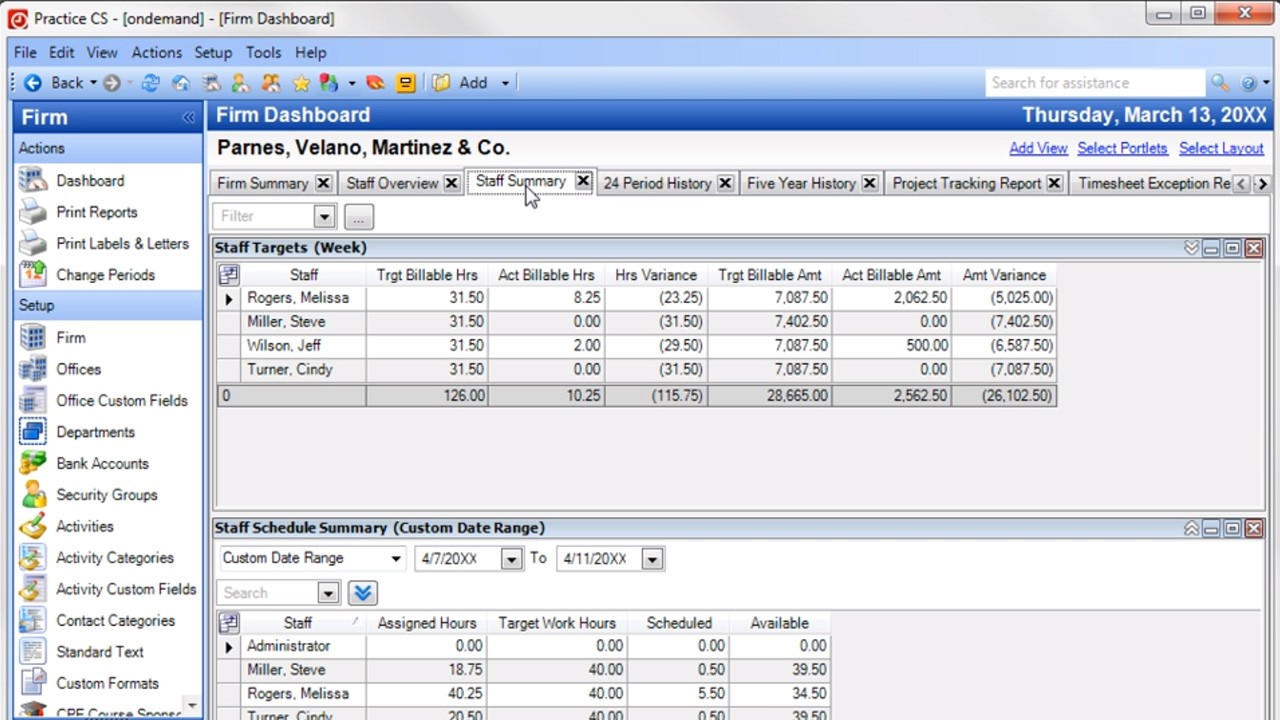
Its core is time and billing:
- Time and expense entry and work in progress, with WIP transfers between clients and engagements
- Billing and invoicing with electronic invoices, online bill posting and card or ACH payments
- Dashboards for the firm, each staff member and each client, and flexible reporting
- Add-on modules, each sold separately: Project Management, Staff Management and Client Management
- Integration with UltraTax CS, Accounting CS and the rest of CS Professional Suite, which share its client database
- Deployment on your own server, or hosted through Virtual Office CS or Software as a Service
 Source: Thomson Reuters demo
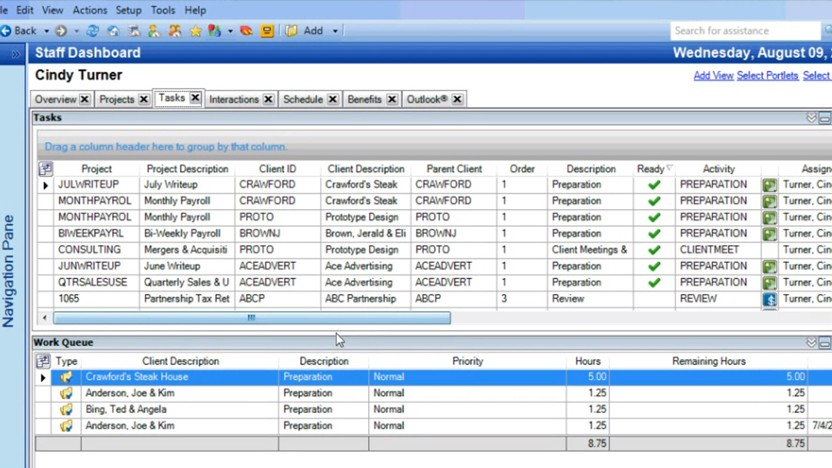
With the Project Management module, each staff member works from a dashboard of ready tasks and a work queue with hours.
 Source: Thomson Reuters demo
The product page doesn’t include a price; every route goes to “Contact sales”. According to available information and client reviews, pricing starts at around $1,000 per user annually, before add-on modules and hosting. Software as a Service and support contracts carry a 12-month commitment, the client portal and e-signature come through a separate product, NetClient CS, and in August 2026 Practice CS moved its payments to Stripe, which becomes mandatory on 10 November 2026.
CS Professional Suite reviewers on Capterra rate the suite 3.8 out of 5. A managing member of an accounting firm put the common complaint plainly:
“They charge for support on all products except UltraTax. Practice is becoming a dinosaur, and badly needs to be updated.”
For how each feature works, see our Practice CS review; for the wider market, our guide to the best accounting practice management software.
Want a practice system with the client portal, workflow and billing in one place, priced on a page? Uku is built for exactly that. Try it free for 14 days, no credit card required.
How We Curated Our List of Practice CS Alternatives
We compared on 1 October 2026. Prices are what each vendor shows a US firm on its own pricing page. Feature and integration claims come from each product’s own pages and help centre; if something isn’t mentioned there, we say “not mentioned”, not “doesn’t exist”.
We looked for tools that answer the reasons firms give for leaving Practice CS:
- A cloud system the whole team can use from anywhere, without hosting
- A client portal and e-signature inside the practice system, not a separate product
- Workflow and recurring work included, not sold as add-on modules
- A price you can see, and contracts you can leave
- A clear answer for UltraTax CS, which almost every Practice CS firm keeps
- A realistic way to bring client data and history across
1. Uku: Best Alternative for Billing From Tracked Time and Agreements
Uku is practice management built for accounting, bookkeeping and audit firms: clients, recurring workflows, time tracking, automated billing, a client portal and analytics in one system. It serves 1,000+ firms in 25+ countries, in 12 languages, with USD, EUR and GBP billing. It is modular, so you can start with clients and tasks on day one and add billing, workflows and analytics as you grow.
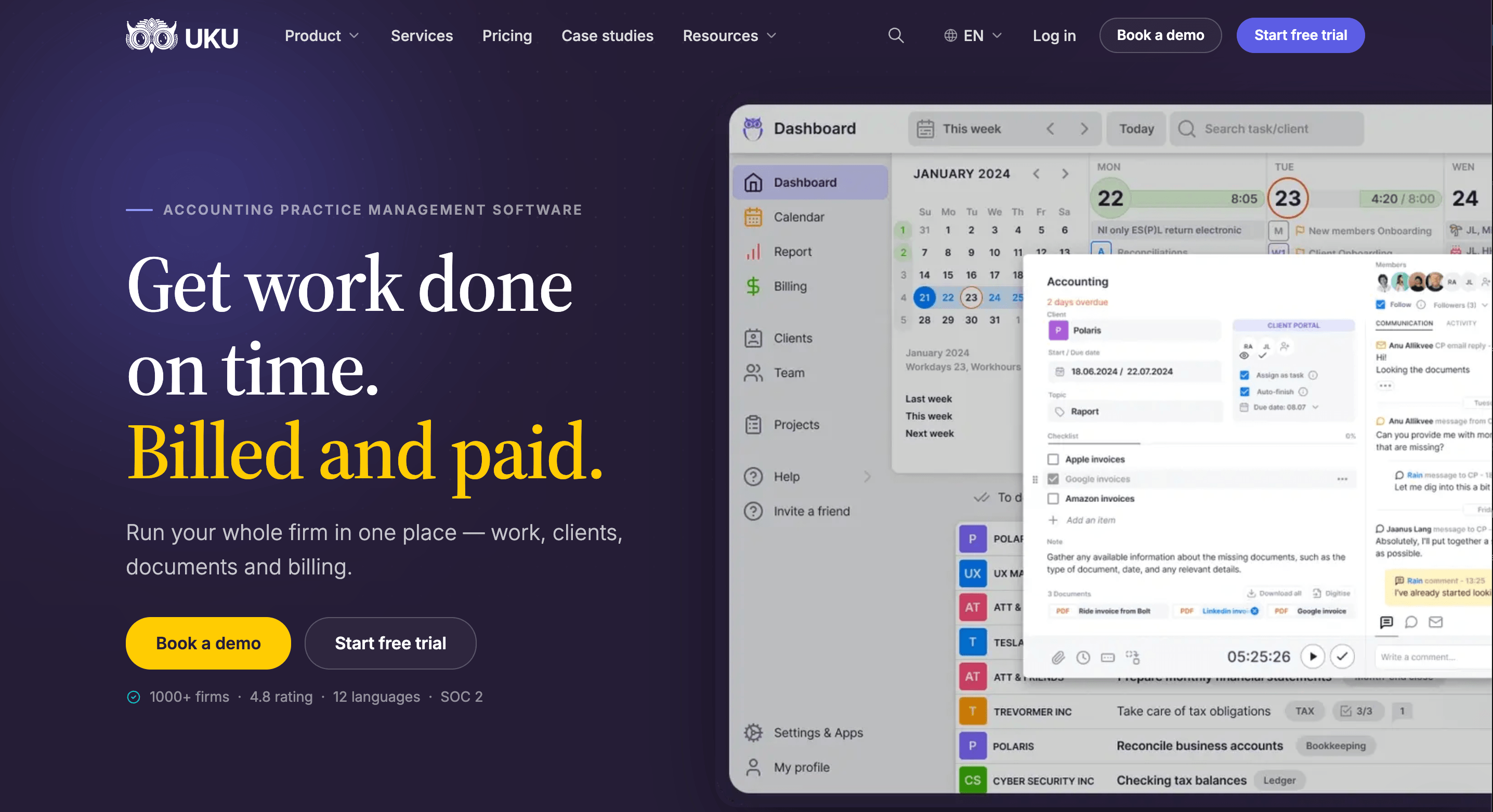
Its key capabilities include:
- Automated billing. Billing contracts (hourly, fixed, per piece, volume tiers, or a mix) draft each period’s invoices from tracked work and sync them to QuickBooks Online, Xero and other ledgers.
- Time tracking on the task. A one-click timer, manual and bulk entry, billable or not. On Elite and Enterprise, a firm can require a time entry before a task is closed.
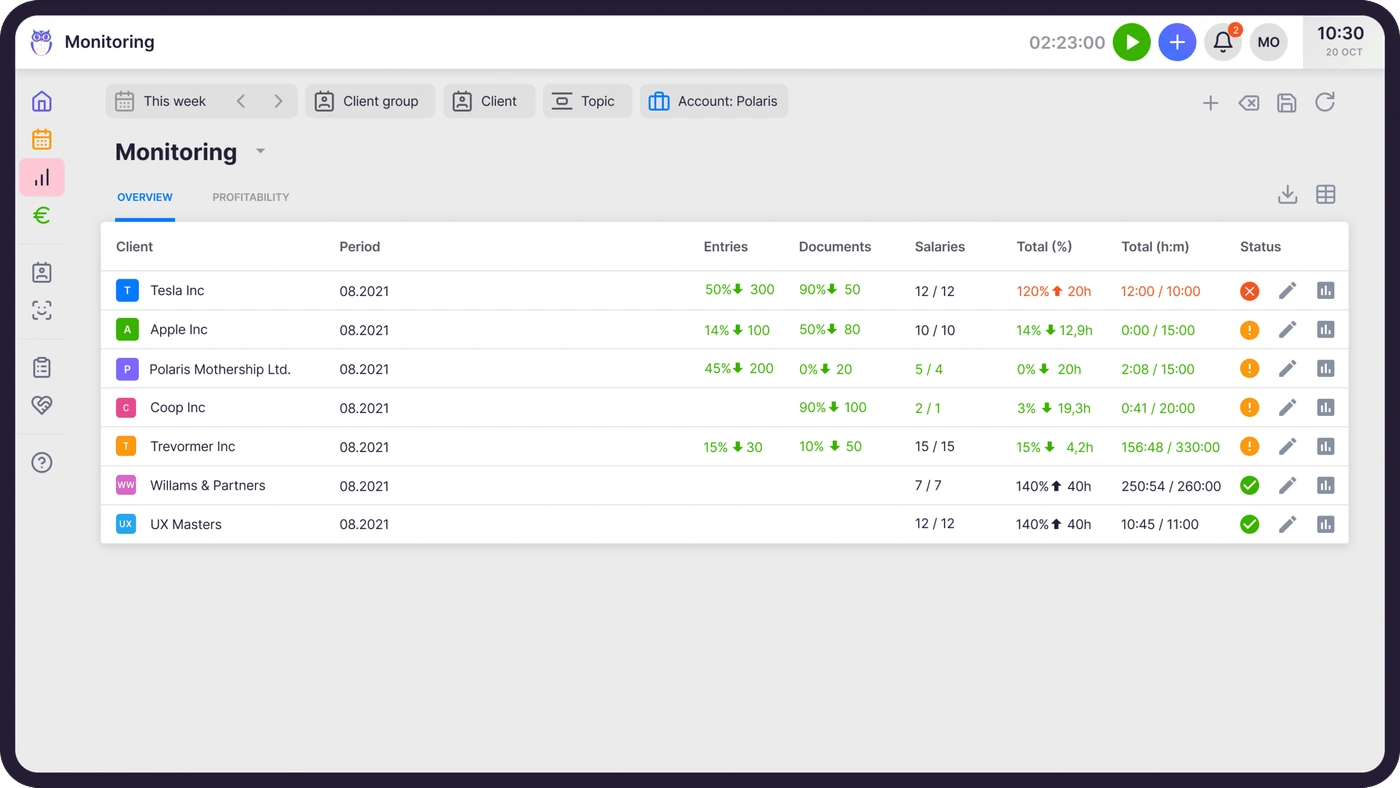
- Agreements monitoring. Agreed work against delivered work for every client, flagged green, amber or red before the month closes.
- Workflow automation. Workflow templates create every recurring task with its checklist, responsible person and due date, included on every plan.
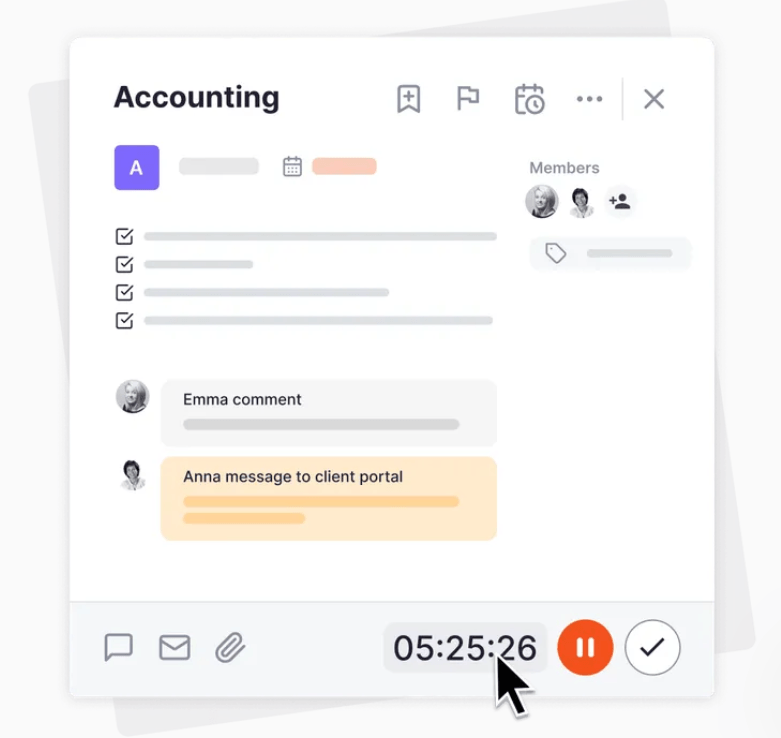
- Client portal. Passwordless, free for clients on every plan, with document requests, reminders, e-signatures and comments on the task itself.
- What Uku does not have: an integration with UltraTax CS or other US tax software, and a Practice CS importer. Clients come across from an Excel export.
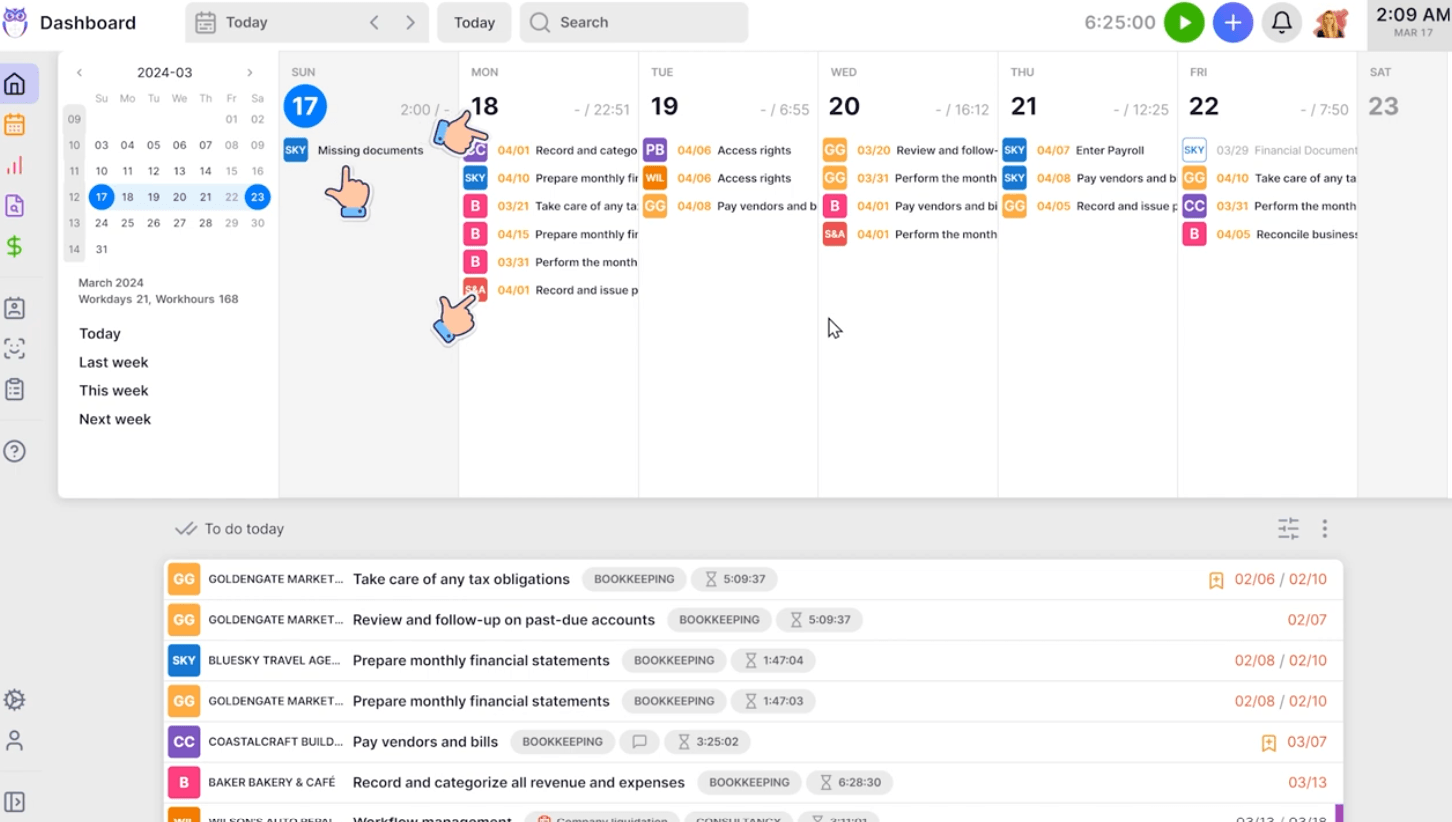
Why choose Uku over Practice CS
The first difference is where billing starts. Practice CS is strongest after the work: time entries become WIP, WIP becomes bills, and reports show what was realized. Uku starts from each client’s agreement. A billing contract says what the fee covers, tracked time and out-of-scope work land against it, and at period end the invoices draft themselves. You review and send them in one batch.


The second is what is in the box. In Practice CS, projects, staff scheduling and client management are separate add-on modules, and the client portal is another product. In Uku, workflow templates, the client portal and e-signatures are on every plan, and clients use the portal free. The portal mirrors the exact same task on both sides: you ask for documents on the task, the client uploads them there, and the conversation stays with the work.
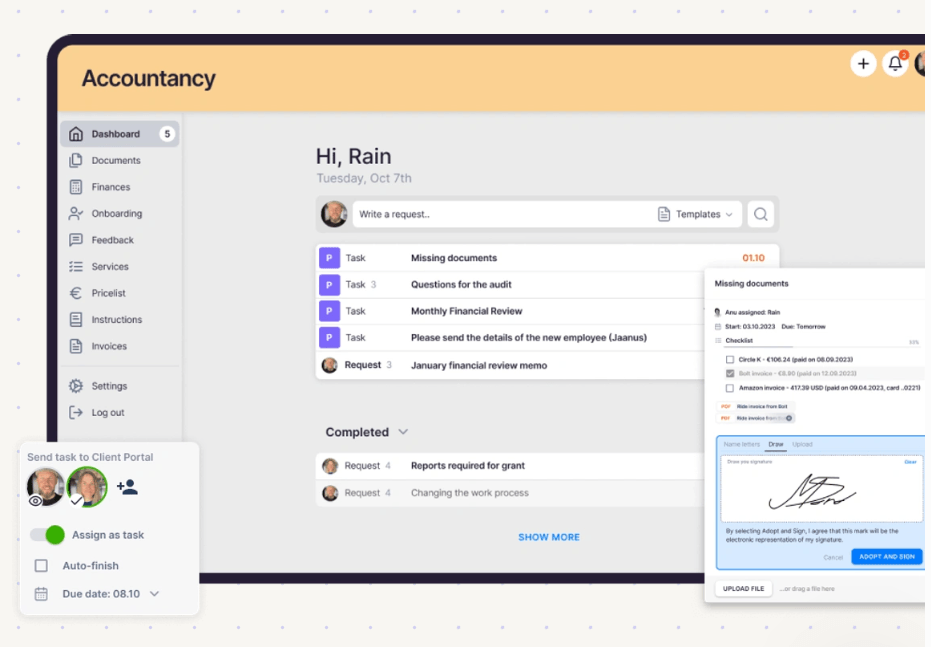
That is also what Practice CS firms tell us first. A mid-sized US tax and bookkeeping firm running Practice CS, UltraTax and SafeSend opened a demo this year with: “we’re really looking for a better way to communicate with our clients through a client portal.” And we have moved a 40-person firm with 1,000+ clients off Practice CS and onto Uku.
The third is catching problems while there is still time to act. Practice CS reports tell you afterwards which engagements ran over. Uku’s agreements monitoring compares agreed work with delivered work for every client in the middle of the month, so a client sending twice the documents they pay for becomes a pricing conversation, not a write-off.
It also carries a US tax season. Gordon J. Maier & Company, a 43-person Wisconsin CPA firm founded in 1935, went live on Uku weeks before tax season and ran the whole season through it.

The trade-off is UltraTax. Practice CS and UltraTax CS share one client database; Uku has no UltraTax integration, so client details live in both systems and returns stay in UltraTax. If that shared database is the reason you are still on Practice CS, weigh it before anything else on this page. Uku connects to QuickBooks Online and Xero, Gmail and Outlook, and on Elite a public API, Zapier and the Uku MCP server for Claude and ChatGPT.
Uku pricing
Per member per month, from Uku’s US pricing page: Solo $19 annual, $25 monthly (1 member, 20 active clients, e-signatures and document management included); Team $38, $49 monthly (unlimited members and clients, projects, access management); Elite $48, $62 monthly (BI Analytics, mandatory time entries, workforce management, public API, Zapier, Uku MCP); Enterprise $88, $99 monthly (custom integrations, dedicated account manager, assisted client import). Clients and the portal are free. Every account starts with a 14-day trial of Elite, no card, plus 90 minutes of onboarding.

Who should use Uku?
Choose Uku if: you run a tax, accounting or bookkeeping firm of 2 to 100 people with recurring monthly work; you bill some or all of it by the hour or against a scope; you want the client portal, workflow and billing in one system; or you want to try the product yourself and pay monthly. Not the first choice if you need your practice system wired into UltraTax CS. Reviews: G2 and Capterra. For the full head-to-head, see Practice CS vs Uku, or book a demo to see it with your own services.
2. Canopy: Best Alternative With a Published Practice CS Migration
Canopy is cloud practice management for US tax and accounting firms: CRM, documents and e-signature, a client portal, workflow, time and billing, payments, and tools for IRS transcripts and tax resolution. It is one of the few vendors that publishes exactly what moves from Practice CS.
 Source: Canopy
Its key capabilities include:
- A Practice CS migration from a full Practice CS backup, documented in Canopy’s help centre
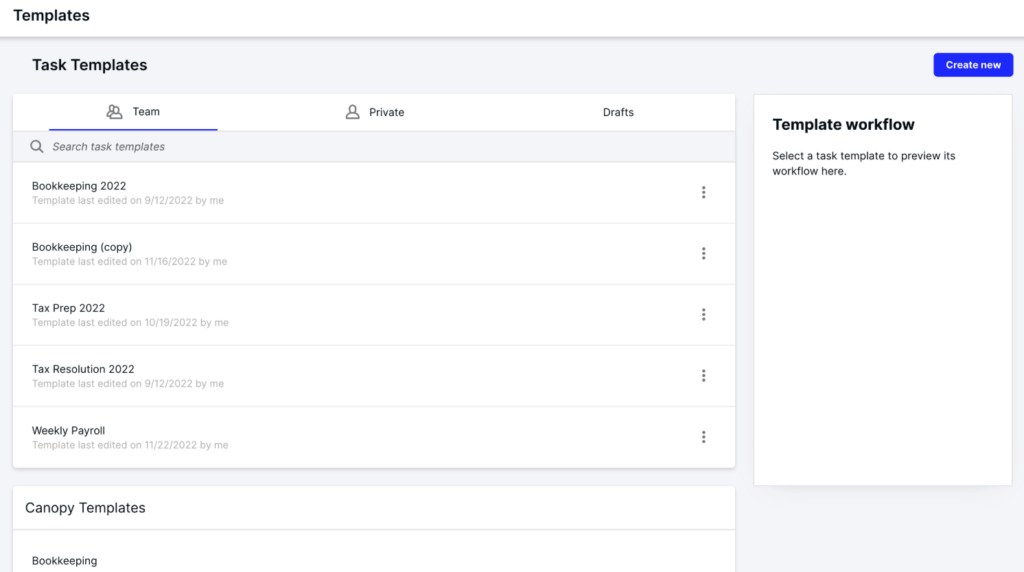
- Client portal and secure messaging, with document management and e-signature on every plan
- Automated and recurring task workflows from team and Canopy templates
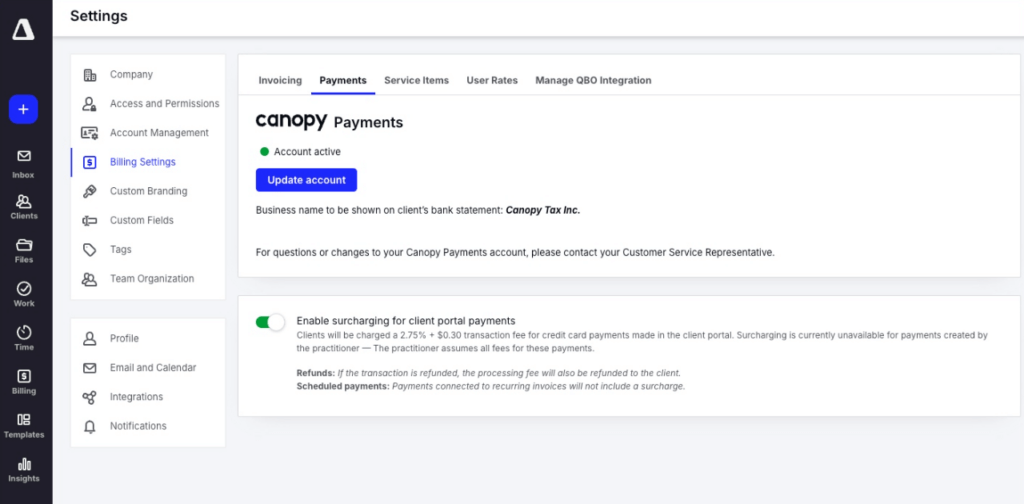
- Time, billing and Canopy Payments, with a QuickBooks Online integration
- IRS transcripts and tax resolution tools for notice and representation work
- Tax software file saving from UltraTax, Lacerte, Drake and CCH Axcess
Why choose Canopy over Practice CS
The first reason is the move itself. Canopy’s Practice CS migration guide asks for a full backup of your Practice CS database and says what comes across: “Client, Contacts, Notes, Service Items, Invoices, Payments, Credits, and Custom Fields.” It also says what does not migrate automatically: work in progress (time entries), roles, projects and tasks, client groups and custom tags. Knowing that list before you sign is worth a lot.
The second is that the portal, documents and e-signature are part of the product. Practice CS firms buy NetClient CS for the portal and FileCabinet CS for documents; Canopy has both on its Standard plan, and saves files from UltraTax into the client’s folder.
 Source: Canopy
The third is tax resolution. Canopy pulls IRS transcripts and organises notice and representation work, which neither Practice CS nor most practice systems on this list do.
 Source: Canopy
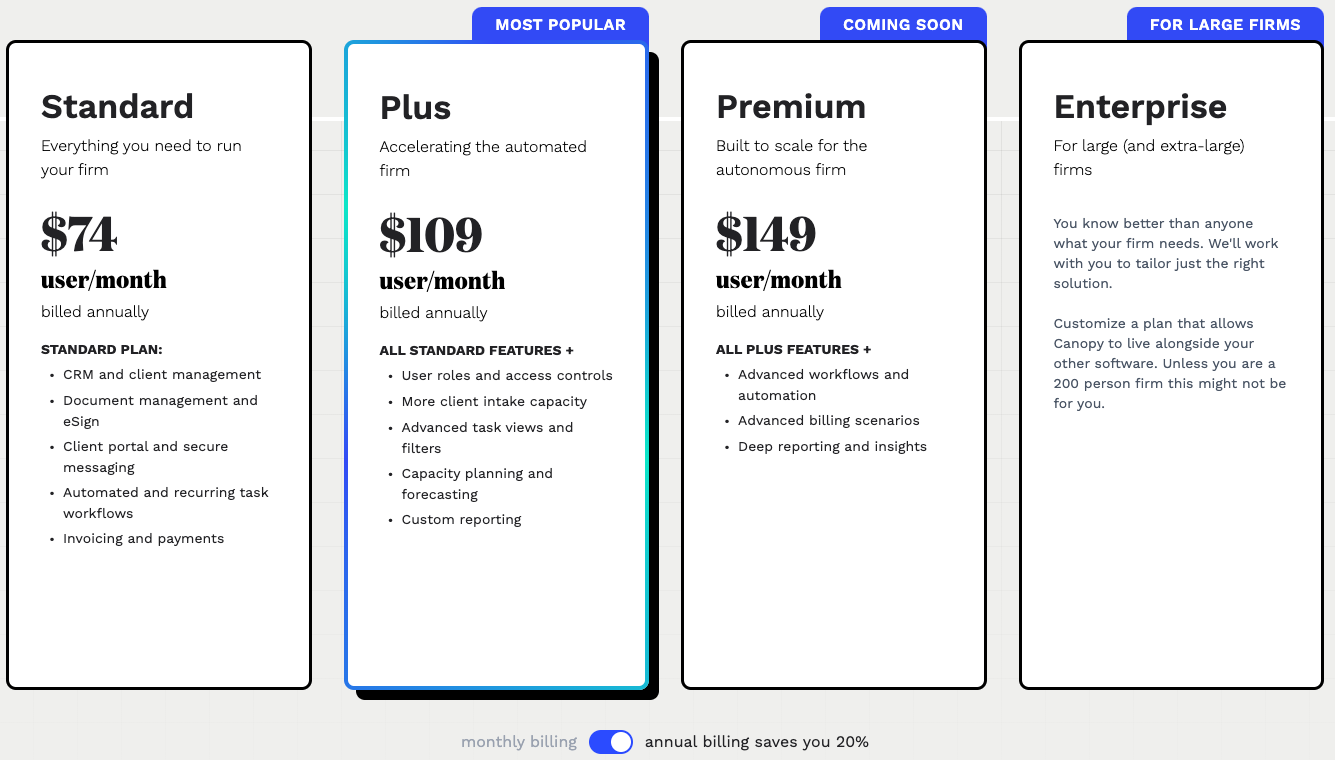
The trade-offs: Canopy is the most expensive per user here, capacity planning starts on Plus at $109, and its UltraTax integration saves files rather than syncing client data. Our Canopy review covers the rest.
Canopy pricing
From the Canopy pricing page, per user per month billed annually: Standard $74 (CRM, documents and e-signature, client portal, workflows, invoicing and payments), Plus $109 (most popular; roles and access controls, capacity planning, custom reporting), Premium $149 (marked coming soon), and Enterprise custom for firms of around 200+. Annual billing saves 20% against monthly.
 Source: Canopy
Who should use Canopy?
Choose Canopy if: you are a US tax firm that wants a documented path from your Practice CS backup, does IRS notice or resolution work, and is happy to pay more per seat for one system. See also our Canopy alternatives, Canopy pricing and Canopy vs Uku.
3. Firm360: Best Alternative for CPA Firms That Want Tax Software File Sync
Firm360 is an all-in-one practice management platform for US accounting and CPA firms, founded by a practising CPA: projects, documents, a client portal, e-signature, time and billing, and reporting in one system. Projects carry federal and state due dates and extensions, and its support is US-based.
 Source: Firm360
Its key capabilities include:
- Project management with templates, rule-based status transitions and a visual workflow builder (Standard and up)
- Document management with revision history, PDF merge and split
- Client portal with branded login, document upload links that need no login, e-signature and invoice payment
- Time tracking and billing with card and ACH payments and automated A/R collections (Standard and up)
- FileSync for UltraTax, Lacerte, Drake, ProConnect and CCH Axcess documents
Why choose Firm360 over Practice CS
The first reason is UltraTax. Firm360’s integrations page says it will “automatically sync documents with UltraTax using our FileSync tool — no manual uploads needed”. It is a document sync, not the shared client database Practice CS has, but it is the closest any third-party system on this list comes for UltraTax firms.
 Source: Firm360
The second is that a firm like yours has done it. CRS CPAs, a 50-person firm in West Tennessee, replaced Practice CS, GoFileRoom, ShareFile, FirmFlow and spreadsheets with Firm360 and reports saving about 200 hours a week.
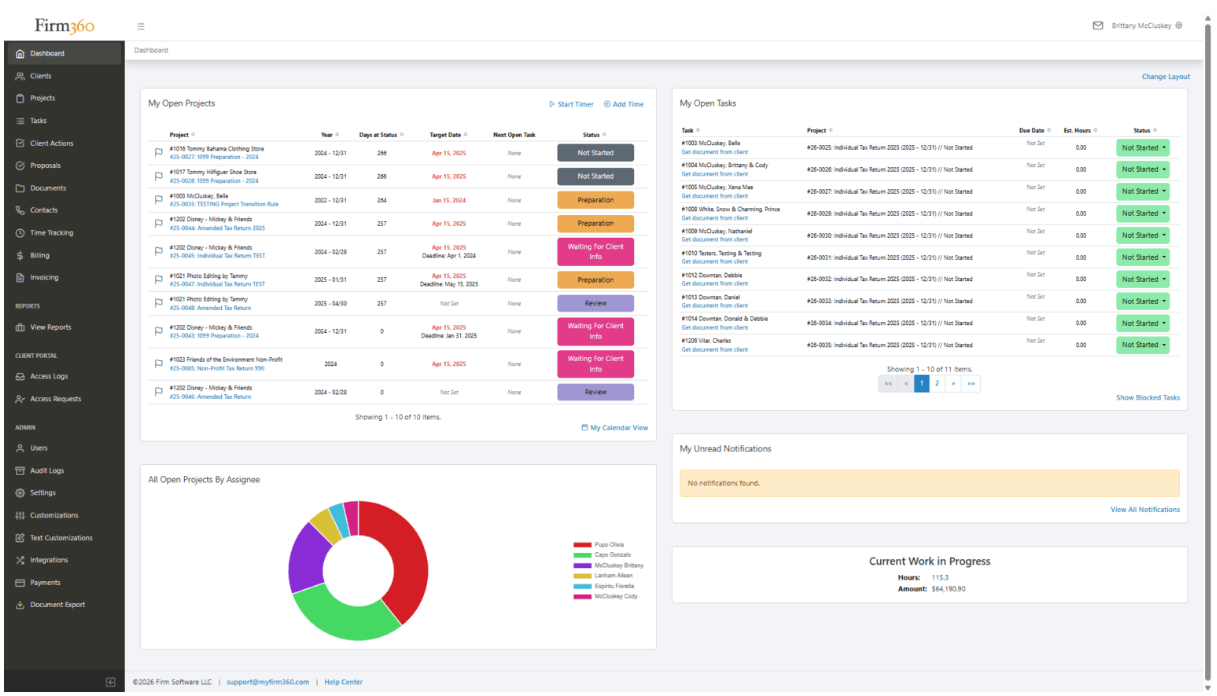
The third is that it still thinks in WIP. Firm360’s dashboard shows current work in progress in hours and dollars, which keeps a Practice CS partner’s habits intact while the portal, documents and projects move into the same system.
The trade-offs: there is no free trial, only a demo; project management starts on Standard with a three-user minimum; every plan is priced on annual billing; and Firm360 says most firms go live in six to eight weeks. We could not read Firm360’s own Practice CS export article (its help centre blocked us), so ask in the demo what moves.
Firm360 pricing
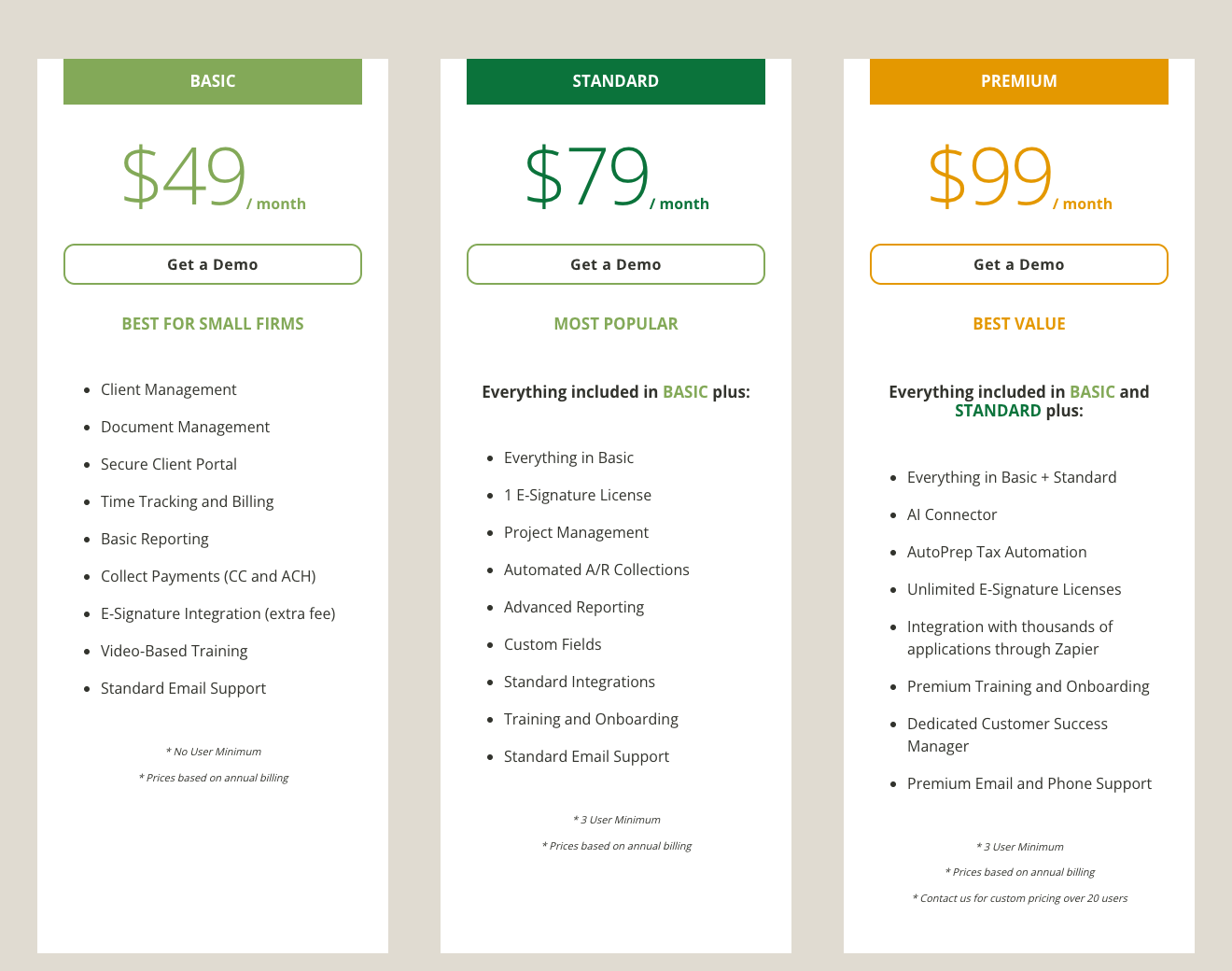
From the Firm360 pricing page, per user per month on annual billing: Basic $49 (no user minimum, e-signature integration at an extra fee, no project management), Standard $79 (three-user minimum; project management, automated A/R collections, advanced reporting), Premium $99 (three-user minimum; AI Connector, unlimited e-signatures, Zapier). Firms above 20 users get a custom quote.
 Source: Firm360
Who should use Firm360?
Choose Firm360 if: you are a US CPA firm of 5 to 100 people whose returns run through UltraTax, Lacerte or CCH Axcess, you want those documents to land in the practice system without uploads, and you are comfortable with an annual contract and a guided rollout. See also our Firm360 review, Firm360 alternatives and Firm360 vs Uku.
4. Onvio Firm Management: Best Alternative for Staying With Thomson Reuters
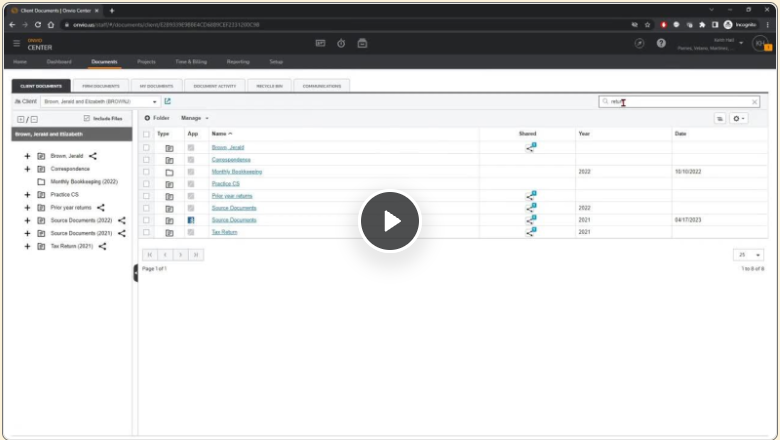
Onvio Firm Management is Thomson Reuters’ own cloud practice management product, launched in 2019. Thomson Reuters describes it as “a single, secure, integrated, cloud-native accounting firm management software solution”, with documents, projects, time and billing, and client collaboration through Onvio Client Center.
 Source: Thomson Reuters
Its key capabilities include:
- Document handling: request and collect source documents by scanning and uploading, with client folders and sharing
- Project management: due date tracking, task tracking for staff and clients, and budgeting tools
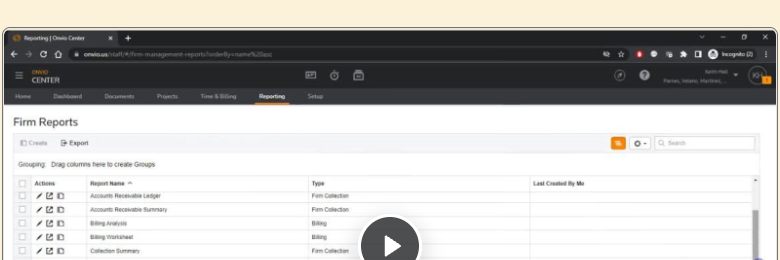
- Time and billing and firm reports on receivables, billing and collections
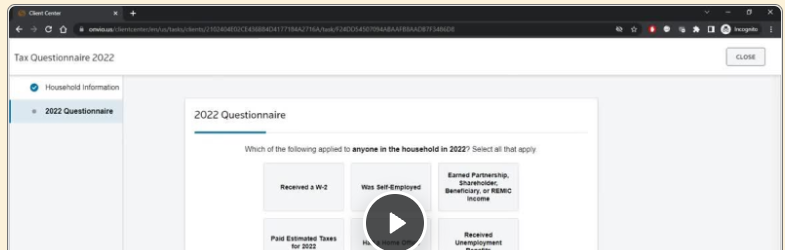
- Onvio Client Center: a secure portal on the web and in two mobile apps
- The Thomson Reuters suite: same vendor as UltraTax CS and the rest of CS Professional Suite
Why choose Onvio Firm Management over Practice CS
The first reason is that you don’t change vendors. Your UltraTax CS licence, your Thomson Reuters account team and your support contract stay where they are, and Onvio’s own customers describe the link to UltraTax as “seamless” on the product page.
 Source: Thomson Reuters
The second is the cloud. Onvio runs in a browser, so the team doesn’t need Virtual Office CS hosting or a server, and the client portal is part of the same suite rather than a desktop sync.
 Source: Thomson Reuters
The trade-offs: pricing is quote-only, like Practice CS. Neither product page mentions the other, so Thomson Reuters does not present Onvio as Practice CS’s successor in public. And we could not find a Thomson Reuters help article for converting Practice CS data into Onvio Firm Management; its migration guides cover FileCabinet CS and NetClient CS. Ask your account team what moves before you plan around it.
Onvio Firm Management pricing
Quote-only. The product page offers “Request free demo” and “Contact a representative”; no plans or prices are published.
Who should use Onvio Firm Management?
Choose Onvio Firm Management if: you want to stay with Thomson Reuters for everything, your firm already uses Onvio Documents or Onvio Client Center, and you want the cloud without a new vendor relationship.
5. TaxDome: Best Alternative for Tax Firms That Sign a Lot of Documents
TaxDome is an all-in-one platform for tax, bookkeeping and accounting firms: CRM, client portal and mobile app, unlimited document storage and e-signatures, workflow automation, email and chat, proposals, invoicing and payments.
 Source: TaxDome
Its key capabilities include:
- Unlimited document storage and e-signatures on every plan
- KBA e-signatures for IRS Form 8879 at $1 per use
- Tax organizers and intake forms that feed the workflow
- Client mobile app on iOS and Android
- Invoicing, time tracking and payments, with the option to lock documents until an invoice is paid
- A Practice CS client import, documented in TaxDome’s help centre
Why choose TaxDome over Practice CS
The first reason is signatures and the client side, in one product. A Practice CS firm signs through NetClient CS or a separate tool such as SafeSend. TaxDome includes unlimited e-signatures on every plan, adds knowledge-based authentication for Form 8879 at $1 a signature, and gives clients a mobile app. Tax organizers work the same on the web and on the phone and can pre-fill last year’s answers.
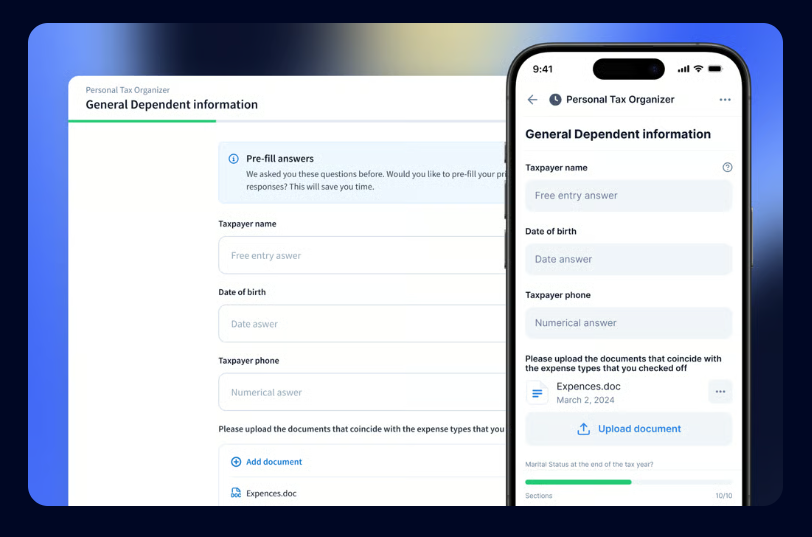 Source: TaxDome
The second is documents. FileCabinet CS gets no updates after 2027; TaxDome treats documents as the centre of the practice, with folder templates per client, signature and approval requests from the document itself, and TaxDome Drive, which mounts the whole store in Windows File Explorer.
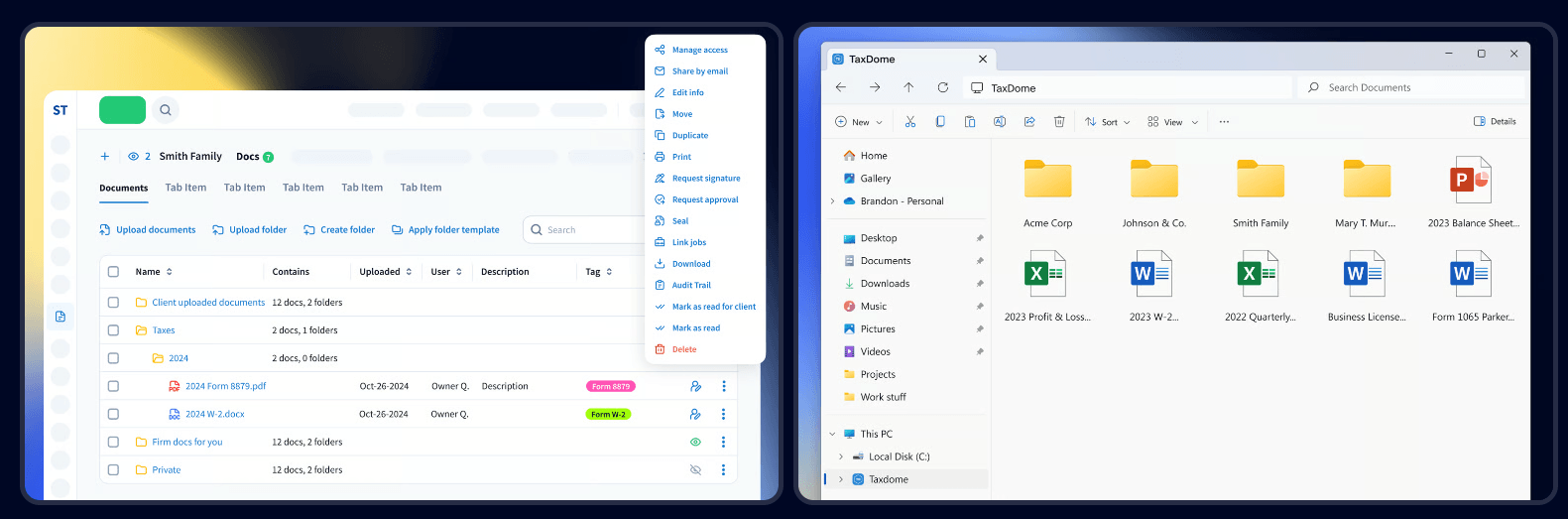 Source: TaxDome
The third is a documented start. TaxDome’s client export guide has step-by-step instructions for Practice CS: export clients from Practice CS as XML, open the file in Excel, save it as CSV and import it. It also has a migration tool for documents in FileCabinet CS.
 Source: TaxDome
The trade-offs: TaxDome bills yearly and upfront, it takes real configuration to deploy, and for UltraTax it documents a one-time import rather than a live integration.
TaxDome pricing
From the TaxDome pricing page, per seat per year on a one-year term: Essentials $800 (solo users only), Pro $1,000 (IRS transcripts, AI reporting), Business $1,200 (Client Care, client import assistance). Two- and three-year terms lower the price; the page opens on the three-year prices. KBA signatures are $1 each.
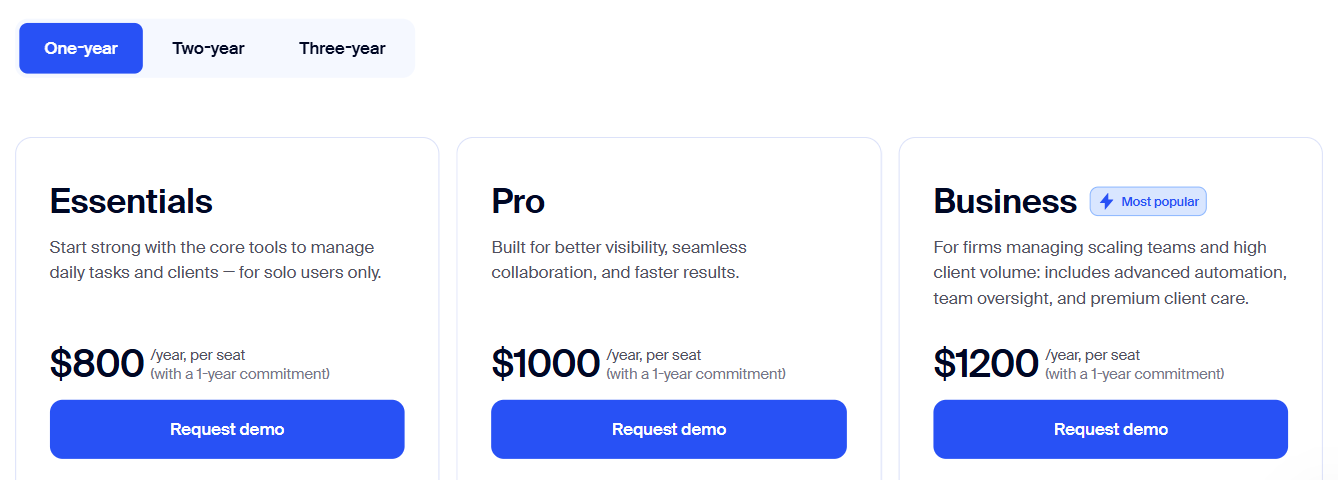 Source: TaxDome
Who should use TaxDome?
Choose TaxDome if: you are a US tax firm with heavy document traffic every season, you sign hundreds of engagement letters and 8879s, and your clients expect a mobile app. See also our TaxDome pricing, TaxDome review and TaxDome alternatives.
6. Financial Cents: Best Alternative for Small Firms That Want to Try First
Financial Cents is practice management for small US accounting and bookkeeping firms: workflow, client tasks and portal, capacity planning, time tracking and invoicing, with a native QuickBooks Online integration and a library of 400+ workflow templates.
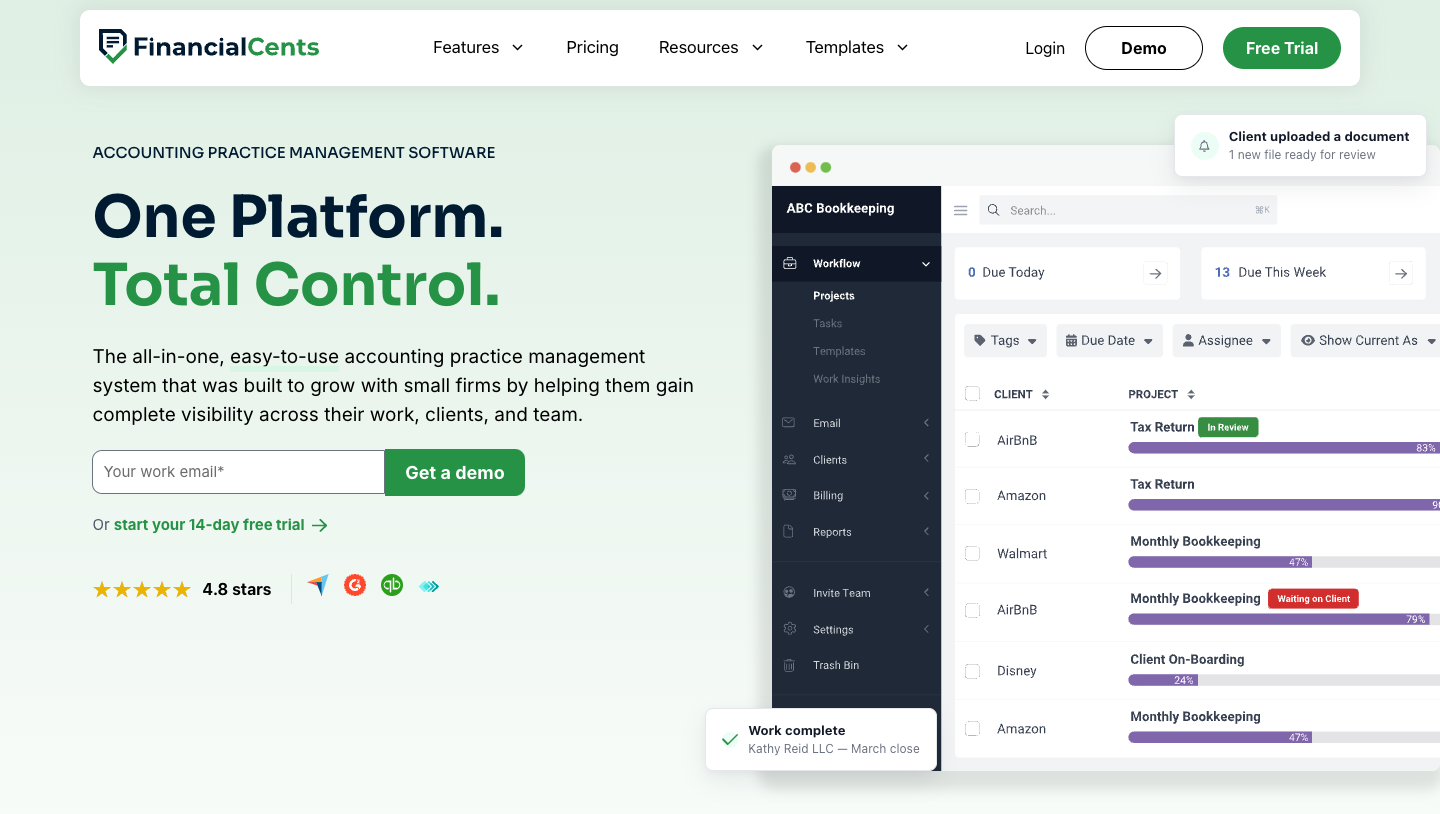 Source: Financial Cents
Its key capabilities include:
- Workflow templates from a library of 400+, with client tasks, a client portal and document requests
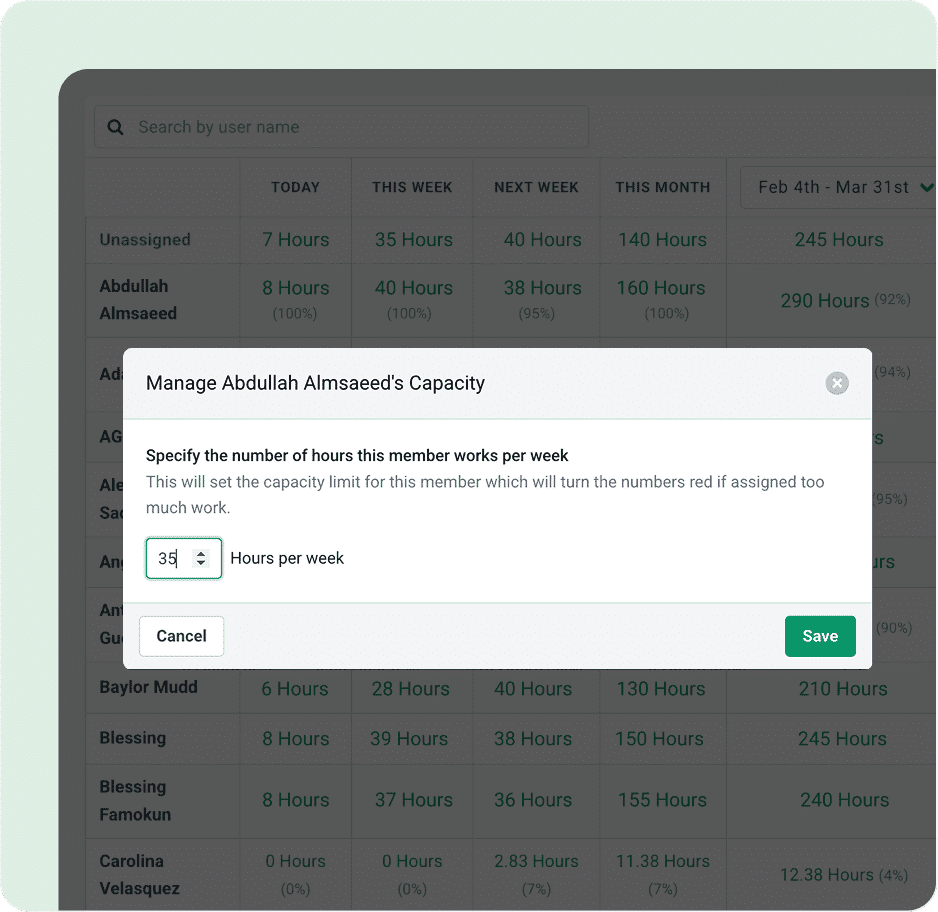
- Capacity management showing each person’s assigned hours against their weekly capacity
- Time tracking and invoicing, including project-based billing and retainers, on every plan
- QuickBooks Online integration on every plan
- Tax software file sync for UltraTax, Drake, Lacerte, ProConnect and CCH Axcess on Scale
Why choose Financial Cents over Practice CS
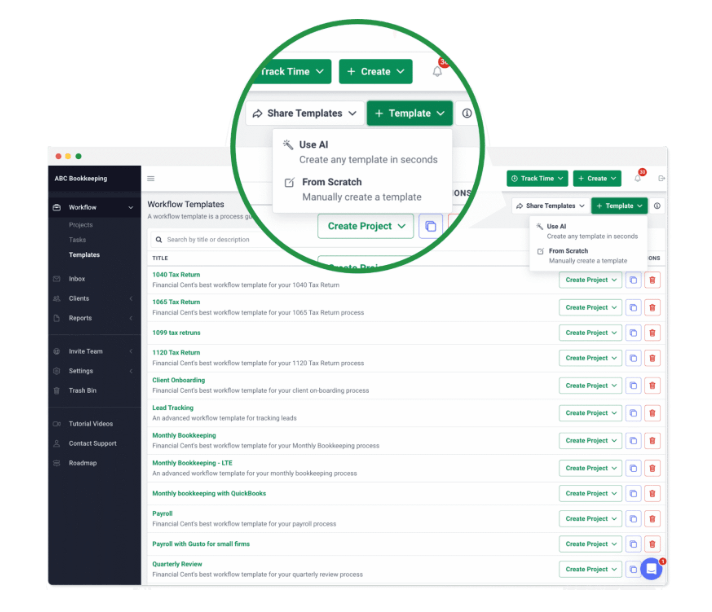
The first reason is the way in. Practice CS starts with a sales call. Financial Cents starts with a 14-day trial, no card, and a price list that begins at $19 a month for a one-person firm. A small firm can have clients and workflows in it the same afternoon, starting from a template or one generated with AI.
 Source: Financial Cents
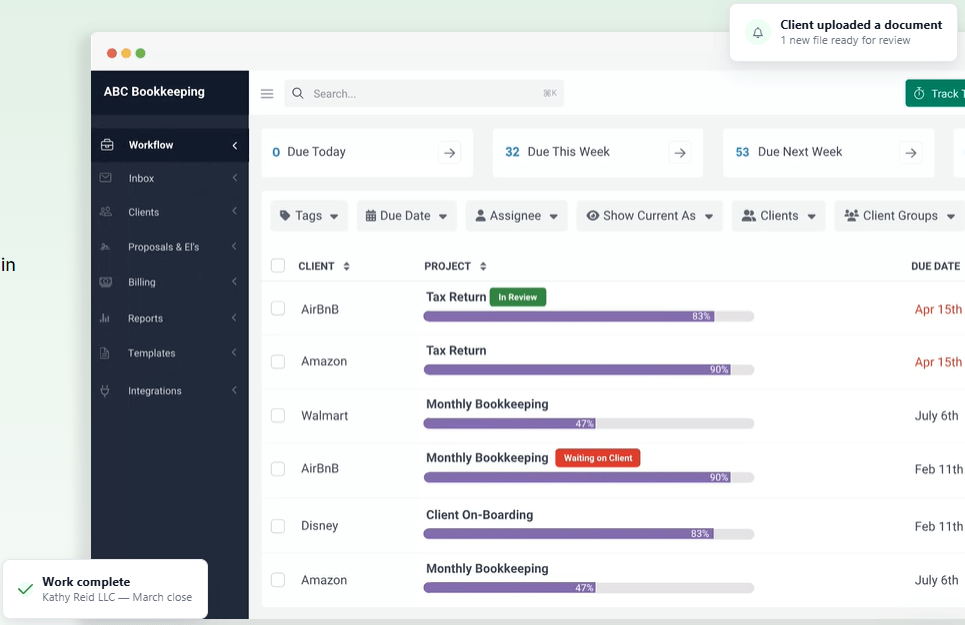
The second is what the entry plan includes. Practice CS sells project management as an add-on module. Financial Cents puts workflow, time tracking, invoicing and QuickBooks Online on every plan, and client tasks live inside the project: the client ticks off “Upload your bank statements” in the portal, and the team’s checklist continues underneath.
 Source: Financial Cents
The third is UltraTax on Scale. Financial Cents’ UltraTax integration lets you “print tax returns from UltraTax straight into Financial Cents”, through a two-way Google Drive sync, so each return lands in the right client folder.
 Source: Financial Cents
The trade-offs: every Financial Cents plan is a 12-month agreement, even when billed monthly, and monthly billing needs five users. The tax integrations, Zapier, a shared inbox and profitability reports all sit on Scale at $69 per user. E-signature runs through an Adobe Sign integration rather than natively, and we found no Practice CS import guide.
Financial Cents pricing
From the Financial Cents pricing page: Solo $19 per month (single-user firms only), Team $49 per user per month ($69 monthly), Scale $69 ($89 monthly; task dependencies, Zapier, shared inbox, branded portal, profitability reports, tax software integrations), Enterprise custom. Every plan is a 12-month agreement. 14-day free trial, no card.
 Source: Financial Cents
Who should use Financial Cents?
Choose Financial Cents if: you are a US firm of one to about 30 people, QuickBooks Online is at the centre of your client work, and you want to try practice management yourself before talking to anyone. See also our Financial Cents review and Financial Cents alternatives.
7. Karbon: Best Alternative for Email-First Teams That Need Capacity Planning
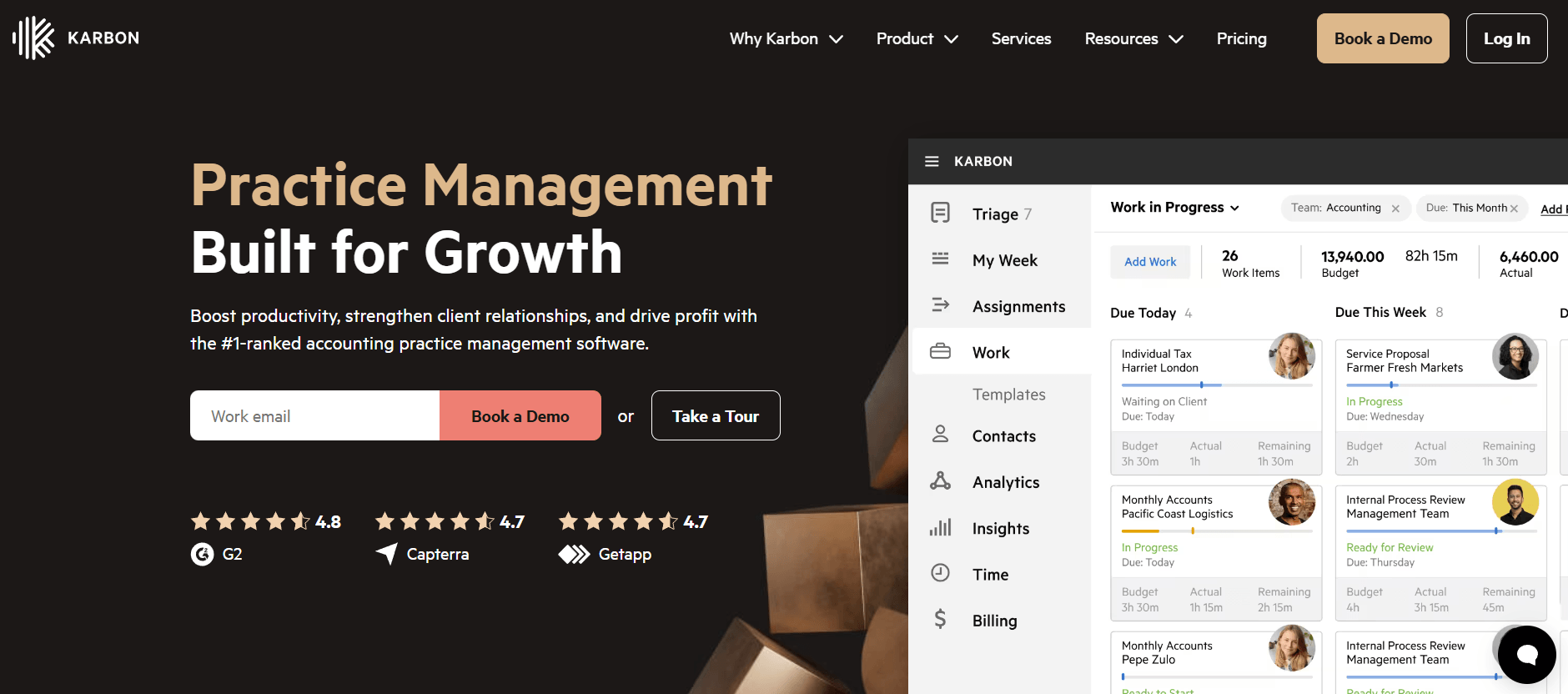
Karbon is practice management for larger, often distributed accounting teams. It says 33,000 accounting professionals in 34 countries use it. Its centre is email: every client conversation becomes shared, assignable work.
 Source: Karbon
Its key capabilities include:
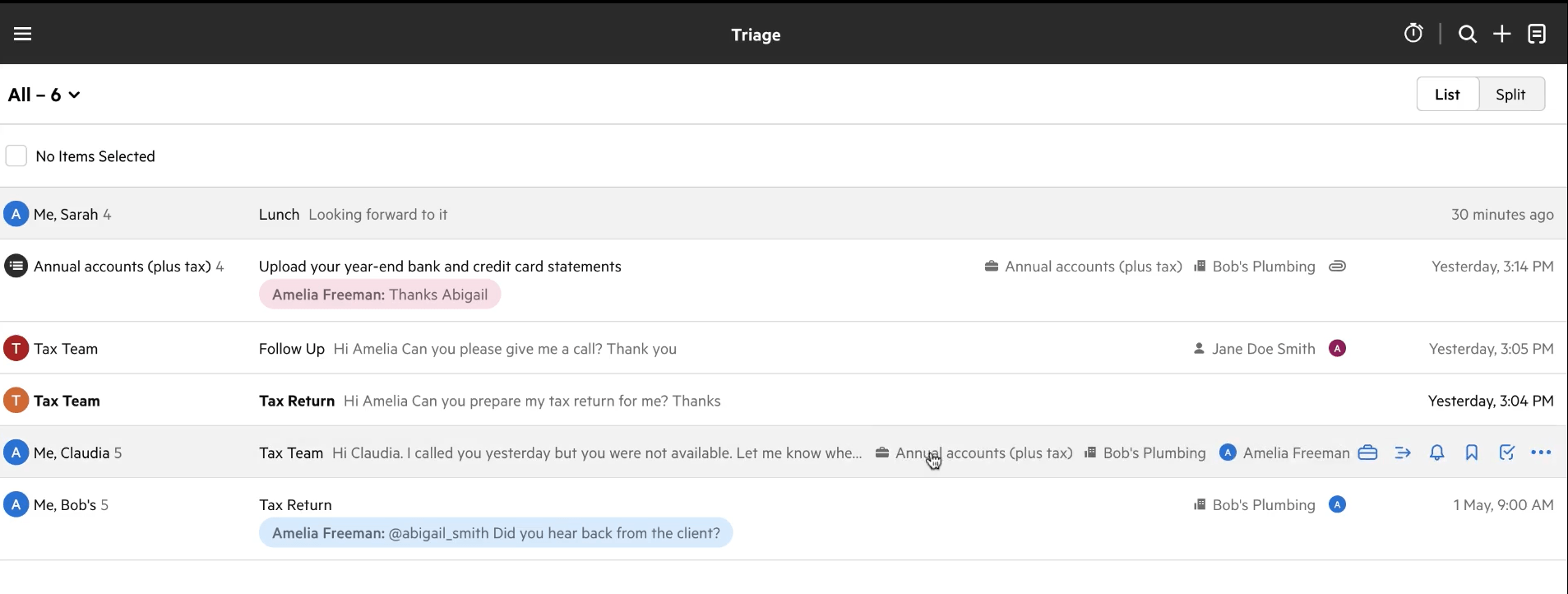
- Triage and Shared Triage: a shared inbox where any email becomes a work item attached to a client and a job
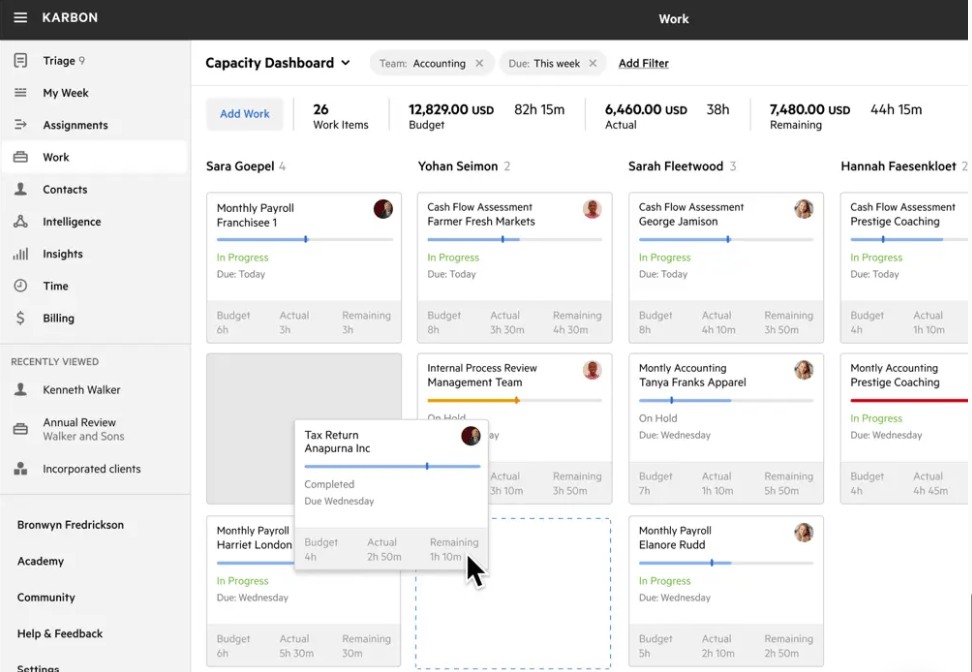
- Capacity planning with each team member’s budgeted hours against their capacity
- Automators that apply practice-wide rules, and automatic client reminders on Business
- Time tracking and billing for hourly, fixed and recurring fees, with payments
- Analytics workbooks on work status, team performance and revenue
Why choose Karbon over Practice CS
The first reason is how work arrives. In a Practice CS firm, client email lives in Outlook and the work lives in Practice CS. Karbon turns email into work: a shared inbox for the team, internal comments on a thread, and one click from a message to an assigned task with a due date.
 Source: Karbon
The second is capacity. Practice CS Staff Management schedules and tracks staff as an add-on module; Karbon measures budgeted hours against capacity per person per week, completion times, and how long work sits in each status, on the core product.
 Source: Karbon
The third is that it is built for teams spread across locations, which is where a desktop system on a firm server hurts most.
The trade-offs: Karbon’s integrations page lists ProConnect and a CCH Axcess sync marked “coming soon”, but not UltraTax, and we found no Practice CS import guide. The automators and client reminders that make Karbon worth switching to sit on Business at $89 per user, and monthly billing is only for teams of four or more. Our Karbon review covers the implementation effort.
Karbon pricing
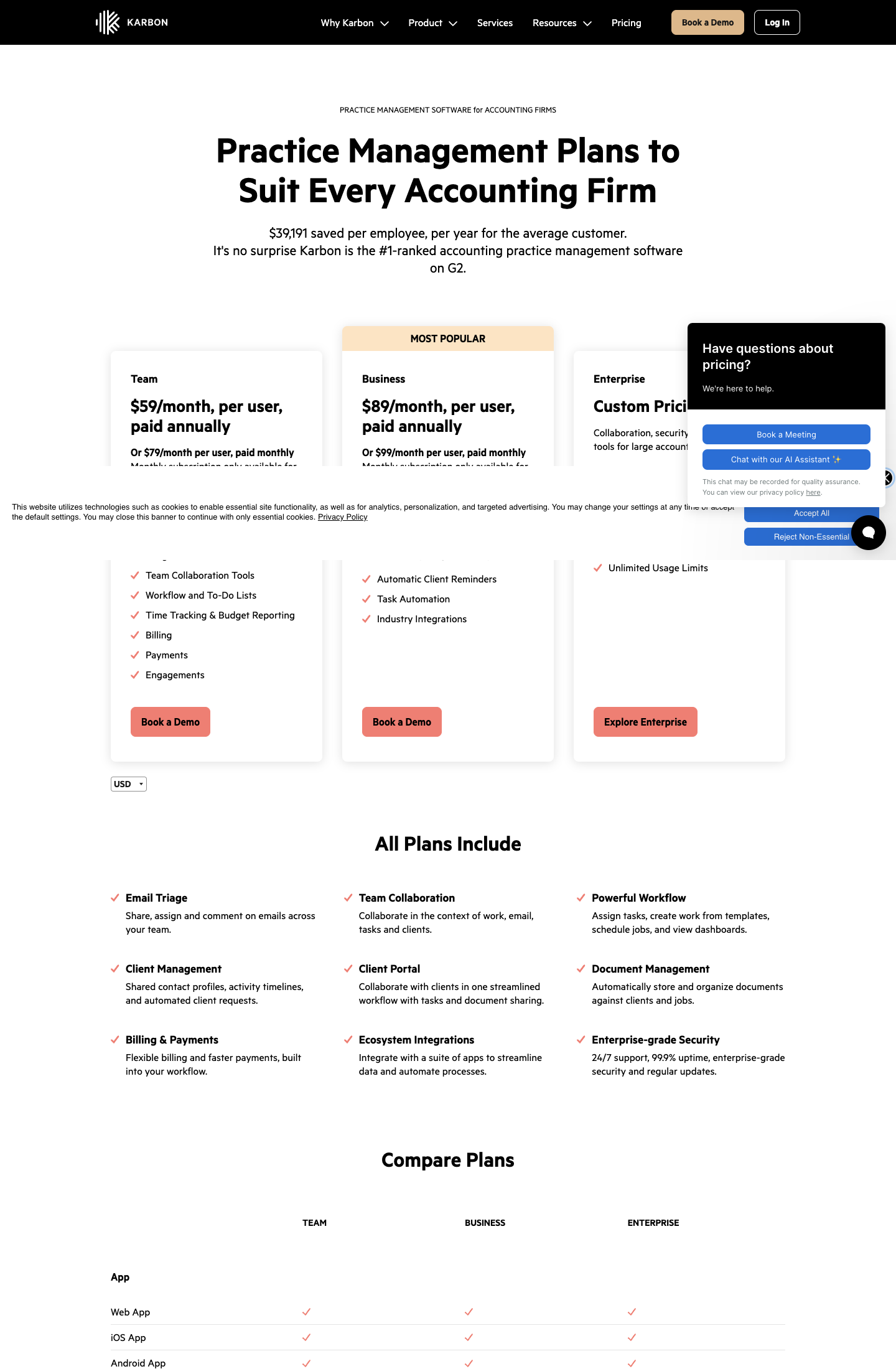
From the Karbon pricing page: Team $59 per user per month annual ($79 monthly), Business $89 annual ($99 monthly; automatic client reminders, task automators, API), Enterprise custom. Monthly billing is only for teams of four or more.
 Source: Karbon
Who should use Karbon?
Choose Karbon if: you are 20 to 200 people, email-first and often distributed, your tax software is not the deciding factor, and you want capacity and performance measured in hours across the whole team. Reviews: Capterra. See also our Karbon review, Karbon pricing and Karbon vs Uku.
How to Switch from Practice CS to Uku
If Uku is your answer, most firms are live in two to six weeks, at their own pace, and keep serving clients throughout. Before anything else, decide what history you need from Practice CS and back it up: after a Software as a Service cancellation, Thomson Reuters says “your data will no longer be available to you”. The full step-by-step is in our Practice CS migration guide.
- Export and import your clients. Practice CS exports clients and each client’s primary contact as XML, which opens in Excel. Import that sheet into Uku through the import flow, or sync clients from QuickBooks Online. Additional contacts aren’t part of that export, so plan to add them separately.
- Rebuild your recurring work as Uku workflow templates. One per service, with the same steps, owners and due-date rules, applied to every client who buys it.
- Set up billing contracts. Hourly, fixed or per-piece, per client, so the first period’s invoices draft themselves from tracked time. Close out open WIP in Practice CS first, so nothing is billed twice.
- Go live. Run one billing cycle in parallel, compare it with Practice CS, then switch off. Use the 90 minutes of onboarding that comes with every plan.
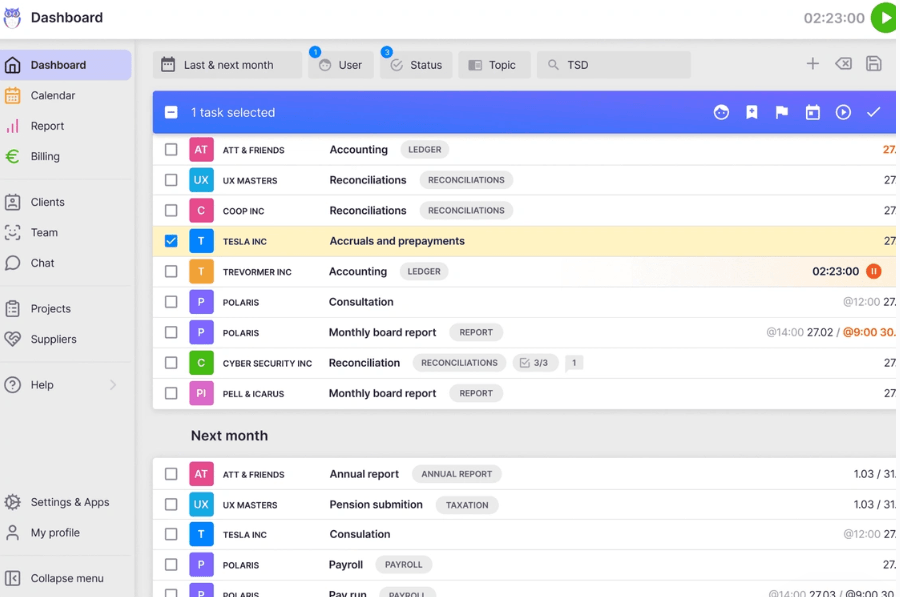
Once the templates are applied, every client’s recurring work appears in the task list on its own, grouped by this month and next, with filters by user, status and topic and bulk actions for reassigning or rescheduling.
If your firm uses an AI assistant, the Uku MCP server connects in a day and can check the move for you: which clients came across, which have no workflow yet, and how the first Uku invoice run compares with the last one from Practice CS.
The Final Verdict
Practice CS is not going away, and for a firm whose whole year runs on its shared database with UltraTax CS, staying is a reasonable choice. The alternatives answer the reasons firms leave it:
- Uku for invoices drafted from tracked time and each client’s agreement, a client portal included, and plans you can try and pay monthly
- Canopy for a documented move from a Practice CS backup, plus IRS transcripts and tax resolution
- Firm360 for a US CPA firm that wants UltraTax documents synced into the practice system
- Onvio Firm Management for staying with Thomson Reuters and moving to the cloud
- TaxDome for tax firms that sign heavily every season and want a client mobile app
- Financial Cents for small firms that want a self-serve trial and a $19 solo plan
- Karbon for email-first teams of 20+ that need a shared inbox and capacity in hours
If your firm wants the portal, workflow and billing in one system and to see it working before a sales call, try Uku free for 14 days or book a demo.
Read more
- Practice CS review — how its features, modules and hosting work
- Practice CS pricing — every cost line, and a five-person firm compared
- Practice CS vs Uku — the head-to-head, including what you give up on UltraTax
- How to migrate from Practice CS — what you can export, and the order to do it in
- The best accounting practice management software — where Practice CS sits in the wider market
- Canopy alternatives, Firm360 alternatives, TaxDome alternatives and Karbon alternatives
- Tax practice management software — what a tax-first firm needs
- CCH Axcess alternatives — the same question for Wolters Kluwer firms
- Uku case studies
Frequently asked questions
Is Practice CS being discontinued?
No. Thomson Reuters shipped a Practice CS release on 26 August 2026 that added Stripe payments, and we found no end-of-life notice for Practice CS itself. What is changing around it: the old CS Payment/Kotapay processor stops on 10 November 2026, after which Stripe is required for card and ACH payments, and FileCabinet CS gets no updates or support after 31 December 2027.
Why do accounting firms look for Practice CS alternatives?
Mostly because it is desktop-era software in a cloud market. Firms want a client portal and e-signature inside the practice system rather than in NetClient CS, workflow without buying separate add-on modules, a price they can see, and contracts they can leave. CS Professional Suite reviewers also mention paid support and yearly fee increases.
How much does Practice CS cost?
Thomson Reuters doesn't display Practice CS pricing publicly, but according to available information and client reviews, pricing starts at around $1,000 per user annually. On top of that, Project Management, Staff Management and Client Management are each sold as an add-on module, Software as a Service and support contracts carry a 12-month commitment, and hosting through Virtual Office CS is priced separately.
What is the best Practice CS alternative?
It depends on what you are replacing. For billing drafted from tracked time and each client's agreement, Uku. For a vendor that publishes a Practice CS migration guide, Canopy. For a US CPA firm that wants documents synced from UltraTax, Firm360. To stay with Thomson Reuters in the cloud, Onvio Firm Management. For heavy e-signature seasons, TaxDome. For a small firm that wants to try first, Financial Cents. For an email-first team, Karbon.
Can I keep UltraTax CS if I leave Practice CS?
Yes. UltraTax CS is sold separately and keeps working. What you lose is the shared client database between the two. Canopy, Firm360 and Financial Cents (on Scale) sync or save files from UltraTax; Karbon, Uku and TaxDome do not have a live UltraTax integration, so client details are kept in both systems.
What data can I export from Practice CS?
Practice CS exports clients and each client's primary contact as XML, which opens in Excel. Additional and standalone contacts are not included in that export. Time entries, work in progress and invoice history come out through reports or a full database backup, so decide what history you need before you cancel: after a Software as a Service cancellation, Thomson Reuters says your data will no longer be available to you.
How long does it take to move from Practice CS to Uku?
Most firms are live on Uku in two to six weeks, at their own pace, and keep serving clients throughout. You export clients from Practice CS, import them from Excel, rebuild your recurring work as workflow templates, set up billing contracts and run one billing cycle in parallel before switching off.

Published Sep 30, 2026 · Updated Oct 2, 2026