Thomson Reuters Practice CS Review 2026: Pros, Cons & Uku Alternative
Practice CS starts at around $1,000 per user a year, plus add-on modules and 12-month terms. Our 2026 review of features, pros, cons and the Uku alternative.


Contents
Practice CS is Thomson Reuters’ practice management software, the time-and-billing centre of CS Professional Suite. It turns everyone’s time into work in progress, WIP into bills, and bills into reports, and it shares one client database with UltraTax CS, Accounting CS and the rest of the suite. For a firm that runs on Thomson Reuters, that shared database is the whole point.
It is also software from another era of accounting technology: installed on a server or hosted remotely, with projects, staff scheduling and client tracking sold as add-on modules, and the client portal in a separate product.
To write this Practice CS review, we analysed the product pages, Thomson Reuters’ help centre and release notes, and what CS Professional Suite users say. We believe it’s the ideal choice if:
- Your firm already runs UltraTax CS and Accounting CS and wants one shared client database
- You bill from time and WIP and want deep, configurable billing
- Your partners rely on firm, staff and client dashboards built over years
- You are comfortable hosting Windows software, or paying Thomson Reuters to host it
- You want one vendor for tax, accounting and practice management
However, Practice CS might not be the best choice if:
- You want a client portal and e-signature inside the practice system, not in NetClient CS
- You don’t want to buy projects, staff scheduling and client management as separate modules
- You need to see a price before a sales call, or want to pay monthly
- Your team works remotely and you don’t want to host or maintain a server
- You want billing drafted from each client’s agreement rather than assembled from WIP
In that case, consider Uku: accounting practice management software where workflow templates, a timer on every task, billing contracts and a free client portal are on every plan, in a browser, with published monthly prices. Uku doesn’t integrate with UltraTax, which we cover honestly below.
Want to see it with your own clients? Try Uku free for 14 days, no credit card required.
Prices and features below were last checked in October 2026.
What is Practice CS?
Practice CS is part of Thomson Reuters’ CS Professional Suite, a family of desktop-era products for US tax and accounting firms: UltraTax CS for tax returns, Accounting CS for write-up and payroll, FileCabinet CS for documents, NetClient CS for client portals, and Practice CS for time, billing and the firm itself. Thomson Reuters calls it “world-class practice management software for accountants”.
 Source: Thomson Reuters
The suite is what gives Practice CS its value. UltraTax CS, Accounting CS and other CS programs can be launched directly from Practice CS and read the same clients. Accounting CS, the suite’s write-up and payroll product, looks and works the same way.
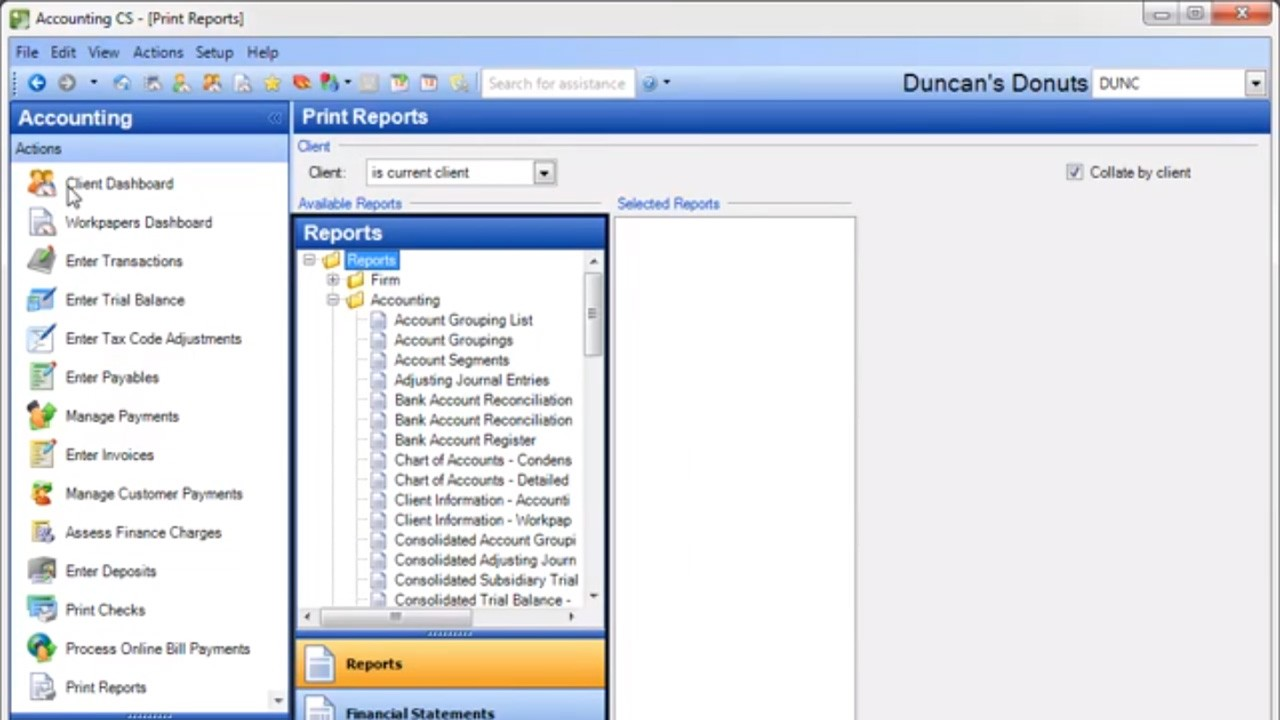 Source: Thomson Reuters demo
It runs in three ways: installed on your own server, hosted by Thomson Reuters through Virtual Office CS (“anytime, anywhere online access to CS Professional Suite and select Microsoft® products in the cloud”), or leased as Software as a Service for CS Professional Suite.
It is actively maintained. Thomson Reuters’ release notes list releases in November 2025 (support for 2025 UltraTax CS), January 2026 and August 2026, when Practice CS moved its payments to Stripe. Despite search queries asking whether it is being discontinued, there is no end-of-life notice for Practice CS itself.
Practice CS Pros & Cons
| ✅ Pros | ❌ Cons |
|---|---|
| One client database shared with UltraTax CS, Accounting CS and the rest of the suite | No published price; reviews put it around $1,000 per user a year |
| Deep time, WIP and billing, including WIP transfers between clients | Project, Staff and Client Management are separate add-on modules |
| Customizable firm, staff and client dashboards | Client portal and e-signature live in NetClient CS, a separate product |
| Electronic invoices, online bill posting and card or ACH payments | Windows software, installed or hosted; not cloud-native |
| Part of a wide Thomson Reuters family, from UltraTax CS to SafeSend | 12-month commitments on SaaS and support contracts |
| Steady releases, including Stripe payments in 2026 | Limited third-party integrations outside the suite |
| Long track record with US CPA firms | Reviewers report paid support and yearly fee increases |
Practice CS Review: How it Works & Key Features
Time, expense and WIP: the core of the product
Time and expense entries are where Practice CS starts. Entries accumulate as work in progress per client, and WIP can be moved: Thomson Reuters’ help centre explains how to transfer WIP amounts from one client to another, with the limit that billed or partially billed WIP can’t be transferred.
The firm dashboard puts every staff member’s billable targets against their actual hours and amounts, week by week.
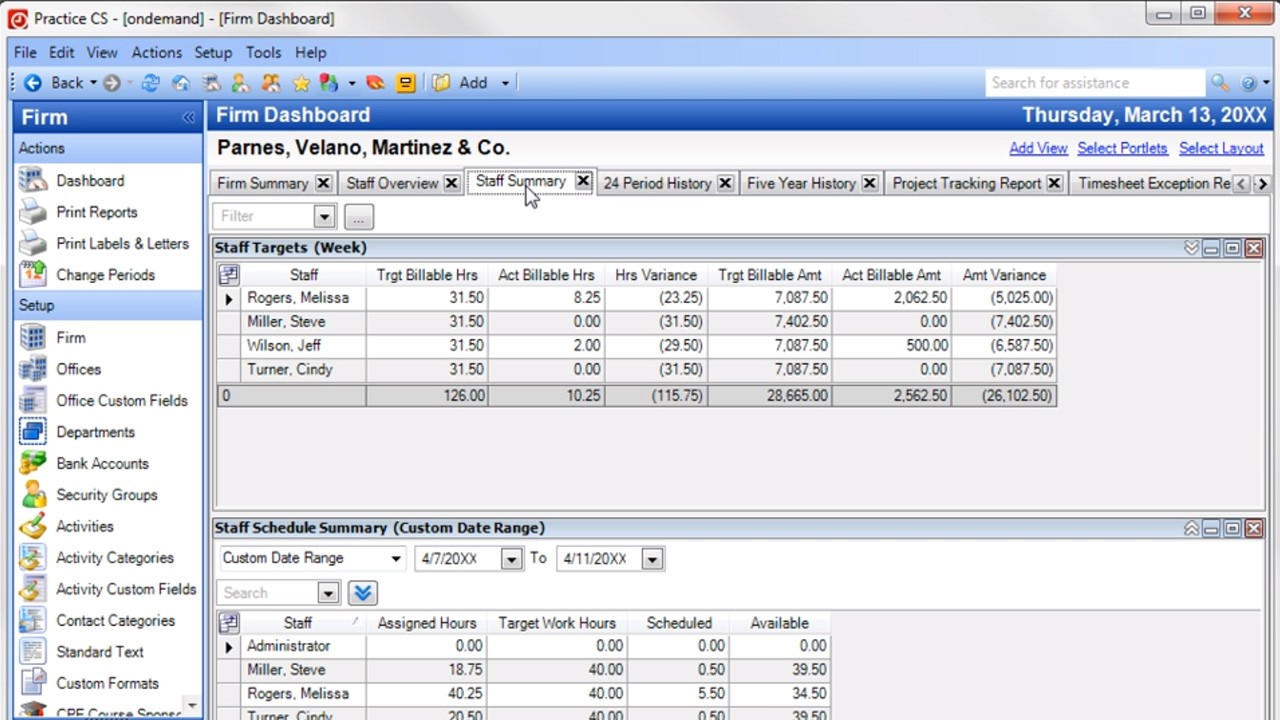 Source: Thomson Reuters demo
Billing and payments: from WIP to invoice
Bills come from WIP. Thomson Reuters’ product page promises “electronic invoices, post bills online, and accept credit card payments, so you can collect payments from your clients faster”. Invoices posted to a client’s NetClient CS portal can be paid there and applied back to the invoice in Practice CS.
Payments are mid-change. Release 2025.2.5 (26 August 2026) added Stripe, and Thomson Reuters says “CS Payment/Kotapay will remain available until November 10, 2026. Beginning on that date, Stripe will be required for all credit card and ACH transactions in Practice CS.” Firms that take card or ACH payments have a setup task this autumn.
Project Management module: workflow as an add-on
Workflow is not in the base product. The Project Management module, an “add-on module for Practice CS that keeps track of projects and tasks”, stages client work and “moves the work through the office”. With it, each staff member works from a dashboard of ready tasks and a work queue with hours.
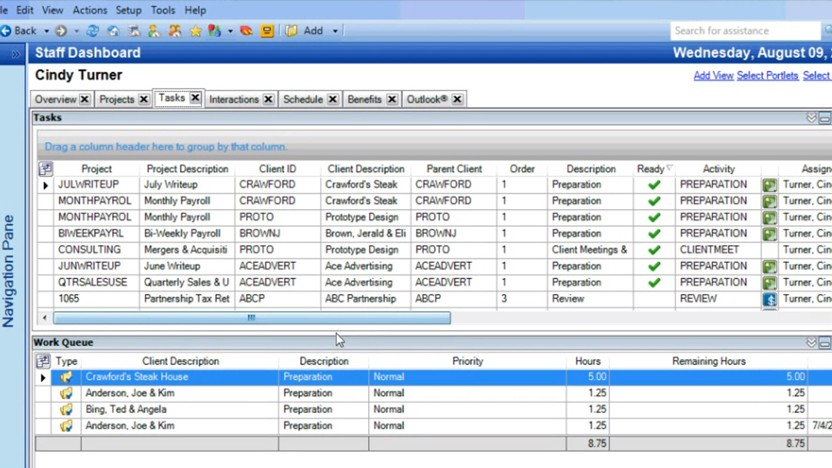 Source: Thomson Reuters demo
Staff Management module: scheduling and availability
The Staff Management module, another add-on, assigns and schedules project tasks, and notifications appear on each staff member’s dashboard as tasks are ready. Thomson Reuters’ product page also mentions staff benefits, comp time and schedules. On the firm dashboard it adds availability, active timers and weekly targets.
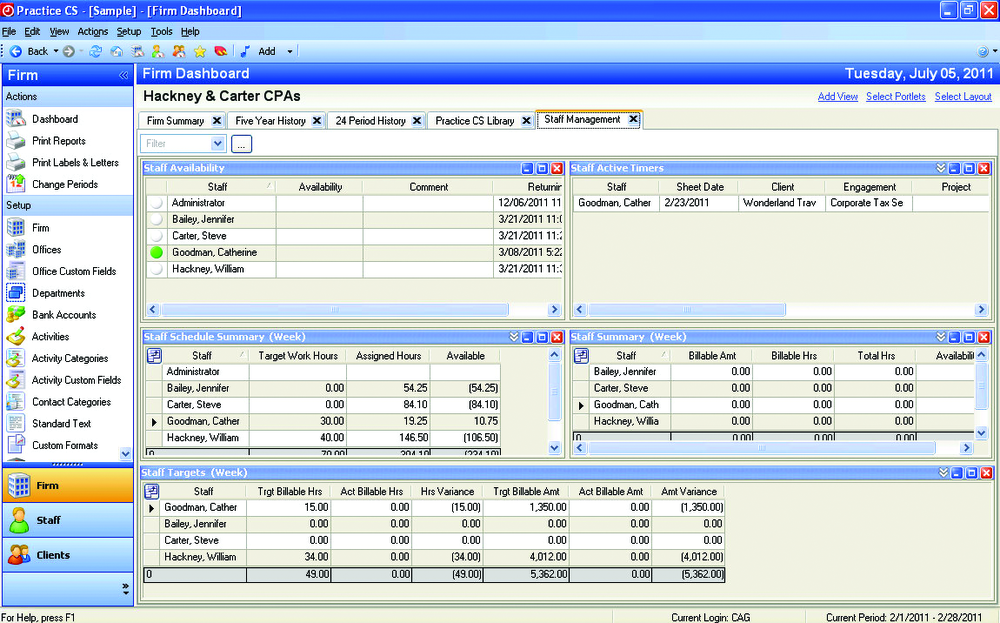 Source: Thomson Reuters demo
Client Management module and Mobile CS
The Client Management module, a third add-on, “tracks your client interactions to keep your relationships going strong”. With it and Mobile CS, Thomson Reuters says you can monitor statuses and receive real-time updates, including staff notes from the preparation and delivery process.
Dashboards and reporting: “mission control”
Thomson Reuters describes Practice CS’s dashboards as “mission control”: “a central hub of customizable dashboards provides up-to-the-second data on firm operations, staff projects, and client statuses”. Combined with flexible reporting, this is the part long-time users value most, because each firm has built its own views over years.
Client portal and documents: NetClient CS and FileCabinet CS
Practice CS’s product page talks about creating “secure client portals in Practice CS” and letting clients sign electronically, but the portal itself is NetClient CS, “client portals that offer your clients 24/7 online access to your services”. Documents live in FileCabinet CS, which gets no updates or support after 31 December 2027. Thomson Reuters also sells SafeSend for intake, engagement letters, organizers, e-signatures and return delivery.
Hosting: Virtual Office CS and SaaS
Practice CS is Windows software, so remote access means hosting. Thomson Reuters offers two routes. Virtual Office CS gives “anytime, anywhere online access to CS Professional Suite and select Microsoft® products in the cloud” and, by Thomson Reuters’ own cancellation terms, “can be canceled at any time”. Software as a Service for CS Professional Suite lets you “lease online versions of our entire award-winning CS Professional Suite, plus Microsoft® Office and Exchange”, with a 12-month commitment.
Hosting has been changing too. Thomson Reuters retired the Hosted Exchange email service within Virtual Office CS on 31 August 2026, according to CPA Practice Advisor, so firms there now run their own Microsoft 365 email. Moving a Practice CS database into a hosted environment starts, in Thomson Reuters’ own migration steps, with a backup of your Practice CS SQL database.
Either way, the team still works in the same Windows application, now running on someone else’s server. That solves access from home; it doesn’t change the experience.
Integrations: the suite, and not much beyond it
Inside the suite, the integration is deep: release 2025.2.1 “supports integrations with 2025 UltraTax CS”, and journal entries can be imported from Practice CS into Accounting CS. Outside it, the list is short; CPA Practice Advisor’s 2020 review noted “limited integration with third-party applications”. A few third parties connect to it, such as Ignition, which imports Practice CS clients and invoices.
Practice CS Pricing (2026)
Thomson Reuters Practice CS doesn’t display its pricing publicly; the product page offers “Contact sales” and a phone number. According to available information and client reviews, pricing starts at around $1,000 per user annually. What you can find out without a sales call is the shape of the bill:
| Cost | What we know |
|---|---|
| Practice CS itself | Around $1,000 per user a year |
| Project, Staff and Client Management | Each an add-on module, priced separately |
| Support contract | 12-month commitment; can’t be cancelled before it is met |
| Software as a Service hosting | 12-month commitment |
| Virtual Office CS hosting | ”Can be canceled at any time” |
| Client portal | NetClient CS, a separate product |
| Card and ACH payments | Stripe, required from 10 November 2026 |
Two lines from Thomson Reuters’ cancellation terms matter before you sign or leave: “You can’t cancel a support contract until you’ve met the 12-month commitment period”, and after a SaaS cancellation “your data will no longer be available to you”.
Reviewers add the rest. A managing member on the CS Professional Suite’s Capterra listing wrote that Thomson Reuters charges “for support on all products except UltraTax”, and another that “the fees increase by around 5% year after year”.
Where Practice CS Falls Short
No price before the sales call: every route on the product page goes to sales. Client reviews put the starting point at around $1,000 per user a year, but the add-on modules, support and hosting are each priced separately, so you can’t compare Practice CS with a cloud system until a representative has quoted the whole bill.
Workflow and client management are extras: the Project Management, Staff Management and Client Management modules are each labelled “add-on module for Practice CS”. A firm that wants recurring work, scheduling and a client timeline buys three modules on top of the base product.
The client portal is another product: clients upload, sign and pay in NetClient CS, not in Practice CS. Firms we speak to often add more on top: a mid-sized US tax and bookkeeping firm running Practice CS, UltraTax and SafeSend told us in a demo this year that what they wanted most was “a better way to communicate with our clients through a client portal”.
Desktop software in a remote world: Practice CS is Windows software, installed or hosted. Hosting solves access but not the experience, and it adds a contract of its own.
Commitments and paid support: SaaS and support contracts run for 12 months. CS Professional Suite reviewers on Capterra rate the suite 3.8 out of 5, and the managing member quoted above put the common complaint plainly:
“They charge for support on all products except UltraTax. Practice is becoming a dinosaur, and badly needs to be updated.”
Limited outside the suite: QuickBooks Online and Xero are not mentioned on the product page, and neither are Zapier or an open API. If your firm’s tools are not Thomson Reuters tools, Practice CS doesn’t reach them.
Not every reviewer is critical. One long-time user on Capterra wrote that “Practice CS helps me keep track of our clients information, staff time and client billing, plus all the reports I need to run”, and Thomson Reuters quotes a CPA who says “Practice CS paid for itself within 2 months”.
Top Practice CS Alternative: Uku
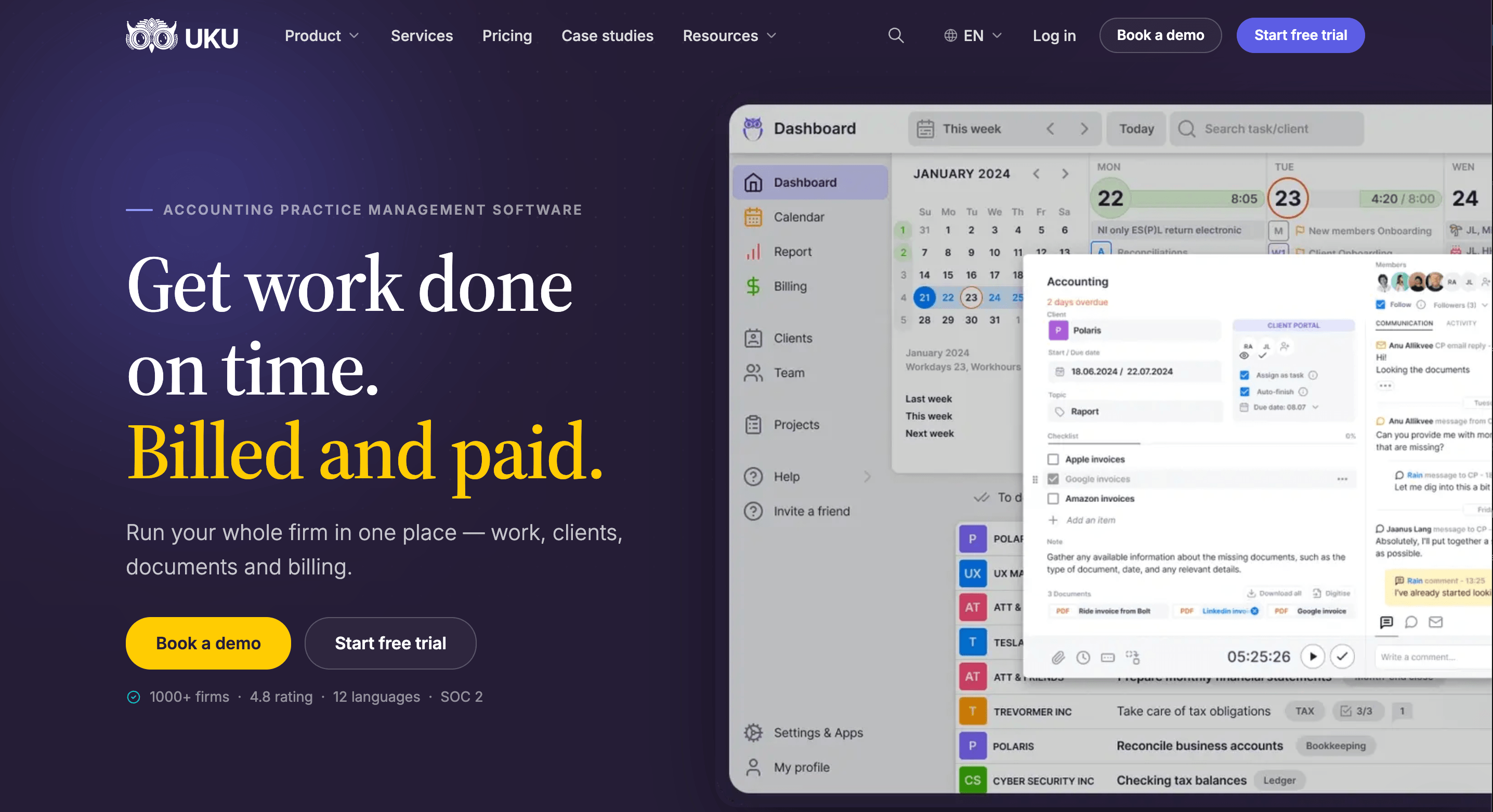
Uku is practice management for accounting, bookkeeping and audit firms that keeps the work, the time, the bill and the client conversation in one browser-based system. It serves 1,000+ firms in 25+ countries, in 12 languages, and it is modular: start with clients and tasks on day one and add billing, workflows and analytics as you grow.
Automated Billing
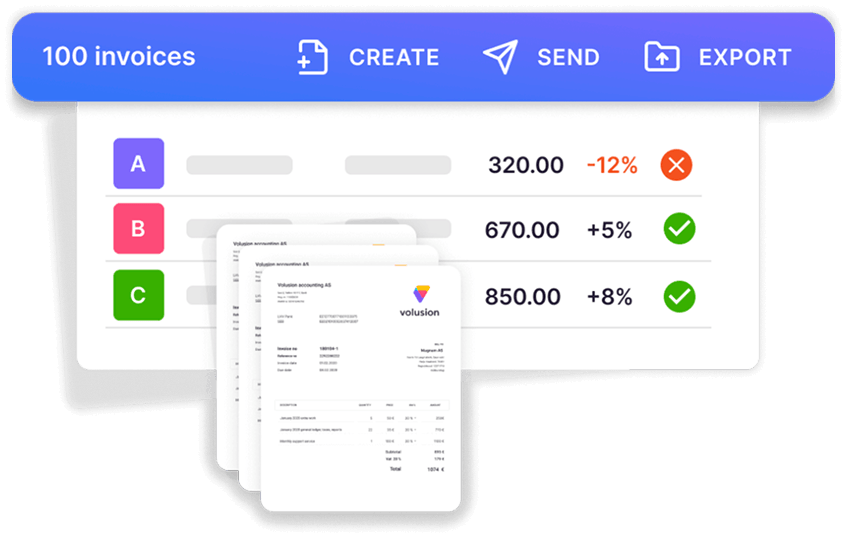
Where Practice CS builds bills from WIP, Uku starts from each client’s agreement. A billing contract says what the fee covers (hourly, fixed, per piece, volume tiers, or a mix), tracked time and out-of-scope work land against it, and at period end the invoices draft themselves. You review and send them in one batch, which reduces invoice preparation from days to about 30 minutes, and they sync to QuickBooks Online or Xero.
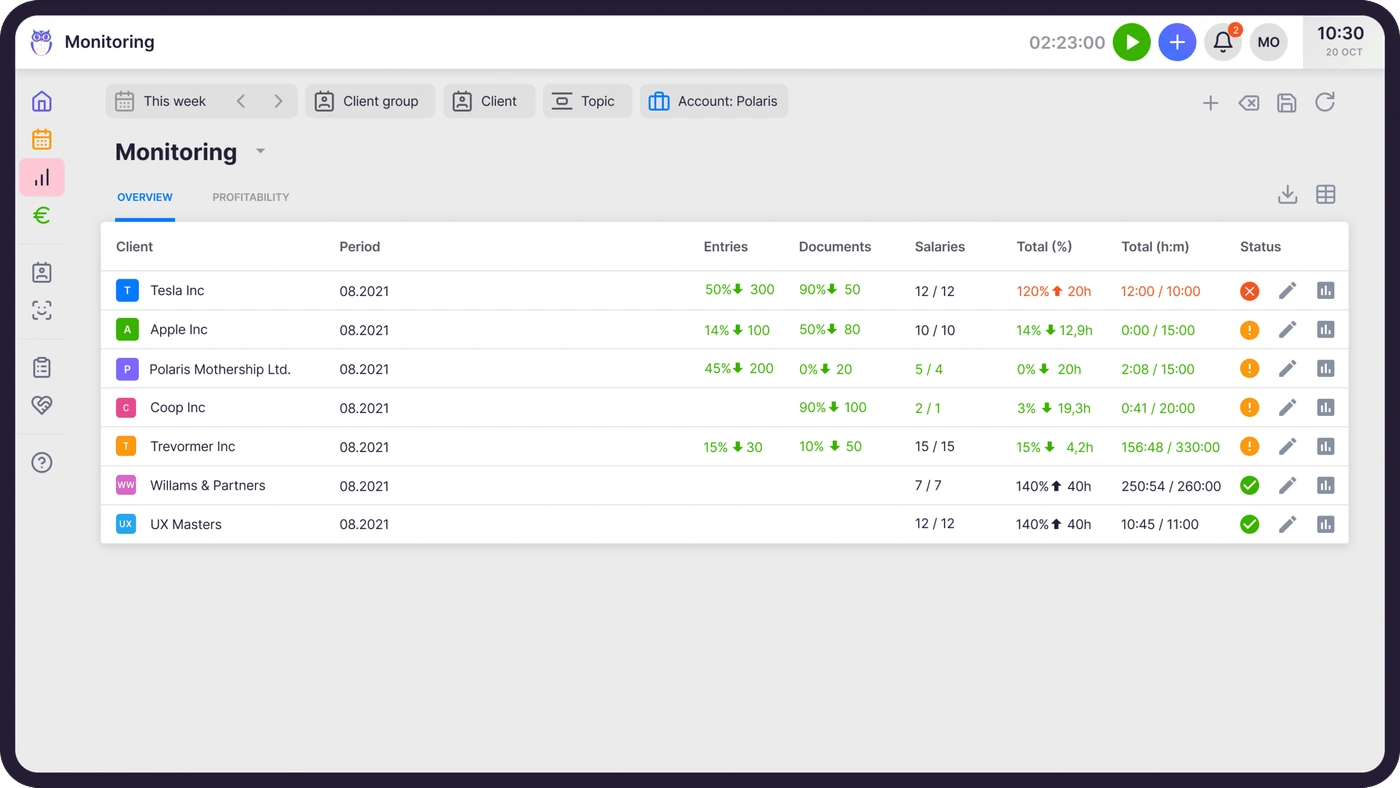
Agreements monitoring then compares agreed work with delivered work for every client in the middle of the month, so over-servicing becomes a pricing conversation before the bill, not a write-off after it.

Client Portal
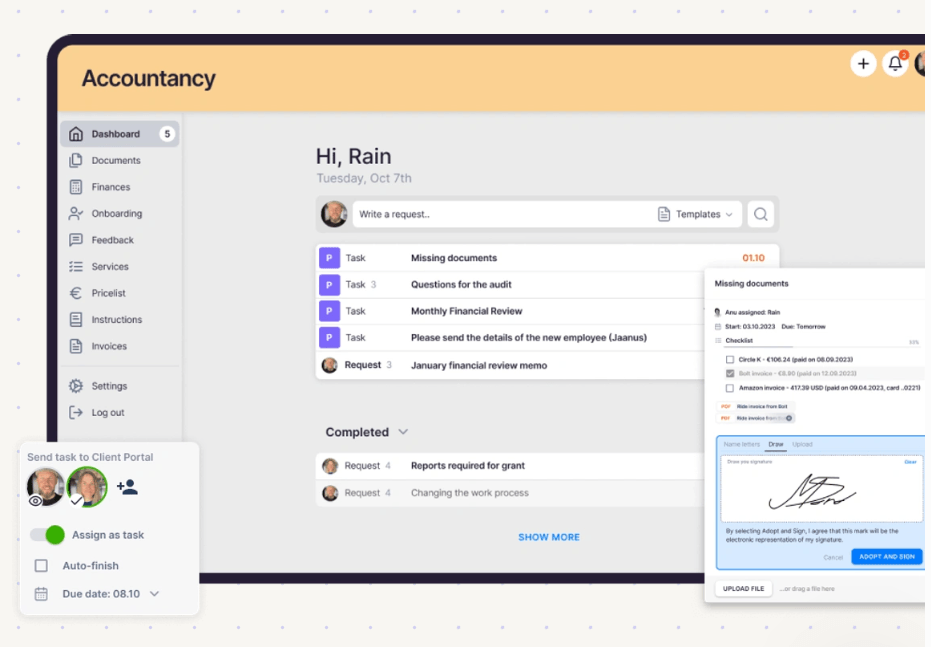
Uku’s client portal is part of the product, passwordless and free for clients on every plan. It mirrors the exact same task on both sides: you ask for documents on the task, the client uploads them there and signs where needed, and the conversation stays with the work. There is no second product to buy or sync.
Workflow
Workflow templates are on every plan, not an add-on. One template per service creates every recurring task with its checklist, owner and due-date rule for every client who buys it, and changes can be pushed to the clients already using it.
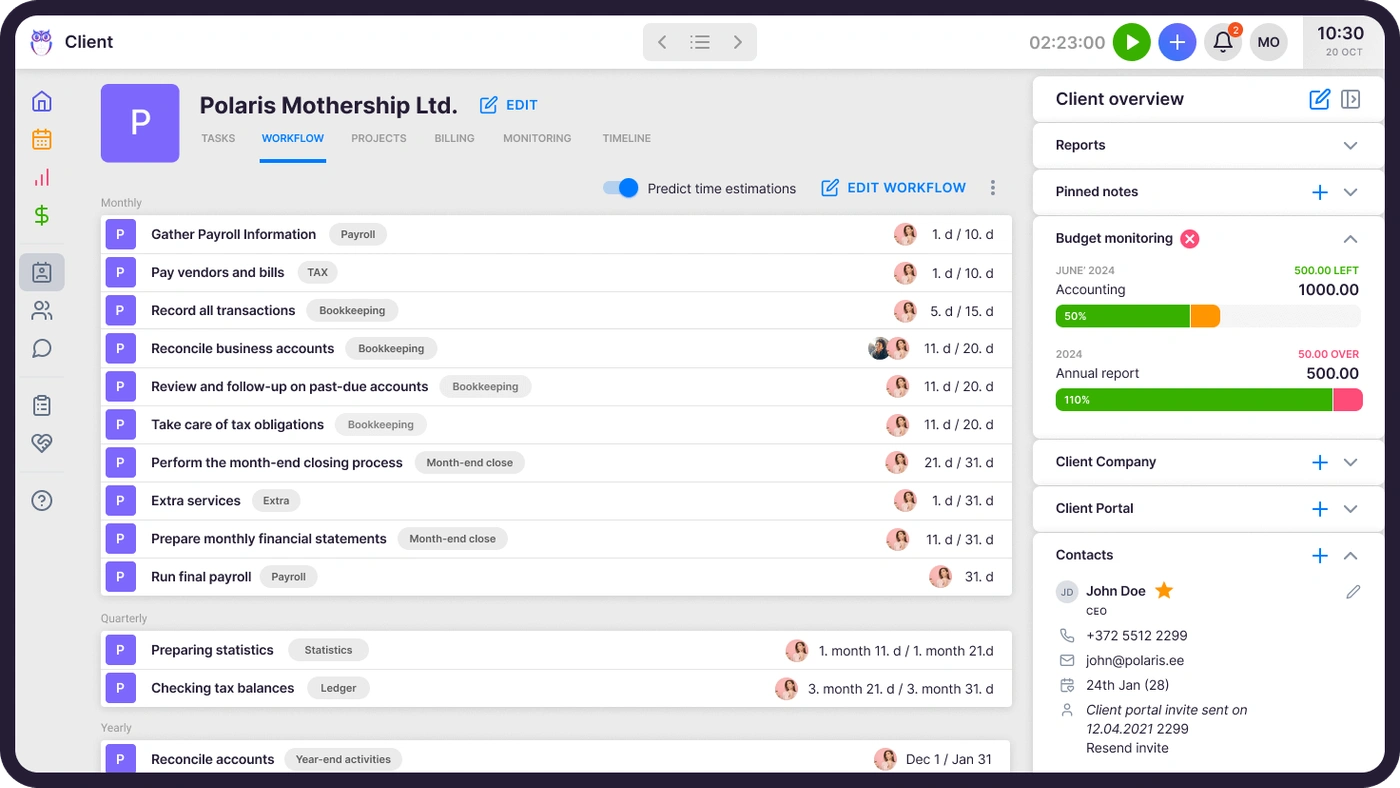

Time Tracking
Time is tracked on the task itself, with a one-click timer, manual or bulk entry, billable or not. On Elite and Enterprise a firm can require a time entry before a task is closed, so nothing worked goes unbilled.
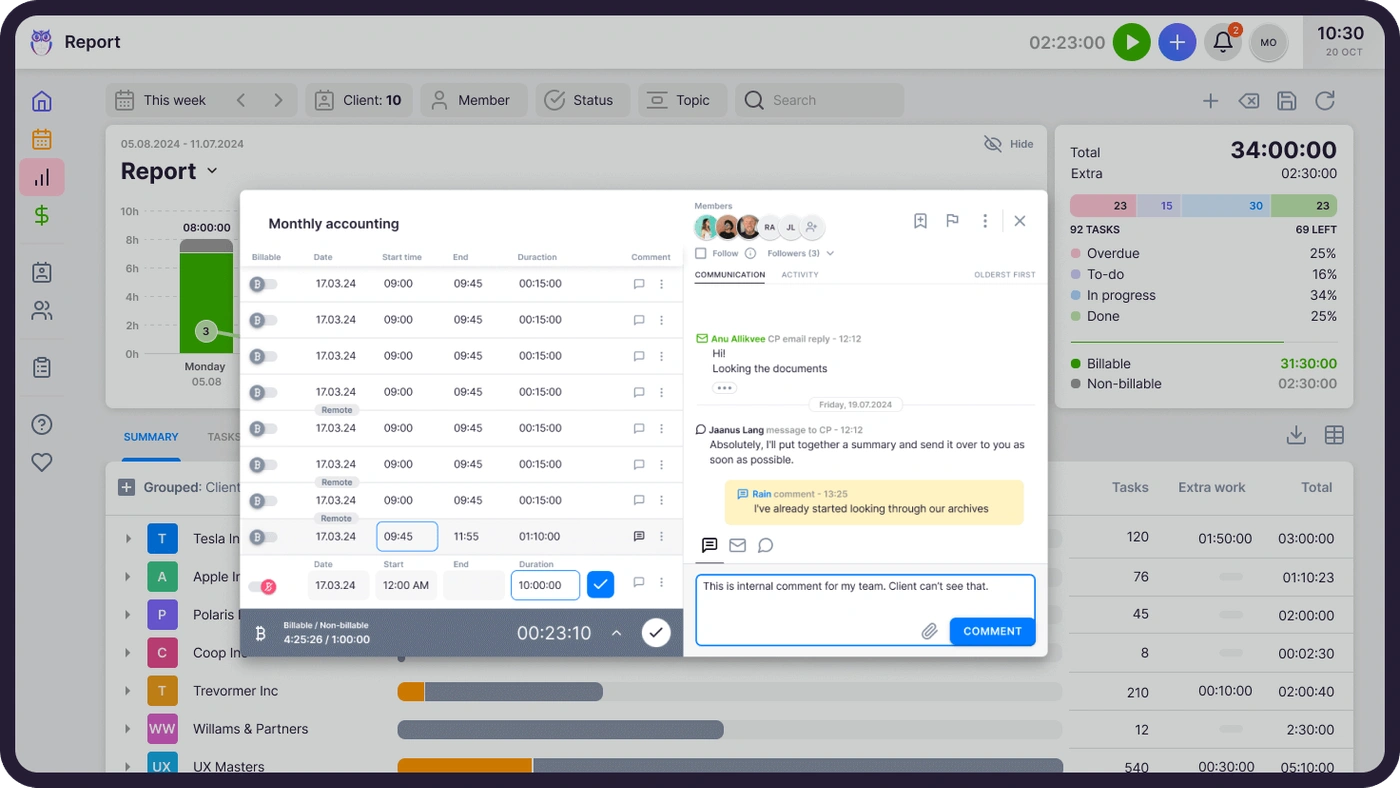
It also carries a full US tax season. Gordon J. Maier & Company, a 43-person Wisconsin CPA firm founded in 1935, went live on Uku weeks before tax season and ran the whole season through it.

Analytics and Reporting
Practice CS users value their dashboards, and the move to Uku shouldn’t mean losing sight of the firm. Uku’s BI Analytics (Elite and Enterprise) shows revenue and profitability by client and service, with health flags for unbilled work, over-serviced clients and star clients, and a 12-month view of revenue against hours.
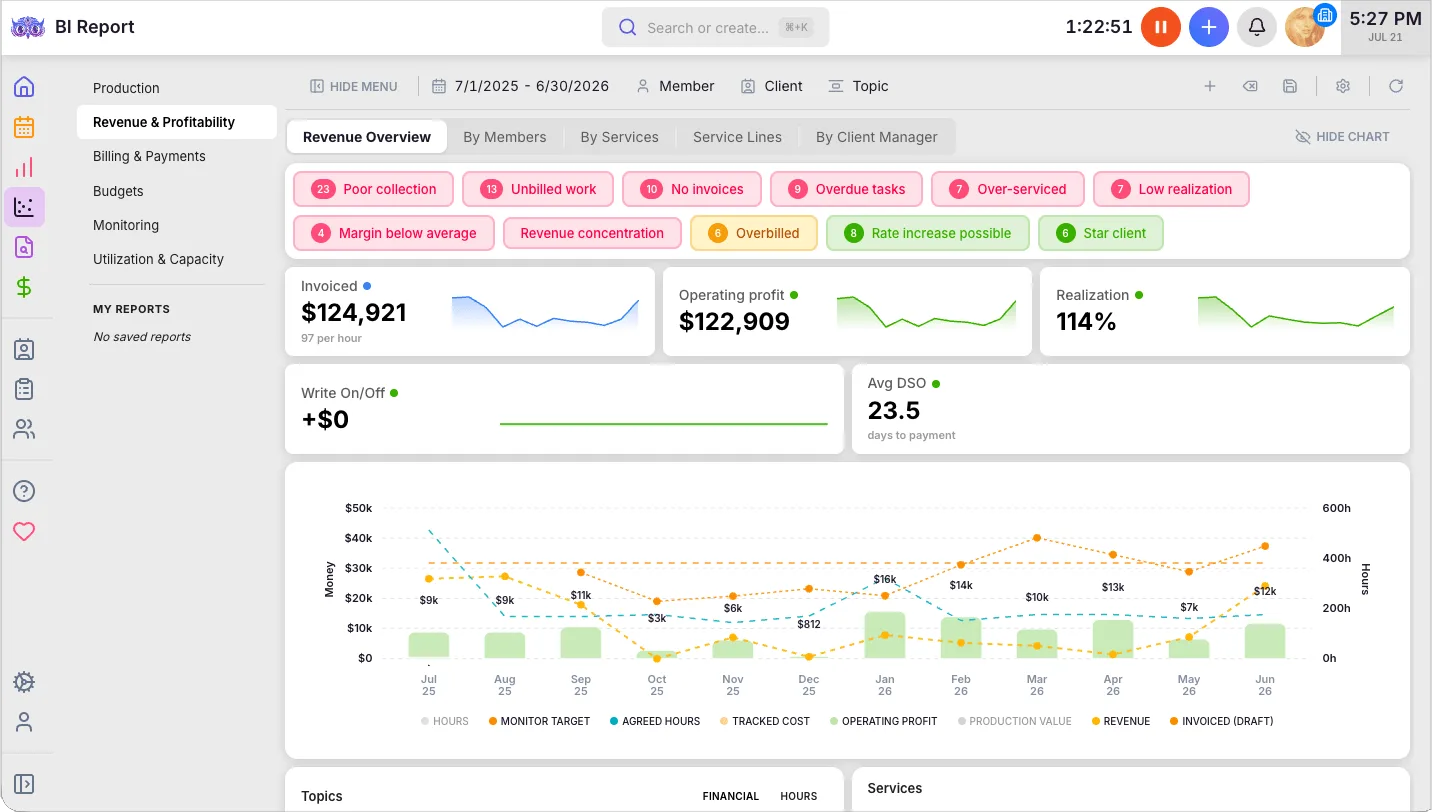
Client budgets add the forward-looking half: each client’s budget is tracked against logged hours, with an alert before it runs over, so the conversation happens while the period is still open.
Multilingual and International
Practice CS is built for US firms. Uku runs in 12 languages and bills in USD, EUR and GBP, which matters for firms with international clients, staff abroad, or offices in more than one country. Clients see the portal and automated emails in their own language.

Pricing
Uku publishes its prices, per member per month:
| Plan | Price | Includes |
|---|---|---|
| Solo | $19 annual, $25 monthly | One member, 20 active clients |
| Team | $38 annual, $49 monthly | Unlimited members and clients |
| Elite | $48 annual, $62 monthly | BI Analytics, API, Zapier, Uku MCP |
| Enterprise | $88 annual, $99 monthly | Custom integrations, import help |
Clients and the portal are free, every account starts with a 14-day Elite trial without a card, and every plan includes 90 minutes of onboarding. See the pricing page for every feature.

What Uku does not do
Uku has no integration with UltraTax CS or any other US tax software, and no Practice CS importer. Firms that move keep UltraTax for returns, import clients from an Excel export, and keep client details in both systems. If Practice CS’s shared database with UltraTax is what holds your firm together, weigh that first.
Practice CS or Uku: Comparison Summary
| Aspect | Practice CS | Uku |
|---|---|---|
| Deployment | Windows software, installed or hosted | Browser, nothing to install |
| Price | Around $1,000 per user a year | From $19 per member a month |
| Contracts | 12-month SaaS and support | Monthly or annual, cancel any time |
| Free trial | None published | 14 days of Elite, no card |
| Workflow | Project Management add-on | Workflow templates on every plan |
| Staff management | Staff Management add-on | Workforce management on Elite (time, attendance, vacations) |
| Time tracking | Deep, with WIP | Timer on every task |
| Billing | From WIP | Billing contracts draft invoices |
| Client portal | NetClient CS, separate | Included, free for clients |
| E-signature | Through NetClient CS or SafeSend | Included on every plan |
| UltraTax CS | Shared client database | No integration |
| QuickBooks Online and Xero | Not mentioned | Clients and invoices sync |
| API and AI | Not mentioned | Public API, Zapier and Uku MCP on Elite |
How to Switch from Practice CS to Uku
If Uku is your answer, most firms are live in two to six weeks, at their own pace, and keep serving clients throughout. We have moved a 40-person firm with 1,000+ clients off Practice CS. Before anything else, decide what history you need and back it up: after a SaaS cancellation, Thomson Reuters says “your data will no longer be available to you”. The full step-by-step is in our Practice CS migration guide.
- Export and import your clients. Practice CS exports clients and each client’s primary contact as XML, which opens in Excel. Import that sheet into Uku through the import flow. Additional contacts aren’t part of that export, so plan to add them separately.
- Rebuild your recurring work as Uku workflow templates. One per service, with the same steps, owners and due-date rules as your Practice CS projects.
- Set up billing contracts. Hourly, fixed or per-piece, per client. Close out open WIP in Practice CS first, so nothing is billed twice.
- Go live. Run one billing cycle in parallel, compare it with Practice CS, then switch off. Use the 90 minutes of onboarding that comes with every plan.
If your firm uses an AI assistant, the Uku MCP server connects in a day and can check the move for you: which clients came across, which have no workflow yet, and how the first Uku invoice run compares with the last one from Practice CS.
Final Verdict
Practice CS is a deep, mature time-and-billing system, and inside a Thomson Reuters firm its shared client database with UltraTax CS is hard to replace. Around it, though, the product shows its age: workflow and client management as add-on modules, the portal in another product, Windows software that has to be hosted, and a price nobody publishes.
👉 Choose Practice CS if:
- UltraTax CS, Accounting CS and FileCabinet CS are the centre of your firm
- You bill from WIP and rely on years of configured dashboards and reports
- You want one vendor and one support relationship for tax and practice management
👉 Choose Uku if:
- You want workflow, time, billing and a client portal in one browser-based system
- You bill against agreements and want invoices drafted for you
- You want a published price, a free trial and monthly billing
- You are fine keeping UltraTax for returns without an integration
If that second list sounds like your firm, try Uku free for 14 days or book a demo to see it with your own services.
Read more
- Practice CS alternatives — seven options and what each does with UltraTax
- Practice CS vs Uku — the head-to-head
- How to migrate from Practice CS — what you can export, and the order to do it in
- Practice CS pricing — every cost line, and a five-person firm compared
- CCH Axcess review — the Wolters Kluwer equivalent
- The best accounting practice management software — the wider market
- Tax practice management software — what a tax-first firm needs
- Uku case studies
Frequently asked questions
What is Practice CS?
Practice CS is Thomson Reuters' practice management software for accounting firms, part of CS Professional Suite alongside UltraTax CS, Accounting CS and FileCabinet CS. It handles time and expense entry, work in progress, billing and invoicing, dashboards and reporting, with project, staff and client management sold as add-on modules.
Is Practice CS being discontinued?
No. Thomson Reuters shipped a Practice CS release on 26 August 2026 and has published no end-of-life notice for it. What is ending around it: CS Payment/Kotapay stops on 10 November 2026, when Stripe becomes required for card and ACH payments, and FileCabinet CS gets no updates or support after 31 December 2027.
Is Practice CS cloud-based?
Not natively. It is Windows software that you install on your own server, or that Thomson Reuters hosts for you through Virtual Office CS or Software as a Service for CS Professional Suite.
How much does Practice CS cost?
Thomson Reuters doesn't display Practice CS pricing publicly, but according to available information and client reviews, pricing starts at around $1,000 per user annually. Expect that subscription or licence, separately priced add-on modules (Project Management, Staff Management, Client Management), a support contract with a 12-month commitment, and hosting if you use Virtual Office CS or SaaS.
Does Practice CS have a client portal?
Not inside Practice CS itself. Client portals, file sharing and electronic signature come through NetClient CS, a separate Thomson Reuters product that Practice CS connects to. Card and ACH payments run through Stripe from November 2026.
What do users say about Practice CS?
Practice CS has no review listing of its own on Capterra; it sits under CS Professional Suite, rated 3.8 out of 5 from 41 reviews. Reviewers praise how the CS products integrate and the depth of time, staff and billing tracking, and criticise paid support, yearly fee increases and a dated interface. One called Practice 'a dinosaur' that 'badly needs to be updated'.
What is the best alternative to Practice CS?
It depends on what you want to keep. For workflow, time, billing and a client portal in one browser-based system with published prices, Uku. For a vendor with a published Practice CS migration guide, Canopy. For UltraTax document sync, Firm360. To stay with Thomson Reuters in the cloud, Onvio Firm Management.

Published Sep 30, 2026 · Updated Oct 2, 2026