Practice CS vs Uku: Which Practice Management Software Fits Your Accounting Firm in 2026?
Practice CS vs Uku compared: UltraTax link, client portal, WIP and billing, pricing and contracts, and how to move off Practice CS if Uku fits.


Contents
- Practice CS vs Uku at a glance
- The real divide: one Thomson Reuters database vs one place for the work
- Workflow and task management
- Client portal and e-signature
- Time, WIP and billing
- Reporting and firm visibility
- Integrations: UltraTax and everything else
- Deployment, support and contracts
- Practice CS vs Uku pricing
- Is Uku better than Practice CS?
- Practice CS vs Uku: Which should you choose?
- How to switch from Practice CS to Uku
Choosing between Practice CS and Uku for your accounting firm comes down to five questions:
- Do you need your practice system to share one client database with UltraTax CS, or can tax preparation live in its own system?
- Do you want software on a server or hosted desktop, or in a browser with nothing to host?
- Should billing start from WIP after the work is done, or from each client’s agreement before it starts?
- Do you want the client portal and e-signature in separate products, or on the same task your team is working on?
- Are you comfortable with quote-based pricing and 12-month commitments, or do you want a published price, a trial and monthly billing?
In short, here’s what we recommend:
👉 Practice CS is Thomson Reuters’ practice management software, part of CS Professional Suite. Its strength is depth in time, WIP and billing, and one client database shared with UltraTax CS, Accounting CS and the rest of the suite. Projects, staff scheduling and client management are add-on modules; the client portal is NetClient CS and documents are FileCabinet CS. It stays the natural choice for a firm whose whole year is built on that shared database.
👉 Uku is accounting practice management software that keeps the work, the time, the bill and the client conversation in one place. Workflow templates create recurring work, a timer runs on every task, billing contracts draft each period’s invoices, and the client portal is free for clients on every plan. It does not integrate with UltraTax. Prices are published, from $19 per member per month, and you can try it for 14 days without a card.
Weighing the move off Practice CS? Uku firms keep UltraTax for returns and run everything around it in one system. Start a free trial or book a demo.
Practice CS vs Uku at a glance
| Feature | Practice CS | Uku |
|---|---|---|
| Vendor | Thomson Reuters, part of CS Professional Suite | Uku, independent |
| Deployment | Your own server, Virtual Office CS or SaaS hosting | Browser, nothing to install |
| Starting price | Around $1,000 per user a year (not published) | $19 per member a month (Solo, annual) |
| Monthly billing | Not published; SaaS has a 12-month commitment | Every plan, from $25 per member a month |
| Free trial | None published | 14 days of Elite, no card |
| Workflow and projects | Project Management add-on module | Workflow templates on every plan |
| Time and WIP | Deep, with WIP transfers | Timer on every task, billable or not |
| Billing | Bills from time and WIP | Billing contracts draft invoices from tracked time |
| Client portal | NetClient CS, a separate product | Included, free for clients |
| E-signature | Through NetClient CS | Included on every plan |
| Documents | FileCabinet CS (no updates after 2027) | Document management included |
| UltraTax CS | Shared client database | No integration |
| Payments | Stripe, required from 10 November 2026 | Invoices sync to QuickBooks Online and Xero |
| Best for | Firms built around the CS Professional Suite | Firms that want work, billing and portal in one browser tab |
The real divide: one Thomson Reuters database vs one place for the work
Practice CS was designed as the back office of a Thomson Reuters firm. Its value grows with every other CS product you own: UltraTax CS, Accounting CS and FileCabinet CS read the same clients, and Practice CS turns everyone’s time into WIP and bills. Thomson Reuters calls it “world-class practice management software for accountants”, and for time and billing depth that is fair.
 Source: Thomson Reuters
Uku starts from the work instead. Every recurring job is a task with an owner, a due date, a checklist and a timer; the client sees the same task in the portal; and the bill comes from the client’s agreement and the time on those tasks. There is no second product for the portal and no add-on for projects.
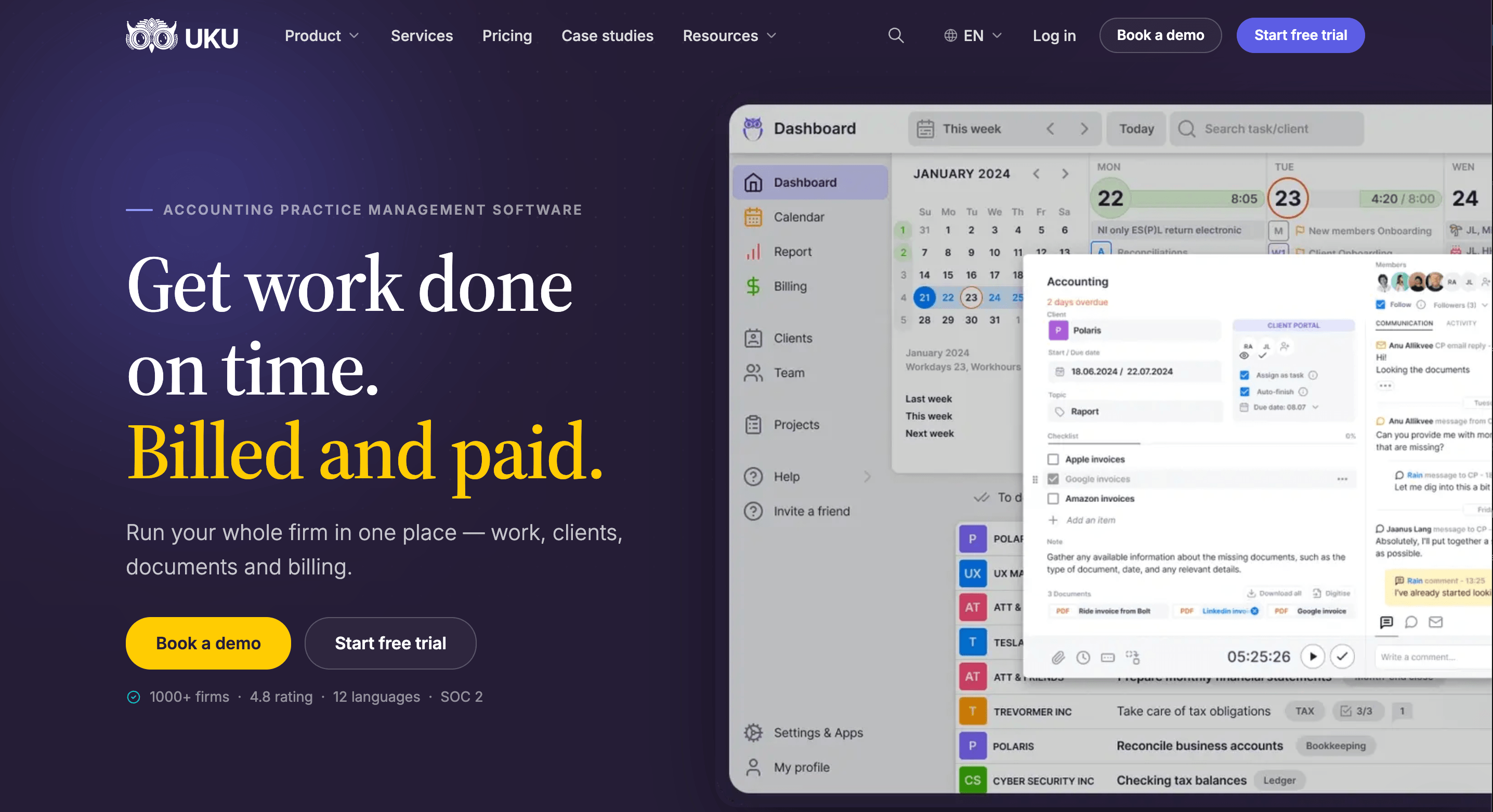
The practical question is which link matters more to your firm: Practice CS’s link to UltraTax, or the link between the work, the client and the invoice. That is the whole comparison in one sentence, and the sections below are the detail.

Workflow and task management
Practice CS
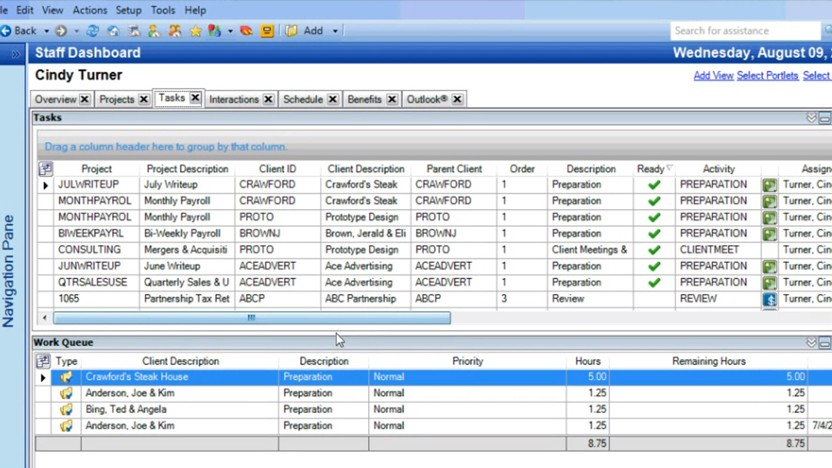
Workflow in Practice CS comes from the Project Management module, which Thomson Reuters lists as an “add-on module for Practice CS that keeps track of projects and tasks”. Staff Management, another add-on, schedules who does what. With both, each staff member works from a dashboard of ready tasks and a work queue with hours.
 Source: Thomson Reuters demo
It is a capable system, but it is a desktop one, and the work lives in a grid rather than with the client conversation.
Uku
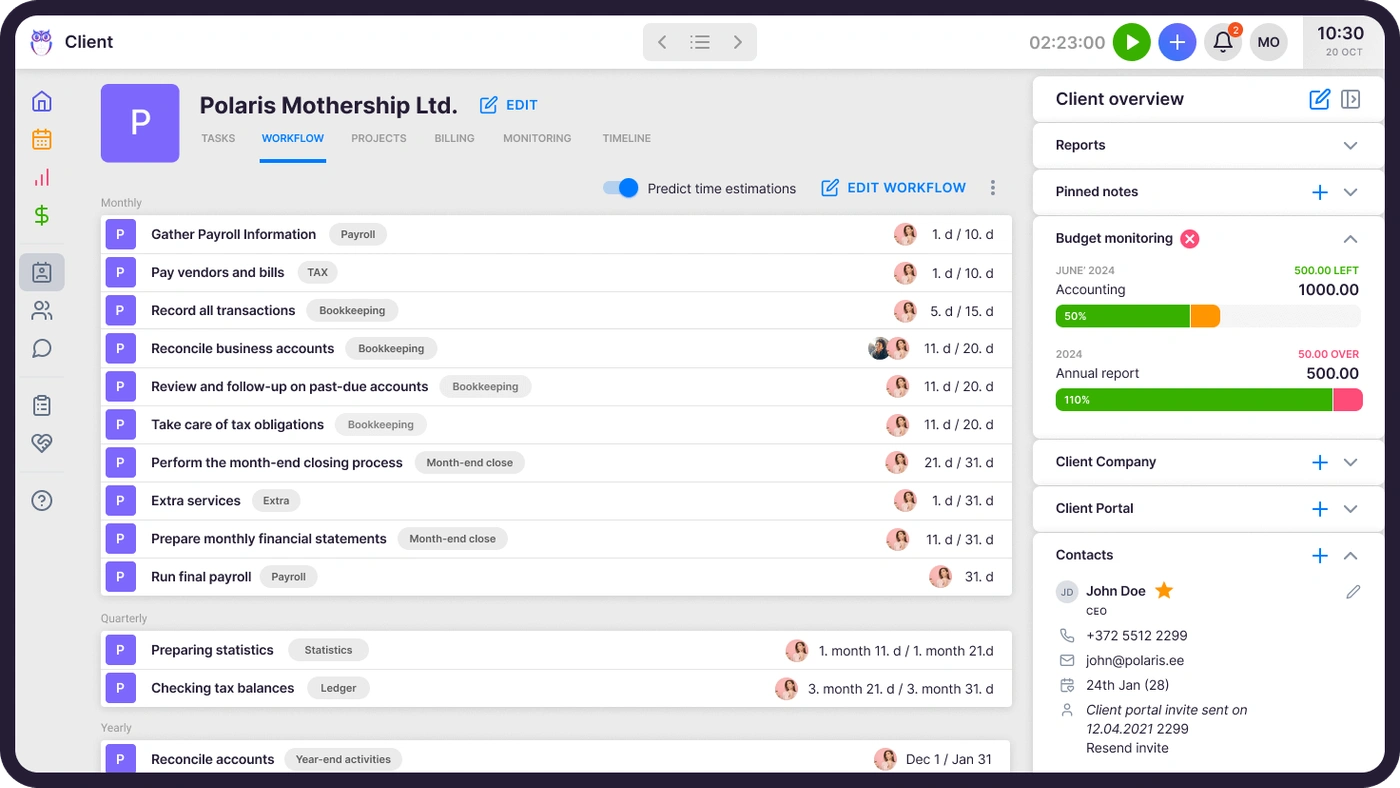
In Uku, workflow templates are on every plan. One template per service creates every recurring task with its checklist, responsible person and due-date rule, applied to every client who buys that service, and changes to a template can be pushed to the clients already using it.
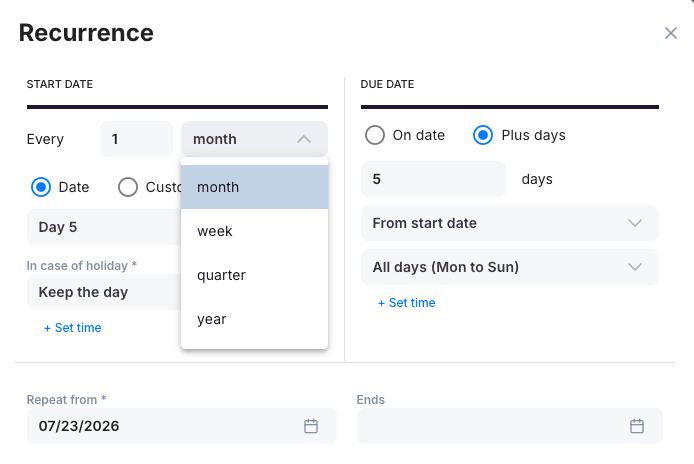
Each task can repeat on its own schedule, including what to do when the date falls on a holiday.

Client portal and e-signature
Practice CS
Practice CS has no client portal of its own. Thomson Reuters’ product page describes creating “secure client portals in Practice CS”, delivered through NetClient CS, a separate product that also handles e-signature and invoice payment. Many Practice CS firms add other tools on top: a mid-sized US tax and bookkeeping firm running Practice CS, UltraTax and SafeSend told us in a demo this year that what they wanted most was “a better way to communicate with our clients through a client portal”.
Uku
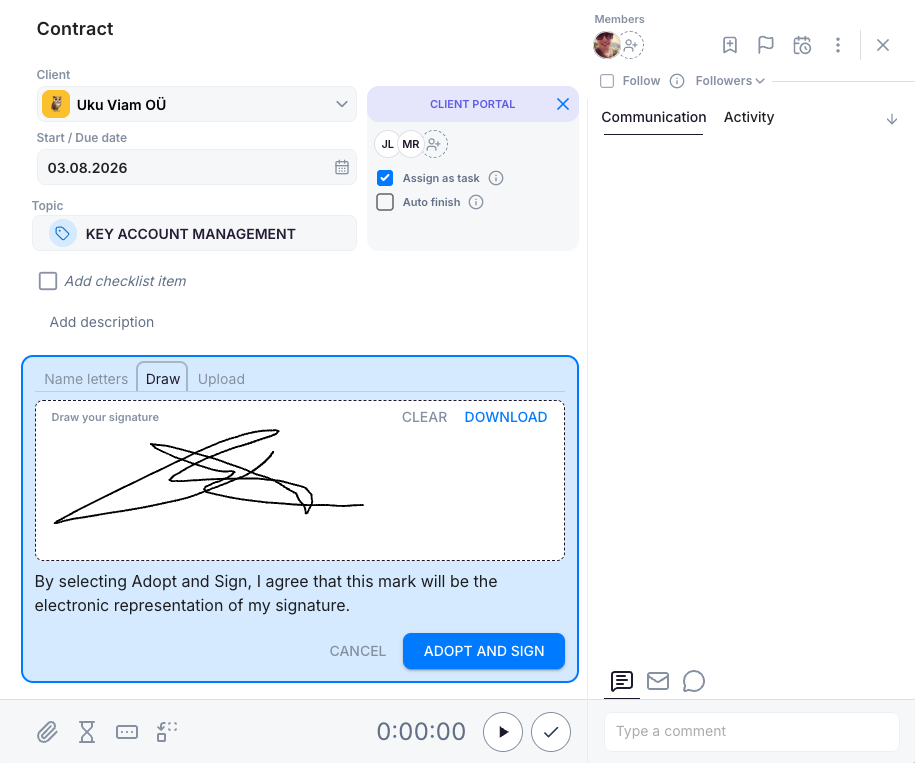
Uku’s client portal is part of the product and free for clients on every plan. It is passwordless and mirrors the exact same task on both sides: you ask for documents on the task, the client uploads them there, signs where needed, and the conversation stays with the work.
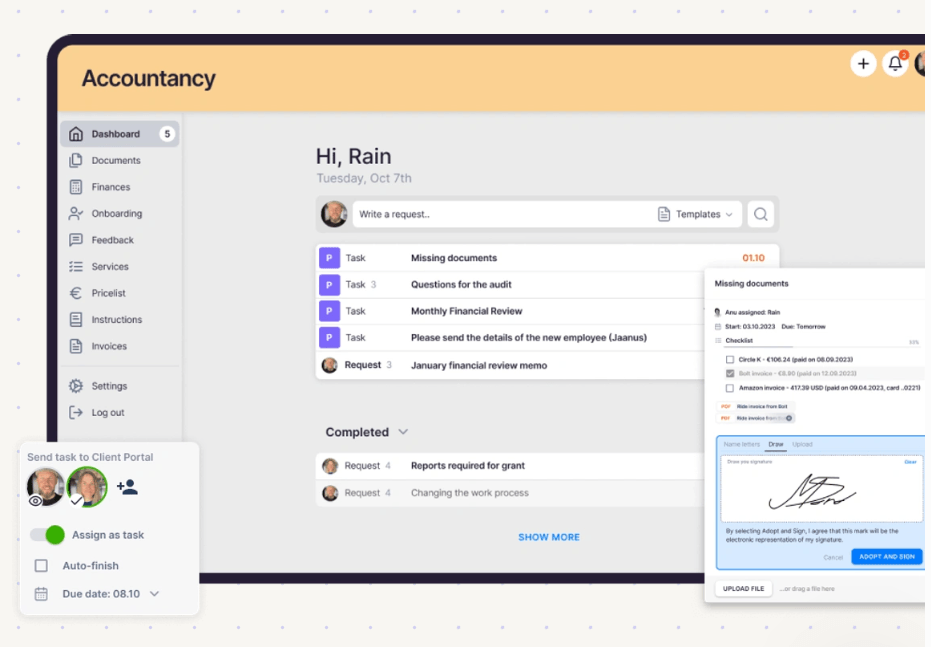
E-signatures are included on every plan, from the task itself.

Time, WIP and billing
Practice CS
This is Practice CS’s home ground. Time and expense entries become work in progress, WIP can be transferred between clients, and bills come out of WIP with electronic invoices, online bill posting and card or ACH payments. The firm dashboard puts every staff member’s billable targets against actuals.
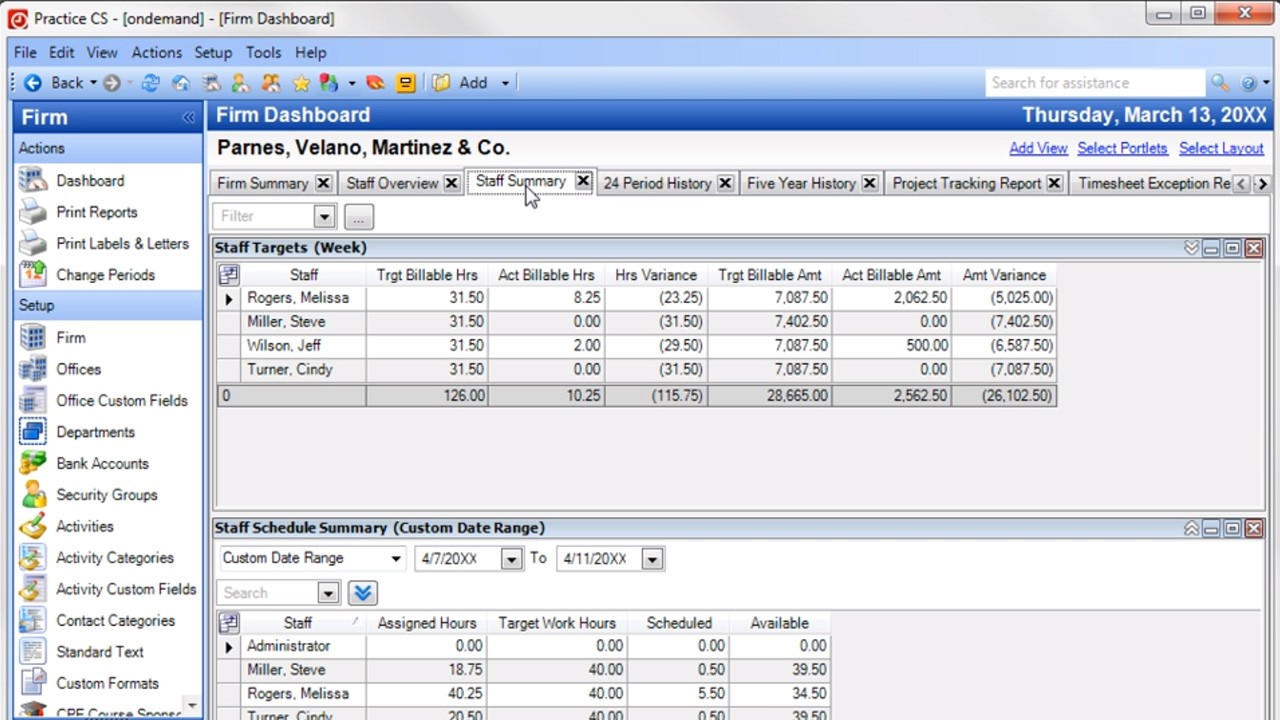 Source: Thomson Reuters demo
Payments are changing: from release 2025.2.5 (August 2026), Practice CS integrates with Stripe, and Thomson Reuters says “CS Payment/Kotapay will remain available until November 10, 2026. Beginning on that date, Stripe will be required for all credit card and ACH transactions in Practice CS.”
Not every reviewer finds the depth easy. One CS Professional Suite reviewer on Capterra wrote:
“The entire process of billing took way too long. There were too many screens and reports to pull. No client communication available.”
Uku
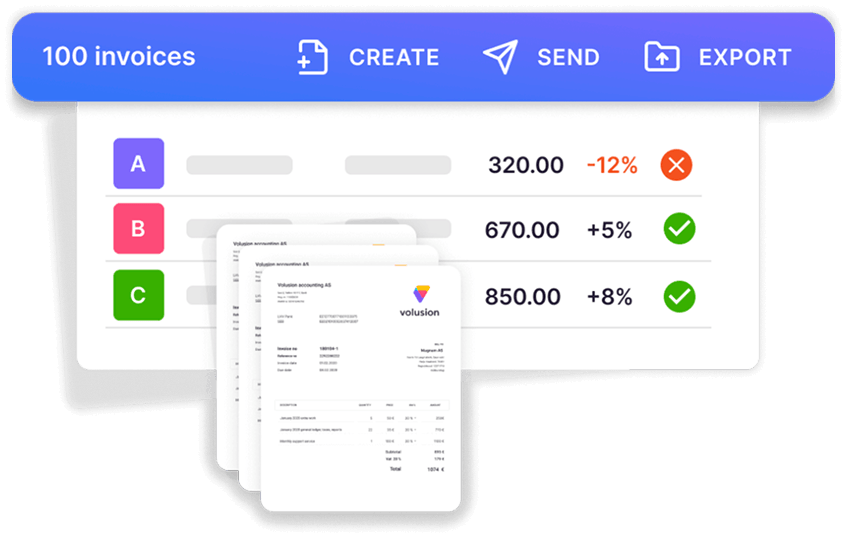
Uku starts billing from each client’s agreement rather than from WIP. A billing contract says what the fee covers (hourly, fixed, per piece, volume tiers, or a mix), tracked time and out-of-scope work land against it, and at period end the invoices draft themselves. You review and send them in one batch, which reduces invoice preparation from days to about 30 minutes.
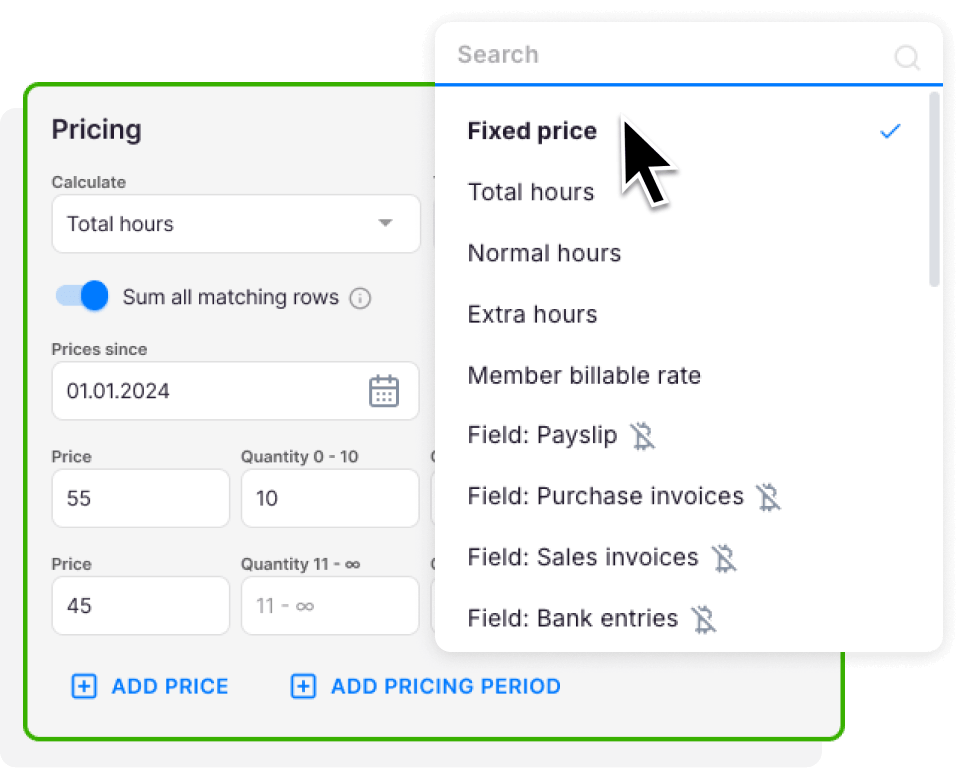
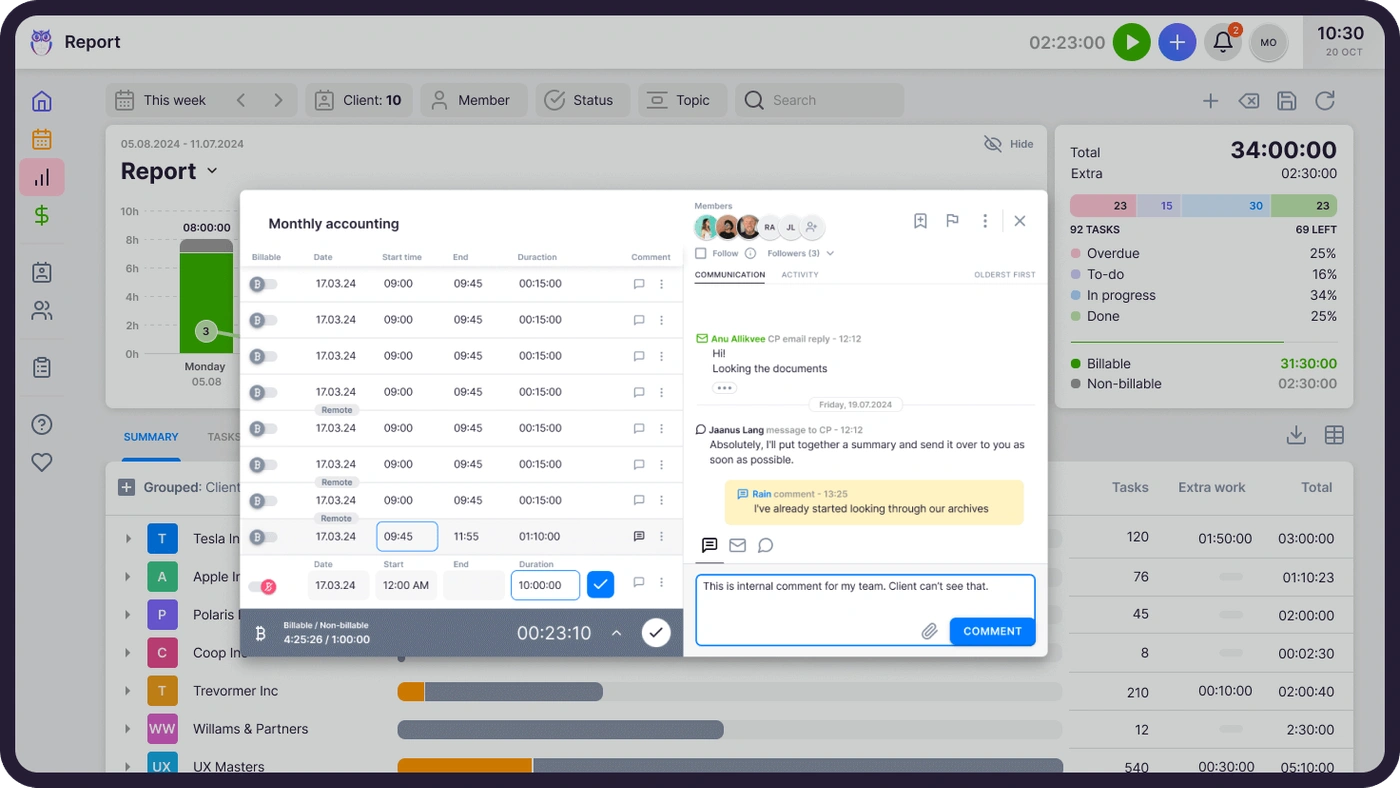
Time is tracked on the task itself, with a one-click timer or manual entry, and on Elite a firm can require a time entry before a task is closed.
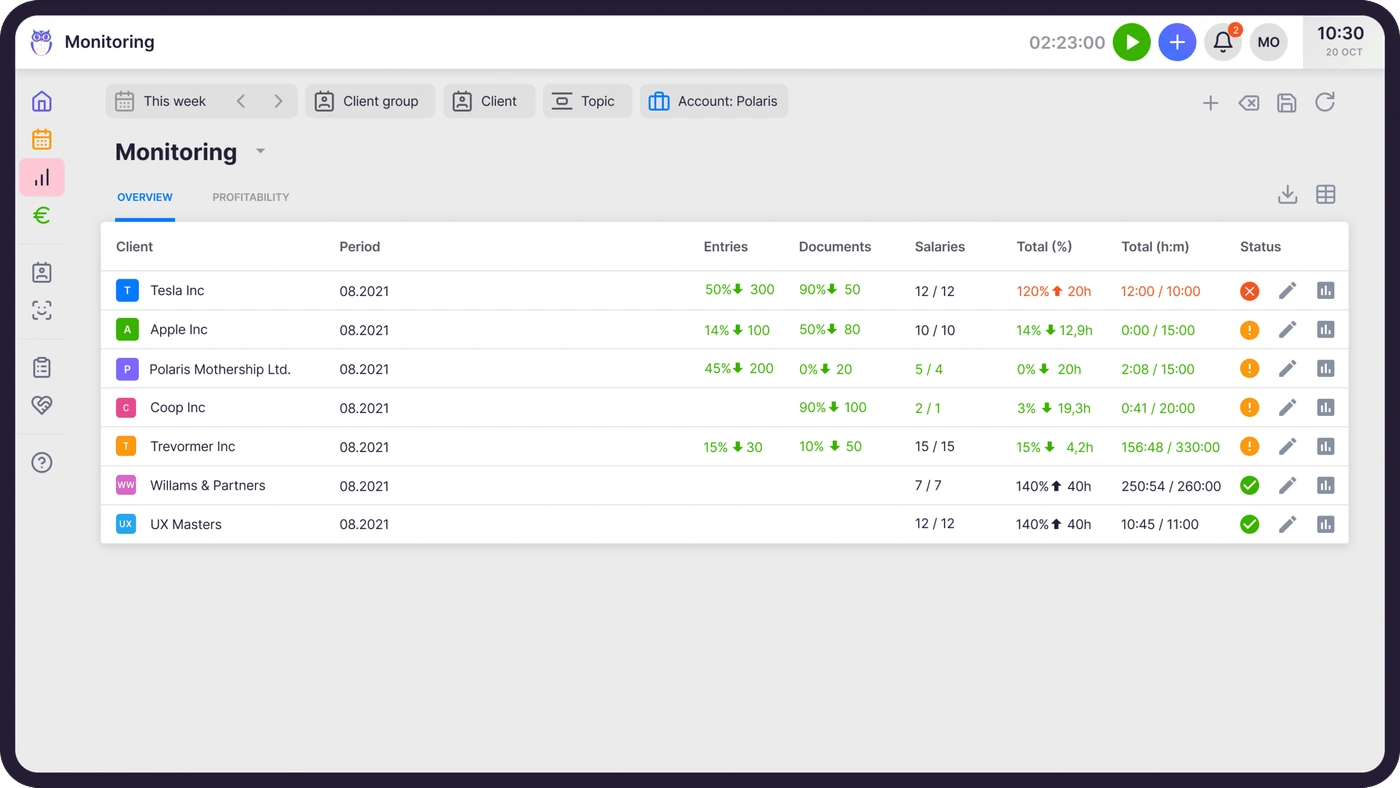
And Uku catches problems before the bill: agreements monitoring compares agreed work with delivered work for every client in the middle of the month, so a client sending twice the documents they pay for becomes a pricing conversation, not a write-off.

Reporting and firm visibility
Practice CS
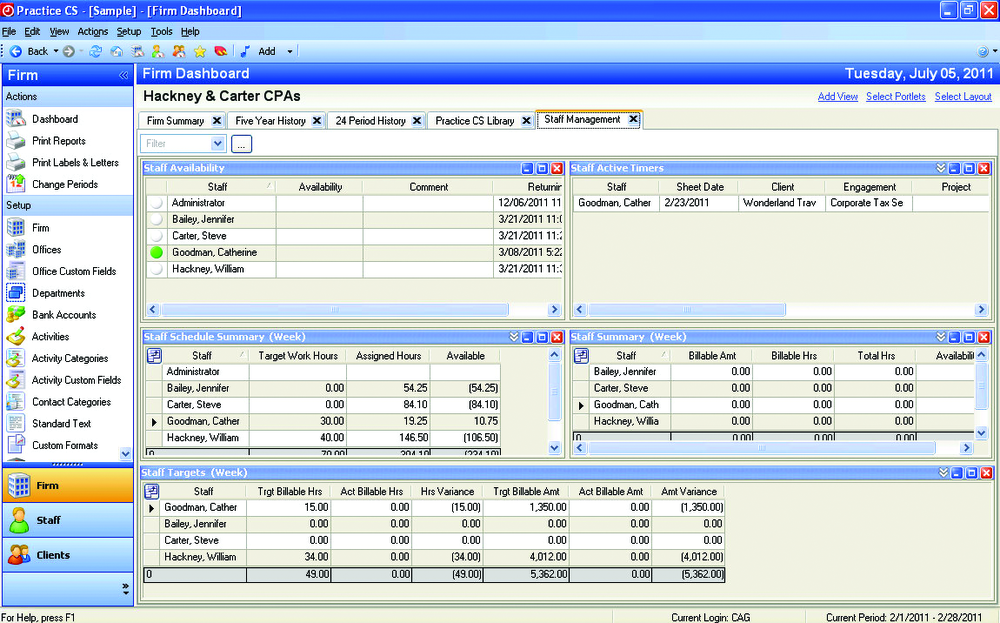
Practice CS’s reporting is one of the reasons firms stay: customizable firm, staff and client dashboards that Thomson Reuters calls “mission control”, and flexible reporting across time, billing and receivables. With Staff Management, the firm dashboard adds availability, active timers and weekly targets.
 Source: Thomson Reuters demo
Uku
Uku’s BI Analytics (Elite and Enterprise) shows revenue and profitability by client and service, with health flags for unbilled work, over-serviced clients and star clients.
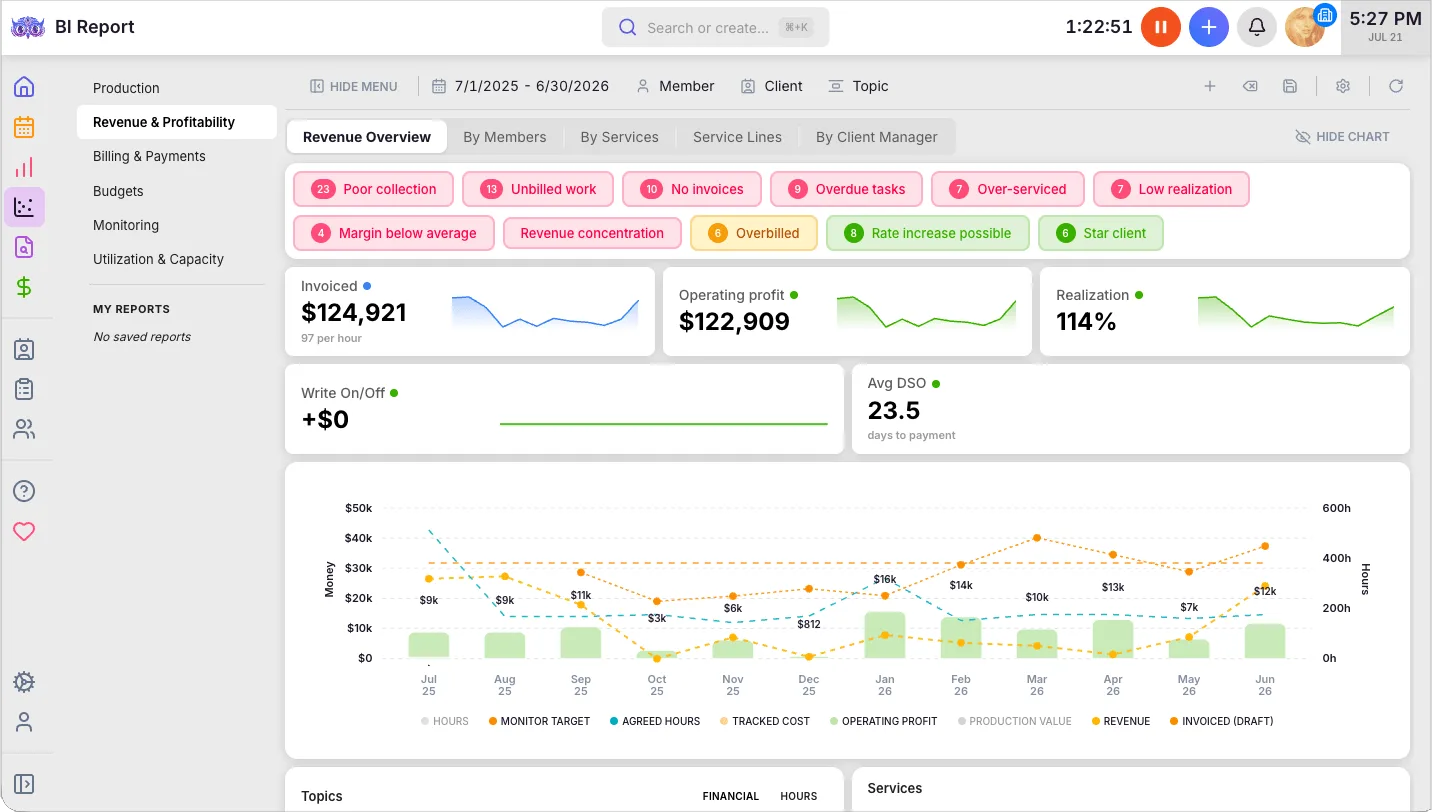
The difference is direction. Practice CS reports are strongest at explaining a period after it closes; Uku’s agreements monitoring and budgets are built to change the period while it is still open.
Integrations: UltraTax and everything else
Practice CS
Practice CS integrates with the CS Professional Suite: UltraTax CS, Accounting CS and the rest share its client database and can be launched from Practice CS. Outside the suite the list is short; CPA Practice Advisor’s 2020 review noted “limited integration with third-party applications”. Some third parties connect to it, such as Ignition, which imports Practice CS clients and invoices.
Uku
Uku has no integration with UltraTax CS or any other US tax software. That is the honest trade-off of this comparison: if you move, client details live in both Uku and UltraTax, and returns stay in UltraTax.
What Uku does connect to: QuickBooks Online and Xero (clients and invoices), European ledgers such as e-conomic, Fortnox and FreeAgent, Gmail and Outlook, and on Elite a public API, Zapier and the Uku MCP server for Claude and ChatGPT.

Deployment, support and contracts
Practice CS
Practice CS runs in one of three ways. You install it on your own server and maintain it, or Thomson Reuters hosts it: Virtual Office CS gives “anytime, anywhere online access to CS Professional Suite and select Microsoft® products in the cloud”, and Software as a Service for CS Professional Suite lets you “lease online versions” of the suite. Either way the experience is the Windows application, delivered remotely.
The hosted options have changed recently. Virtual Office CS retired its hosted Exchange email on 31 August 2026, according to CPA Practice Advisor, and FileCabinet CS, the suite’s document system, gets no updates or support after 31 December 2027.
Support is a contract of its own. Thomson Reuters’ cancellation terms say “you can’t cancel a support contract until you’ve met the 12-month commitment period”, and the same applies to Software as a Service. Reviewers on Capterra mention paying for support on every CS product except UltraTax, and one wrote that “the fees increase by around 5% year after year”.
The release cadence is steady but slow: Thomson Reuters’ release notes list three releases between November 2025 and August 2026, one of which (January 2026) published no changes, and the largest of which moved payments to Stripe.
Uku
Uku runs in a browser, with nothing to install, host or update; new features reach every firm at once. Every plan can be billed monthly or annually (annual saves about 23%), there is no seat minimum, and you can cancel a monthly plan without waiting out a 12-month term.
Support and onboarding are part of the subscription: every plan includes 90 minutes of onboarding with the Uku team, Enterprise adds a dedicated account manager and assisted client import, and the product is available in 12 languages for firms with international teams or clients. Uku serves 1,000+ firms across 25+ countries, including US CPA firms running a full tax season on it.
Practice CS vs Uku pricing
Practice CS doesn’t display its pricing publicly, but according to available information and client reviews, pricing starts at around $1,000 per user annually. What Thomson Reuters does publish is the shape of the bill:
- Contact sales is the only route on the product page.
- Add-on modules are sold separately: Project Management, Staff Management and Client Management.
- Software as a Service has a 12-month commitment; Virtual Office CS “can be canceled at any time”.
- Support contracts have a 12-month commitment, and a CS Professional Suite reviewer on Capterra notes “they charge for support on all products except UltraTax”.
- After a SaaS cancellation, “your data will no longer be available to you”.
For every cost line and a five-person firm worked through, see Practice CS pricing; for how other vendors price, the Practice CS alternatives.
Uku publishes per-member prices on its pricing page:
- Solo $19 per month annual, $25 monthly (1 member, 20 active clients, e-signatures and document management)
- Team $38, $49 monthly (unlimited members and clients, projects, access management)
- Elite $48, $62 monthly (BI Analytics, mandatory time entries, workforce management, public API, Zapier, Uku MCP)
- Enterprise $88, $99 monthly (custom integrations, dedicated account manager, assisted client import)
Clients and the portal are free, every account starts with a 14-day Elite trial without a card, and every plan includes 90 minutes of onboarding.

Is Uku better than Practice CS?
For some firms, yes; for others, no. Here is the honest split.
Uku is better if:
- You want workflow, the client portal and e-signature without buying add-on modules and a second product
- You bill against agreements and want invoices drafted for you, not assembled from WIP at month-end
- Your team works remotely and you don’t want to host or maintain a server
- You want to see the price, try the product and pay monthly
Practice CS is better if:
- UltraTax CS, Accounting CS and FileCabinet CS are the centre of your firm and the shared client database is what holds it together
- You depend on Practice CS’s depth in WIP, billing and staff reporting and have built your processes around it
- You prefer a single vendor for tax, accounting and practice management
Practice CS vs Uku: Which should you choose?
Choose Practice CS if:
- Your firm already runs UltraTax CS and Accounting CS and values one shared client database above everything else
- Billing from WIP, with WIP transfers and detailed billing reports, is how your partners run the firm
- Hosting through Virtual Office CS or your own server is acceptable to your team
- You want one vendor and one support relationship for tax and practice management
Staying in the Thomson Reuters family but moving to the cloud? Ask about Onvio Firm Management.
Choose Uku if:
- You want recurring work, time, billing and the client portal in one browser-based system
- Your clients should upload, answer and sign on the same task your team works on, free for them
- You bill hourly, fixed or by volume and want invoices drafted from each client’s agreement
- You want agreed work checked against delivered work before the month closes
- You are fine keeping UltraTax for returns without an integration
- You want to try it yourself and pay monthly
See it with your own services: try Uku free for 14 days or book a demo.
How to switch from Practice CS to Uku
If Uku is the answer, most firms are live in two to six weeks, at their own pace, and keep serving clients throughout. Practice CS’s structure maps onto Uku’s: clients stay clients, Project Management projects and tasks become workflow templates and client tasks, and the way you bill each client becomes a billing contract. We have moved a 40-person firm with 1,000+ clients off Practice CS this way.
Before anything else, decide what history you need from Practice CS and back it up: after a Software as a Service cancellation, Thomson Reuters says “your data will no longer be available to you”. The full step-by-step is in our Practice CS migration guide.
- Export and import your clients. Practice CS exports clients and each client’s primary contact as XML, which opens in Excel. Import that sheet into Uku through the import flow, or sync clients from QuickBooks Online. Additional contacts aren’t part of that export, so plan to add them separately.
- Rebuild your recurring work as Uku workflow templates. One per service, with the same steps, owners and due-date rules, applied to every client who buys it.
- Set up billing contracts. Hourly, fixed or per-piece, per client, so the first period’s invoices draft themselves from tracked time. Close out open WIP in Practice CS first, so nothing is billed twice.
- Go live. Run one billing cycle in parallel, compare it with Practice CS, then switch off. Use the 90 minutes of onboarding that comes with every plan.
If your firm uses an AI assistant, the Uku MCP server connects in a day and can check the move for you: which clients came across, which have no workflow yet, and how the first Uku invoice run compares with the last one from Practice CS.
Both systems run a firm’s time and billing well; they differ in what they connect. Practice CS connects to the rest of Thomson Reuters. Uku connects the work, the client and the invoice. If the second matters more to your firm than the first, try Uku free for 14 days.
Still shortlisting? Our Practice CS review covers each module and the hosting options, our Practice CS alternatives compares seven options, including what each one does with UltraTax, and the best accounting practice management software covers the wider market.
Frequently asked questions
What is the main difference between Practice CS and Uku?
Practice CS is Thomson Reuters' time-and-billing-centred practice system inside CS Professional Suite, sharing one client database with UltraTax CS and running on your own server or hosted. Uku is a browser-based practice system where workflows, time tracking, billing contracts and the client portal sit together on every plan, with published monthly prices. Practice CS is wired into UltraTax; Uku is not.
Is Practice CS being discontinued?
No. Thomson Reuters shipped a Practice CS release on 26 August 2026, and we found no end-of-life notice for Practice CS itself. What is changing around it: the CS Payment/Kotapay processor stops on 10 November 2026, after which Stripe is required for card and ACH payments, and FileCabinet CS gets no updates or support after 31 December 2027.
Is Practice CS cloud-based?
Not natively. Practice CS is installed on your own server, or Thomson Reuters hosts it for you through Virtual Office CS or Software as a Service for CS Professional Suite. Uku runs in a browser with nothing to install or host.
How much does Practice CS cost per year?
Thomson Reuters doesn't display Practice CS pricing publicly, but according to available information and client reviews, pricing starts at around $1,000 per user annually. On top of that, Project Management, Staff Management and Client Management are each sold as an add-on module, support and Software as a Service carry a 12-month commitment, and hosting is priced separately. Uku publishes its prices: from $19 per member per month on Solo and $38 on Team, billed annually, or monthly at a higher rate.
Does Uku integrate with UltraTax CS?
No. Uku has no integration with UltraTax CS or other US tax software, and client details are kept in both systems. Firms that move from Practice CS to Uku keep UltraTax for returns and run workflow, time, billing and the client portal in Uku.
Can I import my Practice CS data into Uku?
Clients, yes: Practice CS exports clients and each client's primary contact as XML, which opens in Excel, and Uku imports clients from Excel. Uku has no Practice CS importer, so time entries, work in progress and invoice history stay in Practice CS or in the reports and backups you keep. Assisted client import is included on Uku Enterprise.
How long does it take to switch from Practice CS to Uku?
Most firms are live on Uku in two to six weeks, at their own pace, and keep serving clients throughout: import clients, rebuild recurring work as workflow templates, set up billing contracts, then run one billing cycle in parallel before switching off.