Accounting Practice Management Software: 6 Key Features
The six features accounting firms actually use — workflow, reporting, CRM, time tracking and billing, team management, and integrations — and how to tell which ones your firm needs.


Contents
- Which of these six features actually matters?
- Why use accounting practice management software?
- Why do accounting practice management software have such different features?
- Task, project, or workflow management feature
- Business analytics reports
- Accounting CRM
- Time tracking and automated billing
- Time tracking features
- Automated billing features
- Team management and collaboration
- Integration with accounting software
- Why Industry-Specific Workflows Matter
- Frequently asked questions about practice management software features
- Choose the best practice management software with the right features that fit your needs.
Let me guess. You’re a bookkeeper, accountant or accounting firm manager who uses accounting software. You have plenty of clients thanks to being good at what you do. You might have a few employees and have the ambition to grow bigger. You’ve come to search for accounting practice management software to make your life easier. But which features should a practice management software offer?
You’re in luck because we’re experts at accounting practice management software. Here’s a list of the accounting practice management software features Uku users use the most out of all of our features.
- Task, project or workflow management
- Business analytics reports
- CRM
- Time tracking and automated billing
- Accounting team management
- Integration with accounting software
The right practice management software combines all six so nothing slips through the cracks. Already comparing specific products? See our full breakdown of the best accounting practice management software in 2026 — features, pricing, and honest pros and cons for the top 9 tools.
Which of these six features actually matters?
Every vendor lists all six. They are not equally load-bearing, and a feature comparison table will never tell you that. Here is the order that holds up when we watch firms actually adopt software:
- Workflow built for recurring work. Non-negotiable, and the one most tools get wrong (see the first mistake below). Accounting work is not a series of projects with unique deadlines — it is the same set of things every month, per client, anchored to dates that move.
- Time tracking against a client and a task. Not a stopwatch. The client-and-task pairing is what makes every downstream number possible.
- Billing that reads from that tracked time. If your team logs hours in one place and someone rebuilds the invoice from those hours in another, you have bought two tools, not one.
- Reporting you can set a price from. A dashboard that only tells you the team was busy is decoration. A report that tells you this client costs 14 hours a month against an agreed 9 is a pricing decision.
- CRM. Table stakes at this point. Every tool in the category stores client profiles; the difference is whether the workflow, the time entries, and the invoices hang off that profile or live in separate lists.
- Integration with your accounting software. Matters most at the invoice, least everywhere else. Judge it by one question: does the invoice you generate land in your ledger without an export step?
The single test that separates practice management software from a task app
Take one real client through the trial from end to end. Build the workflow template, let the team log time on it for a week, generate the invoice from that time, then open the profitability report.
Can a recorded hour become a line on an invoice and a row in a profitability report without anyone retyping it?
If yes, it is practice management software. If no, it is a task list with an invoice screen bolted on — and you will discover that in month three, when someone has to reconcile the two by hand.
Four mistakes firms make when comparing features
1. Buying a project tool for recurring work. This is the most expensive mistake in the category, and it is easy to make because project tools demo beautifully. Accounting deadlines are frequently not calendar dates at all — they are “the 6th working day of the month,” or a date derived from each client’s fiscal year-end. Most general task apps cannot express that, so firms end up recreating the same board every month by hand.
“Accountants need a completely different approach, because their work mostly consists of repetitive tasks scheduled for a specific day of the month.”
2. Counting features instead of checking adoption. The tool with the longest feature list is not the one that wins; the one your least enthusiastic team member opens every morning is. A feature nobody uses is worse than a missing feature, because it still costs a seat and it still fragments your data. During a trial, hand the software to the person on the team who is most skeptical of new tools — their week is the real evaluation.
3. Treating reporting as a dashboard rather than a pricing instrument. Most firms buy reporting to feel organized and then never change anything as a result. The point of measuring is to act: to raise a fee, to move a client, to stop giving away work that was never in the agreement. Client agreement monitoring exists for exactly this — it compares the agreed workload with the actual work in real time, so an overrun surfaces while you can still do something about it.
“The report function also helps keep track of time spent on clients and specific tasks, allowing to reevaluate our pricing model.”
4. Ignoring what happens when someone is away. Every firm evaluates software as if the team is fully staffed. Then it is August, or someone is ill during year-end, and the question becomes: can a colleague pick up this client’s work today, from the software, without a handover meeting? That is a feature — shared client profiles, assignable tasks, and an honest view of who is out and who has capacity. Uku handles the last part with Flextime, which tracks working hours, overtime, and Vacations in one team calendar so coverage is planned rather than improvised. In our experience it is the feature firms rank last while choosing and miss first once they are running.
And one that underlies all four: “practice management software” means different things to different vendors. Some are portal-first (built around client document exchange), some workflow-first, some tax-first. Decide which problem is actually costing you money before you compare feature counts — otherwise you will compare the wrong products very carefully.
Why use accounting practice management software?
Practice management software has become essential for accountants who want to grow their firms. The software has quite a few benefits:
- Helps improve efficiency
- Reduces manual admin work
- Improves client service
- Boosts profitability
Thanks to winning time, accountants can focus more on high-value activities such as strategic planning and advisory services.
“Now that reminders appear automatically on our dashboards, we save around 20% of time spent on task management.”
Thomas F. Maule, Sandgrav Solutions A/S
Scalable practice management software allows firms to grow without proportionally increasing administrative burdens, making it easier to accommodate new clients and team members.
Beyond operational improvements, practice management software offers significant financial benefits. A cloud-based solution also provides remote accessibility, which is excellent for remote accountants. Built-in data analysis and productivity tools help firms identify bottlenecks and optimize processes for better productivity.
The clearest description of that benefit comes from a firm that made the switch:
“Uku has helped us up our service quality, always deliver work on time and increase profitability.”
What changed there was not any single feature. It was that the guessing stopped — the managers could finally see the same picture the accountants had always had in their heads.
Why do accounting practice management software have such different features?
Imagine you open a Netflix account in the USA. On the home screen, you see three Indian television shows, an advertisement for a Spanish movie, and three films you’ve already seen but didn’t like.
Not very helpful, right?
Fortunately, Netflix has customized its products to please its users. The homepage shows viewers’ content customized to their preferences. This goes for B2B software as well. Each accounting firm is like a living organism—different in its way. Everyone has their own set of demands or needs and seeks customized services to match them.
Let’s discuss each accounting practice management software feature and its benefits for an accounting firm.
Task, project, or workflow management feature
Task and workflow management feature
Accountants have many clients to whom they provide several different services. The complex process requires high organization skills and attention to detail. Accountants must keep track of time spent on specific tasks, clients, and projects to ensure they are billing accurately.
Task, project or workflow management comes in handy when handling hundreds of tasks for several clients.
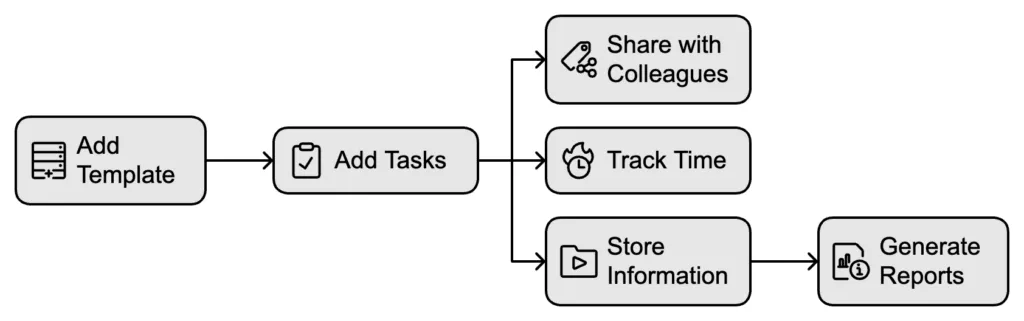
A comprehensive task management feature allows accounting firms to manage daily, weekly, monthly, and yearly tasks. You can create work plan templates from scratch or use existing ones to standardize your accounting services across the firm.
Creating workflow templates saves you time entering tasks for each client individually.
Add the correct template according to the service, and tasks will appear on your dashboard when the time is right.
In a proper workflow management system, you can add tasks with descriptions to clients, share them with colleagues, track time, and keep all work-related information in one place. It also provides data-based reports to show you how you spend your time at work.
What to check before you trust a workflow feature
Templates are easy to demo and hard to get right. Three questions separate an accounting workflow from a generic recurring to-do:
- Can a deadline be a rule rather than a date? Accounting deadlines are often expressed as “the 6th working day of the month” or as an offset from each client’s fiscal year-end. If the software only accepts fixed calendar dates, someone will be adjusting them by hand forever.
- What happens when a recurrence lands on a holiday? In Uku’s workflow automation you choose per recurrence whether the task moves forward or to the next working day; a tool with no answer here quietly generates tasks nobody can complete.
- Can you change the template without re-editing every client? Firms standardize a service once and then improve it four times a year. If an edit to the master template does not reach the clients already using it, the standard stops being a standard within a quarter.
Practice management software task and workflow management features:
- Accounting workflow templates and task plans
- Subtasks in checklists
- Topics to better systematize tasks
- Attachments
- Personalizable custom fields
- A customizable dashboard and calendar
- Assigning tasks
- Marking tasks as extra work
“Using Uku, when an accountant changes, there isn’t a situation where we can’t serve a client because we do not know their tasks.”
– Read how Grow Finance improved their client service with practice managemen software
Project management feature
If you’re more interested in general project-based task management, many practice management software also provide that.
A comprehensive project management feature makes your project schedules more flexible.
You don’t have to know the exact dates of the tasks within a project. You can set the deadline for tasks days, weeks, or months before the project starts or ends.
Project workflows
Similarly to task or workflow management, project management should allow you to create project templates to reduce the time spent entering tasks. You can modify every aspect of the project process.
For example, create specific tasks within a project, assign them to the right team members, and set up dependencies so tasks appear on their dashboard in the correct order.
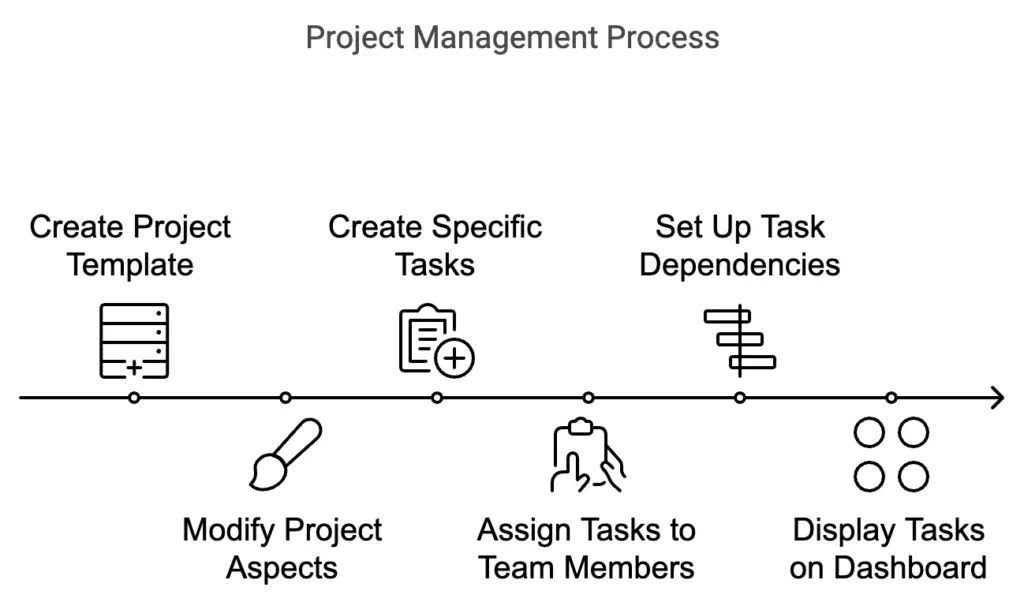
Overview of project tasks
The project management feature gives managers an interactive overview of the current status of all projects at a glance. This allows you to quickly identify projects that are on schedule and those that need to catch up. The feature also shows how work is distributed among team members.
A good project management feature helps managers make informed decisions about workload distribution.
A good project management feature in practice management software helps managers make informed decisions about workload distribution. Preventing overloading employees promotes a healthy work-life balance, making accountants feel considerate and supportive of their team’s well-being.
How does project management boost accounting processes?
- Managing a project from start to finish becomes transparent and controlled.
- Managers and team leaders stay on track without manually checking and adjusting schedules.
- Every benefit combined in a project management tool can help reduce the administrative burden.
- The team can focus more on the content of the work rather than its coordination.
Accounting practice management software project management features:
- Set task deadlines according to the project start or end date
- Customizable project templates
- Track project process
- Distribute work among team members
“The calendar feature is the most used daily. You open Uku in the morning, and there are the tasks you have to do today.”
– Read how HR factory uses project management to organize their work daily
Business analytics reports
You should only make business decisions based on accurate and measured data about your working time, productivity, and other indicators.
Many accounting firms have raised profits after finding inefficient tasks or extra tasks not included in the service.
Accounting practice management software should have an advanced reporting feature that gives you accurate data to analyze your team’s efficiency by tasks, topics, projects, or clients. For example, time expense reports for clients, team members, and tasks.
A reporting feature will also help you keep track of task deadlines.
Client agreement and profitability monitoring
There’s another angle to business analytics reports. Client agreement monitoring, which some accounting practice management firms have, displays whether the amount of work you agreed upon with your client has been exact, surpassed, or too low.
Client agreement monitoring feature differentiates Uku, the accounting practice management software, from its competitors.
The report compares the client’s contractual workload (hours, entries, documents, etc.) with actual work. For example, you can compare actual and agreed hours spent on a client. You can compare any numerical data in monitoring. If you want to prove that the volume of work is more extensive than agreed, you can export the data from the monitoring as a PDF or Excel file. And if you want to point a client toward specific figures, you can highlight PDF sections or add notes before sending the exported report.
Practice management software business analytics reporting features:
- Real-time reports
- Detailed and comprehensive overview
- Reports of employee workload
- Client agreement and profitability monitoring
- Time usage reports
- Easily exportable to offer transparent service to clients
“We now understand how long it takes to work for clients, billing became more accurate, and Uku helped us increase revenues directly.”
Accounting CRM
The complexity of customer management depends on the size of the company. A small business with five clients can keep its data in a notebook and easily find it when needed. However, large companies hold data from several hundred or even thousands of clients, which would require a library to store it.
Imagine trying to find the correct data.
When working with a team, the most practical option is to keep client data in one accounting CRM system instead of a notebook or a set of folders in your document repository.
Everyone can access essential data when a colleague serving a client goes on vacation or is not at the office.
Easily accessible client info
Usually, practice management software has a CRM feature with client profiles. This helps to ensure that information about a client does not remain only in the accountant’s notes**.** Every employee can add or customize all the information about the client (assignments, notes, documents, access rights, etc.) that colleagues might need.
In addition to storing documents, firms often upload supporting files such as scanned receipts, contracts, and ID documents. Using simple tools to remove image background from scanned files or visual documents can help standardize records, improve clarity, and maintain a more professional document archive within the CRM system.
Transferring data to accounting software
Practice management software CRM feature usually allows you to import or export client-related data between your practice management software and your accounting program. Manual work stays in the past when you start using accounting practice management software.
Accounting practice management software CRM features:
- Client contacts and information
- Adding notes and documents to the client profile
- Customizable fields
- Passwords and rights storing
- Unique client work plans
- Different user rights according to the client
- Import and export to accounting software
“We wanted a single platform that all employees could use similarly to ensure that all client tasks are done on time and nothing is forgotten.”
– Read how Sandgrav Solutions ensures no deadline is missed thanks to shared client profiles
Time tracking and automated billing
Time tracking for accountants means recording billable and non-billable hours against a client and a task as the work happens, then turning those hours straight into an invoice. In an accounting firm it answers three questions a timesheet alone cannot: which clients are actually profitable, where the team’s capacity is going, and whether the fee still matches the work. That is the difference between a stopwatch and a practice management feature.
One way to guarantee effectiveness is to have data-based information about the time spent on work tasks. Traditional spreadsheets or paper-based time tracking and billing methods are unreliable and require much manual work. Invoicing can be time-consuming, especially when regularly creating and sending invoices for multiple clients.
Tracking time manually is ineffective because humans tend to get distracted by tasks or deadlines.
Unlike the popular opinion that time tracking wastes time, time-tracking apps provide valuable insights into work habits to identify areas for improvement and increase productivity.
You’ll have data-based proof of whether you are asking for the correct amount for your services.
Time tracking features
Time tracking is an excellent way to increase productivity, find bottlenecks, and raise profits for your accounting firm. Uku, the accounting practice management software, like many others, provides several ways to track time in your accounting firm.
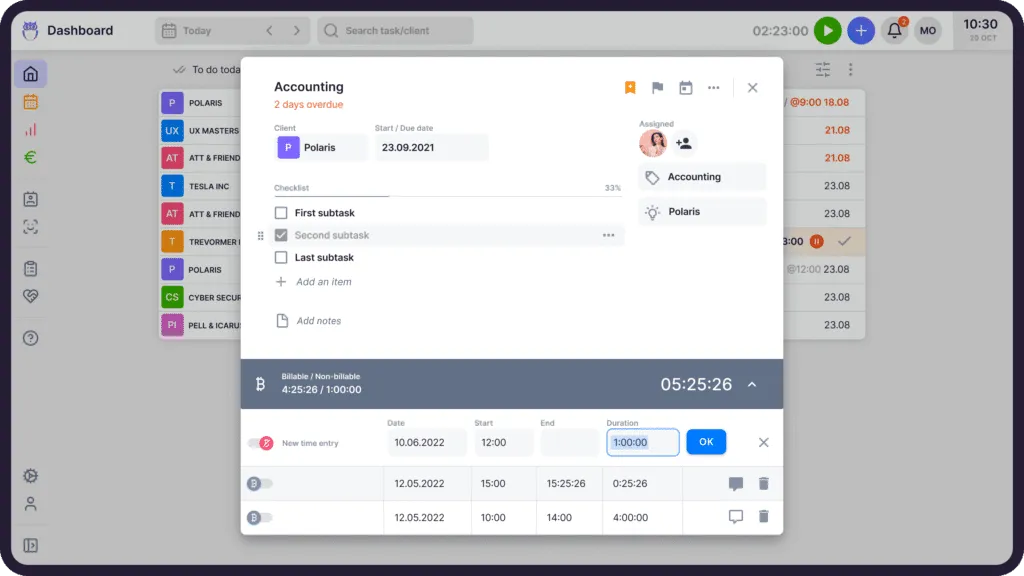
Stopwatch and manual time entry
You can measure working time with a stopwatch when starting a new task. The stopwatch should be as easy as possible and best activated with just a click. You can also manually enter time entries at the end of the day. Some accounting practice management software, like Uku, will automatically add a task to the client’s invoice when marked as done.
Bulk-adding time entries
Another easy option is adding time entries in bulk. If you’re doing similar tasks for different clients on the same day or doing everything you need for a single client, divide the total time you spent on those tasks equally.
Bulk time entries can save hours of administrative work each week.
Billable and non-billable hours
Differentiating between billable and non–billable time entries is crucial for accounting firms because it directly affects their revenue and efficiency. Billable hours are the time spent on client work that can be charged for and contribute to the firm’s income. Non-billable hours include activities like training, meetings, or administrative tasks that do not generate direct income but are essential for operations.
You should not dismiss tracking all of your tasks. By monitoring both hours, firms can identify inefficiencies, like having too many ai meetings or spending time on non-valuable tasks.
Billable and non-billable time entries might uncover opportunities to bill clients for additional work.
Practice management software time tracking features:
- Stopwatch
- Manual time entries
- Bulk time entry
- Automatic time entries
- Time forecasting
- Non-billable and billable time entries
- Time usage reports
- Exporting time-tracking data
“You must consider whether you want to grow your business or your frustration. There are easy solutions if you feel you are losing control over tasks.”
Automated billing features
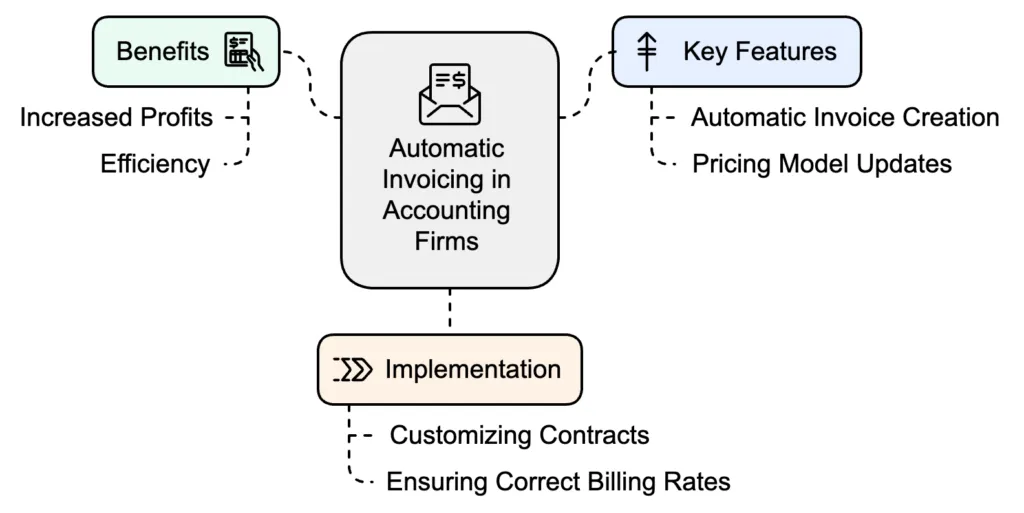
Automatic invoicing has helped many companies increase their profits. The most valuable function is automatically creating invoices based on the contract you customize for your accounting firm set for the client.
Advanced practice management software with an automated billing feature lets you easily update pricing models across your client base. You can implement changes quickly and ensure that all new work is billed at the correct rates.
Generate thousands of invoices in minutes
An automatic invoicing or billing feature helps you generate tens to thousands of invoices within minutes based on tracked time, entries, or client agreements. You can add and customize your clients’ products and services with VAT numbers and resource codes. If integrated with your inbox and accounting software, it’ll even send invoices and track payment status.
If not integrated with other software, it requires a little more manual work, but you can export them to your accounting software and then send them directly to your client.
Integrating automated billing with your accounting software
Integrating your practice management software with accounting software will save you time from exporting and importing invoice data from one program to another. The integration, validated through System Integration Testing, also ensures invoices are automatically recorded in your accounting system to maintain accurate financial records.
The test to apply here is narrow: generate one invoice in the practice management software and check whether it appears in your ledger without you exporting a file. Anything short of that is a saved click, not an integration.
Automatic invoicing helps speed up work and gives you more time for analytical or advisory tasks.
Automated payment reminders
Never worry about sending countless reminders to your clients again with good practice management software. Clients get automated reminders, and you don’t have to spend time tracking what’s missing and writing duplicate emails. Win-win!
These kinds of automated billing and reminder systems are not only useful for accountants, but also essential in other industries that rely on recurring payments and compliance-heavy transactions. For example, securing a merchant account for telemedicine businesses ensures healthcare providers can process patient payments smoothly while meeting strict regulatory and operational requirements. With support from a specialized Healthcare AI consultancy, organizations can further optimize these processes through intelligent automation, predictive insights, and improved compliance management.
“Automated billing reduced invoicing from 5 days to 30 minutes for a 380+ client base. Getting invoices out faster saves time and improves cash flow.”
Practice management software automated billing features:
- Personalized contracts and pricing models
- Import and export to accounting software
- Easy setup
- Master and individual invoice templates for each service
- Automated invoice generation
- Minimum time and rounding
- Price ranges with levels
- Split revenue
- Keeping track of payment status
- Placeholders for invoices
- Integration with accounting software and email provider
“Thanks to the billing solution in Uku, we prepare invoices in 15 minutes instead of 1-2 days.”
– Read how Aaron’s Accounting Services wins hours of time thanks to automated billing
Team management and collaboration
Whether your accounting team works from an office or remotely, team collaboration is as important as communicating with clients. Accounting practice management software has several options to help an accounting team work effectively.
We already discussed one feature that helps with team collaboration. Sharing client data in a CRM feature makes work easier and allows smooth collaboration when working alongside or replacing a colleague.
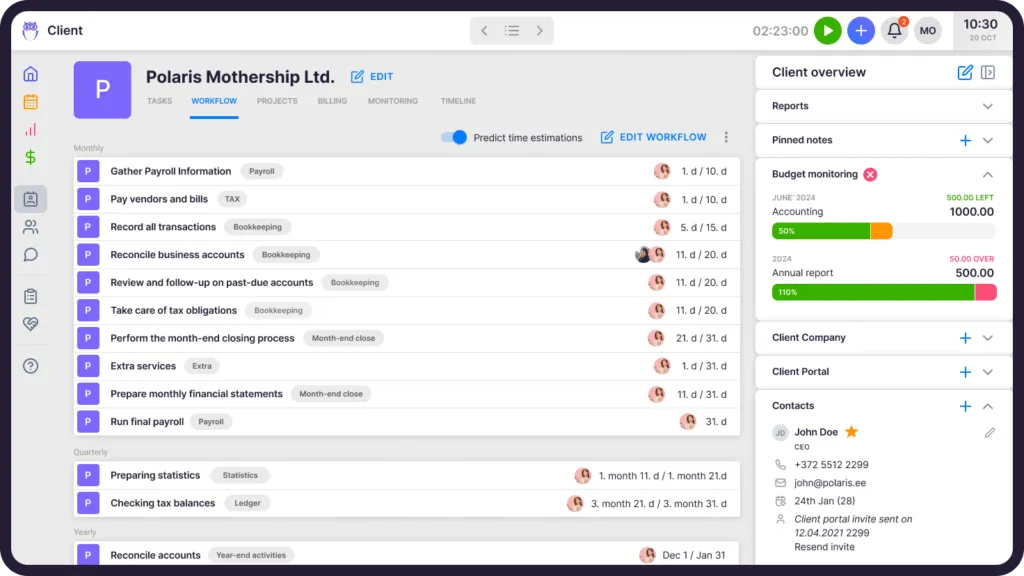
Easier to replace colleagues
When an accountant goes on vacation or gets ill, you should be able to delegate or assign tasks to colleagues with just one click. Another option a practice manager should have is to follow tasks. This is most useful for mentors with students or new employees.
Overtime, sick leave and vacation management
Team management also requires having an overview of vacation days, overtime, and sick leave. Some practice management software also covers that. Uku, for example, has the Flextime app for managing vacations and overtime. You can manage your accounting team’s working hours while Uku adequately calculates working hours according to national holidays and other information you’ve entered.
Practice management software team management and collaboration features:
- Assign tasks to colleagues
- CRM system
- Sharing tasks with colleagues
- A comprehensive team calendar
- Replacement leave
- Tracking others’ tasks
- Commenting on tasks
- Real-time overview
- Monthly summary
“It’s a marvellous tool, not an inefficient extra step that someone else demands to control employees.”
Integration with accounting software
If you’re looking into practice management software, I hope you already have an accounting software. As we’ve talked in nearly every paragraph, integrating your practice management software with accounting software has countless benefits that will save you hours.
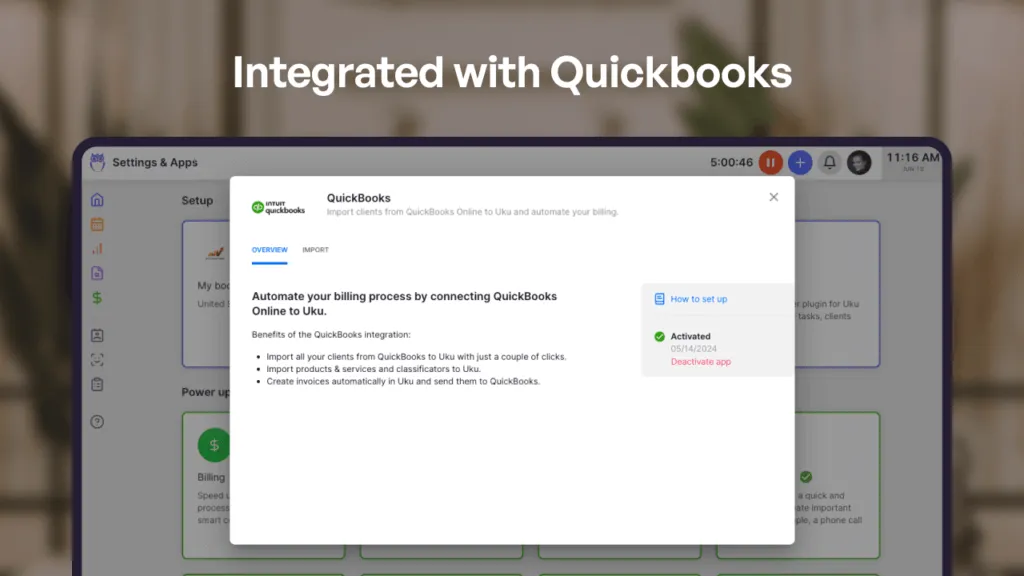
Transferring data from one software to another is an accountant’s most time-consuming task, which is why tech companies create software integrations.
Integration with accounting software like Quickbooks or Xero makes transferring data, such as client information, tracked hours or entries, automatically created invoices, etc., a breeze.
“We are now more efficient because, with the help of Uku, we can present invoices to customers in a few clicks.”
Why Industry-Specific Workflows Matter
While the core pillars of practice management—task automation, time tracking, and client records—are universal, the execution varies wildly by profession. A generic tool often fails because it lacks the nuanced compliance and workflow logic required by high-stakes industries.
For instance, in the healthcare sector, specialized platforms like reliable ABA therapy practice management software must handle complex session tracking, clinical documentation, and HIPAA-compliant billing. These tools are built for the specific regulatory burdens of therapy, just as Uku is built specifically for the “tax season crunch” and the realization rate requirements of accounting firms.
Whether you are managing a behavioral health clinic or a mid-sized accounting practice, the goal remains the same: eliminating manual coordination so professionals can focus on high-value client work. Clinic management software does that job for one side of the comparison, and Uku does it for the other. For accountants, this means moving beyond generic checklists and into intelligent automation that understands the difference between a simple bookkeeping task and a complex year-end audit.
Frequently asked questions about practice management software features
What features should accounting practice management software have?
Six: workflow and task management built for recurring deadlines, time tracking against a client and a task, automated billing that reads from that tracked time, reporting you can set prices from, a shared client record (CRM), and an integration with your accounting software. Everything else — portals, e-signatures, document storage, chat — is useful but replaceable. If the first four are weak, no amount of extras will fix the firm’s coordination problem.
Which practice management feature matters most for a small accounting firm?
Workflow that understands recurring work. A firm under about ten people usually already knows who does what; what it loses money on is work that quietly slips — a monthly filing, a payroll run, a year-end. Recurring templates with dynamic due dates remove that failure mode first. Time tracking and billing become the priority as soon as more than one person works on the same client, because that is when nobody can reconstruct the month from memory.
What is the difference between practice management software and accounting software?
Accounting software (QuickBooks, Xero, e-conomic) keeps the client’s ledger. Practice management software runs your firm — who is doing which task for which client, how long it took, what to invoice for it, and whether that client is still profitable at the agreed fee. They are complementary, which is why the integration between them is one of the six core features rather than a nice-to-have.
Is “practise management software” the same as practice management software?
Yes — same category, different spelling. In British English “practice” is the noun and “practise” is the verb, so the software category is spelled practice management software on both sides of the Atlantic. UK firms searching for practise management software are looking for exactly the tools described here; our UK roundup covers the market from that side.
How do I know if a practice management tool actually fits my firm?
Run one real client through it end to end during the trial: create the workflow template, let the team log time on it for a week, generate the invoice from that time, then open the profitability report. If a recorded hour reaches the invoice and the report without anyone retyping it, the tool is practice management software. If it does not, it is a task app with an invoice screen attached.
Do I need a client portal to call it practice management software?
No. A client portal is a client-facing layer for document exchange and approvals — valuable if chasing paperwork is your main pain, irrelevant if it is not. Portal-first tools and workflow-first tools both market themselves as practice management software, so decide which problem you are actually solving before comparing feature counts.
Choose the best practice management software with the right features that fit your needs.
In conclusion, the right practice management software can change how your accounting firm works.
If you’re looking for the best accounting practice management software, look for features such as task management, business analytics, CRM, time tracking, automated billing, team management, and accounting software integrations.
But look at them in order of consequence, not in the order the vendor lists them. Workflow that survives a real month, time recorded against a client and a task, billing that reads from that time, and a report you would act on — those four carry the firm. If one does not work out for you, try another. There are many options for accountants worldwide that cater to completely different needs.
I’m sure you haven’t missed that this article is brought to you by Uku which is also an accounting practice management software. If you’d like to learn more about how Uku as a practice management software would help you – book a demo!
If you prefer to try everything out yourself, we have a 14-day free trial with no credit card information required. You can try everything when you have time to do so. Start your free trial.
Frequently asked questions
What features should accounting practice management software have?
Six: workflow and task management built for recurring deadlines, time tracking against a client and a task, automated billing that reads from that tracked time, reporting you can set prices from, a shared client record (CRM), and an integration with your accounting software. Everything else — portals, e-signatures, document storage, chat — is useful but replaceable. If the first four are weak, no amount of extras will fix the firm's coordination problem.
Which practice management feature matters most for a small accounting firm?
Workflow that understands recurring work. A firm under about ten people usually already knows who does what; what it loses money on is work that quietly slips — a monthly filing, a payroll run, a year-end. Recurring templates with dynamic due dates ("the 6th working day of the month") remove that failure mode first. Time tracking and billing become the priority as soon as more than one person works on the same client, because that is when nobody can reconstruct the month from memory.
What is the difference between practice management software and accounting software?
Accounting software (QuickBooks, Xero, e-conomic) keeps the client's ledger. Practice management software runs your firm — who is doing which task for which client, how long it took, what to invoice for it, and whether that client is still profitable at the agreed fee. They are complementary, which is why the integration between them is one of the six core features rather than a nice-to-have.
Is "practise management software" the same as practice management software?
Yes — it is the same category, just a spelling slip. In British English "practice" is the noun and "practise" is the verb, so the software category is spelled "practice management software" on both sides of the Atlantic. UK firms searching for practise management software are looking for exactly the tools described here.
How do I know if a practice management tool actually fits my firm?
Run one real client through it end to end during the trial: create the workflow template, let the team log time on it for a week, generate the invoice from that time, then open the profitability report. If a recorded hour reaches the invoice and the report without anyone retyping it, the tool is practice management software. If it does not, it is a task app with an invoice screen attached.
Do I need a client portal to call it practice management software?
No. A client portal is a client-facing layer for document exchange and approvals — valuable if chasing paperwork is your main pain, irrelevant if it is not. Portal-first tools and workflow-first tools both market themselves as practice management software, so decide which problem you are actually solving before comparing feature counts.

Published Feb 19, 2026 · Updated Aug 13, 2026