Recurring Tasks with Client-Specific Deadlines
Set recurring tasks in Uku to follow each client's own dates — VAT stagger groups, financial year ends, licence renewals — instead of one firm-wide date.


Contents
Clients can have different period ends. One closes the financial year in December, another in June. In Uku, a recurring task plan does not have to assume they are all the same.
Recurring tasks can be based on the client’s own dates, not a single firm-wide date.
Two ways to drive a deadline
1. From a date stored on the client card. Add the date to the client — financial year end, VAT period, licence renewal — and create a company template with the recurring task based on that field. The task is then created on the client’s date, wherever it falls in the year.
2. From a fixed calendar rule. Where the cycle is the same but the timing inside it differs, set the recurrence itself. For quarterly work, choose whether the task is generated in the first, second or third month of each quarter.
Both live in the same place — the task’s Recurrence dialog. Under START DATE, switching from Date to Custom replaces the fixed calendar date with a client field, and the offset above it decides how many days before or after that date the task appears:
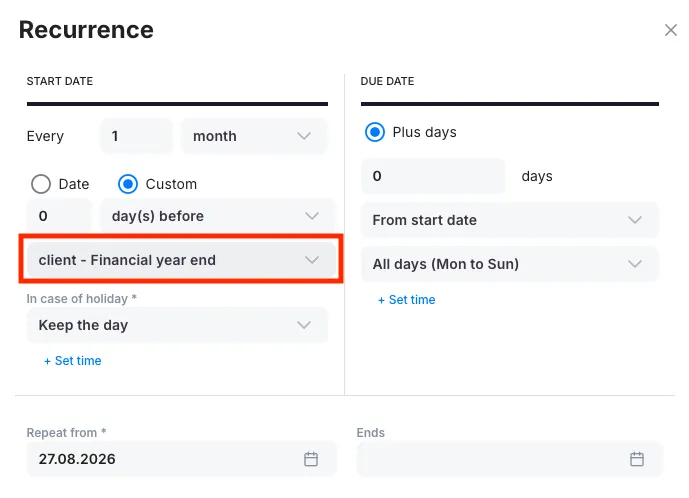
The DUE DATE column then works off that same anchor, so the whole task — start and deadline — moves with the client’s own year end.
Example: UK VAT stagger groups
The UK shows the same problem from a different angle. Two clients can both file quarterly and still never share a deadline, because HMRC assigns each business to one of three stagger groups on registration:
- Stagger 1 — quarters end March, June, September, December
- Stagger 2 — quarters end April, July, October, January
- Stagger 3 — quarters end May, August, November, February
The return and payment are due one calendar month and seven days after the period end, so the stagger group decides the whole year’s dates.
This is where the second method applies. The cycle is quarterly for everyone; only the month inside the quarter differs. Set the recurring task to generate in the first, second or third month of each quarter to match the client’s stagger group, and one VAT plan covers the whole portfolio.
Example: annual report by financial year end
An annual report deadline is a function of the client’s financial year end, not of 1 January. Store the year end date on the client card and set the annual report task to depend on that field. A client closing on 30 June is scheduled from 30 June; a client closing on 31 December is scheduled from 31 December. Nobody has to move deadlines by hand each year.
The date on the client card is an anchor, not the deadline itself. The task can be set to start a chosen number of days before or after it — preparation work that has to begin two weeks ahead of the year end, filing work that falls due some months after it. Each client’s tasks then shift together with their own year end.
Why this matters
Firm-wide recurrence rules force a choice between two bad options: split every workflow into a template per client type, or accept that some deadlines will be wrong and fix them manually. Client-driven dates remove both. One plan covers the whole portfolio, and each client’s tasks land where their own obligations actually fall.
The same logic applies to any obligation tied to a client-specific date — payroll cut-offs, licence renewals, reporting to a parent company, contract review dates.
In short: yes, this kind of system can be set up in Uku.
The chasing part
Most of the work isn’t the return itself. It’s asking the client for the documents, then asking again.
Uku can do that asking for you. On any task you can add an email automation: choose when it fires — when the task is created or a set number of days before the start date, or after the task has been finished. Set it once on the company template and it travels with every occurrence the recurring rule creates. You don’t touch it again next quarter, or next year, or for the next client.
Put that together with client-driven dates and it gets quietly useful. The VAT task appears in the client’s own stagger month, and the nudge goes out a fortnight before that client’s own deadline. The June client gets chased in June. The December client gets chased in December. One plan, and everyone’s dates are their own.
If you’re using the Client Portal, the task can go to the client’s contacts as something they actually tick off. Turn on auto-finish and the task closes itself in Uku when they’re done.
Frequently asked questions
Can recurring tasks follow each client's own deadline instead of one firm-wide date?
Yes. In Uku a recurring task can be anchored to a date stored on the client card — financial year end, VAT period, licence renewal — so the task is created on that client's date wherever it falls in the year. One plan then covers a whole portfolio of clients with different period ends.
How do you handle UK VAT stagger groups in recurring tasks?
HMRC assigns each business to one of three stagger groups, so two clients can both file quarterly and never share a deadline. The cycle is the same for everyone; only the month inside the quarter differs. In Uku you set the recurrence to generate the task in the first, second or third month of each quarter to match the client's stagger group, and one VAT plan covers every client.
Can a task be scheduled a set number of days before a client's year end?
Yes. The date on the client card is an anchor, not the deadline itself. A task can be set to start a chosen number of days before or after it — preparation work two weeks ahead of the year end, filing work some months after — and each client's tasks shift together with their own year end.
Can Uku chase clients for documents automatically on recurring tasks?
Yes. You can add an email automation to a task and choose when it fires — when the task is created, a set number of days before the start date, or after the task is finished. Set it once on the company template and it travels with every occurrence the recurring rule creates.