




Top 8 TaxDome Alternatives for Accounting Firms in 2026
The 8 best TaxDome alternatives for accounting firms in 2026: from modular billing automation to AI-powered bookkeeping. Compare features, pricing, and find the right fit.


Contents
- TaxDome Alternatives at a Glance
- What is TaxDome?
- Why Accounting Firms Choose TaxDome Alternatives
- The Best TaxDome Alternatives for Small Accounting Firms
- How We Curated Our List of TaxDome Alternatives
- 1. Uku: Best TaxDome Alternative for Modular Implementation and Effortless Billing
- 2. Karbon: Best TaxDome Alternative for Enterprise-Grade Practice Management with Distributed Teams
- 3. Financial Cents: Best TaxDome Alternative for Affordable Entry and Ease of Use
- 4. Canopy: Best TaxDome Alternative for Tax-Specialized Firms Needing Tax Resolution Tools
- 5. Jetpack Workflow: Best TaxDome Alternative for Workflow-Only Needs
- 6. Double: Best TaxDome Alternative for Bookkeeper-Specialized Per-Client Pricing
- 7. Cone: Best TaxDome Alternative for Revenue-Led, Proposal-First Firms
- 8. Client Hub: Best TaxDome Alternative for Bookkeeping Firms with QuickBooks Workflows
- TaxDome Alternatives at a Glance
- Feature Comparison
- Onboarding Packages
- How to Switch from TaxDome to Uku
- The Final Verdict
The 8 best TaxDome alternatives for accounting and bookkeeping firms in 2026 are:
- Uku ($19/mo Solo, $38/user/mo Team) — Best for modular implementation and automated billing
- Karbon ($59/user/mo) — Best for enterprise-grade distributed team collaboration
- Financial Cents ($19/mo) — Best for affordable entry and ease of use
- Canopy ($74/user/mo) — Best for tax-specialized firms needing tax resolution tools
- Jetpack Workflow ($40/user/mo) — Best for workflow-only needs
- Double ($10/client/mo) — Best for bookkeeper-specialized per-client pricing
- Cone ($5/user/mo) — Best for revenue-led firms wanting modern proposal-to-payment workflow
- Client Hub ($79/user/mo) — Best for bookkeeping firms with deep QuickBooks integration
TaxDome functions as a comprehensive, cloud-based practice management platform designed for accountants, bookkeepers, and tax preparers. Founded in 2017 by brothers Victor and Ilya Radzinsky, the platform serves as an all-in-one hub for client relationships, workflow automation, document storage, and billing.
However, TaxDome requires substantial upfront configuration with an average 6-8 week onboarding timeline, and users frequently cite a steep learning curve. The platform also requires annual billing commitments (1-year, 2-year, or 3-year terms paid upfront) — a meaningful barrier for firms that want monthly flexibility.
Below we examine why firms switch from TaxDome, then compare each alternative in detail.
TaxDome Alternatives at a Glance
| TaxDome Alternatives at a Glance | ||
|---|---|---|
 | Starts at: $19/mo (Solo) G2 Score: 4.7 Capterra Score: 4.8 | Best Alternative for Modular Implementation and Effortless Billing We chose Uku because it lets firms start working on day one with only the modules they need, then scale up gradually. Its automated billing transforms invoicing into a 30-minute task, and flexible monthly pricing eliminates the need for large upfront annual commitments. |
 | Starts at: $59/user/mo G2 Score: 4.8 Capterra Score: 4.7 | Best Alternative for Enterprise-Grade Practice Management with Distributed Teams Karbon excels at team collaboration and workflow visibility for larger, multi-location firms with its Triage email system and Practice Intelligence analytics suite. |
 | Starts at: $19/mo G2 Score: 4.7 Capterra Score: 4.8 | Best Alternative for Affordable Entry and Ease of Use Financial Cents offers an accessible entry point into practice management with a $19/month Solo plan and industry-leading 4.9/5.0 ease-of-use rating, though it’s limited to US markets. |
 | Starts at: $74/user/mo G2 Score: 4.6 Capterra Score: 4.5 | Best Alternative for Tax-Specialized Firms Needing Tax Resolution Tools Canopy provides purpose-built tax resolution infrastructure with IRS transcript integration, notice management databases, and pre-built resolution workflows. |
 | Starts at: $40/user/mo G2 Score: 4.2 Capterra Score: 4.8 | Best Alternative for Workflow-Only Needs Jetpack Workflow focuses exclusively on workflow management with 70+ accounting templates, unlimited projects, and cascading deadline logic—without the complexity of all-in-one platforms. |
 | Starts at: $10/client/mo G2 Score: 5.0 | Best Alternative for Bookkeeper-Specialized Per-Client Pricing Double targets bookkeeping firms with per-client pricing ($8-$50/month), bidirectional QuickBooks/Xero sync, and AI-powered month-end close with unlimited team members included. |
 | Starts at: $5/user/mo G2 Score: 4.5 Capterra Score: 4.6 | Best Alternative for Revenue-Led, Proposal-First Firms Cone is an AI-powered work operating system built for professional services with proposal-first design. Unified proposal-to-payment platform with branded mobile apps and SOC 2 compliance — at the lowest price point in this list. |
 | Starts at: $49/mo (Solopreneur) G2 Score: 4.7 Capterra Score: 4.8 | Best Alternative for Bookkeeping Firms with QuickBooks Workflows Client Hub is purpose-built for bookkeeping and CAS firms with deep QuickBooks/Xero integration. The “Magic” AI suite plus uncategorized transaction workflow makes it the best fit for QBO-centric daily operations. |
What is TaxDome?

TaxDome’s key features include:
- CRM and Client Management with unlimited contacts and custom fields
- Workflow Automation with visual pipeline-based systems
- Secure Document Management with unlimited cloud storage
- Client Portal and Mobile App with white-labeled options
- Billing and Payments integrated with Stripe and CPACharge
- E-Signatures with Knowledge-Based Authentication
- Proposals and Engagement Letters with tiered service packages
The platform excels at creating unified client experiences where clients receive proposals, sign engagement letters, upload documents, communicate securely, and pay invoices within a single branded portal.
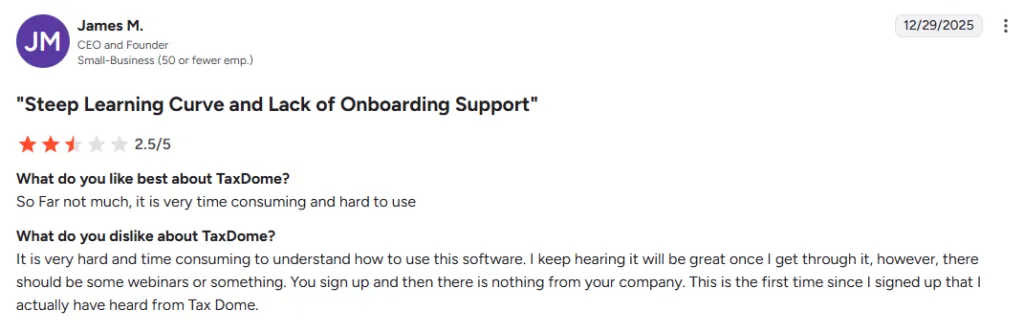
However, users consistently cite a steep learning curve and lengthy onboarding as the platform’s biggest drawbacks. The 6-8 week average setup time and mandatory annual billing commitments are barriers for many firms.
Why Accounting Firms Choose TaxDome Alternatives
While TaxDome has built a substantial user base since 2017, four specific drawbacks consistently drive firms to look elsewhere:
1. Annual upfront commitment with no monthly option
TaxDome requires 1-year, 2-year, or 3-year contracts paid upfront. For firms that want to test the platform first or scale gradually as the team grows, this is a meaningful financial barrier. Monthly alternatives like Uku (from $19/mo Solo, $38/user/mo Team), Financial Cents ($19/mo), and Cone ($5/user/mo) remove this commitment entirely. See our TaxDome pricing breakdown for a full comparison of long-term costs.
2. Steep onboarding curve (6-8 weeks average)
TaxDome’s all-in-one design means every firm rebuilds its workflows inside the platform. Most firms cite 6-8 weeks before productive use, and our TaxDome review documents specific user feedback on the learning curve. Modular alternatives like Uku let firms start with only the modules they need and be live in two to six weeks, then add features as the team adapts.
3. US-centric integration set
TaxDome’s strongest integrations (IRS transcript pulling, Lacerte, ProConnect, Drake) are designed around the US tax preparation workflow. Firms with international clients, bookkeeping-first practices, or non-US tax workflows find limited fit. Alternatives like Uku (12-language support, multi-currency, 25+ countries) or Karbon (global firm focus) serve cross-border firms better — see Karbon vs TaxDome for a direct comparison.
4. Tax-focused workflow design
TaxDome was built for tax preparers first; bookkeeping-only and pure practice management firms often find the UI optimized for tax cases rather than recurring engagement workflows. Bookkeeping-specialized alternatives like Double (per-client pricing) or Client Hub (QuickBooks-native uncategorized transaction workflows) fit this profile better. For a side-by-side comparison with the closest peer competitor, see Canopy vs TaxDome.
The Best TaxDome Alternatives for Small Accounting Firms
“Small firm” covers three very different practices, and the right TaxDome alternative is different for each one. What they share is the constraint that pushes them off TaxDome in the first place: Essentials is $800/year for a single user, paid upfront, and Pro is $1,000/user/year. For a firm still proving its model, that is the entire software budget committed before anyone has logged in.
Solo practitioners (1 person)
Uku Solo ($19/mo) is a curated single-user toolkit rather than a stripped-down baseline — it includes client budgeting and e-signatures, which the Team plan does not — and caps at 20 active clients, which is the realistic ceiling for one person anyway. Financial Cents Solo matches the price at $19/mo but is USD-only with a US/Canada focus. Cone Essentials is the floor at $5/user/mo. Client Hub Solopreneur is $49/mo and annual-only, which reintroduces the commitment you left TaxDome to avoid.
Small teams (2-5 people)
This is where per-user pricing compounds fastest. Five seats on TaxDome Pro is $5,000/year upfront. The same five people cost $190/mo on Uku Team ($38/user/mo), $200/mo on Jetpack Workflow ($40/user/mo annual), and $245/mo on Financial Cents Team ($49/user/mo) — all billed monthly, all cancellable. For a team this size the deciding factor is usually scope rather than price: Jetpack does workflow only, Financial Cents adds client collaboration, Uku covers workflow plus automated billing and time tracking in one system.
Bookkeeping-first small firms
Per-user pricing is the wrong shape for a two-person bookkeeping firm serving 40 clients. Double charges $8-$10/client/mo with unlimited team members, so the cost tracks the revenue line instead of headcount. Client Hub is the alternative when QuickBooks Online is the spine of the work and uncategorized transactions are the real time sink.
What small firms should weigh differently
A 4-person firm has no implementation team. TaxDome’s 6-8 week average onboarding is paid out of billable hours, not out of a project budget, which is why modular deployment matters more at this size than feature count does. Uku’s 5-7 business day migration exists for exactly this reason: you start with the modules you need and add the rest once the team has settled.
The second difference is commitment. A firm of three can gain or lose a third of its headcount in a quarter. Monthly billing is not a discount — it is the ability to resize without eating a prepaid annual contract.
TaxDome alternatives for small firms at a glance
| Platform | One user | Five users | Billing | Best for |
|---|---|---|---|---|
| TaxDome | $800/yr (Essentials) | $5,000/yr (Pro) | Annual upfront, 1-3 yr | US tax-prep firms |
| Uku | $19/mo (Solo, 20 clients) | $190/mo (Team) | Monthly or annual | Firms wanting billing automation without an annual lock-in |
| Financial Cents | $19/mo (Solo) | $245/mo (Team) | Monthly or annual | US/Canada firms wanting the simplest entry |
| Cone | $5/user/mo | $25/mo | Monthly | Lowest-cost proposal-first firms |
| Jetpack Workflow | $40/user/mo | $200/mo | Monthly or annual | Workflow-only, best-of-breed stacks |
| Double | $8/client/mo | $8/client/mo | Monthly | Bookkeeping firms pricing per client |
| Client Hub | $49/mo (annual only) | $295/mo | Annual or monthly | QuickBooks-native bookkeeping firms |
Prices reflect annual billing where both options exist. Five-user figures are per-user rates multiplied by five; Double is priced per client, so its cost depends on client count rather than headcount.
How We Curated Our List of TaxDome Alternatives
The research identified that accounting professionals seek platforms addressing specific operational challenges. While TaxDome excels as an all-in-one solution, users often need more specialized capabilities in key areas:
- Modular implementation allowing immediate work with only needed features
- Streamlined billing automation transforming invoicing into a quick task
- Flexible monthly pricing without long-term commitments
- Advanced team collaboration for distributed teams
- Purpose-built tax resolution tools with IRS transcript analysis
- Bookkeeping-specific workflows with deep ledger integration
- Simpler, more affordable options for solo practitioners
Each platform was selected because it offers genuine advantages for particular use cases and firm types.
INFO
Methodology: Each platform was evaluated through a combination of hands-on testing, analysis of user reviews across G2 and Capterra, pricing transparency assessment, and interviews with accounting professionals who have used these tools. Scores and features reflect publicly available information as of February 2026.
1. Uku: Best TaxDome Alternative for Modular Implementation and Effortless Billing

Starts at: $19/mo (Solo) | G2 Score: 4.7 | Capterra Score: 4.8
Uku is comprehensive accounting practice management software designed to streamline workflows, automate billing, and improve collaboration within accounting firms. Created for international markets (UK and US focus), Uku serves 1,000+ clients across 25+ countries with support for 12 languages and multi-currency capabilities.
Key Features:
- Modular Feature Deployment
- Three-Level Workflow Structure (task templates cascade into client task plans)
- Single Source of Truth for Team Accountability — at-a-glance visibility into who’s doing what across the firm
- Automated Billing transforming multi-day invoicing into ~30 minutes
- Reporting (Team plan) + BI Analytics (Elite plan) — team performance, workload distribution, and client profitability views
- Time Tracking with 90% one-click actions
- Integrated Client Portal where clients and accountants work on same task
- Flextime Management for vacation and overtime
Why Choose Uku Over TaxDome
Fast & Flexible Deployment: Start Working on Day One
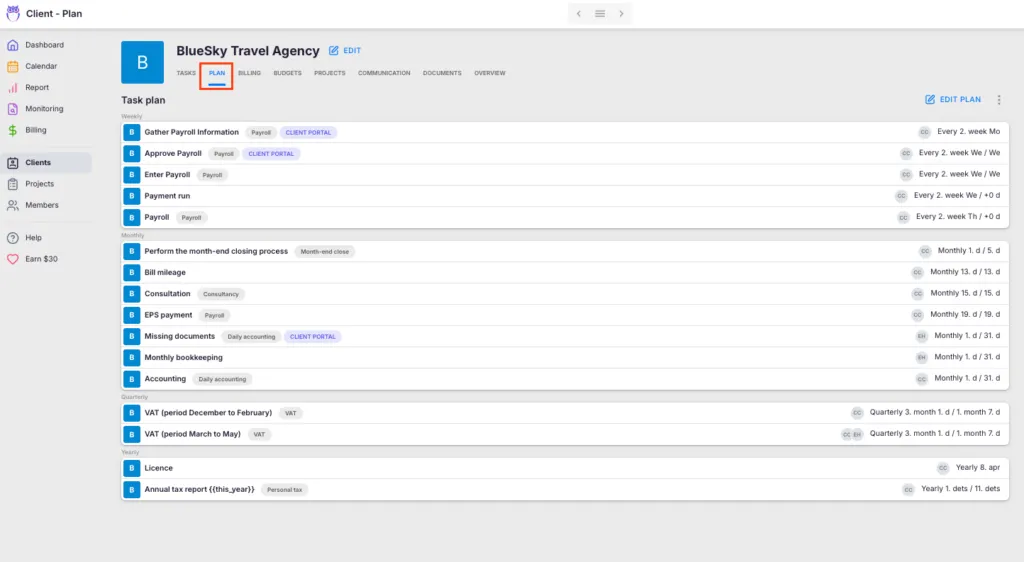
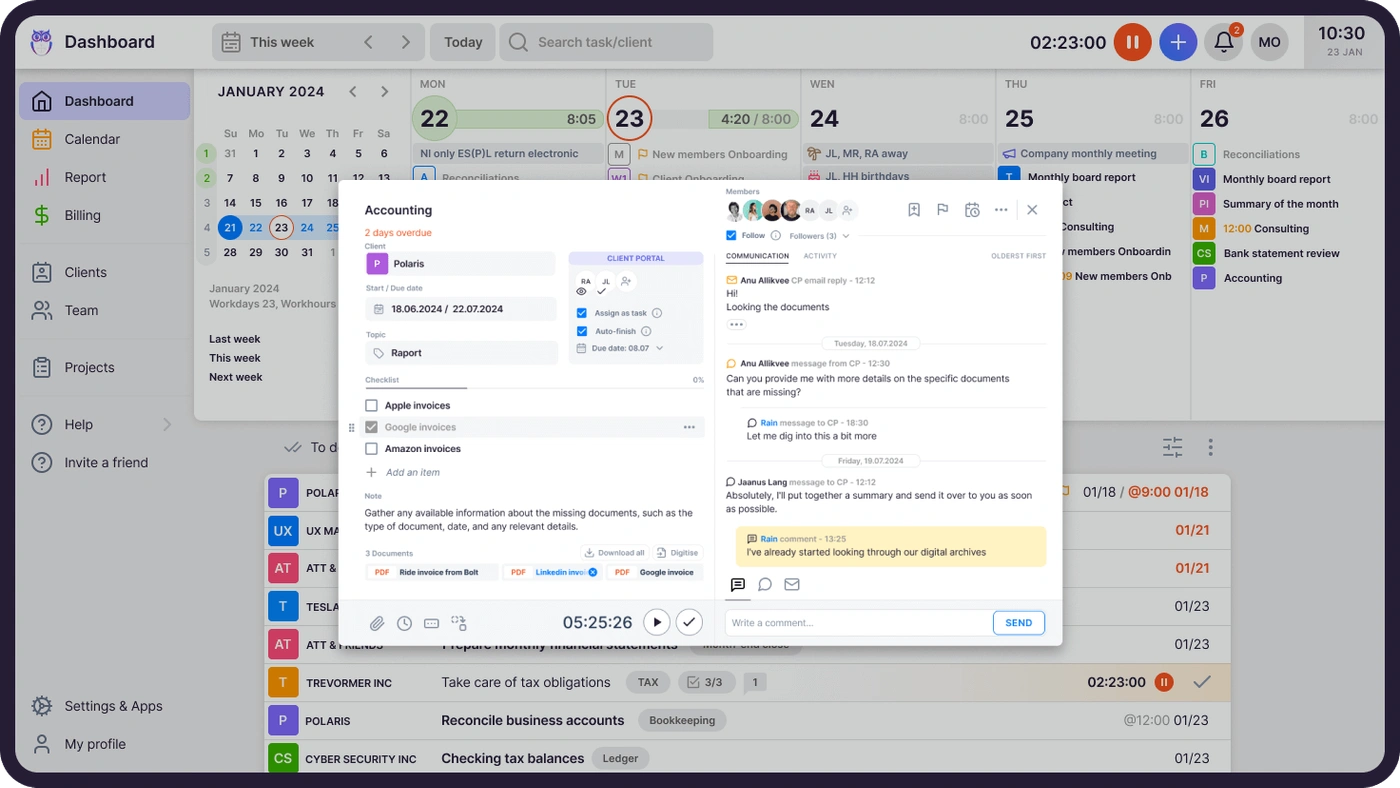
Uku allows users to begin with just CRM and tasks, then gradually add features. Users can import Excel data and have automated plans ready within hours, not weeks. This modular deployment eliminates the substantial upfront configuration required by all-in-one platforms.
The modular deployment is designed for firms transitioning from spreadsheets. Users describe it as going “from Excel to greatness” because of how quickly they become productive.
Flexible Monthly Pricing vs. Annual Commitments
TaxDome requires annual billing commitments starting at $800/year. Uku offers both monthly and annual billing options, allowing firms to test the system without large upfront financial commitments. Clients prefer paying $19/month (Solo) or $38/user/month (Team) rather than committing to hundreds upfront.
Automated Billing That Transforms Your Invoicing Process
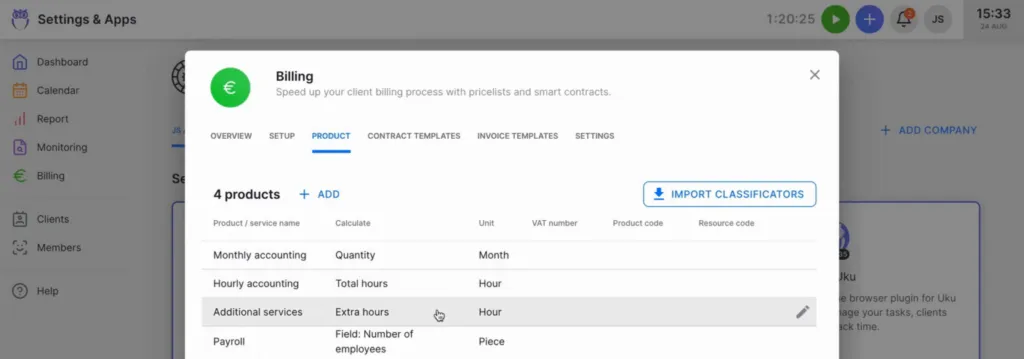
Uku’s billing automation automatically collects billable data from time tracking entries and custom fields, then generates invoices based on predefined client contracts. The system supports:
- Time-based billing with customizable hourly rates
- Fixed-fee billing for specific services
- Item-based billing for individual services
- Complex price lists based on quantity, time, material, and ranges
- Advanced rounding rules based on entry, team, client, or month
Uku can handle scenarios like billing unplanned interruptions—a one-minute call automatically billed as 15 minutes based on configured rules. Firms can complete what previously took two to three days in approximately 30 minutes for over 100 clients.
Reporting + BI Analytics: Know Your Profitability in Real-Time
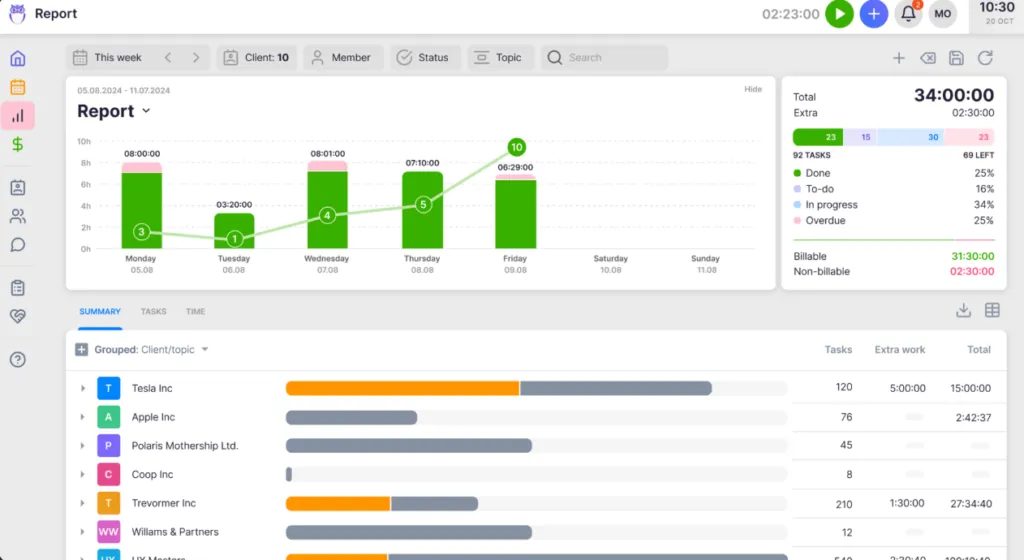
Uku’s Reporting (included from the Team plan) provides comprehensive views into firm performance with deep filters, saved report templates, and three levels of depth: summary, tasks, and time. The BI Analytics layer (Elite plan) extends this with profitability-focused dashboards that track both sales prices and actual cost prices, showing whether employees and clients are profitable.
Key capabilities include:
- Team Performance Reporting showing workload distribution and task completion
- Client Profitability Analysis identifying profitable and resource-draining clients
- Task Status Overviews with real-time tracking
- Real-Time Alerts preventing delayed loss discovery
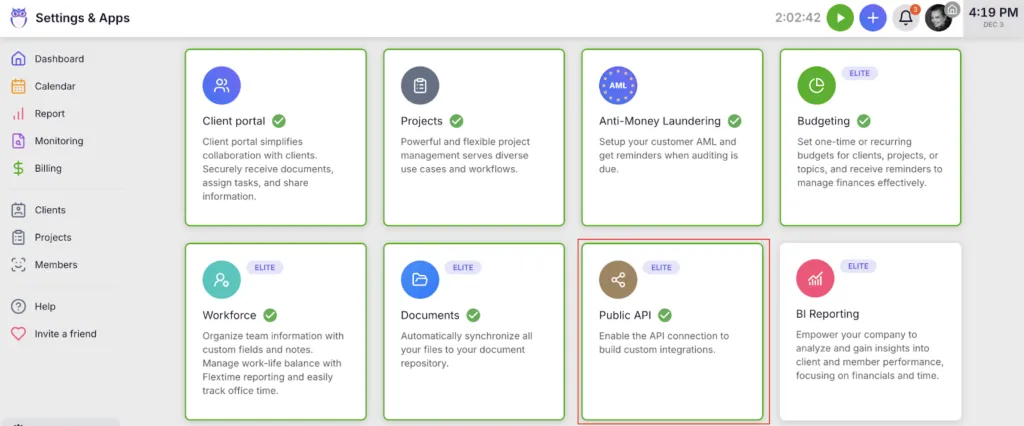
Customers report seeing up to ~20% more profit by discovering outdated agreements where they were billing incorrectly.
A System Your Team Will Actually Enjoy Using

Uku emphasizes remarkable ease of use despite advanced setup capabilities. The platform minimizes admin time, with time tracking UX receiving significant investment: 90% of actions are one-click. The interface is consistently praised for being beautiful and user-friendly.
The client portal mirrors the exact same task on both sides—clients and accountants work on the same item with all communication, actions, documents, logs, and time tracking in one place. Clients access via “magic link” in their email, eliminating username/password friction. The portal can be fully customized with company branding.
Across the team, Uku becomes the single source of truth for who’s doing what — managers see at a glance who owns each task, what’s blocking progress, and where the team has capacity. This is the most-cited reason firms switch to Uku from email-thread workflows: not the features, but the daily clarity of knowing the state of every job without asking.
“We were looking at TaxDome and Karbon, but Uku felt like it was built for how we actually work. We went live in 3 days.”

Uku Pricing

Uku offers four pricing plans available in €, $, and £ with both monthly and annual billing options (annual billing provides ~23% discount):
Solo Plan ($19/mo yearly, $25/mo monthly)
A curated single-user toolkit drawing from both the Team and Elite plans — built for accountants running their practice solo without team complexity. Not a stripped-down baseline: Solo includes premium features (client budgeting, e-signatures) that aren’t in the Team plan.
- 1 member, 20 active clients cap
- CRM, Calendar, Time tracking, Billing, AML
- Workflow automations, All accounting integrations
- Client Portal, Custom fields, Monitoring, Email management
- Document management, Magic buttons, Live chat support
- Client budgeting, E-signatures (Solo + Elite-only)
Team Plan ($38/user/mo yearly, $49 monthly)
For growing firms collaborating as a team. Unlocks unlimited members and the multi-user infrastructure Solo doesn’t cover.
- Unlimited members & clients
- Teamwork Tools, Projects, Access management
- Company templates, Mini Uku (plugin), Reporting
- All baseline practice management features: CRM, Time tracking, Billing, AML, Workflow automations, All accounting integrations, Email management, Client Portal, Document management, Monitoring, Custom fields, Calendar, Magic buttons, Live chat support
Elite Plan ($48/user/mo yearly, $62 monthly) — Most Popular
All Team features plus the scaling layer: BI analytics, API access, advanced storage integrations.
- All Team features, plus:
- BI Analytics
- Workforce management, Actionable audit log
- Client budgeting, E-signatures, Client Portal custom menu
- Public API, Zapier (5,000+ integrations)
- Google Drive, Dropbox & SharePoint integrations
- Also on Elite: Uku MCP server · Coming in 2026: Email Triage, Capacity planning, Proposals
Enterprise Plan ($88/user/mo yearly, $99 monthly)
All Team & Elite features plus white-glove support and custom workflows.
- All Team & Elite features, plus:
- Custom integrations
- Dedicated account manager
- Assisted clients import
- Tailor-made team workshop
- Pay by invoice
- Early access to new features
Uku also offers 14-day free trial with access to Elite plan features and 90 minutes of free onboarding assistance.
Who Should Use Uku?
Choose Uku if:
- You want to start working on day one
- You want to minimize your team’s admin time
- You’re transitioning from Excel and want the easiest implementation
- You need flexible monthly pricing rather than annual commitments
- You need multilingual or multi-currency support
- You want to transform your billing process
2. Karbon: Best TaxDome Alternative for Enterprise-Grade Practice Management with Distributed Teams
Starts at: $59/user/mo | G2 Score: 4.8 | Capterra Score: 4.7
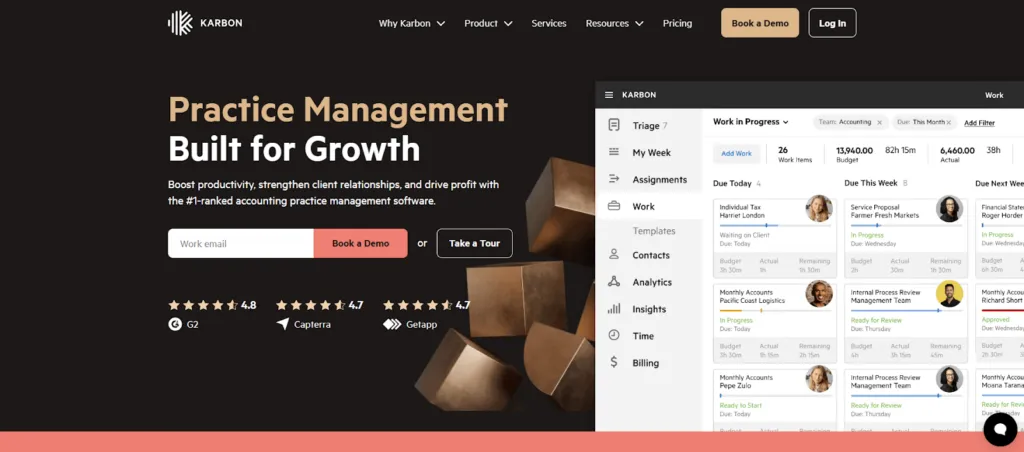
Karbon is a cloud-based practice management platform designed for accounting firms and professional services businesses seeking sophisticated coordination capabilities. Ranked #1 on G2 in its category, Karbon serves as a central hub for managing workflows, client communication, and internal team collaboration.
Key Features:
- Karbon AI with GPT-powered features for email drafting and task creation
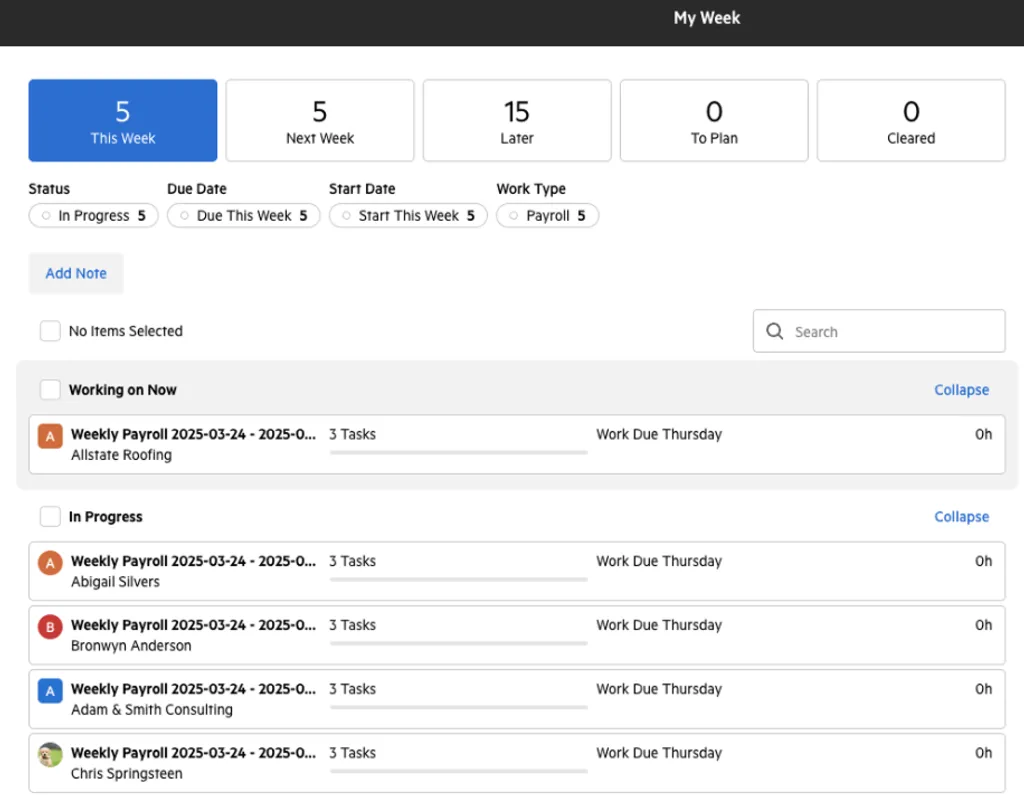
- “My Week” Dashboard organizing work items into intuitive buckets with calendar integration
- Triage Email System consolidating inbox and enabling team collaboration
- Workflow Templates with sophisticated automation and conditional logic
- Practice Intelligence with 12 pre-built dashboards
- Resource Planning Dashboard showing firm-wide capacity visibility
Why Choose Karbon Over TaxDome for Distributed Teams
Superior Internal Team Collaboration
Where TaxDome excels at client-facing features, Karbon’s architecture is fundamentally built around team collaboration. The Triage feature transforms email from individual silos into a collaborative workspace where any team member can see, comment on, and assign client correspondence. The “Colleague’s Week” view allows managers to understand team workloads at a glance across different offices or time zones.
Advanced Workflow Automation with Conditional Logic
Karbon’s workflow engine handles nuanced conditional logic required when managing diverse service lines simultaneously. The “Tasklist automators” can trigger cascading actions when specific conditions are met, providing flexibility larger operations require.
Practice Intelligence for Strategic Decision-Making
Karbon’s suite of 12 pre-built dashboards covers everything from profitability analysis to team capacity planning. The Resource Planning Dashboard provides firm-wide visibility. For firms needing custom analytics, Karbon offers direct access to its Snowflake data warehouse for connection to external BI tools like Power BI.
Consideration: Karbon’s billing setup and confirmation process can take considerable time compared to more billing-focused platforms. For firms where rapid invoicing is a priority, this is worth evaluating during a trial.
Karbon Pricing
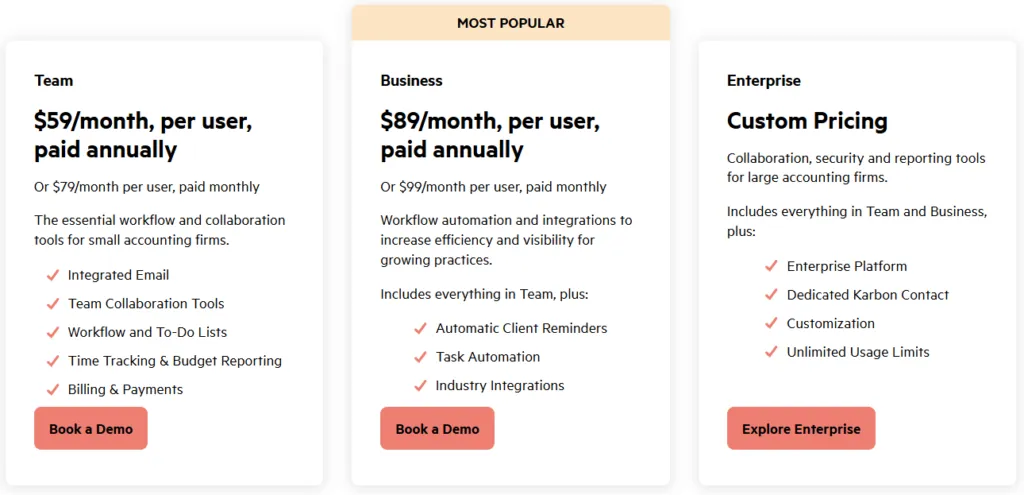
Karbon offers both monthly and annual billing options:
- Team Plan: $59/user/month (annual) with Email Triage, collaboration tools, and time tracking
- Business Plan: $89/user/month (annual) with automatic client reminders, task automation, and client portal
- Enterprise Plan: Custom pricing with unlimited usage limits and dedicated Karbon contact
Who Should Use Karbon?
Choose Karbon if:
- You manage a distributed or multi-location accounting team needing sophisticated coordination
- You require enterprise-grade analytics with custom reporting capabilities
- You prioritize robust internal team collaboration tools
3. Financial Cents: Best TaxDome Alternative for Affordable Entry and Ease of Use
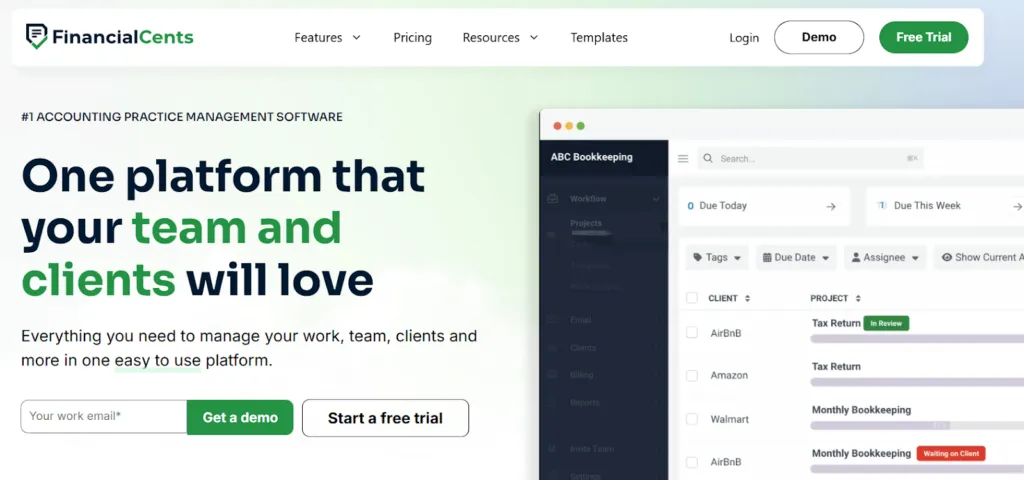
Starts at: $19/mo | G2 Score: 4.7 | Capterra Score: 4.8
Financial Cents is a practice management platform built specifically for small accounting firms, offering an accessible entry point with its $19/month Solo plan. The platform has earned an industry-leading 4.8/5.0 ease-of-use rating, making it an attractive choice for firms prioritizing simplicity.
Key Features:
- Workflow management with 100+ community templates
- CRM with client management
- Time tracking with QuickBooks Online two-way sync
- Passwordless “magic link” client portal access
- Capacity management for team workload visibility
- Document management with e-signatures
Why Choose Financial Cents Over TaxDome
Financial Cents provides a significantly lower entry point than TaxDome’s $800/year minimum. The platform’s passwordless client portal simplifies client access, and the native QuickBooks Online integration with two-way time sync streamlines data flow for QBO-centric firms.
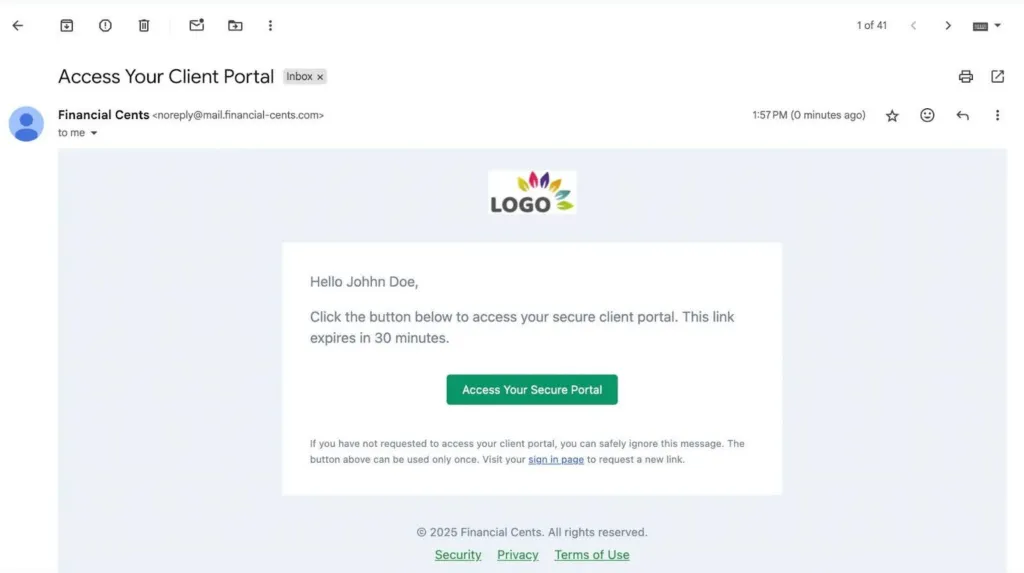
The 100+ community workflow templates allow firms to quickly adopt proven processes rather than building from scratch.
Financial Cents Pricing
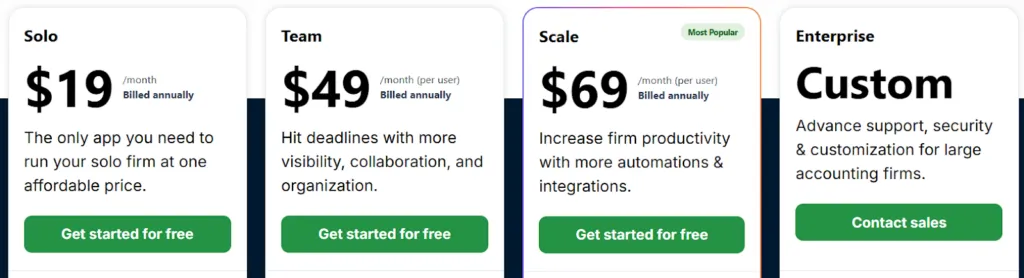
- Solo: $19/month (1 user, clients capped)
- Team: $49/user/month with full workflow and collaboration
- Scale: $69/user/month with advanced analytics and capacity planning
- Enterprise: Custom pricing
CAUTION
Important limitations: Financial Cents has US/Canada geographic focus with USD-only billing, no multilingual support, minimum 1-year commitment required for annual plans, and native Xero integration requires a Zapier workaround.
Who Should Use Financial Cents?
Choose Financial Cents if:
- You’re a US/Canada-based solo practitioner or very small team
- You use QuickBooks Online as your primary accounting platform
- You want the lowest possible entry price with a simple interface
4. Canopy: Best TaxDome Alternative for Tax-Specialized Firms Needing Tax Resolution Tools

Starts at: $74/user/mo | G2 Score: 4.6 | Capterra Score: 4.5
Canopy serves 4,000+ accounting firms with a 90% customer satisfaction score, specializing in tax-focused practice management. Following a $70M Series C funding round, the platform has invested heavily in AI capabilities and tax resolution infrastructure. (Canopy pricing checked 13 August 2026.)
Key Features:
- IRS transcript integration supporting up to 20 years of client data
- Pre-built workflows for notices, penalty abatements, and offers in compromise
- Full platform bundled into every pricing tier, with specialist tax work metered separately
- ChatGPT-powered email drafting and smart intake features
- Automated transcript monitoring and version comparison
Why Choose Canopy Over TaxDome for Tax Resolution
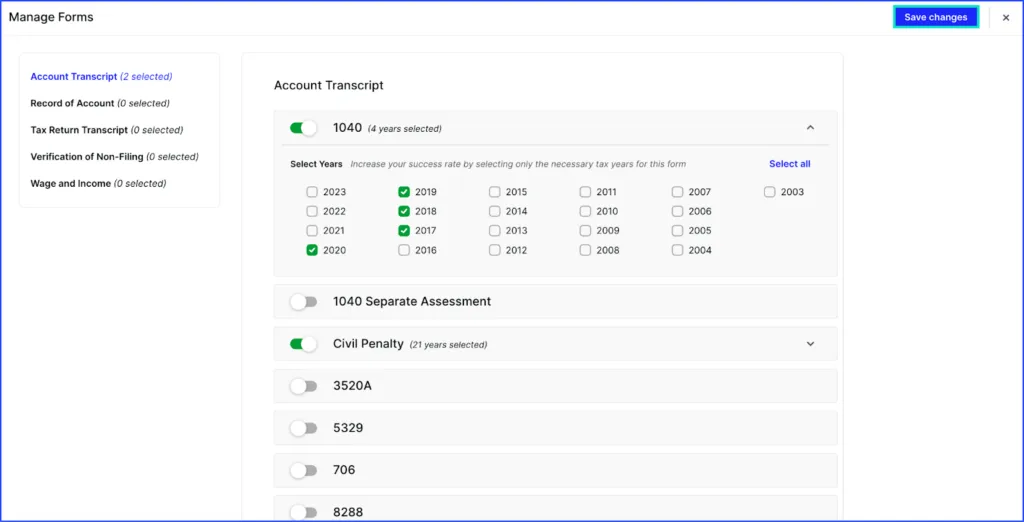
Canopy’s purpose-built tax resolution infrastructure is unmatched among practice management platforms. The IRS transcript integration automatically pulls and analyzes up to 20 years of client tax data, while pre-built workflows handle complex resolution processes like penalty abatements and offers in compromise.
The flat per-seat pricing means every tier already includes client engagement, document management, and workflow — firms only pay separately for the metered specialist tax add-ons they actually use.
Canopy Pricing
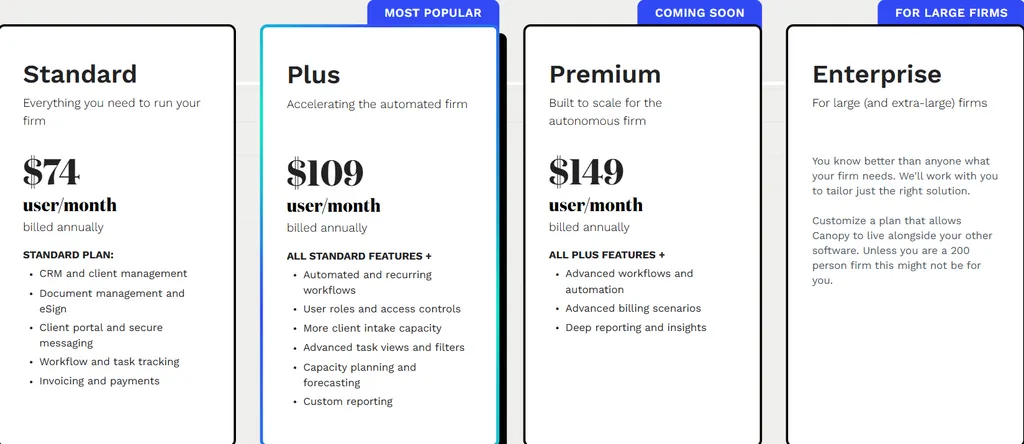
Per-Seat Tiers (annual billing):
- Standard: $74/user/month — full platform included
- Plus: $109/user/month — adds roles, capacity planning
- Premium: $149/user/month — adds advanced workflows and billing
Specialist Add-Ons (consumption-based):
- Tax Workflow Automation: from $34/client credit
- Close Automation: $10/connected client/month (first 5 free)
- Tax Resolution: $50/user/month
Who Should Use Canopy?
Choose Canopy if:
- You specialize in tax resolution and need IRS transcript integration
- You handle complex notices, penalty abatements, or offers in compromise
- You’re comfortable with a flat per-seat price plus metered tax add-ons
5. Jetpack Workflow: Best TaxDome Alternative for Workflow-Only Needs
Starts at: $40/user/mo | G2 Score: 4.2 | Capterra Score: 4.8
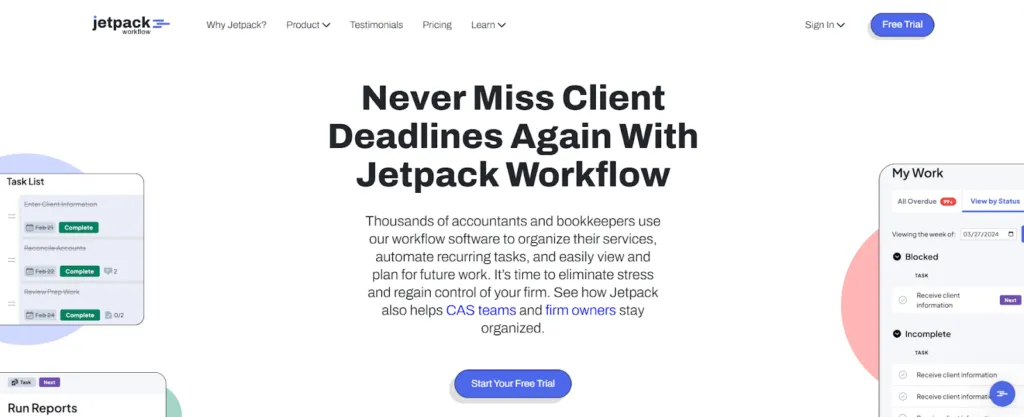
Jetpack Workflow focuses exclusively on workflow management for accounting firms, offering a clean, focused interface without the complexity of all-in-one platforms. The platform provides 70+ pre-built accounting-specific templates and unlimited projects.
Key Features:
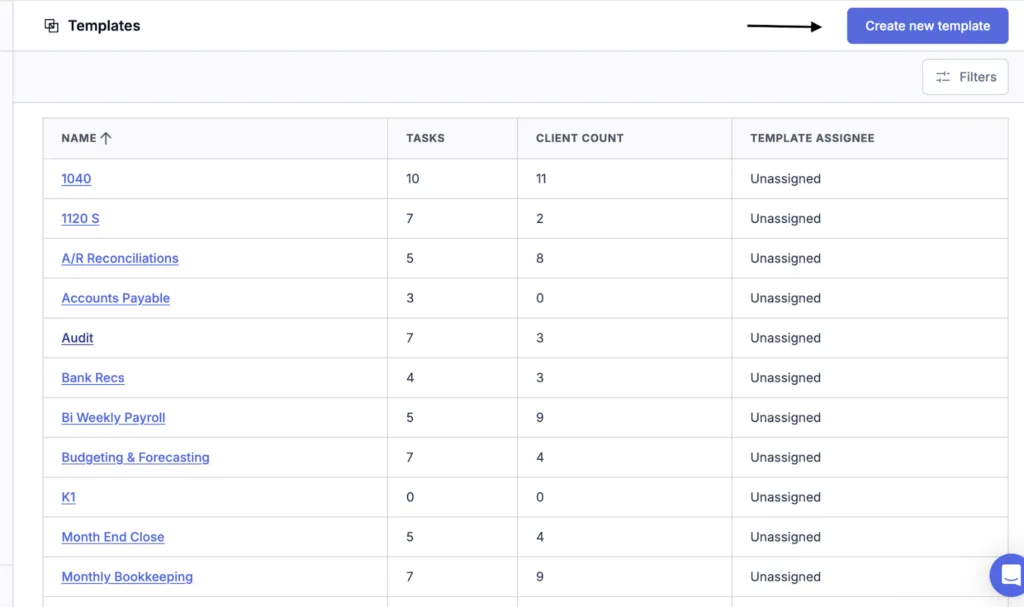
- 70+ pre-built accounting-specific templates
- Unlimited projects, templates, and clients
- Task dependencies with cascading deadline logic
- Team capacity planning and workload visualization
- Automatic template updates cascading to future projects
Why Choose Jetpack Workflow Over TaxDome
For firms already using separate solutions for CRM, billing, and client communication, Jetpack Workflow provides dedicated workflow standardization without forcing adoption of an entire ecosystem. The 70+ accounting templates cover common processes, and template updates automatically cascade to future projects.
Jetpack Workflow Pricing
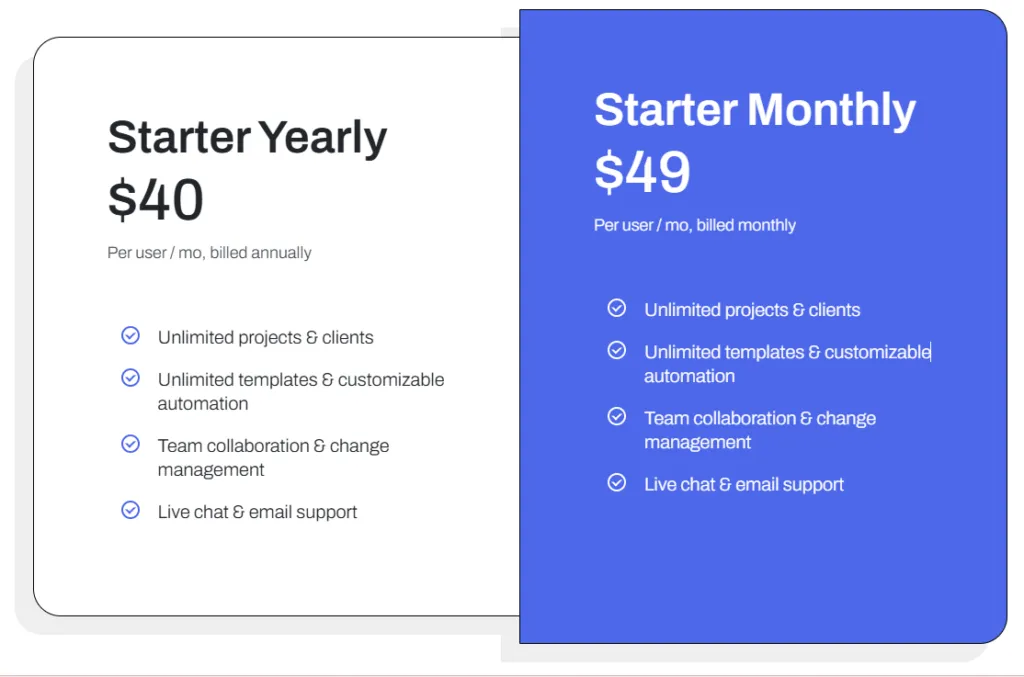
- Starter (Annual): $40/user/month
- Starter (Monthly): $49/user/month
- Custom Setup Services: starting at $299
Who Should Use Jetpack Workflow?
Choose Jetpack Workflow if:
- You use a best-of-breed software strategy and need dedicated workflow management
- You want focused workflow tools without client-facing feature complexity
- You need extensive pre-built templates for quick standardization
6. Double: Best TaxDome Alternative for Bookkeeper-Specialized Per-Client Pricing
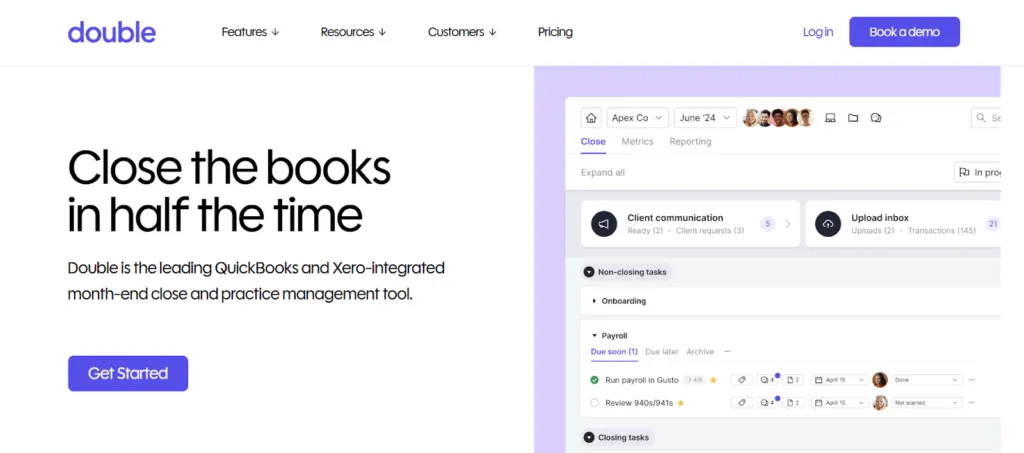
Starts at: $10/client/mo | G2 Score: 5.0
Double targets bookkeeping firms with a unique per-client pricing model ($8-$50/client/month) that includes unlimited team members. As a Platinum Intuit Partner, Double offers bidirectional QuickBooks Online and Xero ledger synchronization.
Key Features:
- Per-client pricing with unlimited team members included
- Bidirectional QuickBooks Online and Xero ledger synchronization
- AI-powered month-end close with bank feed categorization
- Passwordless custom client portal with receipt management
- 1099/W-9 vendor tracking with direct request capabilities
Why Choose Double Over TaxDome for Bookkeeping
Double’s per-client pricing aligns costs directly with revenue—as your client base grows, costs scale predictably. The bidirectional ledger sync pushes corrections directly to client files, and AI-powered bank feeds streamline month-end close processes.
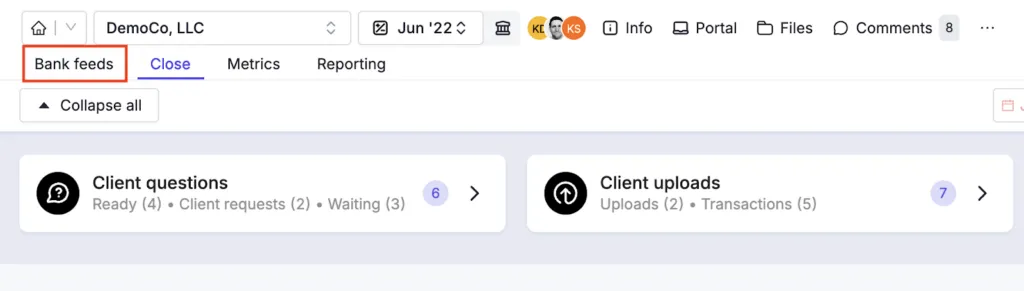
Changes in Double push instantly back to live accounting files, eliminating the manual sync step that other platforms require.
Double Pricing
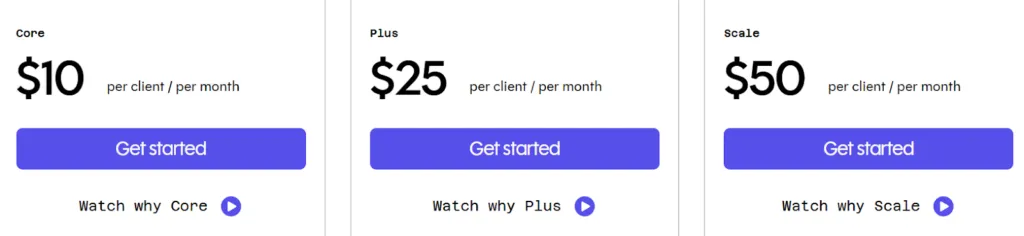
- Lite: $8/client/month
- Core: $10/client/month
- Plus: $25/client/month
- Scale: $50/client/month
All plans include unlimited team members.
Who Should Use Double?
Choose Double if:
- You run a bookkeeping firm and want pricing aligned with per-client revenue
- You use QuickBooks Online or Xero and need bidirectional sync
- You want AI-powered month-end close capabilities
7. Cone: Best TaxDome Alternative for Revenue-Led, Proposal-First Firms
Starts at: $5/user/mo | G2 Score: 4.5 | Capterra Score: 4.6
Cone is an AI-powered work operating system designed for professional service firms. Founded in 2022 and backed by Y Combinator, Cone takes a different approach from TaxDome — proposals and revenue collection are the cornerstone, not an afterthought. The result is the most budget-friendly modern alternative in this list at $5/user/month for unlimited clients, workflows, time tracking, and billing.
Key Features:
- Flexible Proposal Editor with multimedia support, drag-and-drop customization, e-signatures
- Automated Proposal-to-Invoice Flow — when clients accept, the system auto-generates invoices and sets up recurring billing schedules
- Unified Platform — CRM, proposals, projects, workflows, billing, email management, and client portal in one tool
- Native Integrations with QuickBooks Online, Xero, Stripe, GoCardless, and Zoho Books
- White-Labeled Mobile Apps for iOS and Android, available across all tiers
- Branded Client Portal with passwordless magic-link access — included from the entry tier
- SOC 2 Type 1 Compliance with GDPR-compliant data handling
Why Choose Cone Over TaxDome for Revenue-First Operations
- Monthly Pricing at One-Third the Cost
TaxDome’s entry tier requires $800+ paid upfront annually. Cone starts at $5/user/month month-to-month, with unlimited clients and proposals included from the first tier. For solo practitioners or small firms testing a new platform, the commitment risk is dramatically lower.
- Proposal-First Design vs Tax-First Workflow
TaxDome treats proposals as one feature among many; the platform is engineered around tax case workflows. Cone reverses this: the entire system starts with the proposal, which then automatically generates the project, sets up recurring billing, and triggers client onboarding. For firms that grow through service expansion and clear scoping, this matches the actual revenue motion.
- Modern Architecture (2022) vs Legacy Implementation Curve
Cone was built recently, so the UI is faster to learn and the AI features are native rather than retrofitted. Firms report productive use within days rather than the 6-8 weeks typical for TaxDome implementation.
Cone Pricing
- Essentials: $5/user/month — unlimited clients, workflows, time tracking, billing
- Growth: higher tiers add auto-charging, advanced automations, and white-label customization
- All tiers include branded mobile apps, unlimited proposals, and the client portal
Who Should Use Cone?
Choose Cone if:
- You want the lowest-cost modern alternative to TaxDome with no annual commitment
- Your firm growth depends on tight proposal-to-payment workflows
- You appreciate a recently-built platform with native AI rather than legacy retrofits
- You need branded mobile apps for clients at the entry tier
8. Client Hub: Best TaxDome Alternative for Bookkeeping Firms with QuickBooks Workflows
Starts at: $49/mo (Solopreneur, annual) | G2 Score: 4.7 | Capterra Score: 4.8
Client Hub is a cloud-based practice management platform purpose-built for bookkeeping and Client Accounting Services (CAS) firms. Where TaxDome optimizes for tax preparation, Client Hub centers on the daily reality of bookkeepers: uncategorized transactions, client back-and-forth, and month-end close quality control. Founded in 2017, it has built one of the deepest QuickBooks Online integrations in the practice management space.
Key Features:
- QuickBooks Online + Xero Native Integration with automatic uncategorized transaction workflow — when a transaction lands in “Uncategorized Expense” or “Ask My Accountant,” Client Hub auto-creates a client task
- AI “Magic” Features — Magic Workflow, Magic Email, Magic Messages, and Magic Books Review for automated quality control
- Books Review Tool — AI-powered feature that identifies data inconsistencies in QuickBooks Online during month-end close
- Client-Centric Portal with Mobile App for iOS and Android — passwordless access via magic links
- Two-Way Client Task Management with automated reminders until completion
- Secure Messaging System — chat-like real-time communication within each client workspace
- W-9 / 1099 Manager (higher tier) for year-end tax form workflows
- Unlimited Clients and Storage across all plans
Why Choose Client Hub Over TaxDome for Bookkeeping Workflows
- Purpose-Built for Uncategorized Transaction Resolution
TaxDome offers generic QuickBooks integration. Client Hub was engineered around the specific bookkeeping pain point — uncategorized transactions sitting in client books for weeks because asking the client requires an email chain. Client Hub surfaces these as client tasks in their mobile app; clients see transaction details, select the correct category from their actual chart of accounts, and a single click updates QuickBooks. This workflow alone saves bookkeeping firms hours per client per month.
- AI Built for Bookkeeping, Not Tax Cases
TaxDome’s AI features focus on document classification and tax case routing. Client Hub’s “Magic” suite targets bookkeeping productivity: Magic Books Review automatically scans QBO data for inconsistencies before you do a manual review, Magic Email drafts client follow-ups, and Magic Messages cleans up communication threads.
- Bookkeeping-First Pricing Tier Structure
Client Hub’s tiers explicitly add bookkeeping-specific value: the Solopreneur ($49/mo) and Practice Manager ($59/user/mo) tiers include practice management and client portal, while the Practice Manager + QBO/Xero tier ($79/user/mo annual or $99/mo monthly) adds the enhanced uncategorized transaction workflow and Books Review tool. This is in contrast to TaxDome’s flat all-in-one pricing that includes features bookkeepers don’t need.
Client Hub Pricing
- Solopreneur: $49/month (annual only) — single user, all features including AI and QBO/Xero
- Practice Manager: $59/user/month (annual) or $79/month (monthly) — workflow, dashboards, time tracking, email sync, client portal, AI features
- Practice Manager + QBO/Xero: $79/user/month (annual) or $99/month (monthly) — adds uncategorized transaction workflow, Books Review tool, W-9/1099 Manager
Who Should Use Client Hub?
Choose Client Hub if:
- You run a bookkeeping or Client Accounting Services (CAS) firm — not a tax-prep firm
- QuickBooks Online or Xero is the spine of your daily operations
- The uncategorized transaction back-and-forth is your single biggest time sink
- You want AI features built specifically for bookkeeping quality control rather than tax case routing
TaxDome Alternatives at a Glance
 Uku
UkuBest for modular implementation and effortless billing. Start with what you need, scale gradually.
- Starts at: $19/mo (Solo)
- G2: 4.7 · Capterra: 4.8
 Karbon
Best for enterprise-grade practice management with distributed teams. Triage email and Practice Intelligence suite.
- Starts at: $59/user/mo
- G2: 4.8 · Capterra: 4.7
 Financial Cents
Best for affordable entry and ease of use. Industry-leading ease-of-use rating, US/Canada focused.
- Starts at: $19/mo
- G2: 4.7 · Capterra: 4.8
 Canopy
Best for tax-specialized firms needing IRS transcript integration and tax resolution workflows.
- Starts at: $74/user/mo
- G2: 4.6 · Capterra: 4.5
 Jetpack Workflow
Best for workflow-only needs. 70+ pre-built templates, no client-facing feature complexity.
- Starts at: $40/user/mo
- G2: 4.2 · Capterra: 4.8
 Double
Best for bookkeeper-specialized per-client pricing. Unlimited users, deep QBO/Xero ledger sync.
- Starts at: $10/client/mo
- G2: 5.0
 Cone
ConeBest for revenue-led, proposal-first firms. AI-powered work OS, unified proposal-to-payment platform at $5/user/mo.
- Starts at: $5/user/mo
- G2: 4.5 · Capterra: 4.6
 Client Hub
Best for bookkeeping firms with QuickBooks workflows. Magic AI features and uncategorized transaction resolution.
- Starts at: $49/mo (Solopreneur)
- G2: 4.7 · Capterra: 4.8
Feature Comparison
| Feature | Uku | Karbon | Fin. Cents | Canopy | Jetpack | Double |
|---|---|---|---|---|---|---|
| Workflow ManagementRecurring task templates, automation rules, deadline tracking | ✅ | ✅ | ✅ | ✅ | ✅ | ✅ |
| Automated BillingAuto-generate invoices from time entries, contracts, and custom rules | ✅ | ✅ | ✅ | ✅ | ❌ | ✅ |
| Time TrackingStopwatch, manual entry, bulk allocation, billable/non-billable | ✅ | ✅ | ✅ | ✅ | ✅ | ✅ |
| Client PortalSecure document sharing, task visibility, and communication with clients | ✅ | ✅ | ✅ | ✅ | ❌ | ✅ |
| CRM / Client ManagementContact database, client profiles, engagement tracking | ✅ | ✅ | ✅ | ✅ | ✅ | ✅ |
| Email ManagementShared inbox, email-to-task, client communication within the platform | ✅ | ✅ | ❌ | ✅ | ❌ | ❌ |
| Document ManagementFile storage, e-signatures, document requests, version control | ✅ | ✅ | ✅ | ✅ | ❌ | ✅ |
| BI AnalyticsProfitability analysis, team utilization, client revenue dashboards — Elite plan; baseline Reporting on Team plan+ | ✅ | ✅ | ✅ | ⚠️ Basic | ✅ | ⚠️ Basic |
| Modular DeploymentActivate features one by one instead of all-at-once onboarding | ✅ | ❌ | ❌ | ✅ | N/A | ❌ |
| IRS Transcript IntegrationPull and analyze IRS transcripts for tax resolution workflows | ❌ | ❌ | ❌ | ✅ | ❌ | ❌ |
| Multilingual SupportPlatform UI and client portal available in multiple languages | ✅ 12 langs | ❌ | ❌ | ❌ | ❌ | ❌ |
| Flextime / Vacation TrackingManage employee overtime, vacation balances, and work-life balance | ✅ | ❌ | ❌ | ❌ | ❌ | ❌ |
| Ledger Sync (QBO/Xero)Bidirectional sync with QuickBooks Online or Xero accounting software | ❌ | ❌ | ⚠️ QBO only | ❌ | ❌ | ✅ Both |
| Monthly Billing OptionPay month-to-month without annual commitment required | ✅ | ❌ | ❌ | ✅ | ✅ | ✅ |
| Affordable Entry Plan (under $25/mo)Low-commitment starting tier for solo practitioners or small firms | ✅ $19/mo Solo | ❌ | ✅ $19/mo | ❌ | ❌ | ✅ $10/client |
Onboarding Packages
How each platform handles getting your firm up and running:
Uku
Start same day. No waiting weeks.
- ✅ Live in 2–6 weeks, at your own pace
- ✅ 90 min free onboarding help
- ✅ Import from Excel, CSV, or other tools
- ✅ Modular: start with CRM + tasks only
- ✅ No annual commitment required
Karbon
Enterprise onboarding with dedicated support.
- ⚠️ 4-8 weeks typical onboarding
- ✅ Dedicated implementation manager
- ✅ Data migration assistance
- ⚠️ Annual commitment required
Financial Cents
Self-service with community templates.
- ✅ 1-2 weeks typical setup
- ✅ 100+ community workflow templates
- ✅ QBO data sync on connect
- ⚠️ Annual commitment for best pricing
Canopy
Modular adoption with guided setup.
- ⚠️ 2-4 weeks typical onboarding
- ✅ Module-by-module activation
- ✅ IRS data import tools
- ✅ Monthly billing available
Jetpack Workflow
Quick workflow-focused setup.
- ✅ 1-2 weeks typical setup
- ✅ 70+ pre-built templates
- ⚠️ Custom setup from $299
- ✅ Monthly billing available
Double
Connect ledger and start working.
- ✅ 1-3 days typical setup
- ✅ QBO/Xero auto-sync on connect
- ✅ Per-client billing from day 1
- ✅ Monthly billing, no commitment
How to Switch from TaxDome to Uku
Switching platforms is simpler than most firms expect. Here’s a typical Uku migration timeline:
- Discovery Call (30 minutes) — Review your current TaxDome setup, identify priorities, and plan the modular rollout
- Data Migration — Import client lists, task structures, and historical data from TaxDome
- Workflow Setup — Recreate recurring workflows and automation rules in Uku’s automated billing and client portal modules
- Team Training & Go-Live — Walkthrough for your team and deployment, with 90 minutes of free onboarding help
Most firms complete the full Uku migration within two to six weeks, at their own pace — substantially faster than TaxDome’s typical 6-8 week onboarding timeline. With the Uku MCP server connected to your AI assistant, the company setup itself can be done in a day. For a side-by-side feature breakdown before committing, see Financial Cents vs TaxDome (the closest peer comparison to Uku Solo).
The Final Verdict
Each platform on this list solves a different problem well. The right choice depends on your firm’s specific pain points:
- Uku — Best all-around alternative: modular implementation, automated billing, multilingual support, and the fastest onboarding (Solo from $19/mo)
- Karbon — Best for large distributed teams needing enterprise-grade collaboration and analytics
- Financial Cents — Best for budget-conscious US/Canada solo practitioners
- Canopy — Best for tax resolution specialists needing IRS transcript tools
- Jetpack Workflow — Best for firms wanting workflow-only without an all-in-one ecosystem
- Double — Best for bookkeeping firms wanting per-client pricing with ledger integration
- Cone — Best for revenue-led firms wanting modern proposal-to-payment workflow at $5/user/mo
- Client Hub — Best for bookkeeping firms with QuickBooks-native uncategorized transaction workflows
Leaving Zoho rather than TaxDome? The shortlist overlaps, but the trade-offs are different: see our guide to Zoho alternatives for accounting firms.
If you’re unsure where to start, try Uku free for 14 days — no credit card required, full Elite features, and 90 minutes of free onboarding help.
Frequently asked questions
What are the best TaxDome alternatives for a small accounting firm?
For a solo practitioner, Uku Solo ($19/mo, 20 active clients) and Financial Cents Solo ($19/mo) are the closest like-for-like replacements, with Cone Essentials ($5/user/mo) as the lowest-cost option. For a team of 2-5, Uku Team ($38/user/mo) and Jetpack Workflow ($40/user/mo) cost roughly $190-$200/mo for five seats against $5,000/year upfront for five TaxDome Pro seats. Bookkeeping-first firms should look at Double ($8-$10/client/mo), which prices per client rather than per user. The deciding factor at this size is usually onboarding time and billing flexibility, not feature count.
What is the best alternative to TaxDome?
The best alternative depends on your firm's size, budget, and workflow needs. Uku is the best choice for firms wanting modular implementation and automated billing with multilingual support. Karbon suits larger distributed teams needing enterprise-grade collaboration. Canopy is ideal for tax resolution specialists.
How much does TaxDome cost per user?
TaxDome pricing begins at $800/year for the Essentials plan (single user), $1,000/user/year for Pro, and $1,200/user/year for Business. All plans require annual upfront payment with no monthly billing option.
Is switching from TaxDome to another platform difficult?
Switching platforms is simpler than most firms expect. With Uku, most firms are live in two to six weeks, at their own pace — including data import, workflow setup, and team training. Most platforms offer guided onboarding assistance.
Does TaxDome work for international firms?
While TaxDome functions globally, its strongest integrations (IRS, Lacerte, ProConnect, Drake) focus on the US market. European and international firms may find alternatives like Uku—offering 12-language support and global design—more suitable.
What features should I prioritize when evaluating TaxDome alternatives?
Focus on your firm's actual pain points rather than feature checklists. Evaluate workflow automation depth, onboarding speed, client portal quality, pricing transparency, and integration with your existing accounting software.

Published Feb 25, 2026 · Updated Oct 17, 2026