7 Best Xero Practice Manager Alternatives for 2026
Compare the 7 best Xero Practice Manager alternatives for 2026. Uku automates billing, Cone starts at $5/user/mo — see pricing, reviews, and the right fit for your firm.


Contents
- Xero Practice Manager Alternatives at a Glance
- What is Xero Practice Manager?
- How We Curated Our List of Xero Practice Manager Alternatives
- 1. Uku: Best Alternative for Automated Billing & Accounting-Specific Workflows
- 2. Karbon: Best Alternative for Workflow Automation & Email Integration at Scale
- 3. Financial Cents: Best Alternative for Small US Firms Seeking Simplicity & Fast Adoption
- 4. TaxDome: Best Alternative for Consolidating Every Tool into a Single Platform
- 5. Jetpack Workflow: Best Alternative for Focused Workflow Tracking Without Complexity
- 6. Cone: Best Alternative for Budget-Conscious Firms Needing All-in-One Simplicity
- 7. Canopy: Best Alternative for Tax-Focused Firms Needing Specialized Resolution Tools
- What About WorkflowMax Users?
- The Final Verdict
- How to Switch from Xero Practice Manager to Uku
- Xero Practice Manager Alternatives FAQ
Xero Practice Manager is a reliable practice management tool for accounting firms in the Xero ecosystem. It handles job management, time tracking, and invoicing, and integrates closely with Xero’s accounting software on a pricing model that becomes free once firms reach silver partner status.
But as your practice grows, XPM’s trade-offs add up. The interface feels dated. Setup requires consulting-level effort. And for client portals, document management, and e-signatures, you need third-party add-ons or additional Xero products.
This guide covers seven alternatives. Whether you want to:
- Automate billing from time tracking to invoice with accounting-specific templates
- Centralize email and workflow automation at scale
- Deploy a simple, all-in-one platform without weeks of configuration
- Consolidate every operational tool into one platform
- Track workflows without the overhead of full practice management
- Get practice management at startup-friendly pricing
- Handle specialized tax resolution work with direct IRS integration
We cover a dedicated alternative for each.
Some firms will use these tools alongside XPM to fill gaps. Others will replace it entirely. This isn’t about finding a “better” product; it’s about finding the right fit as your firm grows.
Let’s look at the best Xero Practice Manager alternatives.
Xero Practice Manager Alternatives at a Glance
| The Best Xero Practice Manager Alternatives | ||
|---|---|---|
 | Starts at: $19/mo (annual) G2 Score: 4.7 Capterra Score: 4.8 | Best Alternative for Automated Billing & Accounting-Specific Workflows We chose Uku because it automates time-to-invoice workflows, offers a modular approach that lets firms start working on day one, and includes a modern client portal, all built for accounting firms without requiring Xero ecosystem lock-in. |
 | Starts at: $59/user/mo G2 Score: 4.8 Capterra Score: 4.7 | Best Alternative for Workflow Automation & Email Integration at Scale We chose Karbon because its email-based workflow system, conditional automation, and AI tools make it the strongest option for large accounting firms running practice operations at scale. |
 | Starts at: $19/mo (solo) G2 Score: 4.7 Capterra Score: 4.8 | Best Alternative for Small US Firms Seeking Simplicity & Fast Adoption We chose Financial Cents because its 300+ pre-built templates, passwordless client portal, and native QuickBooks Online integration make it the fastest path to organized practice management for small US teams. |
 | Starts at: $800/seat/yr G2 Score: 4.7 Capterra Score: 4.7 | Best Alternative for Consolidating Every Tool into a Single Platform We chose TaxDome because it bundles workflow automation, CRM, document management, client portal, e-signatures, and billing into one platform with unlimited storage, replacing multiple subscriptions. |
 | Starts at: $40/user/mo G2 Score: 4.2 Capterra Score: 4.8 | Best Alternative for Focused Workflow Tracking Without Complexity We chose Jetpack Workflow because it does one thing well: organizing recurring accounting work with 70+ pre-built templates and real-time capacity planning, without the overhead of a full practice management suite. |
 | Starts at: $5/user/mo G2 Score: 4.8 Capterra Score: 4.9 | Best Alternative for Budget-Conscious Firms Needing All-in-One Simplicity We chose Cone because its integrated proposal-to-payment workflow delivers practice management starting at $5/user/month, with native Xero and QuickBooks integrations and no partner-tier requirements. |
 | Starts at: $74/user/mo G2 Score: 4.5 Capterra Score: 4.5 | Best Alternative for Tax-Focused Firms Needing Specialized Resolution Tools We chose Canopy because its native tax resolution suite, direct IRS transcript integration, and client-centric all-in-one design make it the strongest fit for US firms with a significant tax practice. |
What is Xero Practice Manager?
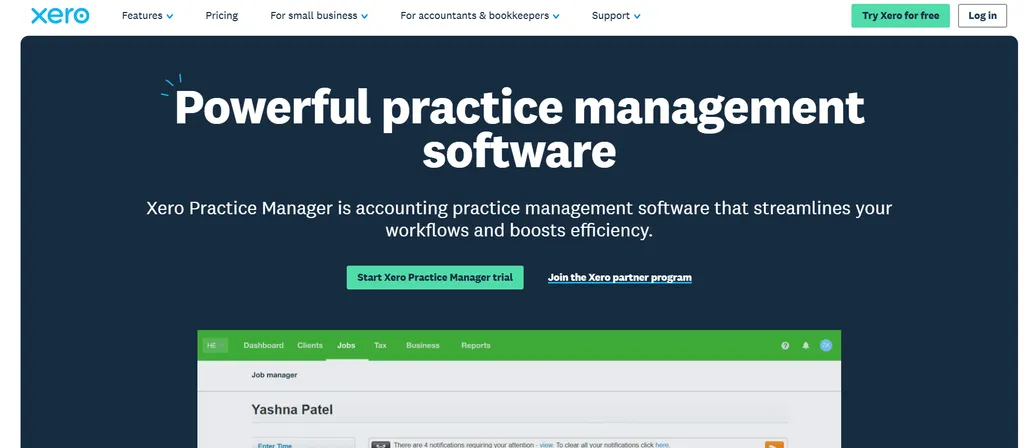
Xero Practice Manager (XPM) is accounting practice management software that “streamlines your workflows and boosts efficiency”, built by Xero Limited for accountants and bookkeepers.
Originally built on WorkflowMax technology (acquired by Xero in 2012), XPM serves as the operational backbone for firms that have standardized on Xero.
Its key features include:
- Job management with configurable templates, statuses, categories, and milestone tracking
- Time tracking and invoicing with automatic rate and markup calculations and WIP (Work-in-Progress) monitoring
- Xero integration with bidirectional invoice sync, shared client records across Xero HQ, and free Xero Workpapers
- Reporting and analytics including productivity reports, WIP aging, KPI dashboards, and a custom Report Builder
- Configurable branded documents for quotes, invoices, engagement letters, and tax letters
- 30+ third-party app integrations via the Xero App Store covering document management, proposals, CRM, and more
When a firm creates a job in XPM, everything connects to the Xero ecosystem: sales invoices push automatically to Xero, and when reconciled, the job is marked paid in XPM. For firms at silver partner status or above, XPM is free, making it a compelling option for practices committed to Xero.
However, XPM’s strengths come with well-documented limitations. Users frequently describe the interface as “clunky” and “dated”. It lacks a native client portal, built-in document management, and e-signatures, requiring third-party add-ons. Setup is complex enough that Xero itself recommends partner consulting for implementation. And the platform is tightly coupled to the Xero ecosystem, which limits flexibility for firms using QuickBooks or other accounting software.
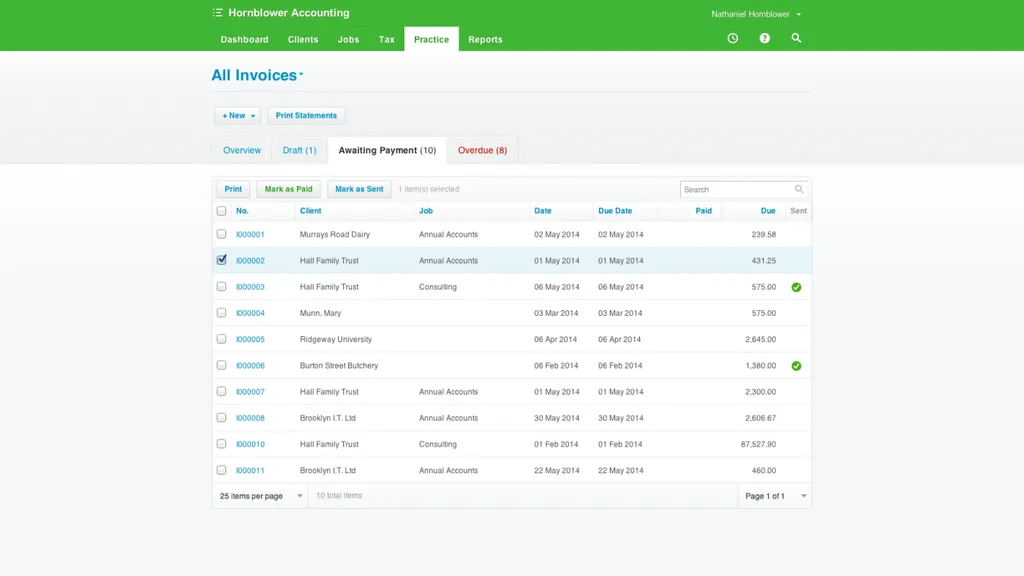
For a deeper feature-by-feature breakdown, read our full Xero Practice Manager review and our Xero Practice Manager pricing analysis.
That’s why we focused on alternatives that address XPM’s specific gaps.
Looking for practice management software that automates your billing and gets your team productive from day one? Uku combines accounting-specific workflows with automated invoicing to help firms save over 12 hours per team member weekly. Try free for 14 days.
How We Curated Our List of Xero Practice Manager Alternatives
After testing Xero Practice Manager and researching the accounting practice management market, we found that XPM’s ecosystem-dependent approach doesn’t fit every firm. While XPM works well for practices embedded in Xero’s partner program, firms often need more in key areas:
- Automating the billing cycle from time tracking through invoice generation without manual reconstruction
- Centralizing email, workflow automation, and team collaboration at scale
- Deploying practice management quickly without weeks of configuration or consulting fees
- Consolidating workflows, client portal, documents, and e-signatures into one platform
- Tracking recurring work with focused tools that don’t require learning a full practice management suite
- Accessing practice management at budget-friendly, per-user pricing
- Handling specialized tax resolution cases with direct IRS integration and accountant-specific tooling
Each tool on this list leads in one of these areas. You might use them alongside Xero Practice Manager or switch entirely; it depends on where your practice needs the most help.
1. Uku: Best Alternative for Automated Billing & Accounting-Specific Workflows
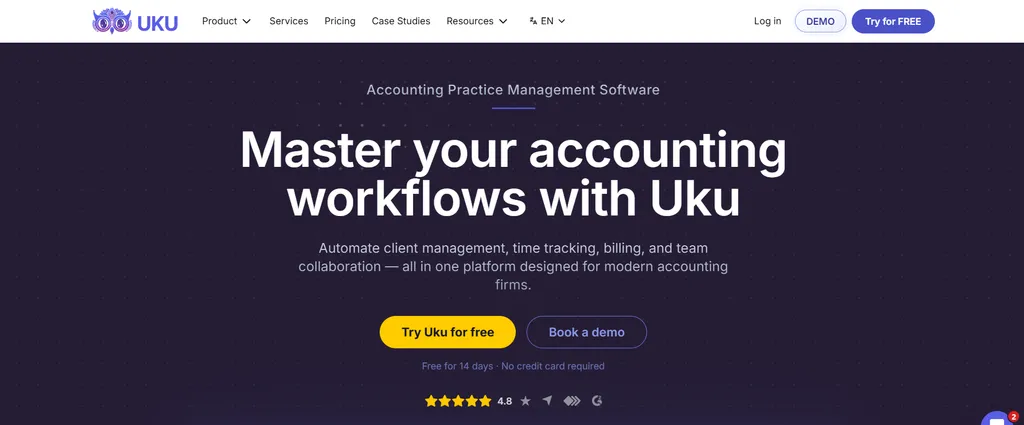
Uku is accounting practice management software built for accounting firms, CPAs, and bookkeepers. Designed from the ground up to be international, with particular strength in the UK, US, and Scandinavian markets, Uku was conceived as a direct response to the clunky practice management tools already on the market. Serving 1,000+ clients globally, the platform helps firms save over 12 hours per team member weekly and raise profit ~20% through workflow management and automated billing. Its key features include:
- Automated billing engine: Converts tracked time into client-ready invoices without manual reconstruction, supporting four billing types (hourly, fixed, per-piece, and recurring) with pricing rules including cumulative tiers, minimum time requirements, and rounding rules based on entry, team, client, or month
- Accounting-specific workflow templates: A pre-built template library organized into seven categories (Accounting, Administration, Bookkeeping, Client Management, Operations, Payroll, Tax), with template propagation that pushes improvements to existing client plans
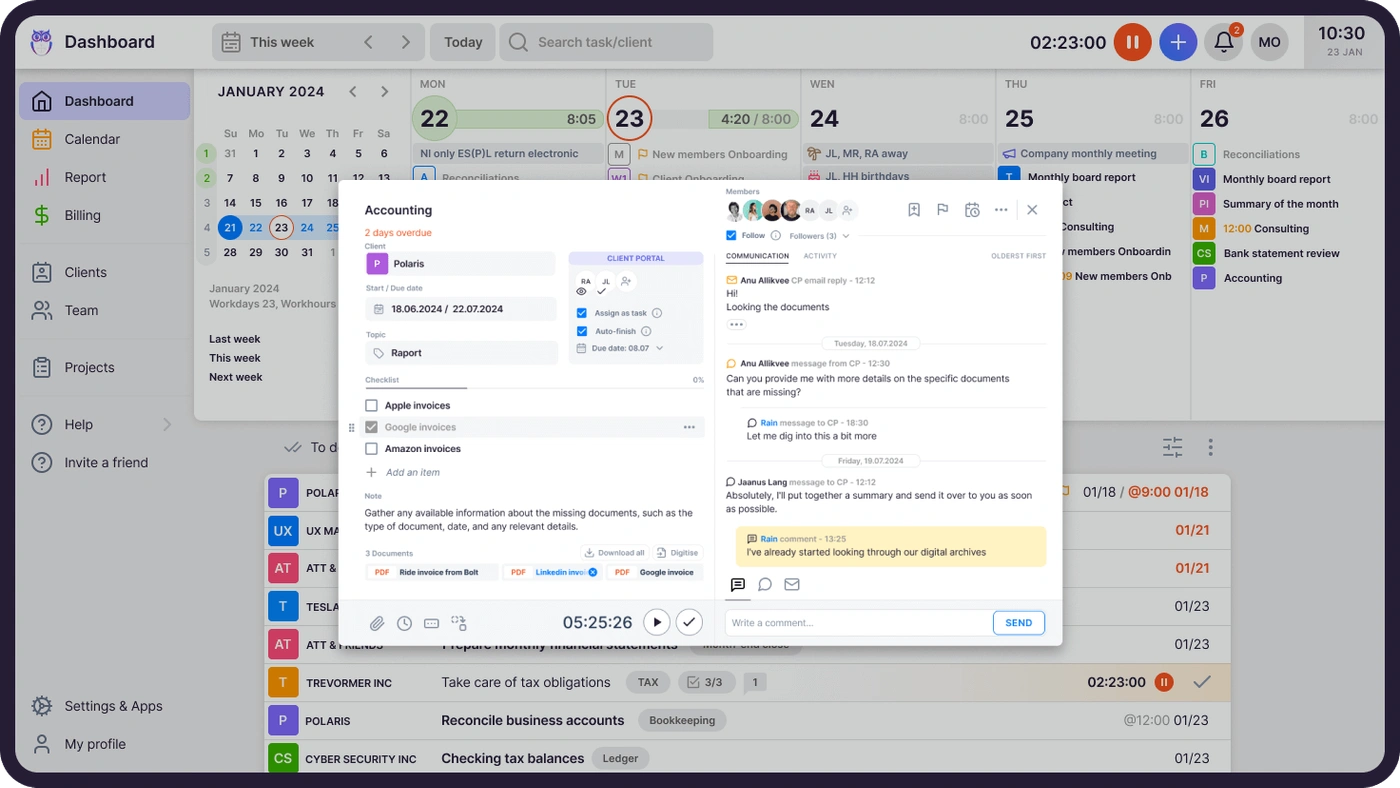
- Integrated client portal: A branded, secure portal where clients and accountants work on the same task with all communication, documents, and time tracking in one place. The portal supports customizable menus per client, onboarding forms, business insight reports, price lists, and embedded custom content, all accessible via magic link with no username or password required
- Time tracking: Stopwatch, manual entry, and bulk time allocation across multiple tasks, with mandatory time entries that prevent tasks from being marked done without logging hours. 90% of time tracking actions require one click
- One-click document digitalization: Documents submitted for digitalization go directly into accounting software with a single click, a level of document automation unique in the practice management space
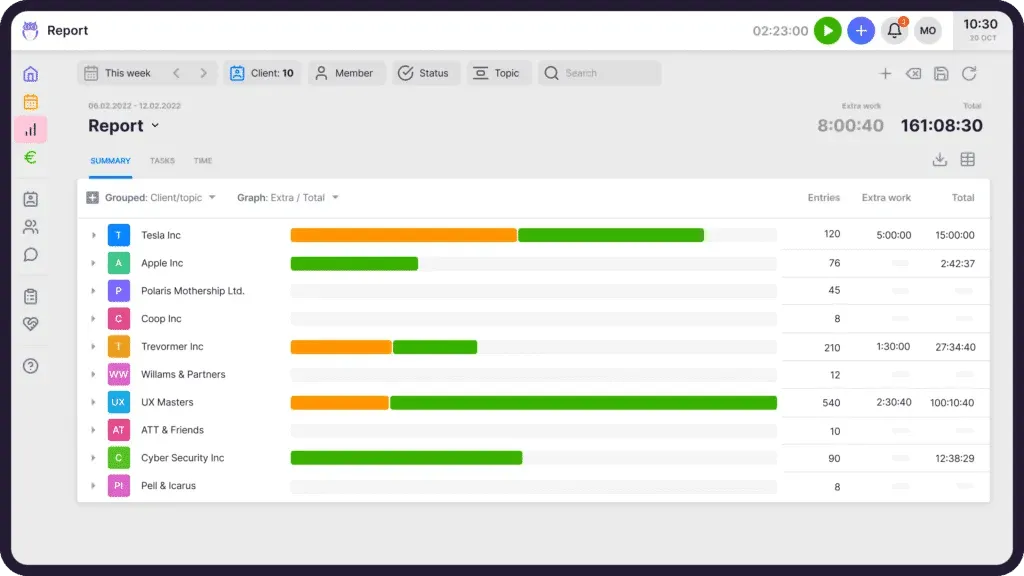
- Reporting: Reports with filters, saved templates, and three levels of depth (summary, tasks, and time), providing real-time insights into profitability, budget status, and business analytics
- 12-language support: Available in English, German, Spanish, Danish, Swedish, Finnish, Polish, Bulgarian, Ukrainian, Lithuanian, Latvian, and Estonian, making it one of the few practice management tools with multilingual depth across European markets
For firms frustrated by XPM’s dated interface, complex setup, and missing client-facing features, Uku provides a modular alternative. Firms can start working on day one with just the features they need and scale up as they grow, rather than spending weeks on upfront configuration. The result is a single source of truth for who’s doing what across the team — managers see every client, deadline, and billable hour in one place.
“Our company has benefited the most from Uku's invoicing solution, which has enabled us to increase our revenue by 34% in the last year.”
Why Choose Uku Over Xero Practice Manager for Automated Billing & Accounting Workflows
Xero Practice Manager offers solid job management and time tracking within the Xero ecosystem. Uku goes further: it eliminates the billing bottleneck, automates workflows with accounting-specific logic, and provides modern client collaboration, all without requiring Xero ecosystem lock-in. Its modular approach means firms implement the software step by step, a system your team will actually use from day one. For a direct head-to-head, see our full Xero Practice Manager vs Uku comparison.
Automated Billing: From Tracked Time to Client Invoice Without Manual Reconstruction
End-of-month invoicing is one of the biggest time drains in accounting practice management. Gathering time logs, applying client-specific rates, checking contract terms, and assembling invoices manually can take two to three days for a firm with 100+ clients. Xero Practice Manager handles time-to-invoice conversion within the Xero ecosystem, but it requires manual steps at several points: staff enter time by duration or start/stop (XPM has no native running timer), then managers review WIP balances, create progress or final invoices, and perform WIP washup to reconcile entries.
Uku collapses this workflow to about 30 minutes. Each client gets one or more contracts that define services, billing type, frequency, and pricing rules. At billing time, Uku auto-generates draft invoices by pulling all tracked time and task data for the period. Managers review, adjust if needed, approve, and send or export to connected accounting software (Xero, QuickBooks Online, E-conomic, Tripletex, FreeAgent, and more).
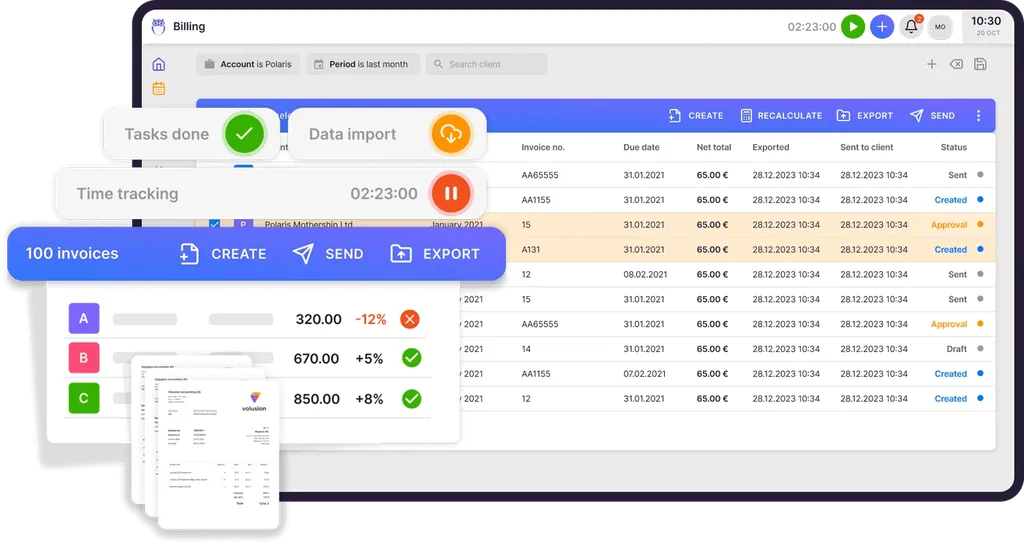
What makes this billing engine distinctive is its flexibility. Uku supports flexible pricing setups including cumulative tier pricing (where rates change as volume increases), per-piece billing, fixed fees, and mix-and-match models within a single client contract. Rounding rules (configurable per entry, team, client, or month) ensure firms properly bill for interruptions and unplanned work; a one-minute unplanned call, for instance, can be automatically billed as 15 minutes.
The “Extra work” tag separates out-of-scope hours automatically, so firms bill contracted work and additional services separately without manual sorting. Client Agreement Monitoring compares agreed service volumes against actual work with color-coded status indicators, and Client Budgeting sends real-time alerts before budgets are exceeded.
Beyond invoicing, the billing system tracks both sales prices and actual cost prices. If an employee costs €30/hour but bills at €45/hour, managers can see whether they’re profitable. When employees work eight hours but only six are billable, Uku’s reporting shows whether the issue is employee efficiency, client difficulty, or pricing structure, preventing firms from discovering losses 30 days too late.
The result? Customers report up to ~20% more profit by discovering outdated agreements where they billed for eight hours but employees performed 20 hours of work.

Workflow Automation with Accounting-Specific Logic
XPM’s workflow system relies on job templates with predefined tasks and statuses. Firms must build their own templates from scratch or engage Xero’s partner consulting team, and the resulting automation is template-based and linear: recurring jobs roll over, but conditional logic and automated client communication are limited.
Uku’s workflow automation operates in two connected layers. The first is recurring task generation: firms define task templates specifying recurrence patterns (daily, weekly, monthly, quarterly, yearly, or working-days-based), assignees, checklists, due dates, and estimated time. These templates generate tasks automatically on the assigned team member’s dashboard at the correct time, with no manual scheduling needed. Tasks can also auto-generate from client custom fields, adding flexibility beyond standard recurrence.
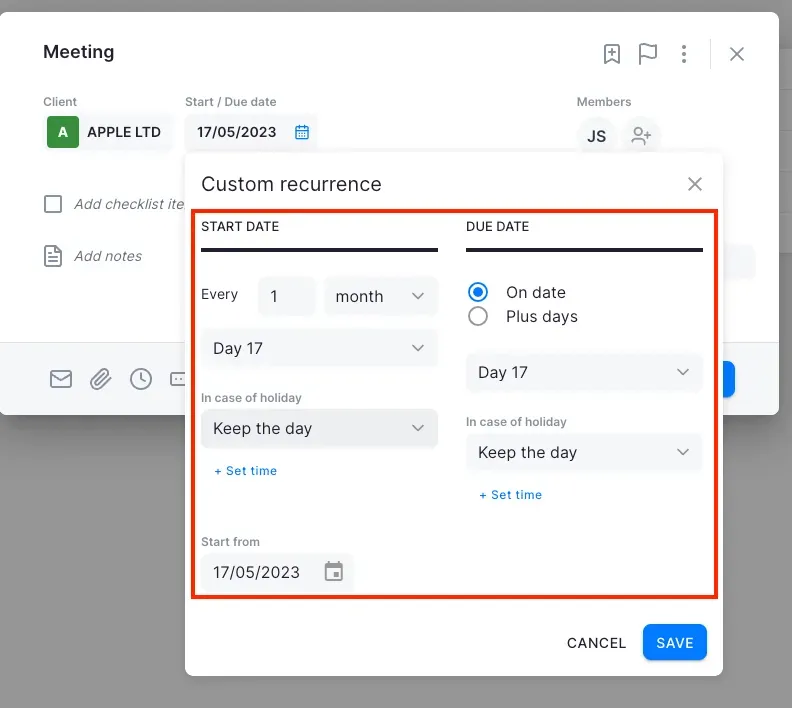
The second layer is email automation: email templates attached to recurring tasks send client-facing communications automatically when a task reaches a defined stage, with color-coded indicators showing send status on the task row.
What sets Uku apart is the pre-built, accountant-developed template library covering Accounting, Administration, Bookkeeping, Client Management, Operations, Payroll, and Tax.
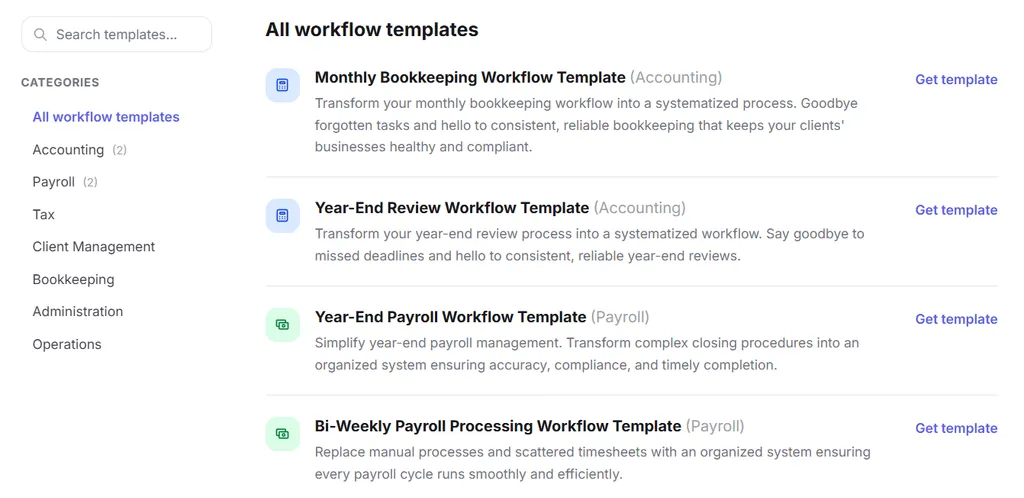
These aren’t generic project management templates; accountants built them to mirror how firms actually operate. When a firm improves a template, Uku’s template propagation feature pushes those changes to existing client plans with firm control over which clients, which fields, and when changes take effect. XPM has no comparable mechanism for rolling out process improvements across an existing client base.
Uku’s modular approach means firms don’t need to adopt the full template library at once. They can start with just CRM and tasks, then add workflow automation, billing, and client portal as the team gets comfortable. This eliminates the risk aversion many accountants feel toward lengthy software implementations.
Client Portal: The Portal You Don’t Have to Explain to Clients
XPM has no native client portal. Firms must buy third-party tools like SuiteFiles or rely on email exchanges for document collection and client communication. This fragments workflows and adds subscription costs.
Uku includes a branded, secure client portal at no extra cost. Unlike traditional portals where tickets must be connected to work items separately, Uku’s portal mirrors the same task on both sides. Clients and accountants work on the same item with all communication, actions, documents, logs, and time tracking in one place. When clients make requests through the portal, notifications appear on the accountant’s dashboard, and they can start tracking time or responding within that same task.
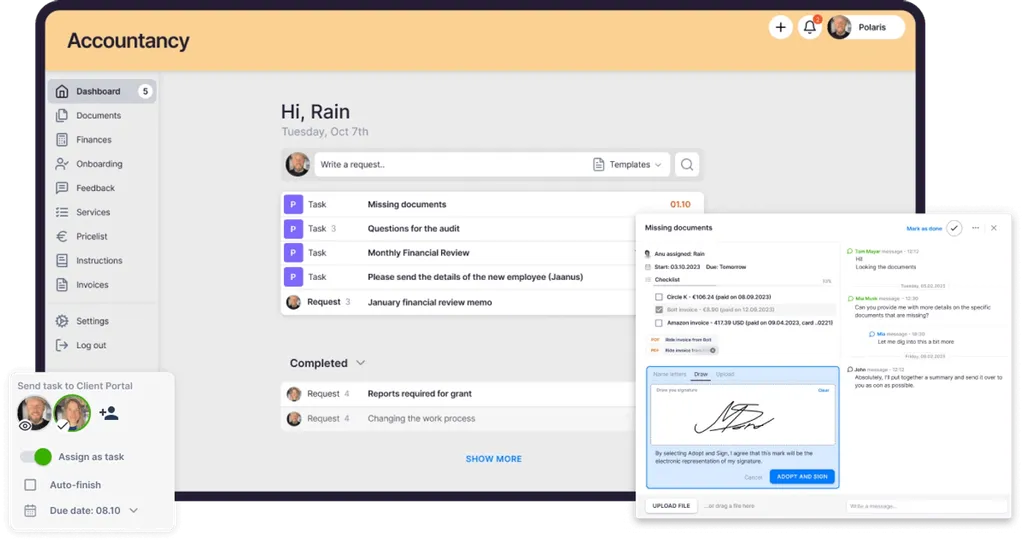
The portal uses magic link access: clients receive a time-limited email link with no username or password required, working on any device. Firms customize the portal with their company branding, custom domain, welcome video, and language selection. They can create unique menus for each client, run onboarding forms, share business insight reports, display price lists, and embed custom content.
Through the portal, accountants assign tasks to clients with due dates, instructions, and file attachments. Clients receive email notifications with a new magic link leading directly to the task. Both parties add comments within the task card. The portal sends automatic deadline and document reminders without manual intervention. Document uploads sync to connected cloud storage (Google Drive, OneDrive, SharePoint, or Dropbox).
The frictionless access model eliminates the most common reason client portals go unused: clients forgetting passwords or refusing to create accounts. As Uku puts it, this is “the client portal you don’t have to explain to clients.”

Multilingual Support for European and International Firms
XPM operates primarily in English, with its deepest market penetration in Australia, New Zealand, and the United Kingdom. For accounting firms in continental Europe and Scandinavia, the lack of native-language UI can block team-wide adoption.
Uku is available in 12 languages (English, German, Spanish, Danish, Swedish, Finnish, Polish, Bulgarian, Ukrainian, Lithuanian, Latvian, and Estonian), with email templates that automatically select the correct language based on each client card’s language setting. This multilingual depth is rare among accounting practice management tools and was a deciding factor for firms like Sandgrav Solutions, which chose Uku partly because it was one of the few tools available in Danish.
Uku’s multi-market presence across the UK, USA, and Scandinavia is backed by an in-house development team that builds country-specific features (like local e-invoice formats) that larger competitors won’t build for smaller markets. For international firms operating across multiple countries, this means the entire team, from headquarters to branch offices across 13 countries, works in their native language without workarounds.

Uku Pricing
Uku uses a per-seat subscription model with monthly and annual billing options, available in €, $, and £. VAT is added on top of all listed prices.
- Solo plan: $19/member/month (annual) or $25/member/month (monthly). Includes 1 member, up to 20 active clients, Billing, Client Portal, Document Management, Custom Fields, AML, E-signatures, and all integrations.
- Team plan: From $38/member/month (annual) or $49/member/month (monthly). Adds workflow automations, team collaboration, email management, billing, client portal, unlimited clients, custom fields, integrations, and live chat support.
- Elite plan (Most Popular): From $48/member/month (annual) or $62/member/month (monthly). Adds Google Drive, Dropbox, and SharePoint integrations; client portal custom menu; workforce management; audit log; Client Budgeting; Document Management; E-signatures; open API; Zapier (5,000+ integrations); and BI Analytics.
- Enterprise plan: $88/member/month (annual) or $99/member/month (monthly). Includes custom integrations, assisted client import, tailor-made workshop, early access to features, pay-by-invoice, and a dedicated account manager.

All new accounts receive a 14-day free trial with full Elite plan access, no credit card required, plus 90 minutes of free onboarding assistance. Assisted import is available across all plans.
Optional onboarding packages: Small ($700 for teams up to 4), Medium ($2,000 for teams up to 15), and Big (custom quote for larger teams). These include client import, company settings setup, template creation, and team training sessions.
See full plan details on the Uku pricing page.
Who Should Use Uku?
Choose Uku if:
- You want to cut admin time with automated billing. Uku’s billing engine converts tracked time into client-ready invoices in about 30 minutes, with flexible pricing rules and one-click time tracking that eliminates the end-of-month billing crunch.
- You value fast deployment with modular scaling. Unlike platforms requiring heavy upfront configuration, Uku lets you start working on day one with just the modules you need (CRM and tasks first, then billing, portal, and automation as your team gets comfortable). Firms transitioning from Excel can import their existing file and have automated plans ready to go.
- You need multilingual and multi-currency support for international operations. With 12 languages, multi-currency capabilities (€, $, £), and integrations with European accounting platforms like E-conomic, Tripletex, and Fortnox, Uku serves non-English-speaking markets at the interface level.
- You prefer flexible monthly pricing rather than annual commitments. Uku offers both monthly and annual billing, letting firms test the system starting at $25/month rather than committing to large upfront annual payments.
Want to see the billing automation live? Book a demo and we’ll walk you through it with your own workflows in mind.
Ready to eliminate the billing bottleneck? Try free for 14 days and see how automated billing and accounting-specific workflows can save your team over 12 hours per week.
2. Karbon: Best Alternative for Workflow Automation & Email Integration at Scale
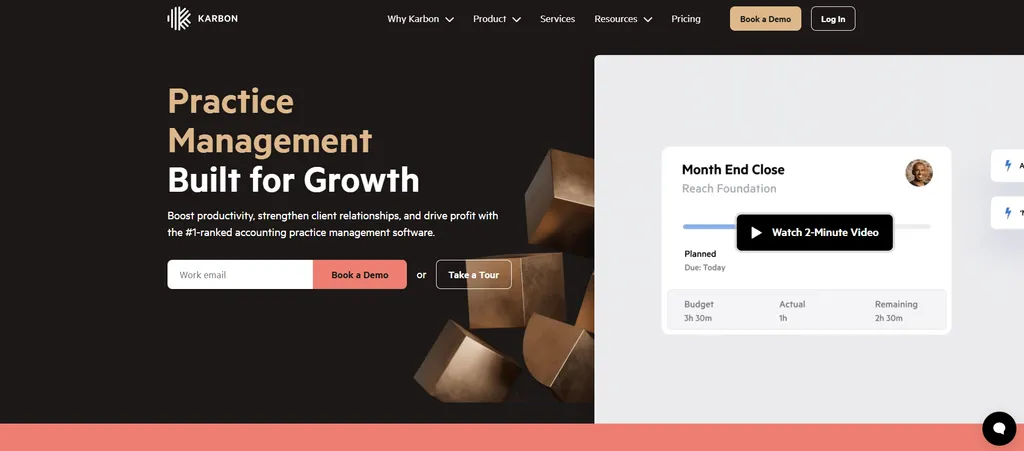
Karbon is an accounting practice management platform for growth-oriented firms, holding the G2 Leader position for 17 consecutive quarters. Founded by three former Xero executives and backed by $101.5M in funding, Karbon serves 33,000 accounting professionals across 34 countries. Its key features include:
- Email triage and centralized inbox that syncs with Gmail and Microsoft 365, creating a single inbox where teams manage, assign, and respond to client emails without switching applications
- Workflow automation with Automators using “if this, then that” rules with conditional workflow support and auto-reminders that chase clients automatically
- Karbon AI built on Azure OpenAI Service for drafting emails, summarizing threads, and suggesting team assignments, with AI Agents launching in early 2026
- Built-in client portal (Karbon for Clients) with web and mobile app access, e-signatures, document uploads, and invoice payments included in Team and Business plans
Why Choose Karbon Over Xero Practice Manager for Workflow Automation at Scale?
Karbon stands out in the following areas:
- Email-Based Workflow Architecture. XPM has no native email integration. Client emails live in individual staff inboxes, invisible to the rest of the team. Karbon syncs Gmail and Microsoft 365 into a consolidated Triage inbox where every email between any team member and client becomes part of a shared audit trail. Karbon customers report saving 3 hours per week per employee on email management alone. Shared Triage for team inboxes (like info@ addresses) costs $10 USD/month per connected inbox.
- Conditional Workflow Automation at Scale. XPM’s automation is template-based and linear. Karbon’s Automators support branching logic where different task paths trigger depending on upstream outcomes. Auto-reminders chase clients until information is received, and attachments file against the corresponding job without staff intervention. The public template library contains hundreds of region-specific and ecosystem-specific workflows, compared to XPM’s blank-slate approach.
- Enterprise Scalability with AI. Karbon’s Enterprise tier includes unlimited workflow statuses, templates, and teams, plus advanced permissions, dedicated customer success, and embedded BI dashboards covering workflow performance, client communication, and revenue management.
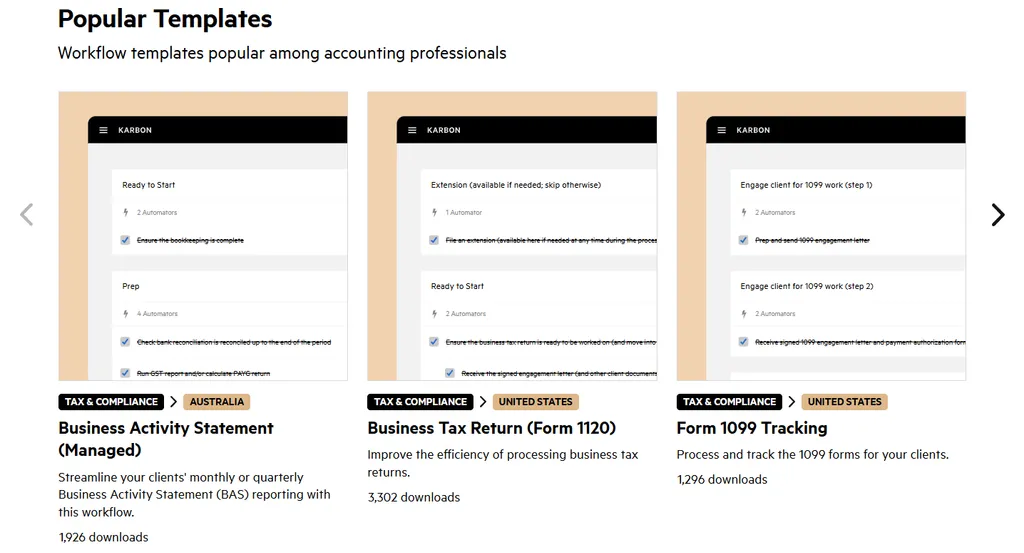
Worth noting: Karbon’s billing setup takes more time than billing-focused platforms. Invoice preparation can take days rather than the 30 minutes achievable with automated billing tools like Uku. Karbon’s Power BI integration also requires separate Power BI licenses starting at $14/user/month, adding per-user costs for advanced reporting beyond the base subscription.
🥇 NOTE: We also evaluated Canopy and TaxDome for this category. While Canopy excels at client onboarding automation and TaxDome offers broad functionality at aggressive pricing, Karbon’s email-based architecture, conditional workflow depth, and AI capabilities make it the strongest fit for large accounting firms (50+ staff) running practice operations at scale.
Karbon Pricing
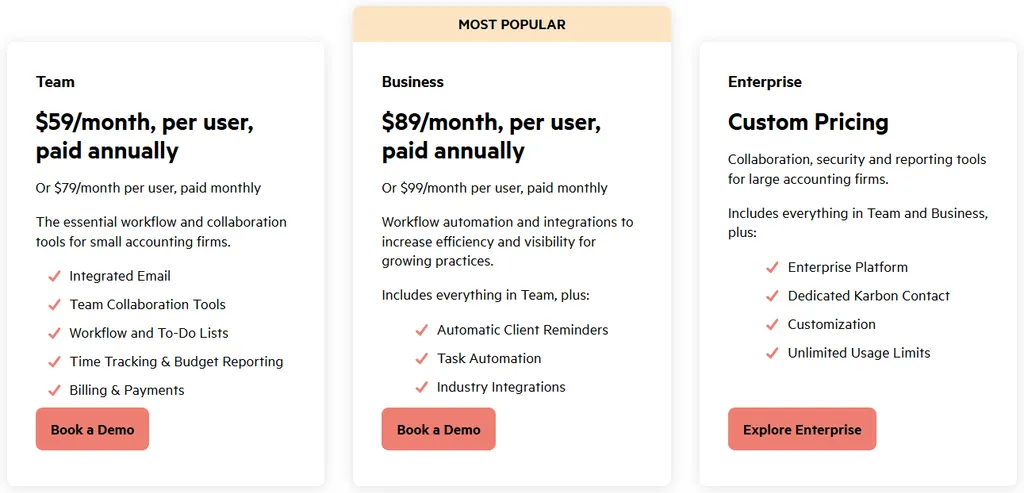
Karbon uses a per-seat subscription model with monthly and annual billing:
- Team plan: $59/user/month (annual) or $79/user/month (monthly). Includes integrated email (Triage), collaboration tools, workflow and to-do lists, time tracking, and billing.
- Business plan (Most Popular): $89/user/month (annual) or $99/user/month (monthly). Adds automatic client reminders, task automation (Automators), industry integrations, and API access.
- Enterprise plan: Custom pricing. Includes unlimited usage limits, advanced permissions, dedicated customer success, guided data migration, and 24/7 priority support.
All plans include the client portal, document management, and SOC 2 Type 2 security.
Who Should Use Karbon?
Choose Karbon if:
- Your firm has 50+ staff and needs workflow automation with advanced permission controls and dedicated customer success support
- Email fragmentation is creating audit trail gaps; you need every client communication visible to your team in one inbox
- You want AI that drafts emails, flags missed time entries, and suggests team assignments based on historical patterns
3. Financial Cents: Best Alternative for Small US Firms Seeking Simplicity & Fast Adoption
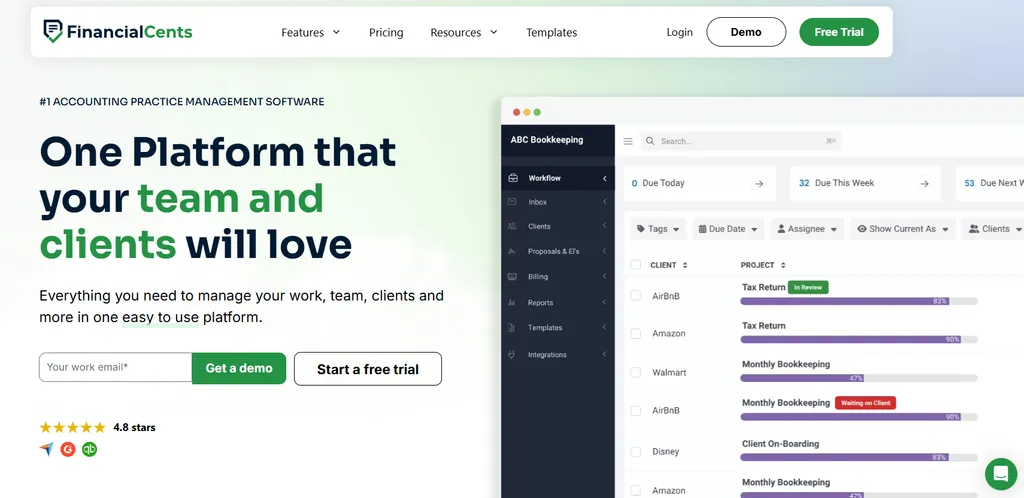
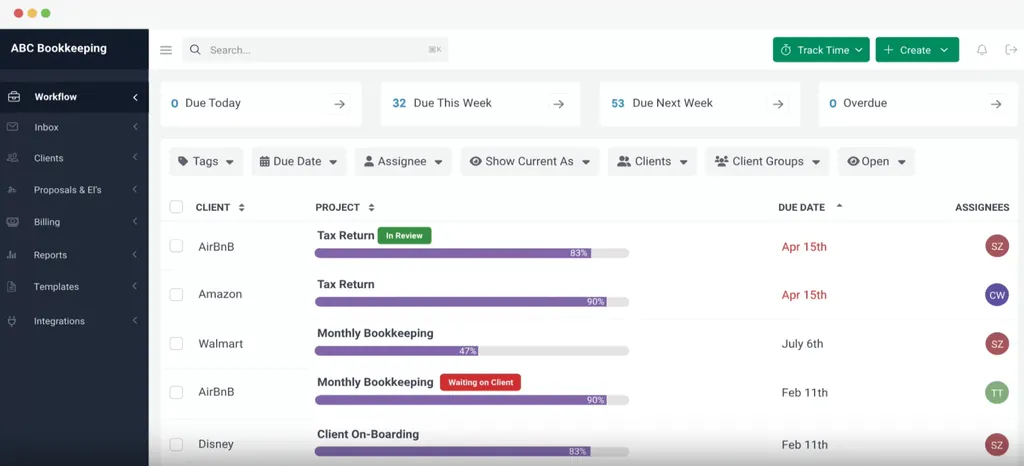
Financial Cents is a cloud-based practice management platform for small accounting and bookkeeping firms in the US and Canada that prioritizes ease of use. Serving over 10,000 accountants and holding a 4.8-star rating on both Capterra and G2, the platform bundles workflow management, client portal, time tracking, billing, proposals, e-signatures, and CRM into a single subscription. Its key features include:
- 300+ pre-built accounting workflow templates covering monthly bookkeeping, tax returns, payroll processing, and client onboarding, all built by practicing accountants
- Passwordless client portal where clients upload documents and complete tasks via magic link, with automated reminders that reportedly deliver responses 6x faster than email
- Native QuickBooks Online integration for US-based firms that use QuickBooks rather than Xero (no native Xero integration available)
- Built-in e-signatures using Adobe’s certification infrastructure, included at no additional cost
Why Choose Financial Cents Over Xero Practice Manager for Simple, Fast Practice Management?
Financial Cents stands out in the following areas:
- Fast Onboarding. XPM requires consultant-led implementation, and Xero itself recommends its partner consulting team for setup. Financial Cents ships with 300+ ready-to-use workflow templates sized to common accounting deliverables. Firms can begin tracking real client work on day one with a 14-day free trial, no credit card required. Guided setup walks new users through project creation, portal setup, and invoice generation.
- Modern Interface That Teams Adopt. XPM’s interface is consistently described as “clunky” and “dated.” Financial Cents launched in 2020 with a focus on user experience, earning a 4.9/5.0 ease-of-use rating and Capterra’s “Best Ease of Use” badge for 2025. Dashboard actions like starting a timer, uploading a document, or sending a client request take one or two clicks rather than multi-step processes.
- Native Client Portal and E-Signatures Without Add-On Costs. XPM lacks a native client portal and gates e-signatures behind Xero Tax. Financial Cents includes a passwordless client portal and Adobe-certified e-signatures on every subscription tier. Proposals, invoices, payments, folder sharing, and secure messaging all live in one client-facing interface.
Worth noting: Financial Cents focuses on the US and Canadian market only, with no multilingual support and billing only in USD, making it less suitable for international firms. The platform also lacks native Xero integration. Financial Cents requires a minimum 1-year purchase commitment, which limits flexibility for firms that prefer month-to-month testing before committing.
🥇 NOTE: We also evaluated Jetpack Workflow and Pixie for this category. Jetpack Workflow excels at recurring task automation but lacks native billing, client portal, and proposals. Pixie offers strong workflow capabilities but its pricing ($199/month for 251-500 clients) is prohibitive for small practices. Financial Cents offers the most complete package for small US teams of 2-10 people.
Financial Cents Pricing
Financial Cents uses a per-seat subscription model with four tiers (minimum 1-year commitment):
- Solo plan: $19/month (single user). Full workflow management, client portal, time tracking, billing, QBO integration, proposals, and e-signatures.
- Team plan: $49/user/month (annual) or $69/user/month (monthly). Adds integrated email, unlimited custom fields, client groups, and team collaboration.
- Scale plan (Most Popular): $69/user/month (annual). Adds task dependencies, auto-follow-ups, cloud storage integrations, Zapier, API access, branded portal, and profitability reports.
- Enterprise plan: Custom pricing. Adds IP fencing, mandatory 2FA, custom permissions, webhooks, and priority support.
All tiers include a 14-day free trial with no credit card required, unlimited clients, and unlimited document storage.

Who Should Use Financial Cents?
Choose Financial Cents if:
- Your firm serves US clients and uses QuickBooks Online, making Xero ecosystem lock-in irrelevant
- You need a system your team will actually use without extensive training, and past implementations have failed due to adoption resistance
- You want an all-in-one platform at transparent per-user pricing with client portal, e-signatures, and proposals included, not sold as add-ons
4. TaxDome: Best Alternative for Consolidating Every Tool into a Single Platform

TaxDome is an all-in-one practice management platform serving 10,000+ firms with 3 million clients across 25+ countries, consolidating every operational layer into a single vendor solution.
Its key features include:
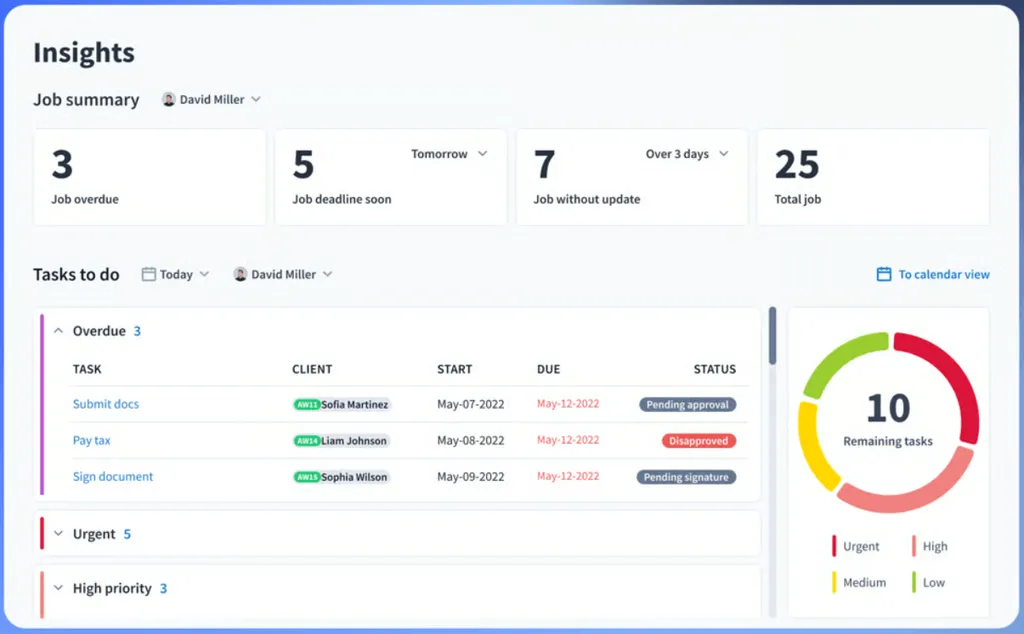
- Pipeline-based workflow automation with stage-based triggers that handle emails, tasks, document requests, proposals, invoices, and payment-gated document releases automatically
- White-labeled client portal with a top-100 App Store ranking mobile app, and custom-branded mobile apps for Business plan firms with 25+ seats
- Unlimited document storage and e-signatures on every plan at no per-document or per-signature fees, compliant with E-Sign Act and UETA, recognized in the US, Canada, UK, and EU
- AI-powered reporting with plain-language query capabilities and real-time team analytics
Why Choose TaxDome Over Xero Practice Manager for Single-Platform Consolidation?
TaxDome stands out in the following areas:
- Native Client Portal and Mobile App. XPM has no built-in client portal or client-facing mobile app. TaxDome includes a white-labeled portal on every plan. The client app reached a top-100 App Store ranking. Firms on the Business plan (25+ seats) can publish a custom-branded mobile app under their own name. The portal also supports two-way SMS with a 98% read rate, secure messaging, and push notifications.
- Unlimited Document Storage and E-Signatures Replace Multiple Subscriptions. XPM requires separate tools for document management and e-signatures. TaxDome bundles unlimited cloud storage and unlimited e-signatures into every tier. TaxDome’s savings calculator estimates firms save $12,000+ annually by consolidating separate portal, e-signature, project management, and billing subscriptions.
- Pipeline-Based Workflow Automation. XPM’s job templates are linear. TaxDome’s visual pipelines trigger both internal tasks and client-facing actions automatically. A tax preparation pipeline can send organizers, trigger reminders, assign preparers, request approvals, lock documents to unpaid invoices, and release them upon payment, all in sequence without manual intervention.
Worth noting: TaxDome’s breadth requires substantial upfront configuration and training. Firms should plan for 6-8 weeks of implementation to configure pipelines, import clients, and train staff. All plans are billed annually with no monthly option, requiring a significant upfront commitment. For firms that prefer implementing software step by step or testing month-to-month, this all-or-nothing approach can be a barrier. This is one of the most common reasons firms switch from TaxDome to more modular platforms that allow immediate productivity with selective feature adoption.
🥇 NOTE: We also evaluated Canopy for this category. While Canopy offers strong e-signature functionality and a well-regarded client portal, TaxDome bundles more capabilities (CRM, portal, e-signatures, document management, workflow, billing, payments, AI reporting, and client mobile app) into a single annual subscription with no per-client fees, making it the most complete single-vendor alternative.
TaxDome Pricing
TaxDome uses a per-seat, annual subscription model (all plans billed annually, no monthly option):
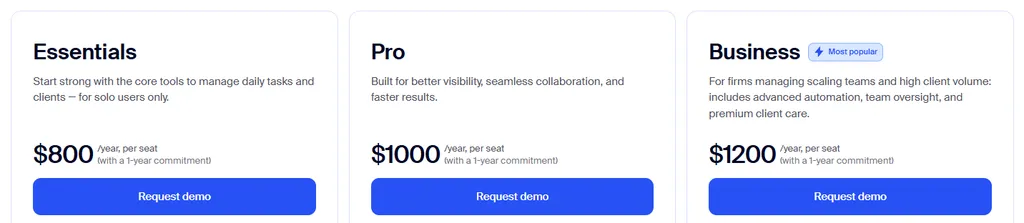
- Essentials plan (Solo only): Starting at $800/seat/year ($750 with 2-year, $700 with 3-year commitment). Includes unlimited CRM, client portal, document storage, e-signatures, workflows, email/SMS/chat, proposals, and payments.
- Pro plan: Starting at $1,000/seat/year ($950 with 2-year, $900 with 3-year). Adds bookkeeper integrations, IRS transcript downloads, AI-powered reporting, team chat, account roles, and custom firm URL.
- Business plan: Starting at $1,200/seat/year ($1,150 with 2-year, $1,100 with 3-year). Adds Client Care support, business reviews, unlimited bookkeeping connections, client import assistance, and seasonal seat options.
Installment plans are available for invoices exceeding $9,000. All subscriptions auto-renew annually.
Who Should Use TaxDome?
Choose TaxDome if:
- Your firm currently uses three or more separate tools for workflow, documents, client communication, e-signatures, and billing, and you want everything under one roof
- You want a white-labeled client experience with branded portal, custom mobile app, and unlimited document storage at no per-document fees
- You’re willing to invest 6-8 weeks in initial configuration for long-term automation that handles the full client lifecycle
5. Jetpack Workflow: Best Alternative for Focused Workflow Tracking Without Complexity
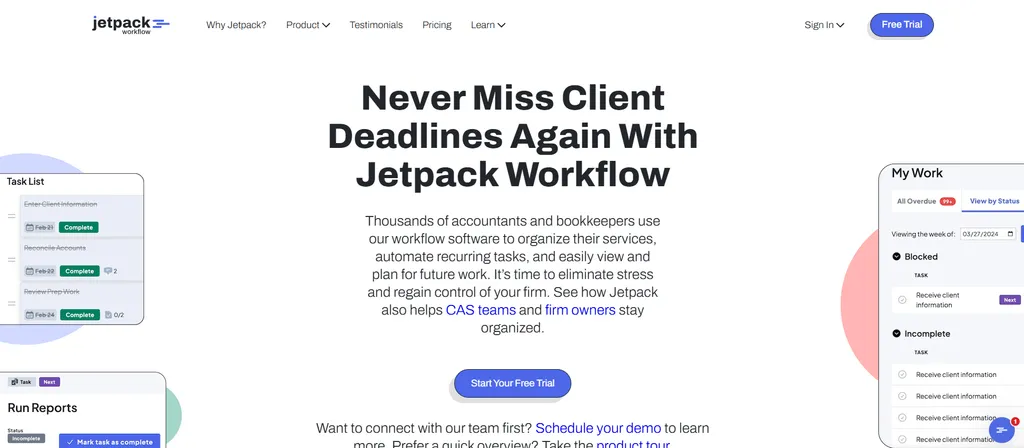
Jetpack Workflow is a workflow and project management tool built for accountants, not a full practice management platform. The company positions itself as doing one thing well. For firms overwhelmed by XPM’s configuration complexity who really only need to organize recurring client work and prevent missed deadlines, Jetpack Workflow offers a simpler alternative. Its key features include:
- 70+ pre-built accounting workflow templates covering tax preparation, bookkeeping, payroll, and audit
- Automatic job recurrence with daily, weekly, monthly, yearly, and custom scheduling
- Real-time capacity planning via the Plan feature showing budgeted time per week per team member (Premium tier)
- Two-tier pricing: Starter from $40/user/month annual, Premium (adds time tracking and capacity reporting) from $50/user/month annual
Why Choose Jetpack Workflow Over Xero Practice Manager for Focused Workflow Management?
Jetpack Workflow stands out in the following areas:
- Pre-Built Templates Eliminate Weeks of Setup. XPM requires understanding job states, categories, task workflows, and milestone structures before productive work can begin. Jetpack Workflow ships with 70+ accounting-specific templates built from interviews with hundreds of accounting firms. A firm can sign up, apply templates to clients in bulk, set recurrence, and have automated work queues ready the same day.
- Task Automation Without Re-Engineering. XPM’s recurring job setup requires configuring its entire operational taxonomy. Jetpack Workflow’s recurrence is straightforward: click a project, select “Create a series,” pick a frequency, and the system generates new instances with tasks, deadlines, and assignees pre-populated. Changes to a series affect only entries that haven’t started, protecting historical records.
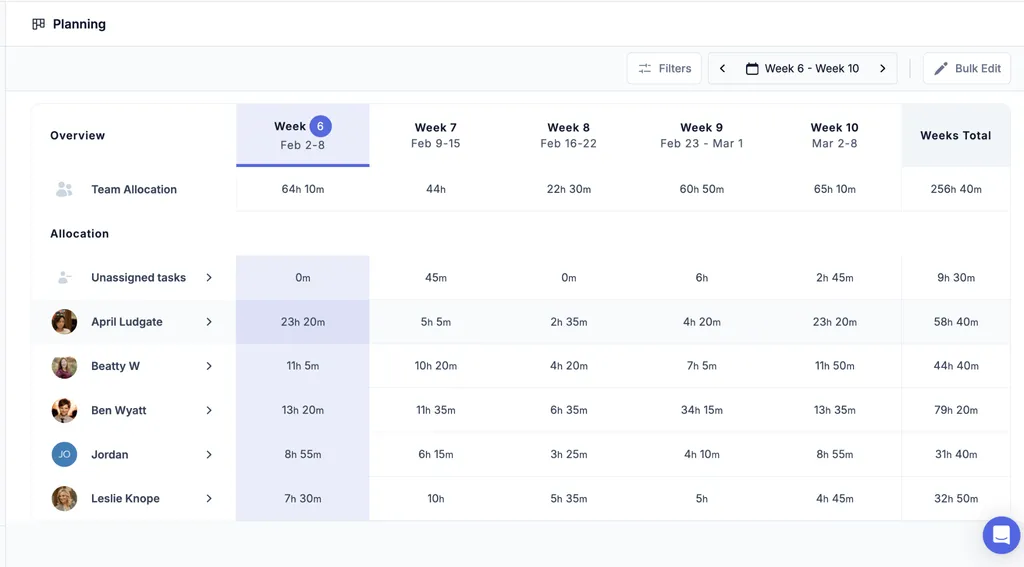
- Built-In Capacity Planning. XPM’s capacity visibility typically requires spreadsheet exports or third-party apps like Link or PlanRight. Jetpack Workflow includes a Planning page with a five-week rolling calendar showing team-wide and individual workload, with direct reassignment capability.
🥇 NOTE: We also evaluated Pixie and Practice Ignition. While Pixie offers proposal-to-payment automation and Practice Ignition specializes in engagement letters, Jetpack Workflow delivers the most focused, template-driven workflow management for firms that only need to organize and track their work without full practice management overhead.
Jetpack Workflow Pricing
Jetpack Workflow offers a single plan with all features included:
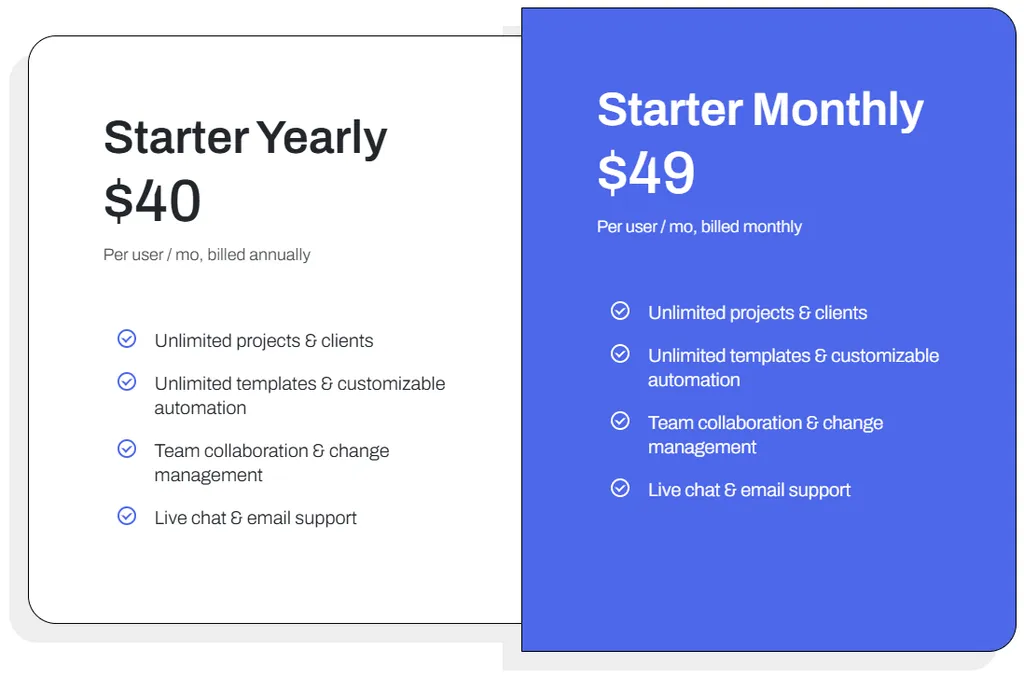
- Starter plan: $40/user/month (annual) or $49/user/month (monthly). Includes unlimited projects and clients, unlimited templates and automation, team collaboration, and live chat and email support.
- 14-day free trial with no credit card required.
Optional setup packages: Kickstarter ($299), Fast Track ($749), and Done for You ($1,499). All paid accounts include 4 complimentary onboarding sessions. Annual plans come with a 30-day money-back guarantee.
Who Should Use Jetpack Workflow?
Choose Jetpack Workflow if:
- You need workflow and task management, not a full practice management suite, and already have separate solutions for billing and client communication
- You’ve been burned by complex software implementations and want pre-built templates, straightforward automation, and quick onboarding
- You want every team member on the same page without constant check-ins, using capacity planning to redistribute work before bottlenecks form
6. Cone: Best Alternative for Budget-Conscious Firms Needing All-in-One Simplicity
Cone is a Y Combinator-backed practice management platform that unifies proposals, client engagement, billing, payments, and practice management in a single product starting at $5/user/month. Founded in 2022, Cone delivers what Xero Practice Manager requires through its entire partner ecosystem, at a fraction of the cost, with native integration for both Xero and QuickBooks Online. Its key features include:
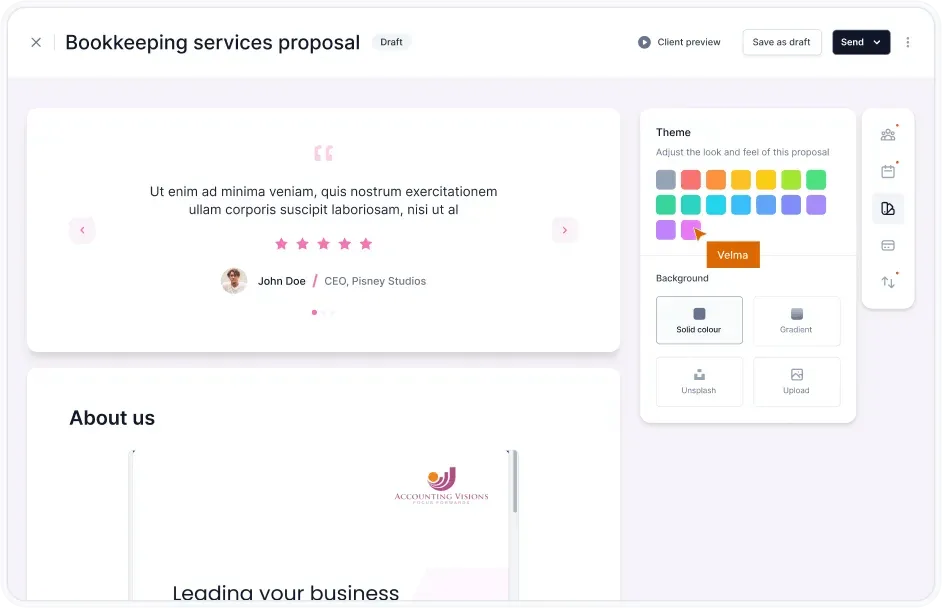
- Integrated proposal-to-payment workflow with a drag-and-drop proposal editor, e-signatures, web-based microsites, and automatic project creation upon acceptance
- Automated billing and payments with recurring invoices, auto-charge via Stripe and GoCardless, and bidirectional sync with Xero or QuickBooks
- Client portal with document requests, secure messaging, and task tracking
- SOC 2 Type 1 and GDPR compliance at budget-tier pricing
Why Choose Cone Over Xero Practice Manager for Budget-Conscious Practice Management?
Cone stands out in the following areas:
- Lower Cost Without Sacrificing Core Functionality. XPM charges $149/month for up to 10 users at Bronze tier, and the threshold to reach free Silver status is undisclosed. A 3-person practice pays $49.67 per user per month on XPM. On Cone’s Essentials plan, the same firm pays $33 total ($11/user/month annual). Add in XPM’s required third-party tools for proposals, e-signatures, and document management, and Cone’s cost advantage widens further.
- Integrated Proposal-to-Payment Lifecycle. XPM lacks native proposal creation, forcing firms to use separate tools like Ignition ($89+/month) or manual Word documents. Cone centers on the proposal-to-payment lifecycle: create branded proposals, collect e-signatures, capture payment details at acceptance, auto-generate projects, and run recurring invoicing and automatic payment collection, all in one system. Proposals can go out as web-based microsites or traditional PDFs.
- Intuitive Interface and Fast Setup. Where XPM’s configurability requires consulting-level implementation, Cone lets firms start working immediately with sensible defaults. Users report creating and sending proposals in under 10 seconds using pre-built templates. The platform is recognized for responsive customer support and can have a small practice operational within hours.
🥇 NOTE: We also evaluated Karbon and TaxDome for this category. While Karbon excels at email-based workflow for larger practices and TaxDome offers broad functionality at higher commitment levels, Cone delivers the most accessible entry point for budget-conscious practices with its $5/user/month starting price, fast setup, and integrated proposal-to-payment workflows.
Cone Pricing
Cone uses tiered per-user pricing with discounts for annual billing:
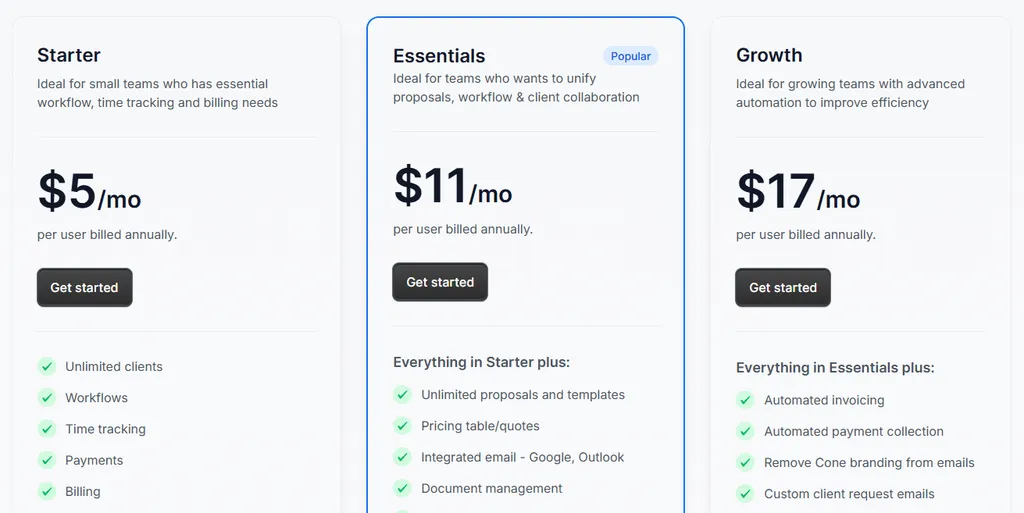
- Starter plan: $5/user/month (annual) or $8/user/month (monthly). Unlimited clients, workflows, time tracking, payments, billing, and integrations with QuickBooks, Xero, Stripe, and GoCardless. 2 GB document storage.
- Essentials plan: $11/user/month (annual) or $16/user/month (monthly). Adds unlimited proposals and templates, integrated email, document management, recurring workflows, client requests, and client portal. 20 GB document storage.
- Growth plan: $17/user/month (annual) or $24/user/month (monthly). Adds automated invoicing and payment collection, custom branding, bulk project creation, and advanced integrations including Zapier and SharePoint. 100 GB document storage.
30-day free trial for Practice products with no credit card required.
Who Should Use Cone?
Choose Cone if:
- Your practice has 3-20 staff and finds XPM’s $149/month entry cost prohibitive, or you haven’t reached Silver partner status for free access
- You need proposal creation, e-signatures, and a client portal immediately without integrating multiple separate tools
- You serve clients on both Xero and QuickBooks Online and need platform-agnostic practice management without ecosystem lock-in
7. Canopy: Best Alternative for Tax-Focused Firms Needing Specialized Resolution Tools
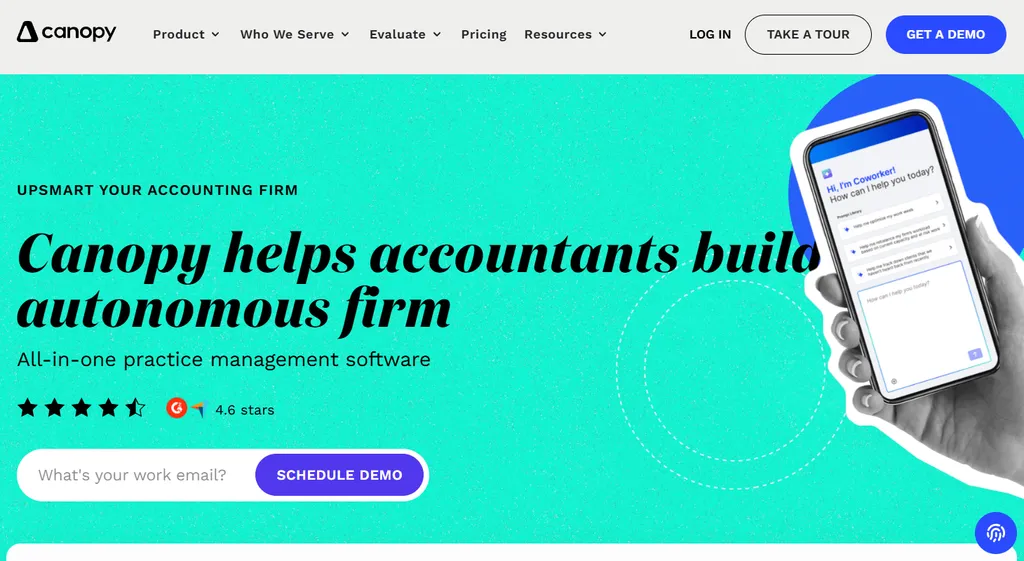
Canopy is a cloud-based practice management platform built specifically for accounting and tax firms, founded in 2014 by former Wall Street tax attorney Kurt Avarell.
Originally created to take the pain out of tax resolution work, Canopy has grown into an all-in-one platform spanning client management, document management, workflow, time and billing, and payments. Backed by $292 million in funding (including a $70 million Series C in April 2025), the company positions itself as the “firm-wide operating system” for accounting practices.
Its key features include:
- Native tax resolution suite with direct IRS integration that pulls up to 20 years of client transcripts in a single click, an annually updated IRS notices library with pre-built resolution workflows, and auto-populating federal and state tax forms
- Client-centric all-in-one platform combining CRM, a highly rated client portal with iOS and Android mobile apps, document management, workflow automation, and time and billing in one native system
- Unlimited eSignatures and document storage included with the Document Management module, with secure client-portal sharing plus secure links for non-portal third parties
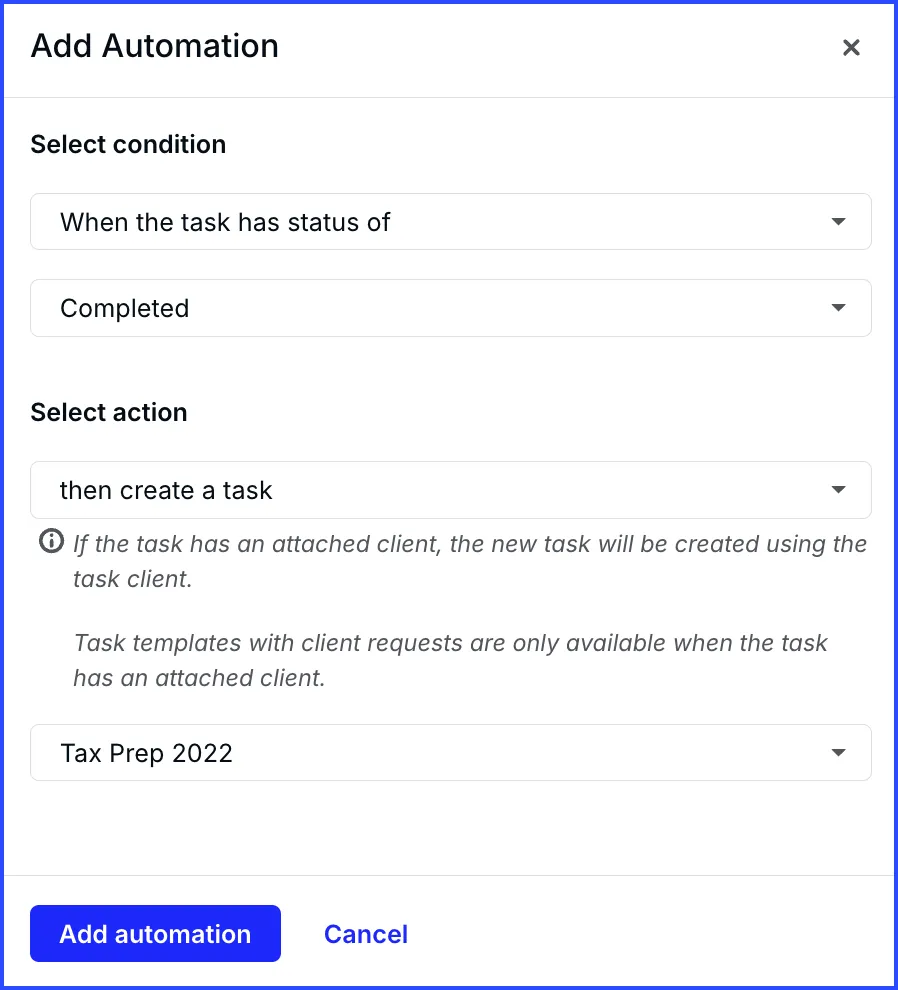
- Engagement-to-workflow automation that automatically creates projects and tasks the moment a client accepts a proposal, eliminating manual setup
Why Choose Canopy Over Xero Practice Manager for Tax-Focused Practice Management?
Canopy stands out in the following areas:
- Specialized Tax Resolution With Direct IRS Integration. XPM has no tax resolution capability and no IRS integration. Canopy was built as a tax resolution tool first, and it remains its deepest strength. Practitioners with a Power of Attorney on file can pull up to 20 years of IRS transcripts with one click, schedule automated transcript pulls to monitor for changes, and work from an expanding library of IRS notices with step-by-step resolution workflows. Client surveys auto-populate the relevant IRS forms, removing manual data entry from a notoriously tedious process.
- Client-Centric All-in-One Design. XPM lacks a native client portal, document management, and eSignatures, forcing firms onto third-party add-ons. Canopy bundles all of these into a single native platform built on a foundation of client management. Its client portal is frequently praised as intuitive even for non-tech-savvy clients, includes a well-regarded mobile app for both firms and clients, and supports unlimited eSignatures with the Document Management license rather than per-signature fees.
- Engagement-to-Workflow Automation. XPM’s job templates require firms to build and maintain their own structures, and there is no link between a signed engagement and the resulting work. With Canopy, accepting an engagement letter automatically triggers the creation of associated projects and tasks in the workflow module, so onboarding and project setup happen without manual rebuilding.
Worth noting: Canopy is heavily US-focused, with tax resolution features built around the IRS, so it is less relevant for firms outside the United States. Canopy integrates with QuickBooks Online but has no native Xero integration. Some users report occasional bugs and glitches, limited customization, and billing tools that feel less robust than dedicated billing software. The metered specialist tax add-ons can also become expensive once a firm’s caseload volume scales up. (Canopy pricing checked 13 August 2026.)
🥇 NOTE: We also evaluated TaxDome and Karbon for this category. While TaxDome consolidates the broadest feature set into one annual subscription and Karbon leads on email-based workflow at scale, Canopy’s specialized tax resolution tools, direct IRS integration, and client-centric design make it the strongest fit for firms with a significant tax or tax resolution practice.
Canopy Pricing
Canopy uses three flat per-seat tiers (20% discount for annual billing) plus consumption-based specialist add-ons. (Canopy pricing checked 13 August 2026.)
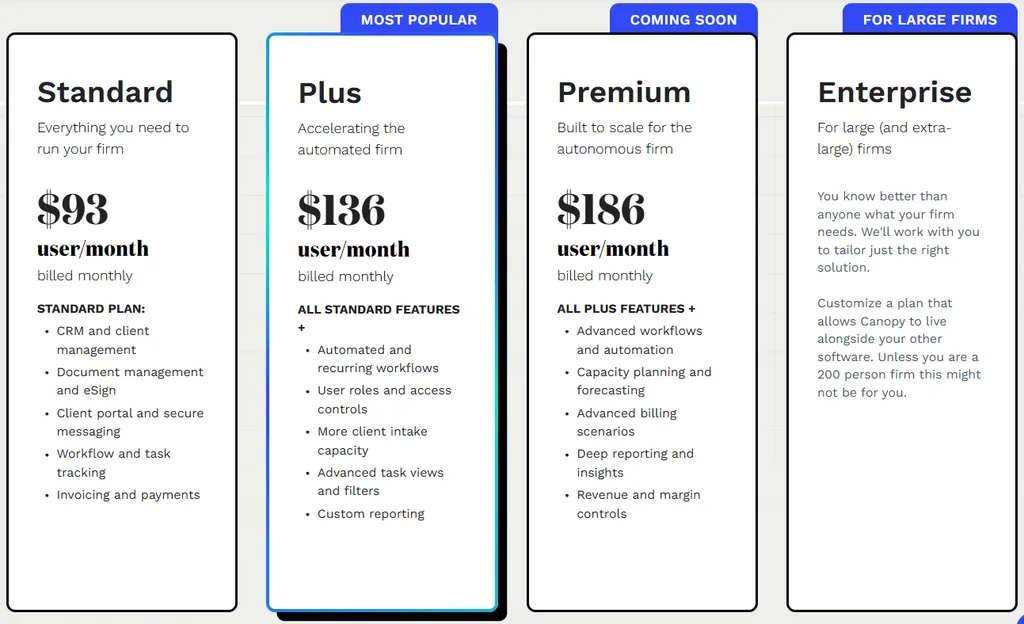
- Standard: $74/user/month (annual) or ~$93/user/month (monthly). Includes the full platform — CRM, document management, workflow, billing, client portal, and payments.
- Plus: $109/user/month (annual) or ~$136/user/month (monthly). Adds user roles and access controls, more client intake capacity, and capacity planning.
- Premium: $149/user/month (annual) or ~$186/user/month (monthly). Adds advanced workflows and automation, advanced billing scenarios, and deeper reporting.
- Enterprise: Custom pricing for large firms.
- Tax Resolution add-on: $50/user/month, consumption-based rather than tiered. Other specialist add-ons include Tax Workflow Automation (from $34/client credit) and Close Automation ($10/connected client/month, first 5 free).
Canopy no longer offers a self-serve freemium tier — evaluating the platform now starts with a sales-assisted demo/trial. Implementation specifics for larger rollouts aren’t standardized on the pricing page.
Who Should Use Canopy?
Choose Canopy if:
- You’re a US-based tax or accounting firm with a meaningful tax resolution practice and need direct IRS transcript pulls, a notices library, and auto-populating IRS forms in one place
- You want a client-centric all-in-one platform with a highly rated client portal and mobile app, unlimited eSignatures, and unlimited document storage rather than stitched-together add-ons
- You use QuickBooks Online and value engagement-to-workflow automation that turns an accepted proposal into a fully built project automatically
What About WorkflowMax Users?
Xero Practice Manager shares its DNA with WorkflowMax: Xero acquired WorkflowMax in 2012 and built XPM on its technology. When Xero retired the original WorkflowMax in 2024, the product name was sold to BlueRock, and thousands of firms faced a forced migration decision.
If you’re evaluating WorkflowMax alternatives today, the calculus is nearly identical to leaving XPM — we’ve covered that migration in depth in our dedicated guide to the best WorkflowMax alternatives for accounting firms. Both products share the same job-and-time-tracking core, the same dated interface lineage, and the same gaps: no native client portal, no built-in document management or e-signatures, and limited workflow automation. Every alternative in this guide addresses those gaps directly:
- Uku for automated billing and modular, day-one deployment
- Karbon for email-centralized workflow at scale
- Financial Cents or Cone for fast, affordable all-in-one simplicity
- TaxDome for single-platform consolidation
- Jetpack Workflow for focused recurring-work tracking
- Canopy for US tax-focused practices
Firms migrating from WorkflowMax by BlueRock can import client lists and work-in-progress directly into most of these tools; Uku, for instance, imports your existing Excel exports and generates automated client plans from them on day one.
The Final Verdict
Xero Practice Manager works well for firms embedded in the Xero ecosystem, but growing practices often need tools with different strengths. Based on our research, here are the best alternatives:
- Uku for automated billing, modular deployment that lets firms start on day one, accounting-specific templates with propagation, and multilingual international practice management
- Karbon for email-based workflow automation at scale, conditional logic, and AI-powered practice operations
- Financial Cents for small US firms needing fast deployment, intuitive design, and all-in-one simplicity with native QuickBooks integration
- TaxDome for consolidating every operational tool (workflows, documents, portal, e-signatures, billing, CRM) into one platform
- Jetpack Workflow for focused workflow tracking with 70+ pre-built templates and capacity planning, without full practice management overhead
- Cone for budget-conscious firms needing proposal-to-payment workflows starting at $5/user/month
- Canopy for US tax-focused firms needing specialized tax resolution, direct IRS transcript integration, and a client-centric all-in-one platform
You don’t have to choose between XPM and these alternatives exclusively. Many firms use XPM for its Xero integration alongside a specialized tool to fill specific gaps. Consider your firm’s workflow pain points, team size, and growth plans when deciding which solution fits best.
How to Switch from Xero Practice Manager to Uku
Switching practice management software sounds disruptive, but Uku’s modular approach makes the move smaller than it looks. Most firms are fully operational within the first week:
- Export and import your client list (day 1). Export clients from XPM (or your Excel master file) and import them into Uku. Assisted import is included on all plans, and the onboarding packages cover client import, company settings, and template creation if you want it done for you.
- Apply workflow templates (days 1-2). Pick matching templates from Uku’s accountant-built template library (monthly bookkeeping, payroll, tax prep) and apply them to clients in bulk. Recurring tasks start generating on each team member’s dashboard automatically.
- Set up billing contracts (days 3-5). Define each client’s services, billing type, and pricing rules. Connect Xero or QuickBooks Online so approved invoices push straight to your accounting software — your Xero connection doesn’t go away, only the manual WIP reconciliation does.
- Invite your team and go live (week 1). Team members see their tasks on day one. The 14-day free trial includes full Elite plan access and 90 minutes of free onboarding assistance, so you can run Uku alongside XPM before committing.
Xero Practice Manager Alternatives FAQ
Why do accounting firms look for Xero Practice Manager alternatives?
The most common reasons are XPM’s dated interface, complex setup that often needs consulting support, and missing native features like client portals, document management, and e-signatures. Firms also evaluate alternatives when they want to avoid Xero ecosystem lock-in, need multilingual support, or require deeper automation than XPM’s template-based job system provides.
What is the best overall Xero Practice Manager alternative?
There is no single best alternative because firms have different priorities. Uku is the top choice for automated billing and accounting-specific workflow management with fast, modular deployment. Karbon leads for email integration and conditional workflow automation at scale. Financial Cents is the strongest option for small US firms wanting fast, simple deployment with QuickBooks Online integration.
Is Xero Practice Manager free?
XPM is free for firms at silver, gold, or platinum Xero partner status. For new and bronze-tier partners, it costs $149 per month for up to 10 users after a 14-day free trial. The thresholds to progress from Bronze to Silver are not publicly disclosed. See our full Xero Practice Manager pricing breakdown for the details.
Which alternative is best for firms not using Xero?
Firms using QuickBooks Online should consider Financial Cents (US-focused, native QBO integration) or Cone (budget-friendly with both Xero and QBO support). For European firms using local accounting software like E-conomic, Tripletex, or Fortnox, Uku offers native integrations plus 12-language support and multi-currency capabilities. TaxDome is also platform-agnostic and works regardless of which accounting software your clients use.
How difficult is it to migrate from Xero Practice Manager?
It depends on how deeply your firm uses XPM. Tools like Uku prioritize fast deployment, with a modular approach that lets firms import their existing Excel data and start working on day one with just the modules they need, scaling up over time. Financial Cents offers 300+ pre-built templates for quick onboarding, and Canopy provides a guided onboarding process through a sales-assisted demo/trial (it no longer offers a self-serve freemium tier). More comprehensive platforms like Karbon and TaxDome may require 4-8 weeks of implementation. Most alternatives offer free trials so you can test alongside XPM before committing to full migration.
Which Xero Practice Manager alternative is cheapest?
Cone starts at $5 per user per month (annual billing) for its Starter plan. Financial Cents offers a Solo plan at $19 per month for single practitioners. Uku offers a Solo plan at $19/member/month (annual) for one member with up to 20 active clients. Canopy’s entry Standard tier begins at $74 per user per month (annual). For the most comprehensive free option, XPM itself remains free for firms at Xero silver partner status or above.
Which alternative is best for large accounting firms?
Karbon is built for large firms with 50+ staff, offering workflow automation at scale, email-based architecture, conditional logic, AI capabilities, and dedicated customer success. Enterprise clients include Baker Tilly, BDO, and Armanino. TaxDome also scales well for 25+ seat firms with its Business plan, which includes custom-branded mobile apps and Client Care support.
Are these also good WorkflowMax alternatives?
Yes. Xero Practice Manager is built on WorkflowMax technology, which Xero acquired in 2012, so the two products share the same job-and-time-tracking DNA. Firms leaving WorkflowMax (now owned by BlueRock) face the same gaps: no native client portal, dated interface, and limited automation. Every alternative on this list addresses those gaps and serves as a direct WorkflowMax replacement as well.
Can I use these alternatives alongside Xero Practice Manager?
Yes. Many firms use XPM for its Xero ecosystem integration (job management, time tracking, invoice sync) while adding a specialized tool for specific gaps. For example, you could keep XPM for billing while adding Jetpack Workflow for structured recurring task management, or maintain XPM’s Xero connection while using Financial Cents for its client portal and document collection.
Ready to eliminate the end-of-month billing bottleneck? Uku automates the time-to-invoice workflow with accounting-specific templates and flexible pricing rules, and you can start with just the modules you need today. Try free for 14 days, book a demo, or compare plans on the pricing page — and see how your firm can save over 12 hours per team member every week.
Frequently asked questions
Why do accounting firms look for Xero Practice Manager alternatives?
The most common reasons are XPM's dated interface, complex setup that often needs consulting support, and missing native features like client portals, document management, and e-signatures. Firms also evaluate alternatives when they want to avoid Xero ecosystem lock-in, need multilingual support, or require deeper automation than XPM's template-based job system provides.
What is the best overall Xero Practice Manager alternative?
There is no single best alternative because firms have different priorities. Uku is the top choice for automated billing and accounting-specific workflow management with fast, modular deployment. Karbon leads for email integration and conditional workflow automation at scale. Financial Cents is the strongest option for small US firms wanting fast, simple deployment with QuickBooks Online integration.
Is Xero Practice Manager free?
XPM is free for firms at silver, gold, or platinum Xero partner status. For new and bronze-tier partners, it costs $149 per month for up to 10 users after a 14-day free trial. The thresholds to progress from Bronze to Silver are not publicly disclosed.
Which alternative is best for firms not using Xero?
Firms using QuickBooks Online should consider Financial Cents (US-focused, native QBO integration) or Cone (budget-friendly with both Xero and QBO support). For European firms using local accounting software like E-conomic, Tripletex, or Fortnox, Uku offers native integrations plus 12-language support and multi-currency capabilities. TaxDome is also platform-agnostic and works regardless of which accounting software your clients use.
How difficult is it to migrate from Xero Practice Manager?
It depends on how deeply your firm uses XPM. Tools like Uku prioritize fast deployment, with a modular approach that lets firms import their existing Excel data and start working on day one with just the modules they need, scaling up over time. Financial Cents offers 300+ pre-built templates for quick onboarding, and Canopy provides a guided onboarding process through a sales-assisted demo/trial (it no longer offers a self-serve freemium tier). More comprehensive platforms like Karbon and TaxDome may require 4-8 weeks of implementation. Most alternatives offer free trials so you can test alongside XPM before committing to full migration.
Which Xero Practice Manager alternative is cheapest?
Cone starts at $5 per user per month (annual billing) for its Starter plan. Financial Cents offers a Solo plan at $19 per month for single practitioners. Uku offers a Solo plan at $19/member/month (annual) for one member with up to 20 active clients. Canopy's entry Standard tier begins at $74 per user per month (annual). For the most comprehensive free option, XPM itself remains free for firms at Xero silver partner status or above.
Which alternative is best for large accounting firms?
Karbon is built for large firms with 50+ staff, offering workflow automation at scale, email-based architecture, conditional logic, AI capabilities, and dedicated customer success. Enterprise clients include Baker Tilly, BDO, and Armanino. TaxDome also scales well for 25+ seat firms with its Business plan, which includes custom-branded mobile apps and Client Care support.
Are these also good WorkflowMax alternatives?
Yes. Xero Practice Manager is built on WorkflowMax technology, which Xero acquired in 2012, so the two products share the same job-and-time-tracking DNA. Firms leaving WorkflowMax (now owned by BlueRock) face the same gaps: no native client portal, dated interface, and limited automation. Every alternative on this list — Uku, Karbon, Financial Cents, TaxDome, Jetpack Workflow, Cone, and Canopy — addresses those gaps and serves as a direct WorkflowMax replacement as well.
Can I use these alternatives alongside Xero Practice Manager?
Yes. Many firms use XPM for its Xero ecosystem integration (job management, time tracking, invoice sync) while adding a specialized tool for specific gaps. For example, you could keep XPM for billing while adding Jetpack Workflow for structured recurring task management, or maintain XPM's Xero connection while using Financial Cents for its client portal and document collection.

Published Jun 8, 2026 · Updated Aug 28, 2026