




Xero Practice Manager Review: Free for Partners, No Portal
XPM verdict: free for Xero Silver+ partners, $149/mo for up to 10 users otherwise. Deep Xero sync, no client portal. Who it fits.


Contents
- What is Xero Practice Manager (XPM)?
- Xero Practice Manager Pros & Cons
- Xero Practice Manager Review: How It Works & Key Features
- Pricing Structure: Free for established Xero partners; $149/month for newer firms
- Where Xero Practice Manager Falls Short
- Top Xero Practice Manager Alternative: Uku
- Xero Practice Manager or Uku: Comparison Summary
- Final Verdict
Our verdict: Xero Practice Manager (XPM) is the right tool if your firm is a Xero partner at Silver tier or above and most of your clients run on Xero. At that tier it’s free, and nothing else syncs jobs, time and invoices with Xero accounting as tightly. New and Bronze partners pay $149/month for up to 10 users after a 14-day free trial.
The main limitation is everything outside jobs, time and WIP: there’s no built-in client portal, and Xero itself recommends its partner consulting team for setup. Xero now sells the product as Xero Partner Hub + Practice Management; it’s the same tool most firms still call XPM.
To write this Xero Practice Manager review, we analyzed the platform extensively. We believe it’s the ideal choice if:
- You’re already a Xero partner at silver tier or above (where XPM is free)
- Your clients predominantly use Xero for their accounting
- You need bidirectional sync between practice management and your accounting ledger
- Time-based billing and WIP tracking are central to your operations
- You value configurability and are willing to invest in proper setup
However, Xero Practice Manager might not be the best choice if:
- You want to cut your team’s admin time with a modern interface they can adopt on day one
- You need a built-in client portal for document exchange and collaboration
- You value automated billing that eliminates days of invoice preparation
- You prefer implementing software step by step rather than configuring everything upfront
- You need multilingual or multi-currency support beyond the Xero ecosystem
In this case, you should consider Uku: a practice management platform built to be international, with a modular approach that lets firms start working on day one and add features as they grow. Its automated billing cuts invoice preparation from days to around 30 minutes, and its integrated client portal gives accountants and clients a shared workspace. Uku serves 1,000+ accounting firms across 12 languages and has earned G2’s Best Usability award and a 4.8 rating on Capterra.
We’ve included a detailed look at Uku at the end of this review as the best alternative for firms that want practice management without ecosystem lock-in. If you’re ready to explore Uku, you can start with a 14-day free trial here.
What is Xero Practice Manager (XPM)?
Xero Practice Manager (XPM) is accounting practice management software that helps firms manage jobs, track time, create invoices, and monitor work-in-progress. On its own site, Xero now calls it Practice Management and sells it as “Xero Partner Hub + Practice Management”: it is built into Xero Partner Hub and runs off the same client records. It traces its origins to WorkflowMax, a cloud-based job management tool founded in New Zealand in 2007. Xero acquired WorkflowMax in February 2012 and adapted the technology for accounting and bookkeeping practices. The original WorkflowMax product was retired in June 2024, leaving XPM as the dedicated accounting-practice offering.
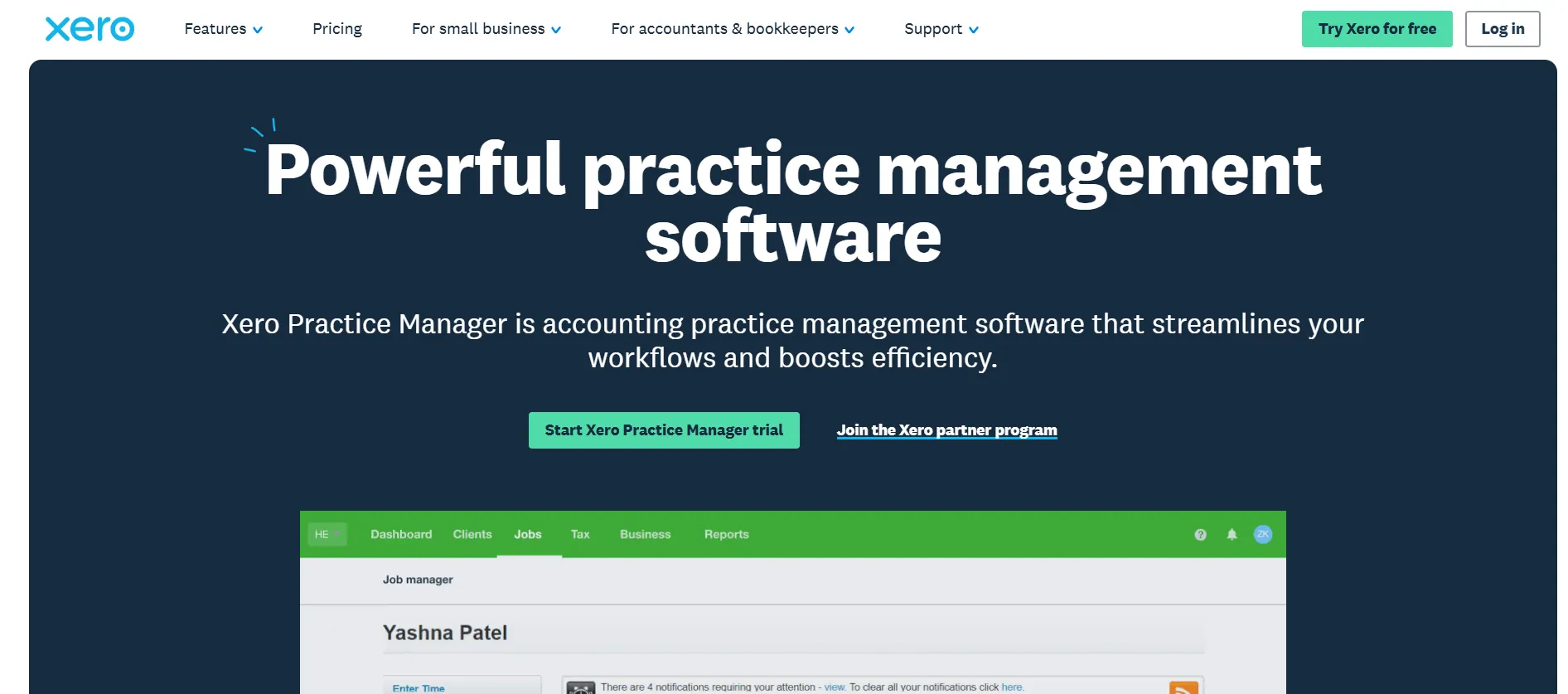
Today, XPM sits within Xero’s “For accountants & bookkeepers” product suite alongside Xero Partner Hub (formerly Xero HQ), Xero Workpapers, Xero Tax, and Syft Analytics. It’s not a standalone purchase but an embedded benefit of the Xero partner ecosystem. For firms at silver partner status or above, XPM is free. New and bronze-tier partners pay $149/month for up to 10 users after a 14-day free trial.
Xero is a publicly traded company (ASX: XRO) headquartered in Wellington, New Zealand, with FY25 revenue of NZ$2.1 billion and approximately 4,610 employees. The platform serves over 250,000 accountants and bookkeepers worldwide.
Xero Practice Manager Pros & Cons
| Pros | Cons |
|---|---|
| ✅ Native bidirectional sync with Xero accounting | ❌ Outdated interface compared to modern competitors |
| ✅ Free for silver, gold, and platinum Xero partners | ❌ Complex setup requiring implementation consulting |
| ✅ Strong time tracking and WIP management | ❌ No built-in client portal |
| ✅ Configurable job templates and workflows | ❌ No native document management |
| ✅ Xero Workpapers included at no extra cost | ❌ No running timer for time tracking |
| ✅ 50+ third-party app integrations | ❌ No bulk job creation capability |
| ✅ Shared client record with Xero HQ | ❌ Limited workflow automation |
Xero Practice Manager Review: How It Works & Key Features
Job Management: XPM organizes all client work into structured jobs with templates, tasks, and milestone tracking
Job Management is the core workflow engine inside XPM. Practices create a job for each unit of client work, either from scratch or from a pre-configured template. Each job record holds the client name, assigned staff, due dates, job category, and job status. Tasks (representing individual services) are added manually or pulled from the template, each with its own deadline and staff assignment.
Job templates standardize how work is created, pre-loading tasks, cost lines, and milestone checkpoints. Practices can define their own job states to mirror internal workflow stages and categorize work by type (tax, audit, advisory). For ongoing compliance work, recurring jobs roll over on a set frequency, generating new jobs with the same structure automatically.
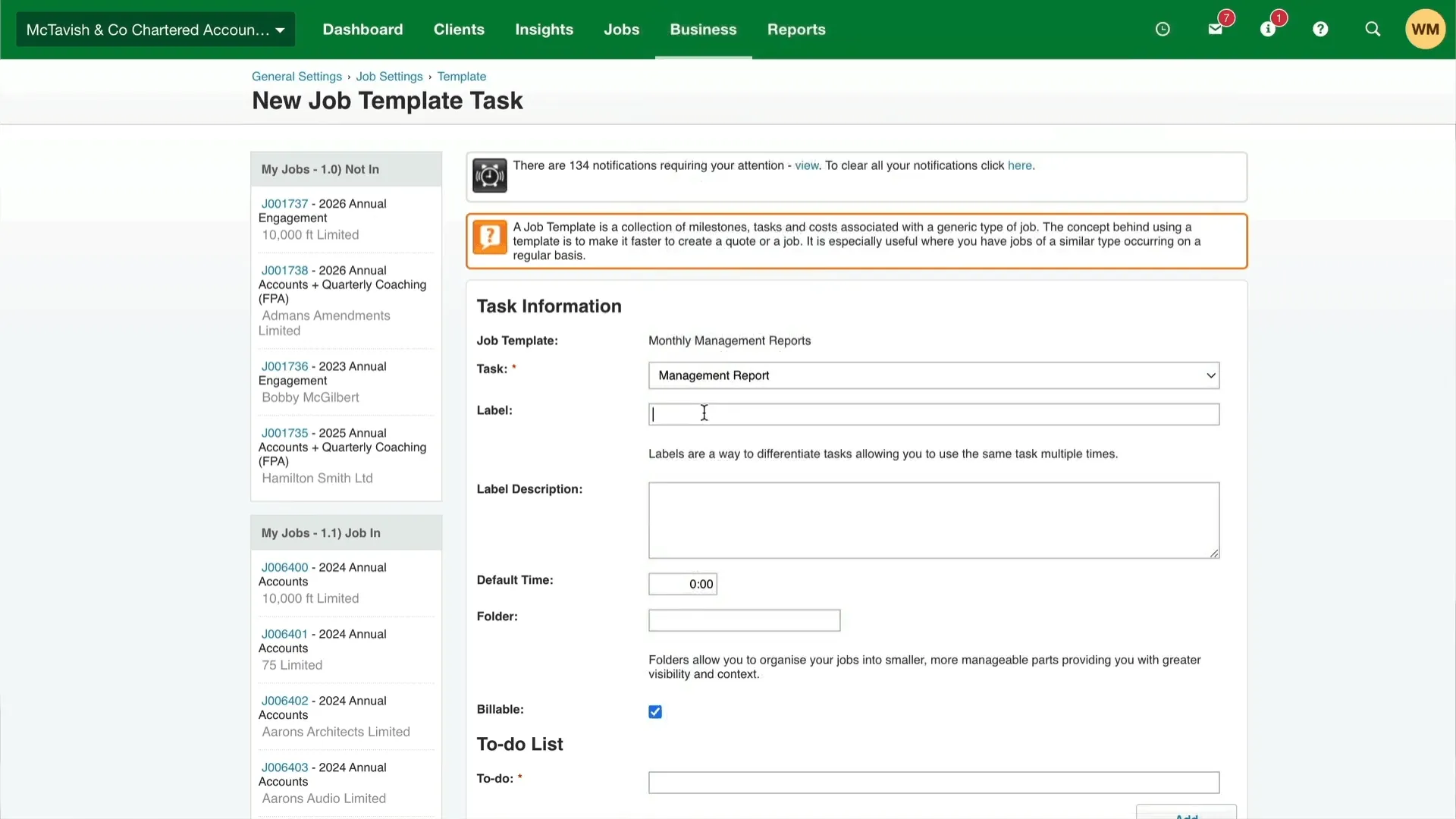
The productivity dashboard shows productivity targets alongside actual billable time, and the jobs list reveals which jobs are scheduled and who is assigned, letting managers balance workloads. XPM also generates custom-branded documents including job briefs, engagement letters, tax letters, quotes, and invoices.
One standout integration: when an invoice created in XPM is reconciled and marked paid in Xero, XPM marks the job paid automatically. This closed loop keeps job profitability current without manual reconciliation.
Time Tracking & Invoicing: Time entries flow directly into WIP tracking and invoice generation within one system
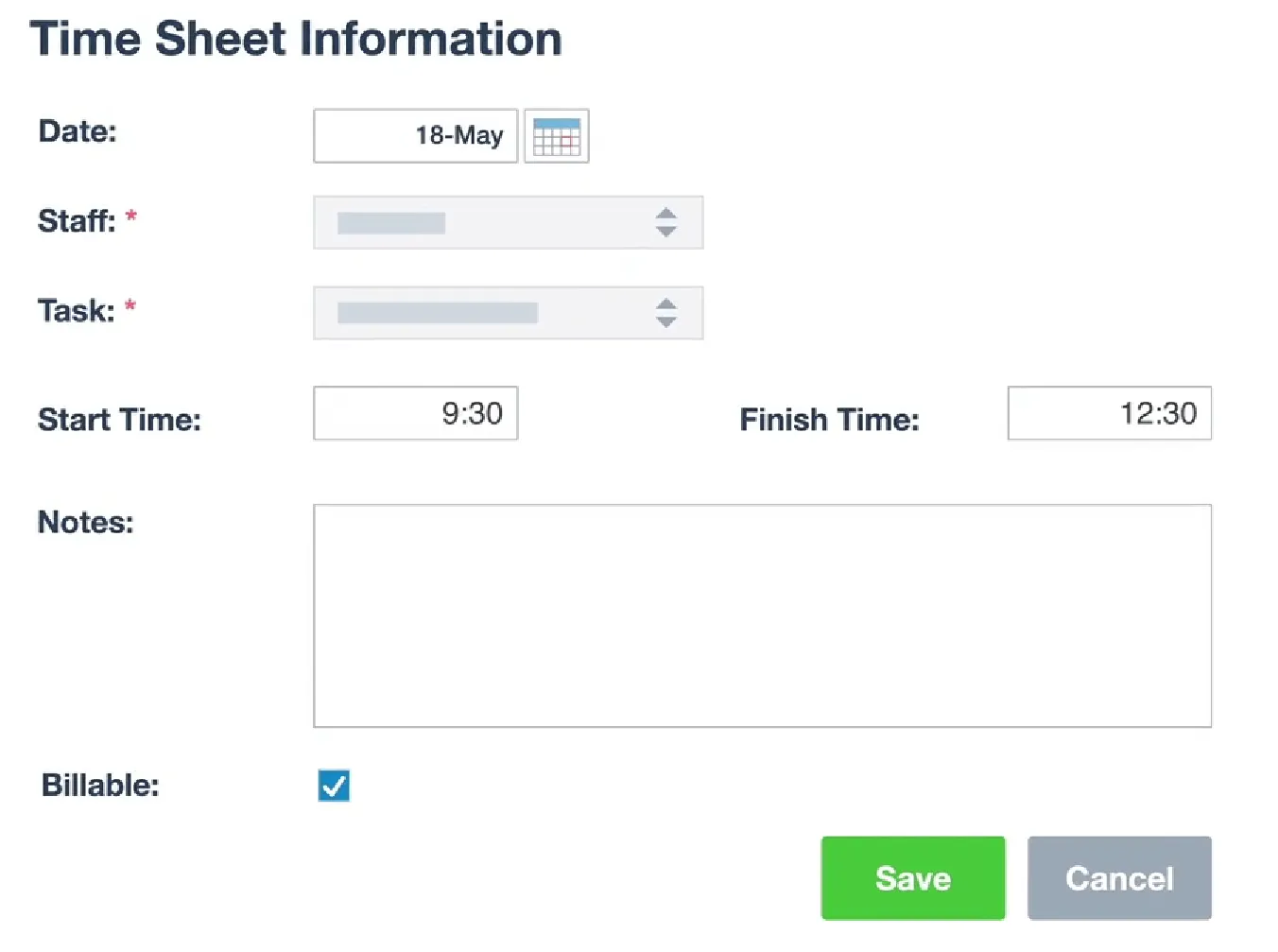
XPM connects time entry to billing in a single workflow. Staff log time against specific tasks on a job using one of two modes: by duration (typing hours and minutes) or by start and stop time. Practices configure which mode applies at the organization level. Each entry can be marked billable or non-billable.
As time accumulates, it flows into the Work-in-Progress (WIP) ledger, representing the dollar value of work performed but not yet invoiced. Managers can view the WIP balance across the entire practice or filter by client, staff, or job type.
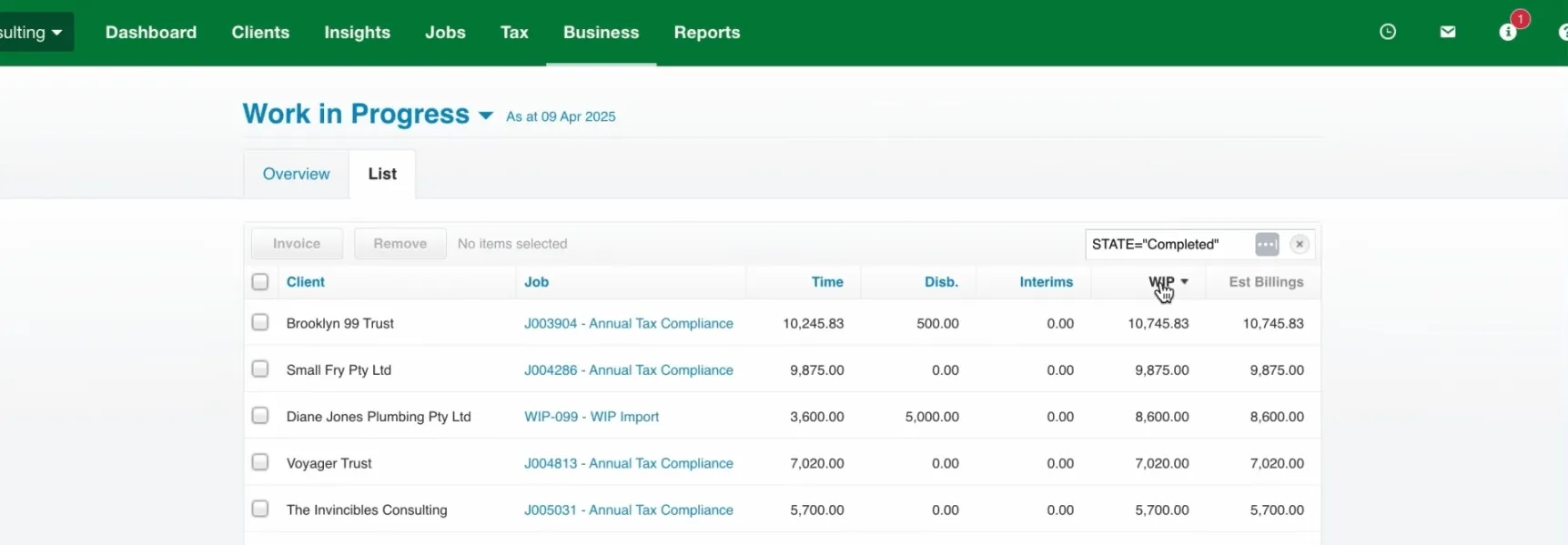
When it’s time to bill, practice managers create either a progress invoice (for partial work) or a final invoice (for completed work). The system can invoice at a fixed price or calculate automatically using rates and markups. Task descriptions auto-populate invoice line items. Billing rates can be configured by staff rate, by task rate, or as a hybrid with custom overrides.
One notable limitation: XPM does not offer a running timer. All time must be entered manually by duration or start/stop, which adds friction compared to tools with one-click timers.
Reporting & Analytics: Practice-specific KPIs and WIP analysis give managers operational visibility
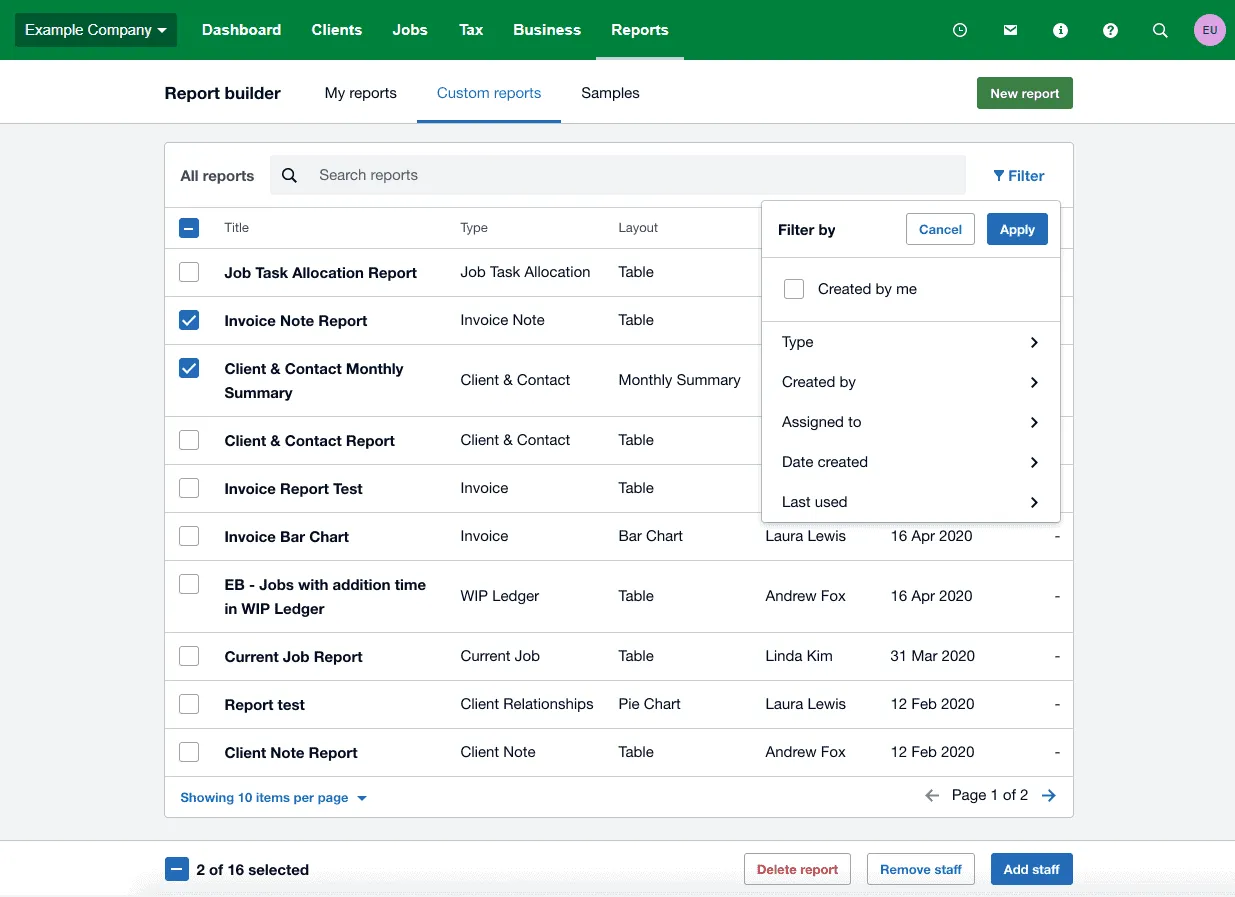
XPM’s reporting suite covers three categories: analysis reports, performance reports, and WIP reports. The system offers three tiers: pre-built standard reports, editable sample report templates, and a full Report Builder for constructing custom reports from scratch.
The KPI Dashboard tracks metrics specific to accounting practice economics: WIP Days, Debtor Days, Average Hourly Rate, Write-Offs, and Revenue per Fee Earner. The WIP Dashboard offers an adjustable “as at” date for reporting closing WIP balances at any historical point, with age-bucket breakdowns by calendar month.
Reports can be exported as PDF, Excel, or CSV, emailed to clients, or enhanced with embedded charts. The Report Builder includes a searchable report list with filtering by type, creator, and date.
Integrations: Xero ecosystem connectivity plus 50+ third-party apps
XPM’s primary differentiator is its native integration with Xero’s accounting ecosystem. Sales invoices push automatically to Xero; payments reconciled in Xero update XPM in real time. Client records are shared bidirectionally between XPM and Xero HQ, with edits propagating immediately. Xero Workpapers is included at no extra cost, pulling client details from XPM and feeding compliance workflows back into the system.
Beyond the Xero ecosystem, the Xero App Store lists over 50 apps that connect to XPM: proposals and billing (Ignition), document management (SuiteFiles, Content Snare), eSignatures (Annature, FuseSign), CRM (Exsalerate), reporting and BI (OdataLink for Power BI/Excel/Tableau), capacity planning (Link, PlanRight), and AI tools (XBert, Vinyl).
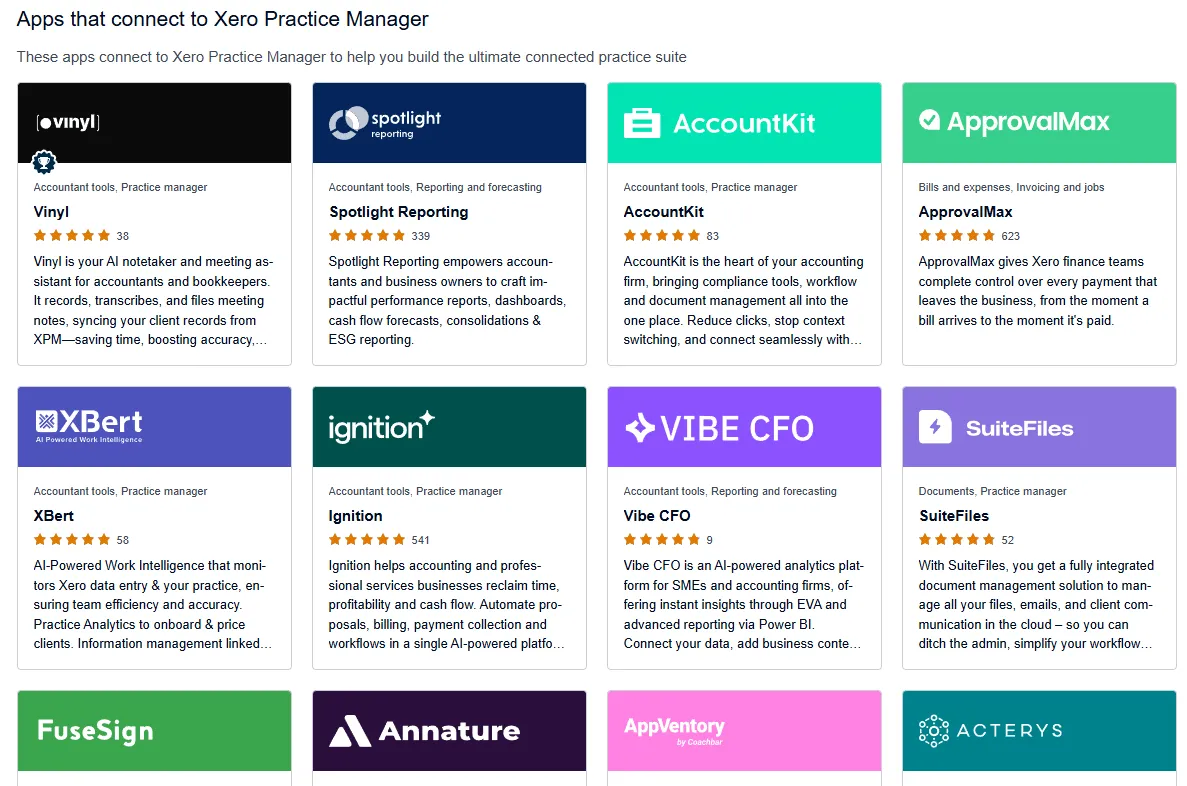
XPM also exposes a public REST API at v3.1 with CRUD support across Clients, Jobs, Invoices, Staff, Tasks, and Categories.
Pricing Structure: Free for established Xero partners; $149/month for newer firms
XPM uses a partner-tier-based pricing model:
New Partner / Bronze:
- 14-day free trial
- $149/month for up to 10 users after trial
- Xero Workpapers included
Silver / Gold / Platinum Partners:
- XPM is completely free
- Xero Workpapers included
- Free Xero subscription for the firm’s own accounts
All Xero partners at every tier also receive access to Xero HQ, Xero Tax, 24/7 Xero support, and Syft Analytics. The critical variable is reaching silver partner status, which requires referring a certain number of Xero subscribers (specific thresholds are not publicly disclosed).
Xero recommends using their partner consulting team for optimal XPM setup, which may carry additional implementation costs not published on public-facing pages.
Where Xero Practice Manager Falls Short
XPM delivers value for Xero-committed practices, but several limitations become apparent with regular use. These reflect a platform optimized for ecosystem integration rather than standalone practice management.
Dated Interface: Multiple sources describe XPM’s interface as clunky compared to modern competitors. The visual design and navigation feel like an earlier generation of web applications. For firms trying to get team-wide adoption, an outdated UI creates resistance. Xero has since moved Practice Management into Xero Partner Hub; whether that removes the friction for your team is worth testing during the 14-day trial.
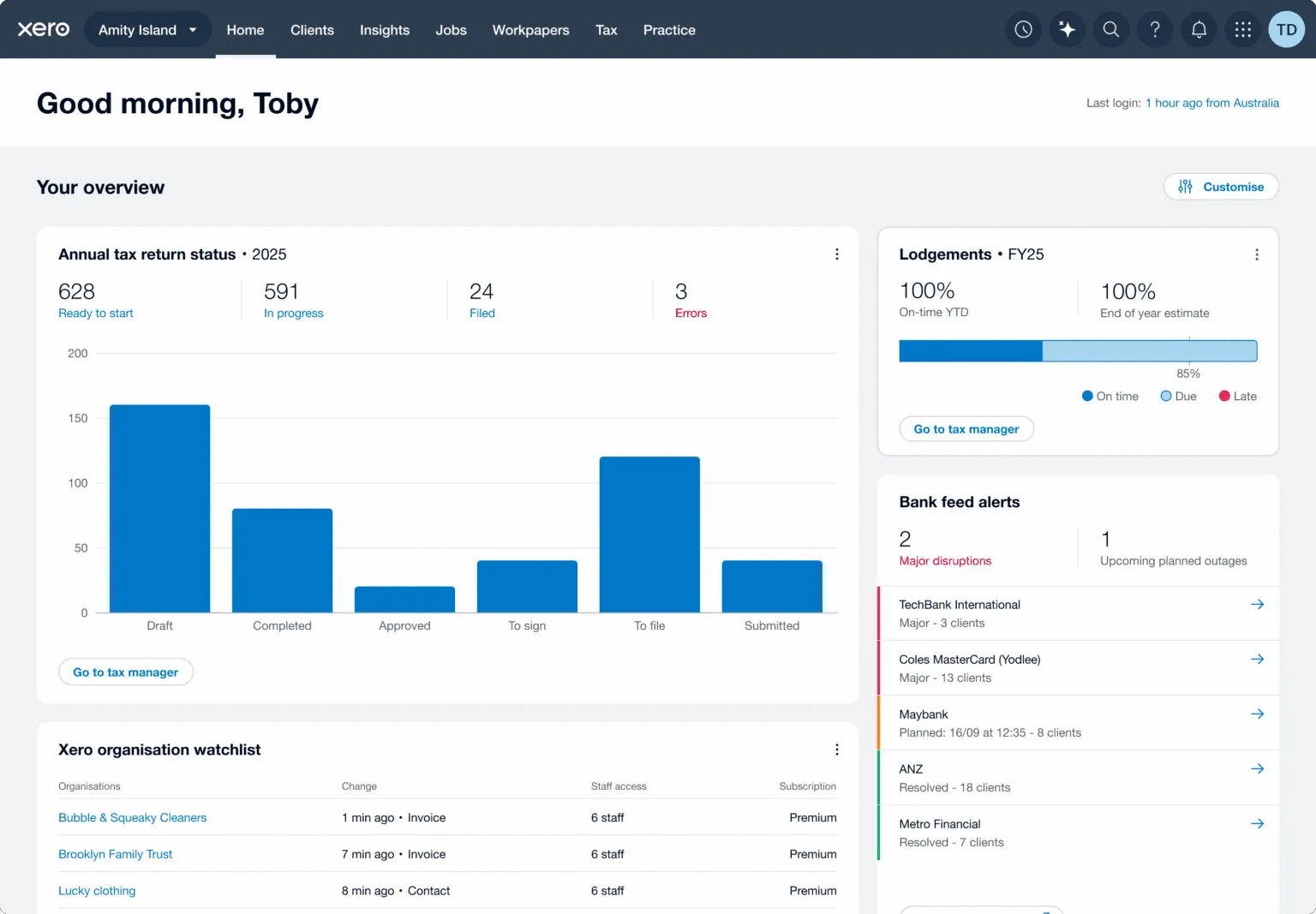
No Built-in Client Portal: XPM lacks a native client portal for document exchange, task assignment to clients, or self-service collaboration. Firms that need these capabilities must purchase third-party add-ons like SuiteFiles or Content Snare. In a market where competitors bundle client portals natively, this gap adds both cost and complexity.
Complex Setup: XPM is configurable, but that configurability comes at the cost of implementation complexity. Xero itself recommends partner consulting for setup, and firms that self-implement without knowing XPM’s category, task, and template structure routinely need remediation. This is not a tool you can deploy over a weekend.
Limited Workflow Automation: Compared to competitors with email-triggered workflows, conditional automation rules, and automated recurring task generation, XPM’s automation capabilities are basic. Recurring jobs help with repetitive work, but there’s no automated client reminder system, no email automation embedded in tasks, and no conditional logic for routing work based on task status.
No Running Timer: XPM requires all time to be entered manually by duration or start/stop time. There is no one-click running timer. For staff who switch between clients throughout the day, this manual entry adds friction and increases the chance of lost billable minutes.
Ecosystem Dependency: XPM’s value dissolves outside the Xero ecosystem. Firms whose clients use QuickBooks, MYOB, or Sage gain little from XPM’s main selling point. This creates lock-in: the more a firm builds its operations around XPM, the harder it becomes to switch accounting platforms.
These limitations aren’t failures. They’re the natural result of building a practice management tool as an ecosystem benefit rather than a standalone product. But they leave a clear gap for firms that want modern, independent practice management software that works regardless of which accounting platform their clients use. (For a head-to-head breakdown, see our dedicated Xero Practice Manager vs Uku comparison.)
Top Xero Practice Manager Alternative: Uku
Uku addresses XPM’s limitations with an independent practice management platform built to be international, now serving 1,000+ accounting firms across 12 languages. Founded by Rain Allikvee and Jaanus Lang as the antidote to “unhandy, impractical and unsightly” tools, Uku earned a 4.7 on G2, 4.8 on Capterra, and awards for Best Usability, Best Value, and Best Customer Support. Its modular approach lets firms start with the features they need on day one and add capabilities as they grow.
Automated Workflow Management: Uku generates recurring tasks automatically so nothing falls through the cracks
Where XPM relies on manual job creation and recurring job templates, Uku automates the entire recurring task lifecycle. Firms define task templates specifying recurrence patterns (daily, weekly, monthly, quarterly, yearly), assignees, checklists, due dates, and estimated time. Tasks can also be generated from client custom fields, providing flexibility beyond standard recurrence options. Once applied to a client’s work plan, Uku generates each task on the assigned team member’s dashboard at the correct time, with no manual scheduling needed.
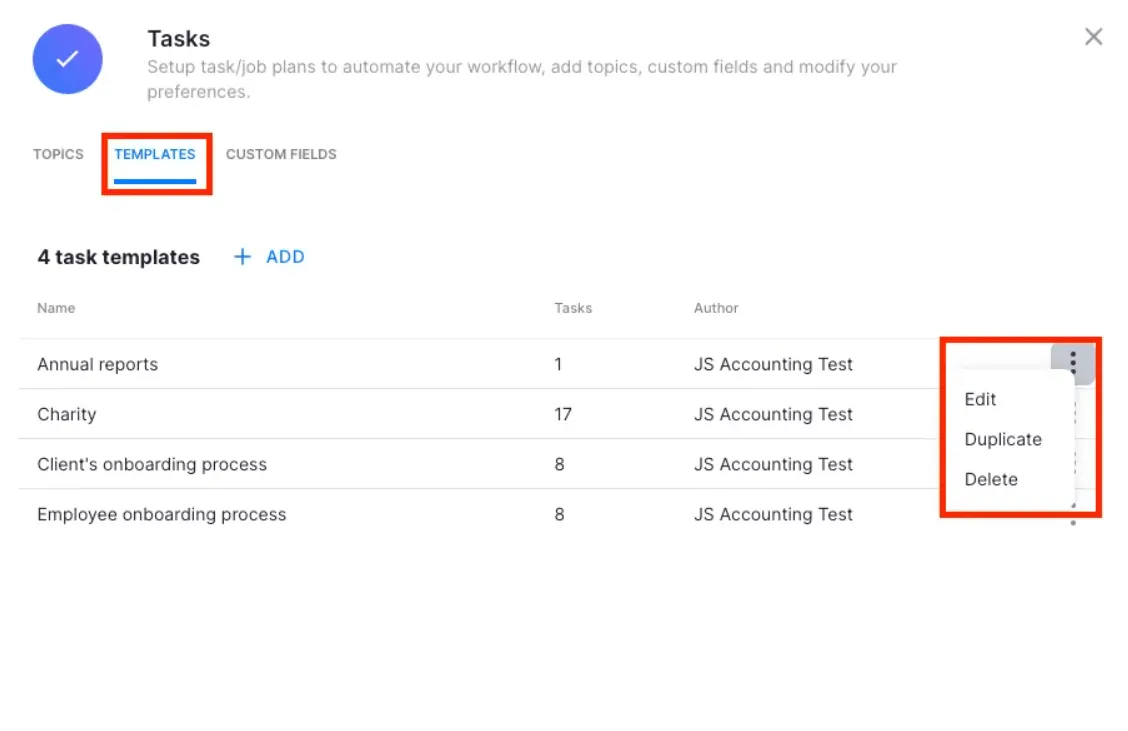
Uku provides pre-built templates developed by accountants across seven categories: Accounting, Administration, Bookkeeping, Client Management, Operations, Payroll, and Tax. When a firm improves a template, it can push those changes to existing client plans at a controlled rollout, choosing which clients, which fields, and which effective date.
For firms transitioning from spreadsheets, Uku offers a smooth path: users can import their existing Excel workflows and have automated plans ready to go, eliminating the fear of lengthy implementations that keeps many accounting firms stuck on manual processes.
Email automation is embedded in task templates. Client-facing reminders send automatically when a task reaches a certain stage, with color-coded status indicators (green for sent, red for failed, grey for pending) visible on the task row. Teams report saving ~30% of their time with these automations.

Built-in Client Portal: Uku includes a portal that reduces email chasing by design
XPM requires third-party tools for client collaboration. Uku includes an integrated client portal natively, designed to reduce the estimated 30% of working time accountants spend on email.
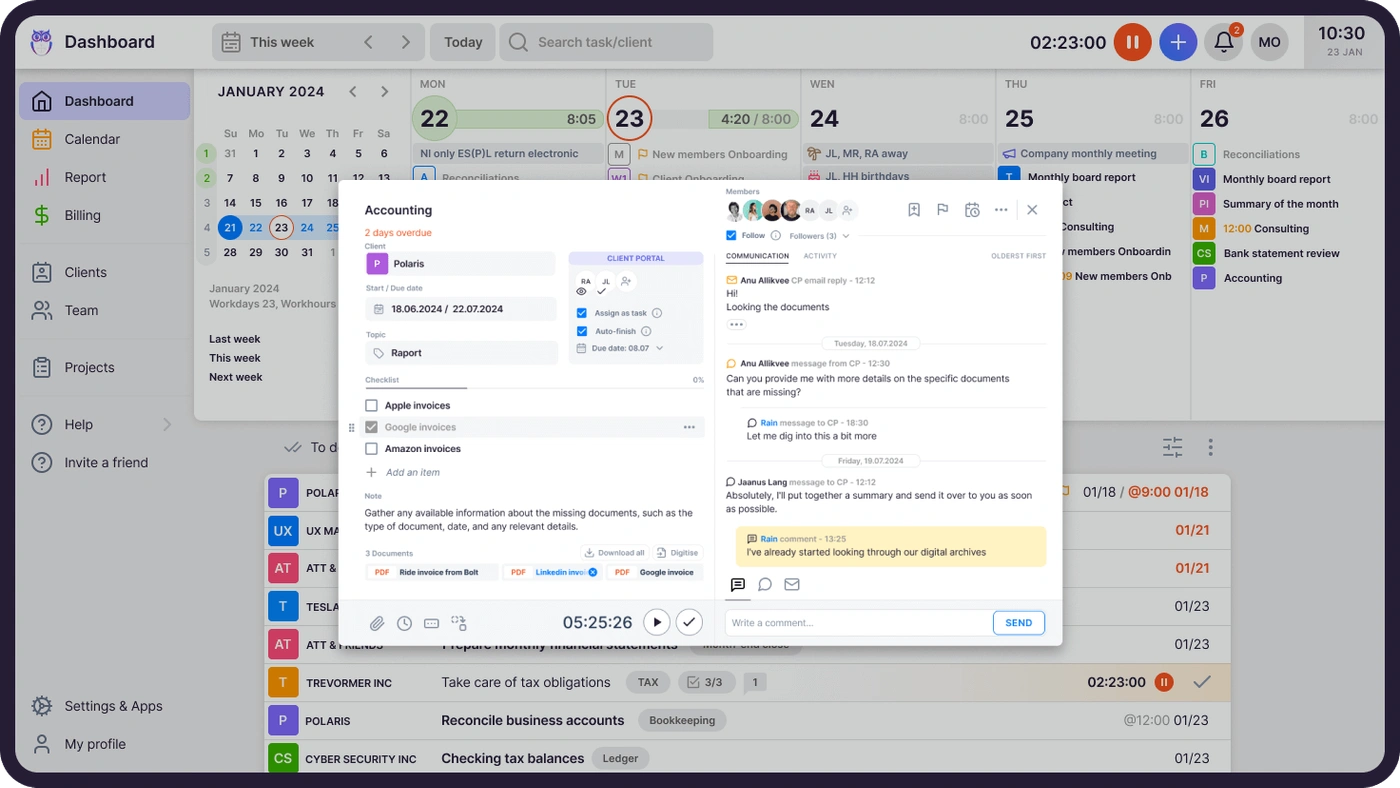
Unlike traditional portals where tickets must be connected to work items, Uku’s portal mirrors the same task on both sides. Clients and accountants work on the same item, with all communication, actions, documents, logs, and time tracking in one place. When clients make requests through the portal, notifications appear on the accountant’s dashboard, and they can start tracking time or communicating within that same task immediately.
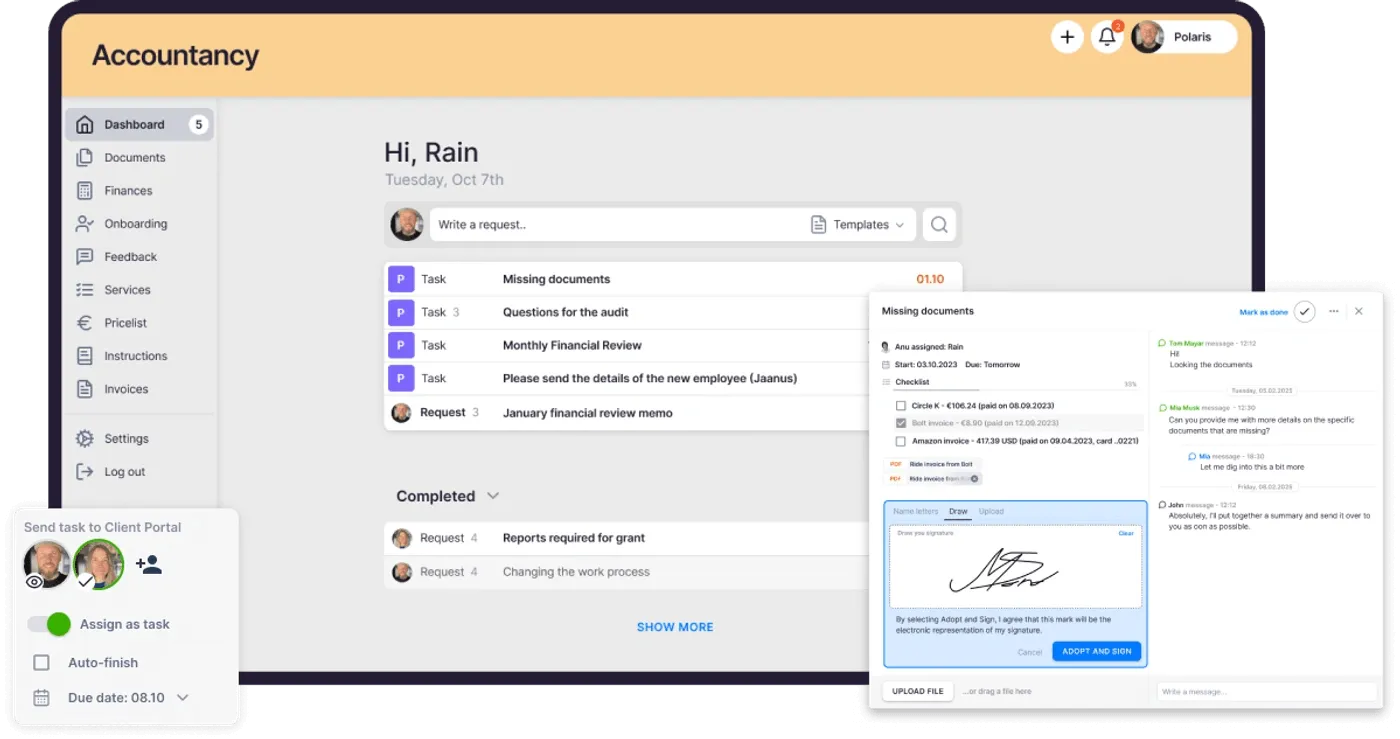
The portal uses a magic link system. Clients access everything through a time-limited email link with no username or password required. Firms customize the portal with company branding (their logo, colors, domain, and welcome video). The portal goes beyond basic document exchange: firms can create unique menus for each client, run onboarding with forms, share business insight reports, display price lists, and embed custom content. Documents submitted through the portal can be sent for digitalization with a single click, going directly into accounting software.
Automated reminders tied to task deadlines send without manual intervention. Document uploads sync to connected cloud storage (Google Drive, OneDrive, SharePoint, or Dropbox). The Catch Up dashboard view aggregates all inbound client activity in one screen, eliminating the need to check multiple channels.
Time Tracking & Automated Billing: Uku captures every billable minute and reduces invoice preparation from days to around 30 minutes
Unlike XPM’s manual-only time entry, Uku offers three input methods: a stopwatch that runs in the header bar (starting a new task automatically pauses the previous one), manual entry with smart time suggestions, and bulk time entry across multiple tasks simultaneously. The time tracking interface is built for speed, with 90% of actions requiring one click.
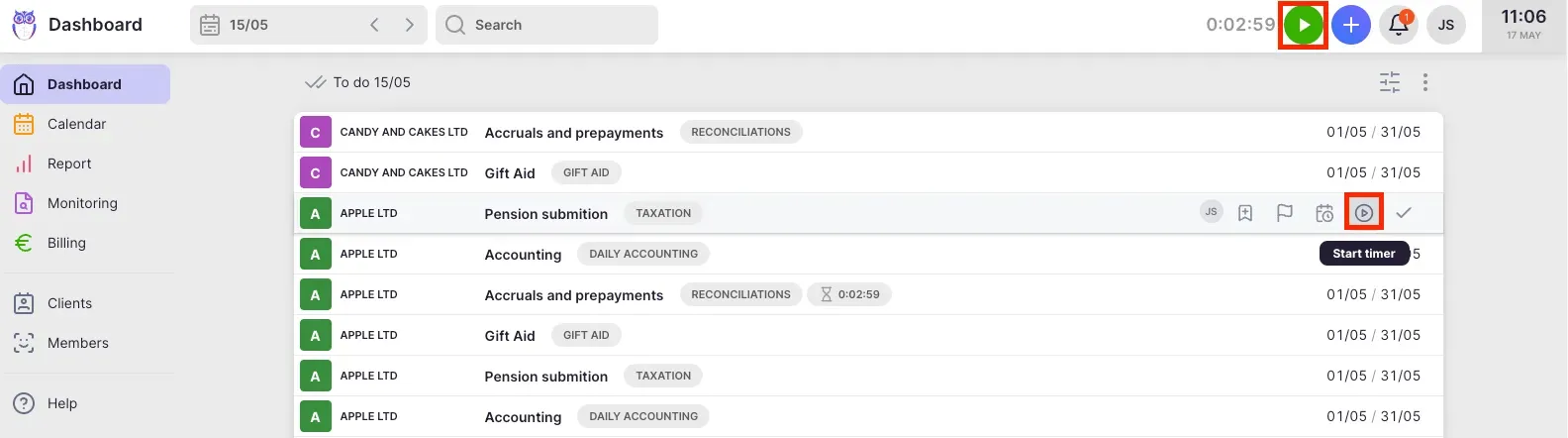
A Mandatory time entries feature (Team+ plan) ensures staff cannot mark tasks done without logging time, closing the most common source of missing billable hours. Time tracked on subtasks rolls up to parent tasks automatically. An offline mode allows logging to continue without an internet connection.
The tracked time feeds into Uku’s automated billing engine, the platform’s main competitive advantage. Billing runs through “contracts” where rules are set once, and time tracking calculates billable amounts as work happens.
The system handles price lists based on quantity, time, and material, with different rates for different periods. Rounding rules ensure firms bill properly for interruptions: a one-minute unplanned call can be billed as 15 minutes, with rounding configurable by entry, team, client, or month. The billing module supports four billing types (hourly, per-piece, fixed, and recurring), cumulative tier pricing, and multiple active contracts per client.
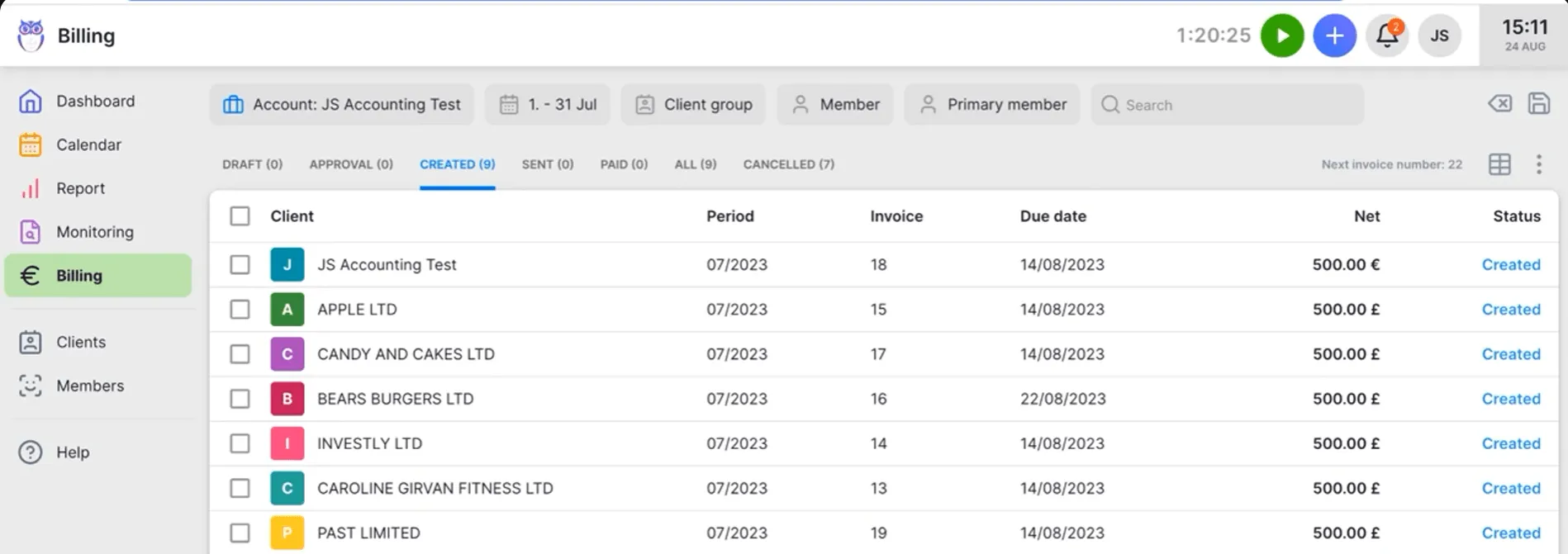
Beyond invoicing, the system tracks both sales prices and actual cost prices. If an employee costs €30/hour but bills at €45/hour, managers can see whether they’re profitable. When employees work eight hours but only six are billable, the system shows whether the gap stems from employee efficiency, client complexity, or pricing structure. Uku’s BI Analytics provides visual reports and alerts on profitability and budget status, preventing firms from discovering losses 30 days too late.

Flexible Pricing Without Ecosystem Lock-in: Uku works with Xero, QuickBooks, and eight other accounting platforms
Uku integrates with Xero, QuickBooks Online, E-conomic, Tripletex, Fortnox, FreeAgent, Merit Aktiva, SmartAccounts, Directo, and Scoro, importing clients and exporting invoices across all of them. Firms aren’t locked into any single accounting ecosystem.
Solo Plan ($25/month, or $19/month billed annually):
- 1 member
- Up to 20 active clients
- Billing, Client Portal, Document Management, Custom Fields, AML, E-signatures, and all integrations
Team Plan ($49/month per member, or $38/month billed annually):
- Unlimited members & clients
- CRM, billing, workflow automations, reporting, email management
- Client portal, integrations, document management, AML
Elite Plan ($62/month per member, or $48/month billed annually):
- Everything in Team
- BI analytics
- Workforce management
- Open API
- Zapier integrations
- Google Drive, Dropbox & SharePoint integrations
- E-signatures
Enterprise ($99/month per member, or $88/month billed annually):
- Custom integrations
- Dedicated account manager
- Assisted client imports
- Tailor-made team workshop
- Early access to features
Pricing is available in EUR, USD, and GBP, with both monthly and annual billing options. Every new Uku account automatically starts a 14-day free trial of the full Elite plan with no credit card required. Uku also includes 90 minutes of free onboarding for all new accounts.
Uku’s monthly billing means firms can start for as little as $25/month on Solo or $49/member/month on Team without committing to annual contracts upfront. Combined with the platform’s modular approach, firms can begin with core workflow management and activate advanced billing, reporting, and automation capabilities as they grow. The platform is SOC 2 Type I compliant with TLS 1.3 encryption and data hosted in Germany (EU).
Multilingual Support for International Firms: Uku operates in 12 languages across European and English-speaking markets
Uku is available in 12 languages (English, German, Spanish, Danish, Swedish, Finnish, Polish, Bulgarian, Ukrainian, Lithuanian, Latvian, and Estonian). Email templates inside the platform select the correct language automatically based on each client card’s language setting. Built to be international with presence across the UK, USA, and Scandinavia, Uku is one of very few practice management tools that serves international accounting firms. The in-house development team can build country-specific features that larger competitors refuse to create for smaller markets.
“I also love how Uku links tasks with incoming and outgoing emails. Everything is automatically recorded, so I don't have to manually enter every step of the process.”

Xero Practice Manager or Uku: Comparison Summary
| Xero Practice Manager | Uku | |
|---|---|---|
| Target audience | Xero-ecosystem accounting firms | Accounting firms on any platform |
| Interface | Dated, complex to navigate | Modern, G2 Best Usability award |
| Setup complexity | High; consulting recommended | Modular deployment, 90 min free onboarding |
| Client portal | ❌ Requires third-party add-on | ✅ Built-in with magic link access |
| Time tracking | Manual entry only (no running timer) | Stopwatch, manual, and bulk entry |
| Workflow automation | Basic recurring jobs | Automated task generation with email automations |
| Billing types | Time-based and fixed price | Hourly, per-piece, fixed, recurring with automated contracts |
| Document management | ❌ Requires third-party add-on | ✅ Built-in with cloud storage sync and one-click digitalization |
| Accounting integrations | Xero only (native) | Xero, QuickBooks, and 8 other platforms |
| Languages | English (primary) | 12 languages |
| Reporting | Strong WIP and KPI dashboards | Reporting plus BI Analytics: time, billing, and profitability analytics |
| Paid pricing | $149/month flat (up to 10 users) | From $19/month (annual billing) |
| E-signatures | Requires separate Xero Tax add-on | Included in Elite plan |
| Customer support | 24/7 Xero support | G2 score 9.7/10; Software Advice Best Support |
Final Verdict
The choice between Xero Practice Manager and Uku depends on your firm’s ecosystem commitments and operational priorities.
Choose Xero Practice Manager if your firm is invested in the Xero ecosystem and your clients predominantly use Xero. The native bidirectional sync between XPM and Xero’s accounting software eliminates duplicate data entry and provides a real-time financial picture that no third-party integration can replicate. If you’ve reached silver partner status, the zero-cost access makes XPM hard to pass up. It’s the right tool for firms that view practice management as an extension of their accounting platform rather than an independent system.
Choose Uku if you want to cut your team’s admin time with a platform where 90% of actions are one-click. Uku’s automated billing, integrated client portal, and stopwatch-based time tracking remove the friction that XPM leaves to third-party tools. Its modular approach lets you implement step by step (start with the features you need on day one and scale up as your firm grows). It’s the better fit for firms that value fast deployment, need multilingual or multi-currency support, are transitioning from Excel and want the easiest implementation path, or prefer monthly pricing rather than annual commitments.
The fundamental difference is architectural. XPM is built as a component of a larger ecosystem, gaining its advantage from that connection. Uku is built as an independent, modular platform, gaining its advantage from letting firms start immediately with what they need and grow into a complete practice management system at their own pace.
If you’d like to see how Uku fits your practice in detail, book a 30-minute demo or read more practice management case studies from firms that made the switch. Ready to try it yourself? Start your free 14-day trial (no credit card required).
Related: for a head-to-head feature comparison, see Xero Practice Manager vs Uku. For a tier-by-tier cost breakdown including hidden add-ons, see Xero Practice Manager pricing. And if you’re weighing the whole market, start with the 7 best Xero Practice Manager alternatives.
Frequently asked questions
What is Xero Practice Manager?
Xero Practice Manager (XPM) is Xero's practice management software for accounting and bookkeeping firms: job tracking, task assignment, staff scheduling, time entry, invoicing and work-in-progress reporting, synced with Xero accounting. Xero now sells it as Xero Partner Hub + Practice Management, built into Xero Partner Hub. It is free for Silver, Gold and Platinum Xero partners; new and Bronze partners pay $149/month for up to 10 users after a 14-day free trial.
Is Xero Practice Manager free?
XPM is free for accounting firms that have reached silver, gold, or platinum Xero partner status. New and bronze-tier partners pay $149/month for up to 10 users after a 14-day free trial. The specific thresholds for reaching silver status are not publicly disclosed by Xero. Uku offers a Solo plan starting at $25/month ($19/month billed annually) for sole practitioners with up to 20 active clients, plus a 14-day free trial of the full Elite plan with no credit card required.
Does Xero Practice Manager have a client portal?
No. Firms needing client-facing document exchange, task assignment, or self-service collaboration must purchase third-party add-ons like SuiteFiles or Content Snare through the Xero App Store. Uku includes an integrated client portal where clients and accountants work on the same task, with magic link access (no passwords), automated reminders, one-click document digitalization, and two-way communication.
Does Xero Practice Manager have a time tracking timer?
No. All time must be entered manually, either by typing a duration or specifying start and stop times. Uku provides a stopwatch that runs in the header bar and automatically pauses the previous task when a new one begins, along with manual and bulk time entry options.
What integrations does Xero Practice Manager support?
XPM integrates natively with Xero accounting, Xero HQ, and Xero Workpapers. It also connects to over 50 third-party apps via the Xero App Store, covering proposals (Ignition), document management (SuiteFiles), eSignatures (Annature, FuseSign), CRM (Exsalerate), and reporting (OdataLink). However, XPM does not integrate with non-Xero accounting platforms. Uku integrates with Xero, QuickBooks, E-conomic, Tripletex, and six other accounting platforms, plus Zapier for 5,000+ additional connections.
How complex is Xero Practice Manager to set up?
XPM is configurable but carries a steep learning curve. Xero recommends using their partner consulting team for setup, and firms that self-implement without knowing XPM's category, task, and template structure often face problems requiring remediation. Uku takes a modular approach: firms can start with the features they need on day one and add capabilities over time. All new accounts receive 90 minutes of free onboarding, optional paid onboarding packages, and a pre-loaded demo account for risk-free exploration.
Can Xero Practice Manager handle workflow automation?
XPM supports recurring jobs that generate new jobs on a defined schedule, and job templates can standardize task structures. However, it lacks email automation within workflows, conditional logic for task routing, and automated client reminders. Uku offers automated recurring task generation, email automations embedded in task templates with status indicators, and automated client portal reminders tied to task deadlines.
What reporting does Xero Practice Manager offer?
XPM includes standard, sample, and custom reports through its Report Builder, plus a WIP Dashboard with adjustable historical dates and a KPI Dashboard tracking WIP Days, Debtor Days, Average Hourly Rate, Write-Offs, and Revenue per Fee Earner. Reports export to PDF, Excel, or CSV. Uku's Reporting provides summary, tasks, and time views with configurable columns, saved report templates, business analytics reports, and client budgeting dashboards with real-time budget alerts.
Does Xero Practice Manager work outside the Xero ecosystem?
XPM is designed for Xero partner firms. Its core value (native accounting sync, shared client records, free access at silver tier) depends on the firm and its clients using Xero. Firms using QuickBooks, MYOB, Sage, or other accounting platforms gain little from XPM. Uku is platform-independent, integrating with 10 accounting platforms and serving firms across the UK, USA, Scandinavia, and beyond regardless of their clients' accounting software.

Published May 19, 2026 · Updated Oct 2, 2026