7 Zoho Alternatives for Accounting Firms in 2026
Leaving Zoho Practice or Zoho Projects? Seven practice-management alternatives for accounting firms with verified 2026 prices, screenshots and who fits each.


Contents
- Zoho Alternatives at a Glance
- What is Zoho?
- How We Curated Our List of Zoho Alternatives
- 1. Uku: Best Alternative for Recurring Work, Client Requests and Time on One Task
- 2. Financial Cents: Best Alternative for Small QuickBooks Online Firms on a Budget
- 3. Karbon: Best Alternative for Firm-Wide Email Triage
- 4. TaxDome: Best Alternative for an All-Inclusive Tax-Firm Suite
- 5. Jetpack Workflow: Best Alternative for Workflow-Only Firms
- 6. Client Hub: Best Alternative for Bookkeeping Firms on QuickBooks Online or Xero
- 7. Canopy: Best Alternative for US Tax Firms with IRS Work
- How to Switch from Zoho to Uku
- The Final Verdict
- Read more
The seven best Zoho alternatives for accounting firms in 2026 are Uku, Financial Cents, Karbon, TaxDome, Jetpack Workflow, Client Hub and Canopy. Uku leads for a firm that wants recurring work, task-based client document requests and time tracking on the same task, with QuickBooks Online and Xero sync, from $19 per member per month. Financial Cents is the budget pick for small QuickBooks Online firms in the US and Canada; Karbon owns firm-wide email triage for larger teams; TaxDome is the all-inclusive tax-firm suite; Jetpack Workflow keeps only the recurring-work engine; Client Hub is built for bookkeeping firms whose month-end lives in QuickBooks Online or Xero; and Canopy adds IRS transcripts and notices for US tax firms.
Zoho for an accounting firm usually means Zoho Practice, Zoho’s practice-management app, which costs $49 per organization per month on Standard and $149 on Premium (billed annually; $59 and $179 monthly), both capped at 5 users. Many firms never bought it: they run client work in Zoho Projects ($4 to $14 per user per month billed annually; Free has no time tracking) and keep the books in Zoho Books.
Firms leave for three reasons. The work lives in three or four Zoho apps. The client portal is Premium-only and Standard’s client list is “Zoho clients only”. And recurring work is an interval repeater rather than a workflow with deadlines, document requests and time attached.
The order below is by fit for the firm that keeps Zoho Books, moves its CRM elsewhere and wants one accounting-specific system for the work. Uku is first because it fits that case, with one caveat stated plainly: its shared inbox is still in development.
Zoho Alternatives at a Glance
| Alternative | Price (annual billing) | Best for (team size) | What it adds over Zoho Practice |
|---|---|---|---|
| Uku | From $19/member/mo (Solo) or $38/member/mo (Team) | 5–50, recurring monthly work, US and Europe | Client portal with task-based document requests on every plan, time tracking on the task, QuickBooks Online and Xero sync |
| Financial Cents | From $19/mo (Solo, 1 user) or $49/user/mo (Team) | 1–15, QuickBooks Online firms in the US and Canada | Native QuickBooks Online sync and a client portal, priced per user, not per 5-user org |
| Karbon | From $59/user/mo (Team) | 20–200, distributed teams | Triage: a shared firm inbox (info@, tax@) turned into work items |
| TaxDome | From $800/seat/year (Essentials, solo only), 1-year term | 1–100, US tax firms | Unlimited e-signatures and storage on every plan, IRS transcripts on Pro |
| Jetpack Workflow | $40–$50/user/mo, annual | 3–30, workflow-only | Recurring accounting work (monthly closes, payroll runs, tax returns) with cascading deadlines |
| Client Hub | See their pricing page | 1–20, bookkeeping firms | Two-way QuickBooks Online and Xero sync that turns uncategorized transactions into client questions |
| Canopy | From $74/user/mo (Standard), plus usage add-ons | 5–100, US tax and accounting | IRS transcripts and notices, client portal, billing and workflow under one login |
“Adds” means we did not find the capability on Zoho Practice’s public pages, pricing table or help docs when we checked them. Zoho may ship it later; we will update the table when it does.
What is Zoho?
Zoho is a suite of more than fifty business apps. Three of them matter to an accounting firm, and they are sold, priced and built separately.
Zoho Practice is the practice-management app: client records, client requests, tasks, time tracking, workpapers, documents and, on the Premium plan, a self-service client portal. It is priced per organization, not per user, and both paid plans stop at 5 users. Paid plans are sold in 11 countries including the US; elsewhere only the free partner plan is shown.
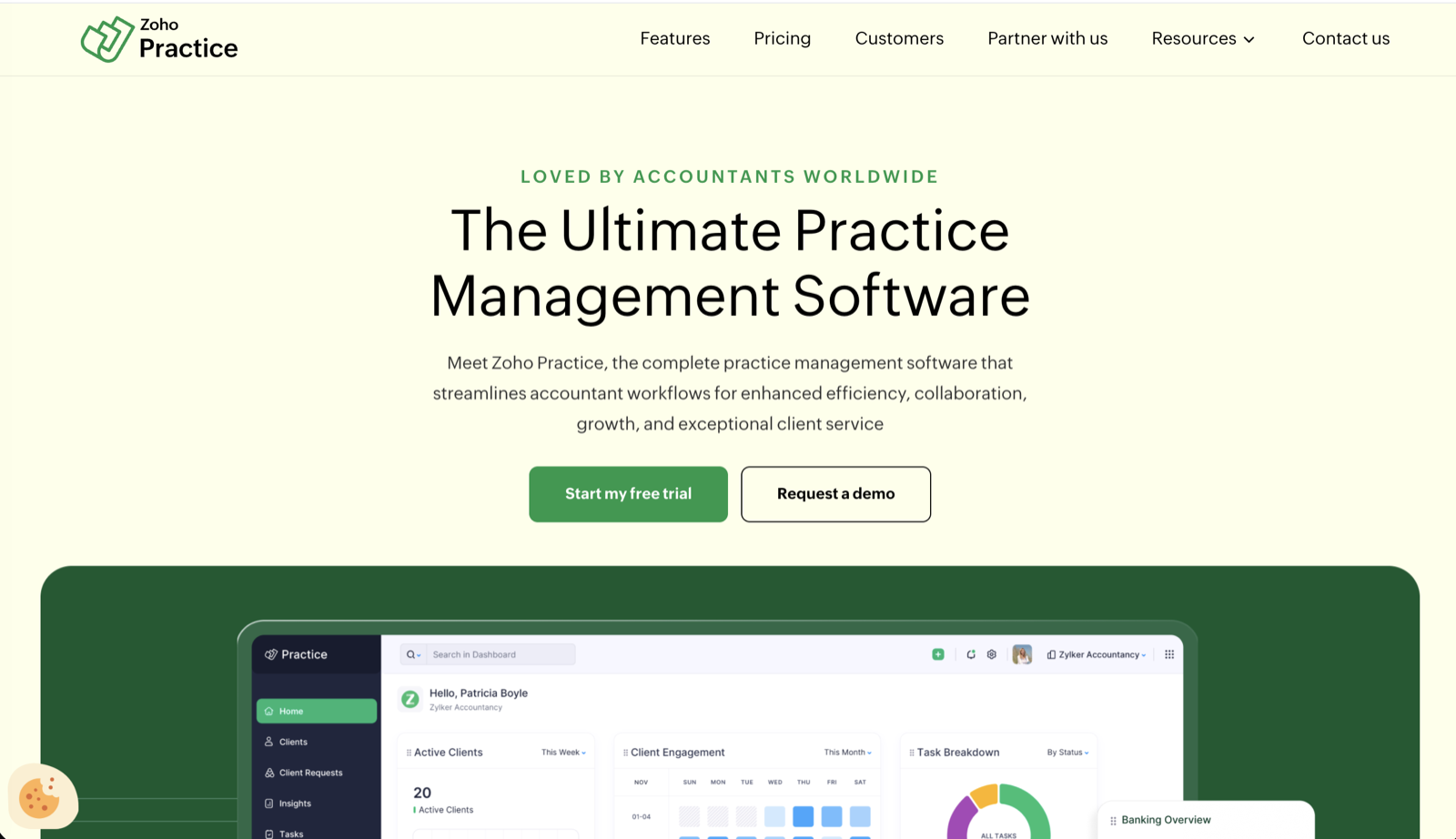
Its pricing page says two things a firm should read twice. On Standard ($49 per organization per month billed annually), Client Management is marked “Zoho Clients Only” and the Self-Service Client Portal is marked unavailable; the portal arrives on Premium at $149. A 35-person firm is not the customer the page describes.
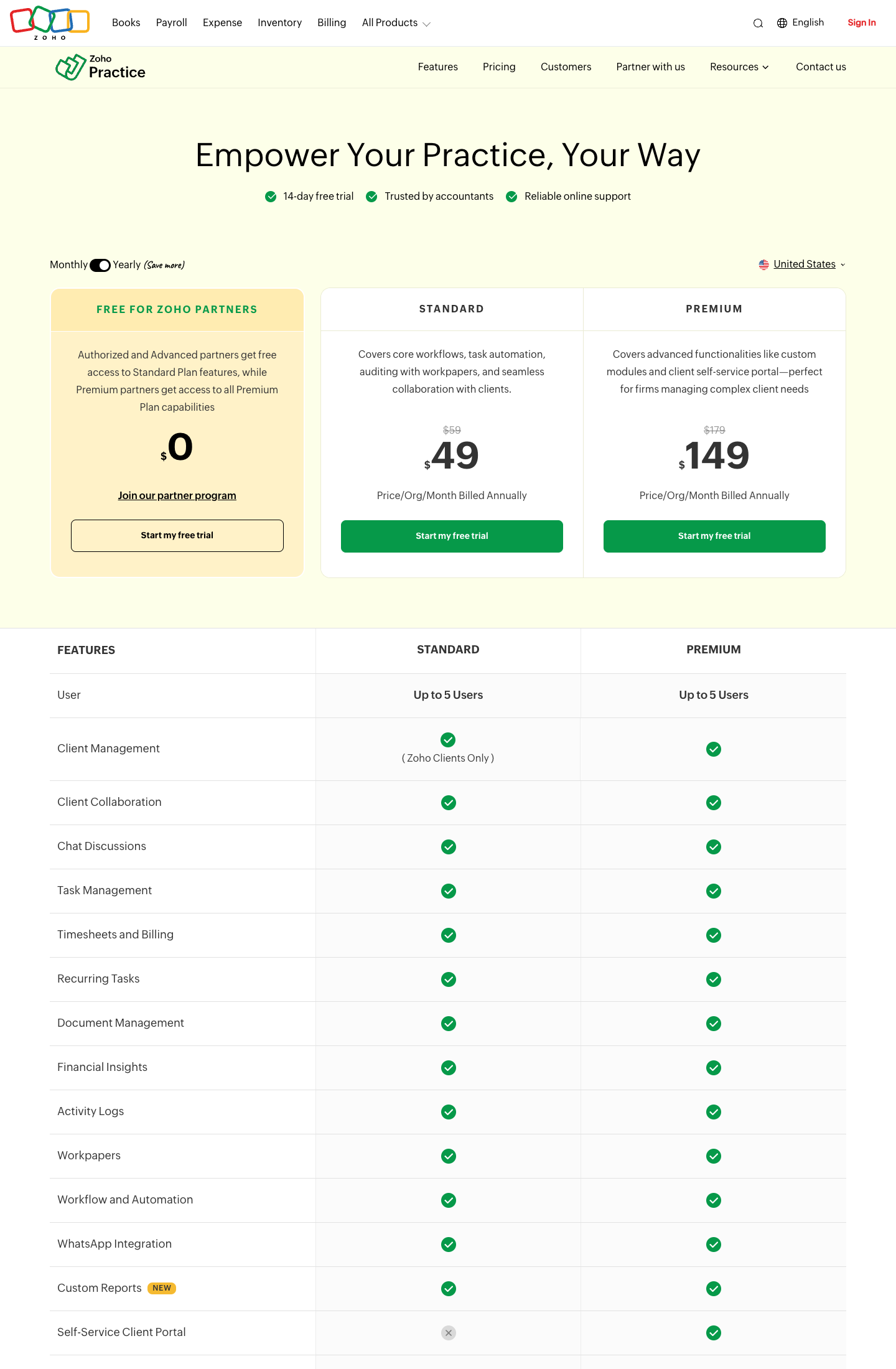
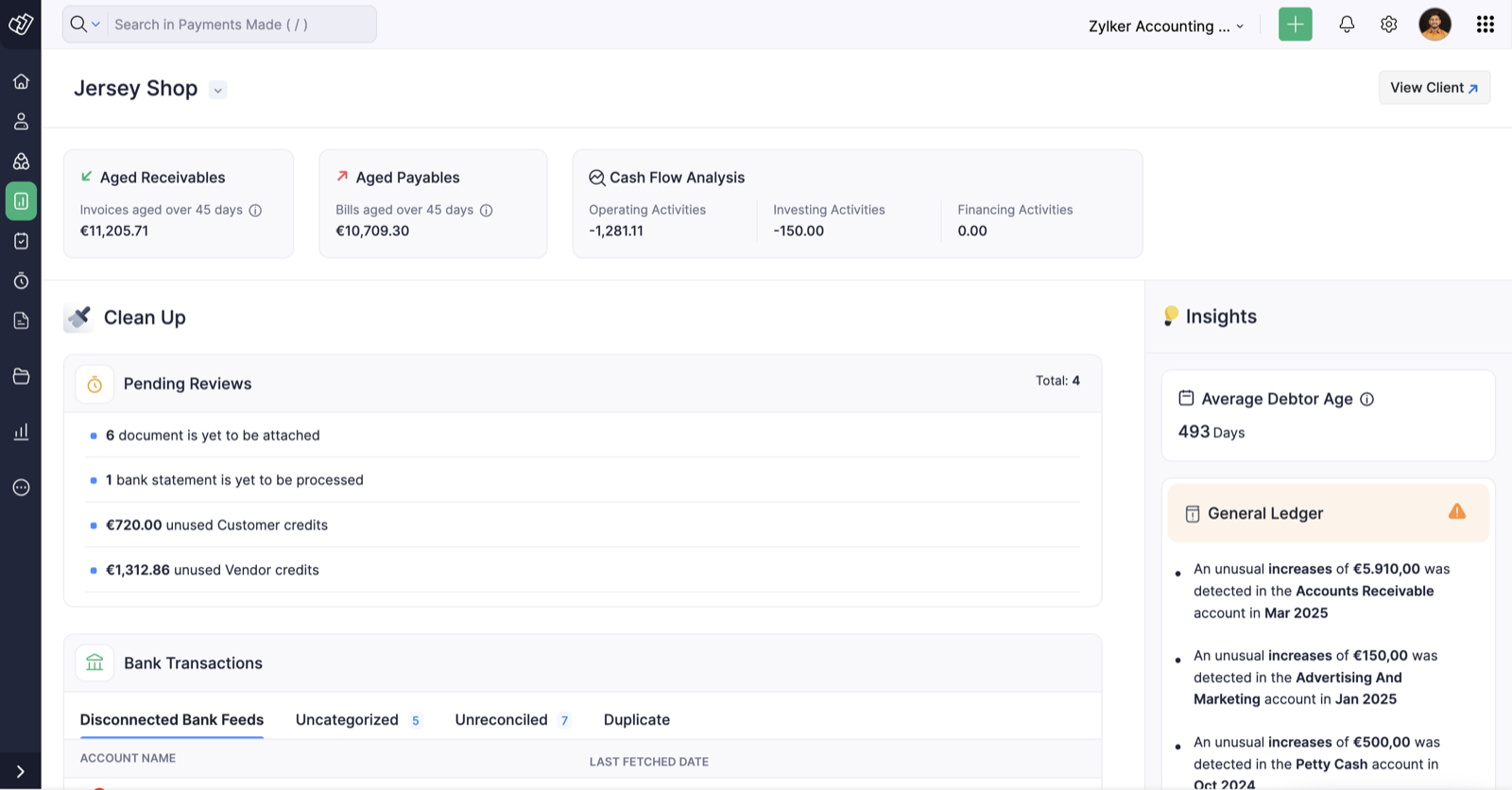
Inside the app, the client overview is a Zoho Books ledger view: aged receivables and payables, cash flow, a “Clean Up” list of unattached documents and unreconciled bank feeds, general-ledger anomaly insights. It is a strong screen if all your clients are on Zoho Books. If your clients are on QuickBooks Online, the pages we checked name no QuickBooks Online or Xero integration, only Zoho Books, Zoho Payroll, Zoho Expense, Zoho Inventory, Zoho Sign and WhatsApp. The one G2 reviewer of Zoho Practice says the same thing from the other side: the insights she likes come “especially with its integration with Zoho Books”.
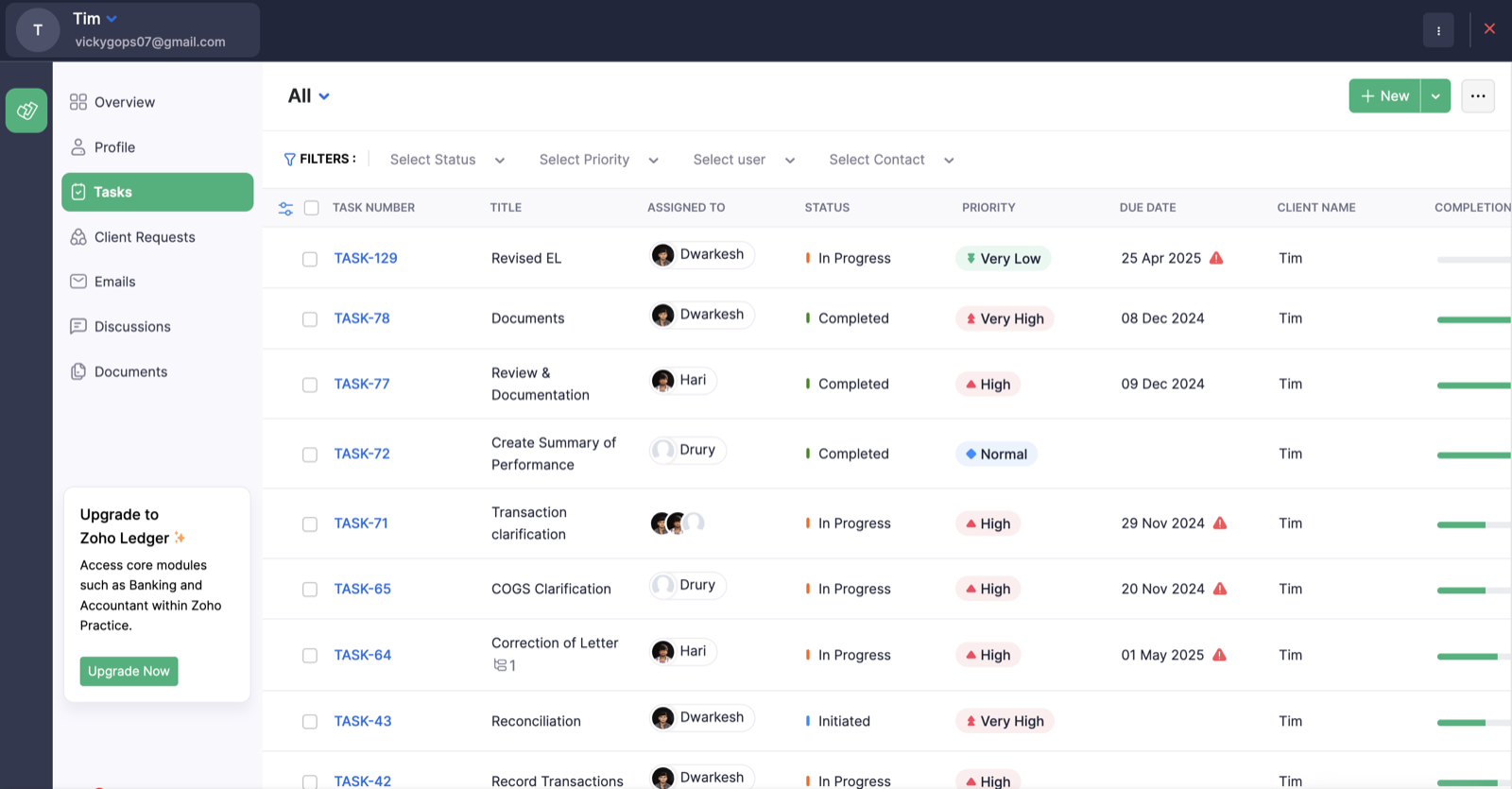
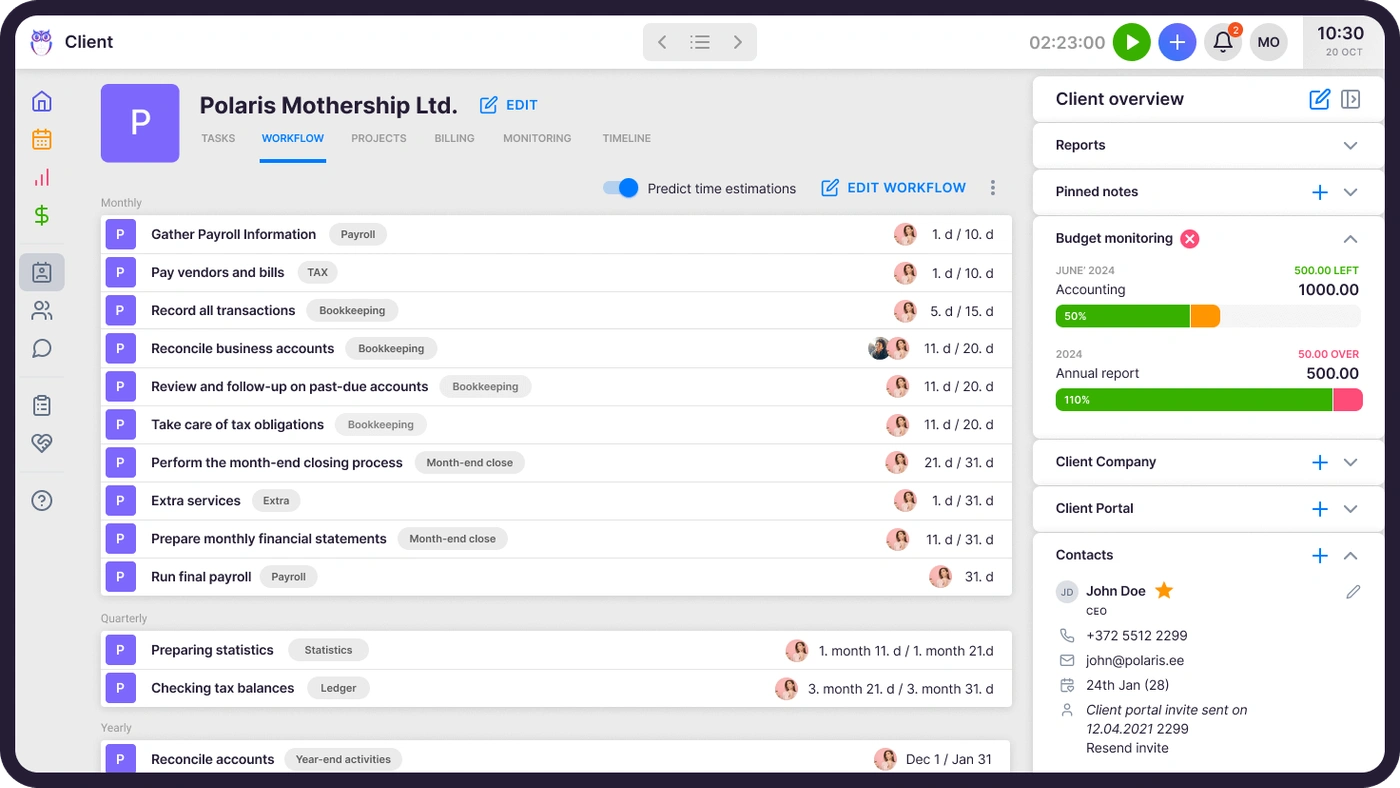
Recurring work in Zoho Practice is a repeater: enable Recurring Tasks under Settings and a task comes back every month. A firm’s recurring work is not that shape. A monthly close has a checklist, a document request to the client, a deadline that moves with weekends and holidays, and hours that need to land on the right client for billing. The task list below shows what Zoho Practice tracks per task: assignee, status, priority, due date and a completion bar. It does not show a document request, a timer or an invoice line attached to the task.
Three things Zoho Practice’s homepage, pricing page and help center do not mention: engagement letters by that name (e-signature exists through Zoho Sign), a tax-deadline-aware recurring engine (Recurring Tasks repeat on an interval; they do not know a filing deadline exists) and QuickBooks Online or Xero as integrations. None of these is impossible to build in Zoho; Premium has custom modules. It means a firm buys a platform and builds a practice-management system, rather than buying one.
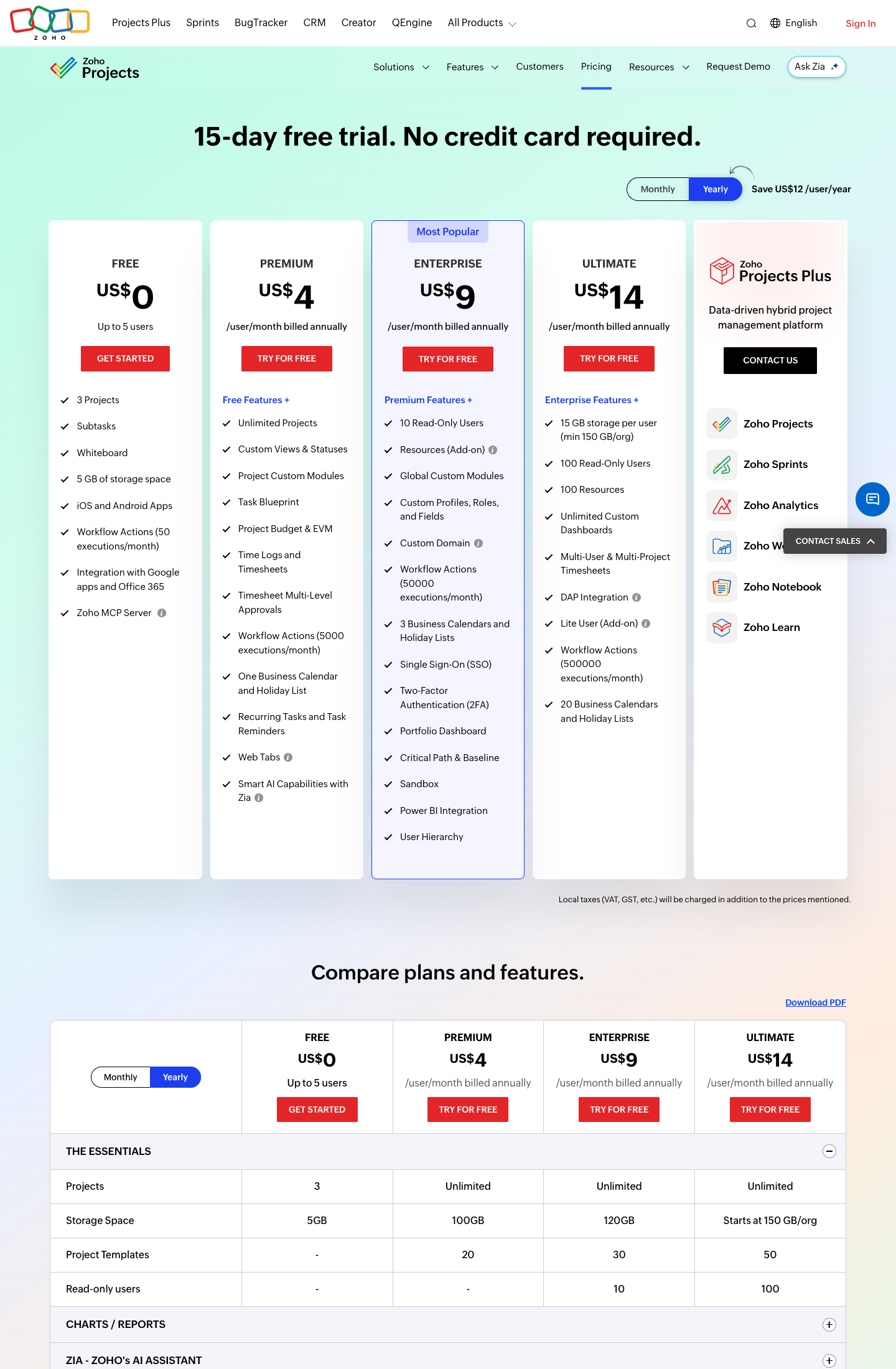
Zoho Projects is where many accounting firms actually run their work, because it predates Zoho Practice by years. It is generic project management: tasks, Gantt charts and, on paid plans, time logs and recurring tasks. Its pricing page does not describe client invoicing at all; billing lives in Zoho Books or Zoho Invoice, so time has to cross an app boundary before it becomes an invoice. And the Free plan (up to 5 users, 3 projects) has no time logs. Time Logs and Timesheets arrive on Premium at $4 per user per month billed annually ($5 monthly), Enterprise is $9 ($10 monthly) and Ultimate $14 ($15 monthly). Cheap per seat, but a firm that pays for it is paying for generic project management with a timesheet, not for accounting workflow.
Zoho Books is accounting software: invoices, bills, bank feeds, financial statements, priced per organization from $0 to $240 per month billed annually. If you searched for “Zoho Books alternatives”, you want a different ledger, and those are QuickBooks Online and Xero; that is a bookkeeping decision, not a practice-management one. The tools in this article do not replace Zoho Books. Uku, for example, is not accounting software; it manages the work around the books and syncs clients and invoices with QuickBooks Online, Xero and seven other ledgers. A practice-management system sits beside your accounting software, not instead of it.
Looking for practice management that does the recurring work, the client requests and the time on one task? Uku is built around exactly that. Try it free and see it on your own client list.
How We Curated Our List of Zoho Alternatives
Last checked: September 2026. All prices are what each vendor shows a US firm on its own pricing page (Zoho Practice, Zoho Projects, Zoho Books and the alternatives below). Where a vendor doesn’t publish a price we can stand behind, we say so and link their page. Feature claims come from each product’s own pages and help center, and from using the products; if something a US accounting firm would expect isn’t mentioned anywhere, we say “not mentioned” rather than “doesn’t exist”.
We also used what firms tell us on demo calls. One of them, a 35-person accounting firm in New York, is leaving Zoho and appears in this article without its name. In their words: “Zoho is our CRM and we’re moving away from that, moving into HubSpot… and so I need to replace the Zoho time tracking.” Zoho Books stays for the firm’s own internal books; client books are on QuickBooks Online. What they want from the replacement is three things: task-based document requests through a client portal so deliverables stop going out by email, one system for the recurring monthly and weekly work across several teams, and time tracking tied to the task rather than logged separately. That is a partial migration, and it is the typical shape: nobody rips out Zoho Books to leave Zoho.
The gap those firms mention most often is not Zoho itself but a shared email inbox, so we say where each alternative stands on email, including where Uku doesn’t yet. Firms leaving Zoho typically need:
- Recurring accounting work with deadlines, document requests and time on the same task
- A client portal that is not gated to the top plan
- QuickBooks Online or Xero sync, because that is where client books live
- Per-user pricing with no 5-user cap
- Firm-wide email triage, if that is the pain
- IRS transcripts and notices, if the firm does US tax work
1. Uku: Best Alternative for Recurring Work, Client Requests and Time on One Task
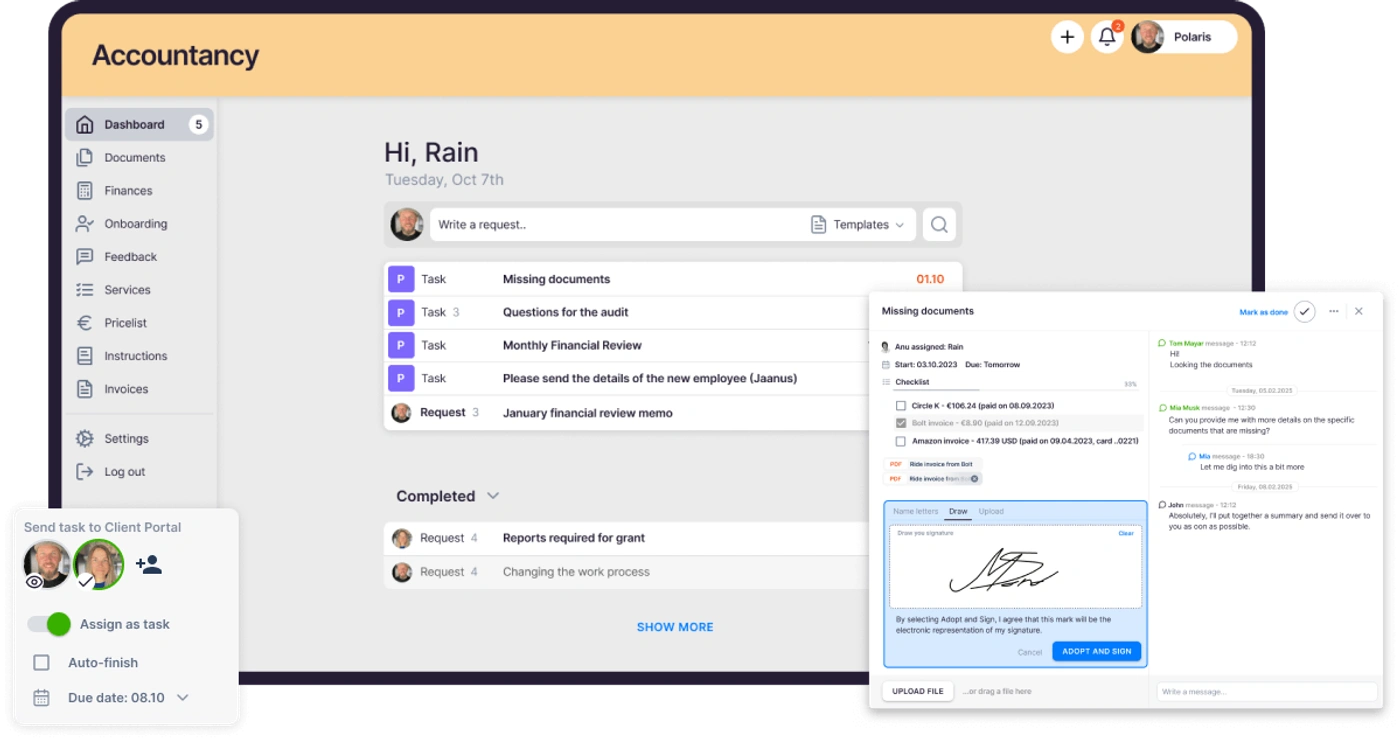
Uku is accounting practice management software built around recurring client work: task templates that generate the month’s work, a client portal where document requests live on the task, a timer on the same task, and invoices that draft themselves from tracked time and contracts. It serves 1,000+ accounting firms across 25+ countries, in 12 languages, with USD, EUR and GBP billing, built for US and European firms alike.
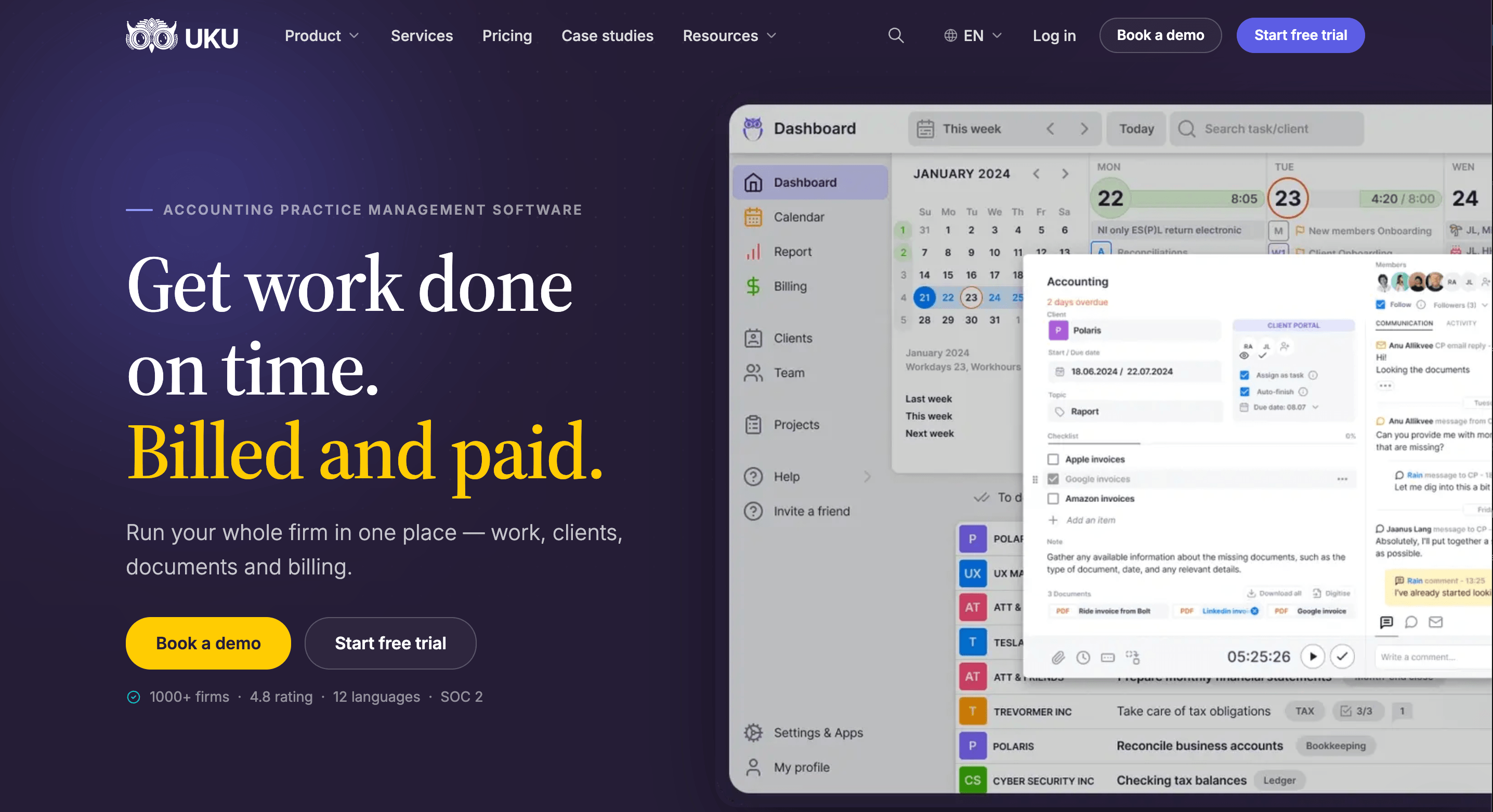
Its key capabilities include:
- Recurring work as workflow, not a repeater. Workflow automation creates each period’s tasks from templates with dependencies, routes them to the right person and moves deadlines around weekends and days off.
- Task-based document requests. The client portal is passwordless (magic links); a request for a bank statement is a task the client sees, uploads to, and that closes when the file arrives. Deliverables stop going out by email.
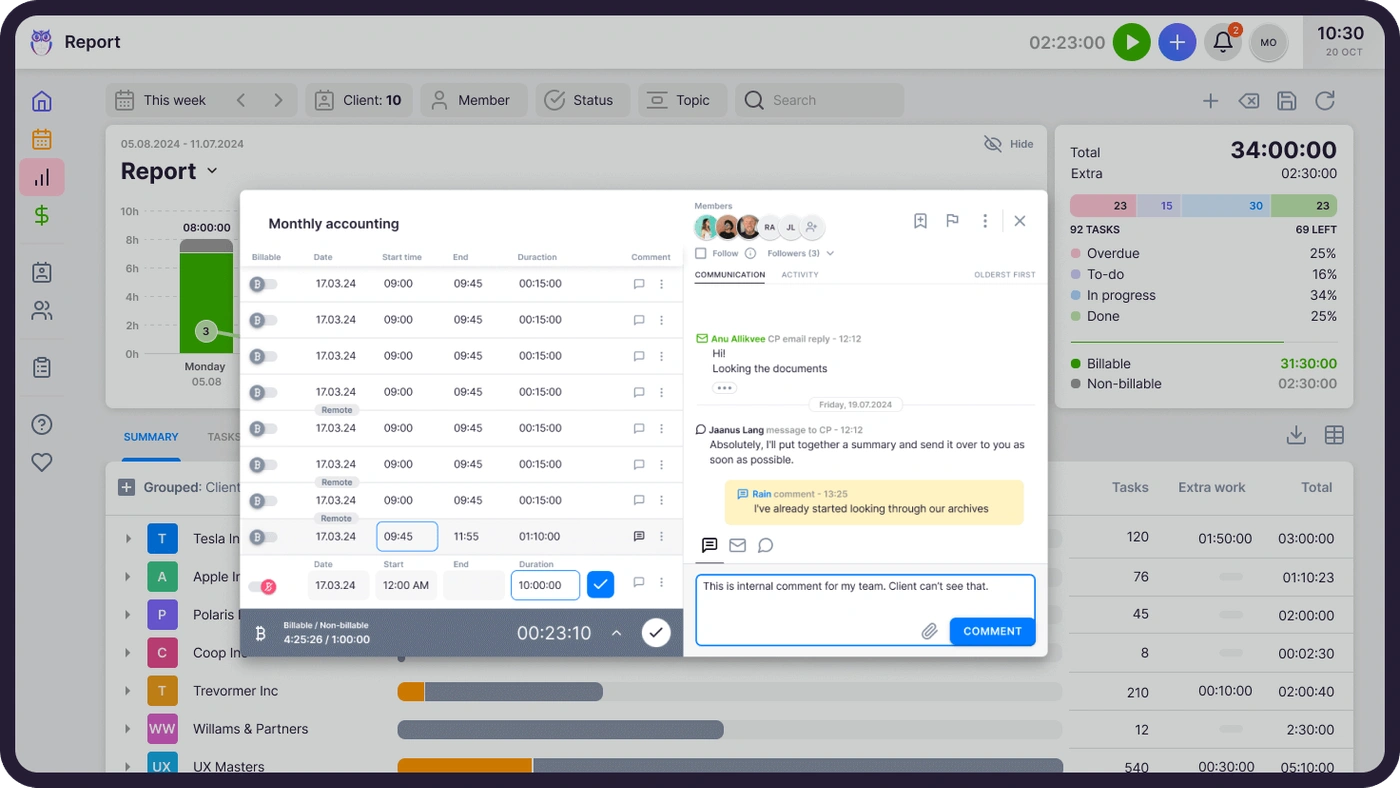
- Time tracking on the task. A stopwatch, manual and bulk entry, billable and non-billable, all attached to the client and task, so the time tracking feeds billing without a second app.
- Automated billing. Time-based, fixed, volume-based and recurring contracts generate invoices in automated billing and export them to your ledger.
- Integrations. QuickBooks Online, Xero, e-conomic, Fortnox and others for client and invoice sync. Zapier and a public API on Elite.
- Email. Uku sends automated emails from task events, with templates and a per-client communication timeline, and connects Gmail and Outlook. A shared team inbox with email-to-task is in development, targeted for the end of 2026. If that is your first requirement today, read the Karbon entry.

Why choose Uku over Zoho
The three things the US accounting firm asked for are the three things Uku is built around: one system for recurring monthly and weekly work across teams, document requests on the task through a client portal, and time on the same task. Zoho Practice has the pieces on Premium and stops at 5 users; Uku includes the client portal and time tracking on every plan, has no user cap above Solo, and syncs with QuickBooks Online, which Zoho Practice’s pages do not name. Where Zoho’s client view is a Zoho Books ledger, Uku’s client view is the work: what is due, who has it, what the client still owes you, and how many hours it took.
For a firm on Zoho Projects, the difference is that time and tasks stop being two things. In Zoho Projects the timer is a timesheet and the invoice is in another app; in Uku the timer runs on the task that came from the recurring template, and the hours land on the client’s invoice draft.
“Uku keeps our team organized and all client work in one secure place — no more scattered desktops or chasing updates from colleagues.”

Uku pricing
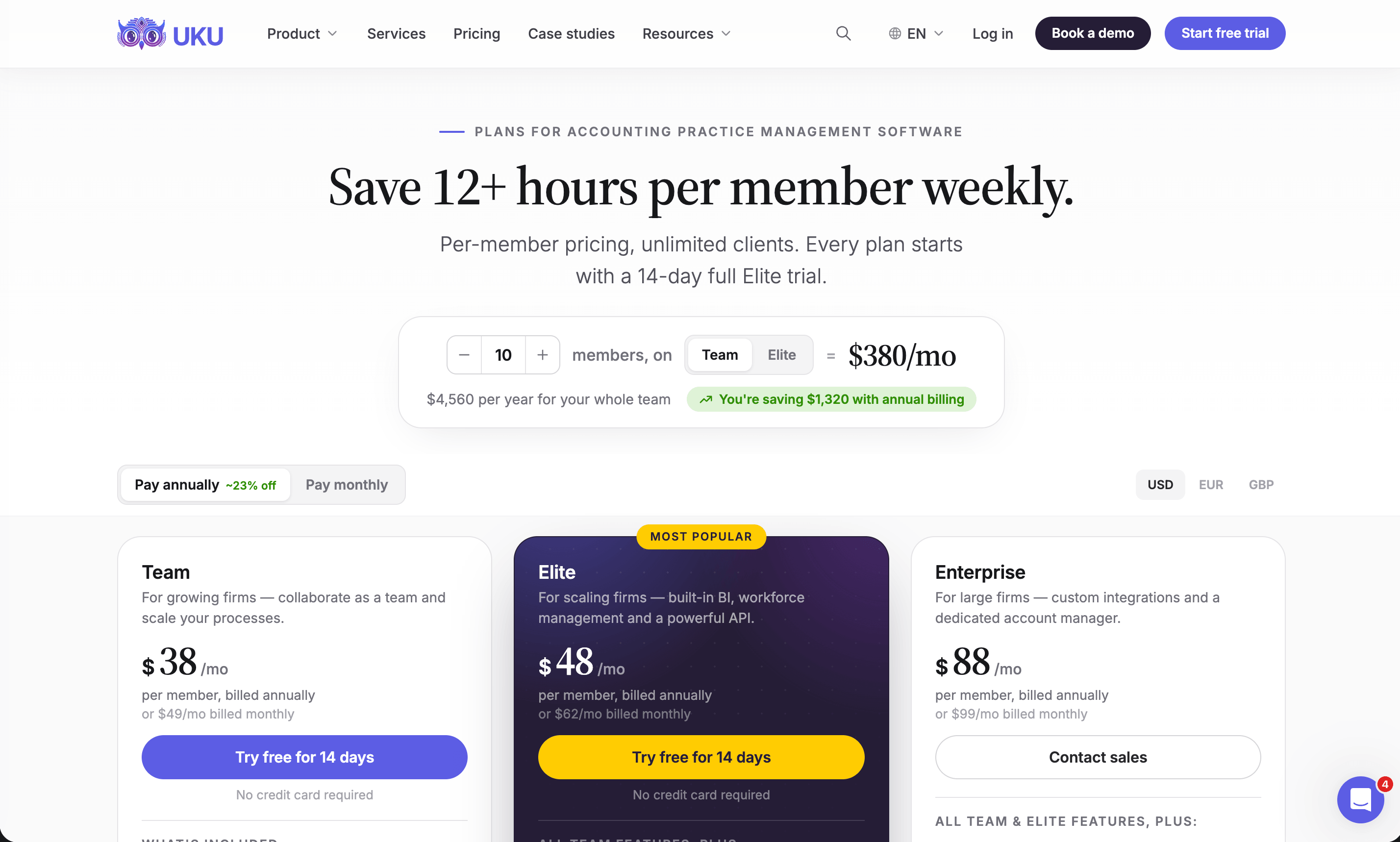
Per member per month, billed annually, from Uku’s US pricing page: Solo $19 (1 member, 20 active clients; $25 monthly), Team $38 (unlimited members and clients, client portal, billing, integrations; $49 monthly), Elite $48 (adds BI Analytics, workforce management, API, Zapier, e-signatures; $62 monthly), Enterprise $88 (custom integrations, assisted client import, dedicated account manager; $99 monthly). Every plan starts with a 14-day trial of Elite, no card, and 90 minutes of onboarding. A 35-person firm on Team pays $1,330 per month with no user cap; both Zoho Practice plans are priced for up to 5 users.
Who should use Uku?
Choose Uku if: your work is recurring bookkeeping, payroll and monthly close for a firm of 5 to 50; your clients are on QuickBooks Online or Xero; and you want the portal, time tracking and billing in one place at a per-member price. Not the first choice if firm-wide email triage is your number-one requirement this quarter (Karbon), or if IRS transcripts and notices are your business (Canopy, TaxDome). Reviews: G2 and Capterra. Book a demo to see it on your own client list.
2. Financial Cents: Best Alternative for Small QuickBooks Online Firms on a Budget
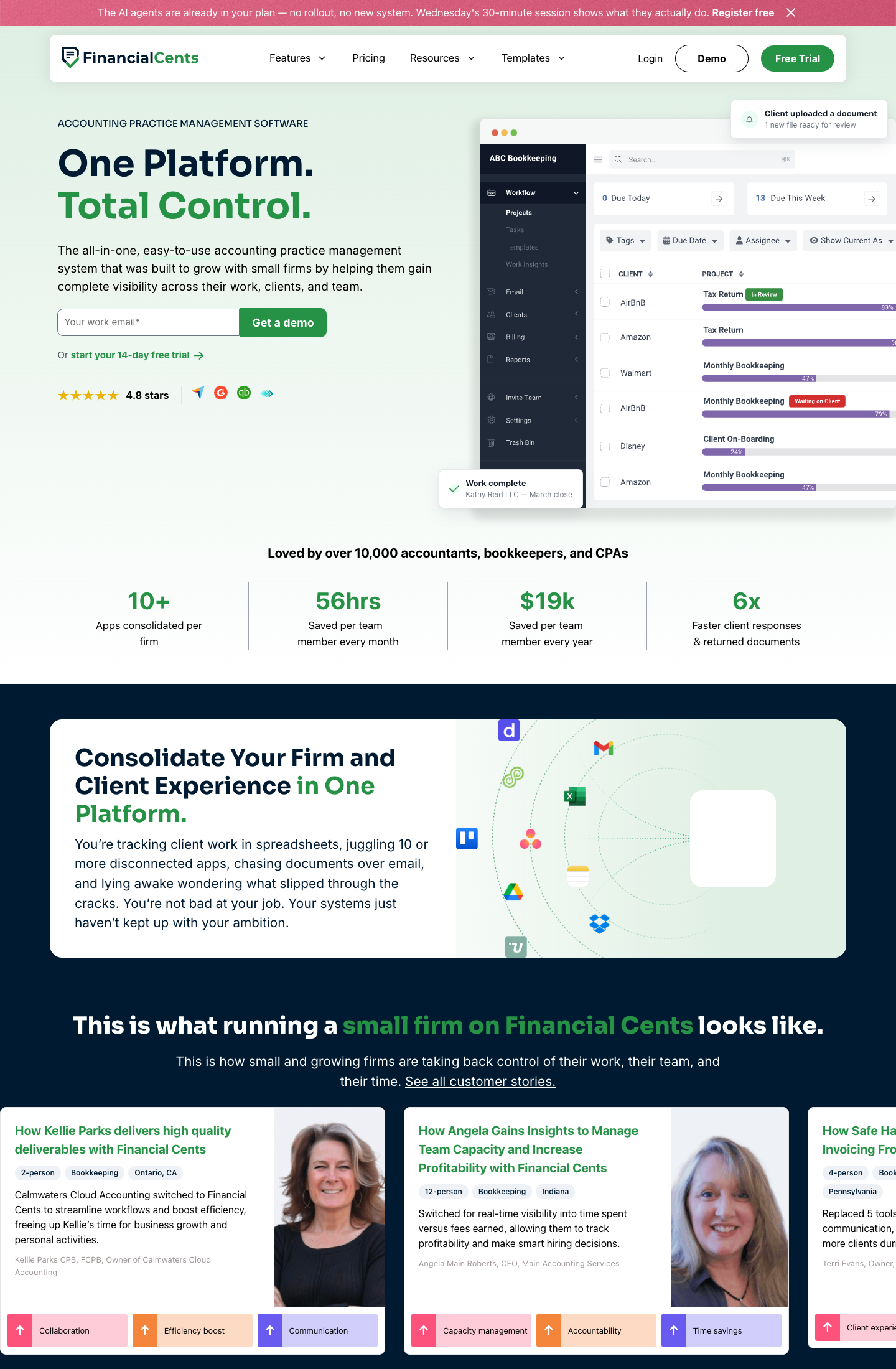
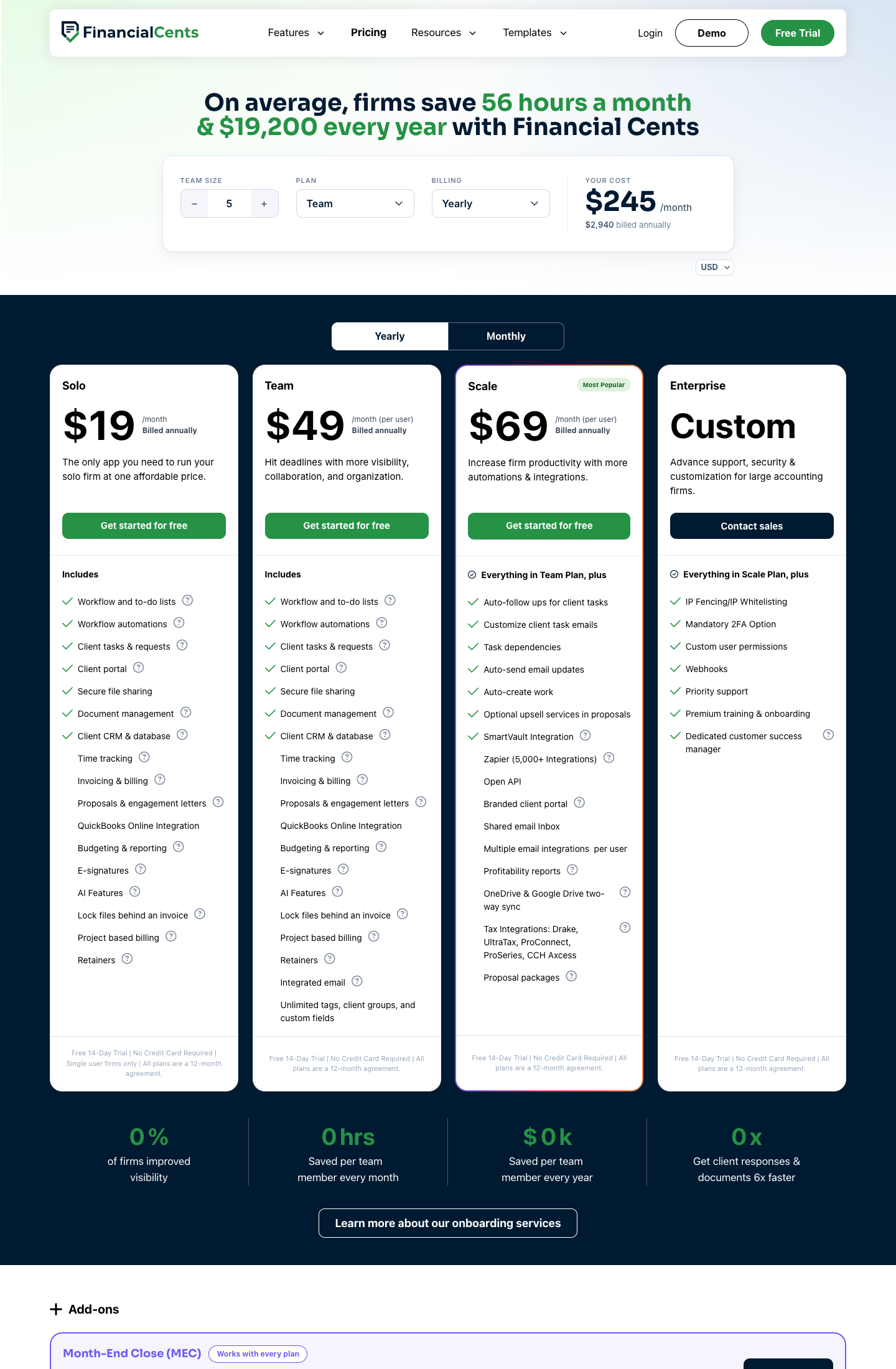
Financial Cents is workflow software for small and growing bookkeeping and accounting firms in North America. Its homepage names the things a Zoho Projects user is missing: “Recurring engagements run on autopilot. Tasks assign themselves. Due dates roll forward”, a “one-click timer linked to the task you’re working on”, a “branded client portal with secure file uploads and e-signature”, and “Native QuickBooks Online sync”. Invoicing with ACH and card payments is included. Canadian firms can choose Canadian data residency.
Its key capabilities include:
- Recurring engagements and rolling due dates on every plan, including Solo, with workflow automations and to-do lists
- Client tasks and requests plus a client portal on every plan; the branded portal and shared email inbox are on Scale
- Time tracking, invoicing and billing, proposals and engagement letters on Solo and Team, so the timer and the invoice live in the same tool
- QuickBooks Online integration as a listed feature on every plan, with tax integrations (Drake, UltraTax, ProConnect, ProSeries, CCH Axcess) on Scale
- Task dependencies, auto-created work and auto-follow-ups for client tasks on Scale
Why choose Financial Cents over Zoho
Zoho Practice Standard gives you a task list and a timesheet for $49 per organization and no portal; Financial Cents gives a single-user firm the portal, recurring work and QuickBooks Online sync for $19 a month and a team the same per user. It is the cheapest way on this list to get the three things the US accounting firm asked for, provided your clients are on QuickBooks Online and your firm is small. The trade-off is depth: Financial Cents has no BI-style profitability analytics on the lower plans and no multi-currency, multi-language setup, which matters if you serve clients outside the US and Canada.
For a firm on Zoho Projects, the switch is like-for-like on the model and different on what the seat buys: Zoho Projects Premium at $4 per user gives you a timesheet, Financial Cents Team at $49 per user gives you the timer on the task, the invoice with ACH and card payment and the client request in the same tool. Zoho Projects Free had no time logs at all, so a firm that “tracked time for free” was not tracking it in Zoho Projects.
Financial Cents pricing
From the Financial Cents pricing page: Solo $19 per month (annual only, single-user firms), Team $49 per user per month annual ($69 monthly), Scale $69 annual ($89 monthly), Enterprise custom. Monthly billing on Team and Scale carries a 5-user minimum. Month-end close is a $5 per client per month add-on.
Who should use Financial Cents?
Choose Financial Cents if: you are 1 to 15 people, on QuickBooks Online, in the US or Canada, and price comes first. Reviews: G2 and Capterra. See also our Financial Cents alternatives.
3. Karbon: Best Alternative for Firm-Wide Email Triage
Karbon is practice management for larger, distributed accounting teams, and the product that owns the email problem. Its Triage connects Gmail or Outlook so that “client email stops living in individual inboxes and becomes something the whole firm can see and act on”; Shared Triage lets a team “work together in a shared inbox like info@ or tax@”, and any email can be turned “into a task, attach it to a client or job, or start a new project, without leaving Triage”.
Its key capabilities include:
- Triage and Shared Triage that turn firm email into work items with a client and a job attached
- Workflow automation with work templates (40 on Team, 75 on Business), automatic client reminders and task automation
- Client portal, time tracking and budget reporting, billing and engagements included on every plan
- Document management and e-signature, the latter sold in bundles
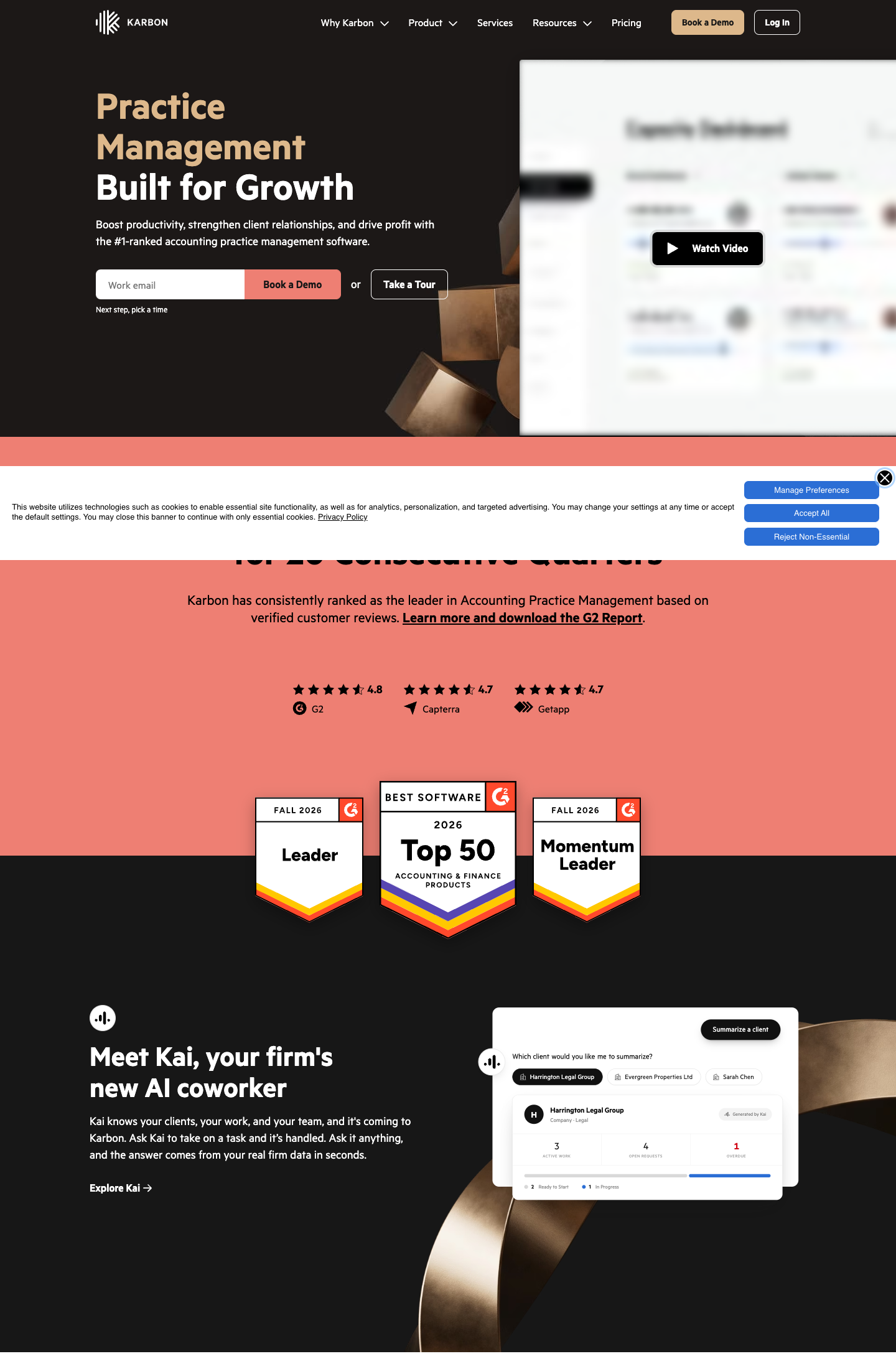
- Kai, Karbon’s AI coworker, which summarizes a client’s active work, open requests and overdue items from firm data
Why choose Karbon over Zoho
If the reason you are leaving Zoho is that client email is scattered and you want it triaged into work by the whole team, Karbon does that today and it is the thing Uku does not have yet. Karbon is also built for the team sizes Zoho Practice cannot serve: 20, 50, 200 people across offices, where Zoho Practice stops at 5 users per organization. The cost is implementation time and a per-user price that starts above Uku’s Team and Elite plans; our Karbon review covers the setup effort in detail.
Karbon also includes the client portal, time tracking, budget reporting and billing on every plan, so the email layer is not bolted on to a workflow tool, and Kai summarises a client’s open requests and overdue items from the firm’s own data. What it does not do is the ledger-health view Zoho Practice draws from Zoho Books; that stays in whichever accounting software your clients use.
Karbon pricing
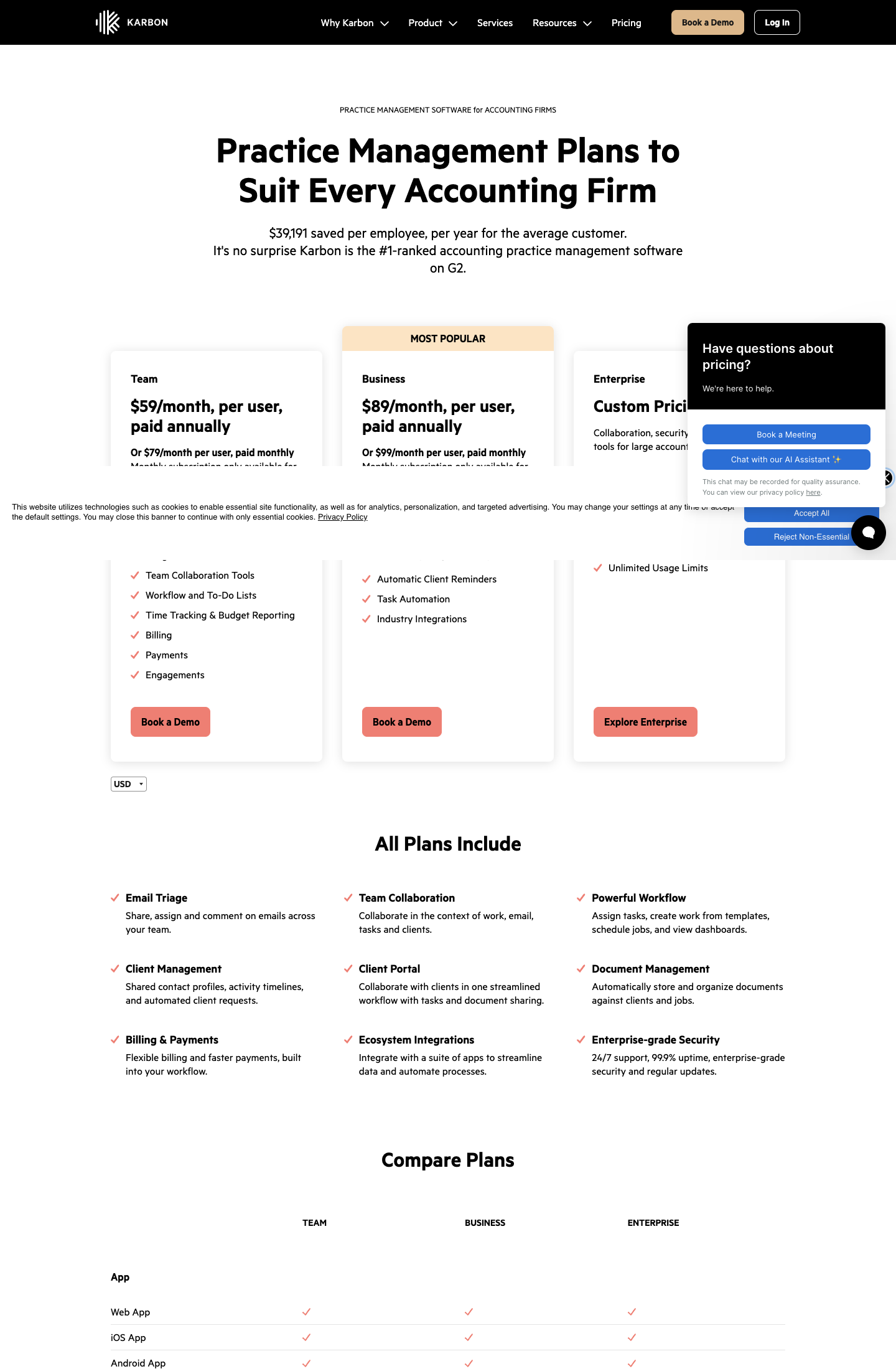
From the Karbon pricing page: Team $59 per user per month annual ($79 monthly; 40 work templates, 1,000 contacts, 3 teams), Business $89 annual ($99 monthly; 75 templates, unlimited contacts, 10 teams), Enterprise custom. E-signatures are sold in bundles from $100 per 100. No seat minimum is stated, but the product is sized for teams.
Who should use Karbon?
Choose Karbon if: you are 20 to 200 people, distributed, and email-first. Reviews: Capterra. See also our Karbon alternatives.
4. TaxDome: Best Alternative for an All-Inclusive Tax-Firm Suite
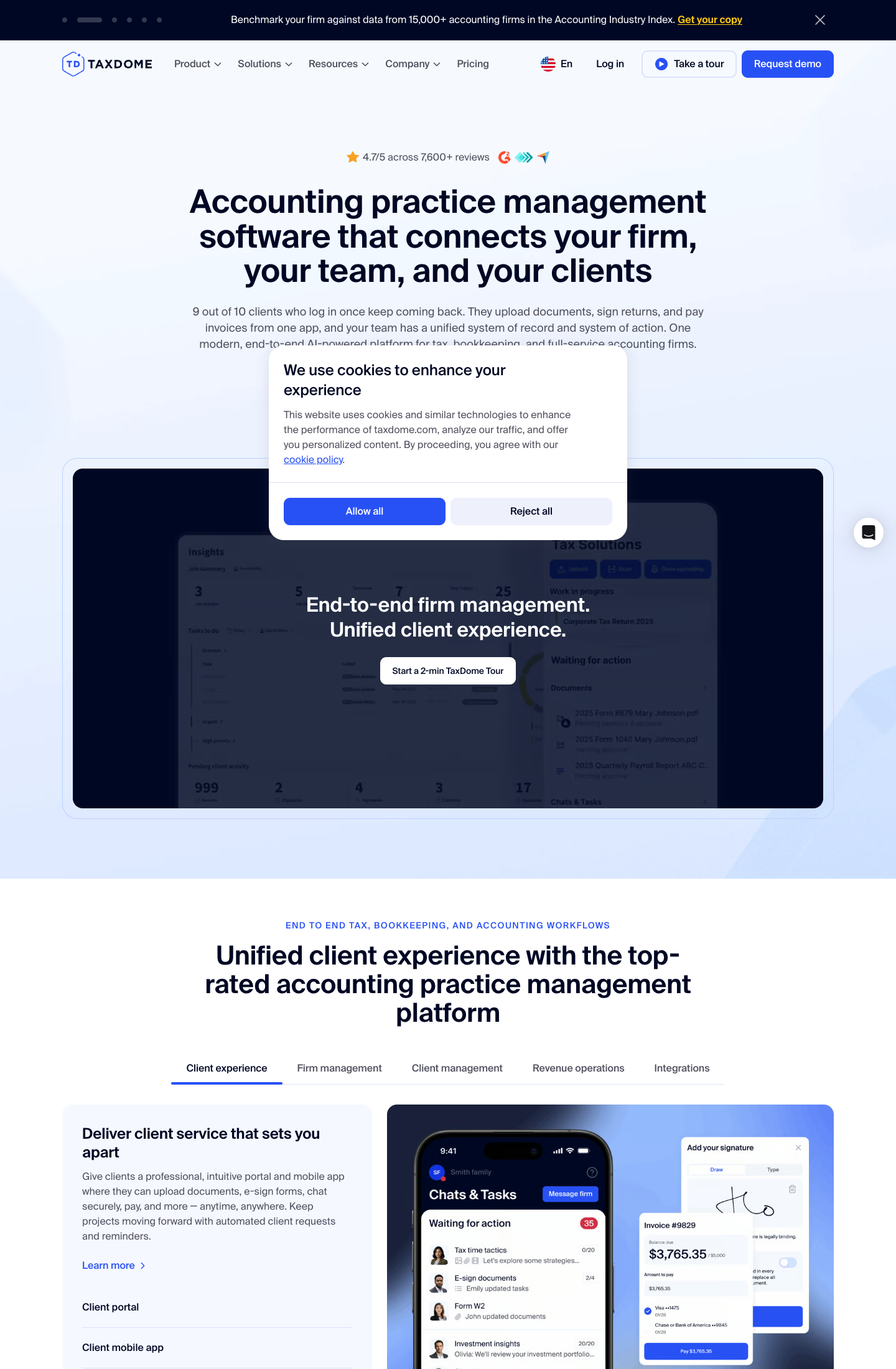
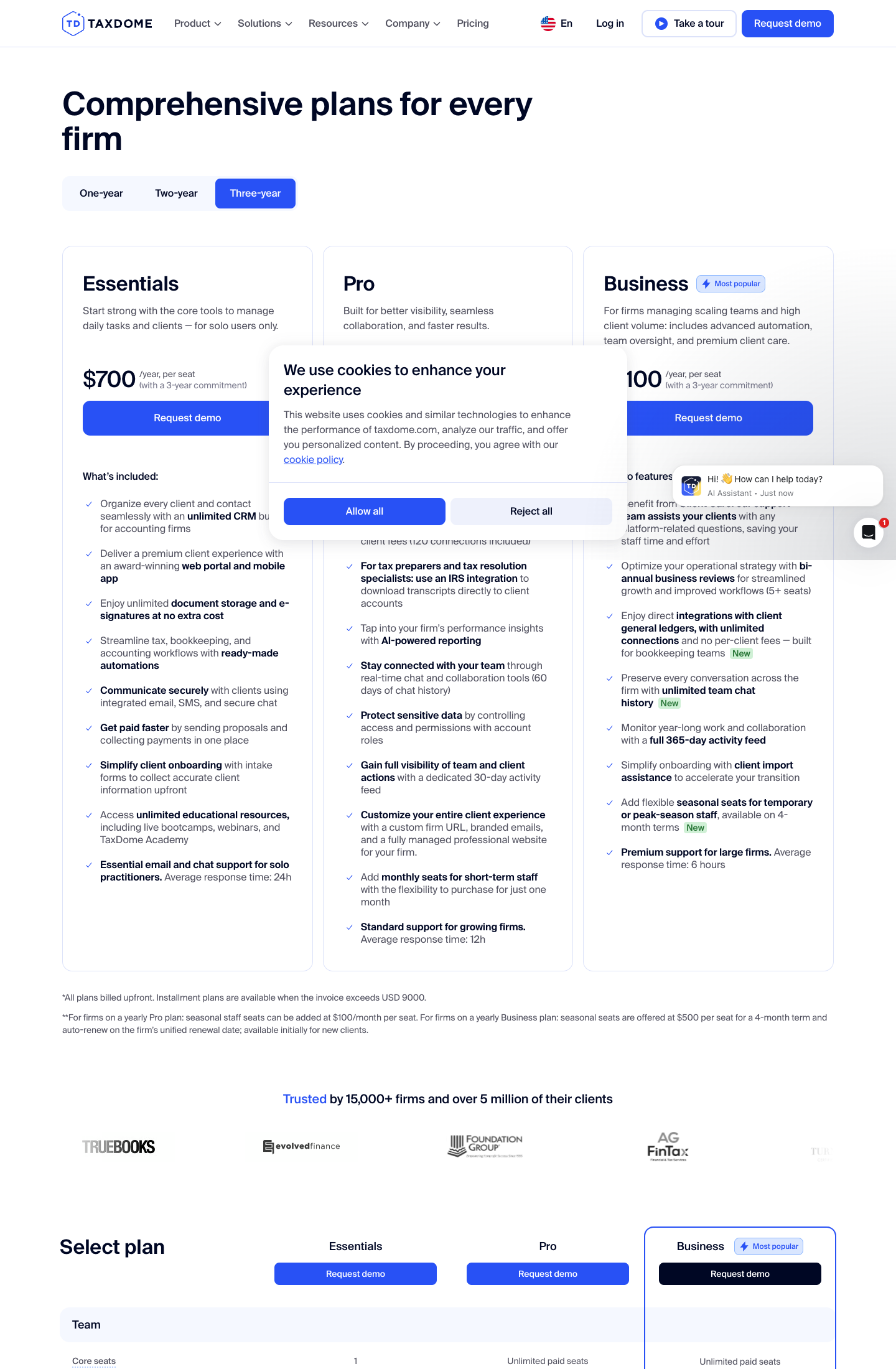
TaxDome is an all-in-one suite for tax, bookkeeping and accounting firms: CRM, client portal and mobile app, unlimited document storage and e-signatures, workflow automations, integrated email, SMS and secure chat, proposals and payments, intake forms. On Pro and above it adds direct integrations with client general ledgers with no per-client fees, an IRS integration to download transcripts into client accounts, and AI reporting. That feature list comes from TaxDome’s own pricing page.
Its key capabilities include:
- Client portal and mobile app on every plan, where clients upload documents, sign and pay
- Unlimited document storage and e-signatures at no extra cost, on Essentials too
- Ready-made workflow automations for tax, bookkeeping and accounting pipelines
- Integrated email, SMS and secure chat with clients, and 60 days of team chat history on Pro (unlimited on Business)
- IRS transcript download into client accounts and direct client general-ledger integrations on Pro and above
Why choose TaxDome over Zoho
Zoho Practice’s e-signature runs through a Zoho Sign integration and its client portal is Premium-only; TaxDome includes unlimited e-signatures, unlimited storage and the portal on its cheapest plan. For a US tax firm the IRS transcript pull alone can justify the switch. The trade-offs are the billing model, annual, upfront, per seat, with the lowest price on a three-year commitment, and a breadth that a bookkeeping-only firm may not use. Our TaxDome alternatives guide goes through both.
On the money, compare a Zoho Practice Premium subscription with TaxDome’s per-seat price: a 5-person firm pays $149 a month for Premium, $1,788 a year, against $5,000 a year for five Pro seats. What the difference buys is the portal on every plan, unlimited e-signatures and storage, the IRS integration, integrated email and SMS with clients, and no 5-user cap.
TaxDome pricing
From the TaxDome pricing page: Essentials $800 per seat per year (solo users only), Pro $1,000, Business $1,200, all on a one-year term, billed upfront. Two- and three-year terms are cheaper: $700, $900 and $1,100 per seat per year on three years. Seasonal seats are $100 per month on Pro or $500 per four-month term on Business.
Who should use TaxDome?
Choose TaxDome if: you are 1 to 100 people, a US tax practice, and you want everything from one vendor and can commit annually. Reviews: Capterra.
5. Jetpack Workflow: Best Alternative for Workflow-Only Firms
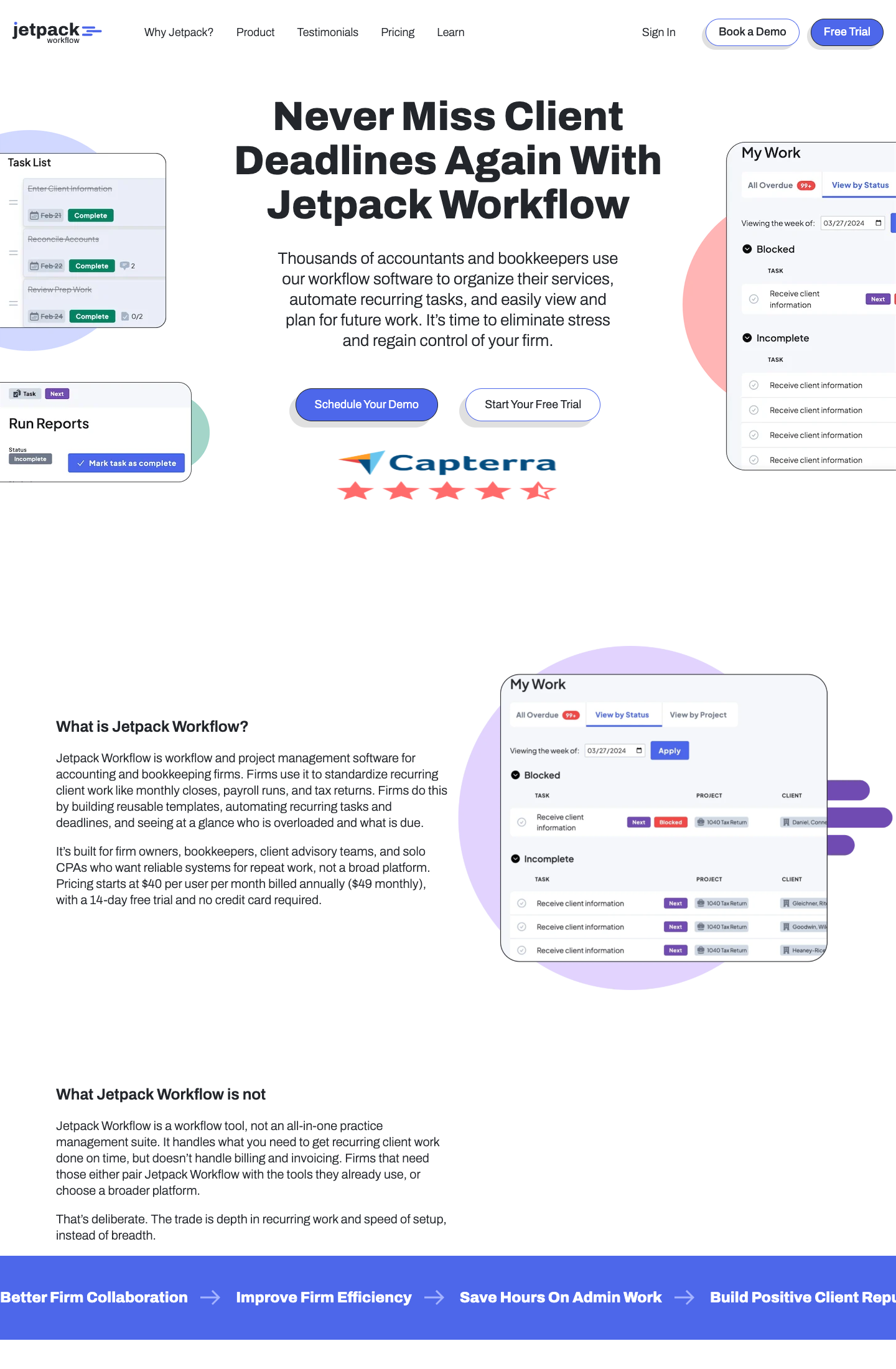
Jetpack Workflow does one job: recurring client work for accountants, CPA firms and bookkeepers. Its homepage promises to “standardize recurring client work like monthly closes, payroll runs, and tax returns” and to build “reusable templates, automating recurring tasks and deadlines”. It is explicit about what it leaves out. Under the heading “What Jetpack Workflow is not”, the homepage says it “doesn’t handle billing and invoicing” and that “the trade is depth in recurring work and speed of setup, instead of breadth”. It does not mention a client portal.
Its key capabilities include:
- Recurring work templates with automated task and deadline creation for monthly closes, payroll runs and tax returns
- A “My Work” view that groups every task by status (Blocked, Incomplete) across projects and clients, with overdue counts
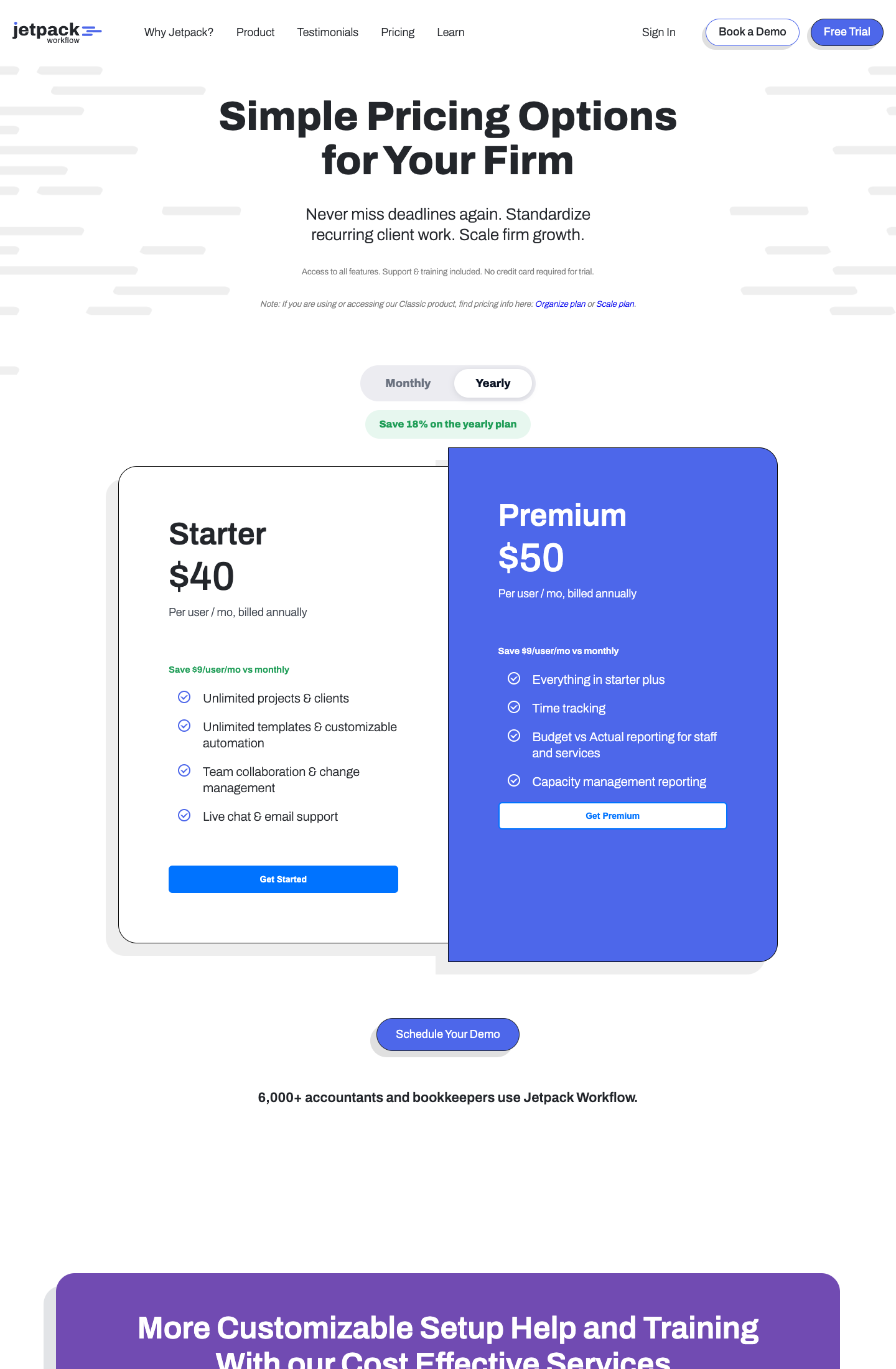
- Unlimited projects, clients and templates on the entry plan
- Time tracking, budget-vs-actual and capacity reporting on the higher plan
- Team collaboration and change management, with live chat and email support
Why choose Jetpack Workflow over Zoho
This is the closest like-for-like replacement for a firm that used Zoho Projects only to track recurring tasks and time. The recurring engine is built for accounting deadlines rather than a generic interval, and there is nothing to configure that you will not use. What you give up is the portal and billing, so document requests still go by email and time still crosses into another tool to become an invoice, which is the Zoho Projects problem in a nicer shape. If the portal is on your list, look at Uku or Financial Cents instead.
The pricing works the way Zoho Projects does, per user, with no 5-user cap. The Premium plan’s budget-vs-actual and capacity reports are the piece Zoho Projects never had for an accounting firm: they show which recurring engagements run over budget and who on the team has room for the next one.
Jetpack Workflow pricing
From the Jetpack Workflow pricing page: Starter $40 per user per month and Premium $50 per user per month, both billed annually (yearly billing saves 18%). Time tracking and the budget and capacity reports are on Premium; every plan includes support, training and a 14-day trial with no card. For a 10-person firm that is $400–$500 a month, against Zoho Practice’s $49–$149 for the whole firm but capped at five users.
Who should use Jetpack Workflow?
Choose Jetpack Workflow if: you are 3 to 30 people, you only need the recurring-work engine, and you bill from your accounting software and do not want a portal. Reviews: G2. See also our Jetpack Workflow alternatives.
6. Client Hub: Best Alternative for Bookkeeping Firms on QuickBooks Online or Xero
Client Hub is practice management for bookkeeping firms, built on a “deep, two-way sync with QuickBooks Online and Xero”. Each client gets a workspace and a mobile app to upload files and answer requests; uncategorized transactions in a monitored QuickBooks account become a question the client answers in the portal, and the answer writes back to the ledger. Around that sit job checklists, month-end close tools, a centralized view of messages and email replies, e-signature and an Autopilot that requests documents on a schedule.
Its key capabilities include:
- Two-way QuickBooks Online and Xero sync that raises an item in the client workspace for every new uncategorized transaction in a monitored account
- Client workspace and mobile app where clients answer questions, upload files and pick an expense account when asked
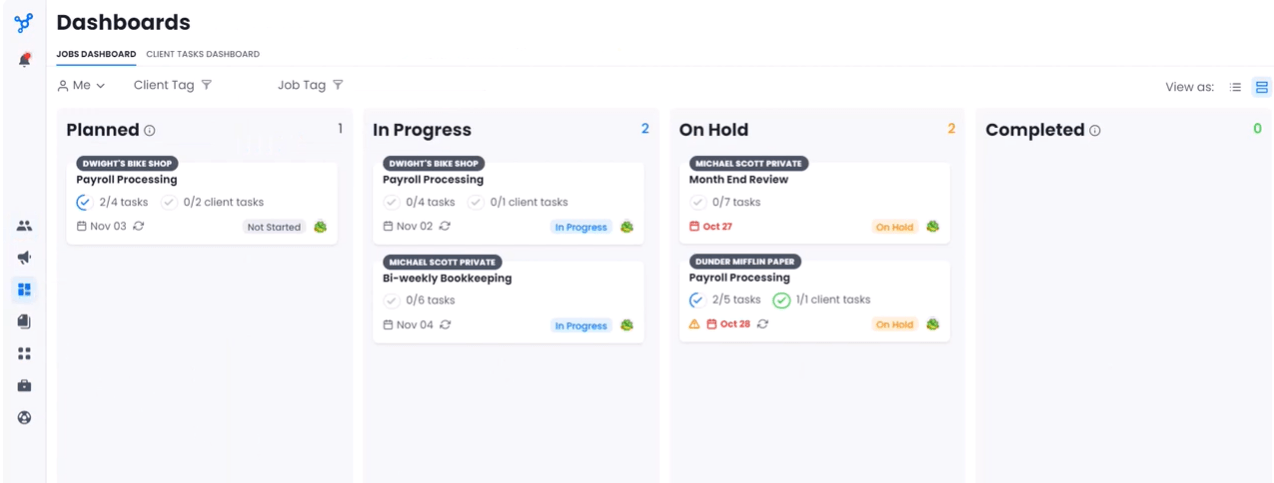
- Jobs with task and client-task checklists on a Kanban or list dashboard, with recurring payroll and bookkeeping jobs
- Month-end close tools and books review for the bookkeeping cycle
- Autopilot document requests, conversations and email replies in one client-facing thread
Why choose Client Hub over Zoho
Zoho Practice’s client overview is a Zoho Books ledger view; Client Hub’s is a QuickBooks Online or Xero ledger view, with the clean-up loop pointed at the client. If your clients are on QuickBooks Online, that is the same idea in the ledger you actually use, and the client answers the question in an app instead of an email thread. The limits are the audience, bookkeeping rather than tax or advisory, and the absence of native billing, which stays in your ledger.
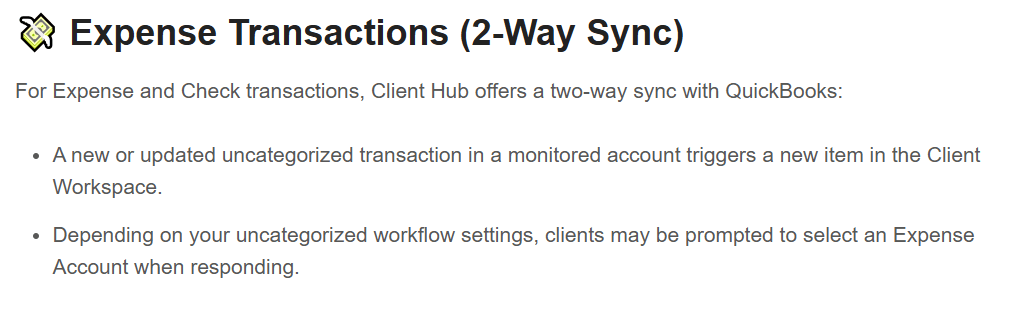
Client Hub also covers the client-facing side that Zoho Practice gates to Premium: the client workspace and mobile app are where every client answers questions and uploads files, and Autopilot requests documents on a schedule so nobody chases by email. Job checklists and recurring payroll and bookkeeping jobs cover the recurring work, and e-signature is included.
Client Hub pricing
Quote-based for the purposes of this article; see the Client Hub pricing page for current numbers. We have not verified a price on their page recently enough to print one. Billing stays in your ledger either way, since Client Hub has no native invoicing.
Who should use Client Hub?
Choose Client Hub if: you are 1 to 20 people, a bookkeeping firm on QuickBooks Online or Xero, and month-end close is the core service. Reviews: G2. See also our Client Hub alternatives.
7. Canopy: Best Alternative for US Tax Firms with IRS Work
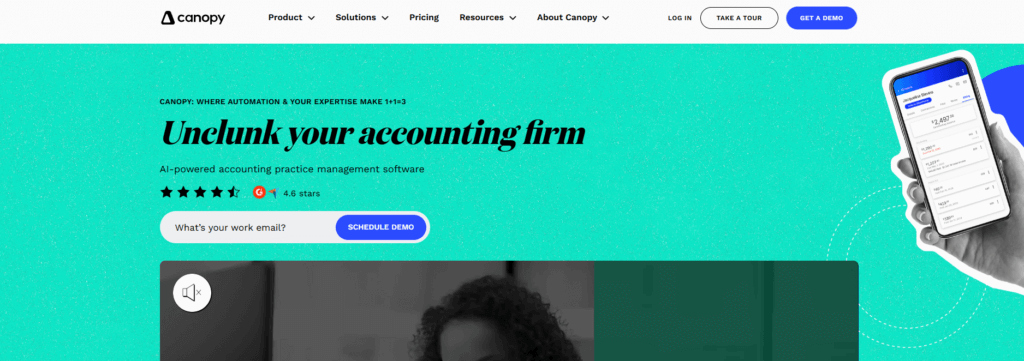
Canopy is practice management for US accounting and tax firms that puts client portal, engagements, CRM, documents, workflow, time and billing, payments and reporting “under one login”, in its own words, with an AI notetaker and a Coworker AI in beta. Its distinguishing module is Transcripts & Notices: pulling clients’ IRS transcripts and matching IRS notices to the right client record.
Its key capabilities include:
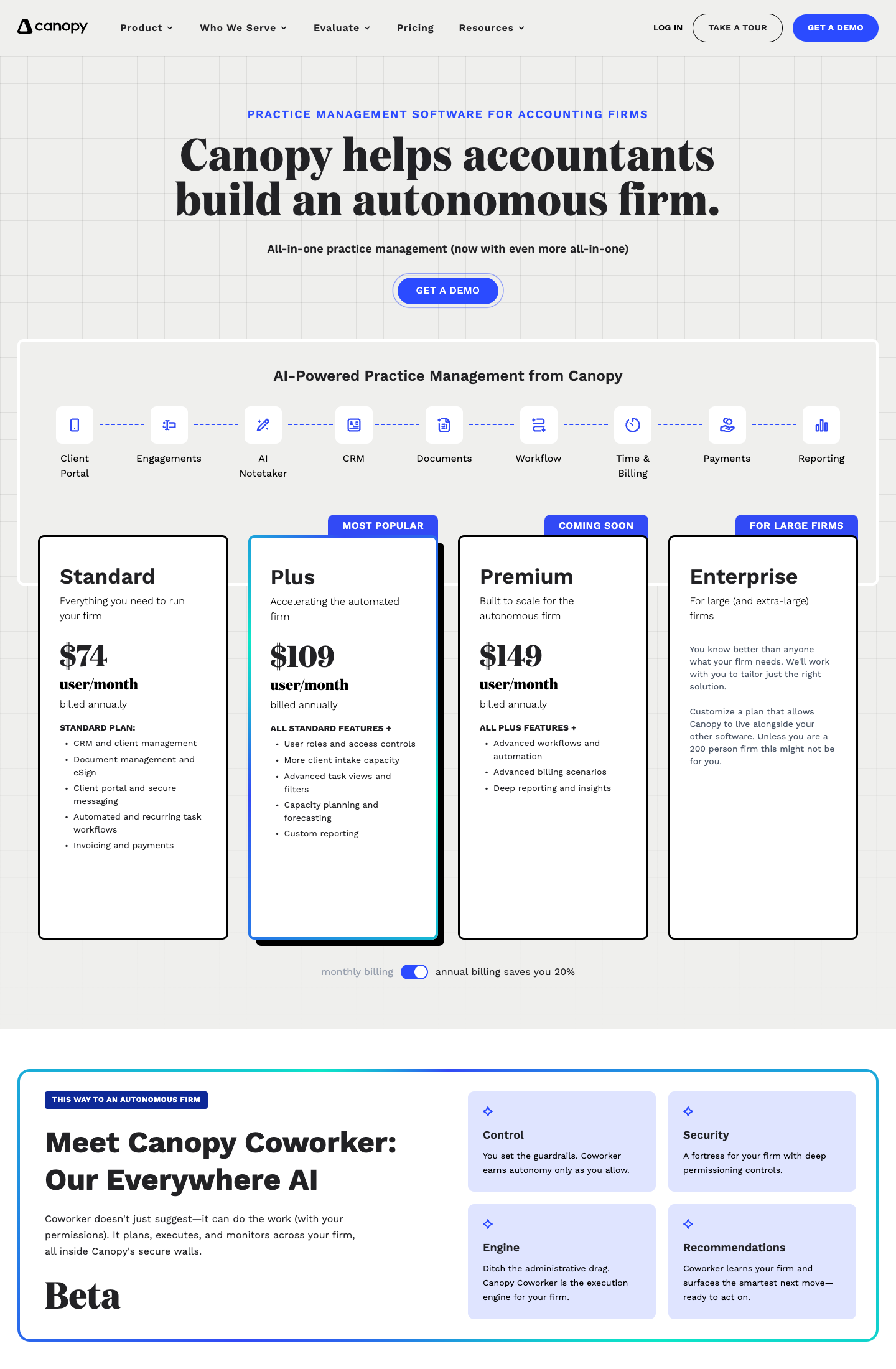
- CRM and client management, document management with eSign, client portal and secure messaging on the Standard plan
- Automated and recurring task workflows, invoicing and payments on Standard; advanced task views, capacity planning and custom reporting on Plus
- IRS transcripts and notices through the Tax Resolution add-on, matched to the client record
- Close Automation for connected client ledgers and Tax Workflow Automation as usage-based add-ons
- Engagements, time and billing and reporting as modules of the same login
Why choose Canopy over Zoho
For a US tax-resolution or tax-heavy firm, Canopy replaces Zoho Practice and adds the IRS side that no Zoho app has. It also has the client portal and billing on the same login from the Standard plan, which Zoho splits between Practice Premium and Zoho Books or Invoice, and it prices per user with no 5-user cap. The trade-offs are the per-seat price, which starts at almost double Uku’s Team plan, the metered add-ons for the tax work that is Canopy’s reason to exist, and a tax-first design that is more than a bookkeeping firm needs. Our Canopy alternatives guide covers the rest.
Canopy also puts CRM, documents with eSign, secure messaging and recurring task workflows on the Standard plan, which is the set a firm spreads across Zoho CRM, Zoho Sign, Zoho Practice and Zoho Projects today. Budget for the add-ons before you compare: Close Automation, Tax Workflow Automation and Tax Resolution are metered on top of the seat price.
Canopy pricing
From the Canopy pricing page, per user per month billed annually: Standard $74 (CRM, documents and eSign, client portal, recurring task workflows, invoicing and payments), Plus $109 (adds user roles, more client intake capacity, advanced task views, capacity planning and custom reporting; marked Most Popular), Premium $149 (advanced workflows, advanced billing scenarios, deep reporting; marked Coming Soon on the page), Enterprise custom, which Canopy itself says is for firms of around 200 people and up. Annual billing saves 20% against monthly. Usage add-ons come on top: Tax Workflow Automation from $34 per client credit, Close Automation at $10 per connected client per month (first five free), Tax Resolution at $50 per user per month, KBA eSignature at $1.25 per credit, and payment processing at 3.30% plus $0.20 per card transaction or 1% for ACH capped at $10.
Who should use Canopy?
Choose Canopy if: you are 5 to 100 people, a US tax and accounting firm, and IRS notices and transcripts are your business. Reviews: G2.
How to Switch from Zoho to Uku
Most firms are live in two to six weeks, at their own pace. The steps don’t have to run back to back; you go at a pace that fits around real client work, and Uku’s onboarding team guides each phase. With the Uku MCP server connected to your AI assistant, the company setup itself can be done in a day.
First, decide what moves and what stays. This is the shape of the US accounting firm’s case and of most partial Zoho migrations:
- Keep Zoho Books. It is your ledger, it works, and nothing in this article replaces it. Keep your clients’ QuickBooks Online files too.
- Move the CRM on its own timeline. HubSpot, or whatever sales tool you chose, is a separate project. The two systems share a client list at most.
- Move time tracking and recurring work together. In a practice-management system they are one thing: the timer runs on the task, the task came from a recurring template, the hours land on the client. Splitting them recreates the Zoho Projects problem.
- Move document requests into the portal at the same time. The request is a task; if you rebuild the recurring work without the portal, you rebuild it twice.
- Do not move billing on day one. Let Uku’s automated billing export invoices into Zoho Books or QuickBooks Online through the integration for the first cycle, and retire the manual step once the numbers match.
Then the four phases:
- Export your data. Clients, contacts and open tasks from Zoho Practice or Zoho Projects as CSV, and time entries for the current month if you bill from them. Uku imports from Excel and syncs the client list straight from QuickBooks Online or Xero; Enterprise includes assisted import.
- Set up your workflow. One template per service (monthly bookkeeping, payroll run, quarterly filing), with the document request and the deadline rule inside it. Uku’s onboarding team helps map the recurring work into templates, so it runs itself from day one.
- Train the team. A free 90-minute onboarding session, booked whenever the team is ready for it. Turn on the QuickBooks Online or Xero sync and brand the portal in the same phase.
- Go live. Send the first document requests from a task so clients learn the new route once, run one cycle in parallel with Zoho, compare hours and invoices, then cancel the Zoho plan you moved off. Keep Zoho Books.
The Final Verdict
Zoho is a suite, and the firms that leave it are not leaving the suite; they are leaving the gap between Zoho Projects, Zoho Practice and Zoho Books where an accounting firm’s recurring work, client requests and hours actually live. Based on the criteria above:
- Uku if you want recurring work, a client portal with task-based document requests and time on the task in one system, with QuickBooks Online and Xero sync, for a firm of 5 to 50, and can wait until the end of 2026 for a shared inbox
- Financial Cents if you are small, on QuickBooks Online and price-first
- Karbon if firm-wide email triage is the first requirement and the team is large
- TaxDome if you are a US tax firm that wants unlimited e-signatures, storage and IRS transcripts in one annual contract
- Jetpack Workflow if you only need the recurring-work engine and bill from your ledger
- Client Hub if you are a bookkeeping firm whose month-end lives in QuickBooks Online or Xero
- Canopy if IRS notices and transcripts are your business
For the wider category, see our best accounting practice management software round-up, and for the product itself, the Zoho Practice review.
Ready to move your recurring work, client requests and time tracking out of Zoho? Start a free 14-day Uku trial with full Elite features, or book a demo and we will walk through it on your own client list. See how other firms did it in our case studies.
Read more
- Zoho Practice Review (2026): the product itself, module by module, with the pricing table and who fits inside the 5-user cap
- Karbon alternatives: if email triage is the first requirement and you are shortlisting around it
- TaxDome alternatives: the all-inclusive tax-firm suites compared
- Financial Cents alternatives: the small-firm, QuickBooks Online-first tools
- Canopy alternatives: the US tax-first platforms and what they cost with add-ons
- Best accounting practice management software: the category overview
Frequently asked questions
What are the best Zoho alternatives for accounting firms in 2026?
For a firm leaving Zoho Practice or Zoho Projects, the seven alternatives worth a demo are Uku (recurring accounting work, client portal and time tracking on tasks, from $19/member/month), Financial Cents (small QuickBooks Online firms, from $19/month), Karbon (shared-inbox Triage for larger teams, from $59/user/month), TaxDome (all-inclusive tax-firm suite, from $800/seat/year), Jetpack Workflow (pure recurring workflow), Client Hub (bookkeeping firms on QuickBooks Online or Xero) and Canopy (US tax firms, from $74/user/month).
What is the difference between Zoho Practice, Zoho Projects and Zoho Books?
Zoho Practice is Zoho's practice-management app for accounting firms (client records, tasks, time tracking, workpapers, a client portal on the Premium plan), priced per organization for up to 5 users. Zoho Projects is generic project management with time logs on paid plans, priced per user. Zoho Books is accounting software, the ledger itself. A firm typically needs one accounting tool for the books and one practice-management tool for the work around them; the alternatives in this article replace Zoho Practice or Zoho Projects, not Zoho Books.
How much does Zoho Practice cost?
On Zoho's US pricing page Zoho Practice Standard costs $49 per organization per month billed annually ($59 monthly) and Premium costs $149 per organization per month billed annually ($179 monthly). Both plans cover up to 5 users. Zoho partners get Practice free. Paid plans are sold in 11 countries; elsewhere only the partner plan is shown.
What is the best Zoho Projects alternative for accountants?
If you only used Zoho Projects for time tracking and recurring tasks, the closest accounting-specific replacements are Jetpack Workflow (recurring work and deadlines, no billing), Financial Cents (recurring work plus a client portal and QuickBooks Online sync) and Uku (recurring work, client portal, time tracking on tasks and automated billing). Zoho Projects' Free plan has no time tracking; the paid plans start at $4 per user per month billed annually.
Can I keep Zoho Books and still switch away from Zoho Practice?
Yes. Zoho Books is accounting software and runs independently of Zoho Practice. A 35-person accounting firm in New York that we spoke with keeps Zoho Books for its own internal books, keeps client books on QuickBooks Online, moved its CRM to HubSpot and is replacing only Zoho time tracking with a practice-management system. The practice-management tools in this list connect to QuickBooks Online and, in most cases, Xero; none of them replace your ledger.
Does Zoho Practice have a client portal?
Only on the Premium plan ($149 per organization per month billed annually). Zoho Practice's pricing page marks the Self-Service Client Portal as unavailable on Standard, and Standard's client management is listed as 'Zoho clients only'. Uku and TaxDome include a client portal on their cheapest plans; Financial Cents, Client Hub and Canopy list one as a core feature.
Does Uku have a shared email inbox like Karbon?
Not yet. Uku sends automated emails from task events and keeps a communication timeline per client, but a shared team inbox with email-to-task is still in development, targeted for the end of 2026. If firm-wide email triage is your first requirement today, Karbon is the stronger choice; if recurring work, a client portal and time tracking on tasks come first, Uku is.
How long does it take to switch from Zoho to a practice-management tool?
Most firms are live in two to six weeks, at their own pace: export clients and open tasks from Zoho Practice or Zoho Projects, import the client list into the new tool, rebuild the recurring work as templates, connect QuickBooks Online or Xero, invite clients to the portal, and run the two systems in parallel for one cycle before cancelling Zoho. With the Uku MCP server connected to your AI assistant, the company setup itself can be done in a day. Uku includes 90 minutes of onboarding on every plan and assisted client import on Enterprise.

Published Sep 20, 2026 · Updated Sep 22, 2026