Zoho Practice Review 2026: Pricing, Features & The Uku Alternative
Zoho Practice review 2026: $49–$149 per org/month for up to 5 users, sold in 11 countries. What it does well, where it falls short, and which firms it fits.


Contents
- What is Zoho Practice?
- Zoho Practice Pros & Cons
- Zoho Practice Review: How it Works & Key Features
- Zoho Practice Pricing (2026)
- Where Zoho Practice Falls Short
- Zoho Practice vs Zoho Projects
- Top Zoho Practice Alternative: Uku
- Zoho Practice or Uku: Comparison Summary
- How to Switch from Zoho Practice to Uku
- Final Verdict
- Read more
Zoho Practice is Zoho’s practice management app for accounting and bookkeeping firms, launched in 2023. It costs $49 per organization per month on the Standard plan and $149 on Premium (billed annually; $59 and $179 monthly), and both plans are capped at 5 users. Zoho partners get it free.
It fits a firm that already runs Zoho Books and Zoho CRM, has five people or fewer, and sits in one of the 11 countries where Zoho sells the paid plans. Its main limits are the user cap, a client portal that only exists on Premium, client management that is “Zoho clients only” on Standard, and no QuickBooks Online or Xero integration named on its pages.
To write this Zoho Practice review, we analysed the platform extensively. We believe it’s the ideal choice if:
- Your firm has five people or fewer and does not expect to grow past that soon
- Your clients’ books are in Zoho Books, so the ledger exceptions land next to the work
- You already run Zoho CRM, Zoho Mail or Zoho Payroll and want practice management inside the same suite
- Audit workpapers or an in-app ledger are part of the service you sell
- You are a Zoho partner, in which case the product is free
However, Zoho Practice might not be the best choice if:
- You have six or more people, or plan to
- Your clients keep their books in QuickBooks Online or Xero
- You need a self-service client portal without paying three times the entry price for Premium
- You want recurring work driven by filing deadlines, with weekend and holiday handling, rather than an interval repeater
- You want the invoice to come out of the same system the hours went into
In that case, consider Uku: accounting practice management software with per-member pricing and no user cap, a client portal on every plan, client workflow templates with deadline rules, time tracking on the task, and automated billing that reduces invoice preparation from days to about 30 minutes, with QuickBooks Online and Xero integrations for the ledgers US clients actually use.
We look at Uku in detail at the end of this review; if you would rather see it on your own client list first, start the 14-day free trial of the full Elite plan, no card needed.
Prices and features below were last checked in September 2026 against Zoho’s pricing page, product page and help center; where a feature a US firm would expect is not mentioned on those pages, we say “not mentioned” rather than “doesn’t exist”.
What is Zoho Practice?
Zoho Practice is the practice management layer of the Zoho suite. Zoho introduced it for “accounting and bookkeeping firms of all sizes, from solo practitioners to growing enterprises”. Zoho Books already had an accountant role that lets one login work across several client organizations; Zoho Practice wraps clients, tasks, time, documents and workpapers around that.
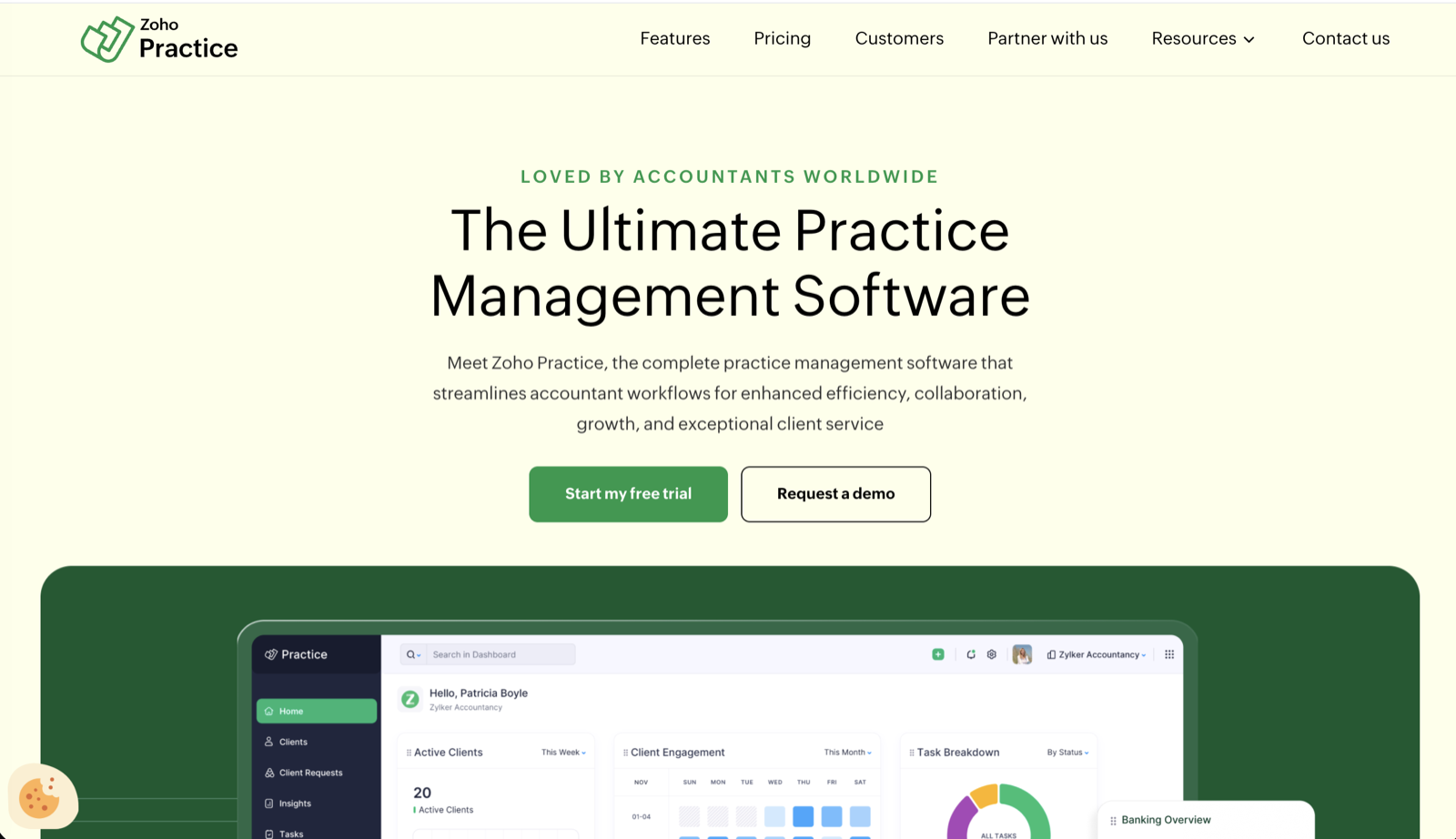
The help center lists the modules a firm gets: Clients, Client Requests, Tasks, Time Tracking, Insights, Operations, Activity Logs, Self-Service Portal, Workpaper, Zoho Ledger, Custom Modules, and a Form 1099 section for US firms. The homepage puts four in the spotlight: Workpaper, Ledger, Client portal, and Customization and Automation.
Two things stand out. First, the product assumes your clients’ books are in Zoho Books: the Ledger module is Zoho Books, and the Standard plan’s client management is “Zoho clients only” on the pricing page. Second, the launch announcement said Zoho Practice was free for firms of up to three users. Today the free plan is only for Zoho partners. Everyone else pays from day 15.
The ideal Zoho Practice customer is a small firm, five people or fewer, whose clients keep their books in Zoho Books and whose own CRM, mail and payroll already sit in the Zoho suite. For that firm, the bookkeeping exceptions and the work land on the same screen, and the whole practice costs less than $10 a seat.
Zoho Practice Pros & Cons
| Pros | Cons |
|---|---|
| ✅ $49/org/month for the whole firm on Standard, under $10 a seat at 5 users | ❌ Both paid plans stop at 5 users |
| ✅ Client overview shows the client’s Zoho Books exceptions next to the work | ❌ Client management on Standard is “Zoho clients only” |
| ✅ Workpaper and Ledger modules for close and audit work | ❌ Self-service client portal only on Premium, at 3× the price |
| ✅ Recurring tasks, timesheets, documents and Zoho Sign on both plans | ❌ No QuickBooks Online or Xero integration named anywhere |
| ✅ Free for Zoho partners | ❌ Recurring tasks are an interval repeater, not a filing-deadline engine |
| ✅ 14-day trial, no sales call | ❌ Paid plans sold in 11 countries only; invoicing happens in Zoho Books |
A small-firm owner who runs their practice on it put both columns in one G2 review (5/5). What they like: “I like how Zoho Practice is easy to use. It provides a lot of insights, especially with its integration with Zoho Books, which helps me see exceptions in accounting for the last month, quarter, or financial year. The setup of Zoho Practice is quite easy and self-explanatory, making its user interface very easy to understand. You can setup recurring tasks, add your own work papers and it also let’s your team track time”. What they do not: “every team member needs to have a different user. So sometimes that becomes difficult especially if there are new interns in the team for a short duration. So if there was a way I can assign tasks or tasks are sent to email IDs without them being actually users in the org, that’ll be a little easier.” The Zoho Books integration is the reason to buy; the user model is the constraint, on a product capped at five seats.
Zoho Practice Review: How it Works & Key Features
This is what each module does, in Zoho’s own terms, and what it does not, with the equivalent screen in Uku next to it where the two products do the same job.
Dashboard and Client Management
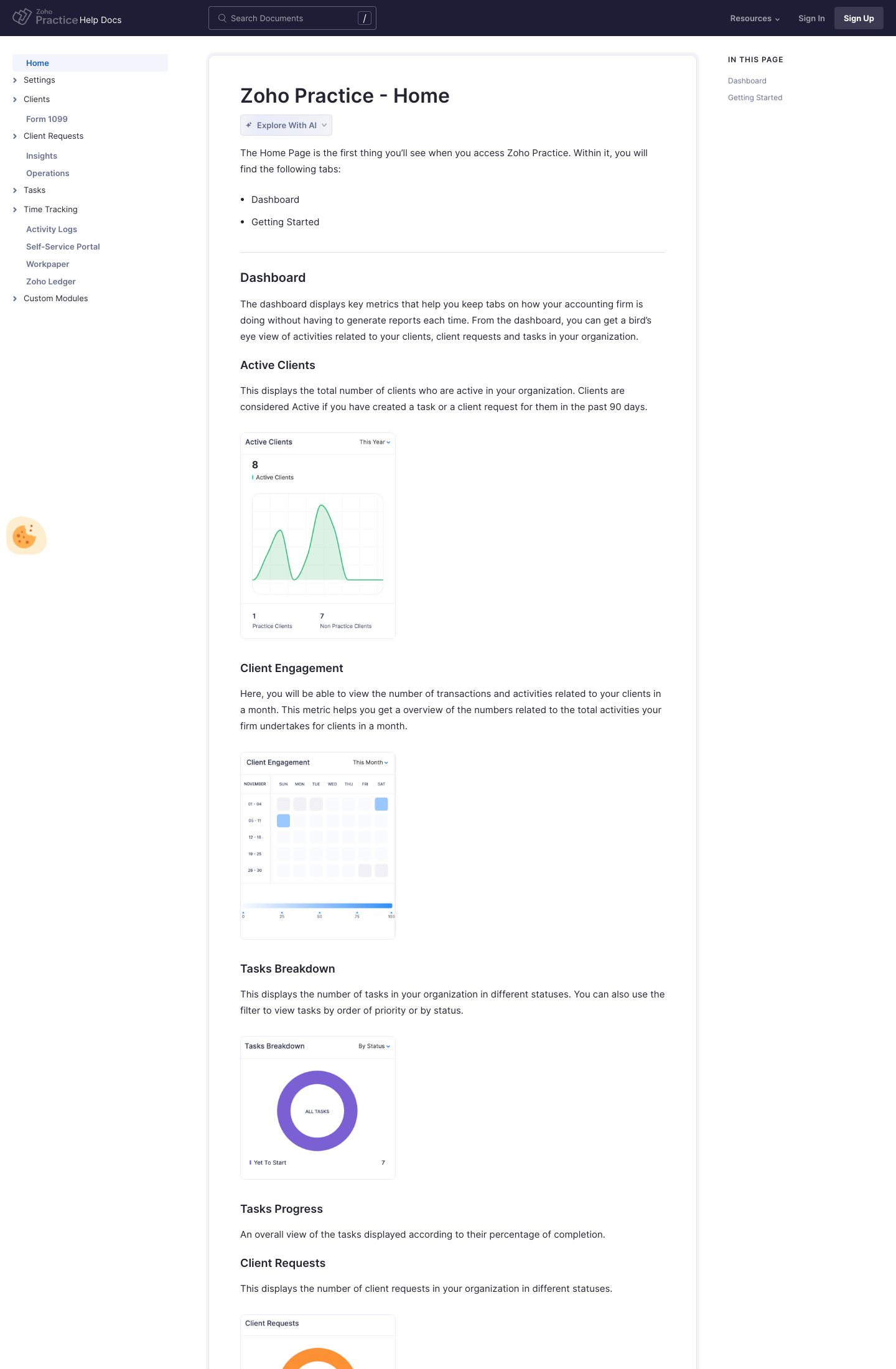
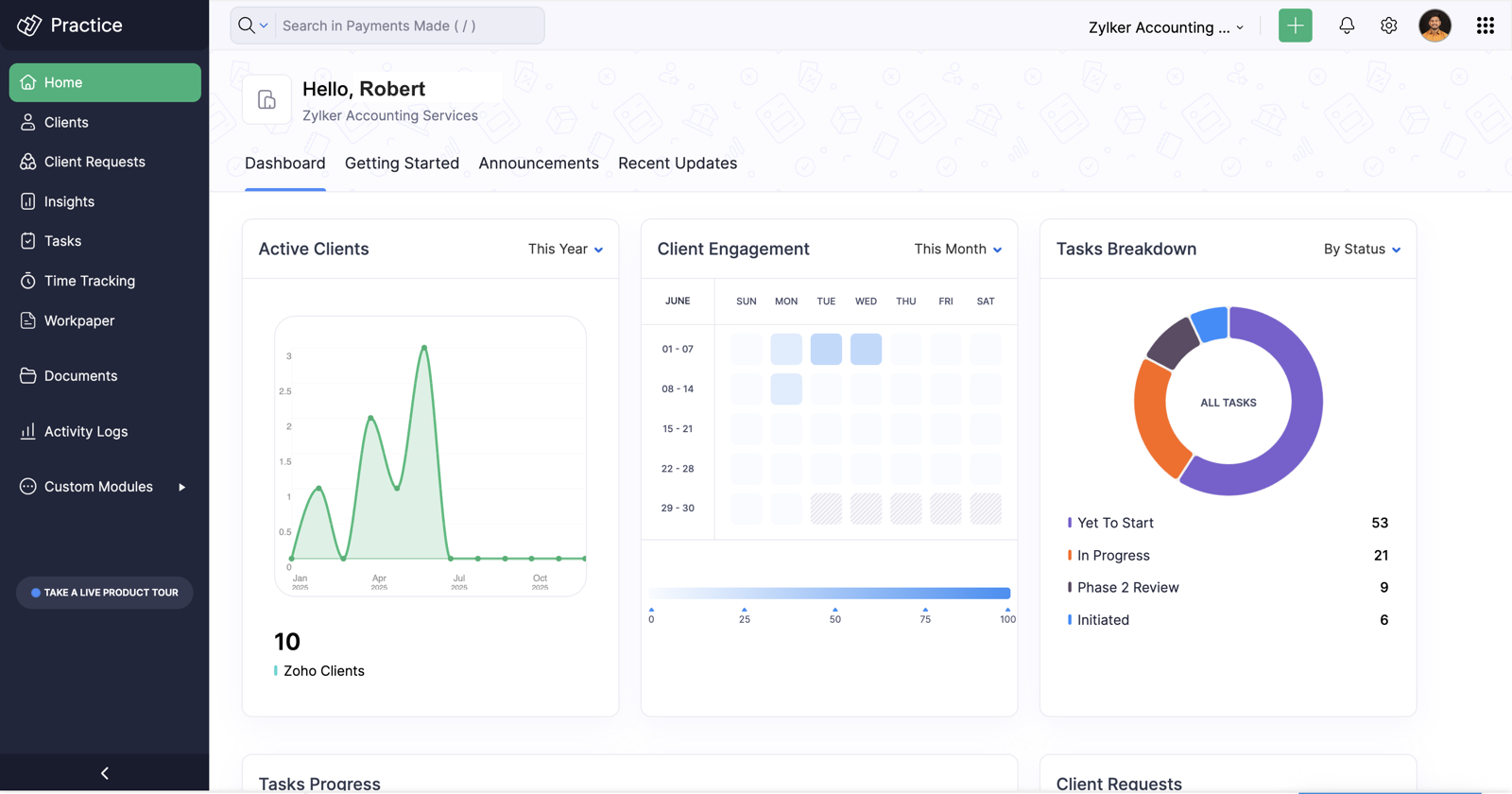
The home dashboard shows Active Clients, Client Engagement, Tasks Breakdown, Task Progress and Client Requests. A detail worth knowing from the help center: a client counts as active only if you have created a task or a client request for them in the past 90 days. The dashboard also splits “Practice Clients” from “Non Practice Clients”, the Zoho Books tenants you manage versus everyone else.
Open a client and the overview is not a CRM card; it is a ledger-health view pulled from that client’s Zoho Books: aged receivables and payables over 45 days, a cash-flow summary, a “Clean Up” list (documents still to attach, a bank statement still to process, unused customer and vendor credits), bank-transaction tabs for disconnected feeds, uncategorized, unreconciled and duplicate items, and General Ledger anomaly alerts. For a firm whose clients are all on Zoho Books, this is the product’s real strength: the bookkeeping exceptions are on the same screen as the work.
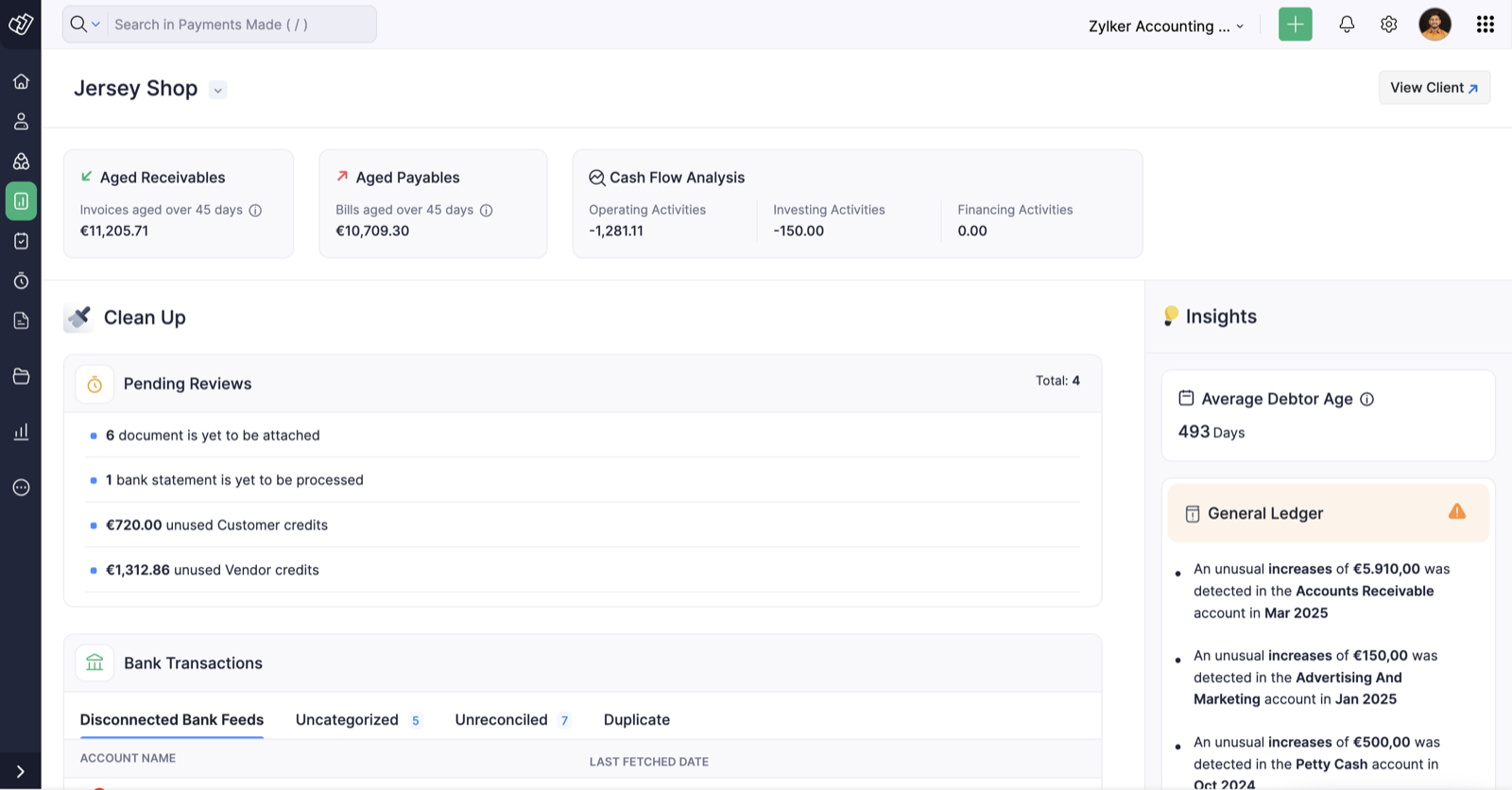
On Standard, as above, that is limited to Zoho clients. Client records also hold profile, tasks, client requests, emails, discussions and documents. Engagement letters are not mentioned as a named feature on any Zoho Practice page; if you need engagement letters generated and signed from the client record, ask Zoho before you buy.
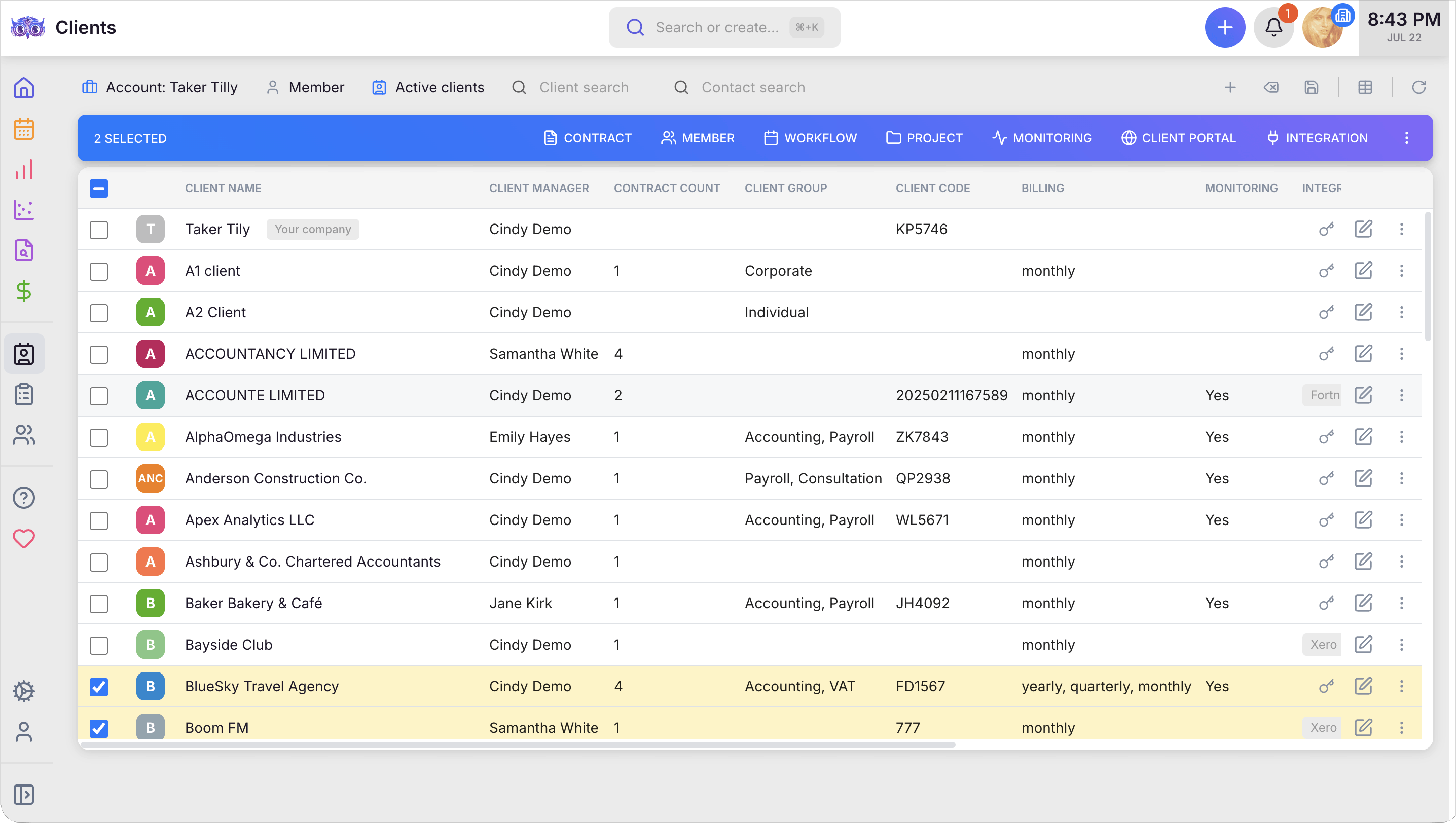
Uku’s client management takes the opposite view: the client list is the firm’s operating record, not the client’s ledger. Each row shows who manages the client, how many billing contracts they have, which services they buy, whether monitoring is on, and which accounting software they are connected to, and you can act on many clients at once from the toolbar.
Tasks and Recurring Tasks
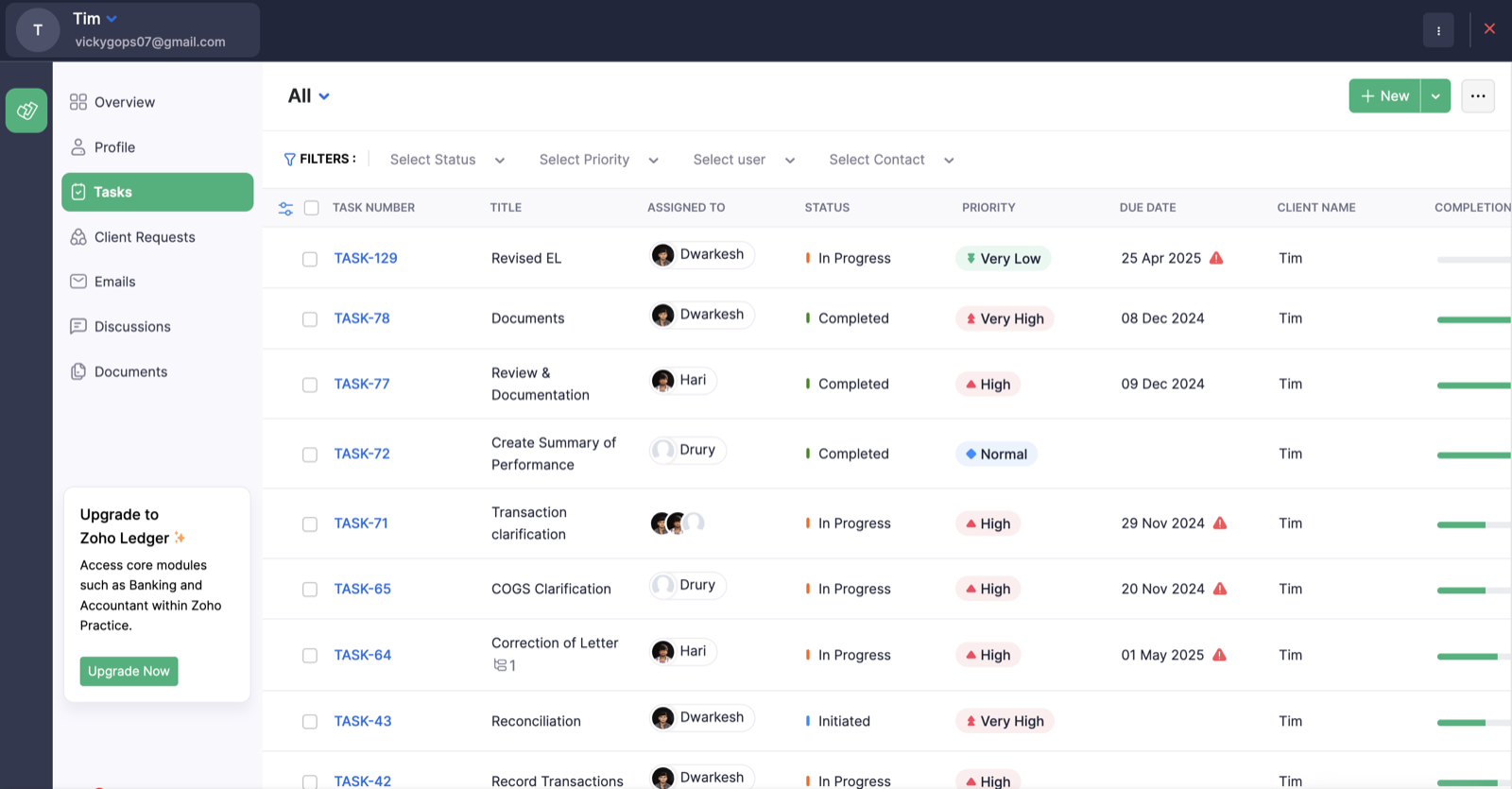
Tasks carry a task number, assignee, status, priority (Very Low to Very High), due date, client and a completion bar, and the list filters by status, priority, user and contact. Overdue tasks get a red warning triangle next to the date. Recurring tasks exist, but you have to switch them on: the help page Tasks preferences shows the toggle under Settings, Preferences, Tasks, “Enable Recurring Tasks”. What you get is a generic interval-based repeater. It is not a tax-calendar-aware engine that knows a monthly sales-tax filing falls on the 20th and a quarterly estimate on the 15th, and shifts the due date when that day is a weekend or holiday.
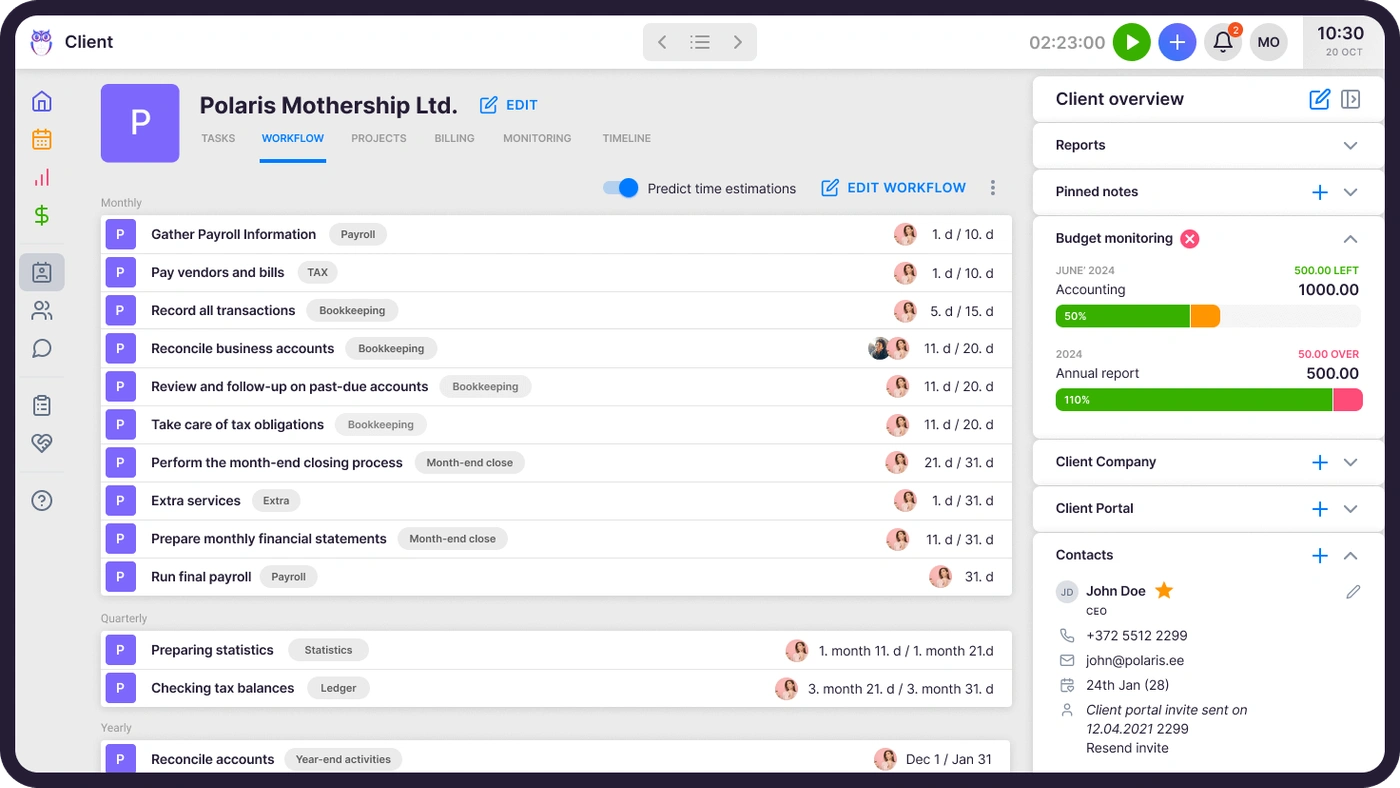
That distinction is the one place a generic task repeater and a practice-management engine diverge. In Uku’s workflow automation, the recurrence lives in a client workflow template: monthly bookkeeping, payroll, VAT or sales tax, year-end, each with its own deadline rule, its own checklist and its own responsible member, and the schedule handles weekends and days off with a “show before, show after, or keep the date” rule. Set it up once per service, apply it to every client who buys that service, and the year’s tasks are planned out.
Time Tracking and Billing
Zoho Practice ships “Timesheets and Billing” on both plans. Time entries are tied to clients and tasks, and the marketing copy ties timesheets to billing and revenue. Invoicing itself, as far as the pages describe it, happens in Zoho Books or Zoho Invoice; Practice feeds them the hours. For a firm already on Zoho Books, that is one integration you never have to think about. For a firm whose own books are elsewhere, it is a second system with its own plan: Zoho Books runs from a free tier to $15, $40 and $60 per organization per month on the plans shown to a US firm, and “Bill timesheets” appears on the Professional plan, not the cheaper ones.
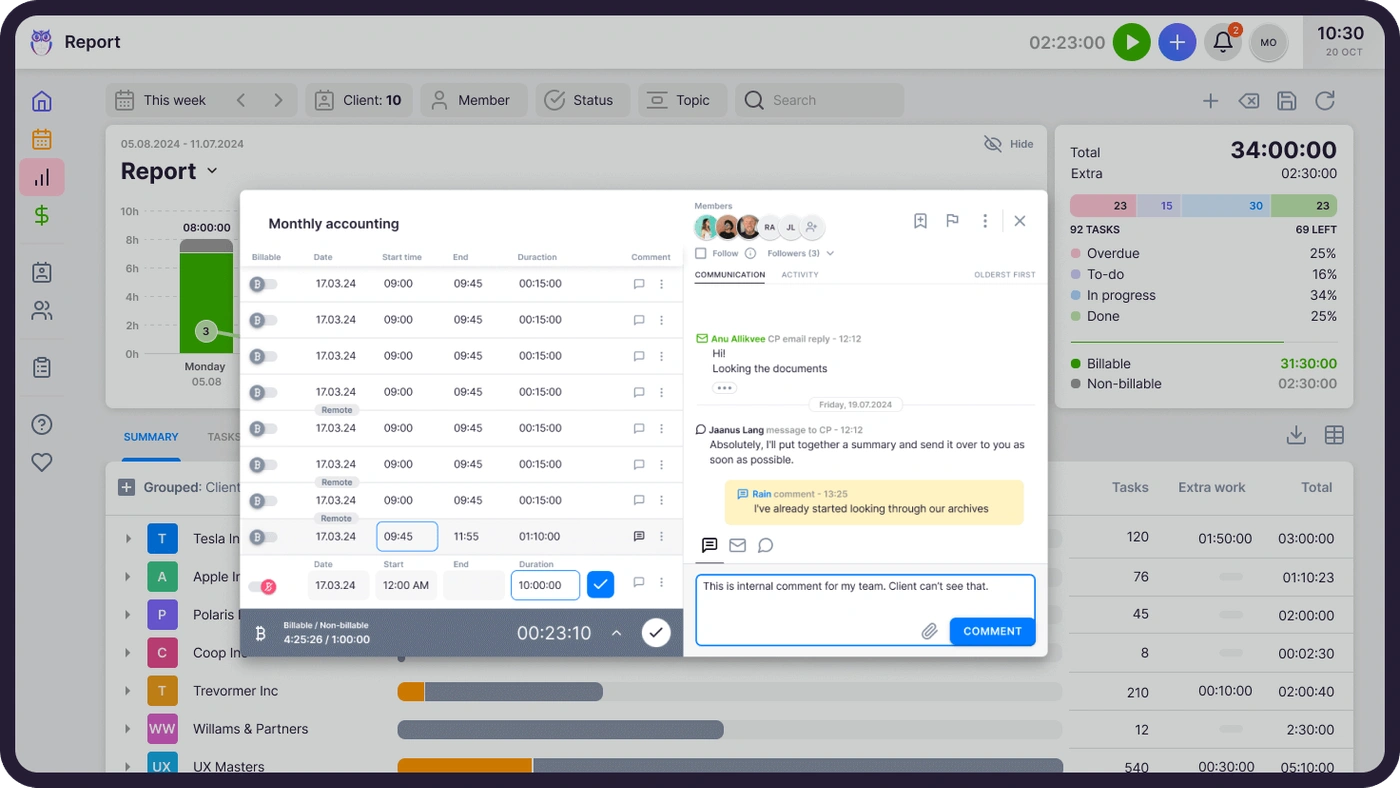
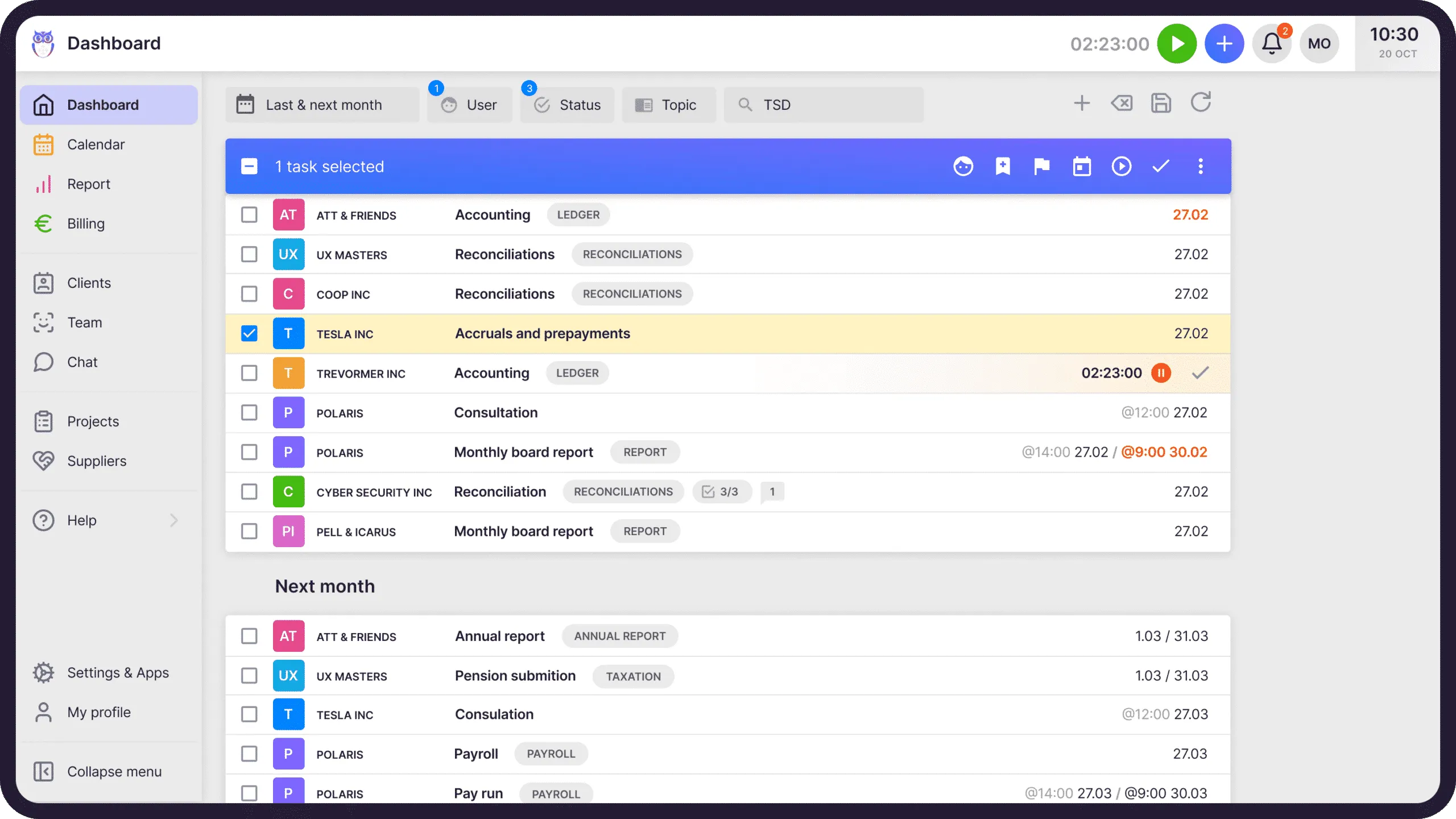
Uku’s time tracking runs a stopwatch on the task you are working on, accepts manual and bulk entries, and separates billable from non-billable hours. The tracked time flows straight into automated billing, where a per-client contract turns hours, volumes and fixed fees into a draft invoice you approve and export to QuickBooks Online or Xero. The invoice is not another product’s job.
“I love the weekly summaries of hours spent on clients, I love how easy it is to track tasks and activities both for myself and for the others in my team, and to track what each of us is doing.”
Documents and E-Signatures
Document management is on both Zoho Practice plans. Contracts, invoices and client files sit against the client record, and e-signature comes through Zoho Sign: the accountant sends a signature request and either side can sign digitally. Zoho Sign is a separate Zoho product with its own plans, so check what the bundled allowance covers before you plan to run every engagement letter through it. Again, it works best if you are all-in on Zoho.
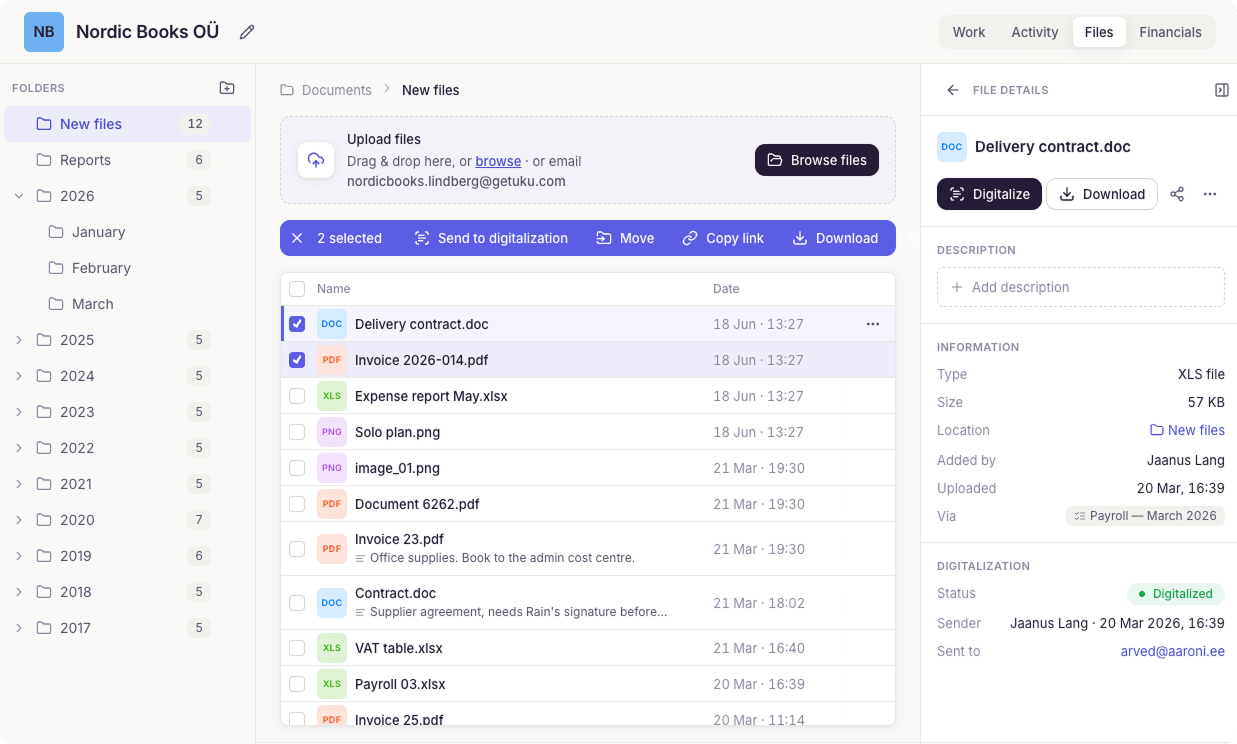
Uku’s document management files documents by client, year and month, so a bank statement or a signed return is found by the period it belongs to, not by whoever uploaded it.
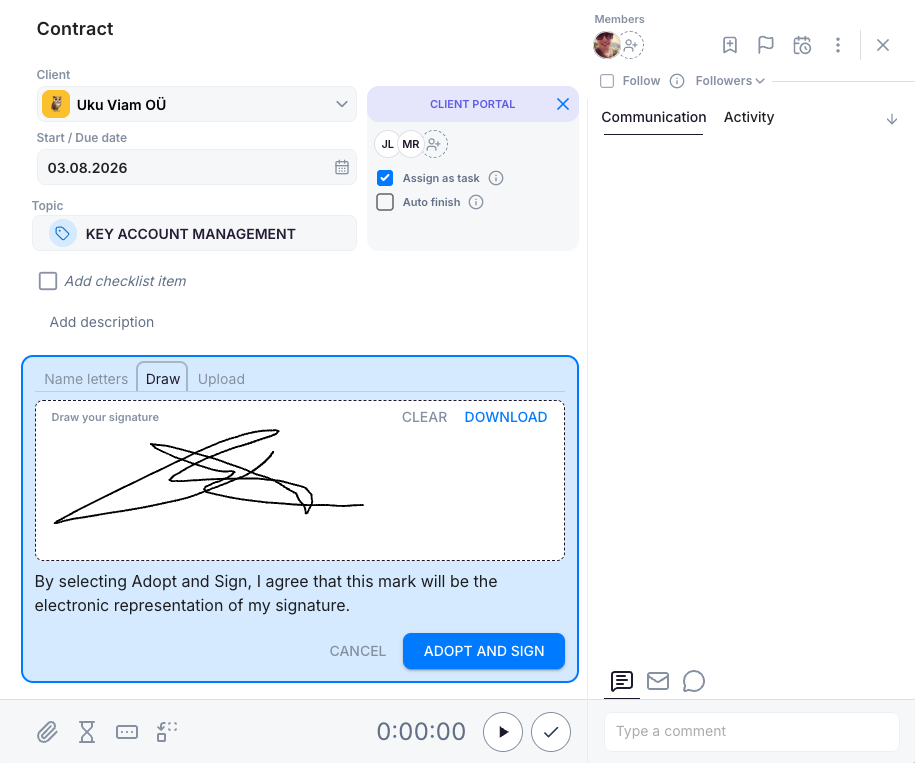
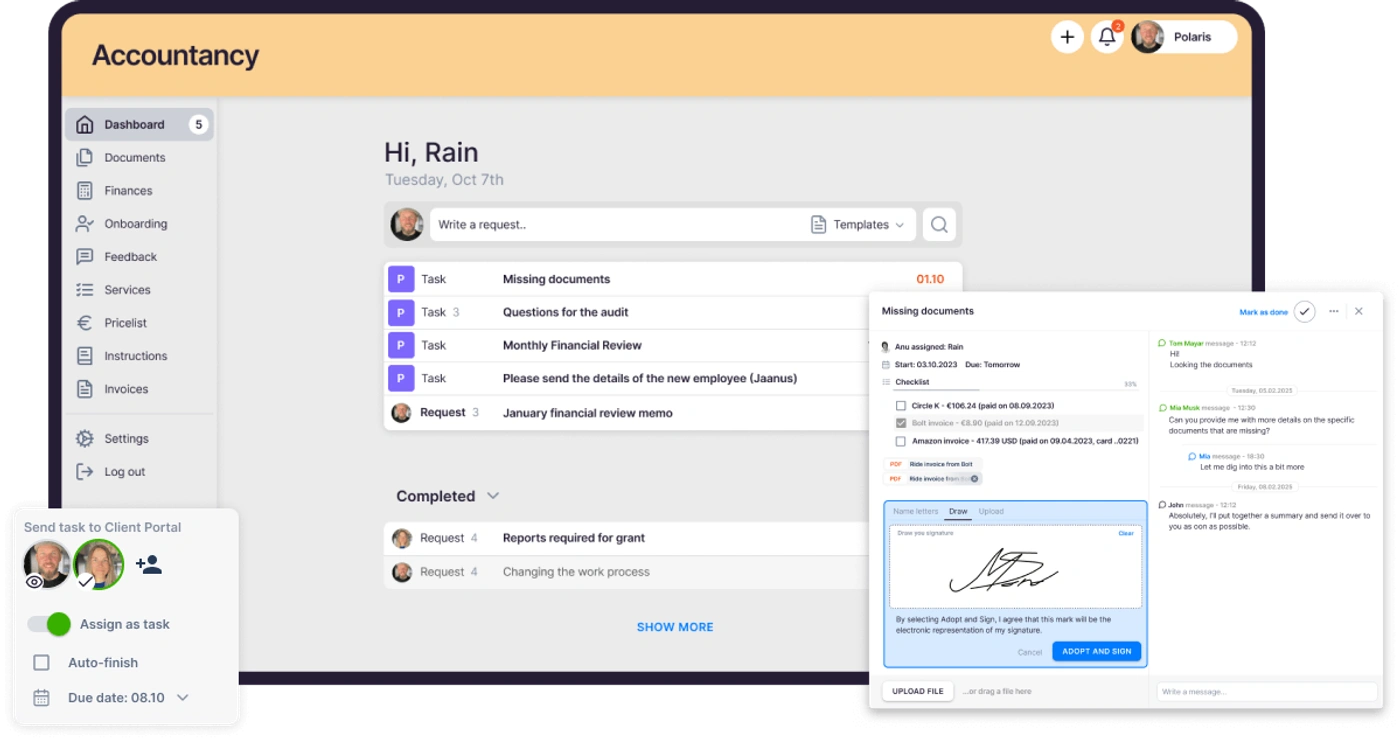
E-signatures in Uku are built into the task itself. A contract task opens with the client portal panel beside it; the client draws, types or uploads a signature and the signed document lands on the task it belongs to, with the timer, checklist and communication thread on the same screen.
Client Portal and Client Requests
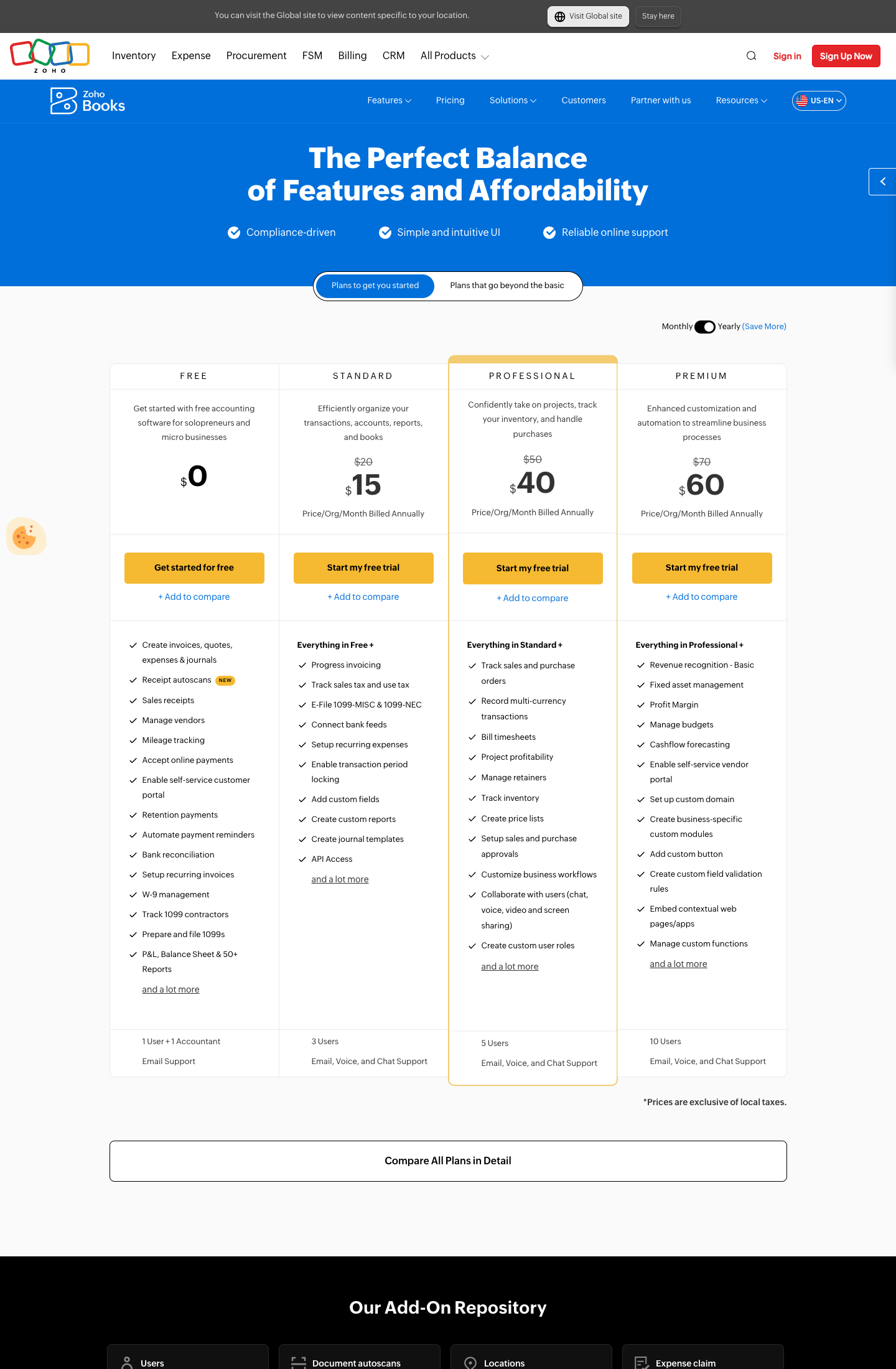
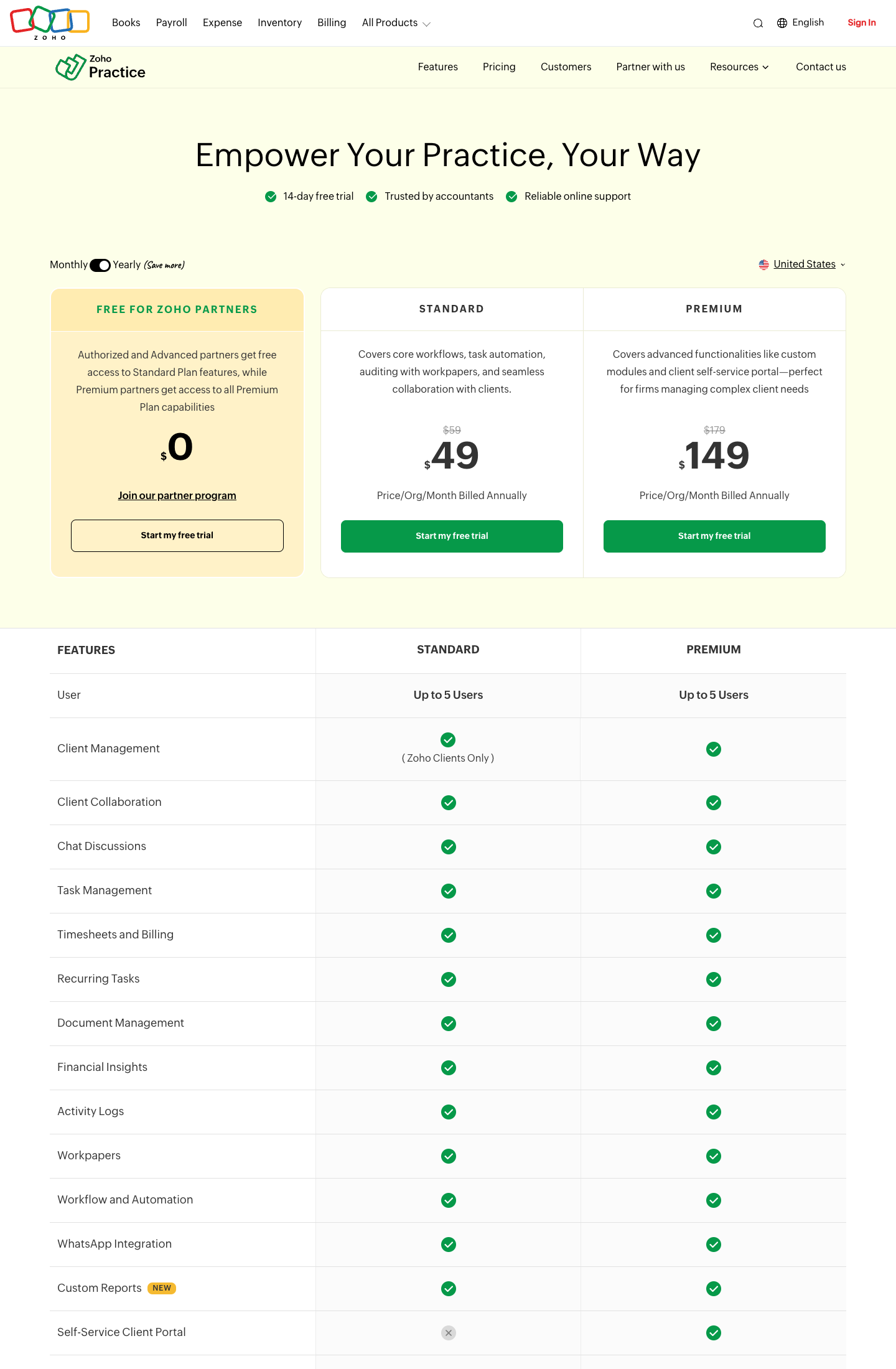
This is where the plan choice bites. Zoho Practice has a Client Requests module on both plans, but the Self-Service Client Portal is a Premium feature. On Standard you can collaborate with clients and chat with them; you cannot give them a place to log in, see what you are waiting on and upload it themselves. The pricing screenshot in the next section shows the crossed-out row.
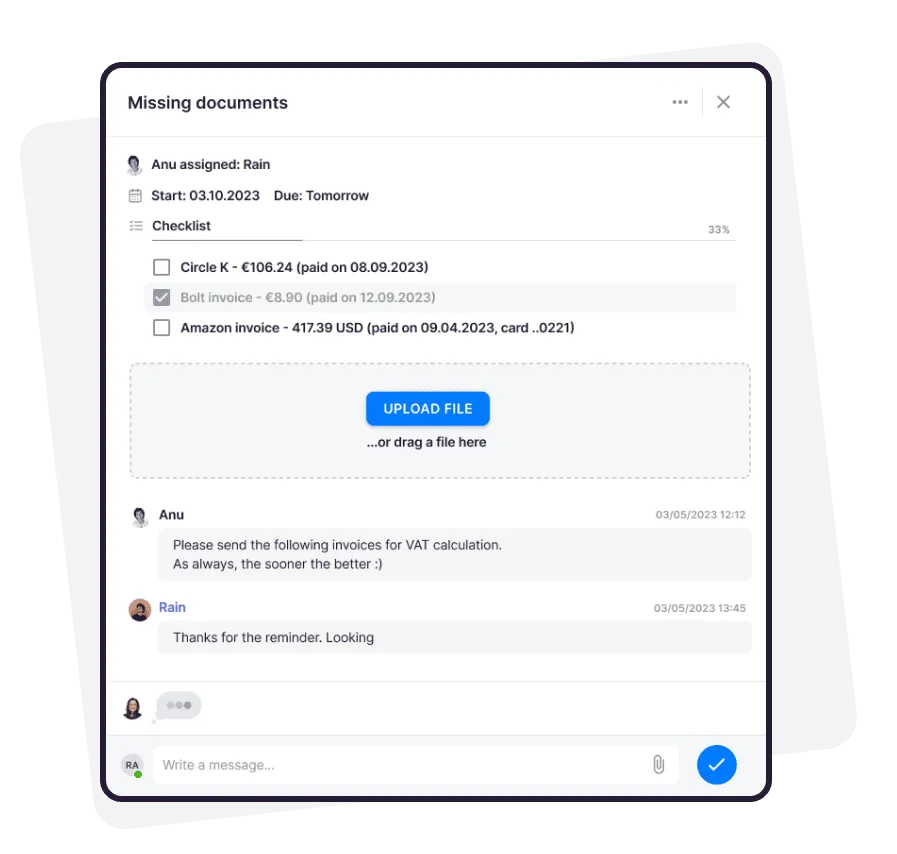
For most firms leaving Zoho, this is the feature at the top of the list: task-based document requests through a portal, so deliverables stop going back and forth by email. In Uku’s client portal, a client request is a task. The client opens a magic link (no password), sees the same checklist and files the accountant sees, uploads, and the accountant’s task updates on the spot. It is included on every plan.
Workpapers and Ledger
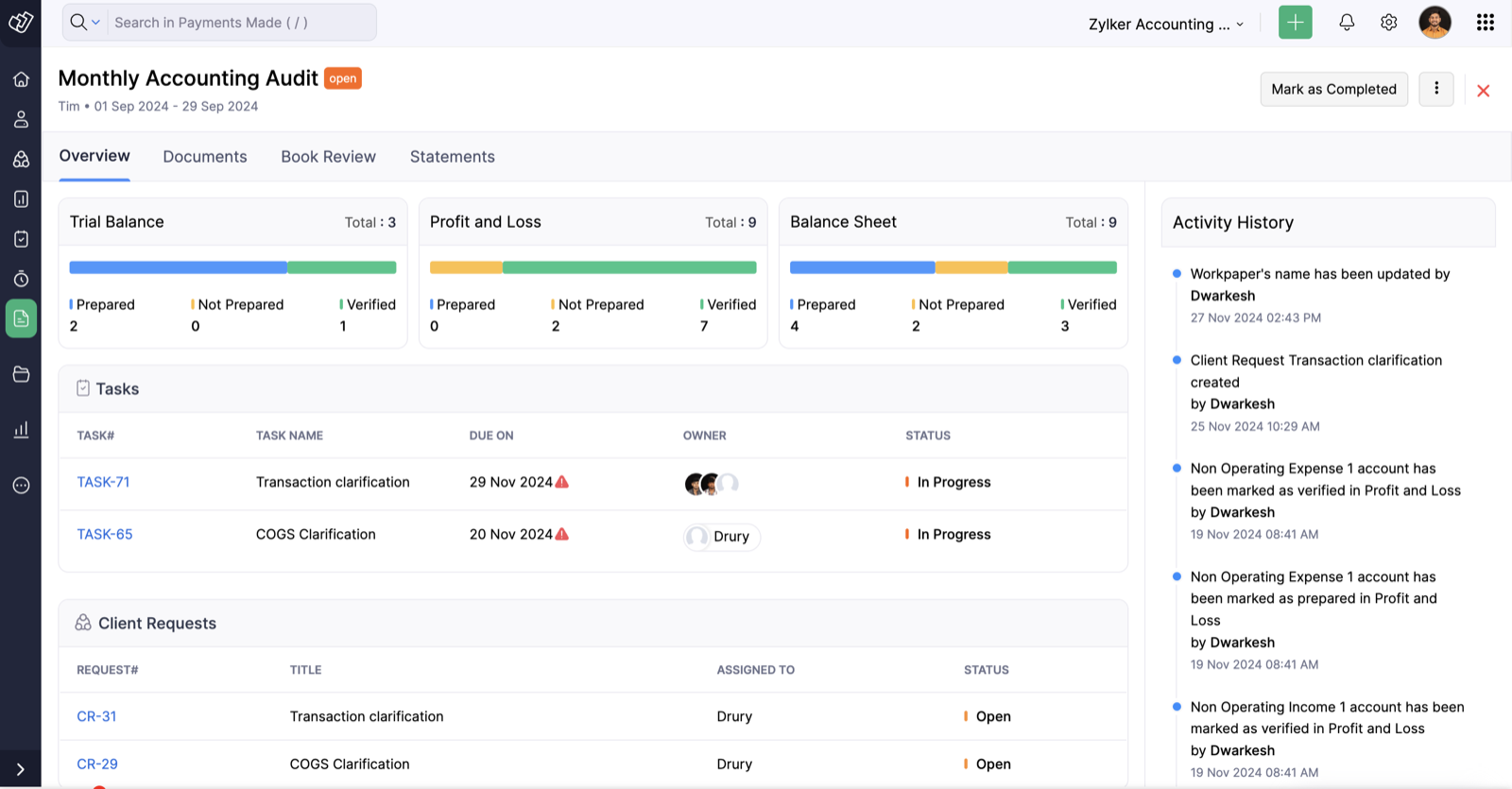
These are the two modules Zoho leads with, and they are where Zoho Practice is genuinely different from a workflow tool. A Workpaper is a period-close checklist: a “Monthly Accounting Audit” for a client covers Trial Balance, Profit and Loss and Balance Sheet, each account marked Prepared, Not Prepared or Verified, with the linked tasks and client requests underneath and an activity history of who verified what and when. It is an audit and close tool, not a tax-deadline calendar. Ledger is end-to-end bookkeeping for a small-business client from inside the practice app, and the “Upgrade to Zoho Ledger” upsell sits in the client sidebar.
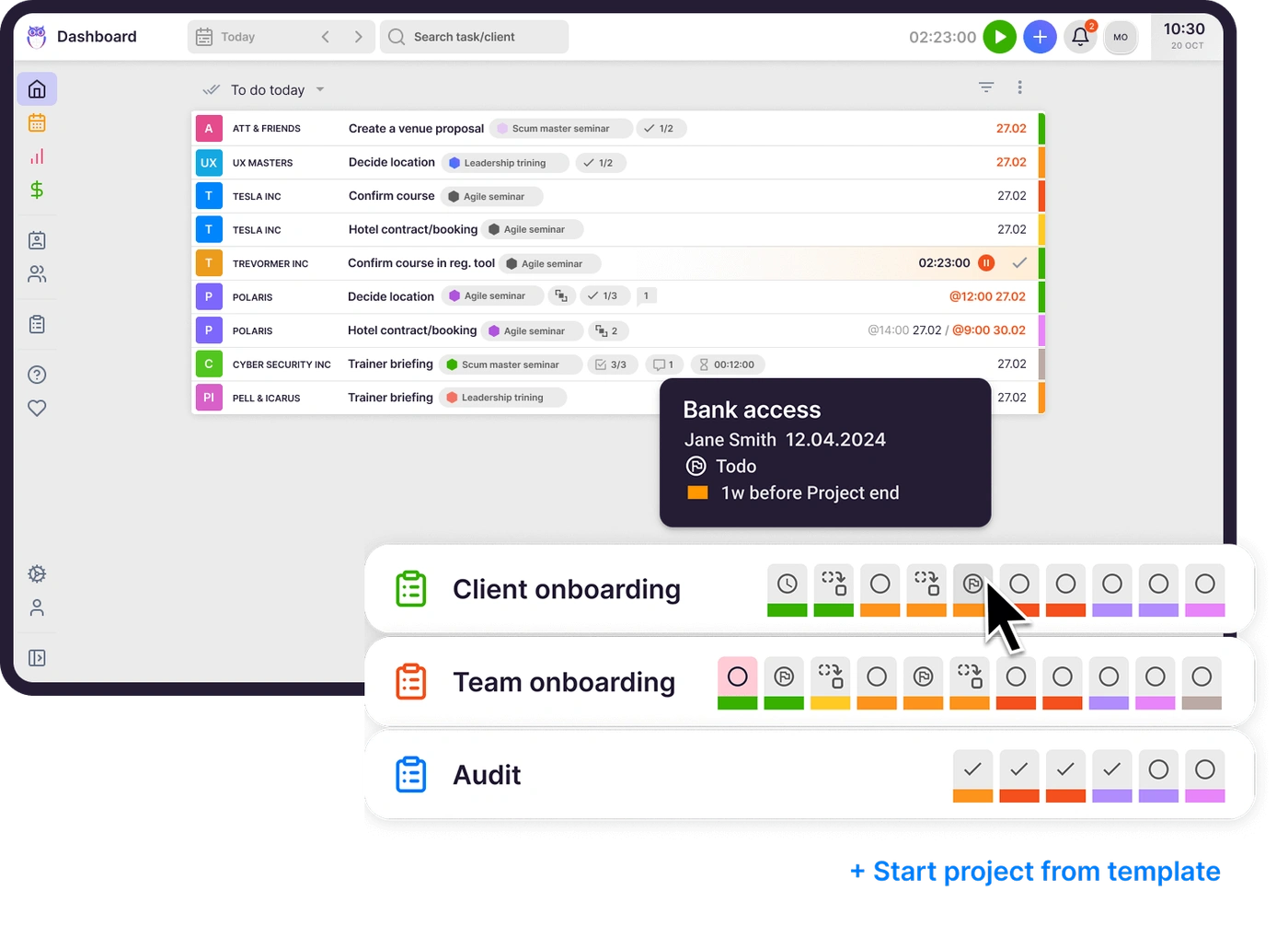
If your firm’s revenue is audit and compilation work and your clients are small enough to live happily in Zoho Books, this is a real reason to choose Zoho Practice. Uku does not do bookkeeping or workpapers; it manages the work and integrates with the ledger your clients already use. The closest thing in Uku is the engagement dashboard, which shows a period close as a project with its progress across the team, but the accounts themselves stay in QuickBooks Online, Xero or whichever ledger the client is on.
WhatsApp integration and chat discussions are on both Zoho Practice plans, and Custom Reports is marked “New” on the pricing page. WhatsApp sells better in India, the UAE, Kenya and Mexico than in the US, which matches where Zoho sells the product. Custom Modules (your own object types) are Premium only.
Zoho Practice Pricing (2026)
Zoho Practice has two paid plans and a partner-only free plan. Pricing is per organization, not per user, which sounds generous until you read the feature table: both plans say “Up to 5 Users”.
| Plan | Monthly billing | Annual billing (per month) | Users | What it adds |
|---|---|---|---|---|
| Free for Zoho Partners | $0 | $0 | Up to 5 | Authorized and Advanced partners get Standard features; Premium partners get Premium features |
| Standard | $59/org | $49/org | Up to 5 | Client management (Zoho clients only), client collaboration, chat, tasks, timesheets and billing, recurring tasks, documents, financial insights, activity logs, workpapers, workflow and automation, WhatsApp, custom reports |
| Premium | $179/org | $149/org | Up to 5 | Everything in Standard, plus full client management, custom modules and the self-service client portal |
Four things to know about this pricing that the headline numbers hide:
- The 5-user cap. A 5-person firm pays $49 a month for Standard, which is under $10 a seat and hard to beat. The US pricing page does not show what a sixth user costs; Zoho’s India page lists an extra-user add-on, but there is no US figure, so treat anything you read about “per extra user” pricing as unconfirmed until Zoho quotes it to you.
- “Zoho clients only” on Standard. Client management on the entry plan is marked “(Zoho Clients Only)” in the feature table. Clients whose books are elsewhere need Premium.
- No self-service client portal on Standard. Clients cannot log in, see their requests and upload documents unless you are on Premium at three times the price.
- 11 countries. Paid plans exist in 11 markets: the United States, Canada, Australia, India, Germany, the UAE, Saudi Arabia, Mexico, Kenya and South Africa, plus one more that Zoho’s page lists inconsistently (the UK in one place, Singapore in another). Outside the list, the pricing page shows only the free-for-partners card. A firm with an office outside these countries should ask Zoho before assuming everyone can be on the same plan.
For a per-member price with no user cap, see Uku’s pricing table in the alternative section below.
Where Zoho Practice Falls Short
Here is the honest list. Every item is something Zoho’s own pages do not say, which is different from something they deny.
Five users, full stop. Both paid plans say “Up to 5 Users”. The moment a firm hires its sixth person it is outside the product’s published plans, and the pricing page does not say what happens next.
No QuickBooks Online or Xero integration named. The product page names Zoho Books, Zoho Payroll, Zoho Expense, Zoho Inventory, Zoho Sign and WhatsApp. It says it can manage clients on other accounting software, but no QBO or Xero sync is described anywhere. In the US, that is most clients.
The client portal costs 3× the entry price. Standard has no self-service portal. The feature the New York firm wanted most is the one gated to Premium.
Engagement letters are not mentioned. Not on the product page, not in the help center. Zoho Sign will sign a document you upload, but nothing generates the letter from the client record.
Recurring tasks are a repeater, not a deadline engine. No filing-calendar awareness and no weekend or holiday shifting described. A monthly task that lands on a Sunday lands on a Sunday.
Billing happens in Zoho Books. Practice tracks the time; the invoice is another product’s job, and “Bill timesheets” starts on Zoho Books Professional at $40 per organization per month.
None of these is fatal for the firm Zoho Practice is built for. All of them are for a 10- to 50-person US firm with QBO clients.
Zoho Practice vs Zoho Projects
When an accounting firm says “we run on Zoho”, it usually means Zoho Projects, not Zoho Practice. Zoho Projects is Zoho’s general project management app; it is older, has a long review history, and is where a lot of firms first set up time tracking because it was already in their Zoho One bundle.
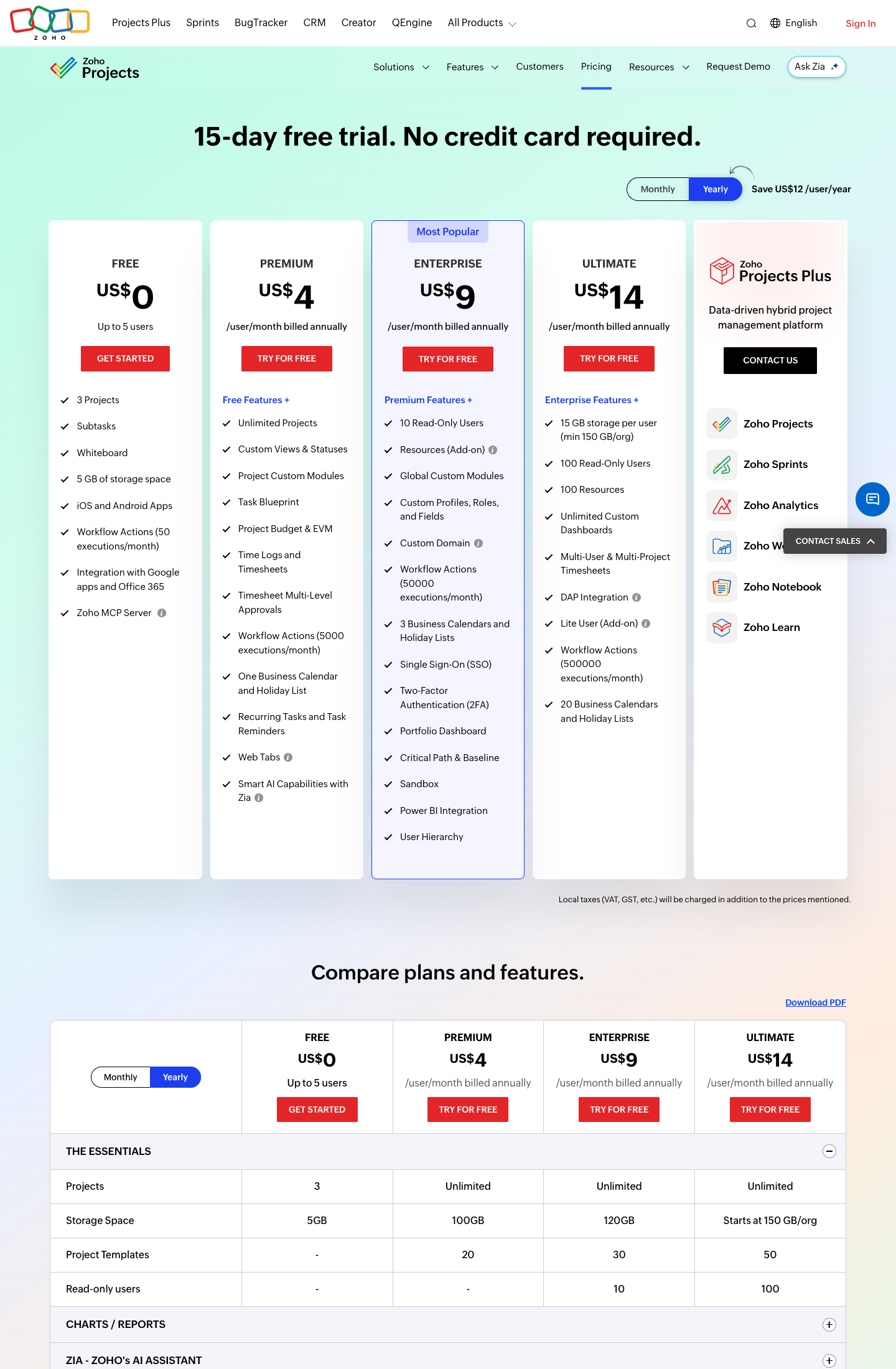
Zoho Projects pricing, from Zoho’s US pricing page (screenshot above):
| Zoho Projects plan | Annual (per user/month) | Monthly | Time tracking | Notes |
|---|---|---|---|---|
| Free | $0 | $0 | No | Up to 5 users, 3 projects, 5 GB storage |
| Premium | $4 | $5 | Yes | Adds time logs, timesheets, timesheet approvals, recurring tasks, 20 project templates |
| Enterprise | $9 | $10 | Yes | Adds read-only users, custom fields and roles, Power BI integration, 30 templates |
| Ultimate | $14 | $15 | Yes | Multi-user and multi-project timesheets, 50 templates |
The Free-plan trap: the Free plan has no time logs and no recurring tasks. Firms that “use Zoho Projects for free” are either on a paid plan or not tracking time in it. And Zoho Projects’ pricing page does not describe client invoicing at all; billing lives in Zoho Books or Zoho Invoice.
So which one? Zoho Practice if your work is client-centric and you want client requests, workpapers and timesheets tied to a client record, and you are five people or fewer. Zoho Projects if you want cheap per-user project tracking with Gantt charts and do not need anything client-facing. Neither if you are past five users and want an accounting-specific system, which is where the Zoho alternatives come in.
Capterra reviewers of Zoho Projects, paraphrased, describe a learning curve (be prepared to search for a lot of answers), an interface that feels crowded at first, and a mobile app that lags the desktop: the complaints of a capable general-purpose tool asked to do specialist work.
Top Zoho Practice Alternative: Uku
We are the vendor here, so read this section as one side of the comparison and check it against the reviews. Uku is accounting practice management software built around the recurring, deadline-driven shape of accounting work: client workflow templates, tasks with time tracking on them, a client portal on every plan, automated billing, and integrations with the ledgers clients already use. It is rated 4.8★ across 300+ reviews on G2, Capterra and Trustpilot, and used by 1,000+ firms.
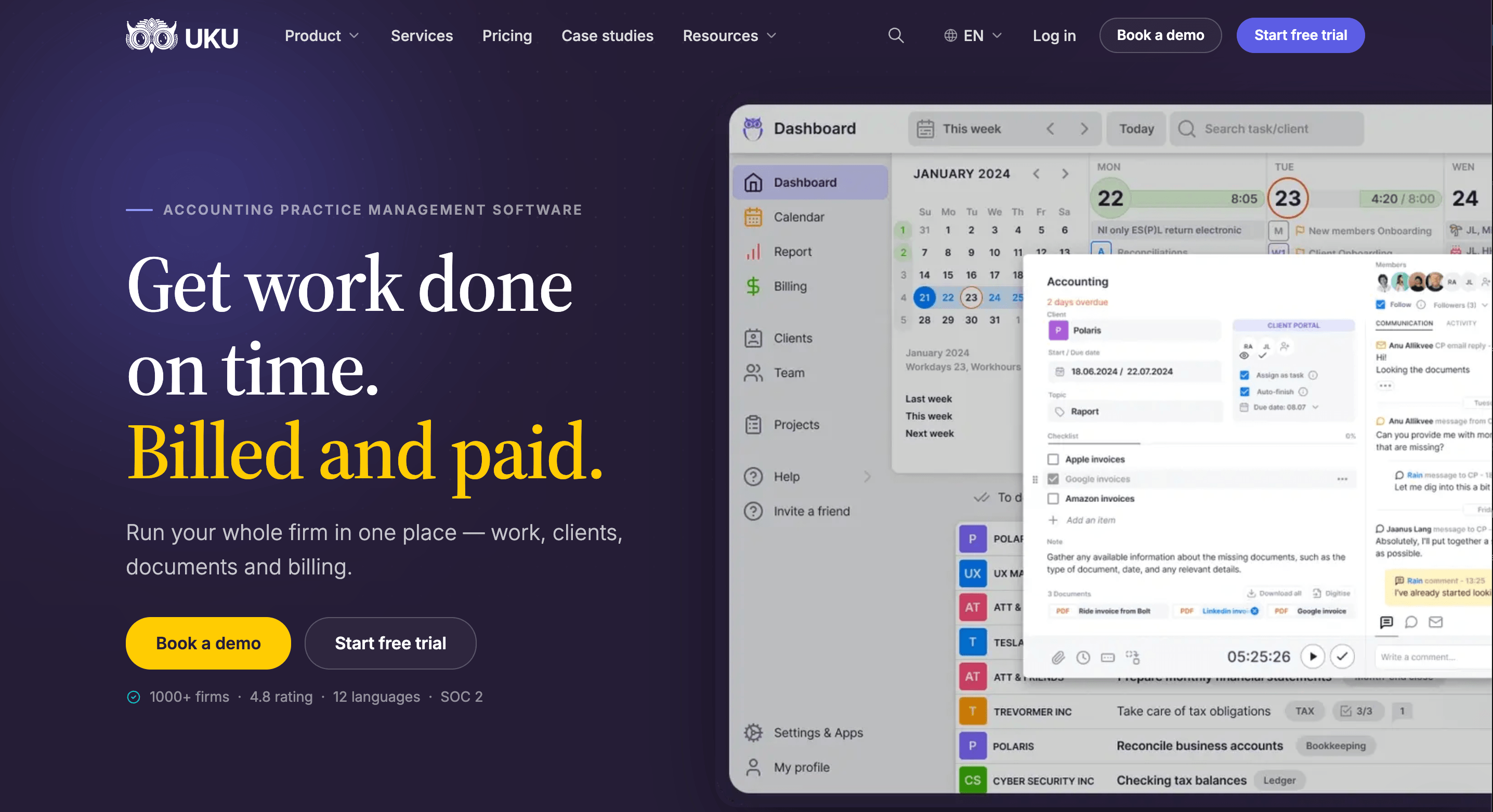
Automated Billing
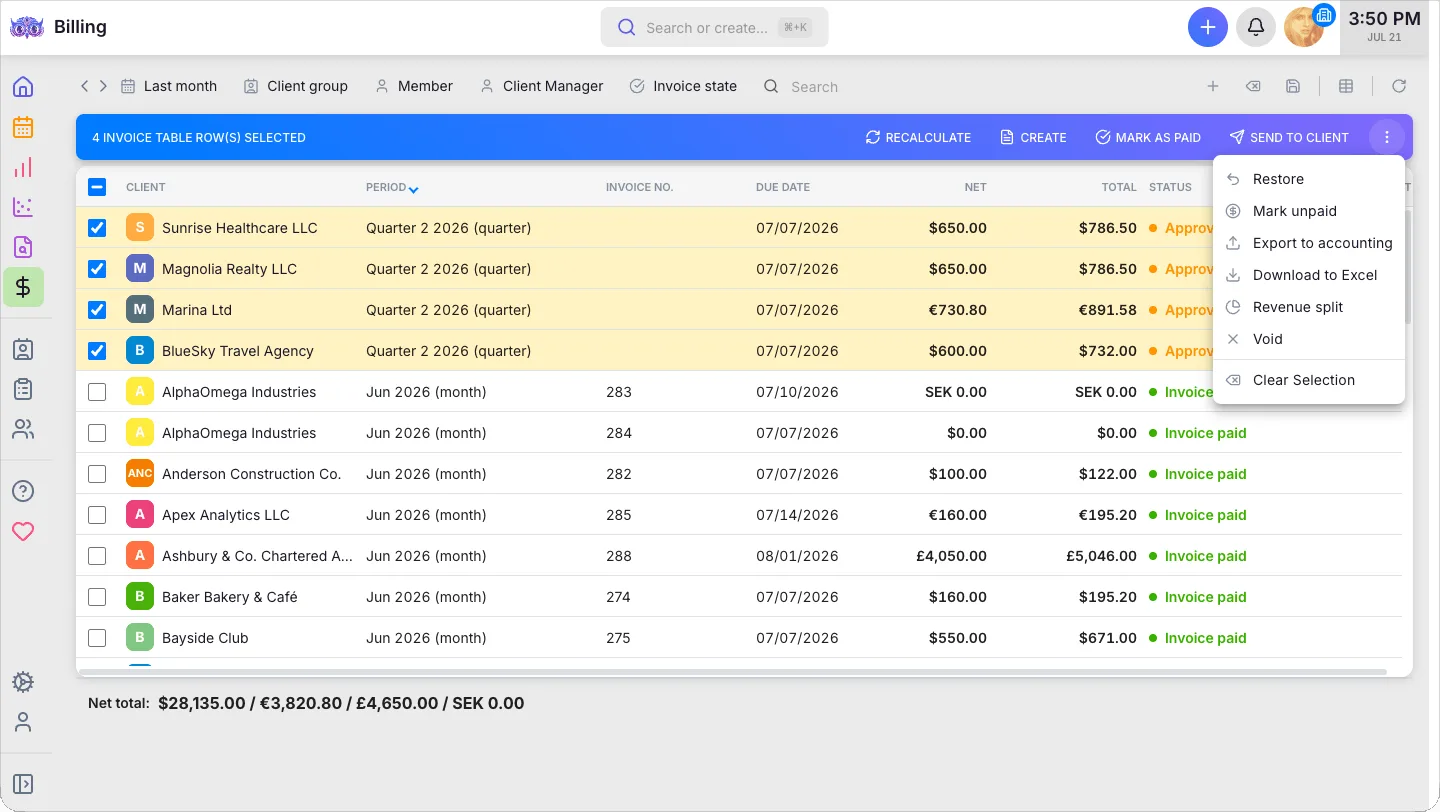
In Uku the invoice is not another product’s job. A per-client billing contract holds the fixed fee, hourly rate or volume price; at month end the tracked time, fixed fees and volumes become draft invoices you approve in one sitting and export to QuickBooks Online, Xero or whichever ledger you keep. Firms tell us this reduces invoice preparation from days to about 30 minutes. On Zoho Practice, that step crosses into Zoho Books, where “Bill timesheets” starts on the Professional plan at $40 per organization per month.

Client Portal
The client portal is included from Solo up; nothing is gated to a higher plan. A request is a task, and the client portal mirrors the exact same task on both sides: the client opens a magic link, no password, sees the checklist and files the accountant sees, uploads into it and gets reminded automatically until they do. A 35-person accounting firm in New York we spoke with named this as the thing they wanted most from whatever replaced their Zoho setup: task-based document requests, so the team could stop emailing deliverables back and forth.

Workflow
A client workflow template holds every recurring service with its own deadline rule and checklist, and the schedule knows about weekends and days off. Set it up once per service, apply it to each client, and every member’s day starts with the tasks that are actually due. The result is a single source of truth for who’s doing what across the team, which is what a firm running work in Zoho Projects, Zoho Practice and a spreadsheet is missing.
Time Tracking
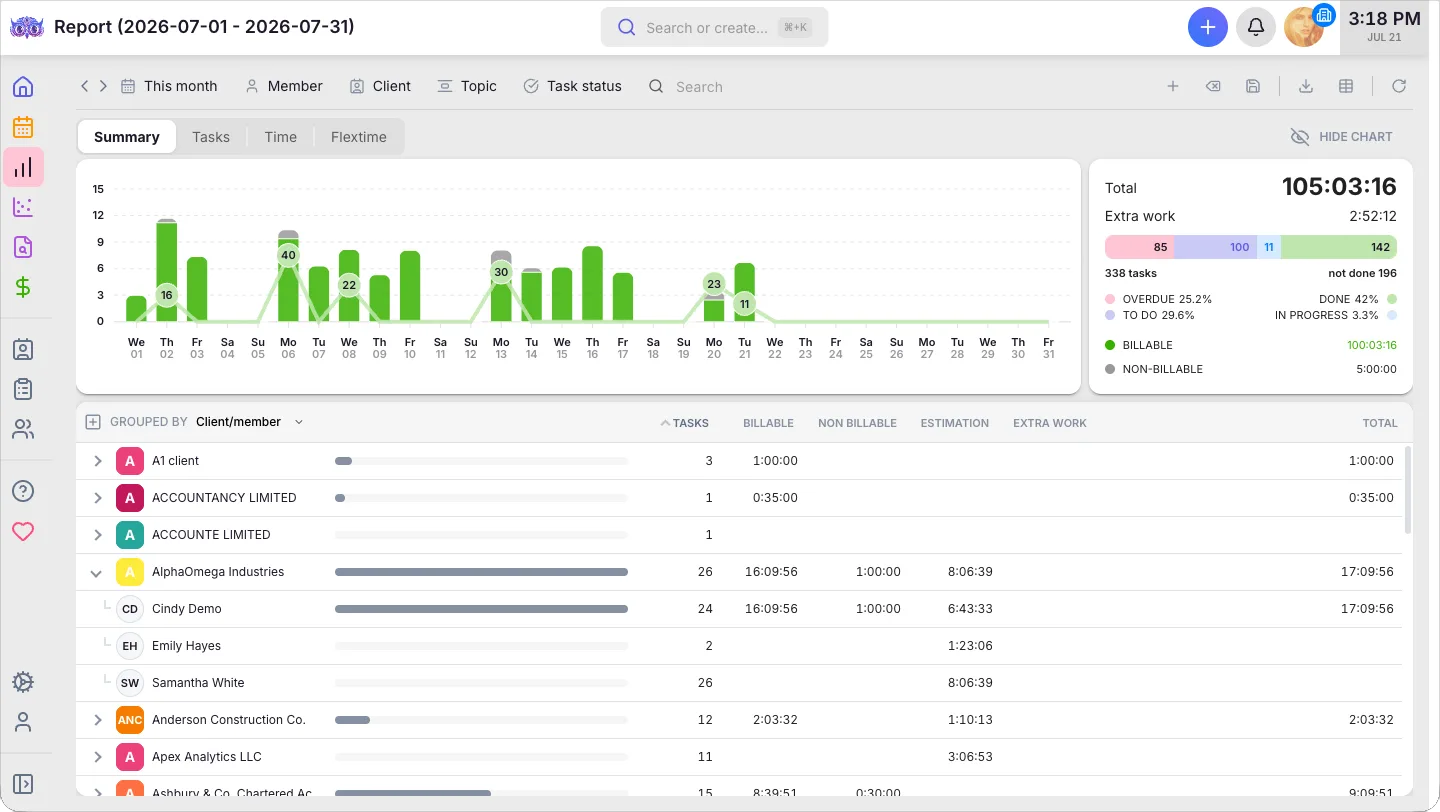
Start the timer on the task you are doing; the entry is already linked to the client, the service and the billing contract, and billable is separated from non-billable. Manual and bulk entry cover the hours you forgot to time. The monthly report then shows the hours by client and by member, next to what was estimated, so an over-served client is visible before the invoice goes out.
QuickBooks Online and Xero
Invoices export to QuickBooks Online and Xero, and the client list can be imported from them. For a US firm with QBO clients this is the difference between one system and two, and it is the integration Zoho Practice’s pages do not name.

Pricing
Uku’s pricing is per member with no user cap and published in full, with about 23% off on annual billing:
| Plan | Annual | Monthly | Best for |
|---|---|---|---|
| Solo | $19/member/mo | $25/member/mo | A one-person practice with up to 20 active clients |
| Team | $38/member/mo | $49/member/mo | Growing firms that need unlimited members and clients, the client portal, billing and integrations |
| Elite | $48/member/mo | $62/member/mo | Firms that want BI Analytics, workforce management, e-signatures, API and Zapier |
| Enterprise | $88/member/mo | $99/member/mo | Larger firms that need custom integrations, assisted client import and a dedicated account manager |
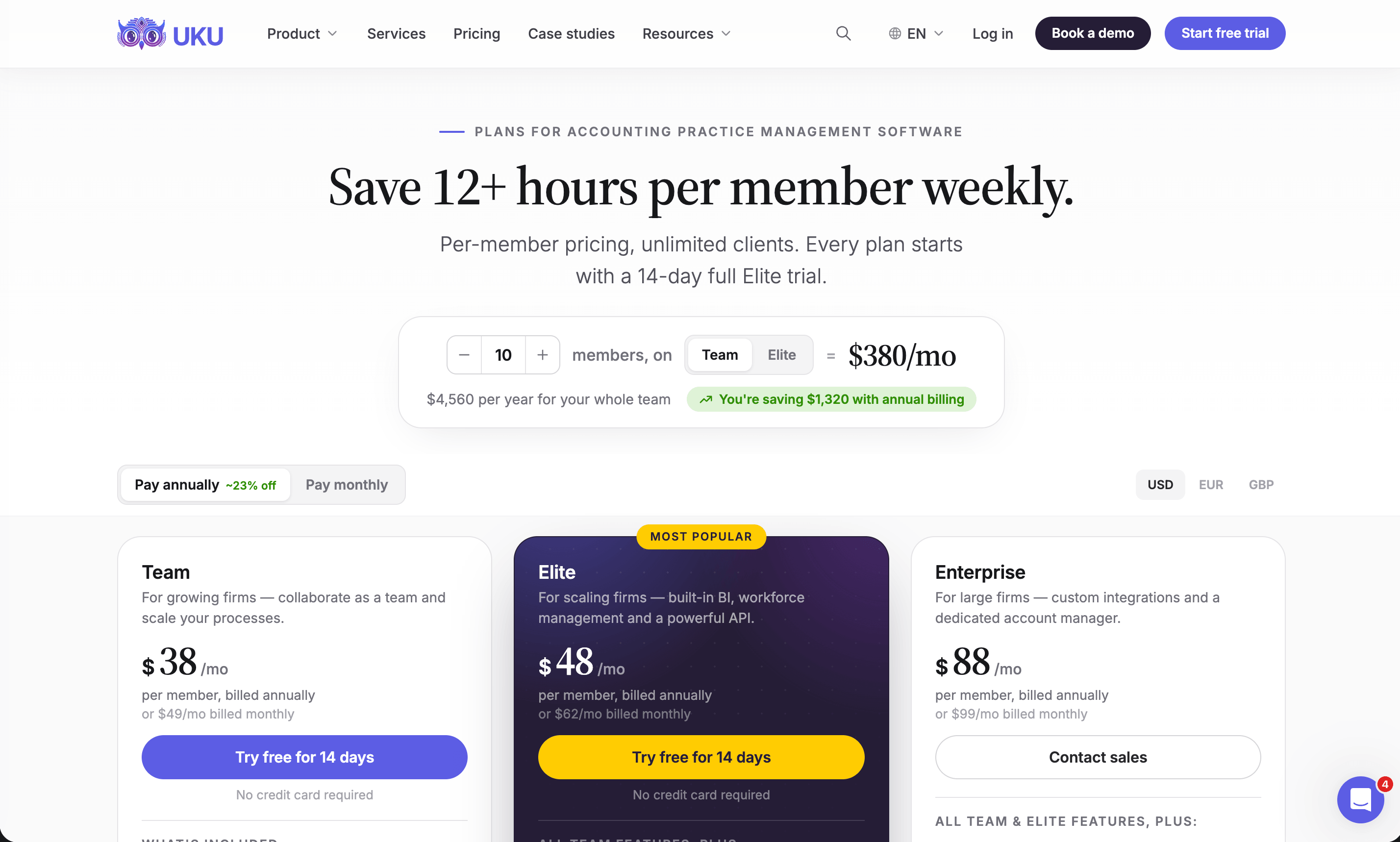
Every plan starts with a 14-day trial of Elite, no card, and 90 minutes of free onboarding. The math flips at five people: a 4-person firm pays $49 a month on Zoho Practice Standard and $152 on Uku Team. A 12-person firm cannot be on Zoho Practice at all, according to its own feature table, and pays $456 a month on Uku Team with everything the firm needs in one plan. A 35-person firm is a normal Uku customer, not an exception.
Where Uku Is Not Stronger, or Not Yet
- Shared inbox. Of the firms that recently told us which incumbent they were leaving, the gap that came up on every call was shared inbox and email triage, not Zoho. Uku does not have a shared inbox today. It is in development, targeted for the end of 2026. Until then, Uku’s email management automates outgoing task emails and integrates with Gmail and Outlook, but it will not triage your firm’s inbox into tasks. If that is your first requirement, say so when you book a demo.
- Bookkeeping and workpapers. Uku does not do the books and does not do audit working papers. If Zoho Practice’s Ledger and Workpaper modules are the reason you are looking at it, that is a real reason.
- Price for a 4-person Zoho Books shop. $49 a month for the whole firm on Zoho Practice Standard is cheaper than $152 on Uku Team. If you are under five people, all-in on Zoho Books, and do not need a client portal, Zoho Practice wins on price.
The New York firm’s situation is a useful template. They are moving CRM from Zoho to HubSpot, keeping Zoho Books for their own internal books, and running client books on QuickBooks Online. In their words: “Zoho is our CRM and we’re moving away from that, moving into HubSpot… and so I need to replace the Zoho time tracking.” What they need from the replacement is one system for recurring monthly and weekly work across the firm, time tracking tied to tasks, and document requests through a portal. That is Uku Team. What they also want, a shared inbox, is on our roadmap and not in the product yet, and we told them so.
A US firm that has already made a similar move:

Zoho Practice or Uku: Comparison Summary
| Aspect | Zoho Practice | Uku |
|---|---|---|
| Entry price (annual) | $49/org/month, up to 5 users | $19/member/month (Solo, 1 user, 20 active clients); $38/member/month (Team) |
| User cap | 5 on both paid plans | None |
| Client cap | Not stated; Standard is “Zoho clients only” | Unlimited on Team and up |
| Client portal | Premium only ($149/org/month) | Every plan |
| Recurring work | Generic recurring tasks (toggle in Settings) | Client workflow templates with deadline rules, weekend and holiday handling |
| Time tracking | Timesheets on both plans | Stopwatch on the task, manual and bulk entry, billable/non-billable |
| Billing | Hours feed Zoho Books or Zoho Invoice | Automated billing built in; export to QBO, Xero and others |
| Accounting integrations named | Zoho Books, Payroll, Expense, Inventory | QuickBooks Online, Xero, e-conomic, Fortnox, FreeAgent and more |
| Bookkeeping / workpapers | Ledger and Workpaper modules | No; integrates with the ledger |
| Shared inbox | Not described | In development, targeted end of 2026 |
| E-signatures | Via Zoho Sign | Built into tasks (Elite) |
| Onboarding | Weekly “Getting Started” webinar | 90 minutes of free onboarding on every paid plan |
| Migration | Not described | Most firms live in 2–6 weeks, at their own pace |
| Availability | Paid plans in 11 countries | Worldwide; USD, EUR, GBP billing |
| Best for (team size) | 1–5, all-in on Zoho Books | 3–50, clients on QBO or Xero |
How to Switch from Zoho Practice to Uku
Most firms are live in two to six weeks, at their own pace. The steps do not have to run back to back, and Uku’s onboarding team guides each phase:
- Export and import your data. Export clients, contacts and open tasks from Zoho Practice as CSV, then bring the client list into Uku from Excel or straight from QuickBooks Online or Xero (the help center covers both), and assign a client manager to each. Enterprise includes assisted import.
- Set up your workflow. One template per recurring service: monthly bookkeeping, payroll, sales tax, year-end, each with its deadline rule and checklist. Apply each to the clients who buy it and the deadlines are planned out. Set up the per-client billing contract in the same pass, so the first month’s invoices draft themselves.
- Train the team. A free 90-minute onboarding session, booked whenever the team is ready for it. Turn on the QuickBooks Online or Xero sync and brand the client portal in the same phase.
- Go live. Clients get a magic link, open requests move to the portal, and you run one cycle in parallel with Zoho Practice before cancelling it. Keep Zoho Books if it is your own ledger; nothing in this move replaces it.
With the Uku MCP server connected to your AI assistant, the company setup itself, clients, workflow templates and billing contracts, can be done in a day.
Final Verdict
Zoho Practice is a fair product at a fair price for exactly one kind of firm, and Zoho is honest about which one: the pricing page’s feature table says “Up to 5 Users” and “Zoho Clients Only” in plain text. The problem is not what it does; it is how many firms fit inside those two lines.
👉 Choose Zoho Practice if:
- Your firm has five people or fewer and does not plan to grow past that soon
- Your clients’ books are in Zoho Books, or you are willing to move them there
- You are a Zoho partner, in which case it is free
- Audit workpapers or an in-app ledger are core to your service
- You are in one of the 11 countries where the paid plans are sold, and your whole team is
👉 Choose Uku if:
- You have six or more people, or expect to
- Your clients’ books are on QuickBooks Online or Xero
- You need a client portal without paying $149 a month for it
- You want recurring work driven by filing deadlines rather than a plain interval
- You want the invoice to come out of the same system the time went into
For the second list, Uku is the accounting-specific option we would put first, with one honest caveat about the shared inbox. Karbon is the stronger choice if email triage is your first requirement today, TaxDome if you want an all-inclusive tax-firm suite, Financial Cents if you are a small QuickBooks-only bookkeeping shop, and Canopy if tax resolution is your business.
Ready to see it on your own client list? Book a demo and bring the three recurring services that cause the most chasing; we will build them live. Or start the 14-day trial from the pricing page, no card needed.
Read more
- Zoho Alternatives for Accounting Firms (2026): Zoho Practice, Zoho Projects and Zoho Books, each matched to what replaces it
- Best Accounting Practice Management Software: the category overview
- Migrate to Uku: the four-phase move, at your firm’s own pace
- Uku case studies: firms that made the switch, in their own words
- Uku pricing: all four plans on one page, in USD
Frequently asked questions
What is Zoho Practice?
Zoho Practice is Zoho's practice management app for accounting and bookkeeping firms, launched in 2023. It covers client management, tasks and recurring tasks, time tracking and billing, document management with Zoho Sign, workpapers, a WhatsApp integration and, on the Premium plan, a self-service client portal. It is built to sit on top of Zoho Books and the rest of the Zoho suite.
How much does Zoho Practice cost in 2026?
Two paid plans, both priced per organization rather than per user and both capped at 5 users: Standard at $49 per org per month billed annually ($59 monthly) and Premium at $149 per org per month billed annually ($179 monthly). Zoho partners get it free.
Is Zoho Practice free?
Only for Zoho partners. Authorized and Advanced partners get the Standard plan free and Premium partners get the Premium plan free. At launch Zoho said the product was free for firms of up to three users; the current US pricing page no longer shows a free tier for non-partners. Every plan has a 14-day free trial.
Does Zoho Practice have a client portal?
Yes, but only on the Premium plan. The pricing page's feature table marks Self-Service Client Portal as unavailable on Standard. Standard firms get client collaboration and chat discussions, but not the portal where clients log in, see requests and upload documents themselves.
Which countries is Zoho Practice available in?
Paid Zoho Practice plans are sold in 11 countries, including the United States, Canada, Australia, India, Germany, the UAE, Saudi Arabia, Mexico, Kenya and South Africa. Outside those, Zoho's pricing page shows only the free-for-partners card. Check the country selector on the pricing page before you plan a rollout across offices.
Should an accounting firm use Zoho Practice or Zoho Projects?
Zoho Practice is the accounting-specific product: clients, client requests, workpapers, timesheets tied to billing. Zoho Projects is generic project management at $4–$14 per user per month annually, and its Free plan has no time tracking at all. Firms that started on Zoho Projects for time tracking usually outgrow it when they need client-facing work; firms of more than 5 users hit Zoho Practice's user cap.
Does Zoho Practice integrate with QuickBooks Online or Xero?
Zoho's pages for Zoho Practice name Zoho Books, Zoho Payroll, Zoho Expense, Zoho Inventory, Zoho Sign and WhatsApp as integrations. They say it can manage clients who use other accounting software, but no QuickBooks Online or Xero integration is named anywhere on the product or help pages. If your clients' books are on QBO, ask Zoho directly before you buy.
What is the best Zoho Practice alternative for a growing firm?
For a firm past 5 users, with clients on QuickBooks Online, that wants recurring workflow templates and task-based document requests, Uku is the closest fit at $38 per member per month on the Team plan (annual). Other options are Karbon, TaxDome, Financial Cents and Canopy; our Zoho alternatives guide compares all of them.

Published Sep 20, 2026 · Updated Sep 22, 2026