Signed, without leaving the task.
In Uku, the engagement letter goes out from the task it already belongs to, your client signs it in the portal they already use, and the signed PDF comes back to the same place. No separate signing tool to buy, log into, or explain.
- Engagement letters, NDAs, consent forms: the paperwork that stalls a start date
- Three ways to sign: type it, draw it, or upload a signature
- Pending → Viewed → Signed, live, so you know who to nudge
4.8 from 300+ reviews · No credit card required
The engagement letter is written on Monday and signed a fortnight later. Nobody objects to it. It simply leaves the workflow: export, attach, email, wait. The client prints it, signs it, photographs it on a kitchen table. Then someone has to remember to ask again. The work hasn't started, the clock hasn't started, and nobody did anything wrong.
Ways to sign
Type the name and Uku renders it, draw it on a touchscreen or with a mouse, or upload a PNG of a real signature. Whichever your client reaches for first.
New logins for your client
They sign in the Client Portal they already use to send documents and answer questions. Nothing new to create, remember, or be talked through on the phone.
PDF back on the task
Signed, stamped, and filed where the work already lives, with the original files kept beside it.
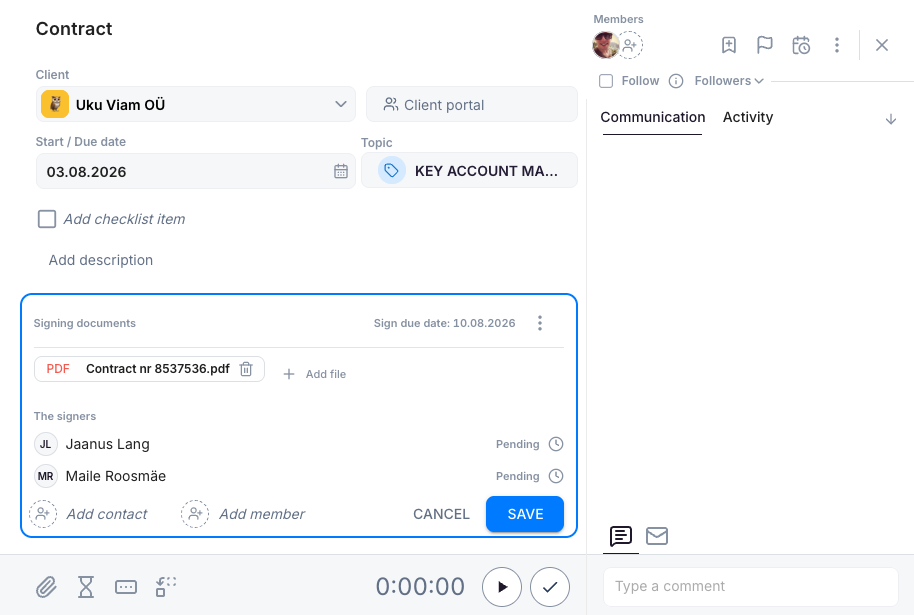
Attach, add signers, save.
Open the task the work already lives on. Attach the PDF, add the people who need to sign — your team, your client's portal contacts, or both — set a sign-by date if it matters, and save. That is the whole setup.
- PDF, DOC or DOCX — Word files convert to PDF on their own
- Signers become assignees, so the task shows up in their queue
- Client Portal contacts get a Review and Sign email from your own mailbox
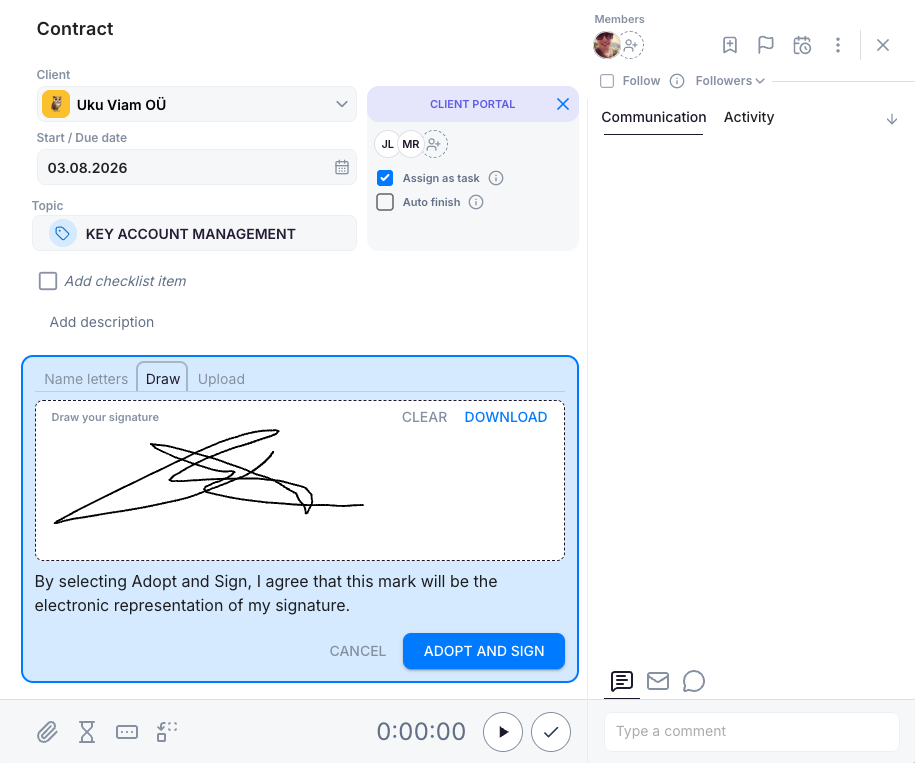
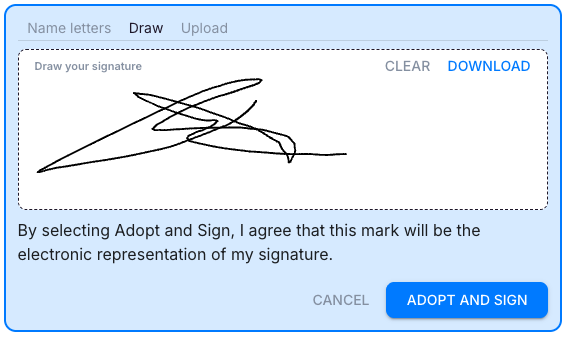
Type it, draw it, or upload it.
Your client opens the link and sees Signing requests at the top of their Client Portal dashboard. One click, one of three ways to sign, and they are done — no account to create, no app to install, no vendor branding in the way.
- Name letters: their name, rendered in a signing hand
- Draw: a finger on a phone, a mouse on a laptop
- Upload: a PNG of the signature they already use
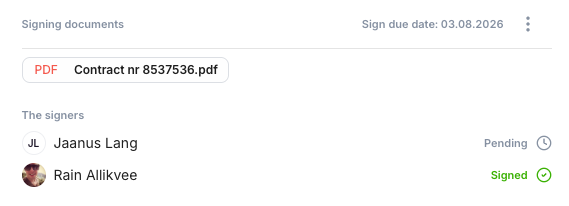
You can see who you're waiting for.
Every signer carries a status that moves on its own: Pending until they open it, Viewed once they have, Signed when they are done. No refreshing, and no emailing three people to find out which one hasn't got to it. When the last signature lands, the signed PDF is saved on the task and everyone assigned is notified in Uku.
- Hover a status to see exactly when it changed
- Signed file lands on the task, originals kept beside it
- Change the document and signatures reset, because a signature belongs to the page it was given on
Decide where the signature lands.
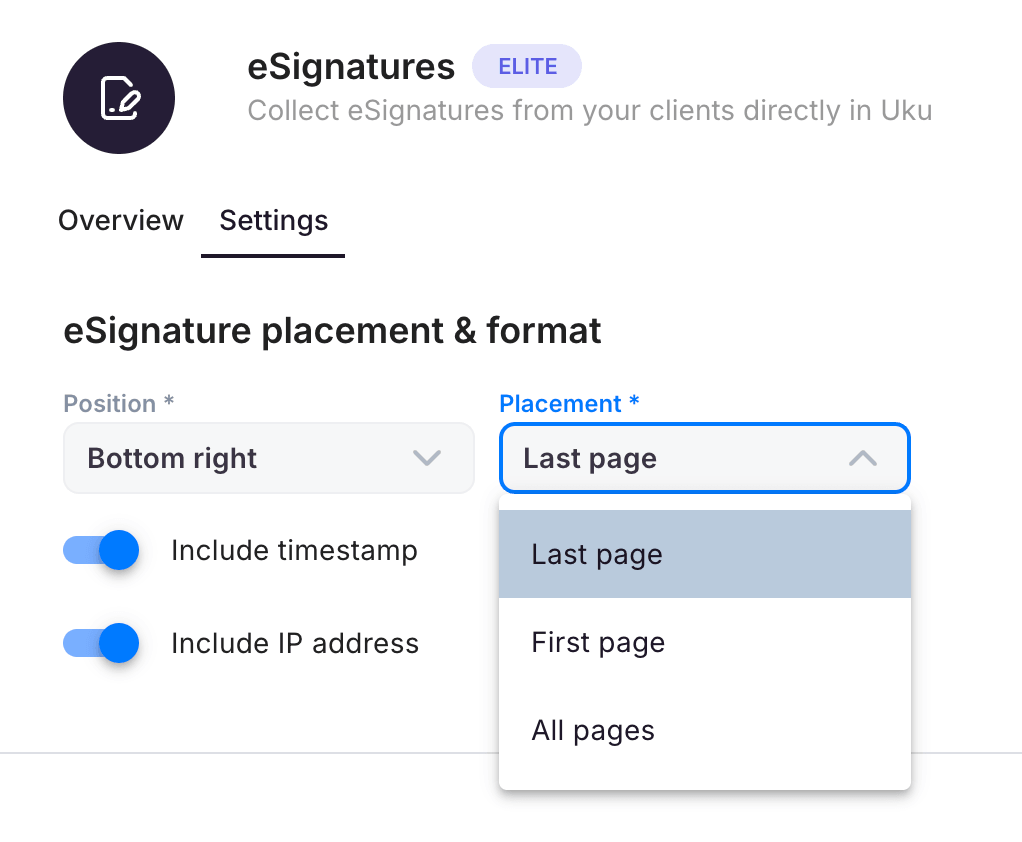
How a signed document looks is a firm decision, not a per-document one. Open the app's Settings tab, pick the corner and the page, choose whether the timestamp and the IP address are printed alongside the mark — and every document you send afterwards comes back stamped that way.
- Position: which corner of the page the signature sits in
- Placement: last page, first page, or every page
- Evidence: the timestamp and the IP printed beside the mark, or left off the page
Signing that behaves like part of the job.
Signing is part of the job, so it lives where the job does.
Three ways to sign
Type the name and let Uku render it, draw it with a mouse or a finger, or upload a PNG of a real signature.
From your mailbox
The Review and Sign email goes through your connected Gmail or Outlook. Your client hears from you, not from a signing vendor.
A sign-by date
Set when it should be done. If the date falls outside the task's range, Uku offers to move the task to match.
An audit trail
Signature image, IP address and timestamp recorded for every signature, stamped onto the document itself.
PDF, DOC or DOCX in
One PDF out, saved on the task in the signature colour, with the original files kept next to it.
The questions firms ask before they switch.
- Can my client sign without creating an account with yet another vendor?
- Does the email come from our address, not a signing company's?
- Can I see who hasn't signed without asking them?
- Can two people sign the same document?
- Can I send a Word file and get a PDF back?
- Can I decide where on the page the signature lands?
- Is the timestamp and IP recorded for each signature?
- Do the original files survive the signing?
Every signature carries its own evidence.
A witnessed electronic signature with an audit trail: the signer's signature image, timestamp and IP address are stamped on the document, the type of e-signature common in the US and UK. It is not a qualified digital signature and not tied to any national eID. The first question below explains what that does and doesn't cover.
E-signature questions.
What kind of e-signature is this?
A witnessed electronic signature with an audit trail. When someone signs, Uku records their signature image, their IP address and the timestamp, and stamps the signature onto the document. It is the same type of e-signature that is common in the US and UK. It is not a cryptographic or qualified digital signature, and it is not tied to any national eID. It suits engagement letters, NDAs, consent forms and internal sign-offs. If a particular document has to carry a qualified electronic signature in your jurisdiction, use a dedicated provider for that document — and check your own requirements rather than taking our word for it.
Which plans include e-signatures?
Solo, Elite and Enterprise. The Team plan does not include e-signatures. Owners and admins turn the app on in Settings & Apps.
We already pay for DocuSign. Why would we switch?
Because for the documents an accounting firm actually signs, a separate tool is a separate place to work. In Uku the request goes out from the task the work already lives on, the email comes from your own connected Gmail or Outlook rather than a signing vendor, and the client signs in the portal they already use for documents and questions. It is included in your plan and priced per user, not per signature. If you also send contracts to people outside your client list, keep the specialist tool for those — Uku signs with your team and your portal contacts.
Who can sign?
Members of your team, and Client Portal contacts of the client the task belongs to. A contact needs an active Client Portal account — one that has been invited and accepted. People outside your team and your portal contacts cannot be added as signers.
Can I set a signing order?
No. Everyone you add signs in parallel, and you watch the statuses move independently. If one signature genuinely has to come before another, send them as two documents.
Does Uku chase people who haven't signed?
You can set a sign-by date, and every signer's status is visible as Pending, Viewed or Signed — so you can see who is holding it up without asking. Uku does not send automatic reminder emails, so the nudge is still yours to send.
What happens if I change the document while people are signing?
Every signature collected so far is cleared and everyone is asked to sign again. That is deliberate: a signature belongs to the document that was in front of the signer, not to a file that changed afterwards.
Which file types can I send, and what comes back?
Send PDF, DOC or DOCX. DOC and DOCX convert to PDF automatically, so the signed file is always a PDF. It is saved back on the task alongside the originals, which are kept.
Have a question? Contact us — real people answer.
Top-rated by accounting firms, consistently.





Explore the rest of Uku.
Deliver the work
Serve clients
Run a profitable firm
 QuickBooks
  Xero
Xero  Gmail
Gmail  Google Drive
  Dropbox
  Zapier
  Microsoft 365









Elevate your efficiency with the powerful yet easy-to-use accounting practice management software.
"Let's create a dream, where the team is happy, clients are well served and profits are fair." — Rain Allikvee, Co-founder of Uku