Switch from Financial Cents to Uku.
Fewer features, finished. Uku does the core of practice management — work, time, billing, portal — and does it to the end, so the tool stops being something you administer. Xero, QuickBooks and e-conomic, in twelve languages and three currencies.
- Try it on your real work — run a month-end end to end in both, then decide
- Xero, QuickBooks, e-conomic — not one ledger and a workaround for the rest
- 12 languages, three currencies — the same product wherever your clients are
4.8 from 300+ reviews · No credit card required
The question that runs a firm is simple: who’s doing what, and is it on time? Answering it should take the software, not your afternoon.
More features than anyone at the price. The trade is depth.
Financial Cents rates 4.8 on Capterra across 267 reviews, and it earns that — the capability you get for $19 to $69 a seat is remarkable. What firms tell us after running both trials is consistent, and it isn’t that something is missing: the list is longer than the product is deep, and the time that should go into client work goes into keeping the system tidy instead.
Which points to the only test that settles it: a trial shows you that a feature exists. Take the two or three workflows your firm actually runs every month and try to finish them, end to end, in both tools.
- Breadth and depth
The feature list is long. The features are shallow.
This is the sentence we hear most from firms who ran both trials, and Financial Cents’ own reviewers say it in their own words. Nothing on the list is missing. Several things on it stop one step short of finishing the job.
I wish they would focus on making the project management portion perfect before adding new features like invoicing and proposals.
Eden W., senior accountant, two years on Financial Cents · Capterra, September 2025
- Where it shows
You find the edge on the day you rely on it.
Proposals exist — they can’t bill automatically when the project completes. E-signing exists — the client can’t download the thing they signed. Documents exist — you can’t open a file in Excel without downloading it first. Each is small. You meet them one at a time, in the middle of the work.
Some key features are little lack luster. I.e. billing options when creating proposals are limited… The integration with adobe sign doesn’t allow clients to download a copy of what they signed.
Scott G., president of a CPA firm · Capterra, September 2025
- The admin tax
Running the practice-management tool becomes a job.
This is the one we hear most often in sales calls, and we’ll say it in our own voice rather than dress it up as someone else’s: firms describe the information they need being spread across the product, and real hours each week going into keeping the system tidy. Nobody buys practice-management software to acquire a second admin job. The template library is the biggest in the category, and it still tends to work out this way —
The library of templates are not useful for my firm. Many of my clients are simple and the templates had way more projects and tasks than needed. I ended up building my projects from scratch.
Helena M H., founder and CEO · Capterra, September 2025
- One ledger, one language
The product assumes a US firm on QuickBooks Online.
QuickBooks Online is the only accounting system named on its plans, English the only interface language, USD the only currency. That is a coherent choice, not an oversight — but it decides whether the tool fits your client base before any feature comparison starts.
It also only integrates with QuickBooks Online for their ReCats feature which means for clients using other accounting software such as Xero, additional tech is needed to perform the same task increasing overhead costs.
Verified reviewer, CEO and strategic bookkeeper · Capterra, September 2025
The commentary is ours, drawn from what firms tell us when they trial both. The quotes are verbatim from public reviews, shortened only with an ellipsis and never reworded. Sources: Financial Cents on Capterra (4.8, 267 reviews) and on Trustpilot, both read on 5 August 2026. Pricing figures come from Financial Cents’ own pricing page the same day.
Three things Financial Cents does better than we do.
The biggest template library in the category
Financial Cents publishes up to 400+ prebuilt workflows. Uku gives you unlimited templates but expects you to shape them around your own process. Our own customers ask us for more ready-made ones — including the one quoted further down this page.
Proposals and payments inside the portal
Clients can accept a proposal, sign it, and pay an invoice by card or ACH without leaving Financial Cents. Uku handles proposals and collection outside the portal. If closing and collecting in one place matters to you, that is a real gap on our side.
A solo plan with no client cap
Both cost $19 a month. Financial Cents Solo takes as many clients as you can carry; Uku Solo stops at 20 active ones (inactive clients don’t count, and Team is unlimited). For a busy sole practitioner, that difference decides it.
The task you assign is the task you invoice.
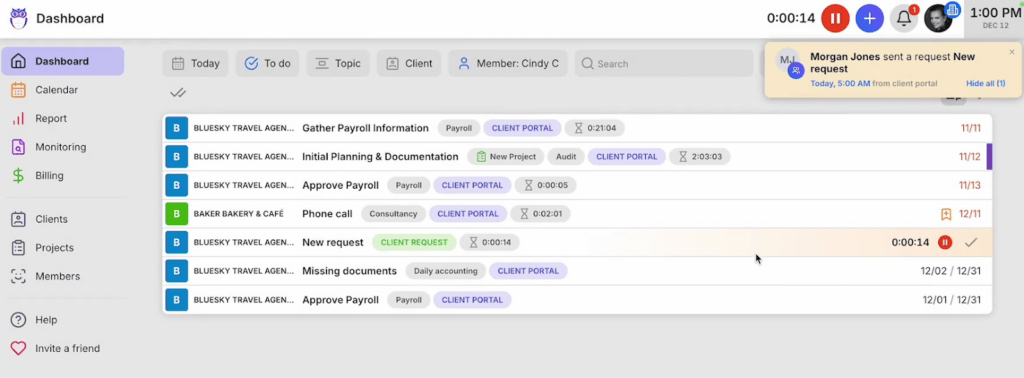
The client-portal request, the team’s task, the time on it and the line on the invoice are the same object in Uku — every log, file and comment attached to it. That is what “finished” means in practice: you don’t re-enter the work at each stage, and nothing needs reconciling between two views of it. So “who’s doing what, and is it on time?” is a screen you open, not a report you assemble.

Beautiful and fast — a tool your team enjoys.
The thing firms notice first is how it feels. Uku is clean, fast, and simple to learn — the kind of software a team is happy to open every morning, with a Client Portal you can brand as your own (logo, domain, per-client menus, e-signing inside the task). Adoption isn’t a battle when the tool is a pleasure to use.
Billing that takes minutes, not days.
Set up billing contracts once and Uku runs them — time entries, fixed fees, and rounding rules flow straight into invoices you review and send in bulk, in dollars, euros or pounds. Firms report cutting invoice prep from two or three days down to about 30 minutes, and every account gets a free 90-minute onboarding to get there.
How automated billing works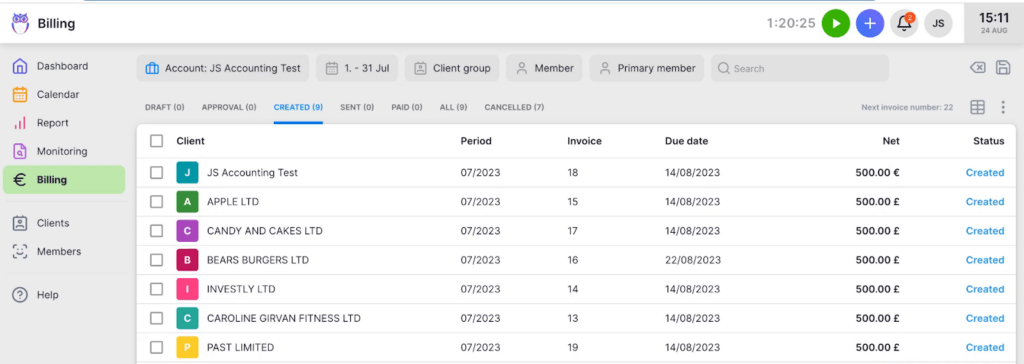
“Uku has hit the nail on the head with its simplicity and specificity, it is designed precisely for accounting firm and integrated with the necessary software. Unfortunately, generic software and direct competitors do not offer this.”
Mia S., 11–50 employees · non-incentivized review on Capterra. Under “alternatives considered” she listed Financial Cents, Karbon and Pixie — and under what she’d change: “we dream that Uku could have more ready-made templates”.
Financial Cents vs Uku, at a glance.
Both start at $19/month on annual billing, so this was never mainly a price argument. All figures are list prices in USD, on annual billing unless noted — and three of these rows go to Financial Cents, including the first one a sole practitioner will read.
Book a free migration consultation Or skip us entirely and run one real month-end in both. That answers it better than any table.
Financial Cents figures are list prices from its published pricing, checked 5 August 2026; the country and integration rows come from its own plan pages and from dated public reviews linked above. Uku prices shown are yearly-billed display rates. The solo plan, the template library and proposals-in-the-portal are rows Financial Cents wins outright — if any of the three is central to how you work, weigh it heavily.
Want the full plan-by-plan breakdown? See our deep dives on Financial Cents pricing, the Financial Cents review, and the best Financial Cents alternatives. Or see Uku’s full pricing.
What firms get after switching.
average rating, 300+ reviews
Teams rate Uku highly for ease of use and fast, professional support.
free onboarding, included
With every account, whatever size your firm is — so the setup isn't the thing that eats your first month.
days to fully migrate
Client import, workflow setup, and team training — a short, guided project.
You won’t do the move alone.
Moving off Financial Cents sounds heavy — in practice it’s a short, guided project, not a system rebuild. Here’s the shape of it.
Export from Financial Cents
Pull your client list, contacts, work templates, and time entries (CSV/Excel). Uku imports them directly — or syncs clients straight from QuickBooks, Xero, or e-conomic.
Set up your workflow
We help map your recurring work into Uku workflow templates and automations, switching on only the modules you need so the team is productive immediately.
Train the team
A 90-minute onboarding session, free with every account, gets your members confident fast — most are productive the same week.
Go live
Turn on the Client Portal, billing, and Reporting. Most firms are live in two to six weeks. With the Uku MCP server connected to your AI assistant, the company setup itself can be done in a day.
Want the step-by-step? Our help center has the full client-import playbook, with screenshots and the exact export/import flow. Read the migration playbook
Switching from Financial Cents — your questions
Is Financial Cents a bad product?
No. It rates 4.8 on Capterra across 267 reviews, its support is one of the things reviewers praise most consistently — we used to say the opposite on this page, and we were wrong to — and no one else gives you that much capability for $19 to $69 a seat. The honest criticism isn’t that anything is missing. It’s that several things stop one step short of finishing the job, which you only discover on the day you rely on them. If your firm is US-based on QuickBooks Online and the breadth is what you want, Financial Cents is a strong choice and you should keep it.
How long does it take to switch from Financial Cents to Uku?
Most firms complete the full move — client import, workflow setup, and team training — within two to six weeks, at your own pace. You export your data from Financial Cents (CSV/Excel), and Uku’s team helps import it. Every new account gets a free 90-minute onboarding session, whatever size your firm is.
Will I lose my data moving from Financial Cents to Uku?
No. You export your client list, contacts, work templates, and time entries from Financial Cents (CSV/Excel), and Uku imports them directly. You can also sync clients straight from QuickBooks, Xero, or e-conomic. Our team helps with the import.
Is Uku cheaper than Financial Cents?
On a team plan, yes; on a solo plan, no. Both are $19/month for one user on annual billing — but Financial Cents Solo takes unlimited clients and Uku Solo stops at 20 active ones, so a busy sole practitioner gets more for the money there. On a Team plan Uku is $38 per member against Financial Cents’ $49 per user, so fifteen seats is about $6,840 a year against $8,820 — roughly 22% less. Month-to-month, Uku Team is $49 per member from one member up; Financial Cents is $69 and starts at five users. Price is rarely the deciding factor either way.
What’s the real reason firms switch from Financial Cents?
Two things, and neither is a fault in Financial Cents. The first is depth: firms who trial both tell us Uku is simpler and that the features behave the way they were described, while in Financial Cents several capabilities feel about three-quarters finished — the proposal that can’t auto-bill, the signature the client can’t download. The second is fit: Financial Cents assumes a US firm on QuickBooks Online, in English, in dollars. If your clients sit outside that, you keep a second tool for the gap. Don’t take either on our word — run a real month-end in both and see which one you can finish.
Does Uku do what Financial Cents does — reporting, portal, billing?
Yes. Uku covers the core practice-management workflow: CRM, recurring tasks and workflow automations, time tracking, billing, a branded Client Portal, document management, email management, AML, Reporting on every plan from Team up, and BI Analytics on the Elite plan ($48/member/month billed annually, $62 monthly). The difference is cohesion — the same task lives across the portal, the team view, and billing as one object, so nothing scatters.
Have a question? Contact us — real people answer.
Top-rated by accounting firms, consistently.







Explore the rest of Uku.
Deliver the work
Serve clients
Run a profitable firm
 QuickBooks
  Xero
Xero  Gmail
Gmail  Google Drive
  Dropbox
  Zapier
  Microsoft 365

Run one real month-end in both. Then decide.
"Let's create a dream, where the team is happy, clients are well served and profits are fair." — Rain Allikvee, Co-founder of Uku