





Switch from Karbon to Uku.
Everything in one place instead of clicking around to find it — and a firm you can configure to how you actually work. All the practice management, billed monthly, without template or contact caps.
- Everything in one place — stop hunting across inboxes and work items
- Flexible — set up your firm the way it actually runs
- No template or contact caps — billed monthly, or ~23% off yearly
4.8 from 300+ reviews · No credit card required
The question that runs a firm is simple: who’s doing what, and is it on time? Uku puts that answer on one screen — no clicking around, no template caps.
Karbon is well liked. Read the one-star reviews anyway.
Karbon scores 4.8 on G2 across 896 reviews, and its email triage is the best in the category — we won’t pretend otherwise. But its Trustpilot score is 4.1, and one review in ten there is a single star. That gap is the interesting part, so we read them: every reason below comes from a named, dated public review, not from us.
- The email bet
It only pays off if the whole firm lives inside it.
Triage is genuinely the best inbox-to-work engine in the category. The return on it is conditional: it assumes your team will move its client email, and its internal chatter, into Karbon. Email Issues and Email Integration are two of G2’s five most-cited complaint tags.
To see benefit you need to make Karbon the primary way you email clients and communicate within your team. Our staff prefer to use their regular email… and we use Slack.
Alex, 15-person firm in Canada · Trustpilot, March 2026
- After you sign
Support is where the reviews turn.
This is the sharpest split in Karbon’s public record, and it’s why a product rated 4.8 on G2 sits at 4.1 on Trustpilot — where one review in ten is a single star.
The support is very slow to reply, 3 to 4 business days or longer… honestly we have an excel list going of all the issues we have found, 30+ of them.
David, three months into implementation · Trustpilot, August 2025
- The add-ons
Some everyday things cost extra.
The reviewer named bulk updates to existing work, and help with an API error. Karbon replied on the record and confirmed it: those requests “fall outside standard support and are available through optional add-ons.” Worth pricing in before you sign.
Great software but… they’ll charge you for ANYTHING.
Rayhaan Moughal · Trustpilot, May 2025
- The caps
You hit a ceiling you have to design around.
Karbon’s Team plan stops at 40 work templates, 35 statuses, and 1,000 contacts, on top of $59–$99 per user per month with no solo option. Firms rarely notice on day one. They notice the month they start merging templates and renaming statuses to stay under the line, and the workaround quietly becomes the workflow.
Karbon published pricing, checked 5 August 2026
Quotes are verbatim from public reviews on Trustpilot and G2, read in full and checked on 5 August 2026. Ratings move — go and read them yourself before you decide anything.
One clean screen, not three inboxes.
The information stops hiding. Clients, tasks, documents, time, and billing live in one place — so the team finds what it needs without digging through inboxes and work items. One screen answers the question that runs a firm: who’s doing what, and is it on time?
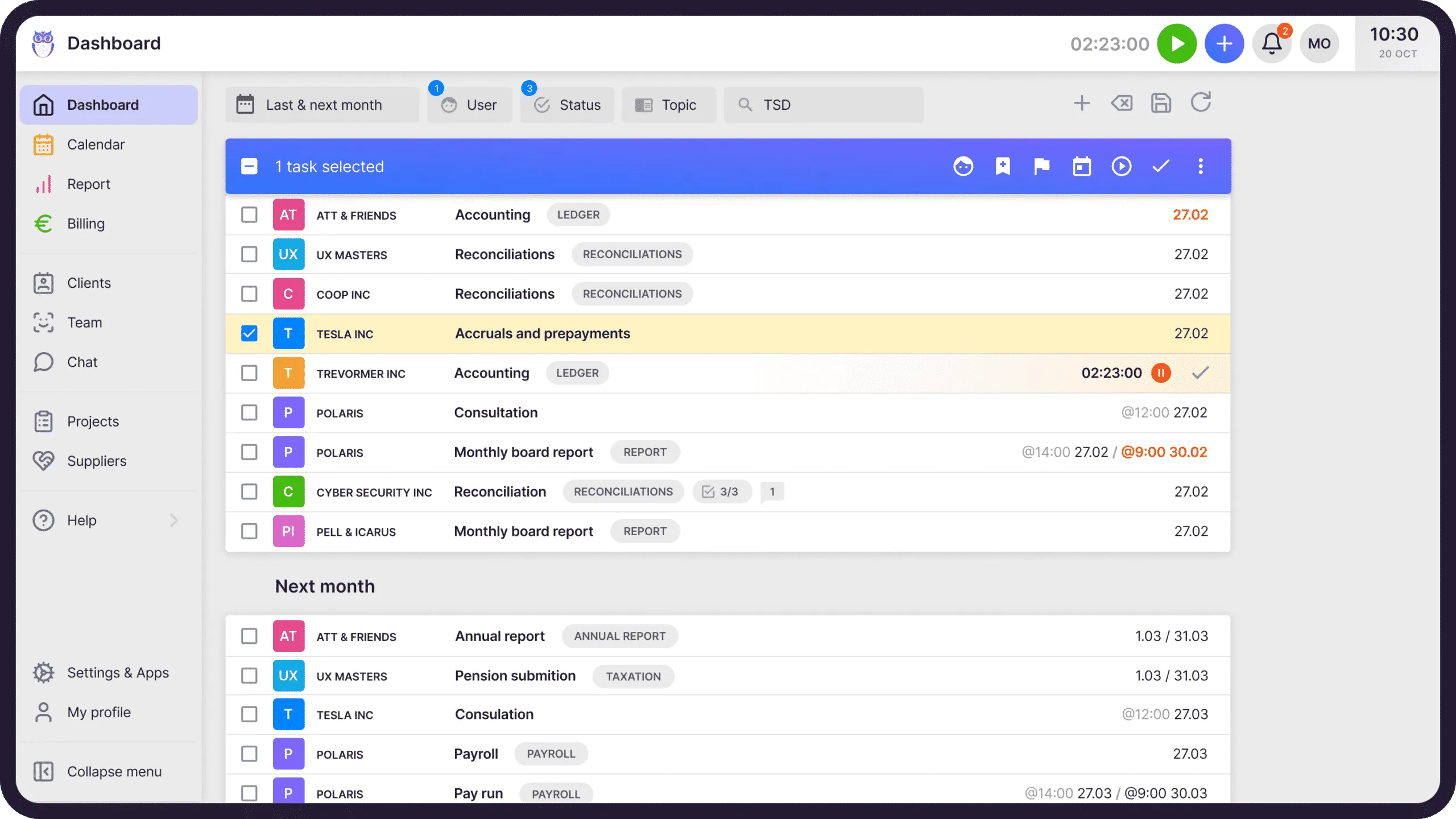
Configure Uku to how your firm actually works.
Karbon bends you to its way of working. Uku flexes to yours — set up your work, your workspaces, your billing, and a Client Portal with your own branding and domain, so the software fits your firm rather than the other way around. Clients notice the difference too.
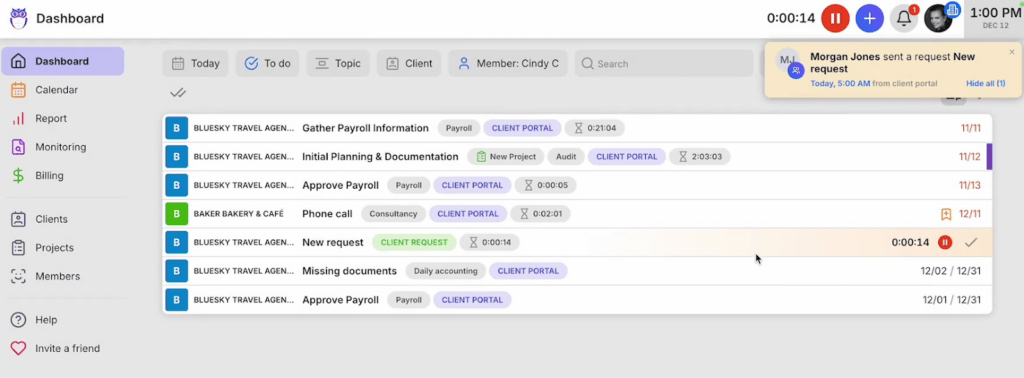
Billing that takes minutes, not menus.
Karbon’s billing is powerful, but slow to run. Uku’s is built to take minutes: set up recurring billing once and it runs — time entries, fixed fees, and contracts flow straight into invoices. Less admin, fewer clicks, money out the door faster. The point of practice-management software is to remove busywork, not add it.
How automated billing works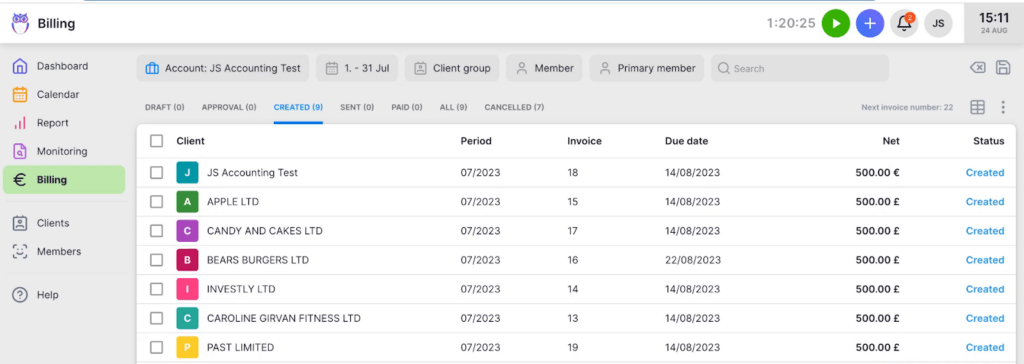
“Everything is in one place instead of spread across different messages or documents. This makes communication within the team faster and reduces missed deadlines.”
Mirjam K. · verified review on G2
Karbon vs Uku, at a glance.
The same firm work, a very different price and set of limits. All figures are list prices in USD.
Karbon prices and plan limits taken from Karbon’s published pricing, checked 5 August 2026. Support and add-on rows reflect public reviews on Trustpilot and G2, checked the same day. Uku prices shown are yearly-billed display rates.
Want the full plan-by-plan breakdown? See our deep dives on Karbon pricing, the Karbon review, and the best Karbon alternatives. Or see Uku’s full pricing.
What firms see after switching.
lower annual cost vs Karbon
15-person firm — Team ($10,620) vs Uku Team ($6,840). About $3,780 saved a year.
days to fully migrate
Client import, workflow setup, and team training — a short, guided project.
firms already on Uku
From solo accountants to 100-person teams across 25+ countries.
You won’t do the move alone.
Moving off Karbon is a short, guided project — not a system rebuild. Here’s the shape of it.
Export from Karbon
Pull your client list, contacts, work templates, and time entries (CSV/Excel). Uku imports them directly — or syncs clients straight from Xero, QuickBooks, or e-conomic.
Set up your workflow
We help map your recurring work into Uku workflow templates and automations — with no 40-template cap to plan around.
Train the team
A 90-minute onboarding session, free with every account, gets your members confident fast — most are productive the same week.
Go live
Turn on the Client Portal, billing, and Reporting. Most firms are live in two to six weeks. With the Uku MCP server connected to your AI assistant, the company setup itself can be done in a day.
Want the step-by-step? Our help center has the full client-import playbook, with screenshots and the exact export/import flow. Read the migration playbook
Switching from Karbon — your questions
Is Karbon a bad product?
No, and we’d rather say so than have you find out from someone else. Karbon scores 4.8 on G2 across 896 reviews, and its email triage is the best in the category — if your firm is willing to run its client communication inside Karbon, it earns its price. The firms that leave tend to be the ones that never made that bet: they kept normal email, they kept Slack, and they were paying $59–$99 per seat for a fraction of what the platform can do. On Trustpilot, where Karbon averages 4.1, one review in ten is a single star, and those reviews are mostly about support response and chargeable add-ons rather than the software itself.
How long does it take to switch from Karbon to Uku?
Most firms complete the full move — client import, workflow setup, and team training — within two to six weeks, at your own pace. Every new account also gets a free 90-minute onboarding session to get the team confident fast.
Will I lose my data moving from Karbon to Uku?
No. You export your client list, contacts, work templates, and time entries from Karbon (CSV/Excel), and Uku imports them directly. You can also sync clients straight from Xero, QuickBooks, or e-conomic. Our team helps with the import.
How much can a firm save switching from Karbon to Uku?
On Karbon Team (annual), a 15-person firm pays about $885/month ($10,620/year). The same team on Uku Team is $570/month ($6,840/year) on annual billing — saving roughly $3,780 a year (about 36% less), with no per-template or contact caps. Month-to-month is $49/member, about $8,820/year, still below Karbon.
Does Uku replace Karbon’s reporting?
Uku includes Reporting on every plan from Team up, and BI Analytics on the Elite plan ($48/member/month billed yearly) — real-time profitability, billable vs non-billable analytics, and client agreement monitoring. For firms whose priority is operational accountability and billing intelligence, Uku Elite covers it at less than half the price of Karbon Business.
Is there an annual contract with Uku?
No. Uku bills monthly with no long-term commitment — cancel anytime. You can also pay annually for roughly 23% off if you prefer, but it’s never required.
Have a question? Contact us — real people answer.
Top-rated by accounting firms, consistently.







Explore the rest of Uku.
Deliver the work
Serve clients
Run a profitable firm
 QuickBooks
  Xero
Xero  Gmail
Gmail  Google Drive
  Dropbox
  Zapier
  Microsoft 365

Leave the clicking around behind. Be live on Uku by next week.
"Let's create a dream, where the team is happy, clients are well served and profits are fair." — Rain Allikvee, Co-founder of Uku