Client agreement monitoring that tells you when to act.
Do you know how profitable your clients are?
- Data-driven reports help respond to changes on time
- Automated comparison between client agreements and actual work done
- Real-time monitoring prevents free extra work
4.8 from 300+ reviews · No credit card required
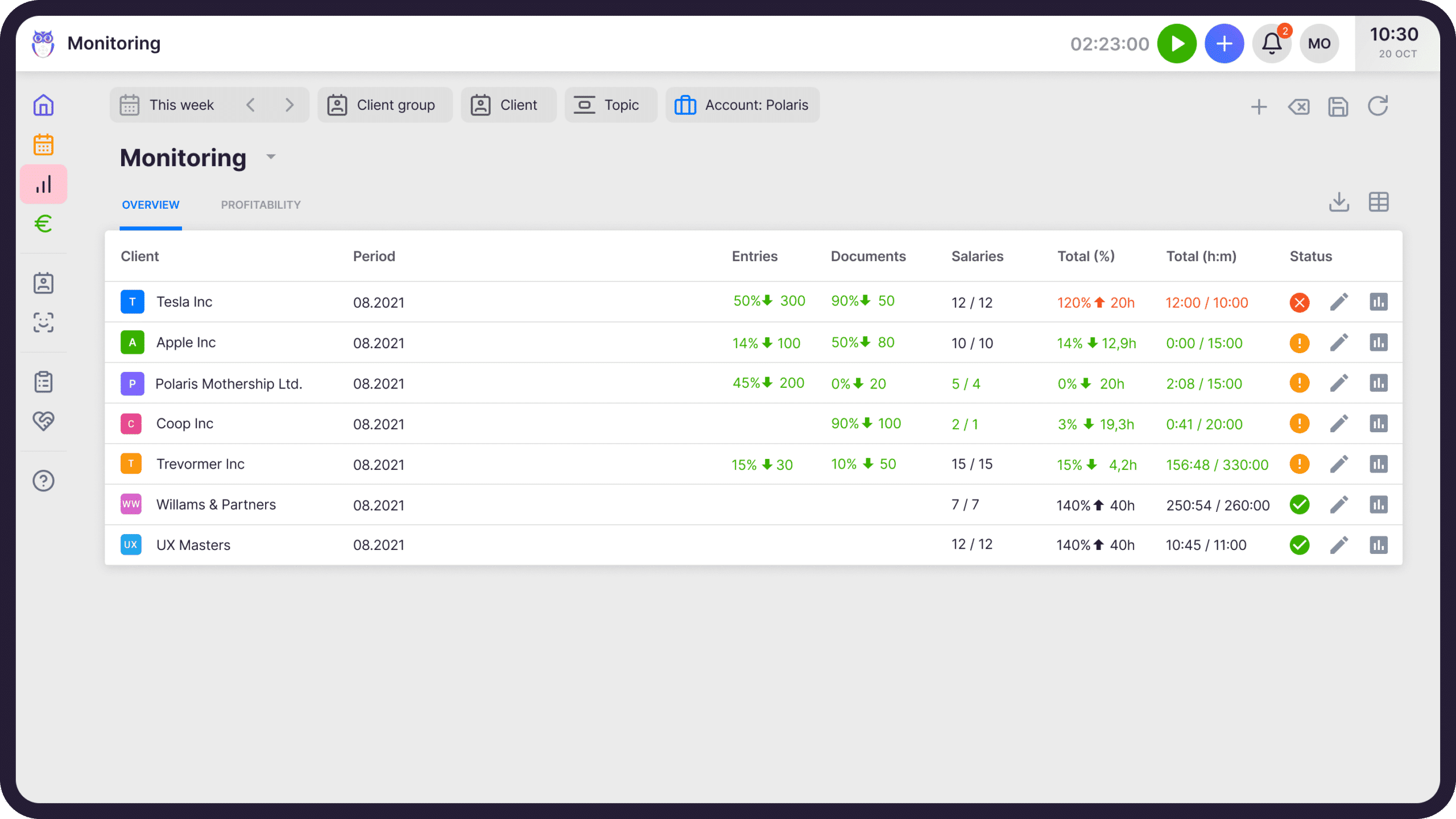
When you can see exactly which clients are profitable — and which ones are eating hours — your firm reacts before losses pile up and has every pricing conversation backed by data, not gut feel.
- Agreement — Enter the client agreement in Uku — by time or by volume (documents, payroll, VAT). Set the allowed fluctuation.
- Tracking — Uku reads time entries and the document log in real time. Workload vs. agreement updates automatically — no end-of-month reconciliation needed.
- Decision — When a client drifts from the agreement, you see it immediately in one view — green, orange, or red. React before losses pile up.
Real-time accuracy
Monitoring is based on real-time data from your team's time tracking and task completion. You see the current state of every client agreement, not last month's numbers.
Spreadsheets for tracking
No more Excel sheets to calculate whether clients are profitable. Uku compares agreement vs. actuals automatically, for every client, in real time.
Colors to understand any client
Red means over-fulfilment. Green means on track. Orange means room to grow. One glance — and you know what action to take.
“Uku has given me and other managers valuable insights on employees, clients, and tasks.”
Christer Haimi, CHK
Lead smarter — all clients on one screen.
Monitoring grounds your decisions in data — not gut feeling.
- Save analysis time — all client agreements on one screen, not monthly Excels
- Grow your profit — see at a glance who brings in money and who eats hours
- One-glance overview — time, entries, documents, payroll, and VAT together
- Control over time spent — actual workload per client, in real time
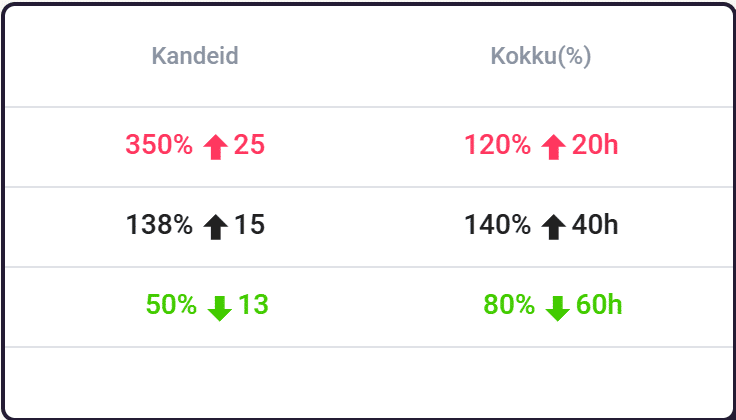
Uku tells you right away when a price needs to change.
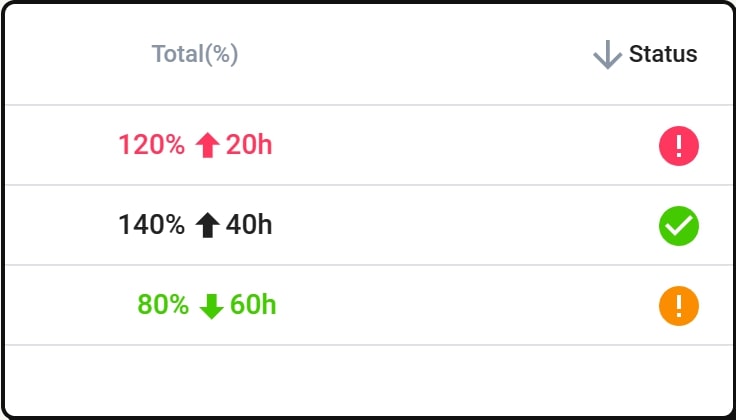
- Red — over-fulfilment — the client pays less than the work actually demands
- Green — the agreement holds, profit is on track
- Orange — there is still room, but the limit is approaching
The colors give you a clear signal for the pricing conversation — not gut feel, but data.
Don't waste time on complicated setups.
Set up monitoring for all your clients at once. Get access to real-time data and raise prices on a timely manner.
- Easier than filling an Excel sheet
- Real-time data access as soon as monitoring is configured
- Automated in the background — no manual work once set up
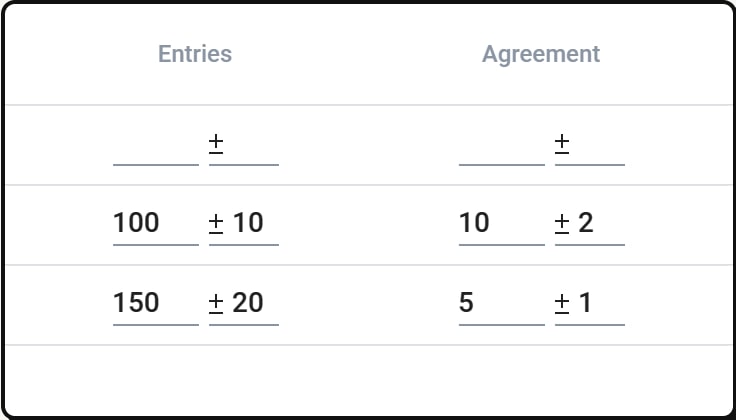
Everything you need to monitor agreements.
Monitor by time
Compare the time agreed upon with the actual time spent on a client.
Monitor by the volume of work
Compare the work agreed upon with the actual volume of work.
Set allowed fluctuation
Set allowed time and volume of work fluctuation.
Easy to set up
Set up monitoring for all of your clients at once. It is easier than filling an Excel sheet.
Visual overview
Monitoring shows you visual data about client agreement fulfilment.
Real-time data
Monitoring is in accordance with real-time data.
Yes, Uku agreement monitoring can do that.
Every agreement monitoring question we hear from accounting firms — and the answer is always the same.
- Can I compare agreed work volume with actual work done per client?
- Can I monitor both time and volume of work — entries, documents?
- Can I set allowed fluctuation for time and work volume?
- Can I see a visual overview of agreement fulfilment across all clients?
- Can I set up monitoring for all clients at once?
- Can I get real-time data instead of last month's numbers?
- Can I see which clients are red, green, or orange?
- Can I use monitoring data to justify price increases to clients?
- Can I track profitability per client automatically?
- Can I react on time when workload exceeds agreements?
"Uku has helped us up our service quality, always deliver work on time and increase profitability."
— Anu A., verified on Capterra
Agreement monitoring questions.
What is client agreement monitoring?
Client agreement monitoring automatically compares the work you agreed upon with the client to the actual work done. It tracks both time spent and volume of work, so you always know whether a client is profitable — or whether you're doing free extra work.
How does the traffic light system work?
Uku uses a simple color-coded system. Red means the client exceeds the agreed plan — you're doing more work than you're being paid for. Green means work is within the agreed limits. Orange means there is room for additional work within the agreement.
How do I set up monitoring for my clients?
You can set up monitoring for all your clients at once. Define the agreed time and work volume per client, set allowed fluctuation, and Uku starts tracking automatically. It's easier than filling an Excel sheet.
Does monitoring work with real-time data?
Yes. Monitoring is based on real-time data from your team's time tracking and task completion. You see the current state of every client agreement, not last month's numbers.
Can I use monitoring to raise prices?
Absolutely. The automated monitoring reports show exactly when you need to raise your price. When a client consistently exceeds the agreed plan (red), you have clear data to support a price conversation.
What's the difference between monitoring and billing?
Billing handles invoicing — creating and sending invoices. Monitoring tracks whether the work you're doing matches what you agreed to. They work together: monitoring tells you if your pricing is right, and billing executes the invoicing.
Have a question? Contact us — real people answer.
Top-rated by accounting firms, consistently.







Explore the rest of Uku.
Deliver the work
Serve clients
Run a profitable firm
 QuickBooks
  Xero
Xero  Gmail
Gmail  Google Drive
  Dropbox
  Zapier
  Microsoft 365







Elevate your efficiency with the powerful yet easy-to-use accounting practice management software.
"Let's create a dream, where the team is happy, clients are well served and profits are fair." — Rain Allikvee, Co-founder of Uku