
Choosing between Financial Cents vs Double for your accounting firm often comes down to these five critical questions:
- Do you need a platform built around the month-end close, or one that covers your entire practice workflow?
- Is your firm primarily focused on bookkeeping, or do you handle a broader range of accounting services?
- How important is it that your practice management tool doubles as a full CRM, time tracker, and billing system?
- Do you need deep integration with QuickBooks and Xero for transaction-level work, or broader workflow automation across all your services?
- Are you looking for a tool your entire team can adopt in days, or are you willing to invest more time in onboarding for specialized features?
In short, here’s what we recommend:
👉 Financial Cents is the go-to choice for small to mid-sized accounting firms that want a straightforward, all-in-one practice management platform. Its intuitive interface, robust workflow templates (with a community-driven library of over 100), and automated client request system make it easy to organize work, track deadlines, and stop chasing clients for documents. However, Financial Cents lacks a mobile app, its native accounting integration is limited to QuickBooks Online (though it offers additional integrations with tools like Gmail, Outlook, and SmartVault), and its reporting and invoicing features may feel basic for firms with more complex needs.
👉 Double (formerly Keeper) is purpose-built for bookkeeping and Client Accounting Services (CAS) firms that live inside QuickBooks Online or Xero. Its deep, two-way sync with these ledgers, automated file review for catching coding errors, and AI-powered financial summaries make it exceptionally strong for the month-end close process. While Double excels in this specialized niche, firms that need broader practice management beyond bookkeeping and tax, such as advanced CRM, capacity planning, or automated invoicing, may find its feature set too narrow.
Both platforms solve real problems for accounting firms. But many firms need more than just project tracking or month-end close automation. They need a single system that handles task management, time tracking, automated billing, client collaboration, and business analytics, all without forcing them to stitch together multiple tools. That’s where Uku comes in.
👉 Uku is the practice management platform built for accounting firms that want to automate their entire workflow, from task creation to invoicing, without a lengthy implementation process. Its modular approach means firms can start with just CRM and tasks on day one, then gradually activate additional modules like automated billing, BI Reporting, and document management as they grow. Combined with integrated time tracking where 90% of actions are one-click, flexible automated billing across multiple pricing models, and a deeply integrated client portal, Uku gives firms the visibility and control to grow without adding headcount. Trusted by over 1,000 clients across 25+ countries with support for 12 languages, Uku is a system your team will actually enjoy using.
If a platform that automates your workflows, billing, and client communication in one place sounds like what your firm needs, start your free 14-day trial with Uku.
Table of contents:
- Financial Cents vs Double vs Uku at a glance
- The fundamental divide: General practice management vs month-end close vs full automation
- Financial Cents keeps things simple (but simplicity has limits)
- Double owns the month-end close (but has grown beyond it)
- Uku automates the entire practice (from tasks to invoicing)
- Client portals show each platform’s approach to collaboration
- Billing and invoicing reveal where time savings really add up
- Reporting capabilities determine how well you can grow
- Financial Cents vs Double vs Uku: Which should you choose?
Related comparisons
Exploring other options? See our detailed comparisons: Aero Workflow vs Jetpack Workflow vs Uku and Aero Workflow vs Karbon vs Uku.
Financial Cents vs Double vs Uku at a glance
| Financial Cents | Double | Uku | |
|---|---|---|---|
| Primary focus | All-in-one practice management | Month-end close and bookkeeping | Full practice automation and billing |
| Best for | Small to mid-sized US/Canada firms wanting simplicity | Bookkeeping and CAS firms on QBO/Xero | Firms wanting modular, end-to-end automation |
| Workflow automation | Good, with community template library | Strong for month-end close tasks | Advanced, with layered template-to-task system |
| Time tracking | Built-in with manual and timer options | Included with timers and reporting | Integrated with stopwatch, manual, and bulk entry (90% one-click) |
| Billing and invoicing | Basic invoicing from tracked time | Not included | Automated invoicing with flexible pricing models |
| Client portal | Passwordless access, document sharing | Passwordless access, transaction questions | Integrated portal with customizable menus per client |
| Accounting integrations | QuickBooks Online only | QuickBooks Online and Xero (two-way sync) | QuickBooks, Xero, e-conomic, and more |
| CRM | Built-in with custom fields and groups | Client management with custom properties | Full CRM with custom fields, groups, and access control |
| Reporting | Reporting suite with profitability analysis | Custom management reports for clients | BI Reporting with business analytics |
| Starting price | from $19/month (Solo) to $49/user/month (Team), annual commitment | from $8/client/month (Lite); demo required for current pricing | Free (Solo), from $38/member/month (Team) |
| Billing options | Annual commitment required | Demo required, then onboarding call | Monthly or annual; pricing in €, $, and £ |
| Free trial | 14-day free trial | Demo required, then onboarding call | 14-day free trial |
The fundamental divide: General practice management vs month-end close vs full automation
These three platforms approach accounting practice management from fundamentally different angles, and understanding this distinction is key to making the right choice.
Financial Cents was built to be the accessible, easy-to-use practice management tool for the “everyday firm.” It covers the essential bases: workflow management, client communication, time tracking, and basic billing. The philosophy is clear: give small firms a single platform they can adopt quickly without feeling overwhelmed. It excels at organizing who’s doing what and when, and its automated client request system saves firms from the endless cycle of chasing clients for documents. That said, Financial Cents requires a minimum 1-year purchase commitment and is built primarily for the US/Canada market, with no multilingual support and billing only in USD.

Double took a completely different path. Rather than trying to manage an entire practice, Double went deep on one specific problem: the month-end close. By building a two-way sync directly into QuickBooks Online and Xero, Double lets bookkeepers review transactions, catch coding errors, ask clients questions about specific entries, and push corrections back to the ledger, all without leaving the platform. It’s highly specialized, and for firms whose work revolves around closing books, that specialization is powerful.

Uku represents a third approach: modular automation designed to scale. Rather than requiring firms to configure an entire platform before getting started, Uku lets teams begin with just the modules they need, such as CRM and tasks, and gradually activate additional capabilities like automated billing, BI reporting, and document management as the firm grows. This step-by-step deployment means firms can start working on day one, which is one of the biggest reasons clients switch to Uku from competitors.
The layered workflow system, where master templates cascade into client-specific task plans that automatically generate recurring tasks, combined with integrated time tracking and automated billing, means the platform handles not just task management but the entire work-to-invoice cycle. For firms looking to grow their client base without proportionally growing their team, this modular approach to automation makes a meaningful difference.

Financial Cents keeps things simple (but simplicity has limits)
Financial Cents has earned its reputation as one of the most approachable practice management tools on the market. The interface is clean, setup is fast, and most teams can be productive within their first week. For firms that have been managing work through spreadsheets, sticky notes, or a chaotic inbox, the improvement is immediate and significant.
The workflow management is solid. Firms can create projects from templates, assign tasks with due dates, and track progress on a centralized dashboard. The community-driven template library with over 100 workflows is a genuine differentiator. Instead of building processes from scratch, firms can download templates created by other accounting professionals and modify them to fit their needs.

Source: Financial Cents
The automated client request system is another highlight. Firms can create task lists for clients, send them through the passwordless portal, and set up automated email and SMS reminders until everything is submitted. Users report that this feature alone saves them significant time each week.
But simplicity comes with trade-offs. Financial Cents’ invoicing capabilities are relatively basic compared to platforms with more advanced billing automation. The platform lacks a mobile app for both staff and clients. While Financial Cents offers native integrations with tools like Gmail, Outlook, Adobe Sign, Google Drive, OneDrive, SmartVault, and Ignition, its only native accounting software integration is QuickBooks Online. Notably, there is no native Xero integration, with broader connectivity available through Zapier. And while the reporting suite has improved with recent additions like the Realization Report and Revenue Insights, firms with advanced analytical needs may find themselves wanting more depth.

Source: Financial Cents
Financial Cents is also exclusively focused on the US and Canadian markets, with no multilingual support and billing only in USD. Firms with international clients or teams will need to look elsewhere. Additionally, Financial Cents requires a minimum 1-year purchase commitment, which means firms cannot test the platform on a flexible monthly basis before committing.
For solo practitioners and small US-based teams that need a clean, organized system at an affordable price, Financial Cents delivers. For firms that need native Xero integration, automated billing, multilingual support, or the flexibility to scale beyond a certain complexity, the platform starts to show its boundaries.
Double owns the month-end close (but has grown beyond it)
Double (formerly Keeper) has carved out a strong niche by doing one thing exceptionally well: making the month-end close faster and more accurate for bookkeeping firms.
The automated file review feature is the heart of the platform. It connects directly to a client’s QuickBooks Online or Xero account through a deep, two-way sync, then analyzes transactions against historical data to flag potential coding errors, uncategorized transactions, and entries missing payees. Instead of manually hunting through a ledger for inconsistencies, bookkeepers can review a curated list of flagged items and make corrections directly within Double, with changes syncing back to the accounting software instantly.

Source: Double
The client portal is tightly integrated with this workflow. When a bookkeeper encounters a transaction they need clarification on, they can ask the client directly from the bank feed. The client receives a notification, accesses the portal through a passwordless “magic link,” answers the question, and the bookkeeper can categorize the transaction without ever leaving Double. For firms where getting timely client responses is a constant bottleneck, this streamlined approach is genuinely valuable.
Double’s custom management reports with AI-powered financial summaries are another standout. The platform can generate comprehensive reporting packages (including P&L, balance sheet, cash flow statements, and executive summaries) with just a few clicks, and the AI can automatically draft client-ready commentary on key financial trends.

Source: Double
It’s worth noting that Double has expanded beyond its original bookkeeping focus. The platform now includes time tracking with timers and reporting, and a dedicated Tax Suite with organizers, e-signatures, and tax-task workflows.
However, Double still does not include invoicing functionality, meaning firms will need a separate solution for billing their clients. And while Double offers a CRM and practice management dashboard with custom properties, its task management is primarily designed around the close process rather than the full range of services that some multi-service firms provide (such as advisory, payroll, or audit work).
For firms that are primarily bookkeeping and tax-focused and want to accelerate their close process, Double is excellent. For firms that need a system to manage their entire practice, Double is only one piece of the puzzle.
Uku automates the entire practice (from tasks to invoicing)
Where Financial Cents focuses on accessibility and Double focuses on the month-end close, Uku focuses on end-to-end automation for the full practice lifecycle, with a modular approach that lets firms adopt features at their own pace.
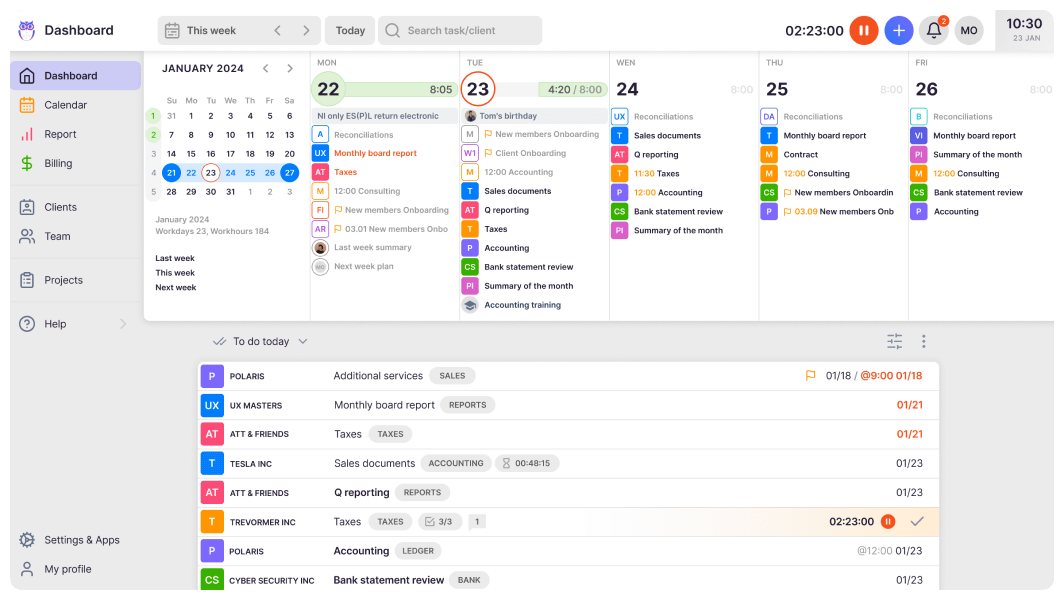
The foundation is Uku’s layered workflow structure. At the top level, firms create master task templates that define standardized processes for their services. These templates are then applied to individual clients to create customized task plans.
From these plans, Uku automatically generates recurring tasks at the right time and assigns them to the right team members. The system handles weekly, monthly, quarterly, and yearly recurrences, and can even set dynamic due dates based on rules like “the 6th working day of the month.”
Tasks can also be automatically generated from client custom fields, and all communication stays within tasks, solving the common problem of critical information being trapped in individual email accounts. For most firms, this structure automates the vast majority of their repetitive task creation and assignment.

The integrated time tracking is built for speed, with 90% of actions being one-click. Users can track time through multiple methods including a stopwatch, manual entry, or bulk time allocation across multiple tasks. This time data feeds directly into the automated billing system, where firms set up client contracts with flexible pricing models, including fixed fees, hourly rates, item-based billing, or combinations of all three.
Want to see how Uku handles all of this in one platform? Start your free 14-day trial — no credit card required.
The billing system also supports complex price lists based on quantity, time, and material, with sophisticated rounding rules that allow firms to properly bill for interruptions (for instance, a one-minute unplanned call can be automatically billed as 15 minutes). What previously took firms two to three days of manual invoice preparation can be completed in approximately 30 minutes, even for firms with over 100 clients.

Uku also tracks both sales prices and actual cost prices, giving managers clear visibility into employee profitability. If an employee costs €30/hour but bills at €45/hour, and only six of their eight working hours are billable, the system highlights whether the issue is employee efficiency, client difficulty, or pricing structure. Customers report seeing ~20% more profit by discovering outdated agreements where actual work far exceeded what was being billed.
For document handling, Uku offers one-click document digitalization, allowing documents to be submitted and sent directly into accounting software with a single click, a level of automation unique in the practice management space.

Uku provides a full CRM with custom fields, client grouping, and access management, along with BI Reporting and business analytics that cover team performance, client profitability, and task status overviews. The platform integrates with QuickBooks, Xero, e-conomic, and several other accounting platforms. The Elite plan ($48/member/month) includes additional capabilities such as Client Budgeting, Document Management, and e-signatures.
What makes Uku’s approach distinctive is its modular deployment. Like an iPhone where you start with basic functionality and add apps as needed, firms can begin with just CRM and tasks, then gradually activate billing, reporting, and document management as they grow.
Many Uku customers are transitioning from Excel. They can work with their existing spreadsheet, import it into Uku with assisted import (available across all plans), and have automated task plans ready to go. This fast and flexible deployment eliminates the need for substantial upfront configuration and training, and is one of the biggest reasons clients switch from competitors to Uku. Firms that adopt the platform consistently report dramatic time savings, with one firm noting they could serve 38% more clients after a year of using Uku.

Client portals show each platform’s approach to collaboration
The client portal is often where practice management software either wins or loses client adoption. All three platforms offer portals with passwordless “magic link” access, but the depth of functionality varies considerably.
Financial Cent
Financial Cents provides a clean, straightforward portal where clients can view and complete requests, upload documents, communicate with the firm, and view and pay invoices. The automated reminders via email and SMS keep clients engaged without requiring manual follow-up. The portal is functional and easy for clients to use, but customization options are limited.

Source: Financial Cents
Double
Double’s portal is tightly integrated with the bookkeeping workflow. The standout feature is the ability for clients to answer questions about specific transactions directly within the portal, with context pulled from their accounting ledger. For bookkeeping-specific communication, this is highly efficient. Double also offers custom branding including whitelabeling on the firm’s own domain, a mobile app for clients on iOS and Android, and the ability to share interactive financial reports through the portal.

Source: Double
Uku
Uku’s portal stands out because it is truly integrated into the workflow rather than being a separate layer. Unlike traditional portals where tickets must be connected to work items, Uku’s portal mirrors the exact same task on both sides. Clients and accountants work on the same item with all communication, actions, documents, logs, and time tracking in one place. When clients make requests through the portal, notifications appear on the accountant’s dashboard, and they can immediately start tracking time or communicating within that same task.
Firms can customize the portal with company branding including logo, colors, and custom domain, and the menu links visible to each client can be customized individually. Different clients can see different features, documents, or external links based on their needs. The portal also supports onboarding with forms, business insight report sharing, price list display, and client feedback collection. And unlike Financial Cents, Uku’s portal is available as a mobile app.

Billing and invoicing reveal where time savings really add up
This is where the three platforms diverge most dramatically, and where the choice can have the biggest impact on a firm’s bottom line.
Financial Cent
Financial Cents offers basic invoicing that connects to its time tracking. Firms can create one-off and recurring invoices, generate invoices from tracked time, and accept online payments via ACH and credit cards. The QuickBooks Online integration syncs invoices and payments. It’s functional for straightforward billing needs, but firms with complex pricing structures or multiple billing models per client may find it limiting. Financial Cents also does not offer one-click document digitalization to accounting software, which means more manual steps in the document-to-ledger workflow.

Source: Financial Cents
Double
Double does not include billing or invoicing as part of its platform. Its pricing model is per-client (historically ranging from $8 to $50 per client per month depending on the plan; contact Double for current pricing), and the platform focuses on the work itself rather than the billing of that work. Firms using Double will need a separate solution for invoicing their clients.
Uku
Uku takes billing further than either competitor. The automated invoicing system generates invoices directly from tracked time and completed tasks, based on pre-defined client contracts. These contracts support a wide range of pricing models: fixed fees, hourly rates, item-based billing, and combinations of all three, plus complex price lists with different rates for different periods and sophisticated rounding rules.
Users can hide zero-sum invoice rows, ensuring invoices reflect only the services that were relevant during the billing period. Once generated, invoices can be reviewed and sent in bulk, then exported to the firm’s accounting software.

Uku supports multi-currency billing for firms with international clients and integrates with Xero, QuickBooks, e-conomic, and several other accounting platforms. Uku also offers both monthly and annual billing options, with pricing available in €, $, and £, so firms can test the platform at approximately $38 per month without a long-term annual commitment.
For a firm with 100+ clients, the difference between manual invoicing (or no built-in invoicing at all) and Uku’s automated approach can save days of administrative work each month.
Reporting capabilities determine how well you can grow
Good reporting doesn’t just tell you where you’ve been. It tells you where to invest, what to change, and when to hire.
Financial Cent
Financial Cents has recently expanded its reporting suite to include Revenue Insights, Accounts Receivable Aging, Work Insights, Realization Reports, and Utilization Reports. The Effective Hourly Rate Report is particularly useful for firms on fixed-fee arrangements, as it reveals which clients are consuming more time than their fee justifies. The reports are filterable by client, service, and date range.

Source: Financial Cents
Double
Double approaches reporting from the client-facing side. Its custom management reports generate comprehensive financial packages (P&L, balance sheet, cash flow, executive summary) that can be published directly to the client portal.

Source: Double
The AI-powered financial summaries automatically generate narrative commentary on key trends and variances, saving accountants the time of writing these summaries manually. For bookkeeping firms that deliver monthly reporting packages to clients, this is a significant time-saver. However, Double’s internal firm analytics and profitability reporting are more limited compared to dedicated practice management platforms.
Uku
Uku provides BI Reporting designed to inform strategic decisions about the firm itself. The reporting offers three levels of depth: summary, tasks, and time, with deep filters, saved report templates, and real-time insights into profitability and budget status. All reports support powerful filtering by client, user, topic, and time period.

The platform also includes specific business analytics reports that provide detailed performance metrics covering team performance, client profitability, and task status overviews. Reports can be exported as PDF or Excel, and for firms that need deeper analysis, Uku offers a public API to connect with external business intelligence tools like Power BI. The actionable audit log adds another layer, tracking every change within the system and allowing managers to restore deleted tasks if needed.
Financial Cents vs Double vs Uku: Which should you choose?
The right platform depends on your firm’s size, services, and priorities.
Choose Financial Cents if:
- You’re a solo practitioner or small firm looking for an easy-to-use, affordable practice management tool
- Your primary need is organizing workflows, tracking deadlines, and automating client requests
- You use QuickBooks Online and need basic time tracking and invoicing
- You want a platform your team can adopt quickly with minimal training
- A community-driven template library appeals to your approach to building workflows
Start your 14-day free trial with Financial Cents.
Choose Double if:
- Your firm is focused on bookkeeping and Client Accounting Services
- The month-end close process is your biggest bottleneck
- You need deep, two-way integration with QuickBooks Online or Xero for transaction-level work
- AI-powered financial summaries and automated file review would transform your workflow
- You’re comfortable using separate tools for invoicing and broader practice management
Schedule a demo with Double to see their month-end close workflow.
Choose Uku if:
- You want to minimize your team’s admin time with one-click actions and automated processes
- You value fast onboarding and modular scaling, starting with what you need on day one and adding modules as you grow.
- You need multilingual or multi-currency support for international teams or clients
- You’re transitioning from Excel and want the easiest, fastest implementation path
- You need flexible monthly pricing rather than annual commitments
- You want automated billing that reduces invoice preparation from days to 30 minutes
Start your free 14-day trial with Uku and experience the full platform, no credit card required.
The accounting practice management market offers tools for every level of need. Financial Cents brings accessible simplicity for US-based firms getting organized. Double delivers specialized depth for bookkeeping and tax teams closing books faster. Uku provides the modular automation that firms need to grow efficiently, a system your team will actually enjoy using. For firms that want one platform to handle tasks, time, billing, client collaboration, and business analytics, Uku offers something the others can’t match: a system where the work you do automatically becomes the invoice you send, with the data you need to make smarter decisions along the way.
Ready to see how Uku can automate your firm’s workflows? Start your free trial today.