
Choosing between Aero Workflow vs Jetpack Workflow for your accounting firm often comes down to these five critical questions:
- Do you need a dedicated workflow engine with SOPs embedded into every task, or a simpler checklist-based system to keep recurring work on track?
- Is flat-rate pricing important to you, or are you comfortable paying per user as your team grows?
- Do you need built-in time tracking that syncs directly with QuickBooks, or is basic time logging sufficient?
- Are you looking strictly for internal workflow management, or do you also need client-facing features like a portal, automated billing, and business analytics?
- Is your firm primarily bookkeeping and CAS-focused, or do you need a tool flexible enough to handle a broader range of accounting services?
In short, here’s what we recommend:
👉 Aero Workflow is purpose-built for bookkeeping and Client Advisory Services (CAS) firms that want to standardize every step of their recurring work.
With over 150 pre-built accounting checklists, a secure Client Vault for storing sensitive credentials, and flat-rate pricing that doesn’t penalize you for adding team members, Aero excels at turning your firm’s knowledge into repeatable, trackable processes. It also offers effective reporting with 20+ built-in reports including profitability analysis.
However, it does not offer a dedicated client portal, has no mobile app, and its interface feels dated compared to newer alternatives.
👉 Jetpack Workflow is the go-to choice for small to mid-sized accounting firms that prioritize simplicity and fast implementation. Its clean, spreadsheet-like interface makes it easy to create jobs, assign tasks, and track deadlines without a steep learning curve. The template library of over 70 accounting workflows and the capacity planning feature help firms stay organized as they grow.
That said, Jetpack Workflow lacks built-in billing, has limited native integrations, and its reporting features are fairly basic compared to more comprehensive platforms.
Both platforms do a solid job of managing internal workflows and preventing missed deadlines. But neither provides the full package that modern accounting firms increasingly need: integrated client collaboration, automated billing, and connected business intelligence in one place.
For firms that want workflow management, time tracking, invoicing, a client portal, and actionable analytics without stitching together multiple tools, there’s a more complete option.
👉 Uku brings workflow automation, time tracking, automated billing, a client portal, and BI Reporting together in a single platform designed specifically for accounting firms. Instead of just tracking what your team is doing, Uku connects every task to client contracts, profitability reports, and automated invoicing, giving you visibility not just into work status but into the financial health of every client relationship.
With a modular approach that lets firms start with just the features they need and scale up over time, a free plan for solo practitioners, and flexible monthly pricing, Uku eliminates the need to bolt on separate tools for the features that Aero and Jetpack leave out. Serving 1,000+ clients globally with support for 12 languages and multi-currency capabilities (€, $, £), it’s a system your team will actually enjoy using.
If a platform that manages your workflows, bills your clients, and shows you exactly which engagements are profitable sounds like what your firm needs, start your free 14-day trial of Uku.
Table of contents:
- Aero Workflow vs Jetpack Workflow vs Uku at a glance
- The real divide: Workflow engine vs practice management platform
- Aero Workflow owns process standardization, Jetpack Workflow owns simplicity
- Client collaboration is where the gap widens
- Time tracking and billing reveal each platform’s priorities
- Reporting and business intelligence separate managers from leaders
- Pricing models reflect very different philosophies
- Implementation and support experiences differ
- Aero Workflow vs Jetpack Workflow vs Uku: Which should you choose?
Related comparisons
Looking at other tools? See our detailed comparisons: Financial Cents vs Double vs Uku and Aero Workflow vs Karbon vs Uku.
Aero Workflow vs Jetpack Workflow vs Uku at a glance
| Aero Workflow | Jetpack Workflow | Uku | |
|---|---|---|---|
| Core focus | Internal workflow standardization | Internal workflow tracking | Complete practice management |
| Pre-built templates | 150+ accounting checklists | 70+ accounting templates | Pre-built templates with customization |
| Client portal | Not available | No | Yes, integrated and fully customizable |
| Time tracking | Built-in, syncs with QuickBooks | Built-in, basic | Multiple methods (90% one-click) with profitability analysis |
| Automated billing | No | No | Yes, with flexible pricing models |
| Pricing model | Flat-rate tiers ($135–$365/mo) | Per user ($40–$49/user/mo) | Per member (from $38/member/mo) |
| Free plan | 30-day trial | 14-day trial | Free Solo plan (1 user, 25 clients) |
| Capacity planning | Capacity viewer | Plan view (Scale tier) | Workload overview with reporting |
| Reporting | 20+ pre-built reports | Progress, metrics, and done reports | BI Reporting with profitability tracking |
| Mobile access | No mobile app | Mobile-optimized web app | Mobile-optimized web app |
The real divide: Workflow engine vs practice management platform
The comparison between Aero Workflow and Jetpack Workflow is actually quite narrow.
Both are dedicated workflow management tools built for accountants. They both help you create templates, schedule recurring tasks, and track deadlines. Where they differ is in depth versus simplicity.
But here’s the bigger question most firms should be asking: Do you just need a workflow tracker, or do you need a platform that connects your workflows to billing, client communication, and business analytics?
Aero Workflow and Jetpack Workflow were both built to keep recurring client work on track, making sure nothing falls through the cracks. They’re excellent at this. But once the work is done, there are gaps.
Need to bill the client? You’ll rely on QuickBooks or another invoicing tool, since neither platform generates invoices internally. Want to know if that fixed-fee client is actually profitable? Aero does offer profitability-related reports that compare actual time against estimated time, but you won’t find automated billing calculations or integrated contract monitoring in either tool.
Uku was designed around a different premise: that workflow management is just one piece of running an accounting practice.

By integrating task management with time tracking, automated billing, a client portal, and BI Reporting, Uku treats workflow completion as the starting point for insights, not the end of the process.
When a team member finishes a task in Uku and has tracked their time, the billing data is captured and the profitability picture updates automatically, showing not just whether a client is profitable but whether the issue lies in employee efficiency, client difficulty, or pricing structure.
Aero Workflow owns process standardization, Jetpack Workflow owns simplicity
Aero Workflow
Aero Workflow has built an exceptionally thorough process documentation system for accounting firms.

Its 150+ pre-built bookkeeping checklists aren’t just task lists. They’re step-by-step procedure guides with embedded instructions, screenshots, and links. When a staff member opens a task, they see exactly how to do the work, not just what needs to be done.
The Client Vault adds another layer, putting client passwords, tax IDs, and login credentials within easy reach of the task workspace so staff can access what they need without navigating away.
For firms where knowledge transfer is the primary concern (training new hires, documenting the owner’s processes, ensuring consistent quality across a remote team), Aero’s embedded SOP approach is hard to beat.
Jetpack Workflow
Jetpack Workflow takes the opposite approach.

Rather than embedding broad procedures into every task, it focuses on making workflow management as frictionless as possible. The interface looks and feels like a well-organized spreadsheet. Creating a job, assigning it to a team member, and setting a recurring schedule takes minutes, not hours.
The template library of 70+ accounting workflows provides a solid starting point, and the change management system ensures that updates to a template cascade down to all future jobs automatically.
For firms that are currently managing everything in Excel or a generic project management tool and just need something purpose-built for accounting workflows, Jetpack’s low learning curve and rapid implementation are compelling.
Client collaboration is where the gap widens
Aero Workflow
Aero Workflow does not appear to offer a dedicated client portal based on its published feature lists.
There’s no documented way for clients to upload files, check the status of their work, or interact with your firm through the platform. Client communication largely stays in email.
Jetpack Workflow
Jetpack Workflow is in a similar position.
While it recently added a client document upload feature that lets clients submit files directly into their profile, there’s no dedicated portal for clients to interact with your firm, view task progress, or manage deadlines on their end.

Source: Jetpack Workflow
For many firms, these gaps mean adding additional tools to the stack: a client portal solution for document collection and communication, plus the administrative overhead of keeping everything synchronized.
Uku
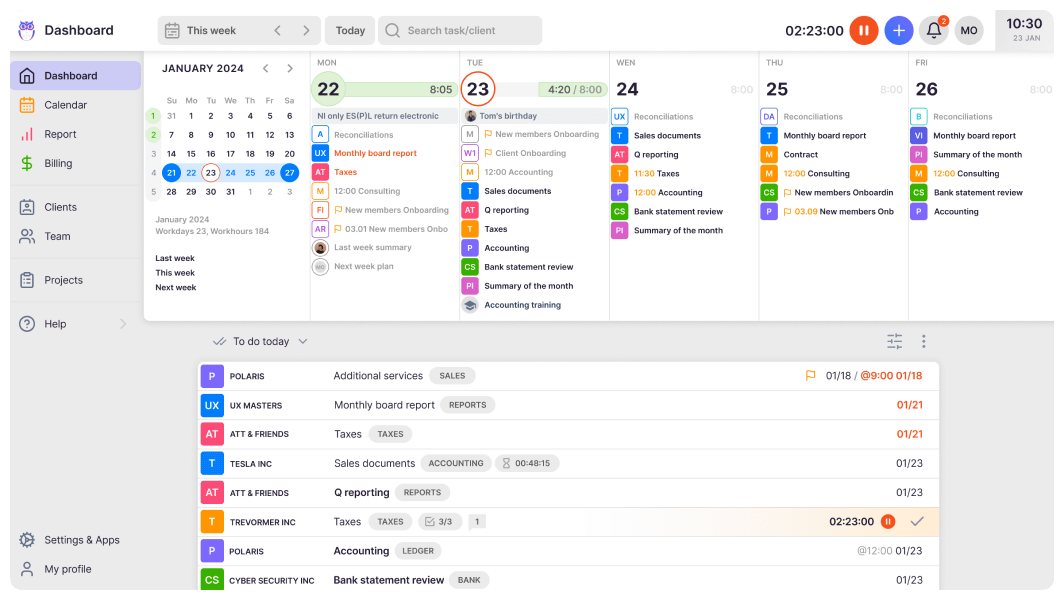
Uku addresses this gap directly with an integrated client portal that works differently from traditional portal solutions.
Instead of a separate ticket system where items need to be connected to internal work, Uku’s portal mirrors the exact same task on both sides. Clients and accountants work on the same item with all communication, actions, documents, logs, and time tracking in one place.

Source: Uku
When a client makes a request through the portal, the notification appears on the accountant’s dashboard, and they can immediately start tracking time or communicating within that same task.
The portal uses “magic link” access (no passwords for clients to forget), supports task assignments with to-do lists and deadlines, and includes automatic reminders for overdue items. Clients can upload documents by dragging and dropping them, and the accountant is notified immediately when submissions arrive.
Beyond document exchange, firms can create unique menus for each client, run onboarding with forms, share business insight reports, display price lists, and embed custom content. This isn’t a bolt-on feature; it’s integrated directly into Uku’s workflow, with company branding so the portal reflects your firm’s identity.
Time tracking and billing reveal each platform’s priorities
Aero Workflow
Aero Workflow has a notable time tracking integration.
The timer is built directly into every task, so when a staff member opens a checklist and starts working, the clock starts automatically. Time data syncs with QuickBooks Online and QuickBooks Time, which means billable hours flow into invoicing without manual re-entry.

Source: Aero Workflow
The platform also provides job costing reports that show actual time versus estimated time for each client and task, which is valuable for firms evaluating fixed-fee profitability.
However, Aero stops at tracking. It doesn’t generate invoices, handle billing calculations, or manage client agreements. You’re still exporting time data to another system to get paid.
Jetpack Workflow
Jetpack Workflow offers time tracking through built-in timers and manual entry at the task and job level.
Users can designate entries as billable or non-billable, and the Timesheet Report provides a downloadable breakdown of all time entries. But like Aero, Jetpack doesn’t include billing or invoicing capabilities. The time data is useful for internal analysis, but turning it into revenue requires another tool.

Source: Jetpack Workflow
Uku
Uku connects workflow to billing more directly than either competitor.
Time tracking is built for speed, with 90% of actions being one-click. Users can track time through multiple methods including a stopwatch, manual entry, or bulk time allocation across multiple tasks, and the data feeds directly into an automated billing engine.
Want to see how Uku handles all of this in one platform? Start your free 14-day trial — no credit card required.

Source: Uku
The billing system handles advanced scenarios: firms can set up client contracts with fixed fees, hourly rates, item-based pricing, or any combination, with rules for rounding, different rates for different periods, and the ability to automatically bill unplanned work at appropriate minimums (a one-minute unplanned call can be billed as 15 minutes, for instance).
Once contracts are configured, time tracking automatically calculates billable amounts in real time.
Uku generates invoices automatically based on the work completed during the billing period and integrates with accounting software like Xero and QuickBooks to export finalized invoices.
Firms report reducing their invoicing process from days to approximately 30 minutes, and customers have seen ~20% more profit by discovering outdated agreements where actual work had far exceeded what was being billed.
The billing integration also tracks both sales prices and actual cost prices. If an employee costs €30/hour but bills at €45/hour, managers can see exactly whether the issue is employee efficiency, client difficulty, or a pricing structure that needs adjustment, rather than discovering losses 30 days too late.
Reporting and business intelligence separate managers from leaders
Aero Workflow
Aero Workflow provides over 20 pre-built reports covering staff activity, job costing, actual versus estimated time, and profitability by client.

Source: Aero Workflow
The reports are customizable and can be saved for recurring use. For a dedicated workflow tool, this is very effective. You can see which staff members are most efficient, which clients are consuming more time than expected, and where your processes need refinement.
Jetpack Workflow
Jetpack Workflow offers reporting through its Progress Report, Metrics Report, Done Report, and Timesheet Report.

Source: Jetpack Workflow
The Progress Report provides a visual overview of job completion rates, while the Done Report acts as an audit trail showing who completed what and when. The Metrics Report can be downloaded as an Excel file for further analysis. While functional, some users note that the reporting could be more advanced, and better analysis typically requires exporting data to external tools.
Uku
Uku approaches reporting through BI Reporting that provides comprehensive views with advanced filters, saved report templates, and three levels of depth: summary, tasks, and time.
Beyond standard task and time reports, Uku provides a dedicated business analytics report that tracks client profitability by comparing agreed work volume against actual effort, team performance reporting that identifies workload imbalances, and customizable analytics views that can be filtered by client, user, topic, or time period.
Reports can be exported as Excel files, and for firms with more advanced needs, Uku offers a public API for connecting to external BI tools like Power BI.

Source: Uku
The actionable audit log is worth highlighting: it tracks every change in the system and, unlike most audit logs, allows users to restore deleted tasks with all their associated data and time entries. For firms that need accountability and compliance, this is a meaningful advantage.
Pricing models reflect very different philosophies
Aero Workflow
Aero Workflow uses a flat-rate, tier-based pricing model that’s straightforward:
- Startup (1–5 users): $135/month ($108/month billed yearly)
- Growth (6–25 users): $250/month ($200/month billed yearly)
- Scaling (26–50 users): $365/month ($295/month billed yearly)

Every tier includes the full feature set. No feature gating, no per-user charges within a tier. For a firm with 15 users, you’re paying $250/month total, which works out to roughly $16.67 per user. That’s remarkably affordable, and the predictability is an advantage for budgeting. Aero also includes free onboarding, training, and API access at every level.
Jetpack Workflow
Jetpack Workflow also uses a straightforward per-user model:
- Starter (yearly): $40/user/month
- Starter (monthly): $49/user/month

For a solo practitioner or small team, this is competitive. But costs scale linearly with headcount. A 15-person firm pays $600/month on the yearly plan, which is more than double what Aero charges for the same team size. Custom setup services start at $299 as a one-time fee, and SSO is available for an additional charge.
Uku
Uku offers four tiers with per-member pricing, available in €, $, and £, with both monthly and annual billing options (annual saves 23%):
- Solo: Free (1 member, 25 clients)
- Team: from $38/member/month includes the client portal, email integration, custom fields, and unlimited clients
- Elite: $48/member/month adds Client Budgeting, Document Management, e-signatures, Google Drive and OneDrive integrations, workforce management, and the actionable audit log
- Enterprise: $88/member/month

The free Solo plan is notable because it’s not a time-limited trial. It’s a permanent free tier for freelancers with core features. Firms that want to test the platform can start with flexible monthly pricing rather than committing to a large annual payment upfront, then scale into higher tiers as they activate more modules.
A 15-person firm on Uku’s Team plan pays $570/month, more than Aero but with significantly more functionality (client portal, automated billing, CRM, and BI Reporting). Whether that additional cost is justified depends on how many separate tools you’d otherwise need to cover those gaps.
Implementation and support experiences differ
Aero Workflow
Aero Workflow offers free “White Glove” onboarding that includes hands-on training sessions.
Certification is available separately through the AeroCertify program. The implementation involves syncing your client list via QuickBooks Online, setting up the Client Vault, and deploying templates.

Source: Aero Workflow
Users note that while the support is excellent, the initial setup can be complex and time-consuming due to the depth of the platform’s workflow configuration. The learning curve is steep, but the support team is invested in getting you through it.
Jetpack Workflow
Jetpack Workflow emphasizes rapid implementation.
The company positions itself as a tool you can be using within days, not weeks. The onboarding process involves four steps: add templates, add clients, add your team, and create jobs. Complimentary onboarding sessions are included, and the learning curve is notably gentle. Support is available via live chat (9 AM to 5 PM EST) and email, with an average response time of 10 minutes.

Source: Jetpack Workflow
For firms that need to be operational quickly, this speed is a real advantage.
Uku
Uku offers fast & flexible deployment through a modular approach that addresses one of the biggest pain points in practice management software: the fear of a lengthy, all-or-nothing implementation.
Rather than requiring substantial upfront configuration and training, Uku lets firms start with just the modules they need — CRM and tasks, for instance — and activate additional features like automated billing, the client portal, or BI Reporting as they grow comfortable. This step-by-step implementation means firms can be productive on day one.
For firms transitioning from Excel, the path is smooth: work with your existing spreadsheet for an hour, import it into Uku, and have automated plans ready to go. Clients can also be synced from accounting software like Xero or QuickBooks.

Source: Uku
Uku provides 90 minutes of free onboarding assistance with a specialist and a 14-day free trial on the Elite plan so teams can explore the full feature set before committing.
The interface is consistently described as intuitive and easy to navigate, and G2 reviews note that Uku’s onboarding is more straightforward than some competitors. Even resistant team members who initially push back on tracking time tend to become the platform’s biggest advocates within a month of use.
Support is available via live chat for Team plans and above, and the platform is SOC 2 Type I compliant with TLS 1.3 encryption and data hosted on enterprise-grade servers in the EU.
Aero Workflow vs Jetpack Workflow vs Uku: Which should you choose?
The right choice depends on what your firm actually needs, not just for workflow management, but for running your practice.
Choose Aero Workflow if:
- You run a bookkeeping or CAS firm and process standardization is your top priority
- You want embedded SOPs, procedure guides, and a secure credential vault accessible from your task workspace
- Flat-rate pricing matters and you want to add team members without increasing your software costs
- You’re really invested in the QuickBooks ecosystem and need seamless time-tracking sync
- You don’t need a client portal, automated billing, or mobile access
Start your free 30-day trial with Aero Workflow.
Choose Jetpack Workflow if:
- You need a simple, fast-to-implement workflow tool with minimal learning curve
- Your firm is small to mid-sized and primarily needs to track recurring tasks and deadlines
- You value a clean, spreadsheet-like interface that your team can adopt immediately
- You’re comfortable using separate tools for client communication, billing, and advanced reporting
- Per-user pricing at $40/month (annual) fits your budget
Try Jetpack Workflow free for 14 days.
Choose Uku if:
- You want workflow management, time tracking, automated billing, and a client portal in one platform
- You want to minimize your team’s admin time with one-click actions and automated processes
- You value ultra-fast onboarding and the ability to implement software step by step rather than all at once
- You’re transitioning from Excel and want the easiest path to a fully automated practice
- Client profitability analysis and BI Reporting are important to your growth strategy
- You need multilingual or multi-currency support for international operations
- You want flexible monthly pricing rather than annual commitments
See how Uku brings your entire practice together with a free 14-day trial.
The accounting workflow market has matured beyond simple task tracking. While Aero Workflow and Jetpack Workflow have long offered dedicated solutions for the profession’s unique recurring work challenges, the reality is that most firms need more than a checklist engine. They need a platform that connects workflows to billing, client relationships, and business intelligence.
Uku provides that connection, turning completed tasks into invoices, time data into profitability insights, and client communication into a streamlined experience, all without requiring a patchwork of separate tools or a lengthy implementation process.
Ready to see what your practice looks like when everything works together? Start with Uku’s free plan or explore the full platform with a 14-day trial.