Jetpack Workflow Review 2026: Is This Workflow Management Tool Right for You?
Jetpack Workflow offers 70+ templates & simple task tracking, but lacks client portal & billing. See top alternative for comprehensive practice management.


Contents
Jetpack Workflow has built a solid reputation as a workflow management tool designed specifically for accountants and bookkeepers. Since 2014, it has helped thousands of firms organize their recurring client work, track deadlines, and standardize their processes. Its focus on simplicity and ease of use has made it a popular choice for firms looking to move beyond spreadsheets without drowning in complexity.
To create this Jetpack Workflow review, I’ve analyzed the platform extensively. I believe it’s the ideal choice if:
- You want a straightforward tool focused specifically on workflow management
- You value simplicity and quick implementation over features
- You primarily need to track internal tasks and deadlines
- You’re comfortable using separate tools for client communication and billing
- You want to be up and running in days, not weeks
However, Jetpack Workflow might not be the best choice if:
- You need a client portal for document collection and collaboration
- You want automated billing based on tracked time
- You require native integrations with accounting software beyond QuickBooks Online
- You’re looking for comprehensive analytics on client profitability
- You prefer a free plan to test before committing
In this case, you should consider Uku: a comprehensive practice management platform that combines workflow automation with a customizable client portal, automated billing that reduces invoice preparation from days to approximately 30 minutes, and native integrations with accounting software like Xero and QuickBooks. Uku’s modular approach allows firms to start working on day one with just the features they need, then scale up gradually.
Because of that, I’ve included a detailed look at Uku later in this Jetpack Workflow review, as an alternative for firms seeking more than internal workflow management. If you’re ready to explore a more comprehensive approach, you can start with Uku’s Solo plan here.
Table of contents:
- What is Jetpack Workflow?
- Jetpack Workflow Pros & Cons
- Jetpack Workflow Review: How it Works & Key Features
- Where Jetpack Workflow Falls Short
- Top Jetpack Workflow Alternative: Uku
- Jetpack Workflow or Uku: Comparison Summary
- Final Verdict
What is Jetpack Workflow?
Jetpack Workflow is a cloud-based workflow management software founded in 2014 by David Cristello.
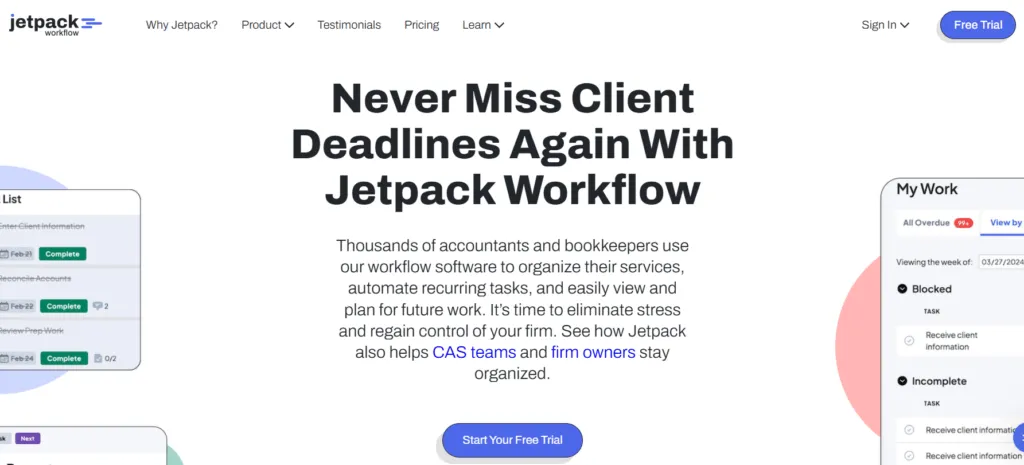
The platform emerged from a specific observation: accounting firms were struggling to manage thousands of deadlines across numerous clients, often relying on spreadsheets and physical files. According to Cristello, existing project management tools like Asana and Trello weren’t designed for the recurring nature of accounting work.
Cristello, who came from a marketing and business development background rather than accounting, pre-sold the initial concept to a dozen firms before building the product. This customer-first approach shaped the platform’s focus on solving what he called the “checklist problem” for recurring client management.
Today, Jetpack Workflow serves over 7,000 customers across 18+ countries. The platform positions itself as a dedicated workflow management solution rather than an all-in-one practice management suite. Core features include task and project management, workflow automation through templates, time tracking, team collaboration tools, and reporting.
The ideal Jetpack Workflow user is a small to mid-sized accounting firm that needs to standardize their processes and ensure deadlines aren’t missed. Firms that have outgrown spreadsheets but want to avoid the complexity of enterprise systems often find it appealing.
Jetpack Workflow Pros & Cons
| Pros | Cons |
|---|---|
| ✅ Intuitive, user-friendly interface | ❌ No client portal for document collection |
| ✅ 70+ pre-built accounting templates | ❌ Limited billing and invoicing capabilities |
| ✅ Effective deadline tracking and reminders | ❌ Many integrations require Zapier (though QuickBooks Online is native) |
| ✅ Quick implementation (days, not weeks) | ❌ Reporting features are functional but basic |
| ✅ Focused on core workflow management | ❌ No free plan (14-day trial only) |
| ✅ Strong change management for templates |
Jetpack Workflow Review: How it Works & Key Features
Templates and Workflow Automation
Jetpack Workflow’s template system forms the foundation of its workflow management.
The platform offers a library of over 70 pre-built templates covering common accounting tasks: monthly bookkeeping, 1040 tax returns, payroll processing, client onboarding, and quarterly financials, among others.
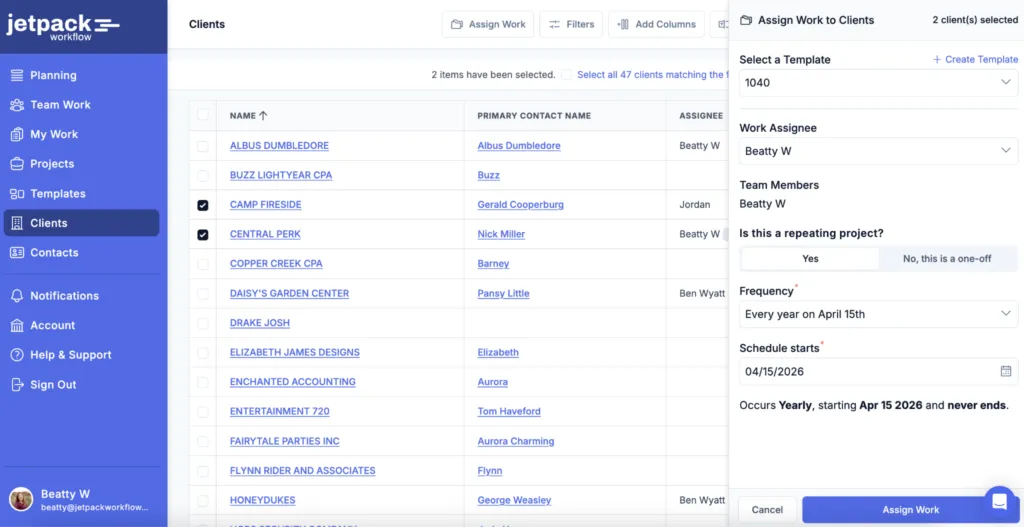
The workflow structure follows a three-level hierarchy. First, you create a master template defining the tasks for a particular service. Then, you apply that template to specific clients to create projects. Finally, the system automatically generates individual jobs based on your recurrence settings (weekly, monthly, quarterly, yearly, or custom schedules).
Source: Jetpack Workflow
A notable feature is the “Magic Job” concept. When you edit a recurring job template, changes automatically cascade to all future jobs in that series. This makes process improvements straightforward since you don’t need to manually update each scheduled instance.
The platform creates future recurring work for approximately three months ahead, giving firms visibility into upcoming workload. Jobs can be created for single clients or in bulk across multiple clients sharing the same service type.
Jobs and Tasks
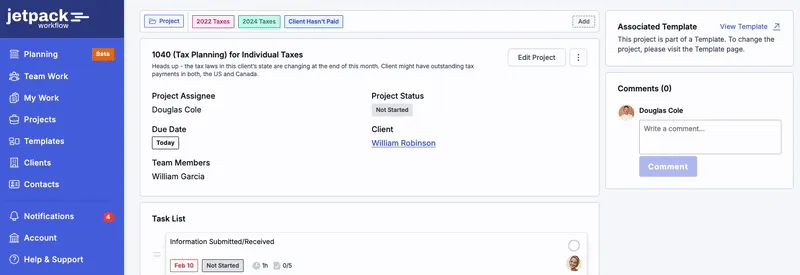
The Jobs tab serves as the central hub for all client work.
It presents a spreadsheet-like view with columns for job name, client, due date, status, and team member information. Users can sort by any column and apply multiple filters simultaneously to create custom views.
Jobs automatically move through two primary statuses: “Pending” (no tasks completed yet) and “In Progress” (at least one task marked done). Beyond these automatic statuses, Jetpack Workflow offers customizable labels for flagging work. Default labels include “Urgent” and “Waiting on Client,” and firms can create up to 50 custom labels.
Source: Jetpack Workflow
Each job contains individual tasks that can include descriptions, due dates relative to the job’s end date, and checklist items for detailed steps. Tasks can be assigned to specific team members, and task dependencies ensure certain steps can’t begin until prerequisites are complete.
Dashboard and Planning
The Dashboard provides a quick snapshot of firm status.
The main view displays jobs categorized by timeline: overdue, due today, due this week, and due next week. Each category shows the job count for easy reference.
A label tracking section shows active labels, while recent activity feeds display completed work. Team capacity summaries provide an overview of workload per team member.
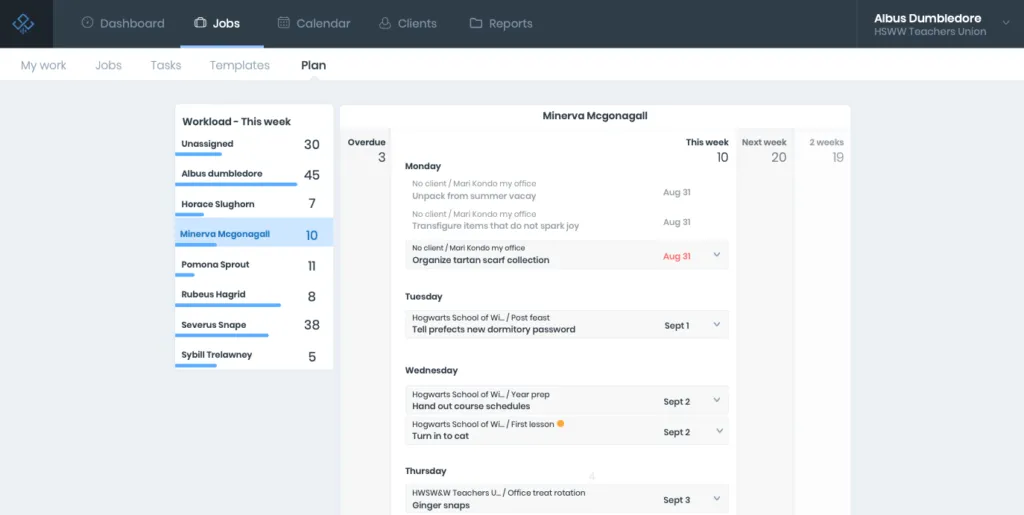
For capacity planning, the “Plan” view (available on the Scale tier) offers a more detailed interface. Users can see progress bars for each team member and use drag-and-drop to reassign work. The view extends to show what’s due this week, next week, and two weeks out.
Source: Jetpack Workflow
Time Tracking and Reporting
Time tracking in Jetpack Workflow includes both stopwatch and manual entry options. The running timer appears as a floating widget in the interface. Time entries can be marked as billable or non-billable.
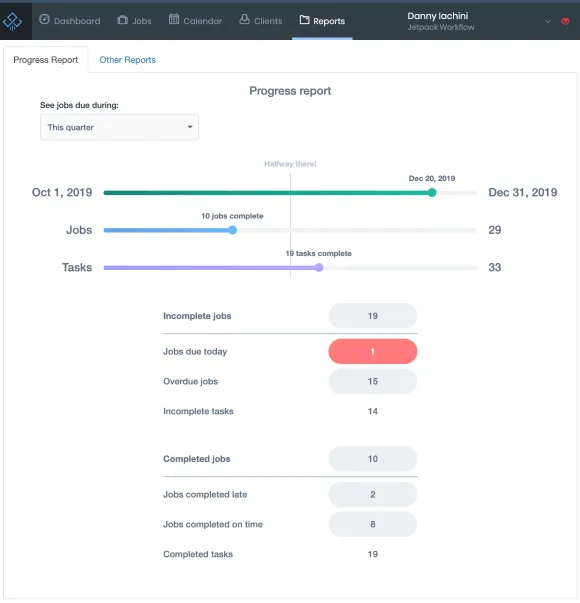
Reporting capabilities include several built-in reports.
The Progress Report shows job completion rates and whether deadlines were met. The Done Report provides an audit trail of completed work, filterable by team member or client, showing who completed what and when.
Source: Jetpack Workflow
The Metrics Report exports detailed data to Excel, including fields for manager, staff, task name, client, stats, due date, budgeted time, and actual time spent. The Timesheet Report exports time entries with breakdowns of billable versus non-billable hours.
Some reports can be downloaded as spreadsheets for further analysis, while others function as in-app dashboards.
Where Jetpack Workflow Falls Short
Compare Uku against your current tool — live Book a 30-minute demo built around your firm's setup. No slides. Book a demoWhile Jetpack Workflow delivers on its promise of streamlined workflow management, several limitations become apparent for firms with needs beyond internal task tracking.
No Client Portal: Perhaps the most frequently requested missing feature is a client portal. All client communication happens through email integrations, which means document collection requires back-and-forth messages rather than a centralized, secure location where clients can upload files and track their own tasks.
For firms spending significant time chasing clients for information, this gap creates ongoing friction.
Limited Billing Capabilities: Jetpack Workflow tracks time but doesn’t generate invoices from that data. Firms must export information and manually create invoices in separate software. There’s no automated billing based on service agreements or time spent, meaning the connection between work performed and revenue collected requires additional steps.
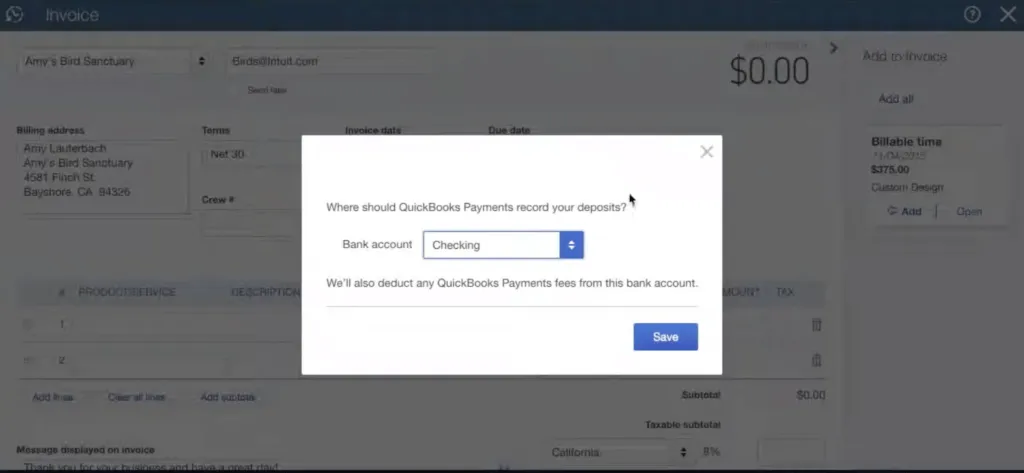
Integration Gaps: While Jetpack Workflow offers a solid native integration with QuickBooks Online (including client import and timesheet syncing), firms using other accounting software face limitations. Xero users, for example, must rely on Zapier rather than a direct connection.
Source: Jetpack Workflow
This means less advanced data syncing for those not on QuickBooks, and limited ability to pull client data directly from systems like Xero.
Basic Reporting: The reporting tools handle essentials but lack depth for advanced profitability analysis. Understanding client profitability requires exporting data and building custom analyses in Excel. There’s no built-in comparison of agreed-upon scope versus actual work performed, making scope creep difficult to identify systematically.
These limitations aren’t oversights; they reflect Jetpack Workflow’s deliberate focus on doing workflow management well without expanding into adjacent territories. However, they create opportunities for firms ready for more integrated solutions.
Top Jetpack Workflow Alternative: Uku
Uku addresses the gaps in workflow-only tools by providing a comprehensive practice management platform with a modular approach that lets firms start simple and scale up.
Created from the ground up to be international, especially for UK and US markets, Uku now serves 1,000+ clients globally with support for 12 languages and multi-currency capabilities (€, $, £).
Task Management and Workflow Automation
Uku’s workflow structure mirrors the template-based approach but adds layers of customization, and crucially, allows firms to adopt features at their own pace.
Like an iPhone where you start with basic functionality and add apps as needed, users can begin with just CRM and tasks, then gradually add features like automated billing and client portal functionality.
What distinguishes Uku’s task management is the depth of customization available. Custom fields can be added to track company-specific information: number of invoices processed, payroll employee counts, or document submission status. These fields can be made mandatory and pulled into reports for analysis.
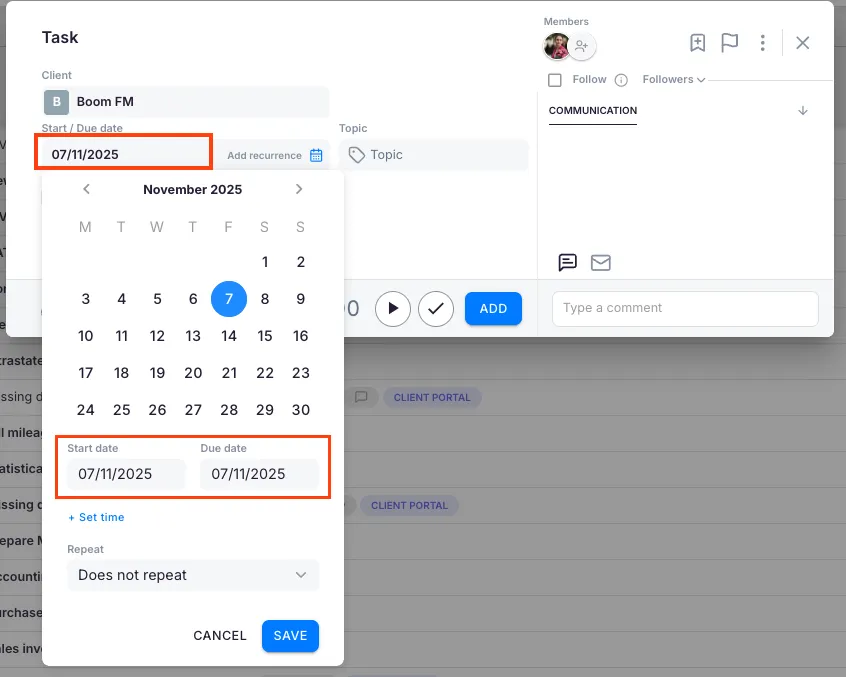
Task dependencies work similarly to Jetpack Workflow, but Uku also supports dynamic due date calculation. Deadlines can be set based on rules like “a certain number of working days from the start of a month” rather than fixed calendar dates. The system automatically handles holidays in the calculation.
Source: Uku
Subtask checklists allow breaking complex tasks into granular steps. Multiple checklists can exist within a single task, separating accountant responsibilities from client responsibilities visible through the portal.
Client Portal
The client portal represents one of Uku’s key differentiators.
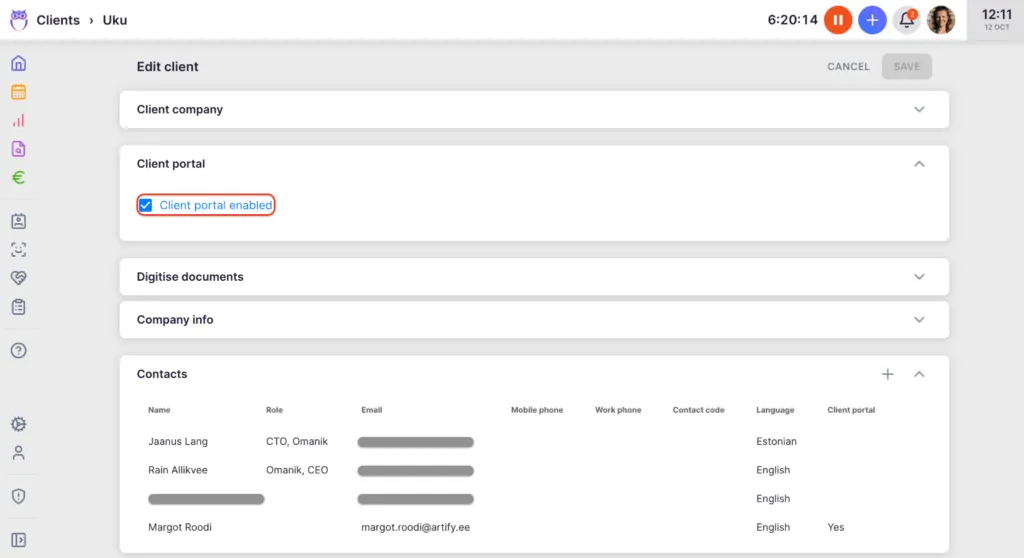
Clients access the portal through a “magic link” sent via email, eliminating username and password requirements. The portal can be fully branded with the firm’s logo, colors, and custom domain.
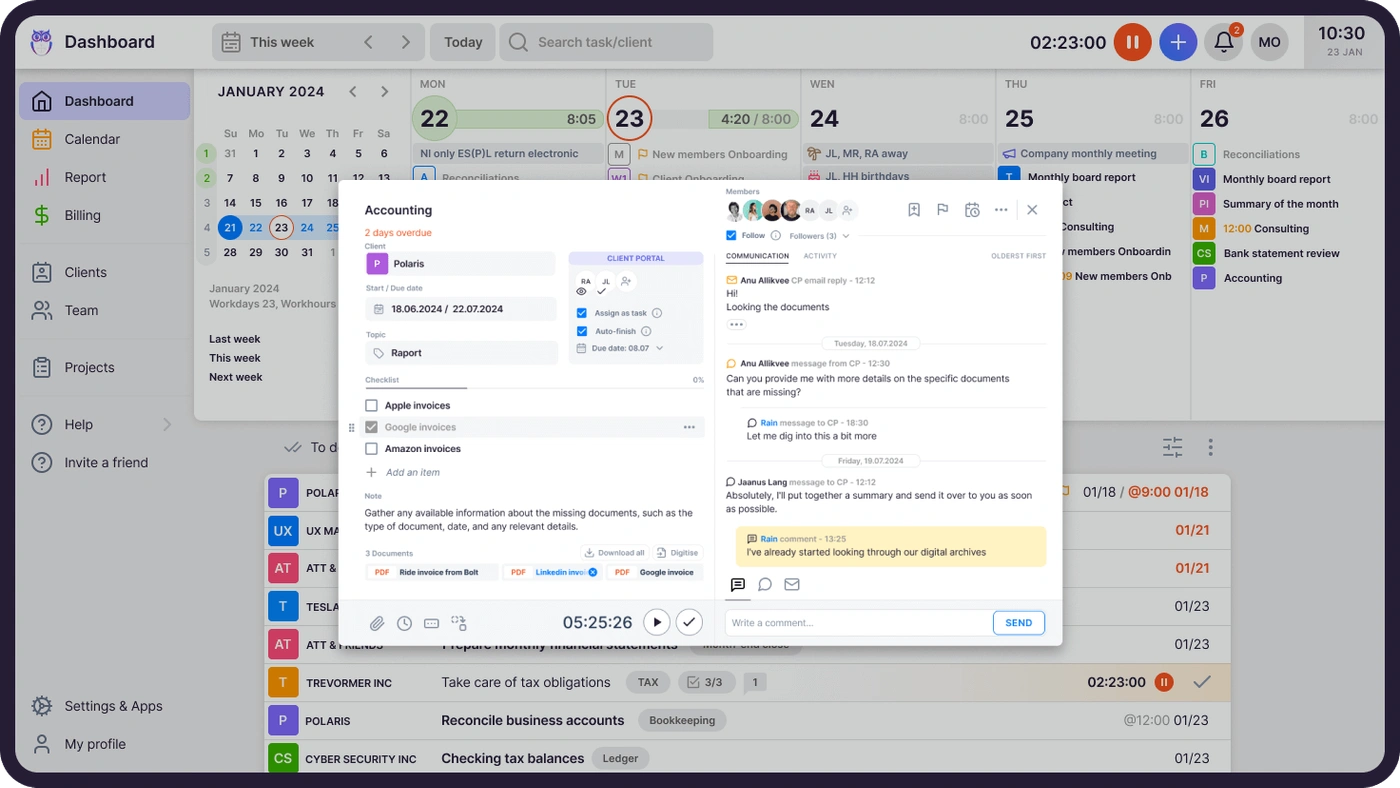
What sets Uku apart from traditional portals is that the client portal mirrors the exact same task on both sides.
Source: Uku
Clients and accountants work on the same item with all communication, actions, documents, logs, and time tracking in one place. When clients make requests through the portal, notifications appear on the accountant’s dashboard, and they can immediately start tracking time or communicating within that same task.
Through the portal, accountants can assign tasks directly to clients, such as document requests with specific to-do lists. Clients receive notifications, upload files via drag-and-drop, and mark tasks complete. All interactions are stored, creating a historical record for both parties.
The portal menu is customizable per client, allowing firms to show or hide features based on the client relationship. Automatic reminders handle follow-ups for overdue items, reducing the time accountants spend chasing information.
Documents uploaded through the portal can integrate with Google Drive, OneDrive, SharePoint, or Dropbox. Uku can automatically create organized file structures by client, year, and month.
Automated Billing
Uku’s automated billing represents a significant advancement in billing efficiency.
The platform transforms what typically takes two to three days of invoice preparation into approximately 30 minutes of work. This is Uku’s primary competitive advantage, with customers reporting ~20% more profit by discovering outdated agreements where they were billing for eight hours but employees were doing 20 hours of work.
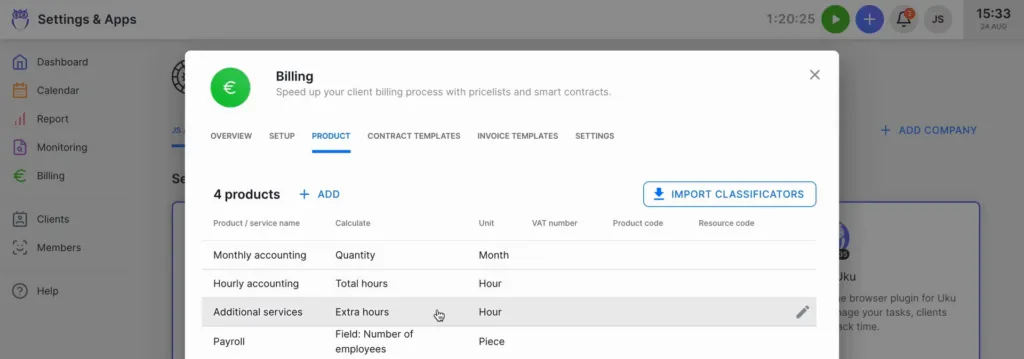
The platform supports multiple pricing models: time-based (hourly rates), fixed-fee, item-based, and mixed models combining different structures within a single contract. Advanced rounding rules allow firms to set minimum time and rounding for services. For instance, a one-minute unplanned call can be automatically billed as 15 minutes.
Source: Uku
The workflow for billing starts with defining services as “products” with their pricing. Contract templates outline standard services, prices, and billing frequency. These templates are then assigned to individual clients and customized as needed.
As work progresses, Uku automatically collects billable data from time entries and custom fields. When it’s time to invoice, the system generates invoices based on client contracts, including only services actually provided during the billing period. Users review and approve before sending invoices in bulk.
Invoices export to connected accounting software including Xero, QuickBooks, e-conomic, and several regional platforms.
Reporting and Analytics
Uku’s BI Analytics goes beyond complete tracking to providing detailed business insights.
The platform offers real-time visual reports showing time spent on clients, tasks, and employees, with automatic comparison between agreed-upon and actual work volume. This helps identify scope creep and unprofitable relationships before they impact the bottom line.
Team performance reporting displays time usage by employee, task completion rates, and billable versus non-billable hour breakdowns. The actionable audit log tracks all system changes and, notably, allows restoration of deleted tasks with their associated data and time entries.
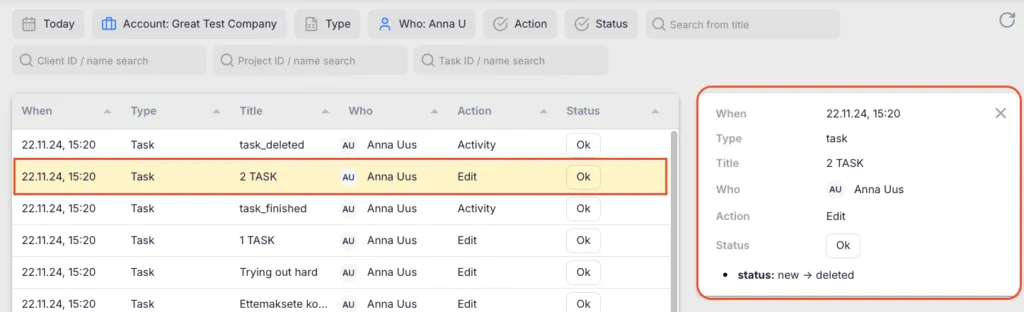
Source: Uku
Reports can be filtered by client, user, time period, task status, and custom topics. The platform supports exporting to PDF or Excel, and a public API allows fetching data for analysis in external business intelligence tools.
Pricing and Accessibility
Uku offers a Solo plan for individual users (up to 20 active clients) starting at $19/user/month billed annually ($25/user/month monthly).
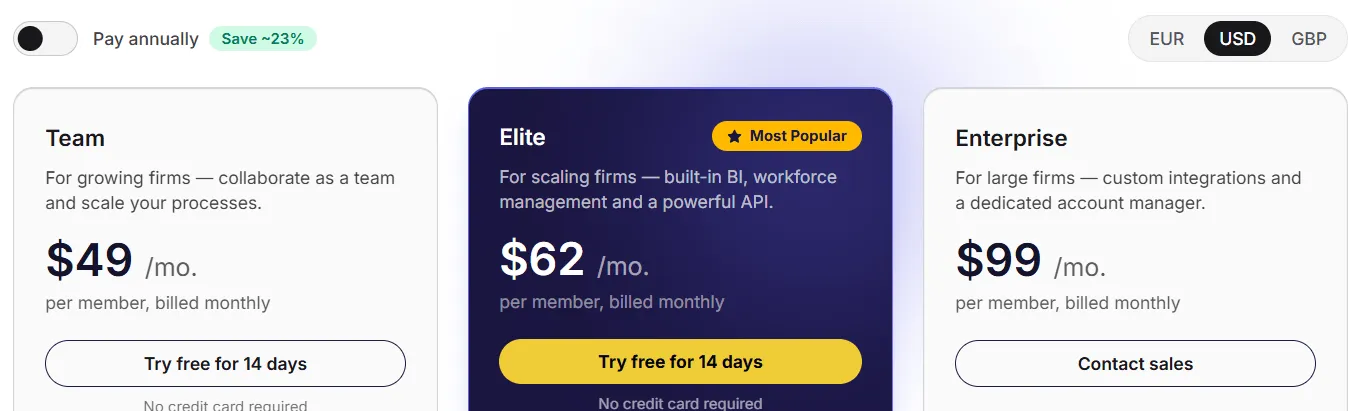
Paid plans start from $38/user/month for the Team plan, with both annual and monthly billing options available. The Elite plan at $48/user/month includes key features such as Client Budgeting, Document Management, and E-signatures. Annual billing provides approximately a 23% discount. New users receive 14 days of Elite features during the trial, plus free onboarding assistance.
For firms transitioning from Excel, Uku provides comprehensive import capabilities and the modular deployment approach means firms can start working on day one rather than requiring substantial upfront configuration.
Jetpack Workflow or Uku: Comparison Summary
| Aspect | Jetpack Workflow | Uku |
|---|---|---|
| Target Audience | Firms wanting focused workflow management | Firms needing comprehensive practice management |
| Core Focus | Internal task tracking and deadlines | Workflow + client collaboration + billing |
| Entry Plan | ❌ 14-day trial only | ✅ Solo plan (1 user, 20 active clients) |
| Client Portal | ❌ Not available | ✅ Customizable, branded portal |
| Automated Billing | ❌ Time tracking only | ✅ Invoice generation from tracked time |
| Template Library | ⭐⭐⭐⭐⭐ 70+ pre-built templates | ⭐⭐⭐⭐ Pre-built templates available |
| Native Integrations | ⭐⭐ QuickBooks Online, Gmail | ⭐⭐⭐⭐ Xero, QuickBooks, e-conomic, Drive, OneDrive |
| Ease of Use | ⭐⭐⭐⭐⭐ Very intuitive | ⭐⭐⭐⭐ Intuitive with more to learn |
| Reporting Depth | ⭐⭐⭐ Basic, export-focused | ⭐⭐⭐⭐⭐ BI Analytics, profitability analysis |
| Modular Implementation | ❌ All features at once | ✅ Start simple, scale gradually |
| Billing Flexibility | Annual only (after trial) | Monthly and annual options |
| Starting Price | $40/user/month (annual) | From $19/user/month (Solo), $38/user/month (Team), annual |
Final Verdict
The choice between Jetpack Workflow and Uku depends on what you need beyond basic workflow management.
Choose Jetpack Workflow if you want a focused tool that handles task tracking and deadline management without complexity. It’s well-suited for firms that have separate systems for client communication and billing, and prefer to keep workflow management as a standalone function.
The platform’s strength lies in its simplicity: you can implement it quickly, train your team easily, and rely on it to keep work organized. For firms where the primary challenge is organizing internal processes rather than client collaboration, Jetpack Workflow delivers exactly what it promises.
Get started with Jetpack Workflow here.
Choose Uku if you want to minimize your team’s admin time, value ultra-fast onboarding with modular scaling, or are transitioning from Excel and want the easiest implementation. The client portal eliminates document-chasing through email, the automated billing connects tracked time directly to invoices (reducing preparation from days to approximately 30 minutes), and the BI Analytics helps you understand which relationships are actually profitable.
With flexible monthly pricing options rather than annual commitments, firms can test the system without large upfront investments. For firms ready to consolidate their practice management into a single platform, or those frustrated by the gaps between separate workflow, communication, and billing tools, Uku provides a more complete solution with the flexibility to implement step by step.
Both platforms serve accounting firms well within their intended scope. Jetpack Workflow offers focused efficiency for internal workflow. Uku extends beyond that foundation to include the client collaboration, billing automation, and profitability insights that growing firms often need next, all while allowing firms to adopt features at their own pace.

Published Jan 23, 2026 · Updated Feb 2, 2026