
Canopy has earned its reputation as a comprehensive practice management platform for accounting and tax firms. With its modular approach covering client management, document storage, workflow automation, and specialized tax resolution tools, it offers a solid foundation for firms looking to consolidate their tech stack.
But as your firm evolves, you might find that Canopy’s modular pricing structure, feature depth, or tax-resolution-first philosophy doesn’t quite match your workflow. Some firms need software they can implement step by step without extensive upfront configuration. Others want simpler pricing without calculating which modules to add. And many are looking for practice management that prioritizes efficiency and data-driven insights over sheer feature volume.
That’s where this guide comes in. Whether you’re looking to:
- Streamline your practice with fast, flexible deployment and modular scaling
- Simplify complex email workflows for distributed teams
- Get unlimited storage and features without modular pricing complexity
- Find budget-friendly workflow management for smaller firms
- Optimize bookkeeping workflows with broad accounting software integration
- Get hands-on implementation support during your transition
We’ll explore alternatives that excel in these specific areas. Some firms might use these tools to replace Canopy entirely, while others might find them better suited for their specific firm size, specialty, or workflow philosophy. This isn’t about finding a “better” solution; it’s about finding the right fit for your practice as it grows.
Let’s dive into the Canopy alternatives and see which one might be the perfect match for your accounting firm.
| The Best Canopy Alternatives | ||
|---|---|---|
 |
Starts at: Free (Solo) G2 Score: 4.7 Capterra Score: 4.8 |
Uku Best Alternative for Fast, Modular Deployment with Data-Driven Insights We chose Uku because it delivers comprehensive practice management through an intuitive interface with modular scaling. Its automated billing and time-tracking-based analytics help firms make smarter pricing decisions while reducing administrative overhead. Read More |
 |
Starts at: $59/user/mo G2 Score: 4.8 Capterra Score: 4.7 |
Karbon Best Alternative for Enterprise-Grade Email Collaboration We chose Karbon because its email-first “Triage” system transforms inbox chaos into actionable workflow items, with Kanban boards and data warehouse access for distributed teams needing advanced internal collaboration. Read More |
 |
Starts at: $800/year G2 Score: 4.7 Capterra Score: 4.7 |
TaxDome Best Alternative for All-Inclusive Features with Unlimited Storage We chose TaxDome because it bundles unlimited document storage, e-signatures, and a website builder into flat annual pricing, eliminating the module-by-module cost calculations that Canopy requires. Read More |
 |
Starts at: $19/user/mo G2 Score: 4.7 Capterra Score: 4.8 |
Financial Cents Best Alternative for Budget-Friendly Workflow Management We chose Financial Cents because it offers streamlined workflow management with strong QuickBooks Online integration at a lower price point than Canopy’s entry-level plans. Read More |
 |
Starts at: $40/user/mo G2 Score: 4.2 Capterra Score: 4.8 |
Jetpack Workflow Best Alternative for Pure Workflow & Task Management We chose Jetpack Workflow because it does one thing exceptionally well: standardizing and automating recurring client work, with 70+ accounting-specific templates and a simple interface. Read More |
 |
Starts at: $49/user/mo G2 Score: 5.0 (limited reviews) Capterra Score: 4.7 |
Client Hub Best Alternative for Bookkeeping Firms with Advanced QuickBooks Integration We chose Client Hub because its automatic uncategorized transaction resolution and AI-powered month-end review features are specifically designed for bookkeeping workflows that Canopy doesn’t address. Read More |
 |
Starts at: $49/user/mo G2 Score: 4.4 Capterra Score: 4.7 |
Firm360 Best Alternative for White-Glove Onboarding & CPA-Designed Workflows We chose Firm360 because it pairs comprehensive practice management with dedicated implementation specialists, ideal for firms needing hands-on transition support from disconnected systems. Read More |
What is Canopy?
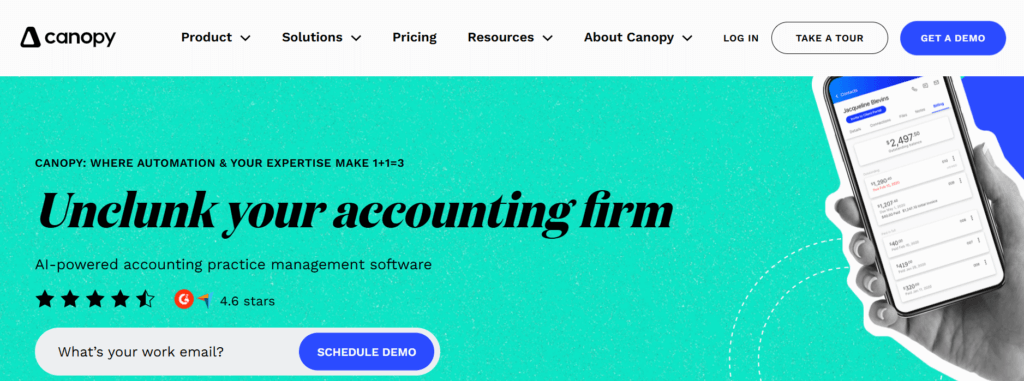
Canopy is a cloud-based practice management platform specifically designed for accounting and tax firms.
Built around a foundation of client management, it offers a modular system where firms can add capabilities like document management, workflow automation, and time & billing based on their specific needs. Founded in 2014, the platform has strong roots in tax resolution and has since expanded into comprehensive practice management.
Its key features include:
- Client Management & CRM with connected email integration that organizes correspondence within client profiles
- Document Management with unlimited cloud storage, folder templates, and integrated e-signatures
- Workflow Automation for projects, tasks, recurrences, and team collaboration
- Time & Billing with timers, invoicing, WIP tracking, and online payment collection
- Client Portal with mobile app for secure document sharing and communication
- Tax Resolution Tools including direct IRS transcript pulling and a notices database with resolution workflows
What makes Canopy distinctive is this tax resolution heritage. The platform can pull up to 20 years of IRS transcripts with a single click and provides an expanding library of IRS notices with step-by-step resolution templates. For firms with significant tax resolution work, this specialization is valuable.
However, Canopy’s modular pricing structure means calculating total costs requires adding the base Client Engagement platform ($150/month) plus per-user fees for Document Management ($36/user), Workflow ($32-40/user), and Time & Billing ($22-31/user). For firms wanting simpler pricing or those whose primary work isn’t tax resolution, alternatives may offer better alignment.
That’s why we’ve focused on platforms that excel where different firm types have different needs.
Looking for practice management that’s powerful yet intuitive? Uku helps accounting firms automate workflows, track time effortlessly, and gain data-driven insights to grow their business. Try it free and see why thousands of accountants trust Uku.
How We Curated Our List of Canopy Alternatives
After testing Canopy ourselves and researching the accounting practice management market, we found that firms are looking for alternatives for several specific reasons.
While Canopy offers comprehensive functionality, businesses often need:
- Software they can implement step by step without extensive upfront configuration
- Simpler pricing without calculating module combinations
- Email-centric collaboration tools for distributed teams
- Budget-friendly options for smaller firms
- Advanced accounting software integration for bookkeeping-focused practices
- Hands-on implementation support during software transitions
Each platform on this list excels in one of these specific areas. You might want to use them as a complete Canopy replacement or evaluate them based on your firm’s particular priorities and growth stage.
| ❗DISCLAIMER: We aren’t covering every single practice management tool! Our focus is on highlighting the best alternatives that address specific needs where firms may find Canopy’s approach doesn’t quite fit. The goal is to provide insights into platforms that cater to different firm types and workflows. |
|---|
1. Uku — Best Alternative for Fast, Modular Deployment with Data-Driven Insights
Uku is a comprehensive accounting practice management software designed to streamline workflows, automate tasks, and provide actionable business insights.

Created from the ground up to be international with a focus on UK and US markets, Uku now serves thousands of accountants across 25+ countries, with support for 12 languages and multi-currency capabilities (€, $, £).
Its key capabilities include:
- Multi-Level Workflow Automation with task templates, client task plans, and individual tasks that can automate the majority of recurring work
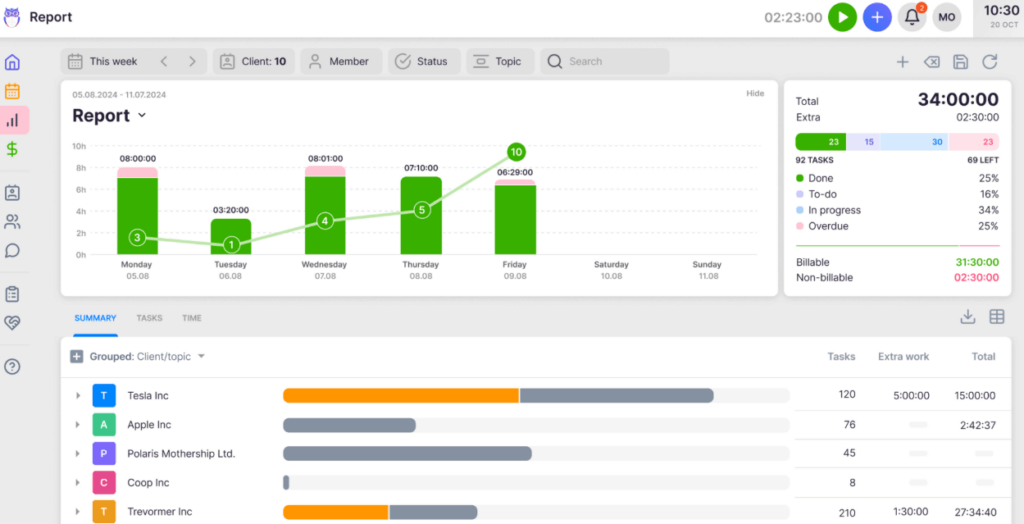
- Intelligent Time Tracking with multiple entry methods (stopwatch, manual, bulk time allocation) and data-driven insights for pricing decisions
- Automated Billing that transforms multi-day invoicing processes into 30-minute tasks with advanced price lists and rounding rules
- Unified Client Portal with “Magic Links” providing passwordless access where clients and accountants work on the same task in a shared workspace
- BI Reporting showing client profitability, team productivity, and actionable metrics with real-time alerts
- One-Click Document Digitalization that sends documents directly into accounting software; a level of automation unique in the practice management space
What sets Uku apart from Canopy is its modular approach to features.
While Canopy requires calculating which modules to purchase, Uku allows firms to implement software step by step, activating only the modules needed and scaling up as they grow. This means firms can start working on day one rather than requiring substantial upfront configuration and training. It’s a system your team will actually enjoy using, with 90% of actions being one-click.
Why Choose Uku Over Canopy for Fast, Modular Practice Management
While Canopy offers a comprehensive set of tools, Uku excels at delivering powerful functionality through fast & flexible deployment that teams can adopt quickly and use effectively.
Here’s where Uku stands out:
Workflow Automation: Multi-Level Intelligent Task Management
Uku’s workflow system operates on an advanced yet simple multi-level hierarchy.
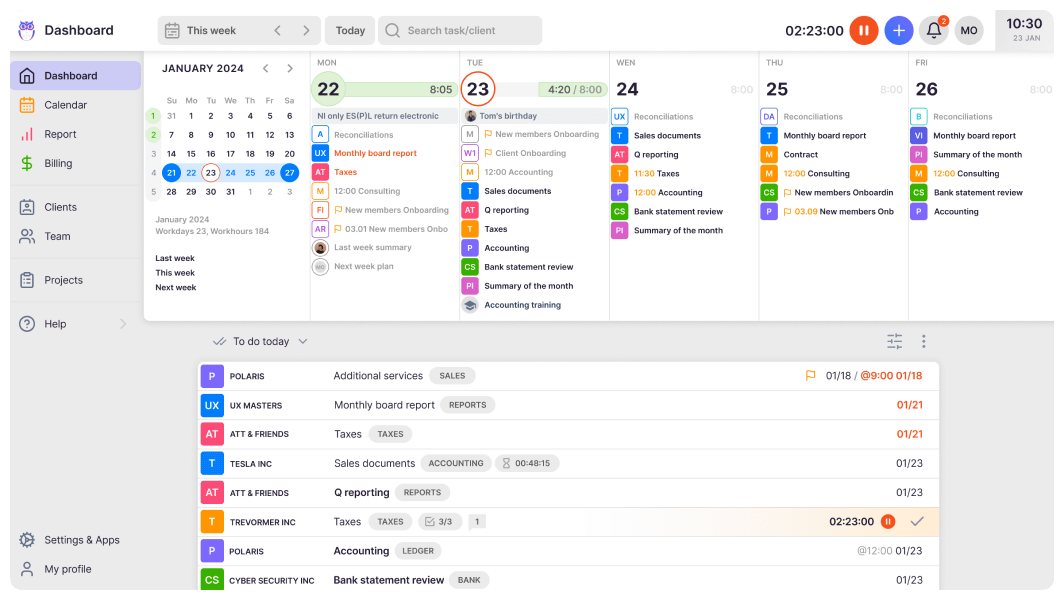
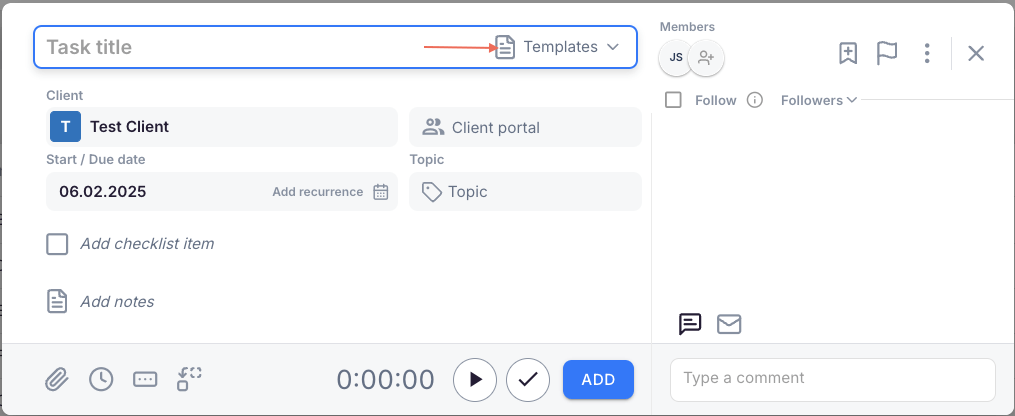
First, you create master task templates that standardize your firm’s service processes. These templates become client task plans when applied to specific clients, which can be customized for each client’s unique agreements. Finally, the system automatically generates individual tasks based on recurrence settings, placing them on team members’ dashboards at exactly the right time.
Source: Uku
This architecture allows firms to automate a significant portion of their total workflow.
Tasks can include subtask checklists, custom fields, file attachments, and task dependencies. The system supports advanced recurrence options, including specific days of the month and automatic handling of holidays. Tasks can also be automatically generated from client custom fields, providing flexibility beyond standard recurrence patterns.
Canopy also offers workflow automation with projects, tasks, and templates. However, users have noted that Canopy’s system requires more initial setup effort. Uku’s modular approach means firms can start with basic task management on day one, then gradually add advanced automation as they become comfortable.
⚡ Uku in Action: When you set up a monthly bookkeeping client, you apply your standard bookkeeping template to create their client task plan.
Uku automatically generates tasks for collecting documents, reconciling accounts, and preparing reports each month. Your team sees exactly what’s due on their dashboard each day, and the system sends automated reminders to clients for missing documents. If a task requires a colleague’s work first, dependencies ensure it doesn’t appear until prerequisites are complete.
Time Tracking & Business Intelligence: Turn Data into Pricing Decisions
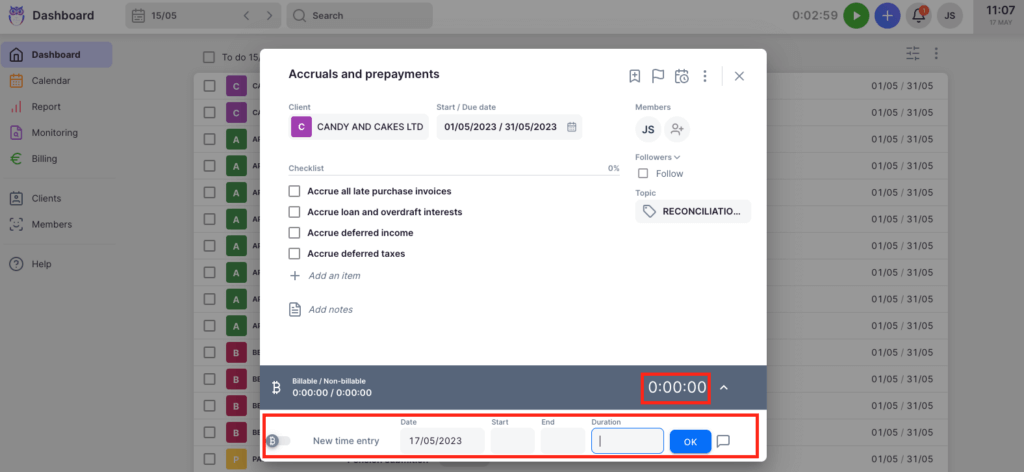
Uku’s time tracking isn’t just about capturing billable hours; it’s designed to provide actionable business insights.
Source: Uku
The platform offers multiple tracking methods: a stopwatch that can be started from anywhere in the app, manual time entry with suggested start times, and bulk time allocation for distributing time across multiple tasks. With 90% of actions being one-click, the time tracking UX reduces day-to-day admin tasks.
What sets Uku apart is how this data translates into business intelligence. The BI Reporting system aggregates time data to show:
- Which clients are profitable after factoring in actual time spent
- How team members’ time is distributed across clients and task types
- Where inefficiencies exist in your service delivery
- Real-time comparison of agreed work scope versus actual work performed
The system tracks both sales prices and actual cost prices. If an employee costs €30/hour but bills at €45/hour, managers can see if they’re profitable. When employees work eight hours but only six are billable, the system provides insights into whether the issue is employee efficiency, client difficulty, or pricing structure.
Customers report seeing up to ~20% more profit by discovering outdated agreements where they were billing for fewer hours than employees were actually working.
Canopy offers time tracking through its Time & Billing module (an add-on at $22-31/user/month), with WIP reports and productivity dashboards. Uku’s integration between time tracking, workflow, and billing creates a cohesive picture of firm performance that influences day-to-day decisions, with BI Reporting providing real-time visual alerts that prevent firms from discovering losses 30 days too late.
⚡ Uku in Action: After three months of tracking time on a new client, you notice they’re consistently using 40% more hours than your quoted fee covers. Uku’s BI Reporting flagged this trend early, and your profitability report shows the exact tasks consuming extra time. With this data, you can have an informed conversation about adjusting the scope or pricing, rather than discovering the issue at year-end.
Automated Billing: From Days to Minutes
Uku’s billing automation addresses one of the most time-consuming aspects of running an accounting practice.
Source: Uku
The system supports complex price lists based on quantity, time, material, and ranges with different rates for different periods. It handles advanced rounding rules based on entry, team, client, or month, allowing firms to properly bill for interruptions and unplanned work. For instance, a one-minute unplanned call can be automatically billed as 15 minutes.
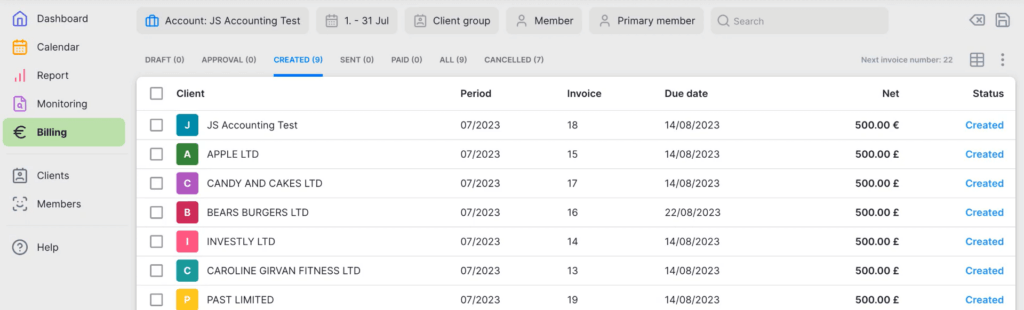
Everything is automated through “contracts” where rules are set up once, then time tracking automatically calculates billable amounts in real-time. Users report that what previously took days of manual invoice creation can be completed in as little as 30 minutes for over 100 clients. Many clients have increased their turnover by over 10% by adopting Uku’s automated billing system.
The system supports:
- Personalized billing contracts with flexible pricing models (fixed fees, hourly rates, item-based, or mixed)
- Automatic invoice generation based on completed work
- Bulk invoice sending with customizable email templates
- Integration with accounting software like Xero, QuickBooks, and e-conomic
Canopy’s Time & Billing module offers similar invoicing capabilities, including recurring invoices and online payments. A key differentiator is how Uku integrates billing with its workflow system, where billing data flows naturally from task completion, and how the modular approach lets firms start with basic invoicing before activating advanced automation.
⚡ Uku in Action: At month-end, you open Uku’s billing section to see all unbilled work organized by client.
For fixed-fee clients, invoices are pre-generated based on their contracts. For hourly clients, time entries are automatically included with your firm’s rounding rules applied. You review, adjust any one-off items, and send all invoices in bulk. What used to be a two-day process at the end of every month now takes 30 minutes.
Client Portal: A Unified Workspace Clients Actually Use
Uku’s client portal was designed with one priority: making it so simple that clients actually adopt it.
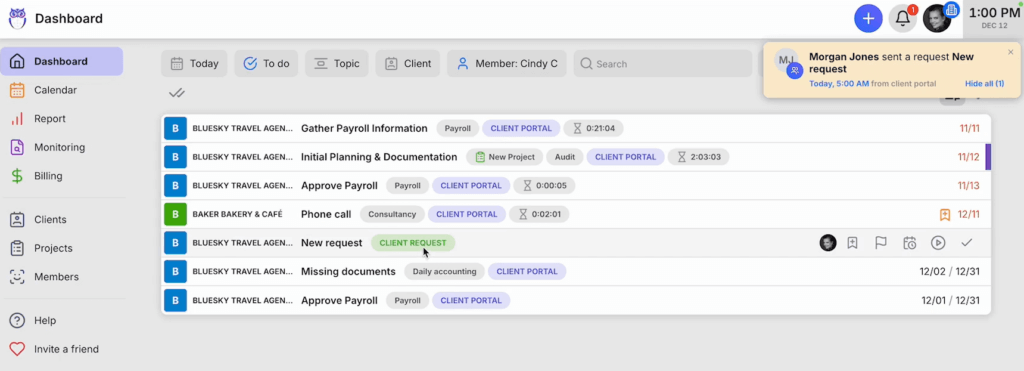
The “magic link” authentication system eliminates the biggest barrier to portal adoption (forgotten passwords). Clients click a secure link in their email and immediately access their workspace, with the system enabling convenient repeat access.
Source: Uku
Unlike traditional portals where tickets must be connected to work items, Uku’s portal mirrors the exact same task on both sides.
Clients and accountants work on the same item with all communication, actions, documents, logs, and time tracking in one place. When clients make requests through the portal, notifications appear on the accountant’s dashboard, and they can immediately start tracking time or communicating within that same task.
The portal is highly customizable. Firms can:
- Create unique menus for each client
- Run onboarding with forms
- Share business insight reports and display price lists
- Embed custom content with simple copy-paste functionality
- Brand it with their logo, colors, and company branding
Canopy’s client portal is also well-regarded and includes a mobile app. However, Uku’s passwordless approach combined with the unified workspace concept specifically addresses the common problem of clients not adopting portals due to login friction and disconnected experiences.
⚡ Uku in Action: You onboard a new client by sending them a task through the portal requesting their incorporation documents.
They receive an email, click the magic link, see exactly what’s needed, and drag-and-drop their files. No password creation, no login issues, no follow-up calls asking how to access the portal. The documents appear in your Uku dashboard, ready to be filed and, with one-click document digitalization, sent directly into their accounting software.
🏅 NOTE: We also evaluated Karbon for its workflow capabilities and TaxDome for its comprehensive feature set.
While Karbon excels at email-centric collaboration for larger distributed teams, and TaxDome offers unlimited storage with flat annual pricing, Uku provides the optimal balance of fast & flexible deployment, data-driven insights, and modular scaling for accounting firms that want powerful practice management without lengthy implementation projects.
Uku Pricing
Uku offers straightforward tiered pricing based on team size and feature needs, with a 23% discount for annual billing.
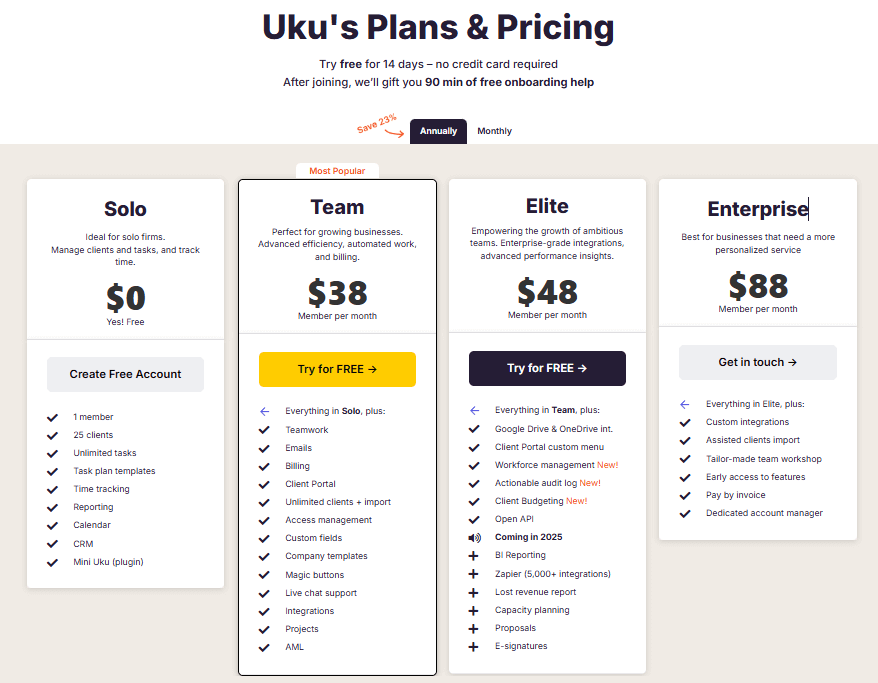
Both monthly and annual billing options are available, and pricing is offered in multiple currencies (€, $, £):
Solo Plan (Free)
- 1 member, up to 25 clients
- Unlimited tasks, task plan templates
- Time tracking, reporting, CRM
- Calendar, Mini Uku browser plugin
Team Plan (from $38/user/month)
- All Solo features plus teamwork functionality
- Email integration and client portal
- Unlimited clients and import capabilities
- Access management, custom fields, company templates
- Integrations and project management
Elite Plan ($48/user/month)
- Everything in Team plan
- Google Drive and OneDrive integrations
- Customizable client portal menu
- Workforce management and actionable audit log
- Client Budgeting and Document Management
- BI Reporting and capacity planning
Enterprise Plan (from $88/user/month)
- All Elite features
- Custom integrations and assisted client import
- Tailor-made team workshop
- Early access to new features
- Dedicated account manager
Uku offers a 14-day free trial with Elite plan access and 90 minutes of free onboarding assistance.
Who Should Use Uku?
Choose Uku if:
- You want to implement software step by step rather than all at once. If you’ve struggled with lengthy software implementations, Uku’s modular approach lets you start with basic CRM and tasks on day one, then gradually add features as needed.
- You’re transitioning from Excel and want the easiest implementation. Many Uku customers come from spreadsheets. You can work with your Excel file for an hour, import it into Uku, and have automated plans ready to go. This path addresses firms’ risk aversion after bad software experiences.
- You want data-driven insights to inform pricing and efficiency decisions. If understanding client profitability and identifying workflow inefficiencies would help you grow your practice, Uku’s integrated time tracking and BI Reporting provide actionable data, with real-time alerts that prevent discovering losses too late.
- You need multilingual or multi-currency support. With 12 languages and support for €, $, and £, Uku serves firms across the UK, USA, Scandinavia, and 25+ other countries. Unlike regionally-focused competitors, Uku was built for global use.
- You prefer flexible monthly pricing rather than annual commitments. If calculating which Canopy modules to add feels cumbersome, Uku’s straightforward per-user pricing includes features bundled at each tier, with the flexibility to pay monthly and test the system before committing.
- Client portal adoption has been a challenge for your firm. If clients struggle with remembering passwords and end up emailing documents anyway, Uku’s “magic link” passwordless portal with unified task workspace specifically addresses this friction point.
Ready to see how fast & flexible practice management can transform your firm? Start your free 14-day Uku trial with full Elite features and experience the difference that modular deployment makes in your daily workflow.
2. Karbon — Best Alternative for Enterprise-Grade Email Collaboration
Karbon is a cloud-based collaborative practice management platform that positions itself as the global leader in accounting practice management software.
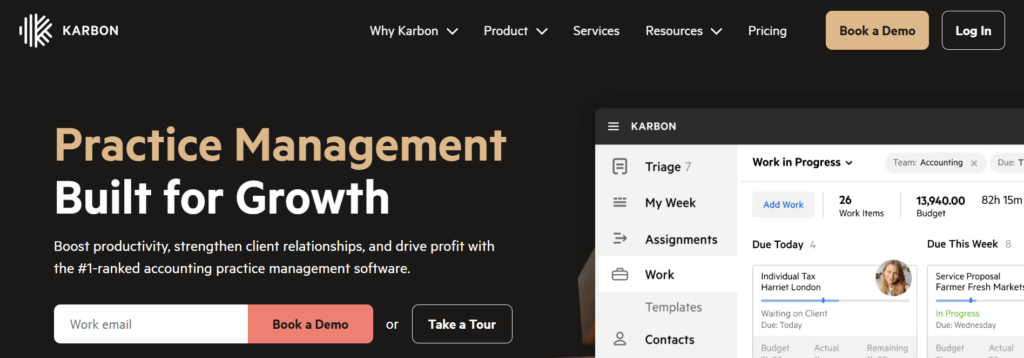
Its approach differs from Canopy’s: while Canopy builds around client management, Karbon places email at the center of its design, recognizing that email is where accounting work often originates and where collaboration can break down.
Its key capabilities include:
- Triage Email Management System that transforms individual inboxes into firm-wide actionable workflow items
- Kanban Boards and Multiple Work Views including timeline views, customizable dashboards, and “My Week” planning interface
- Practice Intelligence Analytics with 12 pre-built dashboards and Snowflake data warehouse access
- Sophisticated Team Collaboration with @mentions, shared inboxes, and colleague workload visibility
- Client Portal with Magic Links for passwordless client access
Why Choose Karbon Over Canopy for Enterprise Email Collaboration
Karbon stands out compared with Canopy in several ways that matter for larger, distributed teams:
- Email-First Architecture
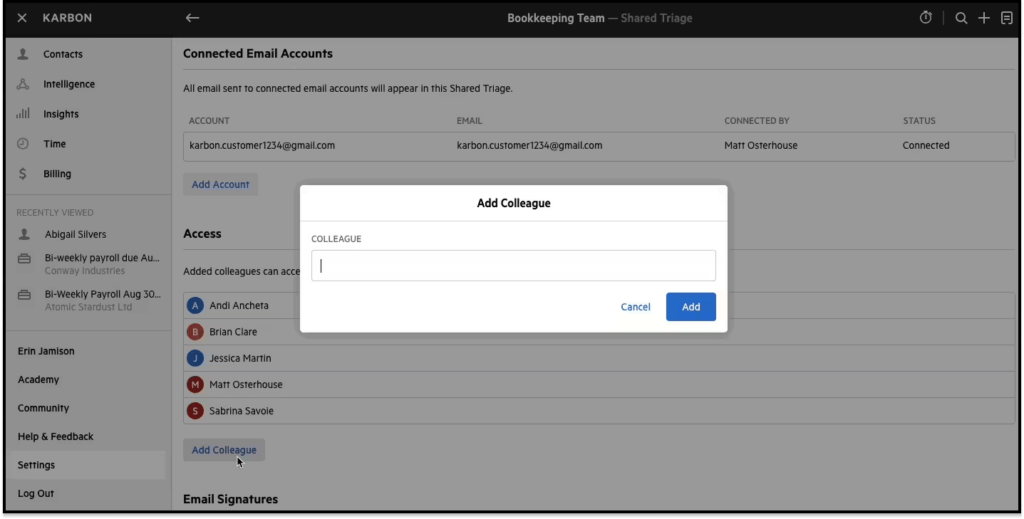
Canopy integrates email through “Connected Email,” which syncs with Gmail and Outlook and organizes conversations within client profiles. Karbon places email at the center of its design.
Source: Karbon
The “Triage” system allows team members to assign emails to colleagues (the item appears on their to-do list), comment internally on email threads without forwarding, convert emails to tasks with due dates, and link correspondence to client timelines creating automatic audit trails. AI-powered inbox prioritization analyzes urgency and sentiment to surface critical messages first.
For larger firms where email volume creates bottlenecks, this email-centric architecture addresses collaboration challenges that Canopy’s approach doesn’t.
- Superior Work Visualization
Canopy offers workflow with projects and tasks in primarily list formats, though it also provides a Board View for capacity planning. Karbon provides Kanban board views where work items appear as draggable cards organized by status, assignee, client, or due date.
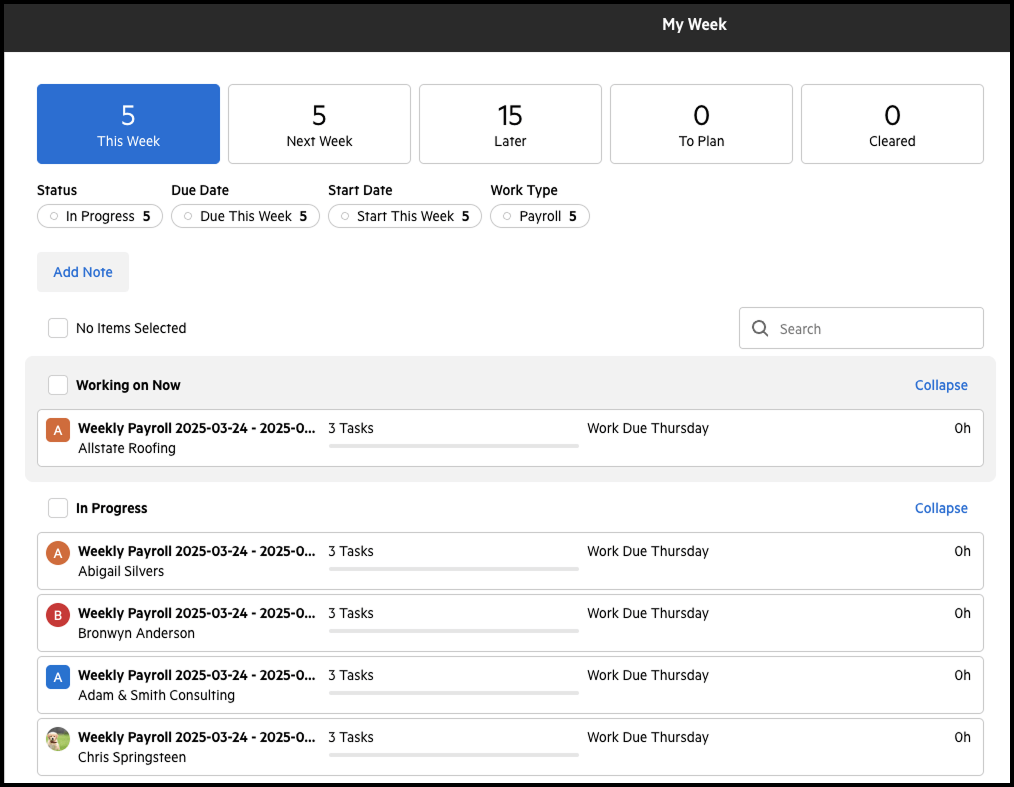
The “My Week” interface gives each team member a personalized dashboard divided into temporal buckets. The “Resource Planning” dashboard shows team capacity versus assigned work to inform hiring decisions and prevent burnout. Managers can view any “Colleague’s Week” rather than asking for status updates.
Source: Karbon
- Advanced Analytics with Data Warehouse Access
Canopy offers reporting through its modules and “Liveboards” for customizable dashboards. Karbon’s “Practice Intelligence” provides 12 pre-built dashboards plus access to its Snowflake data warehouse.
Firms with technical resources can connect external BI tools like Power BI via Snowflake for custom analysis. Note that using Power BI integration requires separate Power BI licenses starting from $14/user/month in addition to the base Karbon subscription.
🏅 NOTE: We also evaluated TaxDome and Financial Cents. While TaxDome excels at serving solo practitioners with comprehensive features and automation, and Financial Cents is praised for simplicity and affordability, Karbon offers the most robust email-centric collaboration and enterprise-grade analytics for larger, distributed teams.
Karbon Pricing
Karbon offers both monthly and annual billing options:
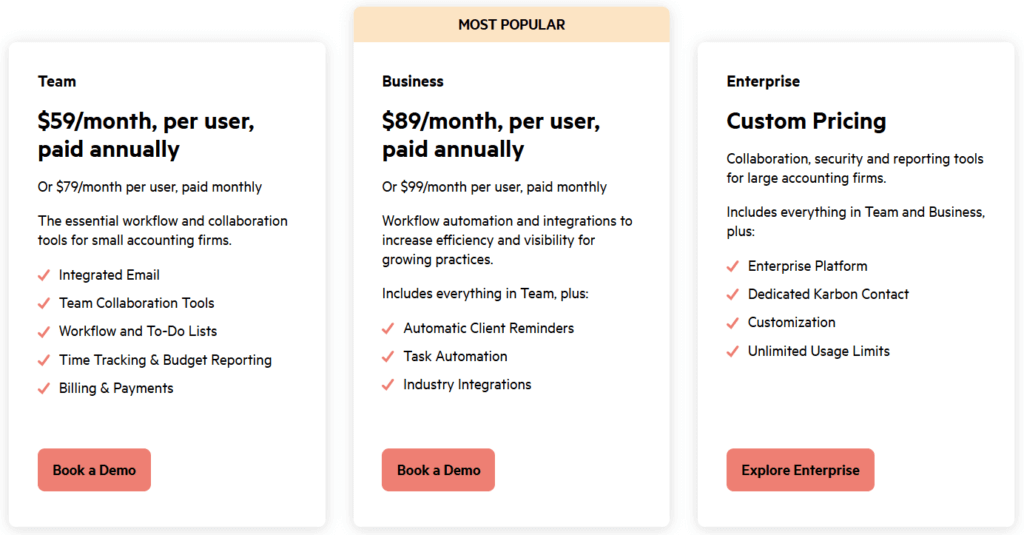
- Team Plan: $59/user/month (annual) or $79/user/month (monthly); includes email triage, collaboration tools, time tracking, billing; limits on templates and contacts
- Business Plan: $89/user/month (annual) or $99/user/month (monthly); adds client reminders, task automation, client portal, advanced reporting
- Enterprise Plan: Custom pricing; unlimited usage, dedicated contact, customization options, managed data import
Who Should Use Karbon?
Choose Karbon if:
- Your firm struggles with email chaos and communication silos. If critical client communications get lost in individual inboxes or team members forward emails inefficiently, Karbon’s “Triage” architecture directly addresses these collaboration breakdowns.
- You need enterprise-grade analytics and data warehouse access. If your firm requires advanced reporting beyond pre-built dashboards and wants to build custom Power BI reports with direct data access, Karbon’s Practice Intelligence with Snowflake data warehouse access provides this capability (factor in additional Power BI licensing costs).
- You’re a larger or distributed team requiring visual capacity management. If you’ve outgrown list-based task views and need Kanban boards and resource planning dashboards to manage workload across multiple team members and locations, Karbon’s visualization options support this complexity.
3. TaxDome — Best Alternative for All-Inclusive Features with Unlimited Storage
TaxDome is a cloud-based practice management platform that takes the opposite approach to Canopy’s modular pricing.

Where Canopy requires calculating which modules to add, TaxDome bundles everything into flat annual per-user pricing, including unlimited document storage and e-signatures at every tier.
Its key capabilities include:
- Unlimited Document Storage with AI-Powered Organization that automatically tags and renames poorly-labeled client uploads
- Built-in Website Builder with 200+ accounting-specific templates and custom domain hosting at no extra cost
- Direct IRS Transcript Integration for pulling transcripts on demand
- Well-Reviewed Client Portal and Mobile App with high ratings across major review platforms
- Unlimited E-Signatures included in all plans (KBA for IRS Form 8879 compliance available at $1 per signee)
Why Choose TaxDome Over Canopy for All-Inclusive Pricing
TaxDome stands out compared with Canopy in several ways:
- All-Inclusive Pricing vs. Modular Complexity
Canopy’s modular structure requires adding Document Management ($36/user/month), Workflow ($32-40/user/month), and Time & Billing ($22-31/user/month) to the base platform. TaxDome bundles all features into flat annual pricing.
Firms never worry about hitting storage caps or paying per e-signature. The Essentials plan provides workflow automation, CRM, client portal, and unlimited storage/e-signatures starting at $800/year (or $700/year with a multi-year commitment).
- Built-In Website Builder
Canopy doesn’t offer website building or hosting. TaxDome includes a full website builder with 200+ accounting-specific templates and custom domain support (you still need to purchase your domain separately). For firms needing to establish their digital presence, this eliminates a separate subscription.
- IRS Integration
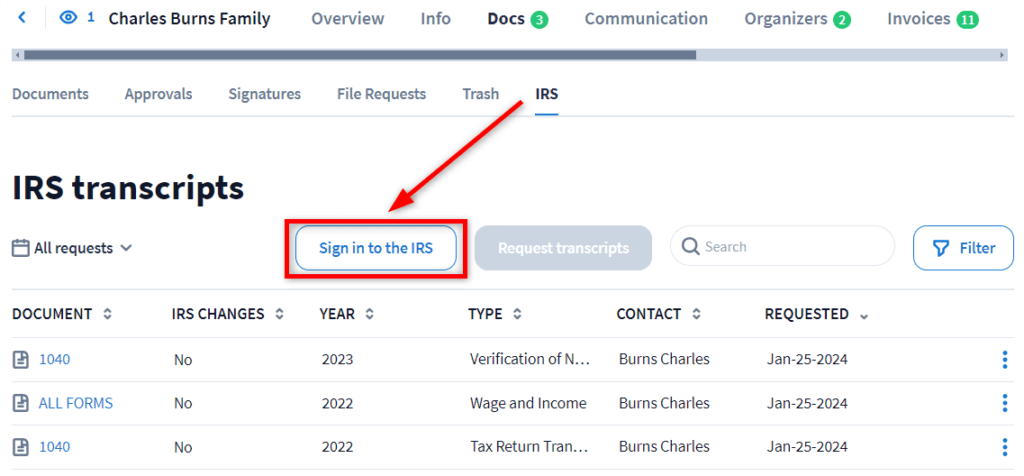
Canopy’s tax resolution heritage makes IRS transcript retrieval a specialized strength, with the ability to pull up to 20 years of transcripts and an extensive notices database with resolution templates. TaxDome offers on-demand transcript retrieval, which covers firms whose primary need is basic transcript access, though it doesn’t match Canopy’s depth of tax resolution features.
Source: TaxDome
- Unlimited E-Signatures Across All Tiers
Canopy offers unlimited e-signatures only with its Document Management add-on. TaxDome includes unlimited e-signatures in every plan, including the entry-level Essentials tier. KBA for IRS-compliant signatures costs $1 per signee.
Note that TaxDome requires annual pricing commitments, whereas some alternatives offer flexible monthly billing options for firms that prefer to test software before committing to a full year.
🏅 NOTE: We also evaluated Karbon for comprehensive features. While Karbon excels at internal team collaboration with email-centric workflows, TaxDome offers the most complete single-platform solution for firms wanting to minimize their software stack with unlimited storage and features.
TaxDome Pricing
Per-user annual pricing with discounts for longer commitments:
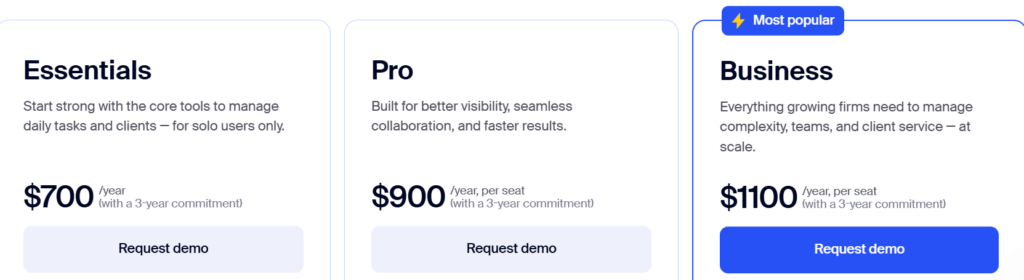
- Essentials Plan: $800/year (1-year); unlimited CRM, storage, e-signatures; client portal; workflow automation
- Pro Plan: $1,000/year per user (1-year); adds team chat, AI analytics, workload management, custom permissions, website builder, IRS integration
- Business Plan: $1,200/year per user (1-year); dedicated Customer Success Manager (for firms with 5+ seats), extended activity history, higher QuickBooks upload limits
KBA for e-signatures: $1 per signee. Monthly option available at $100/user/month.
Who Should Use TaxDome?
Choose TaxDome if:
- You want all-inclusive pricing without calculating add-on costs. TaxDome’s “unlimited everything” model eliminates the complexity of Canopy’s modular approach. You know exactly what you’re paying without surprise costs as storage grows or e-signature volume increases.
- You need to establish or improve your firm’s web presence. The built-in website builder with 200+ accounting templates and custom domain hosting is unique functionality that Canopy doesn’t offer.
- You’re a solo practitioner or small firm wanting full features at an affordable entry point. The Essentials plan provides workflow automation, CRM, client portal, and unlimited storage/e-signatures starting at $800/year (IRS integration available in Pro tier).
4. Financial Cents — Best Alternative for Budget-Friendly Workflow Management
Financial Cents is a cloud-based practice management software that targets smaller and mid-sized firms rather than enterprises.
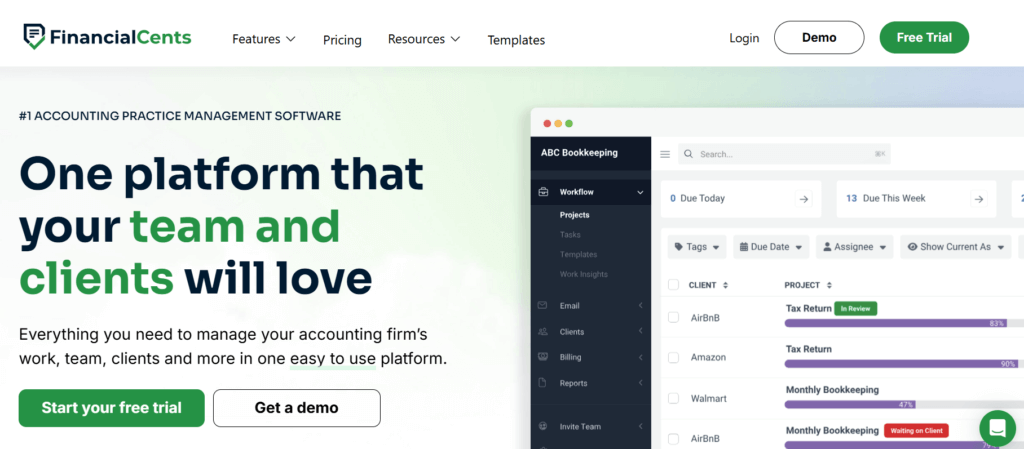
Founded in 2020, it serves over 10,000 accountants globally. Its philosophy centers on providing advanced workflow tools without complexity or enterprise-level pricing.
Its key capabilities include:
- Visual Workflow and Project Management with color-coded tags and visual status cues
- Passwordless “Magic Link” Client Portal that reduces adoption friction
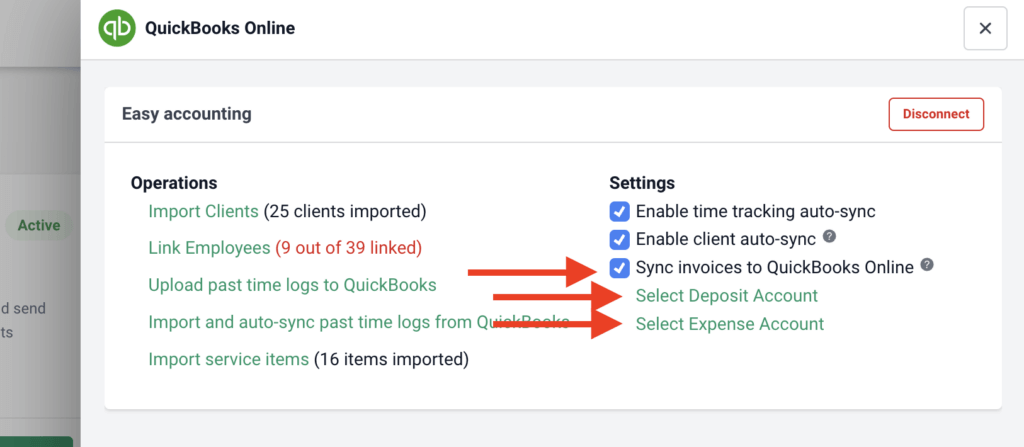
- QuickBooks Online Integration with two-way synchronization for time entries
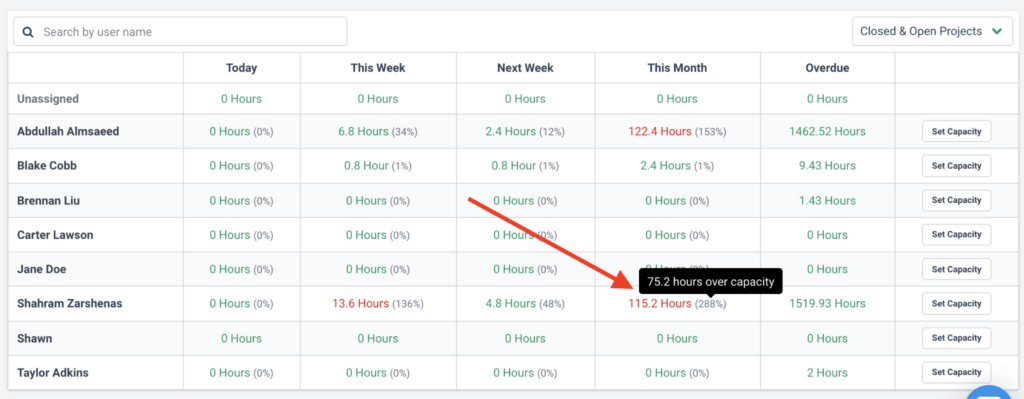
- Team Capacity Management with real-time visibility into workload distribution
- Community-Driven Template Library with 100+ workflows from other accounting professionals
Source: Financial Cents
Why Choose Financial Cents Over Canopy for Budget-Friendly Workflow
Financial Cents stands out compared with Canopy in several ways:
- Streamlined Interface vs. Feature Complexity
Users describe Financial Cents as “very simple but powerful” and “easy user-friendly interface.” While Canopy’s comprehensive feature set works well for many firms, Financial Cents focuses on essential workflow tools without overwhelming users.
- Passwordless Client Portal
Financial Cents’ “magic link” authentication eliminates traditional login friction. Clients click a secure email link, receive a verification code, and gain instant access. The system remembers devices for 30 days. This approach directly addresses the common problem of clients not adopting portals because of password barriers.
- Strong QuickBooks Online Integration
For North American firms using QuickBooks Online, Financial Cents offers quality integration. The two-way synchronization means time entries logged in either platform automatically update in the other. Invoices created in Financial Cents appear in QuickBooks Online, and payments sync back.
Source: Financial Cents
- Built-In Capacity Management
Financial Cents includes dedicated capacity management showing real-time team workload. Visual indicators display who is at, above, or below capacity as work is assigned. This proactive approach helps with resource allocation before deadlines are impacted.
Important limitations to consider: Financial Cents is exclusively US/Canada-centric with no multilingual support and billing only in USD. The platform lacks native Xero integration, which matters for firms using Xero as their primary accounting software. Financial Cents also requires a minimum 1-year purchase commitment, whereas some alternatives offer flexible monthly billing options.
🏅 NOTE: We also evaluated Jetpack Workflow for workflow-focused management. While Jetpack offers excellent task tracking with a focused approach, Financial Cents provides more seamless QuickBooks integration and capacity management for North American small to mid-sized firms.
Financial Cents Pricing
Per-user monthly pricing with annual billing (minimum 1-year commitment required):
- Solo Plan: $19/user/month; workflow management, client portal, document management, CRM, time tracking, invoicing, QuickBooks integration
- Team Plan: $49/user/month; adds email integration, e-signatures, unlimited tags and custom fields
- Scale Plan: $69/user/month; adds auto-follow-ups, task dependencies, SmartVault integration, branded portal
- Enterprise Plan: Custom pricing; IP whitelisting, custom permissions, webhooks, dedicated success manager

14-day free trial available.
Who Should Use Financial Cents?
Choose Financial Cents if:
- You’re a small to mid-sized US or Canadian firm using QuickBooks Online. The two-way integration is well-regarded, and the platform is designed specifically for the US/Canada market where QuickBooks is widely used.
- You want workflow management without enterprise complexity. If Canopy’s comprehensive feature set feels like more than you need, Financial Cents offers focused tools that are easy to learn and implement.
- You’re budget-conscious but want robust features for the North American market. With solo pricing starting at $19/user/month compared to Canopy’s $45/user/month entry point, Financial Cents provides significant cost savings while delivering core practice management (note: limited to USD billing and US/Canada focus).
5. Jetpack Workflow — Best Alternative for Pure Workflow & Task Management
Jetpack Workflow is built exclusively for accounting firms that want to do one thing exceptionally well: standardize, track, and automate recurring client work.
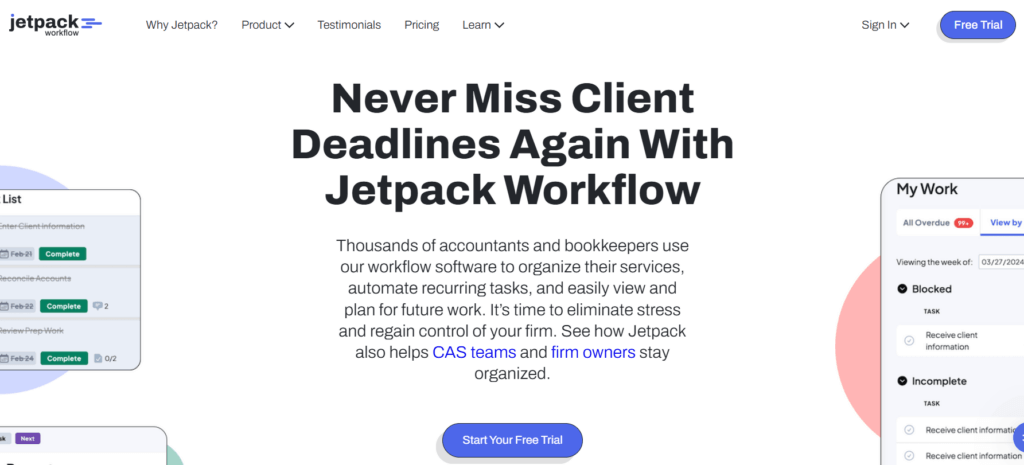
Founded around 2014-2015, the platform emerged because generic project management tools like Asana and Basecamp weren’t addressing the unique “recurring client management” needs of accounting professionals.
Its key capabilities include:
- 70+ Pre-Built Accounting-Specific Templates covering 990s, 1120s, 1040s, payroll, audits, and more
- Powerful Recurring Job Automation with daily, weekly, monthly, quarterly, yearly, or custom schedules
- Task Dependency Management preventing downstream work from appearing until prerequisites complete
- Customizable Labels System with up to 100 custom labels for internal communication
- Capacity Planning View with drag-and-drop workload visualization
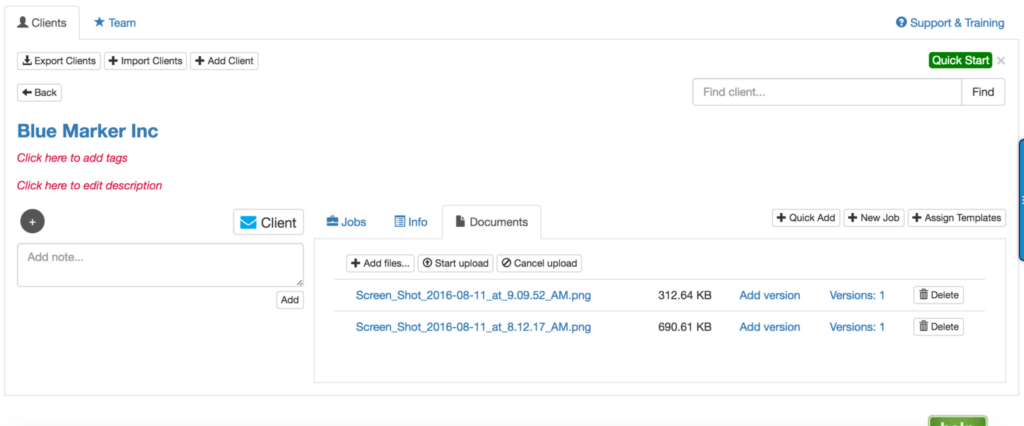
Jetpack Workflow deliberately positions itself as a specialist tool rather than all-in-one practice management. This means it lacks built-in invoicing and a dedicated client portal, though it added basic client document upload capability in late 2023. For firms whose primary pain point is internal workflow chaos, this focused approach eliminates feature bloat.
Source: Jetpack Workflow
Why Choose Jetpack Workflow Over Canopy for Pure Workflow
Jetpack Workflow stands out in specific ways:
- Simplified Implementation
Canopy’s breadth of features requires teams to learn multiple modules. Jetpack Workflow’s interface is designed to reduce adoption friction. The platform offers complimentary onboarding sessions, a straightforward setup process, and training courses oriented toward rapid deployment.
- Focused Pricing for Workflow-Only Needs
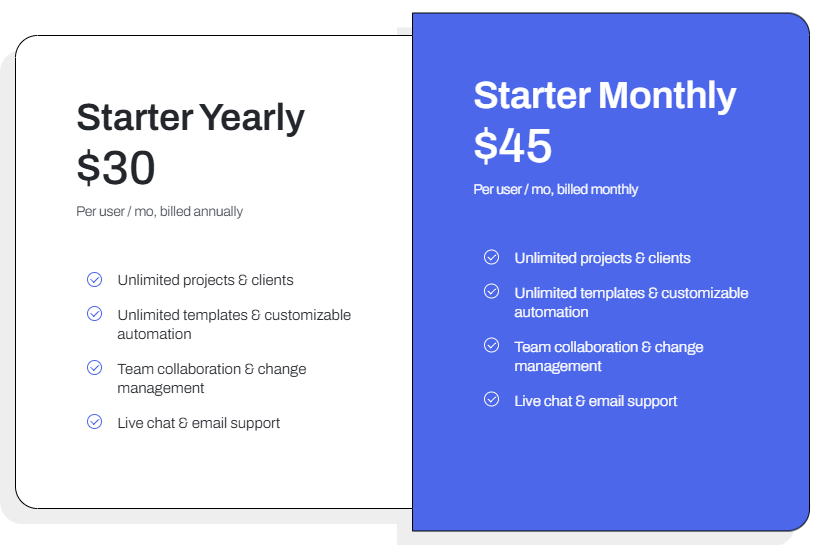
At $40/user/month annually, teams get unlimited projects, clients, and templates. If a firm only needs task and deadline management without client portals or integrated billing, Jetpack Workflow eliminates paying for unused capabilities.
- Purpose-Built Template Propagation
When firms update a template, changes can automatically cascade to all future jobs generated from that template. This is valuable for incorporating new requirements (like tax code changes) across entire client bases. The “Magic Job” concept means the furthest-out instance serves as the master for all subsequent iterations.
- Focused Dashboard Without Feature Sprawl
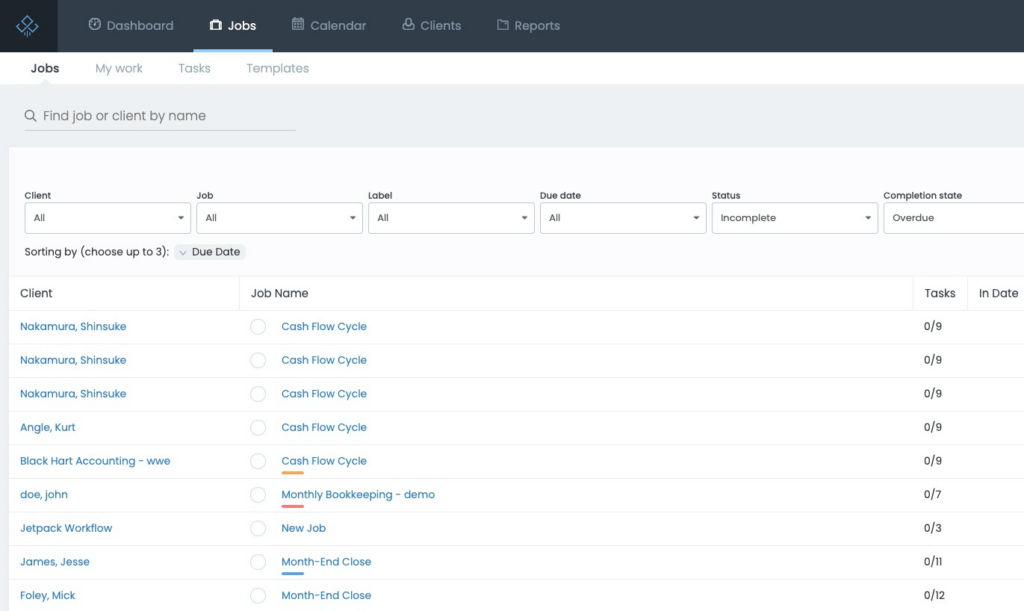
The dashboard delivers a “60-second snapshot” of firm status: jobs overdue, due today, due this week, due next week, with budgeted hours. The focused presentation contrasts with Canopy’s broader dashboard that accommodates multiple modules simultaneously.
Source: Jetpack Workflow
🏅 NOTE: We also evaluated Financial Cents for workflow focus. While Financial Cents offers similar positioning with added QuickBooks integration, Jetpack Workflow provides the most streamlined path for teams needing rapid deployment without comprehensive practice management overhead.
Jetpack Workflow Pricing
- Starter Plan (Annual): $40/user/month; unlimited projects, clients, templates; automation; live chat and email support
- Starter Plan (Monthly): $49/user/month; identical features without annual commitment
- Additional Services: Custom setup starting at $299; SSO available; 14-day free trial; 30-day guarantee on yearly plans
Who Should Use Jetpack Workflow?
Choose Jetpack Workflow if:
- Your primary pain point is internal workflow chaos, not client communication. If your main struggle is tracking recurring deadlines and standardizing processes rather than client document exchange, Jetpack’s specialized focus addresses this directly.
- You want to be operational within days rather than weeks. The straightforward setup process and complimentary onboarding enable rapid deployment without extended implementation projects.
- You already have separate solutions for client portals or billing. If you’re satisfied with existing tools and need a workflow engine to complement them, Jetpack slots into that role. Note that Jetpack added basic document upload capability in late 2023, so it now handles simple document collection.
6. Client Hub — Best Alternative for Bookkeeping Firms with QuickBooks Integration
Client Hub is a cloud-based practice management platform built specifically for bookkeeping and client accounting services (CAS) firms.
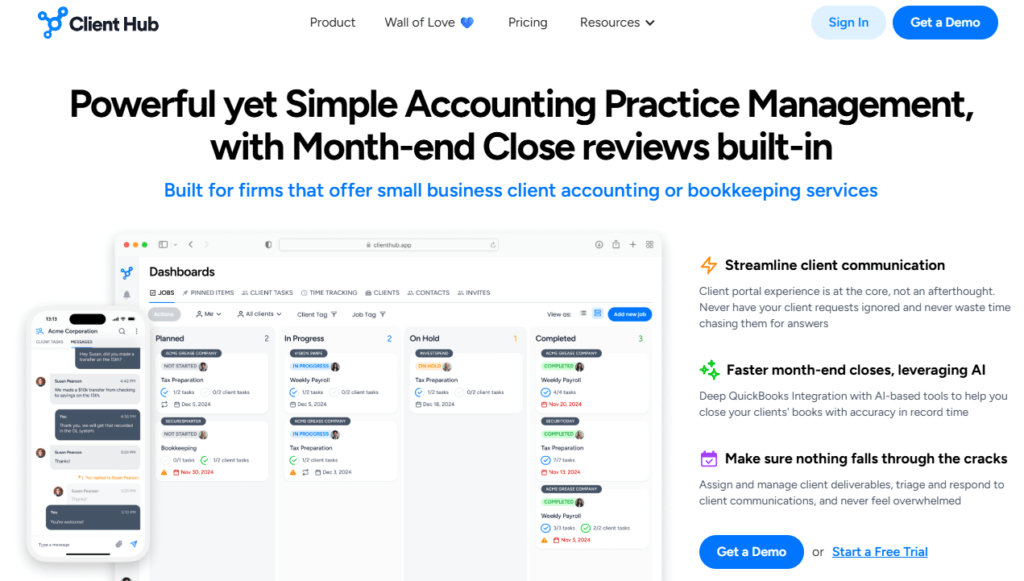
Unlike Canopy’s broader tax-practice orientation, Client Hub was founded in 2017 with client experience as a core focus, emerging from the specific pain point of accountants waiting for client responses.
Its key capabilities include:
- QuickBooks Online and Xero Integration with automatic uncategorized transaction resolution
- AI-Powered “Magic” Features including Magic Workflow, Magic Email, Magic Messages, and Magic Books Review
- Client-Centric Portal with Mobile App for secure document sharing and task completion
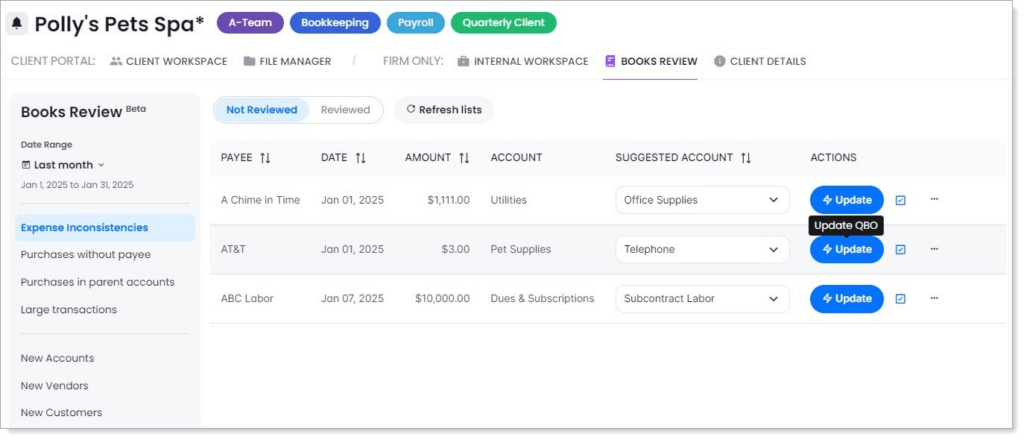
- Books Review Feature for automated month-end close quality control
- Per-User Pricing with Unlimited Clients and Storage
Source: Client Hub
Why Choose Client Hub Over Canopy for Bookkeeping Workflows
Client Hub stands out in several ways that matter for bookkeeping-focused firms:
- More Advanced Accounting Software Integration
Canopy offers QuickBooks integration for data connectivity. Client Hub was built around uncategorized transaction workflows. When a transaction lands in “Uncategorized Expense” or “Ask My Accountant,” Client Hub automatically generates a client task.
Clients see transaction details, select the correct category from their actual chart of accounts, and a single click updates QuickBooks or Xero with real-time synchronization. This specific workflow addresses one of bookkeeping’s most time-consuming aspects.
- AI Features for Bookkeeping Productivity
The “Magic Workflow” feature generates entire workflow checklists from simple descriptions. “Magic Email” provides AI-summarized threads and auto-generated reply suggestions. “Books Review” performs AI-driven month-end quality control, flagging expense inconsistencies, purchases without payees, and unusually large transactions.
- Client Portal Built From the Ground Up
Client Hub was founded with client experience as a core focus and later expanded into full practice management. This manifests in a fully-featured native mobile app where clients complete tasks and upload documents by snapping photos.
- Simpler Pricing Without Modular Complexity
At $79/user/month (annual) for the full integration tier, Client Hub includes practice management, client portal, document management, time tracking, email integration, all AI features, and QuickBooks/Xero integrations. Unlimited clients and storage are included without additional charges.
🏅 NOTE: We also evaluated Karbon and Financial Cents for practice management. While Karbon excels at workflow automation for larger firms, and Financial Cents is known for simplicity, Client Hub offers the most seamless QuickBooks/Xero integration for firms whose workflow bottlenecks center on uncategorized transaction resolution.
Client Hub Pricing
- Solopreneur Plan: $49/month (single user, annual); all features including AI and QuickBooks/Xero integration
- Practice Manager: $59/user/month (annual); full practice management, portal, email integration, AI features, QuickBooks/Xero integration
- Practice Manager + Advanced Integrations: $79/user/month (annual); everything plus enhanced uncategorized transaction resolution, W9/1099 Manager
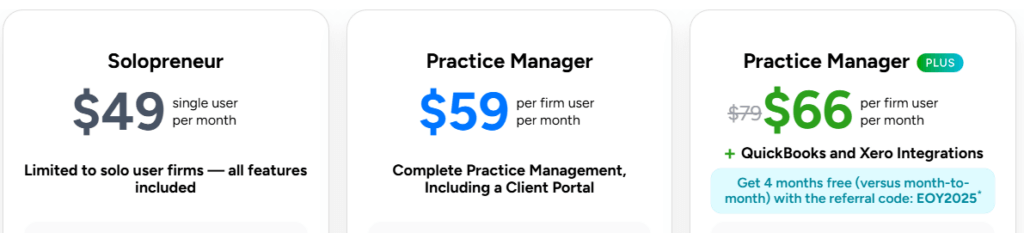
All plans include unlimited clients, unlimited storage, and no setup fees.
Who Should Use Client Hub?
Choose Client Hub if:
- Your firm’s primary service is ongoing bookkeeping or client accounting services. The QuickBooks and Xero integration for resolving uncategorized transactions is specifically designed for this workflow.
- Client communication bottlenecks are your biggest pain point. If you spend significant time chasing clients for transaction clarifications and document requests, Client Hub’s portal-first architecture addresses this directly.
- You want AI features specifically tuned to bookkeeping workflows. The Books Review month-end automation and Magic Workflow generation are specifically developed for bookkeeping use cases.
7. Firm360 — Best Alternative for White-Glove Onboarding & CPA-Designed Workflows
Firm360 is a comprehensive practice management platform built from the ground up by Brandon Gray, a practicing CPA who was frustrated with the disconnected software landscape plaguing his own firm.

This origin story matters because it informs product decisions throughout the platform.
Its key capabilities include:
- Project and Workflow Management with visual flows, automated status transitions, and rule-based task generation
- Integrated Time Tracking and Billing supporting hourly, flat-fee, and progress billing with Stripe-powered payments
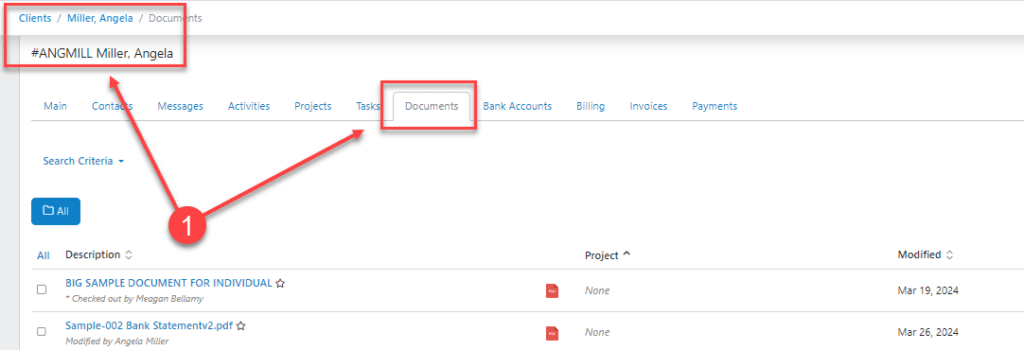
- Secure Document Management with RightSignature integration and in-platform PDF manipulation
Source: Firm360
- Branded Client Portal with secure authentication using SMS verification
- Advanced Firm Performance Reporting including Client Realization, Staff Utilization, and Accounts Receivable aging
- SOC2 Type II Compliant Security with 256-bit encryption on AWS infrastructure
Why Choose Firm360 Over Canopy for White-Glove Support
Firm360 stands out in specific ways:
- Personalized White-Glove Onboarding
While Canopy offers implementation packages with specialists, Firm360 emphasizes dedicated implementation support as a core part of its offering.
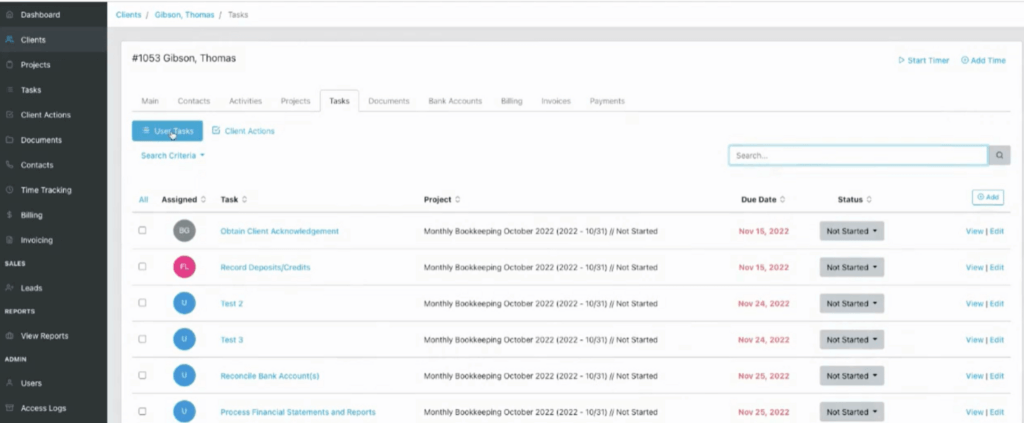
Firm360 assigns dedicated implementation specialists to each new firm. These specialists tailor setup to your specific workflows, assist with data migration, and conduct personalized training. Most firms are fully operational after just four focused sessions.
- CPA-Founded Design Philosophy
This isn’t marketing spin. Features like the visual project workflow builder and the ability to embed signature requests into project templates reflect someone who understands seasonal intensity and repetitive engagement patterns unique to accounting.
Source: Firm360
- Straightforward Tiered Pricing
Firm360 offers three transparent tiers: Basic ($49/user), Standard ($79/user), and Premium ($99/user). Each includes more features without calculating which modules to purchase separately.
- Firm-Specific Reporting
The Client Realization report tracks time spent versus billed. Staff Utilization measures billable versus non-billable against goals. Staff Workload visualizes capacity distribution. These reports are purpose-built for decisions accounting firm owners actually make.
🏅 NOTE: We also evaluated TaxDome and Karbon. While TaxDome offers comprehensive features for smaller firms and Karbon excels at team collaboration, Firm360 provides the most hands-on implementation support for firms specifically needing personalized assistance transitioning from disconnected systems.
Firm360 Pricing
- Basic Plan: $49/user/month; client management, document management, client portal, time tracking and billing, basic reporting
- Standard Plan: $79/user/month; adds project management, automated A/R collections, 1 e-signature license, advanced reporting, standard integrations
- Premium Plan: $99/user/month; unlimited e-signatures, Zapier integration, premium training, dedicated success manager, priority support

3-user minimum for Standard and Premium plans.
Who Should Use Firm360?
Choose Firm360 if:
- You value personalized implementation support over self-service onboarding. If your firm has struggled with software transitions or lacks internal IT resources, Firm360’s dedicated specialists provide hands-on experience.
- You want software designed by someone who runs an accounting firm. The CPA-founded origin manifests in features that reflect how accounting practices actually operate through seasonal intensity and repetitive client cycles.
- Your firm is replacing multiple disconnected applications and needs migration assistance. The hands-on implementation support is designed specifically for this consolidation use case.
The Final Verdict
While Canopy offers comprehensive practice management with strong tax resolution capabilities, different firms have different priorities. Based on our research, here are the best alternatives:
- Uku for fast & flexible deployment with modular scaling, helping firms implement step by step and gain data-driven insights without lengthy setup projects
- Karbon for enterprise-grade email collaboration with Kanban boards and data warehouse access for distributed teams
- TaxDome for all-inclusive features with unlimited storage, eliminating modular pricing calculations
- Financial Cents for budget-friendly workflow management with strong QuickBooks Online integration (US/Canada focus)
- Jetpack Workflow for pure workflow and task management without practice management overhead
- Client Hub for bookkeeping firms needing QuickBooks/Xero integration for uncategorized transaction workflows
- Firm360 for hands-on implementation support and CPA-designed workflows
Remember, the best practice management software is the one your team will actually use. Consider your firm’s specific pain points; whether that’s pricing complexity, implementation time, email chaos, global capabilities, or bookkeeping-specific workflows, and choose accordingly.
Ready to experience practice management that’s both powerful and intuitive? Uku helps accounting firms automate workflows, track time effortlessly, and gain actionable insights to grow their business. Start your free 14-day trial with full Elite features and discover what accounting professionals are saying: with modular deployment and 90% of actions being one-click, practice management doesn’t have to be complicated.