
Choosing between Canopy and Uku for your accounting practice management often comes down to these five critical questions:
- Do you need specialized tax resolution tools with direct IRS integration, or is your focus primarily on streamlined workflow and task automation?
- Is your firm based in the US with complex compliance requirements, or are you looking for a globally accessible solution with transparent pricing?
- Do you prefer a venture-backed platform with a modular pricing structure, or an independent company with straightforward per-user pricing?
- How important is getting up and running quickly versus investing time in a more comprehensive setup?
- Are you a solo practitioner needing a free option, or a growing team seeking scalable features?
In short, here’s what we recommend:
👉 Canopy is the comprehensive, venture-backed practice management platform designed for US accounting and tax firms that need vast tax resolution capabilities. With its direct IRS transcript integration, modular feature set covering client management, document storage, workflow automation, and time and billing, it serves firms looking for an all-in-one solution with enterprise-grade compliance.
Starting at $45 per user per month for small firms (with annual billing), Canopy’s strength lies in its tax-specific tools and SOC 2 Type II certification. However, its modular pricing can become complex, and some users report occasional bugs and limited customization options.
👉 Uku is the intuitive, independent practice management software built for accounting firms that prioritize fast deployment and powerful automation. Used by over 1,000 accountants across 25+ countries, it excels at modular implementation, that is, firms can start working on day one with just the features they need, then scale up over time.
With comprehensive task management, time tracking, advanced automated billing, and a highly customizable client portal, Uku offers a straightforward path to efficiency. A free Solo plan serves freelancers, while team pricing starts from $38 per user per month with flexible monthly billing options.
Both platforms serve accounting firms well, but they reflect different philosophies: Canopy offers depth in tax resolution and US compliance, while Uku delivers streamlined efficiency and global accessibility with a modular approach that eliminates lengthy implementation timelines.
Table of contents:
- Canopy vs Uku at a glance
- The fundamental divide: Tax specialization vs workflow efficiency
- Canopy excels at tax resolution and US compliance
- Uku dominates workflow automation and ease of use
- Pricing models reveal different target markets
- Client portal and collaboration approaches
- Time tracking and billing capabilities
- Implementation and getting started
- Canopy vs Uku: Which should you choose?
Canopy vs Uku at a glance
| Canopy | Uku | |
|---|---|---|
| Core Philosophy | All-in-one with tax specialization | Modular workflow automation |
| Founded | 2014 (Utah, USA) | 2017 (built for international markets) |
| Funding Model | Venture-backed (~$236.5M raised) | Independent |
| Starting Price | $45/user/month (Starter, annual) | Free (Solo), from $38/user/month (Team) |
| Free Plan | Freemium with limited features | Full Solo plan for 1 user, 25 clients |
| Tax Resolution Tools | ⭐⭐⭐⭐⭐ Direct IRS integration | Not specialized |
| Workflow Automation | ⭐⭐⭐⭐ Good automation | ⭐⭐⭐⭐⭐ Highly automated |
| Ease of Use | ⭐⭐⭐⭐ User-friendly | ⭐⭐⭐⭐⭐ Highly intuitive |
| Client Portal | ⭐⭐⭐⭐⭐ Feature-rich | ⭐⭐⭐⭐⭐ Unified workspace |
| Pricing Transparency | ⭐⭐⭐ Modular, can be complex | ⭐⭐⭐⭐⭐ Straightforward tiers |
| Global Accessibility | ⭐⭐⭐ Primarily US/Canada focused | ⭐⭐⭐⭐⭐ 25+ countries, 12 languages |
| Security Certifications | ⭐⭐⭐⭐⭐ SOC 2 Type II, GDPR | ⭐⭐⭐⭐⭐ SOC 2 Type I, TLS 1.3, EU servers |
| Best For | US tax firms needing IRS tools | Firms prioritizing fast deployment |
The fundamental divide: Tax specialization vs workflow efficiency
Canopy was created due to frustration with tax resolution inefficiency.
Founded in 2014 by Kurt Avarell, a Wall Street tax attorney handling pro bono cases, the platform was initially created to solve the pain of repetitive data entry and juggling multiple software programs during IRS resolution work.
This origin story shaped Canopy into a tax-centric platform that gradually expanded into comprehensive practice management. The company has raised over $236.5 million in venture funding, including a $70 million Series C round in April 2025, signaling significant investment in its growth trajectory and feature development.
Canopy’s evolution from a tax resolution tool to an all-in-one practice management platform reflects its positioning as the “firm-wide operating system” for accounting practices.
The platform now covers client management, document storage, workflow automation, time and billing, and maintains its core strength in tax resolution. Recent investment has been directed toward AI-powered features to automate routine tasks and provide actionable insights.
Uku emerged from a different observation.

Founded in 2017 by lifelong friends Rain Allikvee and Jaanus Lang, the platform was created from the ground up to be international, especially for UK and US markets.
The founders, who previously ran a design and development studio called Artify, identified that existing practice management software was “unhandy, impractical and unsightly.” Their vision was a tool that was both powerful and genuinely easy to use; a system your team will actually enjoy using.
Uku’s philosophy centers on modular efficiency. Rather than building from a tax specialization outwardly, Uku was designed to let firms start working on day one with just the features they need, then add capabilities as they grow.
The platform remains independent, meaning all development decisions are driven by customer needs rather than investor expectations. This independence has allowed Uku to focus on what matters most to accountants: saving time and reducing administrative burden. With over 1,000 clients across 25+ countries and support for 12 languages, Uku has proven that simplicity and functionality can coexist.
Canopy excels at tax resolution and US compliance
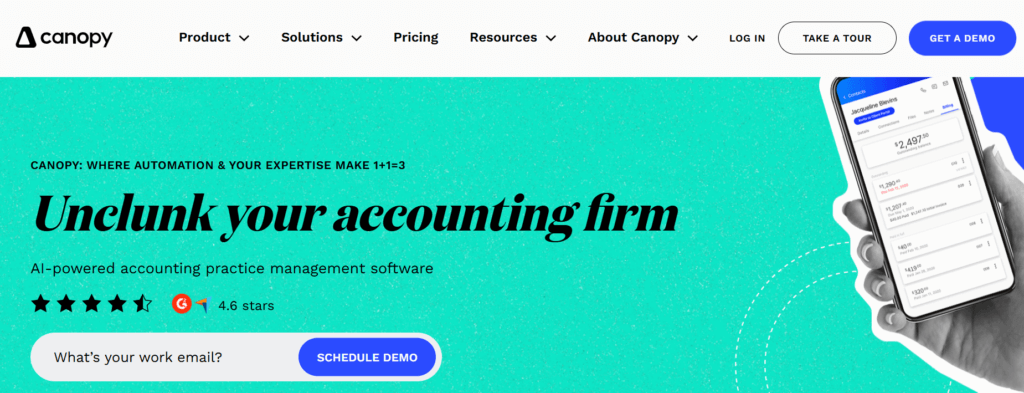
Canopy distinguishes itself through its tax resolution capabilities and US-focused compliance features.
The “Transcripts & Notices” capability is a cornerstone of Canopy’s offering. With a Power of Attorney on file, practitioners can pull up to 20 years of a client’s IRS transcripts with a single click.
The system presents this data in a clear, readable format rather than the often cumbersome raw IRS transcript format. It can also detect changes between transcript versions, alerting practitioners to potential issues before they become problems.
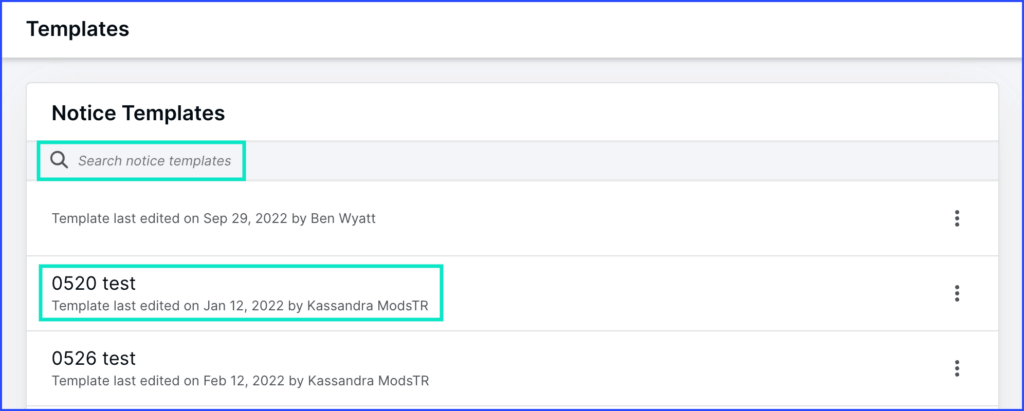
Canopy’s notices library is comprehensive, providing step-by-step workflow templates for resolving various IRS notices. When a client receives a notice, practitioners can quickly understand its implications and have a pre-built resolution path. This capability alone can save significant research time and reduce the risk of missed deadlines or incorrect responses.
Source: Canopy
The platform’s resolution case management creates a structured workspace for each tax issue, integrating forms, letters, client requests, and notes. Client surveys auto-populate IRS forms with gathered information, reducing manual data entry and the associated error risk. This level of tax-specific functionality is uncommon among general practice management platforms.
On the compliance front, Canopy holds SOC 2 Type II certification, which validates its controls for security, availability, and confidentiality.
The platform employs 256-bit encryption for data at rest and in transit, and its payment processor, Adyen, maintains PCI DSS compliance. For firms with strict regulatory requirements, particularly those handling tax resolution work, these certifications provide important assurance.
However, Canopy’s comprehensive feature set comes with trade-offs. Some users report experiencing occasional bugs and glitches with the software. Limited customization options have also been noted as a constraint for firms wanting to tailor the platform more precisely to their workflows. The billing module, while functional, has been described by some users as less robust than dedicated billing software.
Uku dominates workflow automation and ease of use
Uku has built its reputation on making practice management intuitive while delivering powerful automation capabilities.
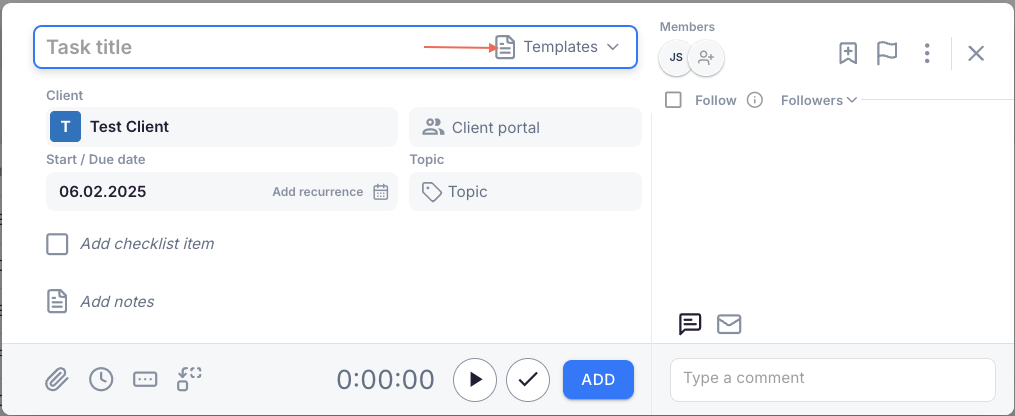
The platform’s three-level workflow structure (task templates to client task plans to tasks) enables advanced automation without complexity. Firms create master workflow templates for their services, then apply these templates to individual clients with client-specific customizations.
Source: Uku
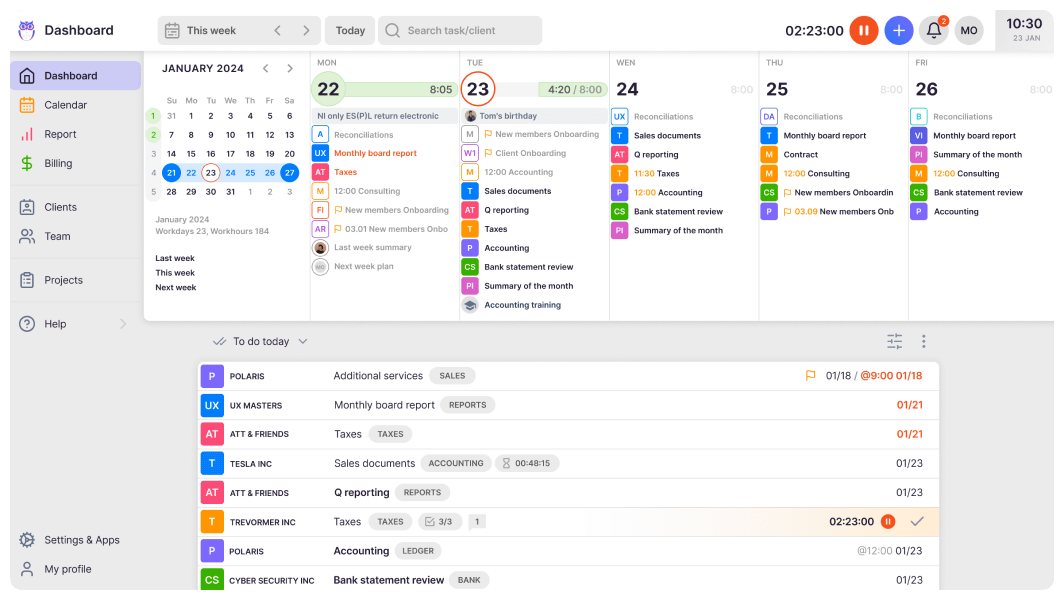
Based on recurrence settings, Uku automatically generates tasks and places them on the responsible team member’s dashboard at the right time.
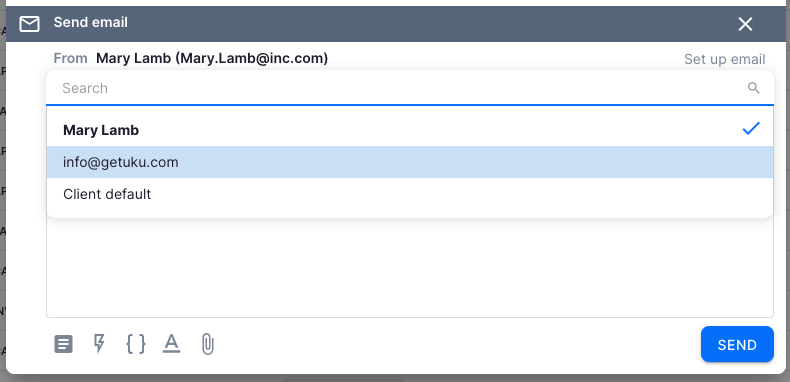
This automation extends to client communication. Uku can send automated email reminders for upcoming deadlines or overdue tasks, and email templates can be triggered at different stages of a task’s lifecycle.
Source: Uku
For accountants who spend significant portions of their day on emails and follow-ups, this automation translates directly to time savings. Customers report seeing up to ~20% more profit by discovering outdated agreements where billing didn’t match actual work performed, with one firm noting they could serve 38% more clients after a year of using Uku.
The platform’s task management is designed around how accountants actually work.
Each task can include subtask checklists for complex processes, custom fields for tracking specific metrics (like the number of invoices processed), and attachments for relevant documents. Task dependencies ensure that work flows in the correct order. The dashboard provides immediate clarity on what needs to be done today, what’s overdue, and what’s coming up.
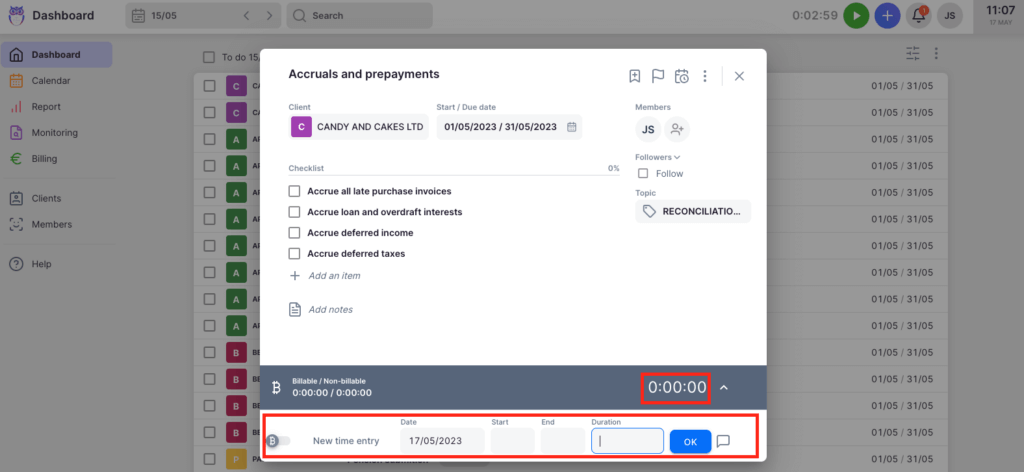
Uku’s time tracking integrates seamlessly into this workflow with a focus on maximized speed, with 90% of actions occurring in one-click.
Source: Uku
Users can track time via a stopwatch, manual entry, or bulk time entry for distributing time across multiple tasks. The system distinguishes between billable and non-billable hours, and this data feeds directly into automated invoicing. Time estimations can be set at the task, plan, or template level, with an option to automatically log estimated time as actual time if no other entry is made.
The interface itself reflects Uku’s design heritage. Users frequently describe it as sleek, modern, and easy to navigate, even for team members with varying technical expertise. The Mini Uku browser plugin extends this functionality, allowing users to track time and manage tasks from any webpage without switching applications.
Uku’s BI Reporting provides comprehensive views with filters, saved report templates, and three levels of depth: summary, tasks, and time. The system tracks both sales prices and actual cost prices, giving managers real-time visibility into whether employees are profitable and whether pricing structures need adjustment.
Pricing models reveal different target markets
Canopy uses a modular pricing approach.

For small firms (4 users or less), the Starter plan costs $45 per user per month (billed annually) and combines Client Engagement and Document Management. The Essentials plan at $66 per user per month adds Workflow and Time & Billing.
For growing firms, Canopy’s pricing becomes more complex.
The base Client Engagement Platform starts at $150 per month for unlimited users (including up to 2,500 clients). Additional modules are priced separately: Document Management at $36 per user per month, Workflow at $32-40 per user per month, and Time & Billing at $22-31 per user per month. Tax Resolution adds $50 per user per month, with collection cases billed at $100 each.
This modular approach allows firms to pay only for what they need, but it also means calculating total costs requires careful consideration of which modules are required. Implementation fees are mentioned for customizable plans, though specific amounts aren’t publicly disclosed. Knowledge-Based Authentication for eSignatures costs approximately $1.25-$1.50 per credit.
Uku takes a simpler approach with four clear tiers, available in multiple currencies (€, $, £).
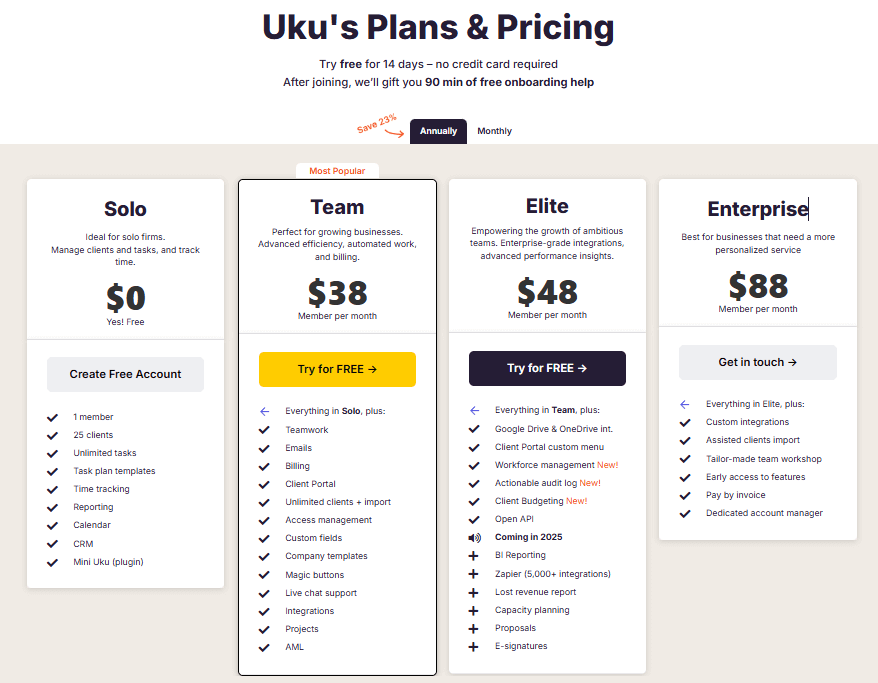
The Solo plan is free and includes support for 1 user with up to 25 clients, unlimited tasks, task templates, time tracking, reporting, CRM, and calendar functionality. This isn’t a limited trial but a fully functional plan for freelance accountants.
The Team plan starting from $38 per user per month adds teamwork features, email integration, a client portal, unlimited clients, access management, custom fields, company templates, automation features, integrations, project management, and AML capabilities.
The Elite plan at $48 per user per month includes everything in Team plus Google Drive and OneDrive integrations, customizable client portal menus, workforce management, an actionable audit log, Client Budgeting, Document Management, and e-signatures. Additional features planned include BI Reporting enhancements, Zapier integration, a lost revenue report, and capacity planning.
The Enterprise plan at $88 per user per month adds custom integrations, assisted client import, tailored team workshops, early access to new features, invoice payment options, and a dedicated account manager.
Annual billing provides a 23% discount, but importantly, Uku offers flexible monthly billing for firms who prefer to test the system without large upfront annual commitments. Uku charges per team member, not per client, so firms can add unlimited clients without additional cost. A 14-day free trial provides access to Elite features, and 90 minutes of free onboarding assistance is included for new users.
Client portal and collaboration approaches
Canopy’s client portal is integrated with its broader functionality.
Clients can securely upload documents, sign documents electronically, and make payments through the portal. The portal offers multi-factor authentication for security and can be customized with the firm’s branding.

Source: Canopy
The engagement letters and proposals feature connects directly to the portal, allowing clients to review terms, electronically sign, and provide payment information.
Once a proposal is accepted, the system can automatically create associated projects and tasks in the workflow module. Client requests for documents or information are sent through the portal and appear on clients’ to-do lists, with automated reminders to encourage completion.
The portal is available as a mobile app for both iOS and Android, enhancing accessibility for clients on the go.
Uku’s client portal takes a different architectural approach.
Unlike traditional portals where tickets must be connected to work items, Uku’s portal mirrors the exact same task on both sides. Clients and accountants work on the same item with all communication, actions, documents, logs, and time tracking in one place.

Source: Uku
When clients make requests through the portal, notifications appear on the accountant’s dashboard, and they can immediately start tracking time or communicating within that same task.
The portal uses magic link access, eliminating the need for clients to remember usernames and passwords. It can be fully customized with company branding including the firm’s logo, colors, and custom domain, all at no additional cost.
Where Uku further differentiates is in per-client customization.
Firms can tailor the menu and visible features for each individual client, providing a personalized experience. For example, certain features or documents can be hidden until a client completes the onboarding process. The portal also displays a client’s current service agreements and can showcase other services the firm offers, creating natural upselling opportunities.
Both portals are well-regarded by users. Canopy offers robust e-signature functionality and payment processing, while Uku’s unified workspace architecture and extensive customization options may appeal to firms seeking a more integrated client experience.
Time tracking and billing capabilities
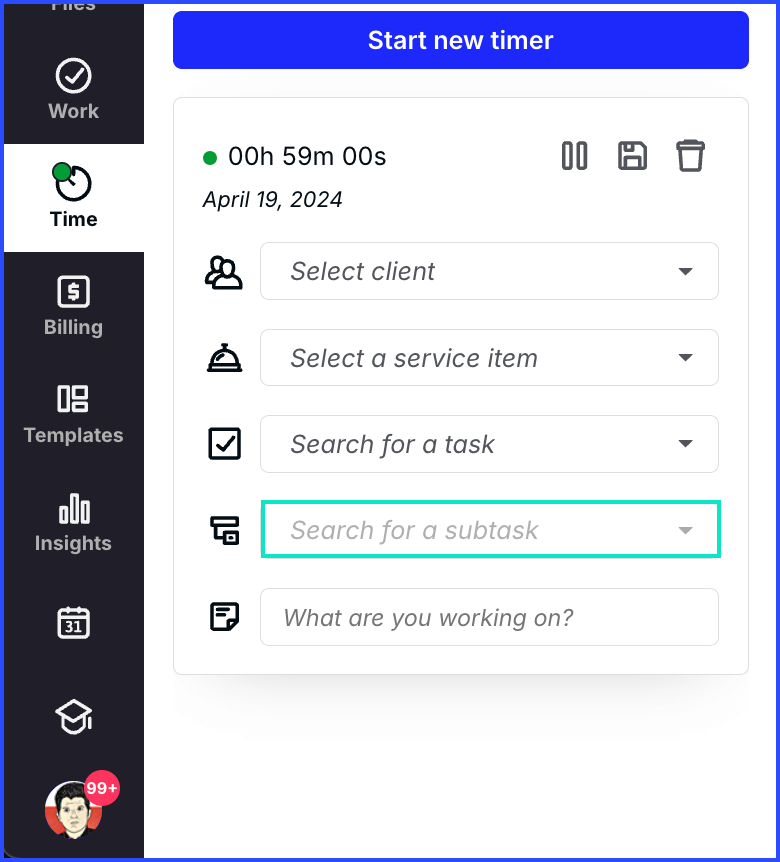
Canopy’s time tracking allows users to start timers from anywhere in the application, with the timer visible in the navigation bar and dashboard.
Source: Canopy
Time can be tracked against specific clients, projects, and service items, with entries marked as billable or non-billable. Manual entry is available for times when the timer wasn’t used.
The platform’s Work-in-Progress (WIP) tracking provides a clear view of all unbilled work, summarizing unbilled hours and revenue for each client.
From this report, users can select time entries and add them directly to invoices. Canopy supports one-time invoices, bulk invoices, and recurring invoices with daily, weekly, monthly, or yearly schedules. Automated reminders can be configured for unpaid invoices, and late fees can be automatically applied to overdue accounts.
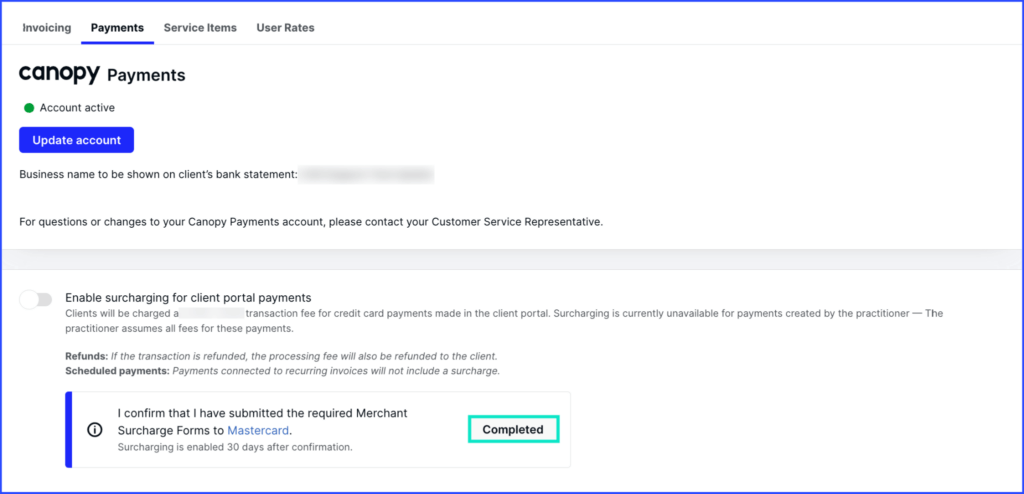
Canopy Payments enables firms to accept credit card and ACH payments directly through the client portal, with payments typically processed within two business days. Surcharging options allow firms to pass credit card fees to clients if desired.
Source: Canopy
Uku’s time tracking offers similar flexibility with multiple input methods: a stopwatch, manual time entry with start and end times, or bulk time entry for distributing time across multiple tasks.
The system can suggest start times based on when the previous task ended, streamlining data entry. Time can be tracked on subtasks, with that time automatically rolling up to the main task. With 90% of time tracking actions being one-click, day-to-day admin is significantly reduced.
The integration between time tracking and automated billing is where Uku excels.
The system supports advanced pricing models including time-based, fixed-fee, item-based, quantity-based, and mixed models with different rates for different periods. Rounding rules can be configured based on entry, team, client, or month. For instance, a one-minute unplanned call can be automatically billed as 15 minutes.
Contract templates are created once, then time tracking automatically calculates billable amounts in real-time. The platform reduces invoicing for 100+ clients from multiple days to approximately 30 minutes.
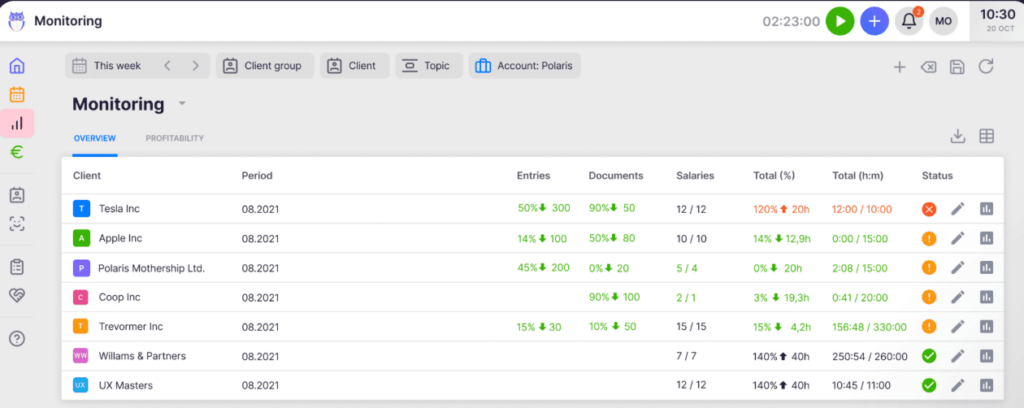
Uku’s client agreement monitoring automatically compares agreed-upon work volume with actual work performed, providing real-time visibility into profitability. The system tracks both sales prices and actual cost prices. If an employee costs €30/hour but bills at €45/hour, managers can immediately see profitability. This helps firms identify scope creep and make data-driven pricing decisions.
Both platforms provide solid time tracking and billing functionality. Canopy’s WIP tracking and integrated payment processing are robust, while Uku’s advanced automated billing with contract-based pricing and profitability insights offer compelling efficiency gains for firms focused on billing optimization.
Implementation and getting started
Canopy offers a Freemium license that allows uploading up to 250 contacts with full Client Engagement functionality, plus a free 15-day trial of other Practice Management modules.
For full implementation, particularly with growing firms on Standard or Pro plans, implementation fees apply (though specific amounts aren’t publicly disclosed). The platform provides a comprehensive Knowledge Base with over 600 articles and more than 60 on-demand training videos.
Customer support is available Monday through Friday via phone, email, and live chat, with extended hours during tax season. Canopy reports a 90% customer satisfaction score with in-house support. However, user reviews on support are mixed, with some praising quick and helpful responses while others report slower resolution times.
The modular nature of Canopy means that full setup may involve decisions about which modules to implement and how they interact. For firms wanting the complete suite, this requires configuring multiple integrated components.
Uku provides a 14-day free trial with access to Elite plan features, requiring no credit card to start.
The Solo plan offers an ongoing free option for freelancers, providing a low-risk entry point. For paid plans, 90 minutes of free onboarding assistance from a specialist is included.
Where Uku differentiates most is in fast and flexible deployment.
Firms can start working on day one with just the modules they need. This modular approach eliminates the substantial upfront configuration and training required by comprehensive all-in-one platforms. Users can begin with just CRM and tasks, then gradually add time tracking, billing, and client portal features as they become comfortable.
For firms transitioning from spreadsheets, Uku offers a particularly smooth path.
Users can import clients individually or in bulk via XLSX files; work with your Excel file for an hour, import it into Uku, and have automated plans ready to go. Integration with accounting software like Xero, QuickBooks, and FreeAgent allows direct client import. The platform includes pre-built task templates that can be used as-is or customized.
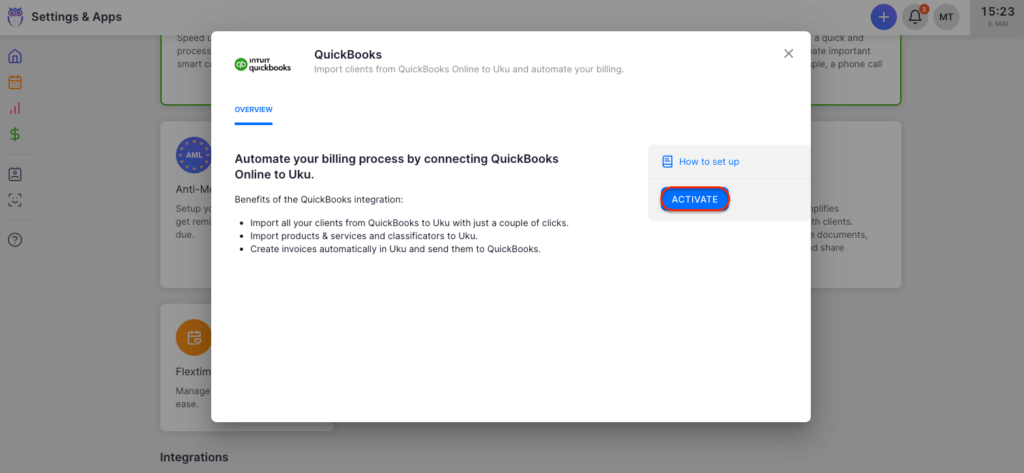
Source: Uku
The interface is designed for quick adoption. Users describe it as intuitive and easy for new team members to learn. Assisted import functionality is available across all plans, and Uku’s SOC 2 Type I compliance provides security assurance from day one.
For firms prioritizing rapid deployment and ease of onboarding, Uku’s modular approach offers a faster path to productivity. Canopy’s more comprehensive setup may be worthwhile for firms specifically needing its tax resolution capabilities and SOC 2 Type II certification.
Canopy vs Uku: Which should you choose?
The choice between Canopy and Uku depends on your firm’s specific needs, geographic focus, and priorities.
Choose Canopy if:
- Your firm specializes in tax resolution or frequently handles IRS-related cases
- Direct IRS transcript integration is essential to your workflow
- You need SOC 2 Type II certification for compliance requirements
- Your firm is US or Canada-based and benefits from that market focus
- You prefer a modular approach to select only the features you need
- You value having a larger, venture-backed company with significant investment in ongoing development
- Tax-specific features like notices libraries and resolution case management are important to your practice
Choose Uku if:
- You want to minimize your team’s admin time with one-click actions and automated processes
- You value ultra-fast onboarding and the ability to implement software step by step rather than all at once
- You need multilingual or multi-currency support for international operations
- You’re transitioning from Excel and want the easiest implementation path
- You prefer flexible monthly pricing rather than annual commitments
- Advanced automated billing that reduces invoicing from days to 30 minutes is a priority
- You want a highly customizable client portal where clients and accountants work on the same tasks
Ready to experience workflow automation that can save your team hours every week? Start your free 14-day trial of Uku today and discover why over 1,000 accountants across 25 countries trust it to manage their practice.
Final Thoughts
The practice management landscape offers strong options for accounting firms, and both Canopy and Uku have proven their value to thousands of users.
Canopy brings expertise in tax resolution and robust US compliance features, making it valuable for firms where IRS work is important to their practice. Uku delivers on its promise of efficiency and modular flexibility, providing powerful automation in an intuitive package that helps firms serve more clients with less administrative burden.
Your decision should align with your firm’s core focus.
If tax resolution drives your practice, Canopy’s specialized tools may be irreplaceable. If streamlined efficiency, fast deployment, and ease of use across all client work matters most, Uku’s approach will likely serve you better.