




Canopy Pricing 2026: Plans, Add-On Costs & The Uku Alternative
Canopy 2026 pricing: Standard $74, Plus $109, Premium $149 per user/month (annual, Premium coming soon), plus consumption-based tax add-ons. Compare against Uku — Solo from $19/month, transparent per-member pricing, no credits to buy.


Contents
Canopy’s 2026 pricing, at a glance: three per-seat tiers on annual billing — Standard $74/user/month, Plus $109/user/month, and Premium $149/user/month (Premium is marked “Coming Soon” and not yet available) — plus a custom-priced Enterprise tier. Every tier bundles the full platform (CRM, document management, workflow, billing, client portal, payments); the difference between tiers is depth of automation, not which features you can access. Specialist tax work — Tax Workflow Automation, Close Automation, Tax Resolution — is now sold as consumption-based add-ons rather than fixed-price modules. (Canopy pricing checked 25 September 2026, getcanopy.com/pricing.)
Uku is the transparent alternative: Solo $19/month (up to 20 active clients, combines Team + Elite features including client budgeting and e-signatures), Team $38/month, Elite $48/month (with BI Analytics), and Enterprise $88/month — all with true monthly billing or ~23% off when billed annually, no consumption credits to track. Uku also gives firms a single source of truth for who’s doing what across the team — the most-cited reason customers say they switched.
If you’ve tried to work out what Canopy actually costs your firm — the per-seat tier price, then whether you’ll burn through Client Credits for Smart Intake, then whether Tax Resolution or Close Automation apply to your caseload — you know that consumption-based software pricing can feel like forecasting a variable bill rather than reading a price tag.
Canopy has established itself as a comprehensive practice management platform for accounting and tax firms by serving firms across the industry.
It promises to be the “firm-wide operating system” that brings client management, document storage, workflow automation, and billing into a single ecosystem. Canopy simplified its pricing structure in 2026, moving from per-module add-ons to three flat per-seat tiers — but it also moved specialist tax work onto usage-based metering, so the total bill still depends on how the firm actually uses the platform.
I’ve analyzed Canopy’s current pricing tiers and add-on costs. I believe it’s the ideal choice if:
- You need specialized tax resolution tools with IRS transcript pulling
- Your caseload volume is predictable enough to budget for consumption-based add-ons
- You want the full feature set unlocked from the entry tier, with premium tiers reserved for automation depth
- You’re comfortable with a sales-assisted trial rather than instant self-serve signup
- Your practice handles significant tax resolution work
However, Canopy’s pricing is not a good choice if:
- You want to minimize your team’s admin time with automated billing
- You value ultra-fast, self-serve onboarding and the ability to start working on day one
- You need multilingual or multi-currency support for international operations
- You’re transitioning from Excel and want the easiest implementation
- You want a flat per-user price with nothing metered or consumption-based
In this case, you should consider Uku: an accounting practice management platform created from the ground up to be international across US and Northern European markets. Uku offers transparent per-member pricing from $19/month (Solo), four clear plans (Solo, Team, Elite, Enterprise) with nothing usage-metered, and fast, flexible deployment that lets firms start with just the features they need and scale up over time.
I’ve included a detailed pricing comparison with Uku in this review. If you’re eager to jump into the Uku pricing breakdown, go ahead and do so with this link.
Table of contents
- Canopy Pricing Summary
- Canopy Pricing: In-Depth Overview
- Where Canopy Falls Short
- Best Canopy Alternative: Uku
- Canopy Feature Value Breakdown (vs Uku)
- Canopy Pricing FAQ
- Final Verdict: Canopy vs Uku
Canopy Pricing Summary
| Canopy | Uku | |
|---|---|---|
| Entry | • Standard: $74/user/month (annual) • Full platform included • Sales-assisted trial, no self-serve free tier | • Solo: $19/member/month annual • Up to 20 active clients • Combines Team + Elite features (client budgeting + e-signatures) |
| Mid-Tier | • Plus: $109/user/month (annual) • Adds roles, capacity planning • More client intake capacity | • Team: $38/member/month annual • Unlimited members + clients • Reporting + Teamwork Tools + Projects |
| Advanced | • Premium: $149/user/month (annual), Coming Soon — not yet available • Advanced workflows and billing • Deep reporting and insights | • Elite: $48/member/month annual • Client Budgeting, Document Management • BI Analytics, workforce management |
| Enterprise | • Custom pricing • For large and extra-large firms | • Enterprise: $88/member/month annual • Custom integrations • Dedicated account manager |
| Specialist Add-Ons | Consumption-based: Tax Workflow Automation from $34/client credit, Close Automation $10/connected client/month, Tax Resolution $50/user/month | Bundled into plan tiers, nothing metered |
| Billing Flexibility | Annual billing saves 20%; monthly available at a higher rate | Monthly or annual on every plan, ~23% off annual |
| Best For | Firms needing specialized tax resolution tools and predictable-enough caseloads to budget consumption fees | Firms wanting transparent pricing with fast & flexible deployment |
Canopy Pricing: In-Depth Overview
Canopy runs three per-seat tiers — Standard, Plus, and Premium — plus a custom Enterprise tier for large firms. Unlike the platform’s old module-based structure, every tier now includes the complete Canopy practice management suite: CRM, workflow, document management, billing, client portal, payments, and core AI capabilities. What changes between tiers is the depth of automation and coordination features available, not which modules you’ve bought. Specialist tax capabilities are metered separately as consumption-based add-ons. Let’s examine each tier and the add-on costs.
Canopy Standard: $74/user/month
| Feature | Annual | Monthly |
|---|---|---|
| Price per user | $74 | ~$93 |
| Platform access | Full suite: CRM, document management, workflow, billing, client portal, payments | Same |
Standard is Canopy’s entry tier and, since the pricing overhaul, already includes the full practice management platform rather than a stripped-down bundle. Firms get CRM and client management, document management with eSign, client portal and secure messaging, and automated task workflows from day one.
| Standard Pros | Standard Cons |
| ✅ Full platform included, nothing locked behind a module purchase | ❌ No self-serve free tier — trial requires a sales demo |
| ✅ Unlimited document storage and eSignatures | ❌ Advanced automation, roles, and reporting reserved for higher tiers |
| ✅ Includes client portal and payments | ❌ Specialist tax work still metered separately |
| ✅ Savings with annual billing | ❌ Monthly billing runs meaningfully higher per seat |
The Bottom Line 👉 Standard gives every firm the complete platform at the entry price point — a real improvement over the old module math — but firms still need to budget for consumption-based tax add-ons on top.
Canopy Plus: $109/user/month
| Feature | Annual | Monthly |
|---|---|---|
| Price per user | $109 | ~$136 |
| Adds over Standard | User roles and access controls, more client intake capacity, advanced task views and filters, capacity planning and forecasting | — |
Plus builds on Standard with firm-level controls — role-based access, higher client-intake volume, and forward-looking capacity planning — aimed at firms that have outgrown a single flat workflow.
| Plus Pros | Plus Cons |
| ✅ Role-based access control | ❌ $35/user/month premium over Standard |
| ✅ Capacity planning and forecasting | ❌ Still layered with consumption-based add-ons for tax work |
| ✅ Higher client-intake capacity | ❌ No advanced billing scenarios (Premium only) |
The Bottom Line 👉 Plus suits firms that need access controls and forecasting more than they need the deepest automation tier.
Canopy Premium: $149/user/month (Coming Soon)
| Feature | Annual | Monthly |
|---|---|---|
| Price per user | $149 | ~$186 |
| Adds over Plus | Advanced workflows and automation, advanced billing scenarios, deep reporting and insights | — |
Premium is listed as Canopy’s top tier, priced to add advanced workflow automation, more complex billing scenarios, and deeper reporting on top of everything in Plus — but as of 25 September 2026, Canopy’s own pricing page badges it “Coming Soon”: it is not yet available to buy or trial.
| Premium Pros | Premium Cons |
| ✅ Priced and scoped in advance, so firms can plan for it | ❌ Not yet available — badged “Coming Soon” on Canopy’s pricing page |
| ✅ Would add deep reporting and insights | ❌ $75/user/month above Standard before any add-ons, once it ships |
| ✅ Would include everything in Standard and Plus | ❌ 20-user firm would run roughly $35,760/year in seats alone (annual billing) once live |
The Bottom Line 👉 Premium is priced but not shipped — firms weighing Canopy’s top tier today are budgeting for a plan they can’t yet buy.
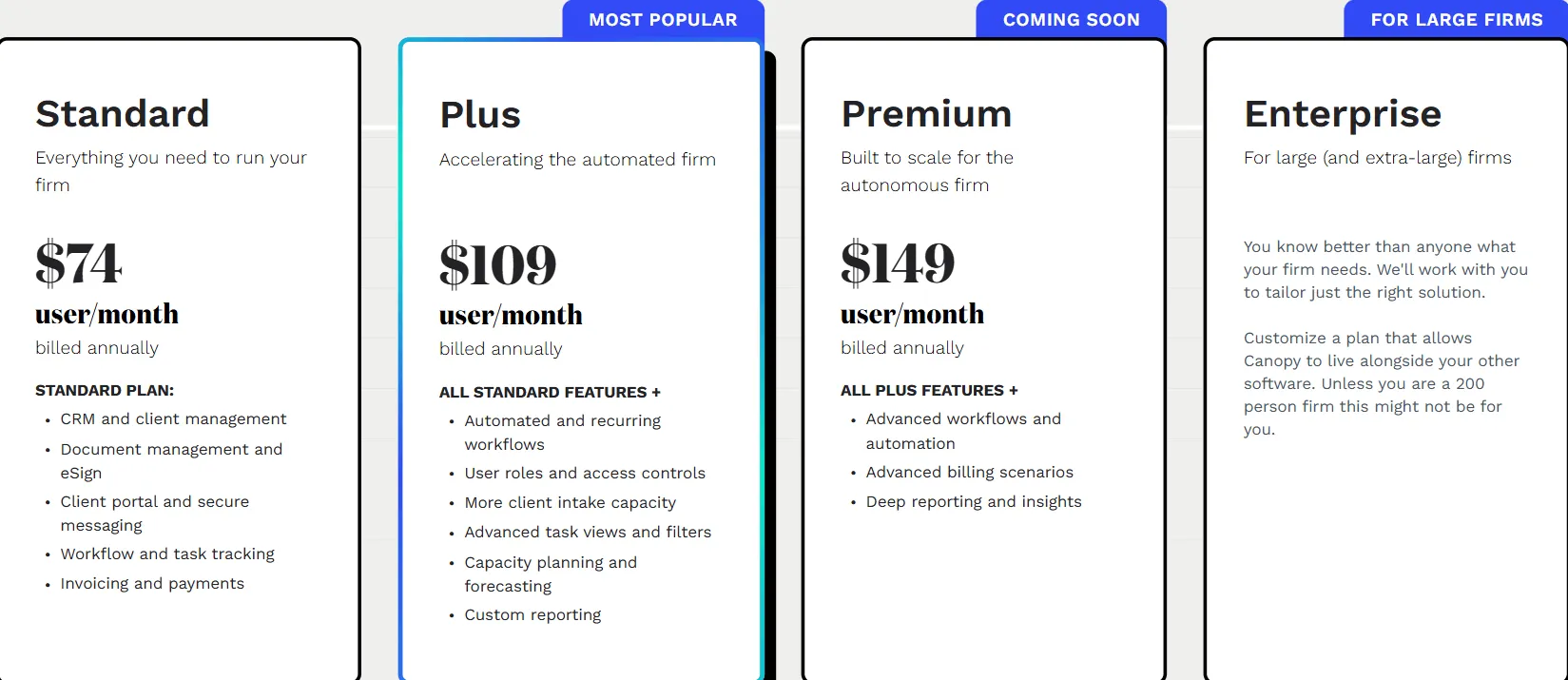
What this replaced. Until the 2026 overhaul, Canopy sold a base fee plus per-user modules — Starter at $45/user/month and Essentials at $66/user/month, each covering a slice of the platform. If you priced Canopy before 2026, this is the model you were quoted, and it no longer exists:

Canopy Enterprise: Custom Pricing
Enterprise is a custom-quoted tier for large and extra-large firms that need Canopy to sit alongside other firm software. Canopy’s own positioning is candid about scope: this tier is aimed at roughly 200-person firms and larger, not typical small or mid-size practices.
Canopy Specialist Add-Ons: Consumption-Based Pricing
The features that used to be separate fixed-price modules (Document Management, Workflow, Time & Billing) are now bundled into every tier. What remains priced separately is specialist tax and payment work, billed on usage:
- Tax Workflow Automation: from $34 per client credit
- Close Automation: $10 per connected client per month (first 5 connected clients free)
- Tax Resolution: $50 per user per month
- KBA eSignature: $1.25 per credit for knowledge-based authentication
- Payment processing: 3.30% + $0.20 per card transaction, 1% for ACH (capped at $10)
Because these add-ons scale with client volume and case complexity rather than seat count, the total bill is harder to predict in advance than a flat per-user price — a firm’s monthly cost depends on how many client credits, connected clients, and tax resolution cases it actually processes that month.
Where Canopy Falls Short
Canopy’s 2026 pricing overhaul fixed one real complaint — firms no longer stack a base platform fee plus three separate per-module subscriptions — but it introduces a different kind of unpredictability:
No Self-Serve Free Tier
- The old freemium tier (250 contacts, Client Engagement only) is gone
- Evaluating the platform now requires booking a sales demo rather than signing up instantly
- Firms wanting to test-drive software on their own schedule have no free entry point
Consumption-Based Add-Ons Are Harder to Forecast
- Tax Workflow Automation, Close Automation, and Tax Resolution all scale with client volume, not a fixed per-user fee
- A firm’s monthly bill depends on how many client credits and connected clients it processes — a number that varies month to month
- Comparing Canopy’s total cost to a flat-rate competitor requires estimating a variable, not reading a table
Per-Seat Price Compounds at Scale
- A 20-person firm on Premium would run roughly $35,760/year in seats alone before any add-ons, at $149/user/month annual — once Premium ships (it’s currently badged “Coming Soon”)
- Moving from Standard to Premium adds $75/user/month — a meaningful jump for firms weighing automation depth against budget
Time-Consuming Billing Setup
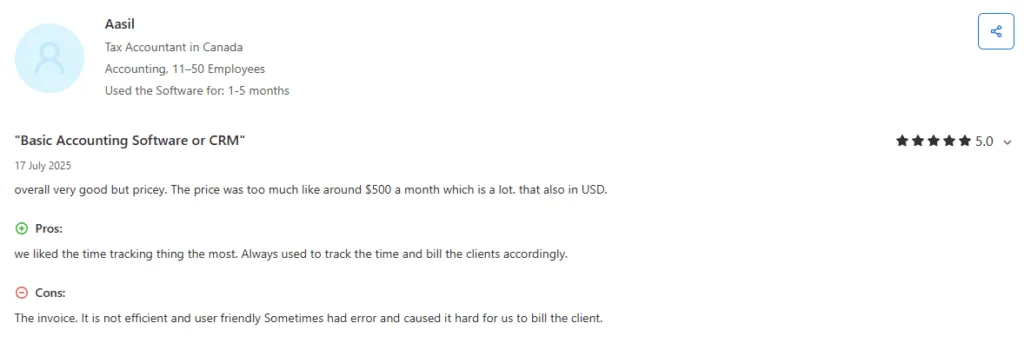
- Preparing invoices within Canopy can take considerable time
- Firms seeking automated billing efficiency may find the process manual-intensive
These characteristics have led many accounting firms to explore alternatives that offer flatter, more predictable pricing and faster time-to-value.
Source: g2
Best Canopy Alternative: Uku
Uku takes a different approach to practice management — it offers transparent per-member pricing with the flexibility to implement features step by step, much like adding apps to an iPhone.
For firms frustrated by Canopy’s consumption-based add-ons and sales-assisted onboarding, Uku delivers fast & flexible deployment that lets you start working on day one. The platform’s standout capability is its automated billing system, which reduces invoice preparation from days to approximately 30 minutes — a primary reason firms switch from competitors.

Created from the ground up to be international across US and Northern European markets, Uku serves 1,000+ accountants globally with support for 12 languages and multi-currency capabilities. Pricing is available in €, $, and £, with both annual and monthly billing options.
The signal we hear most from customers who switched: Uku gives them a single source of truth for who’s doing what across the team. Every task, deadline, billable hour, and client conversation lives in one shared view — so partners stop chasing status updates and staff stop falling through the cracks. This operational accountability, more than any individual feature, is what keeps firms on Uku long-term.
Uku offers four plans — Solo, Team, Elite, and Enterprise — covering everything from solo practitioners up through multi-partner firms. Here is the full 2026 breakdown:

Uku Solo Plan: $19/member/month
| Billing Option | Price | Annual Equivalent |
|---|---|---|
| Monthly | $25/month | $300/year |
| Annual (~23% off) | $19/month | $228/year |
Solo is purpose-built for individual accountants and bookkeepers running their own book of business — up to 20 active clients. Unlike a Team-stripped-down “lite” plan, Solo is a deliberate combination of features pulled from both the Team and Elite plans: you get client budgeting and e-signatures (normally Elite-only) right out of the gate, alongside the core time tracking, automated billing, client portal, and task management.
For accountants comparing against Canopy’s entry tier — Standard at $74/user/month ($888/year) — Solo lands at $228/year fully loaded, a $660/year saving, with monthly billing, no contract, and no consumption-based add-ons to track separately.
| Solo Plan Pros | Solo Plan Cons |
| ✅ Lowest entry price in the category | ❌ 20-client cap by design |
| ✅ Includes client budgeting + e-signatures | ❌ No teamwork tools (Team plan only) |
| ✅ Monthly billing, no contract | ❌ No reporting layer (Team+) |
| ✅ Full time tracking + automated billing | ❌ No BI Analytics (Elite only) |
The Bottom Line 👉 Solo is the obvious starting point for sole practitioners — costs a fraction of Canopy’s entry tier, bills monthly, and needs no self-serve sales call to start a trial.
Uku Team Plan: $38/member/month
| Billing Option | Price | Annual Equivalent |
|---|---|---|
| Monthly | $49/month | $588/year |
| Annual (~23% off) | $38/month | $456/year |
The Team plan is the multi-user baseline — well under half the per-user cost of Canopy’s Plus tier ($109/user). Team is NOT “Solo plus a few extras”; it adds a distinct set of features that solo practitioners don’t need: Reporting, Teamwork Tools, Projects, Access management, Company templates, and the Mini Uku assistant.
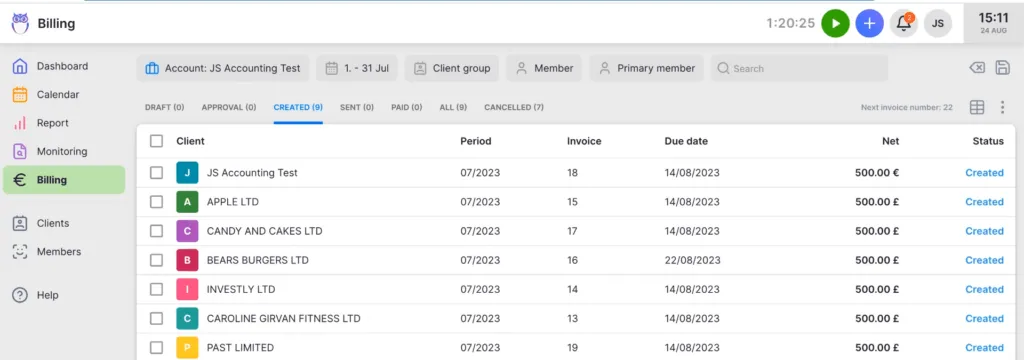
This plan also includes Uku’s automated billing system, where firms set up pricing rules once through “contracts,” and time tracking automatically calculates billable amounts in real-time. The platform supports complex price lists based on quantity, time, material, and ranges with different rates for different periods.
| Team Plan Pros | Team Plan Cons |
| ✅ Automated billing reduces invoicing from days to ~30 minutes | ❌ No Google Drive/Dropbox/SharePoint integration |
| ✅ Unified client portal where both parties work on same tasks | ❌ No advanced audit log |
| ✅ Unlimited clients and members | ❌ No capacity planning features (Canopy Plus/Premium) |
| ✅ Reporting + Teamwork Tools + Projects | ❌ No BI Analytics (Elite only) |
The Bottom Line 👉 Team delivers core practice management with automated billing efficiency Canopy can’t match, at well under half the per-user price point of Canopy Plus and with nothing metered.
Uku Elite Plan: $48/member/month
| Billing Option | Price | Annual Equivalent |
|---|---|---|
| Monthly | $62/month | $744/year |
| Annual (~23% off) | $48/month | $576/year |
Elite is for ambitious teams that need deeper insight and the full document/automation stack. The headline feature is BI Analytics — real-time visual dashboards, alerts, and drill-down reports that go beyond the standard Reporting available from the Team plan.
Beyond Team plan features, Elite adds Google Drive, Dropbox, and OneDrive integrations, customizable client portal menu, workforce management, an actionable audit log with restore, client budgeting, document management with one-click digitalization into accounting software, and e-signatures.
At $48/member, Elite still undercuts Canopy’s Standard tier ($74/user) while including capabilities that Canopy reserves for its Plus and Premium tiers. Firms using Elite often discover ~20% more profit by identifying outdated agreements where actual work hours exceeded what was being billed.
| Elite Plan Pros | Elite Plan Cons |
| ✅ Client Budgeting and Document Management included | ❌ Higher than Team for smaller firms |
| ✅ One-click document digitalization | ❌ No dedicated account manager (Enterprise) |
| ✅ Real-time profitability insights through BI Analytics | ❌ No tax resolution specialization |
| ✅ Still $26 less per user than Canopy Standard | ❌ No custom integrations (Enterprise) |
The Bottom Line 👉 Elite offers advanced features including Client Budgeting, Document Management, and BI Analytics at a price point below Canopy’s entry-level Standard tier.
Uku Enterprise Plan: $88/member/month
| Billing Option | Price | Annual Equivalent |
|---|---|---|
| Monthly | $99/month | $1,188/year |
| Annual (~23% off) | $88/month | $1,056/year |
Enterprise provides dedicated support and custom integrations for larger firms. Uku’s in-house development team can create country-specific features and custom software integrations for clients with 50+ users. At the top plan, Uku’s pricing remains straightforward at $88 per member yearly billed — well under Canopy’s Premium tier ($149/user/month) before Canopy’s own custom-quoted Enterprise tier even enters the conversation. Note that assisted import is available across all plans, not just Enterprise.
“Processing loans for our clients takes less time than ever before.”
Canopy Feature Value Breakdown (vs Uku)
Pricing Transparency
Canopy’s Approach: Canopy runs three flat per-seat tiers — Standard ($74), Plus ($109), Premium ($149) — with the full platform bundled into each. But specialist tax work (Tax Workflow Automation, Close Automation, Tax Resolution) is metered separately by client credit or connected client, so the total monthly bill still depends on usage that varies from month to month.
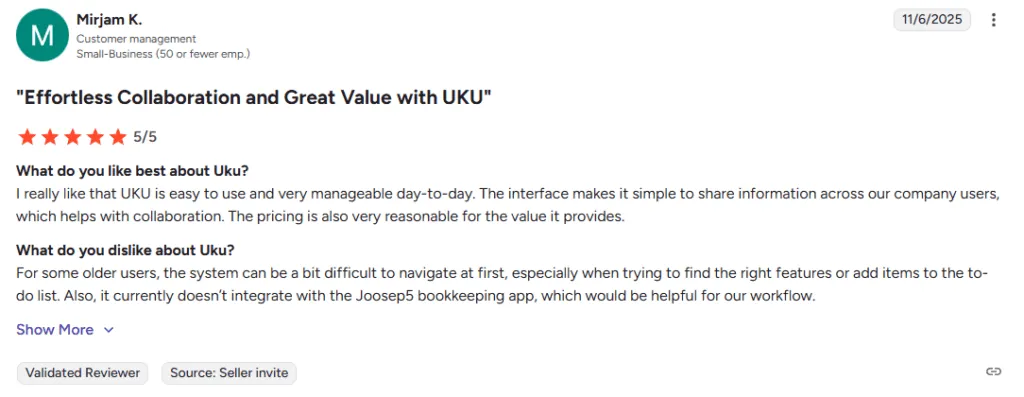
Uku’s Approach: Uku uses transparent tiered pricing with the flexibility to implement features step by step. You choose your tier based on team size and feature needs. A 10-person firm on Team pays $380 per month in total, with the freedom to add capabilities as they grow, and nothing consumption-metered.
Source: g2
Value Verdict: Uku is better for firms wanting predictable budgeting without a variable, usage-based add-on bill each month.
Billing and Invoicing Efficiency
Canopy’s Approach: Canopy includes billing in every tier now, with invoicing and payment collection capabilities plus card/ACH payment processing fees layered on top (3.30% + $0.20 per card transaction, 1% for ACH). The billing process requires manual setup and confirmation steps that can extend invoice preparation time.
Source: Capterra
Uku’s Approach: Uku’s automated billing is its primary competitive advantage. Firms set up pricing rules once through “contracts,” including complex price lists, rounding rules, and rate variations, and time tracking then calculates billable amounts automatically in real time. This reduces invoice preparation from two to three days to approximately 30 minutes. Managers can also see profitability in real-time: if an employee costs €30/hour but bills at €45/hour, the system reveals whether they’re profitable before month-end.
Value Verdict: Uku is significantly better for firms wanting to minimize admin time and automate their billing process.
Client Portal Functionality
Canopy’s Approach: Canopy provides a client portal for document exchange, secure messaging, and eSignature collection as part of the platform included in every tier.
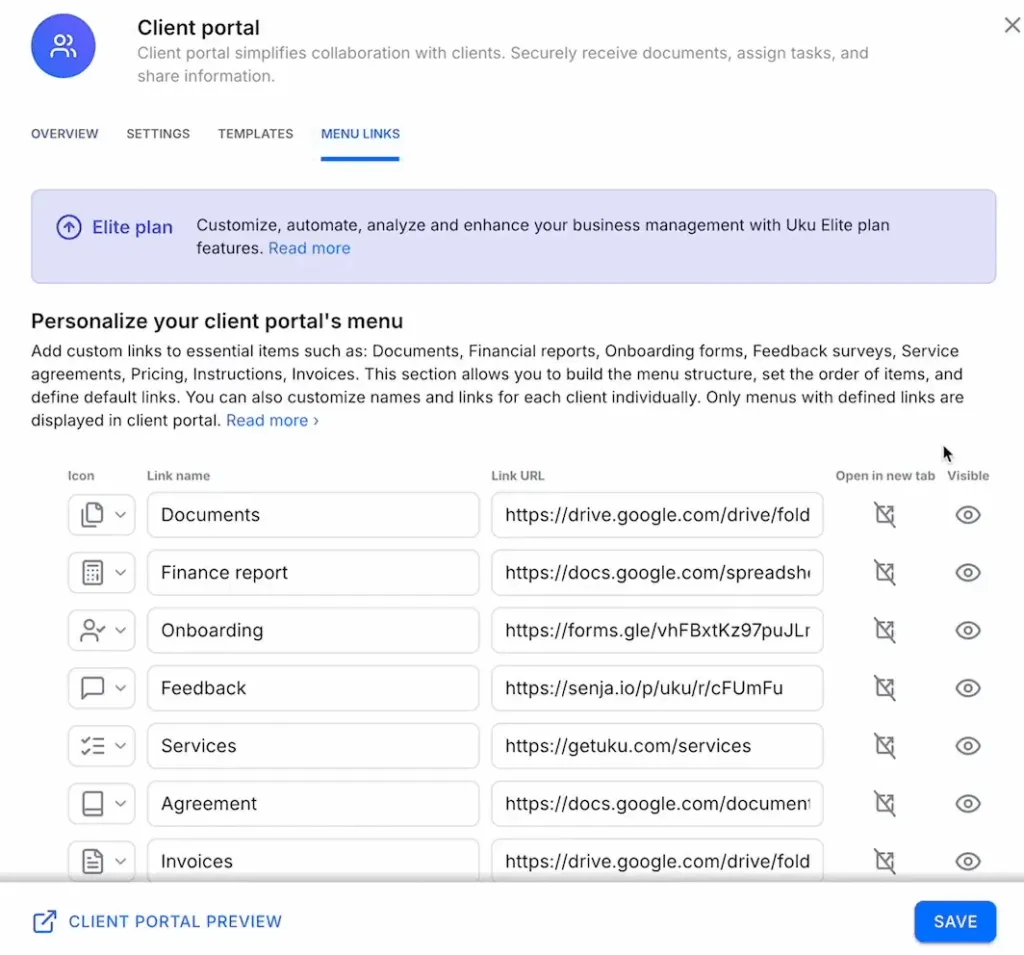
Uku’s Approach: Uku’s integrated client portal works differently. It mirrors the exact same task on both sides. When clients make requests through the portal, accountants see the same item with all communication, actions, documents, logs, and time tracking in one place. There’s no need to connect tickets to work items because they are already the same item. The portal also supports custom menus per client, onboarding forms, business insight reports, and embedded content.
Value Verdict: Uku is better for firms wanting a unified workspace where clients and accountants collaborate on the same tasks rather than communicating through a separate portal layer.
Implementation and Onboarding
Canopy’s Approach: Canopy’s comprehensive platform now bundles the full feature set into every tier, but evaluating it requires a sales-assisted demo rather than instant self-serve signup — there’s no permanent free tier to explore on your own.
Uku’s Approach: Uku emphasizes fast & flexible deployment where firms can start working on day one with just CRM and tasks, then gradually activate additional features. For firms transitioning from Excel, users can import their spreadsheet in about an hour and have automated plans ready to go. This “from Excel to greatness” approach specifically addresses accountants’ risk aversion after bad software implementation experiences.
Value Verdict: Uku is better for firms wanting to implement software step by step on their own schedule rather than starting with a sales demo.
Free Tier Utility
Canopy’s Approach: Canopy no longer offers a self-serve freemium tier. Firms evaluate the platform through a sales-assisted trial arranged after booking a demo.
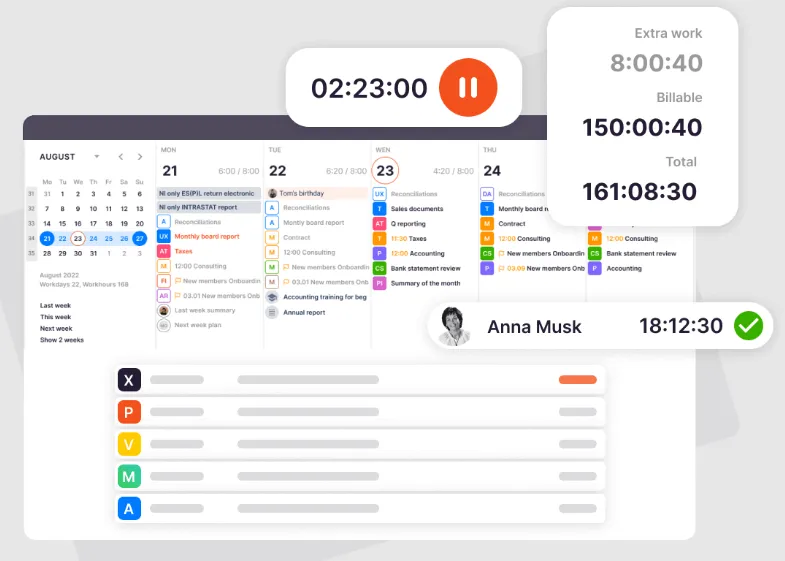
Uku’s Approach: Solo at $19/month provides full practice management for one user with up to 20 active clients — combining features from the Team and Elite plans (including client budgeting and e-signatures). Includes time tracking with stopwatch functionality, task management, automated billing, and CRM. The fixed entry price ($228/year fully loaded) is a fraction of Canopy Standard’s $888/year.
Value Verdict: Uku is better for practitioners wanting to genuinely test or use affordable practice management software without a sales call.
Specialized Tax Features
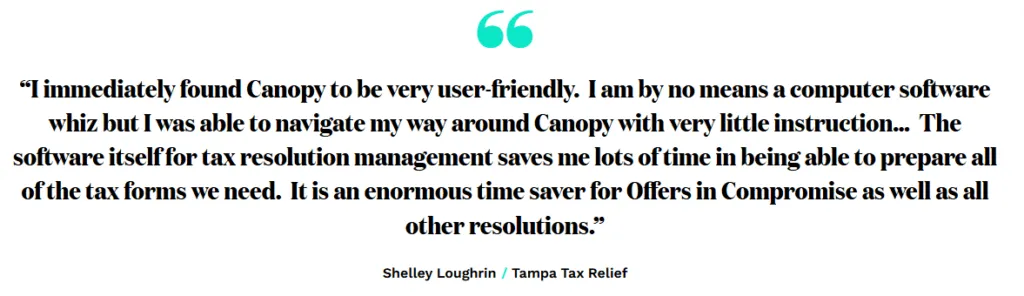
Canopy’s Approach: Canopy offers specialized Tax Resolution tools including IRS transcript pulling, a notices database with resolution workflows, and collection case management, now billed at $50/user/month as a consumption-based add-on. These features represent genuine differentiation for firms handling significant tax resolution work.
Uku’s Approach: Uku focuses on general practice management without specialized tax resolution tools. Firms needing IRS transcript automation or notices management would need to supplement Uku with other tools.
Value Verdict: Canopy is better for firms with significant tax resolution practices that benefit from integrated IRS data tools.
International Capabilities
Canopy’s Approach: Canopy primarily serves the US market with specialized features like IRS transcript integration.
Uku’s Approach: Uku was created from the ground up to be international, supporting 12 languages and multi-currency capabilities. Pricing is available in €, $, and £. The platform serves clients across UK, USA, and Scandinavia, with an in-house development team that can create country-specific features that larger competitors often refuse to build for smaller markets.

Value Verdict: Uku is better for firms needing multilingual or multi-currency support.
How to Switch from Canopy to Uku
If Canopy’s consumption-based add-on pricing no longer fits how your firm wants to budget, the switch to Uku is more manageable than most teams expect:
- Discovery Call (30 minutes) — Review your current Canopy tier and add-ons (Tax Workflow Automation, Close Automation, Tax Resolution), identify which your team actually uses vs. pays for, and plan the Uku rollout (Solo, Team, Elite, or Enterprise plan)
- Data Migration — Import client lists, workflows, document templates, and time/billing history from Canopy into Uku’s plan structure
- Workflow Setup — Recreate recurring workflows and pricing rules in Uku’s automated billing (including the complex per-quantity and per-time price lists) and client portal
- Team Training & Go-Live — Walkthrough for your team and deployment, with 90 minutes of free onboarding help
Most firms complete the full Uku migration within two to six weeks, at their own pace — and Uku’s monthly billing means no annual lock-in, so you can run both platforms in parallel during the transition without committing again. With the Uku MCP server connected to your AI assistant, the company setup itself can be done in a day. For a feature-side breakdown of Canopy vs Uku before committing, see Top Canopy alternatives and Canopy review.
Final Verdict: Canopy vs Uku
The choice between Canopy and Uku depends on your firm’s priorities around specialized tax capabilities versus operational efficiency and fast deployment:
👍 Canopy is a comprehensive practice management platform designed for firms that need specialized tax resolution capabilities and can budget for consumption-based add-on costs as they scale.
With per-seat tiers that bundle the full platform and separately metered specialist tax work, it lets firms pay for automation depth and tax specialization as they need it, including IRS transcript pulling and notices management. This approach works best for firms with significant tax resolution practices, organizations comfortable with usage-based billing, and practices that need to scale specific capabilities independently within the US market.
Get started with Canopy here.
👉 Uku is a practice management platform designed for fast and flexible deployment with transparent pricing, featuring automated billing that reduces invoice preparation from days to approximately 30 minutes and is intuitive for teams to use.
By allowing firms to implement features step by step (starting with just CRM and tasks, then adding capabilities as needed), Uku eliminates lengthy implementation requirements while providing comprehensive workflow automation, time tracking, and an integrated client portal where accountants and clients work on the same tasks. This approach is ideal for firms wanting to minimize admin time, practices transitioning from Excel, teams needing multilingual or multi-currency support, and accountants who prefer flexible monthly pricing rather than annual commitments.
Discover how Uku simplifies practice management and billing and start exploring it here.
The fundamental difference is approach.
Read more
If you’re evaluating Canopy against other practice management platforms, our broader cluster covers each in depth:
- Top Canopy alternatives for accounting firms — head-to-head with the best alternatives
- Canopy review — full editorial review of features and fit
- TaxDome pricing breakdown — for firms comparing tax-focused all-in-ones
- Karbon pricing — enterprise-grade alternative
- Financial Cents pricing — workflow-first alternative
- Jetpack Workflow pricing — workflow-only alternative
- Xero Practice Manager review — for Xero-native firms
While Canopy offers specialized tax tools with flat per-seat pricing plus metered add-ons, Uku delivers operational efficiency through automated billing and fast onboarding with transparent per-member pricing. Both serve legitimate needs; the right choice depends on whether you prioritize tax resolution specialization or billing automation and implementation speed.
Frequently asked questions
How much does Canopy cost in 2026?
Canopy has three per-seat tiers on annual billing: Standard $74/user/month, Plus $109/user/month, and Premium $149/user/month (Premium is marked "Coming Soon" on Canopy's own pricing page and is not yet available), plus a custom-priced Enterprise tier. Every tier includes the full platform (CRM, workflow, document management, billing, client portal, payments); higher tiers unlock deeper automation and controls. Specialist tax work is now sold as consumption-based add-ons rather than separate modules: Tax Workflow Automation from $34/client credit, Close Automation at $10/connected client/month (first 5 free), and Tax Resolution at $50/user/month. Monthly billing costs about 25% more than the annual rate shown here (Canopy states annual billing saves 20%).
Is Canopy worth the cost?
Canopy is worth it for firms with significant tax resolution practices that benefit from IRS transcript pulling, notices databases, and consumption-based automation they can scale with client volume. It is NOT a good fit for firms wanting a genuinely free entry tier, a flat predictable per-user price with no metered add-ons, or fast deployment without a sales-assisted trial.
What is the best Canopy alternative?
Uku is the closest direct alternative for firms wanting transparent pricing — Solo from $19/month (up to 20 active clients), Team from $38/month, Elite from $48/month with BI Analytics, and Enterprise from $88/month. All plans bill monthly or annually with nothing metered or consumption-based to track. Uku also gives firms a single source of truth for who's doing what across the team — the most-cited reason customers say they switched.
Does Canopy have a free plan?
No. Canopy retired its freemium tier along with the old modular pricing. Every current plan is paid, starting at Standard. Firms evaluate the platform through a sales-assisted demo/trial rather than a self-serve free account.
How does Canopy Plus compare to Uku Team?
Canopy Plus is $109/user/month on annual billing ($1,308/user/year) and includes the full platform plus user roles, more client intake capacity, and capacity planning. Uku Team is $38/month annual ($456/user/year), unlimited users and clients, includes automated billing, integrated client portal, Reporting, and Teamwork Tools. A firm on Canopy Plus pays roughly $71/user/month more than Uku Team.
Can I switch from Canopy to Uku without losing my data?
Yes. Uku offers assisted client and data import across all paid plans, with 90 minutes of free onboarding included. Most firms complete the full Uku migration from Canopy (including workflows, client lists, and document templates) within two to six weeks, at their own pace.
What are Canopy's Client Credits?
Client Credits are Canopy's consumption-based unit for specialist add-ons like Tax Workflow Automation and Smart Intake — each credit unlocks unlimited use of that feature set for one client for the subscription period, starting from $34/credit. Because usage varies by caseload, the credit spend is harder to forecast than a flat per-user fee.
What's the minimum cost for complete Canopy functionality?
Since the 2026 pricing overhaul, the full platform is included from the Standard tier ($74/user/month annual) — there's no longer a base-plus-modules calculation for core features. Firms only pay extra for specialist tax add-ons on top: Tax Resolution adds $50/user/month, and Tax Workflow Automation and Close Automation scale with client volume.

Published Dec 23, 2025 · Updated Sep 25, 2026