

7 Financial Cents Alternatives: Specialized Solutions for Growing Accounting Firms [2026]

![Cover for 7 Financial Cents Alternatives: Specialized Solutions for Growing Accounting Firms [2026]](/_astro/heroImage.BBnbDwFn_Z1AEY7j.webp)
Financial Cents has established itself as a comprehensive all-in-one practice management solution for accounting and bookkeeping firms. With over 10,000 accountants using its platform globally, it offers a comprehensive suite of tools including workflow management, CRM, time tracking, client portal, and automated billing, all in one intuitive, user-friendly interface.
But as your firm evolves and grows, you might discover that while Financial Cents excels at providing a solid foundation for practice management, you need more specialized capabilities in certain areas. Perhaps you require different workflow approaches, enterprise-grade email management, tax-specific features, or AI-driven insights that complement what a generalist platform provides.
That’s where this guide comes in. Whether you’re looking to:
- Achieve different approaches to workflow automation and efficiency
- Implement enterprise-grade email-centric collaboration for larger teams
- Specialize your practice management for tax-focused services
- Maximize bookkeeping accuracy with automated month-end processes
- Leverage AI for practice intelligence and strategic insights
- Find more cost-effective solutions with specific strengths
- Standardize recurring work with specialized workflow tools
We’ll explore dedicated alternatives that excel in these specific areas. Some firms might use these tools to complement Financial Cents, while others might choose to replace it entirely with a solution better suited to their evolving needs. This isn’t about finding a “better” solution; it’s about finding the right fit for your firm’s specific requirements and growth trajectory.
Let’s dive into the Financial Cents alternatives and see which ones might be the perfect match for your accounting practice.

What is Financial Cents?
Financial Cents is a cloud-based accounting practice management software designed to help accounting firms, bookkeeping services, and CPAs streamline their operations.
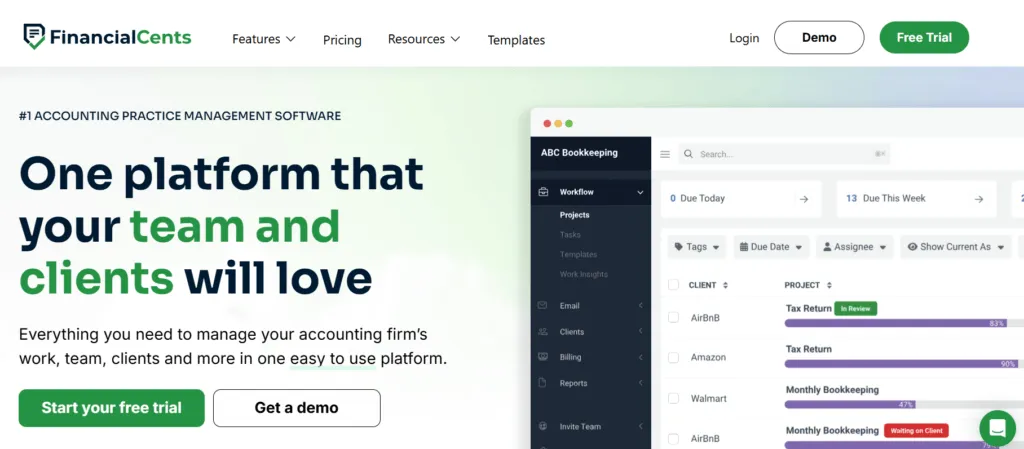
The platform provides an all-in-one solution built around making practice management simple and accessible for the “everyday firm.”
Its key features include:
- Workflow and Project Management: Track client work status, manage deadlines, and monitor progress in real-time
- Client Relationship Management (CRM): Centralized database for all client information, notes, and documents
- Time Tracking and Billing: Track billable hours and generate invoices directly from time entries
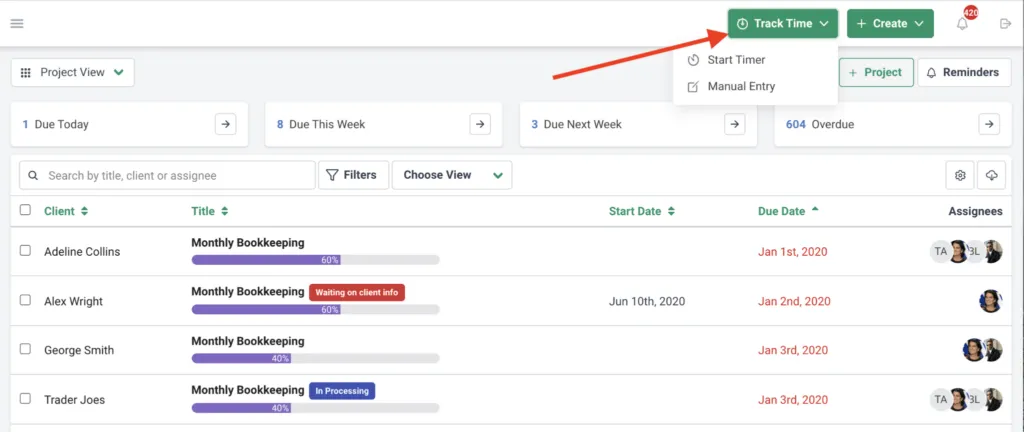
Source: Financial Cents
- Email Integration: Sync with Gmail and Outlook to manage client emails within the platform
- Client Portal: Secure document sharing and communication with automated reminders
- Automation: Automate repetitive tasks like client reminders and recurring work
- Document Management: Centralized, secure storage for all client-related documents
The platform’s strength lies in bringing all these tools together in one intuitive interface, eliminating the need to jump between different applications. Financial Cents serves over 10,000 accountants globally and is particularly well-suited for solo practitioners and small to mid-sized firms looking for an easy-to-implement solution.
However, as firms grow and their needs become more specialized, they might find themselves requiring enhanced features in specific areas, whether that’s more advanced automation, industry-specific features, or advanced analytics capabilities that specialized tools can provide.
How We Curated Our List of Financial Cents Alternatives
After thoroughly analyzing Financial Cents and researching the accounting practice management market, we identified specific areas where firms often need more specialized or powerful capabilities. While Financial Cents provides a solid all-in-one foundation, we found that growing firms frequently seek enhanced features for:
- Advanced workflow automation with different approaches to task management
- Enterprise-grade collaboration for larger teams with complex email workflows
- Tax-specific features including IRS integrations and specialized compliance tools
- Bookkeeping accuracy tools with automated error detection and direct ledger correction
- AI-driven insights for strategic decision-making and practice optimization
- Specialized workflow management focused purely on standardization
- Cost-effective alternatives that excel in specific areas while maintaining lower pricing
Each tool on this list represents the best-in-class solution for one of these specific needs, chosen based on their proven track records, user satisfaction scores, and ability to address different use cases than Financial Cents.
| ❗DISCLAIMER: We aren’t covering every single practice management tool on the market! Our focus is on highlighting the best alternatives that address specific use cases for various firm types. |
|---|
1. Uku — Best Alternative for Automated Billing & Integrated Client Portal
Uku is a comprehensive accounting practice management software that revolutionizes billing efficiency through advanced automation that reduces invoice preparation from 2-3 days to just 30 minutes.

Created from the ground up to be international, especially for UK and US markets, Uku serves 1000+ clients globally with support for 12 languages and multi-currency capabilities.
Its key features include:
- Automated billing system that handles complex price lists based on quantity, time, material, and ranges with different rates – reducing invoice prep from days to ~30 minutes
- Integrated client portal where clients and accountants work on the exact same task with all communication, documents, and time tracking in one place
- Profitability analysis tracking both sales and cost prices to identify when employees work 20 hours but only bill for 8
- One-click document digitalization sending documents directly to accounting software
- BI Reporting providing real-time visual reports and alerts to prevent discovering losses 30 days too late
- Time tracking with maximized speed where 90% of actions are one-click
- Modular deployment approach allowing firms to start with just CRM and tasks, then add features as needed
For firms seeking to enhance their billing efficiency while maintaining exceptional ease of use, Uku offers a “from Excel to greatness” journey with SOC 2 Type I compliance and enterprise-grade security.
Why Choose Uku Over Financial Cents for Billing Automation
Uku differentiates itself through several transformative capabilities that directly impact profitability:
Automated Billing: From Days to 30 Minutes
Uku’s automated billing system represents its primary competitive advantage.
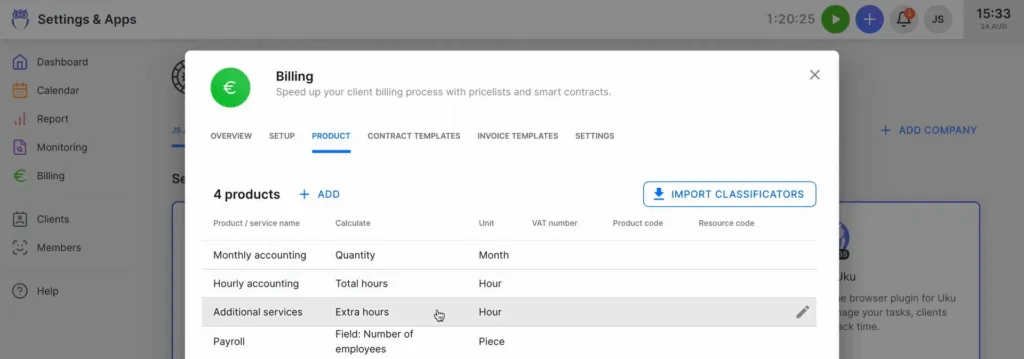
Source: Uku
The system supports complex price lists based on quantity, time, material, and ranges with different rates for different periods. Everything runs through ‘contracts’ where rules are set up once, then time tracking automatically calculates billable amounts in real-time.
The advanced rounding rules based on entry, team, client, or month allow firms to properly bill for interruptions – for instance, a one-minute unplanned call can be automatically billed as 15 minutes.
Customers report seeing up to 20% more profit by discovering outdated agreements where they were billing for 8 hours but employees were doing 20 hours of work. Many have increased their turnover by over 10% by adopting this system.
While Financial Cents offers billing features, Uku’s automated approach reduces what typically takes 2-3 days down to approximately 30 minutes, thereby changing the economics of invoice preparation.
Uku in Action: Your team tracks time throughout the month with 90% of actions being one-click.
When it’s time to invoice, Uku has already calculated everything based on your pre-configured contracts. Complex scenarios like different rates for different services, minimum billing increments, and tiered pricing are all handled automatically. What used to require days of manual calculation now takes 30 minutes of review and sending.
Integrated Portal: True Unified Workspace
Unlike traditional portals where tickets must be connected to work items, Uku’s portal mirrors the exact same task on both sides.
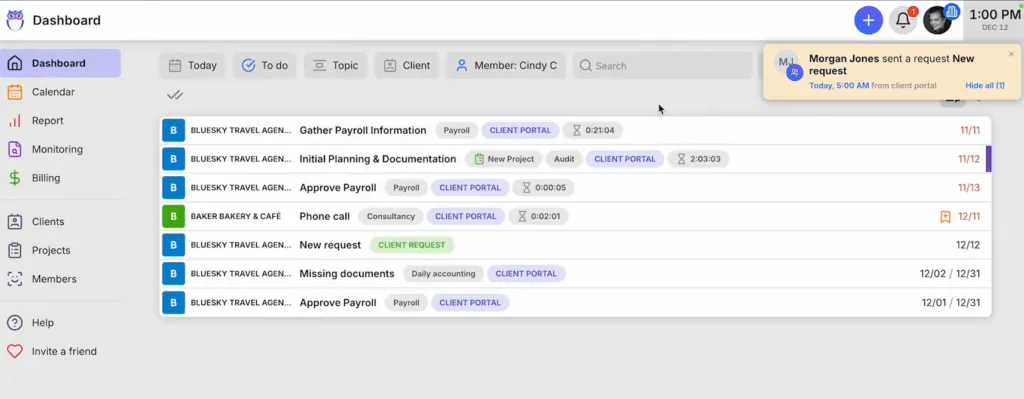
Source: Uku
When clients make requests through the portal, notifications appear on the accountant’s dashboard, and they can immediately start tracking time within that same task.
The portal is highly customizable – firms can create unique menus for each client, run onboarding with forms, share business insight reports, display price lists, and embed custom content with simple copy-paste functions. This unified approach means all communication stays within tasks, solving the problem of information being trapped in individual email accounts.
Financial Cents also provides a client portal with document sharing and communication features. However, Uku’s approach of having clients and accountants literally working on the same item with real-time visibility represents a different philosophy of collaboration.
Modular Approach: Start Today, Scale Tomorrow
Like an iPhone where you start with basic features and add apps as needed, users can begin with just CRM and tasks, then gradually add features.
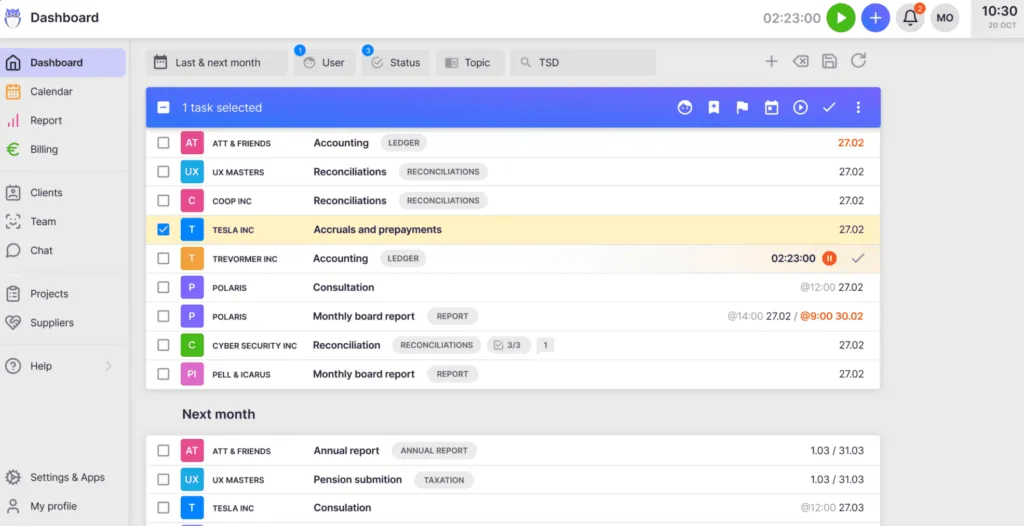
This flexibility is designed for small and medium-sized companies that need agility. Firms can start working on day one, activating only the modules needed and scaling up as they grow.
This modular deployment represents one of the biggest reasons why clients switch from competitors to Uku, as it eliminates the need for substantial upfront configuration and training required by all-in-one platforms. Users can work with their Excel file for an hour, import it into Uku, and have automated plans ready to go.
Uku Pricing
Uku offers transparent, tiered pricing with both annual and monthly billing options in multiple currencies (€, $, £):
- Solo Plan (Free): For individual users with up to 25 clients, includes unlimited tasks, templates, time tracking, reporting, CRM, calendar, and Mini Uku plugin
- Team Plan (from $38/user/month): All Solo features plus teamwork, email integration, client portal, unlimited clients, custom fields, automation, live chat support, integrations including native Xero integration, project management, and AML features
- Elite Plan ($48/user/month): Everything in Team plus Google Drive/OneDrive integrations, customizable portal menu, workforce management, actionable audit log, client budgeting, document management, e-signatures, and BI Reporting with business analytics reports
- Enterprise Plan ($88/user/month): All Elite features plus custom integrations, assisted import, tailor-made workshop, early feature access, invoice payment option, and dedicated account manager

Annual billing provides a 23% discount. All plans include a 14-day free trial with access to Elite features and 90 minutes of free onboarding assistance.
Who Should Use Uku?
Choose Uku if:
- You want to minimize your team’s admin time through automated billing that reduces invoice prep from days to ~30 minutes
- You need to discover revenue leakage with profitability analysis showing when you’re billing for 8 hours but doing 20 hours of work
- You’re transitioning from Excel and want the easiest implementation with the “from Excel to greatness” approach
- You value ultra-fast onboarding and modular scaling where you can start with just what you need today
- You need multilingual or multi-currency support with 12 languages and pricing in €, $, and £
- You want flexible monthly pricing rather than annual commitments, allowing you to test the system at approximately $38/month
2. Karbon — Best Alternative for Enterprise-Grade Email-Centric Workflow
Karbon is a cloud-based practice management platform specifically engineered for accounting firms that need to manage complex, multi-team operations at scale.
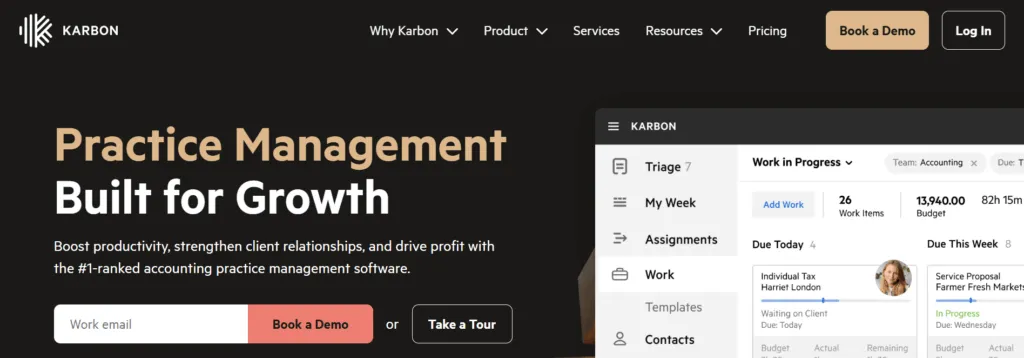
With $101.5 million in funding and serving firms across 34 countries, Karbon positions itself as the solution for practices that have outgrown basic workflow tools and require advanced email integration and enterprise-level collaboration.
Its key capabilities include:
- Triage Email Management System with AI-powered prioritization and smart assignment
- Advanced Workflow Automation with conditional logic and automated client triggers
- Practice Intelligence Platform with 12 pre-built dashboards and Snowflake connector
- Enterprise Collaboration Infrastructure with shared inboxes and granular permissions
- Comprehensive Integration Ecosystem including native QuickBooks, Xero, and Zapier
For firms managing complex client portfolios with multiple teams, Karbon offers enterprise-grade infrastructure designed for advanced operations.
Why Choose Karbon Over Financial Cents for Enterprise Operations
Karbon differentiates itself through capabilities specifically designed for larger, more complex accounting practices:
- Email-First Architecture with Collaborative Triage
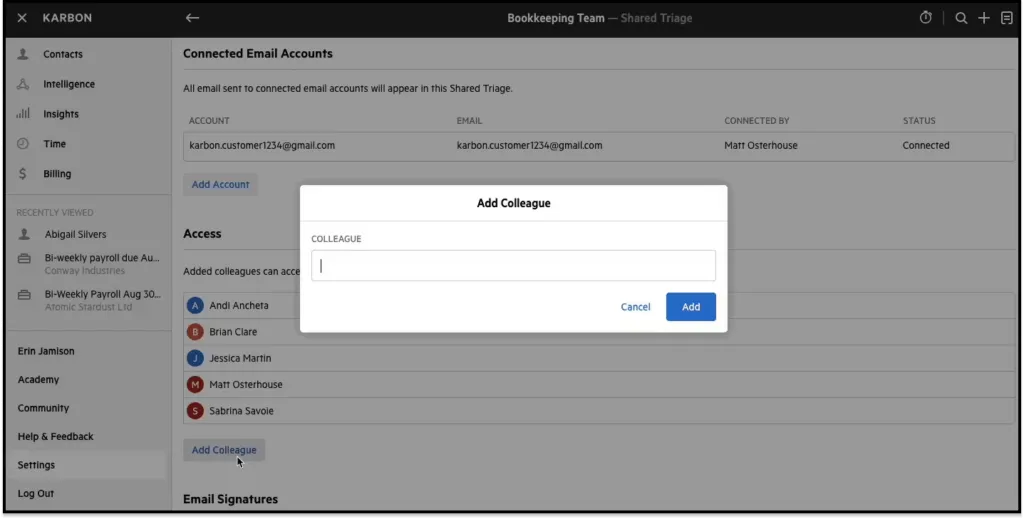
While Financial Cents offers email integration that syncs Gmail and Outlook to link messages with projects, Karbon built its entire platform around email as the central nervous system. The Triage feature functions as a collaborative work environment where every email becomes a work item the entire team can see, comment on internally, assign, and convert to tasks without leaving the email context. This transforms email from correspondence to be organized into workflow itself.
Source: Karbon
Advanced Multi-Team Workflow Orchestration
Financial Cents provides solid workflow templates and automation. Karbon’s workflow engine also supports conditional logic through its Automators feature, enabling multi-layered structures that can execute actions based on predefined conditions. However, Karbon’s billing setup and confirmation process takes considerable time, with invoice preparation taking days compared to specialized billing solutions that can reduce this to approximately 30 minutes.Enterprise Business Intelligence with Additional Costs
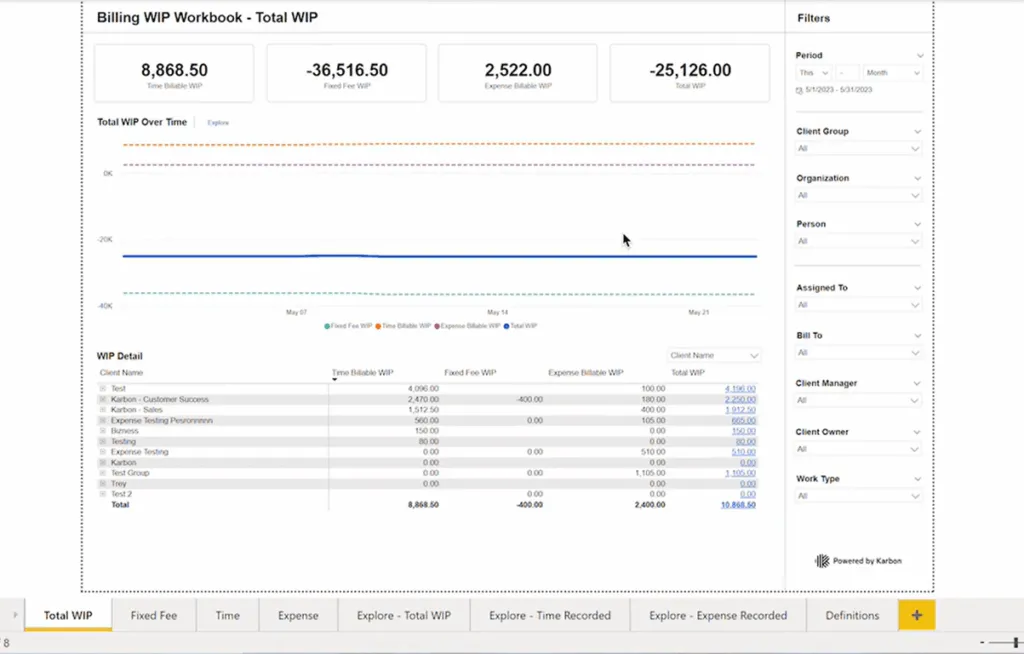
While Financial Cents offers useful reporting including profitability and utilization reports, Karbon’s Practice Intelligence platform takes a different approach. With 12 specialized dashboards and direct Snowflake data warehouse access, firms can build unlimited custom reports. However, using Karbon’s Power BI integration requires separate Power BI licenses starting from $14/user/month in addition to the base Karbon subscription.
Source: Karbon
🏅 NOTE: We also evaluated TaxDome and Canopy as alternatives.
While TaxDome excels at client-facing features and Canopy offers strong portal capabilities, Karbon provides comprehensive email-centric workflow orchestration and enterprise infrastructure for firms that have scaled beyond simpler alternatives.
Karbon Pricing
Karbon employs per-user pricing with both monthly and annual billing options:
- Team Plan: $59/user/month (annual) or $79/month (monthly) – Core features with 40 templates, 1,000 contacts, basic reporting
- Business Plan: $89/user/month (annual) or $99/month (monthly) – Adds automation, integrations, 75 templates, 2,000 contacts
- Enterprise Plan: Custom pricing – Unlimited templates and contacts, dedicated support, full customization
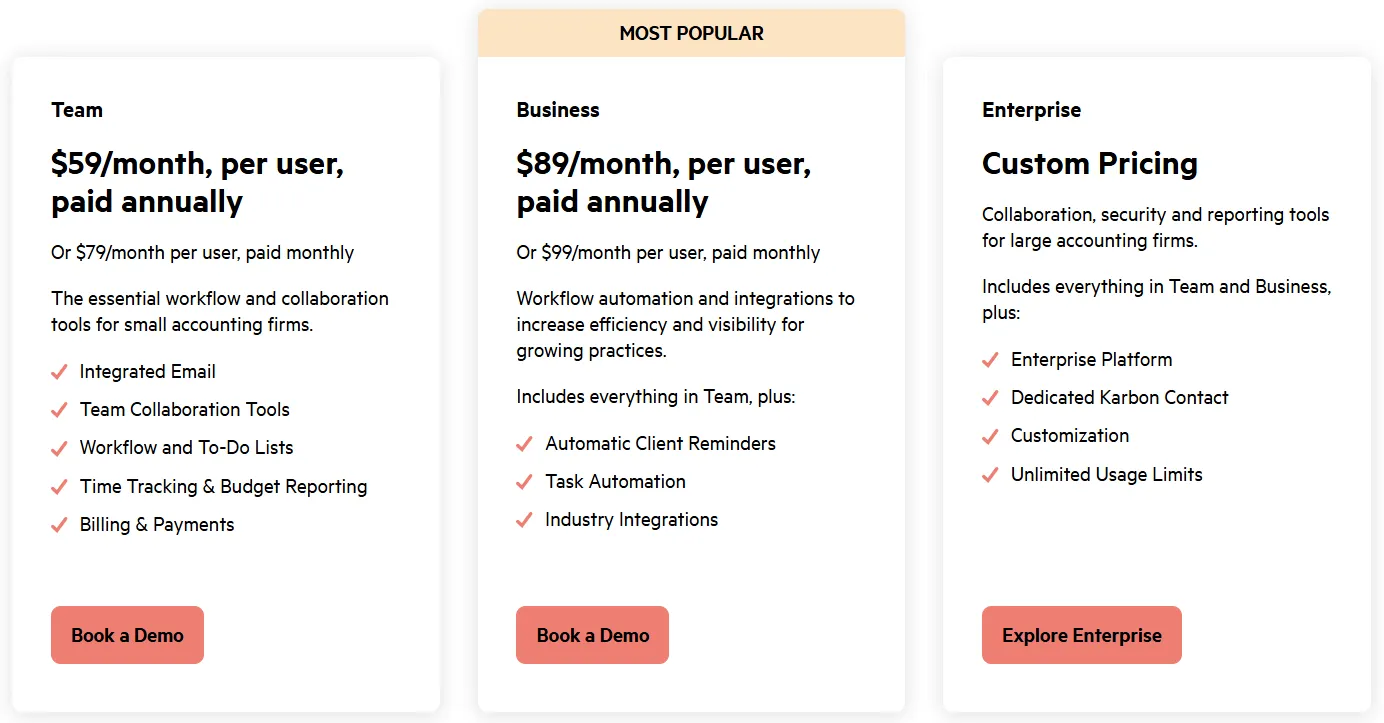
Note: Power BI integration requires separate Power BI licenses from $14/user/month. Client portal is available across all plans.
Who Should Use Karbon?
Choose Karbon if:
- Your practice has grown to a size where email coordination has become an operational challenge
- You need advanced automation with conditional logic for complex workflows
- You require enterprise-grade security, compliance features, and detailed audit trails
- Strategic business intelligence and custom reporting capabilities are priorities for your practice
3. Jetpack Workflow — Best Alternative for Standardizing Recurring Work
Jetpack Workflow is a dedicated workflow management platform specifically designed for accounting firms that need to standardize and automate recurring client work.
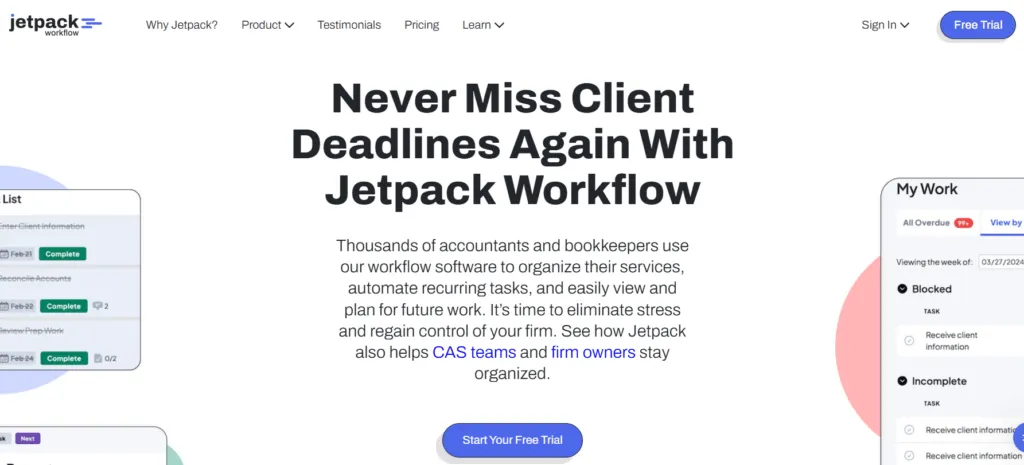
Having completed over 5 million client projects, it serves 7,000+ customers across 18 countries.
Its key features include:
- 70+ Pre-built Workflow Templates covering common accounting tasks
- Automated Recurring Job Creation with support for custom schedules
- Visual Capacity Planning with drag-and-drop workload management
- Task Dependencies and Cascading Deadlines for sequential workflows
- Customizable Labels for at-a-glance status updates
For firms prioritizing workflow standardization, Jetpack Workflow offers focused features that’s operational within days rather than weeks.
Why Choose Jetpack Workflow Over Financial Cents for Workflow Focus
Jetpack Workflow differentiates itself through focused workflow management:
- Focused Simplicity vs. All-in-One Features
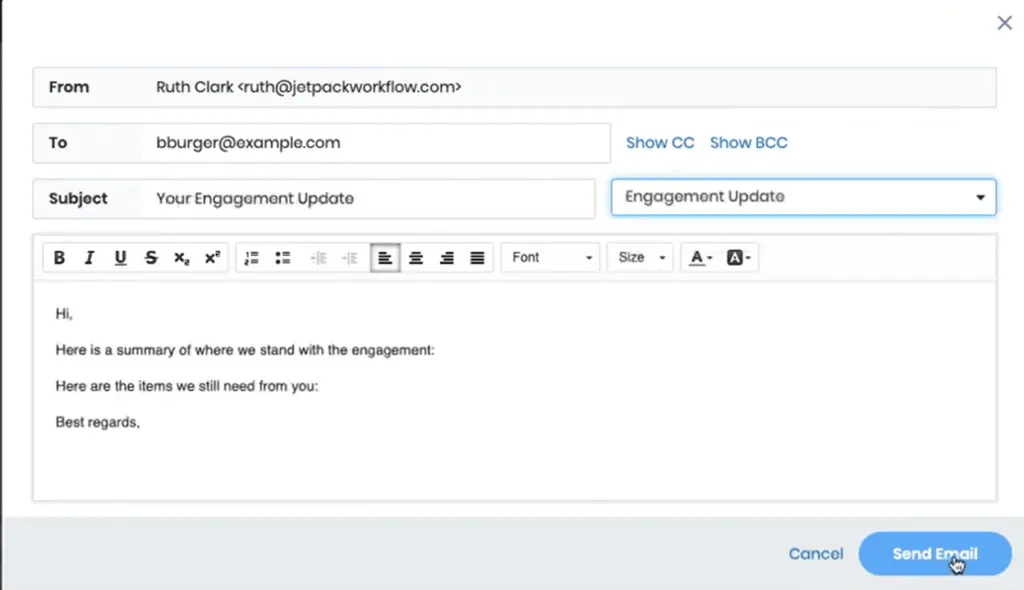
Financial Cents bundles workflow with email integration, client portal, billing, and CRM features, which some users find “initially overwhelming.” Jetpack Workflow focuses primarily on workflow management with additional email integration capabilities, resulting in fast implementation and a gentle learning curve. For firms with existing tools for other functions, this focused approach avoids forced adoption of an entire ecosystem.
Source: Jetpack Workflow
- Extensive Template Library for Instant Standardization
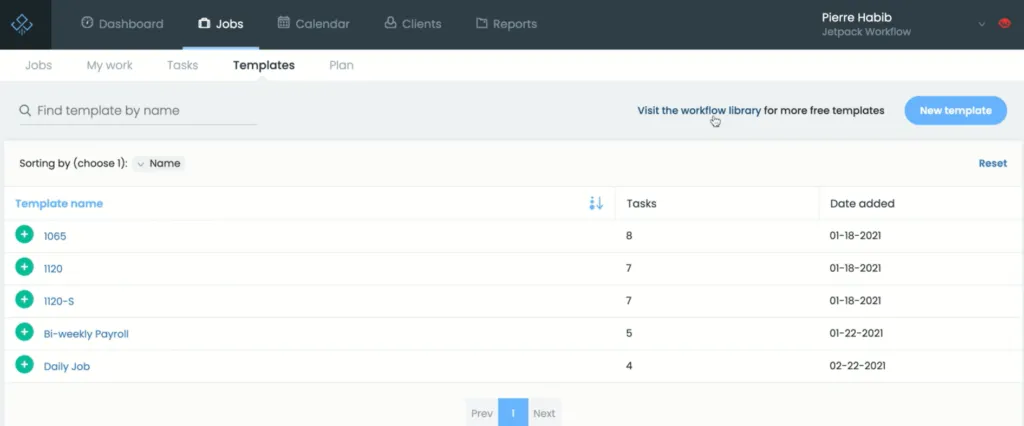
While Financial Cents provides workflow templates, Jetpack Workflow offers 70+ pre-built, accounting-specific templates available immediately at no cost. Firms can preview, add, and customize templates created by other professionals with one click, enabling standardized workflows on day one rather than spending weeks documenting processes.
Source: Jetpack Workflow
- Cost-Effective Entry for Small Practices
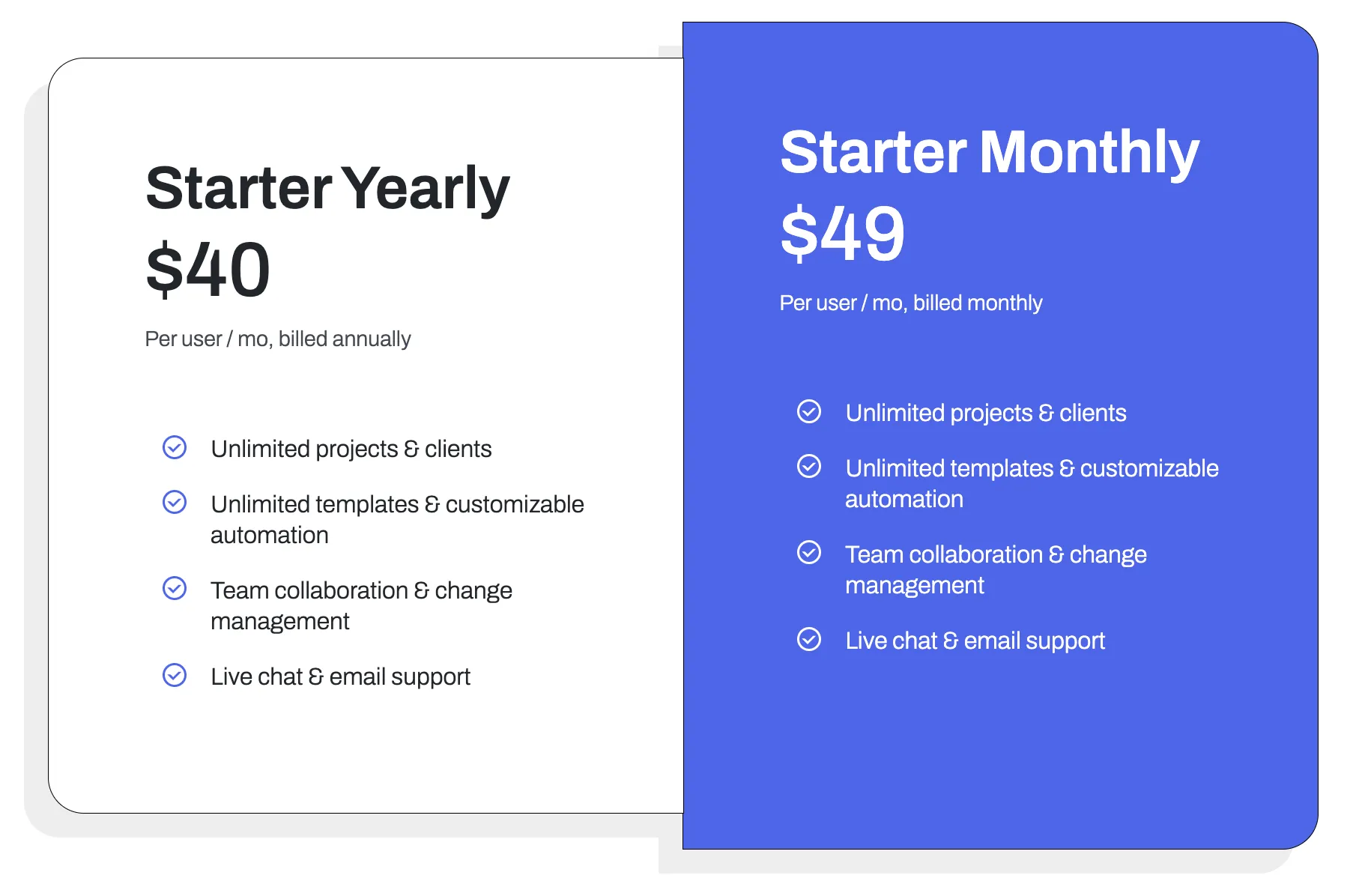
Jetpack’s Starter plan at $40/user/month includes core workflow features. Financial Cents’ comparable automation features require the Scale plan at $63/user/month. For a two-person firm, Jetpack’s annual pricing costs $49/month versus Financial Cents’ $89/month for the Scale tier with advanced automations.
🏅 NOTE: We also evaluated Karbon and TaxDome.
While both offer comprehensive practice management, Jetpack Workflow provides a straightforward path to standardizing recurring workflows for small firms wanting to move beyond spreadsheets without adopting complex platforms.
Jetpack Workflow Pricing
Jetpack Workflow offers tiered pricing:
- Starter Plan (Annual): $40/user/month billed annually – Core workflow features, unlimited projects, templates, automation, collaboration, support, 30-day money-back guarantee
- Starter Plan (Monthly): $49/user/month – Same features with month-to-month flexibility
- Add-On Services: Custom setup from $299 (one-time), SSO capability (pricing varies)
Note: Additional Scale features are available for capacity planning on their Classic product.
Who Should Use Jetpack Workflow?
Choose Jetpack Workflow if:
- Your primary challenge is standardizing recurring work rather than comprehensive practice management
- You’re a 1-10 person firm moving beyond spreadsheets and need quick implementation
- You prefer deep workflow functionality and already have other preferred tools for different functions
4. TaxDome — Best Alternative for Tax-Specific All-in-One Management
TaxDome is a comprehensive practice management platform specifically engineered for tax and accounting firms.

Serving over 10,000 firms and 30,000 professionals globally, it distinguishes itself through significant investments in tax-specific features and enterprise scalability.
Its key capabilities include:
- Built-in unlimited e-signatures with IRS-compliant KBA at $1 per signature
- Native PDF editor for document manipulation without external tools
- Direct IRS integration for transcript downloads (Pro tier and above)
- Visual pipeline-based workflow with conditional logic
- Dedicated mobile apps for iOS and Android
- Integration with Juno for AI-driven tax preparation
For firms where tax preparation represents a significant portion of revenue, TaxDome’s specialized features address tax-specific workflow needs.
Why Choose TaxDome Over Financial Cents for Tax Practices
TaxDome differentiates itself through tax-specific architectural decisions:
Enterprise-Scale Workflow with Visual Pipelines
Where Financial Cents provides straightforward workflow and to-do lists, TaxDome implements visual pipeline architecture with multiple stages and conditional routing. Jobs automatically follow different paths based on client tags, enabling complex workflows like routing 1040 clients differently from business returns within a single pipeline. However, this comprehensive nature requires substantial upfront configuration and training, while more modular solutions allow firms to start working on day one with selective feature adoption.Native Tax Practice Specialization
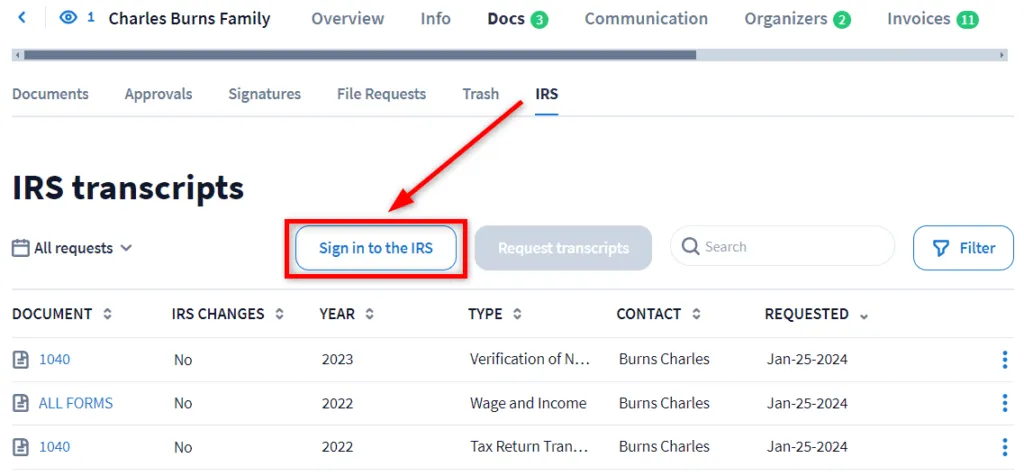
TaxDome provides direct IRS integration for transcript requests and offers integrated tax preparation through its Juno partnership. The e-signature feature includes IRS-compliant KBA for forms like 8879. Financial Cents, designed for general accounting, integrates with separate tax software solutions.
Source: TaxDome
- Advanced Document Management
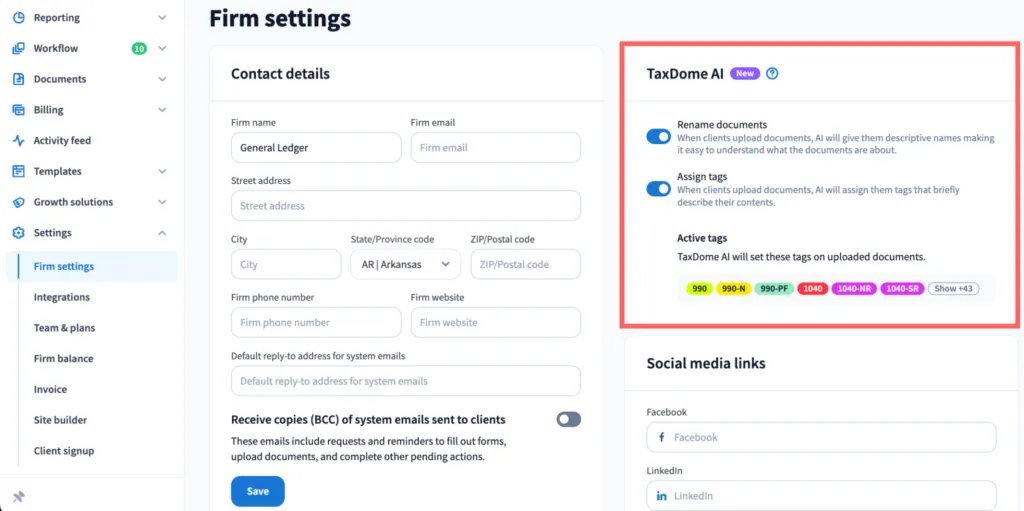
TaxDome includes unlimited AWS-hosted storage and a native PDF editor for merging files and creating fillable forms without leaving the platform. AI-powered document naming automatically converts files like “IMG_1234.pdf” to standardized names like “2024 W-2 John Smith.” Financial Cents offers document storage with various integrations but doesn’t include built-in PDF editing or one-click document digitalization to accounting software.
Source: TaxDome
🏅 NOTE: We evaluated Canopy and Zoho Practice as alternatives.
While Canopy offers a broad workflow customization and excellent e-signature features, and Zoho provides broader business tools, TaxDome offers comprehensive integration of tax-specific features with practice management.
TaxDome Pricing
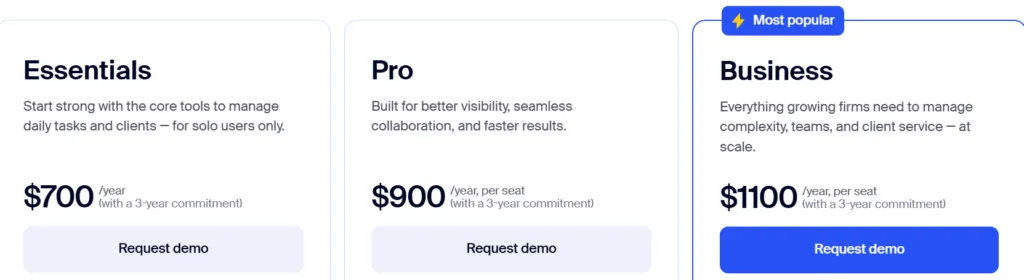
TaxDome structures annual subscription pricing across three tiers:
- Essentials (Solo): $800/year ($66/month) – Core features including CRM, portal, automation, e-signatures
- Pro (Teams): $1,000/year per user – Adds team chat, AI analytics, custom permissions, domain, IRS integration
- Business (Enterprise): $1,200/year per user – Includes Customer Success Manager, bi-annual reviews, enterprise integrations
Additional costs: KBA $1 per signee, monthly subscriptions $100/user/month for seasonal staff.
Who Should Use TaxDome?
Choose TaxDome if:
- Your practice has significant tax preparation components requiring IRS integration and compliant e-signatures
- You need enterprise-grade automation with visual pipelines and conditional logic
- You serve multilingual clients requiring portal support in multiple languages
- You’re a 10+ employee firm requiring granular permissions and dedicated support
5. Cone — Best Alternative for Revenue-Led Practice Management
Cone is a unified work operating system designed for professional services with a focus on modernizing client engagement workflows.
As a newer platform (founded 2022) with modern architecture, it combines impressive proposal capabilities with comprehensive practice management at significantly lower cost.
Its key capabilities include:
- Flexible proposal editor with multimedia support and drag-and-drop customization
- Automated billing and payment collection via Stripe and GoCardless
- White-labeled mobile apps for iOS and Android
- Integrated email management with unified inbox
- SOC 2 Type 1 compliance with GDPR-compliant handling
- Native integrations with QuickBooks, Xero, and Zoho Books
For firms prioritizing modern client experience and cost-effectiveness, Cone delivers top-tier features at a substantially lower cost than Financial Cents.
Why Choose Cone Over Financial Cents for Revenue-First Operations
Cone stands out through three core advantages:
Significantly Lower Cost with Comprehensive Features
Based on available pricing information, Cone’s plans start at approximately $5-7/user/month, compared to Financial Cents’ Team plan at $49/user/month with minimum 1-year purchase requirement. The platform includes unlimited proposals and clients across tiers, while Financial Cents reserves some proposal features for higher-priced plans.Superior Proposal Creation for Client Acquisition
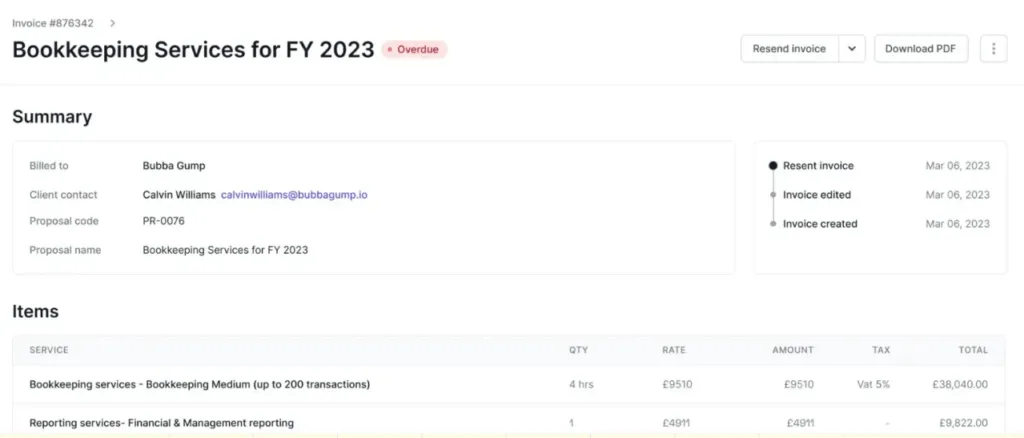
Where Financial Cents treats proposals as a functional feature, Cone approaches proposal creation as the cornerstone. The flexible editor allows embedding videos and interactive documents. Proposal-to-project automation triggers billing and recurring schedules automatically upon signing.
Source: Cone
- Modern Client Experience Through White-Label Apps
Cone provides customizable iOS/Android apps that place your firm’s branding directly on clients’ devices. This persistent brand presence and push notification capability creates engagement that Financial Cents’ web-only portal doesn’t provide.
🏅 NOTE: We evaluated Ignition and GoProposal.
While Ignition excels at proposal-to-payment workflows and GoProposal offers compliance features, Cone provides a comprehensive combination of proposal creation and practice management at an affordable price point.
Cone Pricing
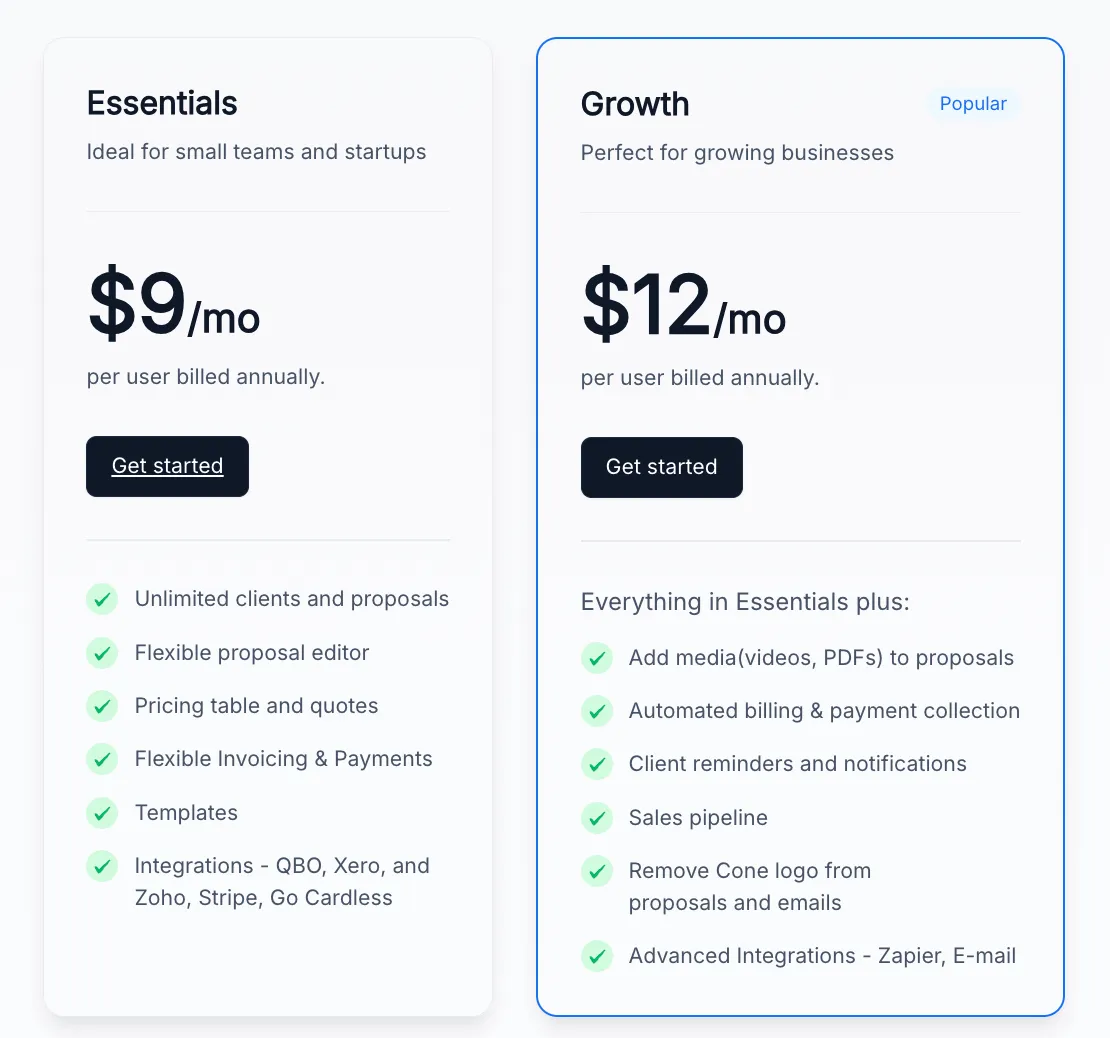
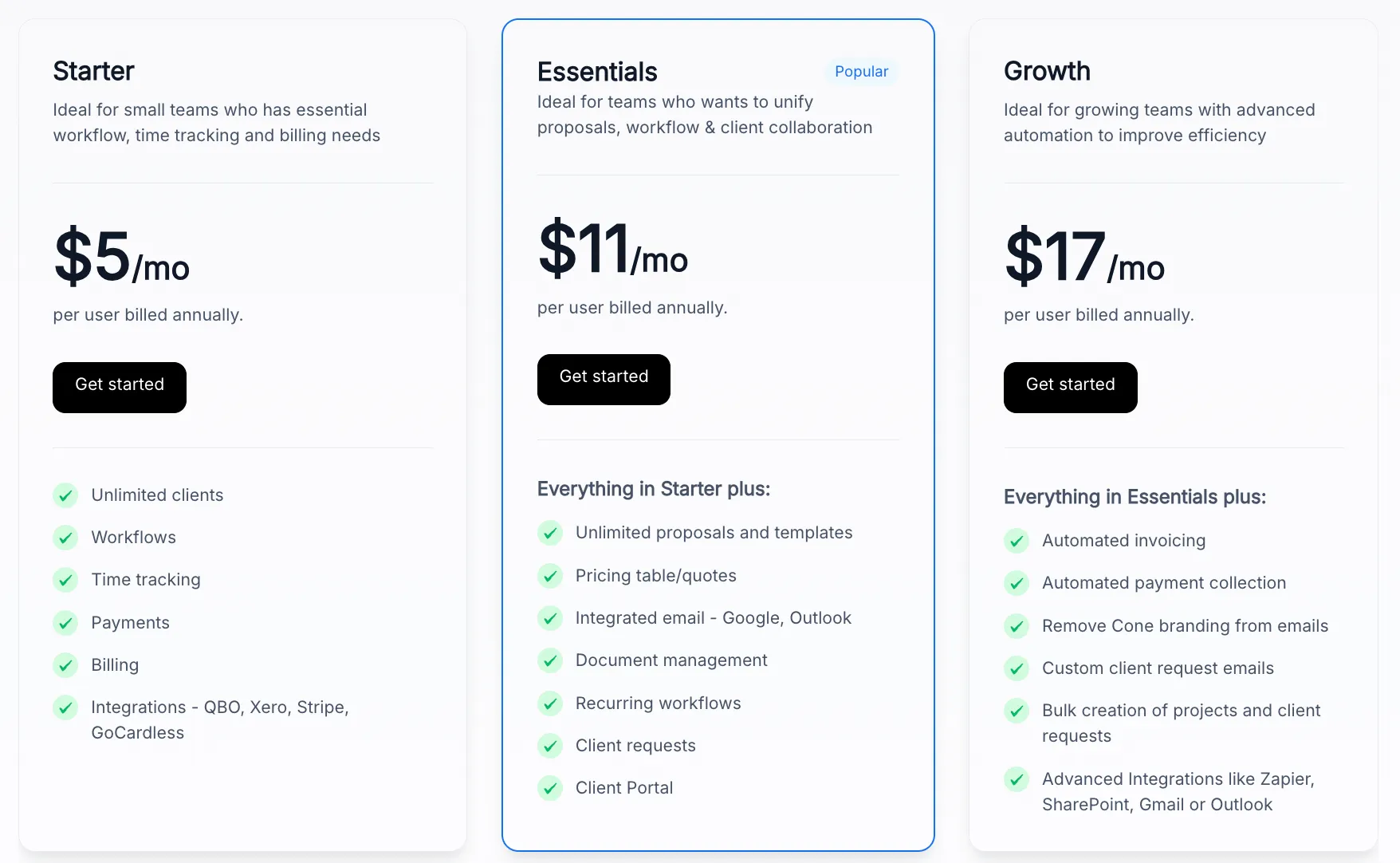
Cone offers dual-product pricing structure:
Propose Product:
- Essentials: $9/user/month annually – Unlimited clients/proposals, templates, basic integrations
- Growth: $12/user/month annually – Adds multimedia, automated billing, Zapier, branding removal
Practice Product:
- Starter: $5/user/month – Unlimited clients, workflows
- Essentials: $11/user/month – Adds proposals, email integration, portal
- Growth: $17/user/month – Adds automation, advanced integrations
Who Should Use Cone?
Choose Cone if:
- You prioritize impressive proposals for competitive client acquisition
- You’re seeking comprehensive features at significantly lower cost
- You want modern mobile-first client experience through white-labeled apps
- You value contemporary UI and are undergoing digital transformation
6. Double — Best Alternative for Automated Month-End Close
Double is a comprehensive bookkeeping practice management platform specifically engineered to streamline month-end close through automated file review and direct ledger correction.
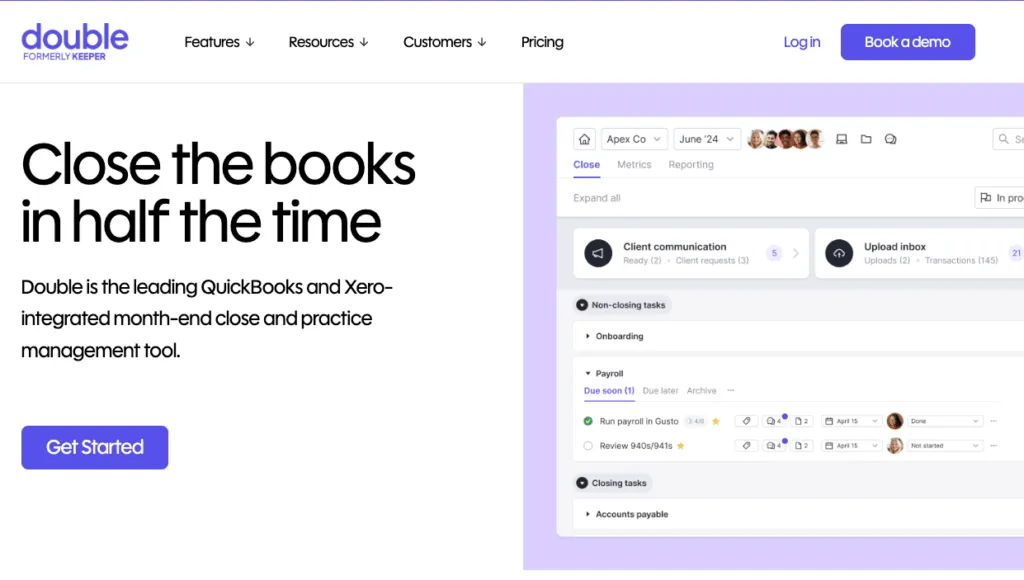
Founded in 2020 by former CFO Ben Stein, it addresses the core issue of bookkeeping accuracy.
Its key capabilities include:
- Automated file review with intelligent error flagging
- Two-way ledger sync with QuickBooks Online and Xero
- Transaction-level client Q&A with context and automated reminders
- Integrated 1099 workflow with year-round vendor identification
- AI-powered reporting with one-click management reports
- Per-client pricing allowing unlimited team members
For CAS-focused firms where accuracy is a primary concern, Keeper’s specialized approach offers unique advantages.
Why Choose Double Over Financial Cents for Bookkeeping Accuracy
Double’s laser focus on the file review and close process offers unique advantages:
- Proactive Error Detection vs. Task Management
While Financial Cents excels at workflow organization, Double identifies what needs correction before close. The Expense Inconsistency Detection analyzes patterns to flag miscoding that would require manual review or be discovered months later. Financial Cents tracks task completion and offers ReCats for managing uncategorized transactions, but doesn’t provide the same depth of pattern-analysis reports.
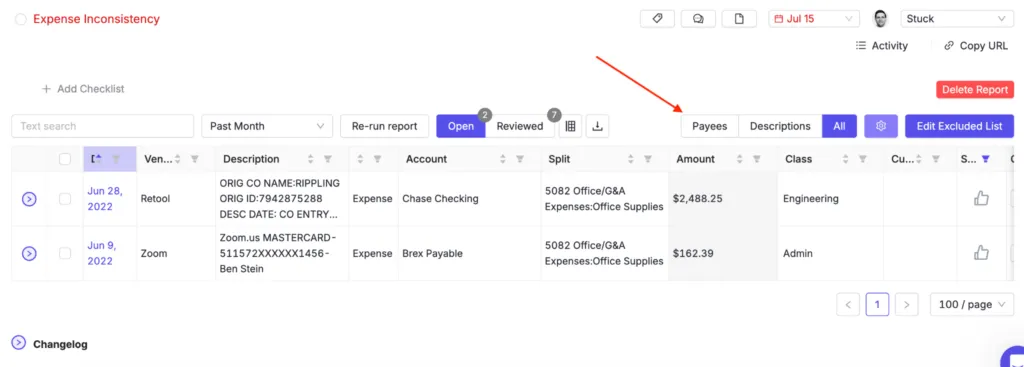
Source: Keeper
Direct Ledger Correction Workflow
Double’s bidirectional sync means corrections made within Double instantly propagate to QuickBooks/Xero. Financial Cents also offers the ability to categorize transactions through its ReCats feature and push updates back to QuickBooks, though Double provides more comprehensive file review reports. Neither platform offers the one-click document digitalization to accounting software that some specialized solutions provide.CAS-Specific Features
The integrated 1099 workflow automatically identifies vendors requiring forms year-round, while the receipt processing add-on uses AI to match transactions. Financial Cents serves multiple service types and includes some bookkeeping features like ReCats, but lacks these specific bookkeeping capabilities.
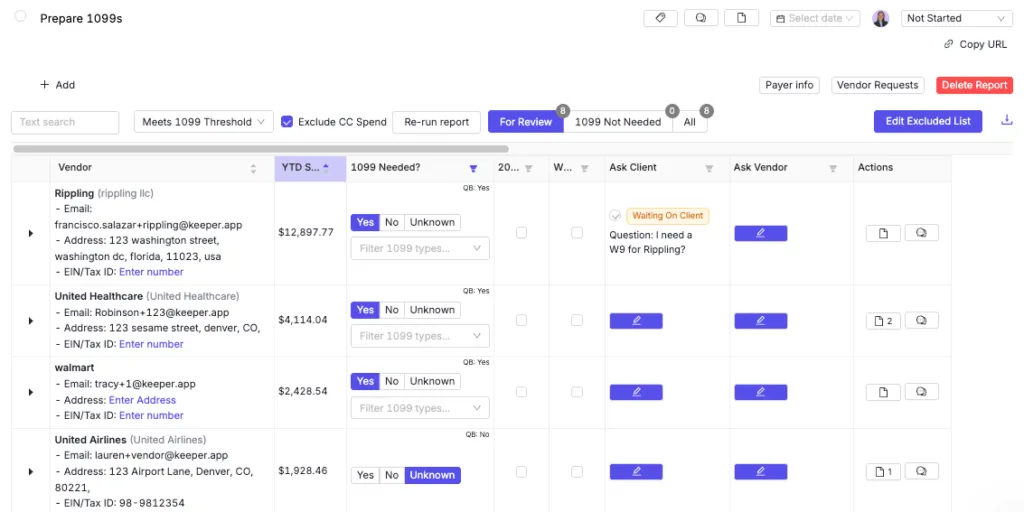
Source: Keeper
🏅 NOTE: We evaluated Uncat and Digits as alternatives.
While Uncat specializes in categorization and Digits provides real-time visibility, Keeper offers a comprehensive combination of automated review, 1099 management, and white-labeled reporting for CAS teams.
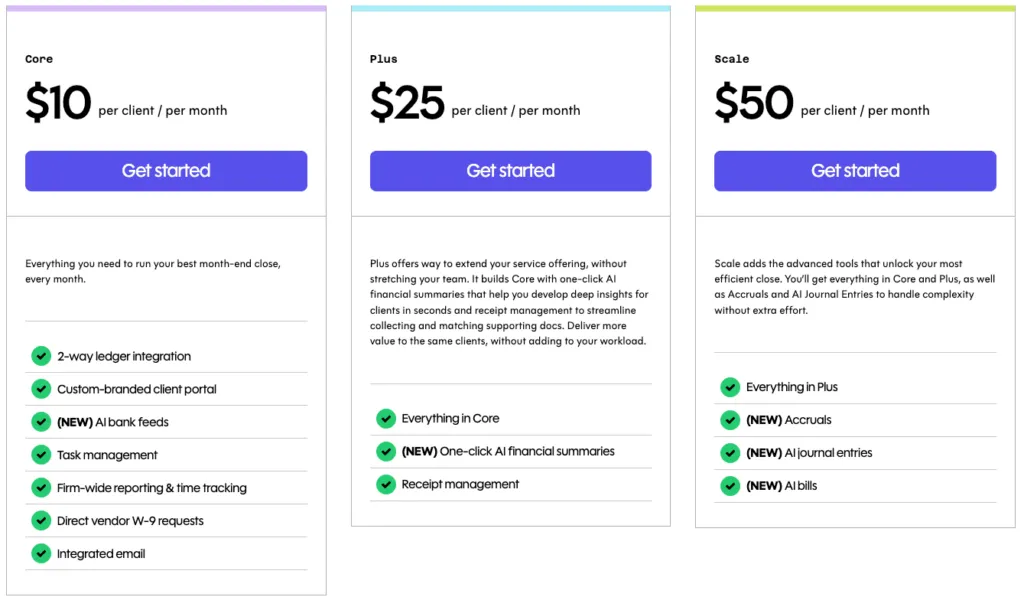
Double Pricing
Double uses per-client monthly pricing with unlimited users:
- Core Plan: $10/client/month – 2-way sync, portal, AI feeds, task management, W-9 requests
- Plus Plan: $25/client/month – Adds AI summaries and Double Receipts
- Scale Plan: $50/client/month – Adds Double Accruals and AI Journal Entries
Who Should Use Double?
Choose Double if:
- Your practice focuses primarily on monthly bookkeeping and CAS work
- File accuracy represents your primary bottleneck rather than task organization
- You want proactive 1099 compliance management year-round
- Your team structure benefits from per-client rather than per-user pricing
7. Qount — Best Alternative for AI-Driven Practice Intelligence
Qount is an AI-native practice management platform positioning itself as the world’s first “Practice Intelligence Platform.”
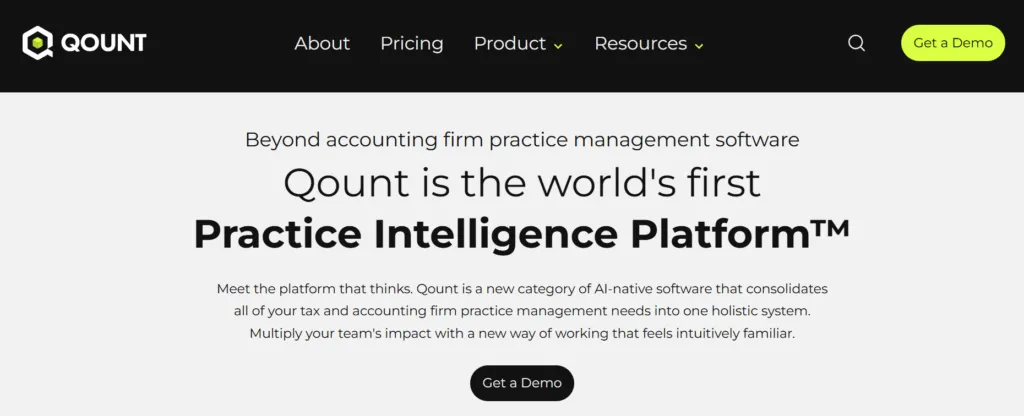
With recent $17M funding and leadership from SurePrep (acquired for $500M), Qount represents enterprise-grade development for forward-thinking firms.
Its key capabilities include:
- QAI (Qount Artificial Intelligence) for sentiment analysis and revenue detection
- Comprehensive practice OS unifying CRM, proposals, billing, and documents
- Advanced 1099 automation with AI-powered chart mapping
- Document merge with audit-ready bookmarks and digital fingerprints
- Direct tax software print integration
For firms viewing practice management as strategic investment rather than commodity tooling, Qount’s intelligence layer offers distinctive capabilities.
Why Choose Qount Over Financial Cents for Practice Intelligence
Qount stands out through AI emphasis and enterprise capabilities:
Practice Intelligence Engine
While Financial Cents provides reporting with some AI features like ChatGPT-based template generation, QAI monitors client sentiment to identify at-risk relationships, identifies revenue leakage, and suggests pricing adjustments based on portfolio analysis. This proactive approach can help identify opportunities that might remain invisible in standard reporting.Enterprise Workflow Automation
Qount’s 1099 workflow features AI-powered transaction pre-classification, bulk enrollment, and intelligent chart mapping. Event-based triggers allow workflows to execute automated actions. Financial Cents also offers workflow automation including task dependencies and Zapier integration for conditional logic, providing different approaches to complex workflows.Strategic Investment and Development Velocity
The $17M funding specifically targets AI acceleration and customer success infrastructure. Leadership’s SurePrep pedigree brings enterprise scaling experience. Qount represents innovation for firms planning longer-term technology roadmaps.
🏅 NOTE: We evaluated Canopy and Firm360.
While Canopy offers strong client features and excellent e-signature features, and Firm360 provides a broad workflow, Qount offers comprehensive AI-driven intelligence for proactive insights.
Qount Pricing
Qount’s pricing reflects enterprise-grade positioning:
- Essentials: $74/user/month (annual) – Core practice management, email integration, basic integrations
- Pro: $114/user/month (annual) – Adds first-tier AI, automation, 500GB storage, tax integration
- Intelligence: $139/user/month (annual) – Full QAI suite
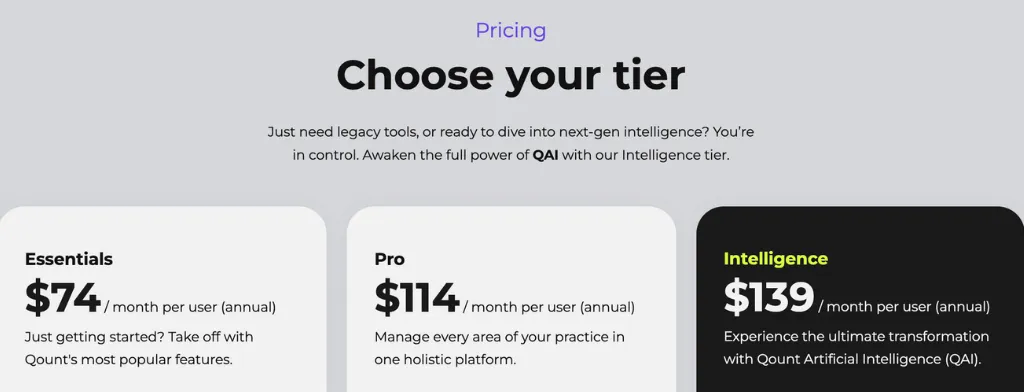
No free trials offered. One-time onboarding scaled to team size.
Who Should Use Qount?
Choose Qount if:
- You’re experiencing lost revenue and want AI-powered detection capabilities
- You run specialized workflows needing advanced automation
- Your growth strategy depends on predictive insights without dedicating staff to analytics
- You’re willing to invest $114-139/user/month for AI-augmented capabilities
- You value innovation from venture-backed leadership with proven track records
The Final Verdict
While Financial Cents provides a solid foundation for accounting practice management with its user-friendly interface and comprehensive features, different firms have varying needs that specialized solutions can address in different ways. Based on our research, here are the best Financial Cents alternatives:
- Uku for firms seeking automated billing that reduces invoice prep from days to ~30 minutes, integrated client portal with a unified workspace, and modular implementation allowing you to start today and grow tomorrow
- Karbon for larger practices needing enterprise-grade email-centric workflow and advanced multi-team orchestration
- Jetpack Workflow for firms wanting to standardize recurring work with 70+ templates in a focused solution
- TaxDome for tax-focused practices requiring IRS integration, visual pipelines, and specialized compliance features
- Cone for cost-conscious firms wanting modern proposals and client experience at a significantly lower pricing
- Double for CAS teams prioritizing bookkeeping accuracy with automated error detection and direct ledger correction
- Qount for data-driven firms seeking AI-powered insights for revenue optimization and strategic decision-making
Remember, the decision isn’t limited to two options. Some firms successfully use Financial Cents alongside specialized tools for specific functions, while others may find that switching to a more specialized solution better serves their evolving needs. Consider your firm’s size, service mix, growth trajectory, and specific challenges when evaluating which solution aligns best with your practice.
The key is finding the right tool that not only addresses your current challenges but also supports your firm’s future growth and strategic objectives.

Founder & Visionary at Uku. Building the future of accounting practice management — where AI handles the routine so accountants can focus on what matters.

Ready to upgrade your practice management?
Join 1,000+ accounting firms already using Uku to save time and grow their business.
Related articles

7 Double Alternatives: Practice Management Tools for Accounting Firms (2026)

Financial Cents vs Double (vs Uku): Which Accounting Practice Management Software Fits Your Firm in 2026?

Client Hub vs Financial Cents (vs Uku): Which Practice Management Software Fits Your Accounting Firm in 2026?