

Jetpack Workflow Pricing: Worth It or Consider Uku? January 2026

If you’re evaluating Jetpack Workflow pricing, you’ll find something refreshing: simplicity. Unlike many practice management platforms with complex tier structures, Jetpack Workflow offers a single Starter plan with two billing options. No feature gates between tiers, no calculating which plan unlocks the features you need.
Jetpack Workflow has built a solid reputation among accountants and bookkeepers as a focused workflow management tool. The platform serves over 6,000 customers across multiple countries, helping firms standardize recurring client work through templates and task automation. Its library of 70+ pre-built templates designed specifically for accounting processes makes getting started straightforward.
I’ve analyzed Jetpack Workflow’s pricing structure and feature set. I believe it’s the ideal choice if:
- You want simple, predictable pricing without tier complexity
- Your primary need is internal workflow management and task tracking
- You prefer a focused tool over an all-in-one solution
- Your firm already has separate systems for billing and client communication
- You value an extensive template library for common accounting workflows
However, Jetpack Workflow’s pricing may not fit your needs if:
- You want integrated billing and invoicing within your practice management tool
- You need a client portal for secure document sharing and collaboration
- Your firm requires native integrations with accounting software beyond QuickBooks
- You’re a solo practitioner looking for a free starting option
- You need advanced reporting and business analytics
In this case, you should consider Uku: a comprehensive accounting practice management platform that combines workflow automation with integrated billing, a branded client portal, and native accounting software integrations, all with a free tier for solo practitioners.
I’ve included a detailed pricing comparison with Uku in this review for firms that need more than workflow management alone. If you want to jump directly to the Uku pricing breakdown, use this link.
Table of contents
- Jetpack Workflow Pricing Summary
- Jetpack Workflow Pricing: In-Depth Overview
- Where Jetpack Workflow Falls Short
- Best Jetpack Workflow Alternative: Uku
- Jetpack Workflow Feature Value Breakdown (vs Uku)
- Jetpack Workflow Pricing FAQ
- Final Verdict: Jetpack Workflow vs Uku
Jetpack Workflow Pricing Summary
| Jetpack Workflow | Uku | |
|---|---|---|
| Free Plan | • No free plan • 14-day free trial • No credit card required | • Solo: $0/month • 1 member, 25 clients max • Unlimited tasks, time tracking, reporting |
| Entry Level | • Starter (Annual): $40/user/month • All features included • Billed annually | • Team: $38/member/month • Client portal included • Unlimited clients |
| Mid-Tier | • Starter (Monthly): $49/user/month • Same features as annual • Month-to-month flexibility | • Elite: $48/member/month • Document management • Client budgeting |
| Enterprise | • No enterprise tier • Custom setup services available ($299+) | • Enterprise: $88/member/month • Custom integrations • Dedicated account manager |
| Best For | Accounting firms wanting focused workflow management with simple, single-tier pricing | Firms needing comprehensive practice management with automated billing that reduces invoicing from days to ~30 minutes |
Jetpack Workflow Pricing: In-Depth Overview
Jetpack Workflow takes a straightforward approach to pricing: one plan with all features included, available at two price points depending on your billing preference.
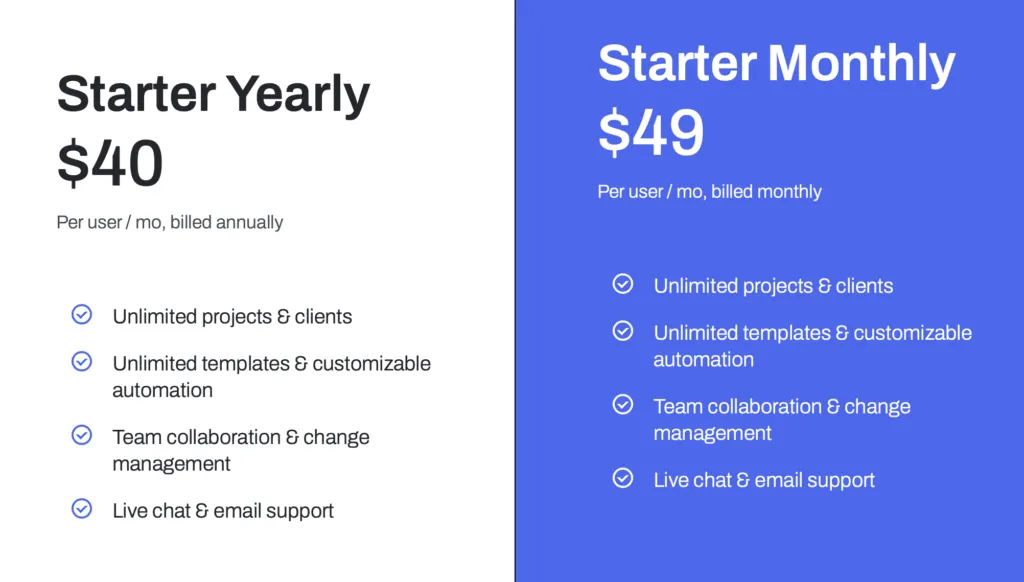
This simplicity eliminates the need to compare feature lists across tiers or worry about upgrading as your firm grows. The platform targets accounting and bookkeeping firms of all sizes, from solo practitioners to larger teams.
Jetpack Workflow Starter Plan: $40-$49/user/month
| Billing Option | Price | Annual Cost (5 users) | Commitment |
|---|---|---|---|
| Annual | $40/user/month | $2,400 | 12 months |
| Monthly | $49/user/month | $2,940 | None |
The Starter plan includes everything Jetpack Workflow offers: unlimited projects and clients, unlimited templates with customizable automation, team collaboration tools, and live chat plus email support.
There’s no feature differentiation between the annual and monthly options; you’re simply choosing your billing commitment.
| Starter Plan Pros | Starter Plan Cons |
| ✅ All features included at every price point | ❌ No free tier for solo practitioners |
| ✅ Unlimited projects and clients | ❌ Monthly option costs about 23% more than annual |
| ✅ 70+ pre-built accounting templates | ❌ No integrated billing or invoicing |
| ✅ Simple pricing eliminates tier confusion | ❌ No client portal for collaboration |
The Bottom Line 👉 The Starter plan works well for firms that want focused workflow management without feature restrictions, but those needing billing automation or client portals will need additional tools.
Jetpack Workflow Free Trial: 14 Days
| Feature | Details |
|---|---|
| Duration | 14 days |
| Credit Card | Not required |
| Access Level | Full feature access |
| Guarantee | 30-day no-risk guarantee on yearly plans |
Jetpack Workflow’s free trial provides full access to test the platform before committing.
No credit card is required to start, which removes friction from the evaluation process. If you choose an annual plan after the trial, you’re protected by a 30-day no-risk guarantee.
Jetpack Workflow Additional Costs
Beyond the base subscription, Jetpack Workflow offers optional services:
Custom Setup Services: Starting at $299 (one-time payment)
- Speeds up the setup process
- Includes workflow formatting assistance
- Enhanced training for your team

Single Sign-On (SSO): Additional fee (pricing not publicly listed)
- Enables SSO for enhanced security
- Requires contacting sales for pricing
Where Jetpack Workflow Falls Short
While Jetpack Workflow excels at its core mission of workflow and task management for accounting firms, its focused approach creates gaps for firms needing more comprehensive practice management:
No Built-In Client Portal
- Client communication happens primarily through email integrations
- Firms can’t share documents or request information through a branded portal
- This affects firms wanting to provide clients with self-service access and reduces the professional experience
Jetpack Workflow’s own documentation confirms the platform doesn’t include a client-facing portal.
Missing Billing and Invoicing
- No native capability to generate invoices from tracked time
- Firms need separate billing software and must transfer data manually (though time can be pushed to QuickBooks)
- This creates additional administrative work and increases the risk of missed billable hours
Limited Native Integrations Beyond QuickBooks
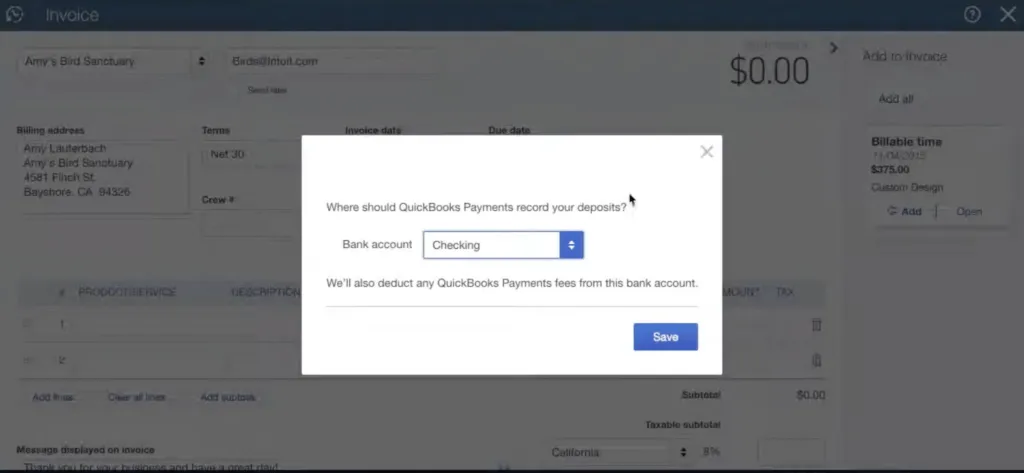
- Native integration with QuickBooks Online exists for syncing client data and pushing time entries
- However, connections to other tools like Xero rely primarily on Zapier
- Firms using accounting software other than QuickBooks may face workflow friction when moving data between systems
Source: Jetpack Workflow
Basic Reporting Capabilities
- Reporting features may be less comprehensive than some competitors
- Limited business analytics for firm performance insights
- Managers seeking data-driven decisions may find the analytics insufficient for their needs
These limitations have led many accounting firms to explore alternatives that bundle workflow management with client collaboration and billing automation
Best Jetpack Workflow Alternative: Uku
Uku brings together workflow management, automated billing, and client collaboration in one integrated platform designed specifically for accounting firms.

For those who find Jetpack Workflow’s lack of client portal, limited billing features, and few native integrations frustrating, Uku offers a solution that directly addresses these gaps with a branded client portal, automated invoice generation, and native connections to Xero, QuickBooks, e-conomic, and other accounting software.
Created from the ground up to be international, especially for UK and US markets, Uku now serves 1,000+ accountants across 25+ countries.
The platform’s strength lies in combining the workflow automation accounting firms need with the client-facing tools and billing capabilities that Jetpack Workflow lacks. With support for 12 languages and multi-currency capabilities (€, $, £), Uku is designed for global use.
Uku excels for firms that want everything in one place: task management, time tracking, automated billing, and secure client collaboration without managing multiple software subscriptions. Customer feedback indicates firms see ~20% more profit by discovering outdated agreements where actual work hours exceeded contracted amounts.
The platform takes a modular approach to features, meaning firms can start working on day one with just the features they need, then activate additional modules as they grow. This eliminates the need for substantial upfront configuration and training required by all-in-one platforms, making the transition “from Excel to greatness” remarkably smooth for firms hesitant to try new software after bad experiences.
Uku Solo Plan: Free
| Feature | Details |
|---|---|
| Price | $0/month |
| Team Members | 1 |
| Clients | Up to 25 |
| Core Features | Unlimited tasks, time tracking, reporting, CRM, calendar |
| Limitations | Single user only |
Unlike Jetpack Workflow’s trial-only free option, Uku’s Solo plan provides a permanent free tier for freelance accountants and bookkeepers.
At 25 clients with unlimited tasks, it’s a genuine working solution rather than just an extended demo. The plan includes time tracking, reporting, and the Mini Uku browser plugin.
| Solo Plan Pros | Solo Plan Cons |
| ✅ Permanently free, not just a trial | ❌ Limited to one user |
| ✅ Unlimited tasks included | ❌ 25 client maximum |
| ✅ Full time tracking and reporting | ❌ No client portal |
| ✅ No credit card required | ❌ No team collaboration features |
The Bottom Line 👉 The Solo plan gives freelancers a genuine free option that Jetpack Workflow doesn’t offer, though growing practices will need to upgrade for team features.
Uku Team Plan: $38/member/month
| Feature | Details |
|---|---|
| Price | $38/member/month |
| Clients | Unlimited |
| Client Portal | Included |
| Key Features | Email integration, access management, custom fields, integrations |
| Billing Options | Both annual and monthly available |
The Team plan unlocks Uku’s collaborative capabilities, including the client portal that Jetpack Workflow lacks entirely.
At $38 per member, it’s actually priced below Jetpack’s annual option ($40) while adding substantially more functionality. Firms can invite unlimited clients to the portal at no extra cost. Flexible monthly billing options let firms test the system without large upfront annual commitments.
| Team Plan Pros | Team Plan Cons |
| ✅ Client portal included (Jetpack lacks this) | ❌ No cloud storage integrations |
| ✅ Unlimited clients | ❌ No advanced integrations |
| ✅ Native integrations with accounting software | ❌ No workforce management |
| ✅ Flexible monthly pricing options |
The Bottom Line 👉 The Team plan suits growing firms that need the client collaboration and unlimited scaling that Jetpack Workflow’s single tier doesn’t provide.
Uku Elite Plan: $48/member/month
| Feature | Details |
|---|---|
| Price | $48/member/month |
| Additional Features | Google Drive/OneDrive integration, customizable portal menu, workforce management |
| Key Capabilities | Client Budgeting, Document Management, E-signatures |
| Reporting | BI Reporting, actionable audit log |
Elite adds advanced integrations and workforce management for $10 more per member than the Team plan.
The customizable client portal menu allows firms to tailor the client experience, while Client Budgeting helps track profitability by account. Document Management enables one-click document digitalization, sending files directly to accounting software.
| Elite Plan Pros | Elite Plan Cons |
| ✅ Cloud storage integrations | ❌ Higher ongoing cost |
| ✅ Customizable client portal | ❌ May exceed small firm needs |
| ✅ Client Budgeting for profitability tracking | ❌ No dedicated account manager |
| ✅ Document Management with one-click digitalization |
The Bottom Line 👉 Elite suits established firms wanting advanced integrations and customization options that neither Jetpack Workflow nor Uku’s lower tiers offer.
Uku Enterprise Plan: $88/member/month
| Feature | Details |
|---|---|
| Price | $88/member/month |
| Support | Dedicated account manager |
| Extras | Custom integrations, assisted client import, team workshop, early feature access |
Enterprise provides white-glove service for larger firms. The dedicated account manager and custom integration support justify the premium for firms with complex requirements.
The Bottom Line 👉 Enterprise makes sense for multi-location firms or those with specialized integration needs that require hands-on support.
Jetpack Workflow Feature Value Breakdown (vs Uku)
Workflow Management Approach
Jetpack Workflow’s Approach: Jetpack Workflow provides a focused workflow engine with 70+ pre-built templates specifically designed for accounting tasks. The platform excels at standardizing recurring client work through its template system, which can be customized and applied across multiple clients.
However, it handles workflow management primarily and requires other tools for billing, though it includes basic email integration for client communication.
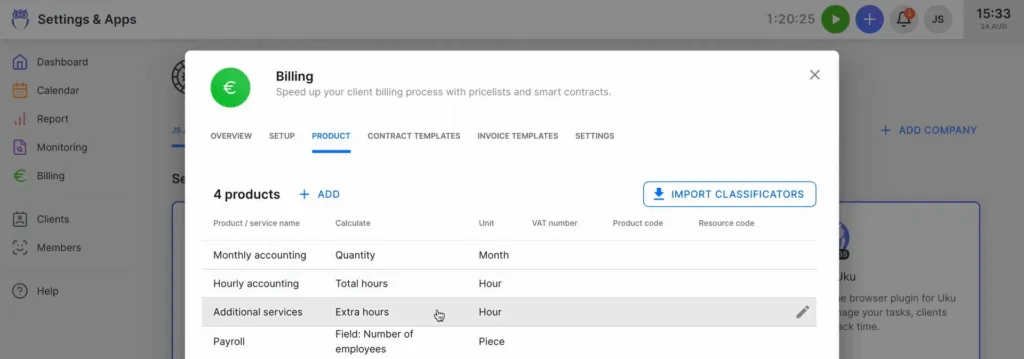
Uku’s Approach: Uku includes comparable workflow automation with task templates and recurring task schedules, but extends the automation to billing. The platform’s automated billing system reduces invoice preparation from multiple days to approximately 30 minutes. Time tracked on tasks automatically calculates billable amounts in real-time through ‘contracts’ where rules are set up once.
Source: Uku
The system supports complex price lists with different rates for different periods and handles advanced rounding rules, allowing firms to properly bill for interruptions and unplanned work.
🪙 Value Verdict: For workflow management alone, both platforms perform similarly. Uku provides better value for firms that want workflow automation to connect directly to billing, with 90% of actions being one-click to minimize admin time.
Client Collaboration Capabilities
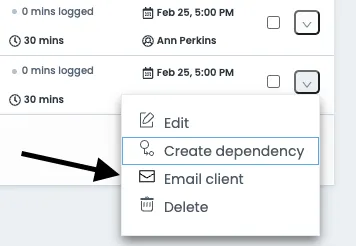
Jetpack Workflow’s Approach: Client communication relies primarily on email integrations. While functional, this means clients don’t have a dedicated space to upload documents, view task status, or collaborate on their work. The firm and client experience remains fragmented across email threads.
Source: Jetpack Workflow
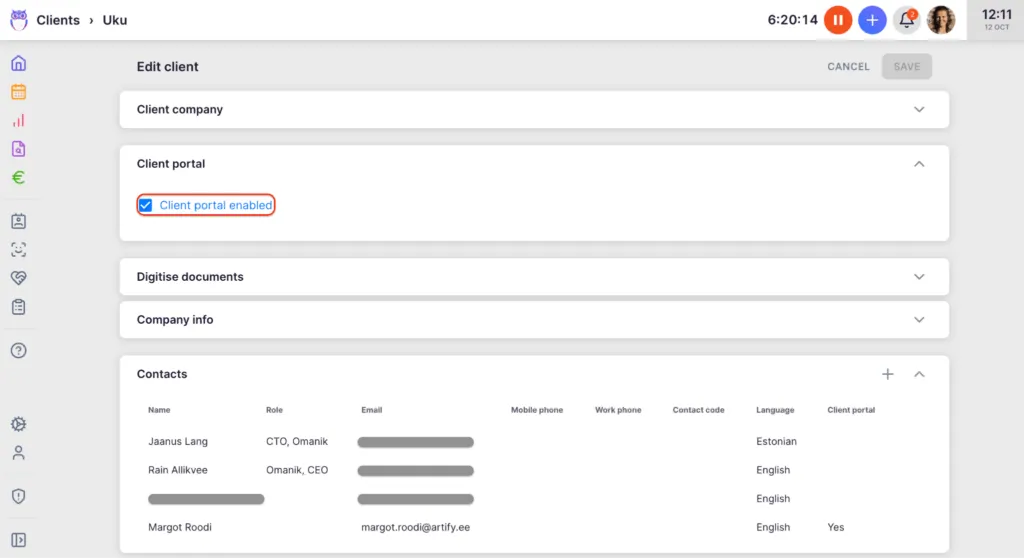
Uku’s Approach: Uku includes a branded client portal where clients can access tasks assigned to them, upload documents, and communicate with their accountant, unlike traditional portals where tickets must be connected to work items.
Source: Uku
Uku’s portal mirrors the exact same task on both sides. Clients and accountants work on the same item with all communication, actions, documents, logs, and time tracking in one place. Clients access the portal via a “magic link” without needing to remember credentials.
Firms can customize the portal menu for each client, run onboarding with forms, share business insight reports, display price lists, and embed custom content.
🪙 Value Verdict: Uku provides substantially better client collaboration with its included portal, which Jetpack Workflow doesn’t offer at any price. The unified task system eliminates fragmented communication.
Pricing Structure and Flexibility
Jetpack Workflow’s Approach: Single-tier pricing eliminates complexity. Every user gets every feature, and the only decision is annual versus monthly billing. This works well for firms that want predictable costs without evaluating tier differences. However, there’s no free option for solo practitioners and no enterprise tier for large firms with specialized needs.
Uku’s Approach: Four tiers provide options for different firm sizes and needs, with pricing available in multiple currencies (€, $, £). The free Solo tier gives freelancers a starting point, while Enterprise provides dedicated support for larger organizations.
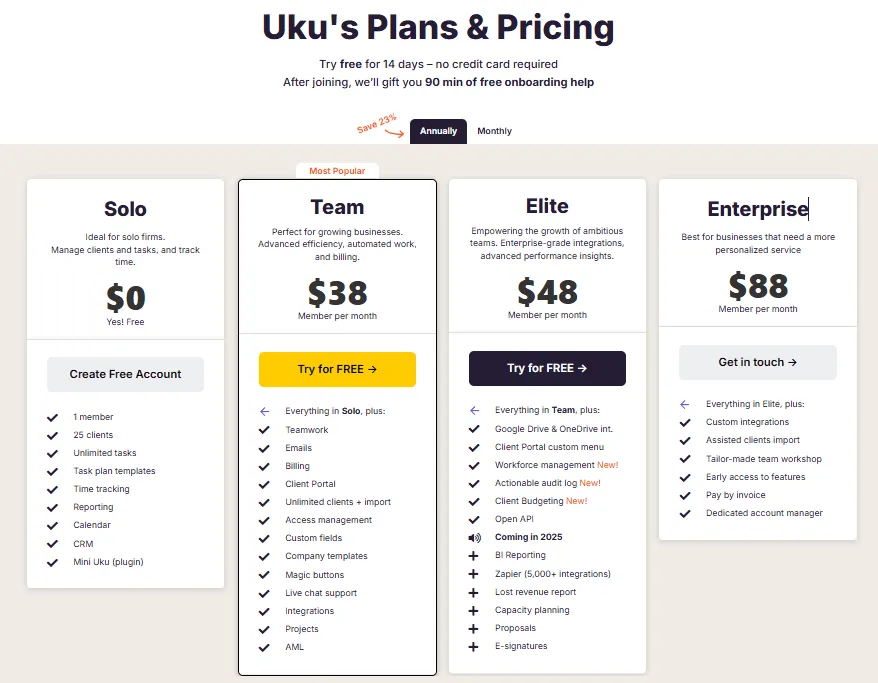
Both annual and monthly billing options are available across all paid tiers, giving firms the flexibility to test the system without large upfront commitments.
🪙 Value Verdict: Uku offers more flexibility across firm sizes, particularly with its free tier and flexible monthly options. Jetpack Workflow’s simplicity appeals to firms that prefer avoiding tier decisions.
Integration Ecosystem
Jetpack Workflow’s Approach: Jetpack offers a native QuickBooks Online integration for syncing client data and pushing time entries. For connections to other tools, including accounting software like Xero, the platform relies on Zapier. This may add cost and complexity for firms not using QuickBooks as their primary accounting software.
Source: Jetpack Workflow
Uku’s Approach: Uku provides native integrations with Xero, QuickBooks, e-conomic, and other accounting platforms. These direct connections enable automatic data sync without middleware, streamlining the workflow from task completion to invoicing. The Elite plan adds Google Drive and OneDrive integrations for cloud storage.
🪙 Value Verdict: Uku provides better integration value for firms using accounting platforms other than QuickBooks, eliminating the need for Zapier workarounds.
Reporting and Analytics
Jetpack Workflow’s Approach: Offers basic reporting on jobs, tasks, and time spent. The platform provides essential visibility into team progress but may lack the depth needed for comprehensive firm performance analysis.
Uku’s Approach: Uku’s BI Reporting offers comprehensive views with filters, saved report templates, and three levels of depth: summary, tasks, and time.
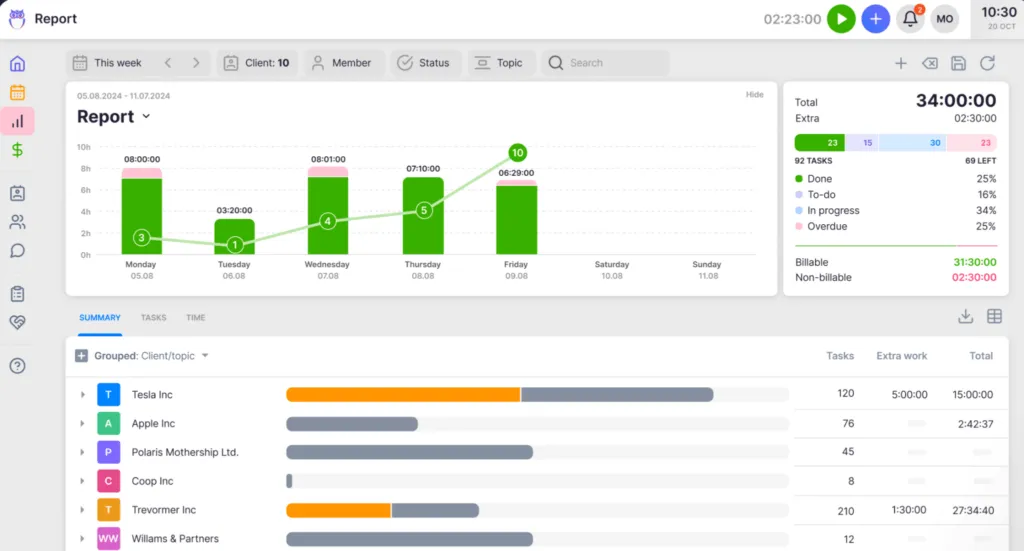
The billing system tracks both sales prices and actual cost prices, enabling managers to see profitability at the employee level, and understanding if an employee costing €30/hour but billing at €45/hour is actually profitable when not all hours are billable. Real-time insights help firms discover issues before month-end closes.
🪙 Value Verdict: Uku provides more comprehensive analytics for firms seeking data-driven decision making, particularly around profitability analysis.
Security and Compliance
Jetpack Workflow’s Approach: Cloud-based platform with standard security measures. Specific compliance certifications are not prominently featured.
Uku’s Approach: The platform is SOC 2 Type I compliant and uses TLS 1.3 encryption. Data is hosted on enterprise-grade cloud servers in Germany (EU), appealing to privacy-conscious firms with European clients.
🪙 Value Verdict: Uku offers stronger documented security credentials for firms with compliance requirements.
Jetpack Workflow Pricing FAQ
Is Jetpack Workflow free to use?
Jetpack Workflow doesn’t offer a free plan. They provide a 14-day free trial with full feature access, and no credit card is required to start. After the trial, you’ll need to choose between the annual plan at $40/user/month or the monthly plan at $49/user/month.
What’s included in Jetpack Workflow’s single plan?
The Starter plan includes unlimited projects and clients, unlimited templates with customizable automation, team collaboration and change management features, plus live chat and email support. There are no feature restrictions based on which billing option you choose.
Does Jetpack Workflow have a client portal?
No, Jetpack Workflow doesn’t include a built-in client portal. Client communication is handled through email integrations. Firms needing a client portal for document sharing and collaboration would need to use a separate tool or consider alternatives like Uku that include this functionality.
How does Jetpack Workflow pricing compare to Uku?
Jetpack Workflow’s annual rate of $40/user/month is slightly higher than Uku’s Team plan at $38/member/month. Additionally, Uku includes features Jetpack lacks: a client portal with magic link access, automated billing that reduces invoicing from days to approximately 30 minutes, native integrations with multiple accounting platforms, and BI Reporting for profitability analysis.
Uku also offers a free Solo plan for freelancers, flexible monthly billing options, and multi-currency support (€, $, £).
Can I cancel my Jetpack Workflow subscription anytime?
Monthly plans must be canceled before the renewal date to avoid the next charge; no refunds are offered for partial months. Annual plans include a 30-day no-risk guarantee, providing more flexibility early in your commitment.
Does Jetpack Workflow integrate with QuickBooks or Xero?
Jetpack Workflow integrates natively with QuickBooks Online for syncing client data and pushing time entries. For Xero and other integrations, the platform relies primarily on Zapier connections. Uku offers native integrations with both QuickBooks and Xero, plus e-conomic and several other accounting platforms.
Final Verdict: Jetpack Workflow vs Uku
The choice between Jetpack Workflow and Uku depends on whether you need focused workflow management or comprehensive practice management:
👍 Jetpack Workflow is a focused workflow management tool designed for accounting firms that want simple, predictable pricing without feature tiers. At $40-49/user/month with all features included, it provides unlimited projects, clients, and templates for standardizing recurring work.
This single-tier approach works best for firms that already have separate billing and client communication systems and simply need a reliable way to manage tasks and deadlines.
Get started with Jetpack Workflow here.
👉 Uku is a comprehensive practice management platform built to combine workflow automation with the billing and client collaboration tools that accounting firms need daily. By offering four tiers from free to $88/member/month, it provides options for solo practitioners through enterprise firms.
The platform’s automated billing reduces invoice preparation from days to approximately 30 minutes, while the included client portal where clients and accountants work on the exact same tasks eliminates fragmented email communication.
With native Xero and QuickBooks integrations, BI Reporting for profitability analysis, SOC 2 Type I compliance, and support for 12 languages across 25+ countries, Uku offers a system your team will actually enjoy using. The modular approach means firms can start working on day one with just the features they need, making the transition from Excel to greatness remarkably smooth.
The difference comes down to scope. While Jetpack Workflow focuses on doing workflow management well, Uku asks how workflow can connect to everything else an accounting practice needs to run efficiently, and answers with automated billing, unified client collaboration, and fast & flexible deployment that minimizes admin time through one-click actions.

Intelligent practice management assistant for accounting firms. Helping 1000+ firms save time, standardise processes, and grow.

Ready to upgrade your practice management?
Join 1,000+ accounting firms already using Uku to save time and grow their business.
Related articles
Double Pricing: Worth It or Consider Uku? April 2026

Aero Workflow vs Jetpack Workflow (vs Uku): Which Accounting Workflow Software Actually Fits Your Firm in 2026?

Financial Cents vs Jetpack Workflow (vs Uku): Which Practice Management Software Actually Fits Your Accounting Firm in 2026?