

Canopy vs Karbon (vs Uku): Which Practice Management Software Actually Fits Your Firm in 2026?

Choosing between Canopy and Karbon for your accounting practice management often comes down to these fundamental questions:
- Do you need specialized tax resolution tools, or are you looking for deep workflow automation with email integration?
- Is your firm ready to invest significant time in learning complex platforms, or do you need something your team can adopt immediately?
- Are you comfortable with premium pricing for enterprise features, or do you want professional capabilities at a more accessible price point?
- Do you prefer modular pricing where you pay for each feature, or comprehensive plans that include everything?
- Would you rather have every possible feature available, or a streamlined platform that does the essentials exceptionally well?
In short, here’s what we recommend:
👉 Canopy excels as the comprehensive solution for tax-focused firms, offering specialized tax resolution features including direct IRS integration, transcript pulls, and notices management. With its modular approach and strong document management capabilities, it’s ideal for firms that want to customize their tech stack. However, the modular pricing can become expensive as you add features, and some users report occasional bugs and limited customization options.
👉 Karbon dominates in workflow automation and team collaboration, with its unique email “Triage” feature turning your inbox into a command center for all firm communication. The platform’s Practice Intelligence provides AI-driven insights and its deep workflow capabilities are sophisticated. The trade-off is a steeper learning curve, premium pricing starting at $59 per user per month, and you’ll need to book a demo before accessing the free trial.
Both platforms are powerful and feature-rich, built by well-funded companies targeting enterprise-level firms. But what if you could get professional practice management capabilities without the complexity, without the premium pricing, and without sacrificing the features that actually matter to your daily workflow?
👉 Uku represents a different philosophy entirely: powerful simplicity. Built specifically for ambitious accounting firms that value efficiency over feature bloat, Uku delivers smart automation while maintaining an interface so intuitive that firms report saving 20% of time spent on task management. With team pricing starting from just $38 per user per month, Uku delivers enterprise-level capabilities (including automated billing that can dramatically reduce invoicing time, integrated client portal with E-signatures, and comprehensive reporting features) at a fraction of the cost. It’s a system your team will actually enjoy using.
If you’re looking for practice management software that transforms your firm from Excel to greatness, see how Uku can help with a 14-day free trial of our Elite plan.
Table of contents:
- Canopy vs Karbon vs Uku at a glance
- The philosophical divide: Complexity vs simplicity
- Workflow automation shows different approaches
- Client portal capabilities reveal priorities
- Pricing transparency tells the real story
- Tax resolution features separate the specialists
- Email management approaches differ dramatically
- Time tracking and billing integration
- The learning curve affects your ROI
- Canopy vs Karbon vs Uku: Which should you choose?
Canopy vs Karbon vs Uku at a glance
| Canopy | Karbon | Uku | |
|---|---|---|---|
| Founded | 2014 | 2014 | 2017 |
| Funding Status | Series C ($236.5M raised total) | Series B ($101.5M raised total) | Bootstrapped |
| Starting Price | $45/user/month | $59/user/month | From $38/user/month |
| Free Trial | 15 days | Available after demo | 14 days (Elite features) |
| Core Strength | Tax resolution & document management | Email integration & workflow | Automated billing & simplicity |
| Workflow Automation | ⭐⭐⭐ Template-based | ⭐⭐⭐⭐⭐ Deep automation | ⭐⭐⭐⭐⭐ Smart automation |
| Client Portal | ⭐⭐⭐⭐ User-friendly | ⭐⭐⭐ Basic functionality | ⭐⭐⭐⭐⭐ “Magic link” access |
| Learning Curve | ⭐⭐⭐ Moderate | ⭐⭐ Steep | ⭐⭐⭐⭐⭐ Minimal |
| Email Integration | ⭐⭐⭐ Basic sync | ⭐⭐⭐⭐⭐ Deep “Triage” system | ⭐⭐⭐⭐ Smart integration |
| Best For | Tax-focused firms | Large collaborative teams | Teams of 15-35 seeking efficiency |
The philosophical divide: Complexity vs simplicity
The fundamental difference between these platforms isn’t about features, it’s about philosophy.
Canopy approaches practice management as a modular system. Starting from its origins as a tax resolution tool, it has expanded into a comprehensive platform where firms can pick and choose the modules they need.
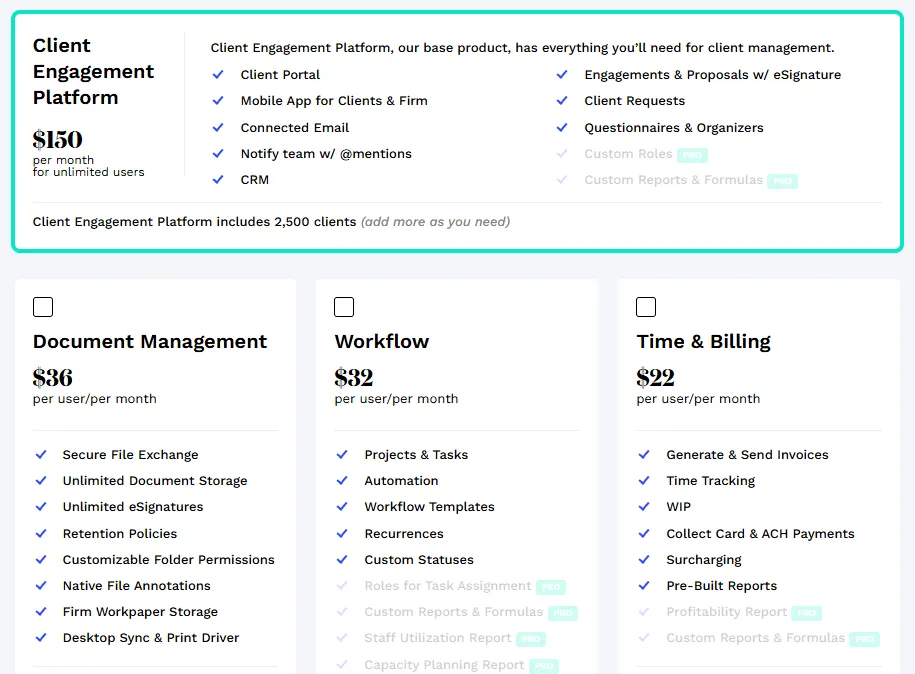
This “choose your own adventure” approach means you might start with Client Management at $150/month, add Document Management at $36/user/month, then Workflow at $32/user/month. The flexibility is appealing, but the complexity of managing multiple modules and their interactions can become overwhelming.

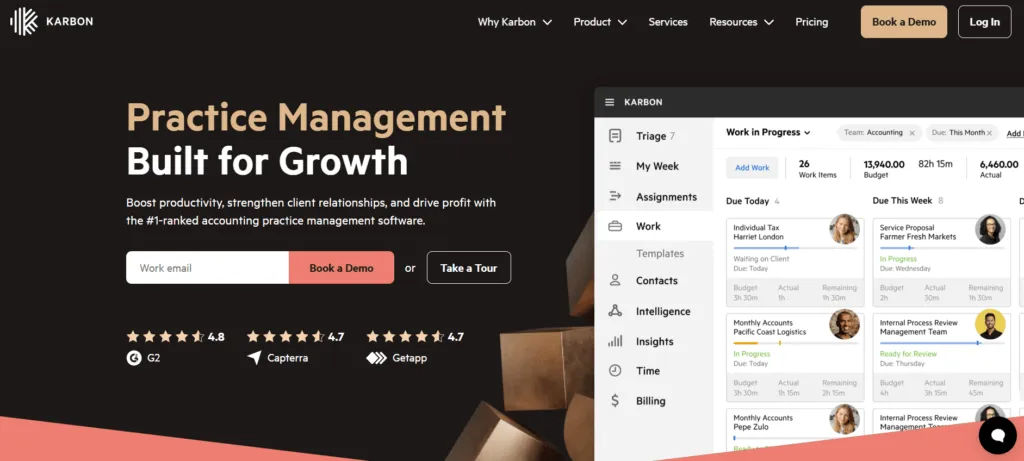
Karbon takes the “everything is a workflow” approach. Built by former Xero executives, it assumes that if you can perfect the workflow, everything else falls into place.
The platform’s deep email integration through its “Triage” feature and sophisticated task automation are impressive. But this power comes with complexity. The platform assumes you want to fundamentally restructure how your firm operates around their methodology.
Uku embodies a philosophy of flexible simplicity. Users can start with core functionality and scale features as they grow.
The platform includes comprehensive features (workflow automation, time tracking with stopwatch, billing, CRM, client portal) with availability varying by plan tier. This flexibility is designed for small and medium-sized companies that need agility. The interface is designed for rapid adoption, making it particularly suitable for firms transitioning from Excel who want straightforward implementation.

Workflow automation shows different approaches
All three platforms promise to automate your workflows, but their approaches reveal their true nature.
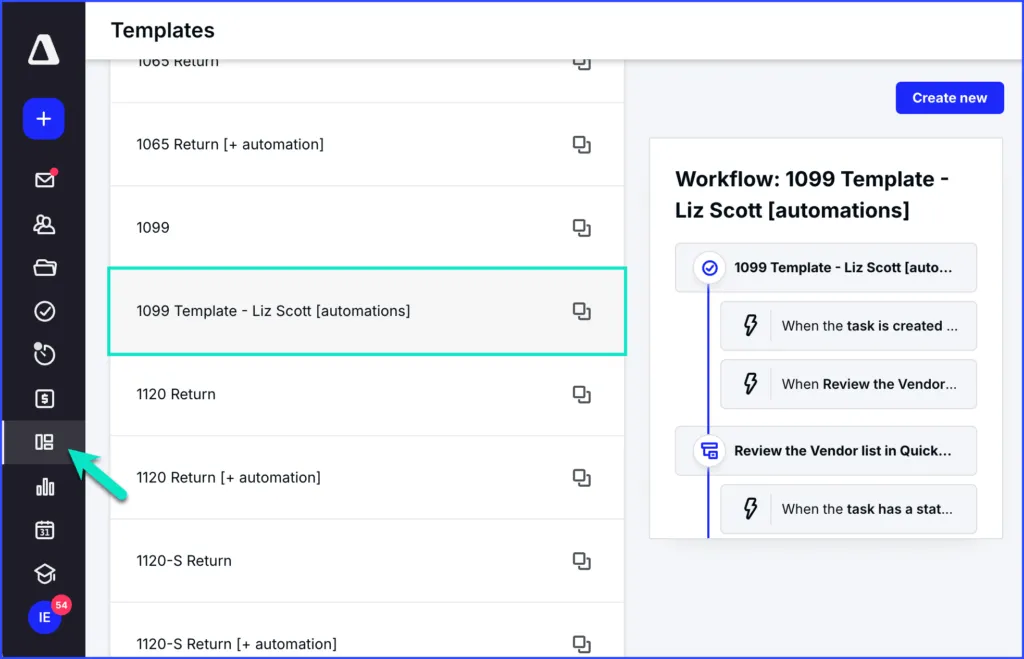
Canopy‘s workflow automation centers on templates and recurring schedules. You can create work templates with predefined tasks, assignees, and due dates, then apply these to clients. The system can automatically create projects when proposals are accepted and trigger tasks based on status changes. It’s solid automation, but it requires significant setup and ongoing management to maintain.
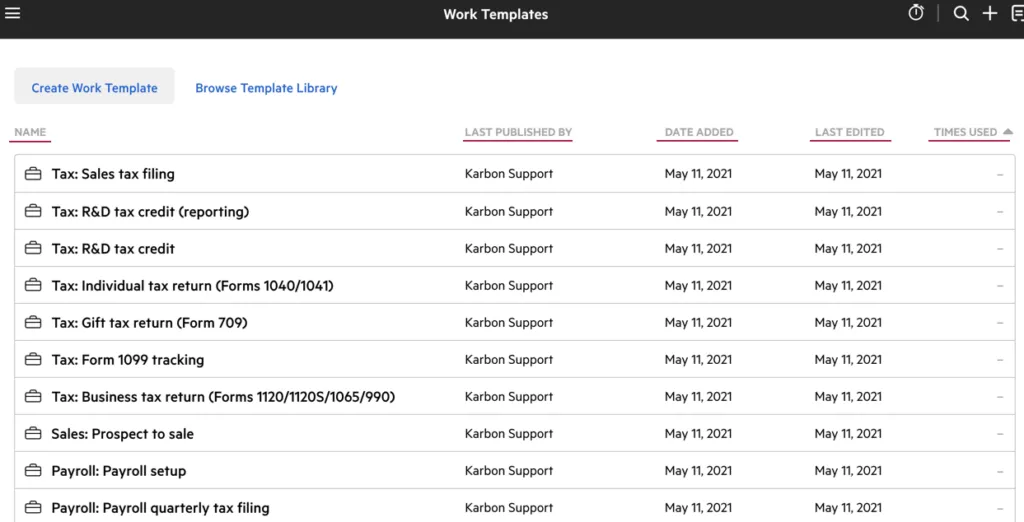
Karbon‘s workflow automation is sophisticated and deeply integrated.
The platform’s “Work Templates” can include complex dependencies, automatic status updates, and multi-step automations. The “Work Scheduler” creates recurring work items with dynamic naming conventions and intelligent task creation timing. For firms willing to invest the time to configure these systems, the automation possibilities are extensive. However, this sophistication can make everyday tasks more complex than simpler approaches.
Uku takes a practical approach focused on maximizing efficiency through smart automation.
Set up a client task plan once, and Uku automatically generates tasks based on your specified recurrence (weekly, monthly, quarterly, yearly, or from client custom fields). The system handles holidays, adjusts for specific days of the month, and even manages task dependencies. The focus is on making repetitive accounting work as efficient as possible.
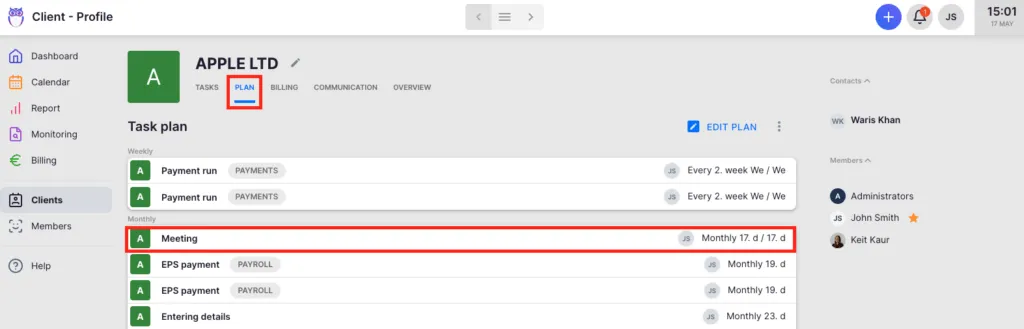
One firm reported serving 38% more clients after a year of using Uku, simply because the automation freed up so much time, allowing them to work on their business rather than managing software.
Client portal capabilities reveal priorities
How each platform handles client interaction tells you everything about their priorities.
Canopy‘s client portal is comprehensive and professional. Clients can upload documents, sign papers, view tasks, and pay invoices through a secure, branded interface. The portal includes multi-factor authentication and extensive customization options. However, some users report that clients find the interface complex, requiring explanation and support to use effectively.
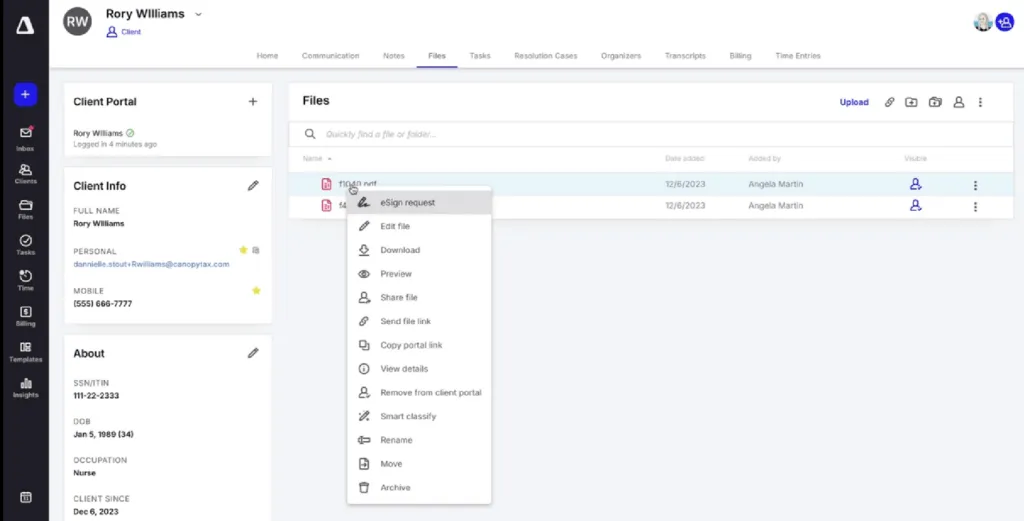
Source: Canopy
Karbon‘s client portal provides essential functionality but feels secondary to the platform’s focus on internal team collaboration. While clients can complete tasks and upload documents, and the “magic links” for easy access are convenient, the overall client experience doesn’t match the sophistication of the internal workflow features.
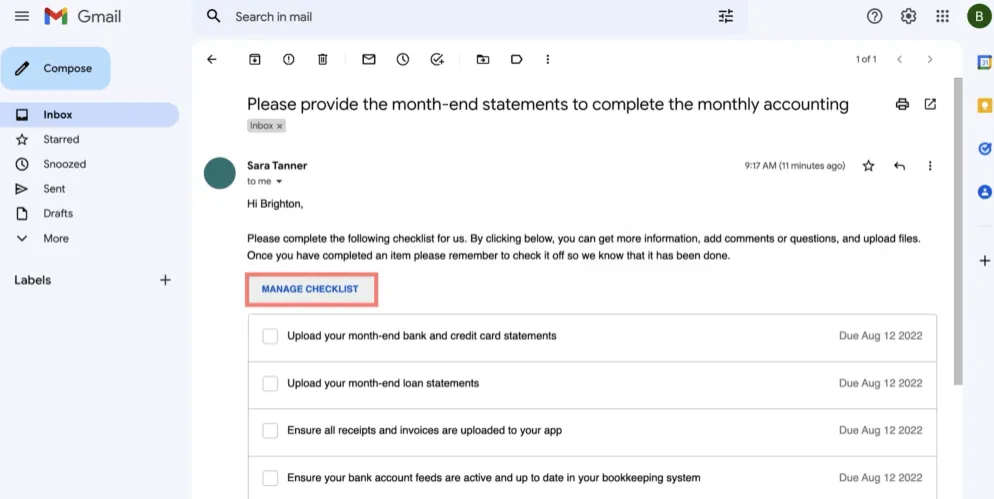
Source: Karbon
Uku‘s client portal embodies their simplicity philosophy perfectly.
Clients access it through a “magic link” sent to their email, no passwords to remember. The interface is so intuitive that Uku describes it as “the client portal you don’t have to explain to clients.” Yet this simplicity doesn’t sacrifice functionality: clients can view tasks, upload documents, communicate with their accountant, see their service agreements, and the Elite plan includes E-signatures.
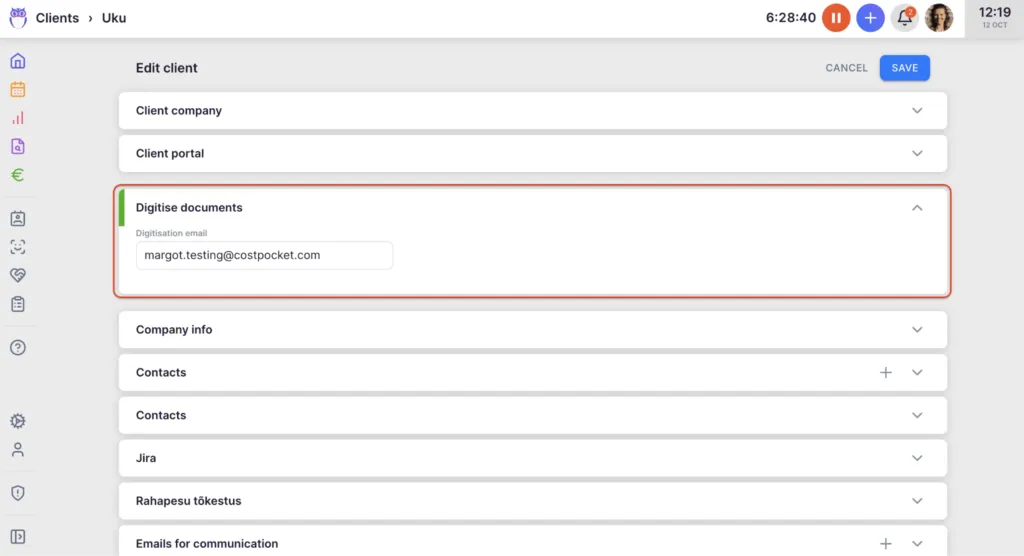
The portal offers full branding capabilities, and firms can customize the menu for each client individually. Documents can even be submitted for digitalization with a single click, sending them directly into accounting software.
Pricing transparency tells the real story
How companies price their products reveals their target market and confidence in their value.
Canopy‘s modular pricing starts appealing but quickly escalates.
The base Client Engagement platform is $150/month for unlimited users, but that’s just the beginning. Add Document Management ($36/user/month), Workflow ($32/user/month), and Time & Billing ($22/user/month), and suddenly you’re looking at over $100 per user monthly for a complete solution.
For a 10-person firm, that’s easily $1,000+ per month. They also charge extra for Tax Resolution features ($50/user/month) and have various usage-based costs.
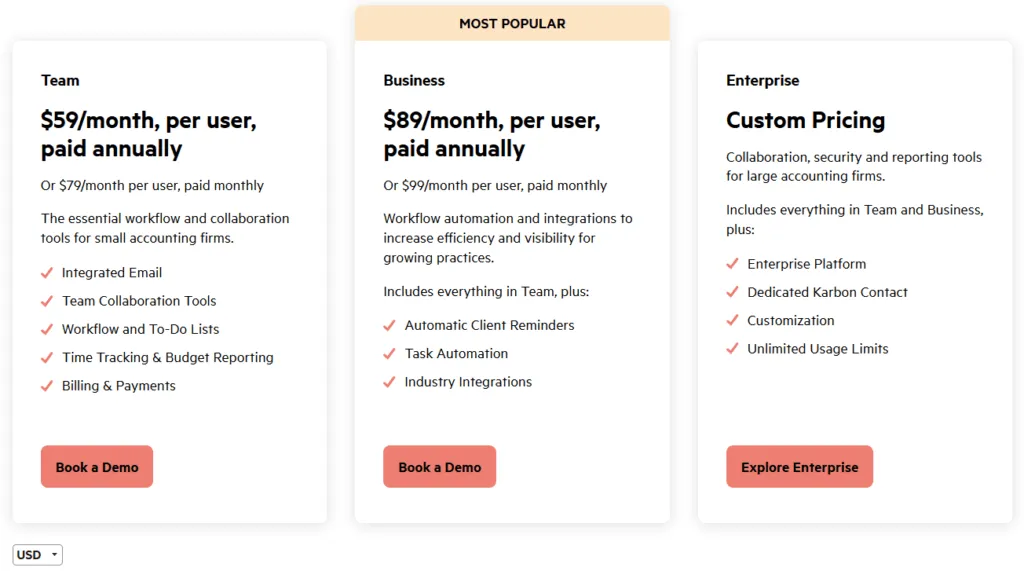
Karbon‘s pricing is more straightforward but premium from the start.
The Team plan at $59/user/month provides core features, while the Business plan at $89/user/month adds automation and integrations. You’ll need to book a demo to access the free trial.
For a 10-person firm, you’re looking at $590-890 per month. Additional costs include eSignature credits, payment processing fees, and Power BI subscription for reporting. While Karbon offers both monthly and annual billing options, the pricing remains steep regardless.
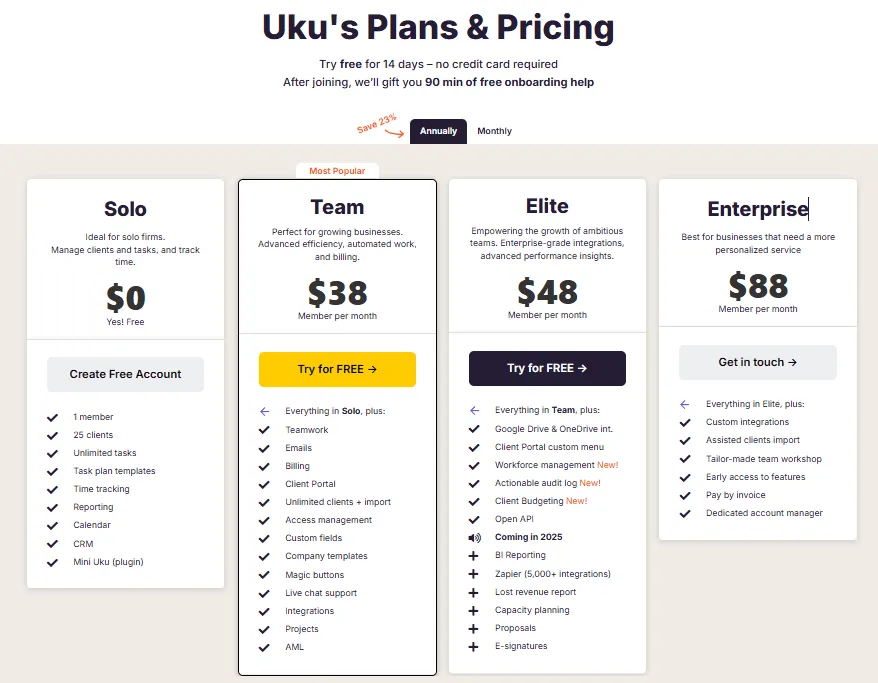
Uku‘s pricing is refreshingly transparent and accessible, with flexible monthly options that many clients prefer to large upfront annual commitments.
The Team plan starts from $38/user/month and includes core features like unlimited clients, client portal, integrations, and automation. The Elite plan, starting from $48/user/month, adds advanced features like Client Budgeting, Document Management, Workforce management and e-signatures.
A 10-person firm pays approximately $380-580 per month depending on the plan selected. Annual billing saves 23%, and pricing is available in multiple currencies (€, $, and £), reflecting Uku’s international focus.
Tax resolution features separate the specialists
For tax-focused firms, specialized features can be a deciding factor.
Canopy shines here with its tax resolution heritage. The platform offers direct IRS integration for pulling transcripts, a comprehensive notices library with resolution workflows, and specialized tools for managing tax resolution cases. You can pull up to 20 years of transcripts with a single click, and the system provides step-by-step guidance for resolving various IRS notices. This specialization is particularly deep for tax resolution work.
Karbon offers tax workflow capabilities and IRS integration through its TaxNow partnership, allowing firms to pull transcripts and tax statuses at scale. The platform can manage tax preparation workflows and deadlines effectively. While it may not have Canopy’s depth in tax resolution calculations and forms, it provides solid tax practice management features that many firms will find sufficient.
Uku sits in the middle, offering solid tax workflow management without specialized resolution features. The platform handles tax preparation workflows well, with customizable templates and automated reminders. While it lacks direct IRS integration, it provides the workflow automation and client management features most tax preparers need.
Created from the ground up to be international, especially for UK and US markets, Uku offers multilingual support (12 languages) and multi-currency capabilities across multiple markets including UK, USA, and Scandinavia.

Email management approaches differ dramatically
Email is the communication backbone of many accounting firms, and each platform handles it differently.
Canopy treats email as a communication record. Emails sync with client records, creating a communication history. The platform also offers shared team inboxes and AI tools to help write and summarize professional emails. It’s functional and integrates email within the client management system effectively.
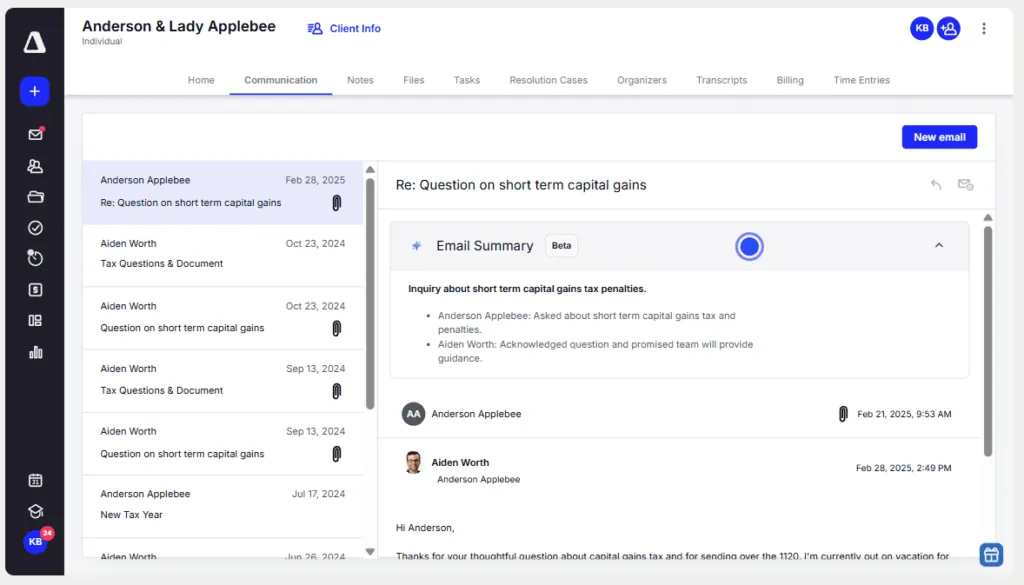
Source: Canopy
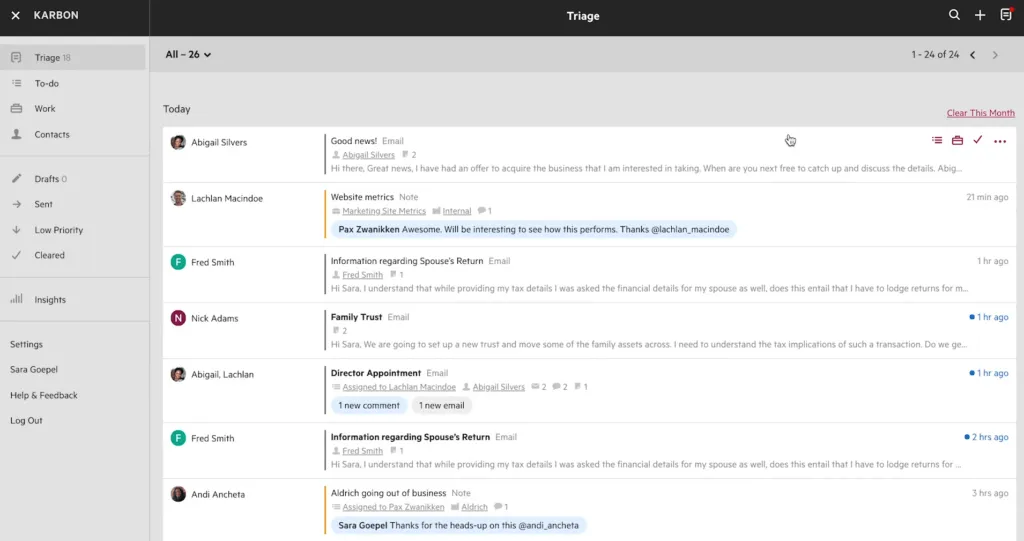
Karbon revolutionizes email handling with its “Triage” system. All emails flow into a central inbox where they can be assigned, commented on, and linked to work items. The philosophy is that email shouldn’t live in personal inboxes but should be part of the firm’s workflow. It’s powerful but requires firms to adapt to this centralized approach, which can represent a significant change in operations.
Source: Karbon
Uku integrates email intelligently without forcing a complete paradigm shift. Emails connect to relevant tasks and clients, automated email reminders keep workflows moving, and templates streamline common communications. Communications appear on a client timeline accessible to the team, helping solve the problem of information being trapped in individual email accounts. The system enhances your existing email workflow rather than replacing it, potentially making adoption smoother.
Time tracking and billing integration
How well these features work together directly impacts your firm’s profitability.
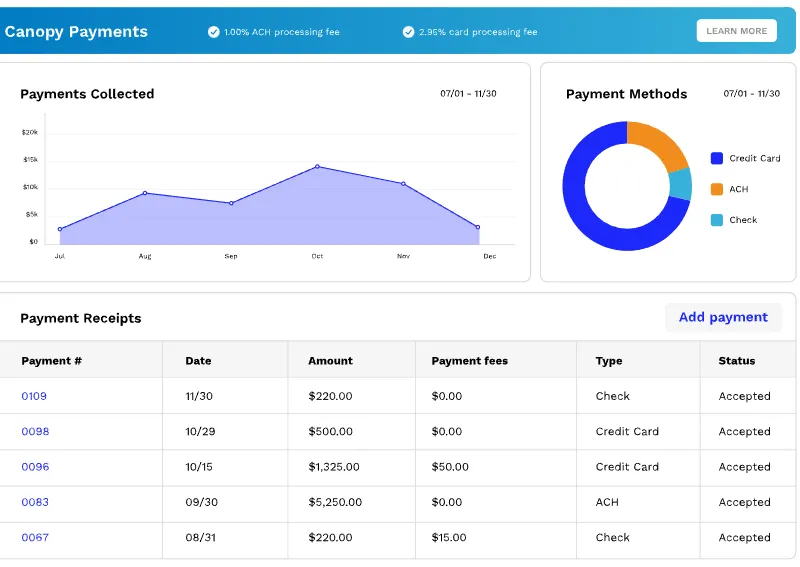
Canopy‘s Time & Billing module offers solid functionality but requires additional subscription costs ($22-31/user/month). Time tracking integrates with workflows, and the billing system handles various pricing models including multiple user rates and surcharging. However, the modular nature means these features might not feel as integrated as in other platforms, and some users report the billing functionality is less comprehensive than dedicated billing software.
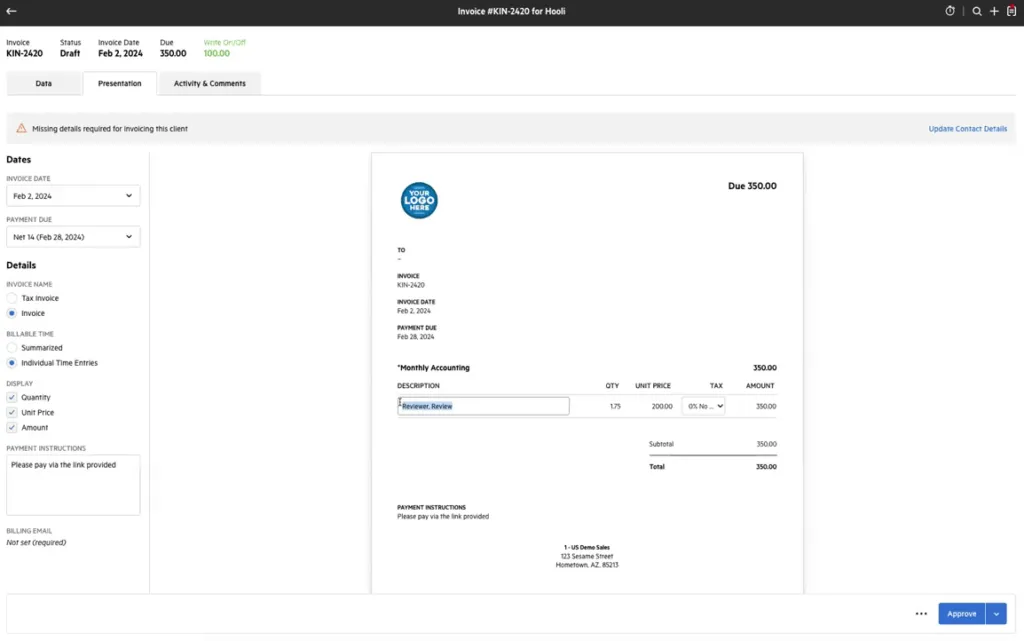
Karbon includes time tracking and billing in its core platform, with sophisticated integration between time entries and invoicing. The system supports multiple billing methods (time-billing, fixed-fee, recurring) and automates invoice generation based on tracked time. Karbon Payments integration streamlines collection, though it adds transaction fees. The reporting on WIP (Work in Progress) and realization rates is particularly strong.
Source: Karbon
Uku‘s approach to time tracking and billing emphasizes efficiency and automation. The automated billing system supports complex price lists based on quantity, time, material, and ranges with different rates for different periods. The system handles sophisticated rounding rules and minimum time settings. Multiple time tracking methods (stopwatch, manual entry, bulk time allocation) accommodate different working styles.
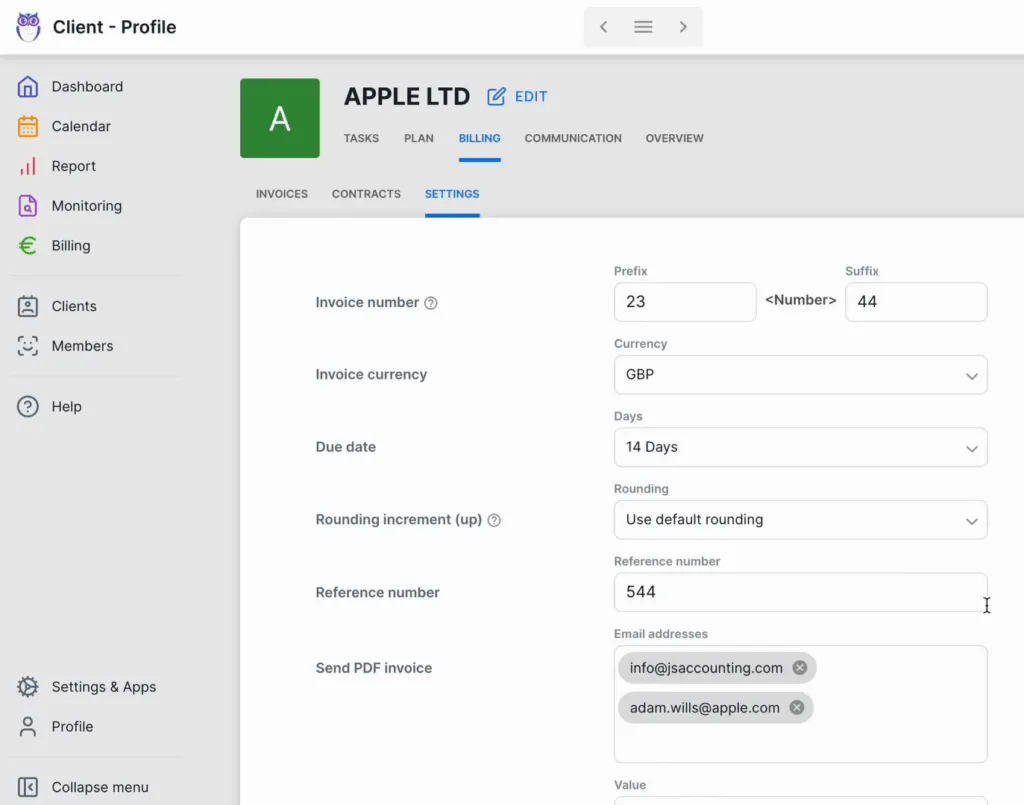
The standout feature is the billing automation that flows from time tracking: according to the vendor, the system can reduce invoicing time for 100+ clients dramatically. The platform includes reporting features to provide insights into profitability and pricing structure, with enhanced BI Reporting features planned for 2026.
The learning curve affects your ROI
The best features in the world don’t matter if your team won’t use them.
Canopy has a moderate learning curve.
The interface is generally intuitive, but the modular structure means understanding how different components interact takes time. Users report that while individual features are straightforward, mastering the full platform requires dedication. The company offers onboarding support with a typical implementation lasting 6-8 weeks.
Karbon has a steep learning curve.
The platform’s power comes with complexity, and implementations can range from 4 weeks (Guided) to 8-12 weeks (Guided Plus). The good news is that Karbon does offer a free trial after you book a demo, allowing you to evaluate the system. While Karbon offers extensive resources including free group onboarding, Guided Implementation packages, and Karbon Academy, the investment in training time is substantial.
Uku prioritizes immediate usability, describing itself as “a system your team will actually enjoy using.”
The platform is designed for rapid adoption with testimonials noting teams can “start assigning tasks immediately.” The 14-day free trial includes access to Elite features, and the company provides 90 minutes of free onboarding assistance. This design focus on rapid adoption can potentially lead to faster ROI compared to more complex platforms.
One firm even reported saving around 20% of time spent on task management.
Canopy vs Karbon vs Uku: Which should you choose?
The choice between these platforms depends on your firm’s specific needs, technical appetite, and growth trajectory.
Choose Canopy if:
- Tax resolution is a significant part of your practice
- You want the flexibility to choose specific modules
- You need direct IRS integration and transcript pulling
- You’re willing to pay premium prices for specialized features
- Your firm has the resources to manage a modular system
Explore Canopy’s specialized tax features with their 15-day free trial
Choose Karbon if:
- Your firm prioritizes internal collaboration and workflow automation
- You want to completely reimagine how your firm handles email
- You need sophisticated Practice Intelligence and AI features
- You have the time and resources for extensive training
- You’re willing to pay premium prices for enterprise features
Book a demo to see if Karbon’s workflow philosophy fits your firm
Choose Uku if:
- You want to minimize your team’s admin time with efficient workflows
- You value ultra-fast onboarding and modular scaling
- You need multilingual or multi-currency support for international clients
- You’re transitioning from Excel and want straightforward implementation
- You prefer flexible monthly pricing rather than annual commitments
- You require E-signatures for document workflows
- Quick adoption and immediate productivity are priorities
- You want automated billing that can significantly reduce invoicing time
Experience how Uku can transform your firm from Excel to greatness with a 14-day free trial of our Elite plan.
The accounting practice management landscape in 2026 isn’t about finding the platform with the most features. It’s about finding the one that your team will actually use, that delivers real efficiency gains, and that grows with your practice without growing your overhead.
While Canopy and Karbon compete on features and complexity, Uku proves that the best solution is often the one that balances capability with simplicity. Sometimes the smartest choice isn’t the one with venture capital backing or the most extensive feature list, it’s the one that lets you focus on serving clients instead of managing software, and transforms your firm into a system your team will actually enjoy using.

Founder & Visionary at Uku. Building the future of accounting practice management — where AI handles the routine so accountants can focus on what matters.

Ready to upgrade your practice management?
Join 1,000+ accounting firms already using Uku to save time and grow their business.
Related articles

Financial Cents vs Karbon (vs Uku): Which Practice Management Software Actually Fits Your Firm in 2026?

Pixie vs Karbon (vs Uku): Which Practice Management Software Actually Fits Your Firm in 2026?

Aero Workflow vs Karbon (vs Uku): Which Practice Management Software Actually Fits Your Accounting Firm in 2026?