

7 Jetpack Workflow Alternatives: Practice Management Tools for Growing Accounting Firms

Jetpack Workflow has earned its reputation as one of the most reliable workflow management tools for accounting professionals. Since 2014, it has helped thousands of firms in 18+ countries standardize their recurring client work, automate task creation, and ensure deadlines are never missed. Its template library, intuitive dashboard, and focused approach to internal workflow management have made it a favorite among small to mid-sized accounting firms. Yet as firms scale, many begin searching for Jetpack Workflow alternatives that offer broader capabilities.
But here’s the reality: as your firm grows, you might find that managing internal tasks is only part of the equation. Jetpack Workflow deliberately focuses on being a workflow management tool, not a comprehensive practice management platform. This means that features many firms eventually need (client portals, integrated billing, advanced analytics) require additional software subscriptions.
That’s where this guide comes in. Whether you’re looking to:
- Add client-facing capabilities with a professional portal and communication tools
- Automate your billing and invoicing process directly from tracked work
- Gain deeper business insights beyond basic progress reports
- Streamline email management and client communication
- Find a more cost-effective solution with flat-rate or budget-friendly pricing
- Get specialized tools for tax preparation or bookkeeping workflows
We’ll explore dedicated Jetpack Workflow alternatives that excel in these specific areas.
Some firms might use these tools to complement their existing Jetpack Workflow setup, while others might choose to replace it entirely with a more comprehensive solution. This isn’t about finding a “better” platform; it’s about finding the right fit for your firm’s current needs and growth trajectory.
Let’s dive into the alternatives and discover which ones might be the perfect addition to your accounting tech stack.

What is Jetpack Workflow?
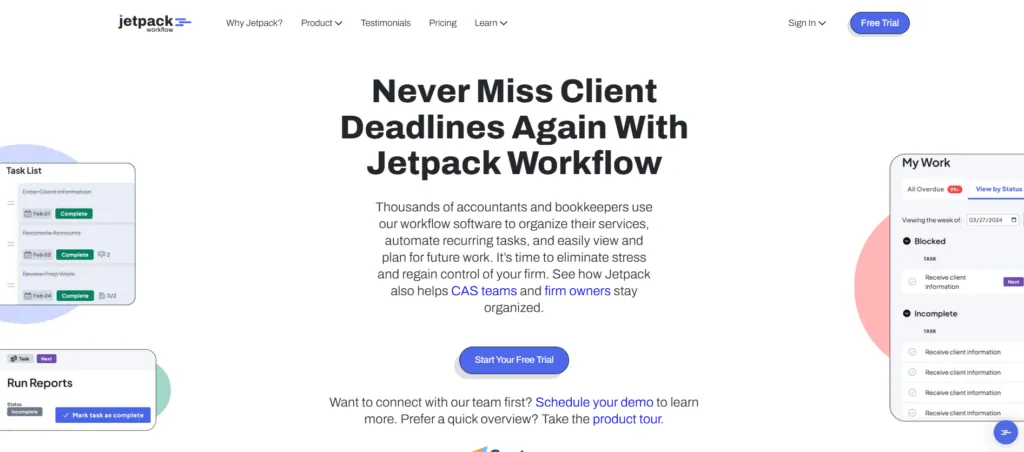
Jetpack Workflow is a cloud-based workflow management software specifically designed for accountants, bookkeepers, and CPA firms. Founded in 2014 by David Cristello, the platform has grown to serve over 7,000 customers across 18+ countries, with more than 5 million client projects completed through the system.
Understanding what makes Jetpack Workflow tick helps explain why firms seek Jetpack Workflow alternatives. The platform’s core philosophy is deliberate simplicity: it focuses on doing one thing exceptionally well, which is helping firms standardize, track, and automate their recurring client work. Its key features include:
- Jobs & Tasks system that creates a hierarchical structure for managing client projects with individual actionable steps
- Template library with 32+ pre-built workflows for common accounting tasks like monthly bookkeeping, tax returns, and payroll processing
- Recurring job automation that automatically generates new jobs based on schedules (daily, weekly, monthly, quarterly, yearly)
- Dashboard providing a bird’s-eye view of firm capacity, showing overdue work, current tasks, and upcoming deadlines
- Customizable labels for flagging job statuses like “Waiting on Client” or “Urgent”
- Planning view for capacity management and workload visualization across the team
- Time tracking with manual entry and stopwatch options
When you create a template in Jetpack Workflow and apply it to clients, the system automatically generates jobs at the right time, assigns them to team members, and tracks progress through completion. The dashboard gives managers visibility into what everyone is working on without constant status meetings.
However, Jetpack Workflow deliberately positions itself as a workflow management tool rather than a comprehensive practice management suite. This means it excels at internal task tracking but requires additional software for client-facing functions like portals, integrated billing, and advanced document management, which are the features most frequently requested by its users.
Looking for a Better Workflow Solution?
Try Uku free for 14 days – no credit card required.
How We Curated Our List of Jetpack Workflow Alternatives
After testing Jetpack Workflow and researching the accounting practice management market, we focused on finding tools that address the specific gaps users consistently mention. While Jetpack Workflow excels at internal workflow management and task tracking, growing firms often need more powerful tools for:
- Client collaboration and communication through dedicated portals rather than scattered email threads
- Integrated billing and invoicing that connects directly to tracked work and time entries
- Advanced reporting and analytics that provide actionable business insights, not just task completion metrics
- Email management that centralizes client communication within the workflow context
- Specialized features for tax preparation, bookkeeping, or specific practice areas
- Cost-effective scaling as teams grow and per-user pricing adds up
Each Jetpack Workflow alternative on this list excels in one or more of these areas. Some are comprehensive alternatives that could replace Jetpack entirely, while others excel in specific functions that complement an existing setup.
| ❗DISCLAIMER: We aren’t covering every single practice management tool on the market! Our focus is on highlighting the best alternatives that address Jetpack Workflow’s limitations for various use cases. The goal is to help you find tools that cater to your firm’s specific needs. |
|---|
1. Uku: Best Alternative for Fast & Flexible Practice Management

Uku is a comprehensive accounting practice management platform and our top pick among Jetpack Workflow alternatives. It combines everything Jetpack Workflow does well with the client-facing capabilities and business intelligence features that growing firms need. Founded in 2017 by Rain Allikvee and Jaanus Lang, Uku was created from the ground up to be international, especially for UK and US markets, and now serves 1,000+ clients globally across 25+ countries with support for 12 languages and multi-currency capabilities.
What makes Uku distinctive is its modular approach to features combined with powerful automation. Like an iPhone where you start with basic functionality and add apps as needed, firms can begin with just CRM and tasks, then gradually add features as they grow. This means you can start working on day one rather than spending weeks on upfront configuration.
The platform’s standout capability is its automated billing system, which transforms what traditionally takes 2-3 days of invoice preparation into approximately 30 minutes. The system supports complex price lists based on quantity, time, material, and ranges with different rates for different periods, along with sophisticated rounding rules that ensure all work gets properly billed.
Its key capabilities include:
- Automated billing with contract templates: Set up rules once, and time tracking automatically calculates billable amounts in real-time. Users report seeing ~20% more profit by discovering outdated agreements where they were billing for eight hours but employees were doing 20 hours of work.
- Integrated client portal: Unlike traditional portals where tickets must be connected to work items, Uku’s portal mirrors the exact same task on both sides. Clients and accountants work on the same item with all communication, actions, documents, logs, and time tracking in one place.
- BI Reporting: Real-time visual reports and alerts with deep filters, saved report templates, and three levels of depth: summary, tasks, and time. This prevents firms from discovering losses 30 days too late.
- Three-level workflow structure: Task templates → Client task plans → Individual tasks, allowing for both standardization and client-specific customization
- Speed-focused UX: 90% of actions are one-click, dramatically reducing day-to-day admin tasks
- One-click document digitalization: Submit documents for digitalization directly into accounting software with a single click
For firms that have outgrown Jetpack Workflow’s internal-only focus and need a unified platform for both workflow management AND client collaboration, Uku provides exactly that, and it is a system your team will actually enjoy using without the enterprise complexity of some competitors.
Why Choose Uku Over Jetpack Workflow for Fast & Flexible Practice Management
While Jetpack Workflow excels at internal task tracking, Uku extends that foundation into a complete practice management solution. Here’s where Uku fills the gaps that Jetpack users frequently cite.
Modular Implementation: Start Working on Day One
The biggest difference between Uku and traditional practice management platforms is Uku’s modular approach. While many competitors require substantial upfront configuration and training before firms can begin using the system effectively, Uku allows firms to implement software step by step.
This flexibility is specifically one of the biggest reasons why firms choose Uku over more complex alternatives. You can work with your Excel file for an hour, import it into Uku, and have automated plans ready to go. This “from Excel to greatness” approach addresses accountants’ risk aversion and fear of lengthy software implementations after bad experiences with other tools.
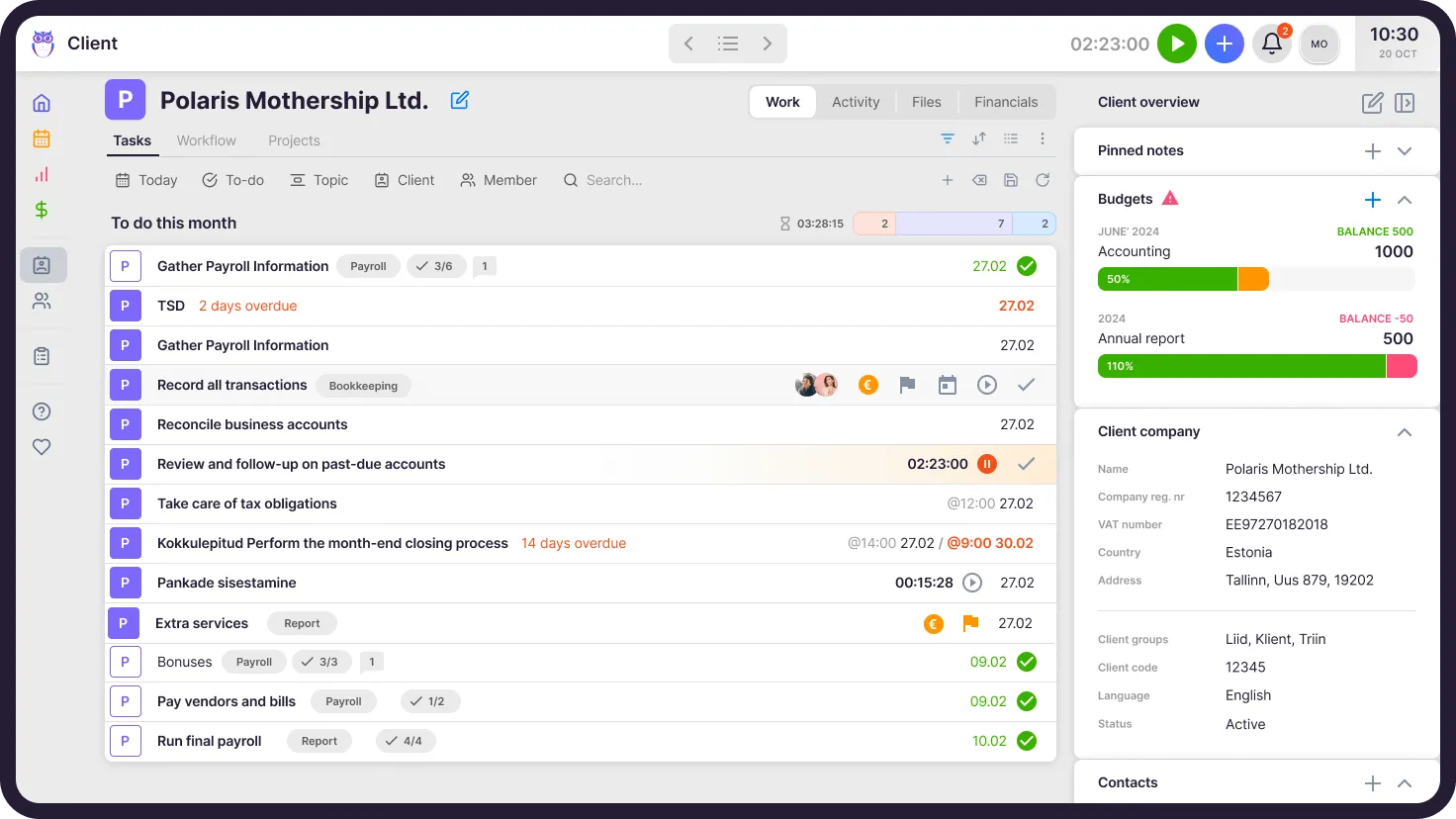
⚡ Uku in Action: A firm transitioning from spreadsheets can import their client list, set up basic workflows on day one, and be productive immediately. Over the following weeks, they gradually add time tracking, then billing automation, and then the client portal, rather than trying to learn everything at once.
Automated Billing: From Days to 30 Minutes
Jetpack Workflow includes time tracking but lacks integrated billing and invoicing capabilities. This means firms need separate software to create invoices, manually reconcile tracked time with billing, and manage the accounts receivable process.
Uku’s automated billing system is the platform’s primary competitive advantage because it reduces invoice preparation time from two to three days to just 30 minutes, even for firms with more than 100 clients. The system connects directly to your workflow: time tracked against tasks flows into the billing module, where invoices are generated automatically based on client contracts.
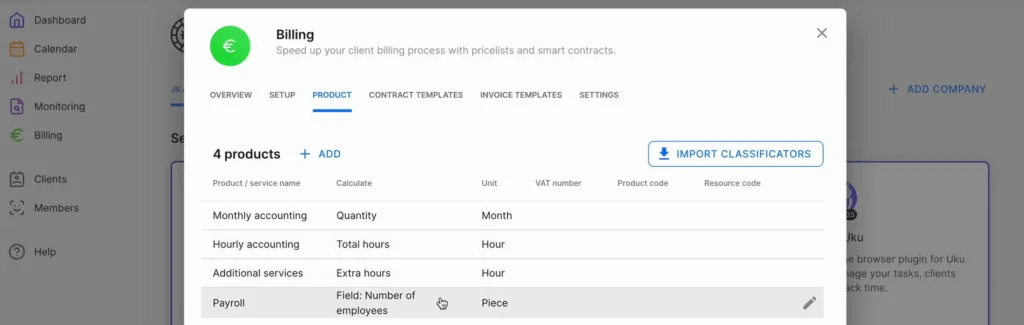
The system supports multiple pricing models including fixed-fee billing for recurring monthly services, hourly billing based on tracked time, item-based billing for specific deliverables, and mixed models combining approaches. You create contract templates tailored to the accounting services you offer, assign them to clients, and Uku creates the invoices automatically.
What makes this particularly powerful is the profitability tracking. The system tracks both sales prices and actual cost prices. If an employee costs €30/hour but bills at €45/hour, managers can see immediately whether that client relationship is profitable. When employees work eight hours but only six are billable, the BI Reporting provides insights into whether the issue is employee efficiency, client difficulty, or pricing structure.
⚡ Uku in Action: At month-end, instead of exporting time reports from Jetpack, creating invoices in separate billing software, and manually matching them up, Uku presents you with draft invoices already populated from tracked work. You review, adjust if needed, and send in bulk. Integration with Xero or QuickBooks means the invoices automatically sync to your financial records.
Client Portal: Unified Workspace for Collaboration
The lack of a built-in client portal is a frequently cited limitation of Jetpack Workflow. Client communication happens primarily through email integrations, which means information can get scattered across individual inboxes, document requests require manual follow-ups, and there may not be a unified view of client interactions.
Uku addresses this directly with an integrated client portal that transforms how firms interact with clients. The portal is fully customizable with your firm’s branding (logo, colors, custom domain) and uses “magic link” authentication, meaning clients receive a secure link via email and don’t need to create or remember credentials.
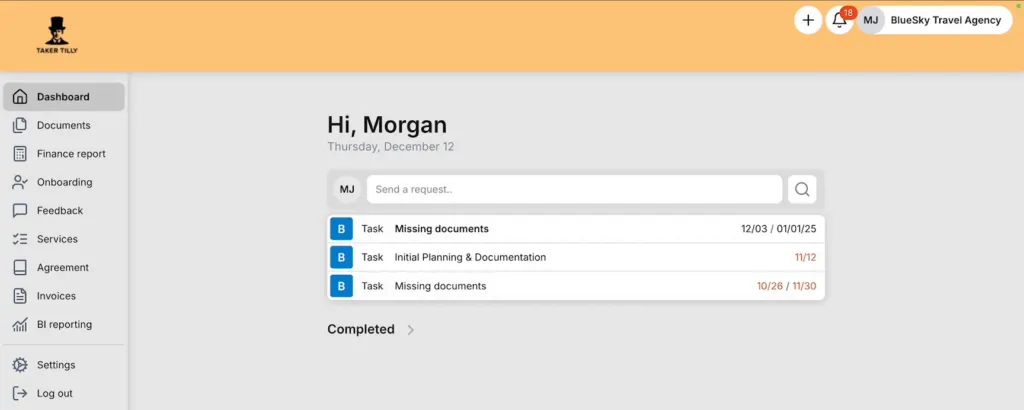
What sets Uku’s portal apart is that it mirrors the exact same task on both sides. When a client makes a request through the portal, notifications appear on the accountant’s dashboard, and they can immediately start tracking time or communicating within that same task. All communication, actions, documents, logs, and time tracking stay in one place.
The portal is highly customizable because firms can create unique menus for each client, run onboarding with forms, share business insight reports, display price lists, and embed custom content using simple copy-paste functionality.
⚡ Uku in Action: Imagine it’s the 5th of the month and you need bank statements from 50 clients for monthly bookkeeping. In Jetpack Workflow, this typically means sending individual emails and tracking responses manually. With Uku, you’ve already set up recurring “Upload Bank Statement” tasks that appear in each client’s portal on the 1st. They receive automatic reminders, upload directly to the right place, and you get a dashboard showing who has completed the task and who needs follow-up, all without a single manual email.
BI Reporting: Actionable Business Insights
Jetpack Workflow offers reporting through its Progress Report, Metrics Report, Timesheet Report, and Done Report. These provide useful operational data about task completion and time tracking. However, users often note that the reporting is basic compared to what they need for strategic decision-making.
Uku’s BI Reporting provides real-time visual reports and alerts with deep filters, saved report templates, and three levels of depth: summary, tasks, and time. The platform answers questions like which clients are actually profitable after accounting for all time spent, which team members are overloaded and who has capacity, and where the bottlenecks are in your workflows.
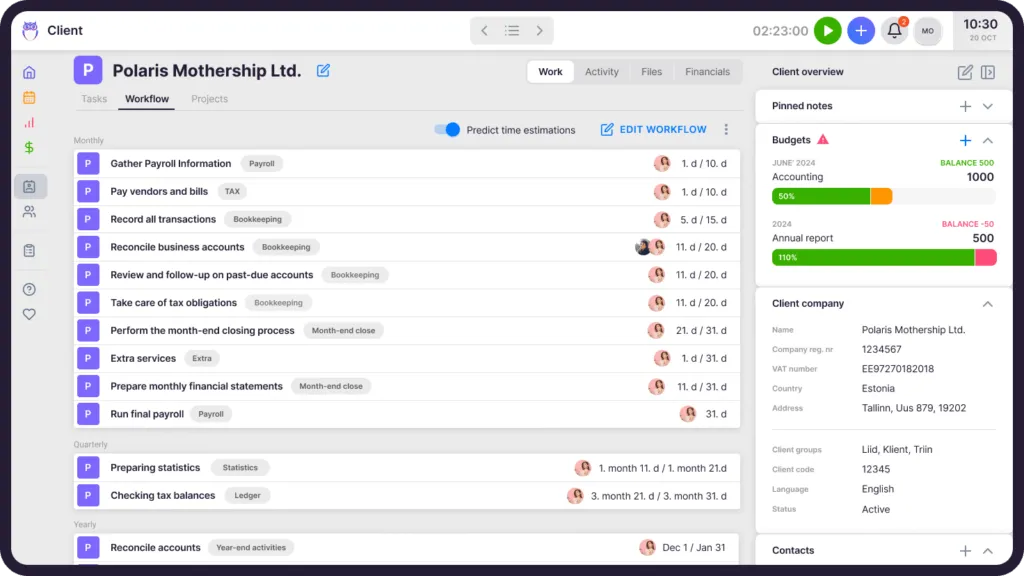
The real-time alerts are particularly valuable because they prevent firms from discovering losses 30 days too late by flagging when actual work significantly exceeds agreed hours or when profitability drops below expected levels.
⚡ Uku in Action: You notice a client seems like they’re taking more time than expected. In Jetpack, you’d export time reports and manually analyze them. In Uku, the BI Reporting dashboard immediately shows you’re significantly over the agreed hours for this quarter. You can drill down to see which tasks are taking longer than estimated and have a data-backed conversation with the client about adjusting scope or pricing.
🏅 NOTE: We also evaluated Karbon and TaxDome as comprehensive alternatives. While Karbon excels at email management with its Triage system, and TaxDome offers unlimited e-signatures, Uku provides the best balance of comprehensive features with fast & flexible deployment, making it ideal for firms that want to start being productive immediately without lengthy implementation.
Uku Pricing
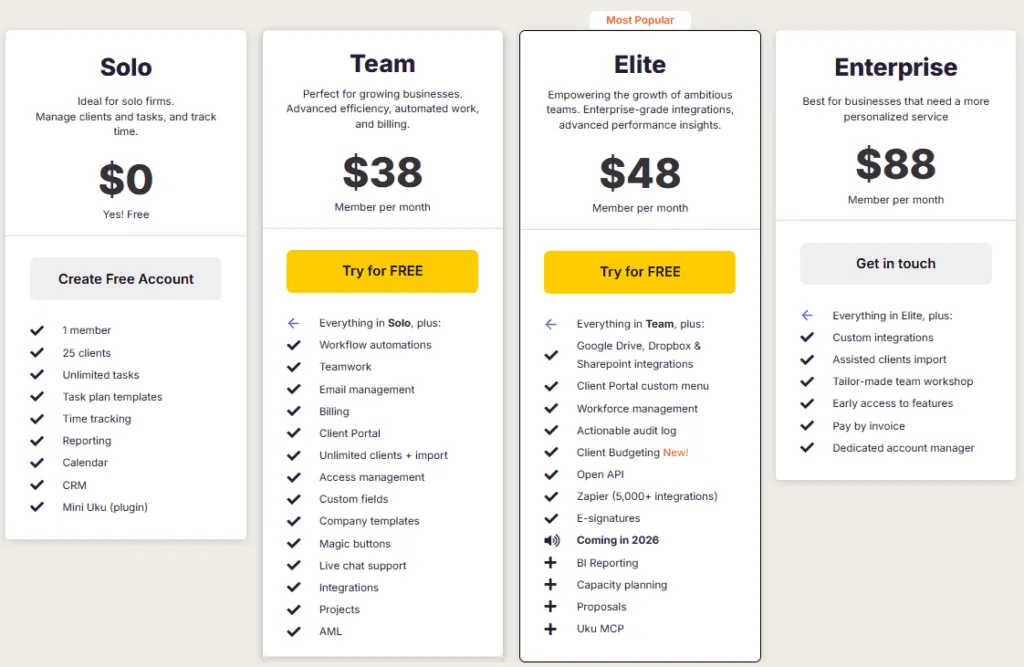
Uku offers four pricing tiers in multiple currencies (€, $, £), each adding capabilities as you scale:
Solo Plan (Free)
- 1 member, up to 25 clients
- Unlimited tasks, task plan templates, time tracking
- Reporting, CRM, calendar, Mini Uku browser plugin
- Perfect for freelancers starting out
Team Plan (from $38/member/month)
- Everything in Solo, plus unlimited clients
- Client portal, email integration, teamwork features
- Access management, custom fields, company templates
- Automated billing with complex price lists
- Integrations and project management
Elite Plan (from $48/member/month)
- Everything in Team, plus Google Drive/OneDrive integration
- Customizable client portal menu, workforce management
- Actionable audit log, client budgeting, document management
- E-signatures included
Enterprise Plan (from $88/member/month)
- Everything in Elite, plus custom integrations
- Assisted client import, tailor-made team workshop
- Early access to new features, dedicated account manager
- Pay by invoice option
Annual billing saves 23%. All paid plans include a 14-day free trial with Elite features, and Uku offers 90 minutes of free onboarding assistance.
“Support and user-friendliness of the system is above expectations on all parameters. It truly makes my life as CEO of a medium-sized accounting company a whole lot easier every day.”
— Frederik K., CEO of a mid-sized accounting firm (via Capterra)
Who Should Use Uku as a Jetpack Workflow Alternative?
Choose Uku if:
You want to minimize your team’s admin time with automated billing that reduces invoice preparation from days to approximately 30 minutes, delivering immediate ROI.
You value ultra-fast onboarding and modular scaling rather than lengthy implementations. Uku lets you start with just the features you need and add capabilities as you grow.
You’re transitioning from Excel and want the easiest implementation path. Uku’s “from Excel to greatness” approach addresses firms’ hesitancy after bad software experiences.
You need multilingual or multi-currency support for international operations. Uku supports 12 languages and pricing in €, $, and £.
You prefer flexible monthly pricing rather than annual commitments, allowing you to test the system before making a long-term financial decision.
Ready to see how Uku can transform your practice? Start your 14-day free trial and experience fast and flexible practice management, complete with the client portal, automated billing, and BI reporting that growing firms need.
Switching from Jetpack Workflow? Every Uku plan includes a free 90-minute onboarding session to help you get started and migrate your core data. Get started →
2. Karbon: Best Alternative for Enterprise-Grade Practice Management
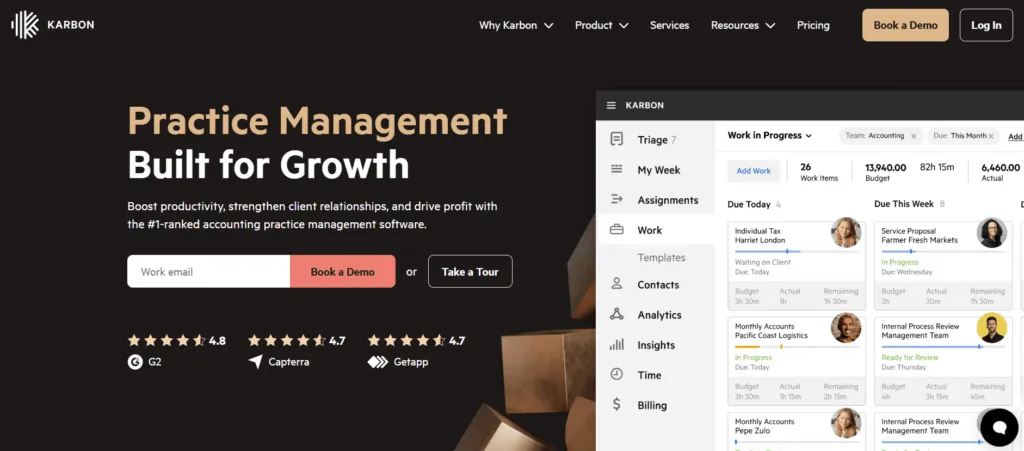
Karbon is a comprehensive, cloud-based practice management platform and one of the most established Jetpack Workflow alternatives for accounting firms that need more than basic task tracking. Where Jetpack Workflow focuses on internal workflow simplicity, Karbon positions itself as an all-encompassing practice operating system that aims to eliminate multiple disparate tools. Its key capabilities include:
- Karbon AI: Summarizes email threads, generates contextual drafts, prioritizes inbox items by urgency and sentiment
- Triage email system: Centralized inbox that makes emails actionable within workflows, with @mentions for team discussions
- Practice Intelligence dashboards: 12 pre-built dashboards covering billing lifecycle, budget vs. actuals, and workflow bottlenecks
- My Week interface: Consolidates tasks, emails, notes, and calendar events into daily planning views
- Client Portal (Karbon for Clients): Secure portal with magic links, document uploads, e-signatures, and task checklists
Karbon serves over 30,000 professionals globally and has raised $101.5M in total funding.
Why Choose Karbon Over Jetpack Workflow for Enterprise-Grade Practice Management
Karbon stands out in several key areas:
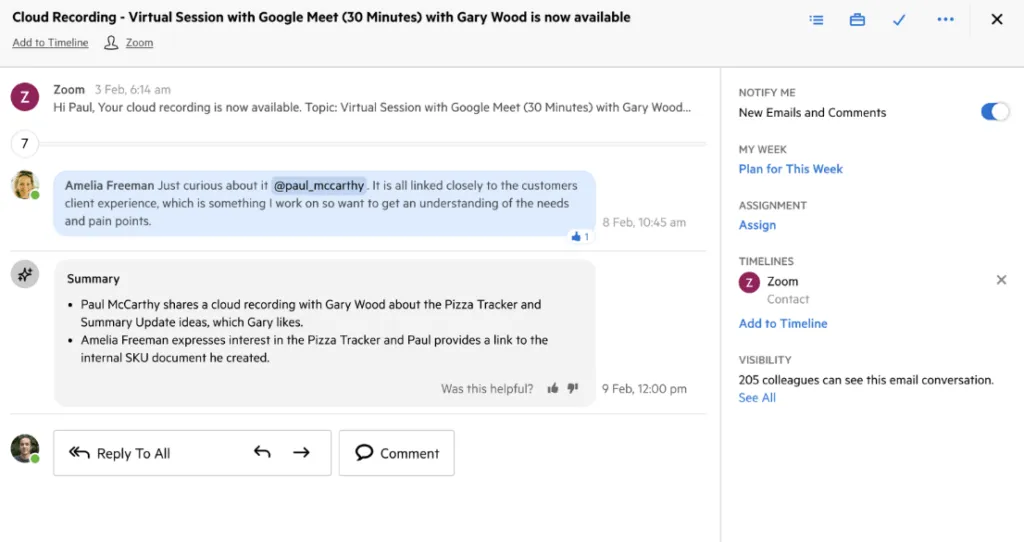
- Email-Centric Architecture
Jetpack Workflow treats email as external, requiring users to send emails through integrations while communication remains in individual inboxes. Karbon’s Triage system fundamentally changes this: every email becomes a shared, actionable item that can be assigned, discussed with @mentions, and linked to workflows. Team members have internal conversations on email threads without forwarding. For firms where partners need visibility into client communication without being CC’d on everything, this solves a structural problem.
- AI-Powered Efficiency
Jetpack Workflow’s core product has no AI workflow capabilities. Karbon has invested significantly in Karbon AI, offering one-click summaries of lengthy email threads, intelligent inbox prioritization based on urgency and tone, and draft generation from prompts. For managing partners processing hundreds of emails weekly, this represents substantial time savings.
Source: Karbon
- Comprehensive Business Intelligence
Jetpack’s reporting includes Progress, Metrics, Timesheet, and Done reports, which users describe as basic. Karbon’s Practice Intelligence provides 12 pre-built dashboards with drill-down capabilities. More significantly, Karbon provides direct data warehouse access via Snowflake for custom analysis in Power BI or similar tools. Note that using Power BI requires separate licenses starting from $14/user/month in addition to your Karbon subscription.
- Integrated Billing and Payment Collection
While both platforms offer time tracking, Karbon provides end-to-end billing: automated invoice generation, customizable templates, multiple billing methods, and integrated payment collection through Karbon Payments. Karbon claims invoices paid through their platform are settled nine days faster than manual invoices. However, note that Karbon’s billing setup and confirmation process takes considerable time compared to platforms with more streamlined invoice preparation.
🏅 NOTE: We also evaluated TaxDome for its comprehensive client-facing features and Canopy for its document management capabilities. Karbon offers the most seamless email-to-workflow integration for teams needing deep visibility into client communication and AI-assisted productivity gains.
Karbon Pricing
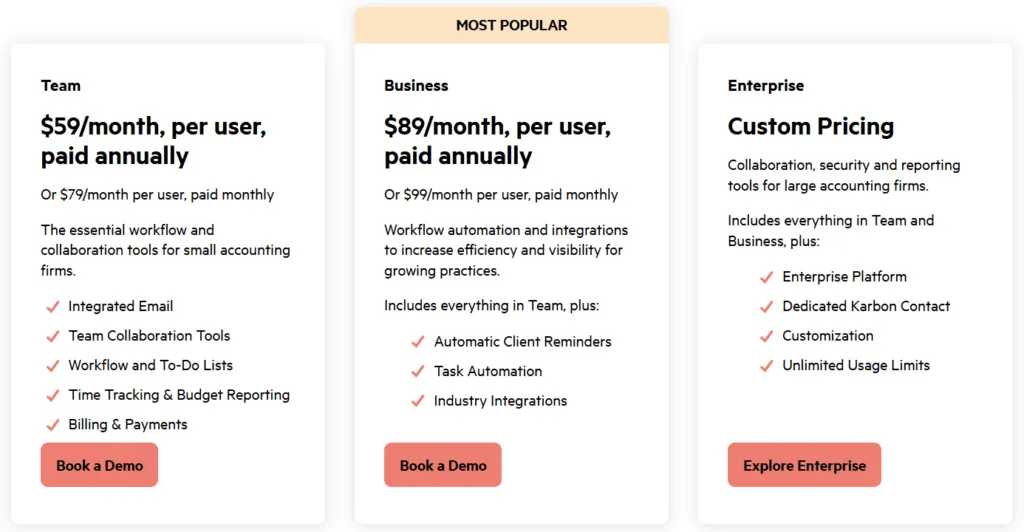
- Team Plan: $59/user/month (annual) or $79/month (monthly). Includes email via Triage, collaboration tools, time tracking, billing. Limited to 40 templates.
- Business Plan: $89/user/month (annual) or $99/month (monthly). Adds automatic client reminders, task automation, 75 templates.
- Enterprise Plan: Custom pricing. Unlimited templates, dedicated support, managed data import.
Additional costs include e-signature credits ($100/100 credits) and payment processing fees. A free trial is available after booking a demo.
Who Should Use Karbon as a Jetpack Workflow Alternative?
Choose Karbon if:
- Email chaos and communication silos are your biggest pain points. If important client information is trapped in individual inboxes, Karbon’s Triage architecture provides a structural solution that Jetpack’s basic email integration cannot match.
- You need AI-powered productivity tools now. If reducing time spent on email summarization and draft writing represents meaningful value, Karbon’s AI capabilities have no equivalent in Jetpack.
- You’re a mid-sized to large firm with growth trajectory. Karbon’s Enterprise tier and global presence are designed for firms that have outgrown simple workflow tools.
Bring order to your firm’s communication with Karbon.
Ready to Upgrade from Jetpack Workflow?
Join hundreds of accounting firms that switched to Uku for faster workflows and better client management.
3. TaxDome: Best Alternative for Comprehensive All-in-One Practice Management

TaxDome is an all-in-one practice management platform and one of the most feature-rich Jetpack Workflow alternatives. Designed for accountants, bookkeepers, and tax preparers, it addresses Jetpack Workflow’s most significant limitation: the lack of dedicated client collaboration tools. Founded in 2017, TaxDome bundles CRM, workflow automation, document management, billing, client portal, e-signatures, and team collaboration into a single platform. Its key capabilities include:
- White-labeled client portal with mobile app: Dedicated iOS and Android apps where clients upload documents, complete organizers, e-sign forms, and pay invoices (Android app rated 4.7/5)
- Unlimited document storage and e-signatures: No caps, with IRS-compliant Knowledge-Based Authentication for Form 8879 at $1/signature
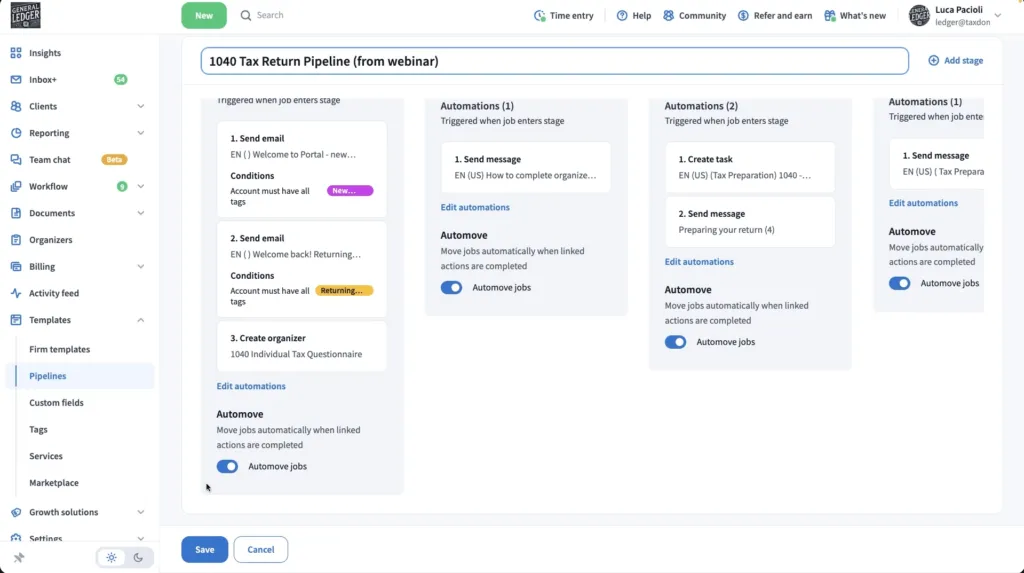
- Pipeline-based workflow automation: Visual Kanban boards with conditional logic that trigger emails, document requests, and invoice generation
- AI-powered document features: Automatic document naming and tagging, plus integration with Juno for tax preparation workflow
TaxDome serves over 10,000 firms and 30,000+ professionals globally.
Why Choose TaxDome Over Jetpack Workflow for Comprehensive Practice Management
TaxDome stands out in several key areas:
- Complete Client-Facing Infrastructure
Jetpack’s client collaboration is primarily email-based, which users find inefficient. TaxDome provides a dedicated, white-labeled client portal and native mobile app. Clients can upload documents (including using a built-in mobile scanner), e-sign forms, pay invoices, complete digital organizers, and communicate via secure messaging, all without email for sensitive document exchange.
- Unlimited Built-in E-Signatures
Jetpack requires external solutions for electronic signatures. TaxDome includes unlimited e-signatures in every tier, with IRS-compliant Knowledge-Based Authentication for Form 8879. This eliminates separate DocuSign or Adobe Sign subscriptions.
- Integrated Billing and Payment Processing
Jetpack lacks integrated billing and invoicing. TaxDome addresses this with one-time and recurring invoice generation, automatic payment collection, document locking until payment, and QuickBooks Online synchronization.
- Comprehensive Workflow Automation TaxDome’s pipeline system includes automation triggers for client-facing communications: requesting specific documents, generating invoices at pipeline stages, and triggering reminders. The “automove” feature advances jobs when client signatures or payments complete.
Source: TaxDome
However, TaxDome’s comprehensive nature means it takes a monolithic approach that requires substantial upfront configuration before firms can begin using the system effectively. Implementation experiences vary, with some users reporting quick setup while others invest weeks in building out their ideal workflows. For firms that prefer to implement software step by step rather than all at once, this can be a significant consideration.
🏅 NOTE: We also evaluated Canopy for its modular flexibility and Financial Cents for its approachability. TaxDome offers a comprehensive all-in-one feature set for firms seeking to replace multiple software subscriptions with a single platform and who are prepared for the upfront investment in configuration.
TaxDome Pricing
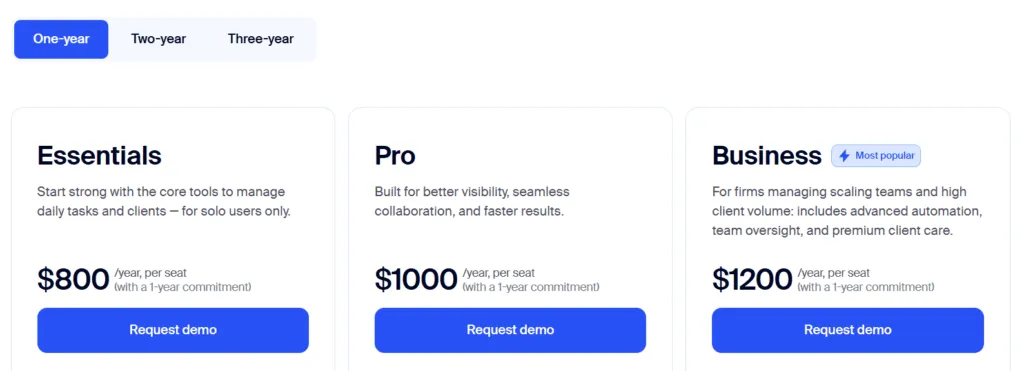
TaxDome uses per-user annual subscriptions. All tiers include unlimited clients, document storage, and e-signatures.
- Essentials: $800/year for 1-year commitment (~$67/month). Unlimited CRM, client portal, workflow automation, proposals, document storage and e-signatures.
- Pro: $1,000/year per user (~$83/month). Adds real-time team chat, AI analytics, custom permissions.
- Business: $1,200/year per user (~$100/month). Dedicated Customer Success Manager, business reviews.
A 14-day free trial is available. Monthly seasonal staff option: $100/user/month on the Pro plan.
Who Should Use TaxDome as a Jetpack Workflow Alternative?
Choose TaxDome if:
- You need client-facing capabilities beyond internal workflow management. If you’re supplementing Jetpack with separate tools for client portals, e-signatures, and document sharing, TaxDome consolidates everything.
- You want unlimited e-signatures and document storage included. For firms handling high volumes of engagement letters and tax authorizations, TaxDome’s unlimited approach avoids per-signature costs.
- You serve clients who expect a modern digital experience. TaxDome’s mobile app and client portal provide a polished, branded experience that email-based workflows cannot match.
- You’re prepared to invest time in upfront configuration. TaxDome rewards the implementation investment with comprehensive functionality, but it’s not a “start working on day one” platform.
Deliver a modern client experience with TaxDome.
4. Financial Cents: Best Alternative for US/Canada Workflow Management
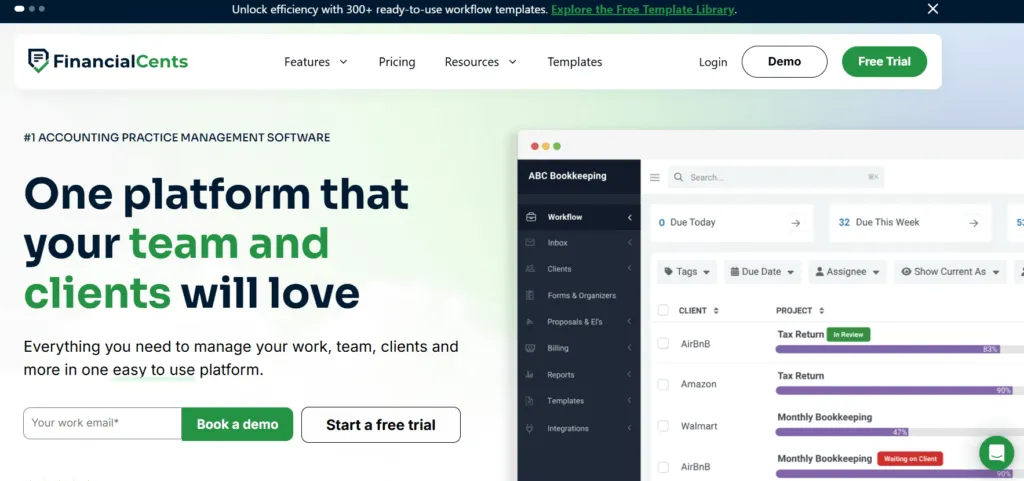
Financial Cents is a cloud-based practice management software and a strong Jetpack Workflow alternative for accounting firms in North American markets that need more than Jetpack Workflow offers, but aren’t ready for enterprise-level complexity. Unlike Jetpack’s internal-only focus, Financial Cents extends capabilities to include a client portal, integrated billing, email management, and proposals, all within a platform consistently praised for exceptional ease of use. Its key capabilities include:
- Passwordless client portal: “Magic link” technology lets clients access their portal without creating credentials; the system remembers devices for 30 days
- Focused Client Inbox: Two-way sync with Gmail and Outlook that filters to show only messages from registered clients
- Community-driven template library: Over 100 workflow templates created and shared by accounting professionals
- QuickBooks Online integration: Two-way sync for time entries, one-way sync for invoices and payments
Financial Cents serves over 10,000 accountants globally.
Why Choose Financial Cents Over Jetpack Workflow for US/Canada Workflow Management
Financial Cents stands out in several key areas:
- Complete Client Collaboration Suite
A frequently cited weakness of Jetpack is the lack of a built-in client portal. Client communication happens through email integrations, meaning requests get buried in inboxes and responses scatter across threads.
Financial Cents provides a comprehensive portal where clients view and respond to requests, upload documents, communicate through secure chat, and pay invoices, all through passwordless magic links. Automated reminders via email and SMS continue until clients complete their items, reportedly saving firms up to 20 hours weekly.
- Integrated Email Management
Jetpack allows Gmail integration for sending emails, but Financial Cents goes further. The “Focused Client Inbox” automatically filters synced emails to display only client communications. Users can pin emails directly to projects, convert emails into tasks with one click, and maintain complete audit trails showing “who spoke to the client, when, and about what.”
- All-in-One Billing and Proposals
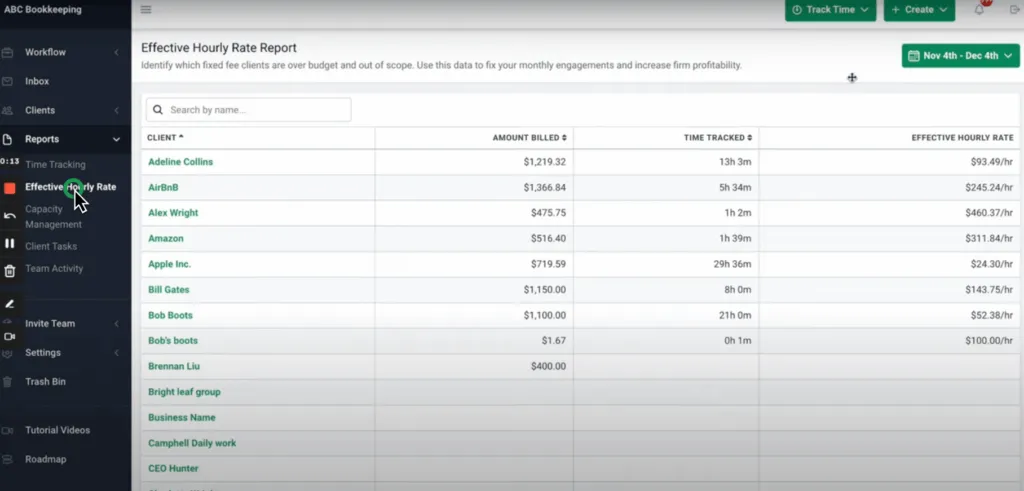
Jetpack lacks integrated billing and invoicing. Financial Cents fills this gap with time tracking, invoicing (one-off and recurring), online payments via ACH and credit card, proposals with e-signature through Adobe Sign integration, and “Effective Hourly Rate” reporting for fixed-fee profitability analysis.
Source: Financial Cents
Important Limitations to Consider:
Financial Cents has geographic and commitment constraints that may affect your decision:
- US/Canada-centric: Financial Cents is exclusively available in US and Canada markets with no multilingual support and billing only in USD. The client portal currently supports English only. For international firms or those with clients across multiple countries, this geographic limitation excludes the platform as an option.
- Minimum 1-year commitment: Unlike competitors offering flexible monthly billing, Financial Cents requires a minimum 1-year purchase commitment. This upfront commitment can deter firms wanting to test the platform thoroughly before making a long-term financial decision.
- No native Xero integration: While Financial Cents offers strong QuickBooks Online integration, it lacks native Xero integration. For firms using Xero as their primary accounting software, this creates workflow inefficiencies.
🏅 NOTE: We also evaluated TaxDome for its comprehensive features. Financial Cents offers an accessible option for North American firms moving from Jetpack who want simplicity without the steeper learning curve of more feature-heavy platforms. For firms needing global capabilities, multilingual support, or flexible monthly pricing, alternatives like Uku may be more suitable.
Financial Cents Pricing
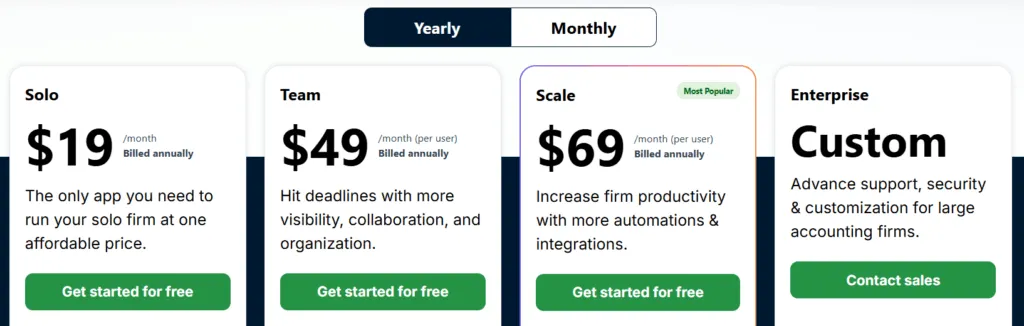
- Solo: $19/user/month (annual). Single-user firms. Includes workflow, client portal, document management, time tracking, invoicing, proposals, QuickBooks integration.
- Team: $49/user/month (annual). Growing teams. Adds integrated email, e-signatures, unlimited tags and custom fields.
- Scale: $69/user/month (annual). Adds auto-follow-ups, task dependencies, SmartVault integration, branded client portal.
- Enterprise: Custom pricing. Custom permissions, webhooks, premium training, dedicated success manager.
All plans require a minimum 1-year commitment. A 14-day free trial is available with no credit card required.
Who Should Use Financial Cents as a Jetpack Workflow Alternative?
Choose Financial Cents if:
- You’re a US or Canada-based firm seeking an upgrade from workflow-only tools. Financial Cents provides client communication, billing, and document collection without a steep learning curve.
- Client adoption of current systems has been a struggle. The passwordless magic link approach reduces friction for clients who resist learning new portals.
- QuickBooks Online is your primary accounting software. The deep two-way integration makes Financial Cents particularly effective for QBO-centric firms.
- You’re comfortable with annual commitments. If the 1-year minimum commitment aligns with your planning horizon, Financial Cents delivers strong value.
Simplify your firm’s workflow with Financial Cents.
5. Aero Workflow: Best Alternative for Flat-Rate Pricing and Process Documentation

Aero Workflow is a cloud-based accounting workflow software and a unique Jetpack Workflow alternative specifically designed for bookkeeping and accounting firms that prioritizes standardizing recurring tasks through detailed checklists and integrated procedures. Where Jetpack Workflow charges per user, Aero offers flat-rate tiers that become increasingly economical as teams grow. Its key capabilities include:
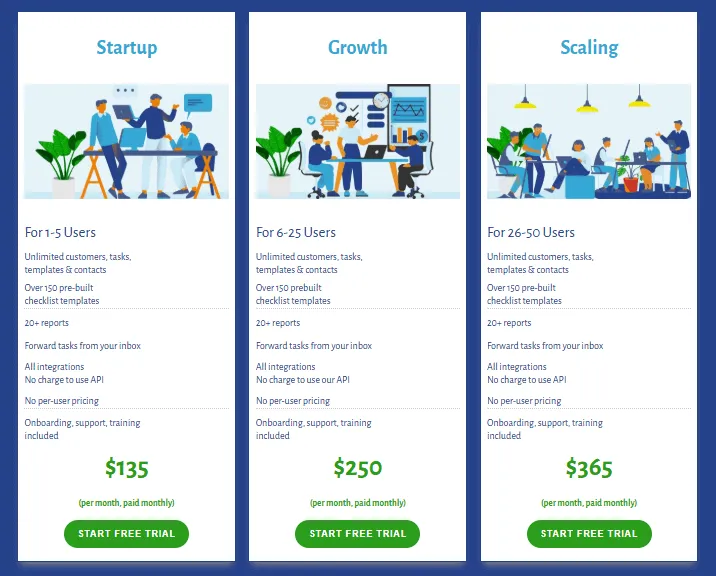
- Flat-rate subscription pricing: Tiered by user ranges (1-5, 6-25, 26-50 users) at fixed monthly rates
- 150+ pre-built templates: The “Aero Library” covers client onboarding, offboarding, monthly closes, payroll, and more
- Integrated procedure guides (SOPs): Link detailed Standard Operating Procedures directly within checklist steps
- Automatic time tracking: Timer starts when a task is opened; step descriptions auto-append to time notes
- Secure Client Vault: Encrypted storage for sensitive credentials, tax IDs, and login details
Why Choose Aero Workflow Over Jetpack Workflow for Flat-Rate Pricing
Aero Workflow stands out in several key areas:
- Flat-Rate vs. Per-User Pricing
Jetpack charges $40-49 per user monthly, so a 10-person firm pays $400-490/month. Aero’s “Growth” plan covers 6-25 users for $200-250/month total. A team of 15 pays the same as a team of 6. For firms in growth mode or adding seasonal staff, this eliminates “can we afford another team member” from software budget decisions.
- Substantially Larger Template Library
Jetpack offers 32+ templates. Aero provides over 150 expert-designed checklists for accounting workflows: monthly closes, client onboarding/offboarding, recurring tasks, year-end procedures, sales tax, payroll, and bill pay. This depth reduces setup time and ensures best practices from day one.
- Deep Procedure Integration
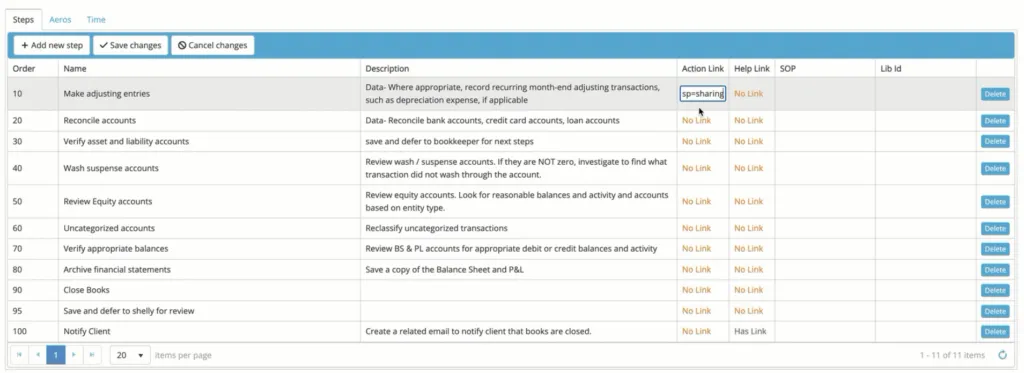
Aero embeds Standard Operating Procedures directly into task execution. Within each checklist step, users add “Help Links” to documentation, “Action Links” to web pages, and direct links to procedure guides. Team members access the “why” and “how” without leaving the task interface, a more systematic approach for firms prioritizing detailed process documentation.
Source: Aero Workflow
- Automatic Time Activation
Both platforms offer time tracking, but Aero’s implementation is automatic: the timer begins when a task opens, without requiring users to remember to start it. As users check off steps, descriptions auto-append to time notes, creating detailed records without manual entry.
🏅 NOTE: We also evaluated Karbon for team collaboration and Financial Cents for automation. Aero Workflow offers the most cost-predictable option for smaller bookkeeping teams needing extensive procedural documentation without practice management complexity.
Aero Workflow Pricing
- Startup (1-5 Users): $135/month ($108/month annual). Unlimited customers, tasks, templates, contacts. All integrations included.
- Growth (6-25 Users): $250/month ($200/month annual). Same flat rate whether you have 6 or 25 users.
- Scaling (26-50 Users): $365/month ($295/month annual). Enterprise pricing available for 50+ users.
30-day free trial with no credit card required. Month-to-month subscriptions available.
Who Should Use Aero Workflow as a Jetpack Workflow Alternative?
Choose Aero Workflow if:
- You prioritize predictable software costs. Firms planning to grow appreciate not recalculating software expenses with each new hire.
- You need extensive accounting templates. The 150+ template library covers workflows that can be implemented immediately.
- You want to embed detailed SOPs directly in workflows. Firms that value comprehensive procedure documentation as a training and quality control tool will find Aero’s approach more systematic.
- You prefer focused workflow management. Aero focuses on task management and process standardization rather than offering extensive client-facing features.
Streamline your firm’s workflows with Aero.
6. Cone: Best Alternative for Budget-Friendly Practice Management
Cone is the most budget-friendly Jetpack Workflow alternative – an AI-powered work operating system designed for professional service businesses that provides a unified proposal-to-payment platform at competitive pricing. Backed by Y Combinator and founded in 2022, Cone specifically addresses the gap between firms needing more than basic workflow management but unable to justify premium pricing. Its key capabilities include:
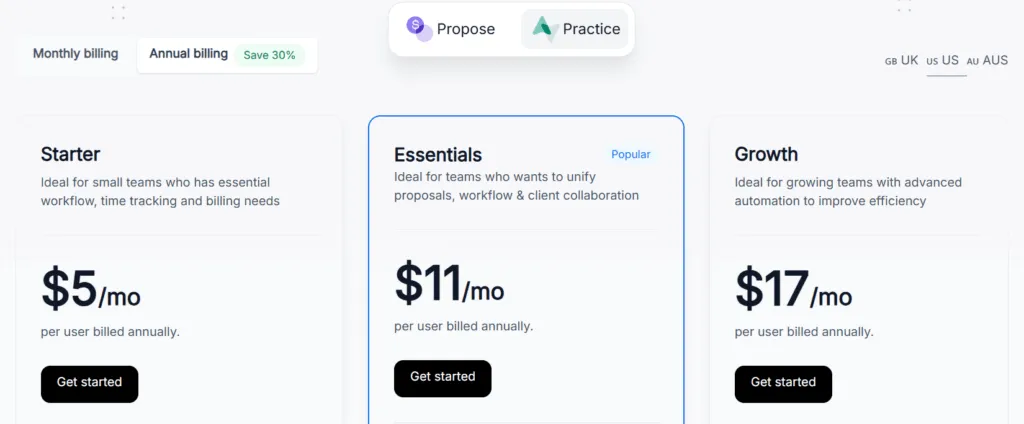
- Affordable pricing: Starting at $5/user/month for unlimited clients, workflows, time tracking, payments, and billing
- Unified proposal-to-payment platform: Create proposals with drag-and-drop editor, collect e-signatures, auto-generate invoices
- Comprehensive features: CRM, proposals, projects, workflows, billing, email management, and client portal in one platform
- Native integrations: Xero, QuickBooks Online, Stripe, GoCardless, Google Drive, SharePoint
Why Choose Cone Over Jetpack Workflow for Budget-Friendly Practice Management
Cone stands out in several key areas:
- Integrated Billing and Invoicing at No Extra Cost
Jetpack’s most cited limitation is lacking integrated billing. Cone builds automated invoicing into its core platform from the $5/user tier. When clients accept proposals, the system auto-generates invoices. Auto-charging for clients with payment methods on file (available on the Growth tier), automated follow-up reminders, and accounting software sync are all included. Cone claims this saves over 30 hours monthly on invoicing tasks.
- Functional Client Portal That Jetpack Lacks
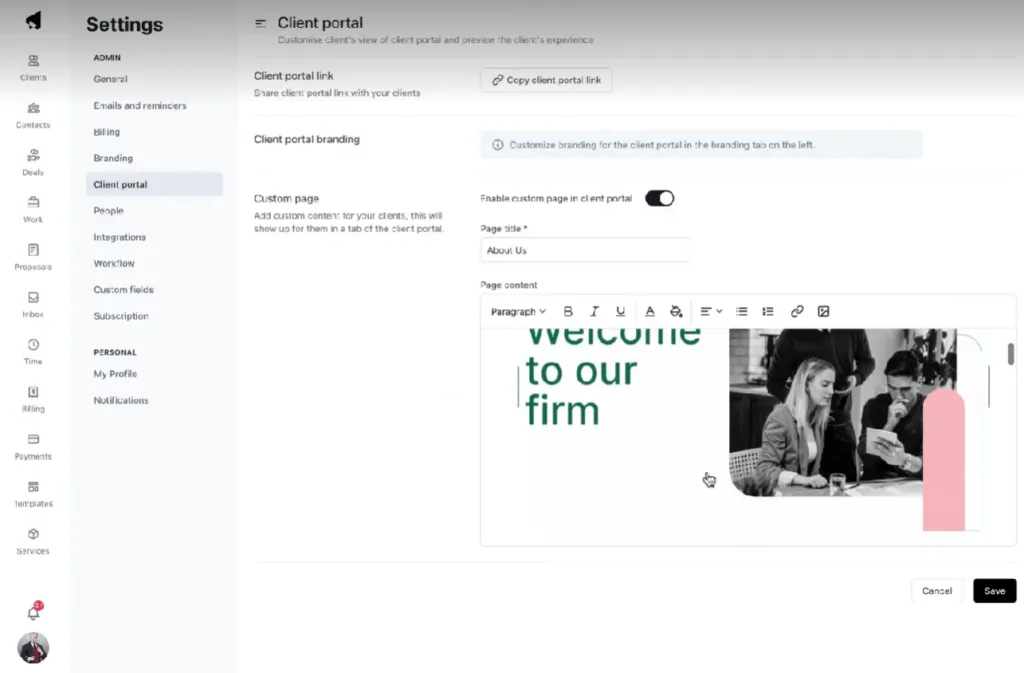
Cone provides a branded client portal at every pricing tier. Clients access tasks, upload documents, fill out questionnaires, e-sign documents, and communicate through built-in chat, all via passwordless magic links.
Source: Cone
- Proposal Creation and E-Signatures Built In
Jetpack doesn’t provide proposal or e-signature tools. Cone includes a flexible proposal editor with drag-and-drop sections, multimedia embedding, customizable templates, and built-in e-signature collection starting from the $11/user Essentials plan.
- Lower Total Cost
Jetpack Workflow costs $40-49/user/month for workflow management alone. Firms then need separate subscriptions for proposals, e-signatures, and client portals. Cone’s all-inclusive pricing at $5-17/user/month can represent significant savings compared to Jetpack plus necessary add-ons.
🏅 NOTE: We also evaluated Financial Cents for deadline tracking and TaxDome for comprehensive client management. Cone offers the most accessible entry point for teams needing integrated billing and client collaboration without premium pricing.
Cone Pricing
Practice Product:
- Starter: $5/user/month (annual) or $8/month (monthly). Unlimited clients, workflows, time tracking, payments, billing. 2 GB storage.
- Essentials: $11/user/month (annual) or $16/month (monthly). Adds unlimited proposals, integrated email, client portal, recurring workflows. 20 GB storage.
- Growth: $17/user/month (annual) or $24/month (monthly). Adds automated invoicing, advanced integrations (Zapier, SharePoint), bulk operations. 100 GB storage.
14-day free trial, no credit card required. Custom pricing for teams larger than 20.
Who Should Use Cone?
Choose Cone if:
- Budget is your primary constraint but you need more than workflow management. At $5-17/user/month for complete practice management, Cone provides an economical upgrade path from Jetpack.
- You’re paying for multiple tools to supplement Jetpack. If you subscribe to separate proposal, e-signature, and client portal solutions, consolidating into Cone eliminates tool fragmentation while reducing total spend.
- Client-facing professionalism matters but you can’t justify enterprise software costs. The branded portal and shareable web proposals give small firms a modern client experience at accessible prices.
Upgrade your practice management on a budget with Cone.
7. Client Hub: Best Alternative for Client Collaboration Excellence
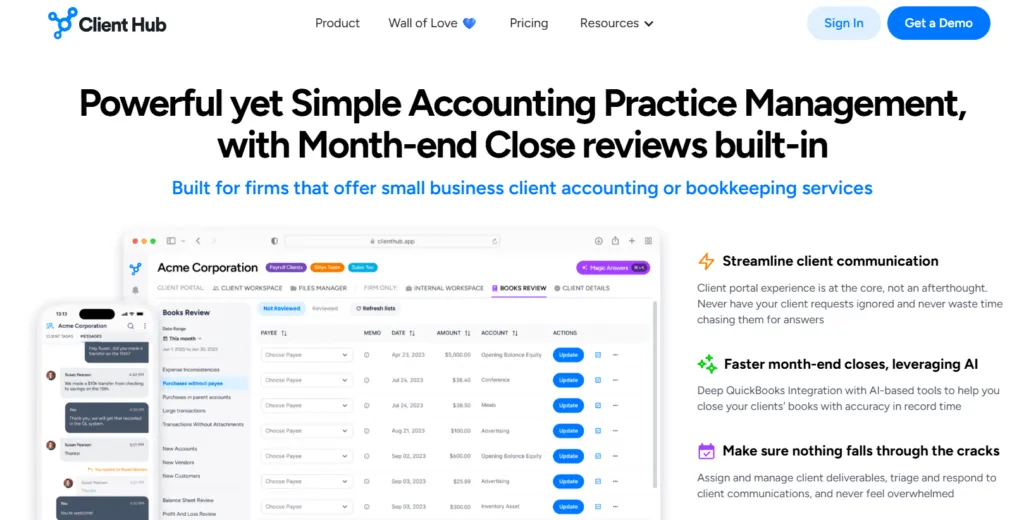
Client Hub is an all-in-one practice management and client portal software, making it a standout Jetpack Workflow alternative that addresses Jetpack Workflow’s most significant gap: the lack of dedicated client collaboration tools. Founded as a client workspace solution, Client Hub was purpose-built to solve the “lost in email” problem that accounting firms face daily. Its key capabilities include:
- Dedicated Client Workspace: Each client gets a branded, secure portal accessible via web or mobile app
- Two-Way Client Task Management: Assign tasks directly to clients with automated reminders until completion
- Uncategorized Transaction Resolution: Specialized QBO/Xero integration surfaces uncategorized transactions as client tasks
- Secure Messaging System: Chat-like, real-time communication within each client workspace
- Client-Facing Mobile App: Dedicated iOS and Android app for clients to respond to requests on the go
- Books Review Tool: AI-powered feature identifying data inconsistencies in QuickBooks Online
Why Choose Client Hub Over Jetpack Workflow for Client Collaboration
Client Hub stands out in several key areas:
- Purpose-Built Client Portal vs. Email-Dependent Communication
A frequently cited weakness of Jetpack is the lack of a dedicated client portal. Client communication happens through email integrations, meaning requests get buried in inboxes and responses scatter across threads.
Client Hub provides each client their own workspace with secure messaging, task lists, and document storage. When you need information, create a “Client Task” that appears in their portal and mobile app with automated reminders, eliminating manual follow-up emails.
- Specialized Uncategorized Transaction Workflow
For bookkeeping firms, Client Hub offers a distinctive QBO/Xero integration: when transactions hit “Uncategorized Expense” or “Ask My Accountant,” the system automatically creates Client Tasks. Clients see transaction details and select the correct category from their own chart of accounts. This specific workflow is beyond Jetpack’s scope entirely.
- Mobile App Designed for Client Engagement
Jetpack’s mobile experience is designed for firm staff managing their work. Client Hub provides a dedicated mobile app built specifically for clients. Clients receive push notifications for pending tasks and complete many requests without opening a laptop. This can increase client response rates compared to email-dependent communication.
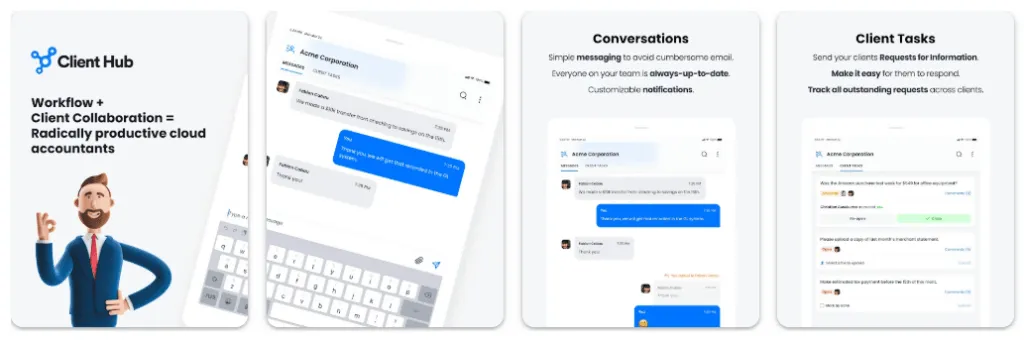
Source: Google Play
- Consolidated Communication History
Client Hub creates a persistent record of all client interactions. Every message, uploaded document, and completed task is stored in context. When you need to reference a conversation from months ago, everything is in one place. Jetpack’s email integration inherits email’s limitation: conversations spread across threads with no unified timeline.
🏅 NOTE: We also evaluated Liscio for pure client communication and TaxDome for comprehensive features. Client Hub offers the most seamless client collaboration experience specifically integrated with ongoing bookkeeping workflows.
Client Hub Pricing
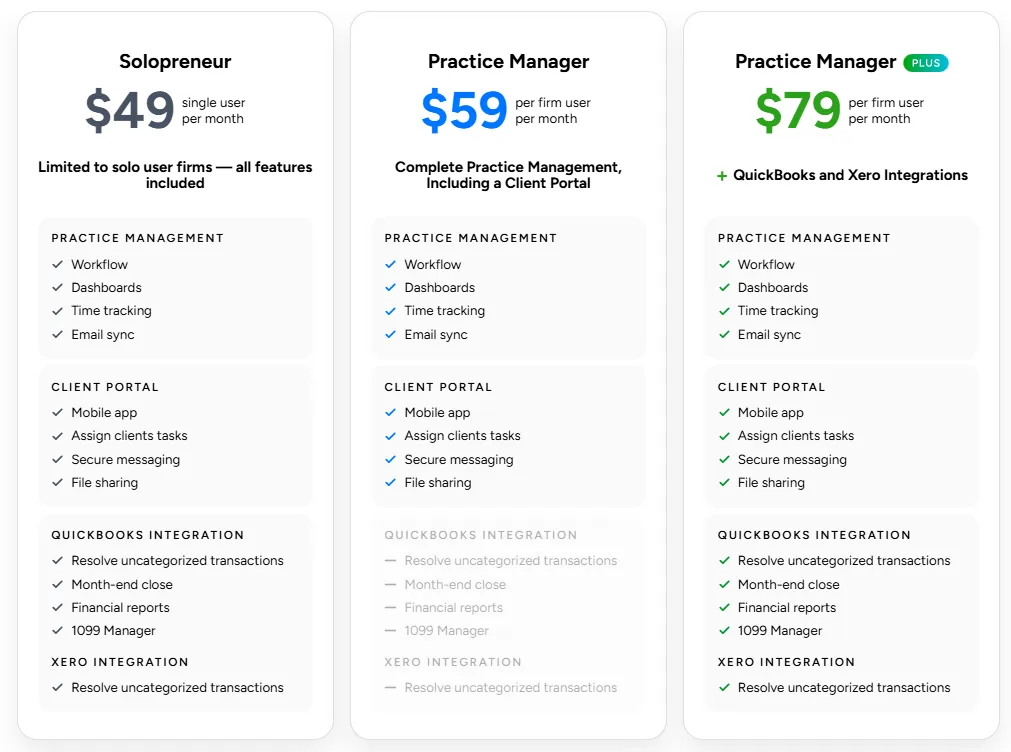
- Solopreneur (Annual Only): $49/month. All features included, unlimited clients and storage.
- Practice Manager: $59/user/month (annual) or $79/month (monthly). Workflow, dashboards, time tracking, email sync, client portal, AI features.
- Practice Manager + QBO/Xero: $79/user/month (annual) or $99/month (monthly). Adds enhanced uncategorized transaction workflow, Books Review tool, W9/1099 Manager.
No per-client charges.
Who Should Use Client Hub?
Choose Client Hub if:
- Your biggest bottleneck is waiting for client responses. If you spend significant time chasing clients via email, Client Hub’s dedicated portal with automated reminders can reduce response times.
- You do monthly bookkeeping for QBO/Xero clients and struggle with uncategorized transactions. The specialized integration that turns uncategorized transactions into client tasks is a workflow Jetpack simply doesn’t offer.
- You want clients to have a modern, mobile-first collaboration experience. The branded portal and dedicated mobile app provide a polished experience that email-based communication cannot match.
Accelerate client responses with Client Hub.
The Final Verdict
While Jetpack Workflow excels as a focused workflow management tool, growing accounting firms often need purpose-built capabilities that extend beyond internal task tracking. The Jetpack Workflow alternatives above each address specific gaps in different ways. Based on our research, here are the best alternatives:
- Uku for fast & flexible deployment with modular scaling, automated billing that reduces invoicing from days to 30 minutes, and BI Reporting that provides actionable business insights
- Karbon for enterprise-grade email management, AI features, and deep business intelligence
- TaxDome for all-in-one practice management with unlimited e-signatures and comprehensive features (requires upfront configuration investment)
- Financial Cents for intuitive workflow management with client collaboration tools for US/Canada-based firms
- Aero Workflow for flat-rate pricing and extensive process documentation
- Cone for budget-friendly practice management starting at $5/user/month
- Client Hub for client collaboration excellence with specialized bookkeeping workflows
Remember, you don’t have to choose between Jetpack Workflow and these Jetpack Workflow alternatives exclusively. Some firms may choose to use Jetpack alongside other tools to create their ideal tech stack. Consider your specific needs, growth plans, and budget when deciding which solution works best for your firm.
Ready to experience practice management that just works?
Join 1,000+ accounting firms who trust Uku for workflow management, automated billing, client collaboration, and business intelligence. Start your free 14-day trial today.

Founder & Visionary at Uku. Building the future of accounting practice management — where AI handles the routine so accountants can focus on what matters.

Ready to upgrade your practice management?
Join 1,000+ accounting firms already using Uku to save time and grow their business.
Related articles

Jetpack Workflow vs TaxDome (vs Uku): Which Practice Management Platform Actually Fits Your Firm in 2026?
7 Double Alternatives: Practice Management Tools for Accounting Firms (2026)

Aero Workflow vs Jetpack Workflow (vs Uku): Which Accounting Workflow Software Actually Fits Your Firm in 2026?