
If your inbox feels like a tax-season filing cabinet that exploded, you’re not alone.
Talk about an influx of PDFs, images, and financial documents every hour, all within your email. The implication is that attachments get buried three replies deep, sensitive PDFs float around without the right protections.
And when the tax filing deadline looms, that quick “Did you see this?” thread quietly turns into a delay that risks you and your client’s operations.
That’s where client portals come in. These platforms serve as the modern front door to a workspace, secure vault, and structured client communication channel for accountants — replacing the ad-hoc nature of email-based workflows with a system that actually fits how accounting work moves. They give your clients a single place to upload documents, sign forms, ask questions, and check their status.
For your firm, portals mean structure, visibility, and a clean trail from request to delivery. No more “where’s this?”
In this article, we’ll look at why emails for client management no longer meet the mark and how to use a client portal to fill in the chaotic gap instead.
The Limitations of Email for Accounting Firms
Email was built for letters, not ledgers. That is why it struggles with the complexity of accounting work.
Security gaps hit first
Email wasn’t designed for sharing tax returns, financial statements, and bank details. Even when you use TLS, messages can be forwarded, misdirected, or phished.
According to Statista, more than 38 million phishing attacks occurred in 2024, and email is a leading channel for cyberattackers. Inboxes remain a primary attack surface for sensitive data exposure.
Disorganization is baked into the design
Consider a growing SaaS startup that has recently crossed 50 employees. In a single month they may process payroll for multiple departments, receive vendor invoices from a dozen software subscriptions, issue customer contracts with varying billing cycles, and handle expense reports from a remote team spread across three countries. Each of these touchpoints generates its own document trail — agreements, receipts, amended invoices, bank confirmations — and all of it lands in your inbox as a tangle of threads with no clear home.
If those files arrive as scattered attachments, complexity compounds fast. One contract gets buried under a week of replies. A revised invoice arrives without referencing the original. A payroll query sits unanswered because it landed in a thread nobody was watching. For one client, it’s manageable, just barely. For ten clients like this simultaneously, the gap becomes impossible to paper over. According to McKinsey, email triage already accounts for about 28% of an average worker’s office time.

Avoidable errors, compliance, and audit
The human side shows up, too. Every email your employees miss becomes a missed opportunity. Clients repeat themselves, which frustrates them. Your teams also experience stress, which affects service quality.
If your firm falls under the FTC Safeguards Rule for handling customer financial data or follows IRS guidance for safeguarding taxpayer information, email-based workflows are tough to govern.
And there’s real money at stake. IBM’s 2024 Cost of a Data Breach report pegged the global average breach cost at $4.4 million, with regulated data and complex environments driving costs higher.

What is a Client Portal?
A client portal is a secure, branded online workspace where your firm and your clients work together.
Most portals also handle task and workflow tracking across engagements, intake forms, and KYC checklists, version history and document retention policies, mobile access and notifications, integrations with tax and practice management tools, plus analytics for workload and client activity.
For accounting practices, this usually includes:
- Secure document sharing with clear request lists and due dates
- Real-time messaging that lives with the related job or document
- E-signatures and approvals with audit trails
- Role-based access controls with MFA
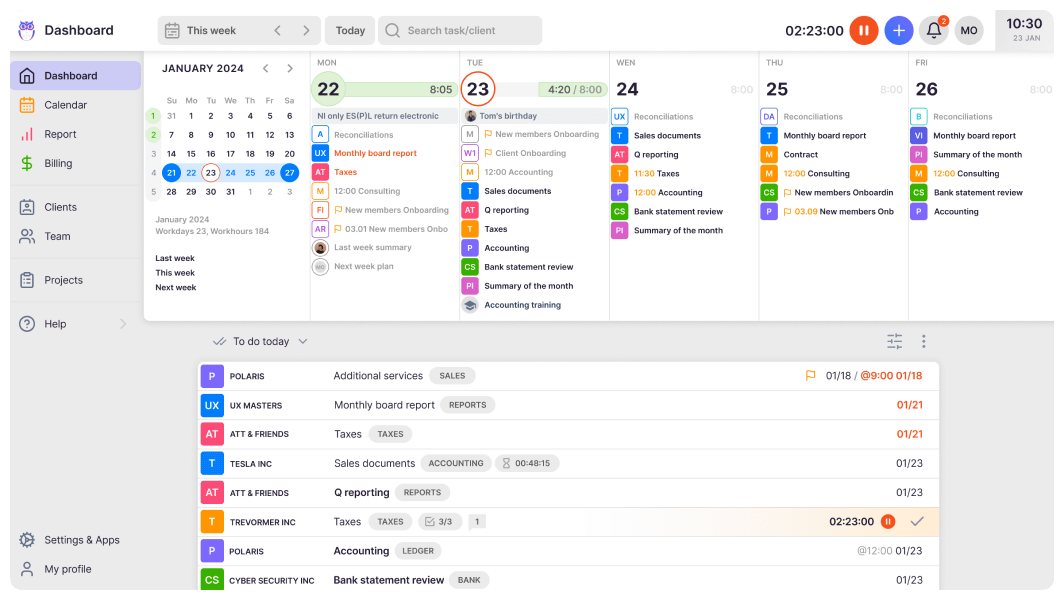
Examples of client portals used by accounting firms today include Uku, a full accounting practice management platform that centralizes client information, communication, tasks, and billing on a single dashboard.

Benefits of Client Portals for Accounting Firms
Client portals enable capabilities not possible with email:
Replaces document chasing with clear accountability
Every accountant knows the pattern with email documentation.
You send a request list, but your client replies to only two items. A week later, you follow up. They forward an old thread with a new attachment. Someone downloads the wrong version. Time disappears in small fragments.
A client portal for accounting firms brings those fragments back under control. All your requests are in one place, and clients can see what is outstanding, with polite notifications that nudge them to keep things up to date.
This ensures your team focuses on reviewing data and giving advice rather than looking for unsubmitted files. That shift alone improves billable efficiency and reduces quiet write-offs.
Cleans up client communication for accountants
Messy email threads do more than irritate. They create risks that can affect you and your clients. It becomes harder to prove who sent what and when. Questions that should take seconds to answer end up as searches through inbox folders.
The strain becomes obvious with high-volume clients. For instance, a customized apparel brand managing bulk orders for schools, teams, and events may generate a separate contract, invoice, deposit, and payroll entry for every order. During peak seasons, dozens of these transactions can hit your inbox within days, each living in a different thread.
An accounting client portal avoids this by keeping communication tied to the relevant engagement. Files, comments, and approvals live together. There is less second-guessing and fewer duplicate efforts.
Your team also spends less time switching between the inbox, document management system, and chat. Fewer context switches mean fewer errors and more focused billable work.
Strengthens security without slowing clients down
Clients trust you with payroll data, tax returns, financial statements, and personal identifiers. Sending those through regular email feels increasingly outdated. Larger clients may even ask about security frameworks such as SOC 2 or ISO 27001 during vendor reviews — and your portal is the most direct way to demonstrate that your document handling meets that standard.
A structured accounting client portal centralizes secure file exchange with controlled access and activity logs. Security becomes part of the normal workflow rather than a separate hurdle, and this balance protects the firm and reassures clients.
Improves the realization rate in practical terms
Realization rate declines when administrative effort increases. Ten minutes here chasing a document, and fifteen minutes spent on clarifying which attachment is correct. Those minutes rarely appear on invoices and are not billable.
A client portal for accounting firms reduces that hidden drag. Standard request templates save setup time. Built-in reminders reduce manual follow-ups. Clear visibility shortens turnaround.
Once your team starts spending less time coordinating and more time reviewing and advising, more of your effort becomes billable. Over a year, that difference can equal the output of an additional staff member without hiring one.
Expands client capacity without immediate headcount growth
Growth often feels heavy before it feels rewarding. Adding clients multiplies coordination, and without structure, each new engagement increases your email volume and deadline pressure.
An accounting client portal solves these restraints easily and allows your business to scale by creating workflows that route information to the right people. Managers can see outstanding items across engagements. Partners gain clearer oversight without asking for status updates.
If your firm is juggling 10 to 50 professionals, or more at once, that visibility creates breathing room. You can take on more work with confidence.
Meets modern expectations for digital service
Clients compare experiences across industries. They log in to banking platforms, legal portals, and payroll systems that offer structured self-service. According to Zendesk, well-designed self-service will increase 5x with AI, boosting satisfaction while reducing support demand.

Clients today arrive with high expectations because they are already accustomed to structured digital access elsewhere. They log into their bank and see every transaction, every statement, every signed document in one place. They use their payroll platform’s self-service portal to download pay stubs without emailing HR. They renew their legal agreements through a platform that holds every version on record. When those same clients then receive a PDF attached to a casual email from their accounting firm, the contrast is noticeable.
A client portal for accounting firms closes that gap in perception. When a client can log in, see their outstanding documents, check the status of a pending return, and pull a prior-year report without sending a single email, it communicates something beyond convenience. It signals that your firm takes data seriously, runs structured processes, and operates at the same level of professionalism your clients expect from every other service provider they work with. That signal matters most during high-pressure periods — tax season, an audit, a due-diligence process — when clients are already anxious and trust is tested.
6 Best Practices to Implement a Client Portal
Client portals are a must-have if you want to scale your accounting firm in 2026. Here’s how to make the most of them.
- Assess your needs and choose the right portal
A portal should solve specific operational problems, not simply add another login for clients and your staff. Start by defining what you actually need. Then run through this checklist:
- Identify essential capabilities of your preferred tools, such as secure messaging, electronic signatures, request lists, identity verification, mobile access, integration with contract management systems, and audit trails
- Map where documents currently live and how they move across engagements
- Evaluate vendors on multi-factor authentication, encryption standards, certifications, data location, uptime, and support responsiveness
- Run a pilot with a small group of clients across different service lines
- Gather structured feedback before full rollout
Uku’s client portal platform meets all these needs and ensures you can serve your clients right where they are.
- Train staff and clients to use the portal effectively
Even the best portal will stall at the adoption stage if your team and clients quietly revert to email out of habit. The portal solves a technical problem, but adoption is a people problem. It requires clear expectations, early exposure, and consistent reinforcement — not a one-off announcement.
Start internally. Your staff need to be comfortable with the portal before they can guide clients through it. Build a short internal playbook that covers naming conventions for uploaded files, expected response timelines within the portal, and a clear rule for when the portal replaces email versus when a quick message is still appropriate. Designate one or two internal champions per team — people who understand the system well enough to answer questions and demonstrate correct usage when colleagues hesitate.
For clients, the bar should be low friction and high clarity. A two-minute screen recording showing how to upload a document or respond to a request list goes further than a written guide. Introduce the portal at the start of every new engagement, not mid-project, so it becomes the established channel from day one rather than a change imposed on an existing routine.
Here’s a practical checklist for the rollout:
- Develop an internal playbook covering naming conventions, response timelines, and when to use the portal instead of email
- Create simple client guides and short screen recordings that demonstrate common tasks
- Introduce the portal early in new engagements as the standard channel for sensitive information
- Designate internal champions who can answer questions and model correct usage
Also, offer scheduled question-and-answer sessions in the early stages.
- Integrate the portal into daily operations
A portal becomes valuable when it is embedded into your routine workflows rather than treated as an optional add-on. You need to standardize and integrate with other systems to reduce manual work and ensure information flows smoothly between tools.
Follow these steps to do that:
- Standardize request lists by service line, such as tax, audit, client accounting services, and payroll
- Connect the portal with document management, general ledger, and electronic signature tools, where possible
- Build reusable templates for common requests and communications
- Automate reminders to reduce manual follow-ups
In addition, track adoption rates and engagement cycle times to identify areas for improvement.
- Prepare for resistance and manage change
Change often challenges established habits. Some of your clients and team members may initially prefer email or shared drives. You need to address this directly and consistently to reinforce the new standard and prevent process drift.
- Communicate clearly that the portal is the default channel for sensitive information
- Explain the security and efficiency benefits in practical terms
- Provide support during the transition period
Gradually retire older email-based workflows to avoid creating parallel systems.
- Define success metrics before rollout
Clear targets help determine whether the portal is improving efficiency, strengthening compliance, or reducing communication friction. Without these metrics, progress is difficult to evaluate and optimize.
Here’s how to measure these metrics and use them to refine your portal integration going forward:
- Track the time required to collect source documents
- Measure the on-time completion of electronic signatures
- Monitor the reduction in internal and external email volume
Lastly, review engagement turnaround times before and after implementation.
- Expand gradually and refine continuously
Instead of replacing all your traditional email methods, gradually expand to allow adjustment after each wave and reinforce consistent usage standards. Then implement continuous review to ensure the portal evolves alongside your firm’s needs.
More things you can do are:
- Review metrics at 30 and 90-day intervals
- Adjust templates, automations, and communication guidance as needed
- Invite additional client groups in planned waves or segments
- Decommission legacy processes once adoption is stable
Conclusion
Email won’t disappear. It’s still handy for quick notes and introductions. But for real work, like collecting documents, securing sensitive data, obtaining signatures, and maintaining a clean record, client portals handle it more efficiently.
Before adoption, identify the needs you want to solve and use them to vet the right tool. Gradually onboard and train your staff and clients on usage, prepare for resistance and drawbacks ahead, and define success metrics for measurability.
Curious where to begin? Explore Uku’s client portal to see how a modern portal can fit your stack and your clients — or check Uku’s pricing to find the right plan for your firm’s size.
If you’d like to see the portal in action before committing, book a short demo and we’ll walk you through the workflows that matter most to your team.